Model: GGJ-801
Overview
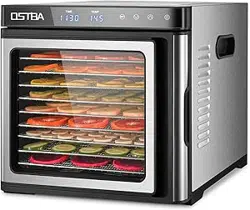
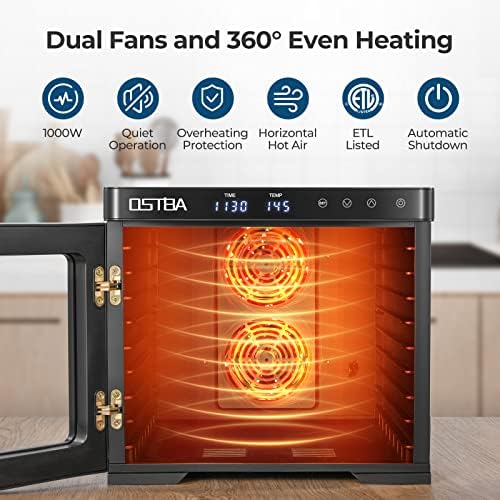
The OSTBA Food Dehydrator Machine (Model GGJ-801) is a 1000W electric food dryer designed for drying meat, herbs, vegetables, fruits, and making fruit roll-ups. It features 9 stainless steel trays, a digital temperature and timer control, dual rear fans for 360° hot air circulation, and overheat protection.

Features
Precise Temperature and Timer Control
- Temperature range: 95°F – 165°F, adjustable in 5°F increments.
- Timer range: 30 minutes – 48 hours, adjustable in 30-minute increments.
- Digital display for easy monitoring.

1000W Power and Dual Rear Fan System
- 1000W rated power for efficient drying.
- Dual rear fans with 360° hot air circulation for even heat distribution.
- No need to rotate trays during operation.
- Transparent door for easy progress monitoring.

Large Capacity with 9 Stainless Steel Trays
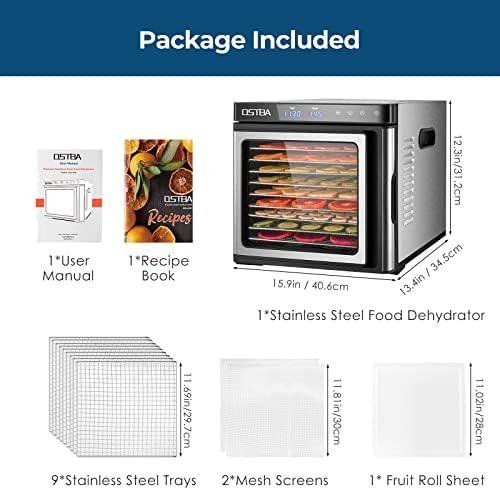
- 9 adjustable stainless steel trays, each 11.69" x 11.69".
- Includes 1 fruit roll-up sheet (also usable as a drip tray).
- Includes 2 mesh screens for smaller items.
- Trays can be removed to increase layer height for thicker slices.
Easy to Clean and Safe
- Food-grade BPA-free stainless steel trays.
- Trays are dishwasher safe.
- Stainless steel body can be wiped clean with a damp cloth.
- Automatic shut-off when timer ends.
- Overheat protection for added safety.

Quiet Operation
- Noise level below 48 decibels.
- Suitable for overnight use without disturbance.
Package Contents
- 1 OSTBA Food Dehydrator Machine
- 9 Stainless Steel Trays
- 2 Mesh Screens
- 1 Fruit Roll-Up Sheet
- 1 User Manual
- 1 Recipe Book
Use Guide
Before First Use
- Remove all packaging materials.
- Wash the stainless steel trays, mesh screens, and fruit roll-up sheet in warm soapy water or place them in the dishwasher.
- Wipe the exterior of the dehydrator with a damp cloth.
- Place the dehydrator on a stable, heat-resistant surface with adequate ventilation.
Operating Instructions
- Prepare your food (wash, slice, and arrange on trays).
- Insert the trays into the dehydrator. For thicker items, you may remove one or more trays to increase vertical space.
- Close the transparent door securely.
- Plug the dehydrator into a 120V AC outlet.
- Press the Start button to turn on the unit.
- Set the desired temperature using the temperature control buttons (range: 95°F – 165°F, in 5°F increments).
- Set the desired drying time using the timer control buttons (range: 30 minutes – 48 hours, in 30-minute increments).
- The dehydrator will begin operation. The digital display will show the current temperature and remaining time.
- When the timer ends, the dehydrator will automatically shut off.
- Unplug the unit and allow it to cool before cleaning.
Drying Tips
- For even drying, ensure food pieces are of uniform thickness.
- Do not overlap food items on the trays.
- Use the mesh screens for small items like herbs or spices.
- Use the fruit roll-up sheet for making fruit leathers or as a drip tray.
- Refer to the included recipe book for recommended temperatures and times for different foods.
Cleaning and Maintenance
- Always unplug the dehydrator and allow it to cool completely before cleaning.
- Stainless steel trays, mesh screens, and fruit roll-up sheet are dishwasher safe.
- Wipe the interior and exterior of the dehydrator with a damp cloth. Do not immerse the unit in water.
- Dry all parts thoroughly before reassembling.
Specifications
| Brand | OSTBA |
|---|---|
| Model | GGJ-801 |
| Wattage | 1000 watts |
| Voltage | 120 Volts |
| Frequency | 60 Hz |
| Number of Trays | 9 |
| Tray Dimensions | 11.69" x 11.69" each |
| Temperature Range | 95°F – 165°F |
| Timer Range | 30 minutes – 48 hours |
| Material | Stainless Steel (trays), Stainless Steel (body) |
| Colour | Silver |
| Product Dimensions (D x W x H) | 40.4 x 34.5 x 31.2 cm |
| Weight | Not specified |
| Noise Level | < 48 dB |
| Safety Features | Overheat protection, auto shut-off |
Safety Information
- Read all instructions before use.
- Do not immerse the dehydrator body in water or any liquid.
- Place the unit on a stable, heat-resistant surface away from water sources.
- Do not block the rear fan vents.
- Unplug when not in use and before cleaning.
- Do not use the appliance if the power cord or plug is damaged.
- Supervise children when the appliance is in use.
- The overheat protection feature will automatically shut off the unit if internal temperatures exceed safe levels. If this occurs, unplug the unit and allow it to cool before investigating the cause.
Video Guide
The following video demonstrates the product in use, setup, and unpacking.
Video: The video showcases the product in use, guides you through product setup, compares multiple products, and shows the product being unpacked.