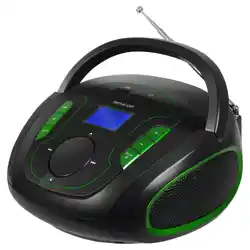
Model: JEU-BT1622
1. Overview

The JEUJUG Portable Radio is a compact audio device that receives AM and FM radio broadcasts and can connect to Bluetooth-enabled devices for audio streaming. It is designed for portability with multiple power options.
Key Characteristics:
- Dimensions: 7.87" L x 5.11" W x 6.25" H
- Weight: 1.45 lbs (without additional batteries)
- Speaker Output: 5 Watts
- Color Options: BLACK, RETRO, RETRO-LCD
2. Features and Components

2.1 Audio Features
- AM/FM Tuner: Receives standard AM (520-1710 KHz) and FM (87-108 MHz) bands.
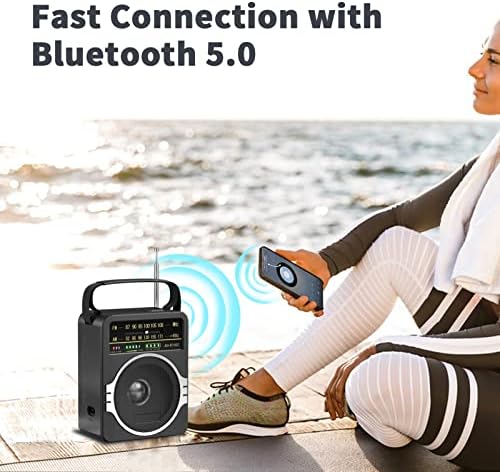
- Bluetooth 5.0: For wireless audio streaming from smartphones, tablets, or computers. The radio automatically reconnects to the last paired device.
- 5W Speaker: Provides clear sound output suitable for personal or small room listening.
2.2 Power & Battery
- Built-in Rechargeable Battery: A 3.7V/1800mAh lithium polymer battery provides over 10 hours of playback.
- DC Battery Backup: A compartment for 4 D-cell batteries (6V) for emergency or extended outdoor use.
- AC Power: Can be powered and the internal battery recharged using the included 120V AC power cord.
2.3 Reception & Portability
- Telescopic Antenna: An 18-inch antenna extends for improved FM reception.
- Built-in AM Antenna: An enhanced magnetic rod antenna for AM reception.
- Carrying Handle: Integrated handle for easy transport.
- Large Tuning Dial: Designed for ease of use.
3. What's in the Box
- JEU-BT1622 Radio unit
- AC 120V Power Cord
- Instruction Manual
- Antenna (attached)
- Battery (pre-installed, rechargeable)
4. Use Guide
4.1 Powering the Radio
Choose one of the following power methods:
- AC Power (Primary/Charging): Plug the included power cord into the radio's DC input port and a standard 120V wall outlet. This will power the radio and charge the internal battery.
- Internal Rechargeable Battery: Use the radio cordlessly after it has been charged via AC power.
- DC Battery Backup: Open the battery compartment on the back and insert 4 D-cell batteries (not included). Ensure correct polarity (+/-).
4.2 Listening to AM/FM Radio
- Extend the telescopic antenna fully for best FM reception. For AM, positioning the entire radio may improve reception.
- Turn the Power/Volume Knob clockwise to turn the radio on and adjust the volume.
- Turn the Tuning Knob to browse through stations on the frequency dial.
- For finer tuning, adjust slowly until the clearest signal is found.
4.3 Using Bluetooth Mode
- Ensure the radio is powered on.
- Press the Mode or Function button (inferred from standard operation) to switch to Bluetooth mode. An indicator light may change or a tone may sound.
- On your smartphone or other Bluetooth device, enable Bluetooth and search for available devices.
- Select "JEU-BT1622" from the list of discovered devices to pair.
- Once paired, audio from your device will play through the radio's speaker. Use your device's volume controls and the radio's volume knob to adjust sound level.
4.4 Charging the Internal Battery
Connect the radio to AC power using the supplied cord. The internal battery will charge while the radio is either on or off. A full charge provides over 10 hours of use.
5. Technical Specifications
- Frequency Range: FM 87-108 MHz, AM 520-1710 KHz
- Bluetooth Version: 5.0
- Bluetooth Name: JEU-BT1622
- Power Sources:
- AC 120V / 60Hz (via power cord)
- Internal: 3.7V / 1800mAh Lithium Polymer Battery (included)
- External: DC 6V (4 x 1.5V D-Cell Batteries, not included)
- Output Power: 5 Watts
- Display: Analog dial (Classic models); LCD screen (RETRO-LCD model)
- Enclosure Material: Plastic
- Voltage Compatibility: 120 Volts (AC). A converter may be needed for use outside the United States.
6. Troubleshooting
No Power
- Ensure the power/volume knob is turned clockwise to the "ON" position.
- If using AC power, check that the cord is firmly connected to the radio and the wall outlet.
- If using the internal battery, ensure it is charged by connecting to AC power.
- If using D-cell batteries, check that they are correctly inserted and not depleted.
Poor Radio Reception
- Fully extend the telescopic antenna for FM listening.
- Move the radio to a different location, away from large metal objects or electronics that may cause interference.
- For AM, try rotating the entire radio to find the best signal direction.
Bluetooth Connection Issues
- Ensure the radio is in Bluetooth mode.
- On your audio device, ensure Bluetooth is enabled and that "JEU-BT1622" is not already connected to another device.
- Move your Bluetooth device closer to the radio (within 33 feet / 10 meters).
- Delete "JEU-BT1622" from your device's Bluetooth paired devices list and attempt pairing again.