Overview
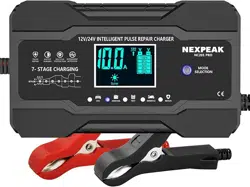
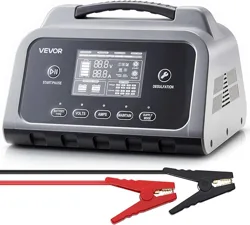
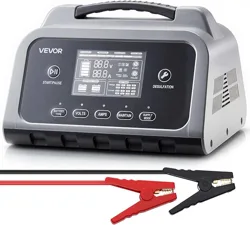
The NEXPEAK 10-Amp Car Battery Charger is a smart, fully automatic charger and maintainer designed for 12V and 24V lead-acid batteries. It features a 7-stage charging process, temperature compensation, and a pulse repair function.

Features & Specifications
Key Features
- 10-Amp Quick Charging: 12V 10-Amp and 24V 5-Amp output for faster charging than lower-amperage chargers.
- 7-Stage Smart Charging: Fully automatic charging cycle for optimal battery health.
- Universal Compatibility: Charges and maintains 12V and 24V lead-acid batteries, including AGM, GEL, SLA, and Flooded types.
- Pulse Repair Function: Helps restore battery performance by reducing sulfation.
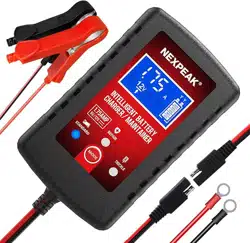
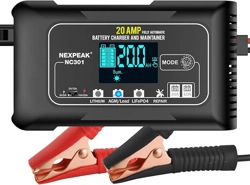
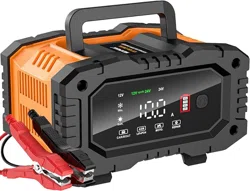
- Large LCD Display: Shows charging status, voltage, current, temperature, and charge percentage.
- Trickle Charge/Maintainer Mode: Maintains battery charge over extended periods of inactivity.
- Temperature Compensation: Adjusts charging parameters based on ambient temperature.
- Multiple Protections: Includes protection against reverse polarity, overcurrent, overcharge, short circuits, and uses fireproof materials.
- Built-in Cooling Fan: Ensures the unit stays cool during prolonged use.
Technical Specifications
- AC Input: 100-240V, 50/60Hz
- DC Output: 12V/10A, 24V/5A (Auto-detecting)
- Max Input Power: 130W
- Product Dimensions: 3.8"D x 7.6"W x 1.3"H
- Item Weight: 1.3 Pounds
- Cooling: Fan
- Compliance: UL Listed

Package Contents
- 1 x NEXPEAK 10-Amp Car Battery Charger
- 1 x User Manual
Use Guide
Safety Instructions
WARNING:
- Read all instructions before use.
- This charger is for lead-acid batteries only. Do not use with lithium-ion batteries.
- Ensure the area is well-ventilated during charging.
- Connect and disconnect clamps in the correct order to avoid sparks.
- Do not charge a frozen battery.
- Keep away from children.
Charger Controls & Display
The charger features a large LCD screen that displays real-time information:
- Charge Status: Indicates the current charging stage (e.g., bulk, absorption, float).
- Voltage & Current: Shows output voltage (V) and current (A).
- Battery Percentage: Displays estimated charge level.
- Temperature: Shows internal temperature.
- Mode Indicators: Shows active mode (e.g., STD, AGM, WET, MOTORCYCLE).
Connection Procedure
- Prepare the Battery: Turn off the vehicle and all electrical loads. If possible, disconnect the battery from the vehicle, starting with the negative (-) terminal.
- Clean Battery Terminals: Ensure terminals are clean and free of corrosion.
- Connect the Charger Clamps:
- Connect the RED clamp to the POSITIVE (+) battery terminal.
- Connect the BLACK clamp to the NEGATIVE (-) battery terminal or a clean, unpainted metal part of the chassis (ground).
- Select Charging Mode: Press the mode button to select the appropriate setting for your battery type:
- STD/AGM: For standard or AGM batteries.
- GEL: For gel cell batteries.
- WET: For flooded lead-acid batteries.
- MOTORCYCLE: For smaller batteries and for entering trickle/maintenance mode.
- Plug into AC Outlet: Plug the charger's power cord into a standard 100-240V AC wall outlet. The charger will automatically begin its diagnostic and charging cycle.
Using Trickle Charge / Maintainer Mode
To maintain a battery over long periods (e.g., winter storage):
- First, fully charge the battery using the appropriate mode (STD, AGM, etc.) until the display shows "FUL".
- Switch the mode to "MOTORCYCLE". The charger will automatically enter a float/trickle charge mode, providing a low current to maintain the battery's full charge.
Pulse Repair Function
The charger automatically detects sulfation during the charging process and applies a pulse repair function. For best results, allow the charger to complete a full cycle on a depleted battery.
NOTE: This charger cannot activate or charge a completely dead (zero voltage) battery.
Troubleshooting
- Charger does not turn on: Check AC power connection. Ensure clamps are firmly connected to correct battery terminals.
- Display shows an error or no reading: Verify battery voltage is above 3V. Check for poor clamp connections or corroded terminals.
- Charger stops prematurely or fan runs loudly: This may be normal due to temperature protection. Ensure the charger is in a well-ventilated area.
- Battery does not hold charge after using repair function: The battery may be damaged beyond recovery and require replacement.
Warranty and Support
This product is backed by a 2-year limited warranty. A new replacement is available for any quality issue within this period.
Manufacturer: NEXPEAK