1. Product Overview
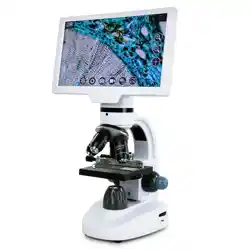
The BEBANG 100X-2000X is a monocular biological microscope designed for educational and hobbyist use. It is suitable for students, beginners, and amateur scientists to explore microscopy, biology, and life sciences.

The microscope features a 45° inclined, 360° rotatable monocular head, a dual LED illumination system, and offers six levels of magnification from 100X to 2000X.
2. Specifications
| Eyepiece | WF25X with built-in 2X lens |
|---|
| Objective Lenses | Achromatic 4X, 10X, 40X |
|---|
| Magnification Range | 100X, 200X, 250X, 500X, 1000X, 2000X |
|---|
| Illumination | Top and bottom LED lights |
|---|
| Focusing System | Coarse and fine focus knobs |
|---|
| Diaphragm | Five-color disc diaphragm |
|---|
| Head | 45° inclined, 360° swiveling |
|---|
| Power Supply | 100-240V AC adapter or 3x AA batteries (batteries not included) |
|---|
| Product Dimensions | 16L x 18W x 37H centimetres |
|---|
| Item Weight | 2.43 Pounds |
|---|
| Material | Aluminium |
|---|
| Colour | White |
|---|
3. Features and Components
3.1 Optical System
The microscope provides six magnification settings by combining the WF25X eyepiece, the built-in 2X lens, and the three objective lenses (4X, 10X, 40X).
- 100X: 25X eyepiece x 4X objective
- 250X: 25X eyepiece x 10X objective
- 1000X: 25X eyepiece x 40X objective
- 200X: 25X eyepiece x 2X lens x 4X objective
- 500X: 25X eyepiece x 2X lens x 10X objective
- 2000X: 25X eyepiece x 2X lens x 40X objective

3.2 Dual LED Illumination
The microscope has separate top and bottom LED lights. Each has its own power switch and brightness adjustment knob to control light intensity for different specimens.

3.3 Focusing Mechanism
The coaxial coarse and fine focus knobs are located on both sides of the microscope arm. The fine focus knob allows for precise adjustments to achieve a sharp image.
3.4 Five-Color Disc Diaphragm
A rotating disc beneath the stage contains five colored filters. Rotating the disc changes the background color to improve contrast and clarity for different specimens.

3.5 Stage and Clips
The rectangular stage has spring-loaded clips to hold microscope slides securely in place.
4. Package Contents
- 1x Microscope
- 1x Microscope Slides Set (15 pieces)
- 1x Operation Accessories Set (10 pieces)
- 1x Wire Shutter
- 1x Phone Adapter
- 1x Power Adapter (100-240V)
- 1x Operation Manual
- 1x Carrying Bag
5. Setup and Installation
- Place the microscope on a stable, flat surface.
- Insert the WF25X eyepiece into the monocular head if not already installed.
- Ensure the 4X objective lens is clicked into position facing the stage.
- Connect the power adapter to the microscope and a wall outlet, or insert 3 AA batteries into the compartment.
- Turn on the desired illumination (top, bottom, or both) using the separate switches and adjust brightness with the knobs.
6. Basic Operation Guide
- Prepare a Slide: Place your specimen on a glass slide and secure it with the stage clips.
- Initial Setup: Rotate the nosepiece to set the 4X objective lens in place. Ensure the disc diaphragm is set to a clear or suitable colored aperture.
- Rough Focus: Look through the eyepiece and turn the coarse focus knob to raise the stage until the specimen comes into a general view.
- Fine Focus: Use the fine focus knob to sharpen the image.
- Center the Specimen: Use the mechanical stage (if applicable) or gently move the slide to center the area of interest.
- Increase Magnification: To view at a higher power, first center your specimen under 4X. Then, rotate the nosepiece to the 10X objective. Use the fine focus knob to re-sharpen the image. Repeat for the 40X objective. Note: Use only the fine focus knob with the 40X objective to avoid damaging the slide or lens.
- Using the 2X Lens: For the highest magnifications (200X, 500X, 2000X), ensure the built-in 2X lens in the tube is engaged as per the manual's instructions.
- Adjust Lighting: Use the brightness knobs and the disc diaphragm to optimize contrast and clarity for your specimen.
7. Using the Phone Adapter
The included phone adapter allows you to attach a smartphone to the eyepiece to capture images and video.
- Attach the adapter bracket to your smartphone, ensuring the camera lens is centered in the opening.
- Position the microscope's eyepiece into the adapter's holder and tighten the securing mechanism.
- Open your phone's camera app. You may need to adjust the phone's position slightly to align the camera with the eyepiece and eliminate vignetting (dark edges).
- Use the microscope's focus knobs to achieve a clear image on your phone screen before capturing.
8. Care and Maintenance
- Always turn off the LED lights and disconnect power when not in use.
- Use only a soft, lint-free cloth to clean the lenses. For stubborn dirt, use lens cleaning paper moistened with a small amount of lens cleaner.
- Do not touch the glass surfaces of the lenses with your fingers.
- Store the microscope in the provided carrying bag in a dry, dust-free place.
- When changing objective lenses, grip the lens by its housing, not the glass element.
- Do not force any knobs or moving parts.
9. Troubleshooting
| Problem | Possible Cause | Solution |
|---|
| No light from LEDs | Power not connected, batteries dead, or switch off. | Check power connection, replace batteries, ensure switches are on. |
| Blurry image | Incorrect focus, dirty lens, or slide upside down. | Use fine focus knob, clean lenses, ensure slide is placed with cover slip facing up. |
| Image is dark | Insufficient light or diaphragm closed. | Increase LED brightness and open the disc diaphragm aperture. |
| Can't focus at high magnification | Specimen not centered under lower power first. | Start with 4X objective to center and focus, then move to higher magnifications. |
| Phone camera shows dark circle | Phone camera not aligned with eyepiece. | Adjust the phone's position in the adapter until the full field of view is visible. |
10. Safety Information
- This is an optical instrument. Avoid pointing the eyepiece directly at bright light sources, including the sun.
- Intended for indoor use only.
- Keep the power adapter and microscope away from water or other liquids.
- The microscope is not a toy. Supervision is recommended for young users.
- Use only the provided 100-240V AC adapter.