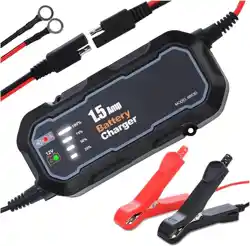
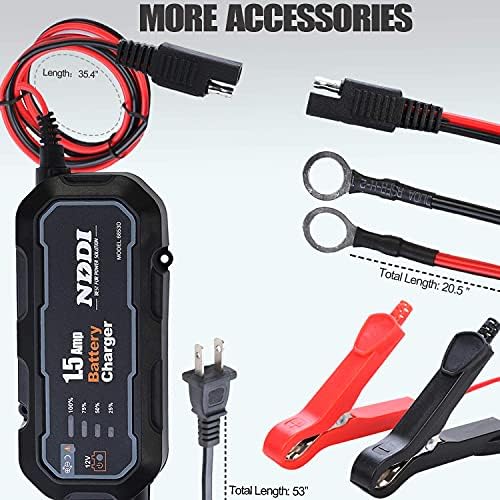
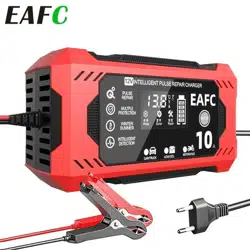
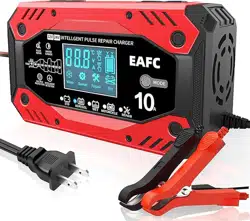
The EAFC 1.5A Fully-Automatic Smart Charger is a portable 12V automotive battery charger, maintainer, trickle charger, and desulfator with temperature compensation. It is designed for all types of 12-volt lead-acid batteries, including Wet, Gel, and AGM. The charger uses a microprocessor-controlled program to monitor the charging process and automatically adjust output.
Battery maintainer / trickle charge mode for long-term storage
Desulfation function to prevent battery stratification and sulfation
Temperature compensation for safe charging in varying conditions
Multi-protection: reverse polarity, over-temperature, overcharge, short circuit, low/high voltage
Compatible applications: automobiles, marine, boats, campers, trolling motors, watercraft, riding lawnmowers, lawn tractors, snowmobiles, and more.
Package Contents
1 x Battery charger (12V 1.5A)
1 x Clip connectors cable
1 x Instruction Manual
Specifications
Brand
EAFC
Model
12V 1.5A
Output Voltage
12 Volts
Input Voltage
12 Volts
Current Rating
1.5 Amps
Output Parameter
2V (minimum operating voltage: 2.5V)
Product Dimensions (D x W x H)
1.58" x 2.64" x 5.9"
Color
Black, Red
Specification Met
CE, FCC, UL
Mfr Part Number
6853
UPC
793611480407
Features
4-Stage Automatic Charging
The charger constantly monitors the battery level and automatically adjusts the converter output voltage based on the battery’s charge status. The LED indicator displays the charging status at four levels: 25%, 50%, 75%, and 100%. When the battery is fully charged, the charger stops automatically.
Battery Maintainer / Trickle Charge Mode
After full charge, the unit automatically switches to maintenance mode with a constant pulse current. This keeps the battery at an optimal level and is ideal for long-term storage, preventing battery stratification and sulfation.
Desulfation Function
The charger includes a desulfation feature that helps break down sulfate crystals on battery plates, extending battery life and restoring capacity.
Temperature Compensation
Built-in temperature compensation adjusts the charging voltage based on ambient temperature, ensuring safe and efficient charging in hot or cold conditions.
Multi-Protection Safety
Smart circuits provide multiple layers of protection:
Reverse polarity protection
Over-temperature protection
Overcharge protection
Short circuit protection
Low and high voltage protection
Easy Plug-and-Use Operation
No manual settings required. Simply connect the clips to the battery, plug the charger into a standard AC outlet, and the microprocessor automatically manages the entire charging cycle.
Indicators and Controls
Element
Description
LED 25%
Lights when battery charge is at 0–25% (charging in progress)
LED 50%
Lights when battery charge reaches 25–50%
LED 75%
Lights when battery charge reaches 50–75%
LED 100%
Lights when battery is fully charged; charger enters maintenance mode
Fault / Connection LED
Indicates reverse polarity, faulty connection, or other error (refer to manual for blink patterns)
Power / Charging LED
Steady on when AC power is connected; may blink during desulfation or fault
Note: The charger has no physical buttons or switches. All operations are fully automatic.
Use Guide
Before You Start
Ensure the battery is 12V lead-acid type (Wet, Gel, AGM). Do not use with lithium batteries unless specified.
Place the charger on a stable, dry surface away from moisture and flammable materials.
Inspect the clip connectors cable for damage before each use.
Step-by-Step Charging
Connect the clips to the battery: Attach the red clip to the positive (+) terminal and the black clip to the negative (-) terminal. Ensure a secure connection.
Plug in the charger: Connect the charger to a standard 12V AC power outlet. The LED indicators will light up to show the current charge level.
Monitor the charging process: The LEDs will progress from 25% → 50% → 75% → 100% as the battery charges. The charger automatically stops when full charge is reached.
Maintenance mode: After reaching 100%, the charger enters maintenance mode (pulse current) to keep the battery topped off. You can leave it connected indefinitely.
Disconnect: Unplug the charger from the AC outlet first, then remove the clips from the battery terminals (black first, then red).
Using as a Battery Maintainer
For long-term storage (e.g., seasonal vehicles), leave the charger connected to the battery. The unit will automatically maintain the charge and prevent sulfation. Ensure the area is well-ventilated and the charger is not covered.
Desulfation Mode
If the battery is deeply discharged or sulfated, the charger may enter a desulfation phase (indicated by a specific LED pattern). This can take several hours. Do not interrupt the process unless necessary.
Product Video
NDDI Battery Charger Unboxing – A customer review video showing the unboxing and initial setup of the charger.
Note: The video source is a blob URL; playback may not be supported in all environments. The video demonstrates unboxing and basic connection steps.
Troubleshooting
Issue
Possible Cause
Solution
No LEDs light up
No AC power; faulty cable
Check outlet; inspect cable for damage
Fault LED on
Reverse polarity; bad connection
Swap clip connections; clean battery terminals
Charger stops before 100%
Battery voltage too low (<2.5V); battery defective
Try a different battery; replace battery if necessary
Charger gets hot
Overheating protection active
Move to cooler area; ensure ventilation
Battery not holding charge
Sulfation; battery age
Leave charger in maintenance mode for 24–48 hours; replace battery if needed
Safety Precautions
Use only with 12V lead-acid batteries (Wet, Gel, AGM).
Do not use with non-rechargeable batteries or lithium batteries.
Keep the charger away from water, rain, and high humidity.
Do not cover the charger during operation – ensure free airflow.
Disconnect from AC power before cleaning or moving the unit.
If the cable or housing is damaged, stop using immediately.
Keep out of reach of children.
Warranty and Support
Manufacturer: EAFC
Mfr Part Number: 6853
UPC: 793611480407
For warranty claims, support, or returns, please contact the seller or manufacturer through the Amazon product page. No specific warranty duration or contact details are provided in the product documentation.
Note: This manual does not include a dedicated support phone number or email. Refer to your purchase receipt or the seller’s return policy.
Disposal
Do not dispose of the charger or its accessories in household waste. Recycle electronic devices and cables at designated collection points in accordance with local regulations.