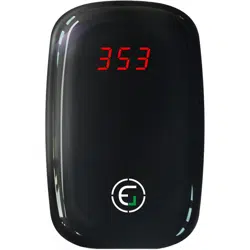
EG VOC Air Quality Pollution Monitor, Formaldehyde Detector, Temperature & Humidity Meter

Product's Documents

Below are documents related to this product, you can read online or download:
VOC photo

1. Overview

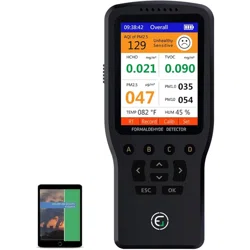
EG Air Quality Monitor showing a color LCD display with readings for PM2.5, HCHO, TVOC, temperature, and humidity.

The EG Air Quality Monitor is a portable device designed to measure and display key indoor environmental parameters. It provides real-time data on air quality to help you understand your indoor environment.

The monitor is equipped with multiple sensors and a built-in fan for active air sampling. It is powered by a rechargeable battery or via USB, making it suitable for use in various locations such as homes, offices, and vehicles.

2. Features and Specifications

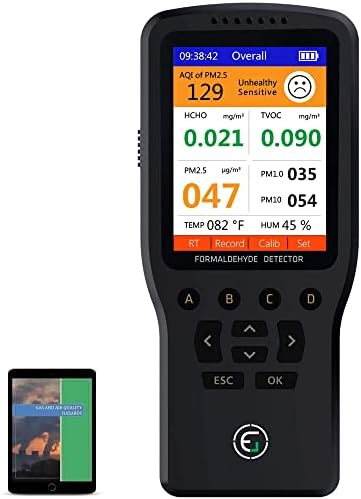
Front view of the black EG Air Quality Monitor with a color screen.

2.1. Measurement Capabilities

  • Formaldehyde (HCHO): Range 0-1.999 mg/m³.
  • Total Volatile Organic Compounds (TVOC): Range 0-9.999 mg/m³.
  • Particulate Matter (PM): Measures PM1.0, PM2.5, and PM10 levels in a range of 0-999 μg/m³.
  • Temperature: Displays in degrees Celsius.
  • Relative Humidity: Displays as a percentage.

2.2. Physical Specifications

  • Display: 2.8-inch color LCD with 320 x 240 pixel resolution.
  • Dimensions: 150.0 mm x 67.5 mm x 37.4 mm (5.9" x 2.66" x 1.47").
  • Weight: 170.5 grams (0.22 kg).
  • Construction: Plastic and LCD glass enclosure.
  • Operating Humidity: Up to 95% relative humidity.

2.3. Power and Connectivity

  • Power Source: Rechargeable 1000 mAh lithium battery.
  • Charging: Via DC 5V Micro USB port.
  • Battery Life: Provides portable operation when not connected to USB power.

2.4. Sensors and Operation

  • Fan: Built-in fan draws in ambient air for real-time measurement.
  • Particle Sensor: Laser-based sensor for detecting dust particles.
  • Gas Sensor: Electrochemical semiconductor sensor for detecting HCHO and TVOCs.
  • Alarm: Audible alert system.

3. Use Guide

3.1. Initial Setup and Calibration

  1. Fully charge the device using the provided Micro USB cable before first use.
  2. Power on the device. It is recommended to perform an initial calibration.
  3. If the device shows readings of 0.000 indoors, or if readings for HCHO, temperature, or PM2.5 seem inaccurate, access the calibration menu:
    • Press the D button to enter the SET menu.
    • Navigate to and select the SENSOR option by pressing the A button.
    • Follow the on-screen instructions to calibrate the device readings.

3.2. Taking Measurements

  1. Ensure the device is powered on. The built-in fan will activate to draw in air.
  2. Place the monitor in the area you wish to test. For best results, avoid placing it directly next to windows, vents, or obvious pollution sources at the start.
  3. Allow several minutes for the readings to stabilize and provide real-time data.
  4. You can use the device for spot checks or leave it on for continuous monitoring.

3.3. Understanding the Display and Readings

The color LCD screen simultaneously displays all measured values. Monitor the following:

  • PM2.5/PM10/PM1.0: High levels may indicate dust, smoke, or other particulates. Consider improving ventilation or using an air purifier.
  • HCHO (Formaldehyde): Elevated levels can come from building materials, furniture, or household products. Ventilation is key to reducing concentration.
  • TVOC: This measures a wide range of organic chemicals. Levels can fluctuate significantly. Note that high readings (e.g., 9.999) can sometimes be triggered by benign sources like fragrances or cleaning products.
  • Temperature & Humidity: Useful for assessing overall comfort. High humidity can promote mold growth.

Note: The device's "Air Pollution Level" is a separate assessment from the standard Air Quality Index (AQI).

3.4. Interpreting Alarms and High Readings

  • The device features an audible alarm that will sound when certain thresholds are exceeded.
  • If TVOC readings are very high or variable, this does not necessarily indicate a device error. The sensor is sensitive and environmental TVOCs can change rapidly.
  • Consistently high PM or HCHO readings suggest a persistent source of pollution that should be addressed.

4. Care and Maintenance

  • Keep the sensor inlets (where the fan draws air) free from dust and obstructions.
  • Wipe the exterior with a soft, dry cloth. Do not use liquids or abrasive cleaners.
  • Store the device in a cool, dry place when not in use for extended periods.
  • For long-term accuracy, periodic recalibration via the Sensor Set menu is recommended.

5. Troubleshooting

Issue Possible Solution
Device does not power on. Connect to a DC 5V USB power source to charge the battery. Ensure the cable is properly connected.
Readings show 0.000 indoors. Perform a sensor calibration via the SET > SENSOR menu.
HCHO, temperature, or PM2.5 readings seem inaccurate. Access the "Sensor Set" Menu (SET > SENSOR) to calibrate the specific reading.
TVOC readings are very high (e.g., 9.999) or fluctuate wildly. This may be normal sensor sensitivity to environmental odors (e.g., perfume, cooking). Move the device to a different location or ventilate the area.
Fan is not operating. Ensure the device is powered on. If the fan remains inactive, contact support.

Reference file: EG VOC Air Quality Pollution Monitor, Formaldehyde Detector, Temperature & Humidity Meter

Specifications

EG VOC Questions and Answers