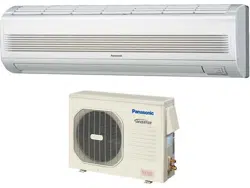
© Panasonic Appliances Air-Conditioning Malaysia
Sdn. Bhd. 2012. Unauthorized copying and distribution
is a violation of law.
F568313
ENGLISH 2 ~ 8
Before operating the unit, read these operating
instructions thoroughly and keep them for future
reference.
ESPAÑOL (LE) 10~ 16
Antes de utilizar la unidad, sírvase leer
atentamente estas instrucciones de
funcionamiento y conservarlas como futuro
elemento de consulta.
QUICK GUIDE
QUICK GUIDE
GUÍA RÁPIDA
GUÍA RÁPIDA
Please register your product at :
www.panasonic.com/register
For assistance, please call : (866)-292-7292
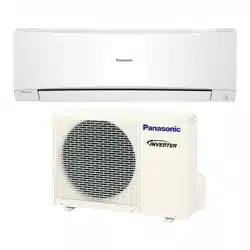
Operating Instructions
Air Conditioner
Model No.
Indoor Unit
Outdoor Unit
Outdoor Unit
CS-S9NKUW CU-S9NKU
CS-S12NKUW CU-S12NKU
CS-S18NKU CU-S18NKU
CS-S22NKU CU-S22NKU
2
SAFETY PRECAUTIONS
Thank you for purchasing
Panasonic Air Conditioner
TABLE OF CONTENTS
TABLE OF CONTENTS
SAFETY PRECAUTIONS
2~3
REMOTE CONTROL
4~5
INDOOR UNIT
6
TROUBLESHOOTING
7
INFORMATION
8
QUICK GUIDE
BACK COVER
NOTE
NOTE
The illustrations in this manual are for
explanation purposes only and may
differ from the actual unit. They are
subjected to change without notice for
future improvement.
OPERATION CONDITION
OPERATION CONDITION
Use this air conditioner under the following
temperature range
Temperature (˚F)
Indoor
*DBT *WBT
COOLING
Max. 89.6 73.4
Min. 60.8 51.8
Temperature (˚F)
Outdoor
*DBT *WBT
COOLING
Max. 109.4 78.8
Min. 60.8 51.8
* DBT: Dry bulb temperature
* WBT: Wet bulb temperature
POWER SUPPLY
POWER SUPPLY
Models Number
Time
Delay
Fuse
Rated
Volts
CS-S9NKUW /
CU-S9NKU
15 Amps
208/
230V
CS-S12NKUW /
CU-S12NKU
15 Amps
CS-S18NKU /
CU-S18NKU
20 Amps
CS-S22NKU /
CU-S22NKU
25 Amps
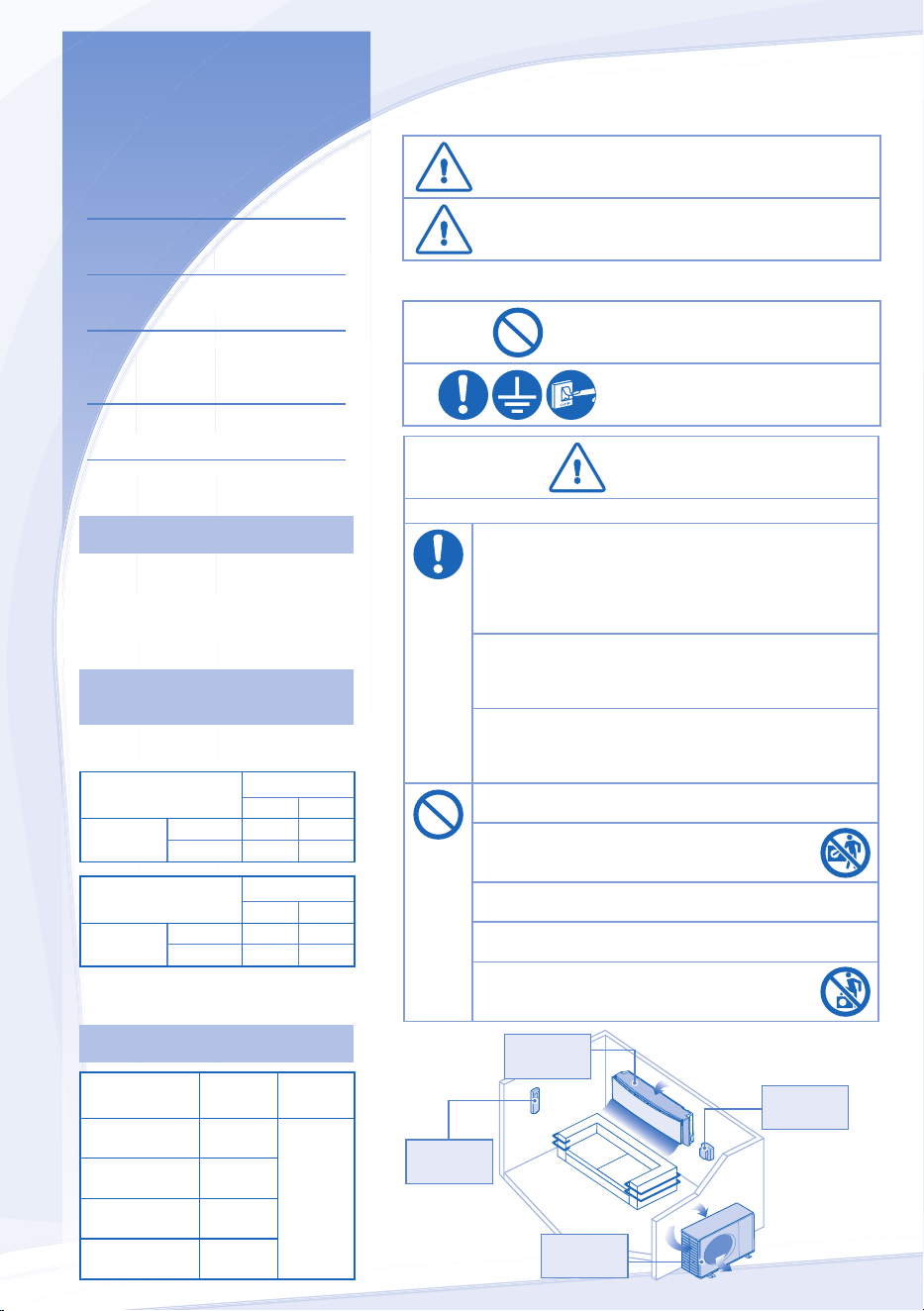
To prevent personal injury, injury to others, or property damage, please
comply with the following.
Incorrect operation due to failure to follow instructions below may cause
harm or damage, the seriousness of which is classifi ed as below:
WARNING
WARNING
This sign warns of death or
serious injury.
CAUTION
CAUTION
This sign warns of injury or
damage to property.
The instructions to be followed are classifi ed by the following symbols:
This symbol denotes an action
that is PROHIBITED.
These symbols denote an
actions that is COMPULSORY.
WARNING
WARNING
INDOOR UNIT AND OUTDOOR UNIT
This appliance is not intended for use by persons (including
children) with reduced physical, sensory or mental capabilities,
or lack of experience and knowledge, unless they have been
given supervision or instruction concerning use of the appliance
by a person responsible for their safety. Children should be
supervised to ensure that they do not play with the appliance.
Please consult authorized dealer or specialist to clean the
internal parts, repair, install, remove and reinstall the unit.
Improper installation and handling will cause leakage, electric
shock or fi re.
Confi rm to authorized dealer or specialist on usage of specifi ed
refrigerant type. Using of refrigerant other than the specifi ed
type may cause product damage, burst and injury etc.
Do not install the unit in a potentially explosive or fl ammable
atmosphere. Failure to do so could result in fi re.
Do not insert your fi ngers or other objects into the air
conditioner indoor or outdoor unit, rotating parts may
cause injury.
Do not touch the outdoor unit during lightning, it may cause
electric shock.
Do not expose yourself directly to cold air for a long period to
avoid excess cooling.
Do not sit or step on the unit, you may fall down
accidentally.
Air Inlet
Air Inlet
Air Outlet
Air Outlet
Air Outlet
Air Outlet
Air Inlet
Air Inlet
Outdoor
Unit
Indoor
Unit
Power
Supply
Remote
Control
ENGLISH
3
CAUTION
CAUTION
INDOOR UNIT AND OUTDOOR UNIT
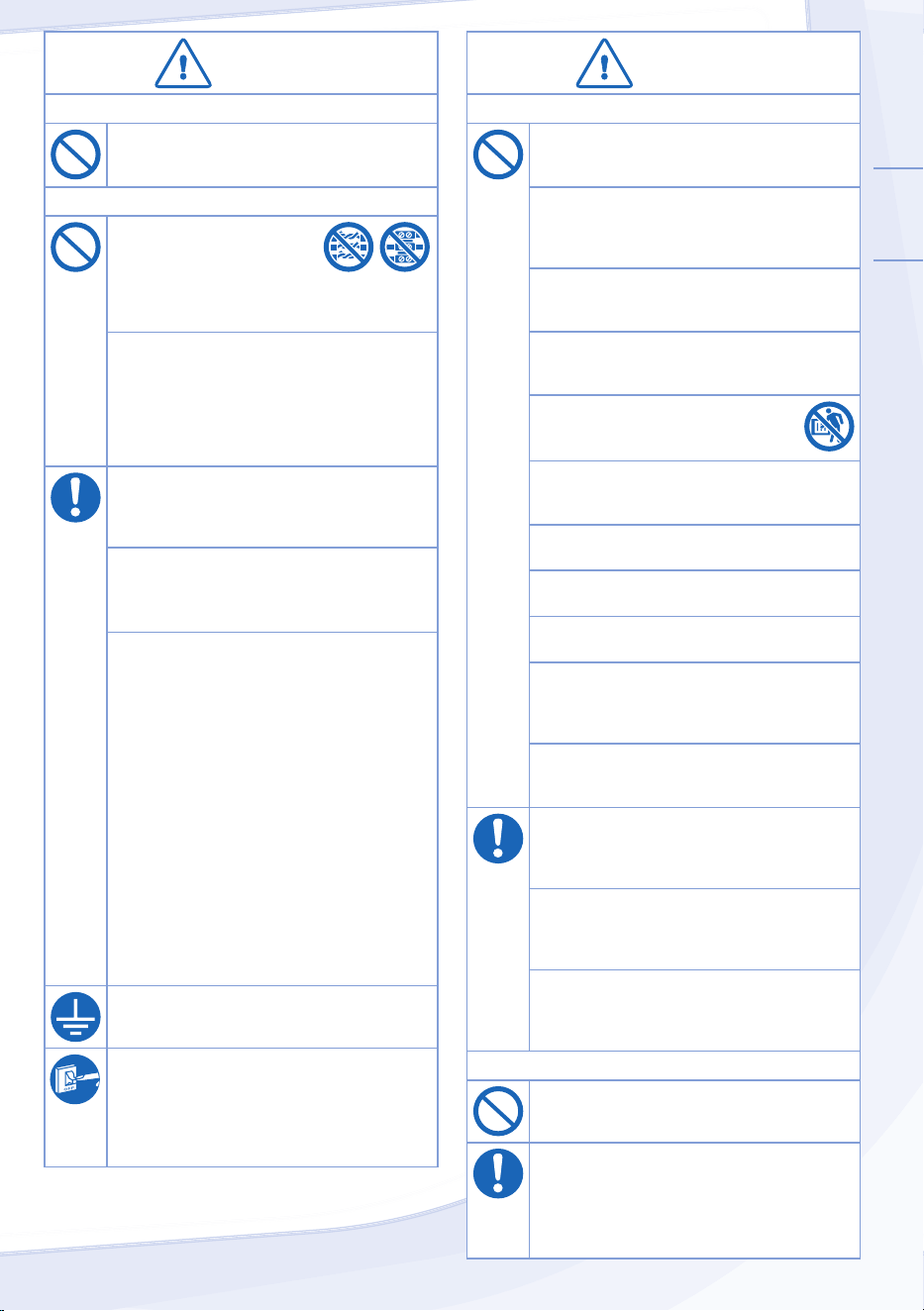
Do not wash the indoor unit with water, benzene,
thinner or scouring powder to avoid damage or
corrosion at the unit.
Do not use for preservation of precise
equipment, food, animals, plants, artwork
or other objects. This may cause quality
deterioration, etc.
Do not use any combustible equipment in front of
the airfl ow outlet to avoid fi re propagation.
Do not expose plants or pet directly to airfl ow to
avoid injury, etc.
Do not touch the sharp aluminium fi n,
sharp parts may cause injury.
Do not switch ON the indoor unit when waxing
the fl oor. After waxing, aerate the room properly
before operating the unit.
Do not install the unit in oily and smoky areas to
prevent damage to the unit.
Do not dismantle the unit for cleaning purpose to
avoid injury.
Do not step onto an unstable bench when
cleaning the unit to avoid injury.
Do not place a vase or water container on the
unit. Water may enter the unit and degrade the
insulation. This may cause an electric shock.
Do not open window or door for long time during
COOL/DRY mode operation.
Ensure drainage pipe is connected properly and
keep drainage outlet clear of gutters, containers
or does not immersed in water to prevent water
leakage.
After a long period of use or use with any
combustible equipment, aerate the room
regularly.
After a long period of use, make sure the
installation rack does not deteriorate to prevent
the unit from falling down.
REMOTE CONTROL
Do not use rechargeable (Ni-Cd) batteries.
It may damage the remote control.
To prevent malfunction or damage of the remote
control:
• Remove the batteries if the unit is not going to
be used for a long period of time.
• New batteries of the same type must be
inserted following the polarity stated.
WARNING
WARNING
REMOTE CONTROL
Do not allow infants and small children to play
with the remote control to prevent them from
accidentally swallowing the batteries.
POWER SUPPLY
Do not use a modifi ed cord,
joint cord, extension cord or
unspecifi ed cord to prevent
overheating and fi re.
To prevent overheating, fi re or electric shock:
• Do not share the same power outlet with other
equipment.
• Do not operate with wet hands.
• Do not over bend the power supply cord.
If the supply cord is damage, it must be replaced
by the manufacturer, its service agent or similarly
qualifi ed persons in order to avoid a hazard.
It is strongly recommended to install this unit
using an Earth Leakage Circuit Breaker (ELCB)
or Residual Current Device (RCD) to prevent
electric shock or fi re.
Stop using the product if any abnormality/failure
occurs or turn off the power switch and breaker.
(Risk of smoke/fi re/electric shock)
Examples of abnormality/failure
• The ELCB trips frequently.
• Burning smell is observed.
• Abnormal noise or vibration of the unit is
observed.
• Water leaks from the indoor unit.
• Power cord becomes abnormally hot.
• Fan speed cannot be controlled.
• The unit stops running immediately even if it is
switched on for operation.
• The fan does not stop even if the operation is
stopped.
Contact your local dealer immediately for
maintenance or repair assistance.
This equipment must be earthed to prevent
electrical shock or fi re.
Prevent electric shock by switching off the power:
- Before cleaning or servicing.
- Extended non-use.
- Abnormally strong lightning activity.
4
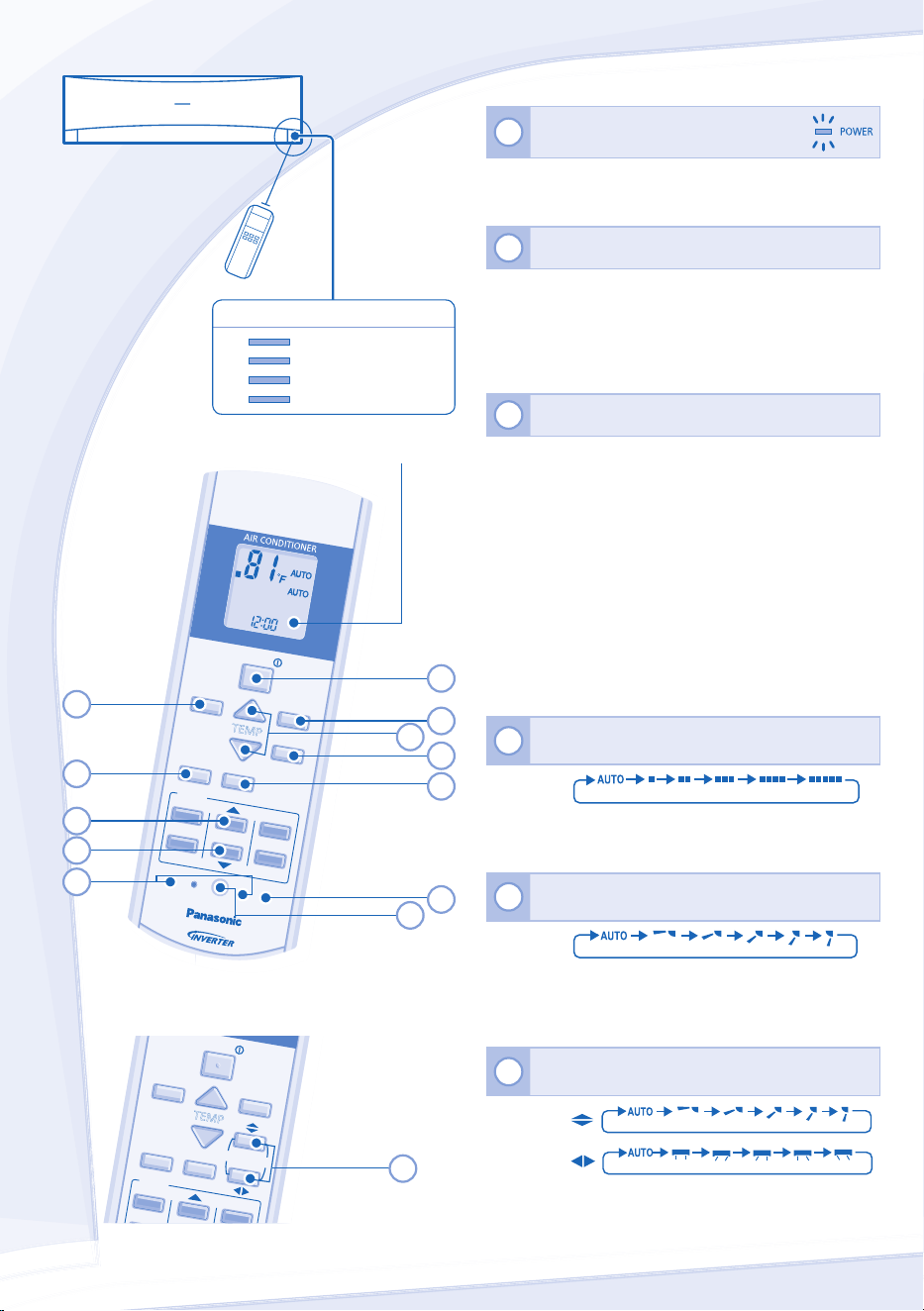
REMOTE CONTROL
Maximum distance: 26ft
INDICATOR
POWER
(Green)
TIMER
(Orange)
QUIET
(Orange)
POWERFUL
(Orange)
Press the remote control’s button
1
TO TURN ON OR OFF THE UNIT
• Please be aware of the OFF indication on the remote
control display to prevent the unit from starting/stopping
improperly.
2
TO SET TEMPERATURE
• Selection range: 60°F ~ 86°F.
• Operating the unit within the recommended temperature
could induce energy saving.
COOL mode : 78˚F ~ 82˚F.
DRY mode : 2˚F ~ 4˚F lower than room temperature.
3
TO SELECT OPERATION MODE
AUTO mode - For your convenience
• During operation mode selection the power indicator
blinks.
• Unit selects operation mode every 10 minutes according
to temperature setting and room temperature.
COOL mode - To enjoy cool air
• Use curtains to screen off sunlight and outdoor heat to
reduce power consumption during cool mode.
DRY mode - To dehumidify the environment
• Unit operates at low fan speed to give a gentle cooling
operation.
4
TO SELECT FAN SPEED (5 OPTIONS)
FAN
S
PEED
• For AUTO, the indoor fan speed is automatically adjusted
according to the operation mode.
5
TO ADJUST VERTICAL AIRFLOW DIRECTION
(5 OPTIONS)
AIR SWING
• Keeps the room ventilated.
• In COOL/DRY mode, if AUTO is set, the louver swing
up/down automatically.
6
TO ADJUST AIRFLOW DIRECTION (5 OPTIONS)
AIR SWING
• Keeps the room ventilated.
• In COOL/DRY mode, if AUTO is set, the louver swing
left/right and up/down automatically.
S18NKU, S22NKU
FAN SPEED
MOD
E
QUI
ET
TEMP
OFF/ON
AIR
SWI
NG
POW
ERF
UL
TIM
ER
SET
ON
1
2
6
AUTO
COOL
DRY
FAN
SPE
ED
AIR
SWING
FAN SPEED
AIR
SWING
MOD
E
QUIET
TEMP
OFF/ON
POW
ERFUL
TIM
ER
SET
CAN
CEL
ON
OFF
1
2
3
SET
CHECK
CLOC
K
RESET
AC
RC
3
7
4
5
2
8
9
10
13
11
Remote Control display
1
12
S9NKUW, S12NKUW
ENGLISH
5
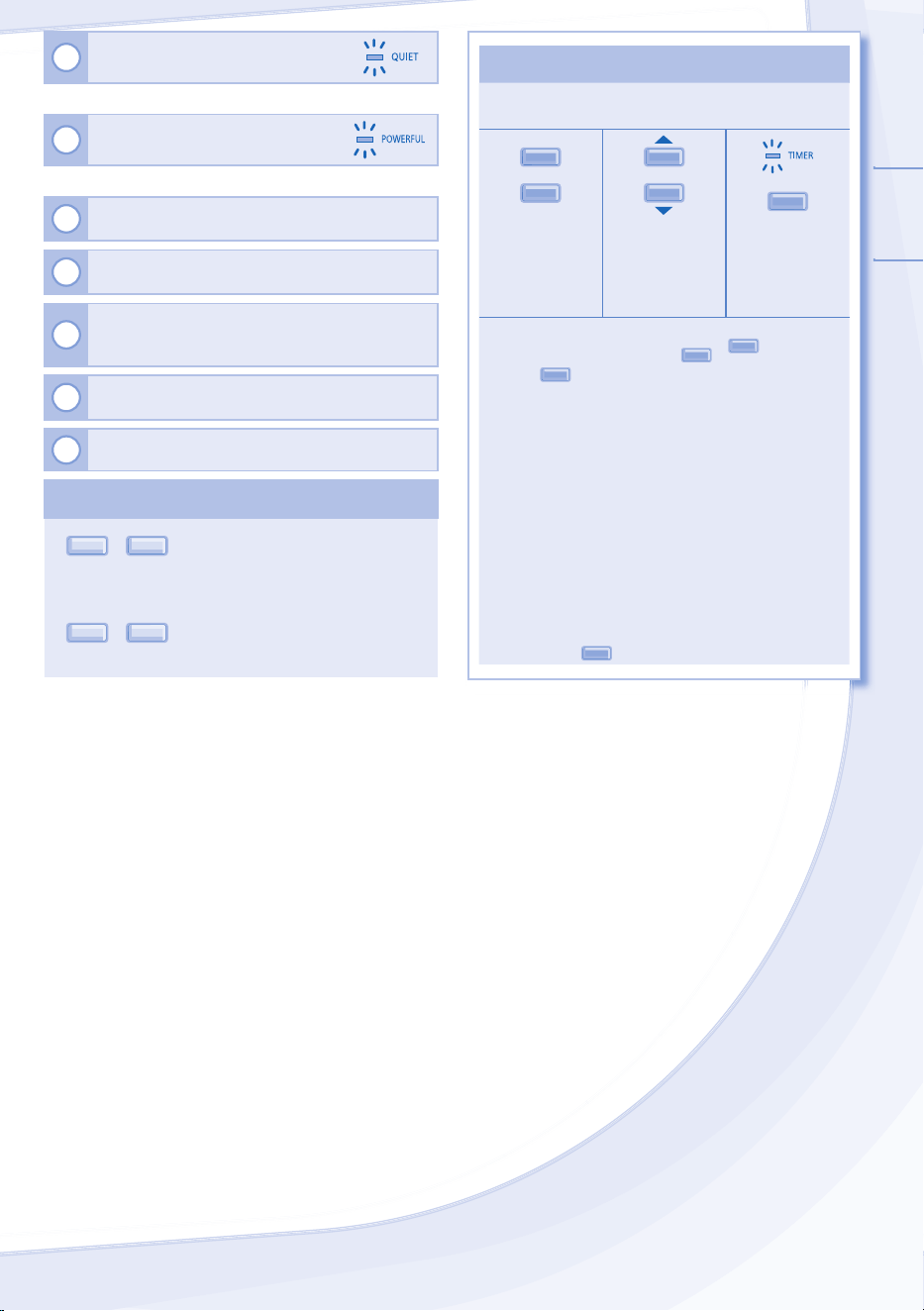
7
TO ENJOY QUIET OPERATION
• This operation reduces airfl ow noise.
8
TO REACH TEMPERATURE
QUICKLY
• This operation stops automatically after 20 minutes.
9
Press and hold for 5 seconds to dim or restore the
unit’s indicator brightness.
10
Press and hold for approximately 10 seconds to
show temperature setting in °C or °F.
11
Press and hold for approximately 5 seconds to show
12-hour (am/pm) or 24-hour time indication.
12
Press to restore the remote control’s default setting.
13
Not used in normal operations.
NOTES
NOTES
Q
UIET
,
P
O
WERFUL
• Can be activated in all modes and can be cancelled by
pressing the respective button again.
Q
UIET
,
P
O
WERFUL
• Cannot be selected at the same time.
TO SET THE TIMER
TO SET THE TIMER
• To turn ON or OFF the unit at a preset time.
ON
OFF
1
2
S
ET
Select ON or
OFF timer
Set the time Confi rm
• To cancel ON or OFF timer, press
O
N
or
OFF
then
press
CANCEL
.
• When ON Timer is set, the unit may start earlier (up
to 15 minutes) before the actual set time in order to
achieve the desired temperature on time.
• Timer operation is based on the clock set in the
remote control and repeats daily once set. For clock
setting, please refer to Remote Control Preparation
on the back cover.
• If timer is cancelled manually or due to power failure,
you can restore the previous setting (once power is
resumed) by pressing
SET
.
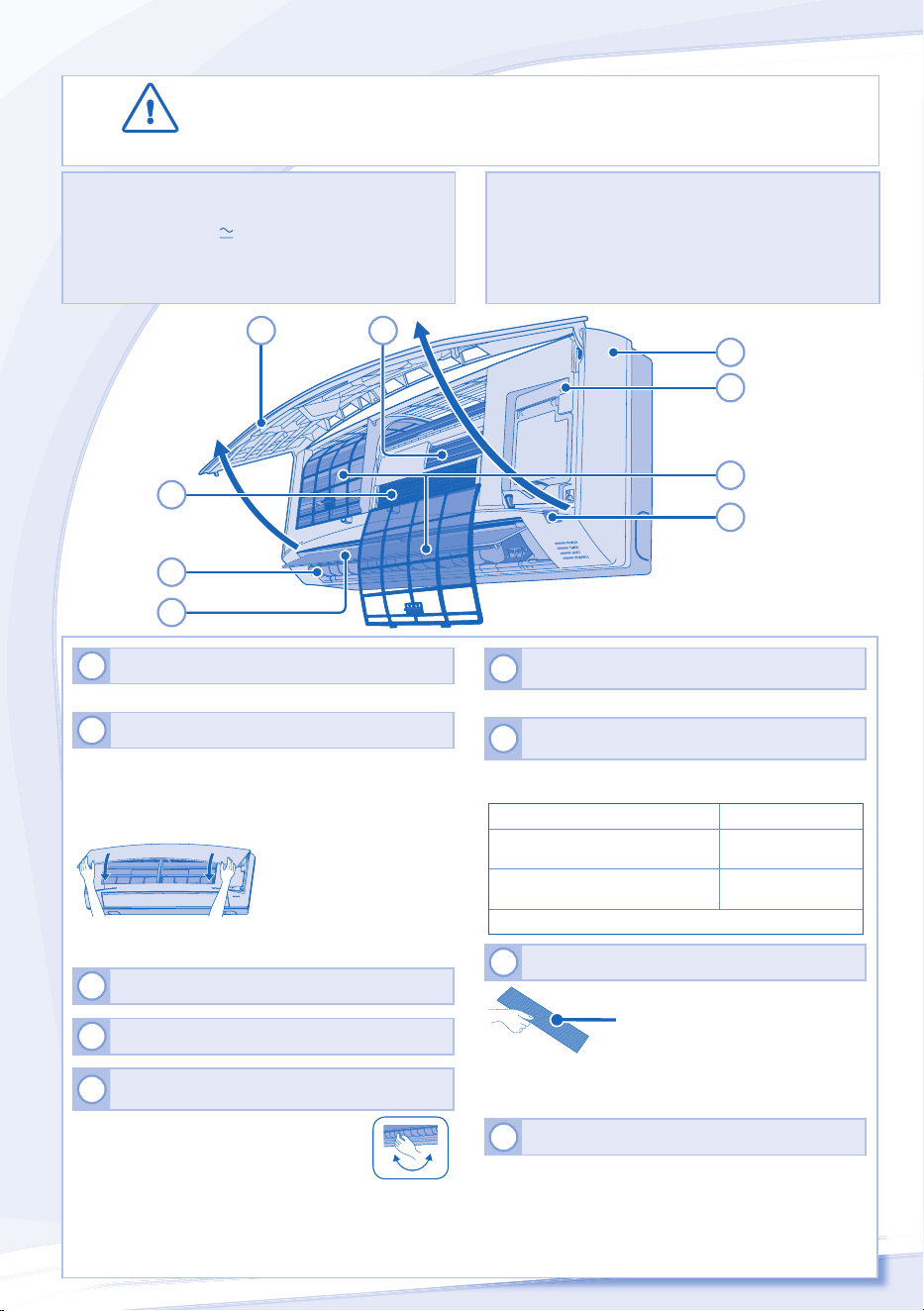
6
CAUTION
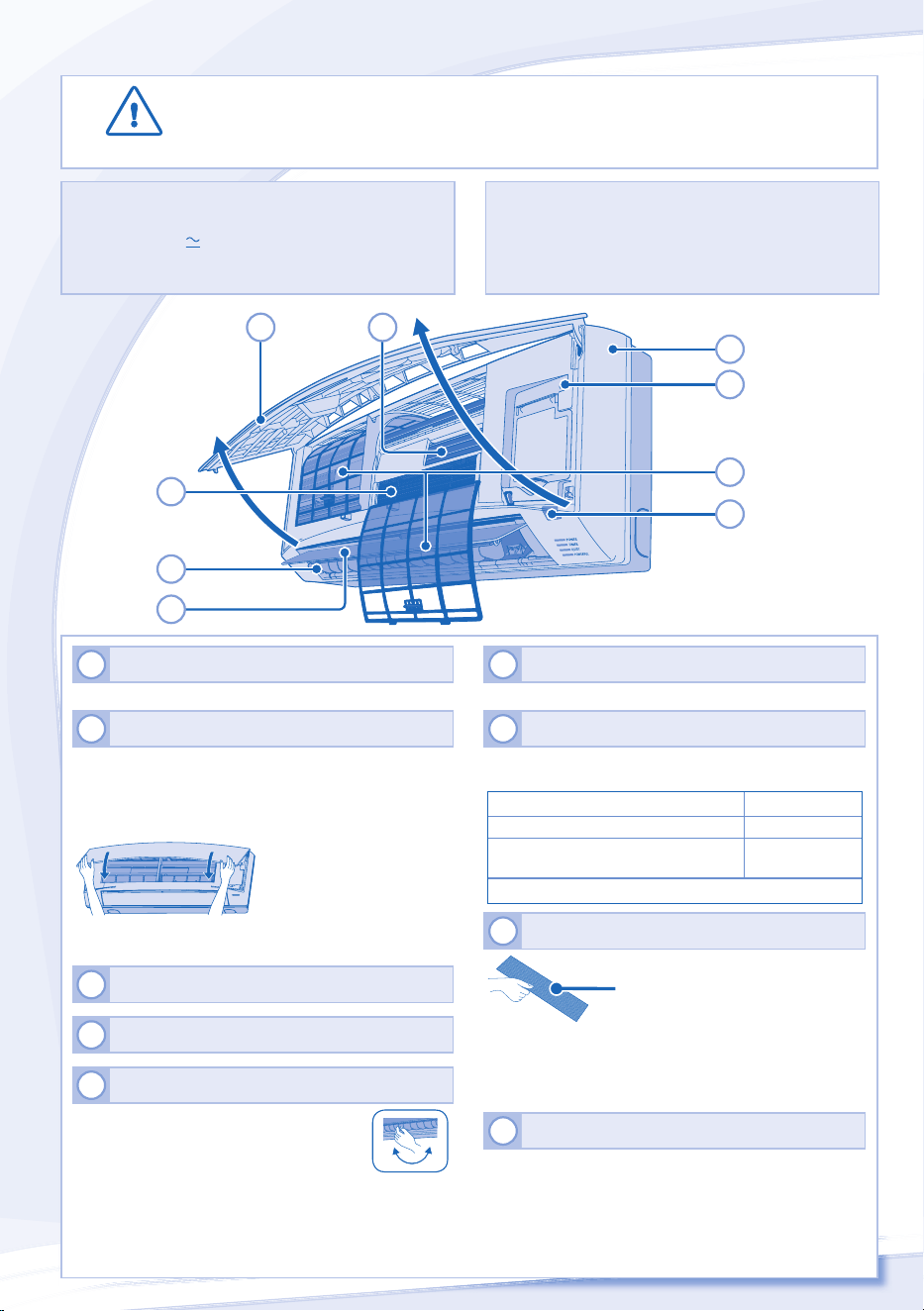
• Switch off the power at the circuit breaker before cleaning.
• Do not touch the aluminium fi n, sharp parts may cause injury.
1
INDOOR UNIT
• Wipe the unit gently with a soft, dry cloth.
2
FRONT PANEL
Remove Front Panel
• Raise and pull to remove the front panel.
• Wash gently and dry.
Close Front Panel
• Press down both ends of the front panel to close it
securely.
3
REMOTE CONTROL RECEIVER
4
ALUMINIUM FIN
5
HORIZONTAL AIRFLOW DIRECTION LOUVER
S9NKUW, S12NKUW
• Manually adjustable.
S18NKU, S22NKU
• Do not adjust by hand.
6
VERTICAL AIRFLOW DIRECTION LOUVER
• Do not adjust by hand.
7
AUTO OFF/ON BUTTON
• Use when remote control is misplaced or a malfunction
occurs.
Action Mode
Press once. Auto
Press and hold until 1 beep is heard,
then release.
Cooling
Press the button to turn off.
8
AIR PURIFYING FILTER
Vacuum the air purifying fi lter.
• It is recommended to clean the fi lter every 6 months.
• Replace the fi lter every 3 years or replace any damaged
fi lter.
Part no.: CZ-SA20P
9
AIR FILTERS
• Air fi lter cleaning is required every two weeks.
• Wash/rinse the fi lters gently with water to avoid damage
to the fi lter surface.
• Dry the fi lters thoroughly under shade, away from fi re or
direct sunlight.
• Replace any damaged fi lters.
INDOOR UNIT
CLEANING INSTRUCTIONS
CLEANING INSTRUCTIONS
HINT
HINT
• Do not use benzene, thinner or scouring powder.
• Use only soap ( pH7) or neutral household detergent.
• Do not use water hotter than 104˚F.
• To ensure optimal performance of the unit, cleaning
maintenance has to be carried out at regular intervals.
Dirty unit may cause malfunction and you may see error
code “H99”. Please consult authorized dealer.
2
5
6
7
1
4
3
9
8
ENGLISH
7
TROUBLESHOOTING
The following symptoms do not indicate malfunction.
The following symptoms do not indicate malfunction.
SYMPTOM
SYMPTOM
CAUSE
CAUSE
Mist emerges from indoor unit. ► • Condensation effect due to cooling process.
Water fl owing sound during operation. ► • Refrigerant fl ow inside the unit.
The room has a peculiar odor. ► • This may be due to damp smell emitted by the wall,
carpet, furniture or clothing.
Indoor fan stops occasionally during automatic fan speed
setting.
► • This helps to remove the surrounding odours.
Operation is delayed a few minutes after restarting. ► • The delay is a protection to the unit’s compressor.
Outdoor unit emits water/steam. ► • Condensation or evaporation occurs on pipes.
TIMER indicator is always on. ► • The timer setting repeats daily once set.
POWER indicator blinks before the unit is switched on. ► • This is a preliminary step in preparation for the operation
when the ON timer has been set.
Cracking sound during operation. ► • Changes of temperature caused the expansion/
contraction of the unit.
Check the following before calling for servicing.
Check the following before calling for servicing.
SYMPTOM
SYMPTOM
CHECK
CHECK
Cooling operation is not working effi ciently. ► • Set the temperature correctly.
• Close all doors and windows.
• Clean or replace the fi lters.
• Clear any obstruction at the air inlet and air outlet vents.
Noisy during operation. ► • Check if the unit has been installed at an incline.
• Close the front panel properly.
Remote control does not work.
(Display is dim or transmission signal is weak.)
► • Insert the batteries correctly.
• Replace weak batteries.
The unit does not work. ► • Check if the circuit breaker is tripped.
• Check if timers have been set.
The unit does not receive the signal from the remote
control.
► • Make sure the receiver is not obstructed.
• Certain fl uorescent lights may interfere with signal
transmitter. Please consult authorized dealer.
The unit stops and the TIMER indicator blinks.
Use remote control to retrieve error code.
TIMER
SET
CANCEL
ON
OFF
1
2
3
SET CHECK CLOCK RESET
AC
RC
1
Press for 5
seconds.
3
Press for 5
seconds to
quit checking.
2
Press until you hear
beep sound, then
write down the error
code.
Note:
• For certain errors, you
may restart the unit for
limited operation with 4
beeps when operation
starts.
4
Turn the unit off and reveal the error code to authorized dealer.
8
Information for Users on Collection and Disposal of Old Equipment and used Batteries
[Information on Disposal in other Countries
outside the European Union]
These symbols are only valid in the European
Union. If you wish to discard these items,
please contact your local authorities or dealer
and ask for the correct method of disposal.
Note for the battery symbol (bottom two
symbol examples):
This symbol might be used in combination with
a chemical symbol. In this case it complies with
the requirement set by the Directive for the
chemical involved.
Pb
FOR SEASONAL INSPECTION AFTER EXTENDED
NON-USE
• Check remote control batteries.
• No obstruction at air inlet and air outlet vents.
• Use Auto OFF/ON button to select Cooling operation.
After 15 minutes of operation, it is normal to have the
following temperature difference between air inlet and air
outlet vents:
Cooling: ≥ 14.4°F
FOR EXTENDED NON-USE
• Switch off power at the circuit breaker.
• Remove the remote control batteries.
SERVICEABLE CRITERIAS
SWITCH OFF POWER AT THE CIRCUIT BREAKER then
please consult an authorized dealer under the following
conditions:
• Abnormal noise during operation.
• Water/foreign particles have entered the remote control.
• Water leaks from Indoor unit.
• Circuit breaker switches off frequently.
• Switches or buttons are not functioning properly.
INFORMATION
Model Number
CS-S9NKUW / CU-S9NKU
The above listed models have been designed and manufactured to meet ENERGY STAR® criteria for energy effi ciency
when matched with appropriate coil components. However, proper refrigerant charge and proper air fl ow are critical to
achieve rated capacity and effi ciency. Installation of this product should follow the manufacturer’s refrigerant charging
and airfl ow instructions. Failure to confi rm proper charge and airfl ow may reduce energy effi ciency and shorten
equipment life.
Federal Communications Commission Interference Statement
This device complies with part 15 of the FCC Rules. Operation is subject to the following two conditions: (1) This device may
not cause harmful interference, and (2) this device must accept any interference received, including interference that may
cause undesired operation.
This equipment has been tested and found to comply with the limits for a Class B digital device, pursuant to part 15 of
the FCC Rules. These limits are designed to provide reasonable protection against harmful interference in a residential
installation. This equipment generates, uses and can radiate radio frequency energy and, if not installed and used in
accordance with the instructions, may cause harmful interference to radio communications. However, there is no guarantee
that interference will not occur in a particular installation. If this equipment does cause harmful interference to radio or
television reception, which can be determined by turning the equipment off and on, the user is encouraged to try to correct
the interference by one or more of the following measures:
• Reorient or relocate the receiving antenna.
• Increase the separation between the equipment and the receiver.
• Connect the equipment to an outlet on a circuit different from that to which the receiver is connected.
• Consult the dealer or an experienced radio/TV technician for help.
FCC Caution: To assure continued compliance, follow the attached installation instructions. Any changes or modifi cations not
expressly approved by the party responsible for compliance could void the user’s authority to operate this equipment.
Industry Canada Notice
This Class B digital apparatus complies with Canadian ICES-003.

MEMO
10
NOTA
NOTA
Las ilustraciones de este manual sirven
únicamente para describir las explicaciones
y pueden no coincidir exactamente con las
del aparato suministrado. Están sujetas
a cambios sin previo aviso con el fi n de
mejorar el producto.
PRECAUCIONES DE SEGURIDAD
Para evitar lesiones personales, lesiones a terceros, o daños materiales,
cumpla lo siguiente.
El uso incorrecto por no seguir las instrucciones puede causar daños o
averías; su gravedad se clasifi ca con las indicaciones siguientes:
ADVERTENCIA
ADVERTENCIA
Esta indicación advierte del posible
peligro de muerte o de daños graves.
PRECAUCIÓN
PRECAUCIÓN
Esta indicación advierte de los
posibles daños o desperfectos
materiales.
Las instrucciones que deben seguirse están clasifi cadas mediante los
siguientes símbolos:
Este símbolo denota una acción
que está PROHIBIDA.
Estos símbolos denotan
acciones que son
OBLIGATORIAS.
ADVERTENCIA
ADVERTENCIA
UNIDAD INTERIOR Y UNIDAD EXTERIOR
UNIDAD INTERIOR Y UNIDAD EXTERIOR
Este aparato no debe ser utilizado por personas (incluyendo niños) con
discapacidades mentales, sensoriales o físicas, o falta de experiencia
y conocimiento, a menos que hayan recibido formación o supervisión
en relación al uso del aparato por una persona responsable por su
seguridad. Los niños deberían estar supervisados para asegurar que no
juegan con el aparato.
Por favor consulte un distribuidor o especialista autorizado para limpiar
las partes internas, reparar, instalar, sacar o reinstalar la unidad. La
instalación y la manipulación inadecuadas pueden provocar fi ltraciones,
descargas eléctricas o incendios.
Confi rme el uso del tipo de refrigerante especifi cado con el distribuidor
autorizado o especialista. El uso de un refrigerante que no sea del tipo
especifi cado podría provocar daños al producto, roturas y lesiones
físicas, etc.
No instale la unidad en ambientes potencialmente explosivos o
infl amables. En caso contrario, podría provocar accidentes de incendios.
No introduzca los dedos u otros objetos en la unidad
exterior o interior del aire acondicionado, ya que las partes
rotatorias podrían provocarle lesiones.
No toque la unidad exterior durante un relámpago, ya que podría causar
una descarga eléctrica.
No toque la unidad externa durante una tormenta eléctrica ya que
podría haber una descarga eléctrica.
No se siente o pare sobre la unidad, se podría caer
accidentalmente.
Entrada
Entrada
de aire
de aire
Salida
Salida
de aire
de aire
Salida
Salida
de aire
de aire
Entrada
Entrada
de aire
de aire
Unidad
Exterior
Unidad
Interior
Fuente de
energía
Mando a
Distancia
Muchas gracias por elegir una
unidad de aire acondicionado
Panasonic
CONTENIDO
CONTENIDO
PRECAUCIONES DE
SEGURIDAD
10~11
MANDO A DISTANCIA
12~13
UNIDAD INTERIOR
14
LOCALIZACIÓN DE
AVERÍAS
15
INFORMACIÓN
16
GUÍA RÁPIDA
CUBIERTA TRASERA
CONDICIONES DE
CONDICIONES DE
FUNCIONAMIENTO
FUNCIONAMIENTO
Utilice este aparato de aire acondicionado
dentro del siguiente intervalo de temperaturas
Temperatura (˚F)
Interior
*DBT *WBT
COOLING
Max. 89.6 73.4
Min. 60.8 51.8
Temperatura (˚F)
Exterior
*DBT *WBT
COOLING
Max. 109.4 78.8
Min. 60.8 51.8
* DBT: Temperatura de bulbo seco
* WBT: Temperatura de bulbo húmedo
FUENTE DE ENERGÍA
FUENTE DE ENERGÍA
Modèlo
Voltaje
asignado
Voltaje
asignado
CS-S9NKUW /
CU-S9NKU
15 Amps
208/
230V
CS-S12NKUW /
CU-S12NKU
15 Amps
CS-S18NKU /
CU-S18NKU
20 Amps
CS-S22NKU /
CU-S22NKU
25 Amps
ESPAÑOL
11
PRECAUCIÓN
PRECAUCIÓN
UNIDAD INTERIOR Y UNIDAD EXTERIOR
UNIDAD INTERIOR Y UNIDAD EXTERIOR
No lave la unidad interior con agua, benceno,
solvente o pulidor en polvo para evitar daños a la
unidad o corrosión en la unidad.
No use para la preservación de equipos
precisos, alimentos, animales, plantas, trabajos
artísticos u otros objetos. Esto podría provocar
deterioro en la calidad, etc.
No utilice ningún equipo combustible frente
a la salida del fl ujo de aire a fi n de evitar la
propagación del fuego.
No exponga las plantas o las mascotas
directamente al fl ujo del aire para evitar daños
físicos, etc.
No toque la fi losa aleta de aluminio,
las piezas fi losas pueden causar
lesiones.
No encienda la unidad cuando encere el suelo.
Después de encerar, airee la habitación
correctamente antes de usar la unidad.
No instale la unidad en áreas grasientas o con
humo para evitar daños a la unidad.
No desmantele la unidad con la fi nalidad de
limpiarla para evitar daños físicos.
No se pare sobre un banco inestable al limpiar la
unidad para evitar daños físicos.
No coloque fl oreros o un recipiente con agua
sobre la unidad. Puede que entre agua en la
unidad y que la misma degrade el aislamiento.
Esto podría provocar una descarga eléctrica.
No abra la ventana o la puerta durante un tiempo
prolongado mientras funcione el modo
COOL(FRÍO)/DRY(DESHUMIDIFICACIÓN).
Asegúrese de que el drenaje de la tubería esté
conectado correctamente y mantenga la salida
del drenaje libre de canaletas, recipientes y no
sumerja en agua para evitar escapes de agua.
Después de usarse durante un período
prolongado o de usarse con cualquier equipo
que use combustible, airee la habitación
regularmente.
Después de un período prolongado de uso,
asegúrese de que el estante de instalación no
esté deteriorado para evitar que el equipo se
caiga.
MANDO A DISTANCIA
No utilice pilas recargables (Ni-Cd).
Podría dañar el control remoto.
Para evitar el funcionamiento inadecuado o
daños al control remoto:
• Extraiga las pilas si no va a utilizar la unidad
durante un periodo prolongado de tiempo.
• Deben introducirse baterías nuevas del mismo
tipo de acuerdo a la polaridad indicada.
DVERTENCIA
DVERTENCIA
MANDO A DISTANCIA
No permita que bebés y niños pequeños jueguen
con el mando a distancia para evitar que ingieran
accidentalmente las pilas.
FUENTE DE ENERGÍA
No utilice un cable modifi cado,
unido con otro, un cable
de extensión o un cable
no especifi cado para evitar
sobrecalentamiento e
incendios.
Para evitar el sobrecalentamiento, un incendio o
descarga eléctrica:
• No comparta el mismo tomacorriente con
otros equipos.
• No ponga a funcionar la unidad mientras
tenga las manos mojadas.
• No doble demasiado el cable de alimentación.
Para evitar riesgos, si el cable de alimentación
está dañado y es necesario cambiarlo, deberá
hacerlo el fabricante, un representante del
servicio técnico o una persona califi cada.
Se recomienda altamente instalarlo con un
disyuntor de fuga a tierra (ELCB) o un dispositivo
residual actual (RCD) para evitar descargas
eléctricas o incendios.
Deje de usar el producto cuando ocurra
cualquier anomalía/falla y apague el interruptor y
disyuntor.
(Riesgo de humo/fuego/descarga eléctrica)
Ejemplos de anomalía/falla
• El ELCB se dispara frecuentemente.
• Huele a quemado.
• La unidad emite un ruido anormal o vibra.
• Gotea agua desde la unidad interior.
• El cable de alimentación se calienta
anormalmente.
• No se puede controlar la velocidad del
ventilador.
• La unidad deja de funcionar inmediatamente
aunque esté encendida.
• El ventilador no se detiene aunque se haya
apagado la unidad.
Contacte inmediatamente su distribuidor local
para mantenimiento/reparaciones.
Este equipo deberá conectarse a tierra para
evitar descargas eléctricas o incendios.
Evite la descarga eléctrica apagando la fuente
de energía cuando:
- Antes de limpiar o de reparar.
- Si no se va usar durante un tiempo prolongado.
- Si están cayendo relámpagos de una manera
anormalmente intensa.
12
MANDO A DISTANCIA
Distancia máxima: 26ft
INDICADOR
POWER
(Verde)
TIMER
(Naranja)
QUIET
(Naranja)
POWERFUL
(Naranja)
Pulse el botón del control remoto
1
ENCENDER O APAGAR LA UNIDAD
• Por favor esté al tanto de la indicación OFF en la pantalla
del mando a distancia para impedir que la unidad
arranqueo se detenga incorrectamente.
2
PARA AJUSTAR LA TEMPERATURA
• Gama de selección: 60°F ~ 86°F.
• El funcionamiento de la unidad dentro de la temperatura
recomendada podría resultar en el ahorro de energía.
MODO FRÍO : 78˚F ~ 82˚F.
MODO DESHUMIDIFICACIÓN : 2˚F ~ 4˚F menos que la
temperatura ambiente.
3
SELECCIONAR MODO DE OPERACIÓN
MODO AUTOMÁTICO - Para su conveniencia
• Durante la selección del modo de funcionamiento el
indicador de encendido parpadea.
• La unidad selecciona el modo de funcionamiento cada 10
minutos de acuerdo con la confi guración de temperatura o
temperatura ambiente.
MODO FRÍO - Para disfrutar de aire frío
• Use cortinas para proteger de luz solar y el calor exterior y
así reducir el consumo eléctrico durante el modo de frío.
MODO DESHUMIDIFICACIÓN - Para deshumidifi car
el ambiente
• La unidad funciona en la velocidad de ventilador baja para
proporcionar una agradable refrigeración.
4
PARA SELECCIONAR LA VELOCIDAD DEL
VENTILADOR (5 OPCIONES)
FAN
S
PEED
• Para AUTO (automático), la velocidad de ventilador de
interior es ajustada automáticamente según el modo de
operación.
5
PARA AJUSTAR LA DIRECCIÓN VERTICAL DE
LA CORRIENTE DE AIRE (5 OPCIONES)
AIR SWING
• Mantiene la habitación ventilada.
• En el modo FRÍO/SECAR, si AUTOMÁTICO está
confi gurado, la rejilla gira hacia arriba/abajo
automáticamente.
6
PARA REGULAR LA DIRECCIÓN DE LA
CORRIENTE DE AIRE (5 OPCIONES)
AIR SWING
• Mantiene la habitación ventilada.
• En el modo FRÍO/SECAR, si AUTOMÁTICO está
confi gurado, la rejilla gira hacia la izquierda/derecha y
arriba/abajo automáticamente.
S18NKU, S22NKU
FAN SPEED
MOD
E
QUIET
TEMP
OFF/ON
AIR
SWING
POW
ERF
UL
TIM
ER
SET
ON
1
2
6
AUTO
COOL
DRY
FAN
SPE
ED
AIR
SWING
FAN SPE
ED
AIR
SWING
MOD
E
QUIET
TEMP
OFF/ON
POW
ERFUL
TIMER
SET
CAN
CEL
ON
OFF
1
2
3
SET
CHECK
CLOC
K
RESET
AC
RC
3
7
4
5
2
8
9
10
13
11
Pantalla del mando a distancia
1
12
S9NKUW, S12NKUW
ESPAÑOL
13
7
PARA DISFRUTAR DE UN
AMBIENTE TRANQUILO
•
Esta operación reduce el ruido de corriente de aire.
8
ALCANZAR TEMPERATURA
RÁPIDAMENTE
•
Esta operación para automáticamente después de 20 minutos.
9
Mantenga pulsado por 5 segundos para oscurecer o
restablecer el brillo del indicador de la unidad.
10
Mantenga pulsado aproximadamente 10 segundos
para mostrar la temperatura en °C o °F.
11
Presione y sostenga durante aproximadamente 5
segundos para mostrar el formato de 12 (am/pm)
o 24 horas.
12
Presione para restablecer el ajuste de fábrica del
mando a distancia.
13
No utilizado en operaciones normales.
NOTAS
NOTAS
Q
UIET
,
P
O
WERFUL
• Se puede activar en todos los modos y se puede
cancelar pulsando de nuevo el botón respectivo.
Q
UIET
,
P
O
WERFUL
• No se puede seleccionar al mismo tiempo.
PARA AJUSTAR EL TEMPORIZADOR
PARA AJUSTAR EL TEMPORIZADOR
• Conectar o desconectar la unidad a una hora
predeterminada.
ON
OFF
1
2
S
ET
Seleccione el
temporizador de
activación (ON) o
de desactivación
(OFF)
Ajuste la hora Confi rmar
• Para cancelar el temporizador de encendido (ON) o
el de apagado (OFF), pulse
O
N
o
OFF
y, después,
pulse
CANCEL
.
• Cuando el temporizador es ajustado en ON, la unidad
puede comenzar (hasta 15 minutos) antes de la
hora real programada para alcanzar la temperatura
deseada a tiempo.
• La operación de temporizador está basada en la
hora programada en el mando a distancia y se
repite diariamente. Para el ajuste del reloj, por favor
consulte Preparación del Mando a Distancia en la
contra portada.
• Si el temporizador es cancelado manualmente o por
una caída en el suministro eléctrico, puede restaurar
el ajuste anterior (cuando vuelva la electricidad)
presionando
SET
.
14
PRECAUCIÓN
• Apague el disyuntor antes de limpiar.
• No toque la aleta de aluminio, las partes afi ladas pueden
causar heridas.
1
UNIDAD INTERIOR
• Limpie la unidad suavemente con un paño suave y seco.
2
PANEL FRONTAL
Retire el panel frontal
• Levante y tire del panel frontal para retirarlo.
• Lávelo con cuidado y séquelo.
Cierre el panel frontal
• Pulse hacia abajo los dos extremos del panel frontal para
cerrarlo herméticamente.
3
RECEPTOR DE CONTROL REMOTO
4
ALETA DE ALUMINIO
5
REJILLA DE DIRECCIÓN DE CORRIENTE DE
AIRE HORIZONTAL
S9NKUW, S12NKUW
• Manualmente ajustable.
S18NKU, S22NKU
• No lo ajuste manualmente.
6
REJILLA DE DIRECCIÓN DE CORRIENTE DE
AIRE VERTICAL
• No lo ajuste manualmente.
7
BOTÓN DE ENCENDIDO/APAGADO
AUTOMÁTICO (AUTO OFF/ON)
• Utilize cuando el mando a distancia está extraviado o
funciona mal.
Acción Modo
Pulsar una vez. Funcionamiento
automático
Presione y mantenga hasta que
escuche un pitido, luego suéltelo.
Enfriamiento
Presione el botón para apagar.
8
FILTRO DE PURIFICADOR DE AIRE
Limpiar con aspiradora el
fi ltro de Purifi cador de Aire.
• Se recomienda limpiar el fi ltro cada 6 meses.
• Cambie el fi ltro cada 3 años o reemplace los fi ltros dañados.
Nº de referencia: CZ-SA20P
9
FILTROS DE AIRE
• Es necesario limpiar los fi ltros de aire cada dos semanas.
• Lave/enjuague los fi ltros con agua, con cuidado para evitar
dañar la superfi cie del mismo.
• Secar minuciosamente los fi ltros a la sombra, lejos del fuego o
la luz solar directa.
• Reemplace los fi ltros dañados.
UNIDAD INTERIOR
INSTRUCCIONES DE LAVADO
INSTRUCCIONES DE LAVADO
INDICACIONES
INDICACIONES
• No utilice benceno, disolvente o limpiador en polvo.
• Utilice sólo jabones (
pH7) o detergentes domésticos
neutros.
• No utilice agua con una temperatura superior a 104˚F.
• Para garantizar el desempeño óptimo de la unidad, el
mantenimiento de limpieza debe llevarse a cabo durante
intervalos regulares. Una unidad sucia podría provocar un
funcionamiento inadecuado y que usted vea el código de
error “H99”. Por favor, consulte su distribuidor autorizado.
2
5
6
7
1
4
3
9
8
ESPAÑOL
15
LOCALIZACIÓN DE AVERÍAS
Las siguientes señales no indican un mal funcionamiento.
Las siguientes señales no indican un mal funcionamiento.
SEÑAL
SEÑAL
CAUSA
CAUSA
Sale neblina de la unidad interior. ► • Efecto de condensación producido durante el proceso de
enfriamiento.
Se escucha un sonido similar a agua fl uyendo durante el
funcionamiento.
► • Flujo del refrigerante en el interior de la unidad.
Hay un olor extraño en la habitación. ► • Puede ocurrir debido al olor a humedad producido por
las paredes, las alfombras, los muebles o las telas de la
habitación.
El ventilador interior se para de vez en cuando con la
velocidad del ventilador automática.
► • Con esto se eliminan los malos olores del ambiente.
El aparato tarda varios minutos en funcionar tras volver a
encenderlo.
► • El retraso responde a un dispositivo de protección del
compresor de la unidad.
La unidad exterior emite agua o vapor. ► • Se produce condensación o evaporación en los tubos.
El indicador TIMER siempre está encendido. ► • Una vez confi gurado, el ajuste del temporizador se repite
todos los días.
El indicador de encendido parpadea antes de encender la
unidad.
► • Se trata de un paso preliminar para preparar el
funcionamiento cuando se ha ajustado el temporizador
de encendido.
Sonido seco (de chasquido) durante el funcionamiento. ► • Los cambios de temperatura causan la expansión/
contracción de la unidad.
Compruebe lo siguiente antes de llamar a un técnico.
Compruebe lo siguiente antes de llamar a un técnico.
SEÑAL
SEÑAL
COMPRUEBE
COMPRUEBE
La operación frío no funciona efi cientemente. ► • Programe la temperatura correctamente.
• Cierre todas las puertas y ventanas.
• Limpie o sustituya los fi ltros.
• Quite cualquier obstrucción en la entrada y salida de
aire.
Funcionamiento ruidoso. ► • Compruebe si la unidad ha sido instalada en una
inclinación.
• Cierre el panel delantero correctamente.
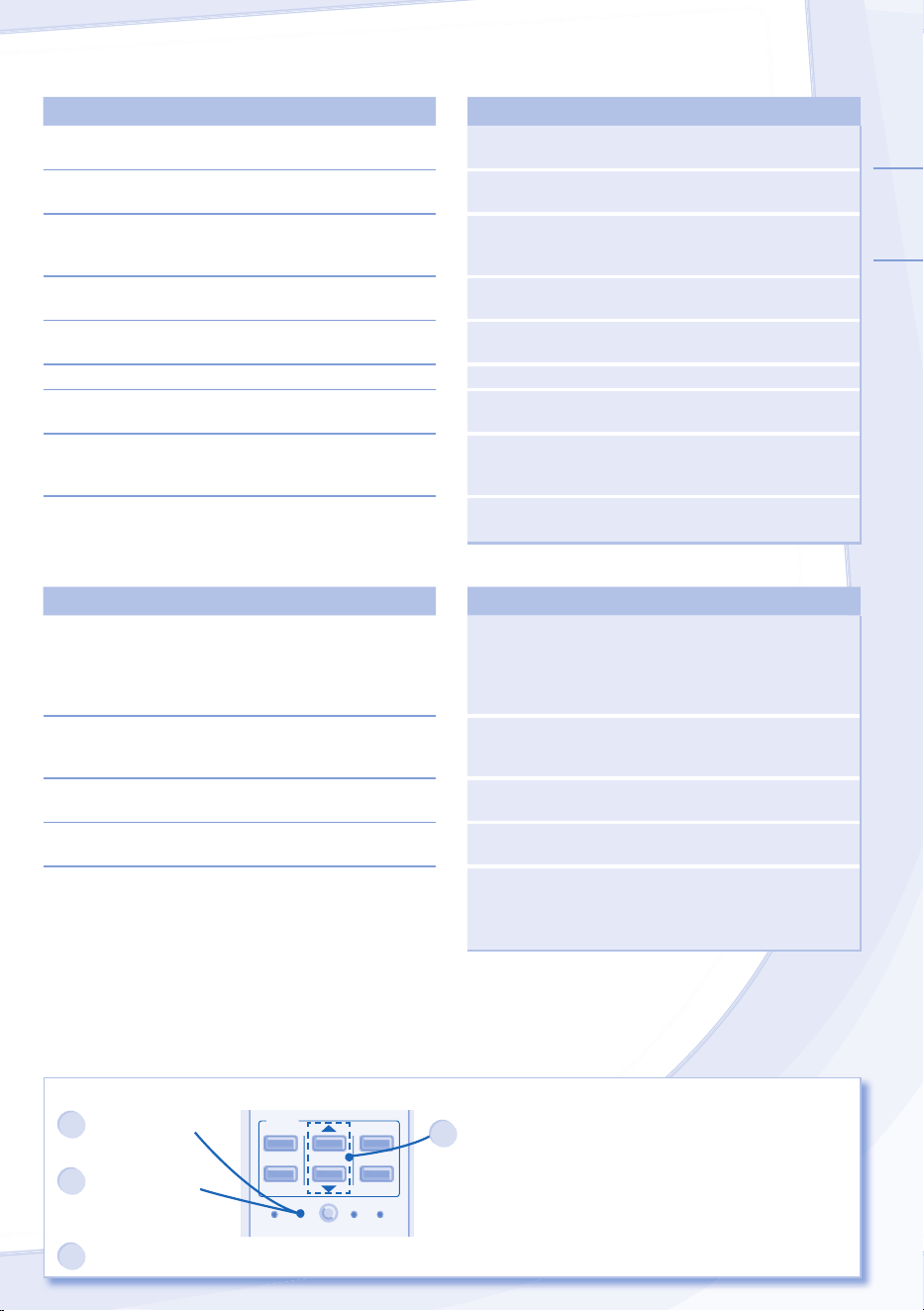
El mando a distancia no funciona.
(La pantalla está oscura o la señal de transmisión es débil.)
► • Inserte las baterías correctamente.
• Reemplace las baterías débiles.
La unidad no funciona. ► • Compruebe si el disyuntor está activado.
• Compruebe si los temporizadores han sido programados.
La unidad no recibe la señal del mando a distancia. ► • Asegúrese de que el receptor no esté obstruido.
• Ciertas luces fl uorescentes puede interferir con el
transmisor de señal. Consulte con un distribuidor
autorizado.
La unidad se detiene y el indicador de tiempo titila.
Use el control remoto para recuperar el código de error.
TIMER
SET
CANCEL
ON
OFF
1
2
3
SET CHECK CLOCK RESET
AC
RC
1
Pulse durante
5 segundos.
3
Pulse durante 5
segundos para
abandonar la
comprobación.
2
Pulse hasta escuchar
un pitido y, después,
apunte el código del
error.
Nota:
• Para cierto error, puede
reiniciar la unidad con el
funcionamiento limitado
con 4 pitidos durante el
inicio de la operación.
4
Apague la unidad e informe el código de error al distribuidor autorizado.
16
Información para Usuarios sobre la Recolección y Eliminación de aparatos viejos y baterías usadas
[Informacion sobre la Eliminación en otros
Países fuera de la Unión Europea]
Estos símbolos sólo son válidos dentro de la Unión
Europea. Si desea desechar estos objetos, por favor
contacte con sus autoridades locales o distribuidor y
consulte por el método correcto de eliminación.
Nota sobre el símbolo de la bateria (abajo,
dos ejemplos de símbolos):
Este símbolo puede ser usado en combinación con un
símbolo químico. En este caso, el mismo cumple con
los requerimientos establecidos por la Directiva para
los químicos involucrados.
Pb
PARA INSPECCIÓN TEMPORAL DESPUÉS DE UN
LARGO PERÍODO EN DESUSO
• Verifi que las pilas del mando a distancia.
• Compruebe que las tomas de entrada y salida de las
rejillas de ventilación no estén obstruidas.
•
Use el botón Auto OFF/ON (apagado/encendido automático) para
seleccionar el funcionamiento de Refrigeración. Después de 15
minutos de operación, es normal que exista la siguiente diferencia
de temperatura entre los orifi cios de entrada y salida de aire:
Enfriamiento: ≥ 14.4°F
SI NO SE VA A UTILIZAR LA UNIDAD DURANTE UN
PERIODO PROLONGADO DE TIEMPO
•
Apague el disyuntor.
•
Extraiga las pilas del mando a distancia.
NO UTILICE LA UNIDAD SI
APAGUE EL DISYUNTOR, después consulte a un distribuidor
autorizado bajo las siguiente condiciones:
•
Si escucha ruidos extraños durante el funcionamiento.
•
Si entra agua o elementos extraños en el mando a distancia.
•
Si hay escapes de agua de la unidad interior.
•
Si el interruptor del circuito se abre frecuentemente.
•
Los interruptores o los botones no funcionan correctamente.
INFORMACIÓN
Número de modelo CS-S9NKUW / CU-S9NKU
Los modelos enumerados anteriormente han sido diseñados y fabricados para cumplir con los criterios
de ENERGY STAR® respecto a la efi ciencia energética cuando se usan con los componentes de bobina
adecuados. Sin embargo, la carga de refrigerante adecuada y el fl ujo de aire adecuado son críticos para
lograr la capacidad y efi ciencia nominales. Al instalar este producto deben seguirse las instrucciones en
cuanto a carga del refrigerante y la corriente de aire. El no confi rmar que la carga y la corriente de aire
sean los adecuados podría reducir la efi ciencia energética y acortar la vida útil del equipo.
Aviso de la FCC
Este dispositivo cumple con la parte 15 de las Normas de la FCC. Su funcionamiento esta sujeto a las siguientes
condiciones: (1) este dispositivo no puede provocar interferencia danina y (2) este dispositivo debe aceptar cualquier
interferencia recibida, incluso aquella que pudiera provocar un funcionamiento no deseado.
Este equipo ha sido probado y se comprobo que cumple con los limites para un dispositivo digital Clase B, en aplicacion
de lo dispuesto en la parte 15 de las Normas de la FCC. Estos limites estan disenados para proporcionar proteccion
razonable contra interferencia danina en una instalacion residencial. Este equipo genera, usa y puede irradiar energia
de radiofrecuencia y, si no se instala y usa de acuerdo con las instrucciones, puede causar interferencia danina a las
comunicaciones por radio. Sin embargo, no se garantiza que no ocurra interferencia en una instalacion en particular. Si este
equipo causa interferencia danina en la recepcion de radio o television, lo que se puede descubrir encendiendo y apagando
el equipo, se aconseja al usuario que intente corregir la interferencia siguiendo uno o mas de los procedimientos indicados
a continuacion:
• Reoriente o ubique en otra parte la antena receptora.
• Aumente la separacion entre el equipo y el receptor.
• Conecte el equipo a una toma de corriente o un circuito distinto al cual esta conectado el receptor.
• Consulte con el distribuidor o con un tecnico experimentado de radio o TV para recibir ayuda.
Precaución FCC: Para asegurar el cumplimiento continuado y seguir las instrucciones de instalación adjuntas. Cualquier
cambio o modifi caciones no expresamente aprobadas por la parte responsable del cumplimiento podrían anular la autoridad
del usuario para operar este equipo.
Aviso de Industria Canadá
Este aparato digital de Clase B cumple con la norma Canadiense ICES-003.

MEMO
MEMO

MEMO
QUICK GUIDE/GUÍA RÁPIDA
Printed in Malaysia
F568313
YS1211-1
Panasonic Corporation
Website: http://panasonic.net/
S9NKUW, S12NKUW S18NKU, S22NKU
AUTO
COOL
DRY
FAN
SPEED
AIR
SWING
FAN SPEED
AIR SWING
MODE
QUIET
TEMP
OFF/ON
POWERFUL
TIMER
SET
CANCEL
ON
OFF
1
2
3
SET CHECK CLOCK RESET
AC
RC
AUTO
COOL
DRY
FAN
SPEED
AIR
SWING
FAN SPEED
MODE
QUIET
TEMP
OFF/ON
AIR SWING
POWERFUL
TIMER
SET
CANCEL
ON
OFF
1
2
3
SET CHECK CLOCK RESET
AC
RC
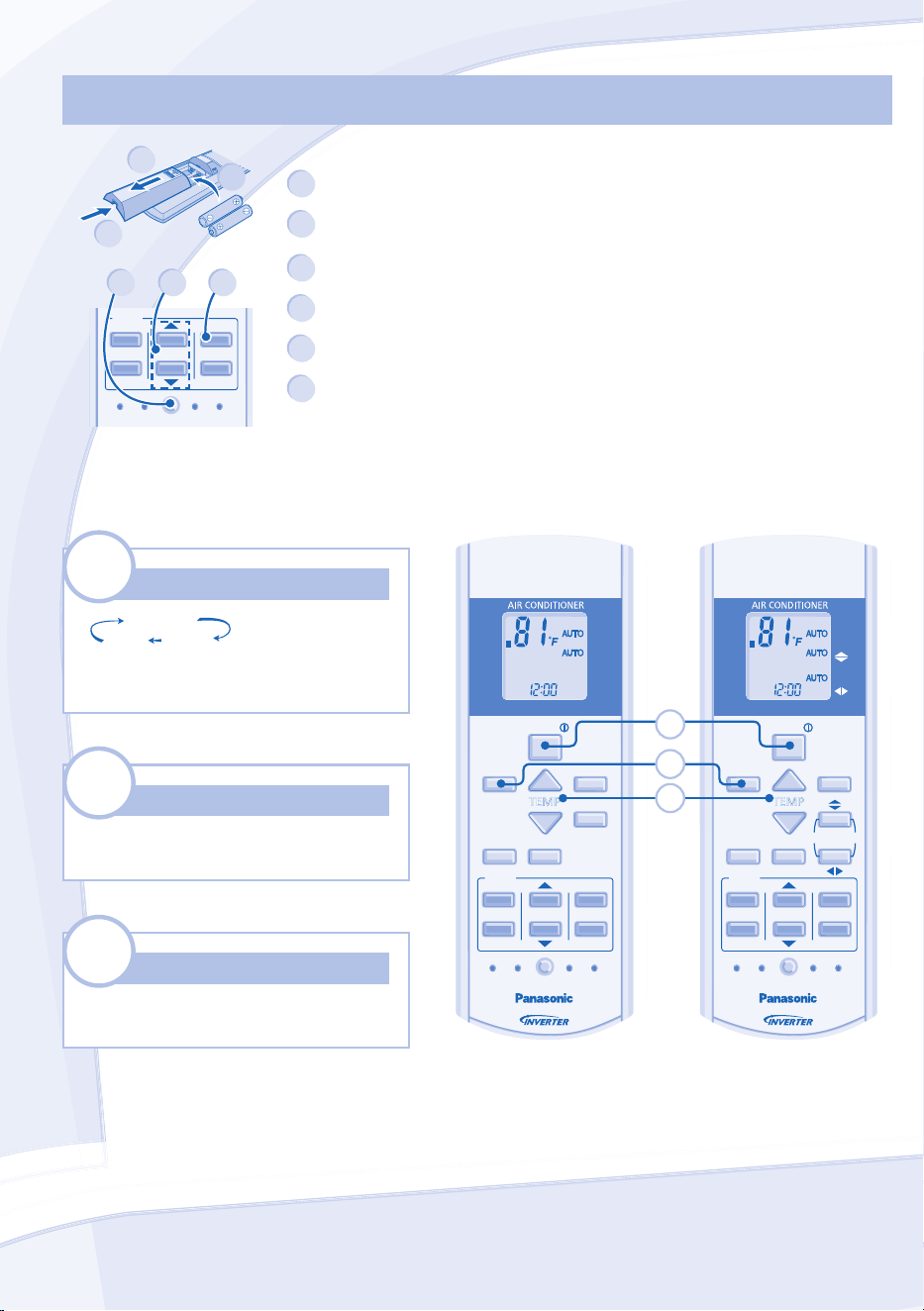
2
1
3
MODE
MODE
AUTO
DRY COOL
Select the desired mode.
Seleccione el modo deseado.
1
OFF/ON
OFF/ON
Start/stop the operation.
Inicie/detenga el funcionamiento.
2
TEMP
TEMP
Select the desired temperature.
Seleccione la temperature deseada.
3
Remote Control Preparation • Preparación Del Mando A Distancia
Remote Control Preparation • Preparación Del Mando A Distancia
1
2
3
TIMER
SET
CANCEL
ON
OFF
1
2
3
SET CHECK CLOCK RESET
AC
RC
4
5 6
1
Pull out • Quite
2
Insert AAA or R03 batteries (can be used ~ 1 year) •
Inserte pilas AAA o R03 (puede ser usado ~ 1 año)
3
Close the cover • Cierre la tapa
4
Press CLOCK • Presione CLOCK
5
Set time • Ajuste la hora
6
Confi rm • Confi rmar