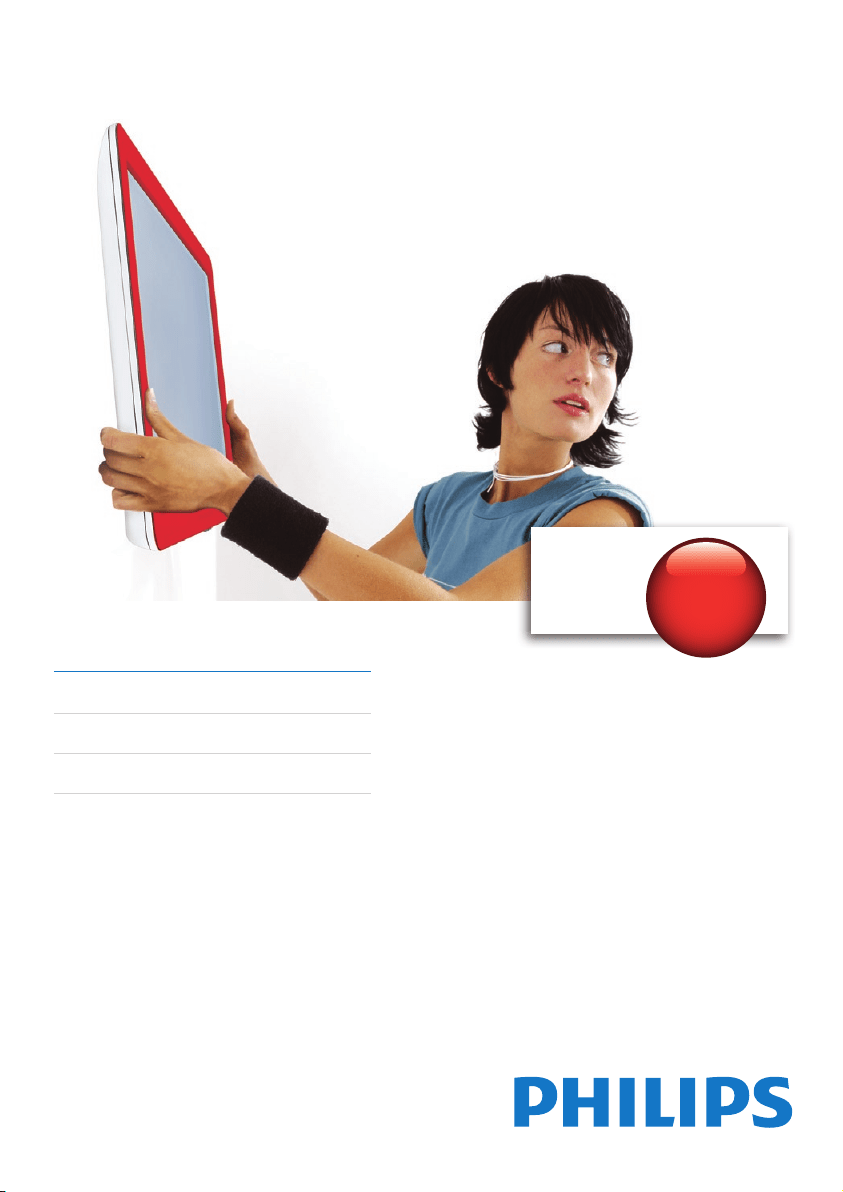
Register your product and get support at
www.philips.com/welcome
Philips
SQM6485/17
42-60” (107-152cm)
Supports
up to
152lb
(
70Kg
)
EN User manual
ES Manual del usuario
FR Mode d’emploi

2
EN
Caution
This product is designed strictly for installation on a vertical wall in commercial and residential buildings. It is constructed •
of wooden wall studs (16” (40cm) or 24” (60cm) pitch), masonry (brick) or solid concrete only.
This product is designed for easy connection of cables and peripherals. Avoid exerting excessive pulling force during •
connection or this can damage the product.
This product is designed for use with all display models that incorporate respective VESA mounting standard. Ensure the •
displayiswithinthespeciedweightlimit.Mountinganyothertypeormodelofdisplayisapotentialsafetyrisk.Philips
declines all liability resulting from the unauthorized use of this wall mount.
This product is not designed for installation on walls constructed of metal studs or studs with a pitch exceeding 24” • (60cm).
Ifyouareunsureofyourwallcomposition,contactaqualiedinstaller.
To avoid weakening the wall strength, drill at least 1” • (2.5cm) away from another drill hole. If the wall mount bracket is not
perfectly level, adjust the angle of the display later, as described in the wall mount guide (section 3, image b).
The roller mechanism is designed for a perfect leveling during installation. Avoid frequent moving of the rollers inside the •
rail as this can unscrew the rollers and cause damage to the rollers and the display.
The wall or mounting surface must be capable of supporting the combined weight of the mount and the display; •
otherwise the structure must be reinforced.
Safety gear and proper tools must be used. Failure to do so can result in property damage and/or serious injury.•
A minimum of two people are required for this installation. Do not attempt to install this mount alone under any •
circumstance.
The wall mount allows a limited tilting movement if you pull on the bottom edge of the display. However, for inserting and •
adjusting cables and connectors, we strongly advise you to dismount the display.
Follow all instructions and recommendations regarding suitable locations for mounting your display. Consult the owner’s •
manual for your display for more information.
Maintenance
After installation, brackets require regular maintenance and inspections periodically to prevent the possibility of rot,
•
deformation and looseness.
Warranty
Warranty information can be found at: www. philips.com/welcome. For technical support, send us an email with the model •
number of the product and a detailed description of your problem to: accessor[email protected]
Limited One-Year Warranty Philips warrants that this product shall be free from defects in material, workmanship and •
assembly,undernormaluse,inaccordancewiththespecicationsandwarnings,foroneyearfromthedateofyour
purchase of this product. This warranty extends only to the original purchaser of the product, and is not transferable.
To exercise your rights under this warranty, you must provide proof of purchase in the form of an original sales receipt
that shows the product name and the date of purchase. For customer support or to obtain warranty service, please call
1-919-573-7854. THERE ARE NO OTHER EXPRESS OR IMPLIED WARRANTIES. Philips’ liability is limited to repair or, at
its sole option, replacement of the product. Incidental, special and consequential damages are disclaimed where permitted
bylaw.Thiswarrantygivesyouspeciclegalrights.Youmayalsohaveotherrightsthatvaryfromstatetostate.Warranty
information can also be found at: www.philips.com/welcome
!
!
CAUTION
The maximum loading weight is 152lbs (70kg). Use
heavier than that may cause injury. TV size: 42 - 60 inch
(107 - 152cm)
. See apparatus instructioins.

3
ES
Precaución
Esteproductosehadiseñadoestrictamenteparainstalarloenunaparedverticalenedicioscomercialesyresidenciales.•
Deben estar construidos con montantes de madera (de 16” (40 cm) o 24” (60 cm) de grosor), mampostería (ladrillo o piedra)
o únicamente con hormigón.
Este producto ha sido diseñado para conectar cables y periféricos fácilmente. Evite ejercer excesiva fuerza durante la •
conexión, ya que ello podría dañar el producto.
Este producto ha sido diseñado para utilizarlo con todos los modelos de pantalla que incorporan el estándar de montaje •
VESAcorrespondiente.Asegúresedequelapantallaestádentrodellímitedepesoespecicado.Elmontajedecualquier
otro tipo o modelo de pantalla supondrá un riesgo potencial contra la seguridad. Philips rechaza cualquier responsabilidad
derivada de un uso inapropiado de este soporte de montaje en pared.
Este producto no ha sido diseñado para instalarlo en paredes hechas de montantes de metal o montantes con más de 24” •
(60 cm)degrosor.Sinoestásegurodelacomposicióndelapared,póngaseencontactoconuninstaladorcualicado.
Paraevitarquelaparedsedebilite,perforelosoriciosconalmenos1”• (2.5 cm) de separación entre ellos. Si el soporte de
montaje en pared no está perfectamente nivelado, ajuste más tarde el ángulo de la pantalla tal como se describe en la guía
del soporte de montaje en pared (sección 3, imagen
b).
El mecanismo de rodillo ha sido diseñado para un perfecto nivelado durante la instalación. Evite mover con frecuencia los •
rodillos del interior del raíl, ya que se pueden desatornillar y se pueden producir daños en los rodillos y en la pantalla.
Laparedolasuperciedemontajedebensercapacesdeaguantarelpesocombinadodelsoportedemontajeydela•
pantalla. De lo contrario, la estructura se debe reforzar.
Se debe utilizar un engranaje de seguridad y herramientas adecuadas. De lo contrario se pueden producir daños •
materiales y/o lesiones graves.
Para llevar a cabo la instalación se necesita un mínimo de dos personas. No intente instalar este soporte de montaje sin •
ayuda bajo ningún concepto.
El soporte de montaje en pared permite inclinar ligeramente la pantalla al tirar del borde inferior de la misma. Sin •
embargo, para insertar y ajustar cables y conectores, le recomendamos encarecidamente que desmonte la pantalla.
Siga todas las instrucciones y recomendaciones relativas a las ubicaciones apropiadas para el montaje de la pantalla. •
Consulte el manual de usuario de la pantalla para obtener más información.
Mantenimiento
Tras la instalación, los soportes necesitan un mantenimiento regular e inspecciones periódicas para evitar la posibilidad de
•
que se oxiden, se deformen o se suelten.
Garantía
Puede encontrar información sobre la garantía en: www. philips.com/welcome. Para obtener asistencia técnica, •
envíenos un correo electrónico con el número de modelo del producto y la descripción detallada del problema a:
accessorysuppor[email protected]
La garantía limitada de un año de Philips garantiza que este producto no tendrá ningún defecto de material, fabricación, ni •
montaje durante un año a partir de la fecha de compra del mismo, siempre y cuando se le dé un uso normal de acuerdo
conlasespecicacionesyadvertencias.Estagarantíaseaplicaúnicamentealcompradororiginaldelproductoynoes
transferible.Parabeneciarsedelosderechosqueleotorgaestagarantía,debeproporcionarlapruebadecompra
mediante un recibo de compra original en el que se indique el nombre del producto y la fecha de compra. Para ponerse
en contacto con el servicio de atención al cliente o para obtener servicio de garantía, llame al número 1-919-573-7854.
NO EXISTEN OTRAS GARANTÍAS EXPRESAS O IMPLÍCITAS. La responsabilidad de Philips está limitada a reparar o
reemplazar el producto por decisión propia. Los daños accidentales, especiales y resultantes carecerán de validez dentro
deloslímitesdelaley.Estagarantíaleotorgaderechoslegalesespecícos.Puedequetengaotrosderechosquevaríende
una región a otra. La información acerca de la garantía también se puede consultar en: www.philips.com/welcome
!
!
PRECAUCIÓN
La charge maximale est de 152lbs (70kg). Une charge
plus lourde induit un risque de blessures. Taille du
téléviseur : 42 - 60” (107 - 152cm). Voir les instructions
concernant l'appareil.

4
FR
Attention
Cesupportdexationmuraleestexclusivementconçupouruneinstallationsurunmurverticaldansunbâtiment•
commercialourésidentiel.Ildoitêtreinstallésurunmurencloisonslattéesetplâtréesenbois(16”(40 cm) ou 24” (60 cm)
d'écart),unmurdemaçonnerie(brique)ouunmursolideenbétonuniquement.
Ceproduitestconçudemanièreàcequevouspuissiezfacilementconnecterdescâblesetdespériphériques.N’exercer•
pasunepressiontropfortelorsquevousbranchezuncâbleouunpériphérique,celapourraitendommagerleproduit.
Ceproduitestconçupourêtreutiliséavectouslesmodèlesd’écransconformesàlanormedemontageVESA.Assurez-•
vousquel’écrannedépassepaslachargemaximumspéciée.Lemontagedetoutautremodèled’écranconstitueun
risquedesécuritépotentiel.Philipsdéclinetouteresponsabilitéencasdemauvaiseutilisationdecesupportdexation
murale.
Ceproduitn’estpasadaptéàuneinstallationsurdescloisonsenmétaloudescloisonsdontl’écartentrelesmontants•
estsupérieurà24po(60cm).Sivousneconnaissezpaslacompositiondevotremur,contactezuninstallateurqualié.
And’éviterd’affaiblirlarésistancedumur,percezuntrouàaumoins1po• (2.5cm)d’unautretrou.Silesupportdexation
muralen’estpasparfaitementàniveau,vousréglerezlapositiondevotreécranplustard,commeindiquédansleguidede
xationmurale(section3,imageb).
Lemécanismeàroulettesestconçupourqueleniveausoitparfaitpendantl’installation.Évitezdetropbougerles•
roulettesàl’intérieurdurail,celapourraitdévisserlesroulettesetlesendommagerainsiquel’écran.
Lemuroulasurfacedexationdoiventpouvoirsupporterlepoidscombinédusupportdexationetdel’écran;sice•
n’est pas le cas, la structure doit être renforcée.
Utilisez du matériel de sécurité et les outils adéquats. Sans ces précautions, vous risquez d’endommager l’appareil ou de •
vousblessergrièvement.
Deux personnes minimum sont nécessaires pour l’installation. N’essayez en aucun cas d’installer ce support tout seul.•
Le montage mural permet une inclinaison limitée si vous exercez une traction sur la partie inférieure de l’écran. •
Cependant,sivoussouhaitezinséreretréglerlescâblesetlesconnecteurs,nousvousrecommandonsdedémonter
l’écran.
Suiveztouteslesinstructionsetlesrecommandationsrelativesauxsurfacesdexationadaptéespourl’installationde•
votre écran. Pour plus d’informations, reportez-vous au manuel d’utilisation de votre écran.
Entretien
Aprèsinstallation,ilestnécessaired'effectuerunevéricationetunentretienréguliersdessupportsand'évitertout
•
risque de dégradation, déformation et desserrement.
Garantie
Pour obtenir des informations sur la garantie, rendez-vous sur : www. philips.com/welcome. Pour obtenir une assistance •
technique,envoyez-nousune-mailindiquantlaréférencedumodèleetcomportantunedescriptiondétailléeduproblème
àl’adresse:accessor[email protected]
Garantielimitéeàunan:Philipsgarantitqueceproduitestexemptdedéfautsdematériau,defabricationet•
d'assemblage, dans des conditions normales d'utilisation, conformément aux caractéristiques techniques et avertissements,
pourunepérioded'unanàcompterdeladated'achatduproduit.L'extensiondecettegarantieestaccordéeuniquement
àl'acheteurd'originedeceproduitetn'estpastransférable.Pourexercerlesdroitsquivoussontconférésparla
présentegarantie,vousdevezfournirlereçuoriginalattestantdel'achatsurlequelgurelenomduproduitainsiquela
dated'achat.Pourcontacterl'assistanceclientèleoubénécierd'unservicesousgarantie,appelezle:1-919-573-7854.
AUCUNEAUTREGARANTIEEXPRESSEOUIMPLICITEN'ESTPRÉVUE.Philipss'engageuniquementàréparerouà
remplacerleproduitàsapropreconvenance.Lesdommagesaccessoires,particuliersetindirectsnesontpascouverts
parcettegarantie,etce,dansleslimitesautoriséesparlaloi.Cettegarantievouspermetdejouirdedroitsspéciques.
Vouspouvezégalementjouird'autresdroits,selonlesÉtats.Pourplusd'informationssurlagarantie,visitezlesitewww.
philips.com/welcome
!
!
ATTENTION
El peso de carga máximo es de 152lbs (70kg). Un peso
mayor podría causar daños. Tamaño del televisor: 42 -
60” (107 - 152cm). Consulte las instrucciones del aparato.

5
#3
#2
#2
4x
4x
2x
2x
2x
2x
4x
2x
2x
4x 2x
4x 2x
1x
<110lb (50Kg):
M6
>110lb
(50Kg):
M8
6
1
5
/8”
(41mm)
1
7
/8”
(46mm)
1”
(24mm)
1
1
/8”
(29mm)
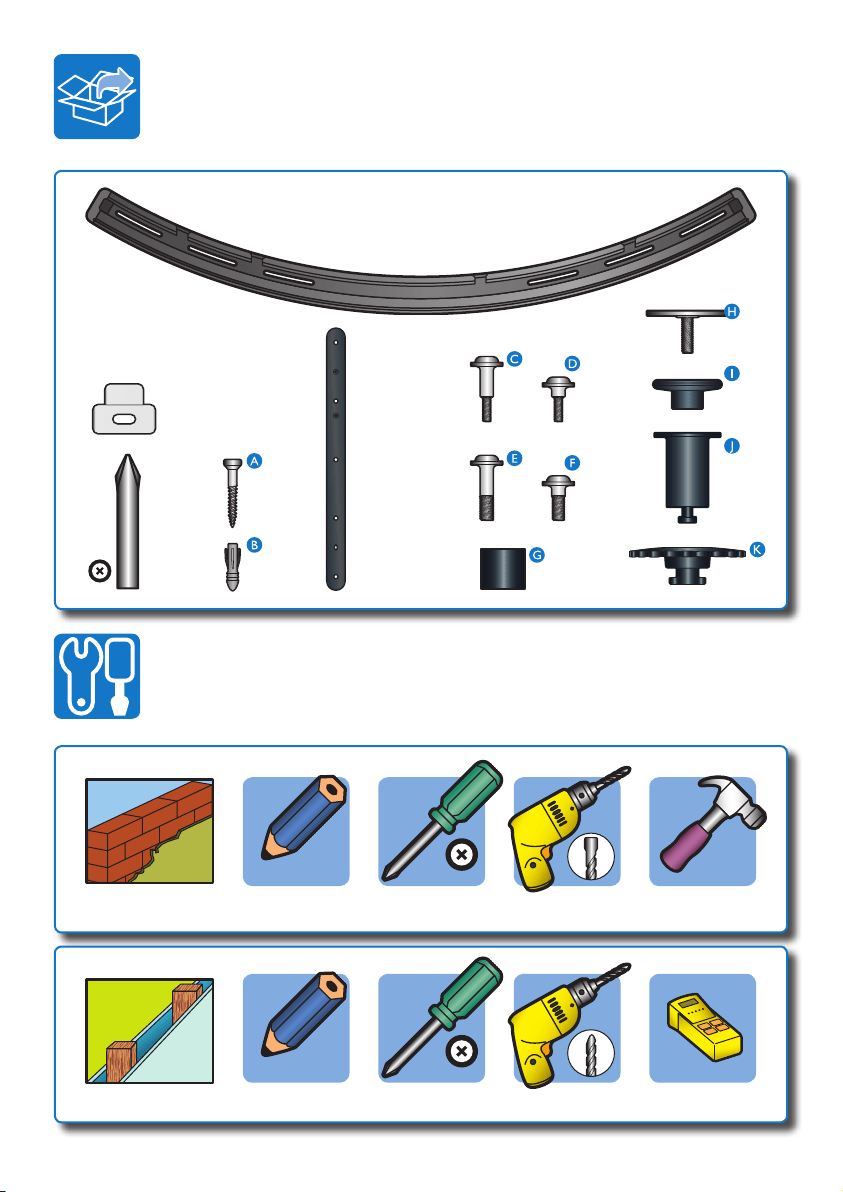
EN Screwdriver/electricdrill/hammer•ES Destornillador/taladroeléctrico/martillo•
FR Tournevis / perceuse électrique / marteau
EN Screwdriver/electricdrill/studnder•ES Destornillador/taladroeléctrico/detectordemontantes•
FR Tournevis / perceuse électrique / détecteur de montant
5
/16” (8mm)
3
/16” (5mm)
1
! !! !
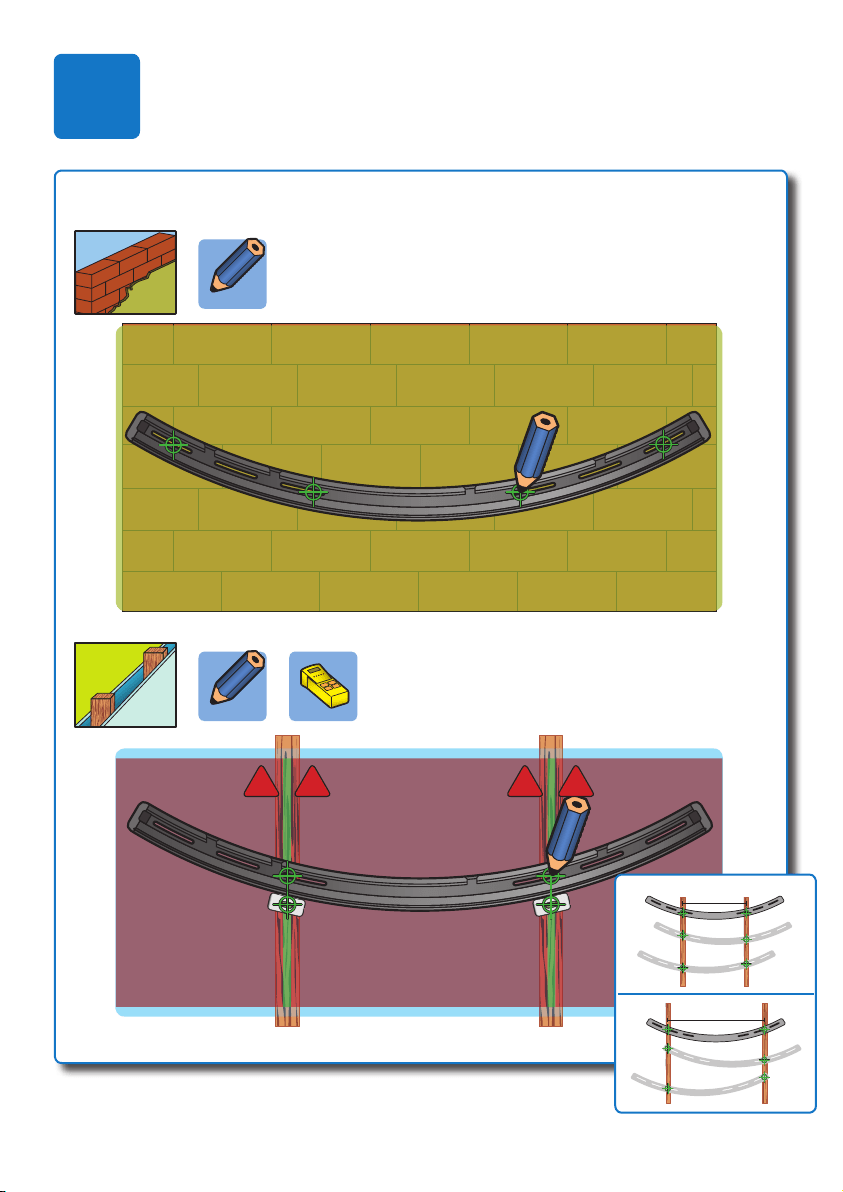
a
EN Selectamongthreepositionstoxthemount:left,centralorright.
ES Seleccioneunadelastresposicionesparajarelsoportedemontaje:izquierda,
centro o derecha.
FR Sélectionnezunedestroispositionsdexation:àgauche,aucentreouàdroite.
16” (40cm)
24” (60cm)
7
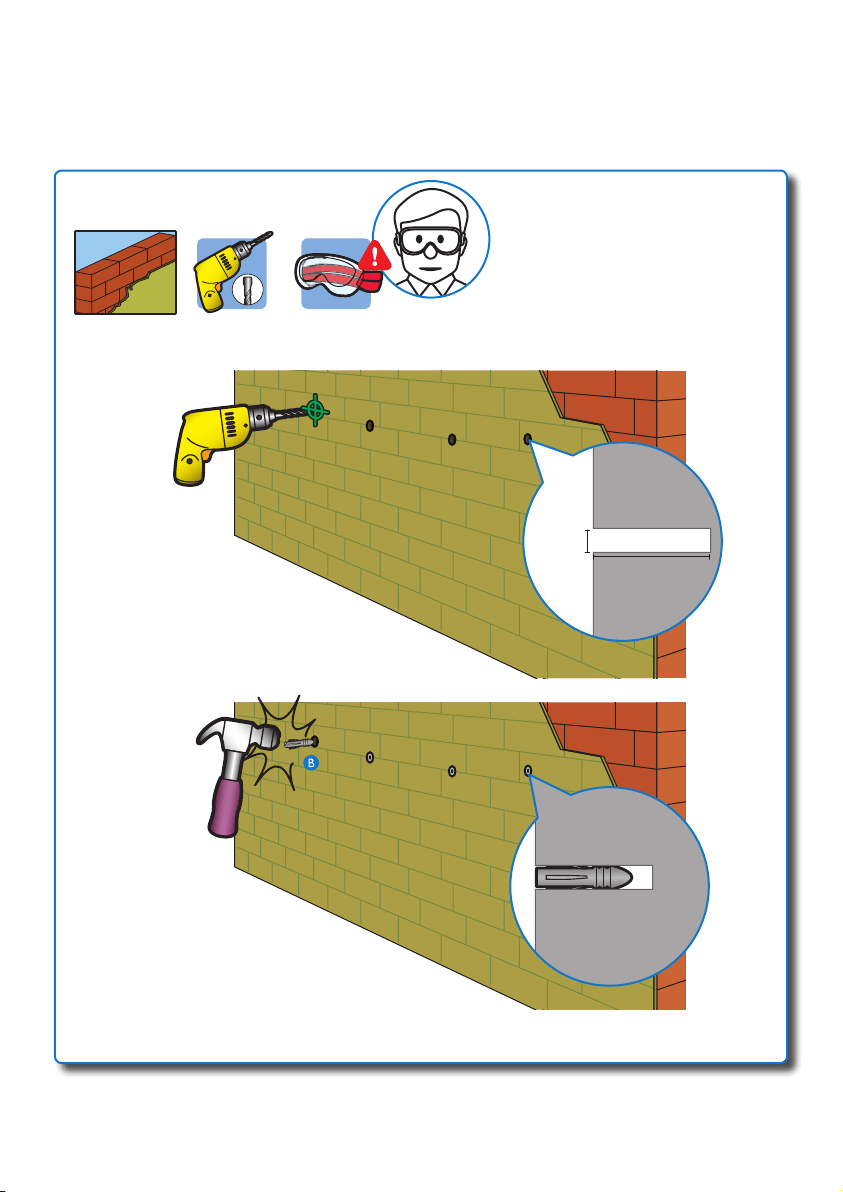
b
A
B
3” (75mm)
Ф
5
/16”
(8mm)
5
/16” (8mm)
8
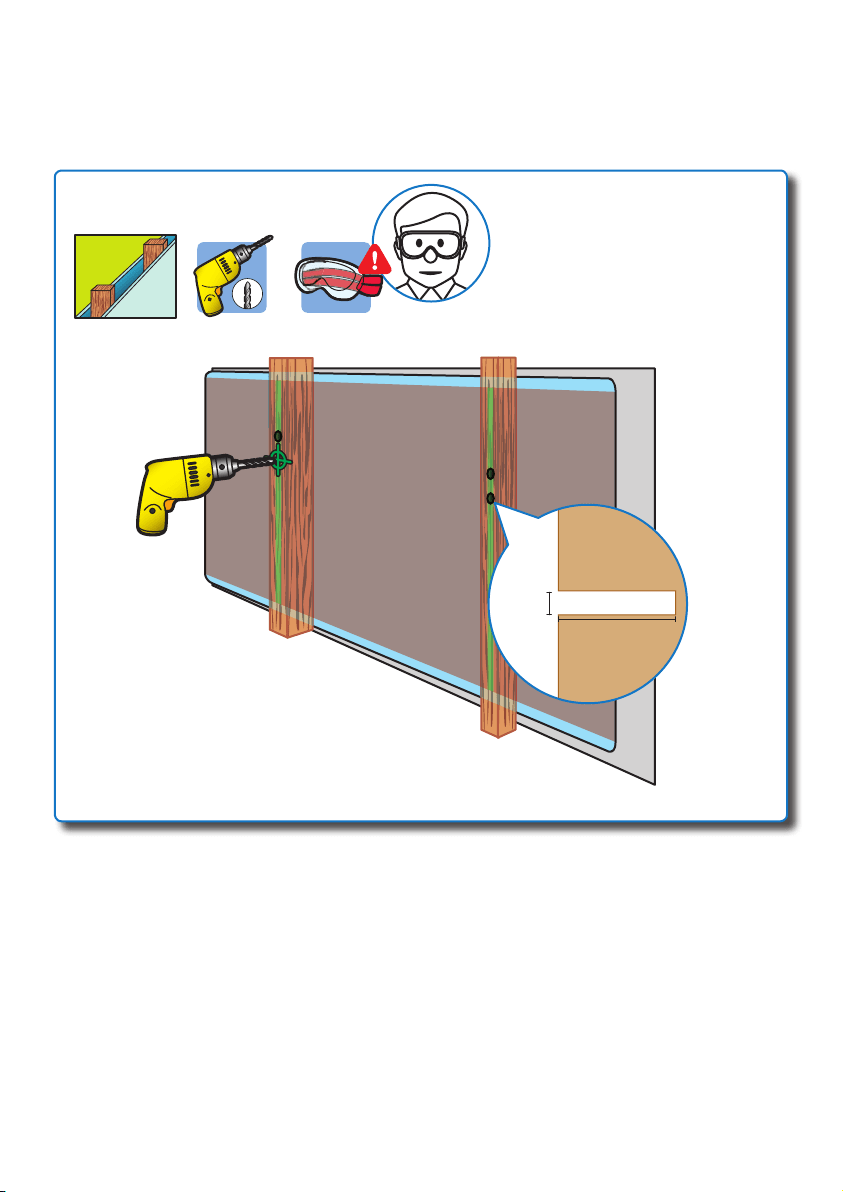
b
...
3
/16” (5mm)
2” (50mm)
Ф
3
/16”
(5mm)
9
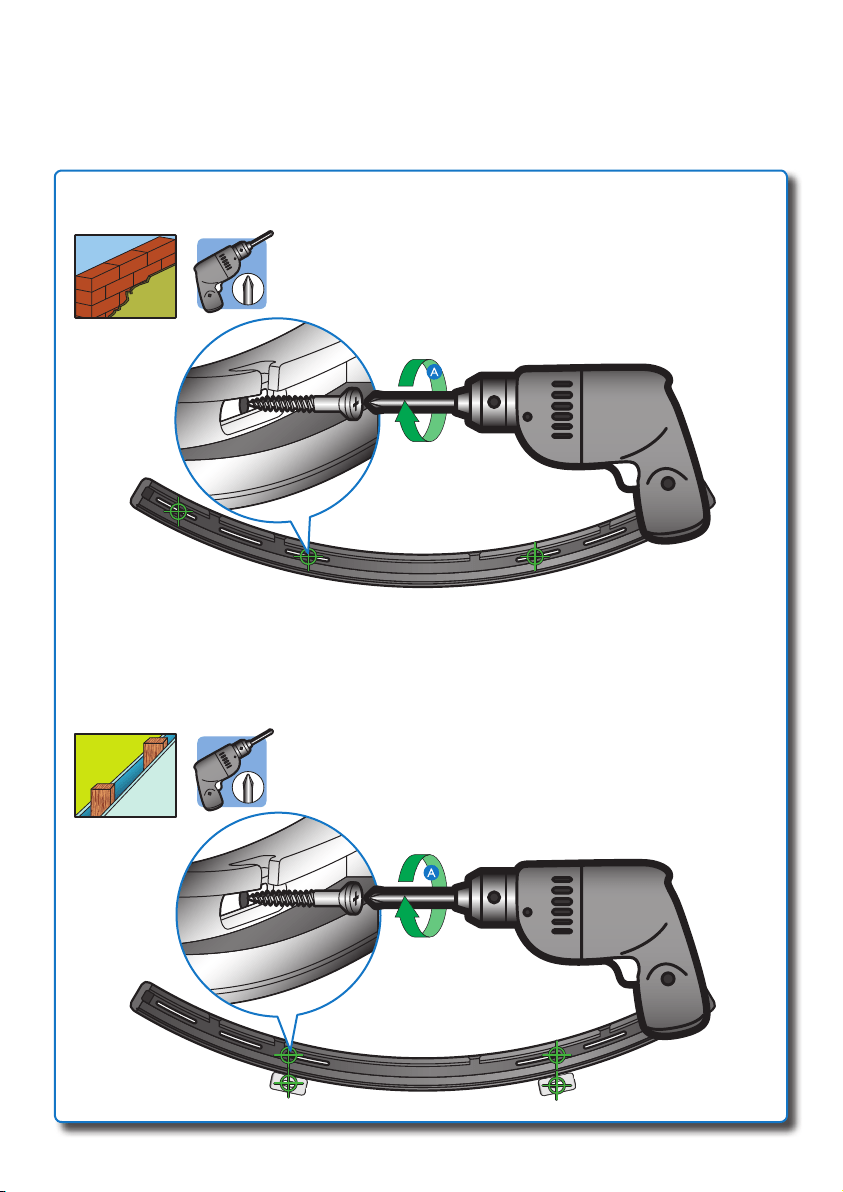
c
10
#3
#3
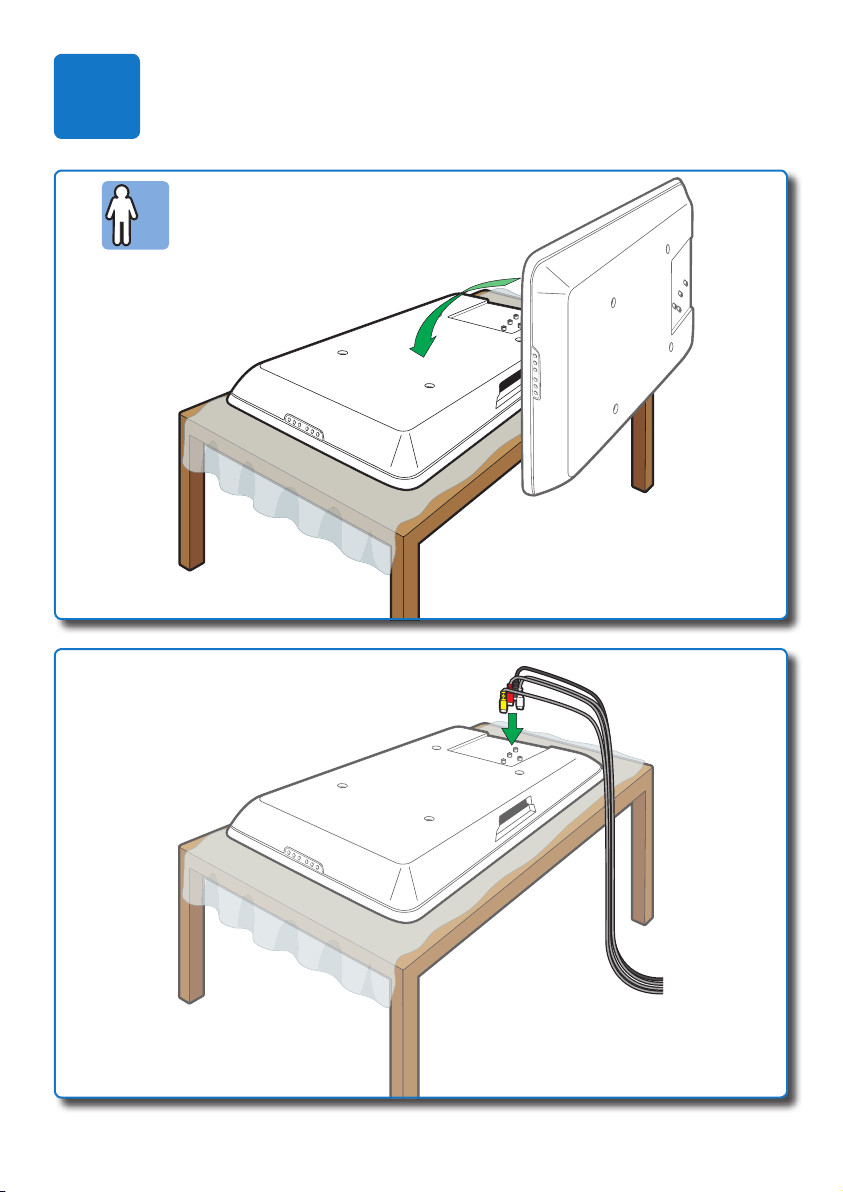
2x
2
b
a
11
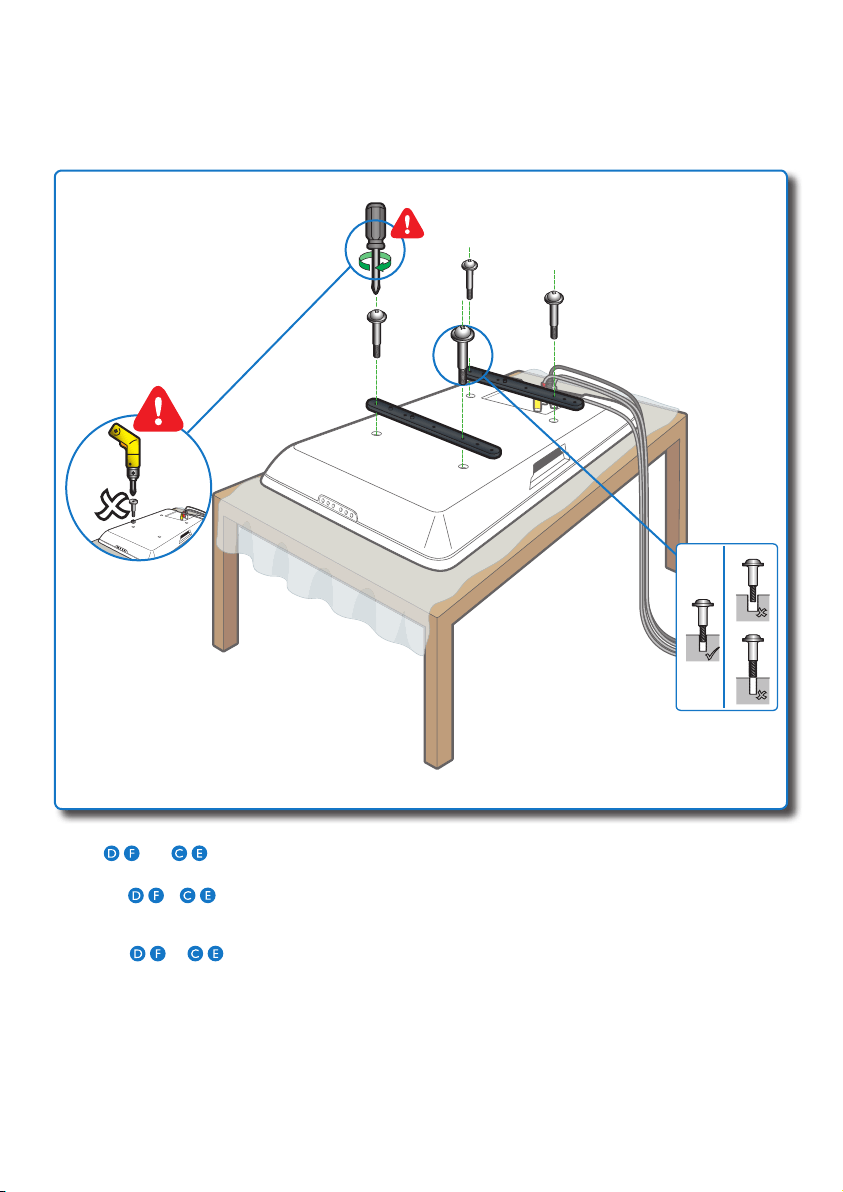
c
12
EN Try / and / , and then determine the ones with correct diameter and length. Stop forcing them into
the holes if you feel resistance to avoid damaging the display.
ES Pruebe
/ y / y, a continuación, determine los que tienen una longitud y un diámetro correctos.
Paraevitarquelapantallasedañe,nolosintroduzcaalafuerzaenlosoriciossiencuentraalgúntipode
resistencia.
FR Essayez
/ et / ,puissélectionnezlesvisayantlediamètreetlalongueurappropriés.Pournepas
endommager l'écran, n'enfoncez pas les vis dans les trous si vous sentez une résistance.
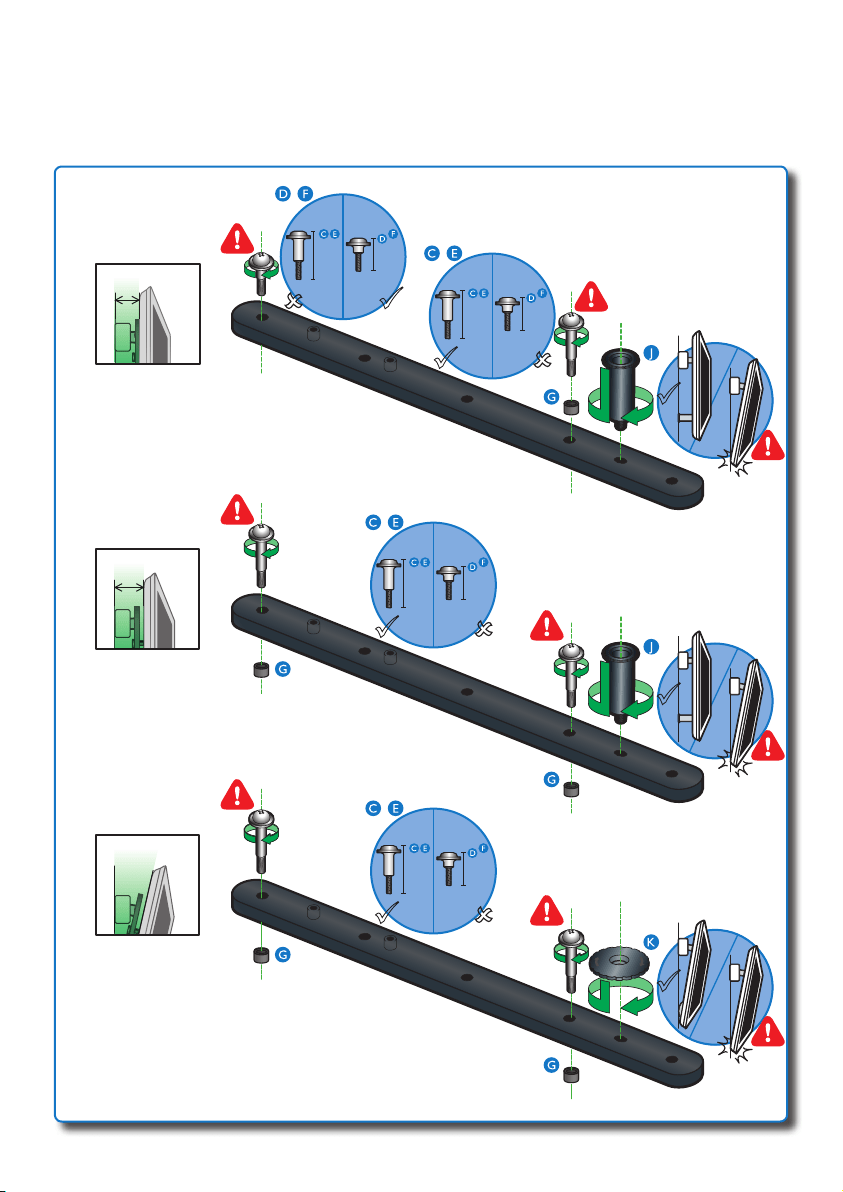
c
...
B
A
C
13
2
3
/8” (60mm)
1
5
/8” (41mm)
1
7
/8” (46mm)
1
5
/8” (41mm)
1
7
/8” (46mm)
1
5
/8” (41mm)
1
7
/8” (46mm)
1
5
/8” (41mm)
1
7
/8” (46mm)
/
/
/
/
1
25
/32” (45mm)
1” (24mm)
1
1
/8” (29mm)
1” (24mm)
1
1
/8” (29mm)
1” (24mm)
1
1
/8” (29mm)
1” (24mm)
1
1
/8” (29mm)
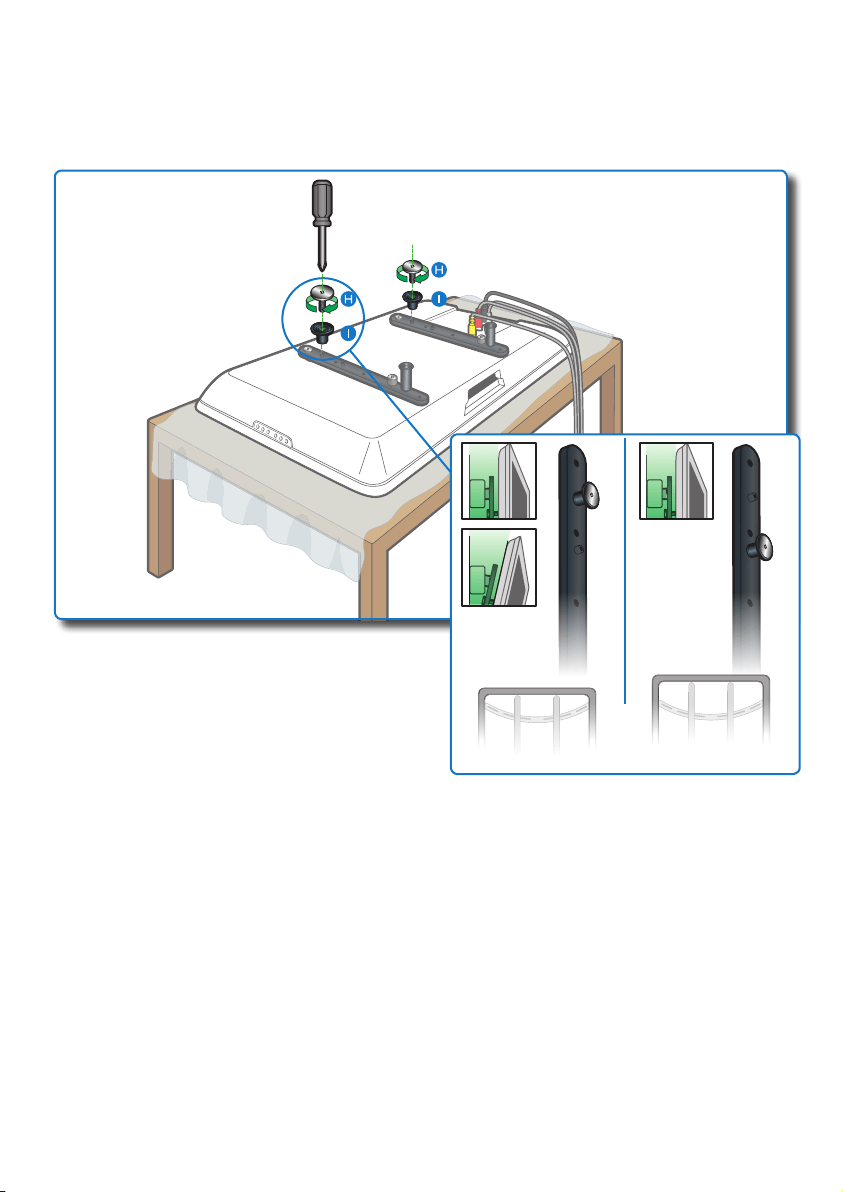
d
14
b
a
2x
3
VESA600
VESA400
VESA300
≈0.2”
(5mm)
600mm (23
5
/8”)
400mm (15
3
/4”)
300mm (11
13
/16”)
15
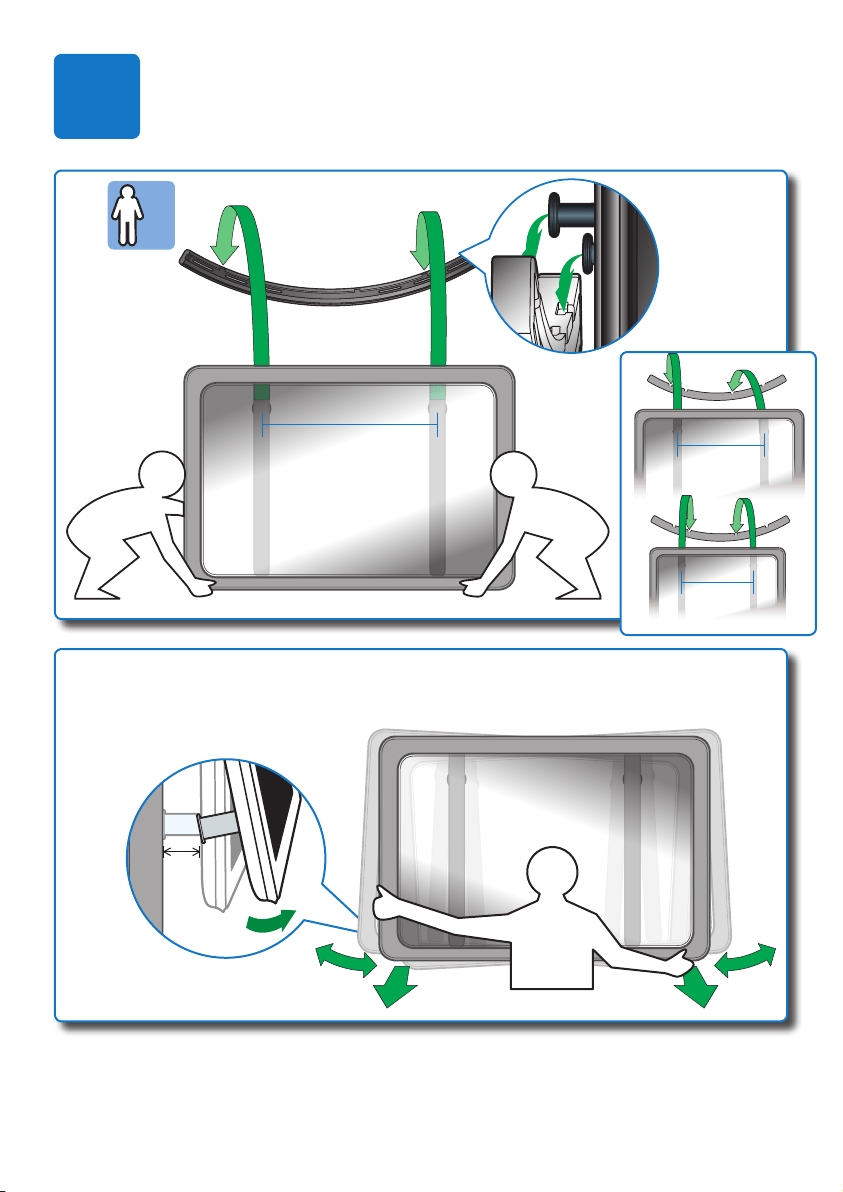
EN To allow a little extra wall space, gently lift the display and ensure the distance of the wall space is within
3
/16” (5mm).
ES Para dejar espacio adicional con la pared, levante la pantalla suavemente y compruebe que la distancia con la
pared es de
3
/16” (5mm) como máximo.
FR Pourobtenirunpeuplusd'espaceentrel'écranetlemur,soulevezdélicatementl'écranetenveillantàque
cet espace soit de
3
/16” (5mm) maximum.
Specicationsaresubjecttochangewithoutnotice
Trademarks are the property of Koninklijke Philips Electronics N.V.
or their respective owners
2011 © Koninklijke Philips Electronics N.V. All rights reserved.
SQM6485_17_UM_V1.6
WK10451