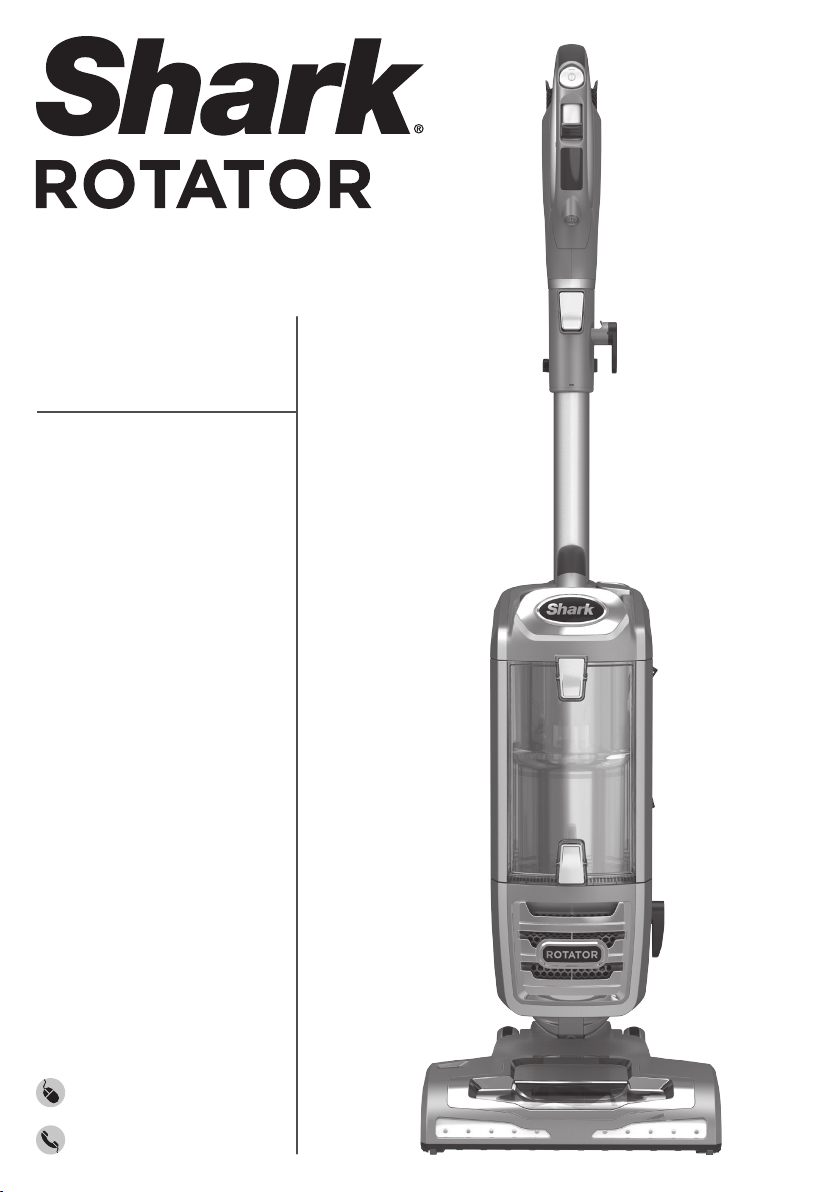
NV650/750
Series
POWERED LIFT-AWAY
®
sharkclean.com
1-800-798-7398
INSTRUCTIONS
1
1-800-798-7398
THANK YOU
for purchasing the Shark
®
Rotator
®
Powered Lift-Away
™
Upright Vacuum
PLEASE READ CAREFULLY AND KEEP
FOR FUTURE REFERENCE.
This Owner’s Guide is designed to help you get
a complete understanding of your new Shark
Rotator Powered Lift-Away Upright Vacuum.
If you should have a question, please call the
customer service line at 1-800-798-7398.
TECHNICAL SPECIFICATIONS
Voltage: 120V., 60Hz
Watts: 1150W
Amps: 9.5A
RECORD THIS INFORMATION
Model Number: ��������������������������������������
Date Code: �����������������������������������������
Date of Purchase (Keep receipt): �����������������������
Store of Purchase: �����������������������������������
REGISTER YOUR PURCHASE
sharkclean.com
1-800-798-7398
TIP: You can find the
model number on the
rating label located on
the back of your unit.
TIP: You can locate the
date code on one of the
prongs of the power
cordplug.

2
sharkclean.com
CONTENTS
Important Safety Instructions . . . . . . . . . . . . . . . . . . . . . . . . . . . 3
Getting to Know Your Shark
®
Rotator
®
Powered Lift-Away
™
Upright Vacuum . . . . . . . . . . . . . . . . . . . . 5
Assembling Your Vacuum . . . . . . . . . . . . . . . . . . . . . . . . . . . . . . 7
Using Your Vacuum in Upright Mode . . . . . . . . . . . . . . . . . . . . 9
What Does the Brushroll Indicator Light Mean? � � � � � � � � � � � � � 9
Using Your Vacuum in Above-Floor Mode . . . . . . . . . . . . . . . .11
Changing Your Floor Nozzles . . . . . . . . . . . . . . . . . . . . . . . . . . 13
Motorized Floor Nozzle � � � � � � � � � � � � � � � � � � � � � � � � � � � � � � � � � � �13
Dust-Away™ Hard Floor Attachment � � � � � � � � � � � � � � � � � � � � � � � 13
Using Your Vacuum in Lift-Away
®
Mode . . . . . . . . . . . . . . . . . 15
Lift-Away Cleaning � � � � � � � � � � � � � � � � � � � � � � � � � � � � � � � � � � � � � � �16
Using Your Caddy . . . . . . . . . . . . . . . . . . . . . . . . . . . . . . . . . . . . 17
Compatible Accessories . . . . . . . . . . . . . . . . . . . . . . . . . . . . . . . 19
Maintenance . . . . . . . . . . . . . . . . . . . . . . . . . . . . . . . . . . . . . . . . . 21
Emptying the Dust Cup � � � � � � � � � � � � � � � � � � � � � � � � � � � � � � � � � � � 21
Cleaning the Filters � � � � � � � � � � � � � � � � � � � � � � � � � � � � � � � � � � � � � � 22
Checking for Blockages & Maintaining Brushroll � � � � � � � � � � � � 23
Troubleshooting Guide . . . . . . . . . . . . . . . . . . . . . . . . . . . . . . . . 25
Warranty . . . . . . . . . . . . . . . . . . . . . . . . . . . . . . . . . . . . . . . . . . . . 26
3
1-800-798-7398
IMPORTANT SAFETY INSTRUCTIONS
FOR HOUSEHOLD USE ONLY
WARNING
To reduce the risk of injury, fire, electric shock, and property damage
resulting from improper use of the appliance, carefully observe the following
instructions. This unit contains electrical connections and moving parts that
potentially present risk to the user.
THE MOTORIZED FLOOR NOZZLE,
WAND, AND HANDLE CONTAIN
ELECTRICAL CONNECTIONS:
• These are not serviceable parts.
• Do not use to vacuum any liquids.
• Do not immerse in water.
•
If handle/wand is damaged, discontinue use.
1 Inspect power cord or plug for any damage
before use. DO NOT use vacuum cleaner
with a damaged cord or plug. Turn off all
controls before plugging or unplugging
the vacuum cleaner. Store your vacuum
cleaner with the power cord secured
around the two cord hooks.
2 DO NOT use outdoors or on wet surfaces.
Use only on dry surfaces.
3 Unplug from electrical outlet when not in
use and before servicing.
4 If vacuum cleaner is not working as it
should, has been dropped, damaged, left
outdoors, or dropped into water, return it to
SharkNinja Operating LLC for examination,
repair, or adjustment.
5 The hose contains electrical wires. DO NOT
use when damaged, cut, or punctured.
6 DO NOT pull or carry vacuum cleaner by
the cord or use the cord as a handle.
7 DO NOT unplug by pulling on cord. Grasp
the plug, not the cord.
8 DO NOT handle plug or vacuum cleaner
with wet hands.
9 DO NOT run the vacuum cleaner over the
power cord, close a door on the cord, or
pull cord around sharp corners.
10 The use of an extension cord is NOT
recommended.
11 DO NOT leave vacuum cleaner unattended
when plugged in.
12 Keep cord away from heated surfaces.
13
Always turn off the vacuum cleaner before
connecting or disconnecting motorized nozzle.
GENERAL USE
14 Use only as described in this manual.
1 5 Keep your work area well lit.
16 Keep the vacuum cleaner moving over
the carpet surface at all times to avoid
damaging the carpet fibers.
17 DO NOT place vacuum cleaner on unstable
surfaces such as chairs or tables.
18 DO NOT put any objects into openings. DO
NOT use with any opening blocked; keep
free of dust, lint, hair, and anything that
may reduce airflow.
19 DO NOT allow the appliance to be used by
children. Close attention is necessary when
used near children. This is not a toy.
20 DO NOT use without dust cup and/or filters
in place.

4
sharkclean.com
SAVE THESE INSTRUCTIONS
PLEASE READ CAREFULLY BEFORE USE
DUST CUP/FILTERS/ACCESSORIES
Before turning on the vacuum:
21 Make sure that all filters are thoroughly dry
after routine cleaning.
22 Make sure that dust cup and all filters are
in place after routine maintenance.
23 Make sure accessories are free of
blockages.
24 Only use Shark-brand filters and
accessories (failure to do so will void
thewarranty).
HOSE ATTACHMENTS
25 DO NOT use if airflow is restricted; if the air
paths or the motorized floor nozzle become
blocked, turn the vacuum cleaner off and
unplug from electrical outlet. Remove
all obstructions before you turn on the
unitagain.
26 Keep the end of the hose and accessory
openings away from face and body.
27 Keep cleaning tools and hose suction
openings away from hair, face, fingers,
uncovered feet, or loose clothing.
2 8 Only use manufacturer’s recommended
attachments.
GENERAL CLEANING
29 DO NOT pick up large-sized objects.
30 DO NOT pick up hard or sharp objects
such as glass, nails, screws, or coins that
could damage the vacuum cleaner.
31 DO NOT use to pick up drywall dust,
fireplace ash, or embers. DO NOT use
as an attachment to power tools for dust
collection.
32 DO NOT pick up smoking or burning
objects such as hot coals, cigarette butts,
or matches.
33 DO NOT pick up flammable or combustible
materials (e.g., lighter fluid, gasoline, or
kerosene) or use vacuum in areas where
they may be present.
34 DO NOT pick up toxic solutions (e.g.,
chlorine bleach, ammonia, or drain cleaner).
35 DO NOT use in an enclosed space
where vapors are present from paint,
paint thinner, moth-proofing substances,
flammable dust, or other explosive or toxic
materials.
36 DO NOT vacuum up any liquids.
37 DO NOT immerse vacuum cleaner in water
or other liquids.
38 Use extra care when cleaning on stairs.
POLARIZED PLUG
To reduce the risk of electric shock, this
vacuum cleaner has a polarized plug (one
blade is wider than the other). As a safety
feature, this plug will fit into a polarized outlet
only one way. If the plug does not fit fully into
the outlet, reverse the plug. If it still does not fit,
contact a qualified electrician. DO NOT force
into outlet or try to modify to fit.

5
1-800-798-7398
GETTING TO KNOW YOUR SHARK
®
ROTATOR
®
POWERED LIFT-AWAY
™
UPRIGHT VACUUM
WELCOME!
Congratulations on
your purchase. Use this
instruction manual to
learn about your new
vacuum’s great features.
From assembly to use
to maintenance, you will
find it all in here.
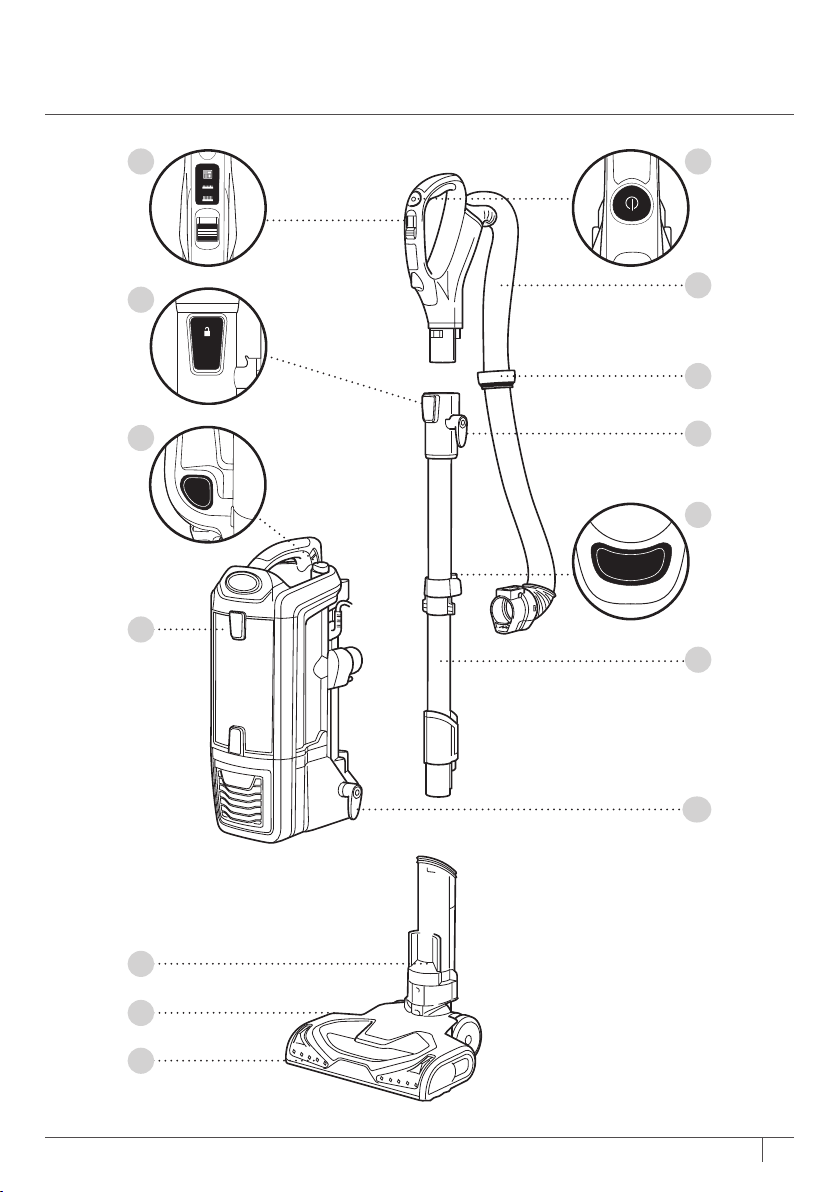
MAIN UNIT
A Surface Selector
A Power Button
C Hose
D Handle Release Button
E Hose Clip
F Upper Cord Hook
G Lift-Away Button
H Wand Release Button
I Lift-Away Pod
J Wand
K Lower Cord Hook
L Motorized Floor Nozzle
M Brushroll Indicator Light
N Headlights
6
sharkclean.com
Wand
Release
Hard Floor
Carpet
Deep Carpet
Handle
L
i
f
t
A
w
a
y
®
A B
C
E
F
K
H
J
D
G
Wand
Release
Hard Floor
Carpet
Deep Carpet
Handle
L
i
f
t
A
w
a
y
®
Wand
Release
Hard Floor
Carpet
Deep Carpet
Handle
L
i
f
t
A
w
a
y
®
Wand
Release
Hard Floor
Carpet
Deep Carpet
Handle
L
i
f
t
A
w
a
y
®
Wand
Release
Hard Floor
Carpet
Deep Carpet
Handle
L
i
f
t
A
w
a
y
®
I
L
M
N
7
1-800-798-7398
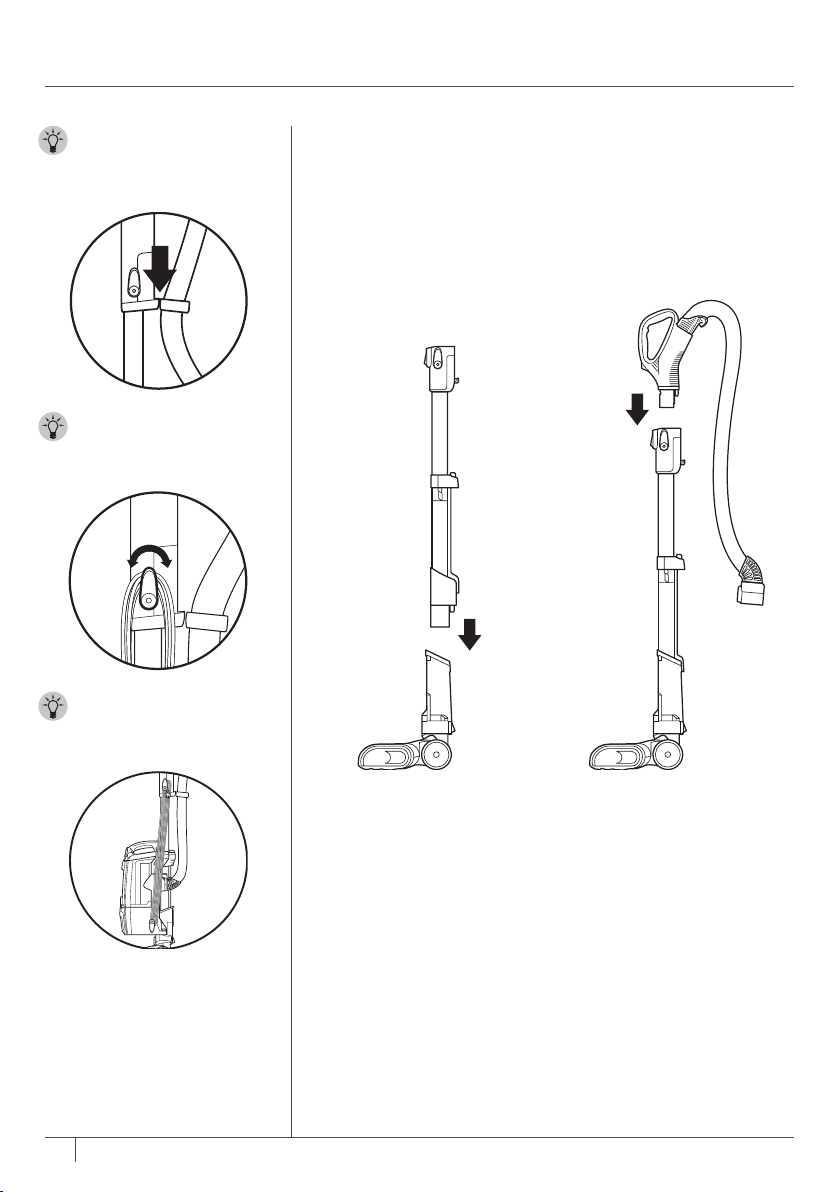
TIP: To store your
vacuum, wrap cord
around cord hooks.
1 Place selected floor nozzle
on floor and insert wand.
ASSEMBLING YOUR VACUUM
TIP: Slide hose clip
into back of wand for
convenience.
2 Insert handle into wand.
STEP 1 STEP 2
TIP: For quick cord
access, rotate upper hook
down and remove cord.
8
sharkclean.com
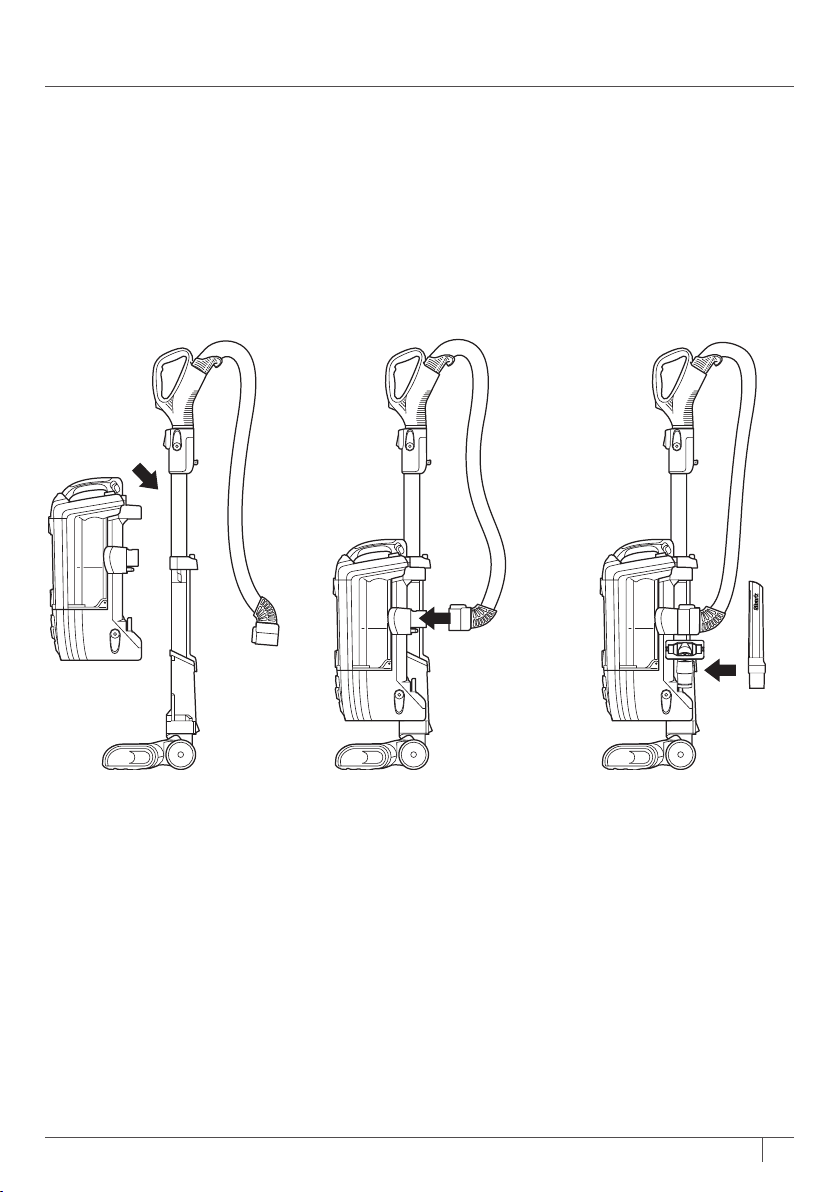
3 Place pod onto wand and
slide down to connect.
4 Connect hose into back of
pod until you hear a click.
5 Place tools on their
accessory posts.
STEP 3 STEP 4 STEP 5
CLICK!
9
1-800-798-7398
USING YOUR VACUUM
IN UPRIGHT MODE
WARNING: DO
NOT use to pick
up drywall dust,
fireplace ash, or
embers. DO NOT use
as an attachment to
power tools for dust
collection.
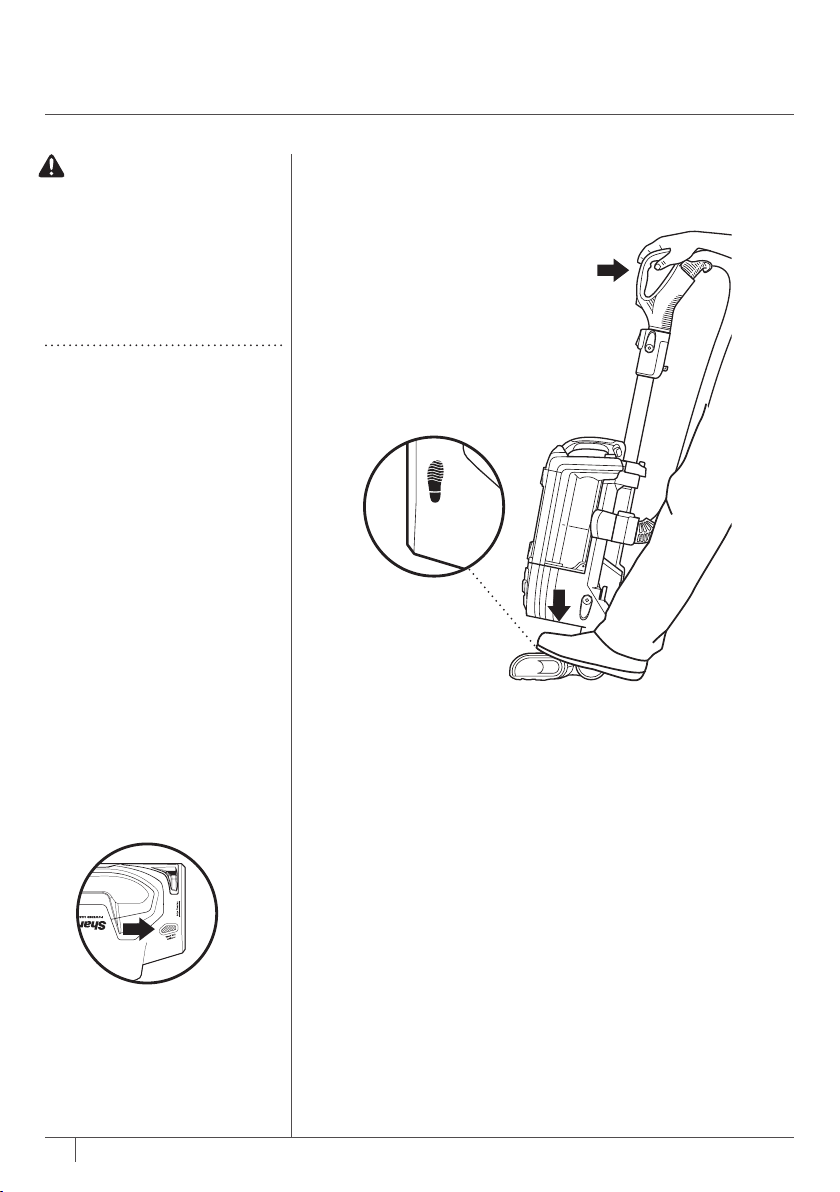
1 Plug power cord into outlet. Place foot on floor nozzle
andtilt handle back.
STEP 1
WHAT DOES THE
BRUSHROLL INDICATOR
LIGHT MEAN?
Solid Green
The brushroll is on and
working as it should.
Solid Red
There is a jam in the brushroll
area. Turn your vacuum off
and remove the blockage.
Flashing Red*
The motorized floor nozzle
is overheating. Turn your
vacuum off and wait for it to
cool down. Next time you are
vacuuming that surface, try
opening the Suction Control.
No Light
The brushroll is off because the
vacuum is in Hard Floormode.
* See Troubleshooting section for
further instructions.
10
sharkclean.com
Hard Floor
Carpet
Deep Carpet
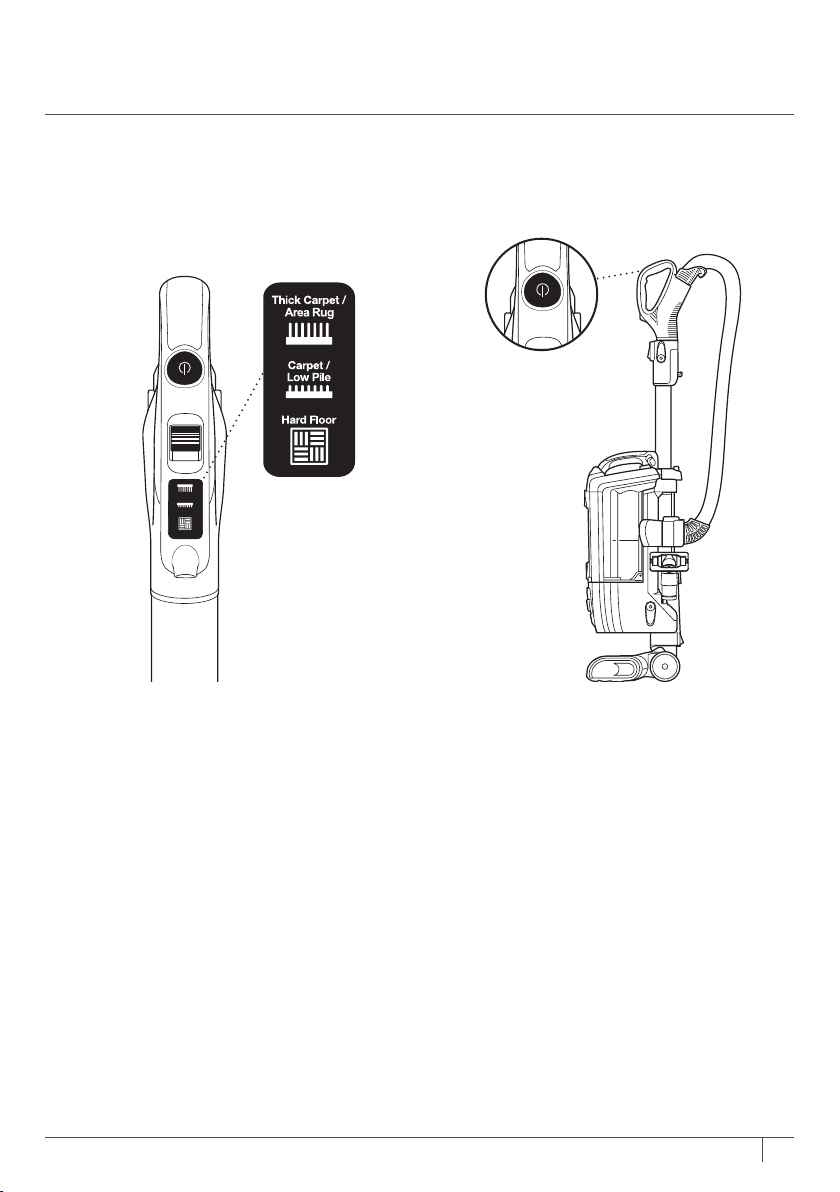
2 Choose the appropriate setting.
Thick Carpet & Area Rug Cleaning
Set floor selector to Carpet.
Carpet & Low Pile Cleaning
Set floor selector to Carpet/Low Pile.
Hard Floor Cleaning
Set floor selector to Hard Floor.
NOTE: For deep cleaning per ASTM F 608 (embedded
dirt in carpets) please set to Carpet/Low Pile.
3 Press power button to turn vacuum on to
start cleaning. The brushroll will not spin
unless the wand is reclined.
STEP 2 STEP 3
11
1-800-798-7398
OR
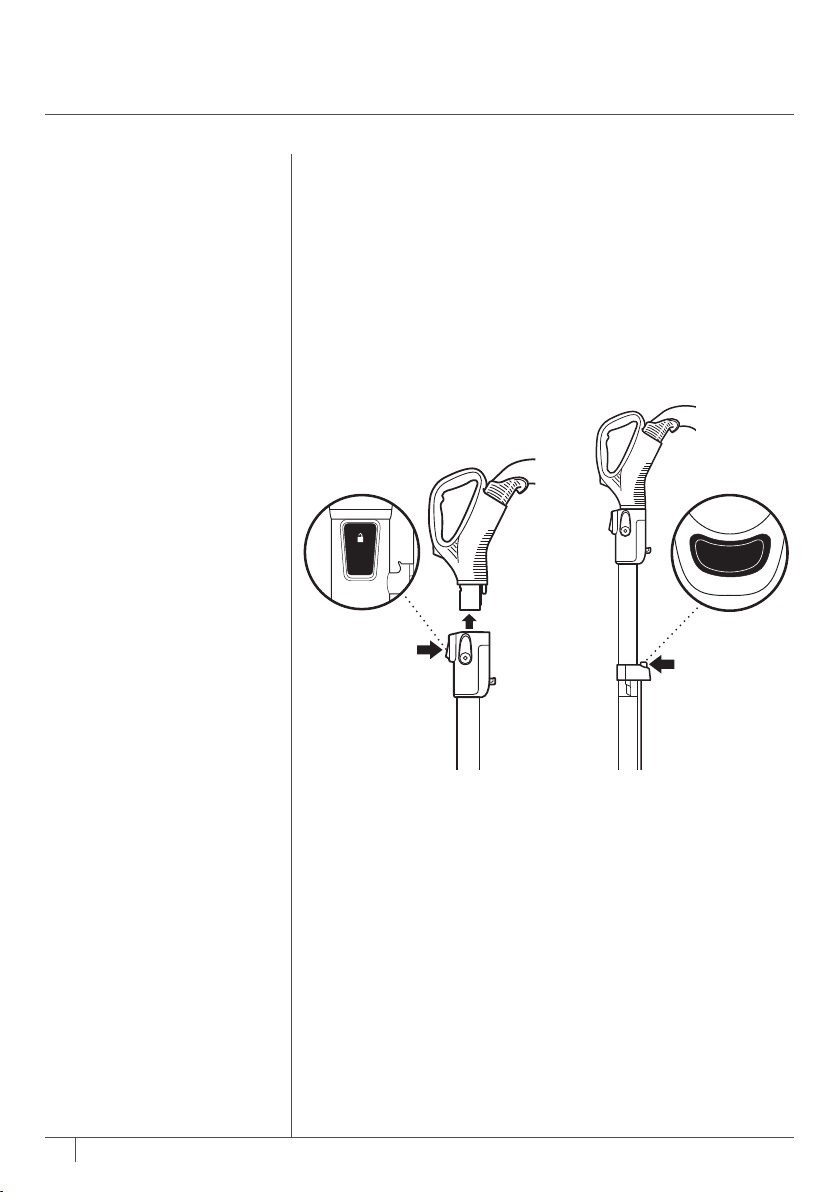
1 Press the Handle button
when you need to clean
within short reach.
USING YOUR VACUUM
IN ABOVE-FLOOR MODE
Press the Wand Release
button when you need to
clean with a longer reach.
STEP 1
OR
Wand
Release
Handle
12
sharkclean.com
OR
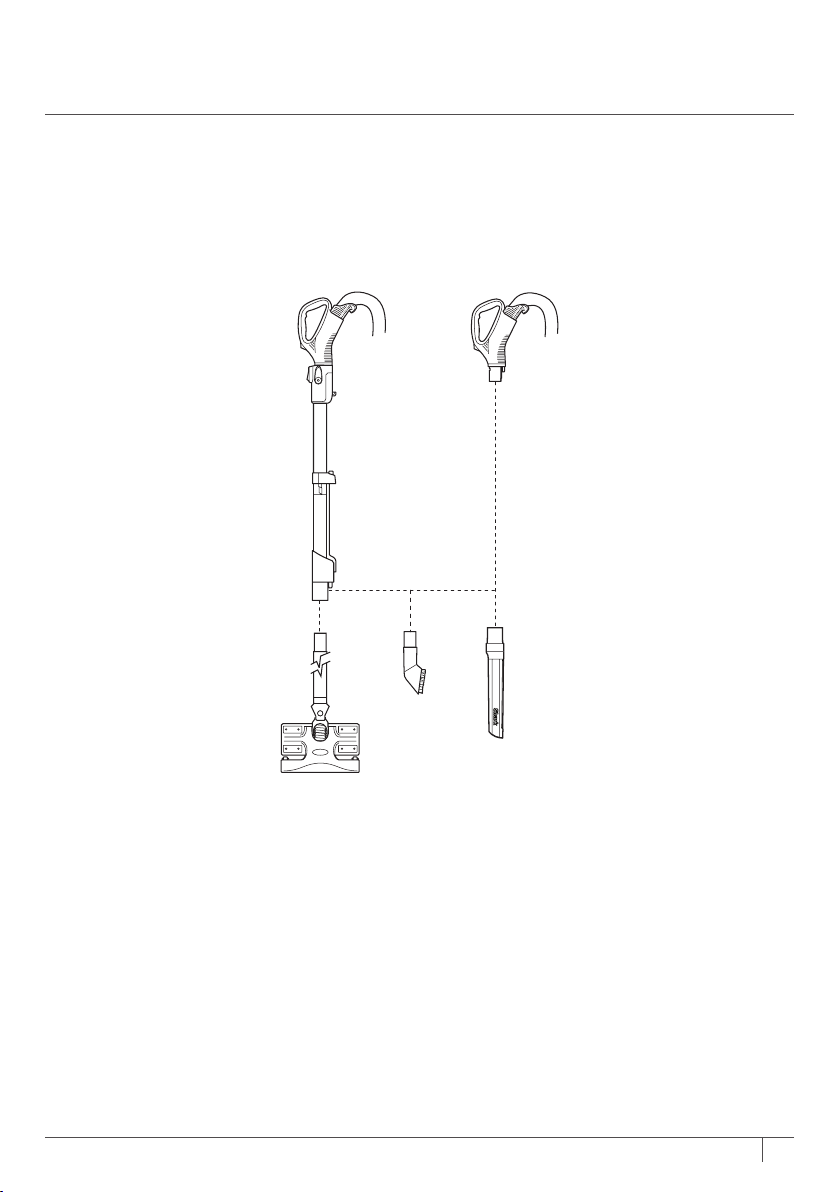
2 Insert desired tool directly into wand orhandle.
STEP 2
13
1-800-798-7398
CHANGING YOUR
FLOOR NOZZLES
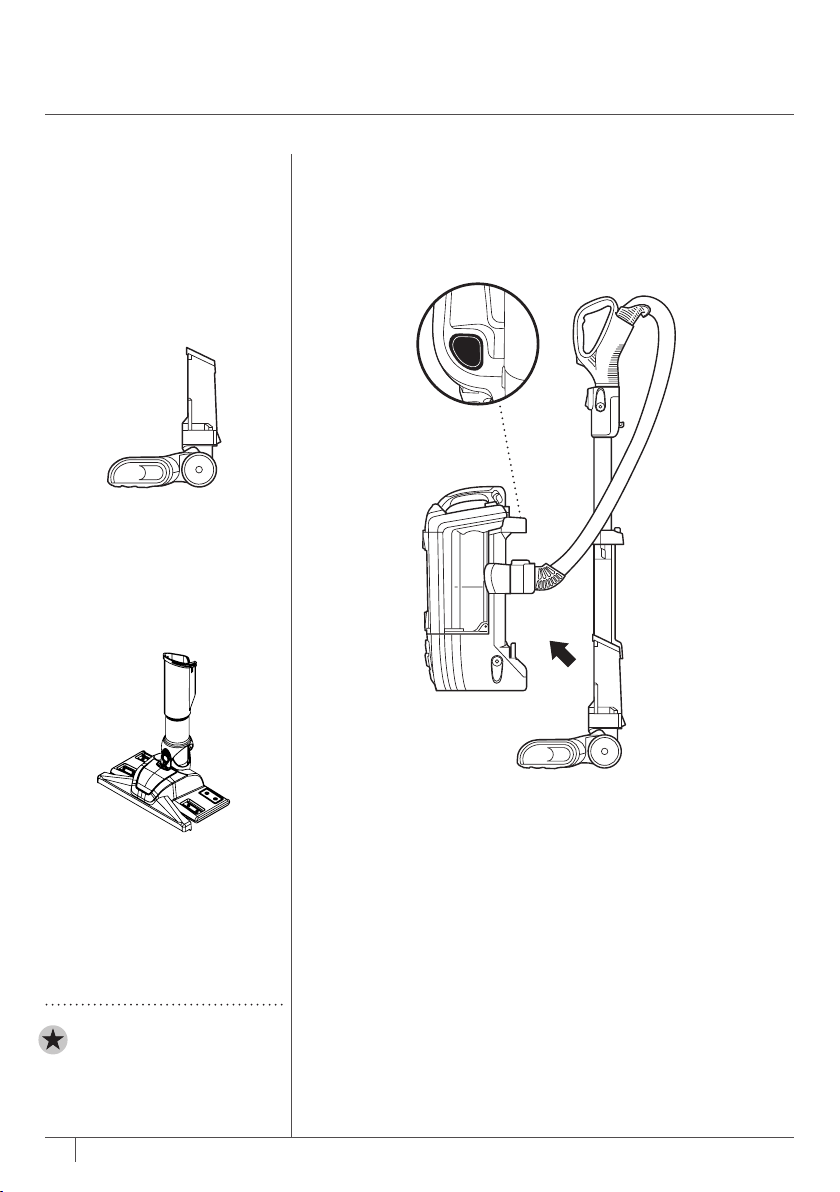
1 Press Lift-Away
®
button to lift pod off motorized
floornozzle.
STEP 1
If your vacuum comes with
a Dust-Away
™
Hard Floor
Attachment, use these
instructions.
To purchase a Dust-Away
Hard Floor Attachment,
go to sharkclean.com
IMPORTANT: Do not use
the Dust-Away Hard Floor
Attachment without the
microfiber pad attached.
Motorized Floor
Nozzle
Use the motorized floor nozzle
for deep-cleaning carpets and
picking up large debris on
hard floors.
L
i
f
t
A
w
a
y
®
Dust-Away Hard
Floor Attachment
Use the Dust-Away Hard Floor
Attachment to pick up debris
and wipe away fine dust on
hard floors.
DO NOT SCALE DRAWING
nv650_asm
SHEET 1 OF 1
UNLESS OTHERWISE SPECIFIED:
SCALE: 1:5
WEIGHT:
REV
DWG. NO.
A
SIZE
TITLE:
NAME
DATE
COMMENTS:
Q.A.
MFG APPR.
ENG APPR.
CHECKED
DRAWN
FINISH
MATERIAL
INTERPRET GEOMETRIC
TOLERANCING PER:
DIMENSIONS ARE IN INCHES
TOLERANCES:
FRACTIONAL
ANGULAR: MACH
BEND
TWO PLACE DECIMAL
THREE PLACE DECIMAL
APPLICATION
USED ON
NEXT ASSY
PROPRIETARY AND CONFIDENTIAL
THE INFORMATION CONTAINED IN THIS
DRAWING IS THE SOLE PROPERTY OF
<INSERT COMPANY NAME HERE>. ANY
REPRODUCTION IN PART OR AS A WHOLE
WITHOUT THE WRITTEN PERMISSION OF
<INSERT COMPANY NAME HERE> IS
PROHIBITED.
5
4
3
2
1
14
sharkclean.com
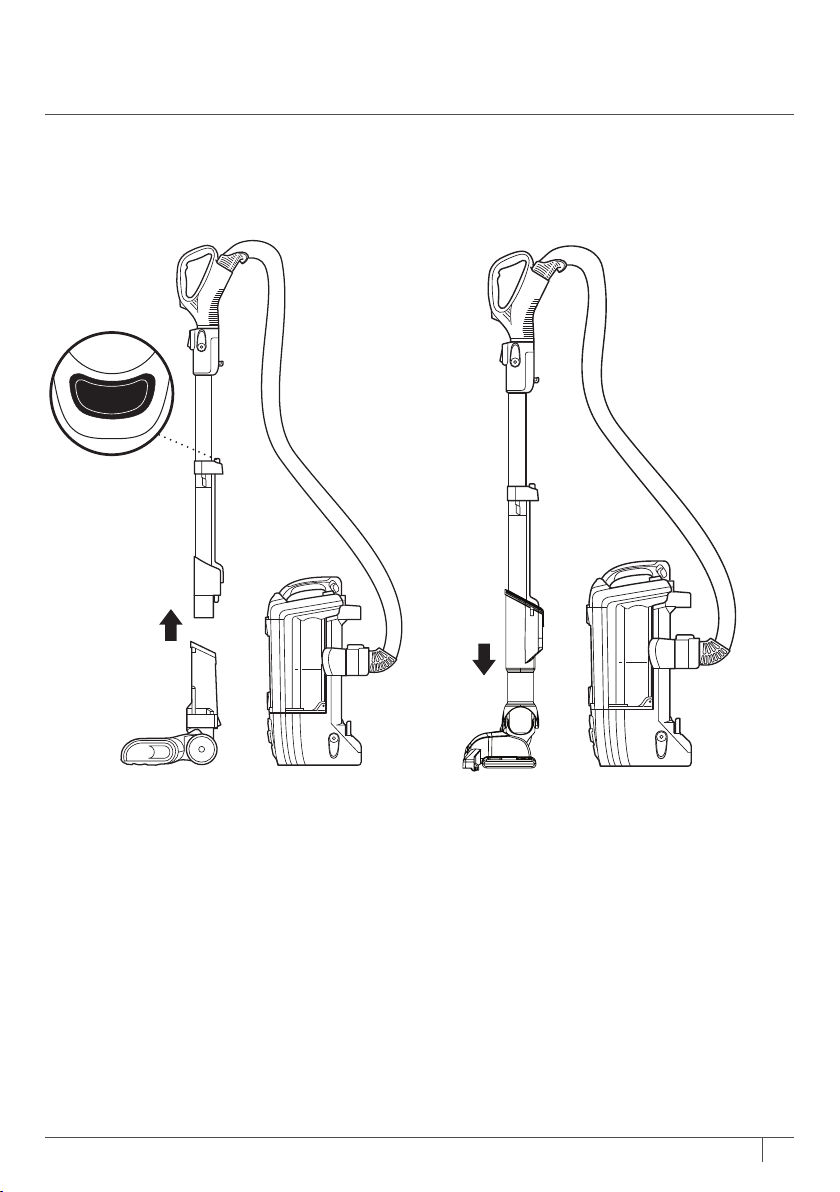
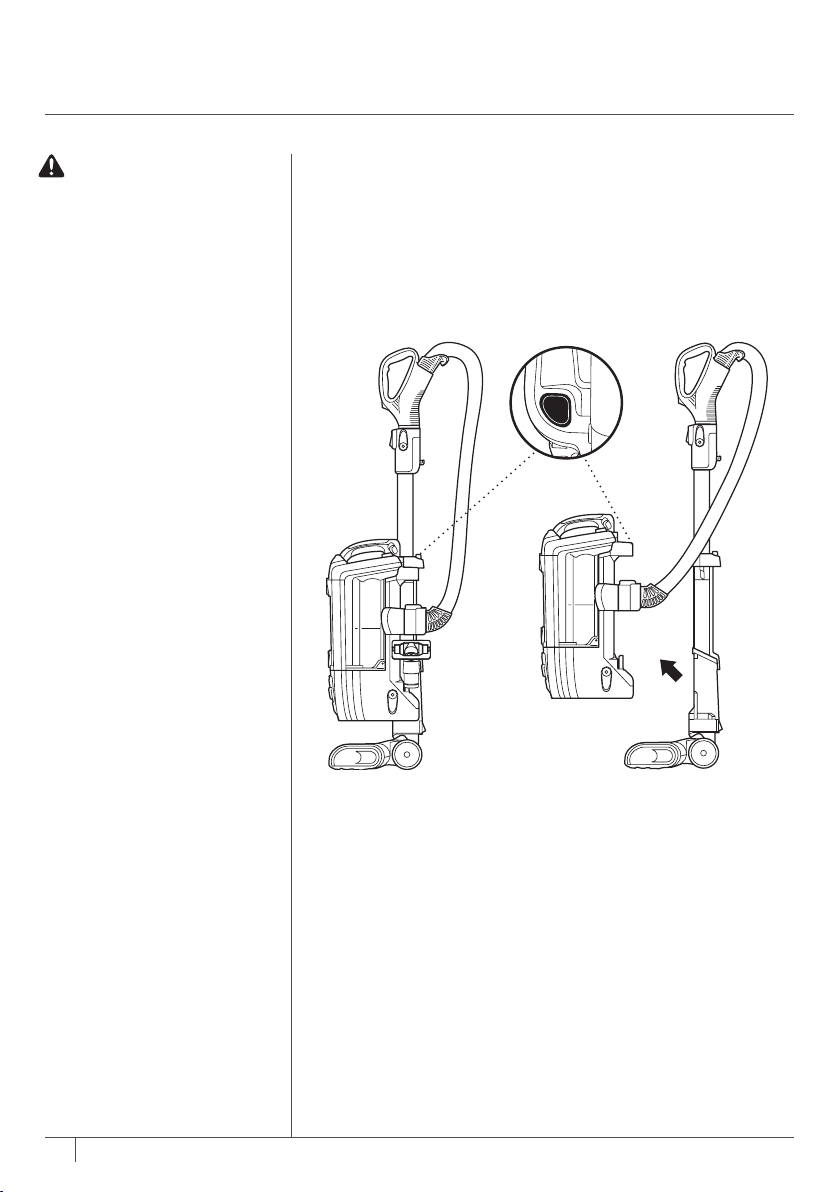
2 Press Wand Release button to remove
wand from motorized floor nozzle.
3 Insert wand into the Dust-Away
™
Hard
Floor Attachment.
Hold pod in hand to clean in Lift-Away
®
mode. You cannot use the Dust-Away Hard
Floor Attachment in regular upright mode.
STEP 2 STEP 3
Wand
Release
15
1-800-798-7398
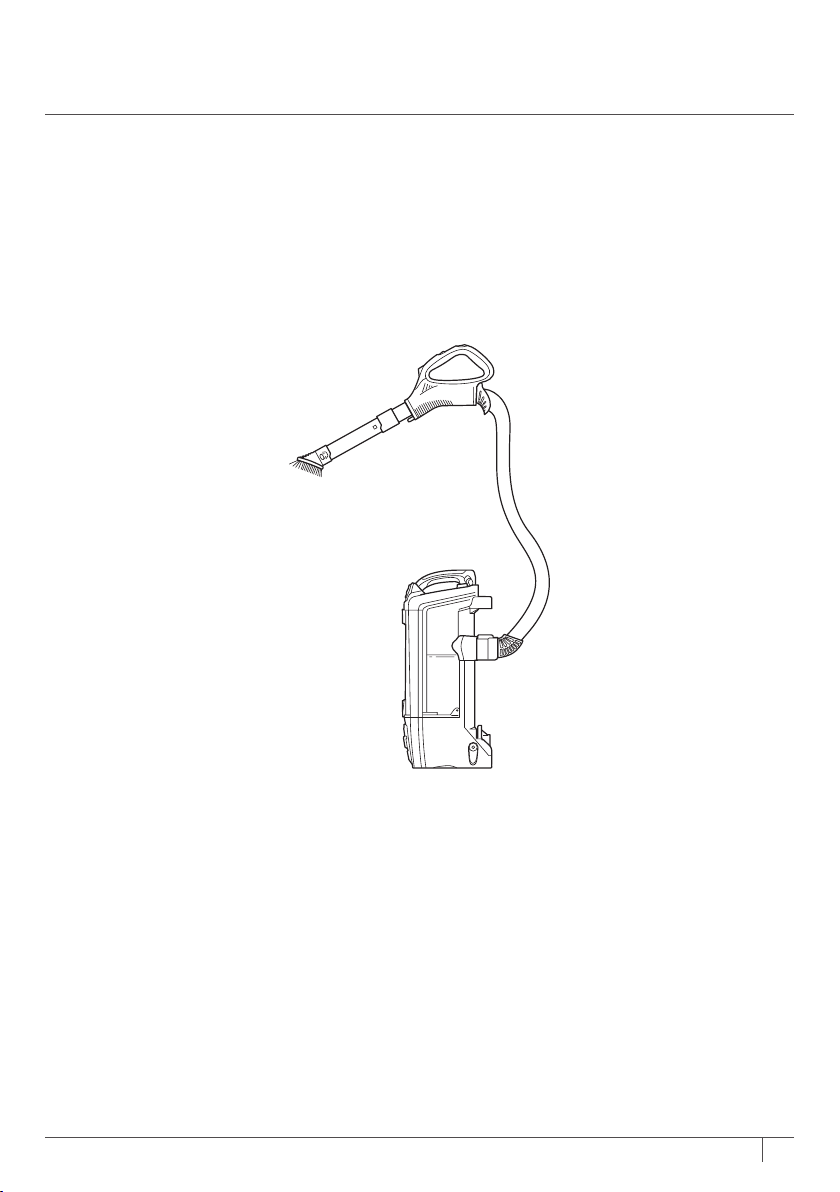
LIFT-AWAY CLEANING
1 Press Lift-Away button to lift pod off motorized floor nozzle.
You are now ready to clean those hard-to-reach places.
USING YOUR VACUUM IN
LIFT-AWAY
®
MODE
WARNING: Ensure solid
footing when using in
Lift-Away mode. Using
for an application where
you lack stability may result
in personal injury.
L
i
f
t
A
w
a
y
®
STEP 1
16
sharkclean.com
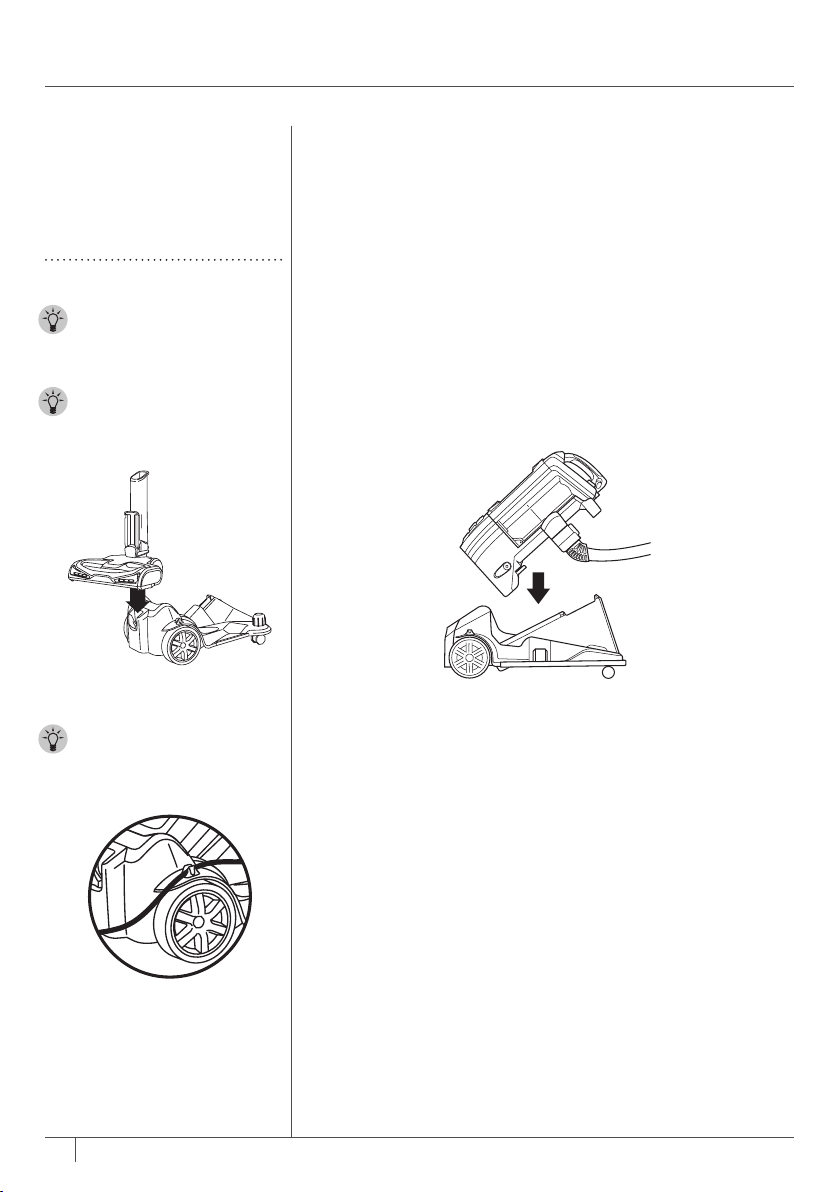
2 Attach desired accessory directly into handle. You can also attach the accessory to the wand
for extended reach.
STEP 2
17
1-800-798-7398
If your vacuum comes with a
caddy, use these instructions.
To purchase a caddy, go
to sharkclean.com
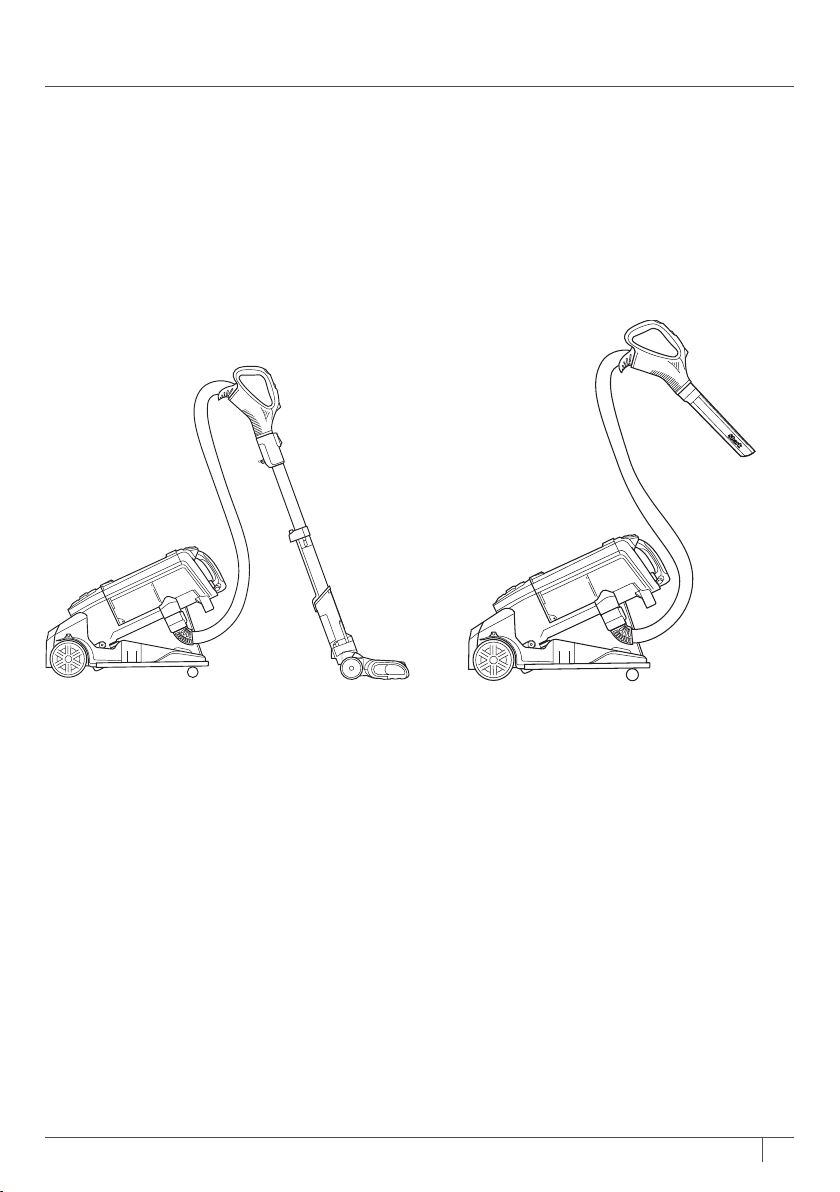
USING YOUR CADDY
1 From Lift-Away
®
mode, place pod onto caddy.
TIP: Use the posts on the
caddy to store additional
cleaning accessories.
TIP: You can store the
motorized floor nozzle on
the back on thecaddy.
TIP:
There is a cord clip
on the caddy to help with
cord management.
STEP 1
18
sharkclean.com
2 Cleaning in Powered Lift-Away
™
mode
allows you to still use the motorized
floornozzle.
3 To clean above floor, press the Wand
Release or Handle button. Lift upand
attach preferred accessory.
REMOVING POD FROM CADDY
When you are done cleaning with your
caddy, press Lift-Away
®
button and lift
podup.
STEP 2 STEP 3

19
1-800-798-7398
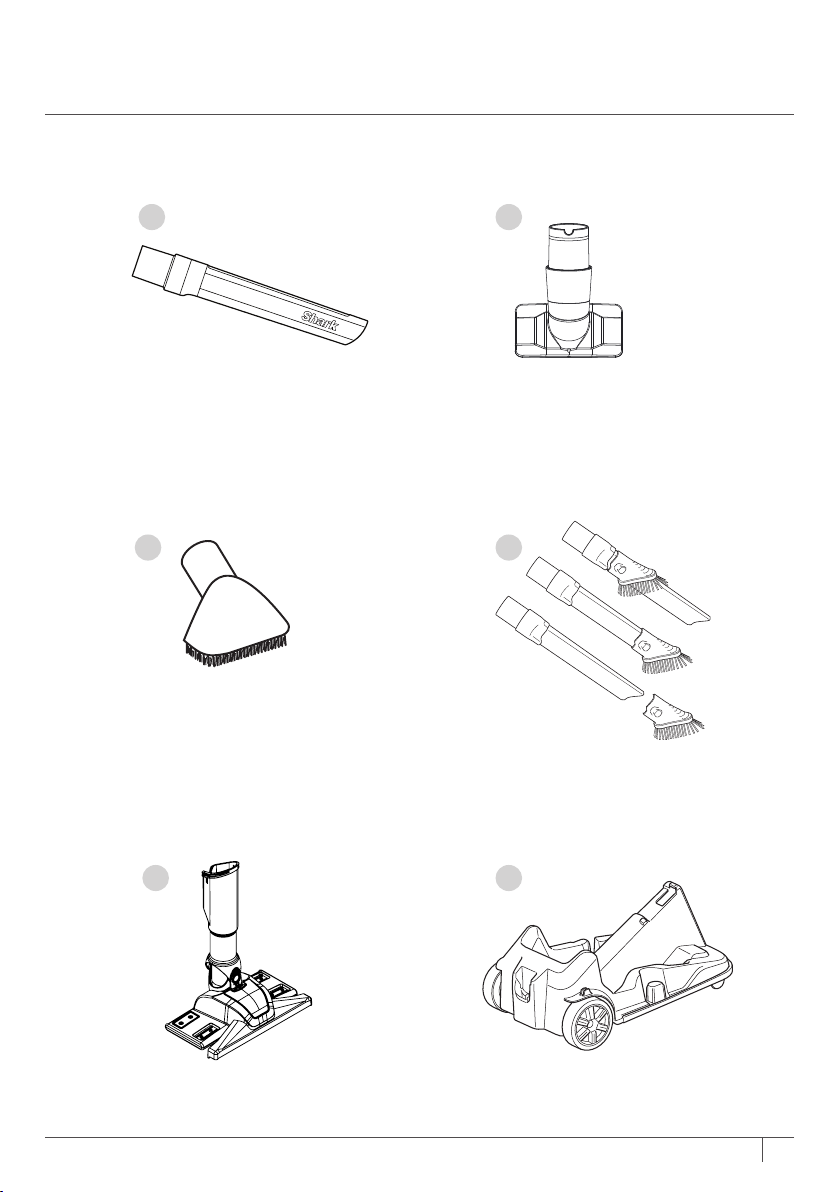
COMPATIBLE
ACCESSORIES
There are a variety of
accessories that are compatible
with this vacuumseries.
The top flap of your box shows
the select accessories that are
included with your model.
To purchase additional
accessories, go to
sharkclean.com
A 11" Crevice Tool
For cleaning hard-to-reach
places.
B Upholstery Tool
Designed for removing
stubborn pet hair from
upholstery and more.
D Duster Crevice
Two cleaning tools in one—
the crevice tool gives you
extended cleaning reach
for small spaces, while the
dusting brush cleans a
multitude of surfaces.
C Dusting Brush
Cleans hard surfaces and
upholstery.
E Dust-Away™ Hard Floor
Attachment
Durable enough for big
crumbs and debris but
gentle enough for delicate
dusting on hardwood and
tile floors.
F Caddy
Transforms your Rotator
®
into a canister vacuum,
giving you the freedom to
roll the pod along while
keeping cleaning tools
close by.
20
sharkclean.com
DC
F
DO NOT SCALE DRAWING
nv650_asm
SHEET 1 OF 1
UNLESS OTHERWISE SPECIFIED:
SCALE: 1:5
WEIGHT:
REV
DWG. NO.
A
SIZE
TITLE:
NAME
DATE
COMMENTS:
Q.A.
MFG APPR.
ENG APPR.
CHECKED
DRAWN
FINISH
MATERIAL
INTERPRET GEOMETRIC
TOLERANCING PER:
DIMENSIONS ARE IN INCHES
TOLERANCES:
FRACTIONAL
ANGULAR: MACH
BEND
TWO PLACE DECIMAL
THREE PLACE DECIMAL
APPLICATION
USED ON
NEXT ASSY
PROPRIETARY AND CONFIDENTIAL
THE INFORMATION CONTAINED IN THIS
DRAWING IS THE SOLE PROPERTY OF
<INSERT COMPANY NAME HERE>. ANY
REPRODUCTION IN PART OR AS A WHOLE
WITHOUT THE WRITTEN PERMISSION OF
<INSERT COMPANY NAME HERE> IS
PROHIBITED.
5
4
3
2
1
E
BA
21
1-800-798-7398
To keep your vacuum’s
suction power optimal, follow
these instructions. Make
sure unit is off and cord is
unplugged.
MAINTENANCE
RECOMMENDED
FILTER CLEANING
SCHEDULE:
Pre-Motor Filter Kit
(Foam & Felt)
XFF650
Clean every 3 months.
Post-Motor Filter
(HEPA)
XHF650
Clean once a year.
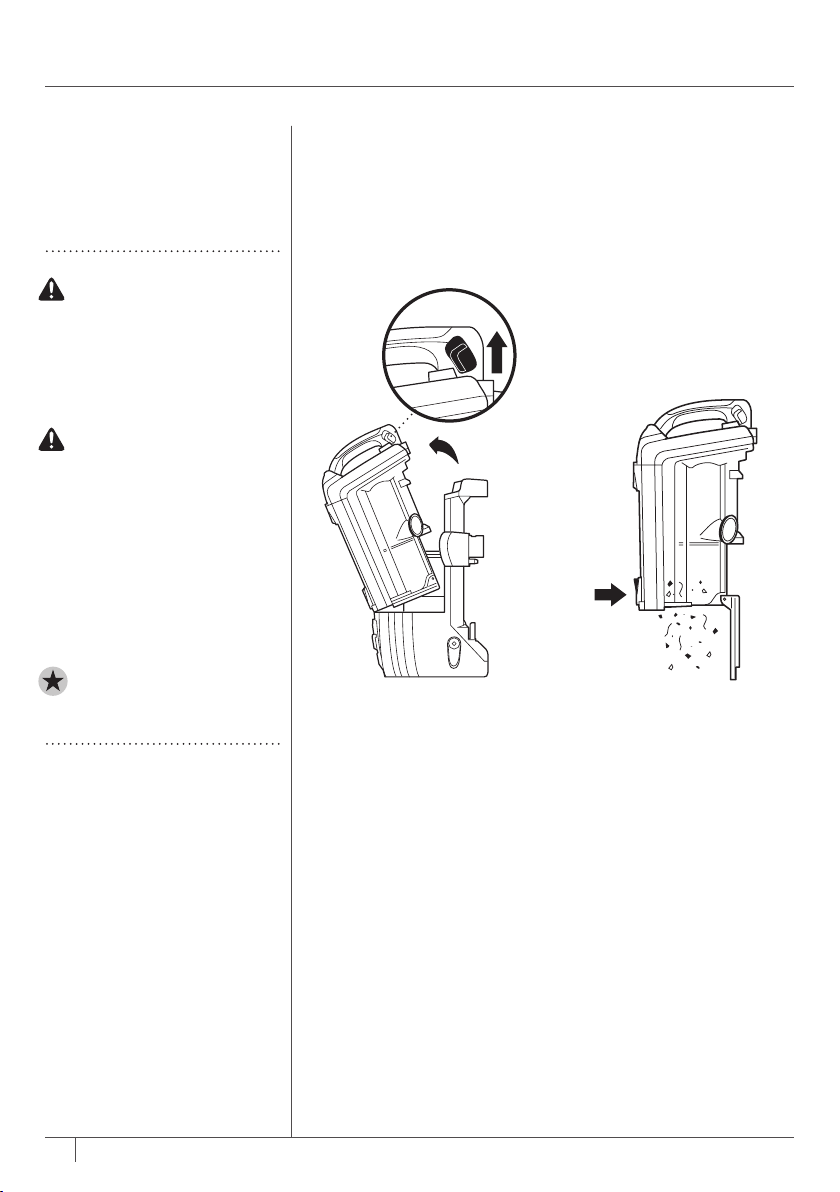
EMPTYING THE DUST CUP
1 Pull up on dust cup
release latch and lift
dustcup off pod.
2 Hold dust cup over a
trash bin and press the
empty-release latch on the
bottom.
STEP 1 STEP 2
WARNING: To reduce
the risk of shock and
unintended operation,
turn power off and
unplug unit before
servicing.
Hand wash filters
with water only to
prevent damage from
cleaning chemicals.
Allow ALL filters
to dry completely
before replacing
in the vacuum to
prevent liquid from
being drawn into
electric parts.
IMPORTANT: Do not use
soap when cleaning the
HEPA filter.
22
sharkclean.com
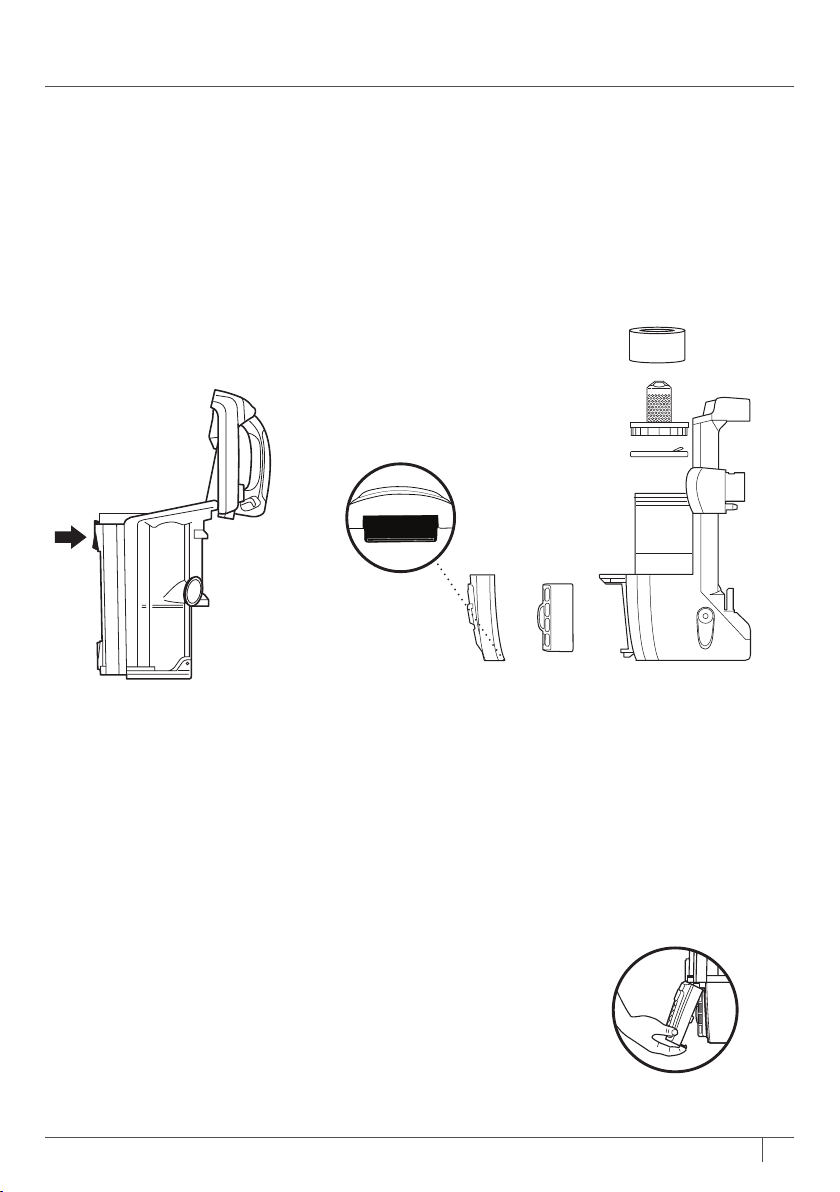
3 Press top dust cup release
latch to access dust
screen and remove built-
up debris asrequired.
CLEANING THE FILTERS
1 Pre-Motor
(foam and felt):
With the dust cup
removed, take out and
rinse the foam and felt
filters with water. Tap
loose dirt off filters
between washes
asneeded.
2 Post-Motor (HEPA):
To access the HEPA filter,
reach under the grill and
pull the Filter Access
latch to remove the grill.
Remove and rinse the
HEPA filter.
STEP 3
HEPA
FELT FILTER
FOAM FILTER
FILTER FRAME
Filter Access
23
1-800-798-7398
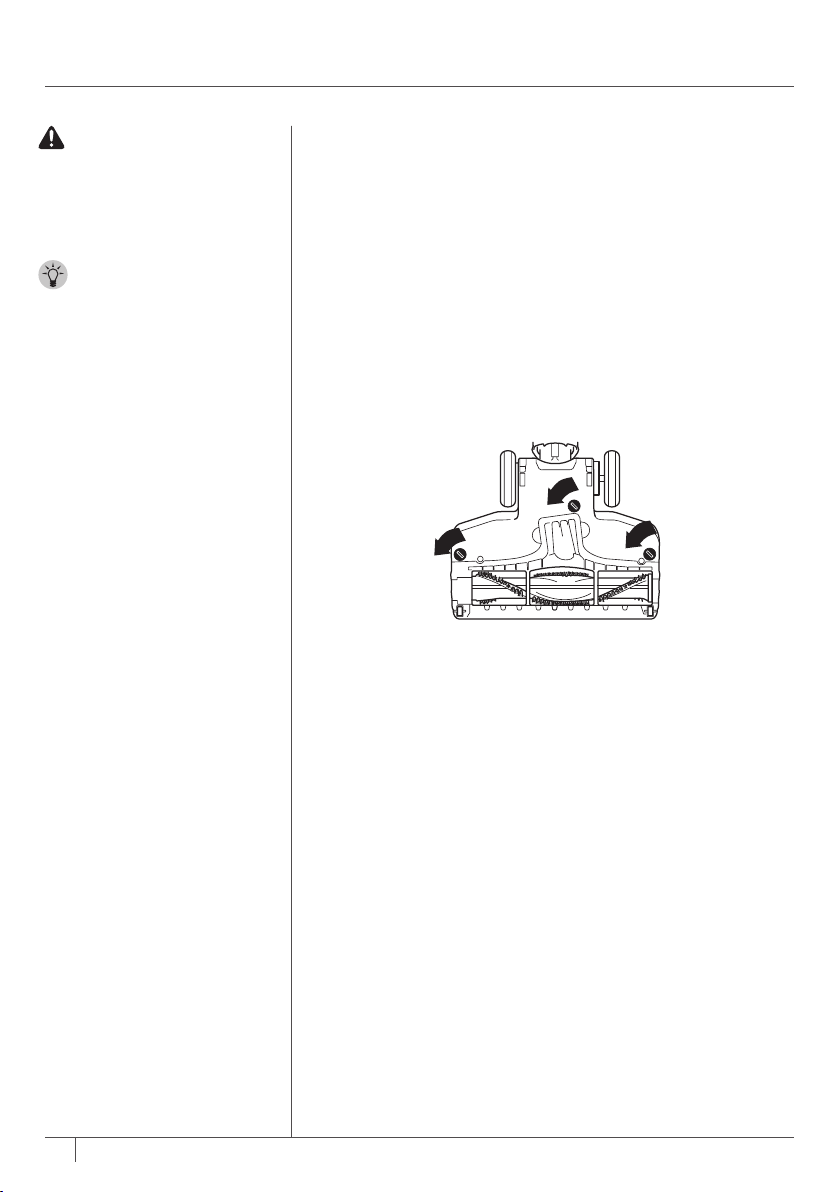
CHECKING FOR BLOCKAGES
& MAINTAINING BRUSHROLL
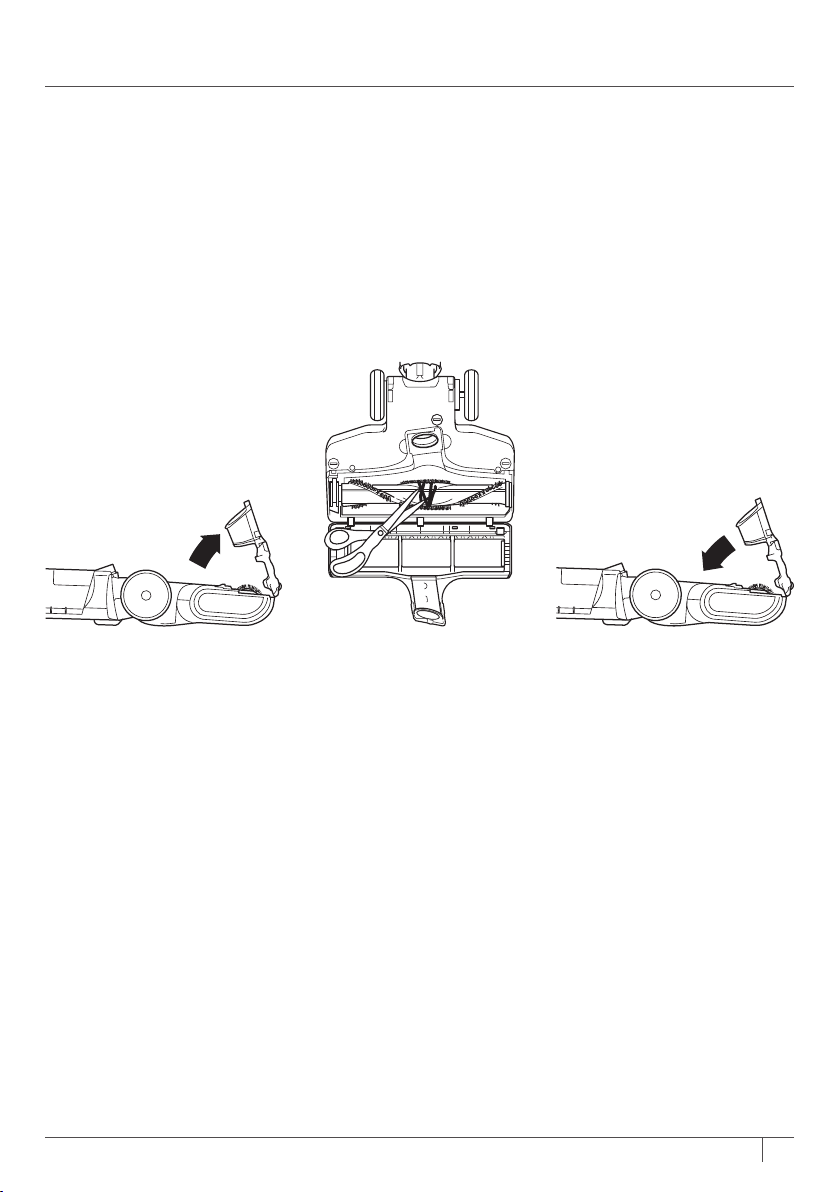
1 Use a coin to unlock the 3 locks on the bottom of the
floornozzle.
MAINTENANCE
WARNING: To reduce
the risk of shock and
unintended operation,
turn power off and
unplug unit before
servicing.
TIP: You do not need
any tools to open the
motorized floor nozzle—
just a coin.
STEP 1
24
sharkclean.com
2 A portion of the base is
hinged for better access
to the brushroll and
exposure to the airway.
Shine a flashlight from
the bottom of the base to
check for blockages.
3
Remove any hair, fibers,
or debris that is wrapped
around the brushroll.
There is a groove
that allows a pair of
scissors to cut across to
loosendebris.
4 To reassemble, replace
base by lining it up along
the front of the nozzle.
Rotate closed and lock
the 3 locks.
STEP 2 STEP 3 STEP 4

25
1-800-798-7398
TROUBLESHOOTING
GUIDE
Vacuum is not picking up debris. No suction or light suction.
(Refer to Maintenance section for more information.)
• Check filters to see if they need cleaning. Follow instructions for rinsing and drying the filters
before reinserting in the vacuum.
• Dust cup may be full; empty dust cup.
• Check hose, hose connections, nozzles, and accessories for blockages; clear blockages if required.
• Remove any string, carpet fibers, or hair that may be wrapped around the brushroll.
Vacuum lifts area rugs.
• Turn off unit to disengage the brushroll. Move switch to Hard Floor setting for suction-only
cleaning, and turn unit back on.
• Suction is powerful. Take care when vacuuming area rugs or rugs with delicately sewn edges.
Brushroll does not spin.
• If Brushroll Indicator Light on the motorized floor nozzle turns red, the brushroll has stopped
spinning. Immediately turn off and unplug vacuum, disconnect the nozzle, and remove
blockage before reconnecting and turning vacuum back on.
• With the power on, recline the handle, which will automatically turn on the brushroll.
• Make sure the carpet height selector is not set to Hard Floor.
Vacuum turns off on its own or indicator light flashes red.
• This vacuum is equipped with a motor-protective thermostat. If your vacuum overheats, the
thermostat will automatically turn the suction motor off. Perform the following steps to restart
thethermostat:
1. Turn vacuum off and unplug it.
2. Empty dust cup and clean filters (see Maintenance section).
3. Check for blockages in hose, accessories, and inlet openings.
4. Allow unit to cool for a minimum of 45 minutes.
5. Plug in vacuum and turn it on.
• If hose is not fully connected to the pod, it can cause a poor electrical connection and the
hose can come loose, turning the vacuum off.
1. Turn vacuum off and unplug it.
2. Empty dust cup and clean filters.
3. Check for blockages in hose, accessories, and inlet openings.
4. Remove cord from cord hook so hose latch can be seen and engaged.
5. Ensure you hear an audible click at all connection points:
a. Where hose meets back of pod (may require additional force; pull on hose to ensure
latch is fully engaged)
b. Where wand plugs into floor nozzle
c. Where handle plugs into wand
6. Plug in vacuum and turn it on.
Note: If vacuum still does not start, contact Customer Service at 1-800-798-7398.
WARNING: To reduce the risk of shock and unintended operation, turn
power off and unplug unit before servicing.
26
sharkclean.com
SEVEN (7) YEAR
LIMITED WARRANTY
The 7 Year Limited Warranty applies to purchases made from authorized retailers of SharkNinja
Operating LLC. Warranty coverage applies to the original owner and to the original product only and is
not transferable.
SharkNinja warrants that the unit shall be free from defects in material and workmanship for a period of 7 years
from the date of purchase when it is used under normal household conditions and maintained according to the
requirements outlined in this instruction manual, subject to the following conditions and exclusions.
What is covered in my warranty?
1. The original unit and/or non-wearable components deemed defective, in SharkNinja’s sole discretion,
will be repaired or replaced for up to 7 years from the original purchase date.
2. In the rare event that a replacement unit is issued, the warranty coverage ends six months following the
receipt date of the replacement unit or the remainder of the existing warranty, whichever is greater. If
the unit is replaced, SharkNinja reserves the right to replace the unit with one of equal or greater value.
What is not covered in my warranty?
Our Customer Care/Product Specialists are available to provide all the warranty service options available to
you including the possibility of upgrading to our VIP Warranty Service Options for select product categories.
1. Normal wear and tear of wearable parts such foam filters, HEPA filters, pads etc., which require regular
maintenance and/or replacement to ensure the proper functioning of your unit are not covered by this warranty.
2. Any unit that has been tampered with or used for commercial purposes.
3. SharkNinja will cover the cost for the customer to send in the unit to us for repair or replacement. A
fee of $19.95 for return shipping costs will be charged at the time of return shipment of the repaired
or replacement unit. Our Customer Care /Product Specialists are available to provide all the warranty
service options available to you including upgrading to our VIP Warranty Service Options.
4.
Damage caused by misuse, abuse, or negligent handling, or damage due to mishandling in transit.
5. Consequential and incidental damages.
6. Defects caused by or resulting from damages from shipping or repairs, service, or alteration to the
product or any of its parts which have been performed by a repair person not authorized by SharkNinja.
7. Products purchased, used or operated outside of North America.
Problems with your unit/How to get service
If your appliance fails to operate properly while in use under normal household conditions within the
warranty period, visit www.sharkclean.com for product care/maintenance self- help. Our customer care
and product specialists are also available at 1-800-798-7398 to assist with product support and warranty
service options.
How to initiate a warranty claim
You must first activate your warranty by registering your unit online at sharkclean.com/customersupport.
(Note: Purchases made directly from SharkNinja are automatically registered with us and the warranty
activated.) Alternatively you can call 1-800-798-7398 to have a customer care specialist assist you. Please
note you must call 1-800-798-7398 to initiate a warranty claim. Return and Packing Instruction information
will be provided at that time.
The customer care line is open Monday-Saturday, 7am-11pm EST and Sunday, 9am-8pm EST.
Replacement parts are available for purchase at sharkclean.com. For more information on what is
classified as wearable and non-wearable parts, please visit sharkwarranty.com.
This warranty gives you specific legal rights, and you also may have other rights that vary from state to state.
Some states do not permit the exclusion or limitation of incidental or consequential damages, so the above
may not apply to you.

@sharkcleaning
SharkNinja Operating LLC
US: Newton, MA 02459
CAN: Ville St-Laurent, QC H4S 1A7
1-800-798-7398
sharkclean.com
Illustrations may differ from actual product. We are constantly striving to improve
our products; therefore the specifications contained herein are subject to change
withoutnotice.
Shark, Rotator, and Lift-Away are registered trademarks of SharkNinja Operating LLC.
Powered Lift-Away and Dust-Away are trademarks of SharkNinja Operating LLC.
For SharkNinja U.S. Patent information, visit www.sharkninja.com/USPatents
© 2016 SharkNinja Operating LLC
NV650-750�Series�E�IB�160418
PRINTED IN CHINA

