Instructions
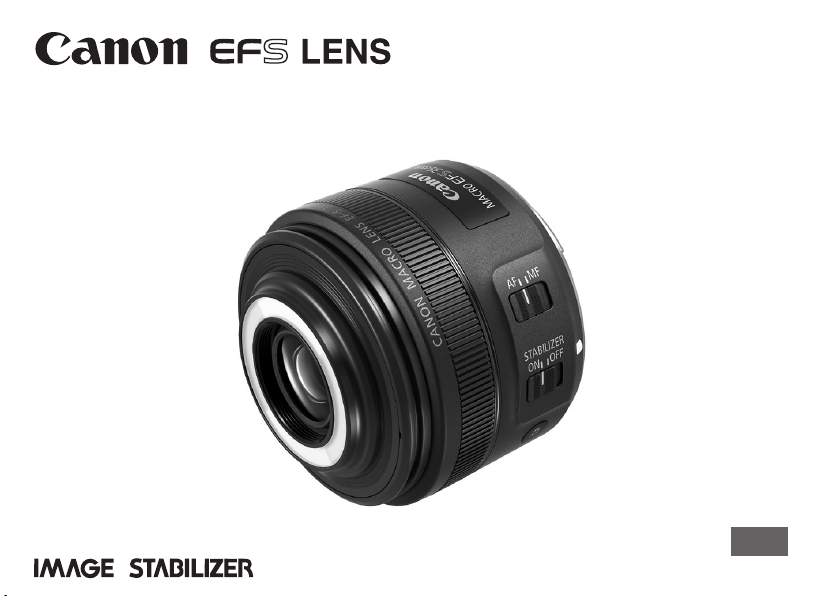
EF-S35mm f/2.8 MACRO IS STM
ENG
ENG-1
Thank you for purchasing a Canon product.
The Canon EF-S35mm f/2.8 MACRO IS
STM is a macro lens for use with EF-S lens
compatible EOS cameras*. It is equipped
with an Image Stabilizer capable of shooting
portraits, scenery, and other normal shots
as well as close-up (macro) shots with a
magnication ratio of 1:1.
* ThelenscanonlybeusedwithcompatibleEOS
cameras.Forcompatibilityinformation,please
checkthecamera’sinstructionmanual,product
catalogortheCanonwebsite.
“IS”standsforImageStabilizer.
“STM”standsforsteppingmotor.
Camera Firmware
Pleaseusethelatestversionofrmwarewiththe
camerainuse.Fordetailsonwhetherthermwareis
thelatestversionornot,andfordetailsonupdatingthe
rmware,pleasechecktheCanonwebsite.
Conventions used in this instruction
Warningtopreventlensorcameramalfunction
ordamage.
Supplementarynotesonusingthelensand
takingpictures.
ENG-2
Precautionstoensurethatthecameraisused
safely.Readtheseprecautionsthoroughly.Make
surealldetailsareobservedinordertoprevent
risksandinjurytotheuserandotherpeople.
Warning
Detailspertainingtorisksthatmay
resultindeathorseriousinjury.
Do not look at the sun or a bright light source
through the lens or single-lens reflex camera.
Doingsocouldresultinlossofvision.Lookingatthe
sundirectlythroughthelensisespeciallyhazardous.
Whether it is attached to the camera or not, do
not leave the lens under the sun without the
lens cap attached.Thisistopreventthelensfrom
concentratingthesun’srays,whichcouldcauseare.
Caution
Detailspertainingtorisksthatmay
resultininjury.
Do not hold the Macro Lites located on the front
of the lens close to the eyes or stare at them when
they are illuminated. Doingsomayresultineye
damage.
Do not leave the camera in locations subject to
high or low temperatures. Thismayresultinthe
camerabecomingexcessivelyhotorcold,whichmay
causeburnsorotherinjurieswhentouched.
Caution
Detailspertainingtorisksthatmay
resultindamagetoproperty.
Donotleavethelensinexcessiveheatsuchasina
carindirectsunlight.Hightemperaturescancausethe
lenstomalfunction.
Safety Precautions

ENG-3
General Precautions
Handling Precautions
Ifthelensistakenfromacoldenvironmentintoa
warmone,condensationmaydeveloponthelens
surfaceandinternalparts.Topreventcondensationin
thiscase,rstputthelensintoanairtightplasticbag
beforetakingitfromacoldtowarmenvironment.Then
takeoutthelensafterithaswarmedgradually.Dothe
samewhentakingthelensfromawarmenvironment
intoacoldone.
Pleasealsoreadanylensrelatedhandlingprecautions
listedinyourcamera’sinstructionmanual.
Shooting Precautions
Notethattherearecasesinwhichthewhiteringon
thefrontofthelensmaybereectedintophotographs
ifthelensisheldclosetoreectiveobjects(glass
surfaceonwristwatches,forexample),evenifthe
MacroLitesarenotilluminated.Thiscanbeavoidedby
attachingthehoodwhentakingphotographs.

ENG-4
Shooting Precautions
Thislensusesasteppingmotortodrivethefocusinglens.
1. Initial focus lens resetting operations
Thelensperformsaninitialresetofthefocuslenswhenthecameraisswitchedon.Whenthelensisattached
tothefollowingcameras*,aninitialresetwillbeperformed,aswhenoperationisresumedfromanautopower
offstate.
Thelenswillmoveinandoutoffocusduringinitialreset.
2. Lens sleep mode
WhenthecameraisON,thelenswillenterthesleepmodeinordertoconservepowerifitisnotoperatedfor
acertainperiodoftime.Thelenswillalsoconstantlybeinthesleepmodewhenthecamera’sautopoweroff
functionisineffect.Thefocuslenswillnotbeoperatedwhenthelensisinthesleepmode.
Focusingbyrotatingthefocusingringisnotpossiblewhenthelensisinthesleepmode.
Toexitsleepmode,presstheshutterbuttonhalfway.
* Applicabletothefollowingcameras:
EOS7DMarkII,
EOS7D,EOS70D,EOS60D,EOS60Da,EOS50D,EOS40D,EOS30D,EOS20D,EOS20Da,
EOSREBELT3i/600D,EOSREBELT2i/550D,EOSREBELT1i/500D,EOSREBELXSi/450D,EOSREBELT5/1200D,
EOSREBELT3/1100D,EOSREBELXS/1000D,EOSDIGITALREBELXTi/400DDIGITAL,EOSDIGITALREBEL
XT/350DDIGITAL,EOSDIGITALREBEL/300DDIGITAL
General Precautions

ENG-5
ThisdevicecomplieswithPart15oftheFCCRules.
Operationissubjecttothefollowingtwoconditions:(1)This
devicemaynotcauseharmfulinterference,and(2)this
devicemustacceptanyinterferencereceived,including
interferencethatmaycauseundesiredoperation.
Donotmakeanychangesormodicationstotheequipment
unlessotherwisespeciedintheinstructions.Ifsuch
changesormodicationsshouldbemade,youcouldbe
requiredtostopoperationoftheequipment.
Thisequipmenthasbeentestedandfoundtocomplywith
thelimitsforaclassBdigitaldevice,pursuanttopart15
oftheFCCRules.Theselimitsaredesignedtoprovide
reasonableprotectionagainstharmfulinterferenceina
residentialinstallation.Thisequipmentgenerates,usesand
canradiateradiofrequencyenergyand,ifnotinstalledand
usedinaccordancewiththeinstructions,maycauseharmful
interferencetoradiocommunications.
However,thereisnoguaranteethatinterferencewillnot
occurinaparticularinstallation.Ifthisequipmentdoes
causeharmfulinterferencetoradioortelevisionreception,
whichcanbedeterminedbyturningtheequipmentoffand
on,theuserisencouragedtotrytocorrecttheinterference
byoneormoreofthefollowingmeasures:
•Reorientorrelocatethereceivingantenna.
•Increasetheseparationbetweentheequipmentand
receiver.
•Connecttheequipmentintoanoutletonacircuitdifferent
fromthattowhichthereceiverisconnected.
•Consultthedealeroranexperiencedradio/TVtechnician
forhelp.
CANICES-3(B)/NMB-3(B)
ENG-6
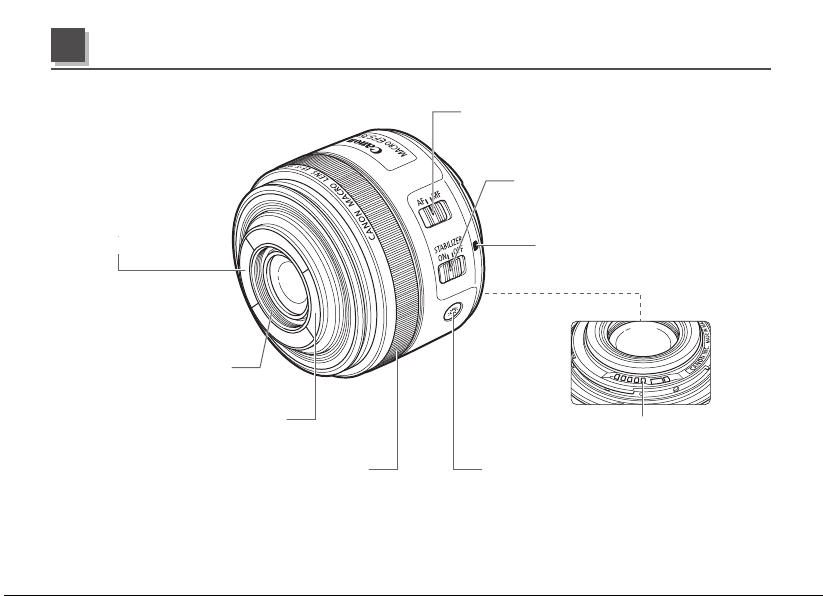
MacroLiteB(→12)
Contacts(→7)
Hoodmount(→15)
Focusingring(→7)
MacroLiteA(→12)
Focusmodeswitch(→7)
Imagestabilizerswitch(→8)
Lensmountindex(→7)
MacroLiteONbutton(→12)
Fordetailedinformation,referencepagenumbersareprovidedinparentheses(→**).
Nomenclature
ENG-7
See your camera’s instructions for details on
mounting and detaching the lens.
Afterdetachingthelens,placethelenswith
therearenduptopreventthelenssurfaceand
contactsfromgettingscratched.
Contactsthatarescratched,soiled,orhave
ngerprintsonthemmayresultinfaulty
connectionsorcorrosion,whichmayleadto
malfunctions.Ifthecontactsgetsoiled,clean
themwithasoftcloth.
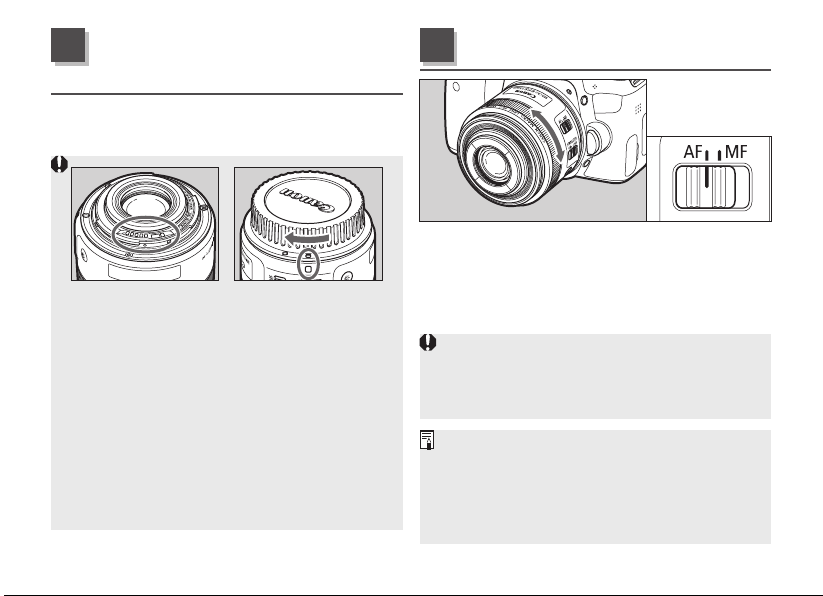
Attachthelenscapanddustcapwhen
disconnectingthelens.Whenattachingthe
dustcap,alignthelensmountindexwiththe
indexofthedustcapandrotateinaclockwise
directionasshownintheillustration.Followthe
reverseproceduretodetachit.
Toshootinautofocus(AF)mode,setthefocus
modeswitchtoAF.
Touseonlymanualfocusing(MF),setthefocus
modeswitchtoMF,andfocusbyturningthe
focusingring.
Quicklyrotatingthefocusingringmayresultin
delayedfocus.
Focusingbyrotatingthefocusingringisnot
possiblewhenthecameraisOFF.
WhenAFoperationissetto[ONESHOT],manual
focusispossibleafterautofocusinghasbeen
completedbycontinuingtopresstheshutterbutton
halfway(Full-timemanualfocus).
Therearetimeswhencamerasettingchangesare
required.
Mounting and
Detaching the Lens
1
Setting the Focus Mode
2

ENG-8
YoucanusetheImageStabilizerinAForMF
mode.
Also,theImageStabilizerprovidesimage
stabilizationdependingonshootingconditions
(suchasshootingstillsubjects,followingshots,
andclose-ups(macro)).
1 Set the STABILIZER switch to ON.
Ifyouarenotgoingtousetheimagestabilizer
function,settheswitchtoOFF.
2
When you press the shutter button halfway,
the Image Stabilizer will start operating.
Makesuretheimageintheviewnderisstable,
thenpresstheshutterbuttontherestoftheway
downtotakethepicture.
Image Stabilizer
3
T
heshorterthesubjectdistancefromthecamera,
thelessertheImageStabilizereffectwillbe.
TheImageStabilizercannotcompensatefora
blurredshotcausedbyasubjectthatmoved.
T
heImageStabilizermaynotbefullyeffectiveifyoushoot
fromaviolentlyshakingvehicleorothertransportation.
T
heImageStabilizerconsumesmorepowerwhen
setatONthannormalshootingatOFF,resulting
infewershotsandashortermovieshootingtime.
Whenshootingastillsubject,itcompensatesfor
camerashakeinalldirections.
Itcompensatesforverticalcamerashakeduring
followingshotsinahorizontaldirection,and
compensatesforhorizontalcamerashakeduring
followingshotsinaverticaldirection.
Whenyouuseatripod,theImageStabilizer
shouldbeturnedofftosavebatterypower.
E
venwithamonopod,theImageStabilizerwillbe
aseffectiveasduringhand-heldshooting.However,
dependingontheshootingconditions,therearecasesin
whichtheImageStabilizereffectmaybelesseffective.
T
heimagestabilizerfunctionalsooperateswhenthe
lensisusedwithanextensiontubeEF12IIorEF25II.
TheImageStabilizerwilloperateevenwhenyou
pressthebuttonassignedtotheAFfunctionwith
thecamera’sCustomFunctions.
ENG-9
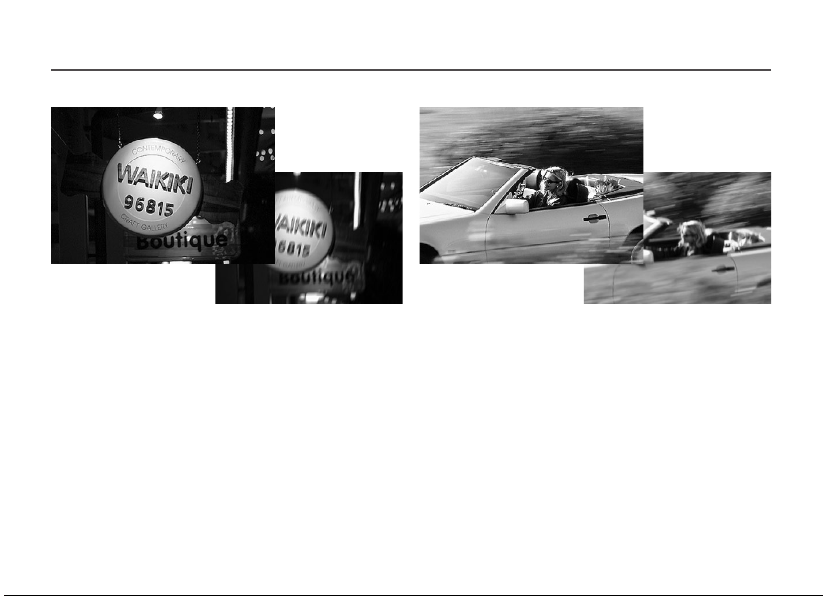
The image stabilizer for this lens is effective for hand-held shots in the following conditions.
Image Stabilizer
OFF
ON
OFF
ON
Hand-heldclose-ups(macro)
Insemi-darkenedareassuchasindoorsoroutdoors
atnight.
Inlocationswhereashphotographyisprohibited,
suchasartmuseumsandtheaterstages.
Insituationswhereyourfootingisuncertain.
Insituationswherefastshuttersettingscannotbe
used.
Whenpanningsubjectsinmotion.
ENG-10
Thislensallowsuserstofocusfrominnitytoa
magnicationratioof1:1forclose-ups(macro).
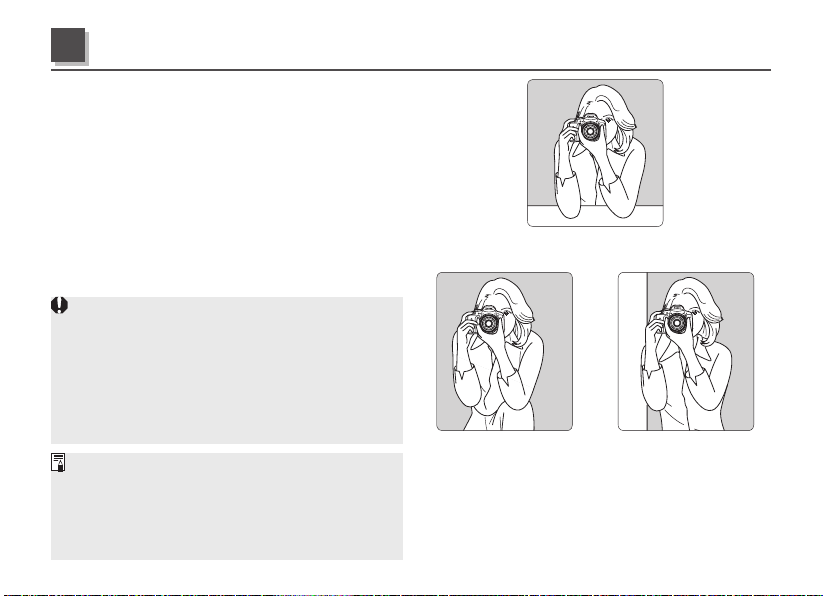
Hold the camera rmly
Holdthecamerarmlyasshownintheillustration
ontherightwhentakinghand-heldclose-ups
(macro),andtaketheshotscarefullytominimize
camerashakeandpreventfocusblurring.
Taking Photographs using AI Servo AF
ItisrecommendedthatthecameraAFissettoAI
SERVOwhentakingclose-up(macro)shots.See
thecamera’sinstructionmanualforfurtherdetails.
Itisnecessarytobecarefulofthefollowingduring
close-up(macro)shooting.
• T
hereisatendencyforcamerashaketoaffectclose-
up(macro)shotsmorethannormalshots,andthe
effectsoftheimagestabilizingfunctionarereduced.
• D
epthofeldbecomesextremelyshallowwhen
takingclose-up(macros)shots,andthefocusmay
blurifthecameraismovedforwardandbackward.
Theminimumfocusingdistanceofthislens
(minimumdistancebetweenthesubjectandthe
imagesensoratwhichthelenscanfocus)is
0.13m/0.43ft.Theworkingdistanceofthislens
(minimumdistancefromthefrontofthelenstothe
subject)is30mm/1.18inch.
Useyourkneetosupport
anarmholdingthecamera
orlens.
Leanagainstasteady
objectlikeawall.
Placebothelbowsonasteadysurfacesuchasatable.
Taking Hand-held Close-ups (Macro)
4
ENG-11
Setting the Exposure
WhentakingphotographsusingTTLmetering,
noexposurecompensationisnecessarytometer
thelightcomingthroughthelens.
WithTTLmetering,AE(autoexposure)ispossible
atallfocusingdistances.Justsetthedesired
picture-takingmode,thenchecktheshutter
speedandaperturebeforetakingthepicture.
Magnification and Effective f-number
Theaperturedisplayedbythecameraassumes
thatthefocusissettoinfinity.Theactual
aperture(effectivef-number)becomesdarker
(effectivef-numberincreases)atcloserfocusing
distances(magnificationincreases).Thisdoes
notcauseexposureproblemsfornormalpicture-
taking.However,forclose-upphotography,you
cannotignorethechangeintheeffective
f-number.
Conditionsprevalentwiththesubjectarevery
importantwhendecidingonthecorrectlevel
ofexposureforclose-up(macro)shots.Itis
thereforerecommendedthatexposurelevelsare
amendedasmuchaspossibleduringshooting,
orthattheimageofthesubjectischeckedon
thecamera’sLCDmonitor.
Usingeithertheaperture-priorityAE(Av)mode
ormanualexposure(M)modeisrecommended
forclose-up(macro)photography,asthese
makeiteasiertoadjustthedepthofeldand
exposure.
Whenyouuseahandheldexposuremetertoset
theexposure,youmusttakeintoaccountthe
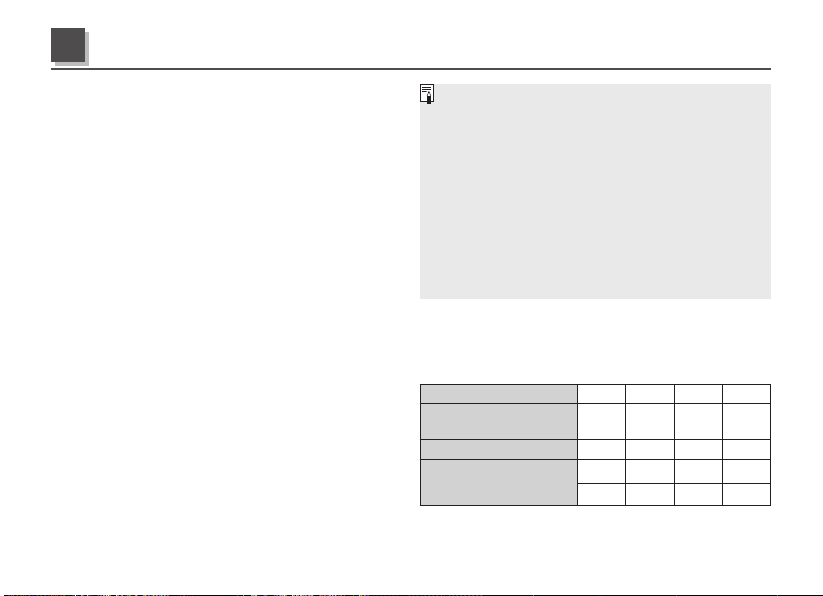
exposurefactorshowninthefollowingtable.
Magnification 0.3 0.5 0.7 1.0
FocusingDistance
(m/ft.)
0.21/
0.69
0.17/
0.56
0.14/
0.46
0.13/
0.43
Effectivef/No. 3.3 3.5 3.7 4.0
ExposureFactor(stops)*
+1/3 +2/3 +2/3 +1
+1/2 +1/2 +1/2 +1
*
Uppervalues:1/3stops.Lowervalues:1/2stops.
Exposure When Taking Close-up (Macro) Shots
5
ENG-12
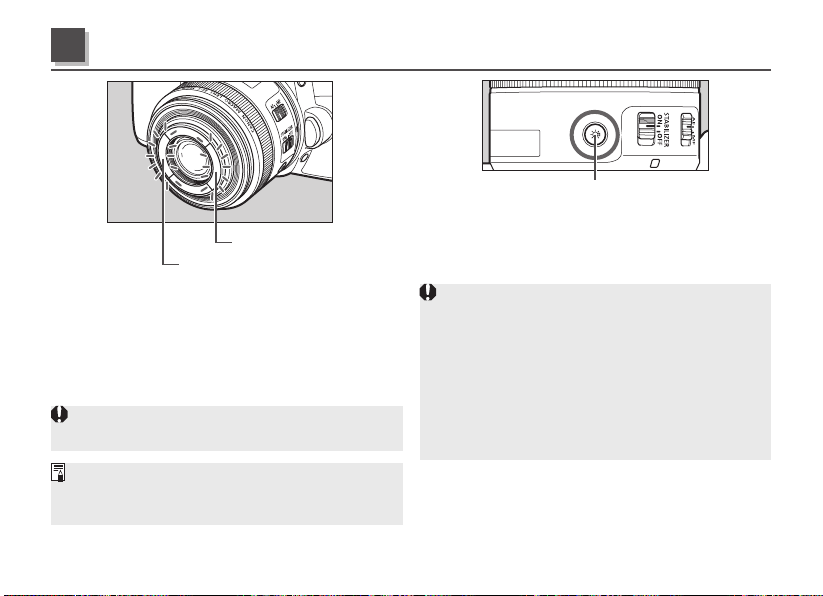
MacroLiteA
MacroLiteB
TheMacroLitesonthefrontofthelensshine
lightonthesubjectduringclose-up(macro)
photographytofacilitateshooting.Therearetwo
light-emittingMacroLiteslocatedonbothsides
ofthelens,anditispossibletoilluminateboth
simultaneouslyoreitherofthemindependently.
TheMacroLitescanonlybeilluminatedwhenthe
powertothecameraisswitchedon.
TheuseofasingleMacroLitewilladdshadowto
thesubjectandaddasenseofthree-dimensionality
tophotographs.
Macro Lites
6
MacroLiteONbutton
TheMacroLitesareilluminatedbypressingthe
MacroLiteONbutton.PressingtheMacroLite
ONbuttonwillilluminatetheMacroLitesfor
approximately30seconds.
D
uringLiveViewormovieshooting,theMacro
Liteswillnotturnoffuntilthecameraisturnedoff.
RemovethehoodwhenusingtheMacroLites.
Ifanyofthefollowingactionsareperformed
within30secondsoftheMacroLitesbeing
activated,theMacroLiteswillremainactivated
foranadditional30seconds.
•
Pressingtheshutterbuttonhalfway/completely*
•
PressingtheMacroLiteONbutton
•
Manualfocusoperation
* TheMacroLiteswillturnoffafterafewsecondswhenyou
removeyourfingerfromtheshutterbuttonafterahalfway/
completepressinthecaseoftheEOS30D,EOS20D,
EOS20Da,EOSDIGITALREBELXT/350DDIGITALand
EOSDIGITALREBEL/300DDIGITAL.
ENG-13
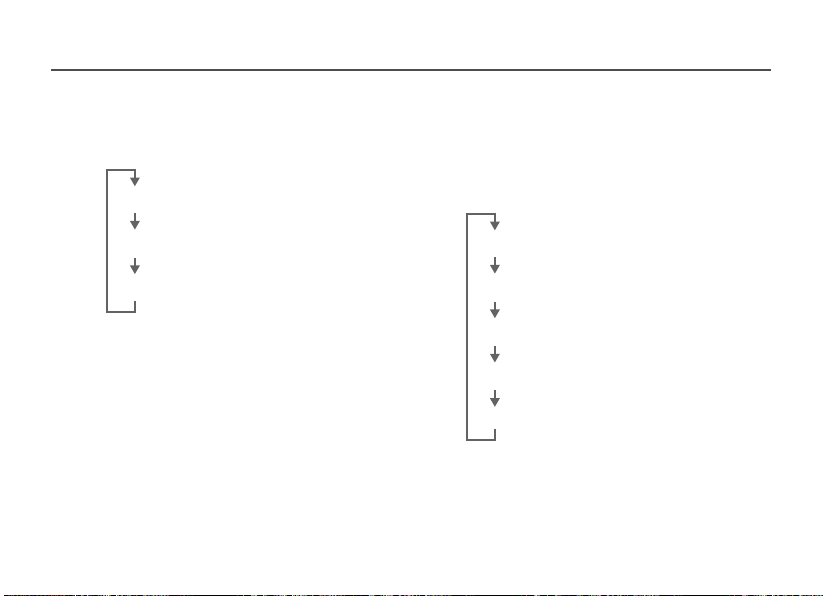
■ Both Macro Lites Illuminated
BrieypressingtheMacroLiteONbuttonwill
alternatebetweenONandOFFforbothlights,
andbetweenBrightandDim.
OFF
[Bothlightsilluminated:Bright]
[Bothlightsilluminated:Dim]
■ Macro Lites A and B Illuminated
Independently
HolddowntheMacroLiteONbuttonwiththe
lightswitchofftoilluminateoneofthelights.
BrieypressingtheMacroLiteONbuttonwhen
onelightisilluminatedwillalternatetheON
statustotheotherlight.
OFF
[MacroLiteAilluminated:Bright]
[MacroLiteAilluminated:Dim]
[MacroLiteBilluminated:Bright]
[MacroLiteBilluminated:Dim]
■ Switching Between Both Macro Lites
and a Single Macro Lite
HolddowntheMacroLiteONbuttonwiththe
lightilluminatedtoalternatebetweenboth
lightsandasinglelight.
Macro Lites

ENG-14
T
heMacroLitescastshadowsfromthecamera
andlensontothesubjectduringclose-up(macro)
photographytofacilitateshootingandimprovethe
endresult.Theyarenotdesignedtoshinesufcient
lightonsubjectswhenshootingindarklocations.
Morebatterypowerisconsumedwhenthe
MacroLitesareinusethanwhentheyare
notinuse,whichwillreducethenumberof
photographsthatcanbetakenandtheamount
oftimethatvideoscanbelmed.
TheilluminationstatusoftheMacroLiteswillbe
savediftheyhaveturnedoffautomaticallyafter
30secondshaselapsed.PresstheMacroLite
ONbuttontoreactivatethem.Thiswillcausethe
MacroLitestobeilluminatedatthesamelevel
asbeforetheywereextinguished.
T
heilluminationstatuswillnotbesavedifthecamera
isturnedoffandtheMacroLitesextinguished.
TherearecasesinwhichtheMacroLiteswillbe
extinguishedwhenthecamera’spower-saving
function(AutoPowerOff)turnsoffthepower,
evenwhentheyareilluminated.Whenthis
occurs,theilluminationstatuswillnotbesaved.
Dependingonthecameraused,therearetimes
whentheMacroLiteswillnotilluminateeven
afterpressingtheMacroLiteONbuttonduring
AutoPowerOff.
Macro Lites
T
herearecasesinwhichtheMacroLiteswillbe
extinguishedforshortperiodsoftimeduringoperations
andwhenilluminatedifimagereplay,menudisplay,
movie/stillimageswitchingandothercamerasettings
areamended.Theilluminationstatuswillnotbesaved
inthiscase.ChecktheilluminationstatusoftheMacro
Litesimmediatelypriortotakingphotographs.
I
fAForMFisselectedusingthefocusmodeswitch
whiletheMacroLitesareilluminated,theMacroLites
mayturnoffforashortperiodoftime.Theillumination
statusoftheMacroLiteswillbesavedinthiscase.
TherearecasesinwhichtheMacroLiteswillnot
beilluminatedforseveralsecondsafterthelens
hasbeenattachedtothecamera.
InordertoilluminatetheMacroLites
continuouslyduringintervalshooting,setthe
shootingintervalwithin30seconds.
InordertoilluminatetheMacroLites
continuouslyduringtime-lapseshooting,setthe
shootingintervalwithin10seconds.
A
fterpressingtheshutterbuttonhalfway,don’t
changetheMacroLitestatuswhenshooting.
Sincepressingtheshutterbuttonhalfwaylocksthe
exposure*,itmaynotbepossibletoshootinstandard
exposureiftheMacroLitestatushaschanged.
T
heMacroLiteswillbeconcealedwhenthehood
isattached,sodon’tforgettoswitchthemoff.
*
Differsaccordingtothecamera’sphotometryandAFsettings.
Fordetails,pleasecheckyourcamera’sinstructionmanual.
ENG-15
TheES-27lenshoodplaysthefollowingroles:
I
nadditiontoblockingoutdamaginglight,italsoprotects
thelensfromrain,snow,dustandotherelements.
Itpreventsthewhiteringonthefrontofthe
lensfrombeingreectedbackintoimages.
Itactsasanadapterwhenltersarebeingused.
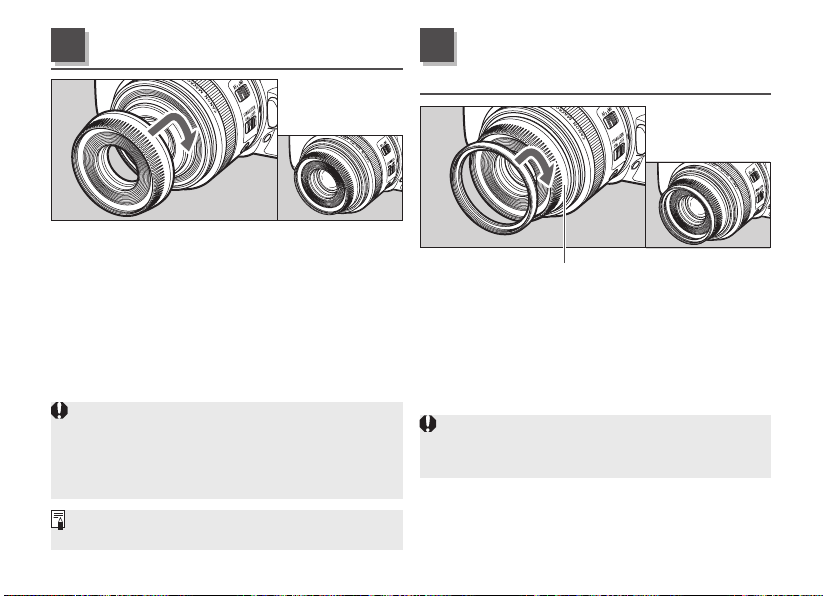
Screwthehoodrmlyandcorrectlyontothe
frontofthelens.
Attachingthehoodatananglemaydamagethe
outsideofthelens.
I
fthehoodisnotattachedproperly,vignetting
(darkeningoftheperimeterofthepicture)mayoccur.
RemovethehoodwhenusingtheMacroLites.
Itispossibletoattachthelenscaptothefrontof
thehoodwhenitisattachedtothelens.
Hood
Youcanattachlters(whichare49mmin
diameter)totheltermountingthreadonthe
frontofthehood.
1.Attachthehood.
2.Attachtheltertothefrontofthehood.
Filterscannotbeusedunlessthehoodis
attached.
Onlyoneltermaybeattached.
Hood
7
Filters
(sold separately)
8
ENG-16
TheMacroRingLiteMR-14EXIIortheMacro
TwinLiteMT-24EXenablesfullyautomatic
macroashphotographyupto1xmagnication
inE-TTLautoashmode.
ForinformationonoperatingtheCanonMacroRing
LiteMR-14EXIIortheMacroTwinLiteMT-24EX,
refertotheindividualinstructionmanuals.
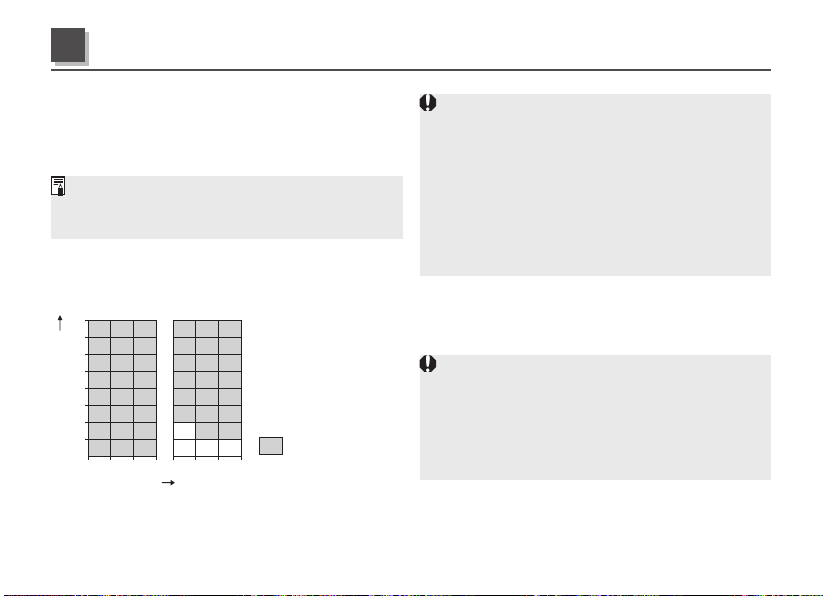
■ When the MR-14EX II is in use
•EffectiveFlashRange(Reference)
Aperture
Magnification
: Effective flash range
(both sides firing)
(with the Macro Lite
set at OFF)
0.5 0.7 10.3 0.5 0.7 10.3
ISO100
32
22
16
11
8
5.6
4
2.8
0.5 0.7 1
ISO400
Therearecasesinwhichtheareassurrounding
thesubjectwillbebrighterinimagestakenclose
totheminimumfocusingdistance.
Therearecasesinwhichvignettingmayoccur
aroundthecenterofimagestakenclosetothe
minimumfocusingdistancewitha67mmin
diameterlterattachedtothelight-emittingMicro
LitesontheMR-14EXII,whichwillmakethem
darker.Inthisevent,attacha49mmindiameter
ltertothelens.
■ When the MT-24EX is in use
TheMT-24EX’sashrangelargelydependson
theashhead’sposition.
Intheeventofover-exposure,lowerthevalueof
theISOsensitivitysetting,orreducethesizeof
theaperture,etc.
Dependingontheshapeandsizeofthesubject,
therearecasesinwhichthelight-emittingMacro
Liteswillinterferewiththesubjectinimages
takenclosetotheminimumfocusingdistance.
Macro Flash (sold separately)
9
ENG-17
Extension Tubes
(sold separately)
10
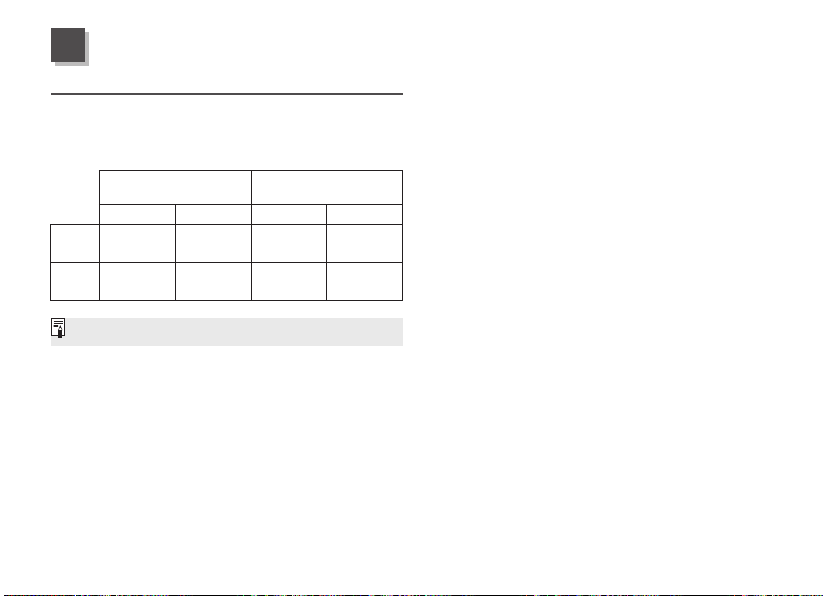
YoucanattachextensiontubeEF12IIorEF25
IIformagniedshots.Theshootingdistanceand
magnicationareshownbelow.
Magnication(×)
FocusingDistanceRange(mm)
(WorkingDistance)
Closedistance
Longdistance
Closedistance
Longdistance
EF12II
1.41 0.34
133
(20)
209
(97)
EF25II
1.91 0.76
142
(15)
167
(39)
MFmodeisrecommendedforaccuratefocusing.
ENG-18
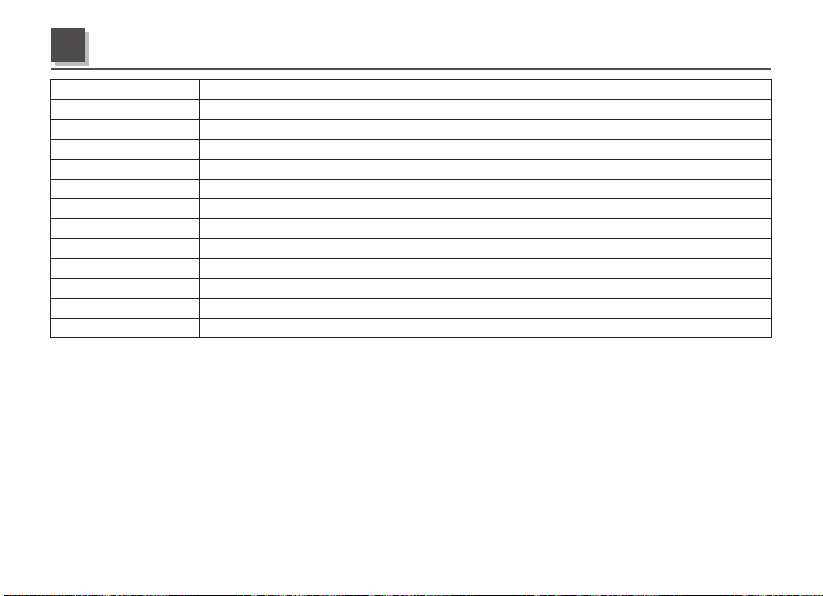
Focal Length/Aperture
35mmf/2.8
Lens Construction 6groups,10elements
Minimum Aperture f/32
Angle of View Diagonal:42°35′,Vertical:24°20′,Horizontal:35°55′
Min. Focusing Distance
0.13m/0.43ft.
Max. Magnification 1x
Field of View
Approx.15.0x22.3mm/0.59x0.88inch(at0.13m/0.43ft.)
Filter Diameter 49mm(whenlenshoodES-27isattached)
Max. Diameter and Length
69.2x55.8mm/2.72x2.20inch
Weight Approx.190g/6.7oz
Hood ES-27
Cap LensCapEF-S35,LensDustCapE
Case LP1014(soldseparately)
Equivalentto56mminthe35mmlmformat.
Thelenslengthismeasuredfromthemountsurfacetothefrontofthelens.Whenthelenscapand
dustcapsuppliedareattached,add34.1mmifthehoodisattachedand24.1mmifthehoodisnot
attached.
Thesizeandweightlistedareforthelensonly,exceptasindicated.
Extenderscannotbeusedwiththislens.Inaddition,therearenoclose-uplensesdesignedforuse
withthislens.
Aperturesettingsarespeciedonthecamera.
AlldatalistedismeasuredaccordingtoCanonstandards.
Productspecicationsandappearancearesubjecttochangewithoutnotice.
Specications

CT1-D002-A 0217Ni © CANON INC. 2017