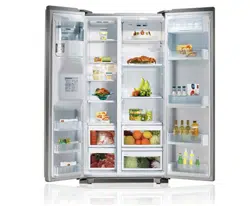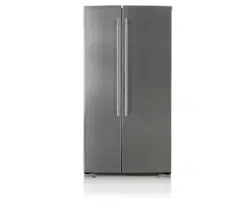
Model Name/Nombre de Modelo/Nom du modèle
LSC23954**
P/No. MFL62884307
OWNER’S MANUAL
SIDE BY SIDE
REFRIGERATOR
Please read this manual carefully before operating
your set and retain it for future reference.
MANUAL DE USUARIO
REFRIGERADOR
DE DOS PUERTAS
Lea detenidamente este manual antes
de empezar a utilizar el refrigerador y guárdelo
como referencia para el futuro
ENGLISH ESPAÑOL FRANÇAIS
MANUEL D’UTILISATEUR
RÉFRIGÉRATEUR
CÔTE À CÔTE
Veuillez lire ce manuel en entier avant de mettre
en marche l’unité et conservez-le à la portée de la
main pour le consulter à tout moment.
**color number/número de color/ numéro de couleur
www.lg.com
2
Visit our web site http://www.lg.com LG Electronics
LIMITED WARRANTY
United States of America
LG Electronics will repair or at its option replace, without charge, your product which proves to be defective
in material or workmanship under normal use during the warranty period listed below from the date of original
purchase.
This warranty is good only to the original purchaser of the product during the warranty period as long as it is in the
U.S. including Alaska, Hawaii, and U.S. Territories.
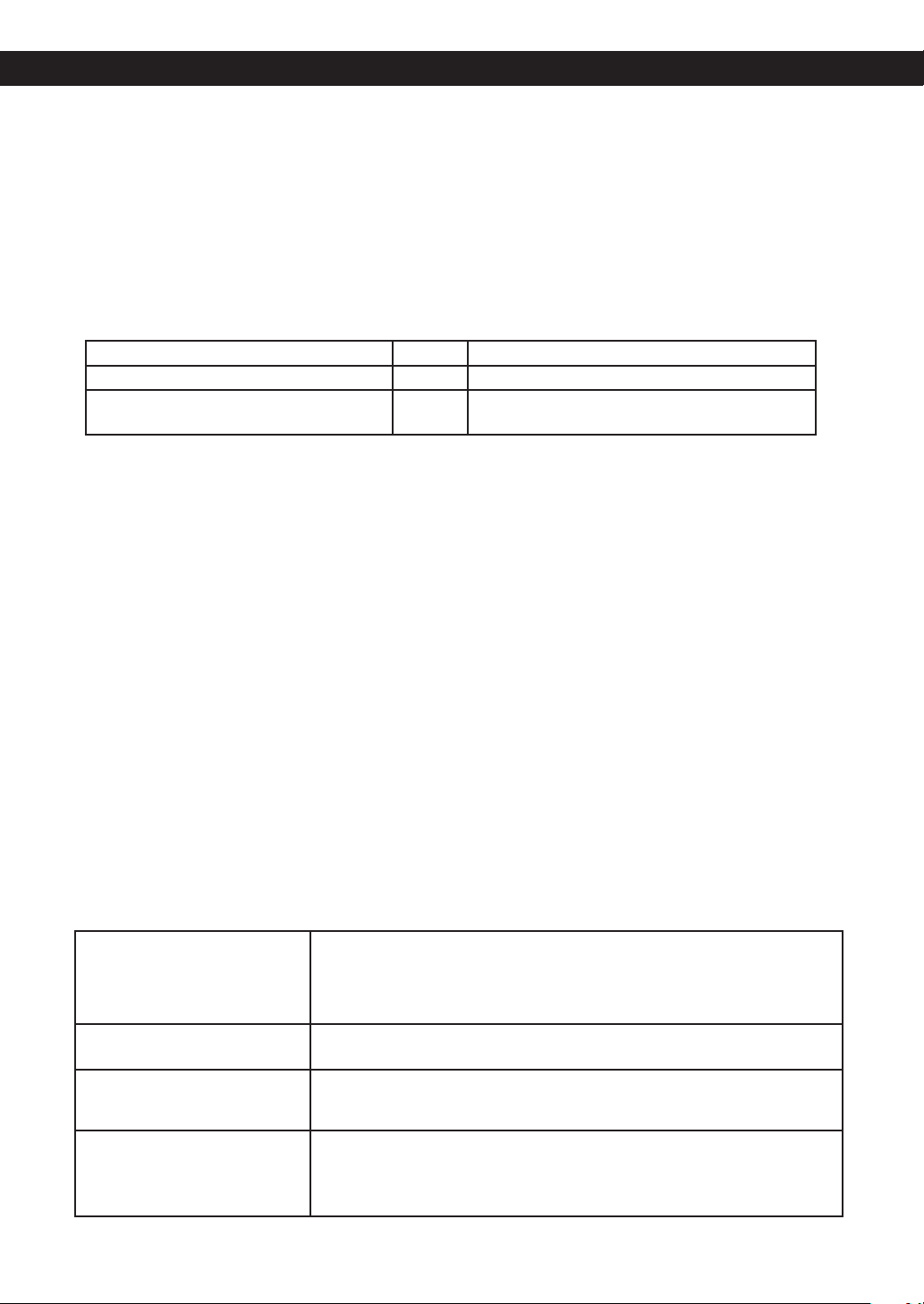
LG Refrigerator / Freezer Warranty Period
Product Parts Labor
Refrigerator / Freezer 1 year 1 year [In-Home Service (Except Model GR-051)]
Sealed System
(Compressor, Condenser, Evaporator)
7 years 1 year [In-Home Service (Except Model GR-051)]
No other express warranty is applicable to this product. THE DURATION OF ANY IMPLIED WARRANTIES. INCLUDING
THE IMPLIED WARRANTY OF MERCHANTABILITY, IS LIMITED TO THE DURATION OF THE EXPRESS WARRANTY
HEREIN. LG ELECTRONICS SHALL NOT BE LIABLE FOR THE LOSS OF USE OF THE PRODUCT, INCONVIENCE,
LOSS OR ANY OTHER DAMAGES, DIRECT OR CONSEQUENTIAL, ARISING OUT OF THE USE OF OR INABILITY
TO USE, THIS PRODUCT OR FOR ANY BREACH OF ANY EXPRESS OR IMPLIED WARRANTY, INCLUDING THE
IMPLIED WARRANTY OF MERCHANTABILITY APPLICABLE TO THIS PRODUCT.
Some States do not allow the exclusion or limitation of incidental or consequential damages or limitations on how long an
implied warranty lasts; so these limitations or exclusions may not apply to you. This warranty gives you specic legal rights
and you may also have other rights which vary from state to state.
THE ABOVE WARRANTY DOES NOT APPLY TO:
1. Service trips to your home to deliver and pickup, install, instruct, or replace house fuses or correct house wiring or
plumbing, or correction of unauthorized repairs.
2. Damage to the product caused by accident, pests, re, oods, or acts of God.
3. Repairs when your LG product is used in other than normal, single-family household use.
4. Damage resulting from accident, alteration, misuse, abuse, or improper installation.
5. Damages caused during and/or after delivery.
6. Display, discount, or refurbished units purchased with scratches, dents, or defects.
Proof of purchase is required and must be provided to LG in order to validate warranty.
Therefore, these costs are paid by the consumer.
If the product is installed outside the normal service area, any cost of transportation involved in the repair of the product,
or the replacement of defective parts, shall be borne by the owner.
CUSTOMER ASSISTANCE NUMBERS:
To obtain Warranty Coverage: Retain your Bill of Sale to prove date of purchase.
A Copy of your Sales Receipt must be submitted at the time warranty service is
provided.
To obtain Product or Customer: Call 1-800-243-0000 (24 hrs a day, 7 days per week, 365 days per year)
Service Assistance: Press the appropriate menu option, and have your product type (Refrigerator),
model number, serial number, and ZIP/Postal Code ready.
To obtain the nearest Authorized
Service Center:
Call 1-800-243-0000 (24 hrs a day, 7 days per week, 365 days per year)
Press the appropriate option, and have your product type (Refrigerator), model
number, serial number, and ZIP/Postal Code ready.
WARRANTY
3
Visite nuestro sitio web http://www.lg.com LG Electronics
GARANTÍA LIMITADA
Estados Unidos de América
LG Electronics reparará o en su defecto reemplazará sin cargo, el producto defectuoso en material o mano de
obra bajo uso normal durante el período de garantía que se menciona a continuación desde la fecha original de
compra.
Esta garantía es válida solo para el comprador original del producto durante el período de garantía mientras
permanezca en los E.E. U.U. Incluyendo Alaska, Hawaii y otros territorios de E.E.U.U.
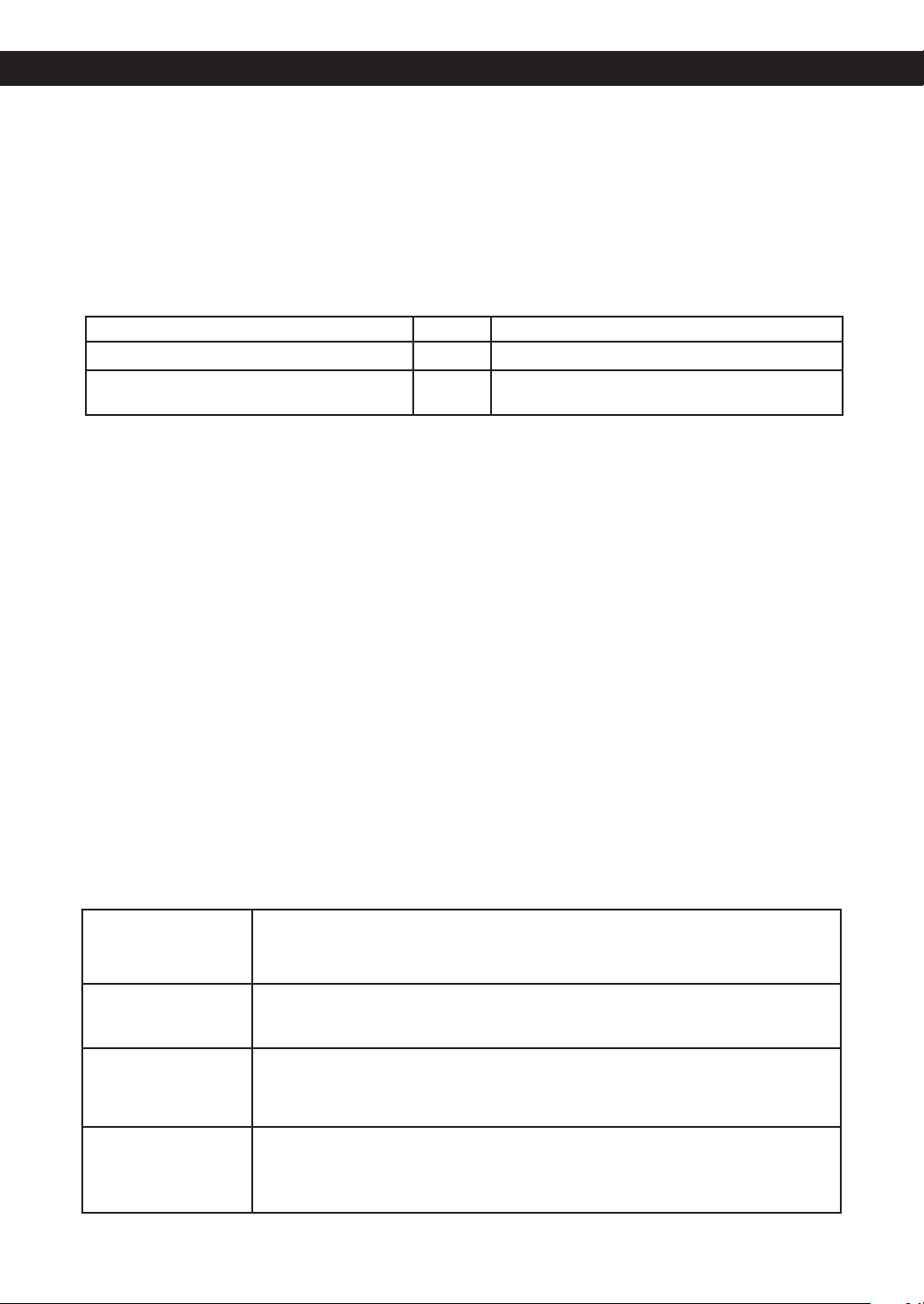
Período de Garantía del Refrigerador/Congelador LG
Producto Partes Mano de Obra
Refrigerador / Congelador 1 año 1 año [Servicio a Domicilio (Except Model GR-051)]
Sistema Sellado
(Compresor,Condensador, Evaporador)
7 años 1 año [Servicio a Domicilio (Except Model GR-051)]
No se aplicará otro tipo de garantía a este producto. LA DURACION DE OTRAS GARANTÍAS , INCLUYENDO LA DE
COMPRA, ESTÁN LIMITADAS A LA DURACIÓN DE ÉSTA GARANTÍA. LG ELECTRONICS NO SE HACE RESPONSABLE
POR LA PÉRDIDA EN EL USO DEL PRODUCTO, POR INCONVENIENCIA O CUALQUIER OTRO DAÑO DIRECTO O
CONSECUENTE QUE PROVENGA DEL USO Y/O NO USO DE ESTE PRODUCTO O POR ALGUNA VIOLACIÓN A LAS
GARANTÍAS IMPLEMENTADAS INCLUYENDO LA GARANTÍA DE COMPRA APLICADA A ESTE PRODUCTO.
Algunos estados no permiten la exclusión o limitación de daños incidentales o consecuenciales o limitaciones en cuanto
al tiempo que dura una garantía implícita; por lo que algunas de estas limitaciones o exclusiones pueden no aplicarse a
usted. Esta garantía le otorga derechos legales especícos y usted puede además tener otros derechos los cuales varían
de Estado a Estado.
LA GARANTIA ANTERIOR NO APLICA A :
1. Servicio a su casa para entregar, recoger, instalar o reemplazar fusibles caseros, corregir cableado casero o plomería
corrección de reparaciones no autorizadas.
2. Daño al producto causado por accidente, plagas, incendios, inundaciones o actos por naturaleza.
3. Reparaciones cuando su producto LG sea usado diferente a lo normal.
4. Daño resultante de accidente, alteración, mal uso o instalación inadecuada.
5. Daños causados durante y después de la entrega.
6. Reemplazo, descuento o restauración de unidades compradas con rayones, abolladuras o defectos.
La prueba de la compra se requiere y se debe proporcionar a LG para validar la garantia.
Por lo tanto, estos costos serán pagados por el consumidor.
Si el producto es instalado fuera del área normal de servicio, cualquier costo de transportación relacionado en la reparación
del producto, o el reemplazo de partes defectuosas, serán cargados al propietario.
NÚMEROS DE ASISTENCIA AL CLIENTE:
Para obtener cobertura
de la Garantía:
Conserve su factura para comprobar la fecha de compra. Una copia de su recibo de
compra debe ser entregada cuando se le proporcione el servicio de garantía.
Para obtener
información:
Llame al 1-800-243-0000 (24 hrs al día, 7 días por semana, 365 días al año)
Servicio de Asistencia: Presione la opción de menú apropiado, y tenga su tipo de producto (Refrigerador), número
de modelo, número de serie, y ZIP / Código Postal listos.
Para obtener el Centro
de Servicio Autorizado
más cercano:
Llame al 1-800-243-0000 (24 hrs al día, 7 días por semana, 365 días al año).
Presione la opción adecuada, y tenga su tipo de producto(Refrigerador), número de modelo,
número de serie, y ZIP /código Postal listos.
GARANTÍA
4
LG ELECTRONICS CANADA, INC.
LG REFRIGERATOR LIMITED WARRANTY - Canada
WARRANTY: Should your LG Refrigerator (“Product”) fail due to a defect in material or workmanship under normal home use during the
warranty period set forth below, LG Canada will at its option repair or replace the Product upon receipt of proof of original retail purchase.
This warranty is valid only to the original retail purchaser of the product and applies only to a Product distributed in Canada by LG
Canada or an authorized Canadian distributor. The warranty only applies to Products located and used within Canada.
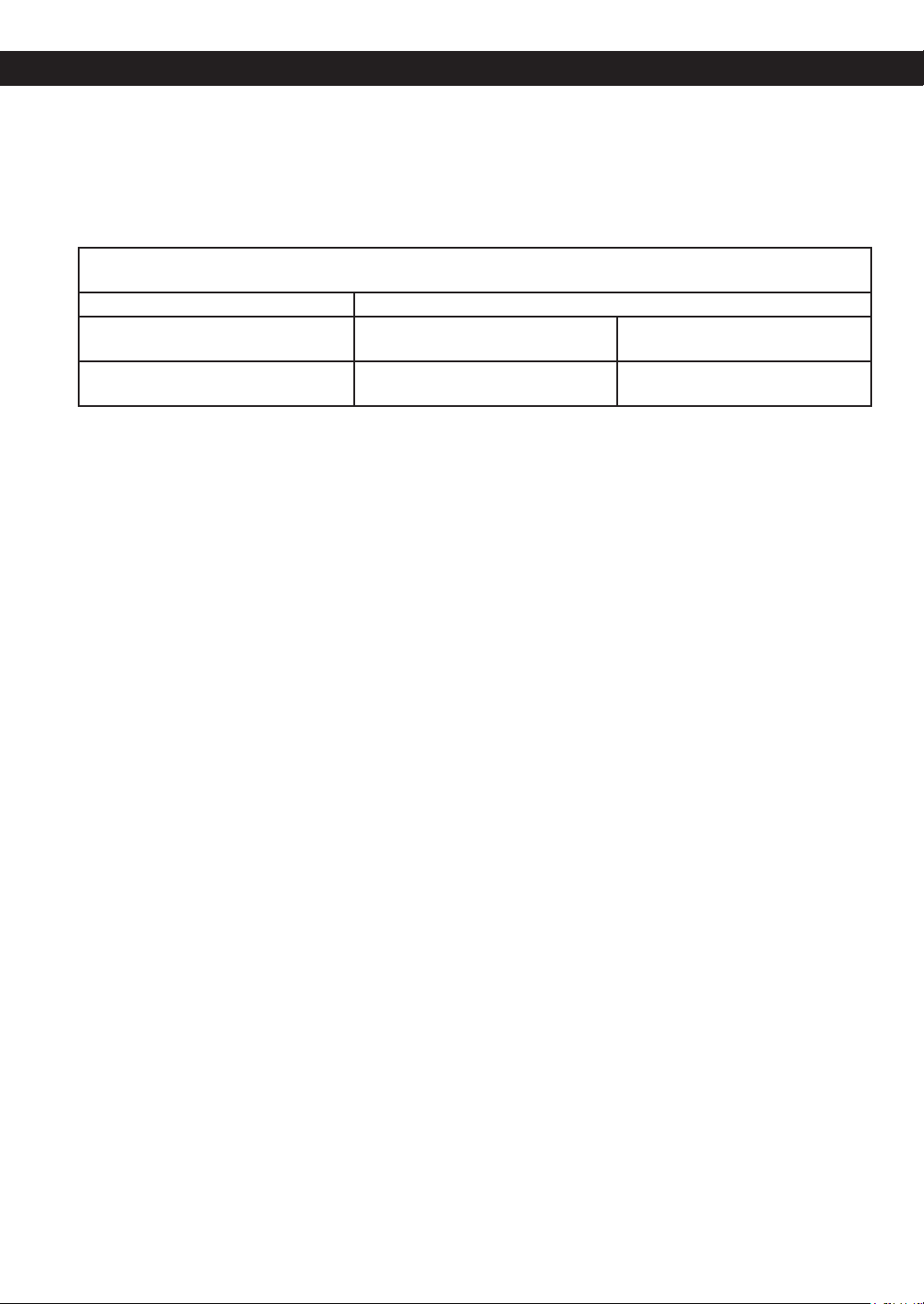
WARRANTY PERIOD: (Note: If the original date of purchase can not be veried, the warranty will begin sixty
(60) days from the date of manufacture).
Refrigerator/Freezer Sealed System (Compressor, Condenser, and Evaporator only)
One (1) year from the date of original
retail purchase
One (1) year from the date of original
retail purchase
Seven (7) years from the date of
original retail purchase
Parts and Labor
(internal/functional parts only)
Parts and Labor Parts only
(Consumer will be charged for labor).
* Replacement products and parts are warranted for the remaining portion of the original warranty period or ninety (90) days, whichever
is greater.
* Replacement products and parts may be new or remanufactured.
* LG Authorized Service Center warranties their repair work for thirty (30) days.
LG CANADA´S SOLE LIABILITY IS LIMITED TO THE WARRANTY SET OUT ABOVE. EXCEPT AS EXPRESSLY PROVIDED
ABOVE, LG CANADA MAKES NO AND HEREBY DISCLAIMS ALL OTHER WARRANTIES AND CONDITIONS RESPECTING
THE PRODUCT, WHETHER EXPRESS OR IMPLIED, INCLUDING, BUT NOT LIMITED TO, ANY IMPLIED WARRANTY OR
CONDITION OF MERCHANTABILITY OR FITNESS FOR A PARTICULAR PURPOSE , AND NO REPRESENTATIONS SHALL
BE BINDING ON LG CANADA. LG CANADA DOES NOT AUTHORIZE ANY PERSON TO CREATE OR ASSUME FOR IT ANY
OTHER WARRANTY OBLIGATION OR LIABILITY IN CONNECTION WITH THE PRODUCT. TO THE EXTENT THAT ANY
WARRANTY OR CONDITION IS IMPLIED BY LAW, IT IS LIMITED TO THE EXPRESS WARRANTY PERIOD ABOVE. LG
CANADA, THE MANUFACTURER OR DISTRIBUTOR SHALL NOT BE LIABLE FOR ANY INCIDENTAL, CONSEQUENTIAL,
SPECIAL, DIRECT OR INDIRECT DAMAGES, LOSS OF GOODWILL, LOST PROFITS, PUNITIVE OR EXEMPLARY
DAMAGES OR ANY OTHER DAMAGE, WHETHER ARISING DIRECTLY OR INDIRECTLY FROM ANY CONTRACTUAL
BREACH, FUNDAMENTAL OR OTHERWISE, OR FROM ANY ACTS OR OMISSIONS, TORT, OR OTHERWISE.
This warranty gives you specic legal rights. You may have other rights which may vary from province to province depending on
applicable provincial laws. Any term of this warranty that negates or varies any implied condition or warranty under provincial law is
severable where it conicts with provincial law without affecting the remainder of this warranty’s terms.
THIS LIMITED WARRANTY DOES NOT COVER:
1. Service trips to deliver, pick up, or install the product; instructing a customer on operation of the product; repair or replacement of fuses or
correction of wiring, or correction of unauthorized repairs/installation.
2. Failure of the product to perform during power failures and interruptions or inadequate electrical service.
3. Damage caused by leaky or broken water pipes, frozen water pipes, restricted drain lines, inadequate or interrupted water supply or
inadequate supply of air.
4. Damage resulting from operating the Product in a corrosive atmosphere or contrary to the instructions outlined in the Product owner’s
manual.
5. Damage to the Product caused by accidents, pests and vermin, lightning, wind, re, oods, or acts of God.
6. Damage resulting from the misuse, abuse, improper installation, repair, or maintenance of the Product. Improper repair includes use of parts
not approved or specied by LG Canada.
7. Damage or product failure caused by unauthorized modication or alteration, or use for other than its intended purpose, or resulting from
any water leakage due to improper installation.
8. Damage or Product failure caused by incorrect electrical current, voltage, commercial or industrial use, or use of accessories, components,
or cleaning products that are not approved by LG Canada.
9. Damage caused by transportation and handling, including scratches, dents, chips, and/or other damage to the nish of your product, unless
such damage results from defects in materials or workmanship and is reported within one (1) week of delivery.
10. Damage or missing items to any display, open box, discounted, or refurbished Product.
11. Products with original serial numbers that have been removed, altered, or cannot be readily determined. Model and Serial numbers, along
with original retail sales receipt, are required for warranty validation.
12. Increases in utility costs and additional utility expenses.
13. Replacement of light bulbs, lters, or any consumable parts.
14. Repairs when your Product is used in other than normal and usual household use (including, without limitation, commercial use, in ofces
or recreational facilities) or contrary to the instructions outlined in the Product owner’s manual.
15. Costs associated with removal of the Product from your home for repairs.
16. The removal and reinstallation of the Product if it is installed in an inaccessible location or is not installed in accordance with published
installation instructions, including the Product owner’s and installation manuals.
17. Accessories to the Product such as door bins, drawers, handles, shelves, etc. Also excluded are parts besides those that were originally
included with the Product.
All costs associated with the above excluded circumstances shall be borne by the consumer.
For complete warranty details and customer assistance, Write your warranty information below:
please call or visit our website: Product Registration Information:
Call 1-888-542-2623 (24 hours a day, 35 days a year) and select the Model:
appropriate option from the menu or visit our website at http://www.lg.com Serial Number:
Date of Purchase:
WARRANTY
5
LG ELECTRONICS CANADA, INC.
GARANTIE LIMITEE DU REFRIGERATEUR LG – CANADA
GARANTIE : Si votre réfrigérateur s’avère être défectueux en raison d’un défaut de matériau ou de fabrication, lors d’une utilisation correcte à domicile,
pendant la période de garantie spéciée ci-après, LG Electronics réparera ou remplacera le produit sur réception de la preuve d’achat d’origine fournie par
le détaillant. Cette garantie est valable uniquement pour l’acheteur original du produit et s’applique uniquement aux produits distribués au Canada par LG
Electronics Canada ou par un distributeur canadien autorisé.
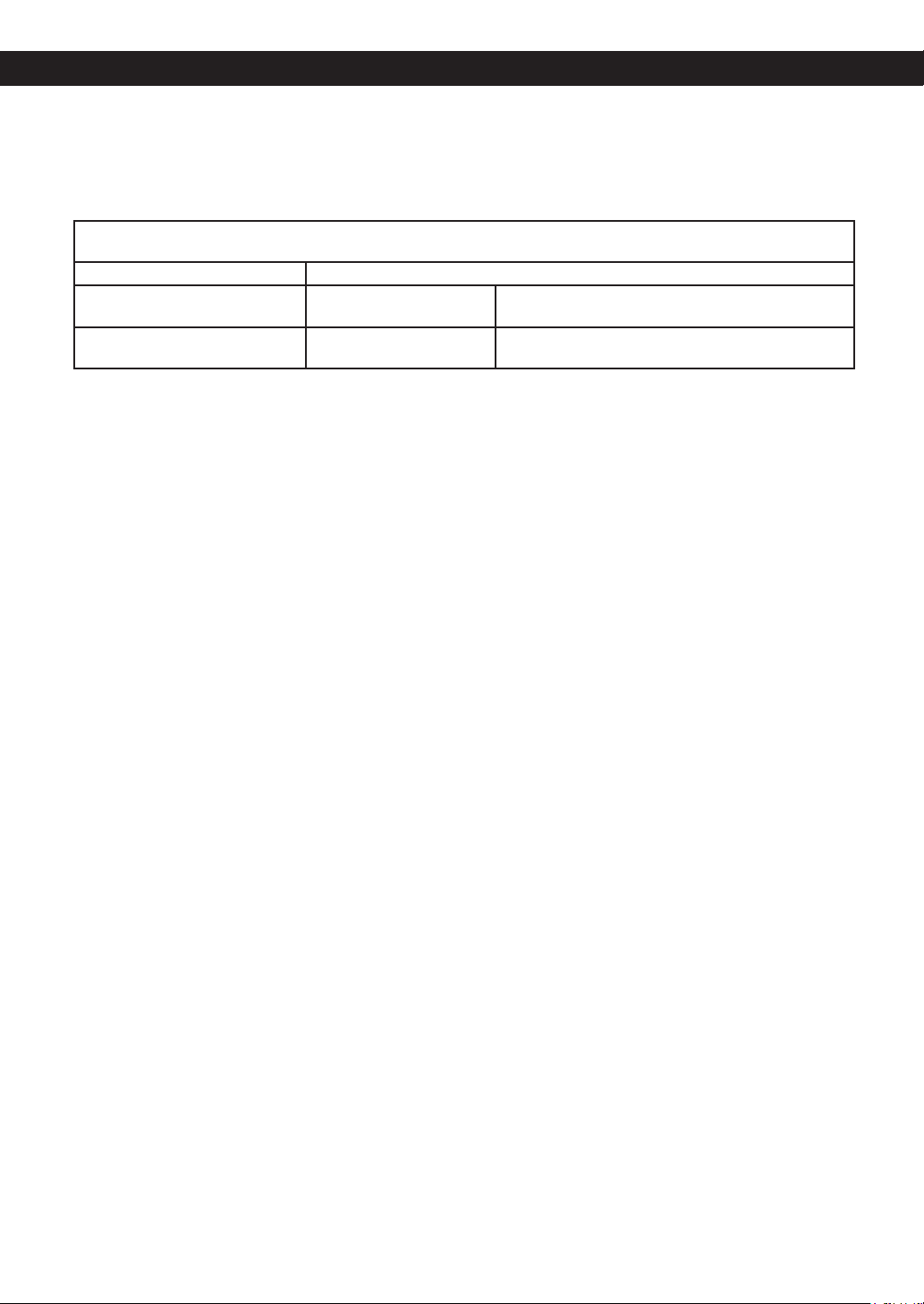
PÉRIODE DE GARANTIE : (Remarque : Si la date d’achat d’origine ne peut pas être vérié », la garantie débutera soixante (60)
jours à partir de la date de fabrication).
Réfrigérateur/congélateur Système scellé (compresseur, condensateur et évaporateur seulement)
Un (1) an à partir de la date d’achat
d’origine.
Un (1) an à partir de la date
d’achat d’origine.
Sept (7) ans à partir de la date d’achat d’origine.
Pièces et main-d’œuvre (pièces
internes fonctionnelles seulement)
Pièces et main-d’oeuvre. Pièces seulement (Le coût de la main d’œuvre sera à la charge
du consommateur)
* Les produits et les pièces de remplacement sont garantis pour la portion restante de la période de garantie originale ou pour quatre-vingt-dix
(90) jours.
* Les produits et les pièces de remplacement peuvent être neufs ou manufacturés.
* Le centre de service autorisé par LG Electronics garantit les réparations pendant trente (30) jours.
LA RESPONSABILITÉ DE LG CANADA SE LIMITE À LA GARANTIE CI-DESSUS. SAUF TEL QU’IL EST EXPLICITEMENT INDIQUÉ CI-DESSUS, LG
CANADA NE FOURNIT AUCUNE AUTRE GARANTIE ET REJETTE TOUTES LES AUTRES GARANTIES ET CONDITIONS EXPLICITES OU IMPLICITES À
L’ÉGARD DU PRODUIT, CE QUI INCLUT, SANS TOUTEFOIS S’Y LIMITER, TOUTE GARANTIE ET CONDITION IMPLICITE DE QUALITÉ MARCHANDE OU
DE CONVENANCE À UN USAGE PARTICULIER ET AUCUNE DÉCLARATION NE LIERA LG CANADA. LG CANADA N’AUTORISE PERSONNE À CRÉER
NI À ASSUMER AUCUNE AUTRE PROVISION POUR GARANTIES EN RELATION AVEC CE PRODUIT. SI UNE GARANTIE OU CONDITION IMPLICITE
EST REQUISE PAR LA LOI, SA PÉRIODE SE LIMITE À CELLE DE LA GARANTIE EXPLICITE SUSMENTIONNÉE.
LG CANADA, LE FABRICANT ET LE DISTRIBUTEUR NE POURRONT ÊTRE TENUS RESPONSABLES D’AUCUN DOMMAGE ACCESSOIRE,
CONSÉCUTIF, SPÉCIAL, DIRECT OU INDIRECT, D’AUCUNE PERTE D’ACHALANDAGE OU DE PROFITS, D’AUCUN DOMMAGE PUNITIF, EXEMPLAIRE
OU AUTRE, DIRECTEMENT OU INDIRECTEMENT ATTRIBUABLE À TOUTE VIOLATION CONTRACTUELLE, FONDAMENTALE OU AUTRE, OU À UNE
ACTION, UNE OMISSION, UN DÉLIT OU TOUTE AUTRE CHOSE.
La présente garantie vous confère des droits légaux spéciques. Vous pourriez disposer d’autres droits, suivant les lois provinciales applicables. T
oute clause
de la présente garantie qui invalide ou modie une condition ou garantie implicite aux termes d’une loi provinciale est dissociable si elle entre en conit avec la
loi provinciale, et ce, sans affecter les autres clauses de la garantie.
LA PRÉSENTE GARANTIE LIMITÉE NE COUVRE PAS CE QUI SUIT:
1. Un appel de service pour livrer, ramasser ou installer le produit; renseigner un client sur le fonctionnement du produit; réparer ou remplacer des fusibles
ou rectier le câblage; ou corriger une réparation ou installation non autorisée.
2. La défaillance du produit durant une panne ou interruption de courant ou en raison d’un service électrique inadéquat.
3. Des dommages occasionnés par la fuite ou le bris de conduites d’eau, le gel de conduites d’eau, des tuyaux de drainage restreints, une alimentation en
eau inadéquate ou interrompue ou une alimentation en air inadéquate.
4. Des dommages attribuables à l’utilisation du produit dans une atmosphère corrosive ou contraire aux instructions spéciées dans le manuel d’utilisation
de produit.
5. Des dommages au produit causés par un accident, des animaux nuisibles ou des vermines, la foudre, le vent, un incendie, une inondation ou une
catastrophe naturelle.
6. Les dommages attribuables à une mauvaise utilisation, une utilisation abusive ou à une installation, une réparation ou un entretien inapproprié du produit.
Les réparations inappropriées incluent l’utilisation de pièces ni aprouvées ni recommandées par LG Canada.
7. La détérioration ou la défaillance du produit causée par une modication ou un changement non autorisé ou une utilisation autre que celle prévue, ou
résultant d’ une fuite d’eau occasionée par une mauvaise installation.
8. La détérioration ou la défaillance du produit causée par un courant ou un voltage électrique incorrect, une utilisation commerciale ou industrielle, ou
l’utilisation d’accessoires, d’éléments ou de produits nettoyants non approuvés par LG Canada.
9. Les dommages causés par le transport et la manipulation, notamment les égratignures, les bosses, les écaillures et / ou tout autre dommage à la nition
du produit, à moins que ces dommages ne soient attribuables à des défauts de matériaux ou de fabrication et qu’ils ne soient signalés dans un délai d’une
(1) semaine de la livraison.
10. Des dommages ou des pièces manquantes à tout produit exposé, déballé, soldé ou remis à neuf.
11. Des produits dont le numéro de série original a été retiré, modié ou ne peut être facilement déterminé. Le modèle et le numéro de série, ainsi que le reçu
de vente original du détaillant, sont requis pour valider la garantie.
12. L’augmentation des coûts et de la consommation des services publics.
13. Le remplacement des ampoules électriques, des ltres et de toute pièce non durable.
14. Les réparations requises si le produit ne sert pas à une utilisation domestique normale et habituelle (y compris, sans toutefois s’y limiter, une utilisation
commerciale, dans un bureau ou un centre récréatif) ou est utilisé contrairement aux instructions spéciées dans le manuel d’utilisation du produit.
15. Les coûts associés à l’enlèvement du produit de votre résidence aux ns de réparation.
16. L’enlèvement et la réinstallation du produit, s’il est installé à un endroit inaccesible ou contrairement aux instructions publiées, y compris dans le manuel
d’utilisation et le manuel d’installation du produit.
17. Les accesoires du produit, tels que les balconnets, les tiroirs, les poignées, les tablettes, etc. Sont également exclues les pièces non incluses initialement
avec le produit.
Tous les coûts associés aux circonstances exclues ci-dessus seront assumés par le consommateur.
Pour obtenir tous les détails sur la garantie et Écrivez vos renseignements de garantie ci-dessous:
accéder au service à la clientèle, téléphonez-nous
visitez notre site Web: Renseignements sur l’enregistrement du produit:
Composez le 1-888-542-2623 (24 h sur 24, 365 jours par année) et Modèle:
Sélectionnez l’option de menu appropriée, ou visitez notre site Web
au: http://www.lg.com Numéro de série:
Date d’achat:
GARANTIE
6
TABLE OF CONTENTS
Warranty (USA) 2 – 3
Warranty (Canada) 4 – 5
Important Safety Instructions 7
Grounding Requirements 8
Refrigerator Installation 9 - 14
Unpacking your Refrigerator 9
Installation 9
Base Grille Installation 9
Handle Removal 10
Removing and Replacing Refrigerator
Doors
10 - 11
Door Alignment 11
Connecting the water line 12
Before you begin 12
What you will need 12
Installation instructions 14 – 15
Refrigerator Features 15 - 16
Using Your Refrigerator 17 - 25
Ensuring Proper Air Circulation 17
Prior to Use 17
Control Panel Features 17
Refrigerator And Freezer Controls 17 - 18
Adjusting Control Settings 19
Icemaker Operation 19
Food Storage Guide 20
Storing Frozen Food 20
Water and Ice Dispenser 21
Ice Storage Bin 21
Door and Rack Support 21
Snack Pan 21
Crisper and Crisper cover 21
Refrigerator Shelves 22
Freezer Shelf 23
Filter 24 - 25
Water Filter 24
Performance Data Sheet 25
Care and cleaning 26
General cleaning tips 26
Outside 26
Inside Walls 26
Door liners and Gaskets 26
Plastic Parts 26
Back Cover 26
LED Replacement 26
Power Interruptions 26 - 27
When you go on Vacation 27
When you Move 27
When you should set the Icemaker
Power Switch to off
27
Normal sounds you May Hear 27
Troubleshooting Guide 28 - 31
7
This guide contains many important safety messages. Always read and obey.
This is the safety alert symbol. It alerts you to safety messages that inform you of hazards that can kill or
hurt you or others, or cause damage to the product. All safety messages will be preceded by the safety
alert symbol and the hazard signal word DANGER, WARNING, or CAUTION. These words mean:
DANGER You will be killed or seriously injured if you do not follow instructions.
WARNING You can be killed or seriously injured if you do not follow instructions.
CAUTION Indicates an imminently hazardous situation which, if not avoided, may result in minor or moderate
injury, or product damage only.
All safety messages will identify the hazard, tell you how to reduce the change of injury and tell you what can
happen if the instructions are not followed.
To reduce the risk of fire, electric shock or injury to
persons when using your product, basic safety
precautions should be followed, including the
following. Read all instructions before using this
appliance:
• NEVER unplug your refrigerator by pulling on the
power cord. Always grip the plug firmly and pull it
straight out from the outlet.
• Repair or replace immediately all electric service cords
that have become frayed or otherwise damaged. Do
not use a cord that shows cracks or abrasion
damage along its length or at either the plug or
connector end.
• When moving your refrigerator away from the wall, be
careful not to roll over or damage it in any way.
• Do not crush or damage the water line.
• Do not store or use gasoline or other ammable vapors
or liquids in the vicinity of this or any other appliance.
• Do not allow children to climb, stand or hang on the
refrigerator doors or shelves in the refrigerator. They
could damage the refrigerator and seriously injure
themselves.
• Keep ngers out of ‘pinch point’ areas; clearances
between the doors and cabinet are necessarily small.
Be careful when you open the doors when children are
in the area.
• Unplug your refrigerator before cleaning or making any
repairs.
NOTE: We strongly recommend that any servicing be
performed by a qualified individual.
• Do not store bottles in the freezer compartment, they
may break when frozen, causing damage.
• The refrigerator-freezer should be positioned so that
the supply plug is accessible for quick disconnection if
an accident happens.
• For personal safety, this appliance must be properly
grounded. Have the wall outlet and the circuit checked
by a qualified electrician to make sure the outlet is
properly grounded.
• This refrigerator must be properly installed in
accordance with the ‘Attention Installer’ instructions
that were taped to the front of the refrigerator.
• After your refrigerator is in operation, do not touch the
cold surfaces in the freezer compartment when hands
are damp or wet. Skin may adhere to the extremely
cold surfaces.
• In refrigerator with automatic icemakers, avoid
contact with the moving parts of the ejector
mechanism, or with the heating element that releases
the cubes.
• DO NOT place ngers or hands on the automatic ice
making mechanism while the refrigerator is plugged in.
• DO NOT refreeze frozen foods which have thawed
completely. The United States Department of
Agriculture in Home and Garden Bulletin No. 69 says:
“...You may safely refreeze frozen foods that have
thawed if they still contain ice crystals or if they are still
cold below 40 °F (4 °C)”.
“Thawed ground meats, poultry, or fish that have any
off-odor or off-color should not be frozen and should
not be eaten. Thawed ice cream should be discarded.
If the odor or color of any food is poor or questionable,
get rid of it. The food may be dangerous to eat”.
“Even partial thawing and refreezing reduces the
eating quality of foods, particularly fruits, vegetables
and prepared foods. The eating quality of red meats
is affected less than that of many other foods. Use
refrozen foods as soon as possible to save as much of
their quality as you can”.
SAVE THESE INSTRUCTIONS
IMPORTANT SAFETY INSTRUCTIONS
WARNING
8
This appliance is not intended for use by persons (including children) with reduced physical, sensory or mental
capabilities, or lack of experience and knowledge, unless they have been given supervision or instruction
concerning use of the appliance by a person responsible for their safety.
Children should be supervised to ensure that they do not play with the appliance.
Child entrapment and suffocation are not problems of
the past. Junked or abandoned refrigerators are still
dangerous… even if they will sit for “just a few days”. If
you are getting rid of your old refrigerator, please follow
the instructions at right to help prevent accidents.
Before you throw away your old
refrigerator or freezer:
• Take off the doors.
• Leave the shelves in place so that children
may not easily climb inside.
Your old refrigerator may have a cooling system that
used CFCs (chlorouorocarbons). CFCs are believed
to harm stratospheric ozone. If you are throwing away
your old refrigerator, make sure the CFC refrigerant is
removed for proper disposal by a qualified servicer. If
you intentionally release this CFC refrigerant, you can
besubject to fines and imprisonment under provisions
of environmental legislation. This appliance contains uid
(refrigerant, lubricant), and is made of parts and
materials which are reusable and / or recyclable.
All the important materials should be sent to the
collection center of waste material and can be reused
after rework (recycling). To recycle, please contact
your local agency.
IMPORTANT: Please read carefully.
TO CONNECT ELECTRICITY
WARNING
ELECTRICAL SHOCK HAZARD
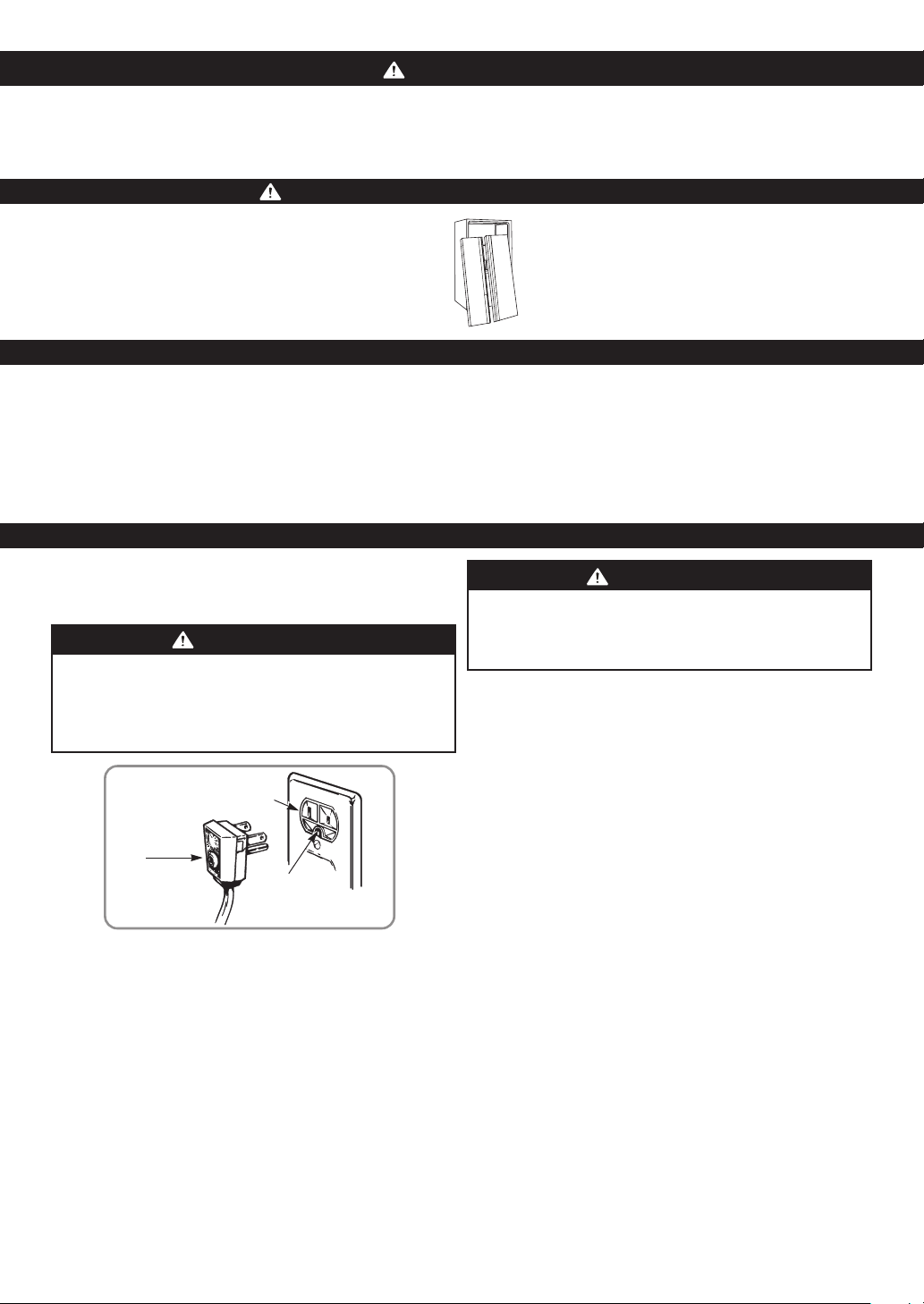
FOR PERSONAL SAFETY, this appliance MUST be
properly grounded. Have the wall outlet and the
circuit checked by a qualified electrician to make sure
the outlet is properly grounded.
USE OF EXTENSION CORDS
Because of potential safety hazards under certain
conditions, we strongly recommend against the use of
an extension cord. However, if you still elect to use an
extension cord, it is absolutely necessary that it be a
UL-listed (in the United States), 3-wire grounding type
appliance extension cord having a grounding type plug
and outlet, and that the electrical rating of the cord be
15 amperes (minimum) and 120 V or 115 V
(According to the grounding requirements).
Use of an extension cord will increase the clearance
needed for the back of the refrigerator.
WARNING
REPLACING ELECTRICAL CABLE
If the power cord is damaged, it must be replaced by
our service center of qualified LG technician to avoid
any risk.
RECOMMENDED GROUNDING METHOD
The refrigerator should always be plugged into its own
individual properly grounded electrical outlet rated for
127 V ~ 60 Hz, AC or 115 ~ 60 Hz, AC only and fused at
15 or 20 amperes.
This provides the best performance and also prevents
overloading house wiring circuits which could cause a
fire hazard from overheated wires. It is recommended
that a separate circuit serving only this appliance be
provided. Use a receptacle which cannot be turned off
with a switch or pull chain. Do not use an extension cord.
Where a standard two-prong wall outlet is encountered,
it is your personal responsibility and obligation to have
it replaced with a properly grounded three-prong wall
outlet. Do not, under any circumstances, cut or remove
the third (Ground) prong from the power cord.
NOTE: Before performing any type of installation or
cleaning turn the control (thermostat,
refrigerator control or freezer control,
depending on the model) to OFF and then
disconnect the refrigerator from the electrical
source. When you are finished, reconnect the
refrigerator to the electrical source and reset the
control (thermostat, refrigerator control or freezer
control, depending on the model) to the desired
setting.
CAUTION
DANGER: RISK OF CHILD ENTRAPMENT
CFC DISPOSAL
GROUNDING REQUIREMENTS
Ensure proper
ground exists
before use.
3-prong
grounding
plug
3-prong
grounding type
wall receptacle

9
WARNING
EXCESSIVE WEIGHT HAZARD
Use two or more people to move and install the
refrigerator. Failure to do so can result in back or other
injury.
UNPACKING YOUR REFRIGERATOR
Remove tape and any temporary labels from your
refrigerator before using. Do not remove any warning
type labels, the model and serial number label.
To remove any remaining tape or glue, rub the area
briskly with your thumb. Tape or glue residue can also be
easily removed by rubbing a small amount of liquid dish
soap over the adhesive with your fingers. Wipe with warm
water and dry.
Do not use sharp instruments, rubbing alcohol,
ammable uids or abrasive cleaners to remove tape or
glue. These products can damage the surface of your
refrigerator. For more information, see the Important
Safety Instructions section.
Refrigerator shelves are installed in the shipping
position. Please reinstall shelves according to your
individual storage needs.
WARNING
WHEN MOVING YOUR REFRIGERATOR
Your refrigerator is heavy. When moving the
refrigerator for cleaning or service, be sure to protect
the oor. Always pull the refrigerator straight out when
moving it. Do not wiggle or walk the refrigerator when
trying to move it, as oor damage could occur.
WARNING
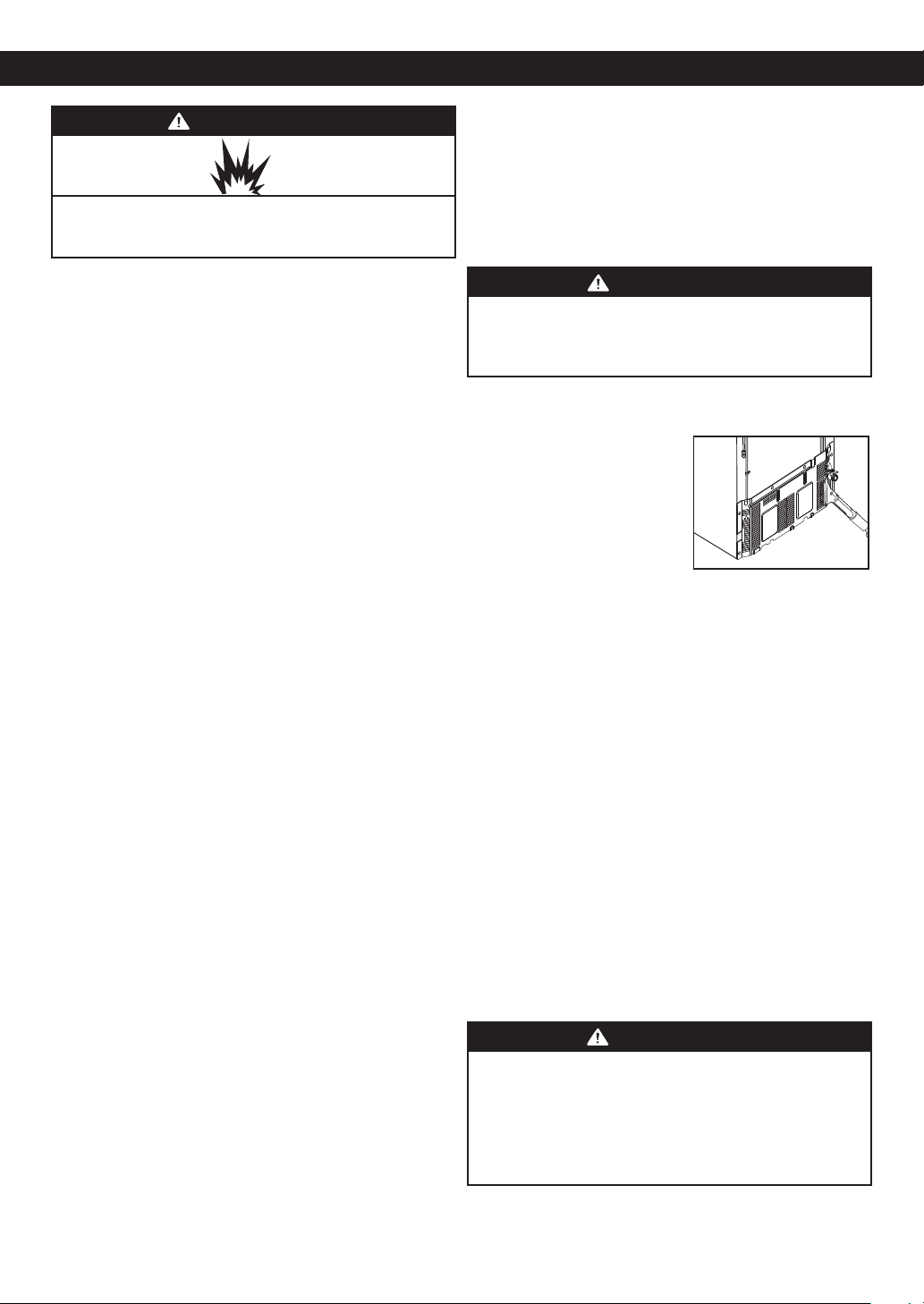
EXPLOSION HAZARD
Keep ammable materials and vapors, such as
gasoline, away from refrigerator. Failure to do so can
result in death, explosion or fire.
INSTALLATION
1. Avoid placing unit near heat sources, direct sunlight or
moisture.
2. To minimize noise and vibration, the refrigerator
MUST be installed on a solidly constructed oor.
3. Carpeting and soft tile surfaces are not
recommended.
4. NEVER install the refrigerator on a platform or a
weakly supported structure.
5. Install this appliance in an area where the
temperature is between 41°F (5°C) and 110°F (43°C).
If the temperature around the appliance is too low or
high, cooling ability may be adversely affected.
NOTE: For proper air circulation, and best
cooling and energy consumption
results, maintain a minimum
distance of 2 inches (5,08cm) from
adjacent items and surfaces.
WARNING
• Be careful when you work with the hinge, base
grille, stopper, etc. You may be injured.
• Do not put hands or metal sticks into air vents,
base grille or bottom of the refrigerator. You may be
injured or receive an electrical shock.
BASE GRILLE INSTALLATION
To remove the base grille:
1. Open the doors (refrigerator and freezer).
2. Once doors are open, remove screws from base grille.
Remove base grille and set safely aside.
To install or replace base grille:
1. Place base grille into position and insert and tighten
screws.
HANDLE REMOVAL
You may have to remove the door handles to move the
refrigerator through a narrow opening. See instructions
below.
NOTE: To avoid damaging door surfaces when moving
the refrigerator through narrow openings, it is
ALWAYS recommended to remove the doors as
instructed in the next two pages.
•Loosen the set screws with a 3/32” (2,38 mm) Allen
wrench and remove the handle.
NOTE: If the handle
mounting
fasteners need
to be tightened
or removed use
a 1/4” (6,35
mm) Allen
wrench.
2” (5.08 cm)
REFRIGERATOR INSTALLATION
Mounting
fasteners
Set screw
Allen Wrench
10
WARNING
ELECTRIC SHOCK HAZARD
• Disconnect electrical supply to the refrigerator
before installing. Failure to do so could result in
death or serious injury.
• Do not put hands, feet or other objects into the air
vents, base grille, or bottom of the refrigerator. You
may be injured or receive an electrical shock.
• Be careful when you work with the hinge, base
grille, and stopper. You may be injured. Before
removing the doors, remove the base grille.
REMOVING AND REPLACING
REFRIGERATOR DOORS
Before removing the doors, remove the base grille.
See BASE GRILLE INSTALLATION for reference.
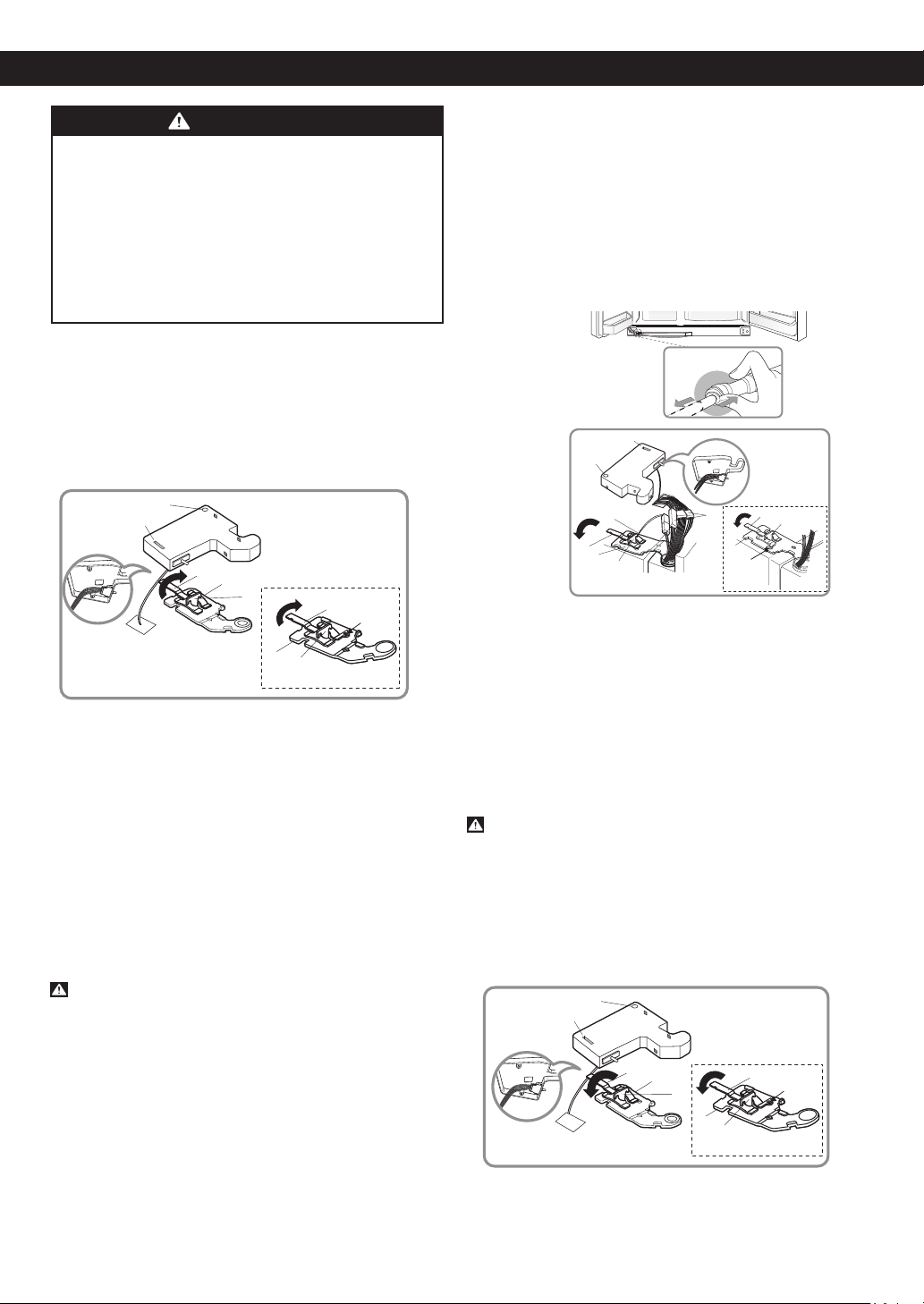
To remove the right (refrigerator) door:
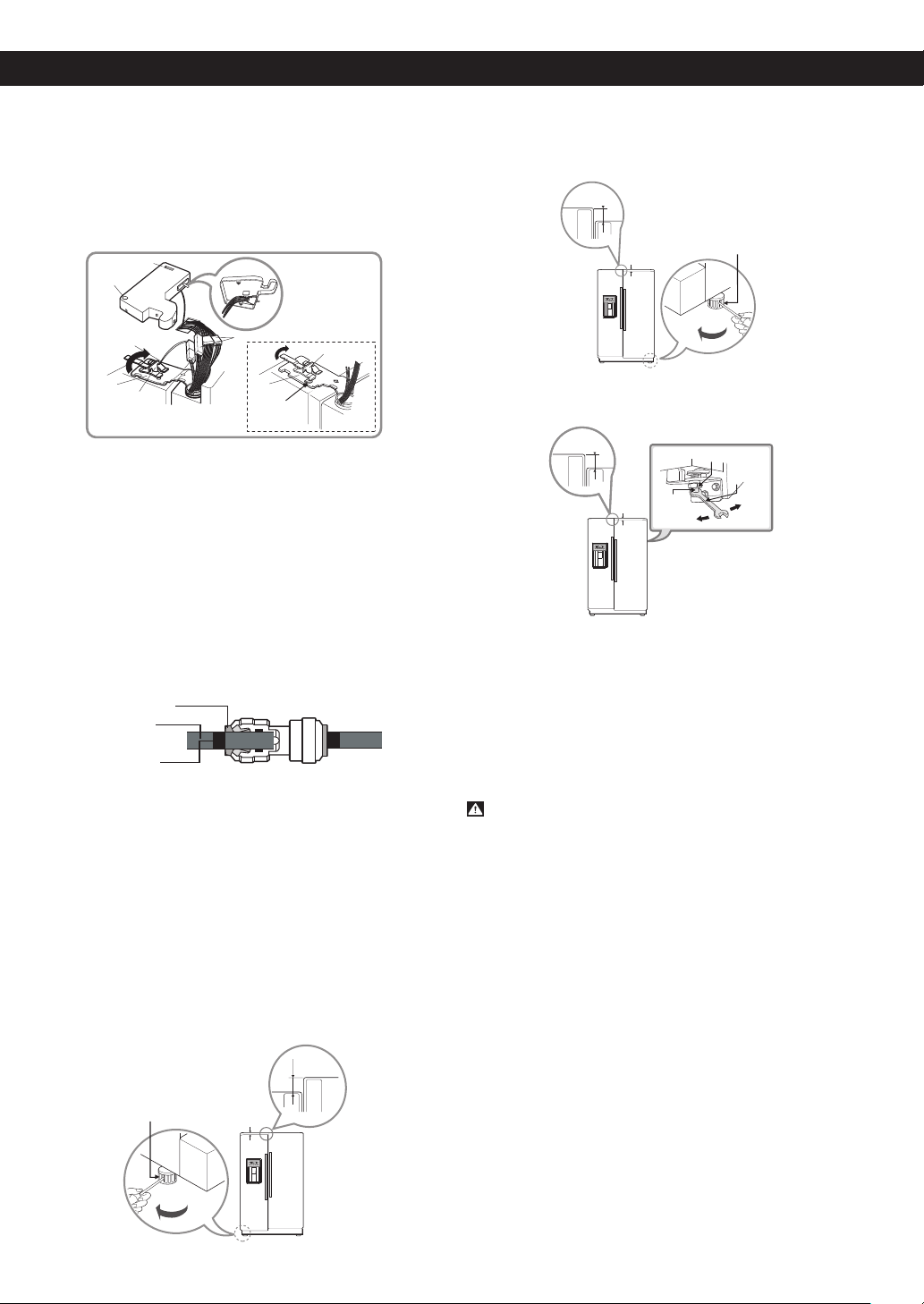
1. Open the door. Remove the top hinge cover
screw (1).
2. Use a at blade screwdriver to pry back the hooks
(not shown) of the hinge cover (2) from the top of the
refrigerator cabinet. Lift up the cover.
3. Rotate the hinge lever (3) clockwise. Lift the top hinge
(4) free of the hinge lever latch (5).
NOTE: Regardless of hinge lever type, removal process
is the same.
4. Lift the door from the lower hinge pin.
5. Place the door, inside facing up, on a nonscratching
surface.
CAUTION: When lifting the hinge free of the latch,
be careful that the door does not fall forward.
Removing the left (freezer) door with water line
connection.
• Pull up the water feed tube while pressing the area
(Figure 1) as shown in the figure below.
NOTE: If a tube end is deformed or abraded, trim the
part away. Disconnecting the tube under the
door causes about 0.13 gallons (0,5 liters) water
to ow out. Put a large container at end of tube
to prevent water from draining onto the oor.
1. Open the door. Remove the top hinge cover
screw (1).
2. Use a at blade screwdriver to pry back the hooks
(not shown) of the hinge cover (2) from the top of the
refrigerator cabinet (2). Lift up the cover.
3. Disconnect all the wire harnesses (3).
4. Remove the grounding screw (4).
5. Rotate hinge lever (5) counterclockwise. Lift the top
hinge (6) free of the hinge lever latch (7).
NOTE: Regardless of hinge lever type, removal process
is the same.
CAUTION: When lifting the hinge free of the latch,
be careful that the door does not fall forward.
6. Lift the door from the lower hinge pin being careful to
pull the water lines through the lower hinge pin.
7. Place the door, inside facing up, on a nonscratching
surface.
Reinstalling the right (refrigerator) door
1. Place the door onto the lower hinge pin.
2.Fit top hinge (4) over hinge lever latch (5) into place.
Rotate lever (3) counterclockwise to secure hinge.
REFRIGERATOR INSTALLATION
Figure 1
(1 )
(2 )
(3)
(5)
(6)
(7)
(4)
Type 2
Type 1
(6)
(5)
Rivet
(7)
(1)
(3)
(4)
(5)
Type 2
Type 1
(3
)
(4 )
(5 )
Rivet
(2 )
(1 )
(2 )
(3
)
(4 )
(5 )
Type 2
Type 1
(3
)
(4 )
(5 )
Rivet
11
NOTE: Regardless of hinge lever type, reinstallation
process is the same.
3. Hook tab on switch side of corner under edge of wire
opening in cabinet top. Position cover (2) into place.
Insert and tighten cover screw (1).
Reinstalling the left (freezer) door
1. Feed the water tubes through the lower hinge pin and
place the door onto the lower hinge pin.
2. Fit top hinge (6) over hinge lever latch (7) and into
place. Rotate lever (5) clockwise to secure hinge.
NOTE: Regardless of hinge lever type, reinstallation
process is the same.
3. Install the grounding screw (4) and connect all the
wire harnesses (3).
4. Hook tab on door switch side of cover (2) under edge
of wire opening in cabinet top. Position cover into
place. Insert and tighten cover screw (1).
5. Reconnect the water tubes by inserting the tubes into
the connectors.
DOOR ALIGNMENT
Remove the base grille before adjusting the doors. See
BASE GRILLE INSTALLATION for reference.
Two methods of door alignment are available based
on the amount of adjustment needed and installation
requirements.
Type 1
Adjusting tool: Flat blade screwdriver
If the freezer compartment door is lower than the
refrigerator compartment door, level them by inserting a
at blade screwdriver into the groove of the left leveling
leg and rotating it clockwise.
If the freezer compartment door is higher than the
refrigerator compartment door, level them by inserting a
at blade screwdriver into the groove of the right leveling
leg and rotating it clockwise.
Type 2
Adjusting tools: 5/16” (8 mm) wrench and 3/4”
(19 mm) wrench
Using a 3/4” (19 mm) wrench, turn the keeper nut
clockwise to loosen the keeper nut.
Using a 5/16” (8 mm) wrench, turn the adjustment
hinge pin clockwise or counterclockwise to level the
refrigerator and freezer door.
After setting level door, turn the keeper nut
counterclockwise to tighten.
CAUTION: Do not overtight the door adjustment
screw. The hinge pin can be pulled out. (Adjustable
range of height is a maximum of 1/2” (1.27 cm)).
AFTER LEVELING THE DOOR HEIGHT
Conrm all legs are in contact with the oor.
REFRIGERATOR INSTALLATION
(1 )
(2 )
(3)
(5)
(6)
(7)
(4)
Type 2
Type 1
(5)
(6)
(7)
Rivet
Insert Line
Tube
Collet
Left leveling
leg
Height
Height
difference
difference
C
F
C
F
H
C
F
Rigth leveling leg
Heigt
difference
C
F
C
F
H
C
F
Heigt
difference
Height
difference
Keeper Nut
Adjustment
hinge pin
Wrench
Up
Down
C
F
C
F
H
C
F
Height
difference
12
CONNECTING THE WATER LINE
NOTE: Water line installation is needed when the
Automatic Icemaker and/or Water Dispenser
features are available on your product.
BEFORE YOU BEGIN
This water line installation is not warranted by the
refrigerator or icemaker manufacturer or seller.
Follow these instructions carefully to minimize the risk of
expensive water damage.
Water hammer (water banging in the pipes) in house
plumbing can cause damage to refrigerator parts
and lead to water leakage or ooding. Call a qualied
plumber to correct water hammer before installing the
water supply line to the refrigerator.
To prevent burns and product damage, do not hook up
the water line to the hot water line.
If you use your refrigerator before connecting the water
line, make sure the icemaker power switch is in the OFF
(O) position.
Do not install the icemaker tubing in areas where
temperatures fall below freezing.
When using any electrical device (such as a power drill)
during installation, be sure the device is double
insulated or grounded in a manner to prevent the
hazard of electric shock, or is battery-powered.
All installations MUST be in accordance with local
plumbing code requirements.
NOTE: Wear eye protection.
• If a reverse osmosis water ltration system is
connected to your cold water supply, the water line
installation is not warranted by the refrigerator or
icemaker manufacturer or seller. Follow next
instruction carefully to minimize the risk of
expensive water damage.
• If a reverse osmosis water ltration system is
connected to your cold water supply, the water
pressure to the reverse osmosis system needs to be
a minimum of 40 to 60 PSI (2,8 kg•f/cm² ~ 4,2 kg•f/
cm² , less than 2~3 sec to ll a cup of 7 oz. capacity).
If the water pressure from the reverse osmosis system is
less than 21 PSI (1,5 kg•f/cm², more than 4 sec to ll a
cup of 7 oz. capacity):
• Check to see whether the sediment lter in the
reverse osmosis system is blocked. Replace the filter
if necessary.
• Allow the storage tank on the reverse osmosis system
to refill after heavy usage.
• If the issue about water pressure from reverse
osmosis remains, call a licensed, qualified plumber.
WHAT YOU WILL NEED
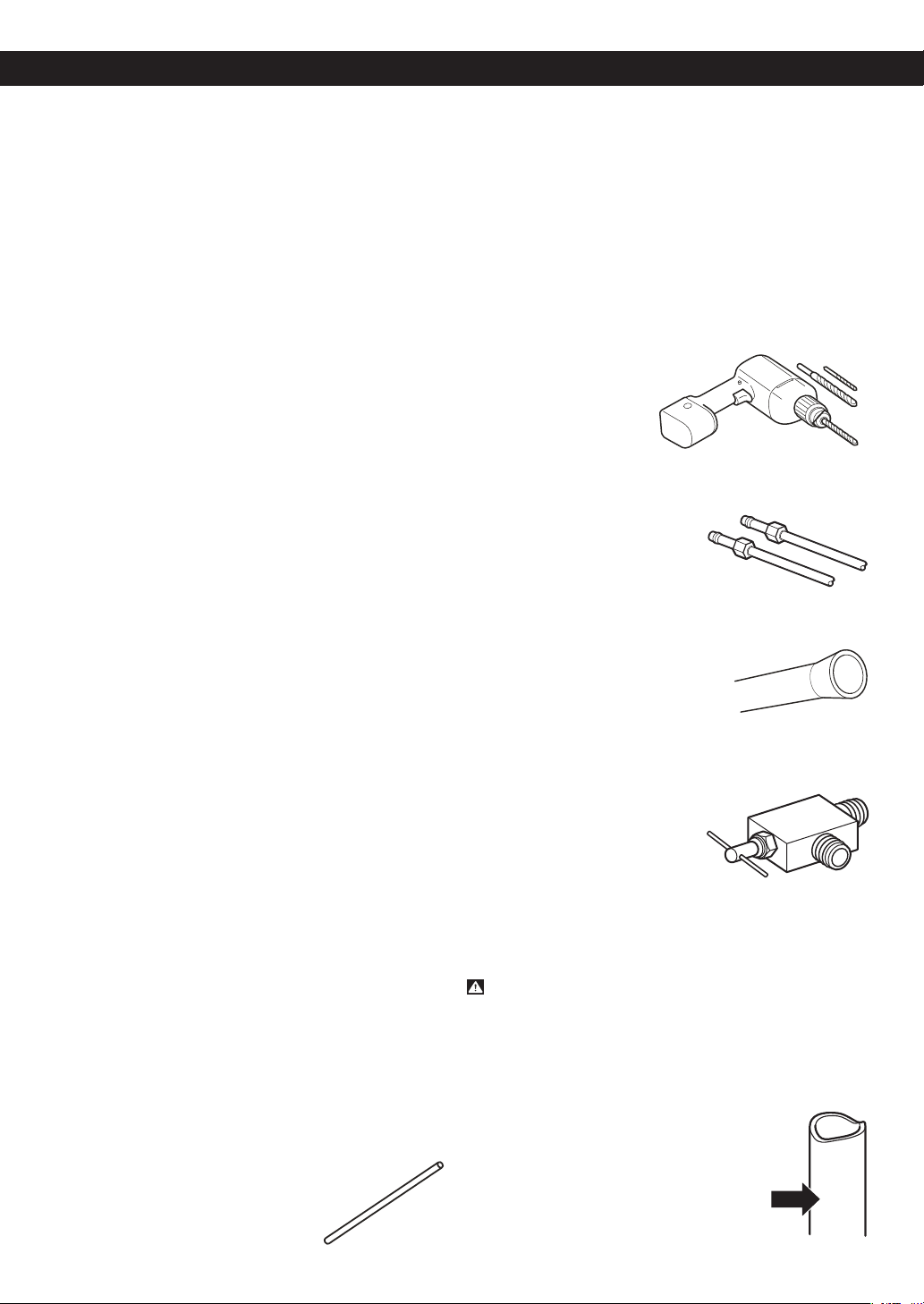
• Copper Tubing, 1/4” (6,35 mm) outer diameter to
connect the refrigerator to the water
supply. Be sure both ends of the
tubing are cut square.
To determine how much tubing you need, measure the
distance from the water valve on the back of the
refrigerator to the water supply pipe. Then add 8 feet
(2,4 m). Be sure there is sufficient extra tubing (about
8 feet [2,4 m] coiled into 3 turns of about 10” [25 cm]
diameter) to allow the refrigerator to move out from the
wall after installation.
Be sure that the kit you select allows at least 8 feet
(2,4 m) as described above.
• A cold water supply. The water pressure MUST be
between 20 and 120 PSI (1,4 bar and 8,2 bar) on
models without a water filter and between 40 and 120
PSI (2,8 bar and 8,2 bar) on models with a water filter.
• Power drill.
• 1/2” (12,7 mm) or
Adjustable Wrench.
• Flat head and Phillips screwdrivers.
• Two 1/4” (6,35 mm) outer diameter compression nuts
and 2 ferrules (sleeves) to
connect the copper tubing to
the shutoff valve and the
refrigerator water valve.
• If your existing copper water line has a ared tting at
the end, you will need an adapter (available at
plumbing supply stores) to
connect the water line to the
refrigerator OR you can cut off the
ared tting with a tube cutter and
then use a compression fitting.
• Shutoff valve to connect to the cold water line.
The shutoff valve should have a water inlet with a
minimum inside diameter of
5/32”(3,96 mm) at the point of
connection to the COLD
WATER LINE. Saddle-type
shutoff valves are included in
many water supply kits. Before
purchasing, make sure a saddle-type valve complies
with your local plumbing codes.
INSTALLATION INSTRUCTIONS
WARNING: Connect to potable water supply only.
1. SHUTOFF THE MAIN WATER SUPPLY
Turn on the nearest faucet to relieve the pressure on
the line.
2. CHOOSE THE VALVE LOCATION
Choose a location for the valve that is easily
accessible. It is best to connect into the
side of a vertical water pipe. When it is
necessary to connect into a horizontal
water pipe, make the connection to the
top or side, rather than at the bottom,
to avoid drawing off any sediment from
the water pipe.
REFRIGERATOR INSTALLATION
13
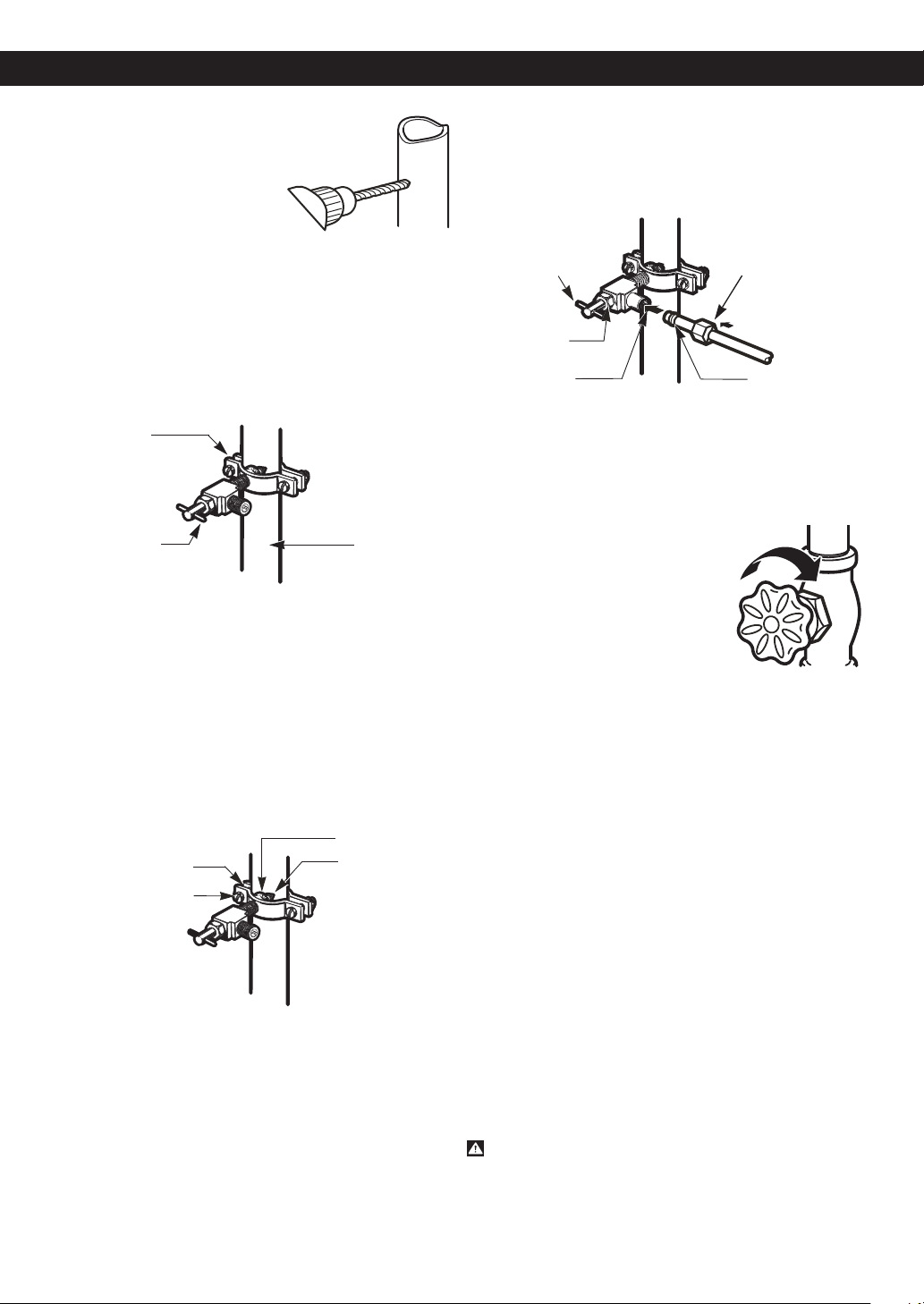
3. DRILL THE HOLE FOR THE VALVE
Drill a 1/4” (6,35 mm) hole in
the water pipe using a sharp
bit. Remove any burrs
resulting from drilling the hole
in the pipe. Take care not to
allow water to drain into the
drill. Failure to drill a 1/4”
(6,35 mm) hole may result in reduced ice
production or smaller cubes.
NOTE: Licensed plumbers MUST use only cooper
tubing NDA tubing #49595 or 49499 or Cross
Link Polyethylene (PEX) tubing.
4. FASTEN THE SHUTOFF VALVE
Fasten the shutoff valve to the cold water pipe with
the pipe clamp.
NOTE: Commonwealth of Massachusetts Plumbing
Codes 248CMR shall be adhered to. Saddle
valves are illegal and use is not permitted in
Massachusetts. Consult with your licensed
plumber.
5. TIGHTEN THE PIPE CLAMP
Tighten the clamp screws until the sealing washer
begins to swell.
NOTE: Do not overtighten or you may crush the tubing.
6. ROUTE THE TUBING
Route the tubing between the cold water line and the
refrigerator.
Route the tubing through a hole drilled in the wall or
oor (behind the refrigerator or adjacent base
cabinet) as close to the wall as possible.
NOTE: Be sure there is sufficient extra tubing [about 8
feet (2,4 m) coiled into 3 turns of about 10”
(25 cm) diameter] to allow the refrigerator to
move out from the wall after installation.
7. CONNECT THE TUBING TO THE VALVE
Place the compression nut and ferrule (sleeve) for
copper tubing onto the end of the tubing and
connect it to the shutoff valve. Make sure the tubing is
fully inserted into the valve. Tighten the compression
nut securely.
NOTE: Commonwealth of Massachusetts Plumbing
Codes 248CMR shall be adhered to. Saddle
valves are illegal and use is not permitted in
Massachusetts. Consult with your licensed
plumber.
8. FLUSH OUT THE TUBING
Turn the main water supply on
and ush out the tubing until
the water is clear. Shut the water
off at the water valve after about
one quart (1 L) of water has been
ushed through the tubing.
9. CONNECT THE TUBING TO THE
REFRIGERATOR
NOTES:
• Before making the connection to the refrigerator, be
sure the refrigerator power cord is not plugged into the
wall outlet.
• If your refrigerator does not have a water lter, we
recommend installing one. If your water supply has
sand or particles that could clog the screen of the
refrigerator’s water valve, install the lter in the water
line near the refrigerator
• Do not uses old hoses; only use new hoses provided by
the manufacturer.
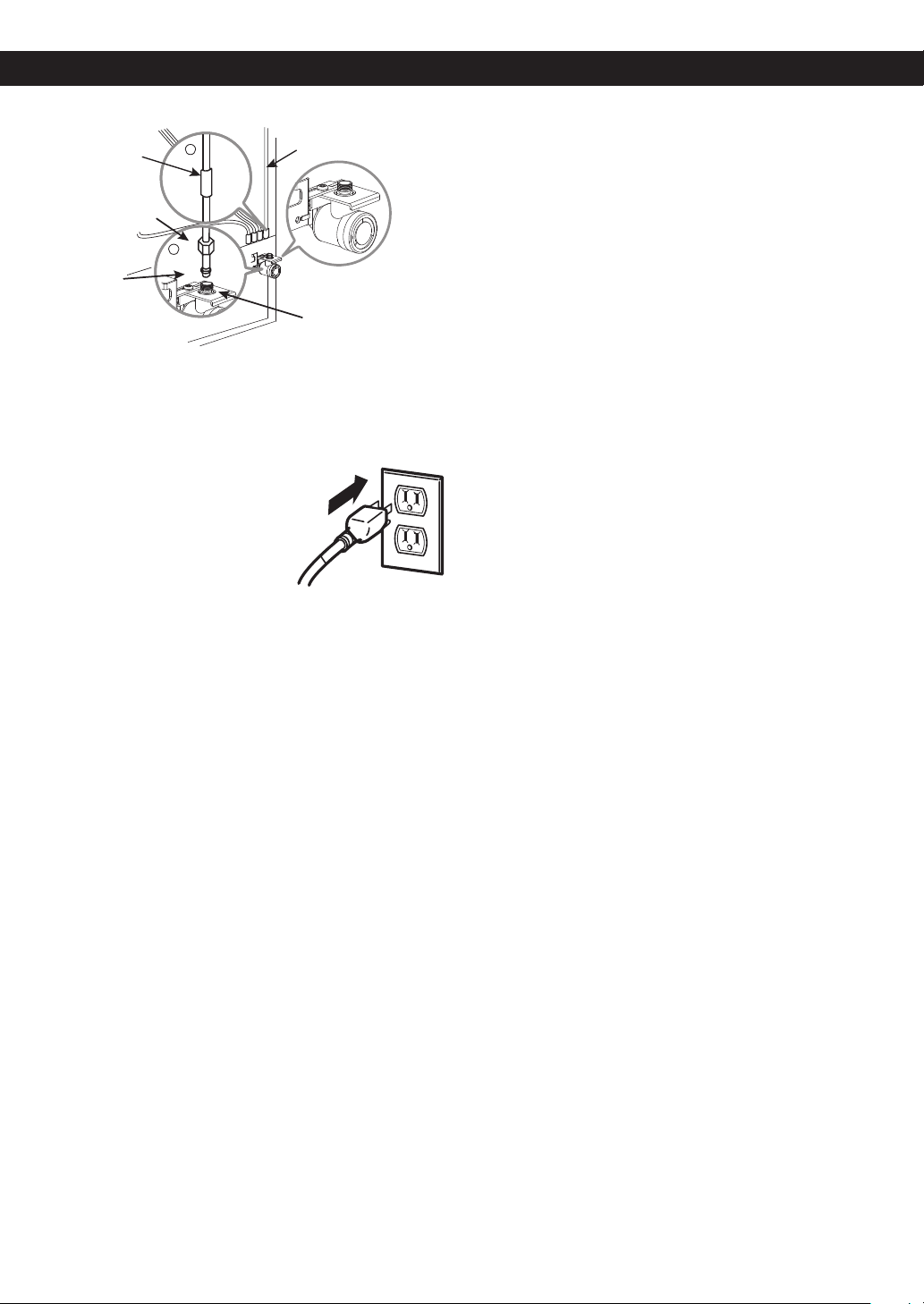
1. Remove the plastic exible cap from the refrigerator
connection.
2. Place the compression nut and ferrule (sleeve) onto
the end of the tubing. (See figure 1)
3. Insert the end of the tubing into the connection as
far as possible. While holding the tubing, tighten the
fitting.(Part A)
CAUTION: Check to make sure that leaks are not
occurring in the water line.
Vertical Cold
Water Pipe
Saddle-Type
Shutoff Valve
Pipe Clamp
Washer
Inlet End
Pipe Clamp
Clamp Screw
Saddle-Type
Shutoff Valve
Packing
Nut
Ferrule(sleeve)
Compression
Nut
Outlet
Valve
REFRIGERATOR INSTALLATION
14
Fasten the tubing into the tubing clamp attached to the
back of the refrigerator.
First, loosen the screw fastening the clamp. Next, insert
the tubing in the groove. Finally, re-fasten the screw.
10. PLUG IN THE REFRIGERATOR
Arrange the coil of tubing so
that it does not vibrate against
the back of the refrigerator or
against the wall. Push the
refrigerator back to the wall.
11. START THE ICEMAKER
Set the icemaker power switch to the ON (I) position.
The icemaker will not begin to operate until it reaches
its operating temperature of 15°F (-9°C) or below. It
will then begin operation automatically if the icemaker
power switch is in the ON (I) position.
¼” (6,35 mm) Tubing
Refrigerator
Connection
¼” (6,35 mm)
Compression
Nut
Ferrule
(sleeve)
2
1
Back of refrigerator
Figure 1
Part A
Tubing Clamp
REFRIGERATOR INSTALLATION
15
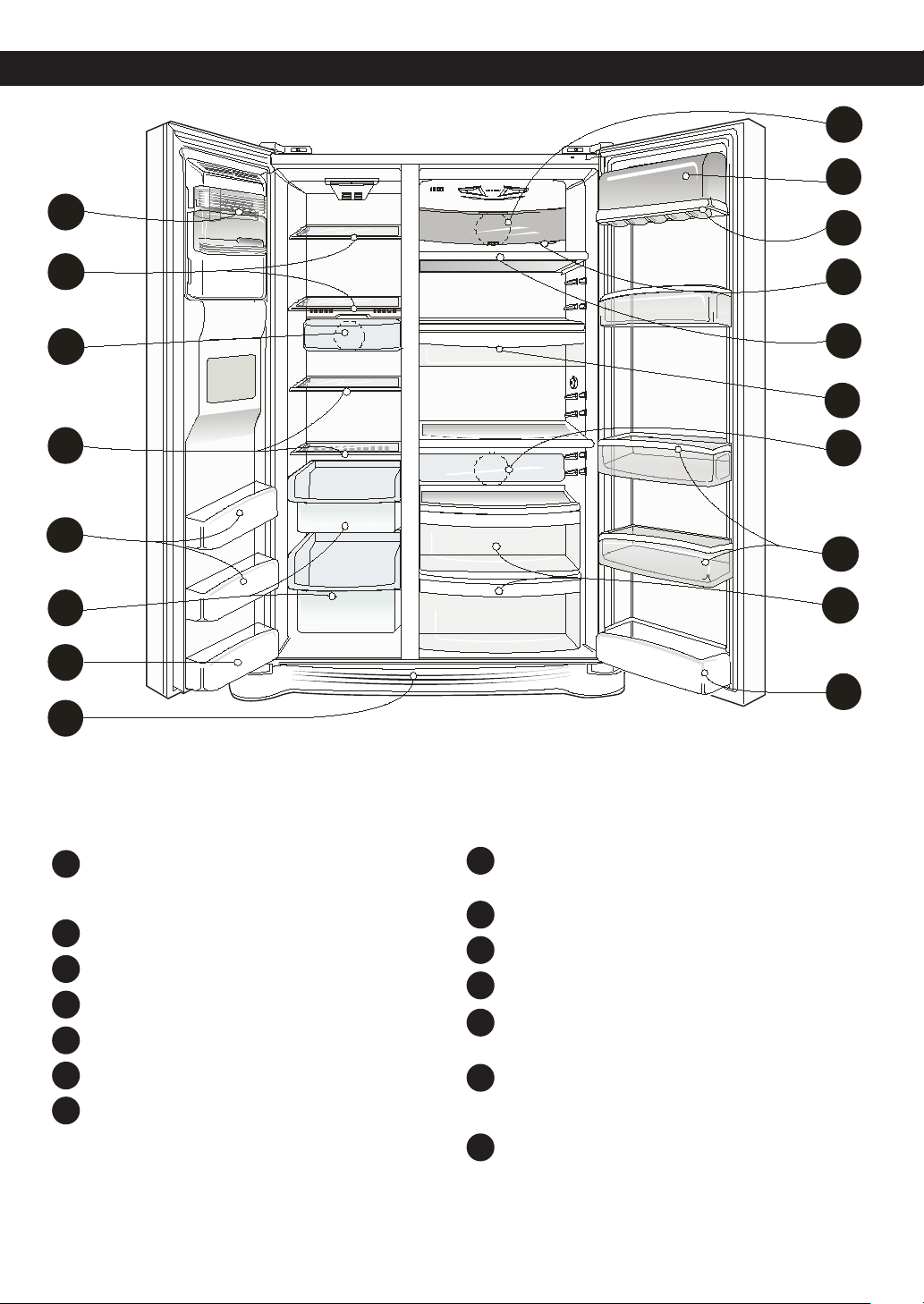
Use this page to become more familiar with the parts and features.
NOTE: This guide covers several different models. The refrigerator you have purchased may have some or all of the
items listed below. The locations of the features shown below may not match your model.
Automatic Icemaker
The ice is produced in the icemaker and sent to the
dispenser.
Freezer Shelf
Freezer Light (LED)
Freezer Door Rack
Drawer
Base Grille
Refrigerator Light (LED)
Dairy Corner
For storage of dairy products such as butter and cheese.
Can Rack
Water Filter
Refrigerator Shelf
Snack Pan
For storage of meat or fresh food.
Refrigerator Door Rack
Door racks may be clear or opaque depending on
refrigerator model type.
Vegetable Drawer
REFRIGERATOR FEATURES
A
B
C
B
D
D
E
F
M
H
K
M
G
L
G
J
I
N
A
B
C
D
E
F
G
H
I
J
K
L
M
N
16
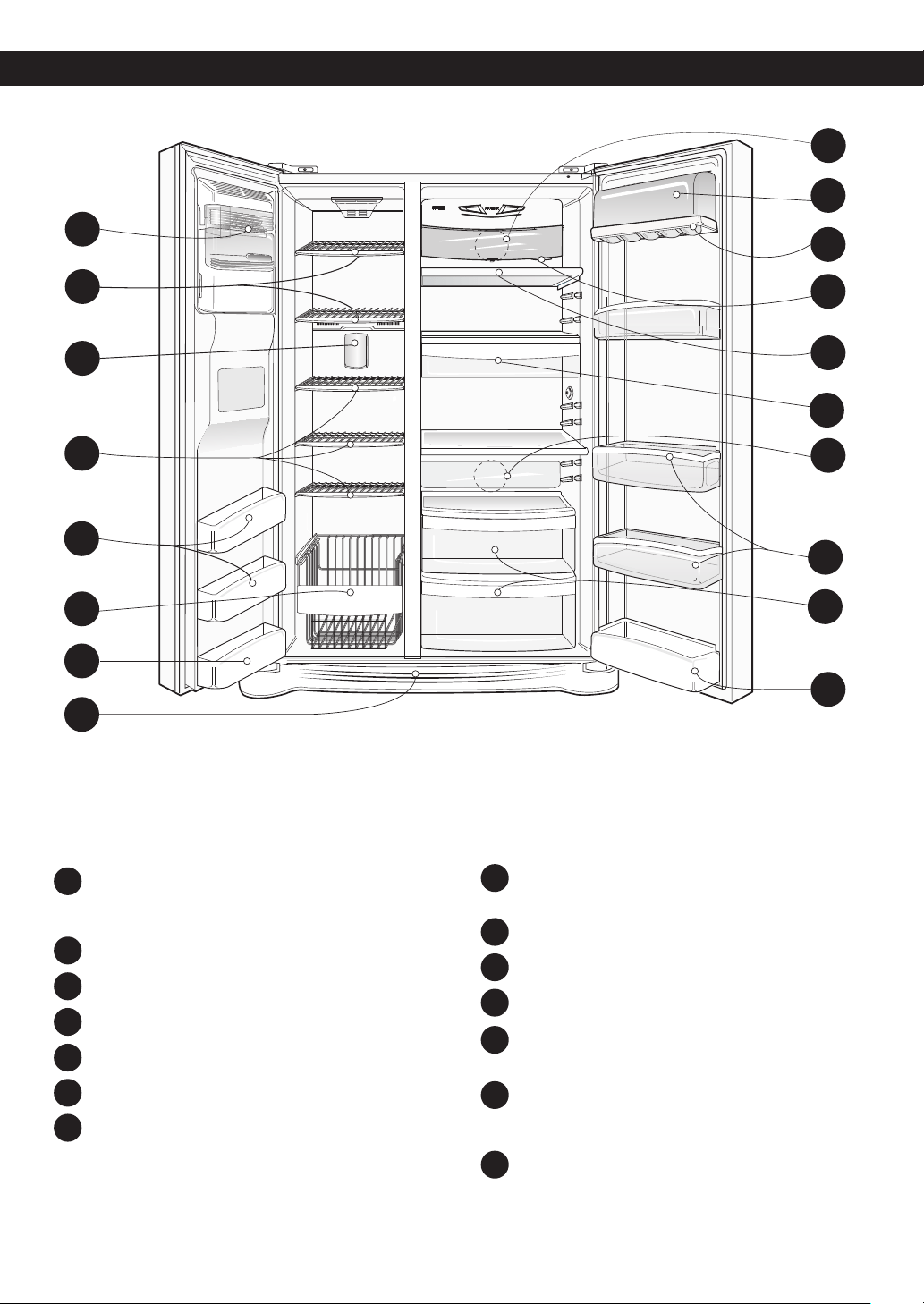
REFRIGERATOR FEATURES
Use this page to become more familiar with the parts and features.
NOTE: This guide covers several different models. The refrigerator you have purchased may have some or all of the
items listed below. The locations of the features shown below may not match your model.
Automatic Icemaker
The ice is produced in the icemaker and sent to the
dispenser.
Freezer Shelf
Freezer Light (LED)
Freezer Door Rack
Drawer
Base Grille
Refrigerator Light (LED)
Dairy Corner
For storage of dairy products such as butter and cheese.
Can Rack
Water Filter
Refrigerator Shelf
Snack Pan
For storage of meat or fresh food.
Refrigerator Door Rack
Door racks may be clear or opaque depending on
refrigerator model type.
Vegetable Drawer
A
B
C
B
D
D
E
F
M
H
K
M
G
L
G
J
I
N
A
B
C
D
E
F
G
H
I
J
K
L
M
N
17
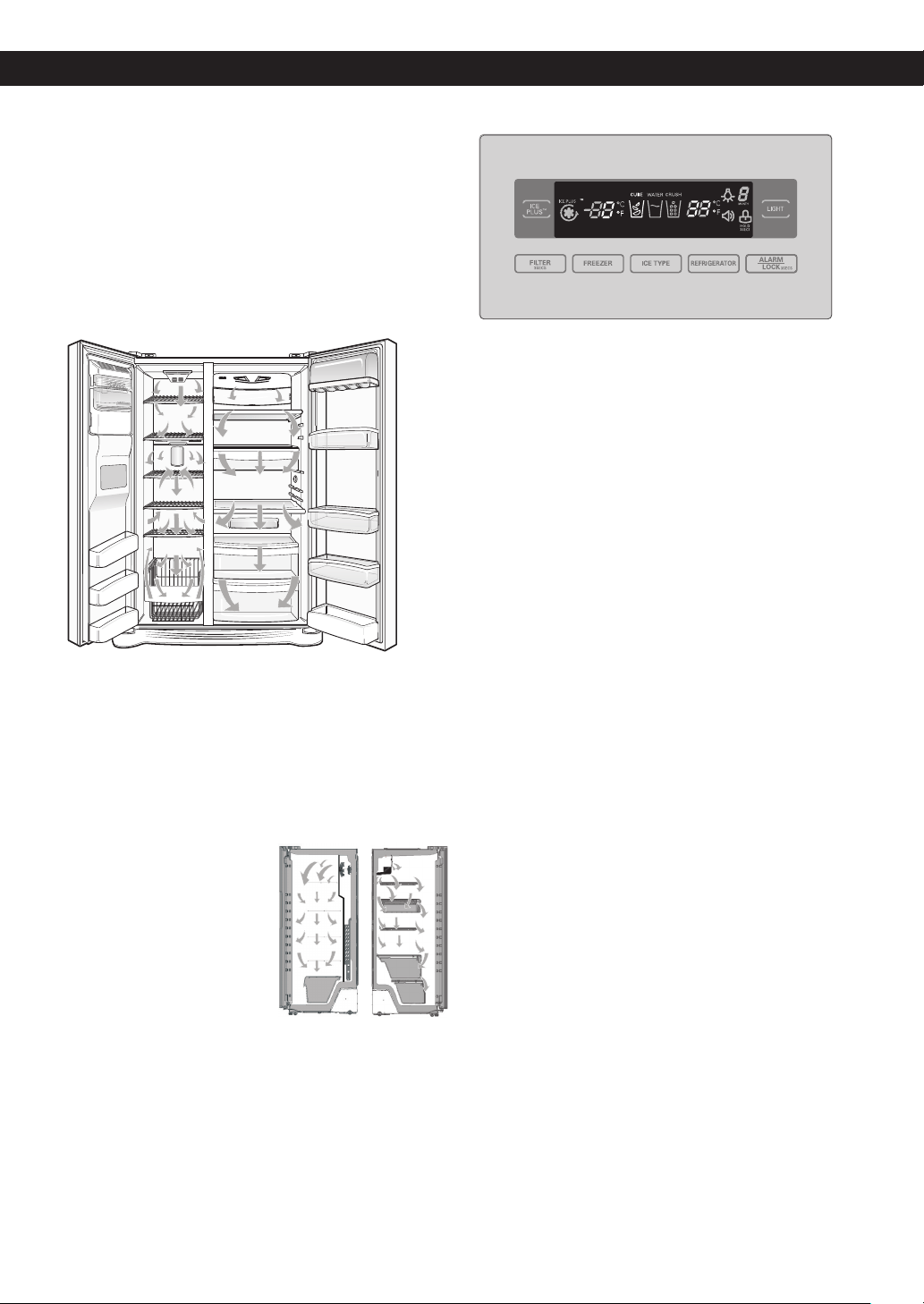
ENSURING PROPER AIR CIRCULATION
In order to ensure proper temperatures, air MUST ow
between the refrigerator and freezer sections.
• Cool air enters the freezer through the vents located
at the top of the compartment and exits through the
vents located behind the freezer drawers.
• Cool air from the freezer section enters the fresh food
section through vents located at the top of the
compartment. The air moves down throughout the
compartment and exits through the vents located
behind the crisper drawers.
• Do not block any of these vents with food packages.
If the vents are blocked, airow will be interrupted and
temperature and moisture problems may occur.
IMPORTANT:
Because air circulates between both sections, any odors
formed in one section will transfer to the other. You
MUST thoroughly clean both sections to eliminate odors.
To prevent odor transfer and dried out food, wrap or
cover foods tightly. (See the Food Storage Guide
section for details.)
NOTE: If you close the
refrigerator door, you may see
the freezer door open and
close again due to pressure
from internal air ow.
PRIOR TO USE
1. Clean your refrigerator thoroughly and wipe off dust
accumulated during shipping.
2.Install accessories such as ice cube bin, drawers,
shelves, etc., in their proper places. They are packed
together to prevent possible damage during shipment.
3.Let your refrigerator run for at least 2 or 3 hours
before putting food in it. Check the ow of cold air in
the freezer compartment to ensure proper cooling.
Your refrigerator is now ready for use.
CONTROL PANEL FEATURES
REFRIGERATOR AND FREEZER CONTROLS
It is recommended to maintain the temperature of 37ºF
(3ºC) in the refrigerator compartment and 0ºF (-18ºC)
in the freezer compartment. To adjust temperatures,
press Refrigerator graphic and Freezer graphic. The
lower the number, the colder the compartment will be.
NOTE: The refrigerator temperature can be modified
from 33ºF to 46ºF (0ºC to 8ºC). The freezer
temperature can be modified from -6ºF to 8ºF
(-21ºC to -13ºC).
To change temperature unit from Fahrenheit to Celsius
or from Celsius to Fahrenheit press and hold
Refrigerator and Freezer buttons.
Display Off Mode
The display lights up and stays lit when the refrigerator is
plugged in for 60 seconds. After the display lights all off
except the dispenser icon selected (CRUSH, WATER or
CUBE) and the display only lights when door is opened
or display button is pressed. Display turn off 20 seconds
after door is closed or display button pressed. You can
change the display always ON pressing “FREEZER” and
“ICE PLUS” buttons at the same time for 5 seconds. A
tone will sound indicating that the display is ON (Display
Off Mode Deactivate). Activate the Display Off Mode in
same manner as deactivation.
USING YOUR REFRIGERATOR
18
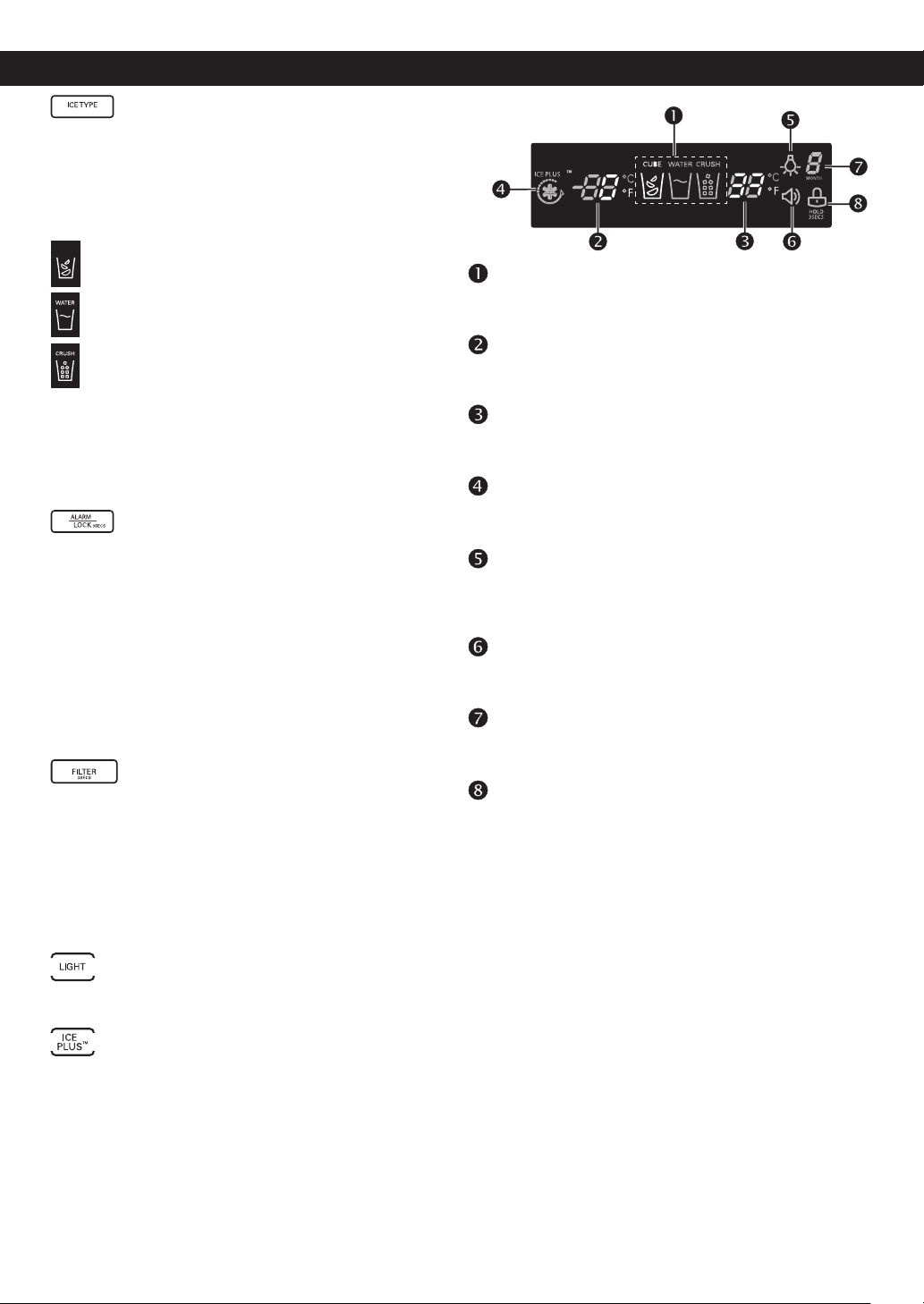
ICE TYPE
You can select water or ice.
• Select Water, Crushed Ice or Cubed Ice by
pressing the ICE TYPE button to the selection desired.
The Water, Crushed Ice or Cubed Ice icon will light up
to indicate selection.
Light up the cubed ice lamp by pressing the
selection button. The icon will be illuminated.
Light up the water lamp by pressing the selection
button. The icon will be illuminated.
Light up the crushed ice lamp by pressing the
selection button. The icon will be illuminated.
To dispense water or ice, gently push your cup against
the dispenser pad.
NOTE: Hold your cup in place for a couple of seconds
after dispensing ice or water so the last few drops
go in your cup instead of on the oor.
ALARM/LOCK
Press this button to control the door-open alarm. Press
and hold the ALARM/LOCK button for 3 seconds to
lock the dispenser and all the other control panel
functions. Press and hold again for 3 seconds to
unlock.
The ALARM/LOCK button also controls the door alarm
that sounds three times in 30 second
intervals when a compartment door is left open for more
than 60 seconds. The alarm stops sounding when the
door is closed. Press the ALARM/LOCK button once to
activate or deactivate the door alarm function.
FILTER
The filter button resets the water filter replacement
indicator when the water filter has been replaced.
The water filter needs replacement once every six
month.
Filter indicator becomes “0” to let you know when
replace filter. Press and hold the filter button for more
than 3 seconds to reset the filter month indicator to six
after the water filter has been replaced.
LIGHT
The LIGHT button controls the dispenser’s light.
ICE PLUS
Press this button once to activate the increased ice
making function. The ICE PLUS icon on the display
panel will illuminate when activated. The Ice Plus
function runs the freezer compartment at the coldest
settings for a 24 hour period to increase ice making.
Press the button again to cancel the Ice Plus function.
Ice type indicator
Shows the type of ice, crushed or cube, or water that
the dispenser will dispense.
Freezer temperature control
Shows the temperature in the freezer, Celsius or
Fahrenheit.
Refrigerator temperature
Shows the temperature in the refrigerator, Celsius or
Fahrenheit.
Ice Plus
When this button is on the screen will show this has
been activated.
Dispenser light
When this button is in function on the light will show
this has been activated. When the dispenser light is
on the display will indicate this feature.
Door alarm indicator
This indicator shows that the door-open warning
alarm is activated.
Water filter status
This light shows the lter’s status. See the lter’s
configurations.
Lock status
This light shows the actual status of the control
panel, in which the lock function is on.
USING YOUR REFRIGERATOR
CUBE
19
ADJUSTING CONTROL SETTINGS
Give the refrigerator time to cool down completely
before making final adjustments. It is best to wait 24
hours before doing this. The initial settings mentioned in
CONTROL PANEL FEATURES section should be correct
for normal household refrigerator use.
The refrigerator control functions as the thermostat for
the entire appliance (refrigerator and freezer sections).
The colder the setting, compressor will the longer the
run to keep the temperature colder. The freezer control
adjusts the cold air ow from the freezer to the
refrigerator. Setting the freezer control to a lower
temperature keeps more cold air in the freezer
compartment to make it colder.
If you need to adjust temperatures in the refrigerator or
freezer, start by adjusting the refrigerator and allow 24
hours for the temperature to stabilize. If it is too warm or
too cold, then adjust the freezer control. Use the settings
listed in the chart below as a guide. Always remember to
wait at least 24 hours between adjustments.
CONDITION/REASON: RECOMMENDED
ADJUSTMENT:
REFRIGERATOR section too
warm
–Door opened often
–Large amount of food added
–Room temperature very
warm
Set the Refrigerator
control one degree
colder; wait 24 hours
for the new setting to
take full effect before
making another
adjustment.
FREEZER section too warm/
ice not made fast enough
–Door opened often
–Large amount of food added
–Very cold [room 55°F (13°C)]
room temperature
(Compressor does not cycle
often enough).
–Heavy ice usage
–Air vents blocked by items
Set the Freezer
control one
degree colder; wait
24 hours for the new
setting to take full
effect before making
another adjustment.
Move items out of
airstream
REFRIGERATOR section too
cold
–Controls not set correctly for
your conditions
Set the Refrigerator
control one degree
warmer; wait 24
hours for the new
setting to take full
effect before
making another
adjustment.
FREEZER section too cold
–Controls not set correctly for
your conditions
Set the Freezer
control one degree
warmer; wait 24
hours for the new
setting to take full
effect before
making another
adjustment.
ICEMAKER OPERATION
WARNING
PERSONAL INJURY HAZARD
Avoid contact with the moving parts of the
ejector mechanism, or with the heating element that
releases the cubes. DO NOT place fingers or hands
on the automatic icemaking mechanism while the
refrigerator is plugged in.
A newly-installed refrigerator may take 12 to 24 hours
to begin making ice.
The icemaker will produce 5 cubes per cycle,
approximately 90 cubes in a 24 hour period,
depending on freezer compartment temperature,
room temperature, number of door openings and
other operating conditions.
If the refrigerator is used before the water connection is
made to the icemaker, set the power switch to OFF (O).
Throw away the first few batches of ice to allow the water
line to clear.
Be sure nothing interferes with the sweep of the shutoff
arm. When the bin fills to the level of the shutoff arm,
the icemaker will stop producing ice. It is normal for
several cubes to be stuck together.
If ice is not used frequently, old ice cubes will become
cloudy, taste stale, and shrink.
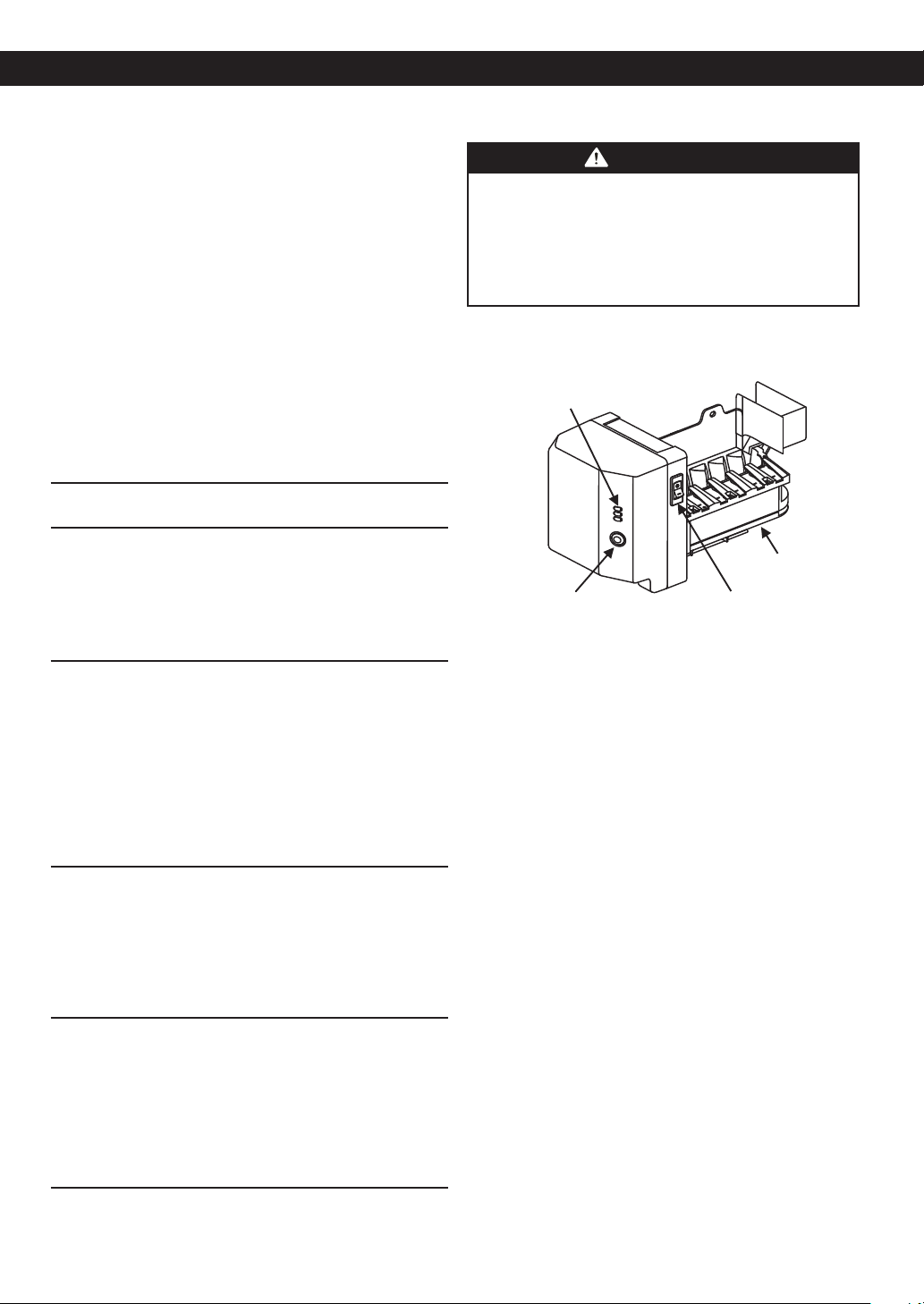
Indicator Light
Power Switch
(ON/OFF)
Ice Cube Size
selector button
Shutoff Arm
USING YOUR REFRIGERATOR
20
FOOD STORAGE GUIDE
Wrap or store food in the refrigerator in airtight and
moisture-proof material unless otherwise noted. This
prevents food odor and taste transfer throughout the
refrigerator. For dated products, check date code to
ensure freshness.
ITEMS HOW TO STORE
Butter or
margarine
Keep opened butter in a covered dish
or closed compartment. When
storing an extra supply, wrap in
freezer packaging and freeze.
Cheese Store in the original wrapping until
you are ready to use it. Once opened,
rewrap tightly in plastic wrap or
aluminum foil.
Milk Wipe milk cartons. For best storage,
place milk on interior shelf, not on
door shelf.
Eggs Store in original carton or on interior
shelf, not on door shelf.
Fruit Wash, let dry, and store in
refrigerator in plastic bags or in the
crisper. Do not wash or hull berries
until you are ready to use them. Sort
and keep berries in their original
container in a crisper drawer, or store
in a closed and sealed paper bag on
a refrigerator shelf.
Leafy
vegetables
Remove store wrapping and trim or
tear off bruised and discolored areas.
Wash in cold water and drain. Place
in plastic bag or plastic container and
store in crisper drawer.
Vegetables
with skins
(carrots,
peppers)
Place in plastic bags or plastic
container and store in crisper drawer.
Fish Use fresh fish and shellfish the same
day purchased.
Leftovers Cover leftovers with plastic wrap or
aluminum foil. Plastic containers with
tight lids can also be used.
STORING FROZEN FOOD
NOTE: For further information about preparing food for
freezing or food storage times, check a freezer
guide or a reliable cookbook.
Packaging
Successful freezing depends on correct packaging.
When you close and seal the package, it must not allow
air or moisture in or out. If it does, you could have food
odor and taste transfer throughout the refrigerator and
also dry out frozen food.
Packaging recommendations:
• Rigid plastic containers with “tight-tting lids”
• Straight-sided canning/freezing jars
• Heavy-duty aluminum foil
• Plastic-coated paper
• Non-permeable plastic wraps
• Specied freezer-grade self-sealing plastic bags
Follow package or container instructions for
proper freezing methods.
Do not use
• Bread wrappers
• Containers without tight lids
• Wax paper or wax-coated freezer wrap
• Thin, semi-permeable wrap
CAUTION: Do not keep beverage cans or plastic
food containers in the freezer compartment. They
may burst if they freeze.
Freezing
Your freezer will not quick-freeze any large quantity of
food. Do not put more unfrozen food into the freezer
than will freeze within 24 hours [no more than 2 to 3 lbs
of food per cubic foot (0,9 to 1,35 kg per cubic meter) of
freezer space]. Leave enough space in the freezer for air
to circulate around packages. Be careful to leave enough
room at the front so the door can close tightly.
Food storage times will vary according to the quality
and type of food, the type of packaging or wrap
used (airtight and moisture-proof) and the storage
temperature. Ice crystals inside a sealed package are
normal. This simply means that moisture in the food
and air inside the package have condensed, creating ice
crystals.
NOTE: Allow hot foods to cool at room temperature for
30 minutes, then package and freeze. Cooling
hot foods before freezing saves energy.
USING YOUR REFRIGERATOR
21
WATER AND ICE DISPENSER
Your refrigerator has a mechanism that dispatch cool
water and ice cubes without open the door.
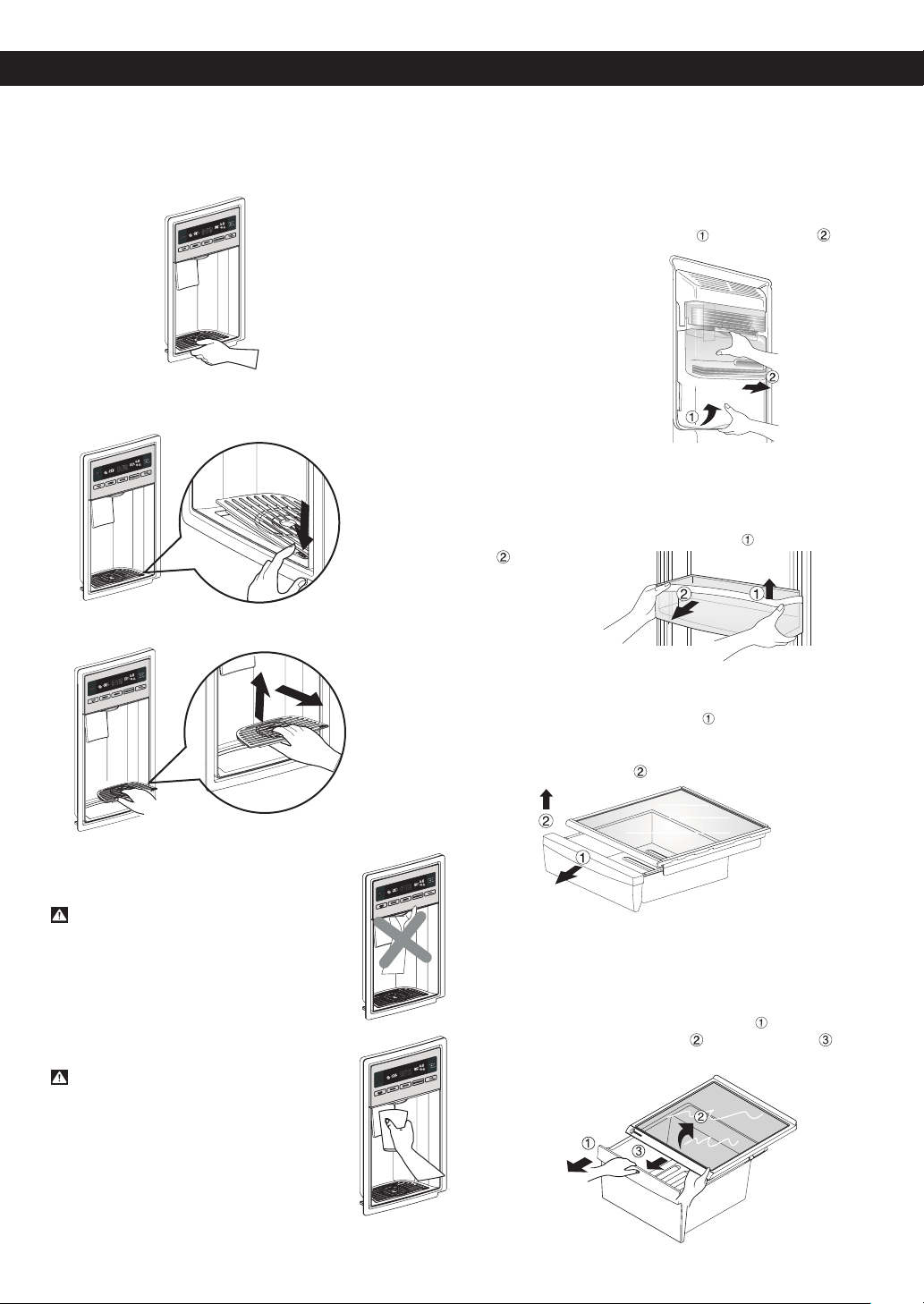
• Tray can be easily removed by pressing and pulling it.
• First push the tray in the area with the word ‘PUSH’,
then place your finger in the center hole and upwards,
finally takes out the tray.
WARNING
Do not put your hands into the water &
ice dispenser opening. Doing so may
cause an injury to your hand.
CAUTION
When opening the container with the
small opening, use it near the opening
of the water or ice dispenser as close
as possible.
ICE STORAGE BIN
The ice bin stores the ice cubes made by the
icemaker. If you need to remove the ice storage bin, do
so as follows:
NOTE: Use both hands to remove the ice bin to avoid
dropping it.
• Lift the ice storage bin slightly
and pull it out
shown in the figure.
DOOR RACK AND SUPPORT
Your refrigerator and freezer features racks which can
easily be arranged for packaged products.
• Lift the door rack holding both sides
and pull it out
in direction.
SNACK PAN
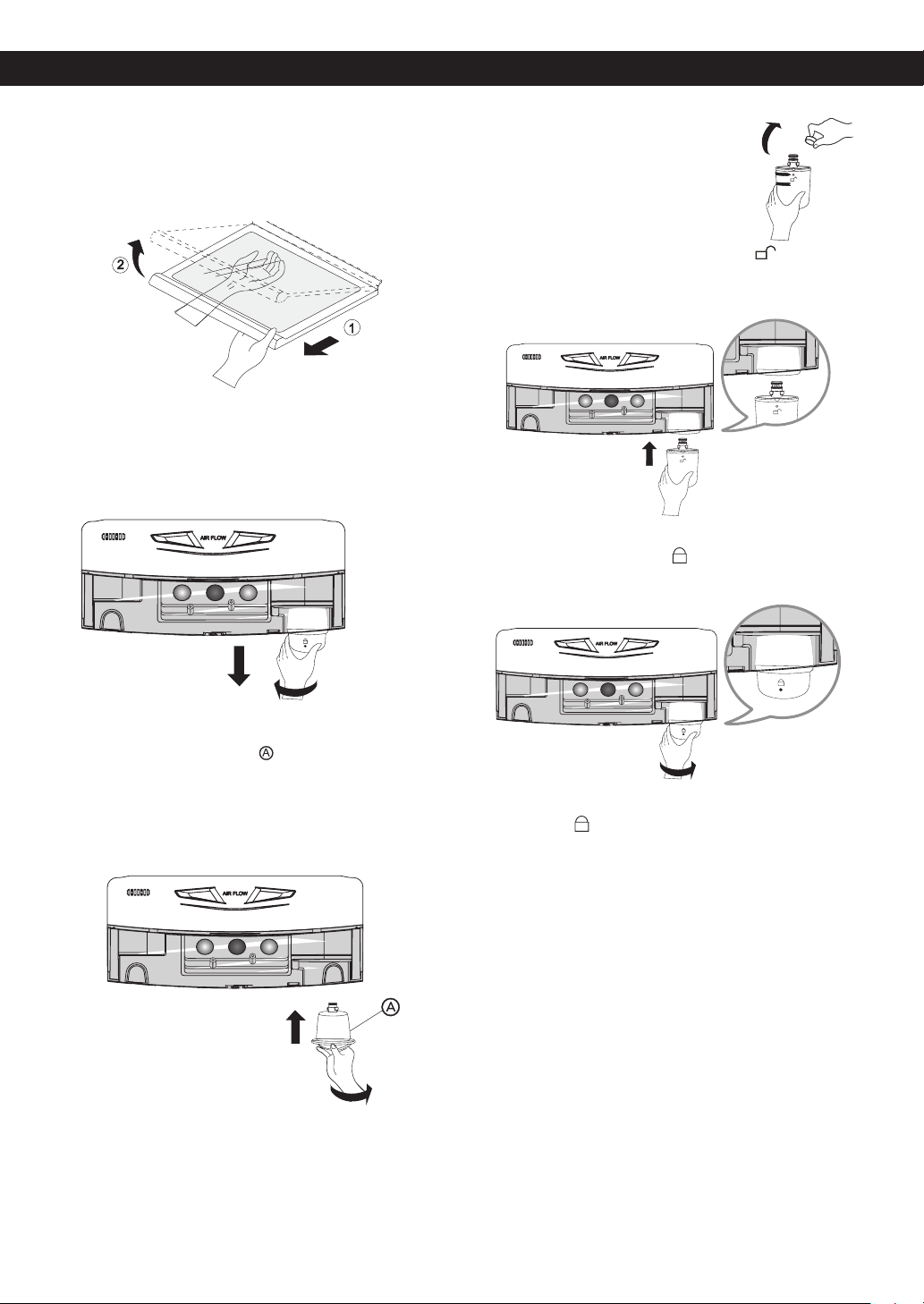
• To remove the snack pan cover, pull out the snack pan
compartment a bit to the front
, then lift the front
part of the snack pan compartment later raises a little
the snack pan compartment until it leaves the top of
the shelf as shown in
, and take it out.
CRISPER AND CRISPER COVER
The crisper allows for better conservation of fruits and
vegetables.
• To remove the crisper compartment cover, pull out the
crisper compartment a bit to the front
, lift the front
part of the cover as shown in , and take it out .
H
C
F
T
M
C
F
H
C
F
T
M
C
F
H
C
F
T
M
C
F
H
C
F
C
F
T
M
C
F
T
M
C
F
H
USING YOUR REFRIGERATOR
22
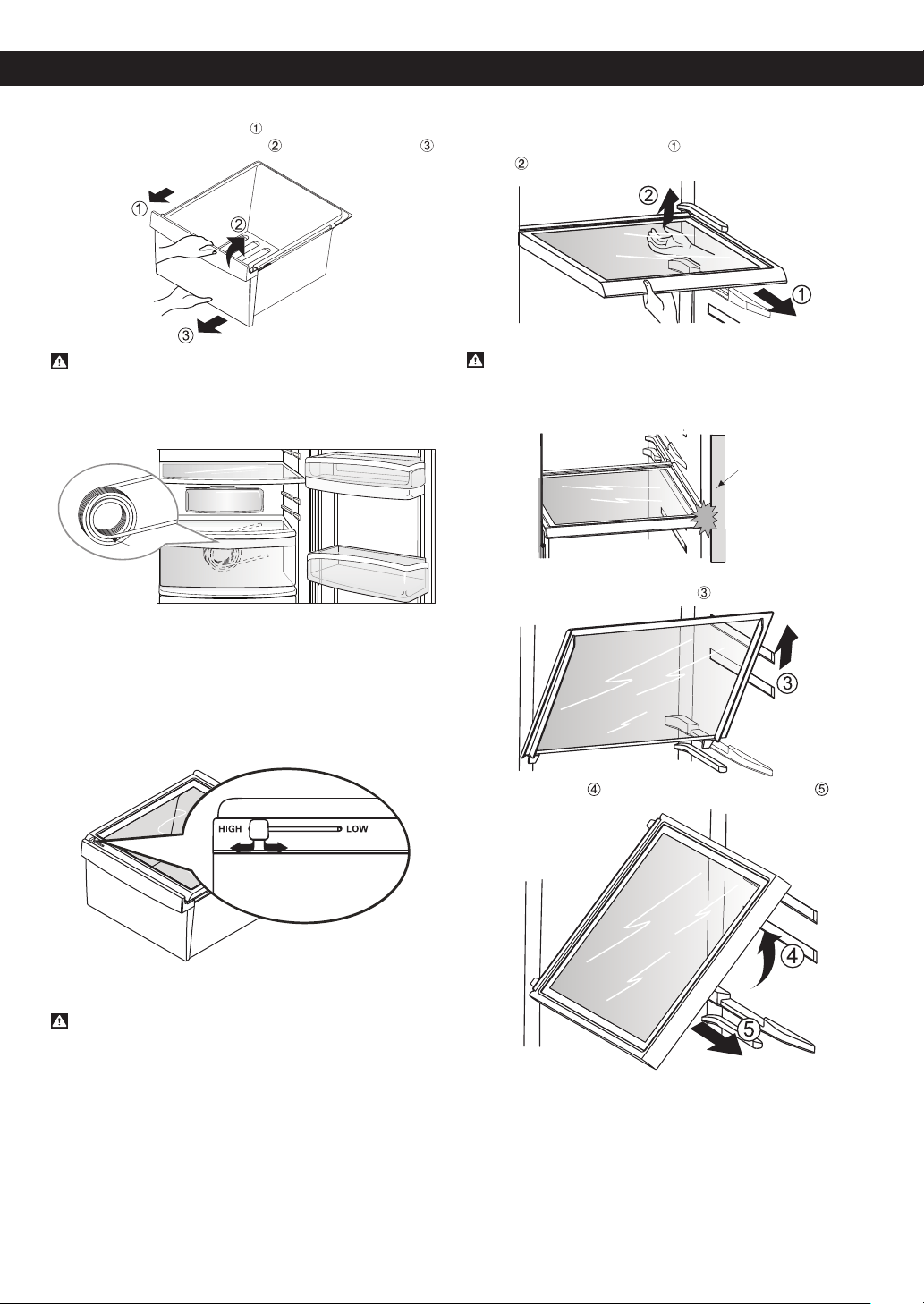
• To remove the crisper compartment, pull the crisper
compartment to the front
until it stops. Then slightly
lift the crisper compartment while pulling it out .
CAUTION
When removing the crisper compartment you will
see the water tank. Do not remove it, or water
leakage may result. The water tank is not a
removable part.
You can control the amount of humidity in the
moisture sealed crispers. Adjust the control to any
setting between “HIGH” and “LOW”.
“HIGH”: Keeps moist air in the crisper for best storage
of fresh, leafy vegetables
“LOW”: Keeps moist air out of the crisper for best
storage of fruits or vegetables with skins.
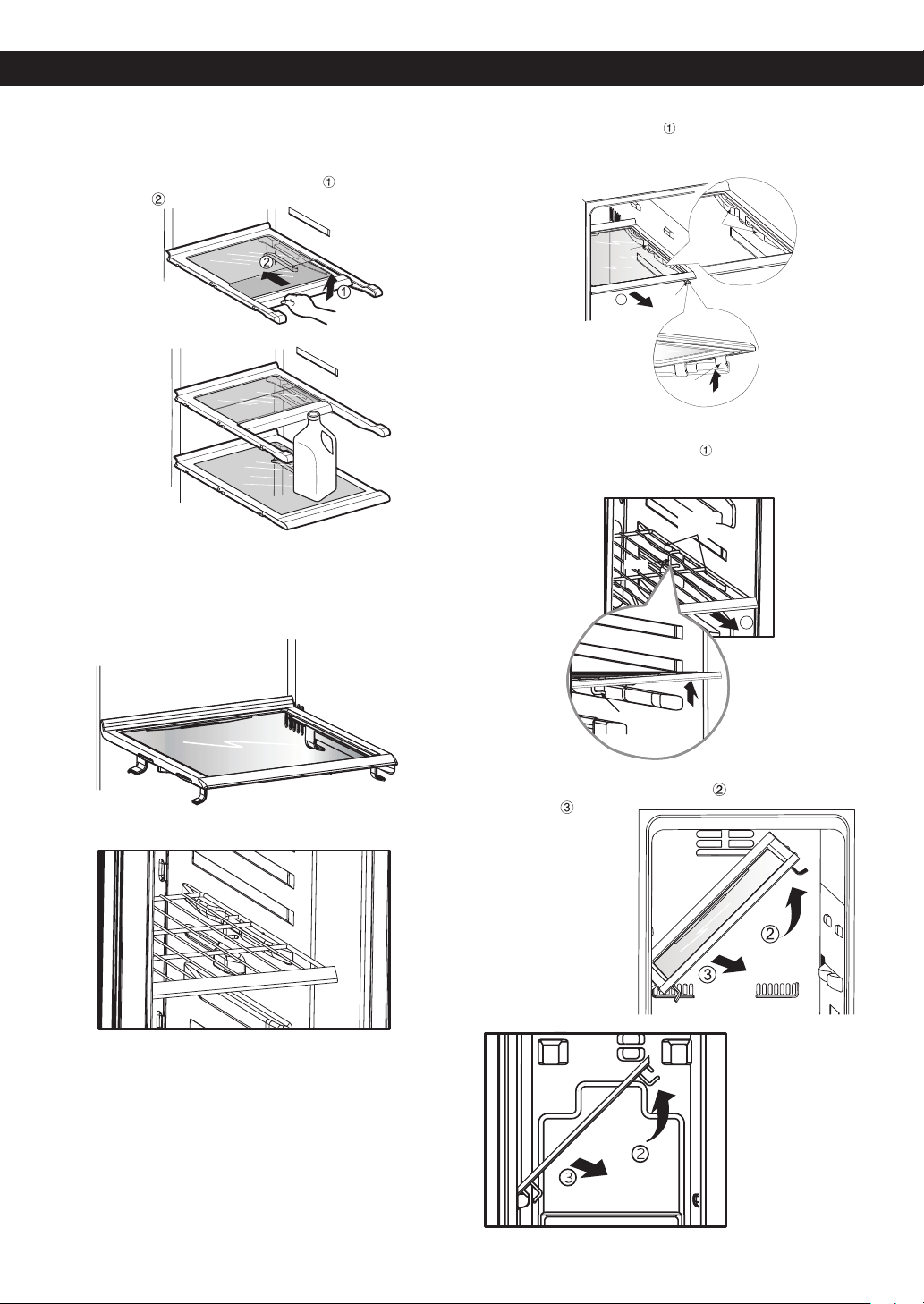
REFRIGERATOR SHELVES
CAUTION
Make sure to keep shelf horizontal while removing;
otherwise it may drop.
The refrigerator compartment shelf is adjustable so that
you can place it at a height according to space
requirement of foods.
Sliding out Shelf:
1. Pull the shelf towards you
, then lift both front and
rear .
CAUTION
Be careful when pulling out the shelf. If you apply
too much force, it may hit the refrigerator door and
damage it or you could hurt yourself.
2. Carefully lift the shelf up fully
.
3. Tilt the shelf and pull forward to remove it .
Tank
Door
USING YOUR REFRIGERATOR
23
Folding Shelf:
You can store taller items such as gallon containers or
bottles by simply sliding the shelf back.
1. Slightly lift the shelf in the direction
while pushing it
to the back .
FREEZER SHELF
(Identify your Shelf freezer type)
To assemble or disassemble the freezer shelf (Wire or
Glass), follow the next steps:
Shelf Freezer Glass
Shelf Freezer Wire
Shelf Freezer Glass
• Pull the shelf towards you
. You will feel the shelf stop,
that means that the second hook of the shelf is in part
guide that’s support the shelf (view detail).
Shelf Freezer Wire
• Pull the shelf towards the front
. The Shelf hook will
contact the support on the guide. Lift the shelf so the
hook clears the guide support (view detail).
• Tilt the shelf (as shown in gure) , and then pull it
toward you .
Shelf Freezer Glass
Shelf Freezer Wire
Hook
Detail
Hook
1
Hook
Support
guide
USING YOUR REFRIGERATOR
Hook
1
Support
guide
Detail
Hook
24
WATER FILTER
Before removing or installing water filter:
1. IMPORTANT: Turn off household water supply.
2.Take out the top shelf and move it to the lowest level.
Removing the water filter:
1. For filter replacement, remove old filter by turning it
counterclockwise and pulling it down.
NOTE : The substitute cap must be retained for the
future. If the filter is removed and not replaced, it is
necessary to reinstall the substitute cap to prevent
water leaks from the filter housing.
Installing the water filter
1. Remove the red cap from the filter.
2. Hold the filter with the unlock symbol
facing
towards you as shown in the picture below. Insert the
filter into the filter receptacle on the right side of the
refrigerator compartment.
3. Push the water filter up into the filter receptacle and
rotate it clockwise to lock it into place. Once installed
correctly, the lock symbol
should be facing you and
you should not be able to rotate the filter clockwise
any more.
NOTE: After installation, if you notice that the lock
symbol
is not facing you or you can continue
to rotate the lter clockwise; remove the lter and
repeat installation to prevent water leaks.
After installing water filter:
1. Replace the shelf to the initial position.
2. After installing filter, turn on household water supply.
3. Dispense 2.5 gallons (9,46 liters) of water to purge
the system, depressing and releasing the dispenser
pad in cycles of 30 seconds ON and 60 seconds
OFF. Open the refrigerator door and check the shelf
area for water leaks.
To purchase or replace water filters, call your Service
Center. Refer to the Warranty Card to obtain the
telephone number of the Service Center near you and
ask for part no. 5231JA2002A or ADQ72910901.
FILTER
25
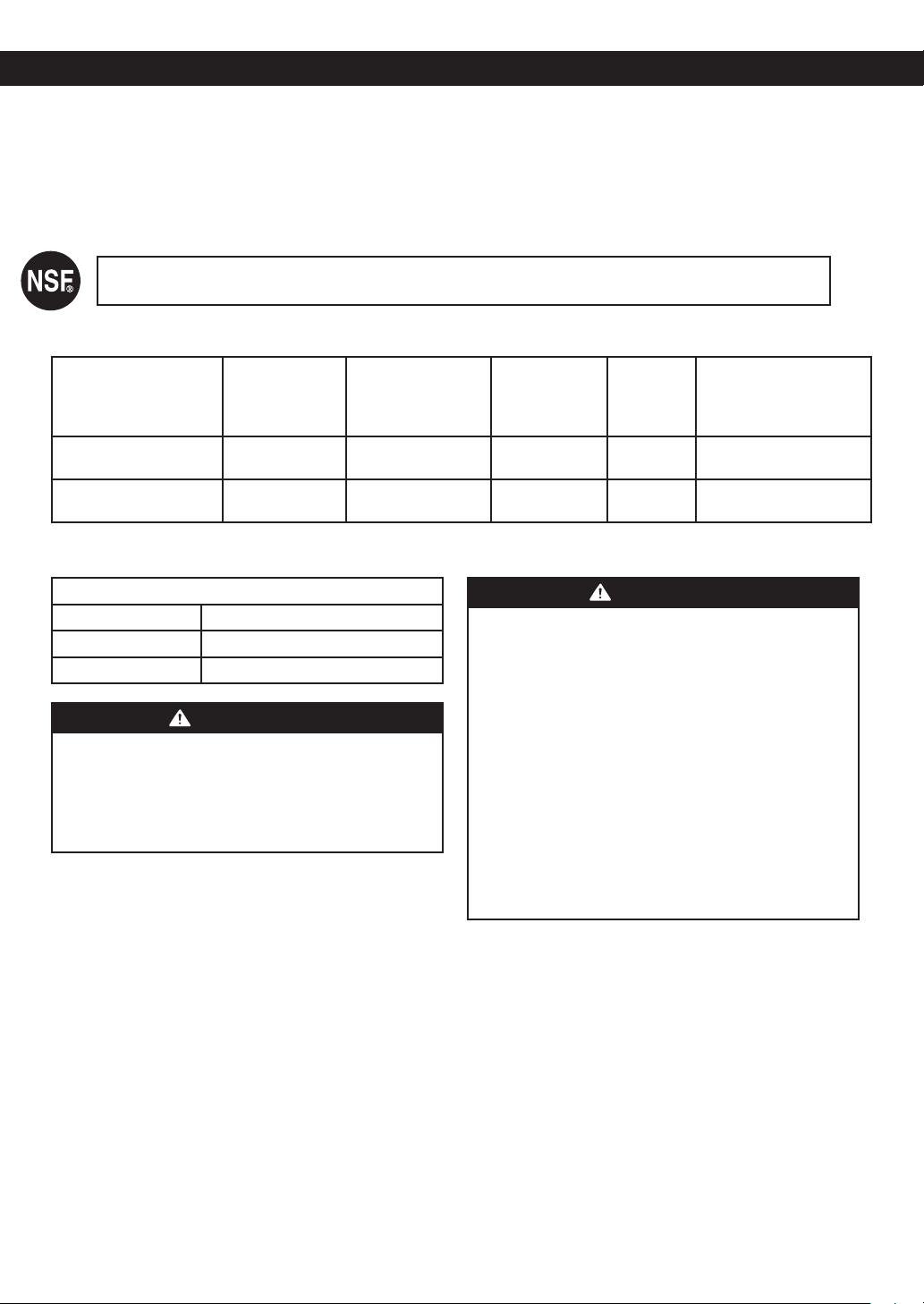
Performance Data Sheet
Models Number 5231JA2002A-S
Use with replacement cartridge 5231JA2002A
This system has been tested according to NSF/ANSI Standards 42 for the reduction of the substances listed
below. The concentration of the indicated substances in water entering the system was reduced to a concentration
less than or equal to the permissible limit for water leaving the system as specified in NSF/ANSI 42.
System tested and certified by NSF International against NSF/ANSI Standard 42 for the reduction of
Chlorine Taste and Odor and Nominal Particulate Class III.
*
Capacity: 500 gal (1,892 L)
Substance
Average
Inuent
Concentration
Inuent Challenge
Concentration.
Units apply to
each row
Avg. Product
Water
Concentration
Average
%
Reduction
NSF % reduction req.
or Max. permissible
product water
concentration
Nominal Particulate
Class I Particle size: ›0.5 to ‹1 um
24,333
At least 10,000
particles/ml
915 96
≥ 85%
Chlorine taste and odor
Class III
1.9
2.0 mg/L ± 10%
0.07 96.4
≥ 50%
Note that while the testing was performed under standard laboratory conditions, actual performance may vary.
Application Guidelines / Water Supply Parameters
Service ow 0.5 gpm (1.89 lpm)
Water pressure 20 - 125 psi (138 - 862 kPa)
Water temperature 33ºF - 100ºF (0.6ºC - 38ºC)
WARNING
To reduce the risk associated with ingestion of
contaminants due to use with water that is
microbiologically unsafe or of unknown quality.
Do not use with water that is microbiologically unsafe
or of unknown quality without adequate disinfection
before or after the system.
Systems must be installed and operated in accordance
with manufacturer’s recommended procedures and
guidelines
CAUTION
To reduce the risk of property damage due to water
leakage:
• Read and follow Use instructions before installation
and use of this system.
• Install on COLD water lines only.
• Comply with all state and local plumbing codes.
• Install a pressure limiting device and water
hammer arrester for inlet water pressures
exceeding 80 psi (552 kPa). Refer to Uniform
Plumbing Code, Sections 608.2 and 609.10.
• Never install or operate where inlet water pressure
may exceed 120 psi (827 kPa).
• Protect lter from freezing. Remove lter in
temperatures below 33° F (0.6° C).
• Replace cartridge at specied service interval.
Cartridge MUST be replaced at least every 6
months.
To purchase or replace water filters call your Service
Center. Refer to the Warranty Card to obtain the
telephone number of the Service Center near you and
ask for part no. 5231JA2002A or ADQ72910901.
FILTER
26
WARNING
EXPLOSION HAZARD
Use non-ammable cleaner.
Failure to do so can result in death, explosion, or fire.
Both the refrigerator and freezer sections defrost
automatically. However, clean both sections about once
a month to prevent odors. Wipe up spills immediately
GENERAL CLEANING TIPS
• Unplug refrigerator or disconnect power.
• Remove all removable parts, such as shelves,
crispers, etc. Refer to sections in Using Your
Refrigerator for removal instructions.
• Use a clean sponge or soft cloth and a mild detergent
in warm water. Do not use abrasive or harsh cleaners.
• Hand wash, rinse and dry all surfaces thoroughly.
• Plug in refrigerator or reconnect power.
OUTSIDE
Waxing external painted metal surfaces helps provide
rust protection. Do not wax plastic parts. Wax painted
metal surfaces at least twice a year using appliance wax
(or auto paste wax). Apply wax with a clean, soft cloth.
Do not use wax on stainless steel exteriors. Use a
product specially designed for polishing stainless steel
appliances, or clean with a soft cloth or clean sponge
and a mild detergent dissolved in warm water. Dry
thoroughly with a soft cloth.
NOTE: Avoid door surface contact with chemical
products that contain Phosphate or Chlorine,
such as degreasers, detergents (containing TSP)
and bleaches.
INSIDE WALLS
NOTE: Allow freezer to warm up so cloth will not stick.
To help remove odors, you can wash the inside of the
refrigerator with a mixture of baking soda and warm
water. Mix 2 tablespoons baking soda to 1 quart of water
(26 g soda to 1 liter water.) Be sure the baking soda is
completely dissolved so it does not scratch the
surfaces of the refrigerator.
DOOR LINERS AND GASKETS
Do not use cleaning waxes, concentrated detergent,
bleaches, or cleaners containing petroleum on plastic
refrigerator parts.
Use a clean sponge or soft cloth and a mild detergent
in warm water. Wash, rinse and dry all surfaces
thoroughly.
PLASTIC PARTS (covers and panels)
Do not use window sprays, abrasive cleaners, or
ammable uids. These can scratch or damage the
material. Use a clean sponge or soft cloth and a mild
detergent in warm water. Wash, rinse and dry all surfaces
thoroughly.
BACK COVER
WARNING
ELECTRICAL SHOCK HAZARD
Before you begin, either unplug the refrigerator or turn
off power at the circuit breaker or fuse box.
Failure to do so could result in death or serious injury.
NOTE: Back cover should only be removed by a
qualified technician.
Clean the vents on the back
cover. Use a vacuum cleaner
with the brush attachment, at
least twice a year to keep your
refrigerator working efficiently.
LED REPLACEMENT
If refrigerator or freezer LED stop working, please call
your Service Center for service. Refer to the Warranty
Card to obtain the telephone number of the Service
Center near you.
NOTE: Do not remove the LED, it is only to be
removed by a qualified technician.
POWER INTERRUPTIONS
1. If the power will be out for 24 hours or less, keep all
refrigerator doors closed to help foods stay cold and
frozen.
2. If the power will be out for more than 24 hours:
a) Remove all frozen food and store it in a frozen food
locker.
OR
b) Place 2 lbs. (1 kg) of dry ice in the freezer for
every cubic foot (28 L) of freezer space. This will keep
the food frozen for two to four days. While handling
dry ice, wear gloves to protect your hands from
frostbite.
WARNING
SUFFOCATION HAZARD
When using dry ice, provide adequate ventilation, Dry
ice is frozen carbon dioxide (CO2). When it vaporizes,
it can displace oxygen, causing dizziness,
light-headedness, unconsciousness and death by
suffocation. Open a window and don not breathe
vapors.
OR
c) If neither a food locker nor dry ice is available,
consume or dispose of food at once.
CARE AND CLEANING
BACK COVER
27
REMEMBER: In a power failure, a full freezer stays cold
longer than a partially filled one. If you see that food
contains ice crystals, it may be affected. If the condition
of the food is poor, or if you feel it is unsafe,
dispose of it.
WARNING
DO NOT refreeze frozen foods which have thawed
completely. The United States Department of
Agriculture in Home and Garden Bulletin No. 69
says: ...You may safely refreeze frozen foods that
have thawed if they still contain ice crystals or if they
are still cold-below 40 °F (4 °C). ...Thawed ground
meats, poultry or fish that have any off-odor or
off-color should not be frozen and should not be
eaten. Thawed ice cream should be discarded. If
the odor or color of any food is poor or question-
able, dispose of it. The food may be dangerous to
eat. Even partial thawing and refreezing reduces the
eating quality of foods, particularly fruits, vegetables
and prepared foods. The eating quality of red meats
is affected less than that of many other foods. Use
refrozen foods as soon as possible to save as much
of their quality as you can.
WHEN YOU GO ON VACATION
If you choose to leave the refrigerator ON while you
are away, follow these steps to prepare your refrigerator
before you leave.
1. Use up any perishables and freeze other items.
2. Empty the ice bin.
3. Turn OFF the Icemaker. NOTE: If the ambient
temperature will drop below freezing, have a quailed
service technician drain the water supply system
(on some models) to prevent serious property
damage due to possible ooding from ruptured
water lines or connections.
If you choose to turn the refrigerator OFF before you
leave, follow these steps.
1. Remove all food from the refrigerator and empty ice
bin.
2. Unplug refrigerator.
3. Clean refrigerator, wipe, and dry well.
4. Tape rubber or wood blocks to the tops of both doors
to prop them open far enough for air to get in. This
stops odor and mold from building up.
WHEN YOU MOVE
When you are moving your refrigerator to a new home,
follow these steps to prepare it for the move.
1. Remove all food from the refrigerator and pack all
frozen food in dry ice.
2. Unplug refrigerator.
3. Clean refrigerator, wipe, and dry well.
4. Empty water from the defrost pan.
5. Clean, wipe and dry thoroughly.
6. Take out all removable parts, wrap them well and
tape together so they don’t shift and rattle during the
move. Refer to sections in Using your Refrigerator for
removal instructions.
7. Depending on the model, raise the front of the
refrigerator so it rolls more easily OR screw in the
leveling legs all the way so they don’t scrape the oor.
See the DOOR ALIGNMENT section.
8. Tape the doors shut and tape the power cord to the
refrigerator cabinet.
When you get to your new home, put everything back
and refer to the REFRIGERATION INSTALLATION
section for setup instructions.
WHEN YOU SHOULD SET THE ICE MAKER POWER
SWITCH TO OFF (O)
• When the water supply will be shut off for several
hours.
• When the ice storage bin is removed for more than a
minute or two.
• When the refrigerator will not be used for several days.
NORMAL SOUNDS YOU MAY HEAR
• The icemaker water valve will buzz as the icemaker lls
with water. If the power switch is in the ON position, it
will buzz even if it has not yet been hooked up to water.
To stop the buzzing, move the power switch to OFF
position.
NOTE: Keep the power switch in the ON position before
the water line is connected can damage the
icemaker.
• You will hear the sound of cubes dropping into the bin
and water running in the pipes as the icemaker refills.
CARE AND CLEANING
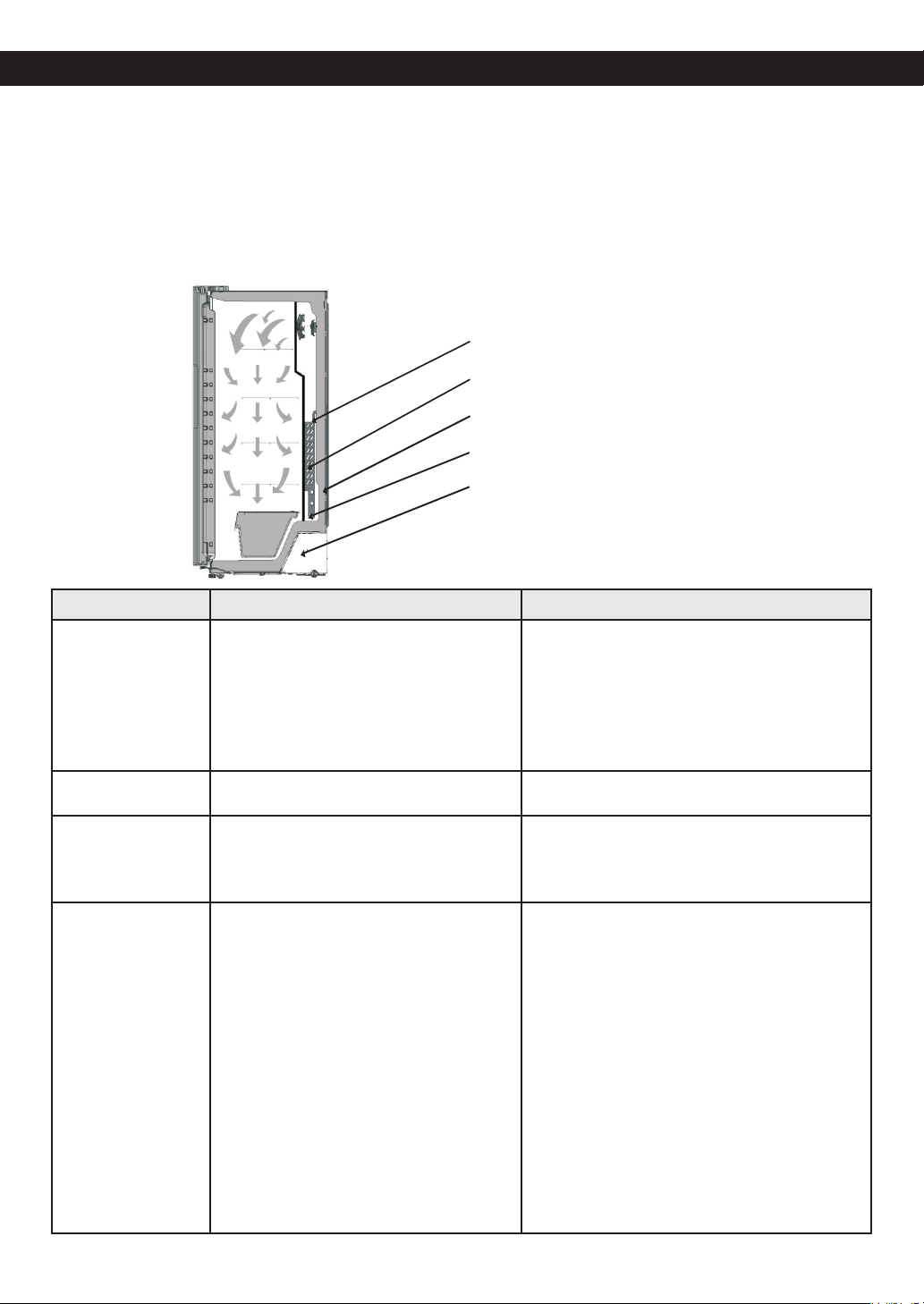
28
UNDERSTANDING SOUNDS YOU MAY HEAR
Your new refrigerator may make sounds that your old
one did not make. Because the sounds are new to you,
you might be concerned about them. Most of the new
sounds are normal. Hard surfaces, like the floor, walls
and cabinets, can make the sounds seem louder than
they actually are. The following list describes the kinds of
sounds and what may be making them.
• The defrost timer will click when the automatic
defrost cycle begins and ends. The thermostat control
(or refrigerator control, depending on the model) will
also click when cycling on and off.
• Rattling noises may come from the ow of
refrigerant, the water line, or items stored on top of the
refrigerator.
• Your refrigerator is designed to run more efciently to
keep your food items at the desired temperature. The
high efciency compressor may cause your new
refrigerator to run longer than your old one, and you
may hear a pulsating or high-pitched sound.
• You may hear the evaporator fan motor circulating the
air through the refrigerator and freezer compartments.
• As each cycle ends, you may hear a gurgling sound
due to the refrigerant flowing in your refrigerator.
• Contraction and expansion of the inside walls may
cause a popping noise.
• Water dripping on the defrost heater during a defrost
cycle may cause a sizzling sound.
• You may hear air being forced over the condenser by
the condenser fan.
• You may hear water running into the drain pan during
the defrost cycle.
Problem Possible causes Solutions
REFRIGERATOR
DOES NOT
OPERATE
• The power supply cord is unplugged.
• A household fuse has blown or
circuit breaker tripped.
• The refrigerator control is set to the
OFF position.
•Refrigerator is in the defrost cycle.
• Firmly plug the cord into a live outlet with
proper voltage.
• Replace the fuse or reset the circuit breaker.
• Refer to the CONTROL PANEL FEATURES.
• Wait about 30 minutes for defrost
cycle to end.
VIBRATION OR
RATTLING NOISE
• The refrigerator is not resting solidly on
the floor.
• Floor is weak or uneven or leveling legs need
adjusting. See DOOR ALIGNMENT Section.
LIGHTS DO NOT
WORK
• The power supply cord is unplugged.
• LED Light failure.
• Firmly plug the cord into a live outlet with
proper voltage.
•Do not remove LED light, it is only to be
removed by a qualied technician.
COMPRESSOR
MOTOR SEEMS TO
RUN TOO MUCH
• The refrigerator that was replaced was
an older model.
• The room temperature is hotter than
normal.
• The door is opened often or a large
amount has just been added.
• The refrigerator was recently plugged
in and the refrigerator control was set
correctly.
• Modern refrigerators with more storage space
require more operating time.
• The motor will run longer under warm
conditions. At normal room temperatures,
expect your motor to run about 40% to 80%
of the time. Under warmer conditions, expect
it to run even more often.
• Adding food and opening the door warms
the refrigerator. It is normal for the refrigera-
tor to run longer in order to conserve energy,
try to get everything you need out of the
refrigerator at once, keep food organized
so it is easy to nd and close the door as
soon as the food is removed. See the FOOD
STORAGE GUIDE section.
• The refrigerator will take up to 24 hours to
cool completely.
TROUBLESHOOTING GUIDE
29
Problem Possible causes Solutions
COMPRESSOR
MOTOR SEEMS TO
RUN TOO MUCH
• The refrigerator control was not set
correctly for the surrounding conditions.
• The doors are not closed completely.
• The condenser coils are dirty.
• See the ADJUSTING CONTROL SETTINGS
Section.
• Push the doors rmly shut. If they will not
shut all the way, see Doors will not close
completely below.
•This prevents air transfer and makes the
motor work harder. Clean the condenser
coils. Refer to the CARE AND CLEANING
section.
DOORS WILL NOT
CLOSE
COMPLETELY
• The refrigerator is not level.
• Food packages are blocking the door
open.
• The ice bin, crisper cover, pans, shelves,
door bins or baskets are out of position.
• The gaskets are sticking.
• The refrigerator wobbles or seems
unstable.
• The doors were removed during
product installation and not properly
replaced.
• See the REFRIGERATOR INSTALLATION
AND DOOR ALIGNMENT section to level
refrigerator.
• Rearrange food containers to clear door and
door shelves.
• Push bins all the way in and put crisper cover,
pans, shelves and baskets into their correct
positions. See the USING YOUR
REFRIGERATOR Section.
• Clean gaskets and the surface that they
touch. Rub a thin coat of parafn wax on the
gaskets after cleaning.
• Level the refrigerator. Refer to the DOOR
ALIGNMENT section.
• Remove and replace the doors according to
the REMOVING AND REPLACING
REFRIGERATOR DOORS section, or call
qualied service technician.
THE DOORS ARE
DIFFICULT TO
OPEN
• The gaskets are dirty or sticky.
• The door is reopened within a short
time after having been opened.
• Clean gaskets and the surfaces that they
touch. Rub a thin coat of appliance polish or
kitchen wax on the gaskets after cleaning.
•When you open the door, warmer air enters
the refrigerator. As the warm air cools, it can
create a vacuum. If the door is hard to open,
wait 5 minutes to allow the air pressure to
equalize, then see if it opens more easily.
TEMPERATURE IS
TOO WARM OR
THERE IS
INTERIOR
MOISTURE
BUILDUP
• The doors are opened often.
• The control is not set correctly for the
surrounding conditions.
• A large amount of food has just been
added to the refrigerator or freezer.
• The food is not packaged correctly.
•The doors are not closing completely.
• When the door is opened, warm humid air
is allowed into the refrigerator. The more the
door is opened, the faster the humidity builds
up, and the more warm air the refrigerator
must cool. In order to keep the refrigerator
cool, try to get everything you need out of the
refrigerator at once, keep food organized so it
is easy to nd and close the door as soon as
the food is removed.
• Refer to the CONTROL PANEL FEATURES
section. Wait 24 hours for temperatures to
stabilize or even out. If the temperature is too
cold or too warm, move the dial one number
at a time.
• Adding food warms the refrigerator. It can
take a few hours for the refrigerator to return
to normal temperature.
• Wrap food tightly and wipe off damp
containers prior to storing in the refrigerator
to avoid moisture accumulation. If necessary,
repackage food according to the guidelines in
the FOOD STORAGE GUIDE section.
•See “Doors will not close completely”.
TROUBLESHOOTING GUIDE
30
Problem Possible causes Solutions
TEMPERATURE IS
TOO WARM OR
THERE IS
INTERIOR
MOISTURE
BUILDUP
• The weather is humid.
• A self-defrost cycle was completed.
• The air vents are blocked. Cold air
circulates from the freezer to the fresh
food section and back again through air
vents in the wall dividing the two
sections.
• In humid weather, air carries moisture into
refrigerator when doors are opened.
• It is normal for droplets to form on the back
wall after the refrigerator self-defrosts.
• Locate air vents by using your hand to sense
airow and move all packages that block
vents and restrict airow. Refer to ENSURING
PROPER AIR CIRCULATION section for the
location of air vents.
CUBES
PRODUCED BY
ICEMAKER ARE
TOO SMALL
• Water shutoff valve connecting
refrigerator to water line may be
clogged.
• Call a plumber to clear the valve.
ICE HAS BAD
TASTE OR ODOR
• The icemaker was recently installed.
• The ice has been stored for too long.
• The food has not been wrapped tightly
in either compartment.
• The water supply contains minerals
such as sulfur.
• The interior of refrigerator needs
cleaning.
• Ice storage bin needs cleaning.
• Discard rst few batches of ice to avoid
discolored or off-avored ice.
• Throw away old ice and make new supply.
• Rewrap foods since odors may migrate to
the ice if food is not wrapped properly.
• A new lter may need to be installed to
eliminate taste and odor problems.
• See CARE AND CLEANING section.
• Empty and wash bin. Discard old cubes.
THERE IS WATER
IN THE DEFROST
DRAIN PAN
• The refrigerator is defrosting.
• It is more humid than normal.
• The water will evaporate. It is normal for water
to drip into the defrost pan.
• Expect that the water in the defrost pan will
take longer to evaporate. This is normal when
it is hot or humid.
THE
REFRIGERATOR
SEEMS TO MAKE
TOO MUCH NOISE
• The sounds may be normal for your
refrigerator.
• Refer to the UNDERSTANDING SOUNDS
YOU MAY HEAR section.
FROST OR ICE
CRYSTALS ON
FROZEN FOOD
• The door is not closing properly.
• The door is opened often.
• See “Doors will not close completely” above.
• When the door is opened, warm, humid air is
allowed in the freezer resulting in frost.
THE ICEMAKER IS
NOT PRODUCING
ICE OR ICE CUBES
ARE FREEZING
TOO SLOWLY
• The freezer temperature is cold enough
to produce ice.
• Door left open.
• Wait 24 hours after hook-up for ice
production. See the CONTROL PANEL
FEATURES section.
•Check to see if something is holding the door
open.
NOT DISPENSING
ICE
• All the doors are not closed completely.
• The dispenser display is locked.
• Ice is not selected on the dispenser.
• The ice dispenser is not used often.
• Ice bin is not installed correctly.
• Ice will not dispense if any of the refrigerator
doors are left open.
• Press and hold the Alarm/Lock button for
3 seconds to unlock the control panel and
dispenser.
• The dispenser can be set for ice or water.
Make certain that the control panel is set for
the proper operation. Press the dispenser
button on the control panel to cycle through
the ice and water options.
• Check the ice bin for ice cubes clumping/
sticking together.If they are, break up the ice
cubes allow for proper operation.
• Be sure to install the ice bin rmly into
position.
TROUBLESHOOTING GUIDE
31
Problem Possible causes Solutions
NOT DISPENSING
ICE
• New installation.
• Ice cubes are stuck in the delivery
chute.
•The ice dispenser is stalling while
dispensing “crushed” ice.
• Icemaker power switch in the OFF (O)
position.
• Water supply turned off or not
connected.
• Wait 24 hours after ice maker installation for
ice production to begin. Wait 72 hours for full
ice production.
• Use a plastic utensil to clear the delivery
chute.
•Change the ice button from “crushed” to
“cubed”. If cubed ice dispenses correctly,
depress the button for“crushed” ice and
begin dispensing again.
• Move the switch to the ON (I) position.
• See the CONNECTING THE WATER LINE
section.
NOT DISPENSING
WATER
• The dispenser display is locked.
• New installation.
•Refrigerator or freezer doors are not
closed properly.
• Water supply turned off or not
connected.
• The water pressure is less than 40 PSI.
• Home lter or reverse osmosis system
is used.
• The dispenser is not set for water
dispensing.
• Press and hold the Alarm/Lock button for
3 seconds to unlock the control panel and
dispenser.
• Flush and ll the water system.
• Water will not dispense if any of the
refrigerator doors are left open.
• See the CONNECTING THE WATER LINE
section.
• The water pressure to the home affects the
flow from the dispenser.
• This can decrease water pressure. It is
recommended not to connect the supply line
to a reverse osmosis system for optimal
operation.
• The dispenser can be set for ice or water.
Make certain that the control panel is set for
the proper operation. Press the dispenser
button on the control panel to cycle through
the ice and water options.
TROUBLESHOOTING GUIDE
USA, Consumer User
USA, Commercial User
CANADA
LG Customer Information Center
www.lg.com
Register your Product Online!
1-800-243-0000
1-888-865-3026
1-888-542-2623