
Customer Assistance/Asistencia al Cliente
1-800-488-1222
Use & Care Guide
Manual de Uso y Cuidado
1.8 Pies.Cúbicos, 1000 Vatios
1.8 Cu. Ft., 1000 Watts
Models/Modelos:
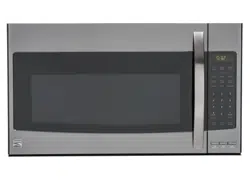
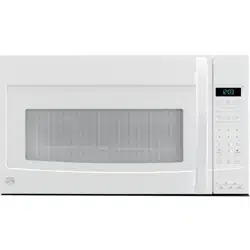
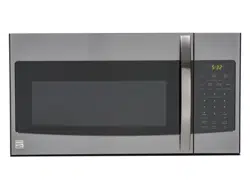
111.83532 - White / Blanco
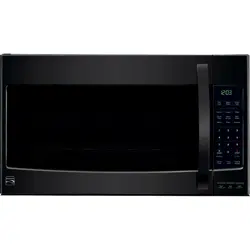
111.83539 - Black / Negro
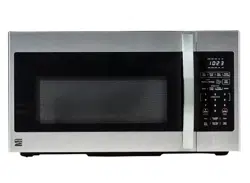
111.83533 - Stainless Steel / Acero Inoxidable
111.83537 - Black Stainless Steel / Acero Inoxidable Negro
Transform SR Holding Management LLC,
Hoffman Estates, IL 60179 U.S.A.
www.kenmore.com
www.sears.com
Kenmore
Microwave Hood Combination
Combinación de microondas y campana

For the most prompt assistance to order available replacement parts for this appliance,
call 1-800-488-1222.
KENMORE LIMITED WARRANTY
FOR ONE YEAR from the date of sale this appliance is warranted against defects in material or
workmanship when it is correctly installed, operated and maintained according to all supplied
instructions.
WITH PROOF OF SALE a defective appliance will receive free repair. If the appliance cannot be
repaired it will be replaced free of charge.
For warranty coverage details to obtain free repair or replacement,
visit the web page: www.kenmore.com/warranty
This warranty applies for only 90 DAYS from the date of sale if this appliance is ever used for other
than private household purposes.
This warranty covers ONLY defects in material and workmanship, and will NOT pay for:
1. Expendableitemsthatcanwearoutfromnormaluse,includingbutnotlimitedtolters,belts,bags
or screw-in base light bulbs.
2. A service technician to clean or maintain this appliance, or to instruct the user in correct appliance
installation, operation and maintenance.
3. Service calls to correct appliance installation not performed by Sears authorized service agents,
or to repair problems with house fuses, circuit breakers, house wiring, and plumbing or gas supply
systems resulting from such installation.
4. Damage to or failure of this appliance resulting from installation not performed by Sears authorized
service agents, including installation that was not in accord with electrical, gas or plumbing codes.
5. Damage to or failure of this appliance, including discoloration or surface rust, if it is not correctly
operated and maintained according to all supplied instructions.
6. Damage to or failure of this appliance, including discoloration or surface rust, resulting from
accident, alteration, abuse, misuse or use for other than its intended purpose.
7. Damage to or failure of this appliance, including discoloration or surface rust, caused by the use of
detergents, cleaners, chemicals or utensils other than those recommended in all instructions supplied
with the product.
8. Damagetoorfailureofpartsorsystemsresultingfromunauthorizedmodicationsmadetothis
appliance.
9. Service to an appliance if the model and serial plate is missing, altered, or cannot easily be
determinedtohavetheappropriatecerticationlogo.
Disclaimer of implied warranties; limitation of remedies
Customer’s sole and exclusive remedy under this limited warranty shall be product repair or replacement
asprovidedherein.Impliedwarranties,includingwarrantiesofmerchantabilityortnessforaparticular
purpose, are limited to one year or the shortest period allowed by law. Seller shall not be liable for
incidental or consequential damages. Some states do not allow the exclusion or limitation of incidental or
consequentialdamages,orlimitationonthedurationofimpliedwarrantiesofmerchantabilityortness,
so these exclusions or limitations may not apply to you.
This warranty applies only while this appliance is used in the United States.
Thiswarrantygivesyouspeciclegalrights,andyoumayalsohaveotherrightswhichvaryfromstate
to state.
Transform SR Brands Management LLC, Hoffman Estates, IL 60179
Customer Assistance

EN-1
Introduction
Table of Contents
Congratulations on your purchase of an over-the range microwave oven. For best results, we
suggestreadingthisguidecarefully.Youwillndinstructionsontheproperoperationand
maintenance of your microwave.
Introduction .................................................................................................................................................. 1
Precautions to Avoid Possible Exposure to Excessive Microwave Energy ...................................... 1
Important Safety Instructions ............................................................................................................. 2~4
Installation Recommendations / Automatic Fan Protection Feature ................................................ 5
Microwaving Tips ........................................................................................................................................ 6
Safe and Unsafe Materials ..................................................................................................................... 7
Touch Control Panel ............................................................................................................................. 8~9
Oven Features at a Glance .................................................................................................................. 10
Operation ......................................................................................................................................... 11~23
Care and Cleaning ......................................................................................................................... 24~27
Common Questions and Answers ......................................................................................................... 28
Before You Call ............................................................................................................................... 29~30
PRECAUTIONS TO AVOID POSSIBLE
EXPOSURE TO EXCESSIVE MICROWAVE
ENERGY
A. Do not
attempt to operate this oven with the door open since open-door operation can
result in harmful exposure to microwave energy. It is important not to defeat or tamper
with the safety interlocks.
B. Do not
place any object between the oven front face and the door or allow soil or
cleaner residue to accumulate on sealing surfaces.
C. Do not
operate the oven if it is damaged. It is particularly important that the oven door
close properly and that there is no damage to the: (1) door (bent), (2) hinges and latches
(broken or loosened), (3) door seals and sealing surfaces.
D.
The oven should not be adjusted or repaired by anyone except properly qualified
service personnel.

EN-2
Important Safety Instructions
When using electrical appliances, basic safety precautions should be followed, including the
following:
WARNING - To reduce the risk of burns, electric shock, re, injury to persons or exposure
to excessive microwave energy:
1. Read all instructions before using the appliance.
2. Readandfollowthespecic“PRECAUTIONSTOAVOIDPOSSIBLEEXPOSURETOEXCESSIVE
MICROWAVEENERGY”foundonpage1.
3. This appliance must be grounded. Connect only to properly grounded outlet. See
“GROUNDINGINSTRUCTIONS”onpage5.
4. Install or locate this appliance in accordance with the provided installation instructions. Do not
mount over a sink
5.
This microwave oven is UL listed for installation over electric and gas ranges.
This over-the-range oven was designed for use over ranges no wider than 30 inches.
6.
For best operation, plug this appliance into its own electrical outlet, to prevent ickering
of lights, blowing of fuse or tripping of circuit breaker.
7. Some products such as whole eggs and sealed containers - for example, closed jars - are
able to explode and should not be heated in this oven. In rare instances, poached eggs have
been known to explode. Cover poached eggs and allow standing time of one minute before
cutting into them.
8. Foodswithunbrokenouter“skin”suchaspotatoes,
sausages, tomatoes, apples, chicken livers and other giblets, and egg yolks (see previous
caution)shouldbepiercedtoallowsteamtoescapeduringcooking.“Boilable”cooking
pouches and tightly closed plastic bags should be slit, pierced or vented.
19. Donotheat,storeoruseammablematerialsinorneartheoven.Fumescancreateare
hazard or explosion.
10. Use this appliance only for its intended use as described in this manual. Do not use corrosive
chemicalsorvaporsinthisappliance.Thistypeofovenisspecicallydesignedtoheat,cook
or defrost food. It is not designed for industrial, laboratory or commercial use. it is intended
for home use only.
11. As with any appliance, close supervision is necessary when used by children.
12. Do not operate this appliance if it has a damaged cord or plug, if it is not working properly
or if it has been damaged or dropped.
13. Thisapplianceshouldbeservicedonlybyqualiedservicepersonnel.Contactnearest
authorized service facility for examination, repair or adjustment.
14. Do not cover or block any openings on the appliance.
15. Do not use or store this appliance outdoors. Do not use this product near water - for example,
near a kitchen sink, in a wet basement or near a swimming pool, or similar locations.
16. Do not immerse cord or plug in water.
17. Keep cord away from heated surfaces.
18. Do not let cord hang over edge of table or counter.
19. When cleaning surfaces of door and oven that come together on closing the door, use only
mild, non-abrasive soaps or detergents applied with a sponge or soft cloth.
20. Toreducetheriskofreintheovencavity:
a.
Do not overcook food. Carefully attend appliance when paper, plastic or other
combustible materials are placed inside the oven to facilitate cooking. Avoid using recycled
paper products. Do not use newspaper or other printed paper in the oven. Such products

EN-3
sometimes contain impurities which could ignite.
b.
Remove wire twist-ties from paper or plastic bags before placing them in oven.
c.
If materials inside the oven ignite, keep oven door closed, turn oven off and disconnect the
power cord or shut off power at the fuse or circuit breaker panel.
d.
Do not use the oven for storage. Do not leave paper products, cooking utensils or food in
the oven when not in use.
e.
Do not pop popcorn except in a microwave approved popcorn popper or in a commercial
package recommended especially for microwave ovens.
f.Donotovercookpotatoes.Theymaydehydrateandcatchre.
g. Do not use for drying clothes, linens, newspaper or similar non-food type items.
21. Do not operate the oven when empty or with an empty utensil to avoid damage to the oven
anddangerofre.
22. Do not lean on the oven door. The door is designed to close tightly and seal properly for safe
operation. Leaning on the door may warp or break the hinges.
23. Toavoidexposuretodangeroushighvoltage,DONOTREMOVETHESPLATTERSHIELDinside
the oven cavity.
24. Liquids, such as water, coffee, or tea are able to be overheated beyond the boiling point
withoutappearingtobeboilingduetosurfacetensionoftheliquid.Visiblebubblingor
boiling when the container is removed from the microwave oven is not always present. THIS
COULDRESULTINVERYHOTLIQUIDSSUDDENLYBOILINGOVERWHENASPOONOR
OTHER UTENSIL IS INSERTED INTO THE LIQUID. To reduce the risk of injury to persons:
1 Do not overheat the liquid.
2 Stir the liquid both before and halfway through heating it
3 Do not use straight-sided containers with narrow necks.
4 After heating, allow the container to stand in the microwave oven for a short time before
removing the container.
5 Use extreme care when inserting a spoon or other utensil into the container.
25. Readandfollowspecicmicrowaveovenpreparationinstructionsonfoodpackagesor
containers (especially baby food). Above all, this is a cooking appliance designed to prepare
food.
26. Useonlycookingutensilsandaccessoriesmadeforuseinthemicrowaveandspecically
described in this manual.
27. Microwave oven manufacturers do not recommend deep fat frying or frying in a microwave
oven. Hot oil can damage oven parts and utensils and even result in skin burns.
28. Plastic wrap : Use only those types designed for microwave oven use and avoid forming an
air-tight seal. Fold back a small corner or cut a small slit to allow steam to escape.
29. Stay near the appliance while it is in use and check cooking progress frequently. Leaving the
applianceunattendedmayreslutinovercookedfoodandpossiblyareinyouroven.
30. Foods cooked in liquids (such as pasta) may tend to boil over more rapidly than foods
containing less moisture. Should this occur, refer to the Care and Cleaning section for
insturctions on how to clean the inside of the oven.
31. Do not use a thermometer in food you are microwaving unless the thermometer is designed or
recommended for use in the microwave oven.
32. Plastic cookware designed for microwave cooking is very useful, but should be used carefully.
Even microwave-safe plastic may not be as tolerant of overcooking conditions as are glass
or ceramic materials and may soften or char if subjected to short periods of overcooking. In
longer exposures to overcooking, the food and cookware could ignite.
For these reasons:1) Use microwave-safe plastics only and use them in strict compliance

EN-4
with the cookware manufacturer’s recommendations. 2) Do not subject empty cookware to
microwaving. 3) Do not permit children to use plastic cookware without complete supervision.
33. Do not store anythig directly on top of the microwave oven surface when the oven is in
operation.
34. TVdinnersmaybemicrowavedinfoiltrayslessthan3/4”deep;removetopfoilcoverand
return tray to box. When using metal in microwave oven, keep metal at least 1 inch away
from the sides of the oven.
35. Do not defrost frozen beverages in narrow necked bottles.
36. Cookware may become hot because of heat transferred from the heated food. Potholders
may be needed to handle the cookware.
37. Donottrytomeltparafnwaxintheoven.Parafnwaxwillnotmeltinamicrowaveoven
because it allows microwaves to pass through it.
38. Never use sharp-edged utensils in or near the oven.
39. Hot foods and steam can cause burns. Be careful when opening containers of hot food,
including popcorn bags, cooking pouches and boxes. To prevent possible injury, direct steam
away from hands and face.
40. Cleantheventhoodoften.Donotallowgreasetobuilduponthehoodorthelter.
41. Usecarewhencleaningtheventhoodlter.Corrosivecleaningagents,suchaslye-based
ovencleaners,maydamagethelter.
42. Whenamingfoodsareunderthehood,turnthefanon.
SAVE THESE INSTRUCTIONS

EN-5
Installation Recommendations
The cooking range installed under the microwave oven may, under some heavy usage conditions,
cause temperatures high enough to overheat some internal parts of the microwave oven.
To prevent overheating from taking place, the exhaust fan is designed to automatically turn on
at a low speed if excessive temperatures occur. Should this happen, the fan cannot be manually
turned off, but it will automatically turn off when the internal parts have cooled. The fan may stay
on for up to an hour after the range and microwave oven controls have been turned off.
Remove all packing materials both outside and inside the oven before using the oven. The oven
requires free movement of air for proper operation. Do NOT block air vents located by the top
air grill and underneath the oven.
Grounding Instructions
This appliance must be grounded. In the event of an electrical short circuit, grounding reduces
the risk of electric shock by providing an escape wire for the electric current. This appliance is
equipped with a cord having a grounding wire with a grounding plug. The plug must be plugged
into a 120v, 15amp. outlet that is properly installed and grounded.
Consultaqualiedelectricianorservicetechnicianifthegroundinginstructionsarenotcompletely
understood or if doubt exists as to whether the appliance is properly grounded.
WARNING - Improper use
of the grounding plug can result in a risk of electric shock.
Where standard two-prong wall receptacle is encountered, it is your personal reponsibility and
obligation to have it replaced with a properly grounded three-prong wall receptacle.
Do not under any circumstance cut or remove the third (ground) prong from the power cord. Do
not use an adapter plug with this appliance. See pages 1 and 2 of the Installation Manual for
acceptableextensioncordspecications.
Interference Note
Microwave ovens generate radio frequency energy during operation and if not installed properly
may cause interference to radio and television reception. You can determine if this unit is causing
interference by turning it on and off while the interference is occurring. If interference occurs, it
may be corrected by one or more of the following measures:
•cleandoorandsealsurfacesoftheoven;
•reorientthetelevisionorradioreceivingantenna;
• the oven with respect to the television or radio receiver, and/or
• Plug the oven into a different oulet so that it and the television or radio receiver are on different
circuits.
If the interference persists, you may want to consult an experienced radio/television technician for
additional information.
Automatic Fan Protection feature

EN-6
• Make sure all cookware used in your microwave oven is suitable for microwaving. Most glass
cooking dishes, measuring cups, custard cups, pottery or china dinnerware, which does not have
metallic trim or glaze with metallic sheen, can be used.
• If you are not sure if a dish is microwave-safe, use this test: Place in the oven the dish you are
testingandaglassmeasuringcuplledwithonecupofwater.Setthemeasuringcupeitherinor
next to the dish.
Microwave 1 minute at high. If the dish heats, it should not be used for microwaving. If the dish
remains cool and only the water in the cup heats, then the dish is microwave-safe.
• Paper towels, waxed paper and plastic wrap can be used to cover dishes in order to retain
moisture and prevent spattering. Be sure to vent plastic wrap so steam can escape.
Microwaving Tips
EN-7
Safe and Unsafe Materials
Materials you can use in microwave oven
Materials to be avoided in microwave oven
Utensils Remarks
Aluminum foil Shielding only. Small smooth pieces can be used to cover thin parts of
meat or poultry to prevent overcooking. Arcing can occur if foil is too
close to oven walls. The foil should be at least 1 inch (2.5cm) away from oven
walls.
Browning dish Follow manufacturer’s instructions. The bottom of browning dish must be
at least 3/16 inch (5 mm) above the turntable. Incorrect usage may cause
the turntable to break.
Dinnerware Microwave-safe only. Follow manufacturer's instructions. Do not use
cracked or chipped dishes.
Glass jars Always remove lid. Use only to heat food until just warm. Most glass jars are
not heat resistant and may break.
Glassware Heat-resistant oven glassware only. Make sure there is no metallic trim.
Do not use cracked or chipped dishes.
Oven cooking bags Follow manufacturer’s instructions. Do not close with metal tie. Make
slits to allow steam to escape.
Paper plates
and cups
Use for short–term cooking/warming only. Do not leave oven unattended
while cooking.
Paper towels Use to cover food for reheating and absorbing fat. Use with supervision
for a short-term cooking only.
Parchment
paper
Use as a cover to prevent splattering or a wrap for steaming.
Plastic Microwave-safe only. Follow the manufacturer’s instructions. Should be
labeled "Microwave Safe". Some plastic containers soften as the food inside
gets hot. "Boiling bags" and tightly closed plastic bags should be
slit, pierced or vented as directed by instructions on package.
Plastic wrap Microwave-safe only. Use to cover food during cooking to retain
moisture. Do not allow plastic wrap to touch food.
Thermometers Microwave-safe only ( meat and candy thermometers).
Wax paper Use as a cover to prevent splattering and retain moisture.
Utensils Remarks
Aluminum tray May cause arcing. Transfer food into microwave-safe dish.
Food carton with
metal handle
May cause arcing. Transfer food into microwave-safe dish.
Metal or metal-
trimmed utensils
Metal shields the food from microwave energy. Metal trim may cause arcing.
Metal twist ties Maycausearcingandcouldcauseareintheoven.
Paper Maycauseareintheoven.
Plastic foam Plastic foam may melt or contaminate the liquid inside when exposed
to high temperature.
Wood Wood will dry out when used in the microwave oven and may split
or crack or begin to smoke.

EN-8
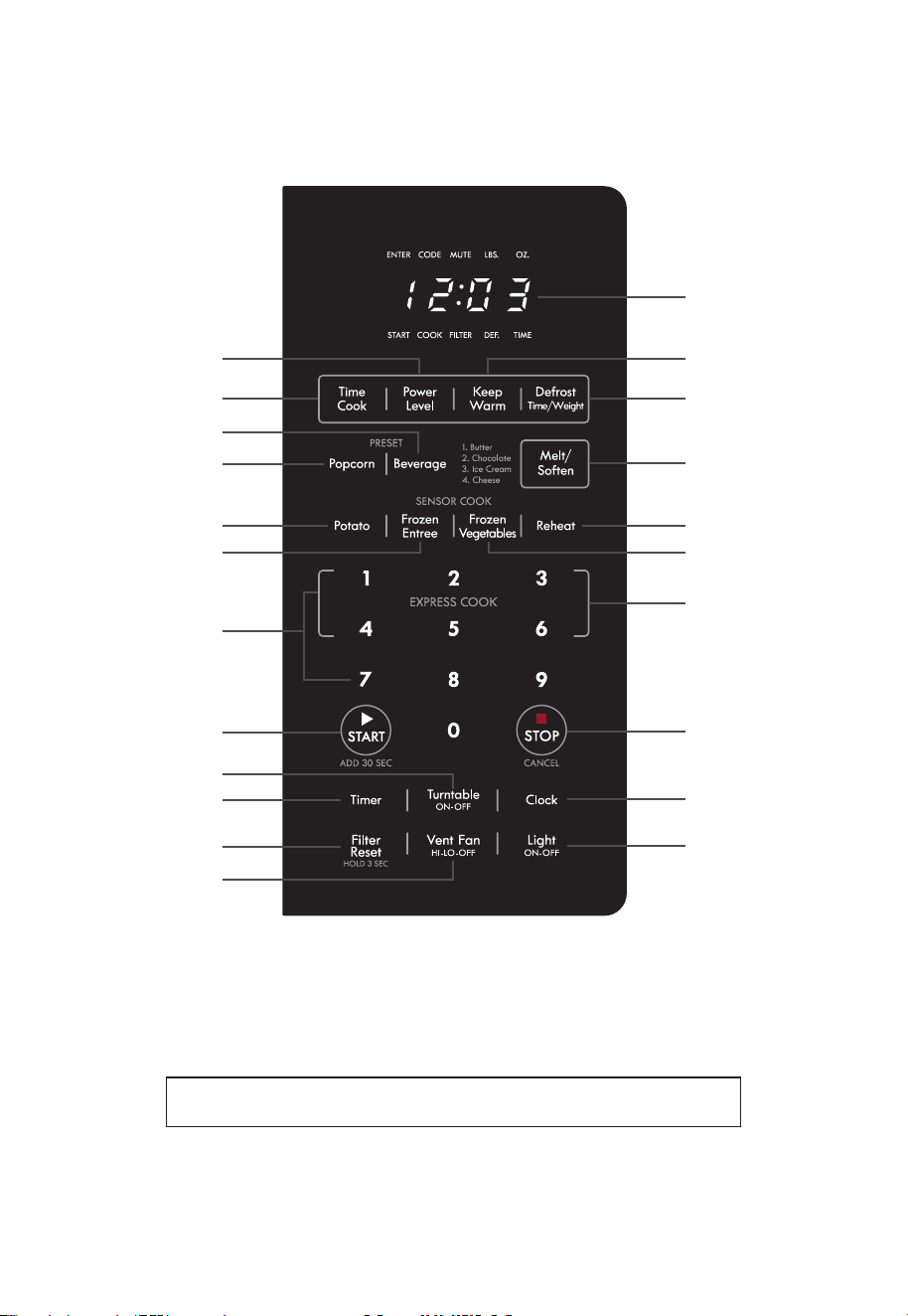
Touch Control Panel
TheTouchControlPanelallowsyoutosettheovencontrolswiththepressofanger.
It’s designed to be easy to use and understand.
1.
DISPLAY
- Displays time of day, time or power level being used, cooking mode and
instructions.
2.
POWER LEVEL
- Press this pad if you want to change from automatic Power Level 10 (High)
for cooking.
3.
TIME COOK
- Press this pad to set the Microwave cooking time.
• Power Level 10 (High) is automatic but lower heat levels may be programmed.
4.
KEEP WARM
- Press this pad and safely keep food warm for up to 30 minutes.
5.
DEFROST
- Press this pad to set defrosting time or defrosting weight.
6.
BEVERAGE
- Press this pad to reheat a beverage.
7.
POPCORN
- Press this pad to cook prepackaged microwave popcorn weight 3.5/3.0/1.75
ounces.
8.
MELT/SOFTEN
- Press this pad to melt or soften Butter, Chocolate, Ice Cream and Cheese.
9.
POTATO
- Press this pad to cook Potato. The microwave oven sensor will automatically adjust
the cooking time to the type and amount of food.
10.
FROZEN ENTREE
- Press this pad to cook Frozen Entree. The microwave oven sensor will
automatically adjust the cooking time to the type and amount of food.
11.
REHEAT
- Press this pad to reheat food. The microwave oven sensor will automatically adjust
the cooking time to the type and amount of food.
12.
FROZEN VEGETABLES
- Press this pad to cook Frozen vegetables. The microwave oven
sensor will automatically adjust the cooking time to the type and amount of food.
13.
NUMBER PADS
- Press these pads to enter cooking time, defrosting time or weight, time of
day, power level.
14.
EXPRESS COOK
- Press these pads to set 1-6 minutes preset cooking time at 100% power
level.
15.
START/ADD 30 SEC
- After all selections are made, press this pad to start the oven or timer.
Also press this pad for 30 seconds instant "ON" cooking time or to add 30 seconds of cooking
time as the timer is counting down.
16.
STOP/CANCEL
- When pressed once, it pauses the oven operation. When pressed twice, it
resets the oven and erases all settings (except time of day).
Also press and hold this pad for 3 seconds to set child safety lock function.
17.
TURNTABLE On-Off
- Press this pad to turn turntable on or off.
18.
TIMER
- Press this pad to use as a minute timer, delay cooking, hold setting after cooking.
Also press and hold this pad for 3 seconds to set sound on/off.
19.
CLOCK
- Press this pad to enter time of day. Also press and hold this pad for 3 seconds to
set power save mode.
20.
FILTER RESET
-Pressandholdthispadfor3secondstoresettimeafterreplacingthelter.
Charcoalltersmustbereplacedevery6months.
21.
VENT FAN
- Press this pad to turn the fan on high, low or off.
22.
LIGHT
- Press this pad to turn on or off the cooktop light.
EN-9
4
1
7
6
8
t
y
i
u
o
p
a
s
5
0 w
r
3
q
9
2
e
• Each time a pad is pressed, a BEEP will sound.
• When
STOP/CANCEL Pad
is pressed during oven operation, the oven
will stop, however, all programmed information is retained. To clear all
information, press the
STOP/CANCEL Pad
again.
Note: Styling and features may differ slightly depending on model.
EN-10
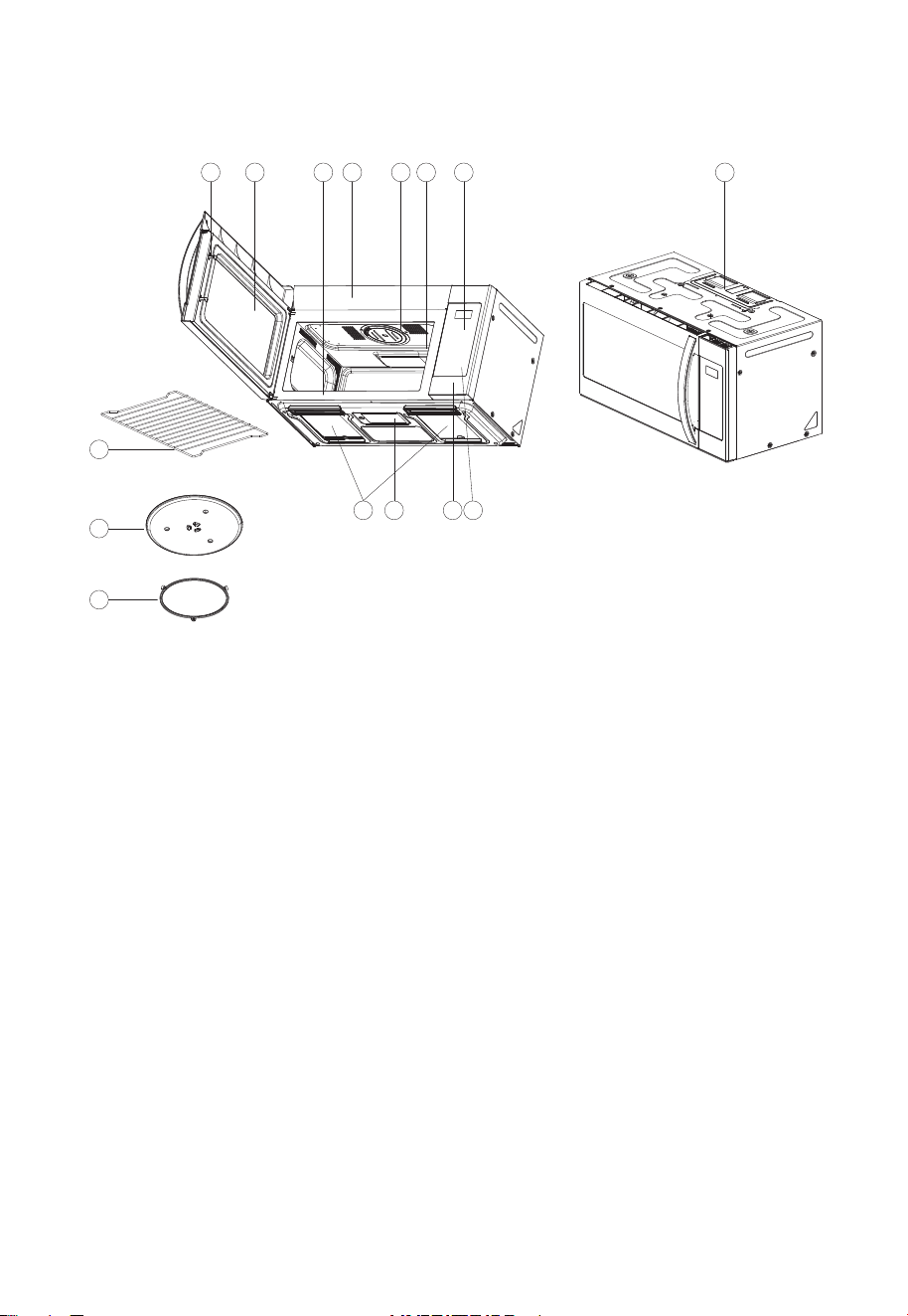
Oven Features at a Glance
1.
DOOR LATCHES
2.
WINDOW with METAL SHIELD -
Screen
allows cooking to be viewed while keeping
microwavesconnedinoven.
3.
MODEL NUMBER PLATE -
Located on the front
wall of the microwave oven.
4.
CHARCOAL FILTER (behind Vent Grille)
5.
OVEN LIGHT
6.
WAVEGUIDE COVER
Protects the microwave
outlet from splashes of cooking foods.
7.
TOUCH CONTROL PANEL and DIGITAL
DISPLAY -
For detailed information on each
feature, see Features Diagram section.
8.
HOOD CONTROLS
Vent Fan -
Press High, Low or Off.
Light -
Press On or Off
9.
COOKTOP LIGHT
10.
GREASE FILTERS
11.
HANDLE FILTERS -
Use to insert Grease Filters.
12.
METAL RACK -
Use for extra space when
cooking with more than one container at the
same time.
Cooking results will differ between food
cooked on rotating turntable and food cooked
on stationary rack. When rack is not in use,
remove from oven to create more access space
to turntable. CAUTION: Rack can become too
hot to touch during or after microwave cooking.
13.
TURNTABLE / GLASS TRAY -
Composed of
glass tray and roller guide. The roller guide
isplacedrstinthebottomofthemicrowave
and supports the glass tray. Both parts must be
in place when using the microwave oven.
Both parts must be in place when using
the microwave oven with the controls set to
Turntable On. See page EN-22 for setting
details. CAUTION: Turntable can become too
hot to touch during or after microwave cooking.
14.
VENTILATION MOTOR -
Your microwave oven
is designed for adaptation to the following
three types of ventilation. (Recirculation
ventilationsystem,Verticalventilation
system,Horizontal ventilation system) See
installation manual to Select the type of
ventilation required for your installation.
15.
Roller Guide
1 2 3 4 5 6 7
14
11 10
9 8
12
13
15

EN-11
Operation
SETTING THE CLOCK
Whentheovenisrstpluggedin,thedisplaywillshow":0"andatonewillsound.IftheAC
powerevergoesoff,thedisplayshow“:0”whenthepowercomesbackon.
1. Press the
CLOCK pad
. The ENTER, TIME indicators blink and "
12H
" is displayed.
• This is a 12 hour clock system.
2. Press the
CLOCK pad
once more. "
24H
" is displayed.
• This is a 24 hour clock system.
• This oven has multiple clock systems. If you want 12 hour clock system, omit this step.
3. Enter the correct time of day by pressing the number pads in sequence.
• If you selected 12 hour clock system, this digital clock allows you to set from 1:00 to 12:59.
If you selected 24 hour clock system, this digital clock allows you to set from 0:00 to 23:59.
4. Press the
CLOCK pad
. The display stops blinking, and the colon starts blinking.
NOTE:
(1) If you attempt to enter an incorrect time, the time will not be set and an error signal
tone will sound. Press the
CLOCK pad
and re-enter the time.
(2) If you want to set power save mode, press and hold
CLOCK pad
for 3 seconds.
For detailed information on this feature, see Operating Basics section, page EN-23.

EN-12
TIMER MODE
In Timer Mode the display operates as a minute timer. No microwave oven cooking occurs.
HOW TO USE AS A MINUTE TIMER
1. Press
TIMER pad
.TheENTER,TIMEindicatorsblinkand“
: 0
”isdisplayed.
2. Press the amount of time you want to count down. The display will show what you pressed.
• Your oven can be programmed for 99 minutes 99 seconds. (99:99)
3. Press
START pad
.
• When you press
START pad
, The TIME indicator starts blinking and the display counts down
the time remaining in TIMER mode. When TIMER mode ends, you will hear 3 beeps and END
appears in display. Press STOP pad or open door to return to time of day in display.
NOTE:
If you want to turn sound on or off, press and hold
TIMER pad
for 3 seconds.
For detailed information on this feature, see Operating Basics section, page EN-22.
HOW TO USE TO DELAY THE START OF COOKING
WARNING:
Food Poisoning Hazard. Do not let food sit for more than one hour before or after
cooking. Doing so can result in food poisoning or sickness.
1. Press
TIMER pad
.TheENTER,TIMEindicatorsblinkand“:0”isdisplayed.
2. Press the amount of time you want to delay. The display will show what you pressed.
3. Press
TIME COOK pad
and enter the desired cooking time for food to be cooked.
4. Press
START pad
.
• When you press
START pad
, the TIME indicator starts blinking and the display counts down the
time remaining in TIMER mode. When TIMER mode ends, the oven will beep. The TIME indicator
goes off and COOK indicator starts blinking. The display counts down the time remaining in
MICROWAVEmode.WhenMICROWAVEcookingends,youwillhear3beeps.
HOW TO USE TO SET A HOLDING TIME
WARNING:
Food Poisoning Hazard. Do not let food sit for more than one hour before or after
cooking. Doing so can result in food poisoning or sickness.
1. Press
TIME COOK pad
and enter the desired cooking time for food to be cooked.
2. Press
TIMER pad
. The ENTER, TIME indicators blink and
“ : 0”
is displayed.
3. Press the amount of time you want the oven to hold. The display will show what you pressed.
4. Press
START pad
.
When you press START pad, the COOK indicator starts blinking and the display counts down the
timeremaininginMICROWAVEmode.
• WhentheMICROWAVEcookends,theovenwillbeep.TheCOOKindicatorgoesoffandTIME
indicator starts blinking. The display counts down the time remaining in TIMER mode. When the
TIMER mode ends, you will hear 3 beeps.
EN-13
TIME DEFROSTING
When TIME DEFROST is selected, the automatic cycle divides the defrosting time into periods of
alternating defrost and stand times by cycling on and off.
1. Press
DEFROST pad
once.TheDEFindicatorlightsandENTER,TIMEindicatorsblink,“
: 0
”is
displayed.
2. Press number pads for the desired defrosting time. The display will show what you pressed.
• Your oven can be programmed for 99 minutes 99 seconds. (99:99)
• See the Defrost by Time Guide for timed defrosting tips.
3. Press
START pad
.
• When you press
START pad
, the DEF indicator starts blinking to show the oven is in the TIME
DEFROST mode. The display counts down the time to show you how much defrosting time is
left in the TIME DEFROST mode. The oven beeps during the defrosting cycle to signal that the
food needs to be turned or rearranged. To pause countdown open door or press Stop pad. To
resume countdown, close door and press Start pad. To cancel cooking cycle once countdown
begins press Stop pad twice. When the defrosting time ends, you will hear 3 beeps.
Defrost by Time Guide (Power Level 3)
Items and Weight
Time
Defrosting
Time
Standing Procedures and Techniques
Beef
Ground Beef/1 lb. 10-12 min. 5 min.
Break apart and remove thawed portions
with fork.
Ground Beef/2 lbs. 18-20 min. 8-12 min.
Break apart and remove thawed portions
with fork.
Beef Roast,
boneless/3 lbs.
26-28 min. 7-10 min.
Turn over part way. Shield ends or thinner
areas with foil.
Steaks/1”thick 7-8 min. 5-7 min. Separate and rearrange once.
Pork
Pork Roast,
boneless/3 lbs.
20-22 min. 10-15 min.
Turn over part way. shield ends or thinner
areas with foil.
Pork Chops/1 lb 7-8 min. 5-7 min. Separate and rearrange once.
Ground Pork/1 lb. 10-12 min. 5-7 min.
Break apart and remove thawed portions
with fork.
Spareribs/1 1/2
1lbs.
15-16 min. 5-7 min.
Turn meat over and rearrange, separate
once.
Poultry
Whole Chicken/3 lbs. 20-22 min. 10-15 min.
Turn chicken over. shield wing tips, leg ends
and breast areas with foil. Breast side down.
Chicken Breasts
boneless/1 lb.
7-8 min. 5-7 min. Separate and rearrange once.
Chicken Thighs/2 lbs. 18-23 min. 8-13 min. Separate and rearrange once.
Fish
Fish Fillets/1 lb. 10-11 min. 5-7 min.
Separate and rearrange once. Shield as
needed.
EN-14
WEIGHT DEFROSTING
WEIGHT DEFROST lets you easily defrost food by eliminating guesswork in determining defrosting
time. Follow the steps below for easy defrosting.
1. Press
DEFROST pad
twice. The DEF. indicator lights and ENTER, LBS indicators blink,
"0.0"
is
displayed.
2. Press number pads for the desired defrosting weight. The display will show what you pressed.
• Your oven can be programmed for 0.2 to 6.0 lbs.
• See the ounces to tenths-of-pound Conversion Chart below.
3. Press
START pad
.
• The defrosting time is automatically determined by the weight selected.
• When you press
START pad
, the DEF indicator starts blinking and the defrosting time counts
down in the display window. The oven beeps during the defrosting cycle to signal that the
food needs to be turned or rearranged. To pause countdown open door or press Stop pad. To
resume countdown, close door and press Start pad. To cancel cooking cycle once countdown
begins press Stop pad twice. When the defrosting time ends, you will hear 3 beeps.
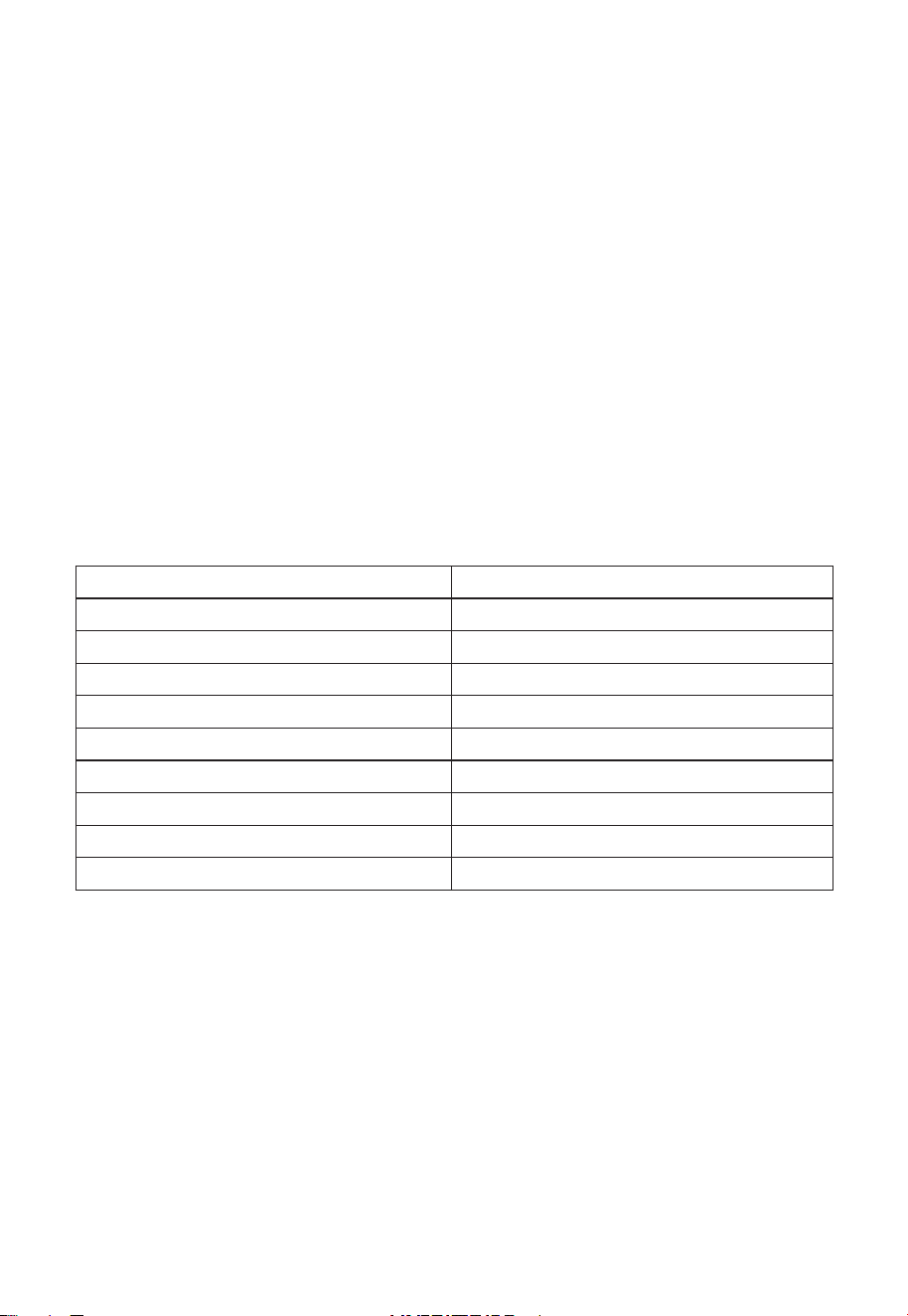
Conversion Chart
Weight in ounces Weight in tenths-of-pound
1 to 2-oz. 0.1
3 to 4-oz. 0.2
5-oz. 0.3
6 to 7-oz. 0.4
8-oz. 0.5
9 to 10-oz. 0.6
11 to 12-oz. 0.7
13-oz. 0.8
14 to 15-oz. 0.9
EN-15
MELT/SOFTEN
Use the Melt/Soften features to melt butter, chocolate and cheese or to soften ice cream.
Seethechartforspecicsettingstouse.
1. Press
MELT/SOFTEN pad
once for butter, twice for chocolate, three times for ice cream, four
times for cheese.
The display will show what you pressed.
2. Press
START pad
.
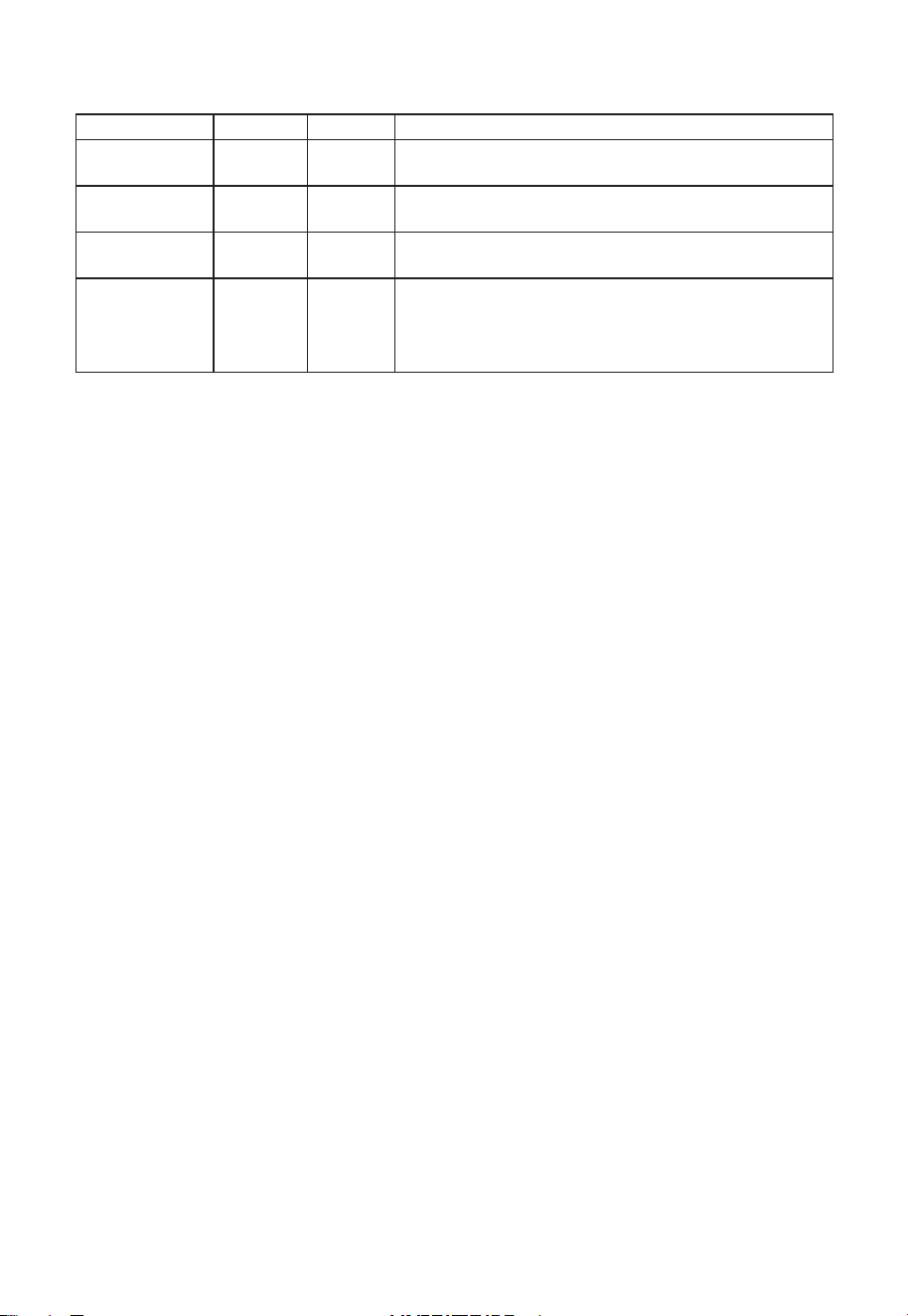
MELT/SOFTEN ITEM CHART
PRESS PAD DISPLAY ITEM WEIGHT
Once S--1 Butter 1/2 cup
Twice S--2 Chocolate 8 oz.
Three Times S--3 Ice Cream 1/2 gallon*
Four Times S--4 Cheese 3 to 4 oz. shredded**
*Microwave with ice cream in carton
** The Cheese setting is designed to melt/soften shredded cheese on top of snack food, example :
nachos.
KEEP WARM
KEEP WARM feature maintains food at a warm temperature for 30 minutes.
1. Press
KEEP WARM pad
. The display shows "
30:00
".
2. Press
START pad
.
• When the cooking time ends, you will hear 3 beeps.
WARNING:
Food Poisoning Hazard. Do not let food sit for more than one hour before or after
cooking. Doing so can result in food poisoning or sickness.
POWER LEVEL
Ten power levels are available.
Power level 0 is also available if you want to program a timed in-oven standing time.
After entering Time Cook digits and prior to starting operation, press Power Level and "PL10" will
display.
Adjust the power by pressing a number pad as indicated in the table below.
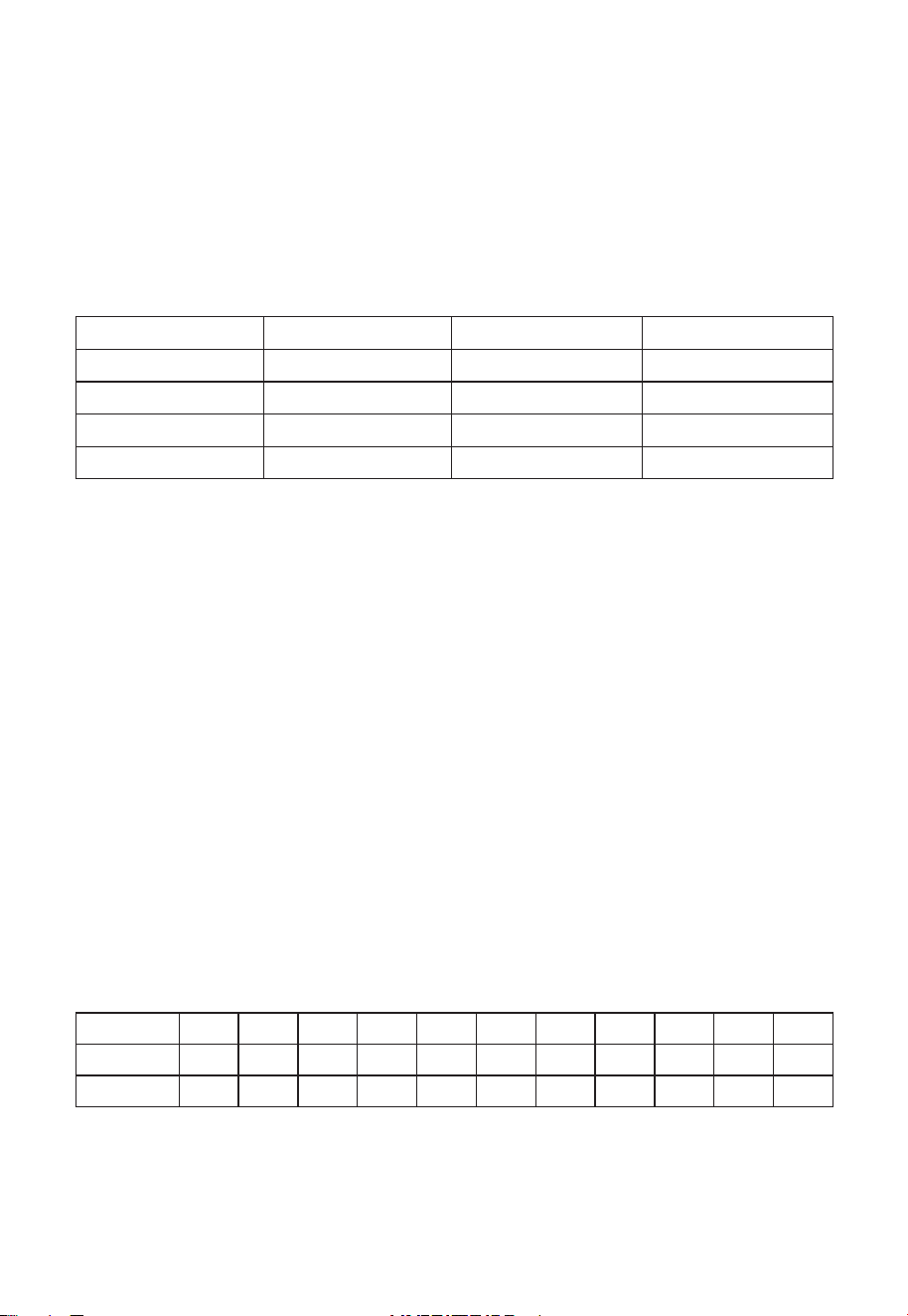
Level 10 9 8 7 6 5 4 3 2 1 0
Power 100% 90% 80% 70% 60% 50% 40% 30% 20% 10% 0%
Display PL10 PL-9 PL-8 PL-7 PL-6 PL-5 PL-4 PL-3 PL-2 PL- 1 PL-0

EN-16
TIME COOK
1. Press
TIME COOK pad
.TheCOOKindicatorlightsandENTER,TIMEindicatorsblink.,“
: 0
”is
displayed.
2. Press number pads for the cooking time. The display will show what you pressed.
• Your oven can be programmed for 99 minutes 99 seconds. (99:99)
3. Press
POWER LEVEL pad
. The display will show
PL10
for 100% power.
4. Press number pads for power level (0~10). The display will show PL-0 ~ PL10.
5. Press
START pad
.
• If you skip 3 and 4 step, 100% power is automatic.
• When you press
START pad
, the COOK indicator starts blinking to show the oven is cooking.
The display counts down the time to show how much cooking time is left. When the cooking time
ends, you will hear 3 beeps.
NOTE:
Using lower power levels increases the cooking time which is recommended for foods such
as cheese, milk and slow cooking of meats.
COOKING IN TWO STAGES
This feature lets you program two sequential operations such as defrosting and cooking or cooking
using two different power levels. It automatically changes power settings and cooking time.
Defrosting + Cooking
1. Press
Defrost pad
once.TheDEFindicatorlightsandENTER,TIMEindicatorsblink,“
: 0
”is
displayed.
2. Press number pads for the defrosting time you want. The display will show what you pressed.
• Your oven can be programmed for 99 minutes 99 seconds. (99:99)
3. Press
TIME COOK pad
.TheCOOKindicatorlightsandENTER,TIMEindicatorsblink.,“
: 0
”is
displayed.
4. Press number pads for the cooking time. The display will show what you pressed.
• Your oven can be programmed for 99 minutes 99 seconds. (99:99)
5. Press
POWER LEVEL pad
. The display will show PL10 for 100% power.
6. Press number pads for power level (0~10). The display will show PL-0 ~ PL10
7. Press
START pad
.
• If you skip 5 and 6 step, 100% power is automatic.
• When you press
START pad
,theDEFandCOOKindicatorscomeontoconrmthepower
levels selected. The DEF indicator starts blinking to show you that the oven is in TIME DEFROST
mode.
The display counts down the time remaining in TIME DEFROST mode. When the oven beeps,
turn over, break apart and/or redistribute the food. At the end of TIME DEFROST mode, the
ovenwillbeepandstartMICROWAVEcook.
The DEF indicator goes off and the COOK indicator starts blinking. The display counts down
thetimeremaininginMICROWAVEmode.WhenMICROWAVEcookingends,youwillhear3
beeps.

EN-17
Cooking + Cooking
1. Press
TIME COOK pad
.TheCOOKindicatorlightsandENTER,TIMEindicatorsblink.,“
: 0
”is
displayed.
2. Press number pads for the cooking time. The display will show what you pressed.
• Your oven can be programmed for 99 minutes 99 seconds. (99:99)
3. Press
TIME COOK pad
.TheCOOKindicatorlightsandENTER,TIMEindicatorsblink.,“
: 0
”is
displayed.
4. Press number pads for the cooking time. The display will show what you pressed.
• Your oven can be programmed for 99 minutes 99 seconds. (99:99)
5. Press
POWER LEVEL pad
. The display will show PL10 for 100% power.
6. Press number pads for power level (0~10). The display will show PL-0 ~ PL10
7. Press
START pad
.
• If you skip 5 and 6 step, 100% power is automatic.
• When you press
START pad
, the COOK indicator starts blinking to show the oven is in cook for
stage 1.
At the end of stage 1, the oven will beep and start stage 2. The display counts down the time
remaining in stage 2 mode. When stage 2 ends, you will hear 3 beeps.
ADD 30 SEC
ADD 30 SEC allows you to reheat for 30 seconds at 100% (full power) by simply pressing the
START/ADD 30 SEC pad
. By repeatedly pressing the
START/ADD 30 SEC pad
, you can also
extend reheating time to 99 minutes 99 seconds by 30 second increments.
1. Press the
START/ADD 30 SEC pad
.
“:30”isdisplayedandtheovenstartsreheating.
NOTE:
ADD 30 SEC cannot be used while the sensor is detecting the vapor emitted from the food
duringsensorcookingsuchasPotato,FrozenEntree,FrozenVegetablesorReheat.

EN-18
EXPRESS COOK
Express Cook is a quick way to set cooking time from 1-6 minutes at 100% (full power).
1. Press one of the
EXPRESS COOK pads
(from 1-6) for 1-6 minutes of cooking at 100% (full
power). The display will show what you pressed.
After 1.5 seconds, the display is changed into cooking time and the oven starts cooking.
ONE TOUCH COOK(PRESET)
One touch cooking allows you to cook or reheat many of your favorite foods by pressing just one
pad. To increase quantity, press the chosen pad until the number in the display is same as desired
quantity to cook.
POPCORN
1. Press
POPCORN pad
once for 3.5 oz bag, twice for 3.0 oz bag or three times for 1.75 oz
bag.
When you press
POPCORN pad
once,“3.5”isdisplayed.
2. Press
START pad
.
NOTE:
(1) Use prepackaged room-temperature microwave popcorn.
(2) Place bag in oven according to manufacturer’s directions.
(3) Pop only one bag at a time.
(4) After popping, open bag carefully: popcorn and steam are extremely hot.
(5) Do not reheat unpopped kernels or reuse bag.
(6) Do not leave oven unattended while popping popcorn.
CAUTION:
If prepackaged popcorn is of a different weight than the recommended weight, do
not use the popcorn pad. Follow the manufacturer instruction.
BEVERAGE
1. Center the mug on oven turntable and close door
2. Press
BEVERAGE pad
once for 1 cup, twice for 2 cups or three times for 3 cups.
When you press
BEVERAGE pad
once,“1”isdisplayed.
3. Press
START pad
.
* BEVERAGE * : 7 oz/cup(mug)
• 1 cup (7 oz total volume) : Press
BEVERAGE
once.
• 2 cups(14 oz total volume) : Press
BEVERAGE
twice.
• 3 cups(20 oz total volume) : Press
BEVERAGE
three times.

EN-19
SENSOR OPERATIONS
The Sensor Cook categories are designed to detect the increasing vapor released by the food
during the cooking process. The microwave oven sensor will automatically adjust the cooking time
to the type and amount of food.
Using Sensor Settings
1. After the oven is plugged in, wait 2 minutes before using Sensor Cook.
2. Be sure the exterior of the cooking container and the interior of the oven are dry. Wipe off
any moisture with a dry cloth or paper towel.
3. The oven works with foods at normal storage temperature.
4. More or less food than the quantity listed in the chart should be cooked following the guidelines
in any microwave cookbook.
5. Do not open the oven door or press STOP/CANCEL pad until cooking time appears on the
display window. The measurement of vapor will be interrupted. If this occurs, an error message
"Er01" will appear. To continue cooking, press the STOP/CANCEL pad and cook manually.
When the sensor detects the vapor emitted from the food, the remainder of cooking time will
appear.
The door may be opened when remaining cooking time appears on the display. At this time,
you may stir or season food, as desired.
6. Alwaysusemicrowave-safecontainersandcoverthemwithloosettinglidsorventedplastic
wrap. Never use tight sealing plastic containers. They will prevent steam from escaping and this
will mislead the sensor, usually causing the food to overcook.
7. Check food for temperature or doneness after cooking.
If food is not completely cooked,
enter additional cooking time manually.
Do not use one of the Sensor Cook categories twice
in succession on the same food portion. This may result in severely overcooked or burnt food.
Covering Foods
Some foods cook best when covered. Use the cover recommended in the Sensor Cook Chart for
these foods.
1. Casserole lid.
2. Plasticwrap:Useplasticwraprecommendedformicrowavecooking.Coverdishloosely;allow
approximately 1/2 inch to remain uncovered to allow steam to escape. Plastic wrap should
not touch food.
3. Waxpaper:Coverdishcompletely;foldexcesswrapunderdishtosecure.Ifdishiswider
than paper, overlap two pieces at least one inch to cover.
CAUTION:
To avoid steam burns, be careful when removing any covering to allow the steam to
escape away from you.

EN-20
SENSOR COOK
Sensor is semi-conductor device that detects the vapor emitted from the food as it heats. The
sensor adjusts the cooking time and power level for various food and quantities and you don't
need to enter the weight or quantity of the food.
POTATO
1. Press
POTATO pad
. "
SCPO
" is displayed.
2. Press
START pad
.
• When the sensor detects the vapor emitted from the food, the remainder of cooking time will
appear.
FROZEN ENTREE
1. Press
FROZEN ENTREE pad
. "
SCFE
" is displayed.
2. Press
START pad
.
• When the sensor detects the vapor emitted from the food, the remainder of cooking time will
appear.
FROZEN VEGETABLES
1. Press
FROZEN VEGETABLES pad
. "
SCFU
" is displayed.
2. Press
START pad
.
• When the sensor detects the vapor emitted from the food, the remainder of cooking time will
appear.
REHEAT
1. Press
REHEAT pad
. "
SrH
" is displayed.
2. Press
START pad
.
• When the sensor detects the vapor emitted from the food, the remainder of cooking time will
appear.
EN-21
SENSOR COOK CHART
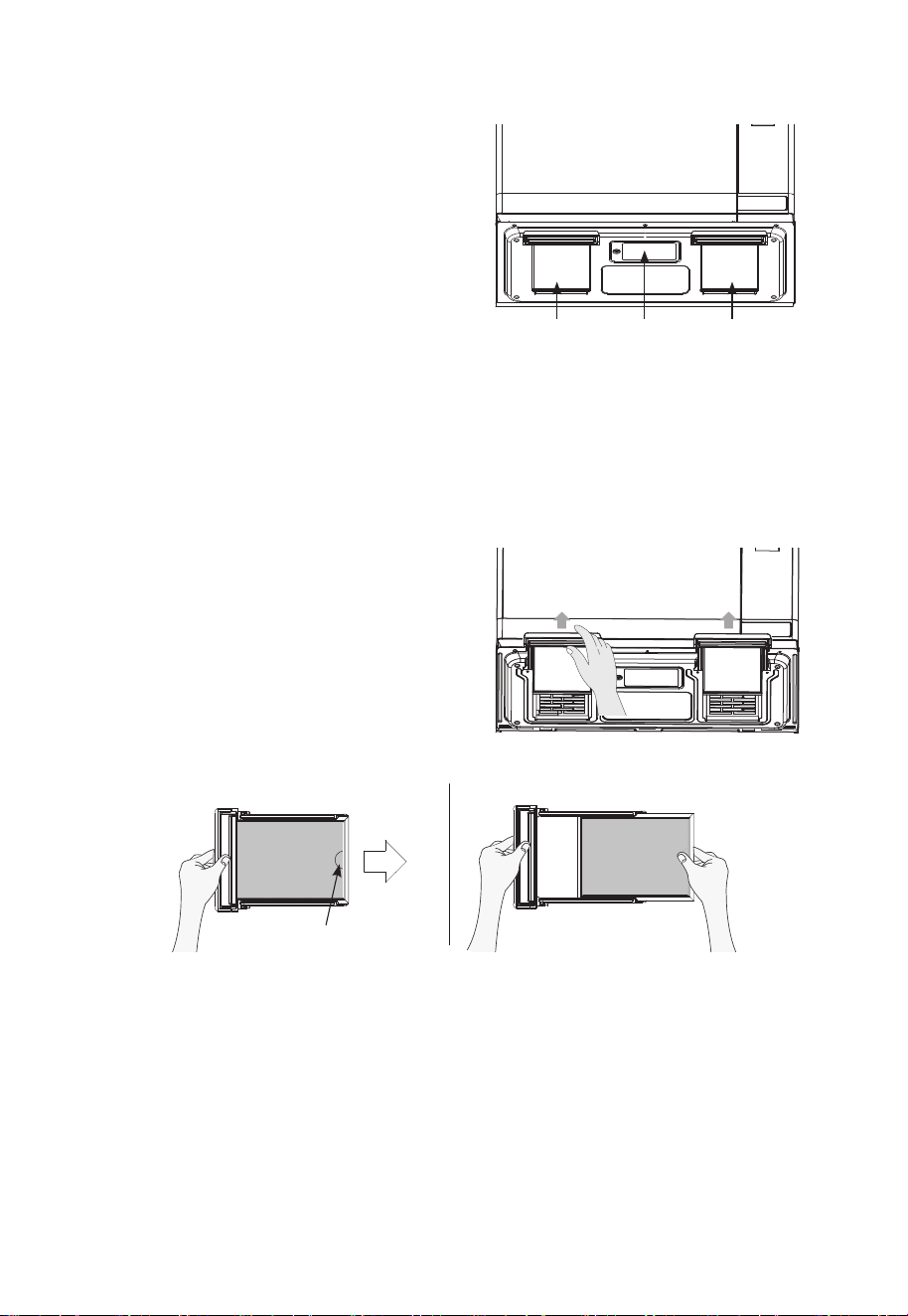
PRESS PAD DISPLAY WEIGHT COMMENTS
Potato SCPO 8 - 24 oz Before cooking, pierce potato skin with fork 5-6 times.
Place potatoes on the turntable.
Frozen Entree SCFE 8 - 32 oz Followthedirectionsspecicforthemicrowaveoven
that are printed on the frozen entree packaging.
Frozen
Vegetables
SCFU 6 - 16 oz 2-4 tbsp water per serving. Cover with lid or vented
plastic wrap.
Reheat SrH 4 - 36 oz For casseroles, add 2-3tbsp water, cover with lid or
vented plastic wrap.
• The food type to avoid, Beverage Frozen pizza or
Frozen food, Raw food, Biscuits, cake
NOTE:
Do not use the Sensor Cook twice in succession on the same food portion.
This may result in severely over-cooked or burnt food.
If additional time is needed after previous cooking, use either the
ADD 30 SEC pad
or
TIME COOK pad
.
• Use proper container and cover for best sensor cooking result.
• Always use microwave-safe containers and cover them with lid or vented plastic wrap.
Never use tight sealing plastic containers - they can prevent steam from escaping and
cause food to overcook.
• Be sure the outside of the cooking containers and the inside of the microwave oven are
dry before placing food in the oven.

EN-22
TURNTABLE ON-OFF
For best cooking result, the turntable should be on. However the turntable can be turned off so
that it does not rotate when extra large dishes are used.
1. Press
TURNTABLE On-Off pad
to turn turntable rotation on or off. When pad is pressed the
displaybrieyindicateseitherOnorOFF.
The options are displayed for 2 seconds.
NOTE :
(1) This option is not available in sensor cook, one touch cook, defrost and melt/soften
modes.
(2) Sometimes the turntable can become too hot to touch. Be careful touching the turntable
during and after cooking.
(3) Do not run the oven empty.
(4) Once cooking is in progress the turntable setting cannot be changed.
CAUTION:
At start of cooking cycle, always look through the oven door glass to observe whether
turntable rotation is On or Off as you have chosen.
VENT FAN
The vent fan removes steam and other vapors from surface of cooktop installed below the
microwave.
1. Press
VENT FAN pad
once for high fan speed, twice for low fan speed or three times to turn
the fan off.
The options are displayed for 2 seconds.
NOTE :
(1) High fan speed cannot be used together with microwave cooking.
(2) An automatic fan feature protects the microwave from too much heat rising from the
cooktop below it. It automatically turns on for low speed if it senses too much heat.
Ifyouhaveturnedthefanonyoumayndthatyoucannotturnitoff.Thefanwill
automatically turn off when the internal parts of the microwave oven are cool.
(3) If there is no user input for 10 hours, cooktop light and vent fan will turn off
automatically to save energy.
COOKTOP LIGHT
Use the cooktop light in the exterior bottom of the microwave oven to illuminate the cooking
surface below.
You can control the light by pressing the
LIGHT pad
.
1. Press
LIGHT pad
once to turn the light on or twice to turn the light off.
The options are displayed for 2 seconds.
NOTE :
If there is no user input for 10 hours, cooktop light and vent fan will turn off automatically
to save energy.
MUTE
Audible signals (beeps) are available to guide you when setting and using your oven.
To mute, press
TIMER pad
for 3 seconds. An indicator arrow lights below the word MUTE in upper
margin of the display. To turn the sound back on, press
TIMER pad
for 3 seconds. A beep sounds
and the MUTE indicator will disappear.

EN-23
FILTER RESET
Ifyourovenisventedtotheinside,thecharcoalltershouldbereplacedapproximatelyevery6
months.Thecharcoalltercannotbecleaned.
The
FILTER RESET pad
willlightupwhenistimetoreplacethecharcoallter.
Press and hold
FILTER RESET pad
for3secondsafterreplacingthelter.SeepageEN-27.
TO SET POWER SAVE MODE
In power save mode, the display screen is dark when the oven is not in use.
1. Press the
STOP/CANCEL pad
.
“
: 0
”orclockappearsinthedisplay.
2. Press and hold the
CLOCK pad
for 3 seconds.
The display will turn off and a beep sounds.
To operate the oven in power save mode, press any key.
Then“
: 0
”orclockwillbeshownandtheoperationofallfunctionkeyswillbesameasinthe
normal mode.
If there is no operation within 10 seconds when the display is showing, the contents of the
display will disappear.
3. To cancel power save mode press Clock pad for 3 seconds when the display is showing. A
beep will sound and the display will no longer turn off after 10 seconds when oven is not in
use.
CHILD SAFETY LOCK
Use the Child Safety Lock feature to lock the control panel to prevent the oven from being
accidentally started or used by children. To lock, press and hold
STOP/CANCEL pad
for 3
seconds.
A beep sounds and "
Loc
" will be displayed for 3 seconds.
To unlock, press and hold
STOP/CANCEL pad
for 3 seconds. A beep sounds.
NOTE :
(1) While the Child Lock is active, only the
STOP/CANCEL pad
works to unlock it.
(2) Microwave oven cannot be used while Child Lock is activated.
TO STOP THE.OVEN WHILE THE OVEN IS OPERATING
1. Press the
STOP/CANCEL pad
.
• Press the
STOP/CANCEL pad
once more to erase all instructions.
• You can restart the oven by pressing the
START pad
.
• You must enter in new instructions.
2. Open the door.
• You can restart the oven by closing the door and pressing the
START pad
.
NOTE :
Oven stops operating when door is opened.

EN-24
Microwave Oven Interior
The oven interior should be cleaned after each use with a damp cloth to keep it free from grease
and soil buildup. Stubborn soils can be removed with a plastic scrub pad. When cleaning interior
surfaces and surfaces of door and oven that come together when the door is closed, use only mild,
non-abrasive soaps or detergents applied with a sponge or soft cloth.
Odors can be eliminated from the inside of the oven by boiling a solution of one cup of water and
several tablespoons of lemon juice in the oven for 5-7 minutes. This also helps loosen any dried soil
in the oven. Wipe off excess moisture after use.
Note:
•
Do not
spray or pour liquid cleansers directly onto a surface. Spray or pour cleanser onto a
cloth or sponge and then clean.
•
Do not
use abrasive cleaners, oven cleaners, abrasive cleaning pads or steel wool, as they can
scratch or dull oven surfaces.
•
Do not
remove or insert knife around the stirrer cover(located on ceiling of oven cavity) to clean,
it may damage the cover or affect the cooking performance of your oven.
Oven Bottom
Wash oven bottom with hot sudsy water, rinse and dry. Do not use excessive amounts of water
when cleaning the oven, especially around the turntable. Do not allow water or cleaning agents to
seep into turntable gears located underneath.
Glass Tray/Turntable
Allow to cool before removing and cleaning. Wash in soapy water or dishwasher.
Roller Guide
Clean frequently to prevent excessive noise. Wash in soapy water or dishwasher.
Oven Exterior
Wipe the outside of your oven with a soapy cloth, rinse and dry. Do not use abrasive cleaners.
They may scratch the surface.
Light Compartment
Clean off the grease and dust on the light compartment cover on the bottom side of the microwave
oven often with warm water and detergent.
Control Panel
Wipe with a damp cloth. Dry. Do not spray cleaners directly on panel. Spray cleaners on cloth
and then wipe.
Care and Cleaning
EN-25
The Exhaust Feature
The exhaust hood feature on your microwave
oven is equipped with two metal filters
which collect grease. When the fan is being
operated,airisdrawnupthroughthelters
and is then discharged through the venting to
theoutsideorthroughthecharcoalltersif
not vented to the outside.
Reusable Grease Filters
Thereusablegreaseltersshouldbecleanedatleastonceamonth.Neveroperatethemicrowave
withouttheltersinplace.Insituationswhereamingmightoccuronsurfacesbelowthehood,
lterswillstoptheentryofamesintotheunit.
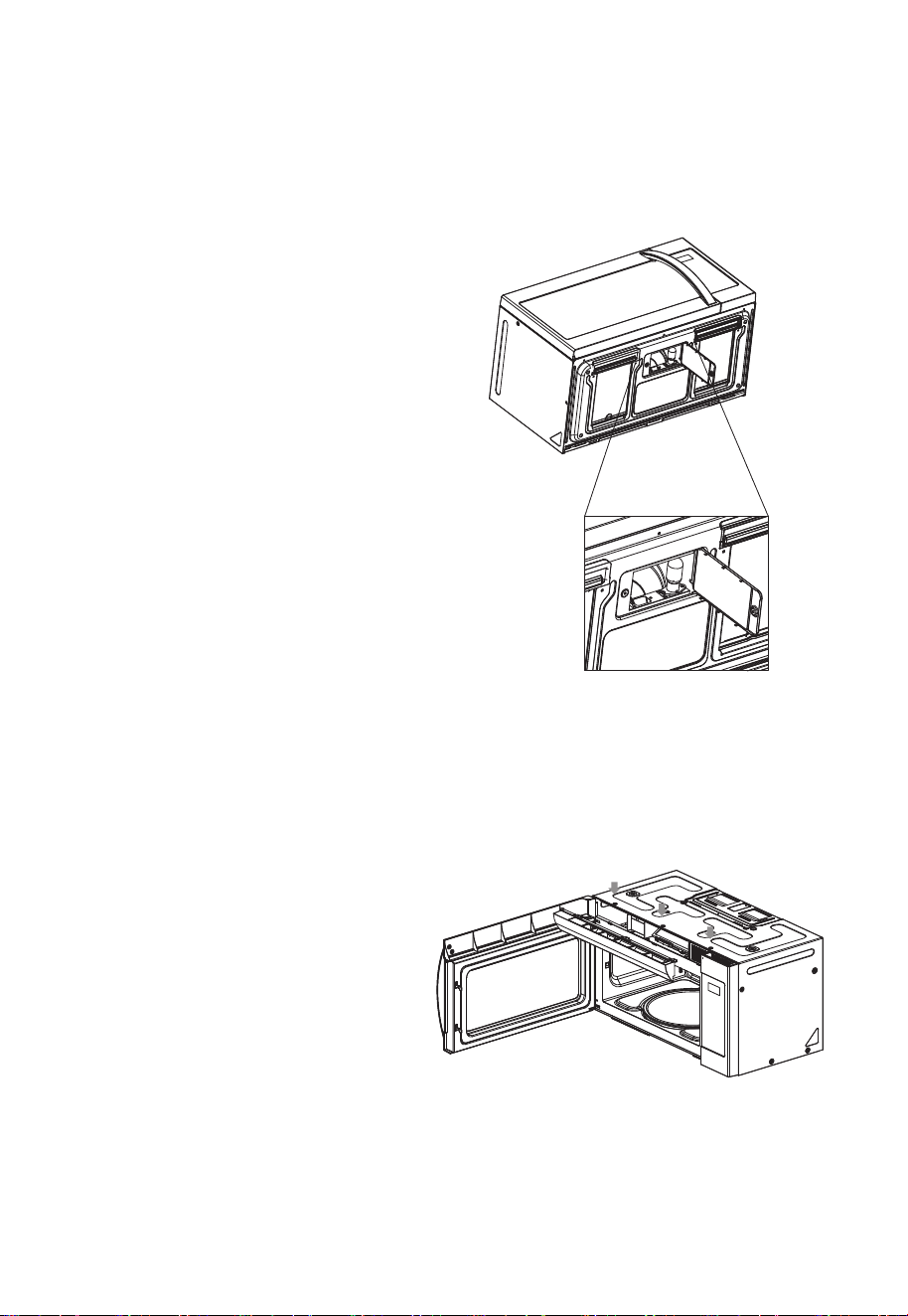
To Remove Grease Filter
To remove the grease filter holder, pull the
tab toward the front of the oven. Repeat for
theothergreaselterholder.
Toremovethegreaselterfromtheholder,
pullusingthe"ngerhold"toassistasshown
in below image.
To clean Grease Filter
Tocleangreaselters,soakandthenagitatelterinsolutionofhotwateranddetergent.Donot
use ammonia or ammonia products because they will darken the metal. Light brushing can be used
to remove embedded dirt. Rinse, shake and remove moisture before replacing.
To Replace Grease Filter
Toreplacethegreaselter,slidethegreaselterintothegreaselterholder.Insertthegrease
lterholderintothedesignatedareaofthebottomoftheoven.Repeatfortheothergreaselter.
METAL GREASE
FILTER
COOKTOP
LIGHT
METAL GREASE
FILTER
PULL
FINGER HOLD
EN-26
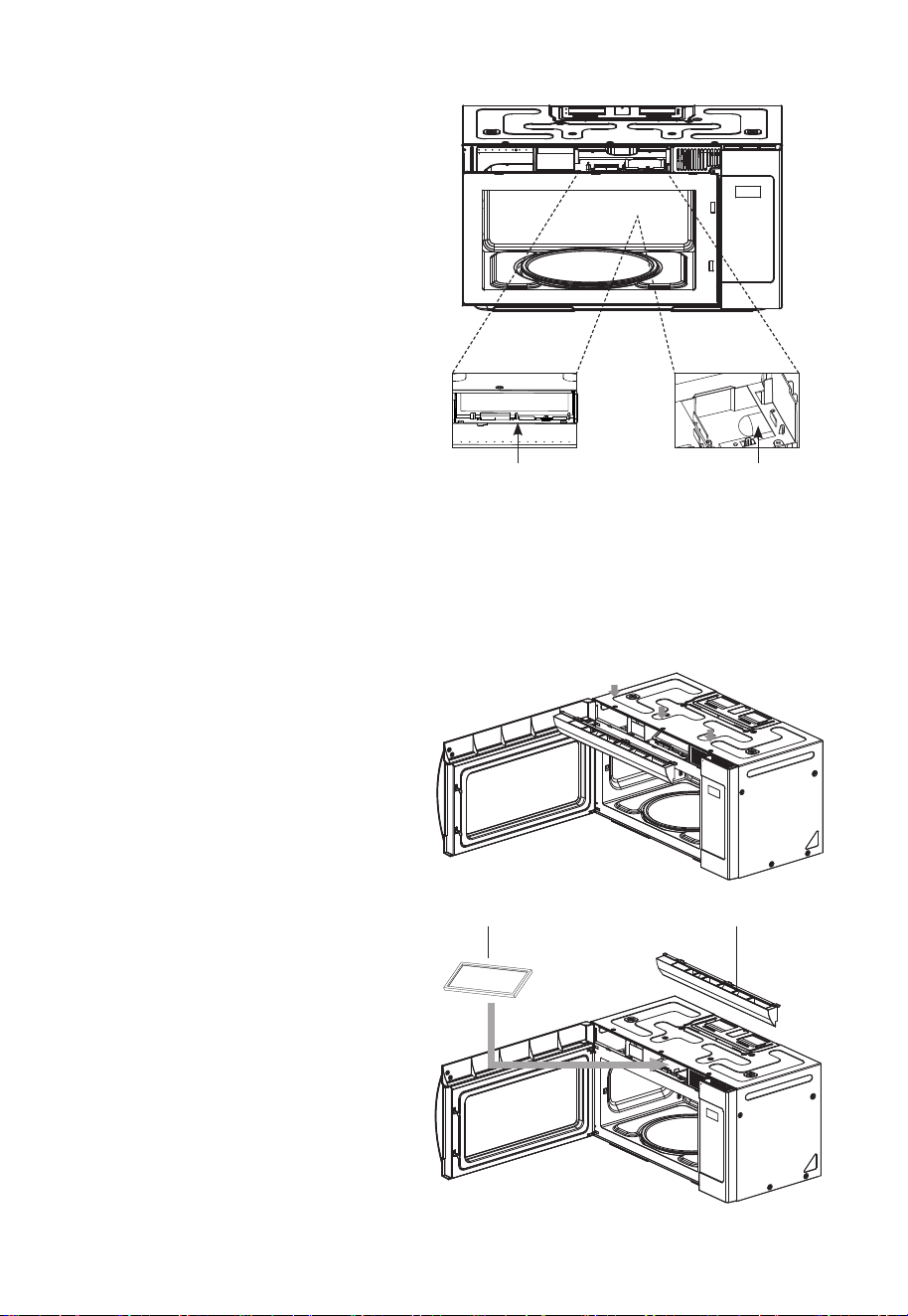
Light Replacement
Cooktop Light
When replacing the cooktop light, make sure that you are wearing gloves to avoid injury from the
heat of the lamp.
1. Unplug the oven or turn off the power
at the main power supply.
2. Remove the screw from the light cover
and lower the cover until it stops.
3. Gently unscrew the bulb(s). Be sure
bulb(s) to be replaced are cool before
removing.
4. Replace with 30-watt incandescent
bulb(s) available by calling the
Customer Assistance number 1-800-
488-1222. Standard 30 watt
appliance bulbs available from
supermarkets or hardware stores may
also be used.
5. Replace the light cover and mounting
screw.
6. Turn the power back on at the main
power supply.
Oven Light
When replacing the oven light, make sure that you are wearing gloves to avoid injury from the
heat of the light.
1. Unplug the oven or turn off the power
at the main power supply.
2. Remove the vent grille mounting 3
screws and open the door.
3. Slide the grille air to the left, then pull
it straight out.
4. Removethecharcoallter,ifpresent
EN-27
5. Pull the hook a little and remove light
cover.
6. Replace light bulb with the 30 watt
bulb available by calling the Customer
Assistance number 1-800-488-1222.
Standard 30 watt appliance bulbs
available from supermarkets or
hardware stores may also be used.
7. Replace the light cover.
8. Replace the grille air and 3 screws
and close the door.
9. Plug the oven in or turn on the power
at the main power supply.
Charcoal Filter
Ifyourovenisventedtotheinside,thecharcoalltershouldbereplacedifitisusedfor
approximately 6 months.
1. Unplug the oven or turn off the power
at the main power supply.
2. Remove the grille air mounting 3
screws and open the door.
3. Slide the grille air to the left, then pull
it straight out.
4. Pushthecharcoallterbackwardsand
remove it.
5. Slideanewcharcoallterintoplace.
Theltershouldrestattheangle.
6. Replace the grille air and 3 screws
and close the door.
7. Plug the oven in or turn on the power
at the main power supply.
LIGHTCOVER
CHARCOAL FILTER GRILLE AIR
BULB LIGHT

EN-28
Common Questions and Answers
Q. Can I open the door when the oven is operating?
A. The door can be opened anytime during the cooking operation. The oven will automatically
stop cooking and the time setting will maintain until the door is closed and the
START Pad
is
pressed.
Q. What causes the oven interior light and display to dim when using a Variable Power
Level?
A. This is normal and indicates the oven is operating and cycling properly.
Q. Why does steam and/or vapor escape around the door and moisture droplets form on the
inside of the oven door?
A. This in normal occurrence - as food cooks, steam is given off.
Q. What do the various beeps mean?
A. Short beep = any pad is pressed.
Three short beeps = incorrect entry.
One long beep = oven plugged in.
Three long beeps = end of cooking (microwave will turn off).
Series of three short beeps = check food to see if turning or rearranging is needed.
Q. Can the oven be used with the glass tray or roller guide removed?
A. The glass tray and roller guide must always be used when the Turntable On-Off pad is set to
On. The glass tray and roller guide may be removed when the Turntable On-Off pad is set to
OFF.
All these things are normal with your microwave oven.
• Steam or vapor escaping from around the door.
•Lightreectionaroundthedoororoutercase.
• Dimming oven light and change in blower sound may occur while operating at power levels other
than high.
• Dull thumping sound while oven is operating.
Charcoal Filter Kit
Thereisarecirculatingcharcoallterkitincludedformodelsthatarenotventedtotheoutside.
See the Charcoal Filter section of this Use & Care Guide.

EN-29
Before You Call
Check the following to be sure a service call is necessary:
If nothing on the oven operates:
• check for a blown circuit fuse or a tripped main circuit breaker.
• check if oven is properly connected to electric circuit in house.
• check that controls are set properly.
• check that the cooking time is set.
If the oven interior light does not work:
• See Oven Light section in this Use & Care Guide or call the Customer Assistance number
1-800-488-1222.
If oven will not cook:
• check that control panel was programmed correctly.
•checkthatdoorisrmlyclosed.
• check that
START Pad
was pressed.
• Delay Start cooking may have been set.
• the
Control Lockout
may have been set
• check the area between the door and seal for obstructions.
If oven takes longer than normal to cook or cooks too rapidly:
• be sure the
Power Level
is programmed properly.
• check available information that may exist concerning food density, etc.
• verify that voltage to the microwave oven is not low.
If the time-of-day clock does not always keep correct time:
• check that the power cord is fully inserted into the outlet receptacle.
• check that the oven is properly grounded.
• try plugging the oven into an outlet on a separate electrical circuit.
If oven oor, glass tray or metal rack are hot:
•Theovenoor,glasstrayormetalrackareabsorbingheatfromthefoodandfoodcontainers
used in cooking.
If the interior of oven collects moisture:
• this is normal. Food gives off moisture when cooking and the steam collects on the door and the
oven surface. Wipe off excess moisture from oven after each use.
If food cooks unevenly:
• refer to your recipe for proper cooking procedures.
• be sure food is evenly shaped.
• be sure food is completely defrosted before cooking.
• check placement of aluminum strips used to prevent overcooking.
• See the Safe and Unsafe Materials section of this Use & Care Guide.

EN-30
If food is undercooked:
• check recipe to be sure all directions (amount, time, and power levels) were correctly followed.
• check household voltage.
• try plugging the oven into an outlet on a separate electrical circuit.
• be sure food was completely defrosted before cooking.
If food is overcooked:
• check recipe to be sure all directions (amount, time, and power levels) were correctly followed.
• the initial temperature of food may have been higher than normal.
If arcing (sparks) occur:
• be sure microwave-safe dishes were used.
• be sure wire twist ties were not used.
• be sure oven was not operated when empty.
• See the Safe and Unsafe Materials section of this Use & Care Guide.
If the display shows a time counting down but the oven is not cooking:
•checkthatdoorisrmlyclosed.
Kenmore ®
Customer Care Hotline
To schedule in-home repair service
or order replacement parts
Para pedir servicio de reparación
a domicilio, y ordenar piezas
1-844-553-6667
www. kenmore. com
®
담당 손경호 님
브랜드 언 어 영어
F.MODEL
111.83532 - White / Blanco
111.83539 - Black / Negro
111.83533 - Stainless Steel / Acero Inoxidable
111.83537 - Black Stainless Steel / Acero Inoxidable Negro
B.MODEL KOT1J8U
BUYER DEAN (SEARS)
COUNTRY
MEMO 총 33p (140 x 210)
19.06.18- 총 19p (표지, 1p, 8p, 9p, 10p, 11p, 12p, 13p, 14p, 15p, 16p, 17p, 18p, 19p,
20p, 21p, 23p, 24p, 25p _ 사진 및 일러스트 호환 작업 9 cut)
19.06.24- 총 10p (10p, 11p, 12p, 13p, 14p, 15p, 16p, 19p, 20p, 21p)
19.06.25- 총 31p (31p _ 사진 및 일러스트 호환 작업 1 cut, Kenmore 서체로 전체 교체
에 따라 글씨가 밀려서 내용 확인)
19.06.28- 총 1p (10p) _ 이승헌 님
19.07.02- 총 1p (표지 _ 모델명 KOT1J8USWAE019AWMD, KOT1J8USBAE019ABMD,
KOT1J8USBAE019ABMD → 111.8353291*, 111.8353991*, 111.8353791* 으로
수정) _ 이승헌 님
19.07.26- 총 1p (표지 _ 모델명 변경 91* 삭제) _ 이승헌 님
19.09.03- 총 3p (표지, 표2, 표4 _ 모델명 추가
111.83533
) _ 이승헌 님
19.09.09- 총 18p (1p, 10p, 11p, 12~13p 페이지 추가, 14p, 15p, 16p, 17p, 19p, 21p, 22p,
23p, 26p, 27p, 28p, 29p, 30p) _ 이승헌 님
19.09.10- 총 1p (12p) _ 이승헌 님
19.09.19- 총 6p (10p, 11p, 12p, 13p, 15p, 23p) _ 이승헌 님
19.10.08- 총 4p (13p, 14p, 15p, 18p) _ 이승헌 님
19.10.10- 총 2p (13p, 14p) _ 이승헌 님
ABOUT THIS MANUAL
(주) 신광씨링
광주광역시 서구 하남대로
502번길 14
NO NEED PRINT