Electric Free-Standing Ranges
Owner’s Manual
Safety Information .................3
Using The Range
Surface Units ....................8
Oven Controls ..................12
Special Features ................14
Oven Racks ....................15
Aluminum Foil and Oven Liners .....15
Cookware ......................15
Cooking Modes .................16
Cooking Guide ..................17
Care And Cleaning
Cleaning the Range – Exterior ......18
Cleaning the Range – Interior ......21
Cleaning the Glass Cooktop .......22
Oven Light .....................24
Oven Door .....................25
Storage Drawer .................25
Troubleshooting Tips .............26
Limited Warranty .................30
Accessories .....................31
Consumer Support ...............32
Models
: XBS360 /XB258
Contents
49-2000226 Rev. 0 08-18 GEA
Write the model and serial numbers here:
Model # _______________________________
Serial # _______________________________
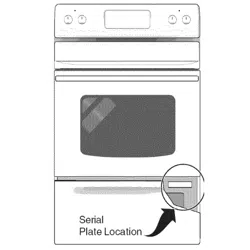
You can find the rating label on the front behind the
range drawer.
Español
Para consultar una version
en español de este manual
de instrucciones,visite sitio
de internet crosley.com.
2 49-2000226 Rev. 0
America's iconic brand, backed by America's best appliance warranty!
10 Year Limited Warranty FREE on all Crosley Appliances!
Visit Crosley.com/mycrosley to register the extended limited warranty.
APPLIANCE COMPONENT
MANUFACTURER'S
LIMITED WARRANTY
CROSLEY'S EXTENDED
LIMITED WARRANTY
Refrigerator or
Freezer
Compressor 1 Year
10 Years
Including 1 year Manufacturer's
Coverage
Top-Load Washer
Gearcase/
Transmission
1 Year
Front-Load
Washer
Motor 1 Year
Compact Washer Motor 1 Year
Washer/Dryer
Stack Unit
Motor/Heating
Element
1 Year
Dishwasher Motor 1 Year
Gas/Electric Dryer
Motor/Heating
Element
1 Year
Electric Range
Bake/Broil/Surface
Elements
1 Year
Gas Range
Ignitors and Spark
Modules
1 Year
49-2000226 Rev. 0 3
READ AND SAVE THESE INSTRUCTIONS
IMPORTANT SAFETY INFORMATION
READ ALL INSTRUCTIONS BEFORE USING THE APPLIANCE
SAFETY INFORMATION
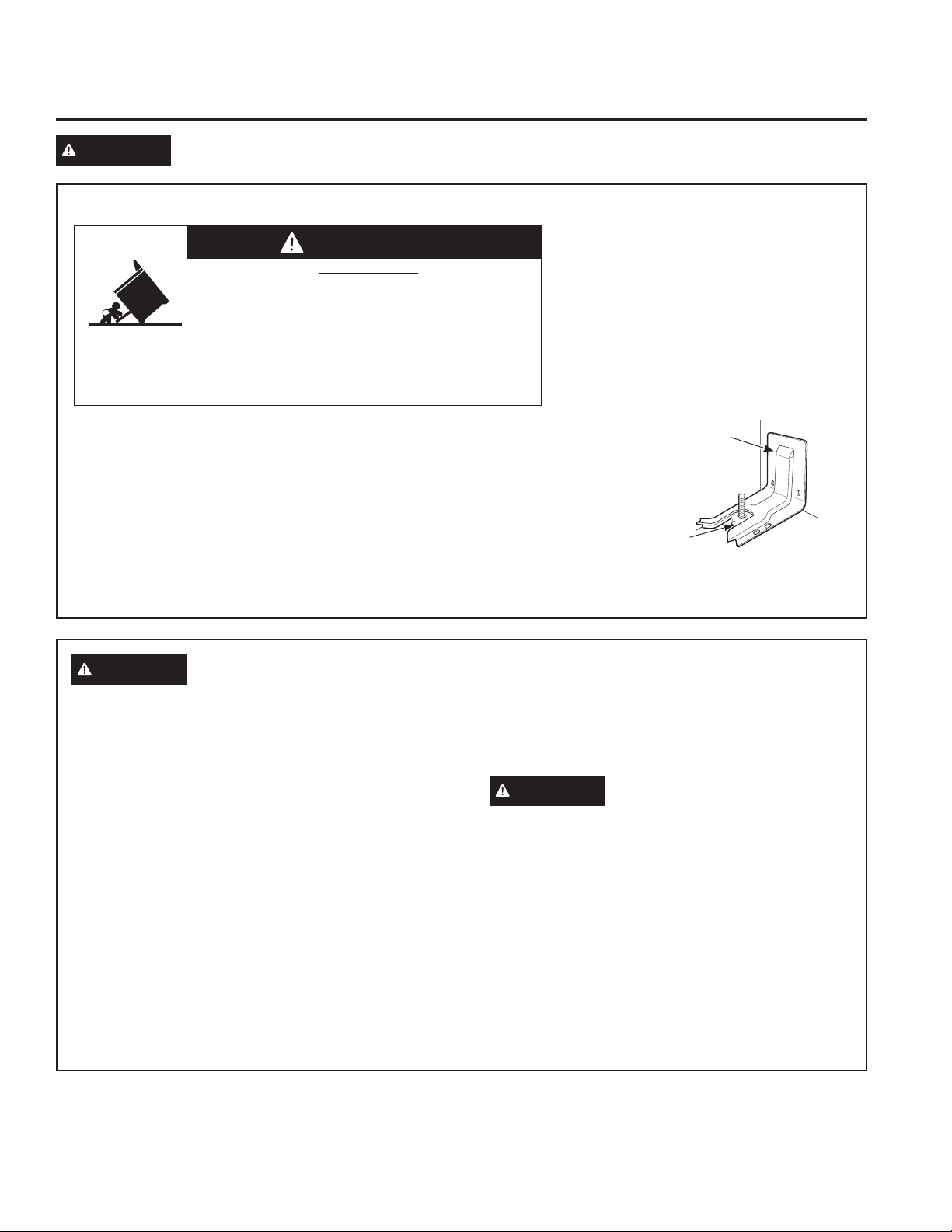
ANTI-TIP DEVICE
To reduce the risk of tipping the range,
the range must be secured by a properly
installed anti-tip bracket. See installation
instructions shipped with the bracket for
complete details before attempting to install.
For Free-Standing and Slide-In Ranges
To check if the bracket is installed and
engaged properly, look underneath the
range to see that the rear leveling leg is
engaged in the bracket. On some models, the storage drawer or kick panel
can be removed for easy inspection. If visual inspection is not possible,
slide the range forward, confirm the anti-tip bracket is securely attached to
the floor or wall, and slide the range back so the rear leveling leg is under
the anti-tip bracket.
If the range is pulled from the wall for any reason, always repeat this
procedure to verify the range is properly secured by the anti-tip bracket.
Never completely remove the leveling legs or the range will not be secured
to the anti-tip device properly.
WARNING
Read all safety instructions before using the product. Failure to follow these instructions may result
in fire, electrical shock, serious injury or death.
• A child or adult can tip the range and be killed.
• Install the anti-tip bracket to the wall or floor.
• Engage the range to the anti-tip bracket by sliding the
range back such that the foot is engaged.
• Re-engage the anti-tip bracket if the range is moved.
• Failure to do so can result in death or serious burns
to children or adults.
Tip-Over Hazard
WARNING
Anti-Tip
Bracket
Leveling Leg
Free-Standing and Slide-In Ranges
WARNING
GENERAL SAFETY INSTRUCTIONS
■ Usethisapplianceonlyforitsintendedpurposeas
described in this Owner’s Manual.
■ FIRE HAZARD: Never leave the range unattended
with the cooktop ON above a Lo setting. Keep
flammable items away from the cooktop. Turn off all
controls when done cooking. Failure to follow these
instructions can result in fire, serious injury or death.
■ Besureyourapplianceisproperlyinstalledand
grounded by a qualified installer in accordance with
the provided installation instructions.
■ Donotattempttorepairorreplaceanypartofyour
range unless it is specifically recommended in this
manual. All other servicing should be transferred to
a qualified technician.
■ Beforeperforminganyservice,unplugtherange
or disconnect the power supply at the household
distribution panel by removing the fuse or switching
off the circuit breaker.
■ Donotleavechildrenalone—childrenshouldnot
be left alone or unattended in an area where an
appliance is in use. They should never be allowed
to climb, sit or stand on any part of the appliance.
■
CAUTION
Do not store items of interest to
children above a range or on the backguard of a
range—childrenclimbingontherangetoreach
items could be seriously injured.
■ Useonlydrypotholders—moistordamppot
holders on hot surfaces may result in burns from
steam. Do not let pot holders touch hot surface
units or heating elements. Do not use a towel or
other bulky cloth in place of pot holders.
■ Neveruseyourapplianceforwarmingorheating
the room.
4 49-2000226 Rev. 0
WARNING
KEEP FLAMMABLE MATERIALS AWAY FROM THE RANGE
Failure to do so may result in fire or personal injury.
■ Donotstoreoruseflammablematerialsinanoven
or near the cooktop, including paper, plastic, pot
holders, linens, wall coverings, curtains, drapes and
gasoline or other flammable vapors and liquids.
■ Neverwearloose-fittingorhanginggarmentswhile
using the appliance. These garments may ignite if
they contact hot surfaces causing severe burns.
■ Donotletcookinggreaseorotherflammable
materials accumulate in or near the range. Grease
in the oven or on the cooktop may ignite.
■ Cleanventilatinghoodsfrequently.Greaseshould
not be allowed to accumulate on the hood or filter.
SAFETY INFORMATION
READ AND SAVE THESE INSTRUCTIONS
WARNING
IN THE EVENT OF A FIRE, TAKE THE FOLLOWING
STEPS TO PREVENT INJURY AND FIRE SPREADING
■ Donotusewaterongreasefires.Neverpickup
a flaming pan. Turn the controls off. Smother a
flaming pan on a surface unit by covering the pan
completely with a well-fitting lid, cookie sheet or flat
tray. Use a multi-purpose dry chemical or foam-type
fire extinguisher.
■ Ifthereisafireintheovenduringbaking,smother
the fire by closing the oven door and turning the
oven off or by using a multi-purpose dry chemical or
foam-type fire extinguisher.
■ Ifthereisafireintheovenduringself-clean,turn
the oven off and wait for the fire to go out. Do not
force the door open. Introduction of fresh air at self-
clean temperatures may lead to a burst of flame
from the oven. Failure to follow this instruction may
result in severe burns.
IMPORTANT SAFETY INFORMATION
READ ALL INSTRUCTIONS BEFORE USING THE APPLIANCE
WARNING
GENERAL SAFETY INSTRUCTIONS (Cont.)
■ Donottouchthesurfaceunits,theheatingelements
or the interior surface of the oven. These surfaces
may be hot enough to burn even though they are
dark in color. During and after use, do not touch,
or let clothing or other flammable materials contact
the surface units, areas nearby the surface units or
any interior area of the oven; allow sufficient time
for cooling first. Other surfaces of the appliance
may become hot enough to cause burns. Potentially
hot surfaces include the cooktop, areas facing the
cooktop, oven vent opening, surfaces near the
opening and crevices around the oven door.
■ Donotheatunopenedfoodcontainers.Pressure
could build up and the container could burst,
causing an injury.
■ Donotuseanytypeoffoilorlinertocoverthe
oven bottom or anywhere in the oven, except as
described in this manual. Oven liners can trap heat
or melt, resulting in damage to the product and risk
of shock, smoke or fire.
■ Avoidscratchingorimpactingglassdoors,cook
tops or control panels. Doing so may lead to glass
breakage. Do not cook on a product with broken
glass. Shock, fire or cuts may occur.
■ Cookfoodthoroughlytohelpprotectagainst
foodborne illness. Minimum safe food temperature
recommendations can be found at IsItDoneYet.gov
and fsis.usda.gov. Use a food thermometer to take
food temperatures and check several locations.
49-2000226 Rev. 0 5
WARNING
COOKTOP SAFETY INSTRUCTIONS
■ Neverleavethesurfaceunitsunattendedwiththe
cooktop ON above a Lo setting. Boilovers cause
smoking and greasy spillovers that may catch on fire.
■ Alwaysbepresentattherangewhencookingwith
oil or grease. Surface cooking is an "attended"
activity.
■ Neverleaveoilunattendedwhilefrying.Ifallowed
to heat beyond its smoking point, oil may ignite
resulting in fire that may spread to surrounding
cabinets. Use a deep fat thermometer whenever
possible to monitor oil temperature.
■ Toavoidoilspilloverandfire,useaminimum
amount of oil when shallow pan-frying and avoid
cooking frozen foods with excessive amounts of ice.
■ Useproperpansize—selectcookwarehaving
flat bottoms large enough to cover the surface
heating element. The use of undersized cookware
will expose a portion of the surface unit to direct
contact and may result in ignition of clothing. Proper
relationship of cookware to surface unit will also
improve efficiency.
■ Onlycertaintypesofglass,glass/ceramic,
earthenware or other glazed containers are suitable
for cooktop service; others may break because of
the sudden change in temperature.
■ Tominimizethepossibilityofburns,ignitionof
flammable materials and spillage, the handle of a
container should be turned toward the center of the
range without extending over nearby surface units.
■ Whenpreparingflamingfoodsunderahood,turn
the fan on.
■ Ifpowerislosttoanelectriccooktopwhilea
surface unit is ON, the surface unit will turn back on
as soon as power is restored. In the event of power
loss, failure to turn all surface unit knobs to the OFF
position may result in ignition of items on or near
the cooktop, leading to serious injury or death.
SAFETY INFORMATION
READ AND SAVE THESE INSTRUCTIONS
IMPORTANT SAFETY INFORMATION
READ ALL INSTRUCTIONS BEFORE USING THE APPLIANCE
WARNING
COIL COOKTOP SAFETY INSTRUCTIONS
■ Donotimmerseorsoaktheremovablesurface
units. Do not put them in a dishwasher. Do not self-
clean the surface units in an oven. Doing so may
cause them to fail presenting a burn or fire hazard.
■Donotuseasurfaceunit(heatingelement)ifit
develops a glowing spot during use or shows
other signs of damage. A glowing spot indicates
the surface unit may fail and present a potential
burn, fire, or shock hazard. Turn the surface unit
off immediately and have it replaced by a qualified
service technician.
■Toavoidthepossibilityofaburnorelectricshock,
always be certain that the controls for all surface
units are at the OFF position and all coils are cool
before attempting to lift or remove a coil surface unit.
■Donotusealuminumfoiltolinedrippans.Foilcan
trap heat or melt, resulting in damage to the product
and a shock or fire hazard.
■Besurethedrippansarenotcoveredandarein
place. Their absence during cooking could damage
range parts and wiring.
6 49-2000226 Rev. 0
SAFETY INFORMATION
READ AND SAVE THESE INSTRUCTIONS
IMPORTANT SAFETY INFORMATION
READ ALL INSTRUCTIONS BEFORE USING THE APPLIANCE
WARNING
RADIANT COOKTOP SAFETY INSTRUCTIONS
■ Usecarewhentouchingthecooktop.Theglass
surface of the cooktop will retain heat after the
controls have been turned off.
■ Donotcookonabrokencooktop.Ifglasscooktop
should break, cleaning solutions and spillovers
may penetrate the broken cooktop and create a
risk of electric shock. Contact a qualified technician
immediately.
■ Avoidscratchingtheglasscooktop.Thecooktop
can be scratched with items such as knives, sharp
instruments, rings or other jewelry, and rivets on
clothing.
■ Donotplaceorstoreitemsthatcanmeltorcatch
fire on the glass cooktop, even when it is not being
used. If the cooktop is inadvertently turned on, they
may ignite. Heat from the cooktop or oven vent after
it is turned off may cause them to ignite also.
■ UseCERAMABRYTE
®
ceramic Cooktop Cleaner
and CERAMA BRYTE
®
Cleaning Pad to clean
the cooktop. Wait until the cooktop cools and the
indicator light goes out before cleaning. A wet
sponge or cloth on a hot surface can cause steam
burns. Some cleaners can produce noxious fumes if
applied to a hot surface. NOTE: Sugar spills are an
exception. They should be scraped off while still hot
using an oven mitt and a scraper. See the Cleaning
the glass cooktop section for detailed instructions.
■ Readandfollowallinstructionsandwarningsonthe
cleaning cream label.
WARNING
OVEN SAFETY INSTRUCTIONS
■ Standawayfromtherangewhenopeningtheoven
door. Hot air or steam which escapes can cause
burns to hands, face and/or eyes.
■ Donotusetheovenifaheatingelementdevelops
a glowing spot during use or shows other signs
of damage. A glowing spot indicates the heating
element may fail and present a potential burn, fire,
or shock hazard. Turn the oven off immediately and
have the heating element replaced by a qualified
service technician.
■ Keeptheovenventunobstructed.
■ Keeptheovenfreefromgreasebuildup.Greasein
the oven may ignite.
■ Placeovenracksindesiredlocationwhileovenis
cool. If rack must be moved while oven is hot, do not
let pot holder contact hot heating element in oven.
■ Whenusingcookingorroastingbagsintheoven,
follow the manufacturer’s directions.
■ Pulltheovenracktothestop-lockpositionwhen
loading and unloading food from the oven. This
helps prevent burns from touching hot surfaces of
the door and oven walls.
■ Donotleaveitemssuchaspaper,cookingutensils
or food in the oven when not in use. Items stored in
an oven can ignite.
■ Neverplacecookingutensils,pizzaorbakingstones,
or any type of foil or liner on the oven floor. These
items can trap heat or melt, resulting in damage to
the product and risk of shock, smoke or fire.

49-2000226 Rev. 0 7
How to Remove Protective Shipping Film and Packaging Tape
Carefully grasp a corner of the protective shipping film
with your fingers and slowly peel it from the appliance
surface. Do not use any sharp items to remove the film.
Remove all of the film before using the appliance for the
first time.
To assure no damage is done to the finish of the
product, the safest way to remove the adhesive from
packaging tape on new appliances is an application of
a household liquid dishwashing detergent. Apply with a
soft cloth and allow to soak.
NOTE: The adhesive must be removed from all parts. It
cannot be removed if it is baked on.
WARNING
SELF-CLEANING OVEN SAFETY INSTRUCTIONS (on some models)
The self-cleaning feature operates the oven at temperatures high enough to burn away food soils in the oven.
Follow these instructions for safe operation.
■ Donottouchovensurfacesduringself-clean
operation. Keep children away from the oven during
self-cleaning. Failure to follow these instructions
may cause burns.
■ Beforeoperatingtheself-cleancycle,removepans,
shiny metal oven racks and other utensils from the
oven. Only gray porcelain-coated oven racks may
be left in the oven. Do not use self-clean to clean
other parts, such as drip pans or bowls.
■ Beforeoperatingtheself-cleancycle,wipegrease
and food soils from the oven. Excessive amount
of grease may ignite leading to smoke damage to
your home.
■ Iftheself-cleaningmodemalfunctions,turnthe
oven off and disconnect the power supply. Have it
serviced by a qualified technician.
■ Donotcleanthedoorgasket.Thedoorgasketis
essential for a good seal. Care should be taken not
to rub, damage or move the gasket.
■ Donotuseovencleaners.Nocommercialoven
cleaner or oven liner protective coating of any kind
should be used in or around any part of the oven.
SAFETY INFORMATION
READ AND SAVE THESE INSTRUCTIONS
IMPORTANT SAFETY INFORMATION
READ ALL INSTRUCTIONS BEFORE USING THE APPLIANCE
8 49-2000226 Rev. 0
Throughout this manual, features and appearance may vary from your model.
How to Set
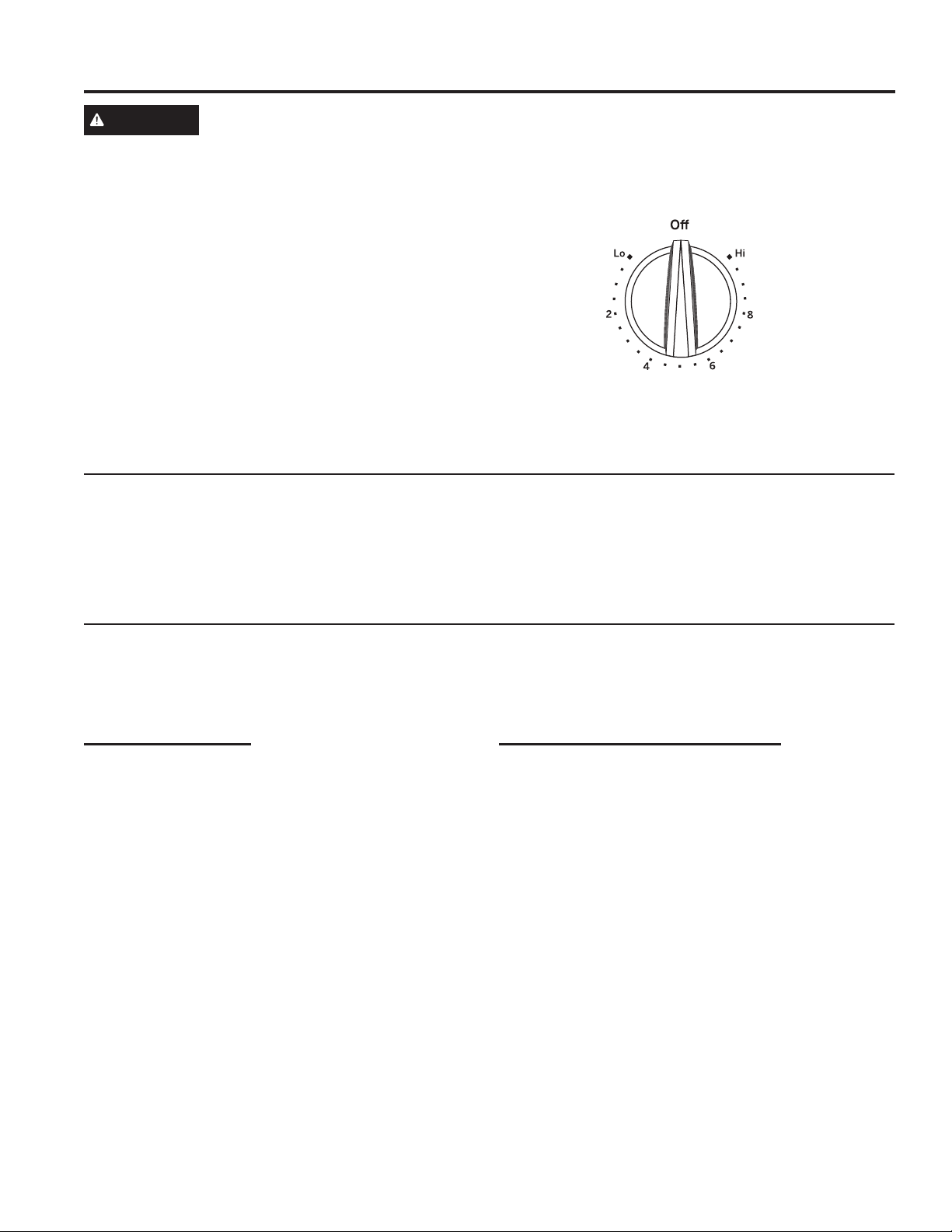
Push the knob in and turn in either direction to the
setting you want.
A surface ON indicator light will glow when any surface
unit is on
For glass cooktop surfaces:
A HOT COOKTOP indicator light will:
■ comeonwhentheunitishottothetouch.
■ stayonevenaftertheunitisturnedoff.
■ stayonuntiltheunitiscooledto
approximately 150°F.
USING THE RANGE: Surface Units
Surface Units
WARNING
FIRE HAZARD: Never leave the range unattended with the cooktop ON above a Lo setting. Keep
flammable items away from the cooktop. Turn off all controls when done cooking. Failure to follow
these instructions can result in fire, serious injury or death.
At both OFF and HI the control clicks into position. You may hear
slight clicking sounds during cooking, indicating the control is
maintaining your desired setting.
Be sure you turn the control knob to OFF when you finish cooking.
Coil Cooktops
Each coil surface unit uses "SENSI-TEMP
TECHNOLOGY" to reduce the risk of cooktop oil and
grease fires. This feature is located in the center of each
surface unit. Power to the surface unit is temporarily
interrupted when a pot or pan exceeds expected cooking
temperatures. Even after the surface units are turned off,
the surface unit retains enough heat to continue cooking.
To avoid overcooking, remove pans from the surface
units when the food is cooked. Avoid placing anything on
the surface unit until it has cooled completely.
Cookware for Coil Cooktops
The following information will help you choose cookware which will give good performance on coil cooktops.
NOTE: Follow all cookware manufacturer’s recommendations when using any type of cookware on the coil cooktop.
Recommended
Stainless Steel
Thin unclad stainless steel will give poor performance.
Aluminum
Heavy weight recommended.
Good conductivity. Because of its low melting point, thin
weight aluminum should not be used.
Copper Bottom
Enamel (painted) on Cast Iron
Cast Iron
Avoid/Not Recommended
Enamel (painted) on Steel
Glass-ceramic
Poor performance.
Stoneware
Poor performance.
49-2000226 Rev. 0 9
Temperature Limiter on Radiant Glass Cooktops
Every radiant surface unit has a temperature limiter.
The temperature limiter protects the glass cooktop from
getting too hot.
The temperature limiter may cycle the surface units off
for a time if:
■ thepanboilsdry.
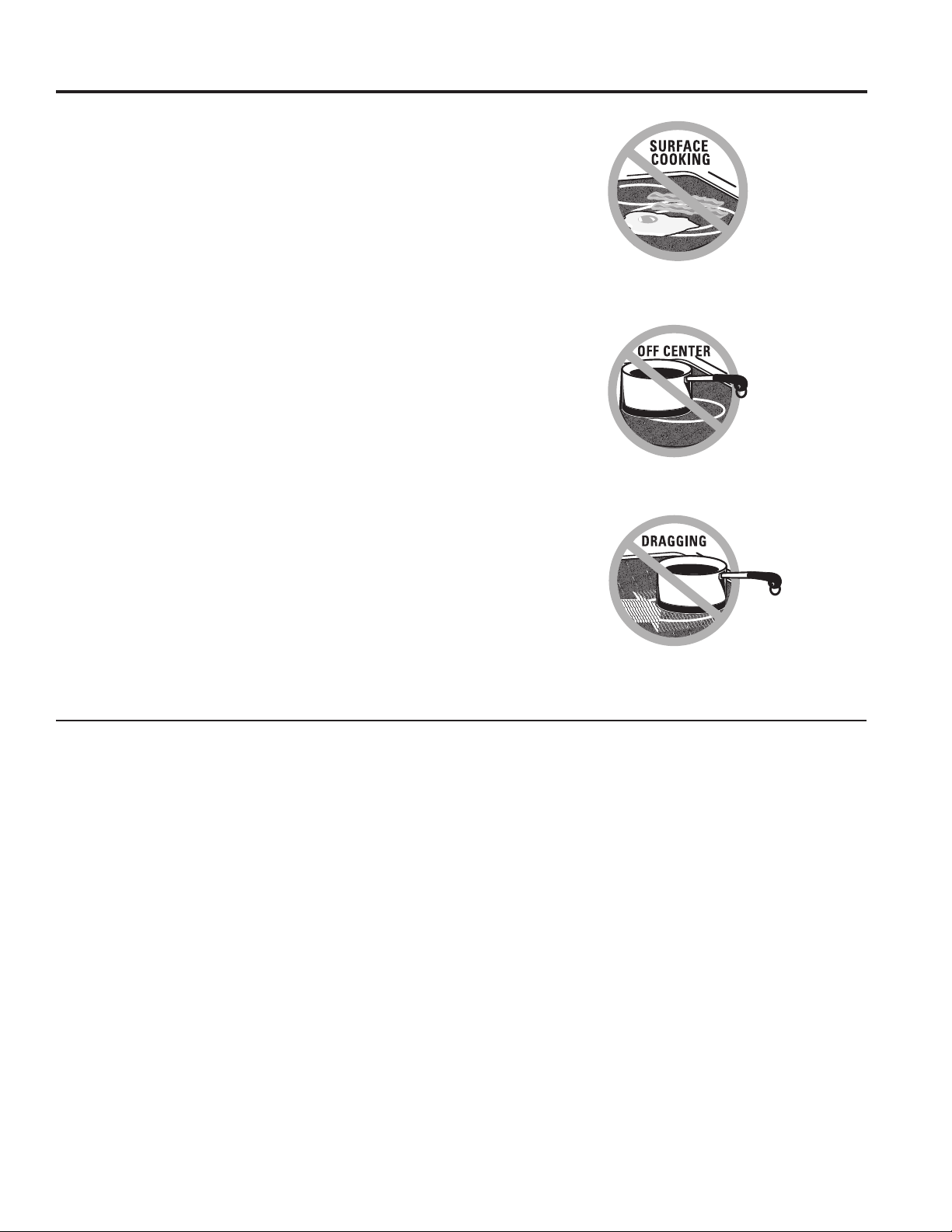
■ thepanbottomisnotflat.
■ thepanisoff-center.
■ thereisnopanontheunit.
Radiant Glass Cooktop
The radiant cooktop features heating units beneath a
smooth glass surface.
NOTE: A slight odor is normal when a new cooktop is
used for the first time. It is caused by the heating of new
parts and insulating materials and will disappear in a
short time.
NOTE: On models with light-colored glass cooktops, it is
normal for the cooking zones to change color when hot
or cooling down. This is temporary and will disappear as
the glass cools to room temperature.
The surface unit will cycle on and off to maintain your
selected control setting.
It is safe to place hot cookware on the glass surface
even when the cooktop is cool.
Even after the surface units are turned off, the glass
cooktop retains enough heat to continue cooking. To
avoid overcooking, remove pans from the surface units
when the food is cooked. Avoid placing anything on the
surface unit until it has cooled completely.
■ Waterstains(mineraldeposits)areremovableusing
the cleaning cream or full-strength white vinegar.
■ Useofwindowcleanermayleaveaniridescentfilmon
the cooktop. The cleaning cream will remove this film.
■ Don’tstoreheavyitemsabovethecooktop.Ifthey
drop onto the cooktop, they can cause damage.
■ Donotusethesurfaceasacuttingboard.
USING THE RANGE: Surface Units
Surface Units (Cont.)
Never cook directly on the glass. Always
use cookware.
Always place the pan in the center of the
surface unit you are cooking on.
Do not slide cookware across the cooktop because
itcanscratchtheglass—theglassisscratch-
resistant, not scratch proof.

10 49-2000226 Rev. 0
Surface Units (Cont.)
USING THE RANGE: Surface Units
Cookware for Radiant Glass Cooktops
The following information will help you choose cookware which will give good performance on glass cooktops.
NOTE: Follow all cookware manufacturer’s recommendations when using any type of cookware on the ceramic cooktop.
Recommended
Stainless Steel
Aluminum
Heavy weight recommended.
Good conductivity. Aluminum residues sometimes
appear as scratches on the cooktop but can be removed
if cleaned immediately. Because of its low melting point,
thin weight aluminum should not be used.
Copper Bottom
Copper may leave residues which can appear as
scratches. The residues can be removed, as long as
the cooktop is cleaned immediately. However, do not let
these pots boil dry. Overheated metal can bond to glass
cooktops. An overheated copper bottom pot will leave
a residue that will permanently stain the cooktop if not
removed immediately.
Enamel (painted) on Cast Iron
Recommended if bottom of pan is coated.
Avoid/Not Recommended
Enamel (painted) on Steel
Heating empty pans can cause permanent damage to
cooktop glass. The enamel can melt and bond to the
ceramic cooktop.
Glass-ceramic
Poor performance. Will scratch the surface.
Stoneware
Poor performance. May scratch the surface.
Cast Iron
Notrecommended—unlessdesignedspecificallyfor
glass cooktops.
Poor conductivity and slow to absorb heat. Will scratch
the cooktop surface.
49-2000226 Rev. 0 11
More about Cookware
■ Placeonlydrypansonthesurfaceelements.Donot
place lids on the surface elements, particularly wet
lids. Wet pans and lids may stick to smooth surface
when cool.
■ Donotusewoksthathavesupportrings.Thistypeof
wok will not heat on the cooktop.
■ Werecommendthatyouuseonlyaflat-bottomed
wok. They are available at your local retail store. The
bottom of the wok should have the same diameter as
the surface element to ensure proper contact.
■ Somespecialcookingproceduresrequirespecific
cookware such as pressure cookers or deep-fat
fryers. All cookware must have flat bottoms and be
the correct size.
Home Canning Tips
Be sure the canner is centered over the surface unit.
Make sure the canner is flat on the bottom.
To prevent burns from steam or heat, use caution when
canning.
Use recipes and procedures from reputable sources.
These are available from manufacturers such as Ball
®
and Kerr
®
and the Department of Agriculture Extension
Service.
Flat-bottomed canners are recommended. Use of water
bath canners with rippled bottoms may extend the time
required to bring the water to a boil.
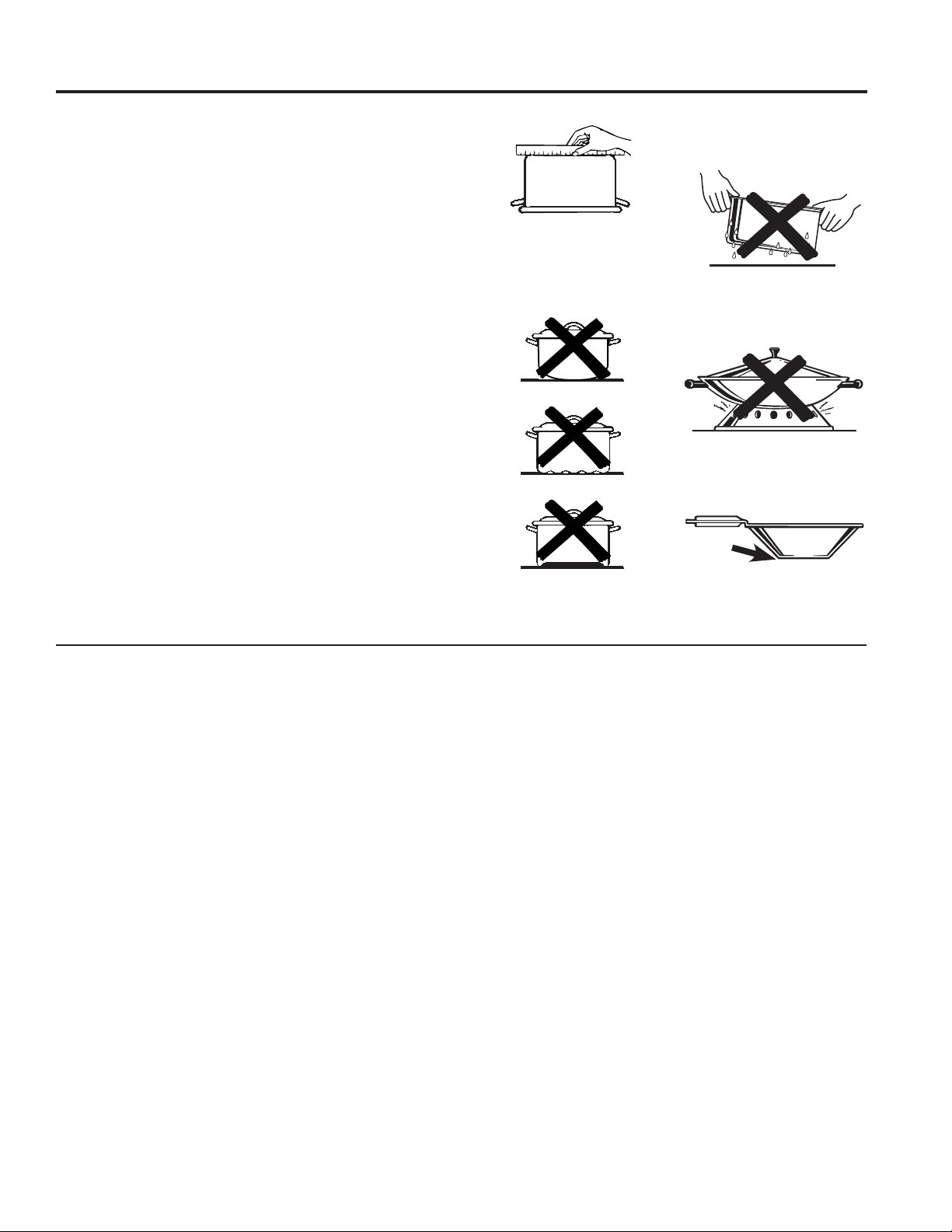
Check pans for flat bottoms by
using a straight edge. You should
not be able to pass a US nickel coin
under the straight edge.
Pans with rounded, curved,
ridged or warped bottoms are not
recommended.
Do not place wet pans on
the glass cooktop.
Do not use woks with support
rings on the glass cooktop.
Use flat-bottomed woks
on the glass cooktop.
USING THE RANGE: Surface Units
Surface Units (Cont.)
12 49-2000226 Rev. 0
Oven Controls
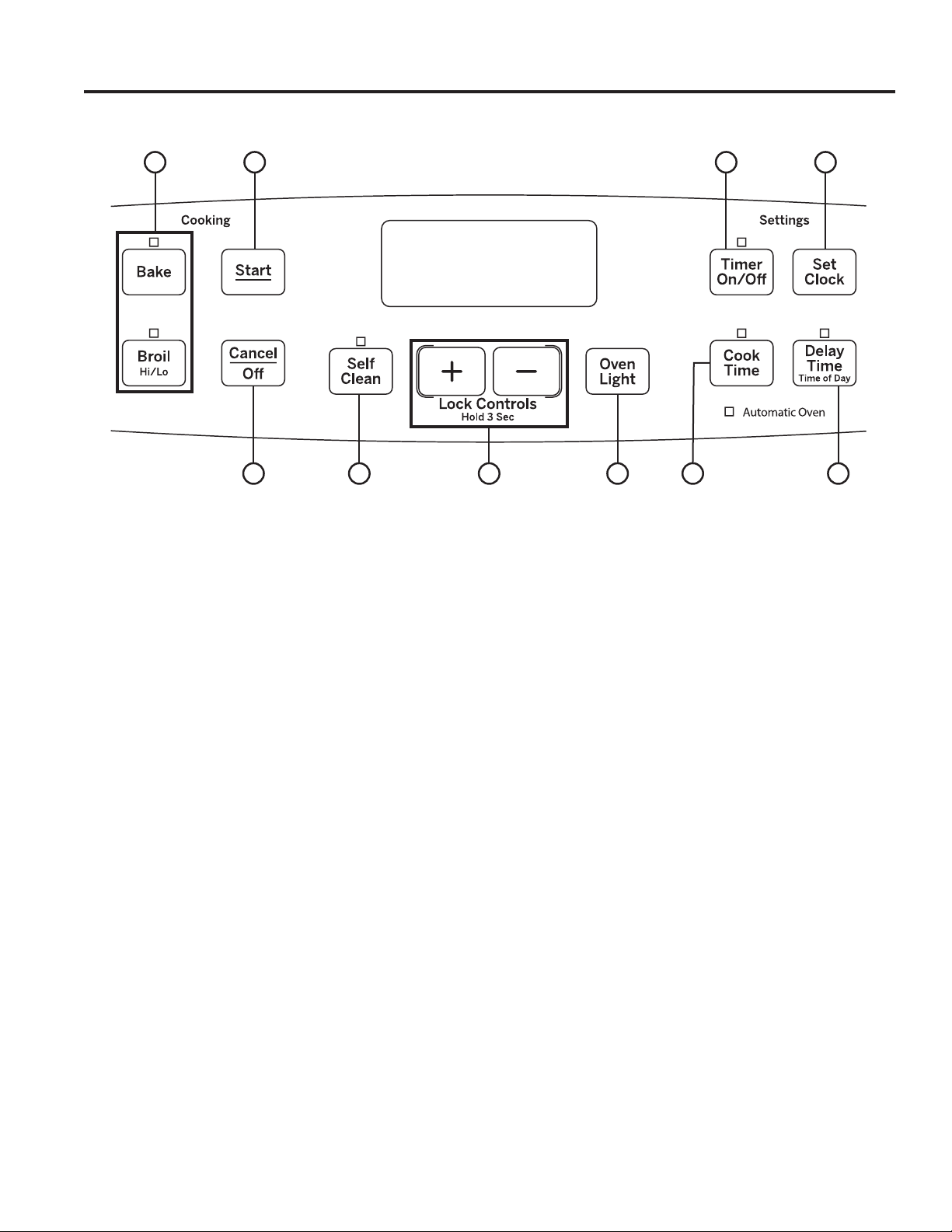
1. Traditional Cooking Modes: Your oven has
the following traditional cooking modes: Bake and
Broil Hi/Lo. See the Cooking Modes section for more
information.
2. Self Clean: See the Cleaning the Oven section for
important information about using this mode.
3. Start: Must be pressed to start any cooking,
cleaning, or timed function.
4. Cancel/Off: Cancels ALL oven operations except
the clock and timer.
5. Cook Time: Counts down cooking time and turns
off the oven when the cooking time is complete. Press
the Cook Time pad, use the +/- pads to program a
cooking time in hours and minutes, then press Start.
This can only be used with Bake.
6. Clock: Sets the oven clock time. Press the Set
Clock or Clock pad and the +/- pads to program the
clock. Press Start to save the time.
7. Timer: Works as a countdown timer. Press the
Timer pad and the +/- pads to program the time in
hours and minutes. Press the Start pad. The timer
countdown is complete. To turn the timer off press the
Timer pad.
8. Delay Time: Delays when the oven will turn on.
Use this to set a time when you want the oven to start.
Press the Delay Time pad and use the +/- pads to
program the time of day for the oven to turn on then
press Start. Press the desired cooking mode and
temperature then press Start. A cook time may also
be programmed if desired. Follow the directions under
Cook Time for setting this feature. This can only be
used with Bake and Self-Clean.
NOTE: When using the delay time feature, foods that
spoileasily—suchasmilk,eggs,fish,stuffings,poultry
andpork—shouldnotbeallowedtositformorethan
1 hour before or after cooking. Room temperature
promotes the growth of harmful bacteria. Be sure that
the oven light is off because heat from the bulb will
speed harmful bacteria growth.
9. Oven Light: Turns the oven light on or off.
10. Lock Controls: Locks out the control so that
pressing the pads does not activate the controls. Press
and hold the +/- pads for three seconds to lock or
unlock the control. Cancel/Off is always active, even
when the control is locked.
Throughout this manual, features and appearance may vary from your model.
10
1 3 67
2 894 5
USING THE RANGE: Oven Controls
49-2000226 Rev. 0 13
USING THE RANGE: Oven Controls
Oven Controls (Cont.)
To Adjust the Thermostat (on models with an OVEN TEMP Knob)
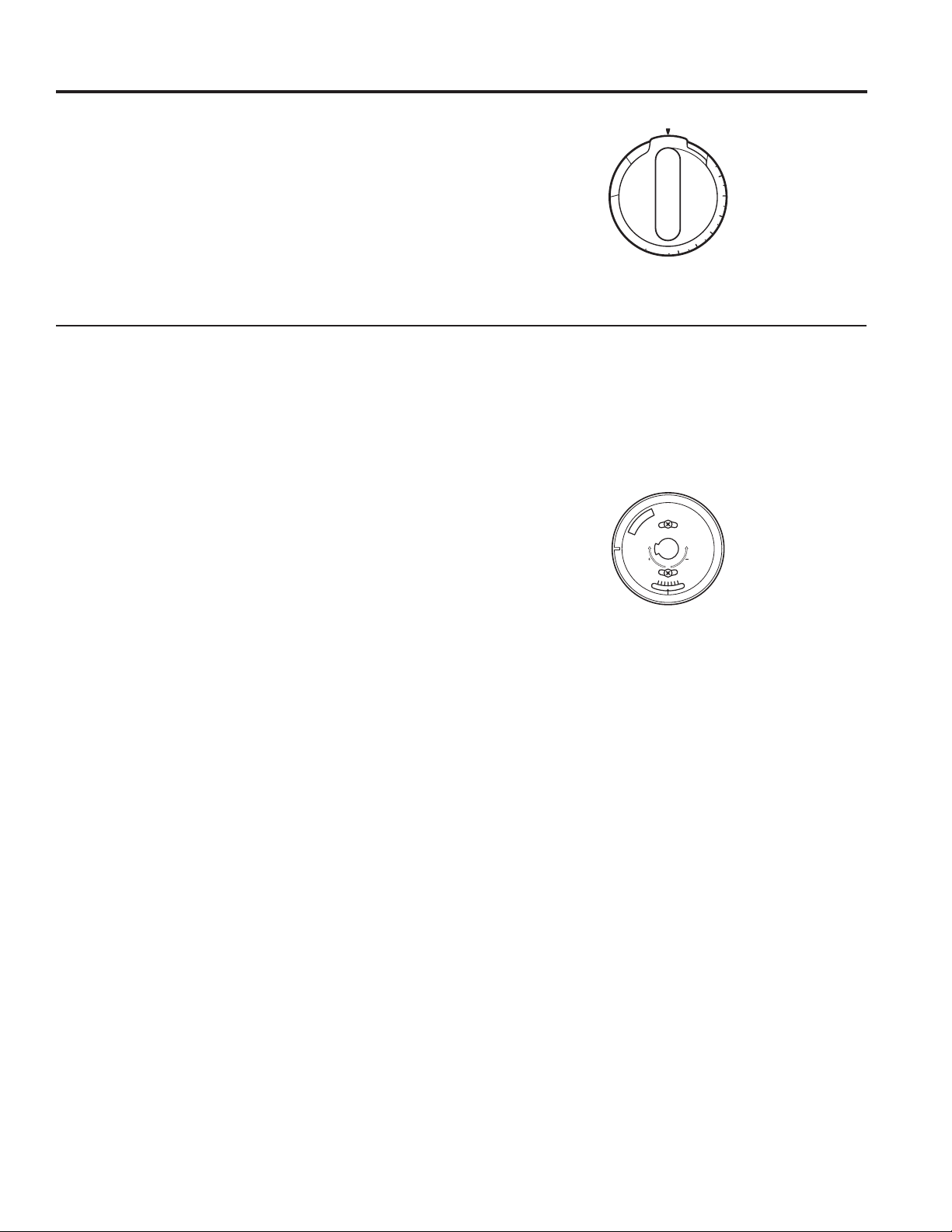
1. Pull the Oven Temp knob off the range and look
at the back side. To make an adjustment, loosen
(approximatelyoneturn),butdonotcompletely
remove, the two screws on the back of the knob.
2. With the back of the knob facing you, hold the outer
edge of the knob with one hand and turn the front of
the knob with the other hand.
To increase the oven temperature, move the top
screw toward the right. You’ll hear a click for each
notch you move the knob.
To decrease the oven temperature, move the top
screw toward the left.
Each click will change the oven temperature
approximately10°F.(Rangeisplusorminus
60°Ffromthearrow.)Wesuggestthatyoumake
the adjustment one click from the original setting
and check oven performance before making any
additional adjustments.
3. After the adjustment is made, retighten screws so
they are snug, but be careful not to overtighten.
4. Replace the knob, matching the flat area of the knob
to the shaft, and check performance.
Oven Temperature Knob (on some models)
Turn the OVEN TEMP knob to the setting you want.
■ Preheattheovenfor10minutesforbaking.
■ Formodelsthatdonothavetheselfcleanfeaturethe
oven heating light comes on when the burner is on. It
will cycle on and off during cooking.
■ Formodelsthathavetheselfcleanfeaturetheoven
heating light comes on when you set your oven
temperature knob. The light will stay on until you set
your knob back to the off position.
Back of OVEN TEMP knob
(knobappearancemayvary)
Front of OVEN TEMP knob
(knobappearancemayvary)
L
O
O
S
E
N
S
C
R
E
W
S
T
O
R
O
T
A
T
E
M
A
K
E
C
O
O
L
E
R
M
A
K
E
H
O
T
T
E
R
OVEN TEMP
2
0
0
2
5
0
3
0
0
3
5
0
4
0
0
4
5
0
5
0
0
B
R
O
I
L
C
L
E
A
N
O
F
F

14 49-2000226 Rev. 0
Special Features
USING THE RANGE: Special Features
There are several different special features on your range. To change the settings of these special features, press
the Bake and Broilpadsatthesametimeandholdforthreeseconds.(SF)willappearinthedisplay.Selectthe
feature you want to change. When the change has been made, press the Start key to save the change and return to
the time of day.
Adjust the Oven Temperature
This feature allows the oven baking temperature to be
adjusted up to 35ºF hotter or down to 35ºF cooler. Use
this feature if you believe your oven temperature is too
hot or too cold and wish to change it. This adjustment
affects Bake mode. No other cooking modes are
affected.
Press the Bake pad to enter the temperature adjustment
mode. A number between 35 and - 35 will display. Use
the +/- pads to set the desired temperature adjustment
and use the Bake pad to change between negative and
positive. Press the Start pad to save the temperature
adjustment.
End of Timer Signals
This is the tone that signals the end of a timer. The tone
canbecontinuous(ConbEEP)oronerepeatingbeep
(bEEP).Acontinuoussettingwillcontinuetosounda
tone until a button on the control is pressed. Press the
Timer pad to view the current setting and then to change
the setting.
Fahrenheit or Celsius Temperature
Display
The oven control is set to use Fahrenheit temperatures
(F),butyoucanchangeittouseCelsiustemperatures
(C).PressthenumberCook Time and Broil Hi/Lo pads
at the same time to view the current setting, press again
to change the setting.
Clock Display
This feature specifies how the time of day will be
displayed or if no time of day will be displayed. You can
selectastandard12-hourclock(12H),24-hourmilitary
timedisplay(24H),ornoclockdisplayed(oFF).Press
the Clock pad to view the current setting, press again to
change the setting.
12-hour auto shut-off and Sabbath
Options for this feature are “12 SHdn”, “no SHdn” and
“SAb”.
12-hour auto shut-off turns off the oven after 12 hours of
continuous operations.
Sabbathmodedisablestheovenlights(theovenlight
willnotturnonwhenthedoorisopened),allsounds(the
controlwillnotbeepwhenabuttonispressed),Broil,
Cook Time, Timer, Clock, and Delay Time functions.
Sabbath mode can only be used with Bake. This feature
conforms to the Star-K Jewish Sabbath requirements.
Press the Set Clock pad to view the current setting and
then to change the setting.
To use Sabbath mode, select “SAb” and press Start. A ]
will appear in the display and the clock will not display.
Once in Sabbath mode, at any time you can press Bake
to start the oven. Note that when programming a bake
in Sabbath mode, the preset starting temperature will
automatically be set to 350°F. Press the + or - pads to
increase or decrease the temperature in 25°F increments
for temperatures between 170°F and 550°F and then
press Start.
No sound will be given when the keys are pressed. At a
random time between 30 seconds and 1 minute, ][, will
appear in the display indicating the oven is running.
If you need to adjust the temperature while baking,
press Bake again. Press the + or - pads to increase
or decrease the temperature in 25°F from the previous
temperature you set to the new baking temperature and
then press Start.
To turn the oven off, press Cancel/Off at any time. The
oven will immediately turn off and ][ will change to ]
indicating that the oven has turned off.
To exit Sabbath mode, make sure that the oven is
turned off. Press and hold the Bake and Broil pads for 3
seconds to enter special features then press Delay Time
until either “12 Shdn” or “no Shdn” is in the display and
press Start.
NOTE: If power outage occurs during Sabbath mode the
unit will remain in Sabbath mode but off when power is
restored.
If you wish to use the Cook Time feature to bake in the
oven and then have the oven automatically turn off, you
will need to press the Cook Time pad, enter a cooking
time duration, and press Start. Then enter special
features to start Sabbath mode as detailed above.
49-2000226 Rev. 0 15
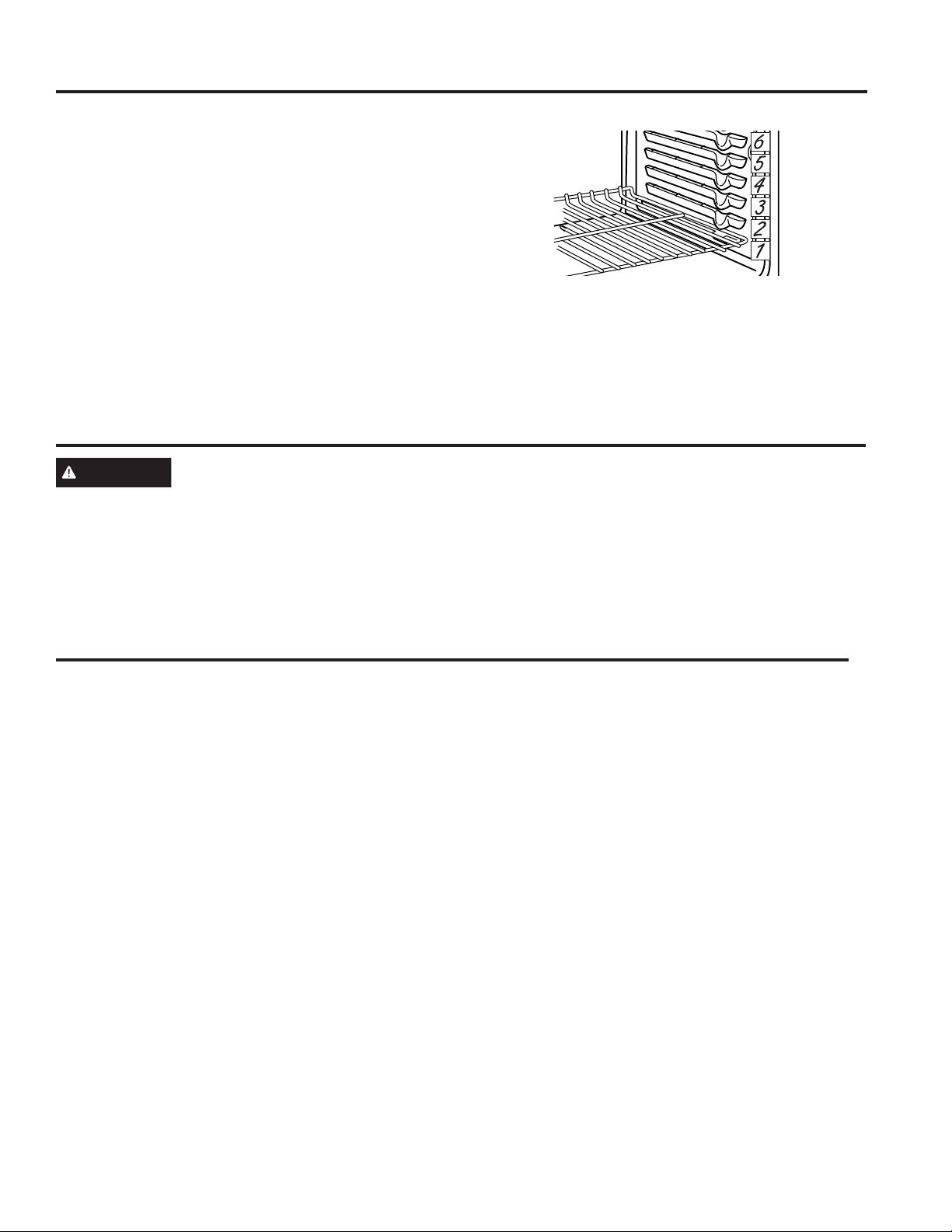
Recommended rack positions for various types of
foods are provided in the Cooking Guide. Adjusting
rack position is one way to impact cooking results. For
example, if you would prefer darker tops on cakes,
muffins, or cookies, try moving food one rack position
higher. If you find foods are too brown on top try moving
them down next time.
When baking with multiple pans and on multiple racks,
ensure there is at least 1½" between pans to allow
sufficient space for air to flow.
Your Oven may have extension racks and/or traditional
flat racks.
To avoid possible burns, place the racks in the desired
position before you turn the oven on.
USING THE RANGE: Oven Racks / Aluminum Foil and Oven Liners / Cookware
Oven Racks
Cookware
Cookware Guidelines
The material, finish, and size of cookware affect baking
performance.
Dark, coated and dull pans absorb heat more readily
than light, shiny pans. Pans that absorb heat more
readily can result in a browner, crisper, and thicker crust.
If using dark and coated cookware check food earlier
than minimum cook time. If undesirable results are
obtained with this type of cookware consider reducing
oven temperature by 25º F next time.
Shiny pans can produce more evenly cooked baked
goods such as cakes and cookies.
Glass and ceramic pans heat slowly but retain heat well.
These types of pans work well for dishes such as pies
and custards.
Air insulated pans heat slowly and can reduce bottom
browning.
Keep cookware clean to promote even heating.
CAUTION
Do not use any type of foil or oven liner to cover the oven bottom. These items can trap heat
or melt, resulting in damage to the product and risk of shock, smoke or fire. Damage from improper use of
these items is not covered by the product warranty.
Foil may be used to catch spills by placing a sheet on a lower rack, several inches below the food. Do not use more
foil than necessary and never entirely cover an oven rack with aluminum foil. Keep foil at least 1-1/2” from oven walls
to prevent poor heat circulation.
Aluminum Foil and Oven Liners
The number of rack positions may vary by model.

16 49-2000226 Rev. 0
Your new oven has a variety of cooking modes to help you get the best results. These modes are described below.
Refer to the Cooking Guide section for recommendations for specific foods. Remember, your new oven may perform
differently than the oven it is replacing.
Baking Modes
When preparing baked goods such as cakes, cookies,
and pastries always preheat the oven first. Follow recipe
recommendations for food placement. If no guidelines
are provided, center food in the oven.
Traditional Bake
The traditional bake mode is intended for single rack
cooking. This mode uses heat primarily from the lower
element but also from the upper element to cook
food. To use this mode press the Bake pad, enter
a temperature, and then press Start. Preheating is
generally recommended when using this mode.
Broiling Modes
The oven must be closed during broiling. Monitor
food closely while broiling. Use caution when broiling
on upper rack positions as placing food closer to the
broil element increases smoking, spattering, and the
possibility of fats igniting. For best performance center
food below the broil heating element. Broiling on rack
position 6 is not recommended.
Try broiling foods that you would normally grill. Adjust
rack positions to adjust the intensity of the heat to the
food. Place foods closer to the broil element when a
seared surface and rare interior is desired. Thicker foods
and foods that need to be cooked through should be
broiled on a rack position farther from the broiler or by
using Broil Lo.
Broil Hi
The Traditional Broil Hi mode uses intense heat from the
upper element to sear foods. Use Broil Hi for thinner cuts
of meat and/or foods you prefer less done on the interior.
To use this mode press the Broil pad once and then
press Start. It is not necessary to preheat when using
this mode.
Broil Lo
The Traditional Broil Lo mode uses less intense heat
from the upper element to cook food thoroughly while
also producing surface browning. Use Broil Lo for thicker
cuts of meat and/or foods that you would like cooked
all the way through. To use this mode press the Broil
pad twice and then press Start. It is not necessary to
preheat when using this mode.
Cooking Modes
USING THE RANGE: Cooking Modes
49-2000226 Rev. 0 17
Cooking Guide
USING THE OVEN: Cooking Guide
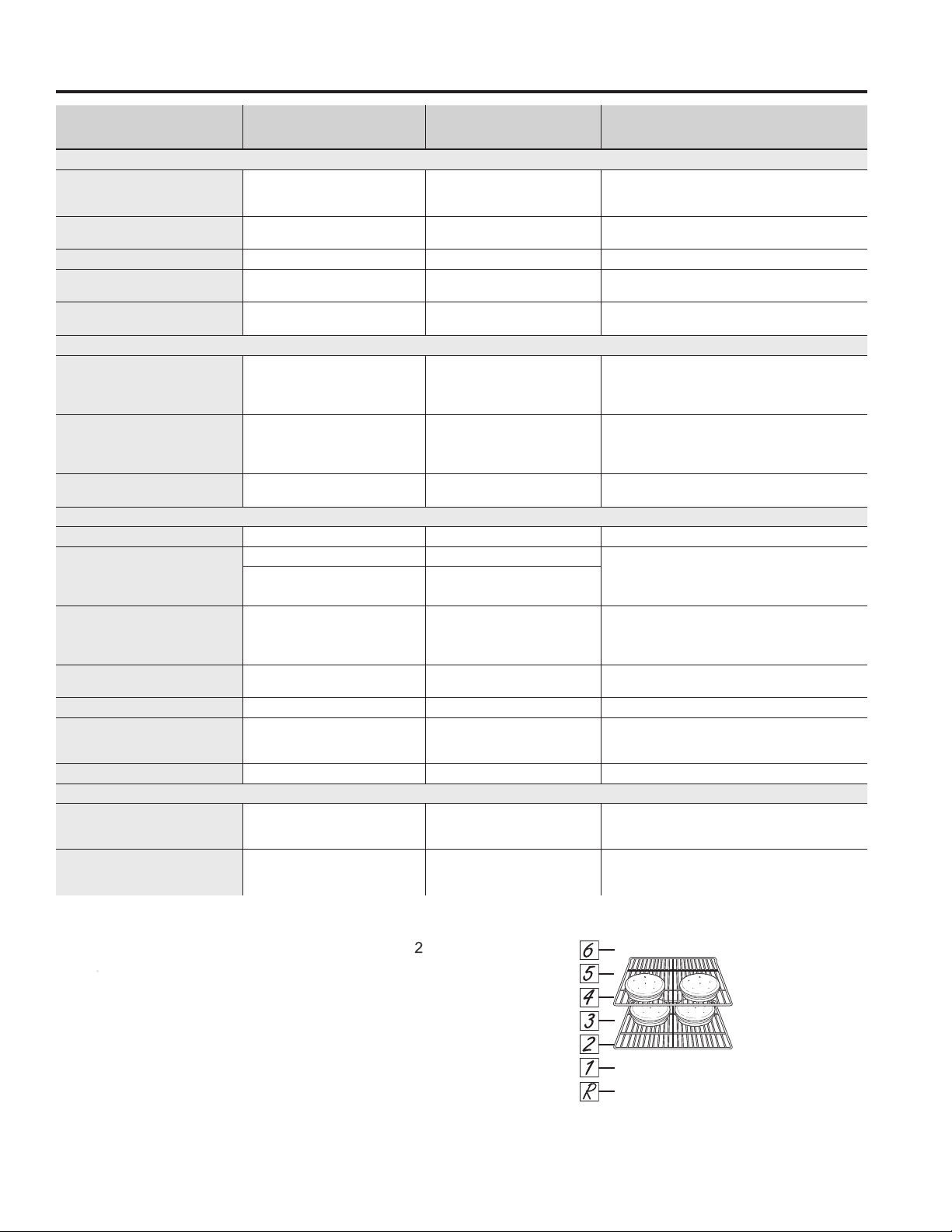
FOOD TYPE
RECOMMENDED
MODE(S)
RECOMMENDED
RACK POSITION(S) ADDITIONAL SUGGESTIONS
Baked Goods
Layer Cakes, sheet cakes, bundt
cakes, muffins, quick breads on
a Single Rack
Bake 3 Use shiny cookware.
Layer cakes* on Multiple Racks Bake 2 and 4
Ensure adequate airflow
(seeillustrationbelow).
Chiffoncakes(angelfood) Bake R Use shiny cookware.
Cookies, biscuits, scones on a
Single Rack
Bake 3 Use shiny cookware.
Cookies, biscuits, scones on
Multiple Racks
Bake 2 and 4 Ensure adequate airflow.
Beef & Pork
Hamburgers Broil Hi 5
Use a broil pan; move food down for more
doneness/less searing. Watch food closely when
broiling. For best performance center food below the
broil heating element.
Steaks & Chops Broil Hi 5
Use a broil pan; move food down for more
doneness/less searing. Watch food closely when
broiling. For best performance center food below the
broil heating element.
Roasts Bake 2 or 3
Use a low sided pan such as a broil pan. Preheating
is not necessary.
Poultry
Whole chicken Bake 3 or 4 Use a low sided pan such as a broil pan.
Bone-in chicken breasts, legs,
thighs
Broil Hi 1 If breaded or coated in sauce avoid Broil Hi modes.
Broil skin side down first. Watch food closely when
broiling. For best performance when broiling, center
food below the broil heating element.
Broil Lo
Bake
1 or 2
Boneless chicken breasts
Broil Lo
Bake
1 or 2
If breaded or coated in sauce avoid Broil Hi modes.
Broil skin side down first. Watch food closely when
broiling. For best performance when broiling, center
food below the broil heating element
Whole turkey Bake 1 or 2 Use a low sided pan such as a broil pan.
Turkey Breast Bake 1 or 2 Use a low sided pan such as a broil pan.
Fish Broil Lo
5(1/2thickorless)
4(>1/2inch)
Watch food closely when broiling. For best
performance center food below the broil heating
element.
Casseroles Bake 3
Frozen Convenience Foods
Pizza, french fries, tator tots,
chicken nuggets, appetizers on a
Single Rack
Bake 3 Use shiny cookware.
Pizza, french fries, tator tots,
chicken nuggets, appetizers on
Multiple Racks
Bake 2 and 4 Use shiny cookware.
*When baking four cake layers at a time, use racks 2
and 4. Place the pans as shown so that one pan is not
directly above another.
Cook food thoroughly to help protect against food
borne illness. Minimum safe food temperature
recommendations for food safety can be found at
IsItDoneYet.gov. Make sure to use a food thermometer
to take food temperatures.
Rack position for baking 4 layer cakes.
18 49-2000226 Rev. 0
Cleaning the Range – Exterior
CARE AND CLEANING: Cleaning the Range – Exterior
A child or adult can tip the range and be killed.
Verify the anti-tip bracket has been properly installed
and engaged.
Ensure the anti-tip bracket is re-engaged when the range
is moved.
Do not operate the range without the anti-tip bracket in
place and engaged.
Failure to follow these instructions can result in death or
serious burns to children or adults.
Tip-Over Hazard
WARNING
WARNING
If your range is removed for cleaning, servicing or any reason, be sure the anti-
tip device is reengaged properly when the range is replaced. Failure to take this
precaution could result in tipping of the range and can result in death or serious
burns to children or adults.
Be sure all controls are off and all surfaces are cool before cleaning any part of the range.
Control Knobs
The control knobs may be removed for easier cleaning.
Make sure the knobs are in the OFF positions and pull
them straight off the stems for cleaning.
The knobs can be cleaned in a dishwasher or they may
also be washed with soap and water. Make sure the
inside of the knobs are dry before replacing.
Replace the knobs, in the OFF position to ensure proper
placement.
Control Panel
It’s a good idea to wipe the control panel after each use.
Clean with mild soap and water or vinegar and water,
rinse with clean water and polish dry with a soft cloth.
Do not use abrasive cleansers, strong liquid cleansers,
plastic scouring pads or oven cleaners on the control
panel—theywilldamagethefinish.
Oven Exterior
Do not use oven cleaners, abrasive cleansers, strong
liquid cleansers, steel wool, plastic scouring pads, or
cleaning powders on the interior or exterior of the oven.
Clean with a mild soap and water or vinegar and water
solution. Rinse with clean water and dry with a soft cloth.
When cleaning surfaces, make sure that they are at
room temperature and not in direct sunlight.
If stain on the door vent trim is persistent, use a mild
abrasive cleaner and a sponge-scrubber for best results.
Spillage of marinades, fruit juices, tomato sauces and
basting liquids containing acids may cause discoloration
and should be wiped up immediately. Let hot surfaces
cool, then clean and rinse.
Painted Surfaces
Painted surfaces include the sides of the range and the
door, top of control panel and the drawer front. Clean
these with soap and water or a vinegar and water solution.
Do not use commercial oven cleaners, cleaning powders,
steel wool or harsh abrasives on any painted surface.
Stainless Steel Surfaces (on some models)
Do not use a steel wool pad; it will scratch the surface.
To clean the stainless steel surface, use warm sudsy
water or a stainless steel cleaner or polish. Always wipe
the surface in the direction of the grain. Follow the cleaner
instructions for cleaning the stainless steel surface.
Cleaners with oxalic acid such as Bar Keepers Friend
Soft Cleanser™ will remove surface rust, tarnish and
small blemishes. Use only a liquid cleanser free of grit
and rub in the direction of the brush lines with a damp,
soft sponge.
To inquire about purchasing cleaning products
including stainless steel appliance cleaner or polish,
read the Assistance/Accessories sections at the
beginning of this manual.
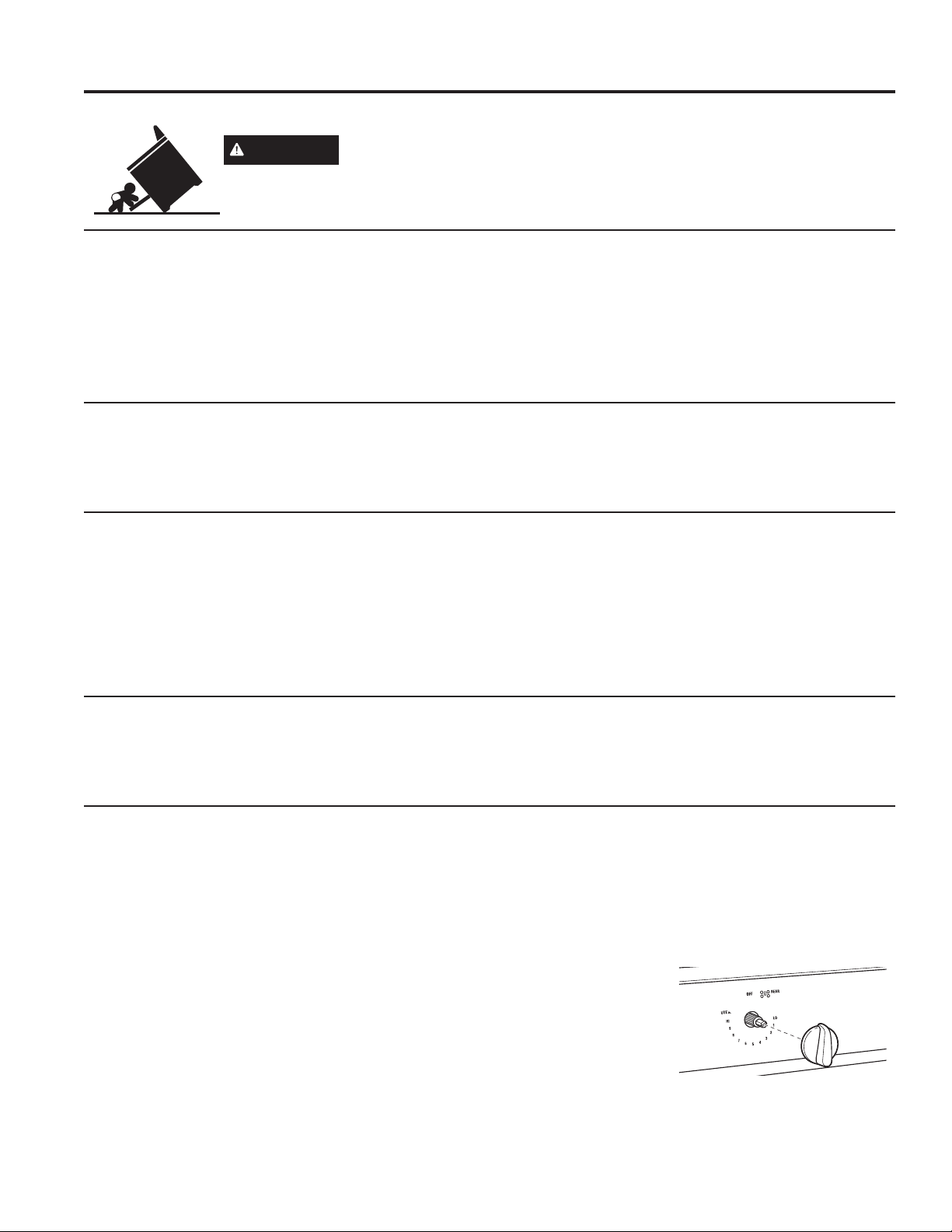
For easier cleaning, the control knobs may be removed
by pulling them directly outwards once the knobs are in
the OFF position. Do not pull knobs up or down or hang
objects on them. This can damage the gas valve shaft.
The knobs can be washed by hand with soap and water
or in a dishwasher.
To replace knobs after
cleaning, align the hole
on the knob backside
with the gas valve shaft
and push inward until
the knob is securely
fastened. All knobs are
interchangeable
Surface burner knob
49-2000226 Rev. 0 19
Surface Units
WARNING
■ Be sure the controls are turned to OFF and the surface
units are cool before attempting to remove them.
■ Do not immerse the surface units in liquids of any kind.
■ Do not clean the surface units in a dishwasher.
■ Do not bend the surface unit plug terminals.
■ Do not attempt to clean, adjust or in any way repair
the plug-in receptacle.
■ Do not pull on the SENSI-TEMP TECHNOLOGY
sensor cap.
To clean the surface units, turn the control to the highest
setting for a minute. The coils will burn off any soil. To
clean the Sensi-Temp Technology Sensor cap, wipe
with a damp sponge or cloth. For cooked-on food spills,
remove the burner from the range and gently scrub the
cap and supports with a damp plastic scouring pad. Do
not use steel wool. Allow the burner to dry over night
before re-installing it.
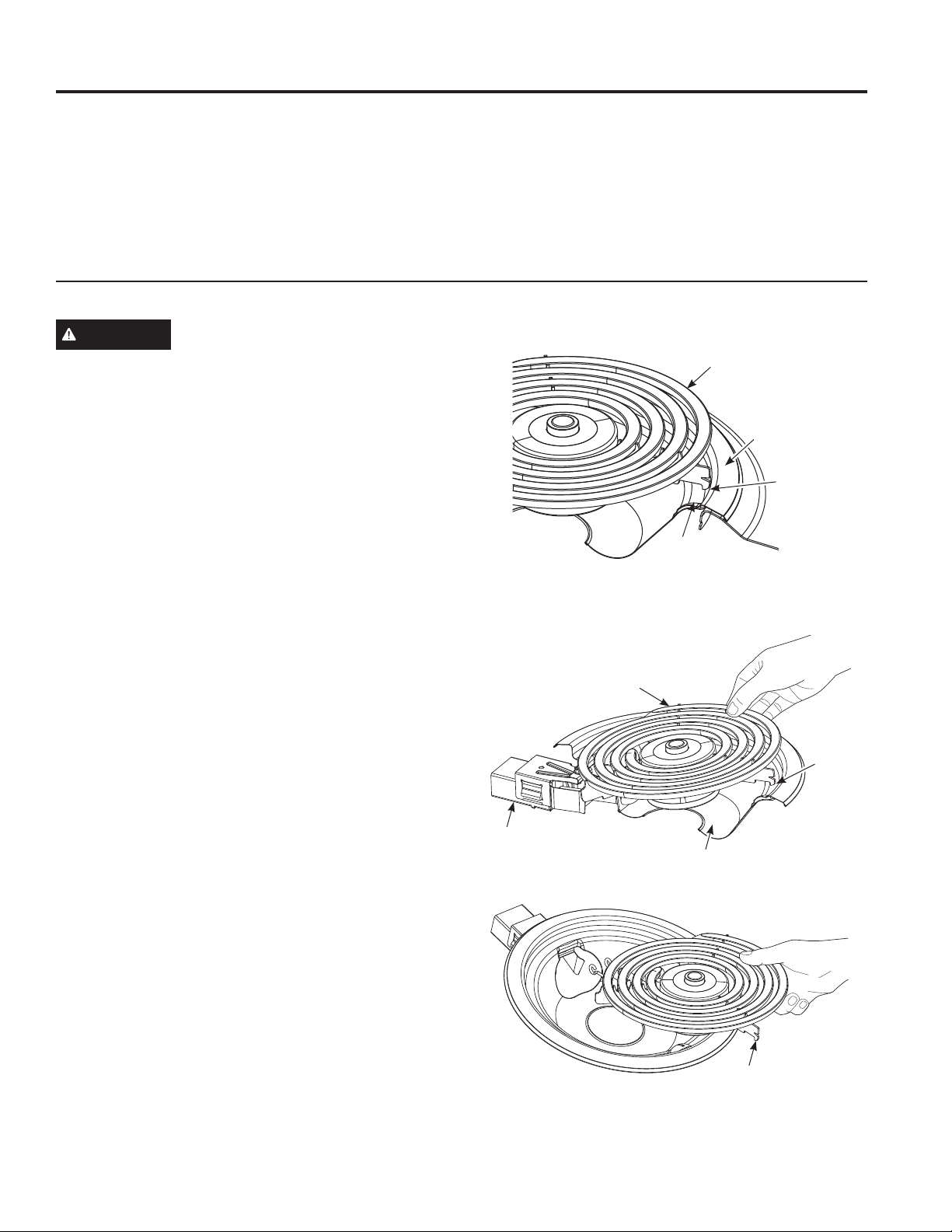
To remove a surface unit:
To remove the drip pans for cleaning, the surface units
must be removed first.
1. Push the surface unit back toward the receptacle.
2. Lift the surface unit about 1 inch above the drip pan
and pull it out.
Do not lift the surface unit more than 1 inch. If you do, it
may not lie flat on the drip pan when you plug it back in.
NOTE: Repeated lifting of the surface unit more than
1 inch above the drip pan can permanently damage the
receptacle.
To replace a surface unit:
1. Replace the drip pan into the recess in the cooktop.
Make sure the opening in the pan lines up with the
receptacle.
2. Insert the terminals of the surface unit through the
opening in the drip pan and into the receptacle.
3. Push the surface unit in and down so it rests evenly in
the cooktop.
Porcelain Enamel Cooktop
The porcelain enamel finish is sturdy but breakable if
misused. This finish is acid-resistant. However, any
acidicfoodsspilled(suchasfruitjuices,tomatoor
vinegar)shouldnotbepermittedtoremainonthefinish.
If acids spill on the cooktop while it is hot, use a dry paper
towel or cloth to wipe it up right away. When the surface
has cooled, wash with soap and water. Rinse well.
For other spills such as fat spatterings, wash with soap
and water or cleansing powders after the surface has
cooled. Rinse well. Polish with a dry cloth.
Cleaning the Range – Exterior (Cont.)
CARE AND CLEANING: Cleaning The Oven - Exterior
Surface Unit
Drip Pan
Locking Tab
Cooktop Rim
Surface Unit
Locking
Tab
Drip Pan
Receptacle
Locking Tab
When properly seated, the locking tab should lock onto
the cooktop rim through the notch in the drip pan.
20 49-2000226 Rev. 0
Cleaning the Range – Exterior (Cont.)
CARE AND CLEANING: Cleaning the Range – Exterior
Drip Pans
Remove the surface units. Then lift out the drip pans.
For best results, clean the drip pans by hand. Place
theminacoveredcontainer(oraplasticbag)with
1
⁄4 cup
ammonia to loosen the soil. Rinse with clean water and
polish with a clean soft cloth.
The drip pans may also be cleaned in a dishwasher.
Clean the area under the drip pans often. Built-up soil,
especially grease, may catch fire.
Do not cover the drip pans with foil. Using foil so close
to the receptacle could cause shock, fire or damage to
the range.
NOTE: If your cooktop is equipped with shiny, silver-
colored drip pans, do not clean them in the self-cleaning
oven. Permanent damage to the finish can occur.
If your cooktop is equipped with black or gray porcelain-
coated drip pans, they can be cleaned in the oven during
the self-cleaning cycle. Before you begin a self-cleaning
cycle, remove any heavy soil from the drip pans and
place them on the porcelain-coated oven racks. Do not
place the drip pans directly on the oven bottom. After
the self-cleaning cycle is completed and the drip pans
are cool, wipe them with a damp cloth to remove any
remaining ash or residue.
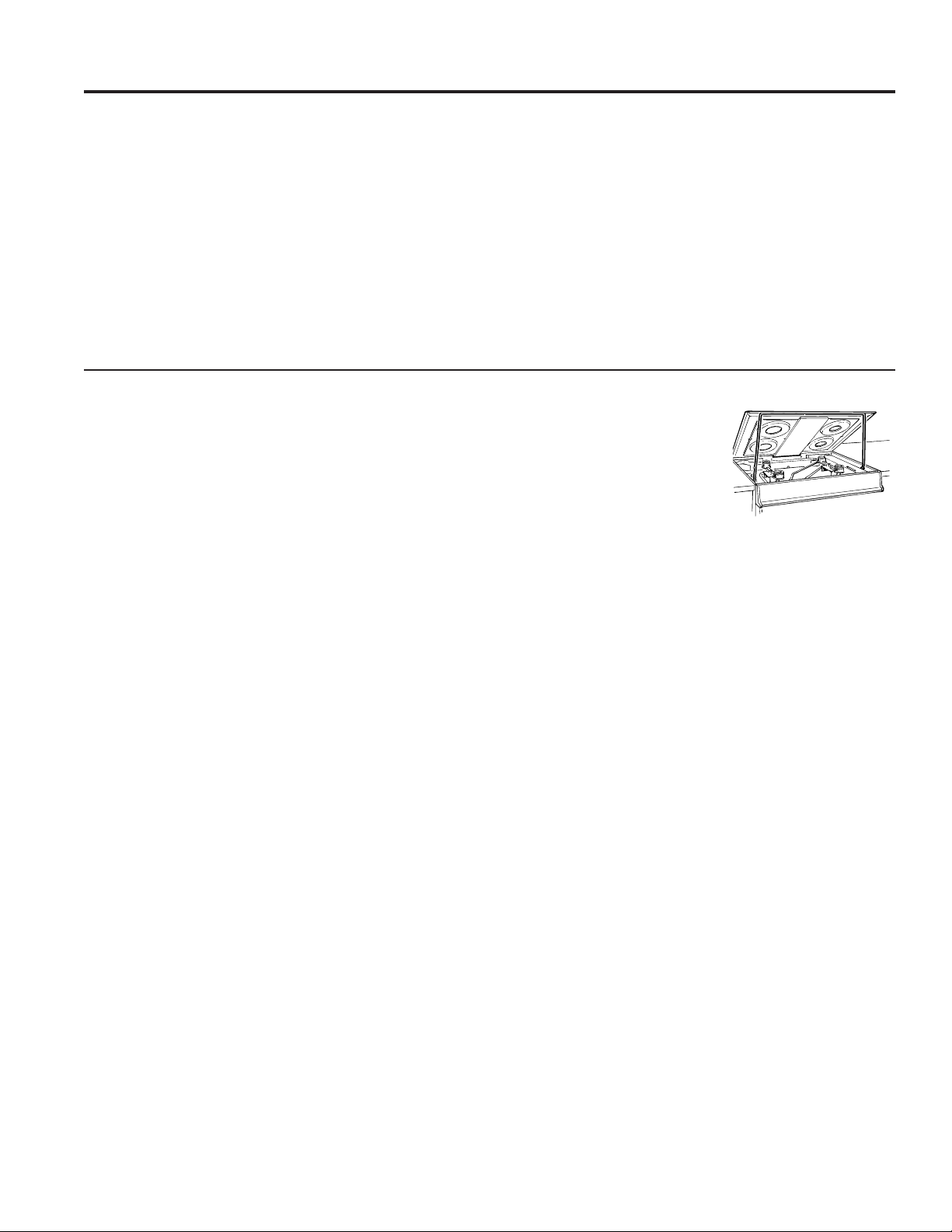
Lift-Up Cooktop
The entire cooktop may be lifted up and supported in the
up position for easier cleaning.
The surface units do not need to be removed; however,
you may remove one to make raising the cooktop easier.
There are two side supports that lock into position when
the cooktop is lifted up.
After cleaning under the cooktop with hot, mild soapy
water and a clean cloth, lower
the cooktop. Be careful not to
pinch your fingers.
To lower the cooktop, push the
rods back and gently lower the
cooktop until it rests in place.
Be sure all surface units
are turned off before
raising the Cooktop.
49-2000226 Rev. 0 21
Cleaning The Oven - Interior
CARE AND CLEANING: Cleaning The Oven - Interior
The interior of your new oven can be cleaned manually or by using Self Clean.
Spillage of marinades, fruit juices, tomato sauces and basting liquids containing acids may cause discoloration and
should be wiped up immediately. Let hot surfaces cool, then clean and rinse.
Manual Cleaning
Do not use oven cleaners, abrasive cleaners, strong
liquid cleansers, steel wool, scouring pads, or cleaning
powders on the interior of the oven. Clean with a mild
soap and water or vinegar and water solution. Rinse with
clean water and dry with a soft cloth. When cleaning
surfaces, make sure that they are at room temperature.
Self Clean Mode (on some models)
Read Self-Cleaning Oven Safety Instructions at the
beginning of this manual before using Self Clean Mode.
Self clean uses very high temperatures to clean the oven
interior. You will need to lock the oven door when using
this feature. Before operating the self-clean cycle, wipe
up grease and soils from the oven. Remove all items from
theovenotherthanenameled(darkcolor)racks.Shinyor
silver racks and any cookware or other items should all be
removed from the oven before initiating a self-clean cycle.
Close the door. Latch the door.
NOTE: Never force the latch. If the oven is too hot, you
will not be able to slide the latch. Allow the oven to cool.
If your range has a knob turn knob to self clean position
or if your range has an oven control press the Self Clean
pad and a default self-clean time is displayed. The clean
time can be changed to any time between 3:00 and 5:00
hours by using the +/- pads to enter a different time and
pressing Start. For heavily soiled ovens, the maximum
5 hour clean time is recommended. If you wish to use
the default time, press the Start pad immediately after
pressing the Self Clean pad. The oven will turn off
automatically when the self-clean cycle is complete and
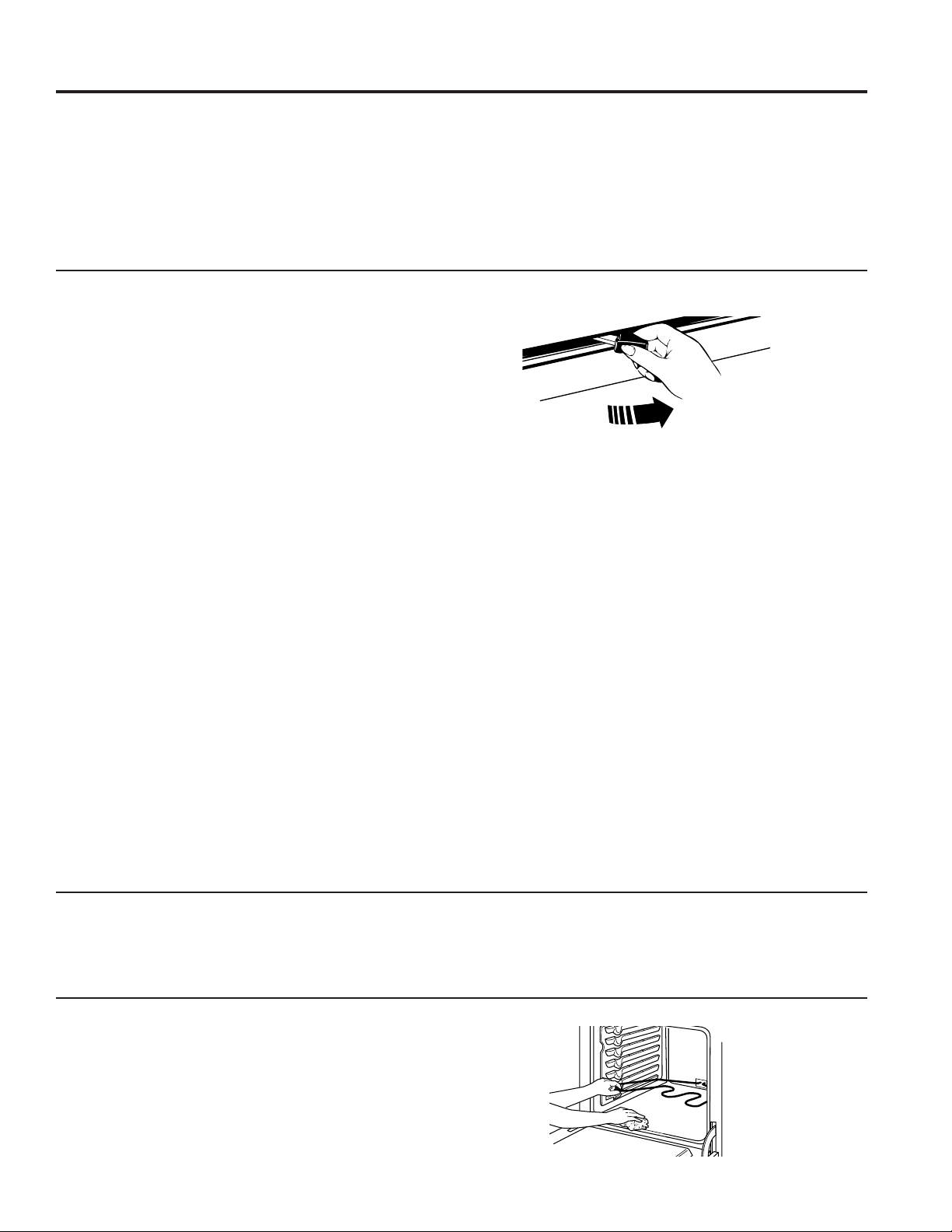
the self-clean light will be off. Slide the latch handle to the
left as far is it will go and open the door. Never force the
latch handle. Forcing the handle will damage the door lock
mechanism. After the oven has cooled down wipe any ash
out of the oven.
We recommend venting your kitchen with an open
window or using a ventilation fan or hood during the first
self-clean cycle.
Soil on the front frame of the range and outside the
gasket on the door will need to be cleaned by hand.
Clean these areas with hot water, soap-filled steel-wool
pads or cleansers such as Soft Scrub
®
. Rinse well with
clean water and dry.
Do not clean the gasket. The fiberglass material of
the oven door gasket cannot withstand abrasion. It is
essential for the gasket to remain intact. If you notice it
becoming worn or frayed, replace it.
Make sure the oven light bulb cover is in place and the
oven light is off.
IMPORTANT: The health of some birds is extremely
sensitive to the fumes given off during the self-cleaning
cycle of any range. Move birds to another well-
ventilated room.
To Stop a Self-Clean Cycle
Press Cancel/Off and wait for self clean light to go
off. Wait until the oven has cooled below the locking
temperature to unlatch the door. You will not be able to
open the door right away unless the oven has cooled
below the locking temperature.
Racks
All racks can be washed with warm, soapy water. Racks may be more difficult to slide, especially after
a self-clean. Put some vegetable oil on a soft cloth or
paper towel and rub onto the left and right edges.
Oven Heating Elements
Do not clean the bake element or the broil element. Any
soil will burn off when the elements are heated.
To clean the oven floor, gently lift the bake element.
Clean the oven floor with warm, soapy water.
Gently lift the bake element
22 49-2000226 Rev. 0
Cleaning the Glass Cooktop
CARE AND CLEANING: Cleaning the Glass Cooktop
Normal Daily Use Cleaning
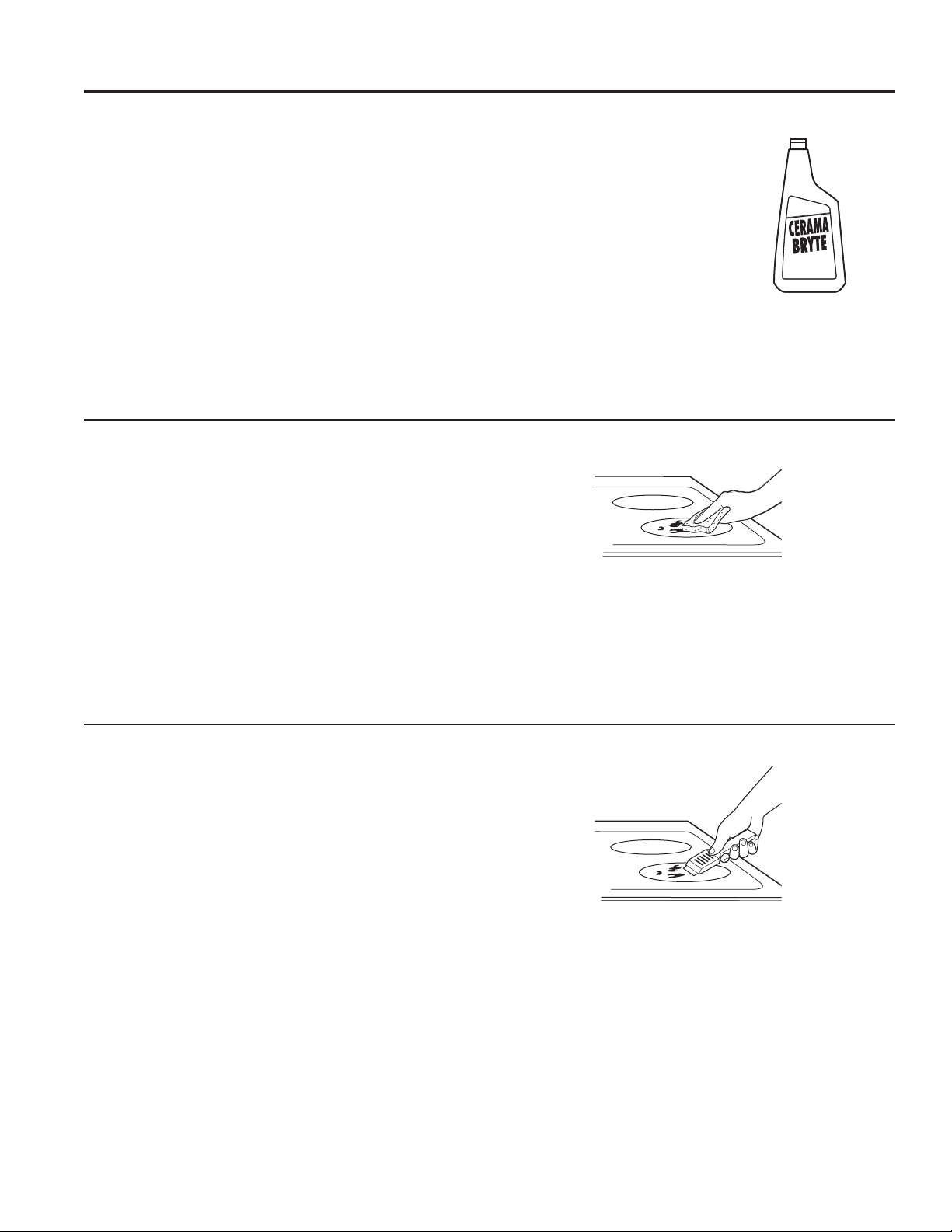
ONLY use CERAMA BRYTE
®
Ceramic Cooktop Cleaner
on the glass cooktop. Other creams may not be as
effective.
To maintain and protect the surface of your glass
cooktop, follow these steps:
1. Before using the cooktop for the first time, clean it
with CERAMA BRYTE
®
Ceramic Cooktop Cleaner.
This helps protect the top and makes cleanup easier.
2. Daily use of CERAMA BRYTE
®
Ceramic Cooktop
Cleaner will help keep the cooktop looking new.
3. Shake the cleaning cream well. Apply a few drops of
CERAMA BRYTE
®
Ceramic Cooktop Cleaner directly
to the cooktop.
4. Use a paper towel or
CERAMA BRYTE
®
Cleaning
Pad for Ceramic Cooktops
to clean the entire cooktop
surface.
5. Use a dry cloth or paper
towel to remove all cleaning
residue. No need to rinse.
NOTE: It is very important that
you DO NOT heat the cooktop
until it has been cleaned
thoroughly.
Burned-On Residue
NOTE: DAMAGE to your glass surface may occur if you
use scrub pads other than those recommended.
1. Allow the cooktop to cool.
2. Spread a few drops of CERAMA BRYTE
®
Ceramic
Cooktop Cleaner on the entire burned residue area.
3. Using the included CERAMA BRYTE
®
Cleaning Pad
for Ceramic Cooktops, rub the residue area, applying
pressure as needed.
4. If any residue remains, repeat the steps listed above
as needed.
5. For additional protection, after all residue has been
removed, polish the entire surface with CERAMA
BRYTE
®
Ceramic Cooktop Cleaner and a paper towel.
Heavy, Burned-On Residue
1. Allow the cooktop to cool.
2. Use a single-edge razor blade scraper at approximately
a 45° angle against the glass surface and scrape the
soil. It will be necessary to apply pressure to the razor
scraper in order to remove the residue.
3. After scraping with the razor scraper, spread a few drops
of CERAMA BRYTE
®
Ceramic Cooktop Cleaner on the
entire burned residue area. Use the CERAMA BRYTE
®
Cleaning Pad to remove any remaining residue.
4. For additional protection, after all residue has been
removed, polish the entire surface with CERAMA
BRYTE
®
Ceramic Cooktop Cleaner and a paper towel.
The CERAMA BRYTE
®
Ceramic Cooktop Scraper and
all recommended supplies are available through our
Parts Center. See instructions under “To Order Parts”
section on next page.
NOTE: Do not use a dull or nicked blade.
Clean your cooktop after each
spill. Use CERAMA BRYTE
®
Ceramic Cooktop Cleaner.
Use a CERAMA BRYTE
®
Cleaning
Pad for Ceramic Cooktops.

49-2000226 Rev. 0 23
Cleaning the Glass Cooktop (Cont.)
CARE AND CLEANING: Cleaning the Glass Cooktop
Metal Marks and Scratches
1. Be careful not to slide pots and pans across your
cooktop. It will leave metal markings on the cooktop
surface.
These marks are removable using the CERAMA
BRYTE
®
Ceramic Cooktop Cleaner with the CERAMA
BRYTE
®
Cleaning Pad for Ceramic Cooktops.
2. If pots with a thin overlay of aluminum or copper
are allowed to boil dry, the overlay may leave black
discoloration on the cooktop.
This should be removed immediately before heating
again or the discoloration may be permanent.
NOTE: Carefully check the bottom of pans for roughness
that would scratch the cooktop.
Damage from Sugary Spills and Melted Plastic
Special care should be taken when removing hot substances to avoid permanent damage of the glass surface.
Sugaryspillovers(suchasjellies,fudge,candy,syrups)ormeltedplasticscancausepittingofthesurfaceofyour
cooktop(notcoveredbythewarranty)unlessthespillisremovedwhilestillhot.Specialcareshouldbetakenwhen
removing hot substances.
Be sure to use a new, sharp razor scraper.
Do not use a dull or nicked blade.
1. Turn off all surface units. Remove hot pans.
2. Wearing an oven mitt:
a.Useasingle-edgerazorbladescraper(CERAMA
BRYTE
®
CeramicCooktopScraper)tomovethe
spill to a cool area on the cooktop.
b. Remove the spill with paper towels.
3. Any remaining spillover should be left until the surface
of the cooktop has cooled.
4. Don’t use the surface units again until all of the
residue has been completely removed.
NOTE: If pitting or indentation in the glass surface has
already occurred, the cooktop glass will have to be
replaced. In this case, service will be necessary.
Cooktop Seal
To clean the cooktop seal around the edges of the glass,
lay a wet cloth on it for a few minutes, then wipe clean
with nonabrasive cleaners.
24 49-2000226 Rev. 0
WARNING
SHOCK OR BURN HAZARD: Before replacing oven light bulb, disconnect the electrical power to the
range at the main fuse or circuit breaker panel. Failure to do so may result in electric shock or burn.
CAUTION
BURN HAZARD: The glass cover and bulb should be removed when cool. Touching hot glass with
bare hands or a damp cloth can cause burns.
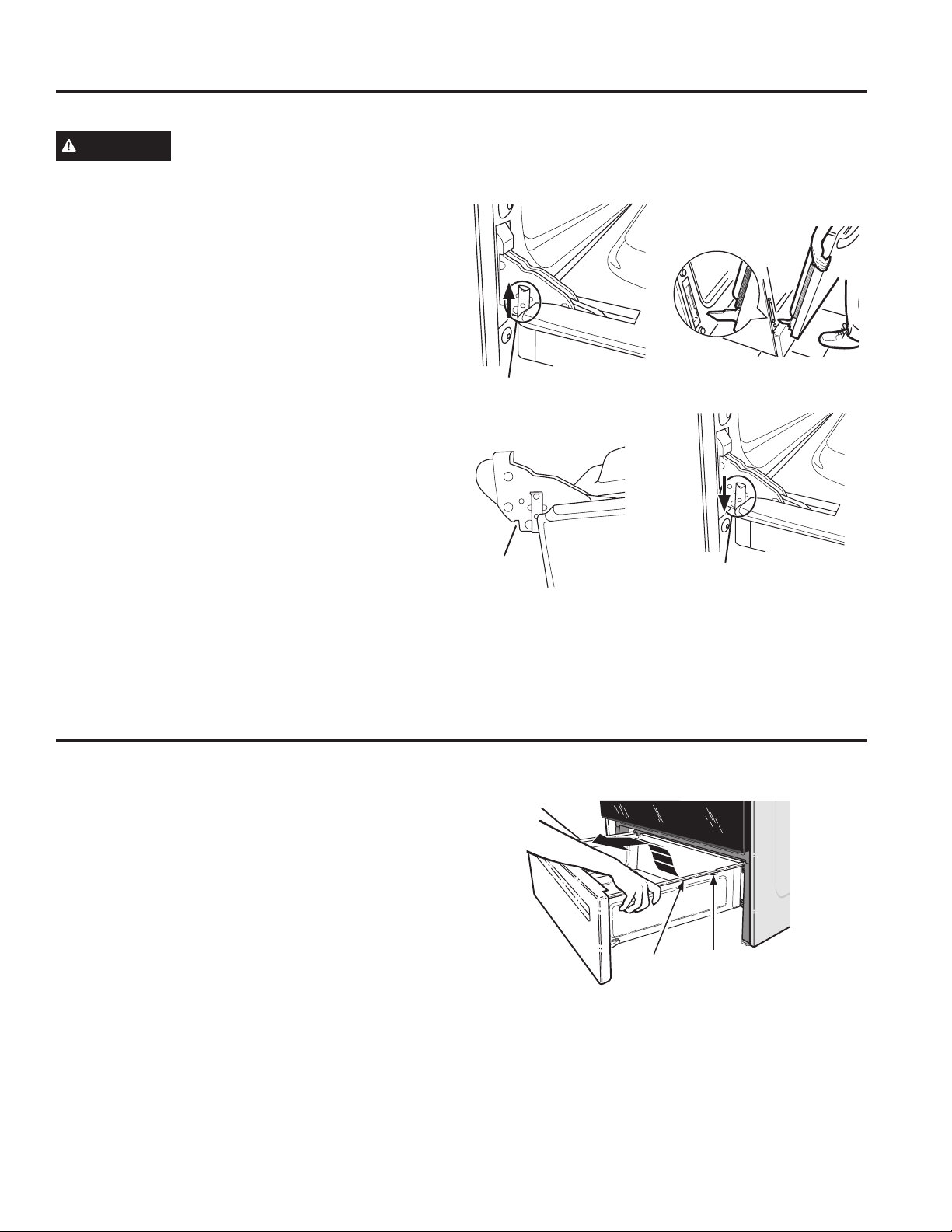
Oven Light Replacement (on some models)
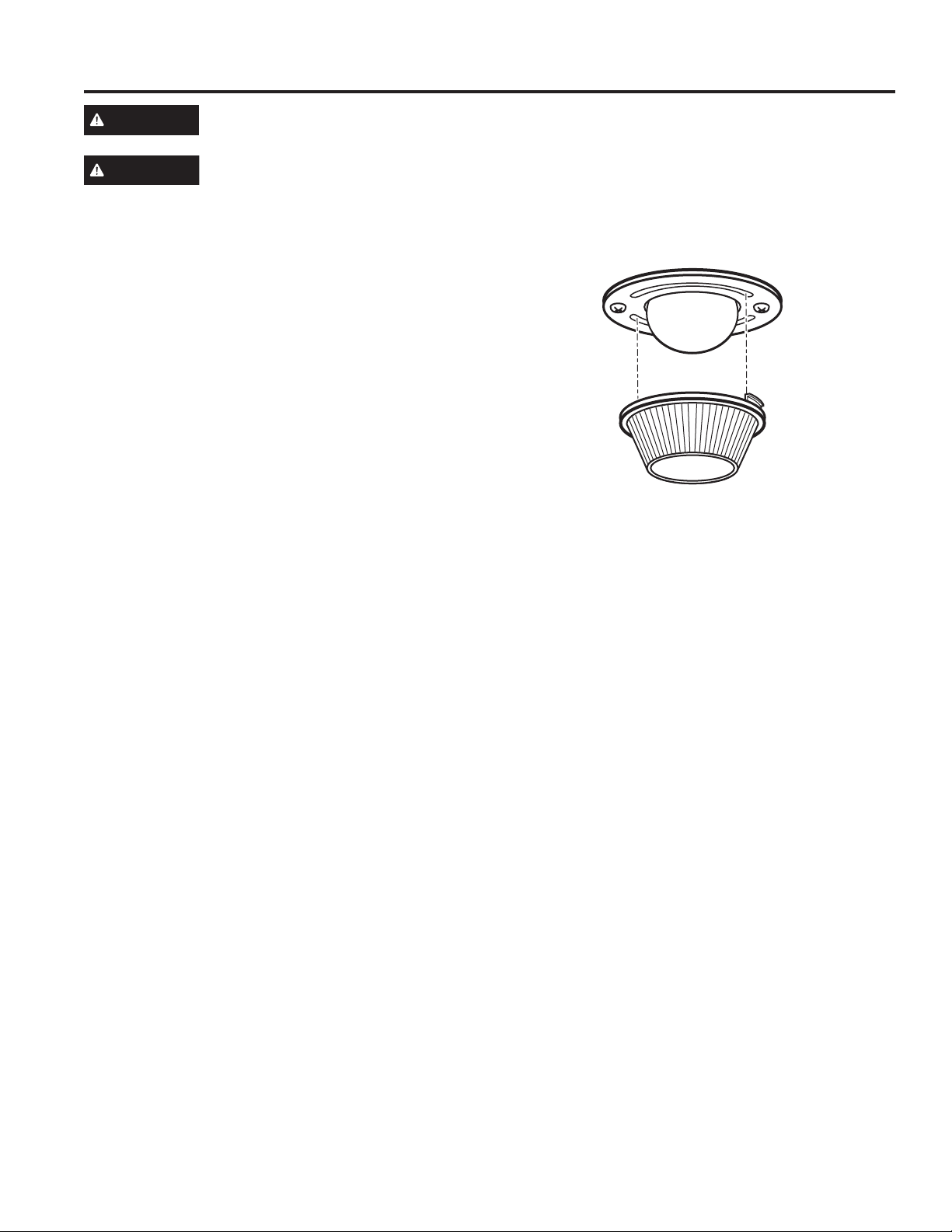
To remove:
1. Turn the glass cover counterclockwise 1/4 turn until
the tabs of the glass cover clear the grooves of the
socket. Wearing latex gloves may offer a better grip.
2. Remove the bulb by turning it counter-clockwise.
To replace:
1. Replace bulb with a new 40-watt appliance bulb.
Insert the bulb and turn it clockwise until it is tight.
2. Place the tabs of the glass cover into the grooves of
the socket. Turn the glass cover clockwise 1/4 turn.
For improved lighting inside the oven, clean the glass
cover frequently using a wet cloth. This should be
done when the oven is completely cool.
3. Reconnect electrical power to the oven.
CARE AND CLEANING: Oven Light
Oven Light
Glass cover on Self Clean models only.
49-2000226 Rev. 0 25
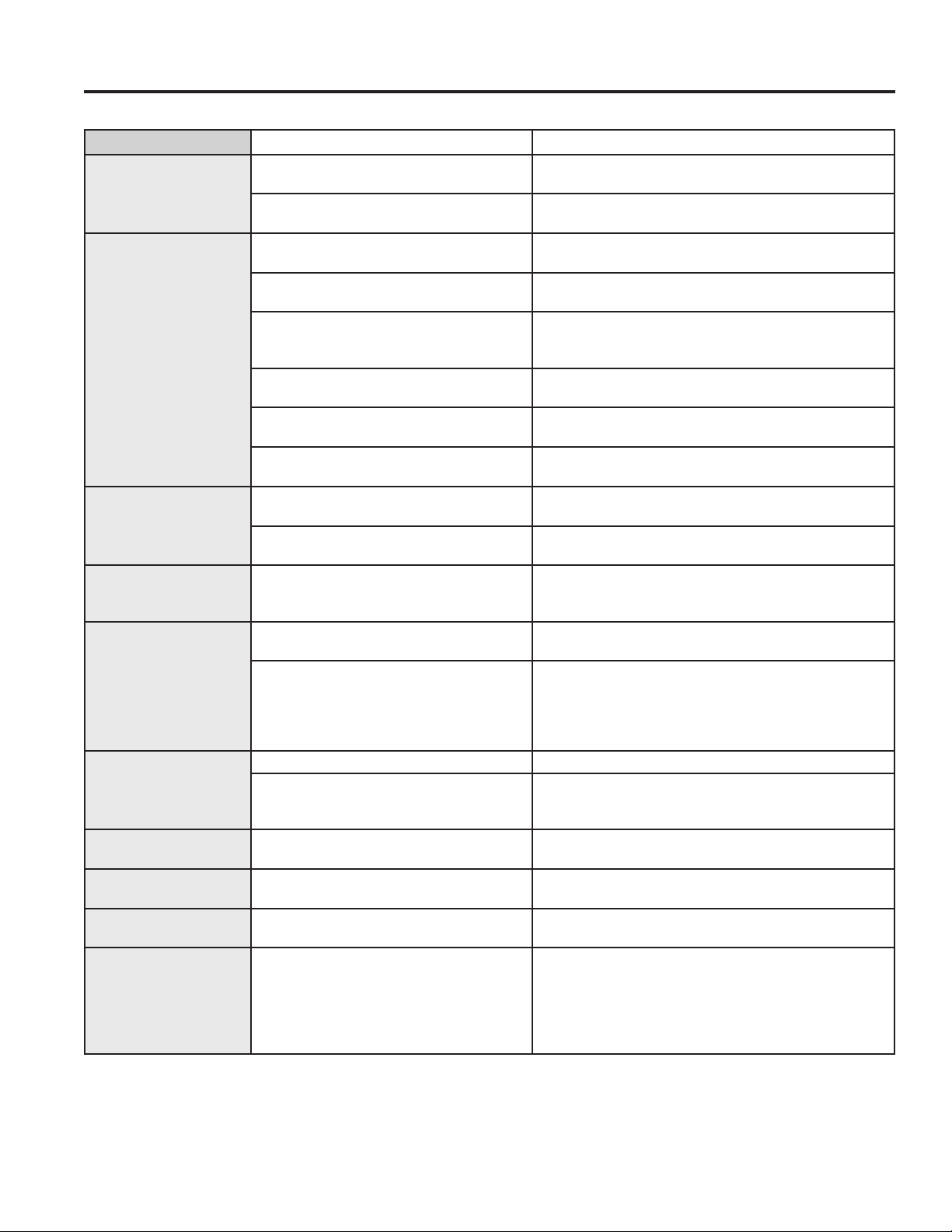
To remove the drawer:
1. Pull the drawer out until it stops.
2. Lift the front of the drawer until the stops clear the
guides.
3. Remove the drawer.
To replace the drawer:
1. Place the drawer rails on the guides.
2. Push the drawer back until it stops.
3. Lift the front of the drawer and push back until the
stops clear the guides.
4. Lower the front of the drawer and push back until it
closes.
Stop guide
Rail
Oven Door
Storage Drawer (on some models)
CARE AND CLEANING: Oven Door / Storage Drawer
To Remove the Door:
1. Fully open the oven door.
2. On each hinge, slide the hinge lock up, making sure it
snaps into its fully raised position.
3. Firmly grasp both sides of the door at near the top.
4. Close door until the top of the door is approximately
3” from the range frame.
5. Lift door up and away from the range until both hinge
arms are clear of the slots in the range frame.
To Replace the Door:
1. Firmly grasp both sides of the door near the top.
2. With the door at the same angle as the removal
position, rest the notch in the bottom of the left hinge
arm on the bottom edge of the left hinge slot. The
notch in the hinge arm must be fully seated onto the
bottom of the slot. Repeat for the right side.
3. Fully open the door. If the door will not fully open,
the notches in the bottoms of the hinge arms are not
seated correctly onto the bottom edge of the slot. Lift
the door off the range and repeat Step 2.
4. Push the hinge locks down to the locked position
5. Close the oven door.
The door is very heavy. Be careful when removing and lifting the door. Do not lift door by the handle.
WARNING
If improperly removed, oven door hinges may suddenly open and can cause personal injury to
appendages near the hinge. Follow instructions below to avoid a risk of injury when removing and
re-installing the oven door.
Pull hinge locks up to unlock
Notch
Push hinge locks down to lock
Removal position
26 49-2000226 Rev. 0
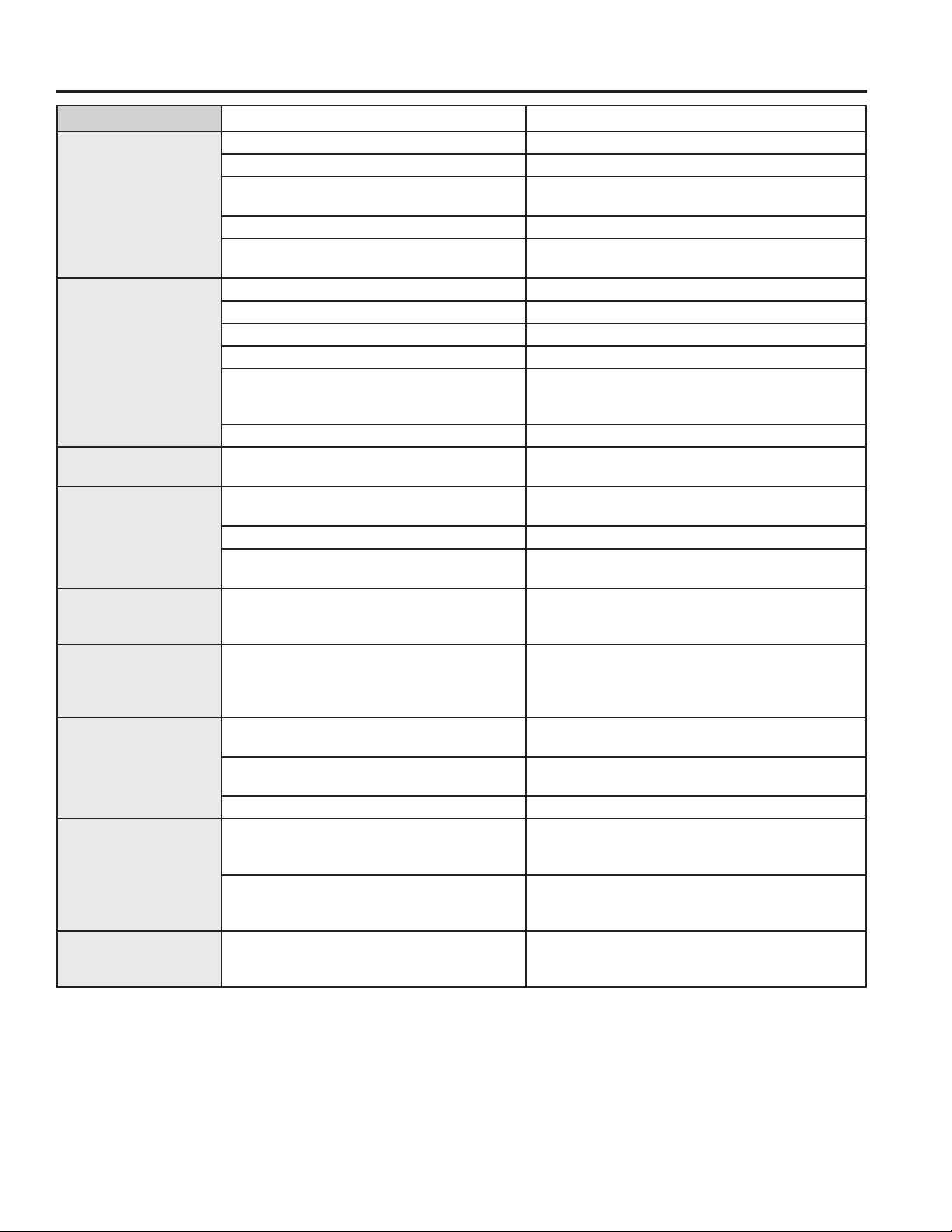
Problem Possible Cause What To Do
Surface units will not
maintain a rolling boil
or cooking is not fast
enough
Improper cookware being used. Use pans which are flat and match the diameter of the
surface unit selected.
Insomeareas,thepower(voltage)maybe
low.
Cover pan with a lid until desired heat is obtained.
Coil surface units do
not work properly
The surface units are not plugged in
solidly.
With the controls off, check to make sure the surface
unit is plugged completely into the receptacle.
The surface unit controls improperly set. Check to see the correct control is set for the surface
unit you are using.
The drip pans are not set securely in the
cooktop.
With the controls off, check to make sure the drip pan is
in the recess in the cooktop and that the opening in the
pan lines up with the receptacle.
A fuse in your home may be blown or the
circuit breaker tripped.
Replace the fuse or reset the circuit breaker.
Sensi-Temp Technology sensor cap is
overly soiled.
Clean Sensi-temp Technology sensor cap per cleaning
the range section.
Sensi-temp sensor cap stuck or will not
flex up and down.
Call a qualified technician for replacement. Replace coil
surface units with only the exact replacement part.
Surface units do not
work properly
A fuse in your home may be blown or the
circuit breaker tripped.
Replace the fuse or reset the circuit breaker.
Cooktop controls improperly set. Check to see the correct control is set for the surface
unit you are using.
Surface unit stops
glowing when turned
to a lower setting
The unit is still on and hot. This is normal.
Scratches (may appear
as cracks) on cooktop
glass surface
Incorrect cleaning methods being used. Scratches are not removable. Tiny scratches will
become less visible in time as a result of cleaning.
Cookware with rough bottoms being used
orcoarseparticles(saltorsand)were
between the cookware and the surface
of the cooktop. Cookware has been slid
across the cooktop surface.
To avoid scratches, use the recommended cleaning
procedures. Make sure bottoms of cookware are clean
before use, and use cookware with smooth bottoms.
Areas of discoloration
on the cooktop
Food spillovers not cleaned before next use.
See the Cleaning the glass cooktop section.
Hot surface on a model with a light-colored
cooktop.
This is normal. The surface may appear discolored
when it is hot. This is temporary and will disappear as
the glass cools.
Plastic melted to the
surface
Hot cooktop came into contact with plastic
placed on the hot cooktop.
SeetheGlasssurface—potentialforpermanentdamage
section in the Cleaning the glass cooktop section.
Pitting (or indentation)
of the cooktop
Hot sugar mixture spilled on the cooktop. Call a qualified technician for replacement.
Frequent cycling off
and on of surface units
Improper cookware being used. Use only flat cookware to minimize cycling.
My new oven doesn't
cook like my old one.
Is something wrong
with the temperature
settings?
Your new oven has a different cooking
system from your old oven and therefore
may cook differently than your old oven.
For the first few uses, follow your recipe times and
temperatures carefully. If you still think your new oven
is too hot or too cold, you can adjust the temperature
yourself to meet your specific cooking preference.
NOTE: This adjustment affects Bake temperatures; it
will not affect Broil or Clean.
TROUBLESHOOTING TIPS
Troubleshooting Tips ... Before you call for service
Save time and money! Review the charts on the following pages first and you may not need to call for service.
49-2000226 Rev. 0 27
TROUBLESHOOTING TIPS
Troubleshooting Tips ... Before you call for service
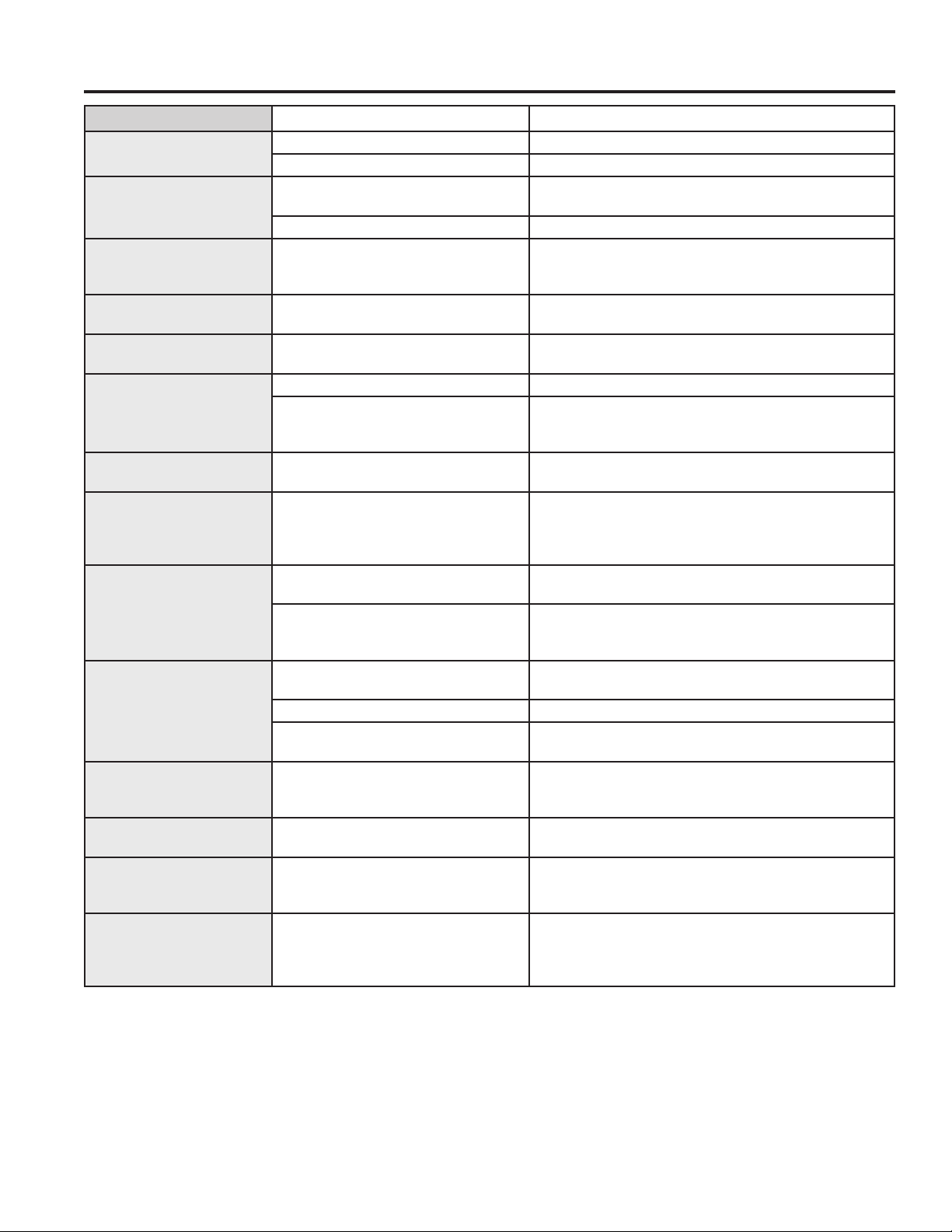
Problem Possible Cause What To Do
Food does not bake
properly
Oven controls improperly set. See the Cooking Modes section.
Rack position is incorrect or rack is not level. See the Cooking Modes section and Cooking Guide.
Incorrect cookware or cookware of improper
size being used.
See the Cookware section.
Oven temperature needs adjustment. See the Special Features section.
Ingredient substitution Substituting ingredients can change the recipe
outcome.
Food does not broil
properly
Oven controls improperly set. Make sure you select the appropriate broil mode.
Improper rack position being used. See Cooking Guide for rack location suggestions.
Food being cooked in a hot pan. Make sure cookware is cool.
Cookware not suited for broiling. Use a pan specifically designed for broiling.
Aluminum foil used on the broiling pan and
grid has not been fitted properly and slit as
recommended.
If using aluminum foil conform to pan slits.
Insomeareasthepower(voltage)maybelow. Preheat the broil element for 10 minutes.
Oven temperature too
hot or too cold
Oven temperature needs adjustment. See the Special Features section or adjust the
thermostat(onmodelswithoventemperatureknob).
Oven does not work
or appears not to work
A fuse in your home may be blown or the
circuit breaker tripped.
Replace the fuse or reset the circuit breaker.
Oven controls improperly set. See the Using the Oven section.
Oven is in Sabbath Mode. Verify, that the oven is not in Sabbath Mode. See
the Special Features section.
“Crackling” or
“popping” sound
This is the sound of the metal heating and
cooling during both the cooking and cleaning
functions.
This is normal.
Why is my range
making a "clicking"
noise when using my
oven?
Your range cycles the heating elements by
turning relays on and off to maintain the oven
temperature.
This is normal.
Clock and timer do
not work
A fuse in your home may be blown or the
circuit breaker tripped.
Replace the fuse or reset the circuit breaker.
Plug on range is not completely inserted in the
electrical outlet.
Make sure electrical plug is plugged into a live,
properly grounded outlet.
Oven controls improperly set. See the Using the kitchen timer section.
Storage drawer won’t
close
Power cord may be obstructing drawer in the
lower back of the range.
Reposition the drawer and power cord. See the
Storage Drawer Removal instructions in the Care
and cleaning of the range section.
Rear drawer support is on top of the guide rail. Reposition the drawer. See the Storage Drawer
Removal instructions in the Care and cleaning of the
range section.
Oven door is crooked The door is out of position. Because the oven door is removable, it sometimes
gets out of position during installation. To straighten
the door, push down on the high corner.
28 49-2000226 Rev. 0
Problem Possible Cause What To Do
Oven light does not work Light bulb is loose or defective. Tighten or replace bulb.
Pad operating light is broken. Call for service.
Oven will not self-clean The temperature is too high to set a
self-clean operation.
Allow the oven to cool and reset the controls.
Oven controls improperly set. See the Cleaning the Oven section.
Excessive smoking
during clean cycle
Excessive soil or grease. Press the Cancel/Off pad. Open the windows to rid the
room of smoke. Wait until the LOCKED light goes off.
Wipe up the excess soil and reset the clean cycle.
Excessive smoking
during broiling
Food too close to burner element. Lower the rack position of the food.
Oven door will not open
after a clean cycle
Oven too hot. Allow the oven to cool below locking temperature.
Oven not clean after a
clean cycle
Oven controls improperly set. See the Cleaning the Oven section.
Oven was heavily soiled. Clean up heavy spillovers before starting the clean
cycle. Heavily soiled ovens may need to self-clean again
or for a longer period of time.
"LOCK DOOR" flashes in
the display
The self-clean cycle has been selected
but the door is not closed.
Close the oven door.
DOOR LOCK light is on
when you want to cook
The oven door is locked because
the temperature inside the oven
has not dropped below the locking
temperature.
Press the Cancel/Off pad. Allow the oven to cool.
“F— and a number or
letter” flash in the display
You have a function error code. Press the Cancel/Off pad. Allow the oven to cool for
one hour. Put the oven back into operation.
If the function code repeats. Disconnect all power to the oven for at least 30 seconds
and then reconnect power. If the function error code
repeats, call for service.
Display goes blank A fuse in your home may be blown or
the circuit breaker tripped.
Replace the fuse or reset the circuit breaker.
The clock is turned off. See the Special features section.
Oven is in Sabbath Mode. Verify that the oven is not in Sabbath Mode. See the
Special Features section.
Power outage, clock
flashes
Power outage or surge Reset the clock. If the oven was in use, you must reset
it by pressing the Cancel/Off pad, setting the clock and
resetting any cooking function.
“Burning” or “oily” odor
emitting from the vent
This is normal in a new oven and will
disappear in time.
To speed the process, set a self-clean cycle for a
minimum of 3 hours. See the Cleaning the Oven section.
Strong odor An odor from the insulation around the
inside of the oven is normal for the first
few times the oven is used.
This is temporary and will go away after several uses or
a self-clean cycle.
My oven door glass
appears to be "tinted" or
have a "rainbow" color. Is
this defective?
No. The inner oven glass is coated with
a heat barrier to reflect the heat back
into the oven to prevent heat loss and
keep the outer door cool while baking.
This is normal. Under certain light or angles, you may
see this tint or rainbow color.
TROUBLESHOOTING TIPS
Troubleshooting Tips ... Before you call for service
49-2000226 Rev. 0 29
TROUBLESHOOTING TIPS
Troubleshooting Tips ... Before you call for service
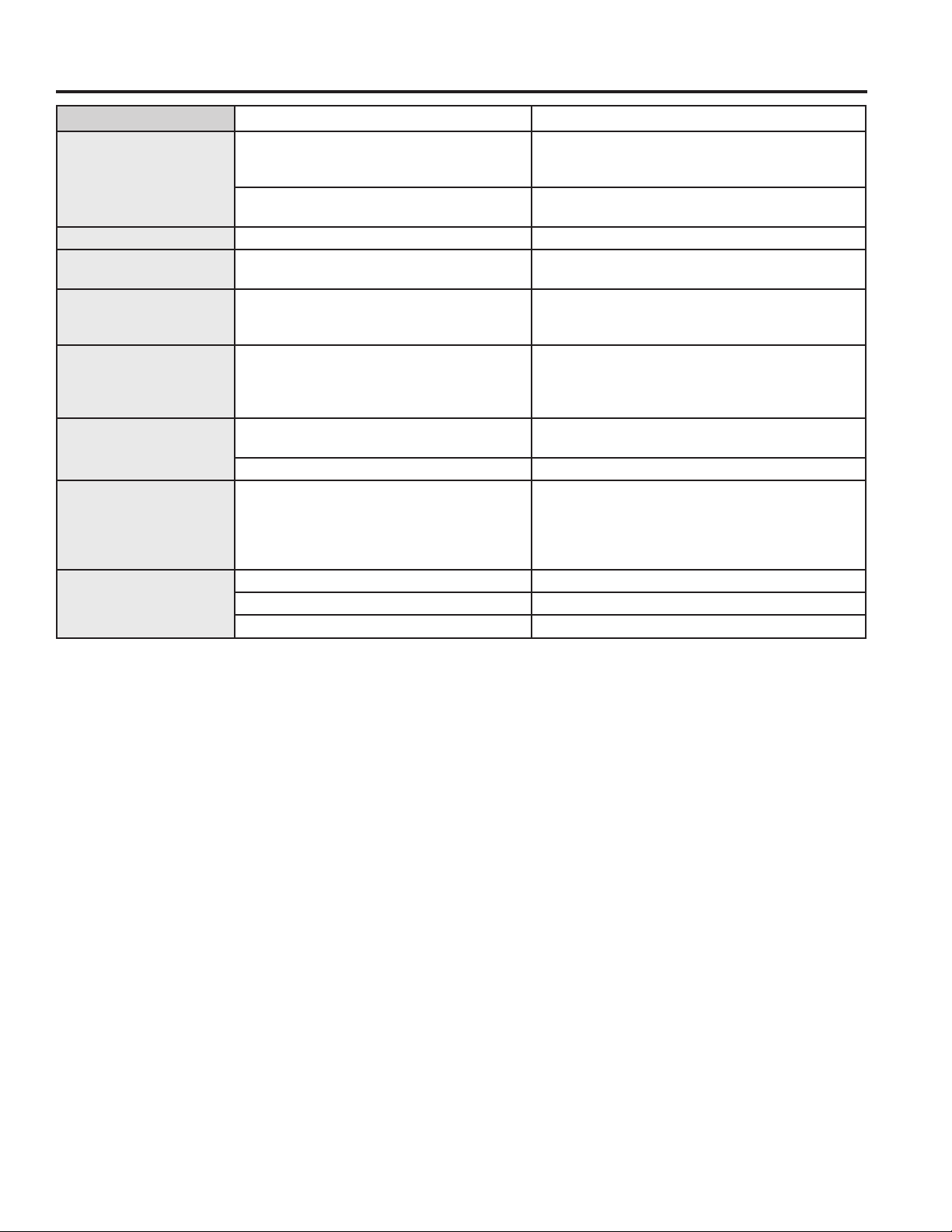
Problem Possible Cause What To Do
Sometimes the oven
takes longer to preheat
to the same temperature
Cookware or food in oven. The cookware or food in the oven will cause the
oven to take longer to preheat. Remove items to
reduce preheat time.
Number of racks in oven. Adding more racks to the oven will cause the oven
to take longer to preheat. Remove some racks.
Display flashes Power failure. Reset the clock.
Unable to get the
display to show “SF”
Oven control pads were not touched
properly.
The Broil Hi/Lo and Bake pads must be touched
at the same time and held for 3 seconds.
Control signals after
entering cooking time or
start time
You forgot to enter a bake temperature or
cleaning time.
Touch the Bake pad and desired temperature or
the Self Clean pad and desired clean time.
Oven racks are difficult
to slide
The shiny, silver-colored racks were cleaned
in a self-clean cycle.
Apply a small amount of vegetable oil to a paper
towel and wipe the edges of the oven racks with
the paper towel. Do not spray with Pam
®
or other
lubricant sprays.
Drawer does not slide
smoothly or drags
The drawer is out of alignment. Fully extend the drawer and push it all the way in
See the Care and cleaning of the range section.
Drawer is over-loaded or load is unbalanced. Reduce weight. Redistribute drawer contents.
Steam from the vent When using the ovens, it is normal to see
steam coming out of the oven vents. As the
number of racks or amount of food being
cooked increases, the amount of visible
steam will increase.
This is normal.
Excessive condensation
in the drawer
Liquid in drawer. Remove liquid.
Uncovered foods. Cover food with lid or aluminum foil.
Temperature setting too high. Reduce temperature setting.
30 49-2000226 Rev. 0
Crosley
®
Corporation Electric Range Limited Warranty
LIMITED WARRANTY
Crosley.com
Your appliance is covered by a limited warranty, as listed below, by GE Appliances. All warranty service is provided by
our GE Appliances Factory Service Centers, or an authorized service technician. To schedule service, call Crosley at
800.544.4780. Please have your serial number and your model number available when calling for service.
EXCLUSION OF IMPLIED WARRANTIES
Your sole and exclusive remedy is product repair as provided in this Limited Warranty. Any implied warranties,
including the implied warranties of merchantability or fitness for a particular purpose, are limited to one year or the
shortest period allowed by law.
Crosley
®
Extended Warranty
In addition to the warranty shown above, ask your dealer or visit us at Crosley.com/warranty regarding the Crosley
10-Year Extended Limited Warranty that comes to you at no extra charge. This warranty will cover your product after
the initial manufacturer’s warranty expires up through 10 years. Please contact Crosley at Crosley.com or call Crosley
at 800.356.5268 for specific details.
This limited warranty is extended to the original purchaser and any succeeding owner for products purchased for
home use within the USA. If the product is located in an area where service by a GE Appliances Authorized Servicer
is not available, you may be responsible for a trip charge or you may be required to bring the product to an Authorized
GE Appliances Service location for service. In Alaska, the limited warranty excludes the cost of shipping or service
calls to your home.
Some states do not allow the exclusion or limitation of incidental or consequential damages. This limited warranty
gives you specific legal rights, and you may also have other rights which vary from state to state. To know what your
legal rights are, consult your local or state consumer affairs office or your state’s Attorney General.
Warrantor: GE Appliances, a Haier company
Louisville, KY 40225
For the period of GE Appliances will replace
One year
From the date
of the original
purchase
Any part of the range which fails due to a defect in materials or workmanship. During this
limited one-year warranty, GE Appliances will provide, free of charge, all labor and in-home
service to replace the defective part.
Staple your receipt here. Proof of the original purchase
date is needed to obtain service under the warranty.
This warranty will not cover:
■ Servicetripstoyourhometoteachyouhowto
use the product.
■ Improperinstallation,deliveryormaintenance.
■ Failureoftheproductifitisabused,misused,
modified or used for other than the intended
purpose or used commercially.
■ Damagetotheglasscooktopcausedbyuseof
cleaners other than the recommended cleaning
creams and pads.
■ Damagetotheglasscooktopcausedbyhardened
spills of sugary materials or melted plastic that
are not cleaned according to the directions in the
Owner's Manual.
■ Replacementofhousefusesorresettingofcircuit
breakers.
■ Damagetotheproductcausedbyaccident,fire,
floods or acts of God.
■ Damagetofinish,suchassurfacerust,tarnish,or
small blemishes not reported within 48 hours of
delivery.
■ Incidentalorconsequentialdamagecausedby
possible defects with this appliance.
■ Damagecausedafterdelivery.
■ Productnotaccessibletoproviderequired
service.
■ Servicetorepairorreplacelightbulbs,exceptfor
LED lamps.
■ ImmersingortamperingwiththeSensi-Temp
Technology coil surface units.

49-2000226 Rev. 0 31
Looking For Something More?
GE Appliances offers a variety of accessories to
improve your cooking and maintenance experiences!
Refer to the Consumer Support page for phone numbers
and website information.
The following products and more are available:
Accessories
SmallBroilerPan(8¾”x1¼”x13½”)
Large*BroilerPan(12¾”x1¼”x16½”)
XL**BroilerPan(17”x1¼”x19¼”)
Parts
Oven racks
Oven burners
Light bulbs
Cleaning Supplies
CitruShine™ Stainless Steel Wipes
CERAMA BRYTE
®
Stainless Steel Appliance Cleaner
CERAMA BRYTE
®
Cleaning Pads for Ceramic Cooktops
CERAMA BRYTE
®
Ceramic Cooktop Cleaner
CERAMA BRYTE
®
Ceramic Cooktop Scraper
Kit(Kitincludescreamandcooktopscraper)
Graphite Lubricant
*The large broiler pan does not fit in 20”/24” ranges.
**The XL broiler pan does not fit in 24” wall ovens, 27”drop ins or 20”/24” ranges
Accessories
ACCESSORIES

32 49-2000226 Rev. 0
Consumer Support
CONSUMER SUPPORT
Crosley Website
Have a question or need assistance with your appliance? Try the Crosley Website 24 hours a day, any day of the
year at Crosley.com. You can also shop for more great Crosley products on our website.
Register Your Appliance
Register your new appliance on-line at your convenience at Crosley.com/mycrosley. Timely product registration will
allow for enhanced communication and prompt service under the terms of your warranty, should the need arise. You
may also mail in the pre-printed registration card included in the packing material.
Schedule Service
Crosley repair service is only one step away from your door. Call 800.544.4780 during normal business hours to
schedule service.
CROSLEYCARE
®
10 Year Limited Warranty
When you buy a Crosley appliance, you receive one of the best warranties available in the appliance industry. For more
information, visit Crosley.com/warranty. Visit Crosley.com/mycrosley to register the extended limited warranty.
Parts and Accessories
Individualsqualifiedtoservicetheirownappliancescanhavepartsoraccessoriessentdirectlytotheirhomes(VISA,
MasterCardandDiscovercardsareaccepted).Orderon-linetoday24hourseveryday.VisitGEApplianceparts.com
or by phone at 877.959.8688 during normal business hours.
Instructions contained in this manual cover procedures to be performed by any user. Other servicing
generally should be referred to qualified service personnel. Caution must be exercised, since improper
servicing may cause unsafe operation.