2218469
Top-Mount Refrigerator
Table of Contents ........2
2
A NOTE TO YOU
Thank you for buying a WHIRLPOOL
®
appliance.
Because your life is getting busier and more complicated,
Whirlpool appliances are easy to use, save time, and help
you manage your home better. To ensure that you enjoy
years of trouble-free operation, we developed this Use
and Care Guide. It is full of valuable information about
how to operate and maintain your appliance properly and
safely. Please read it carefully.
Look for these tips
Look for these Time Smart Tips located through-
out the Use & Care Guide. They will help you save
time and make the most of your new appliance.
TABLE OF CONTENTS
Page
A Note to You ..................................................................2
Refrigerator Safety ........................................................3
Parts and Features ........................................................4
Installing Your Refrigerator ............................................6
Using Your Refrigerator ................................................9
Setting the controls ......................................................9
Changing the control settings ....................................10
Ensuring proper air circulation....................................10
Removing the snap-on door trim ................................11
Removing the drop-in door trim..................................11
Adjusting the door bins ..............................................11
Adjusting the refrigerator shelves ..............................12
Adjusting the utility compartment and tray ................13
Using the flip-up door shelf ........................................13
Removing the meat drawer and cover ......................14
Adjusting the EZ-TRAK refrigerator shelf ..................15
Removing the crisper and crisper cover ....................16
Adjusting the crisper humidity control ........................17
Adjusting the freezer shelf..........................................17
Removing the pull-out freezer floor ............................18
Using the optional automatic ice maker ....................18
Removing the base grille............................................19
Changing the light bulbs ............................................19
Reversing the door swing ..........................................20
Saving energy ............................................................22
Understanding the sounds you may hear ..................22
Caring for Your Refrigerator ........................................23
Food Storage Guide ....................................................25
Troubleshooting Guide ................................................27
Requesting Assistance or Service ..............................32
Index ..............................................................................33
Record your model’s information
Write down the following information about your refrigera-
tor to better help you obtain assistance or service if you
ever need it. You will need to know your complete model
number and serial number. You can find this information
on the model and serial number label/plate.
If you need assistance or service, first see the
“Troubleshooting” section of this book. After checking
“Troubleshooting,” additional help can be found by
checking the “Requesting Assistance or Service” section.
Dealer name________________________________________
Address ____________________________________________
Phone number______________________________________
Model number ______________________________________
Serial number ______________________________________
Purchase date ______________________________________
(See the “Parts and Features” section for model and
serial number label/plate location.)
Keep this book and your sales slip together for
future reference.
3
PROPER DISPOSAL
OF YOUR OLD
REFRIGERATOR
wWARNING
Suffocation Hazard
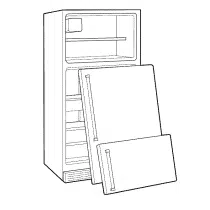
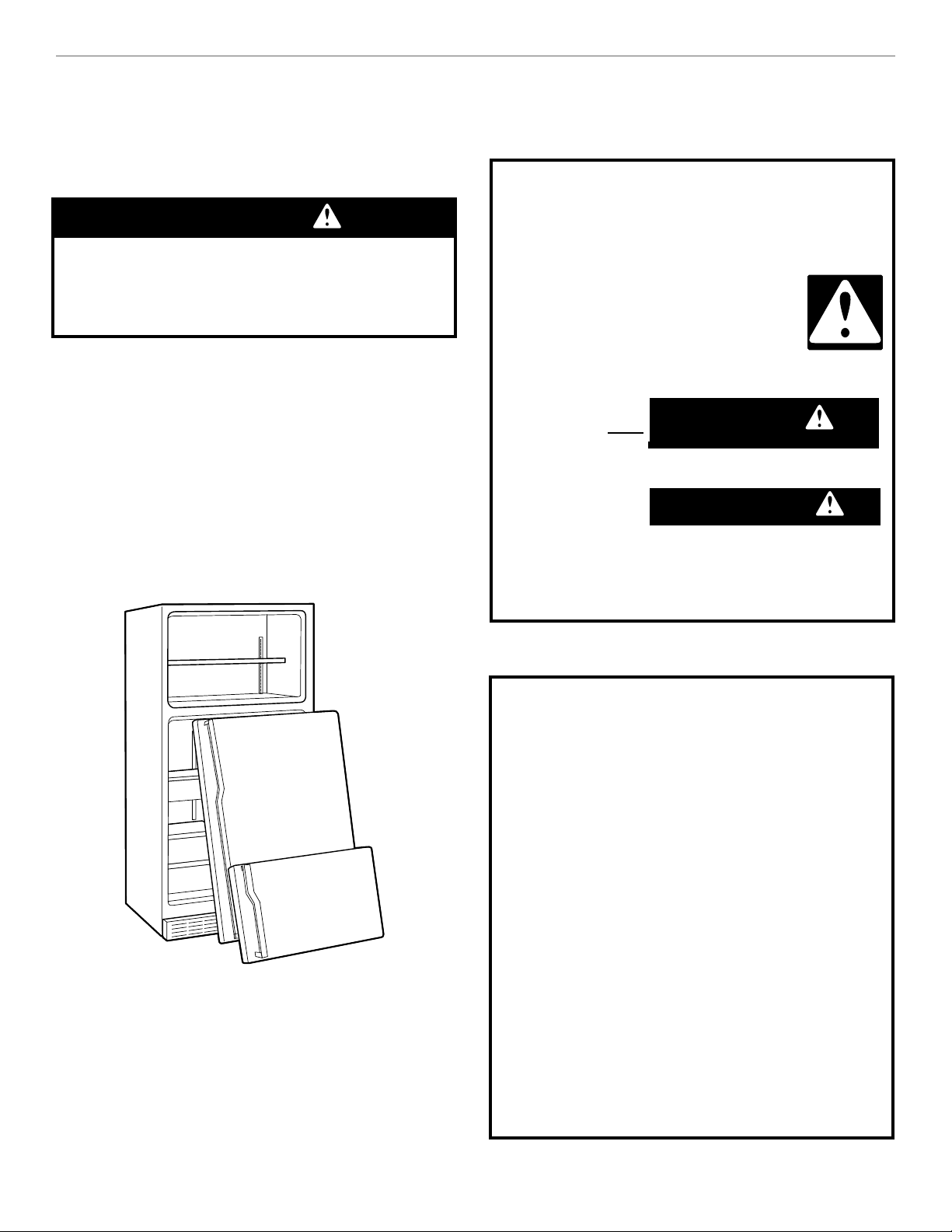
Remove doors from your old refrigerator.
Failure to do so can result in death or
brain damage.
IMPORTANT: Child entrapment and suffocation are not
problems of the past. Junked or abandoned refrigerators
are still dangerous ... even if they will sit for “just a few
days.” If you are getting rid of your old refrigerator, please
follow the instructions below to help prevent accidents.
BEFORE YOU THROW AWAY YOUR OLD
REFRIGERATOR OR FREEZER:
•
Take off the doors.
•
Leave the shelves in place so that children may not
easily climb inside.
REFRIGERATOR SAFETY
IMPORTANT SAFETY INSTRUCTIONS
WARNING: To reduce the risk of fire,
electric shock, or injury when using your
refrigerator, follow these basic precautions:
•
Plug into grounded (earthed) outlet.
•
Do not remove ground prong.
•
Do not use an adapter.
•
Do not use an extension cord.
•
Disconnect power before servicing.
•
Remove doors from your old refrigerator.
•
Use nonflammable cleaner only.
•
Keep flammable materials and vapors, such as
gasoline, away from refrigerator.
•
Use two or more people to move or install
refrigerator.
•
Unplug refrigerator before installing ice maker.
•
Use a sturdy glass when dispensing ice or water
(on some models).
– SAVE THESE INSTRUCTIONS –
All safety messages will tell you what the potential
hazard is, tell you how to reduce the chance of injury,
and tell you what can happen if the instructions are
not followed.
Your safety and the safety of others
are very important.
We have provided many important safety messages in
this manual and on your appliance. Always read and
obey all safety messages.
This is the safety alert symbol.
This symbol alerts you to potential hazards
that can kill or hurt you and others.
All safety messages will follow the safety
alert symbol and either the word
“DANGER” or “WARNING.” These
words mean:
You can be killed or seriously injured if you don't
immediately follow instructions.
You can be killed or seriously injured if you don't
follow instructions.
4
PARTS AND FEATURES
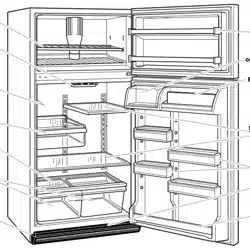
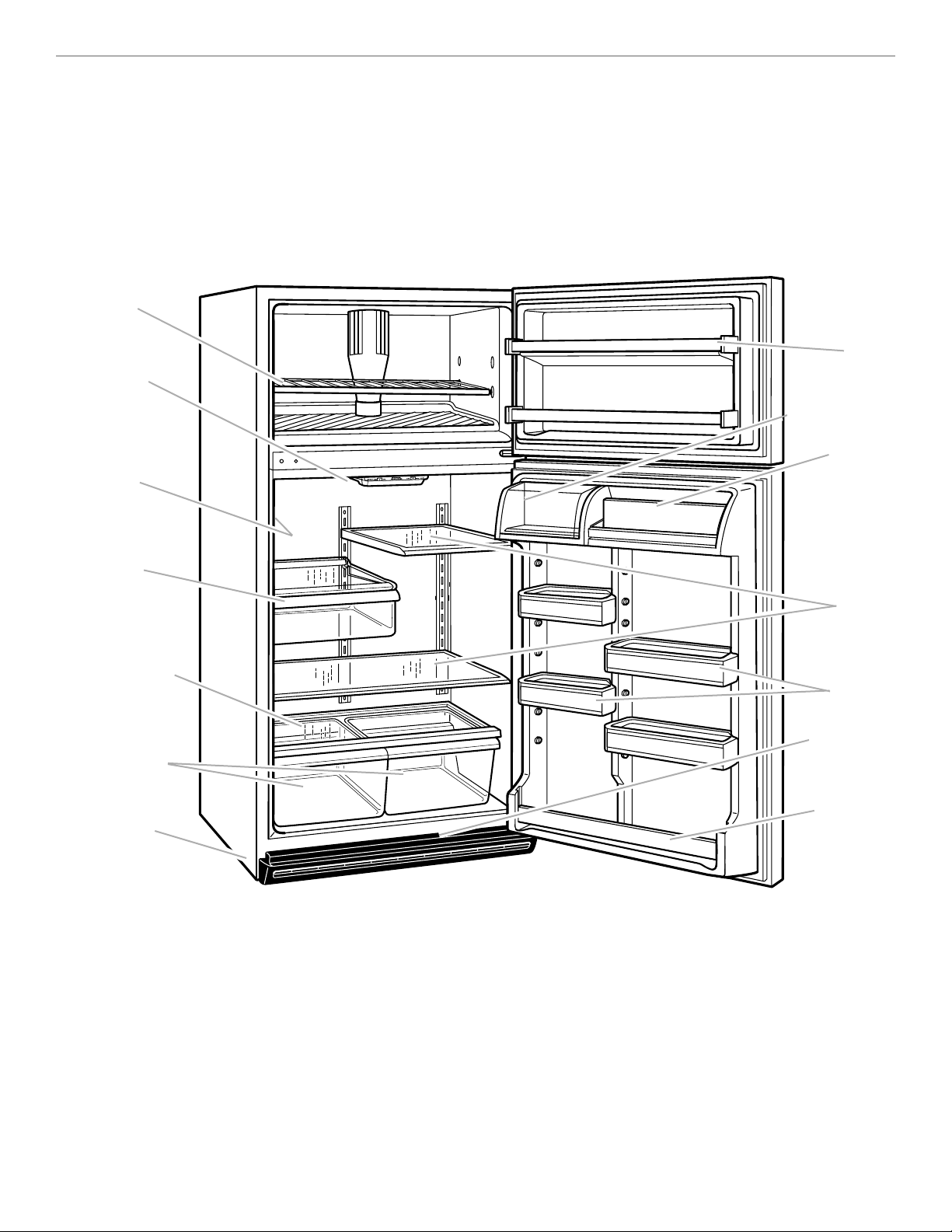
This section contains an illustration of your refrigerator. Use it to become more familiar with the parts
and features. Page references are included for your convenience.
NOTE: This manual covers several different models. The refrigerator you have purchased may have
some or all of the parts and features listed below.
Freezer shelf
†
(p. 17)
Control panel
(p. 9)
Model
and serial
number label
(on side wall)
Meat drawer
†
(p. 14)
Crisper cover
†
(p. 16)
Crispers
†
(p. 15)
Leveling
rollers
(behind
base grille)
(p. 8)
Snap-on
door trim
(p. 11)
Utility
compartment
†
(p. 13)
Flip-up shelf
†
(p. 13)
Adjustable
glass or wire
shelves
(p. 12)
Adjustable
door bins
††
(p. 11)
Base grille
(p. 19)
Drop-in
door trim
(p. 11)
Other parts and features
(not shown in illustration above/optional on some models)
Automatic ice maker (p. 18)
Ice cube trays/ice cube tray shelf
Pull-out freezer floor (p. 18)
Crisper humidity control (p. 17)
Egg/utility bin
EZ-TRAK lateral adjustable refrigerator shelf (p. 15)
†
on some models
††
some models may have fixed door shelves
5
PARTS AND FEATURES
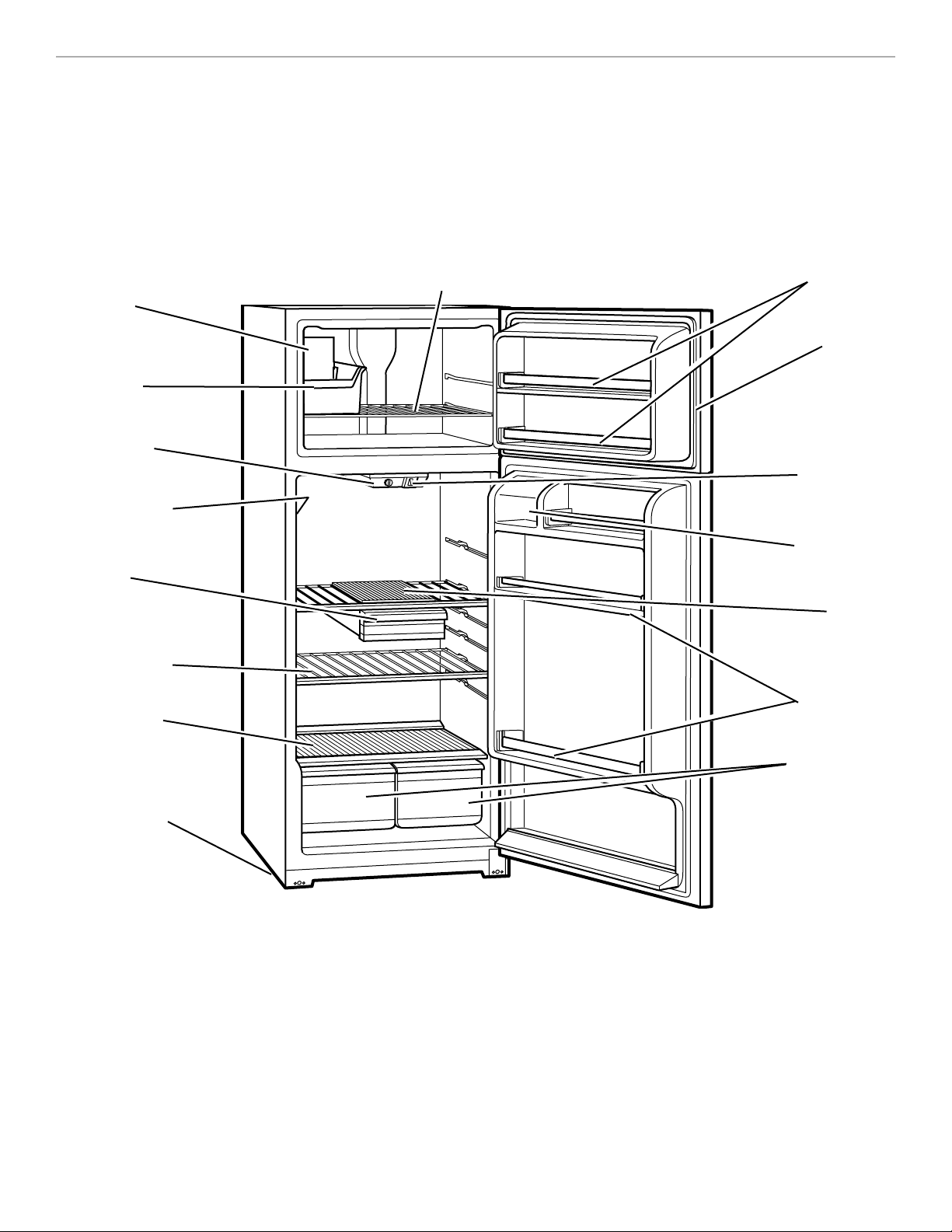
This section contains an illustration of your refrigerator. Use it to become more familiar with the parts
and features. Page references are included for your convenience.
NOTE: This manual covers several different models. The refrigerator you have purchased may have
some or all of the parts and features listed below.
Automatic
ice maker
(p. 18)
Ice bin
Temperature
control
(p. 9)
Model and serial
number label
(on side wall)
Meat drawer
†
(p. 14)
Adjustable
wire shelves
(p. 20)
Plastic crisper
cover
(p. 16)
Leveling rollers
(not shown)
(p. 8)
Door shelves
Magnetic
door gaskets
Light switch
Dairy
compartment
Meat drawer
cover
(solid plastic)
(p. 14)
Door shelves
Crisper drawers
(p. 16)
Adjustable freezer shelf
(partial shelf on some models)
(p. 17)
Other parts and features
(not shown in illustration above/optional on some models)
Ice cube trays
Full-width crisper drawer
Glass crisper cover
†
on some models
6
INSTALLING YOUR
REFRIGERATOR
It is important to prepare your refrigerator for
use. This section tells you how to clean it, install
it, connect it to a power source, and level it.
UNPACKING YOUR REFRIGERATOR
Removing packaging materials
•
Remove tape and any labels from your refrigerator
before using (except the model and serial number
label).
To remove any remaining tape or glue, rub the area
briskly with your thumb. Tape or glue residue can also
be easily removed by rubbing a small amount of liquid
dish soap over the adhesive with your fingers. Wipe
with warm water and dry.
•
Do not use sharp instruments, rubbing alcohol, flam-
mable fluids, or abrasive cleaners to remove tape or
glue. These products can damage the surface of your
refrigerator. For more information, see “Important
Safety Instructions” in the “Refrigerator Safety” section.
•
On some models, shelves, bins, door shelf rails, and
other feature parts may be packaged in the Finishing
Touches FeaturePak. Follow the instructions contained
in the package for proper assembly.
IMPORTANT:
•
Do not remove any permanent instruction labels inside
your refrigerator, or the Tech Sheet that is fastened to
the base grille.
•
Do not remove the white Styrofoam insert that is locat-
ed behind the control panel on the ceiling of the refrig-
erator. The insert is part of the refrigerator and not part
of the packing material. When the insert is removed,
ice may migrate down from the freezer and cause
icicles to form.
Cleaning before use
After you remove all of the packaging materials, clean
the inside of your refrigerator before using it. See the
cleaning instructions in the “Caring For Your Refrigerator”
section for more information.
wWARNING
Excessive Weight Hazard
Use two or more people to move refrigerator.
Failure to do so can result in back or other injury.
1
⁄
2
inch minimum
at top and sides
SPACE REQUIREMENTS
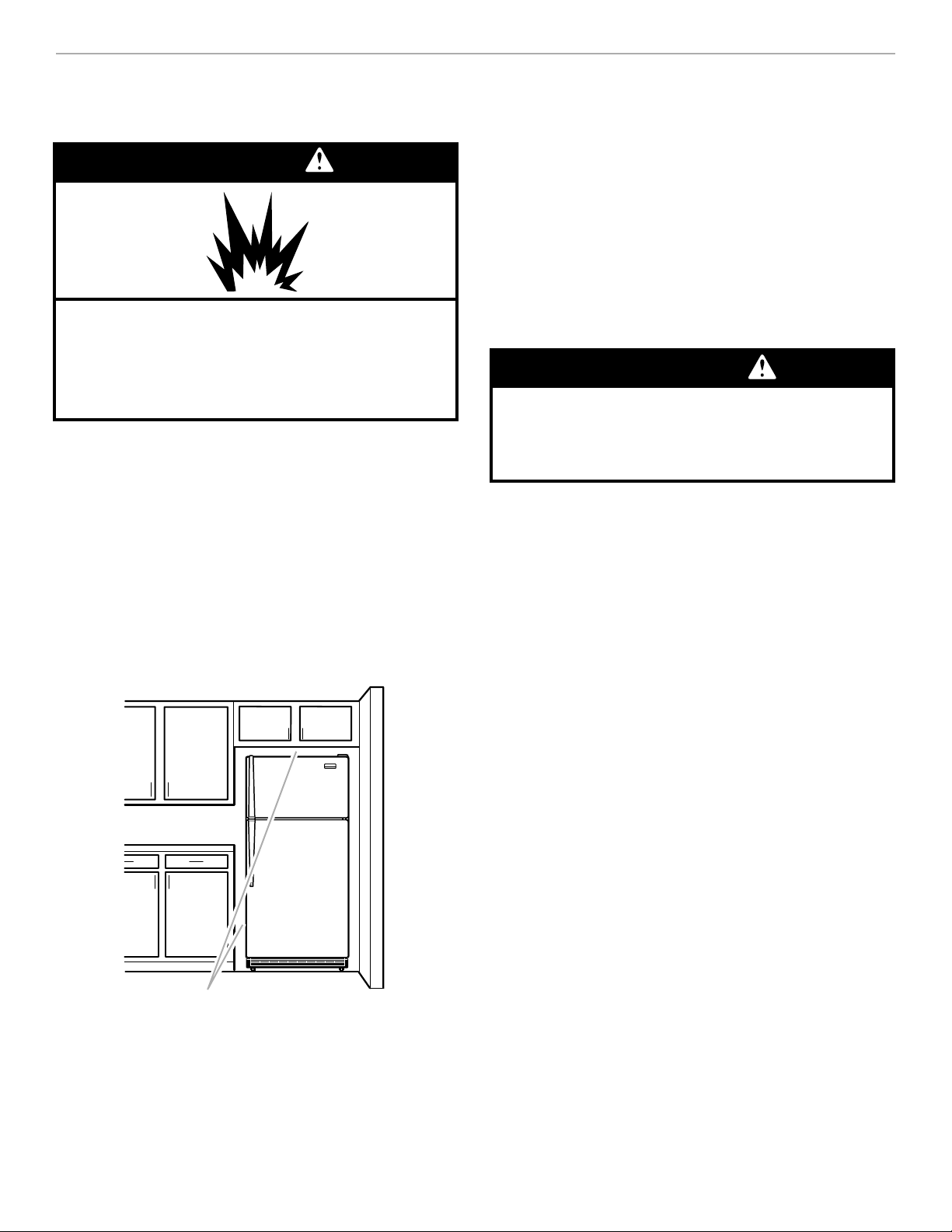
•
To ensure proper ventilation for your refrigerator, allow
for a
1
⁄
2
-inch (1.25 cm) space on each side and at the
top.
•
If your refrigerator has an ice maker, make sure you
leave some extra space at the back to allow for the
water line connections. The refrigerator can be flush
against the back wall if you do not have an ice maker
installed.
•
If you are installing your refrigerator next to a fixed wall,
leave 2 inches minimum on the hinge side (depending
on your model) to allow for the door to swing open.
wWARNING
Explosion Hazard
Keep flammable materials and vapors, such as
gasoline, away from refrigerator.
Failure to do so can result in death, explosion,
fire, or burns.
7
ATTACHING THE OPTIONAL ICE
MAKER TO A WATER SUPPLY
Read all directions carefully before you begin.
IMPORTANT:
•
Use copper tubing only and check for leaks.
•
Install ice maker tubing in areas where temperatures
are above freezing.
•
Contact your dealer or authorized Whirlpool service
company for proper installation and parts.
Cold water supply
The ice maker water valve contains a flow washer which
is used as a water pressure regulator. The ice maker
needs to be connected to a cold water line with water
pressure limitations of 20-120 psi. If a problem occurs,
call your utility company.
IMPORTANT:
•
It may take up to 24 hours for your ice maker to begin
producing ice.
•
If operating the refrigerator before installing the water
connection, turn ice maker to the OFF position to pre-
vent operation without water.
•
All installations must be in accordance with local
plumbing code requirements.
Installation is not warranted by
refrigerator or ice maker manufacturer.
ELECTRICAL REQUIREMENTS
Before you move your refrigerator into its final location, it
is important to make sure you have the proper electrical
connection.
Recommended Grounding Method
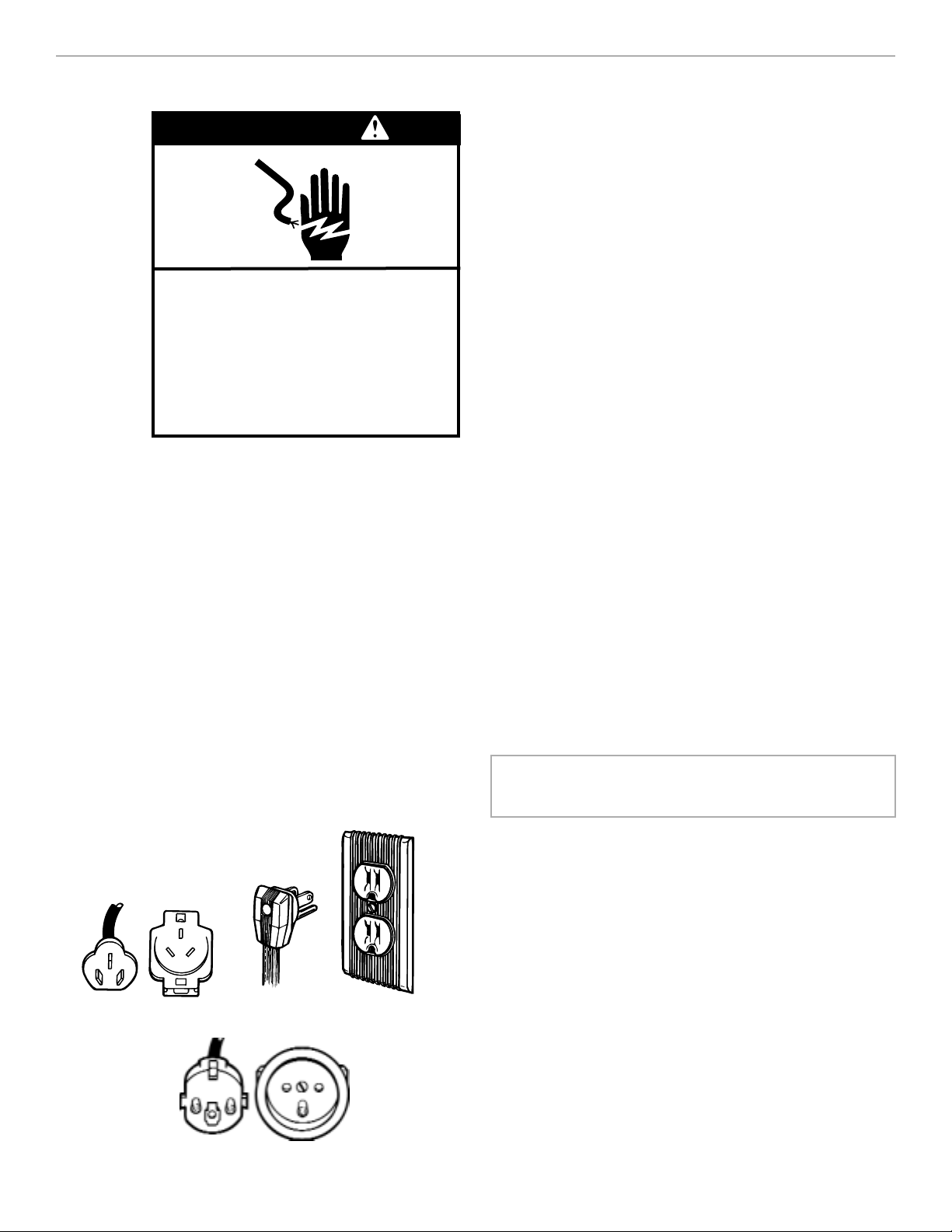
A 115 Volt/60 Hz (Plug 1), 220/240 Volt/50 Hz (Plug 2),
220 Volt/60 Hz (Plug 3) AC only 10 ampere fused and
properly grounded electrical supply is required. It is rec-
ommended that a separate circuit serving only this appli-
ance be provided. Use a receptacle which cannot be
turned off with a switch or pull chain. Do not use an
extension cord.
NOTE: Before performing any type of installation, clean-
ing, or removing a light bulb, turn the Refrigerator Control
to OFF and then disconnect the refrigerator from the
electrical source. When you are finished, connect the re-
frigerator to the electrical source and reset the Refrigera-
tor Control to the desired setting.
Plug 1 Plug 2
Plug 3
wWARNING
Electrical Shock Hazard
Plug into a grounded 3 prong outlet.
Do not remove ground prong.
Do not use an adapter.
Do not use an extension cord.
Failure to follow these instructions
can result in death, fire, or
electrical shock.
8
LEVELING AND DOOR ALIGNMENT
If the refrigerator is not leveled during installation, the
doors may not close or seal properly, causing cooling,
frost, or moisture problems. It is very important for the
refrigerator to be level in order to function properly.
Move the refrigerator into its final position. Use a level on
top of the refrigerator to check that it is level from side-
to-side. Next, open both doors completely and release
them. The doors should close on their own. If the doors
do not close automatically or the refrigerator is not level
side-to-side, adjust the refrigerator's tilt using the
instructions below.
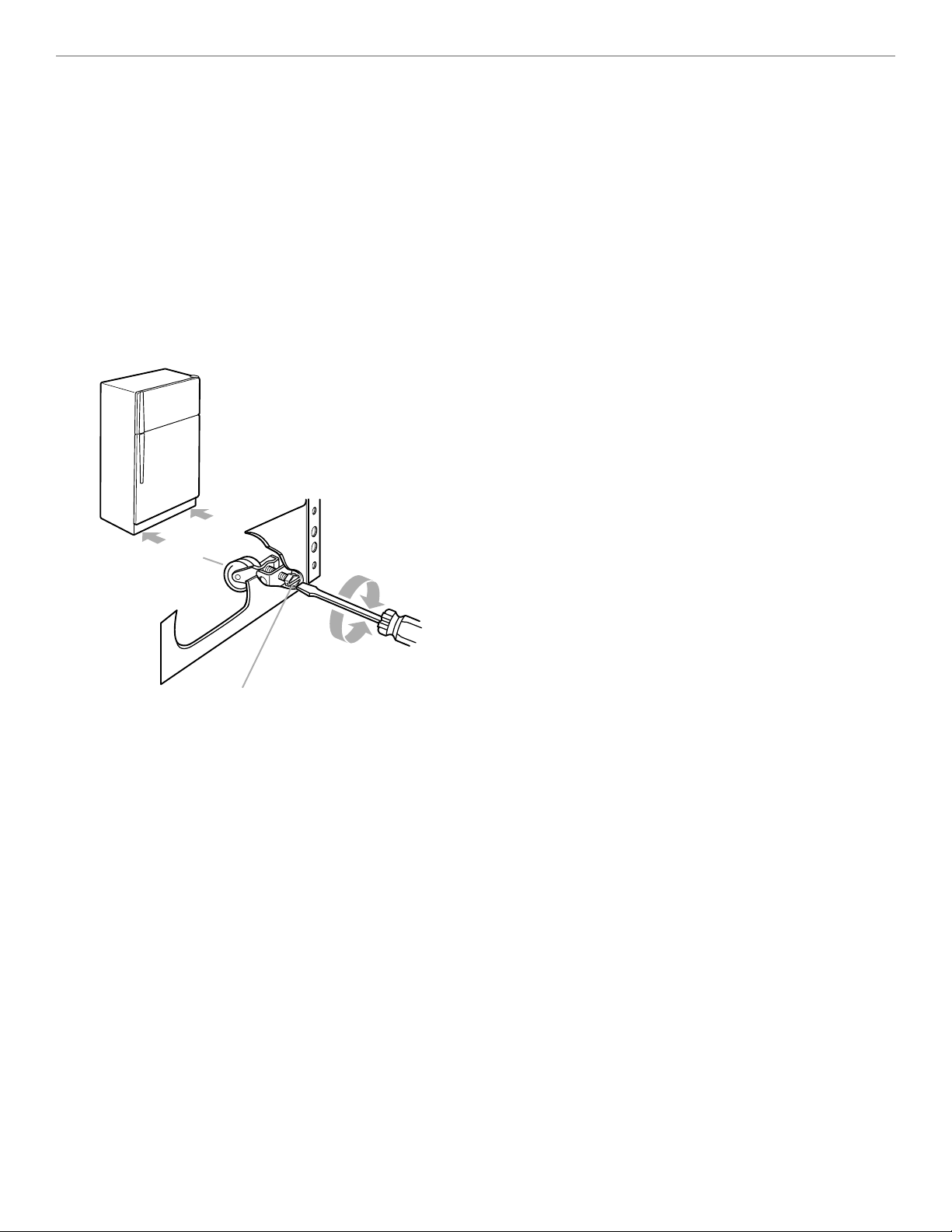
1. Roll out the refrigerator and use a level to check the
floor at the back from side-to-side. If needed, use
shims to level the back of the refrigerator if it is
uneven. Roll the refrigerator back into place with the
rear rollers on top of any shim(s) used so that the rear
of the refrigerator is level.
2. With the rear already level and the refrigerator in place,
use the front leveling screws to level the refrigerator
from side-to-side. Open the refrigerator door and
remove the base grille to find the two leveling screws.
They are part of the front roller assemblies which are
found at the base of the refrigerator on either side.
3. To level your refrigerator, you may either turn the
screw clockwise to raise that side of the refrigerator
or turn the screw counterclockwise to lower that side.
Place a level on top of the refrigerator to check adjust-
ments. Use a screwdriver to adjust the leveling screw.
NOTE: Having someone push against the top of the
refrigerator takes some weight off the leveling screws
and rollers. This makes it easier to adjust the screws.
4. If the doors do not close on their own, you will need to
raise the front of the refrigerator so it is slightly higher
than the back. To do this, turn both leveling screws
clockwise
1
⁄
2
turn.
IMPORTANT: Be sure to turn both screws an equal
amount or the refrigerator will no longer be level
side-to-side.
5. Open doors and check if they close automatically. If
not, repeat steps 3 and 4.
6. Using a level, check to see if the refrigerator is still
level side-to-side. Readjust if necessary.
7. Reinstall the base grille.
Right to raise; left to lower
Use a screwdriver to adjust
Leveling screw
Raise
Front Roller
Lower
9
1
2
0
4
5
WARMER
COLDER
RECOMMENDED SETTINGRECOMMENDED SETTING
REFRIGERATOR
3
O
F
F
USING YOUR REFRIGERATOR
To obtain the best possible results from your refrigerator, it is important that you operate it properly.
This section tells you how to set the controls, remove and adjust the features in your refrigerator, and
how to save energy.
SETTING THE CONTROLS
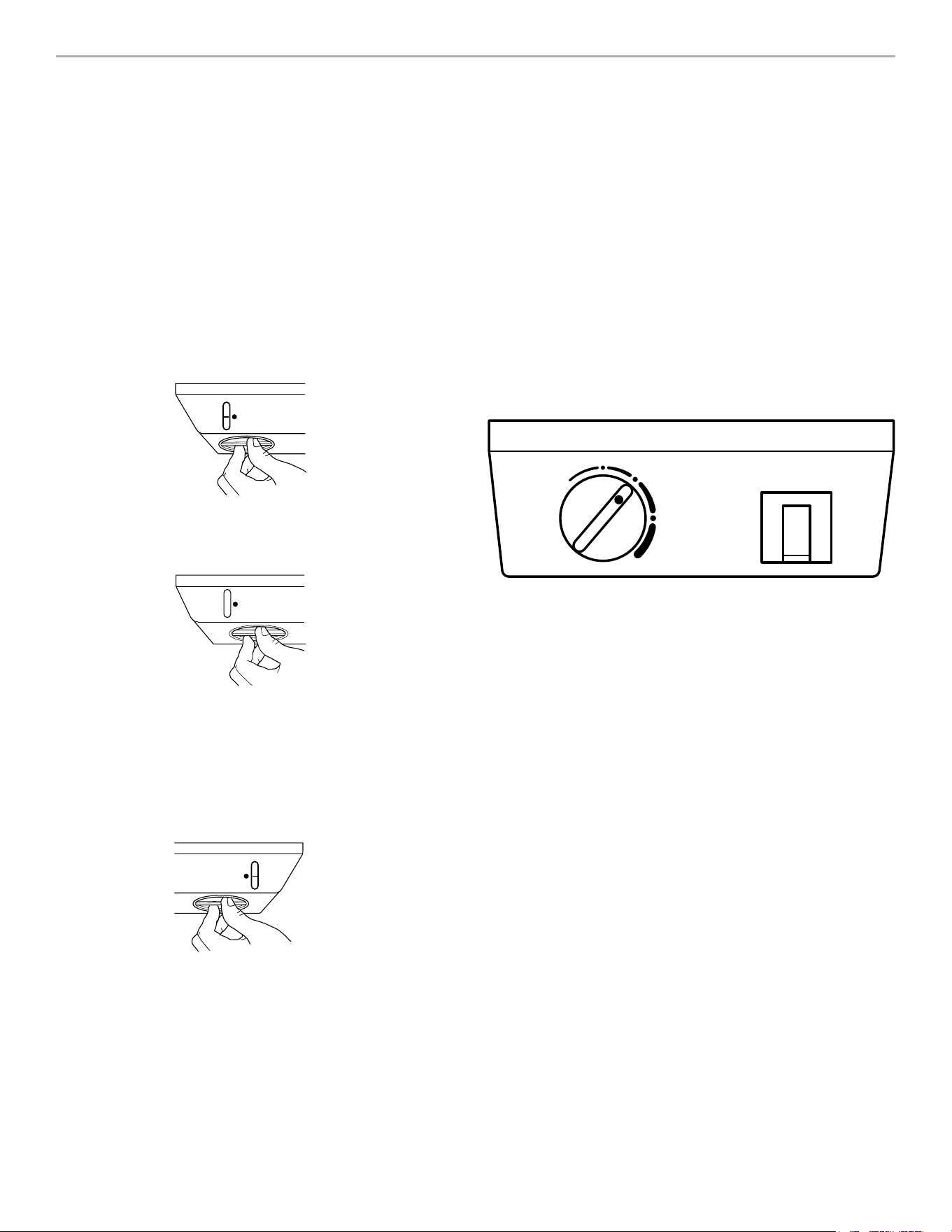
Style 1
Controls for the refrigerator and freezer are located in the
top of the refrigerator section. When you first install
your refrigerator, set the Refrigerator Control at 3 and
the Freezer Control at 3.
1
2
4
5
WARMER
COLDER
RECOMMENDED SETTINGRECOMMENDED SETTING
REFRIGERATOR
3
1
1
2
2
4
4
5
5
WARMER
COLDER
RECOMMENDED SETTINGRECOMMENDED SETTING
FREEZER
3
Style 2
Controls for the refrigerator and freezer are located in the
top of the refrigerator section. When you first install
your refrigerator, set the Temperature Control to 3
(normal). Temperature Control adjustments range from 1
(warmest) to 5 (coldest).
NOTES:
• The built-in exterior moisture control continously
guards against moisture build-up on the outside of
the refrigerator cabinet.
• Turning the Refrigerator Control (Style 1) or
Temperature Control (Style 2) to OFF stops cooling in
both the refrigerator and the freezer compartments,
but does not disconnect the refrigerator from the
......power supply.
IMPORTANT: Give the refrigerator time to cool down
completely before adding food. This could take several
hours. If you add food before the refrigerator has cooled
completely your food may spoil. Turning the control(s) to
a higher than recommended setting will not cool the
compartment(s) any faster. The control settings indicated
in “Changing the Control Settings” section should be
correct for normal household refrigerator usage. The
control is set correctly when milk or juice is as cold as
you like and when ice cream is firm.
To set the Refrigerator Control to OFF, turn one setting
past warmer until the word OFF appears. Your appliance
will not cool when the Refrigerator Control is set to OFF.
The Freezer Control functions as an airflow director.
Setting “1” will direct more of the cold air into the refrig-
erator section, while setting “5” will direct more cold air
into the freezer section. The cold air travels from the
freezer compartment through the top vent, into your
refrigerator section (see diagram in “Ensuring proper air
circulation” section).
normal
coldestoff
1
3
5
10
Condition/
Reason:
Refrigerator section
too warm
•
Door opened often
•
Large amount of food added
•
Room temperature too warm
Freezer section too warm/ice
not made fast enough
•
Door opened often
•
Large amount of food added
•
Very cold room temperature
(can’t cycle often enough)
•
Heavy ice usage
Refrigerator section
too cold
•
Controls not set correctly
for your conditions
Turn refrigerator
Control to next
higher number
Turn freezer
Control to next
higher number
RECOMMENDED
ADJUSTMENT:
Turn refrigerator
Control to next
lower number
CHANGING THE CONTROL
SETTINGS
If you need to adjust temperatures in the refrigerator or
freezer, use the settings listed in the chart below as a
guide. Wait at least 24 hours between adjustments.
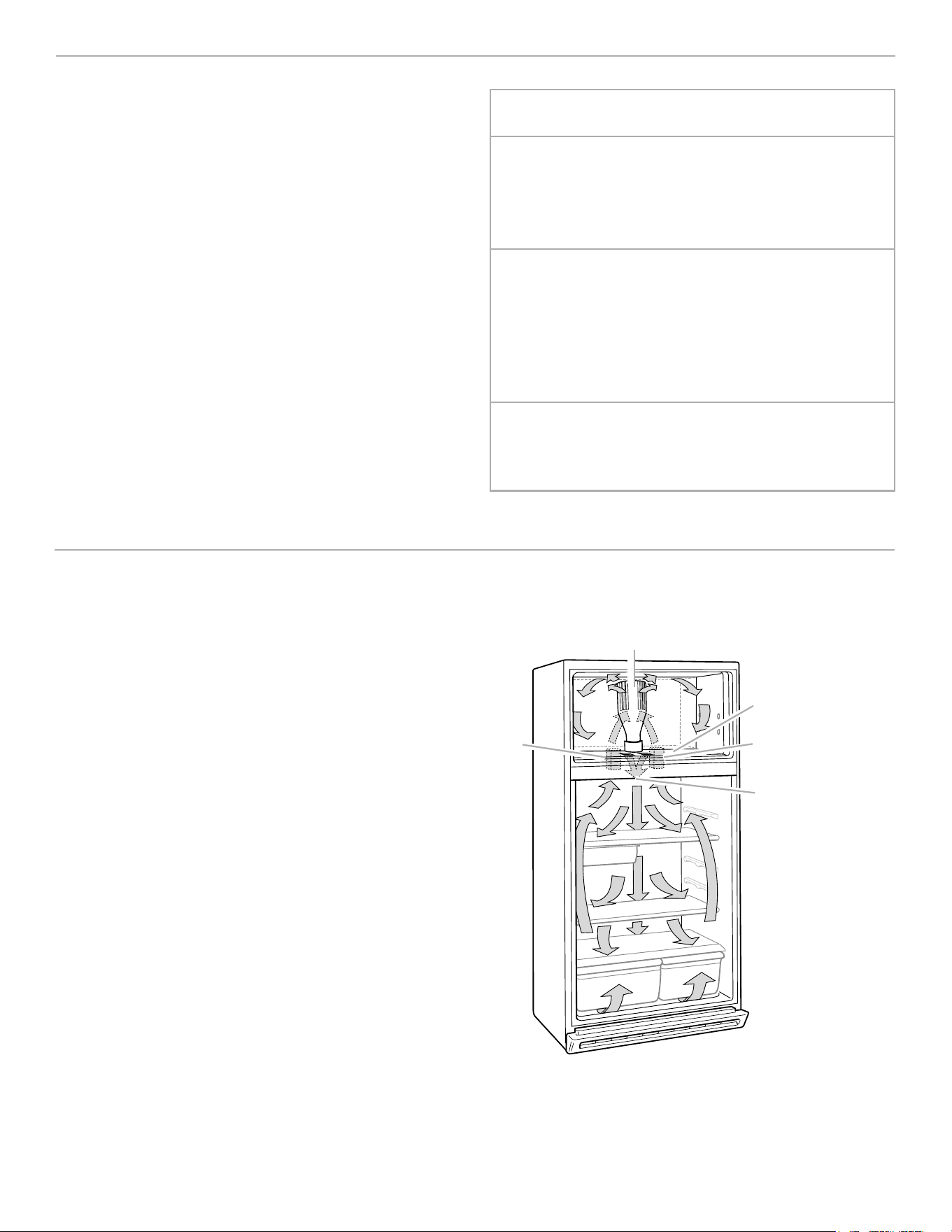
ENSURING PROPER AIR CIRCULATION
In order to ensure proper temperatures, you need to
permit air flow between the two sections. As shown in
the illustration, cool air enters through the bottom of the
freezer section (A) and moves up. Most of the air then
flows through the freezer section vents (B) and
recirculates under the freezer floor (C). The rest of the air
enters the fresh section through the top vent (D).
Do not block any of these vents
(A, B, C, or D) with food packages. If the vents are
blocked, air flow will be prevented and temperature and
moisture problems may occur.
IMPORTANT: Because air circulates between both
sections, any odors formed in one section will transfer to
the other. You must thoroughly clean both sections to
eliminate odors. To prevent odor transfer and drying out
of food, wrap or cover foods tightly. (See the “Food
Storage Guide” section for details.)
B
A
A
D
C
11
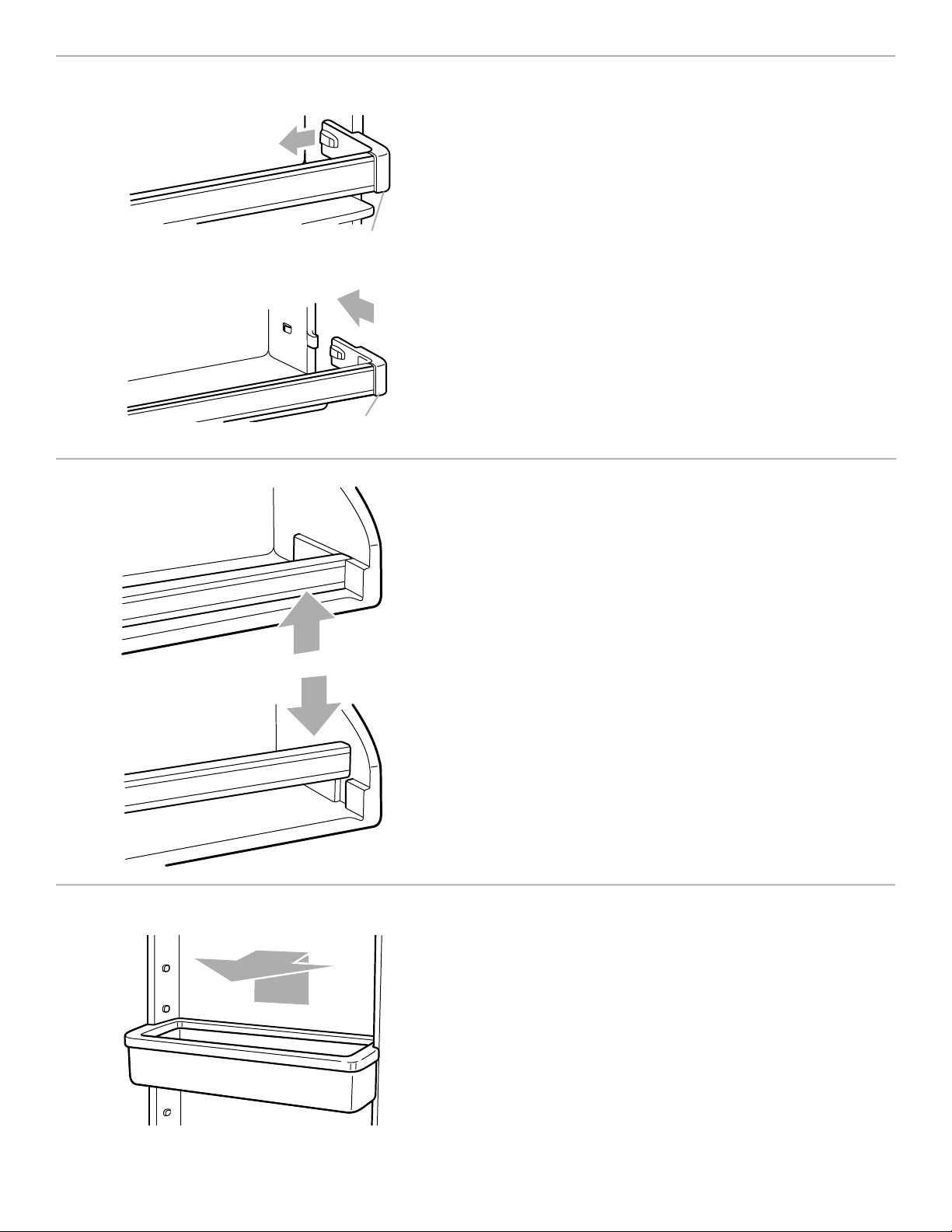
REMOVING THE SNAP-ON DOOR TRIM
The door trim may be removed
for easier cleaning.
To remove the trim:
1. Remove all items from the shelf.
2. Push in slightly and pull out on each side of the inside tab.
3. Lift the trim straight out.
To replace the trim:
1. Line up the ends of the trim with the buttons on the sides
of the door liner.
2. Push the end of the trim straight back until it snaps into
place.
REMOVING THE
DROP
-IN DOOR TRIM
To remove the trim piece:
1. Remove all items from the shelf.
2. Pull straight up on each end of the trim piece.
To replace the trim piece:
1. Locate each end of the trim piece above the trim pocket
opening.
2. Push the trim ends straight down until they stop.
3. Replace items on the shelf.
Push here
Pull here
ADJUSTING THE
DOOR BINS
(on some models)
The door bins are removable for easy cleaning and adjusting.
•
To remove the bin, simply lift the bin up and pull straight
out.
•
To replace the bin, slide it in above the desired support
button and push down until it stops.
Push here
12
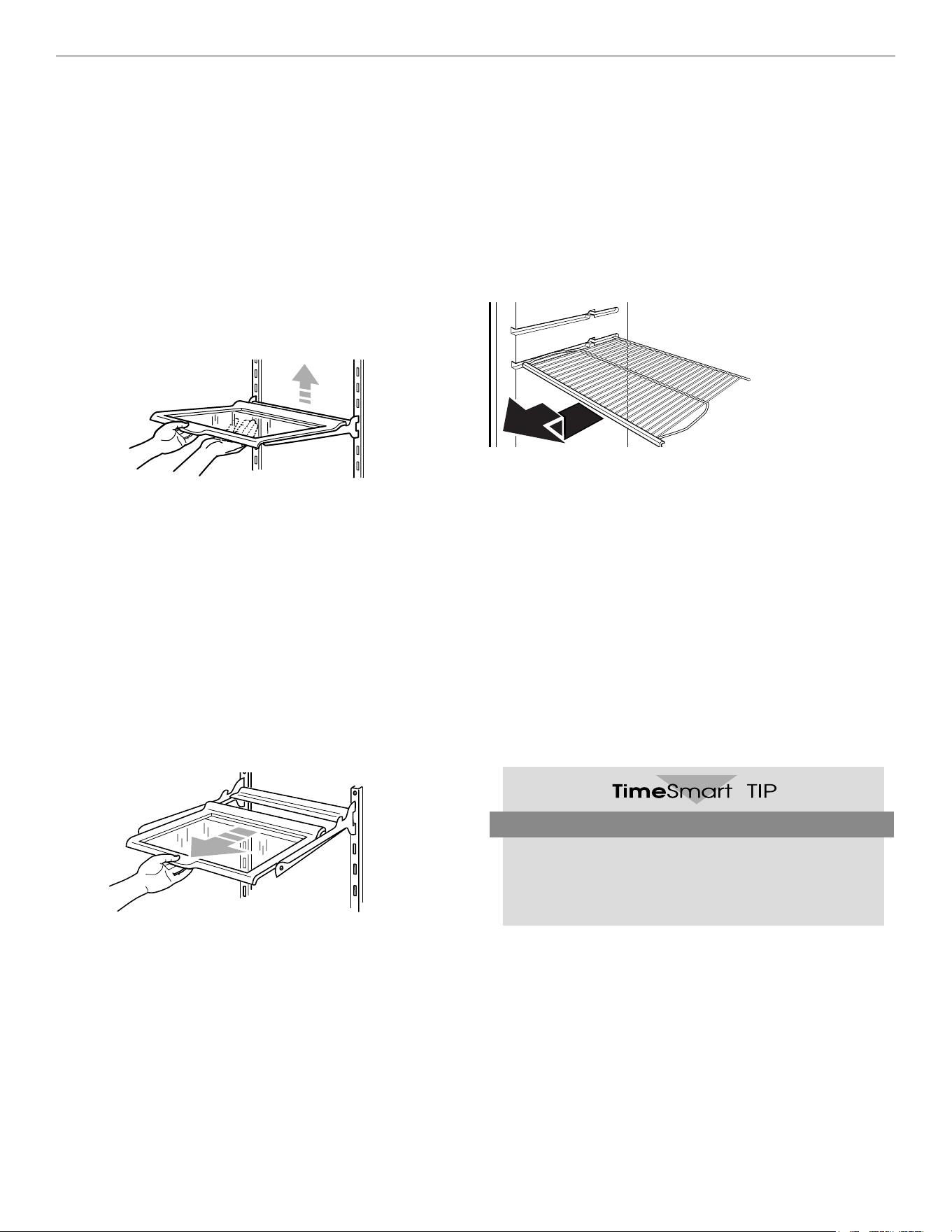
ADJUSTING THE
REFRIGERATOR SHELVES
The shelves in your refrigerator are adjustable to match
the way you use them. Your model may have either glass
or wire shelves:
NOTE: Glass shelves are heavy. Handle them carefully.
To remove a shelf: (Style 1)
1. Remove all items from the shelf.
2. Tilt up the front of the shelf and lift it at the back.
3. Pull the shelf straight out.
Quick and Easy
Store similar food items together in your refrigerator
and freezer. This will make them easy to find and cut
down the amount of time the doors are open.
To replace a shelf:
1. Guide the rear shelf hooks into the slots of the shelf
supports on the back liner of the refrigerator.
2. Tilt the front of the shelf up until the rear hooks drop
into the slots.
3. Lower the front of the shelf into position.
You can slide some glass shelves in and out of your
refrigerator as follows:
To slide shelf out, carefully pull front of shelf toward you.
To slide shelf in, push shelf in until it stops.
To remove the shelves: (Style 2)
1. Remove items from the shelf.
2. Slide shelf straight out to the stop.
3. Lift back of shelf over stop.
4. Slide shelf out the rest of the way.
To replace the shelves:
1. Slide back of shelf into shelf track in wall of cabinet.
2. Guide front of shelf into shelf track.
3. Slide shelf in all the way.
13
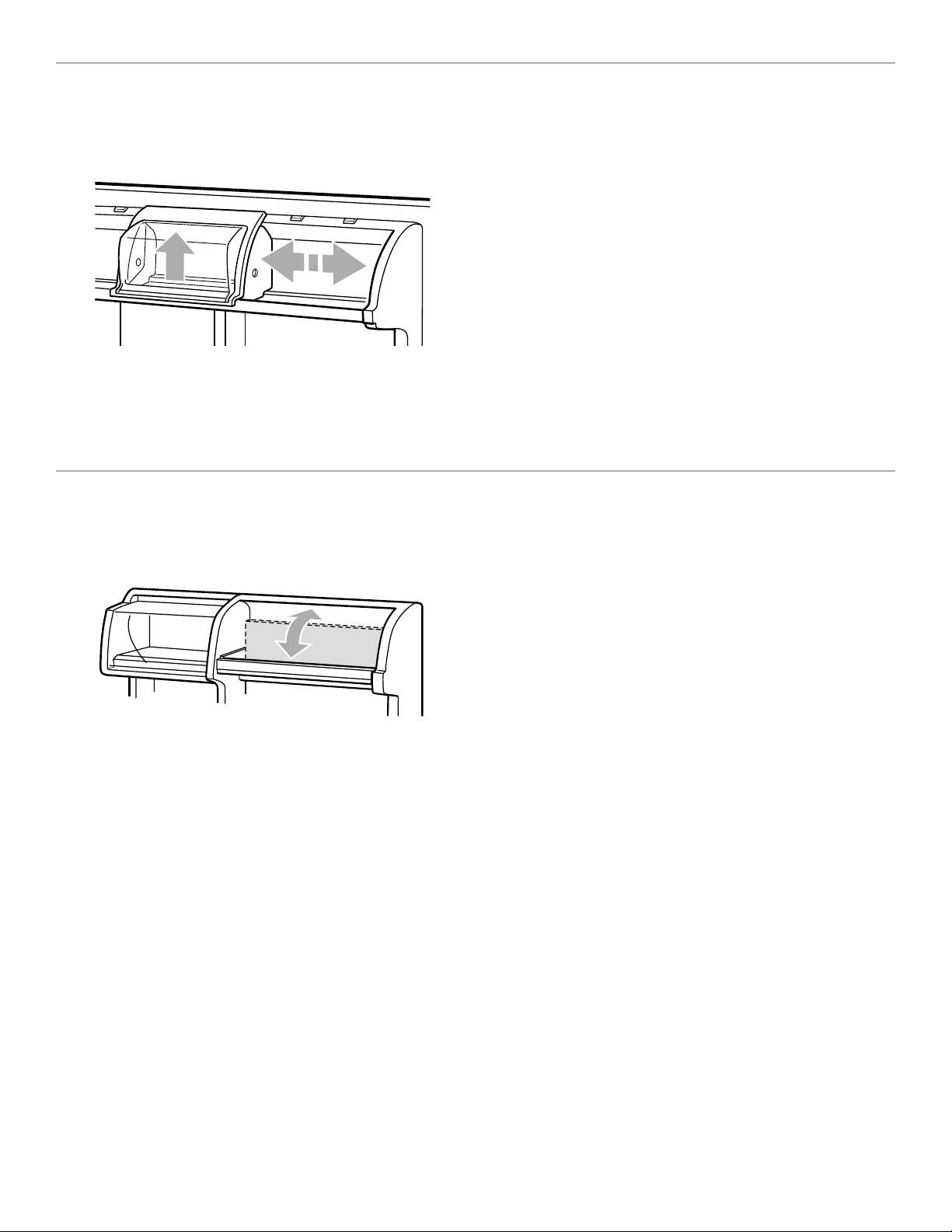
ADJUSTING THE UTILITY
COMPARTMENT AND TRAY
(on some models)
The utility compartment and tray slide from one side to
the other for more flexible storage. The tray fits on either
side of the utility compartment or partially underneath it.
Experiment and find the positions that work best for you.
To adjust the utility compartment or tray:
1. Lift the front slightly.
2. Slide to desired position.
3. Lower front to lock into place.
USING THE FLIP-UP DOOR SHELF
(on some models)
The shelf flips up so you can store taller items in the door
shelf below. When in the down position, the shelf is
strong enough to hold up to 10 pounds (4.5 kg).

14
Style 2
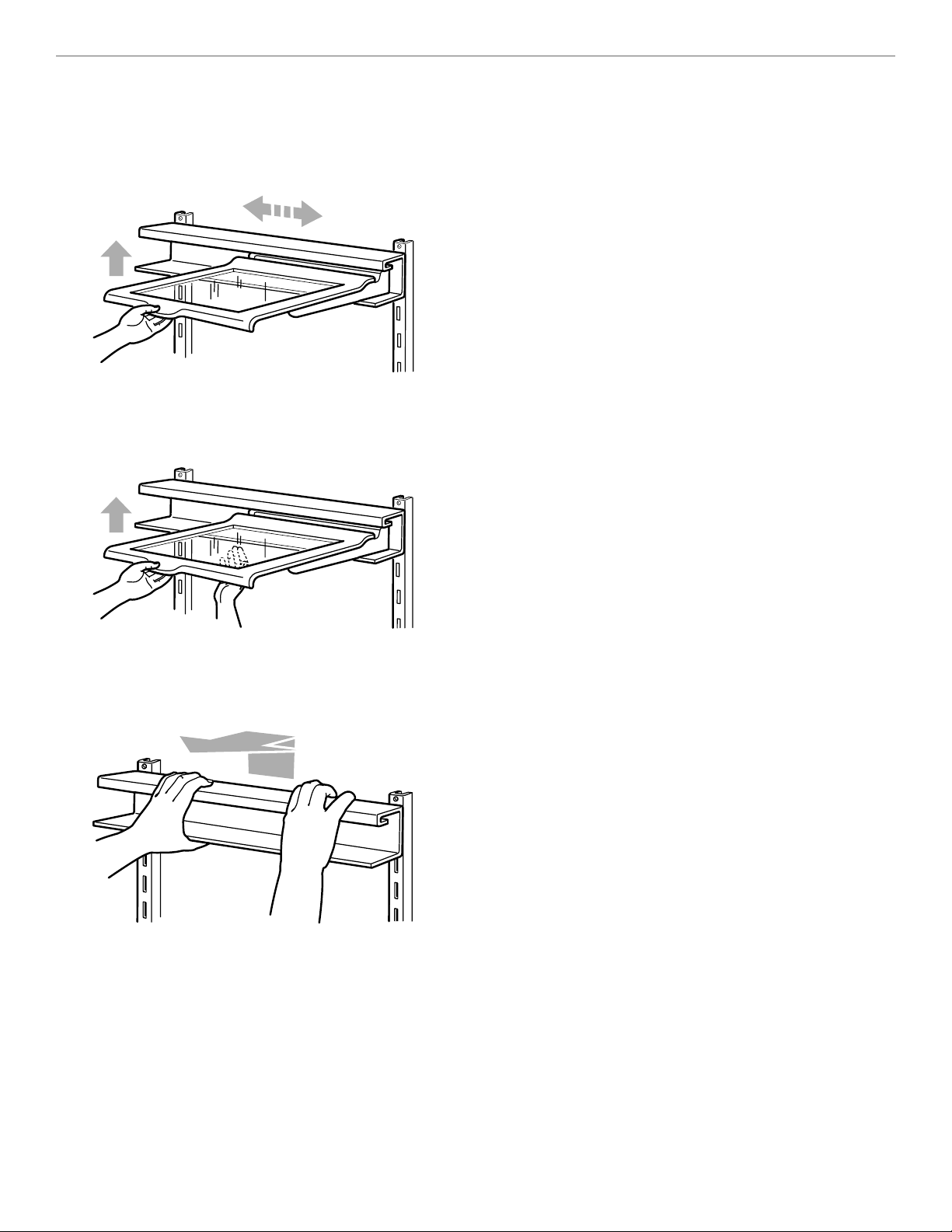
REMOVING THE MEAT DRAWER
AND COVER
(on some models)
To remove the meat drawer:
1. Slide meat drawer out to the stop.
2. Lift front of meat drawer with one hand while support-
ing bottom of drawer with other hand. Slide drawer out
the rest of the way.
3. Replace in reverse order.
To remove the cover: (Style 1)
1. Remove meat drawer.
2. Tilt front of cover up.
3. Lift back of cover.
4. Pull cover straight out.
To replace the cover:
1. Guide the cover’s rear hooks into the slots in the shelf
supports on the back wall.
2. Tilt cover up at the front until the rear hooks drop into
the slots.
3. Lower front of cover to a level position and replace
meat drawer.
To remove the cover: (Style 2)
1. Remove meat drawer.
2. Push cover back to release the rear of the cover from
the shelf.
3. Tilt cover up at the front.
4. Pull cover forward and out.
To replace the cover:
1. Fit notches and rear edge of cover over rear and cen-
ter crossbars on the shelf.
2. Lower cover into place.
3. Replace the meat drawer.
Style 1
15
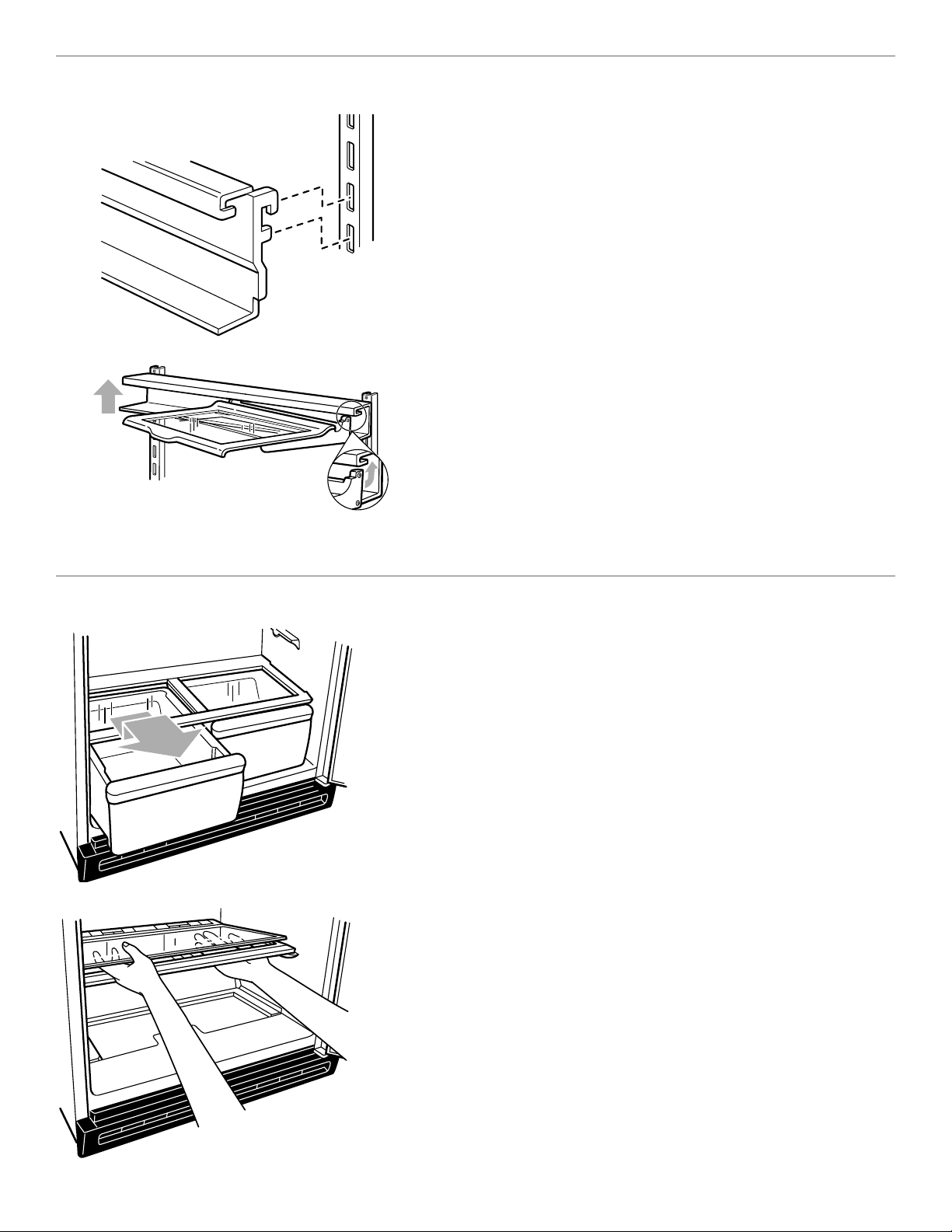
ADJUSTING THE EZ-TRAK
REFRIGERATOR SHELF
(on some models)
The EZ-TRAK shelf slides from side to side for more
flexible storage in your refrigerator.
To slide the shelf from side to side:
1. Lift up on the front of the shelf and slide to the desired
location.
2. Lower the shelf to the level position.
NOTE: You do not have to remove small items from the
shelf before moving it from side to side. You may need to
remove larger items.
To remove the shelf:
1. Remove all items from the shelf.
2. Hold the back of the shelf with one hand.
3. Lift the front of the shelf with the other hand to a 45°
angle and lower it slightly to release it from the upper
channel of the track.
4. Pull the shelf straight out.
NOTE: The shelf is heavy and must be removed using
both hands.
To remove the shelf track:
1. Lift both sides of the track slightly.
2. Pull straight out.
16
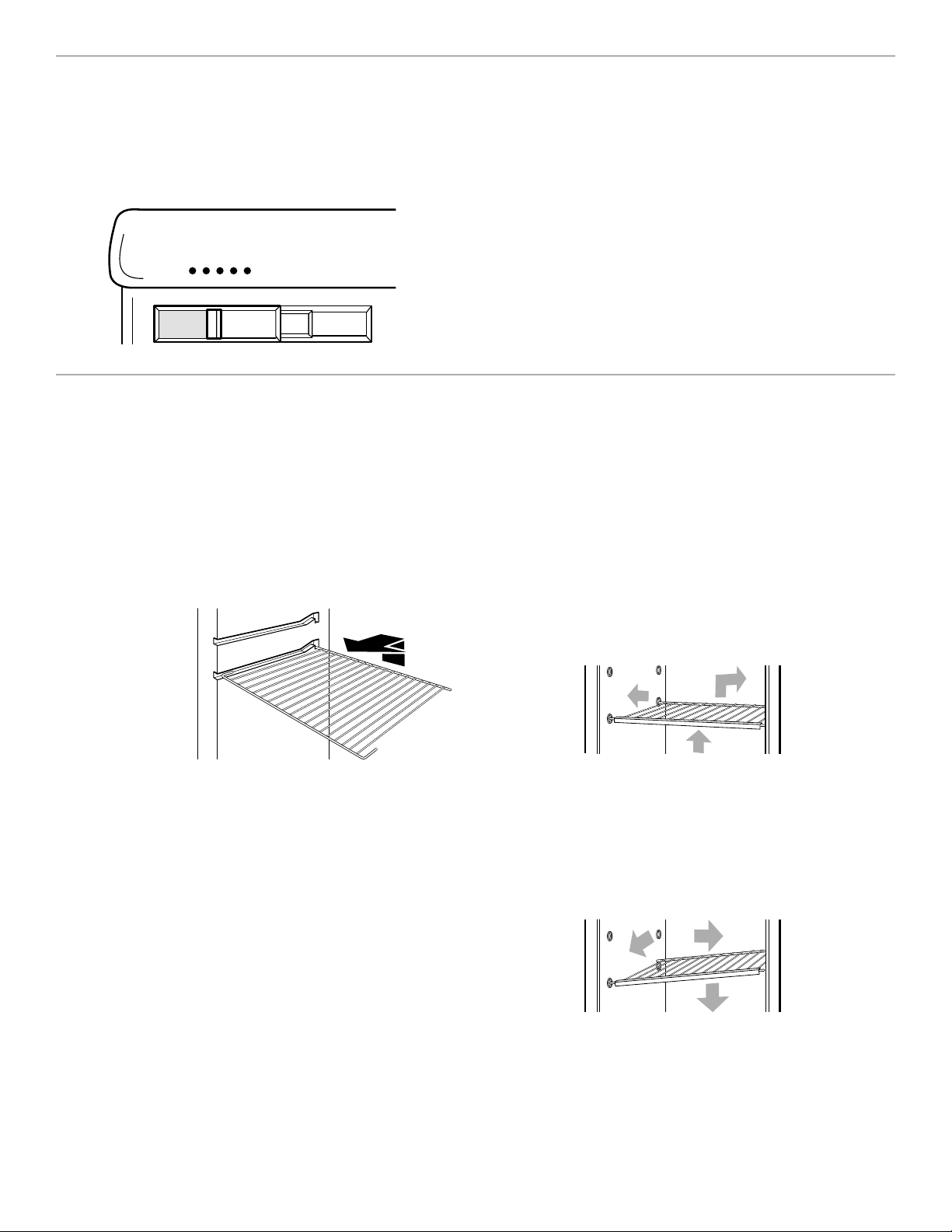
REMOVING THE CRISPER AND
CRISPER COVER
(on some models)
The crisper and its cover are designed for easy removal and
cleaning.
To remove the crisper:
1. Slide crisper straight out to the stop.
2. Lift the front.
3. Slide crisper out the rest of the way.
Replace the crisper in the reverse order.
To remove the cover:
1. Hold the glass insert firmly while pushing up from the
bottom.
2. Slide the glass insert out.
3. Lift cover frame up and out.
NOTE: Before reinstalling the cover, make sure the U-shaped
reinforcement bar is reinstalled.
To replace the cover:
1. Fit back of cover frame into notch supports on back wall
of the refrigerator.
2. Lower front of the frame into place.
3. Slide back of glass insert into place and lower front.
Adjusting the EZ-TRAK refrigerator shelf
(cont.)
To replace the shelf track:
1. Guide the track hooks into the shelf support slots on
the back wall.
NOTE: Make sure that both sets of track hooks are in
the slots and that the slots are parallel with each other.
2. Push the track back and down securely into the shelf
supports.
To reinstall the shelf:
1. Hold the shelf at the front and tip the front at a 45°
angle to the track.
2. Insert both of the rear shelf slides into the upper chan-
nel of the track.
3. Lower the front into place.
NOTE: Make sure that both of the rear shelf slides are
securely in the track before letting go of the shelf. The
EZ-TRAK shelf may be difficult to install if the track is
placed too close to the refrigerator ceiling. If this occurs
reposition the track on lower rungs until the shelf can be
tilted enough to easily slide into the track.
17
3 & 4
2
1
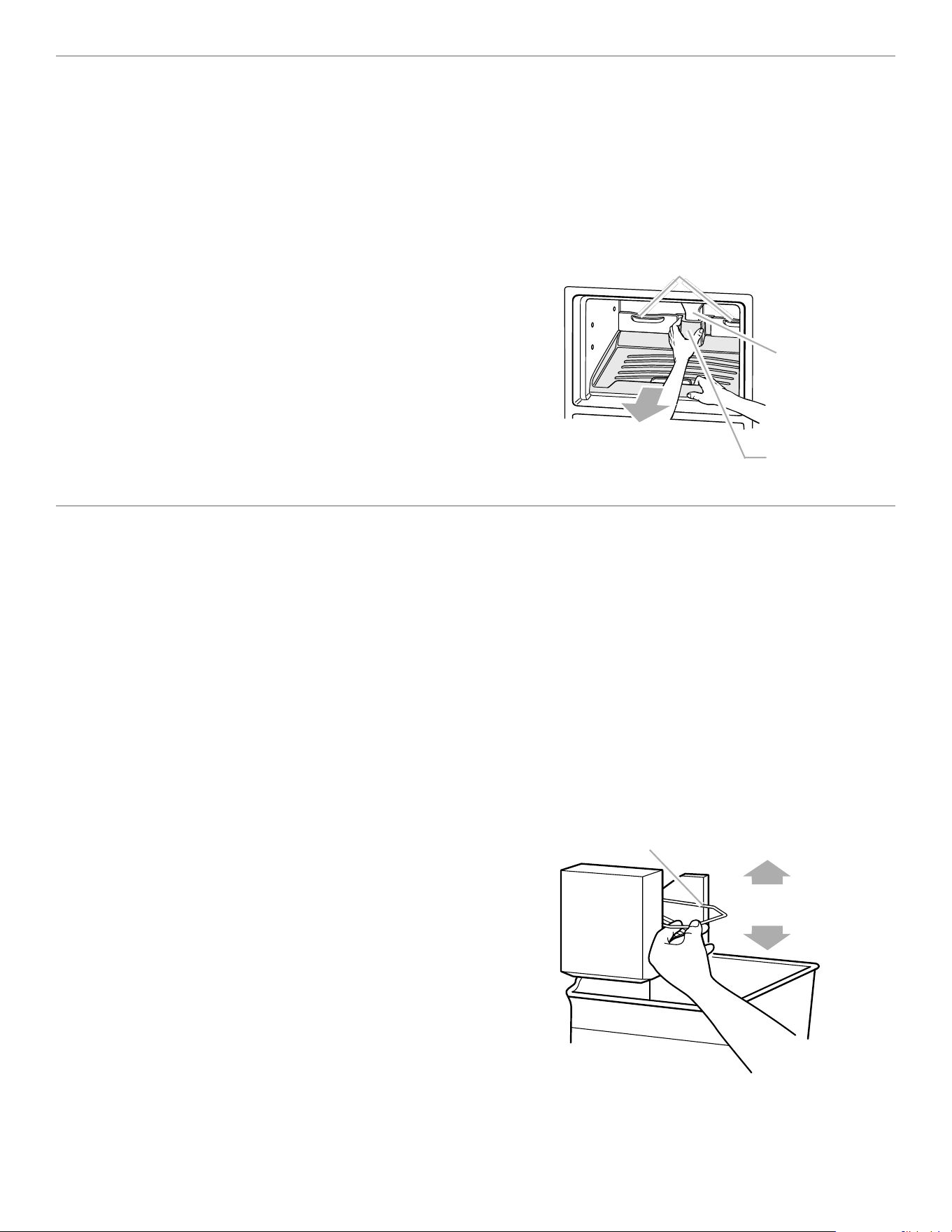
ADJUSTING THE FREEZER SHELF
(on some models)
Adjust the freezer shelf to match the way you use your
freezer.
To remove the shelf: (Style 1)
1. Lift entire shelf slightly.
2. Move shelf all the way to one side.
3. Tilt other side up and out of shelf support cups.
4. Pull shelf up and out.
To replace the shelf:
1. Tilt the shelf and insert into freezer compartment.
2. Insert one end of the shelf all the way into the center
of the shelf support cups.
3. Lower other end of shelf and insert into the shelf
support cups.
4. Lower shelf into place.
NOTE: The shelf should lower slightly and lock into
place. If the shelf does not appear sturdy, make sure both
ends of the shelf are inserted into the shelf support cups.
1 & 2
4
3
LOW
HIGH
ADJUSTING THE CRISPER HUMIDITY
CONTROL
(on some models)
You can control the amount of humidity in the moisture-
sealed crispers. Adjust the control to any setting between
LOW and HIGH.
•
LOW (open) lets moist air out of the crisper for best
storage of fruits and vegetables with skins.
•
HIGH (closed) keeps moist air in the crisper for best
storage of fresh, leafy vegetables.
To remove the shelf: (Style 2)
1. Remove items from the shelf.
2. Lift back of shelf over stop.
3. Slide shelf straight out.
To replace the shelf:
1. Slide back of shelf into shelf tracks on walls of
cabinet.
2. Slide shelf in all the way.
18
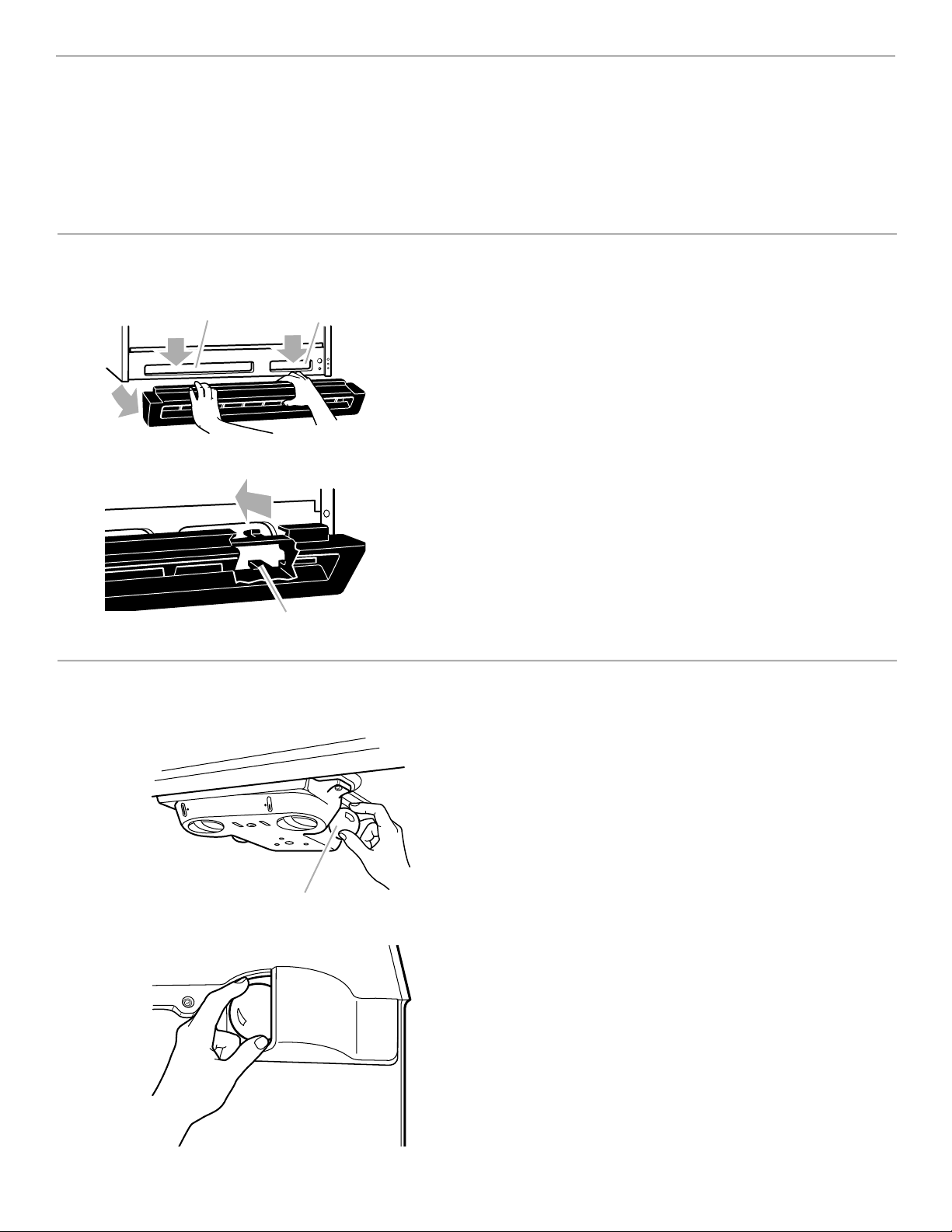
REMOVING THE PULL-OUT
FREEZER FLOOR
(on some models)
The freezer floor pulls out for easier access to foods in
the back of the freezer and for easier cleaning.
To remove the freezer floor:
1. Remove all food items from the freezer floor.
2. Lift both back “fences” up and out.
3. Pull the floor out about 1 inch (2.5 cm) with one hand
around the air tower section (center back) and one
hand at center front.
4. Lift up floor at rear until hooks release from cabinet.
5. Pull floor out the rest of the way.
Freezer floor fences
Air
tower
Air tower
section
Off
On
USING THE OPTIONAL AUTOMATIC
ICE MAKER
Before you turn the ice maker on, be sure that it is
attached to a water supply. Refer to the “Attaching the
optional ice maker to a water supply” section.
•
The ON/OFF lever is a wire signal arm. Push the arm
down to start making ice automatically, and push it up
to shut off the ice maker.
•
If you remove the ice bin, raise the signal arm to shut
off the ice maker. When you replace the bin, push it in
all the way and lower the ice maker signal arm to the
ON position.
•
It is normal for the ice to be attached at the corners.
They will break apart easily.
•
The ice maker will not operate until the freezer is cold
enough to make ice. This can take as long as overnight.
•
If ice is not being made fast enough and more ice is
needed, turn the Refrigerator Control toward a higher
number in half number steps. (For example, if the
control is at 3, move it to between 3 and 4.) Wait 24
hours and, if necessary, gradually turn the Freezer
Control toward COLDER, waiting 24 hours between
each increase.
Signal arm
To replace the freezer floor:
1. Position back of floor into freezer opening.
2. Slide floor straight in until hooks drop into place at
rear of cabinet.
3. Replace “fences” by aligning pins with socket in the
floor, and push down until they snap into place.
REMEMBER:
•
The quality of your ice will be only as good as the
quality of the water supplied to your ice maker.
•
Avoid connecting the ice maker to a softened water
supply. Water softener chemicals (such as salt) can
damage parts of the ice maker and lead to poor quality
ice. If a softened water supply cannot be avoided,
make sure the water softener is operating properly and
is well maintained.
19
To remove the base grille:
1. Open the refrigerator door.
2. Grasp the grille with both hands.
3. Tilt the bottom of the grille up toward you and lower
the grille out and away from the refrigerator.
4. Close the door.
NOTE: Do not remove the Tech Sheet that is fastened
behind the grille.
To replace the base grille:
1. Open the refrigerator door.
2. Place upper clips in openings in the metal panel.
3. Roll the grille down toward the refrigerator until it snaps
into place.
4. Close the door.
Clips
Defrost panCondenser coils
REMOVING THE BASE GRILLE
The base grille can be easily removed for access to the defrost pan and condenser coils. You will need to remove the
base grille to clean the defrost pan or the condenser coils.
NOTE: Carefully avoid touching the condenser coils while cleaning, surfaces may be hot.
1
2
4
5
WARMERWARMER
COOLER
RECOMMENDED SETTINGRECOMMENDED SETTING
REFRIGERATOR
3
1
2
4
5
WARMERWARMER
COOLERCOOLER
RECOMMENDED SETTINGRECOMMENDED SETTING
FREEZER
3
ALLOW 24 HOURS BETWEEN ADJUSTMENTSALLOW 24 HOURS BETWEEN ADJUSTMENTS
3
3
Refrigerator light
CHANGING THE LIGHT BULBS
To change the refrigerator light:
1. Unplug refrigerator or disconnect refrigerator from
power supply.
2. Reach behind the Control Panel and remove the bulb.
3. Replace the bulb with a 40-watt appliance bulb.
4. Plug in refrigerator or reconnect refrigerator to power
supply.
To change freezer light:
1. Unplug refrigerator or disconnect refrigerator from
power supply.
2. Reach behind light shield to remove bulb.
3. Replace bulb with a 40-watt appliance bulb.
4. Plug in refrigerator or reconnect refrigerator to power
supply.
NOTE: Not all appliance bulbs will fit your refrigerator. Be
sure to replace the bulb with one of the same size and
shape.
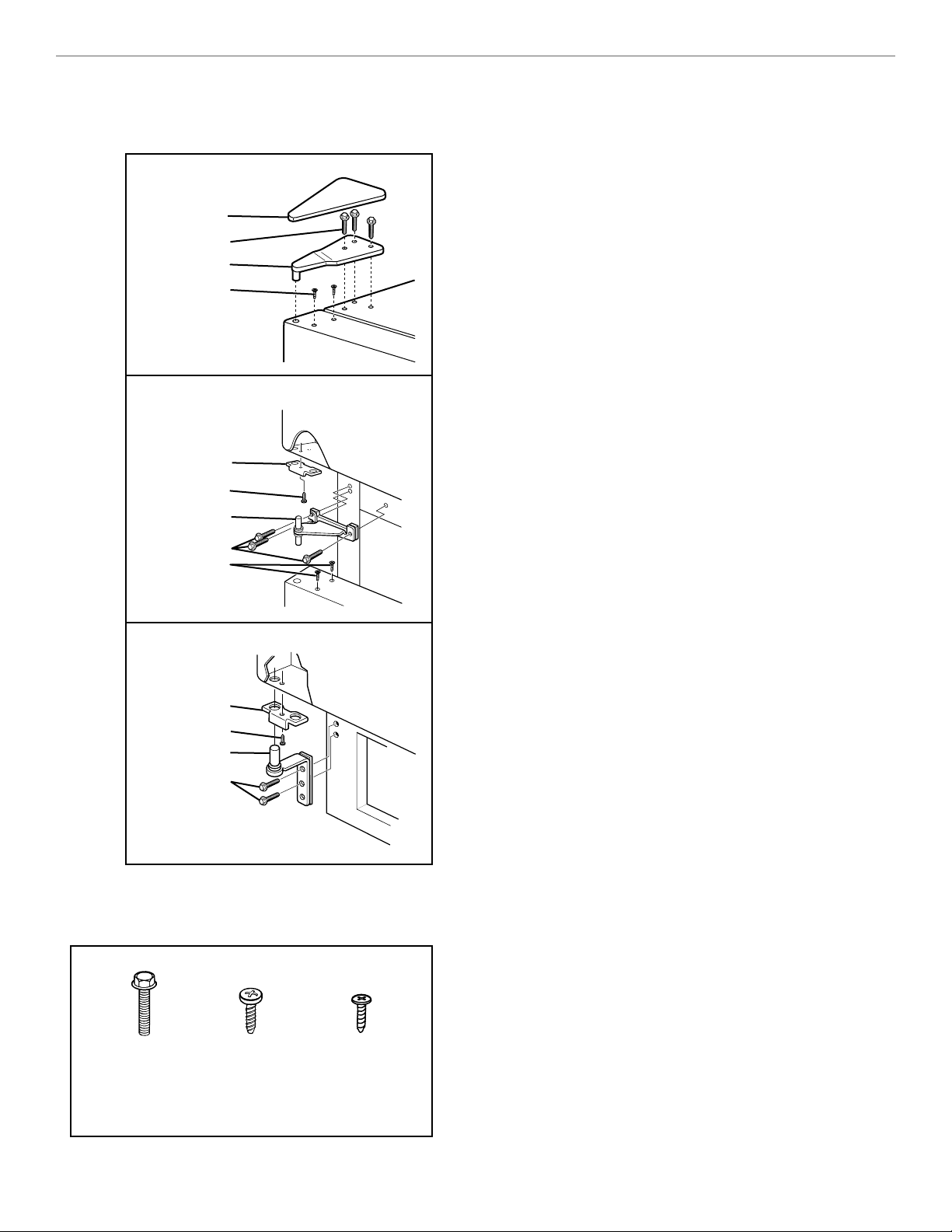
20
REVERSING THE DOOR SWING
SUGGESTION: Reversing the door swing should be
performed by a qualified person.
IMPORTANT INFORMATION:
•
Before you begin, turn refrigerator OFF, unplug it, and
remove any food from door shelves.
•
Remove base grille.
•
When removing hinges, keep doors closed until ready
to lift free from cabinet.
•
To remove doors, start at the top hinge and work your
way down.
Note: The following refers only to those models with the
Style 1 center hinge: To remove the center hinge screws,
remove the center hinge pin by turning it
1
⁄
4
to
1
⁄
2
turn. It
will pop up.
•
To replace doors, start at the bottom hinge and work
your way up.
•
Line up doors so they are centered between the sides
of the cabinet and parallel with each other.
•
Seal all unused openings with screws or plastic plugs.
Moisture will enter any openings.
NOTE: After the doors are reversed, reinstall the handles.
If the doors are not shutting on their own, see “Leveling”
in the “Installing Your Refrigerator” section.
A
B C
Cover
(A) Screws
Top Hinge
(C) Screws
Door Stop
(B) Screw
Hinge
(A) Screws
(C) Screws
Door Stop
(B) Screw
Hinge
(A) Screws
5/16-inch
Hex Head
Hinge Screw
Door
Stop
Screw
Sealing
Screw
(use on top
of doors)
BOTTOM HINGE
CENTER HINGE
TOP HINGE
Reversing the Hinges
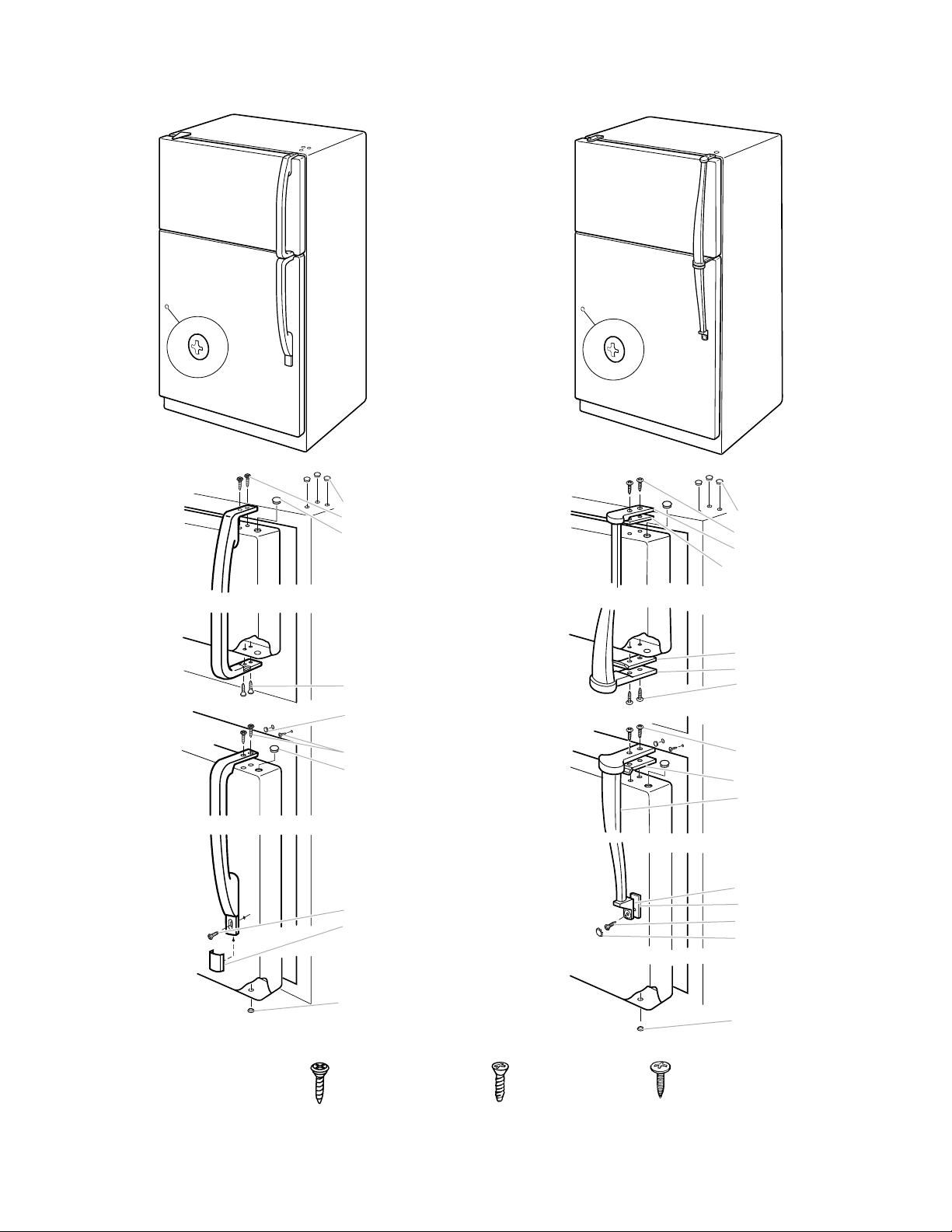
21
Reversing the door swing (cont.)
Reversing the handles
B
AC
Handle Screw
(Use on front of
handles)
Countersink Screws
(Use on top and
bottom of handle)
Countersink Screws
(Use on top an
bottom of handle)
Plugs
Screws (A)
Plug
Screws (A)
Plug
Screws (A)
Screw (C)
Screw cover
Plug
Plugs
Screws (B)
Top endcap
Stick-on shim
Stick-on shim
Bottom endcap
Screws (B)
Screws (B)
Stick-on shim
Top endcap
Bottom Endcap
Screw (C)
Screw cover
Plug
Stick-on shim
Plug
Plug
Plug
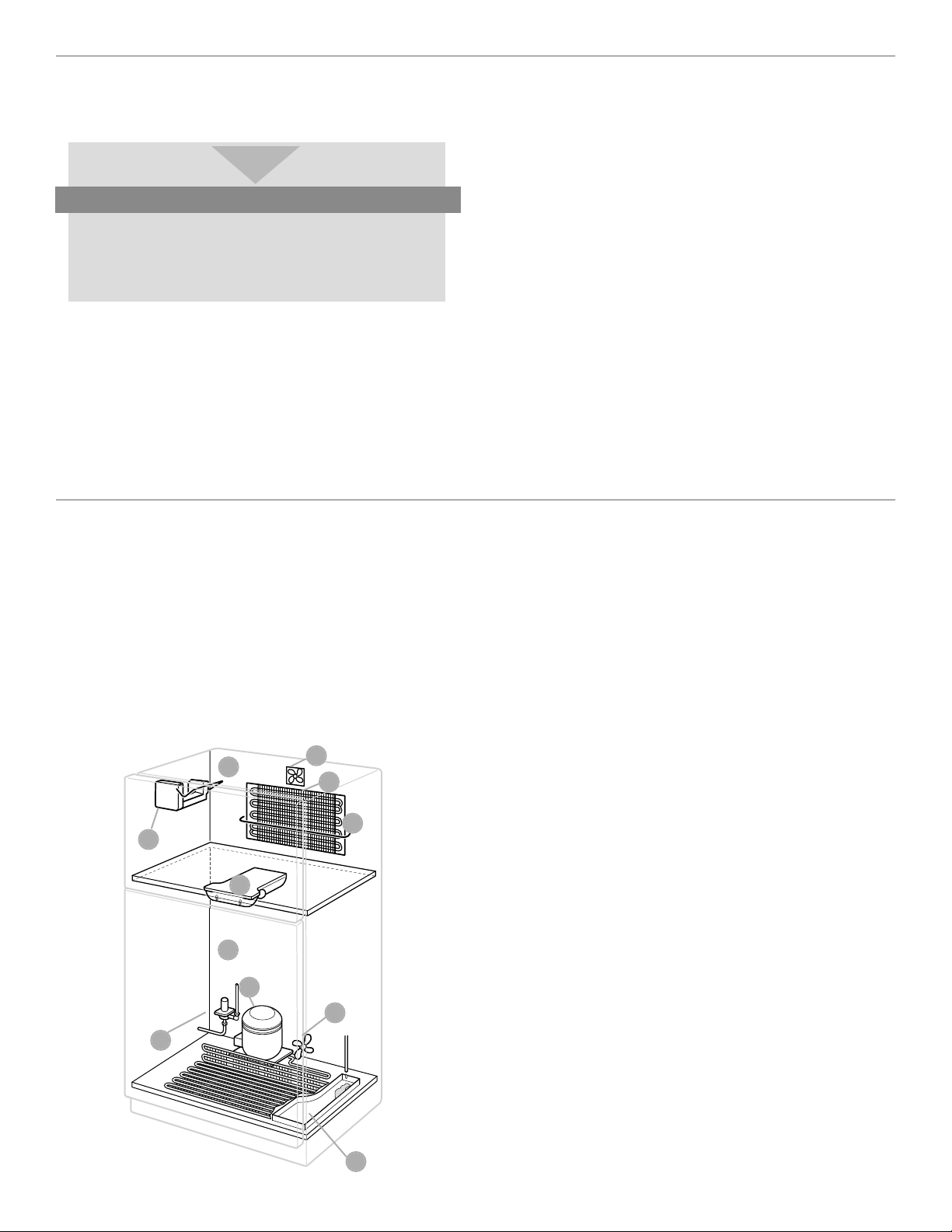
22
C
I
E
G
F
A
B
H
D
J
C
SAVING ENERGY
There are ways that you can help your refrigerator run
more efficiently.
•
Check the door gaskets for a tight seal. Leveling the
cabinet will ensure a proper seal.
•
Clean the condenser coils regularly. A coil cleaning
brush is available for purchase (Part number 4210463).
•
Open the door as few times as possible.
•
Don’t block the air vents in the freezer and refrigerator
so that cold air cannot flow freely. See the “Ensuring
proper air circulation” section.
•
Do not set your refrigerator and freezer at a colder
setting than is needed. Keep the refrigerator control at
the lowest number setting that keeps your ice cream
firm and your drinks as cold as you like.
•
Do not put your refrigerator next to a heat source, such
as a range, water heater, furnace, radiator, or in direct
sunlight.
Save energy
Organize your food in your refrigerator and think
about what you want before you open the door.
This will allow you to get everything in one trip
and will help save energy.
UNDERSTANDING THE SOUNDS YOU
MAY HEAR
Your new refrigerator may make sounds that your old one
didn’t make. Because the sounds are new to you, you
might be concerned about them. Most of the new sounds
are normal. Hard surfaces, like the floor, walls, and
cabinets, can make the sounds seem louder than they
actually are. Due to new product designs, there may be
sounds that you are not familiar with. The following
describes the kinds of sounds that might be new to you
and what may be making them.
A. If your product is equipped with an ice maker, you will
hear a buzzing sound when the water valve opens to
fill the ice maker for each cycle.
B. The defrost timer will click when the automatic defrost
cycle begins and ends. Also, the thermostat
refrigerator control, will click when cycling on and off.
C. Rattling noises may come from the flow of refrigerant
or the water line. Items stored on top of the refrigerator
can also make noises.
D. Your refrigerator is designed to run more efficiently to
keep your food items at the desired temperature. The
high efficiency compressor may cause your new refrig-
erator to run longer than your old one, and you may
hear a pulsating or high-pitched sound.
E. Water dripping on the defrost heater during a defrost
cycle may cause a sizzling sound.
F. You may hear the evaporator fan motor circulating the
air through the refrigerator and freezer compartments.
G. As each cycle ends, you may hear a gurgling sound
due to the refrigerant flowing in your refrigerator.
H. Contraction and expansion of the inside walls may
cause a popping and cracking noise.
I. You may hear air being forced over the condenser by
the condenser fan.
J. Water may be heard running into the drain pan during
the defrost cycle.
23
CARING FOR YOUR REFRIGERATOR
Your refrigerator is built to give you many years of dependable service. However, there are a few
things you can do to help extend its product life. This section tells you how to clean your refrigerator
and what to do when going on vacation, moving, or during a power outage.
CLEANING YOUR REFRIGERATOR
Both the refrigerator and freezer sections defrost
automatically. However, clean both sections about once
a month to prevent odors from building up. Wipe up
spills immediately.
To clean your refrigerator:
•
Unplug it.
•
Remove all removable parts from inside, such as
shelves, crispers, etc.
•
Use a clean sponge or soft cloth and a mild detergent
in warm water. Do not use abrasive or harsh cleaners.
•
Hand wash, rinse, and dry all surfaces thoroughly.
Additional cleaning tips are listed below:
COMMENTS
•
Wax painted metal surfaces at least twice a year with a good appliance wax (or good
auto paste wax). Apply wax with a clean, soft cloth. Waxing painted metal surfaces helps
provide rust protection. Do not wax plastic parts.
•
You can also wash with a mixture of warm water and baking soda (2 tbs to 1 qt [26 g
to .95 L] of water).
Do not use cleaning waxes, concentrated detergents, bleaches, or cleaners containing
petroleum on plastic parts.
Do not use paper towels, window sprays, scouring cleansers or flammable fluids. These
can scratch or damage material.
•
Remove base grille.
•
Reach into small opening at right edge and remove the defrost pan.
•
Wash, rinse, and dry thoroughly.
•
Replace defrost pan. Make sure to push it completely into the opening.
•
Replace base grille.
•
Remove base grille.
•
Vacuum coils when dusty or dirty. Coils may need to be cleaned as often as every
other month.
•
Use a vacuum with an extended attachment to clean condenser coils.
•
Replace base grille.
PART
Outside
Inside walls
(allow freezer to
warm up so cloth
won’t stick)
Door liners
and gaskets
Plastic parts
(covers and panels)
Defrost pan
refrigerator
on top of motor)
Condenser
coils
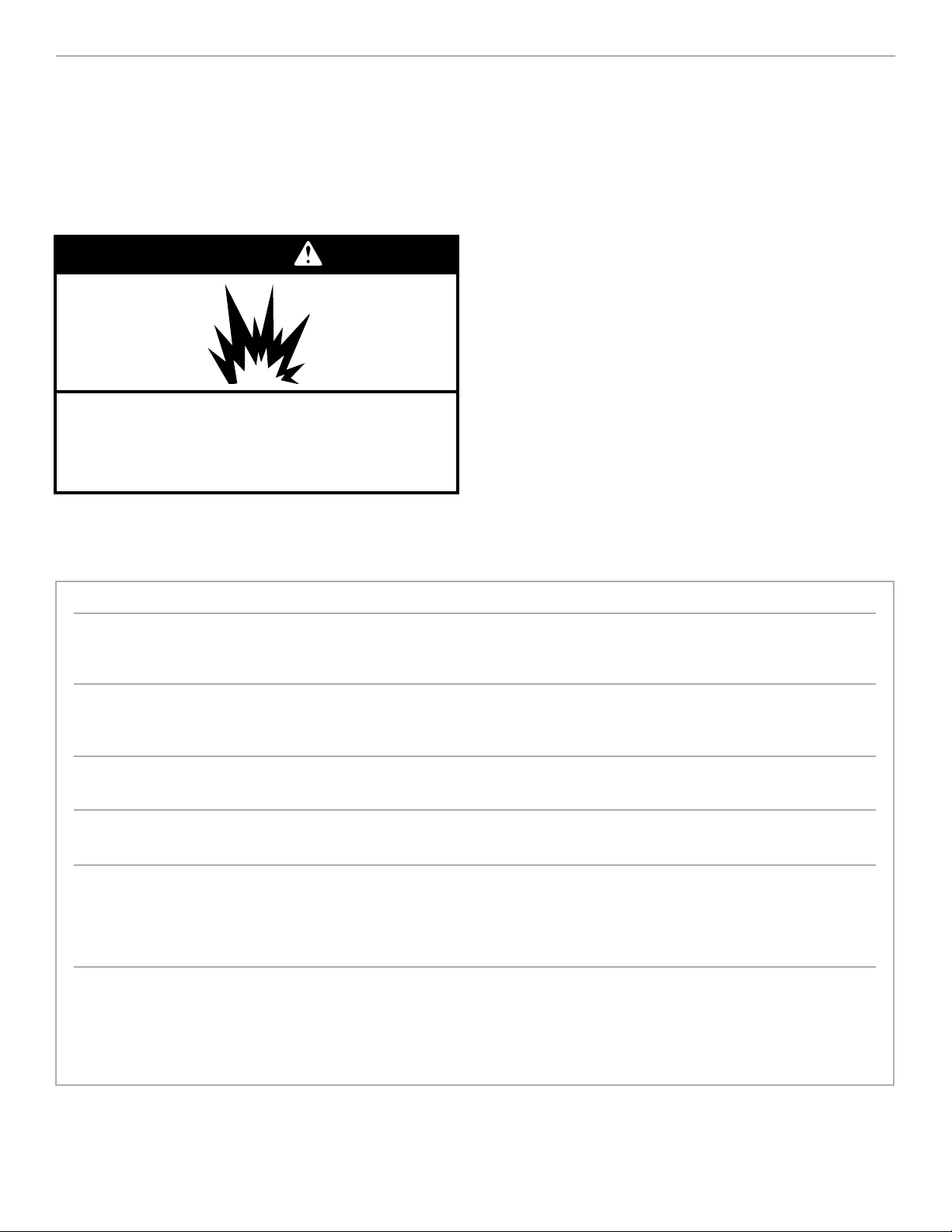
wWARNING
Explosion Hazard
Use nonflammable cleaner.
Failure to do so can result in death, explosion,
or fire.

24
VACATION AND MOVING CARE
Short vacations
If you will be away for less than four weeks, use these
tips to prepare your refrigerator before you leave.
1. Use up any perishables and freeze other items.
2. If your refrigerator has an automatic ice maker:
•
Raise signal arm to OFF (up) position.
•
Shut off water supply to the ice maker.
3. Empty the ice bin.
Long vacations
If you will be gone for a month or more, follow these
steps to prepare your refrigerator.
1. Remove all food from the refrigerator.
2. If your refrigerator has an automatic ice maker:
•
Turn off the water supply to the ice maker at least
one day ahead of time.
•
When the last load of ice drops, turn off the ice
maker. Make sure all ice is dispensed out of the ice
maker mechanism.
3. Unplug the refrigerator.
4. Clean it, wipe it, and dry well.
5. Tape rubber or wood blocks to the tops of both doors
to prop them open far enough for air to get in. This
stops odor and mold from building up.
Moving
When you are moving your refrigerator to a new home,
follow these steps to prepare it for the move.
1. If your refrigerator has an automatic ice maker, turn
off the water supply to the ice maker at least one day
ahead of time.
2. Disconnect the water line from the back of the
refrigerator.
3. When the last load of ice drops, lift the signal arm to
the OFF (up) position.
4. Remove all food from the refrigerator and pack all
frozen food in dry ice.
5. Turn the Refrigerator Control to OFF.
6. Unplug the refrigerator.
7. Empty water from the defrost pan.
8. Clean, wipe, and dry thoroughly.
9. Take out all removable parts, wrap them well, and
tape them together so they don’t shift and rattle dur-
ing the move.
10. Screw in the leveling rollers.
11. Tape the doors shut and the power cord to the
refrigerator cabinet.
When you get to your new home, put everything back
and refer to “Installing Your Refrigerator” for preparation
instructions. Also, if your refrigerator has an automatic ice
maker, remember to reconnect the water supply to the re-
frigerator.
POWER INTERRUPTIONS
If the electricity in your house goes off, call the power
company and ask how long it will be off.
1. If the power will be out for 24 hours or less, keep both
doors closed to help foods stay cold and frozen.
2. If the power will be out for more than 24 hours:
(a) Remove all frozen food and store it in a frozen food
locker.
OR
(b) Place 2 lb. (907 g) of dry ice in the freezer for every
cubic foot (liter) of freezer space. This will keep the
food frozen for two to four days. While handling
dry ice, wear gloves to protect your hands from
ice burns.
OR
(c) If neither a food locker nor dry ice is available, use
up or can perishable food at once.
REMEMBER: A full freezer stays cold longer than a part-
ly filled one. A freezer full of meat stays cold longer than
a freezer full of baked goods. If food contains ice crys-
tals, it may be safely refrozen, although the quality and
flavor may be affected. If the condition of the food is
poor, or if you feel it is unsafe, dispose of it.
25
FOOD STORAGE GUIDE
There is a correct way to package and store
refrigerated or frozen food. To keep food
fresher, longer, take the time to study these
recommended steps.
STORING FRESH FOOD
Wrap or store food in the refrigerator in airtight and
moisture-proof material unless otherwise noted. This
prevents food odor and taste transfer throughout the
refrigerator. For dated products, check code date to
ensure freshness.
Butter or margarine
Keep opened butter in covered dish or closed
compartment. When storing an extra supply, wrap in
freezer packaging and freeze.
Cheese
Store in the original wrapping until you are ready to
use it. Once opened, rewrap tightly in plastic wrap
or aluminum foil.
Milk
Wipe milk cartons. For best storage, place milk on
interior shelf.
Eggs
Store in original carton on interior shelf.
Fruit
Wash, let dry, and store in refrigerator in plastic bags
or crisper. Do not wash or hull berries until they are
ready to use. Sort and keep berries in original
container in a crisper, or store in a loosely closed
paper bag on a refrigerator shelf.
Leafy vegetables
Remove store wrapping and trim or tear off bruised
and discolored areas. Wash in cold water and drain.
Place in plastic bag or plastic container and store in
crisper.
Vegetables with skins
(carrots, peppers)
Place in plastic bags, or plastic container and store
in crisper
Fish
Use fresh fish and shellfish the same day as
purchased.
Meat
Store most meat in original wrapping as long as it
is airtight and moisture-proof. Rewrap if necessary.
See the following for storage times. When storing
meat longer than the times given, freeze the meat.
Chicken ........................................................1-2 days
Bacon............................................................5-7 days
Ground beef..................................................1-2 days
Cold cuts ......................................................3-5 days
Steaks/roasts ................................................3-5 days
Variety meats ................................................1-2 days
Cured meats................................................7-10 days
Leftovers
Cover leftovers with plastic wrap or aluminum foil.
Plastic containers with tight lids can also be used.
Stay fresh
Keep your refrigerator smelling fresh with an open
box of baking soda.
26
STORING FROZEN FOOD
The freezer section is designed for storing
commercially frozen food and for freezing food
at home.
NOTE: For further information about preparing food
for freezing or food storage times, check a freezer
guide or reliable cookbook.
Packaging
Successful freezing depends on the correct packaging.
When you close and seal the package you must not
allow air or moisture in or out. If you do, you could
have food odor and taste transfer throughout the
refrigerator, and also dry out frozen food.
Packaging recommendations:
•
Rigid plastic containers with tight-fitting lids
•
Straight-sided canning/freezing jars
•
Heavy-duty aluminum foil
•
Plastic-coated paper
•
Non-permeable plastic wraps (made from
saran film)
•
Specified freezer self-sealing plastic bags
Follow package or container instructions for proper
freezing methods.
Do not use:
•
Bread wrappers
•
Non-polyethylene plastic containers
•
Containers without tight lids
•
Wax paper or wax-coated freezer wrap
•
Thin, semi-permeable wrap
Save Energy
Allow hot foods to cool at room temperature for
30 minutes, then package and freeze. Cooling hot
foods before freezing saves energy.
Freezing
Your freezer will not quick-freeze any large quantity of
food. Put no more unfrozen food into the freezer than
will freeze within 24 hours (about 2 to 3 lbs of food per
cubic foot [907-1,350 g per liter] of freezer space).
Leave enough space in the freezer for air to circulate
around packages. Also leave enough room at the front
so the door can close tightly.
Storage times vary according to the quality and
type of food, the type of packaging used (airtight
and moisture-proof), and the storage temperature.
Ice crystals inside a sealed package are normal.
It means that moisture in the food and air inside the
package have condensed, creating ice crystals.
27
There is water in the defrost drain pan
Check if ...
The refrigerator is defrosting.
It is more humid than normal.
Water in the defrost pan is overflowing.
Then ...
The water will evaporate. It is normal for water to drip into
the defrost pan.
Expect that the water in the defrost pan will take longer to
evaporate. This is normal when it is hot or humid.
Check to make sure your refrigerator is level. (See the
“Leveling” section.) If it is still overflowing there is probably
something wrong with the refrigerator. Call an Authorized
Whirlpool Service Center.
TROUBLESHOOTING GUIDE
You can solve many common refrigerator problems easily, saving you the cost of a possible service
call. Try the suggestions below to see if you can solve your problem without outside help.
NOTE: The Index in the back of the book will help you locate the appropriate sections that are
referenced throughout this Troubleshooting Guide.
Check if ...
The power supply cord is unplugged.
A household fuse has blown or circuit breaker
has tripped.
The refrigerator control is turned to the
“OFF” position.
The refrigerator is defrosting.
Then ...
Firmly plug the cord into a live outlet with proper voltage.
Replace the fuse or reset the circuit.
Refer to the “Setting the controls” section.
Recheck to see if the refrigerator is operating in 30 minutes.
Your refrigerator will regularly run an automatic defrost cycle.
If it is still not running after checking the above items, call
an Authorized Whirlpool Service Center.
The lights do not work
Check if ...
The power supply cord is unplugged.
A household fuse or circuit breaker has tripped.
A light bulb is loose in the socket.
A light bulb has burned out.
Then ...
Firmly plug the cord into a live outlet with proper voltage.
Replace the fuse or reset the circuit.
Turn the refrigerator control to OFF. Disconnect the
refrigerator from the electrical supply. Gently remove the
bulb and reinsert. Then reconnect the refrigerator to the
electrical supply and reset the refrigerator control.
Replace with an appliance bulb of the same wattage, size,
and shape. See the “Changing the light bulbs” section.
Your refrigerator will not operate
28
The motor seems to run too much
Check if ...
The room temperature is hotter than normal.
A large amount of food has just been added to
the refrigerator.
The door is opened often.
The controls are not set correctly for the
surrounding conditions.
The doors are not closed completely.
The base grille is dirty or blocked.
The condenser coils are dirty.
The door gaskets are not sealed all the way around.
Then ...
Expect the motor to run longer under warm conditions. At
normal room temperatures, expect your motor to run about
40% to 80% of the time. Under warmer conditions, expect
it to run even more of the time.
Adding a large amount of food warms the refrigerator. It
is normal for the motor to run longer in order to cool the
refrigerator back down. See the “Food Storage Guide”
section.
Expect the motor to run longer when this occurs. In order
to conserve energy, try to get everything you need out of
the refrigerator at once, keep food organized so it is easy
to find, and close the door as soon as the food is removed.
Refer to the “How the controls work” section.
Push the doors firmly shut. If they will not shut all the
way, see “The doors will not close completely,” later in
this section.
This prevents air circulation and makes the motor work
harder. Remove the grille and clean. See the “Removing
the base grille” section.
This prevents air transfer and makes the motor work harder.
Clean the condenser coils. Refer to the “Cleaning your
refrigerator” section.
Contact a qualified person or a technician.
If the problem is not due to any of the above, remember
that your new refrigerator will run longer than your old one
due to its high efficiency motor.
The refrigerator seems to make too much noise
Check if ...
The sounds and noises are common for new
refrigerators.
Then ...
Refer to the “Understanding the sounds you may hear”
section.
29
Off-taste or odor in the ice
Check if ...
The plumbing connections are new, causing
discolored or off-flavored ice.
The ice cubes have been stored for too long.
Food in the freezer has not been wrapped properly.
Freezer and ice bin need to be cleaned.
Water contains minerals (such as sulfur).
Then ...
Discard the first few batches of ice.
Throw old ice away and make a new supply.
Refer to the “Storing frozen food” section.
See the “Cleaning your refrigerator” section.
A filter may need to be installed to remove the minerals.
The ice maker is not producing ice
Check if ...
The freezer temperature is not cold enough to
produce ice.
The ice maker arm is in the “OFF” (up) position.
The water line shut-off valve to the refrigerator is
not turned on.
An ice cube is jammed in the ejector arm.
The ice maker mold has no water in it or no ice
has been produced.
Then ...
See the “Setting the controls” section.
Lower arm to the “ON” (down) position. See the “Using the
optional automatic ice maker” section.
Turn on the water valve. See the “Attaching the optional
automatic ice maker to a water supply” section.
Remove the ice from the ejector arm with a plastic utensil.
Refer to the “Using the optional automatic ice maker”
section.
Check to see if your refrigerator has been connected to
your home water supply and the supply shut-off valve is
turned on. Refer to the “Attaching the optional automatic
ice maker to a water supply” section.
If not due to any of the above, there may be a problem with
the water line. Contact the Authorized Whirlpool Service
Company.
The ice maker is producing too little ice
Check if ...
The ice maker has just been installed.
A large amount of ice has just been removed.
The controls are not set correctly.
The water shut-off valve is not turned completely on.
There is a water filter installed on the refrigerator.
This filter may be clogged or installed incorrectly.
Then ...
Wait 72 hours for full ice production to begin. Once your
refrigerator is cooled down, the ice maker should begin
producing 70-120 cubes every 24 hours.
Allow 24 hours for ice maker to produce more ice.
Refer to the “Setting the controls” section.
Turn valve on fully. Refer to the “Attaching the optional
automatic ice maker to a water supply” section.
First, check the filter installation instructions to ensure
that the filter was installed correctly and is not clogged.
If installation or clogging is not a problem, call a qualified
person or a technician.
30
The divider between the two compartments is warm
Check if ...
The condenser coils or base grille are dirty or clogged.
The motor has quit working.
Then ...
Clean according to the “Cleaning your refrigerator” section.
See “Your refrigerator will not operate” earlier in this section.
NOTE: The refrigerator temperature may turn from warm
to hot.
If not due to any of above, the warmth is probably due to
normal operation of the automatic exterior moisture control.
If still concerned, call the Consumer Assistance Center or an
Authorized Whirlpool Service Company.
Temperature is too warm
Check if ...
The air vents are blocked in either compartment.
This prevents the movement of cold air from the
freezer to the refrigerator.
The door(s) are opened often.
A large amount of food has just been added to
the refrigerator or freezer.
The controls are not set correctly for the surrounding
conditions.
Then ...
Remove any objects from in front of the air vents. Refer to
“Ensuring proper air circulation” for the location of air vents.
Be aware that the refrigerator will warm when this occurs.
In order to keep the refrigerator cool, try to get everything
you need out of the refrigerator at once, keep food
organized so it is easy to find, and close the door as soon
as the food is removed.
Adding a large amount of food warms the refrigerator.
It can take several hours for the refrigerator to return to the
normal temperature.
Refer to the “How the controls work” section.
There is interior moisture build-up
Check if ...
The air vents are blocked in the refrigerator.
The door is opened often.
The room is humid.
Then ...
Remove any objects from in front of the air vents. Refer to
“Ensuring proper air circulation” for the location of air vents.
To avoid humidity build-up, try to get everything you need
out of the refrigerator at once, keep food organized so it is
easy to find, and close the door as soon as the food is
removed. (When the door is opened, humidity from the room
air enters the refrigerator. The more often the door is opened,
the faster humidity builds up, especially when the room itself
is very humid.)
It is normal for moisture to build up inside the refrigerator
when the room air is humid.
31
The doors will not close completely
Check if ...
Food packages are blocking the door open.
The ice bin is out of position.
The pans, shelves, bins, or baskets are out
of position.
The gaskets are dirty.
The refrigerator is not level.
The doors were removed during product installation
and not properly replaced.
Then ...
Rearrange containers so that they fit more tightly and take up
less space.
Push the ice bin in all the way.
Put all pans, shelves, bins, and baskets back into their
correct position.
Clean gaskets according to the directions in the “Caring for
Your Refrigerator” section.
Level the refrigerator. Refer to the “Leveling” section.
Remove and replace the doors according to the “Reversing
the door swing” section or, contact a qualified person.
The doors are difficult to open
Check if ...
The gaskets are dirty or sticky.
Then ...
Clean gaskets according to the directions in the “Caring
for Your Refrigerator” section.
There is interior moisture build-up (cont.)
Check if ...
The food is not packaged correctly.
The controls are not set correctly for the
surrounding conditions.
A self defrost cycle was completed.
Then ...
Check that all food is securely wrapped. If necessary,
repackage food according to the guidelines in the “Food
Storage Guide” section. Wipe off damp food containers
before placing in the refrigerator.
Refer to the “How the controls work” section.
It is normal for droplets to form on the back wall after the
refrigerator self-defrosts.
32
REQUESTING ASSISTANCE OR SERVICE
To avoid unnecessary service calls, please check the “Troubleshooting Guide” section. It may save
you the cost of a service call. If you still need help, follow the instructions below.
1. If the problem is not due to one of
the items listed in Troubleshooting…
Contact the dealer from whom you purchased the unit
or an authorized Whirlpool service company.
2. If you need FSP
®
replacement parts
†
…
FSP is a registered trademark of Whirlpool
Corporation for quality parts. Look for this symbol of
quality whenever you need a replacement part for
your WHIRLPOOL
®
appliance. FSP replacement parts
will fit right and work right because they are made to
the same exacting specifications used to build every
new WHIRLPOOL appliance.
To locate FSP replacement parts in your area, contact
the dealer from whom you purchased the unit or an
authorized Whirlpool
®
service company.
†
When asking for help or service:
Please provide a detailed description of
the problem, your appliance’s complete
model and serial numbers, and the
purchase date. (See page 3.) This
information will help us respond properly
to your request.

INDEX
This index is alphabetical. It contains all the
topics included in this manual, along with the
pages on which you can find each topic.
TOPIC PAGE
AIR CIRCULATION ............................................................8
BASE GRILLE
Removing......................................................................23
CLEANING
How to ..........................................................................23
Moving..........................................................................24
Vacation ........................................................................24
CONTROLS
How they work................................................................9
Setting ............................................................................9
DOOR SWING
Hinges ..........................................................................20
Handles ........................................................................21
FOOD STORAGE
Freezing ........................................................................26
Fresh Food ..................................................................25
FREEZER SECTION
Floor..............................................................................18
Shelf..............................................................................17
ICE MAKER
Attaching to a water supply ..........................................7
Using ............................................................................18
LIGHT BULBS
Changing ......................................................................19
TOPIC PAGE
PARTS AND FEATURES ....................................................5
POWER INTERRUPTIONS ..............................................24
REFRIGERATOR SECTION
Door trim ......................................................................11
Crisper ..........................................................................16
Crisper humidity control ..............................................17
Door bins ......................................................................11
Flip-up door shelf ........................................................13
Meat Drawer ................................................................14
Shelves ..................................................................12, 15
Utility compartment ......................................................13
SAFETY ..............................................................................3
SERVICE
Requesting....................................................................32
SOUNDS
Understanding ..............................................................22
STORAGE
Moving..........................................................................24
Vacation ........................................................................24
TEMPERATURE
Controlling ......................................................................9
TROUBLESHOOTING ......................................................27