For questions call: 1-800-634-4350
Pads are for Single Patient Use Only.
OmronHealthcare.com
3125420-0E

1
TABLE OF CONTENTS
Introduction ...............................................................................................2
Safety Instructions .............................................................................. 2
Intended Use ........................................................................................2
Contraindication ..................................................................................3
Receiving and Inspection .................................................................... 3
Symbols Glossary ...................................................................................... 4
Important Safety Information ...................................................................5
Warnings .............................................................................................5
Cautions ............................................................................................... 7
Adverse Reactions ............................................................................... 9
How the Device Works ............................................................................ 10
Know Your Device 11
Package Contents .............................................................................. 11
Part Names And Functions on the Device ........................................ 12
Usage of Storage Case And Pad Holder ........................................... 13
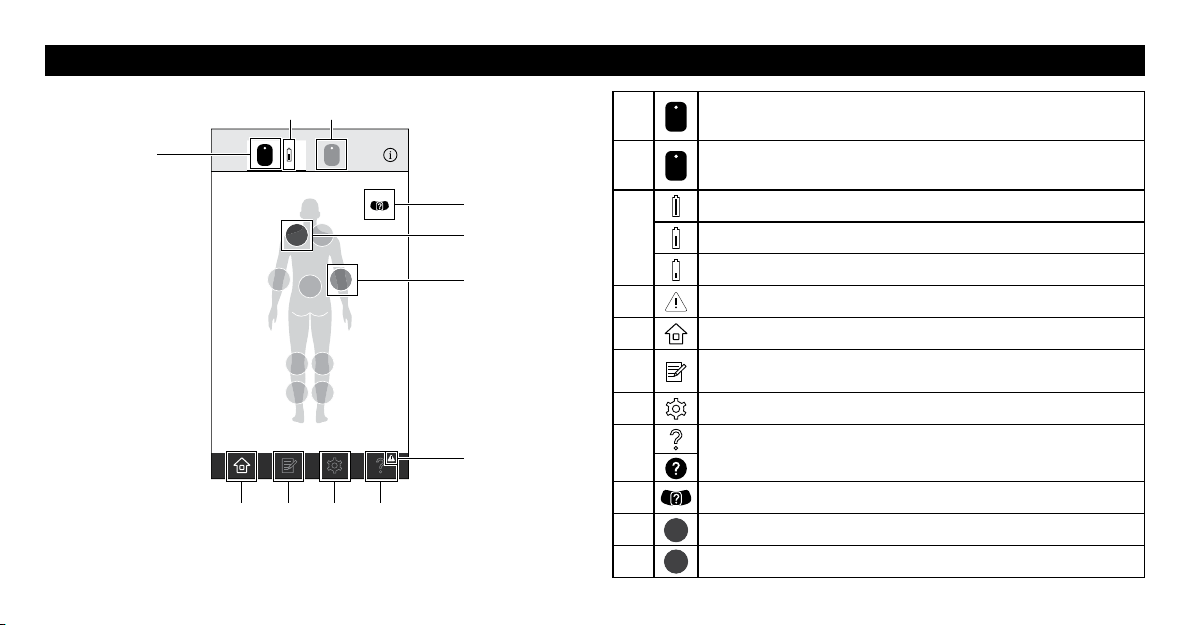
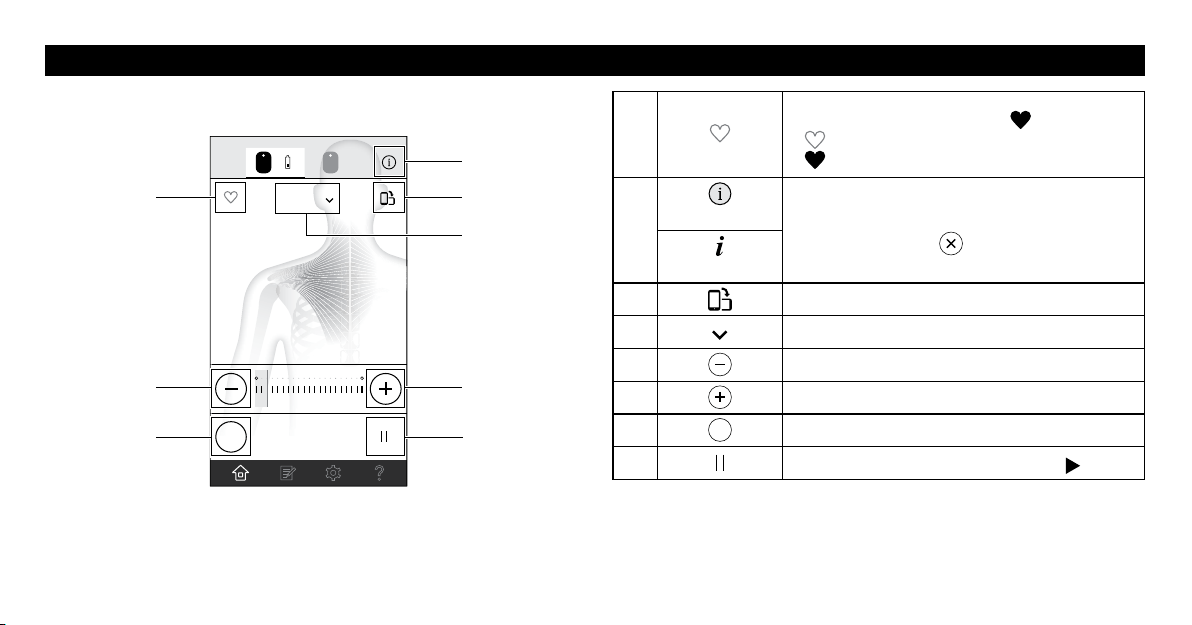
Part Names And Functions of the Omron TENS App ..................... 14
Operating Instructions 16
Preparing for Use .............................................................................. 16
Get Started with Your Therapy ......................................................... 19
Other App Features ........................................................................... 28
How to Control And Reduce Your Pain ............................................ 29
After Daily Use 30
Storage And Removing ..................................................................... 30
Cleaning And Disposal ..................................................................... 31
Appendix 32
Reset the Device ................................................................................ 32
Troubleshooting ................................................................................. 33
Accessories ........................................................................................37
Specications .................................................................................... 39
Limited Warranty .............................................................................. 40
Regulatory Compliance Information 42
FCC Statement .................................................................................. 42
Important Information Regarding Electro Magnetic
Compatibility (EMC) ........................................................................ 43

2
INTRODUCTION
Thank you for purchasing the Omron
®
Avail
TM
.
Avail is a wireless, independent dual channel wearable electrotherapy
device that is designed to alleviate chronic muscle and joint pain on
multiple body locations. It delivers TENS (Transcutaneous Electrical
Nerve Stimulation) technology and microcurrent therapy through the
simple, convenient control of the Omron TENS iOS or Android app.
Premium, contouring pads allow for discreet and convenient placement
on multiple pain locations on the body.
TENS is a safe and drug-free treatment for pain that has been used for
over 30 years by medical professionals such as physical therapists and
chiropractors.
Notes:
•Keep this instruction manual in a convenient place or store with the
device for future reference.
•Register your product online at www.register-omron.com. You can
also register your product via the Omron app.
•Keep your purchase receipt as proof of purchase for warranty
coverage.
•The illustrations used in this manual are images.
SAFETY INSTRUCTIONS
This instruction manual provides you with important information about
this device. To ensure the safe and proper use of this device, read and
understand all of the safety and operating instructions. If you do not
understand these instructions or have any questions, contact 1-800-
634-4350 before attempting to use this device.
INTENDED USE
The Avail
TM
is intended for the relief of pain associated with sore or
aching muscles of the lower back, arms, legs, shoulders or feet due to
strain from exercise or normal household work activities.
When used for the symptomatic relief and management of chronic,
intractable pain and relief of pain associated with arthritis, use the Tap,
Shoulder, Arm or Leg mode of stimulation.
Environment of Use: Clinic, hospital and home environments.
Patient Population: Adult

3
SAVE THESE INSTRUCTIONS
INTRODUCTION
CONTRAINDICATION
Do not use this device if you have a cardiac pacemaker, implanted
defibrillator or other implanted metallic or electronic device. Such
use could cause electric shock, burns, electrical interference or
death.
RECEIVING AND INSPECTION
Remove this device from the packaging and inspect all package
contents for damage. If there is any damage, DO NOT USE and
contact Omron Healthcare Customer Service at 1-800-634-4350.
4
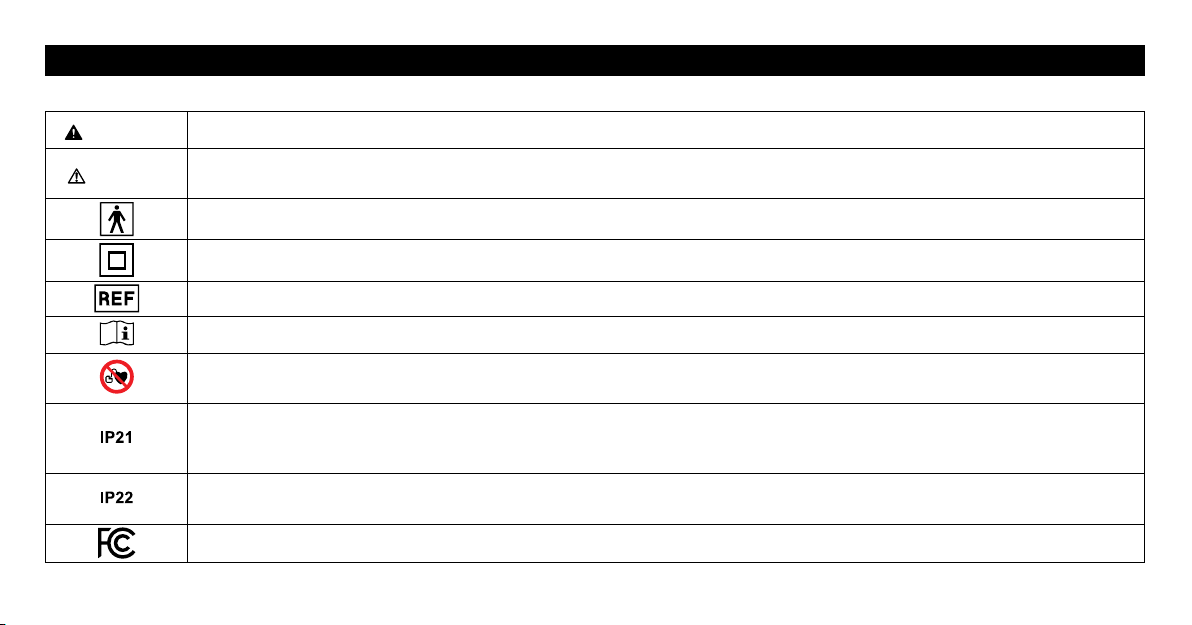
SYMBOLS GLOSSARY
For symbol information, visit: OmronHealthcare.com/symbols-glossary
WARNING
Indicates a potentially hazardous situation which, if not avoided, could result in death or serious injury.
CAUTION
Indicates a potentially hazardous situation which, if not avoided, may result in minor or moderate injury to the user or patient or damage to
the equipment or other property.
Type BF applied part. (Pads)
Class II equipment.
Catalogue number.
Consult instructions for use.
This product should not be used by persons with medical implants, e.g. heart pacemakers, artificial heart, lung or other electronic life support
systems.
IP classification is degrees of protection provided by enclosures in accordance with IEC 60529. This device is protected against solid foreign
objects of diameter 12 mm such as a finger and greater, and against vertically falling water drops which may cause issues during a normal
operation.
IP classification is degrees of protection provided by enclosures in accordance with IEC 60529. This device is protected against solid foreign
objects of diameter 12 mm such as a finger and greater, and against oblique falling water drops which gives trouble to normal operation.
Tested to comply with FCC (Federal Communications Commission) standards.
5
IMPORTANT SAFETY INFORMATION
WARNINGS
Keep this device and the pads out of the reach of infants, toddlers and
children.
Keep out of the reach of young children because the AC adapter cord
could cause strangulation.
Consult with your physician before using this device, because
the device may cause lethal rhythm disturbances to the heart in
susceptible individuals.
If you have had medical or physical treatment for your pain, consult
with your physician before using this device.
If you are in the care of a physician, consult with your physician
before using this device.
If your pain does not improve, becomes more than mild, or continues
for more than five days, stop using the device and consult with your
physician.
Do not place this device across your chest or near your heart because
the introduction of electrical current into the chest may cause rhythm
disturbances to your heart, which could be lethal.
Do not place the pads near or on cancerous lesions, diseased skin,
open wounds, rashes, swollen, red, infected or inflamed areas or skin
eruptions such as phlebitis, thrombophlebitis and varicose veins.
Do not place the pads over your neck because this could cause severe
muscle spasms resulting in closure of your airway, difficulty in
breathing, or adverse effects on heart rhythm or blood pressure.
Do not place the pads on or near the head, mouth, face, heart or
genitals.
Do not use this device when bathing, showering, sleeping, during
exercise, while sweating or in high humidity.
Do not apply stimulation while driving, operating machinery, or
during any activity in which electrical stimulation can put you at risk
of injury.
Do not use this device on infants, toddlers, children, pregnant
women, persons incapable of expressing their thoughts or on persons
unable to operate the device by themselves.
Do not use this device while using another TENS device.
6
IMPORTANT SAFETY INFORMATION
Do not apply stimulation in the presence of electric monitoring
equipment such as cardiac monitors and ECG alarms because the
equipment may not operate properly when the device is in use.
Never bend or fold the pads.
If you have any serious illness, consult with your physician before
using this device.
Apply the pads only to normal, intact, clean, healthy skin of adult
patients.
For Hospitals and Clinics: Operation in close proximity (e.g. 1 m)
to a shortwave or microwave therapy ME equipment may produce
instability to the stimulator output.
For Hospitals and Clinics: Simultaneous connection of a patient to high
frequency surgical equipment and this device may result in bums at the
site of the stimulator electrodes and possible damage to the stimulator.
Do not place the storage case within 2 inches (approx. 5 cm) to
any person who is using pacemakers or implantable cardioverter
debrillators(ICDs).Magnetsareembeddedinthestoragecaseso
thatmagnetismmayaectpacemakersorICDs.
Do not place the charger within 6 inches (approx. 15 cm) to any
person who is using pacemakers or implantable cardioverter
debrillators(ICDs).Thechargeremitselectromagneticelds,which
mayaectpacemakersorICDs.
Data Transmission/Remote Control
This product emits radio frequencies (RF) in the 2.4 GHz band. DO
NOT use this product in locations where RF is restricted, such as on
an aircraft. For further information on potential restrictions refer to
documentation on the Bluetooth usage by the FCC.
Battery Handling and Usage
Topreventtheriskofoverheating,reorexplosion:
•Do not puncture, crush, disassemble or modify the device.
•Do not throw the device into fire.
•Do not recharge, use, or leave the device in any high temperature
environment such as in a location near a fire or in direct sunlight.
The device contains a built-in rechargeable Lithium-Ion battery
which must be disposed of properly. Dispose of the device
according to applicable local government regulations.
Do not disassemble the device by yourself.
7
IMPORTANT SAFETY INFORMATION
CAUTIONS
TENS is not effective for pain of central origin, including headache.
TENS is not a substitute for pain medications and other pain
management therapies.
TENS devices have no curative value.
TENS is a symptomatic treatment and, as such, suppresses the
sensation of pain that would otherwise serve as a protective mechanism.
Effectiveness is highly dependent upon patient selection by a
practitioner qualified in the management of pain patients.
Do not use this device to treat one region for extended periods of
time. The long-term effects of electrical stimulation are unknown.
If you experience any skin irritation or redness after a session, do not
continue stimulation in that area of the skin.
If you have suspected or diagnosed heart disease, you should follow
precautions recommended by your physician.
If you have suspected or diagnosed epilepsy, you should follow
precautions recommended by your physician.
Use caution if you have a tendency to bleed internally, such as
following an injury or fracture.
Consult with your physician prior to using the device after a recent
surgical procedure because stimulation may disrupt the healing
process.
Use caution if stimulation is applied over the menstruating uterus.
Use caution if stimulation is applied over areas of skin that lack
normal sensation.
Use this device only with components provided in the Avail
TM
packaging and accessories recommended by the manufacturer. (Refer
to page 11 and 37)
Place the pads at least 1 inch apart. Do not place the adhesive surface
of the pads on the spine.
Do not apply the pads with wet hands, and do not apply the pads that
are wet.
Pads are for Single Patient Use Only. Never share the pads with
another person.
8
IMPORTANT SAFETY INFORMATION
Do not overlap or put the pads on top of each other because therapy
may weaken or stop.
Do not leave the pads placed on the skin after treatment.
Do not apply any lotion, cream or ointment to the pads.
Never attempt to modify the device.
The pads should not touch any metal object such as a belt buckle or
necklace.
To avoid damage to the adhesive surface of the pads, only put the
pads on the skin or the plastic pad holder.
Always place clean pads in accordance with illustrations provided
(Refer to pages 20 - 24, Pad Placement).
If the device is not functioning properly or you feel discomfort,
immediately stop using the device.
Before use, inspect the cord for open wires or any damage. If
damaged, do not use and replace immediately.
Clean and dry affected area so it is free of all lotions, oils and sweat.
Clean or change the pad when it loses adhesion.
Do not put any metal object, such as coin, clip or other metal on the charger.
Do not put the pad on your body where it cannot be reached by your
own hand.
Do not place the storage case within 2 inches (approx. 5 cm) to any
magnetic memory devices such as key cards or credit cards. Magnets
are embedded in the storage case so that it may lose data stored on a
magnetic memory.
Data Transmission/Remote Control
Do not place integrated circuit cards, magnets, metal objects, or
other devices that emit electromagnetic fields near this device while
the device is controlled remotely. This may result in the incorrect
operation of your device and smartphone.

9
IMPORTANT SAFETY INFORMATION
ADVERSE REACTIONS
•You may experience skin irritation and burns beneath the stimulation
electrodes applied to your skin.
•You may experience headache and other painful sensations during or
following the application of electrical stimulation near your eyes and
to your head and face.
•You should stop using the device and should consult with your
physician if you experience adverse reactions from the device.
10
HOW THE DEVICE WORKS
TENS therapy suggests that electrical stimulation therapy may work in
several ways:
1. The gentle electrical pulses move through the skin to nearby nerves
to block or shut out the pain message from reaching the brain from
the source of the pain.
2. The gentle electrical pulses increase the production of the body’s
natural pain killer, such as endorphins.
3. Furthermore, it is thought that electrical stimulation improves blood
circulation.
About Microcurrent Therapy
Microcurrent is a therapy that applies extremely small electrical
currents to the nerves using electrodes placed on the skin.
Recommended Session Time
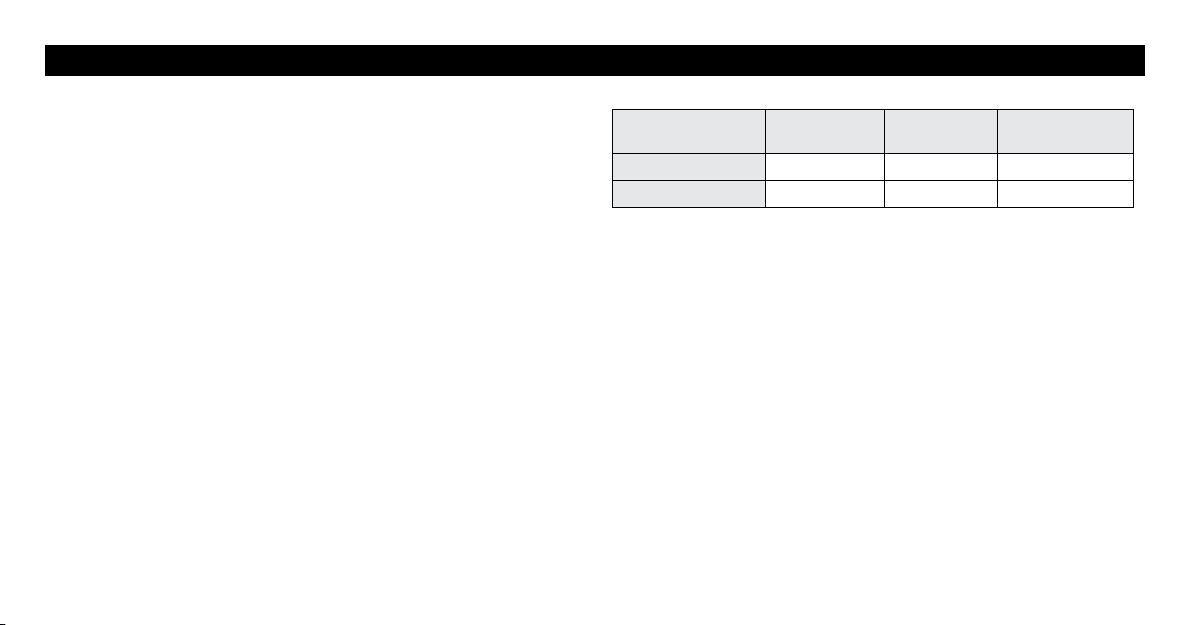
Recommended
1 session
Max minutes
per session
Max times per
day
TENS 30 minutes 60 minutes 3 times per day
MICROCURRENT 30 minutes 180 minutes Unlimited
11
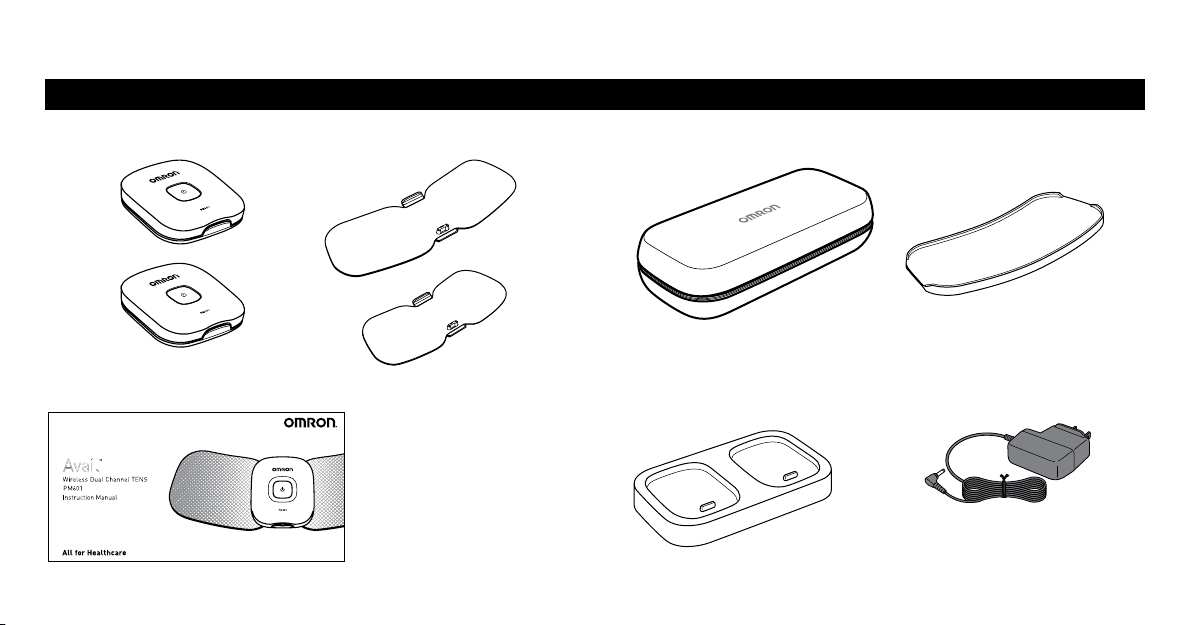
Devices Pads
Large Pad = L
Medium Pad = M
Storage Case and Pad Holder
Instruction Manual Charger AC Adapter
PACKAGE CONTENTS
KNOW YOUR DEVICE
12
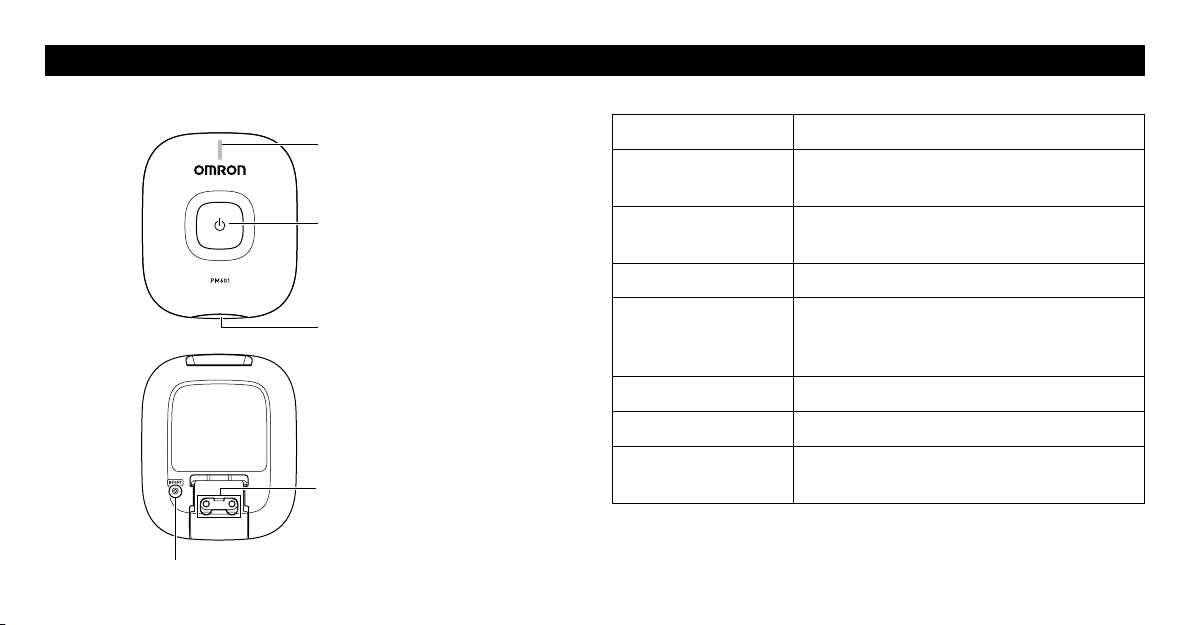
PART NAMES AND FUNCTIONS ON THE DEVICE
Front
Back
Display of Indicator Lights
Indication Description
Blinks green slowly
(every 1 second)
The power is turned on and waiting for
pairing or connecting to smartphone.
Blinks green quickly
(every 0.5 seconds)
Before selecting the therapy setting.
Lit green The device is connected to smartphone.
Blinks orange
Battery is being recharged.
(When the battery is fully charged, the
indicator light will go off.)
Lit orange Battery is depleted.
Blinks white Therapy session is live.
Blinks purple The device is damaged. Refer to page 35 on
Troubleshooting.
Power button
Indicator
Lights green, orange, white and
purple.
Pad release button
Connection hole
This hole is used for attaching the pad
as well as securing the device to the
battery charger.
Reset button
13
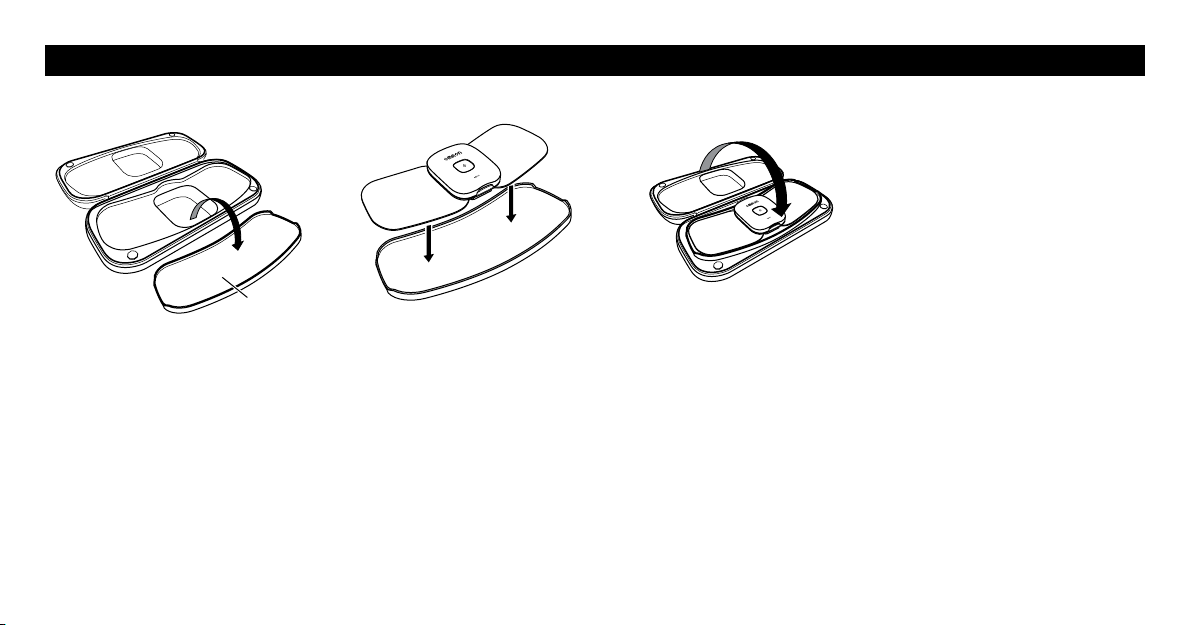
USAGE OF STORAGE CASE AND PAD HOLDER
Pad holder
1. Open the storage case.
2. Remove the pad holder
from the storage case and
plastic bag.
3. Attach the pad to the pad
holder.
For more details, refer to
“Storing the Pads on the Pad
Holder” on page 30.
4. Place the pad holder back
into the storage case.
5. Close the storage case.
14
PART NAMES AND FUNCTIONS OF THE OMRON TENS APP
Therapy Setting Screen
1
A
Tap to make the first connected device active. You can select a
treatment area that the first connected device will be placed.
2
B
Tap to make the second connected device active. You can select a
treatment area that the second connected device will be placed.
3
Battery charge is full.
Battery charge is about half full.
Battery charge is close to low.
4
Displayed when there is any notification.
5
Tap to show the therapy setting screen.
6
Tap to show the pain diary screen to record your pain level or
view your pain history.
7
Tap to show the settings screen.
8
Tap to show the help information.
9
Tap to show the proper pad placement.
J
A
Indicates the area that the first connected device will be placed.
K
B
Indicates the area that the second connected device will be placed.
A
B
A B
1
3 2
I
J
K
4
8765
Screen design may be changed. View of the screen may be slightly
different depending on the smartphone type.
15
PART NAMES AND FUNCTIONS OF THE OMRON TENS APP
Session Screen
1
Tap to save your favorite therapy setting.
When tapped, it will change to “ ”.
“ ” indicates that this setting is not favorite.
“ ” indicates that this setting is favorite.
2
(For iPhone)
Tap to show the caption for app’s display.
To close caption, tap “
”.
(For Android)
3
Tap to switch view orientation.
4
Tap to change the mode.
5
Tap to decrease intensity.
6
Tap to increase intensity.
7
QUIT
Tap to quit the session.
8
Tap to pause the session. To restart, tap “ ”.
A B
STEADY
01
02
0
29
:
41
QUIT
31
5
7
6
8
2
Screen design may be changed. View of the screen may be slightly
different depending on the smartphone type.
4
16
PREPARING FOR USE
Before using the device, inspect these items and ensure that:
1. The pads are not damaged.
2. The devices are intact and working.
3. The AC adapter is not broken or damaged.
For the First Time Use:
1. Recharge the battery to full.
2. Install the Omron TENS app and open it.
3. Turn on the device and pair it to your smartphone by using the app.
4. Attach the device onto the pad.
5. Select your body treatment area and place the pad on your skin.
6. Select a mode and your therapy time, then start a session.
After the First Time Use:
1. Open the Omron TENS app.
2. Turn on the device.
3. Select your body treatment area and place the pad on your skin.
4. Select a mode and your therapy time, then start a session.
Notes:
• Once fully charged, the battery will last for approximately 6 uses at
1 time per day for 30 minutes. Once the battery has been depleted, it
takes about 8 hours to charge.
•If the device is not being used for more than 3 months, recharge it.
•The battery may not be charged at all under extreme environmental
conditions such as high heat or cold temperatures.
STEP 1 RECHARGING THE BATTERY
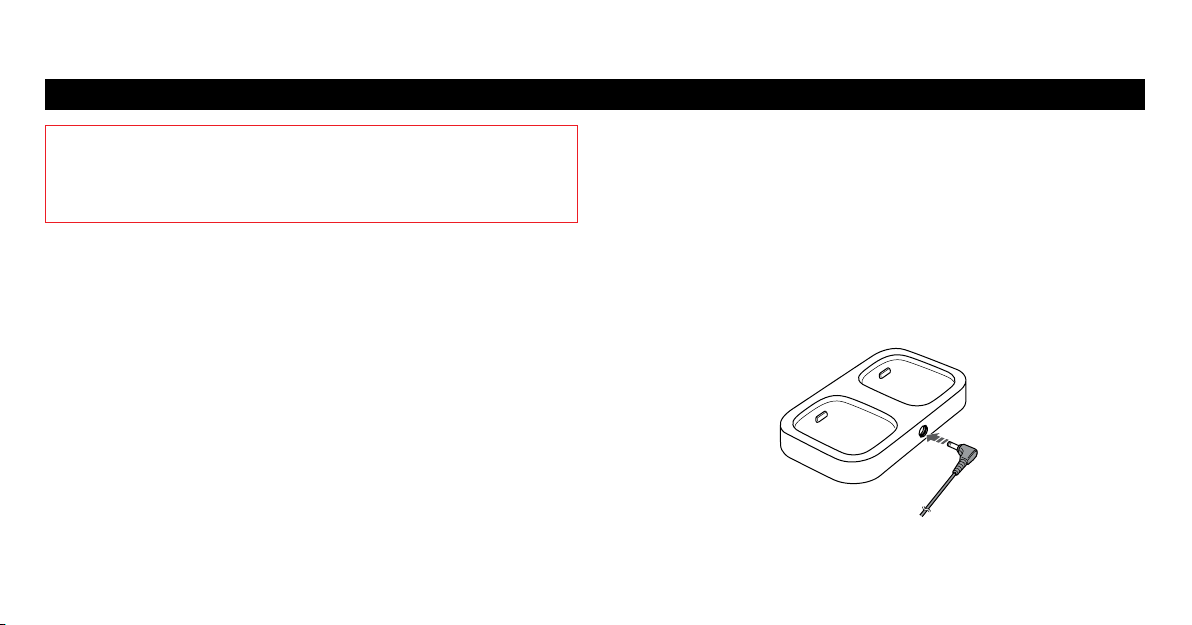
1. Connect the AC adapter plug to the AC adapter jack on the charger.
OPERATING INSTRUCTIONS
17
PREPARING FOR USE
STEP 1 RECHARGING THE BATTERY continued
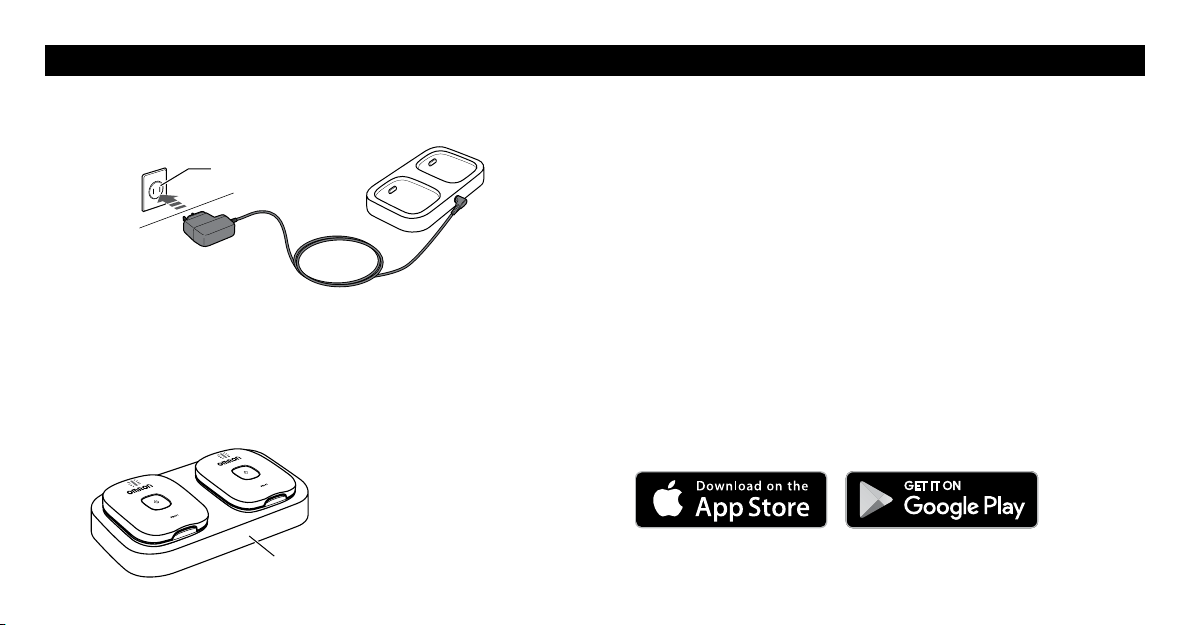
2. Insert the AC adapter into an outlet.
Outlet
Note: Only use the AC adapter and charger provided with this device for
recharging.
3. Set the device on the charger to initiate charging.
•When charging the battery, the indicator blinks in orange.
•When the battery is fully charged, the indicator light will go off.
4. Once the battery is fully charged, unplug the AC adapter and remove
the devices from the charger.
Battery Life
The rechargeable battery will last for up to 500 uses when fully charged
and under the following conditions: new battery was fully charged and
used one time per a day in normal temperatures. Battery life depends on
usage and storage conditions.
Note: See the specifications section on page 38 for temperature to be
used during battery charging.
STEP 2 INSTALLING THE APP
Install and set up the Omron TENS app.
1. Make sure the Bluetooth
®
in your smartphone is turned on.
2. Download and install the free “Omron TENS” app on your
smartphone.
3. Open the app on your smartphone.
Charger
18
PREPARING FOR USE
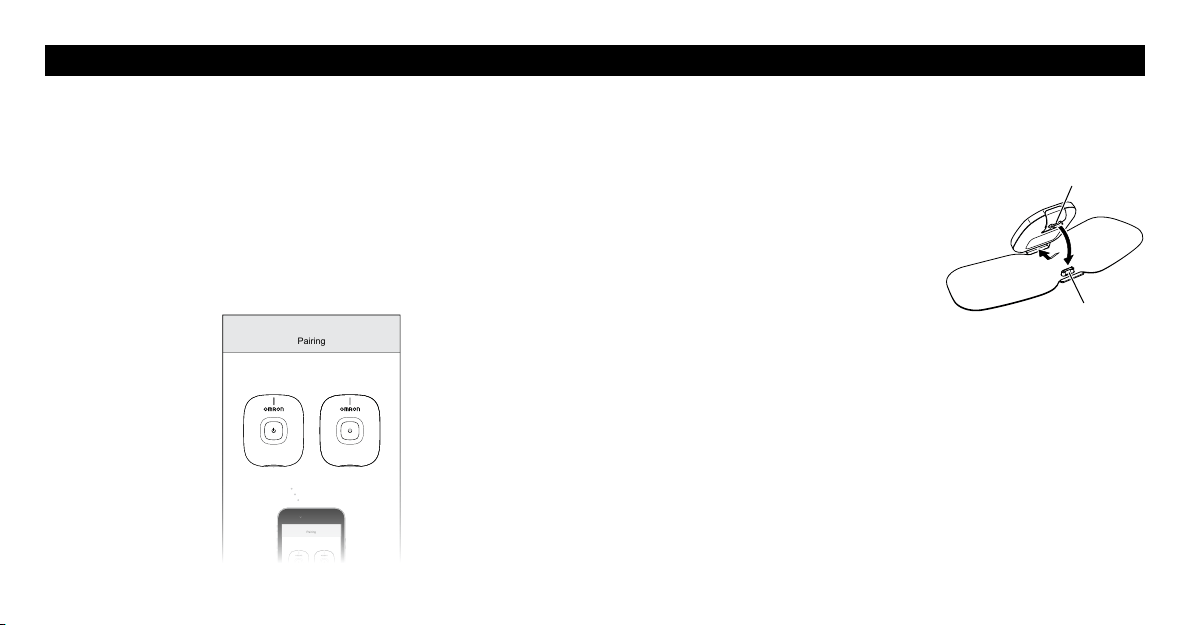
STEP 3 PAIRING THE DEVICE TO YOUR SMARTPHONE
1. Turn on the device, following the app instructions.
2. Confirm the device is paired successfully.
When the device is successfully paired to the smartphone, there will
be a steady green indicator light on the device.
Which One Is Device A?
The device that is connected first will be referred to as device “A” on the
app. The second device that is connected will be referred to as device “B”.
Pairing
Pairing
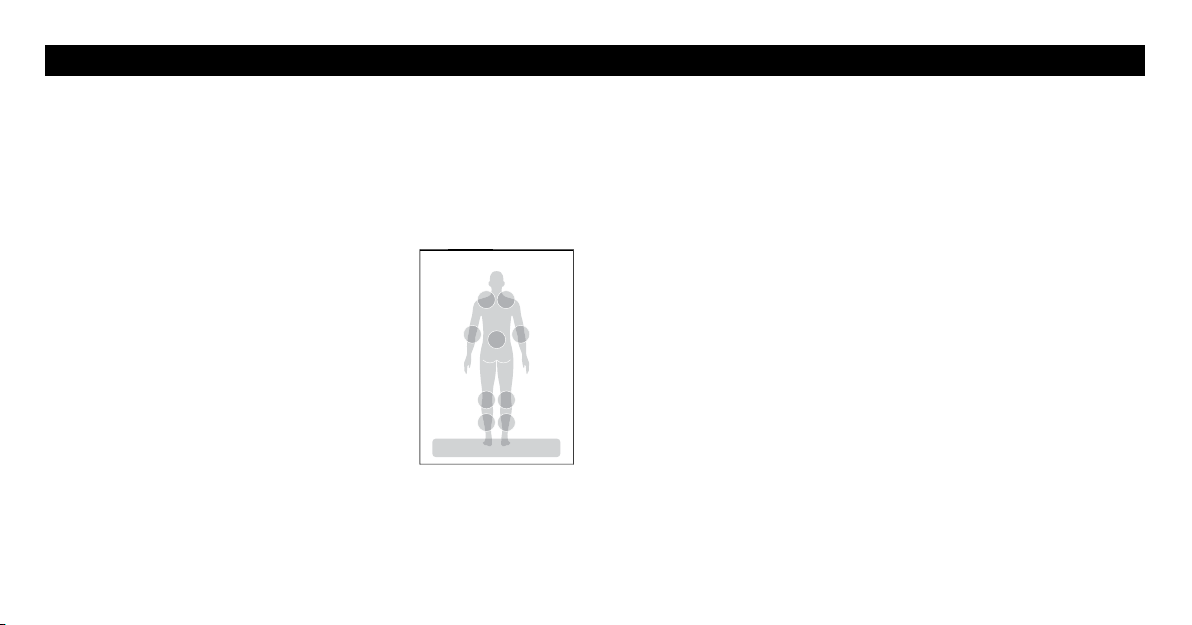
STEP 4 ATTACHING THE DEVICE ONTO THE PAD
For first time use, remove the pad from the sealed plastic bag and attach
the device. Do not remove the plastic film at this time.
1. Attach the connector to the connection
hole and push the device until it clicks
into place.
Connection holes
Connector
19
GET STARTED WITH YOUR THERAPY
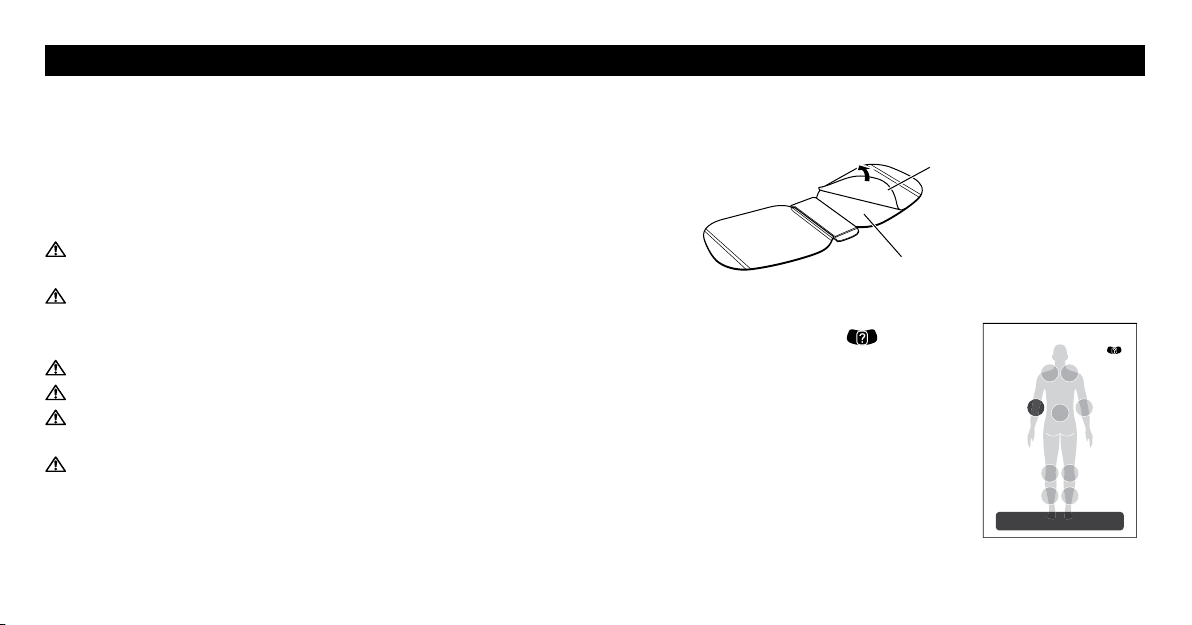
STEP 1 SELECTING A TREATMENT AREA
Before Use
•Open the Omron TENS app.
•Confirm the device(s) is connected.
•Make sure to always keep the smartphone near you during the session.
Treatment Area Selection
1. Tap on one of the suggested locations to
select the area you are going to place the pad.
Next
Select the body part you want to treat.
20
GET STARTED WITH YOUR THERAPY
STEP 2 PAD PLACEMENT
Clean and dry treatment area so it is free of all lotions, oils and sweat.
The pad should be applied only to normal, intact, clean, healthy skin
that is not experiencing any swelling or inflammation.
Before therapy, make sure that the pads stick to the skin.
For optimal therapy:
If using both devices at once,
make sure that the pads are at least 1 inch apart.
Do not overlap the pads or put them on top of each other.
Use the medium pad if the treatment area is so slender that the large
pad is overlapped.
Do not apply any lotion, cream or ointment to the pads.
Clean and dry affected area so it is free of all lotions, oils and sweat.
Pads are for Single Patient Use Only. Never share the pads with
another person.
Do not put the pad on your body where it cannot be reached by your
own hand.
•Check to make sure that the pad is not peeling off during treatment
sessions.
•Do not use the pads after expiration date.
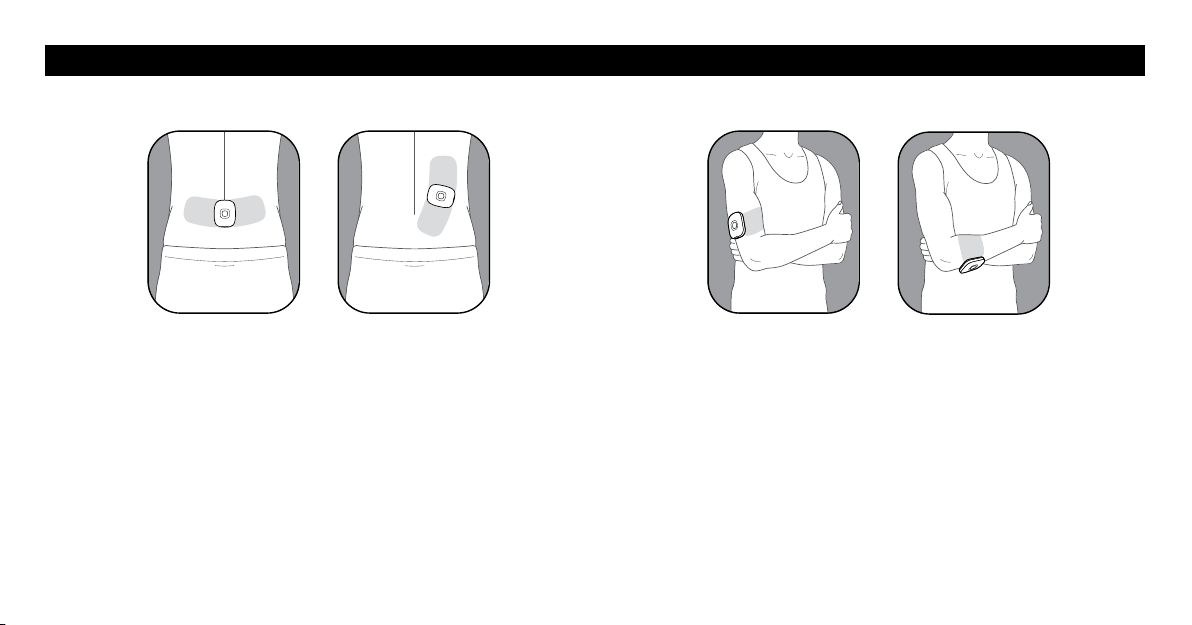
Removing the Plastic Film
For the first time use, remove and discard the plastic film from the back
of the pad.
Plastic film
Adhesive surface of the pad
When a location is tapped, the “ ” icon
will be displayed. Tap it to show how to place
the pad on your body.
Next
Place the pad on your body.
A
21
JOINT
ELBOW
Place so that the pad is on either side of the joint with pain.
LOWER BACK
Place the pad on the lower back according to your pain.
For optimal therapy, place the pad on the muscle of the lower back. Do
not place the adhesive surface of the pad on the spine.
GET STARTED WITH YOUR THERAPY
STEP 2 PAD PLACEMENT (continued)
22
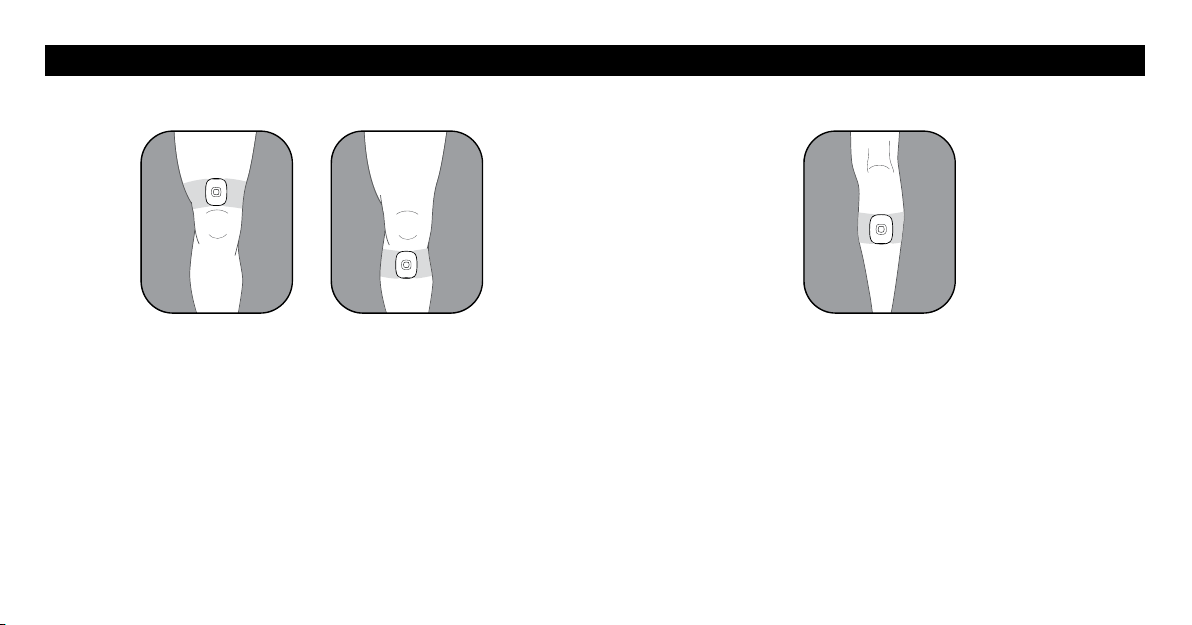
JOINT
KNEE
Place so that the pad is above the knee or below
the joint with pain.
GET STARTED WITH YOUR THERAPY
STEP 2 PAD PLACEMENT (continued)
LEG
CALF
Place so that the pad is on the calf where you feel pain.
23
GET STARTED WITH YOUR THERAPY
STEP 2 PAD PLACEMENT (continued)
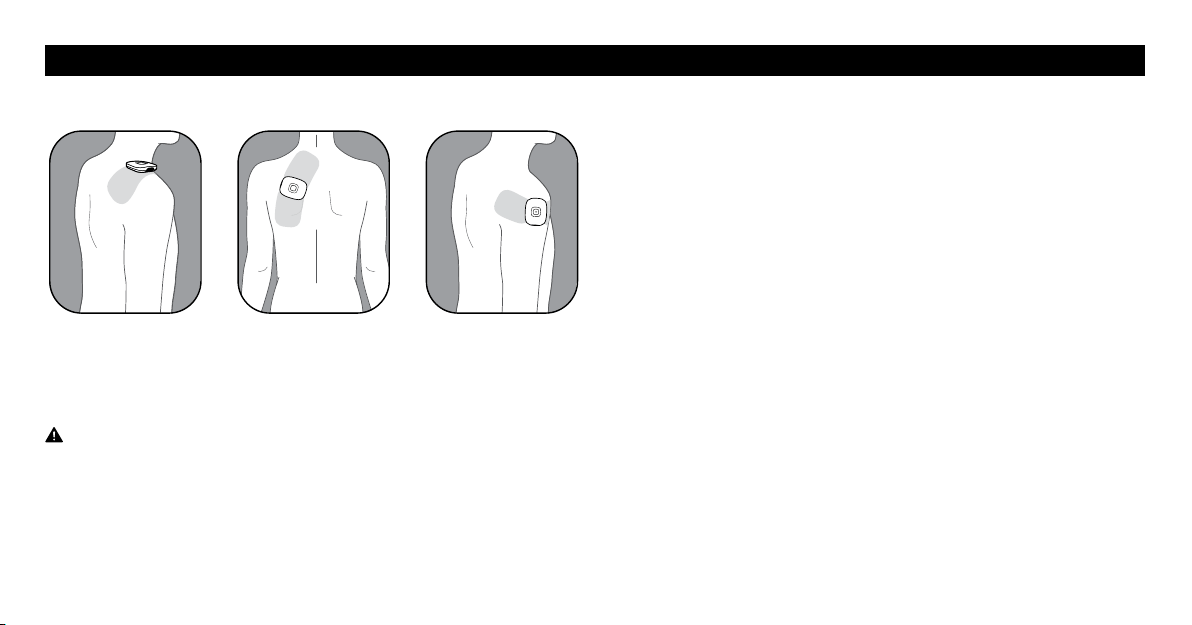
SHOULDER
Place so that pad is on the shoulder where you feel pain.
Do not place this device across your chest or near your heart because
the introduction of electrical current into the chest may cause rhythm
disturbances to your heart.
24
GET STARTED WITH YOUR THERAPY
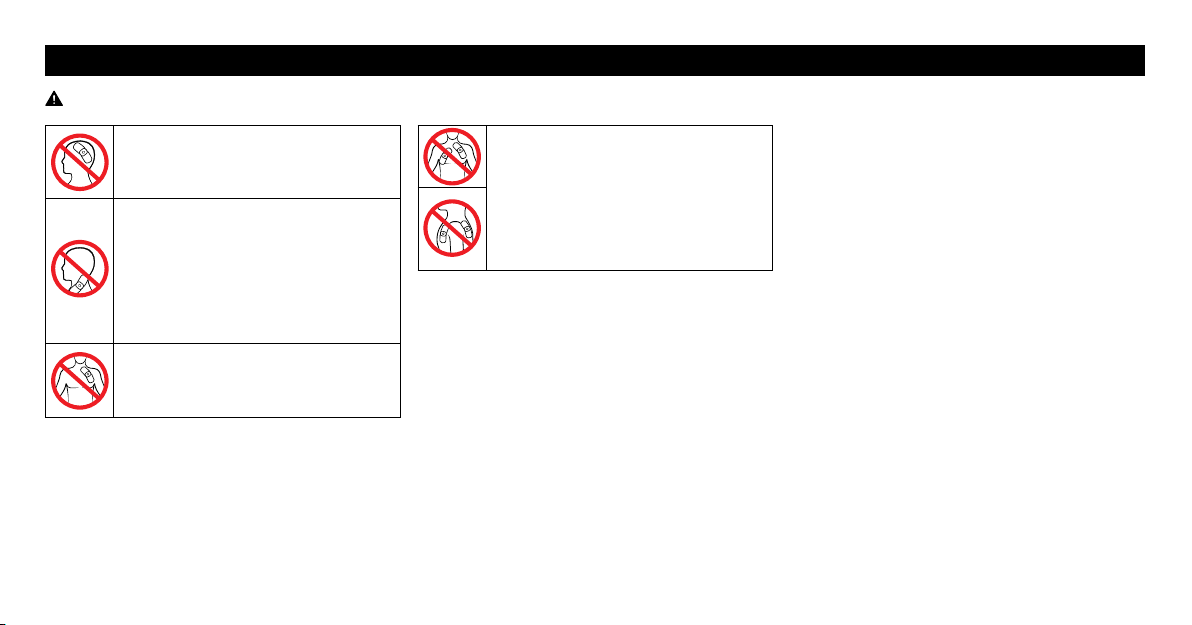
NEVER APPLY THE PADS TO THESE BODY AREAS:
Do not place the pads on or near
the head, mouth or face.
Do not place the pads over your
neck because this could cause
severe muscle spasms resulting in
closure of the airway, difficulty
in breathing, or adverse effects on
heart rhythm or blood pressure.
Do not use near the heart.
Do not place the pads on both sides
of the chest cavity simultaneously
(lateral or front and back), or
across your chest because the
introduction of electrical current
may cause rhythm disturbances.
25
GET STARTED WITH YOUR THERAPY
STEP 3 SELECTING A THERAPY
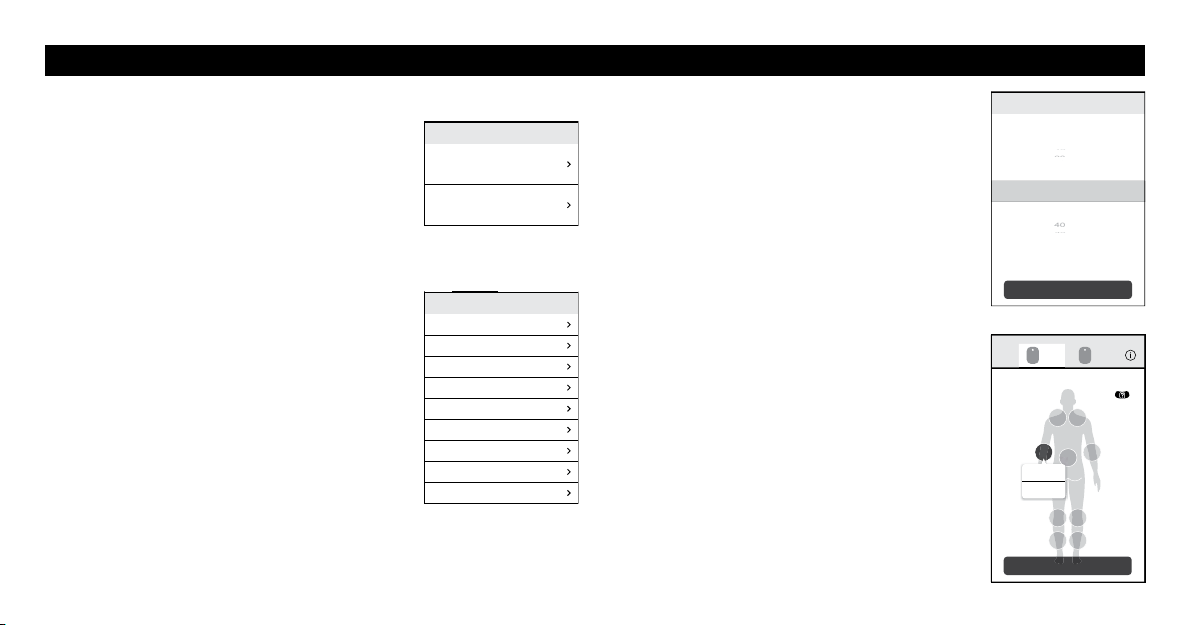
1. Tap “TENS” or “MICROCURRENT” to
select a therapy.
Notes:
•If you have already saved favorite settings,
“FAVORITE” is displayed. To use your favorite
setting, tap it and select a setting.
•If you selected “TENS”, you will then select
a mode. Scroll through the list and select a
mode. Refer to “9 MODES IN TENS AND
MICROCURRENT” on page 26 for more
detail.
2. Select your session time.
Swipe vertically to select the time.
TENS: 5 to 60 minutes
MICROCURRENT: 30 to 180 minutes
3. Tap “SELECT”.
4. Tap “START” to start your session.
If you want to clear the therapy setting, tap
“Clear”.
Note: If the session did not start, check to make
sure that:
•The device is not turned off.
•The pad is either not placed on your skin
or not placed properly.
•The device and the pad are correctly
attached.
TENS
MICROCURRENT
Select a therapy.
STEADY
KNEAD
TAP
ACUPUNCTURE LIKE
Recommended for Lower Back
Recommended for Shoulder
Recommended for Joint
Recommended for Arm
Recommended for Leg
Select a mode.
SELECT
Select a session time.
30
Minutes
25
20
20
0
15
15
45
45
40
40
35
A B
START
Tap start button to start the session.
A
STEADY
30
min.
Clear
26
GET STARTED WITH YOUR THERAPY
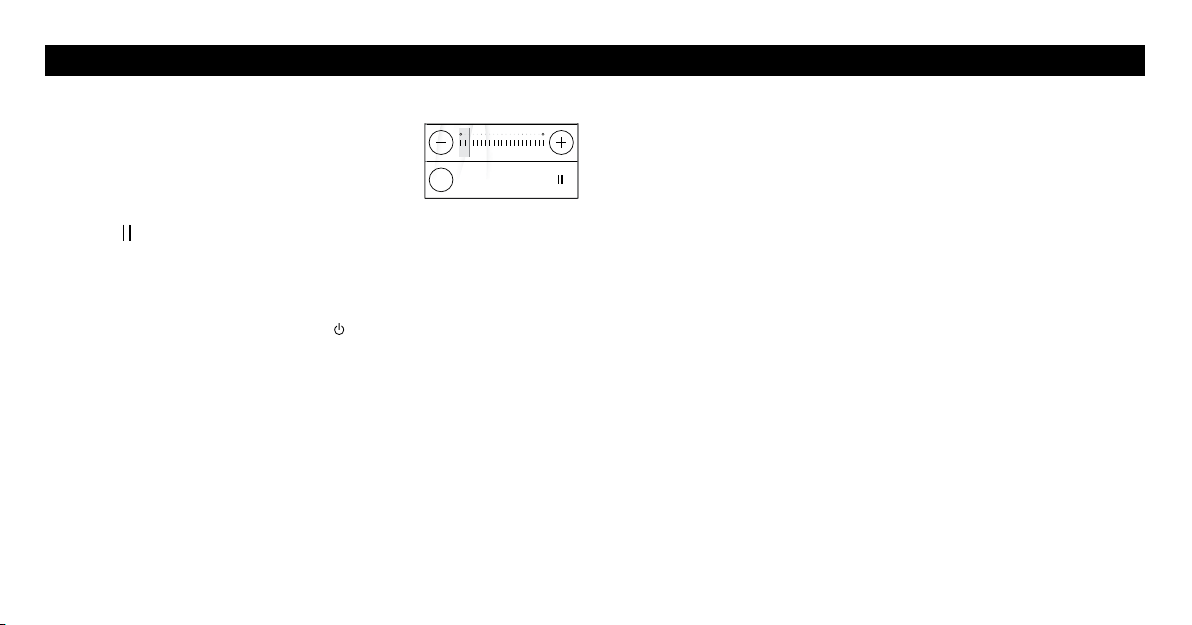
9 MODES IN TENS AND MICROCURRENT
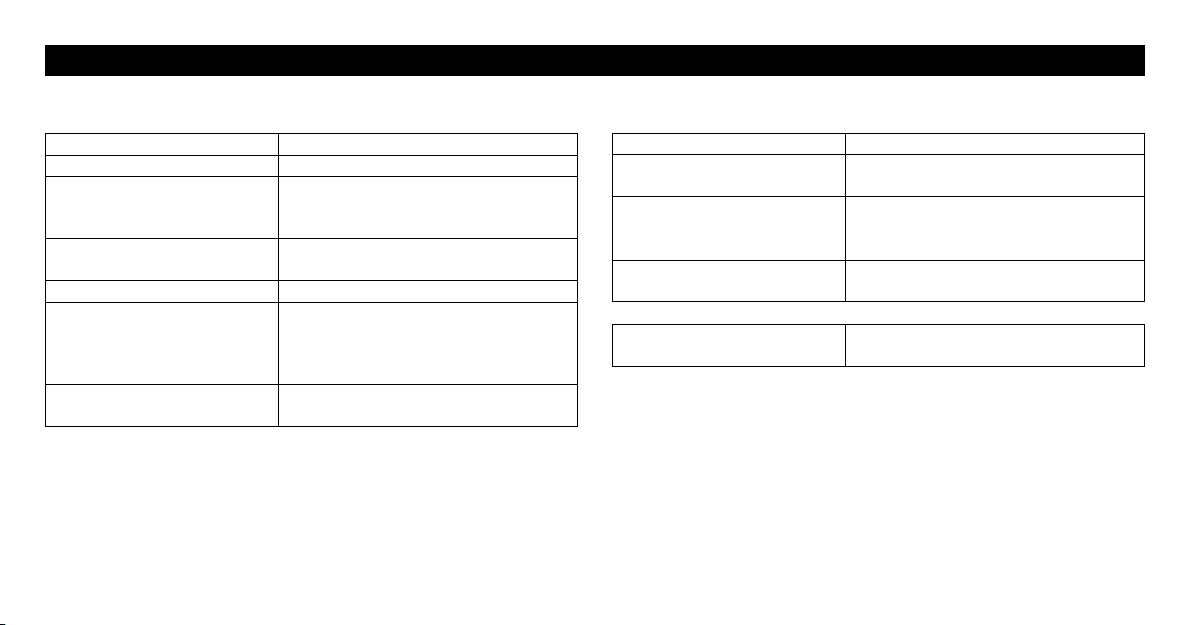
Mode What does the therapy deliver?
STEADY Continuous pulsations at the same rate.
ACUPUNCTURE LIKE Low rate pulsations which mimic a
massage.
KNEAD Medium rate pulsations which mimic a
massage.
TAP Low to medium rate tapping sensations.
Recommended for Lower
Back
High rate to low tingling sensations,
followed by tapping. With higher
intensity, you may feel kneading or
massage-like sensations.
Recommended for Shoulder Low to medium rate tapping and
pulsations.
Mode What does the therapy deliver?
Recommended for Joint Medium to high rate tapping. Followed by
tingling and pulsations.
Recommended for Arm Low to medium rate tapping. Followed by
tingling and pulsations.
Recommended for Leg Low to medium rate tapping. Followed by
tingling and pulsing sensations.
MICROCURRENT
Applies extremely small electrical
currents to nerves.
Any of the modes can be used on body parts or pains described in the
instruction manual of this device.
27
GET STARTED WITH YOUR THERAPY
STEP 4 STARTING A SESSION
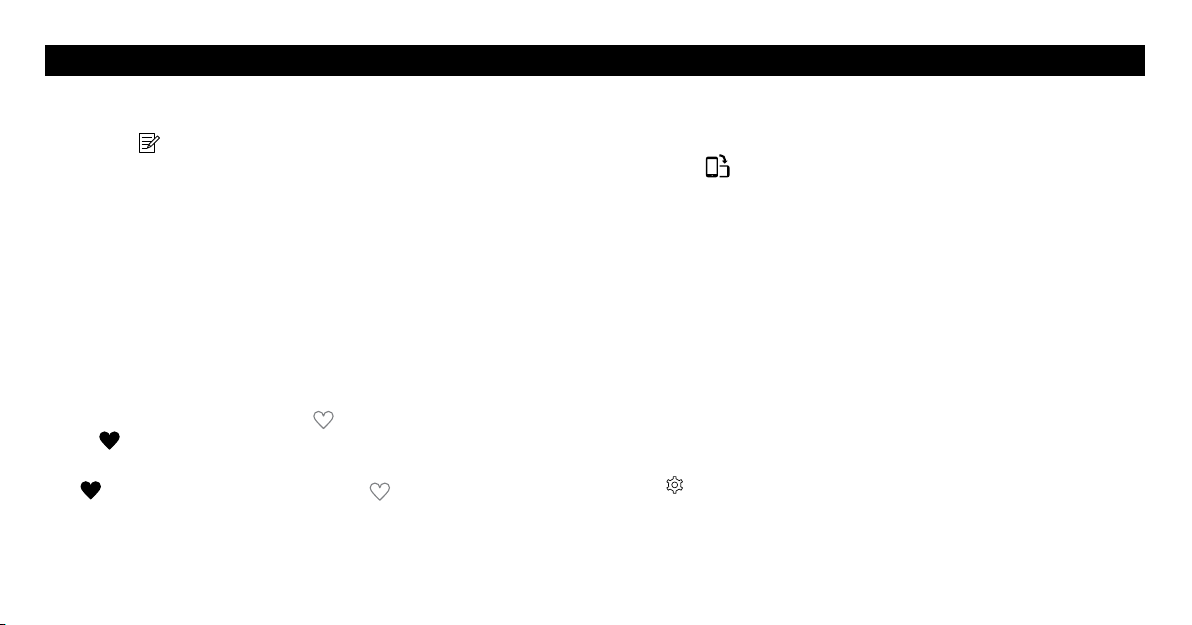
1. The session screen opens and then you can
select your intensity level.
•On the screen, tap “+” or “–” to increase or
decrease the intensity to a comfortable level.
•The session time starts to count down.
•Tap “
” to pause the session. Press it again to restart the session.
•If you want to stop or interrupt the session, tap “QUIT”.
•White light on the device blinks during the session.
2. When the session finishes, press the
(power) button on the device to
turn off it.
Notes:
•If your smartphone cannot operate during the session, turn off the
device or take off the pads immediately.
•When the battery is depleted, the indicator will light up orange and the
power will turn off shortly. Recharge the battery fully.
•If the pad is removed from your body during the session, the session
will automatically be terminated.
01020
29
:
41
QUIT
28
OTHER APP FEATURES
DIARY FUNCTION
To register your pain level in the pain diary:
1. Tap the “
” icon in the menu bar.
2. Select a body part that is aching.
3. Select from the various face icons on the app screen, then tap “OK”.
•To cancel the registration, tap “Cancel”.
•To add multiple body parts, repeat this step.
4. Tap “Register” to add this record to your pain history.
FAVORITE FUNCTION
You can register your favorite session (mode and time) during the
session. You can choose “FAVORITE” to repeat your favorite session.
1. To save the current session, tap “
”. The symbol will then change
to “
”.
2. If you want to delete the current session from your favorite list, tap
“
”. The symbol will then change to “ ”.
DUAL SCREEN FUNCTION
To change view orientation:
1. Tap the “
” icon to change your smartphone screen to landscape
view.
2. Landscape view displays a dual screen that allows for the control of 2
therapy sessions on 1 screen.
SESSION LOG
You can check your therapy’s history of:
•Session time (round up to the nearest minute)
•Treatment area
•Date and time of starting the session
•Mode (tap each item to view the mode histories)
To view the history:
1. Tap
.
2. Tap “Session Log”.
29
HOW TO CONTROL AND REDUCE YOUR PAIN
When Should a Session Start?
Use Avail
TM
as soon as your pain begins. Start with one session.
Recommended Duration of Use
Start with one 30-minute session for TENS and MICROCURRENT.
Always turn the device off with the pads still on your skin. In the pain
diary screen, rate your pain. A rating of 1 indicates less pain whereas
a rating of 10 indicates a high amount of pain. Stop session if pain has
reduced or stopped.
1 session
Max minutes/
session
Max times/day
TENS 30 minutes 60 minutes 3 times per day
MICROCURRENT 30 minutes 180 minutes Unlimited
Do not use this device to treat one region for extended periods of
time.Thelong-termeectsofelectricalstimulationareunknown.
•When a session is completed, remove the pads from your body and dry
them before starting the next session. If the pads are not dried, their
adhesive power may be reduced.
When to Stop Using the Device?
Stop using the device if you experience an adverse reaction (skin
irritation/redness/burns, headache or other painful sensation) or if you
feel any unusual discomfort.
Remember that the device does not cure your pain or the original cause
of the pain. It provides temporary relief or reduction of pain so that you
can control your life and activities better.
30
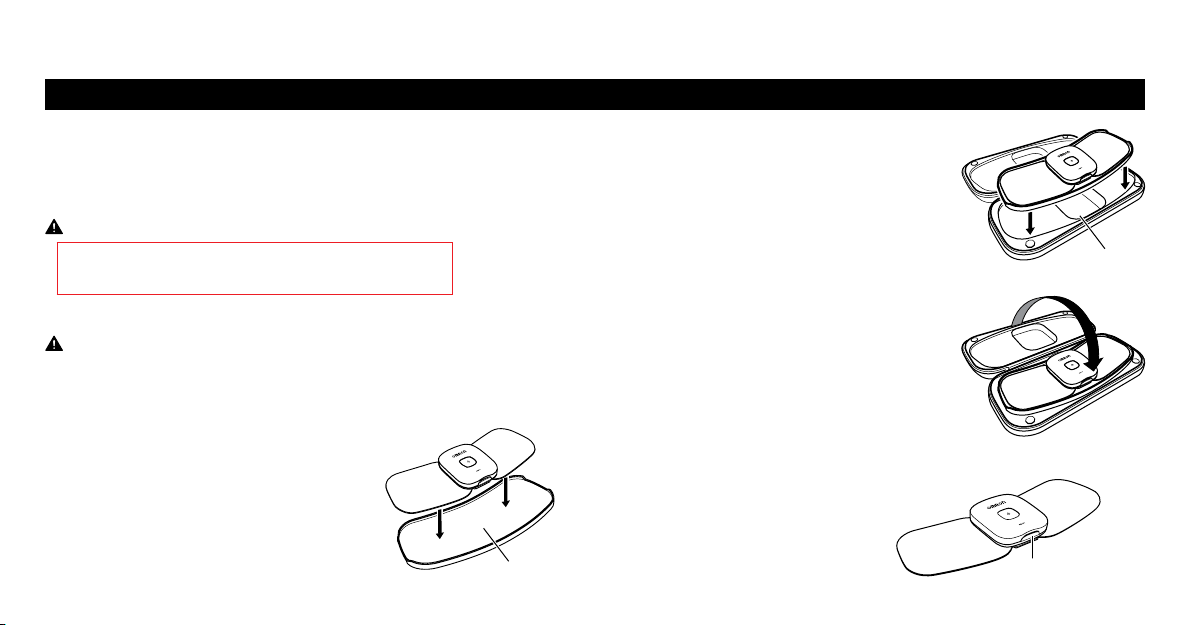
STORING THE PADS ON THE PAD HOLDER
•In between uses, keep the pads on the pad holder in the pad case.
•Do not keep the device in areas subject to direct sunlight, high or low
temperatures, humid areas, near fire, vibration, or shock.
Never bend or fold the pads.
Storage temperature
32 to 104 °F (0 to 40 °C), 30 to 80 % relative humidity.
•Make sure the device has been turned off.
Keep this device and pads out of the reach of infants, toddlers and
children.
Note: With proper storage and use, you may extend the life of your pads.
1. Place the pad onto the pad holder.
A pad can be placed onto the both sides
of the pad holder.
2. Place the pad holder onto the storage case.
3. Close the storage case.
REMOVING THE DEVICE
If the device needs to be recharged, remove the device from the pad.
1. Press the pad release button to
remove the device from the pad.
Pad holder
Storage case
Pad release button
STORAGE AND REMOVING
AFTER DAILY USE
31
With proper storage and use, you may extend the life of your pad to 30
uses. The life of the pads may vary due to skin and storage conditions.
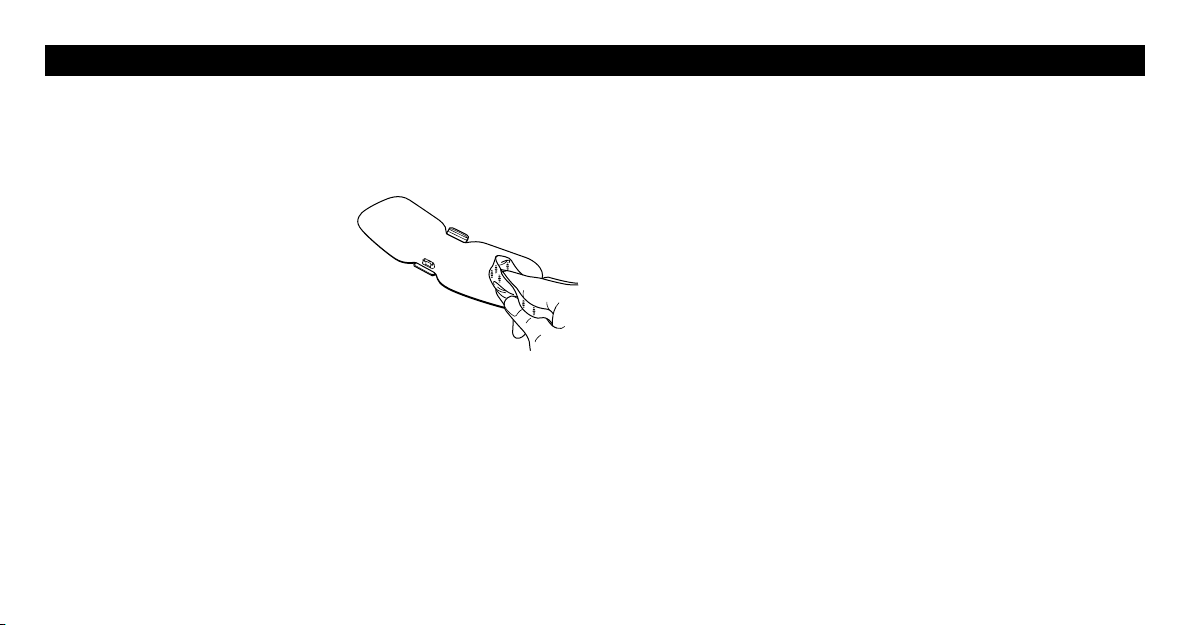
Cleaning the Pads
When the pad has become dirty or soiled:
1. Remove the device from the pad
before cleaning the pads.
2. If you want to clean the ADHESIVE
side of the pads, wipe the surface
with a soft cloth moistened with
water. If you want to clean the
NON-ADHESIVE side of the pads,
wipe the surface with a soft cloth
moistened with water or a neutral detergent, then wipe the surface
with a dry soft cloth to remove extra water.
•Wiping adhesive side of the pads with a soft cloth moistened with
water may reduce their adhesive power.
•Do not wash the pads with running water.
3. Dry the pads and let the adhesive surface air-dry completely. Do not
wipe with a tissue paper or cloth.
Pads can be purchased by calling 1-800-634-4350 or visit
OmronHealthcare.com.
Cleaning the Device
1. Turn the device off.
2. Wipe the surface with a soft cloth moistened with water or a neutral
detergent, then wipe the surface with a dry soft cloth to remove extra
water.
•Do not use chemicals (like thinner, benzene).
•Do not let water get into the internal area of the device.
Disposal
•Dispose of the device and battery in accordance with local government
regulations.
CLEANING AND DISPOSAL
32
RESET THE DEVICE
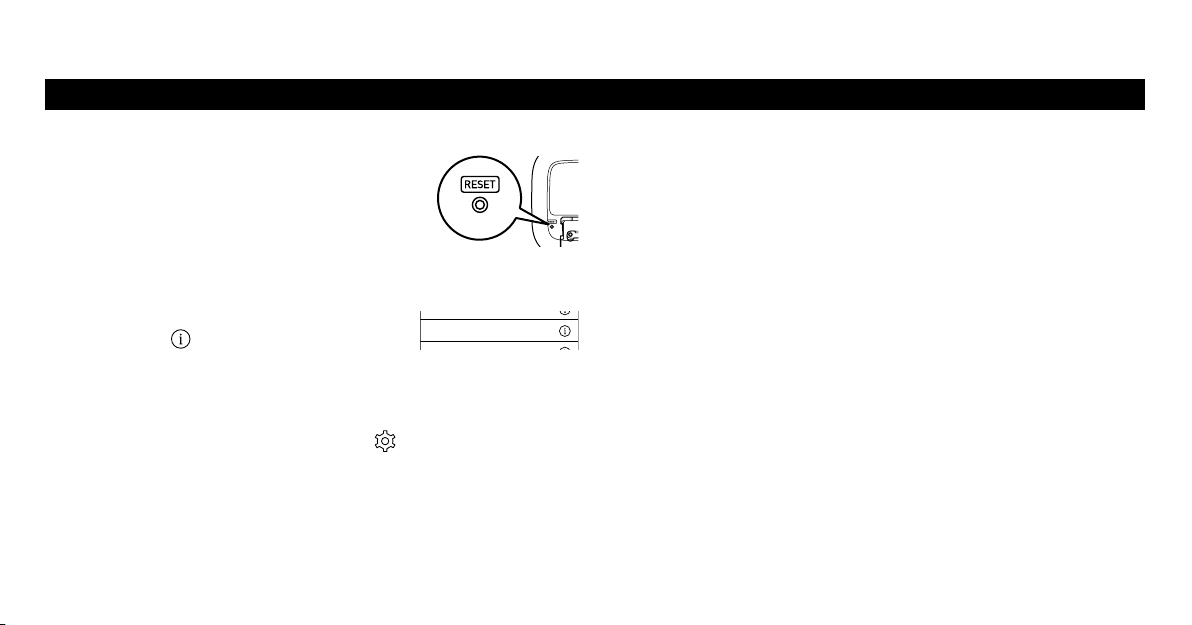
To reset the device, follow the steps below:
1. Reset the Device
Press the reset button on the back of the device.
2. Reset the Bluetooth Information in Your Smartphone
2-1. Open “Settings” of your smartphone’s Operating System (OS)*.
2-2. Tap “Bluetooth” and find “PM601”,
then tap
.
2-3. Tap “Forget This Device”.
3. Reset the App Settings
3-1. Open the Omron TENS app and tap
to open the settings.
3-2. Tap “Forget All Devices”.
*This section explains the steps using iOS 10 as an example. If you’re
using an another OS, refer to your smartphone’s instructions.
Try step 1 if any of the following situations occur:
•There is no response when the device’s power button is pressed.
•You want to clear all the information stored in your device.
•You changed the smartphone to new one.
•You received another person’s device that was paired with his/her
smartphone.
Try step 1 and 2 if the following situation occurs:
•The Omron TENS app was uninstalled and installed again.
Try step 1, 2 and 3 if any of the following situations occur:
•The device was lent to someone and it was returned to you after
being used.
•The Omron TENS app is unresponsive even after it is reinstalled.
PM601 Connected
C
APPENDIX
33
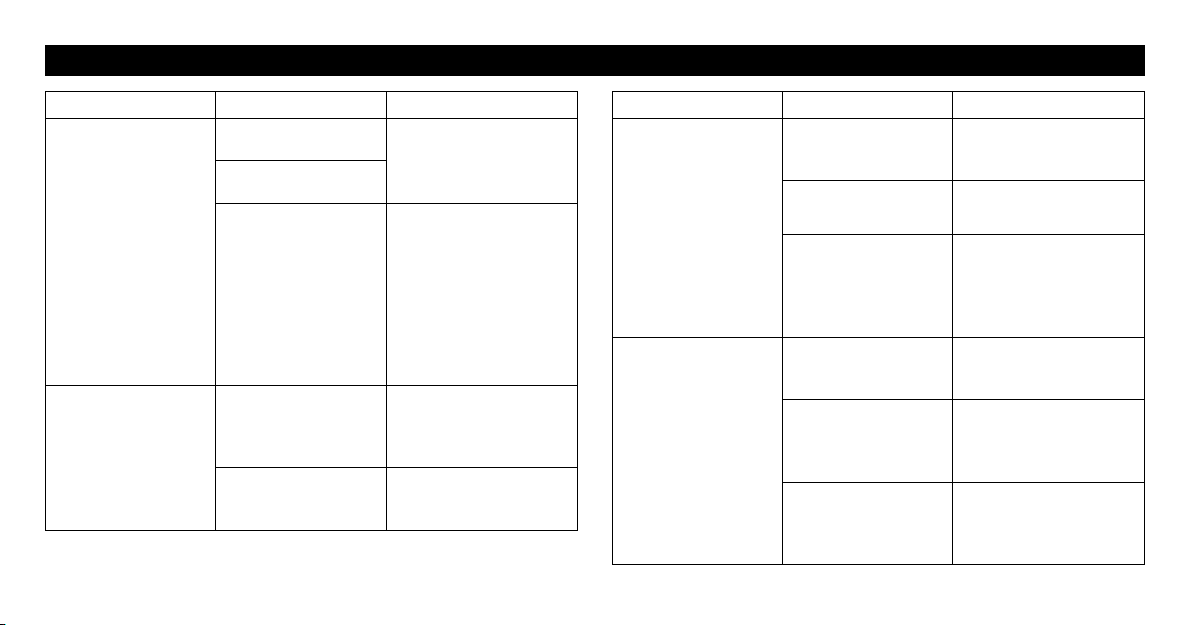
TROUBLESHOOTING
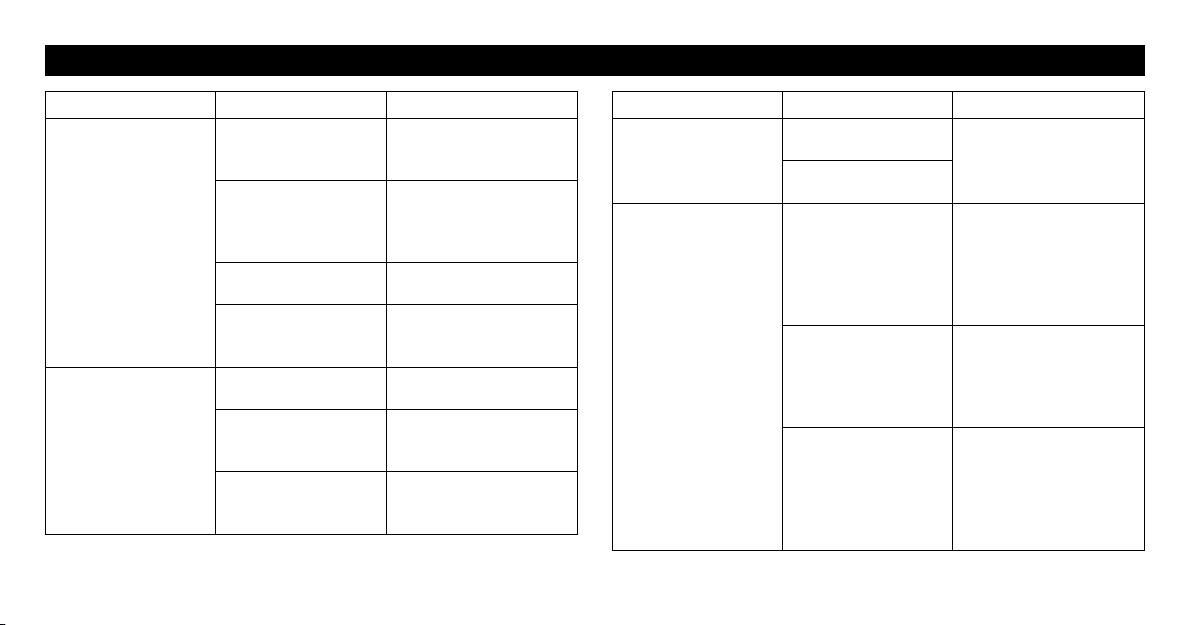
If this happens... Possible causes... Try this solution...
The intensity is not
felt.
The intensity level is
too weak.
Are the pads stacked
together or do pads
overlap?
Check placement of pads.
Refer to “Pad Placement”
on page 20.
Was TENS therapy
selected?
If “MICROCURRENT”
is selected, you will not
feel any intensity.
Is the intensity setting
too low?
Open the app and tap “+”.
Is the adhesive
surface of the pad
damaged?
Replace the pad.
The skin turns red or
feels irritated.
Is the therapy
duration too long?
Shorten session to less
than 30 minutes.
Are the pads placed
properly on the body?
Refer to “Pad Placement”
on page 20 and place
correctly.
Is the adhesive
surface of the pad
worn out?
Replace the pad.
If this happens... Possible causes... Try this solution...
The device's power
cannot be turned on.
Are the batteries
depleted?
Recharge the battery
fully.
Is the indicator light
on orange?
The device cannot be
recharged.
Is the battery charger
connected properly?
Check if the AC adapter
is properly connected to
the charger.
Check if the AC adapter
is connected to a power
outlet.
Is the device properly
placed on the charger?
Place the device properly
on the charger.
Make sure there are no
foreign objects on the
charger area.
Is the device under
high heat or cold
temperatures?
Under high heat or
cold temperatures, the
battery may be stopped
recharging so that it may
take more time to be
fully charged.
34
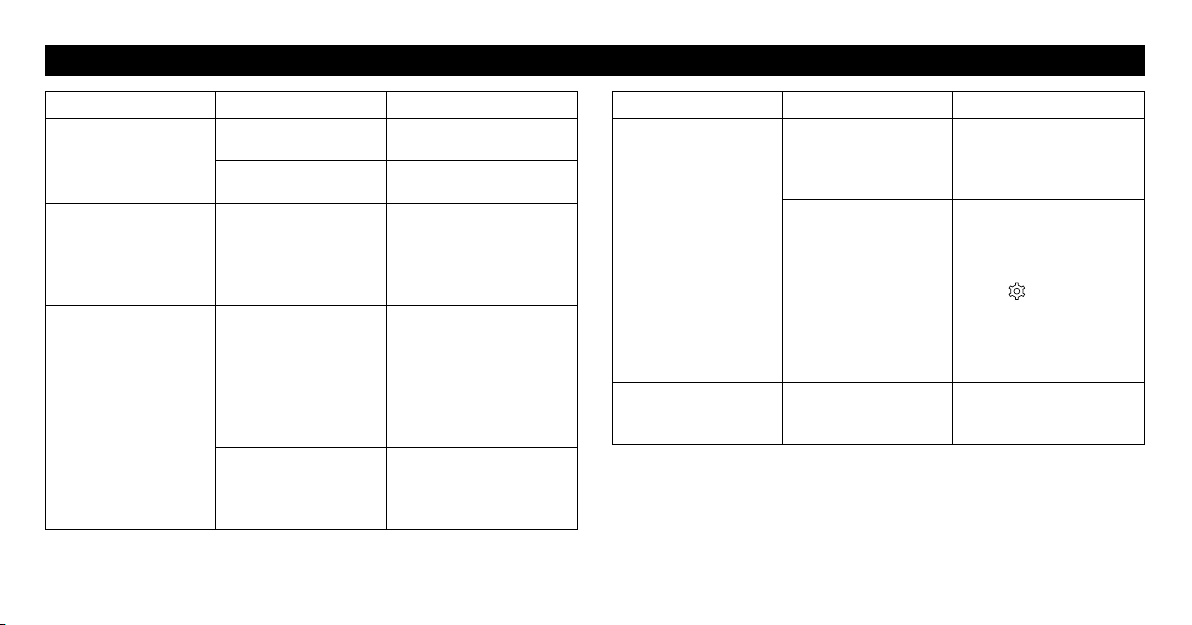
TROUBLESHOOTING
If this happens... Possible causes... Try this solution...
Power cut off during
use.
Is the battery charge
extremely low?
Recharge the battery
fully.
Is the indicator light
on orange?
The device power will
automatically turn off
10 minutes after:
• the therapy is complete
•the pad has been
removed from your
body
•the therapy has been
paused
Check if the therapy has
already finished or been
paused.
Check if the pad is placed
on your body correctly.
The adhesive side of
the pad does not stick
to skin.
Have you removed the
transparent film from
the adhesive surface
of the pad?
Peel off the film on the
adhesive surface of the
pad.
Is the pad wet? Or is
your skin wet?
Air dry the adhesive
surface of the pad or
skin.
If this happens... Possible causes... Try this solution...
The adhesive side of
the pad does not stick
to skin.
The adhesive surface
of the pad may be
damaged.
Replace the pad.
Is there too much hair
on your skin?
Shave the immediate area
for proper pad adhesion.
Were the pads
stored under high
temperature, high
humidity or direct
sunshine?
Replace the pad.
Unable to tap
“START” button.
Are the pads properly
placed on the body?
Refer to “Pad Placement”
on page 20 and place
correctly.
Is the device properly
attached to the pad?
Remove the device from
the pad, then attach
the device to the pad
properly.
Have you removed the
transparent film from
the adhesive surface
of the pad?
Peel off the film from
the adhesive surface of
the pad.
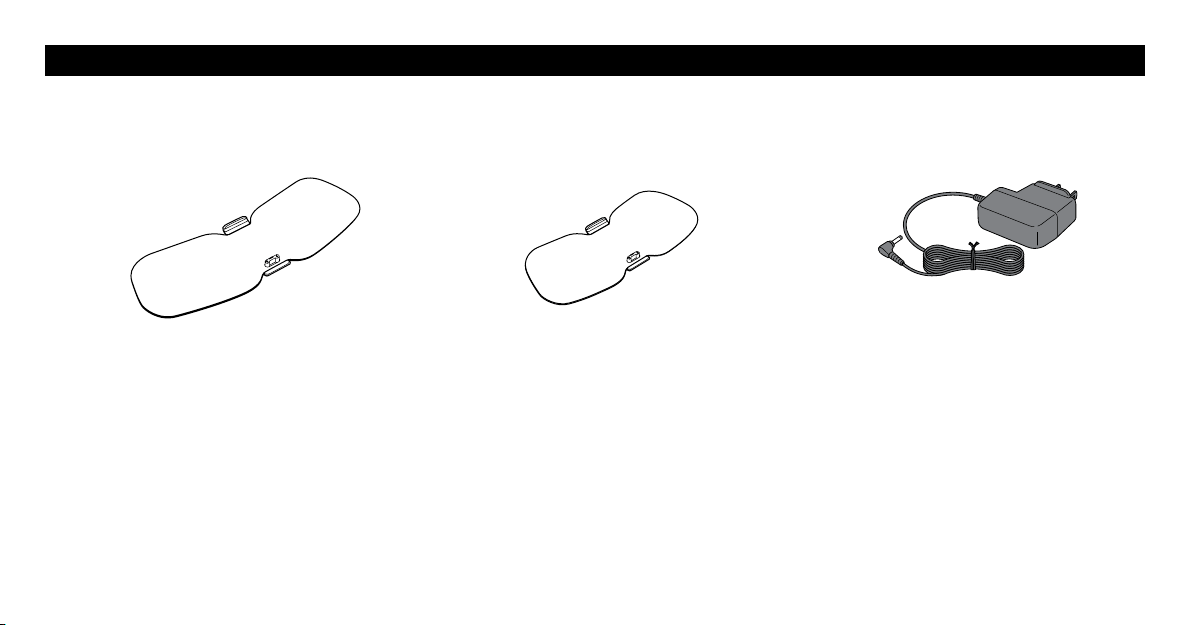
35
If this happens... Possible causes... Try this solution...
Unable to tap
“START” button.
The pad may be
damaged.
Replace the pad.
Is the device power
on?
Turn on the device and
connect to the app.
The devices, the
charger or the
AC adapter are
abnormally hot when
charging the battery.
The devices, the
charger or the AC
adapter may be
damaged.
Unplug the AC adapter
from the charger
immediately. Remove the
device from the charger
immediately.
Connection failure. The device is too far
from the smartphone.
The device might
not be properly
placed within
the smartphone's
transmission range.
If there are no causes of
transmission interference
found near the device,
move the device within
16 ft. (5 m) of the
smartphone and try
again.
Was the Omron TENS
app uninstalled and
installed again?
Refer to “Reset the
Device” on page 32
and follow step 1 and 2.
If this happens... Possible causes... Try this solution...
Connection failure. Had the device been
connected with
another smartphone?
Refer to “Reset the
Device” on page 32
and follow step 1-3.
Reset button was
pressed accidentally.
Do the following steps:
1. Open the Omron
TENS app and tap
“Not now”.
2. Tap to open the
settings.
3. Tap “Forget All
Devices”.
4. Pair the device again.
Purple light on the
device is blinking.
Are there any
abnormalities in the
device?
Stop using the device
immediately, and contact
Customer Service.
TROUBLESHOOTING

36
TROUBLESHOOTING
If the issue is not resolved, follow the steps below.
1. Open the Omron TENS app.
2. Tap
or .
3. Tap “Contact Us”.
4. Select an issue and type the detail of your problem.
5. Tap “Send E-mail”. Your email client app automatically opens.
6. Send email.
7. Our support stuff will respond to your email as soon as possible.
If you are not able to perform the above steps successfully, please contact us at 1-800-634-4350.
37
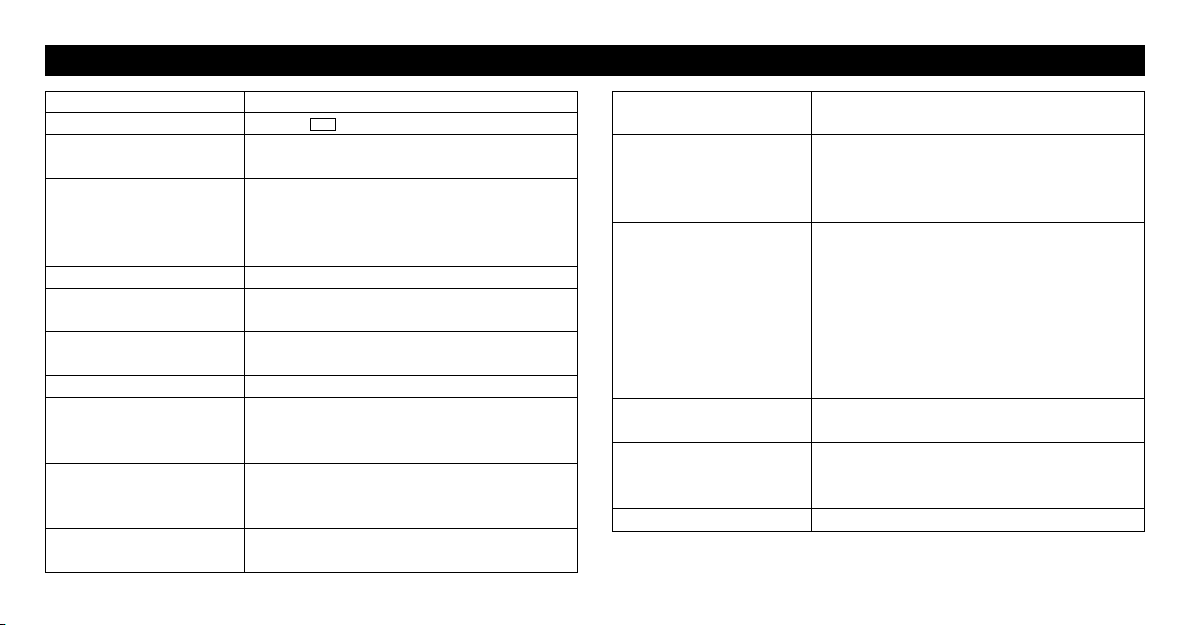
ACCESSORIES
Large Pad (PMWPAD-L) Medium Pad (PMWPAD-M) AC Adapter (HHP-AM01)
Approx. 8.6" (W) × 3.3" (H) × 0.4" (D)
(220 × 83.5 × 9.3 mm)
Approx. 7" (W) × 3.1" (H) × 0.4" (D)
(180 × 79.5 × 9.3 mm)
To order, visit: OmronHealthcare.com
38
Product Name Avail
TM
Model # PM601
REF
HV-F601T-Z
Power Source AC adapter (INPUT AC 120 V, 60 Hz)
1 Lithium-ion battery (3.7 V; Approx. 295 mAh)
Rechargeable Battery Will last for 500 uses under the following
conditions: new battery, fully charged,
used 1 time/day in temperatures of
73.4 °F (23 °C)
Frequency Approx. 0.2 to 108 Hz
PULSE Duration TENS:100μsecorless
MICROCURRENT: 2.5 sec
Maximum Output
Voltage
42.5V(during500Ωload)
Power Control 20 intensity levels
Operating Temperature,
Humidity, Air Pressure
(When using product)
50 to 104 °F (10 to 40 °C),
30 to 80 % RH, 700 to 1060 hPa
(non-condensing)
Transportation and
Storage Between Uses
Temperature, Humidity
32 to 104 °F (0 to 40 °C),
30 to 80 % RH
(non-condensing)
Temperature During
Battery Charging
41 to 95 °F (5 to 35 °C)
(non-condensing)
Transportation
Temperature, Humidity
-4 to 140 °F (-20 to 60 °C),
10 to 90 % RH (non-condensing)
Weight Device: Approx. 1.5 oz (42 g)
Pad-L: Approx. 0.9 oz (25 g)
Pad-M: Approx. 0.7 oz (20 g)
Charger: Approx. 3.5 oz (100 g)
Outer Dimension Device: Approx. 2.3" (W) × 2.8" (H) ×
0.6" (D) (60 × 72 × 15.5 mm)
Charger: Approx. 6.2" (W) × 3.5" (H) ×
0.8" (D) (158 x 90 x 20.5 mm)
Pad-L: Approx. 8.6" (W) × 3.3" (H) × 0.4"
(D) (220 × 83.5 × 9.3 mm)
Pad-M: Approx. 7" (W) × 3.1" (H) × 0.4"
(D) (180 × 79.5 × 9.3 mm)
Classification of ME
Equipment
Internally powered (operating) / Class II
(charging) / Continuous operation
IP classification Device: IP22
Charger: IP21
AC adapter: IP21
Transmission Method Bluetooth
®
low energy technology
SPECIFICATIONS
39
SPECIFICATIONS
Wireless
Communication
Frequency range: 2.4 GHz (2400 - 2483.5 MHz)
Modulation: GFSK
Effective radiated power: <20 dBm
Durable Period
(Service Life)
Device: 5 years
Pad: 30 times (30 minutes/use)
Charger: 5 years
AC adapter: 5 years
Auto Power Off The device power will automatically turn
off 10 minutes after:
•the therapy is complete
•the pad has been removed from your body
•the therapy has been paused
Note: These specifications are subject to change without notice.
About a wireless communication interference
This Product operates in the unlicensed ISM band at 2.4 GHz. In case this
Product is used around the other wireless devices including microwave and
wireless LAN, which operate same frequency band of this Product, there is
a possibility that interference occurs between this Product and such other
devices. If such interference occurs, please stop the operation of other
devices or relocate this Product before using this Product or do not use this
Product around the other wireless devices.
To confirm the latest list of the compatible smartphones and OS, visit:
OmronHealthcare.com

40
LIMITED WARRANTY
Your Avail
TM
device is warranted to be free from defects in materials
and workmanship appearing within 1 year from the date of purchase,
when used in accordance with the instructions provided. The pads
supplied with the device are warranted for 30 days. The above
warranties extend only to the original retail purchaser. We will, at
our discretion, replace without charge any unit covered by the above
warranty. Replacement is our only responsibility and your only remedy
under the above warranties.
To obtain warranty service, contact Customer Service by calling
1-800-634-4350 for the address of the Inspection Center and
shipping and handling charges that may apply. Enclose the Proof
of Purchase. Include a letter, with your name, address, phone number,
and description of the specific problem. Pack the product carefully
to prevent damage in transit. Because of possible loss in transit, we
recommend insuring the product with return receipt requested.

41
LIMITED WARRANTY
THIS WARRANTY GIVES YOU SPECIFIC LEGAL RIGHTS,
AND YOU MAY HAVE OTHER RIGHTS THAT VARY FROM
STATE TO STATE (OR BY COUNTRY OR PROVINCE). THE
FOREGOING IS THE SOLE WARRANTY PROVIDED BY OMRON
IN CONNECTION WITH THIS PRODUCT, AND OMRON HEREBY
DISCLAIMS ANY OTHER WARRANTIES, EXPRESS OR IMPLIED,
INCLUDING IMPLIED WARRANTIES OF MERCHANTABILITY
AND FITNESS FOR A PARTICULAR PURPOSE. IMPLIED
WARRANTIES AND OTHER TERMS THAT MAY BE IMPOSED
BY LAW, IF ANY, ARE LIMITED IN DURATION TO THE PERIOD
OF THE ABOVE EXPRESS WARRANTY.
SOME STATES (COUNTRIES AND PROVINCES) DO NOT ALLOW
LIMITATIONS ON HOW LONG AN IMPLIED WARRANTY
LASTS, SO THE ABOVE LIMITATION MAY NOT APPLY TO
YOU. OMRON SHALL NOT BE LIABLE FOR LOSS OF USE
OR ANY OTHER SPECIAL, INCIDENTAL, CONSEQUENTIAL
OR INDIRECT COSTS, EXPENSES OR DAMAGES. SOME
STATES (COUNTRIES AND PROVINCES) DO NOT ALLOW
THE EXCLUSION OR LIMITATION OF INCIDENTAL OR
CONSEQUENTIAL DAMAGES, SO THE ABOVE EXCLUSION OR
LIMITATION MAY NOT APPLY TO YOU.
This warranty provides you with specific legal rights, and you may
have other rights that vary by jurisdiction. Because of special local
requirements, some of the above limitations and exclusions may not
apply to you.
FOR CUSTOMER SERVICE
Visit our website at: OmronHealthcare.com
Call toll free: 1-800-634-4350

42
FCC STATEMENT
FCC CAUTION
Changes or modifications not expressly approved by the party responsible for compliance could void the user’s authority to operate the equipment.
Note:
This equipment has been tested and found to comply with the limits for a Class B digital device, pursuant to part 15 of the FCC Rules. These limits
are designed to provide reasonable protection against harmful interference in a residential installation. This equipment generates, uses and can radiate
radio frequency energy and, if not installed and used in accordance with the instructions, may cause harmful interference to radio communications.
However, there is no guarantee that interference will not occur in a particular installation. If this equipment does cause harmful interference to radio
or television reception, which can be determined by turning the equipment off and on, the user is encouraged to try to correct the interference by one
or more of the following measures:
•Reorient or relocate the receiving antenna.
•Increase the separation between the equipment and receiver.
•Connect the equipment into an outlet on a circuit different from that to which the receiver is connected.
•Consult the dealer or an experienced radio/TV technician for help.
This device complies with Part 15 and Part 18 of FCC Rules. Operation is subject to the following two conditions: (1) this device may not cause
harmful interference, and (2) this device must accept any interference received, including interference that may cause undesired operation.
This transmitter must not be co-located or operated in conjunction with any other antenna or transmitter.
This equipment complies with FCC radiation exposure limits set forth for an uncontrolled environment and meets the FCC radio frequency (RF)
Exposure Guidelines. This equipment has very low levels of RF energy that are deemed to comply without testing of specific absorption ratio (SAR).
REGULATORY COMPLIANCE INFORMATION

43
IMPORTANT INFORMATION REGARDING ELECTRO MAGNETIC COMPATIBILITY EMC
With the increased number of electronic devices such as PC’s and
mobile (cellular) telephones, medical devices in use may be susceptible
to electromagnetic interference from other devices. Electromagnetic
interference may result in incorrect operation of the medical device and
create a potentially unsafe situation.
Medical devices should also not interfere with other devices.
In order to regulate the requirements for EMC (Electro Magnetic
Compatibility) with the aim to prevent unsafe product situations, the
IEC60601-1-2 standard has been implemented. This standard defines
the levels of immunity to electromagnetic interferences as well as
maximum levels of electromagnetic emissions for medical devices.
Medical devices manufactured for OMRON Healthcare conform to this
IEC60601-1-2:2014 standard for both immunity and emissions.
Nevertheless, special precautions need to be observed:
•The use of accessories and cables other than those specified by
OMRON, with the exception of cables sold by OMRON as replacement
parts for internal components, may result in increased emission or
decreased immunity of the device.
•The medical devices should not be used adjacent to or stacked with
other equipment. In case adjacent or stacked use is necessary, the
medical device should be observed to verify normal operation in the
configuration in which it will be used.
•Do not use mobile (cellular) telephones and other devices, which
generate strong electrical or electromagnetic fields, near the medical
device. This may result in incorrect operation of the unit and create a
potentially unsafe situation. Recommendation is to keep a minimum
distance of 30 cm (12 inches). Verify correct operation of the device in
case the distance is shorter.
During the immunity tests described below the device operated
normally.
44
IMPORTANT INFORMATION REGARDING ELECTRO MAGNETIC COMPATIBILITY EMC
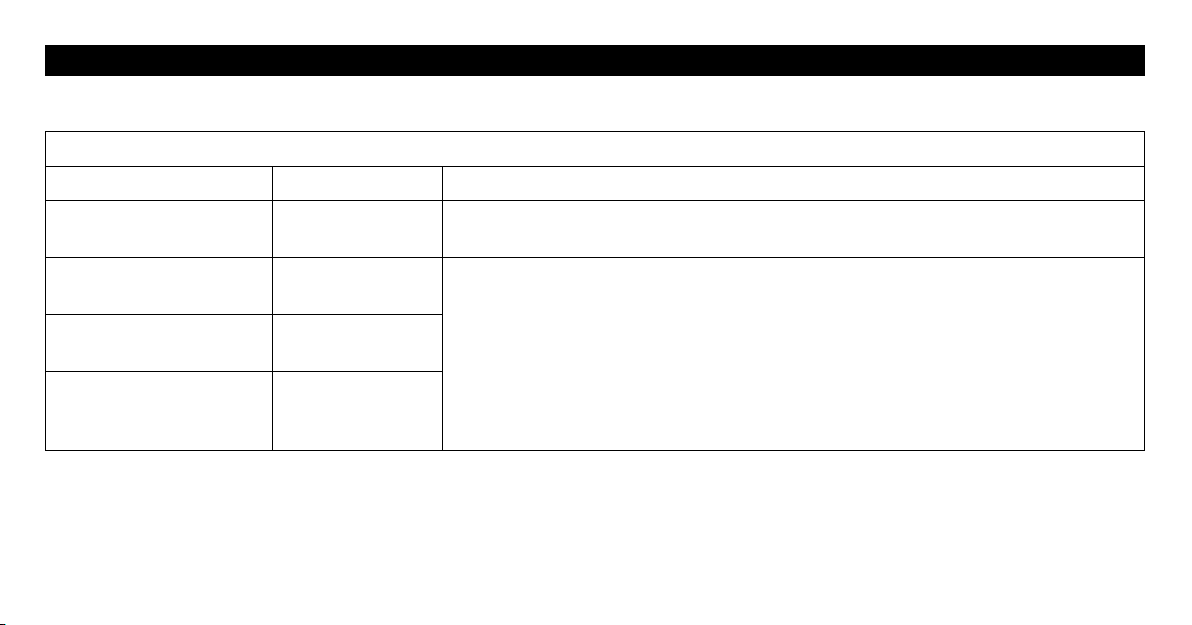
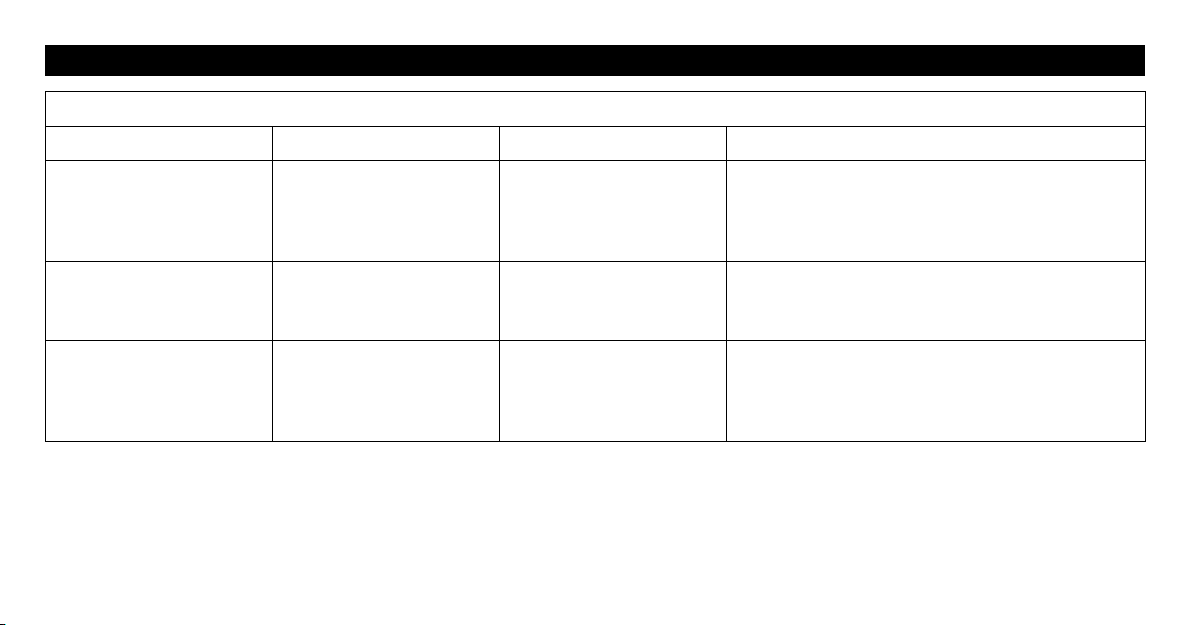
The PM601 is intended for use in the electromagnetic environment specified below. The customer or the user of the PM601 should assure that it is
used in such environment.
Electromagnetic emissions IEC60601-1-2
Emissions test Compliance Electromagnetic environment - guidance
RF emissions
CISPR 11
Group 1
The PM601 uses RF energy only for its internal function. Therefore, its RF emissions are
very low and are not likely to cause any interference in nearby electronic equipment.
RF emissions
CISPR 11
Class B
The PM601 is suitable for use in all establishments, including domestic establishments
and those directly connected to the public low-voltage power supply network that supplies
buildings used for domestic purposes
Harmonic emissions
IEC 61000-3-2
not applicable
Voltage fluctuations/
flicker emissions
IEC 61000-3-3
not applicable
45
IMPORTANT INFORMATION REGARDING ELECTRO MAGNETIC COMPATIBILITY EMC
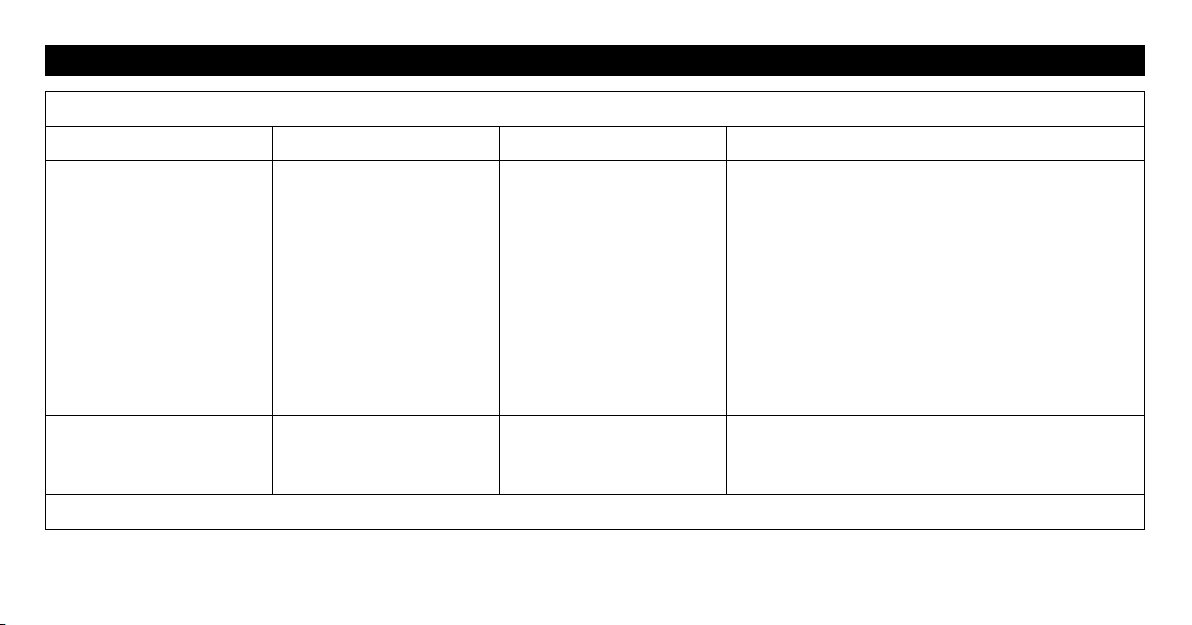
Electromagnetic immunity IEC60601-1-2
Immunity test IEC 60601 Test level Compliance level
Electromagnetic environment –guidance
Electrostatic discharge,
ESD
(IEC 61000-4-2)
Contact discharge:
±8 kV
Air discharge:
±15 kV
Contact discharge:
±8 kV
Air discharge:
±15 kV
The relative humidity should be at least 5 %.
Electrical fast transients /
bursts
(IEC 61000-4-4)
Power supply lines: ±2 kV
Longer input / output lines:
±1 kV
Power supply lines: ±2 kV
Longer input / output lines:
N/A
Mains power quality should be that of a typical home,
commercial or hospital environment.
Surges on AC mains lines
(IEC 61000-4-5)
Common mode:
±2 kV
Differential mode:
±1 kV
Common mode:
N/A
Differential mode:
±1 kV
Mains power quality should be that of a typical home,
commercial or hospital environment.
46
IMPORTANT INFORMATION REGARDING ELECTRO MAGNETIC COMPATIBILITY EMC
Electromagnetic immunity IEC60601-1-2
Immunity test IEC 60601 Test level Compliance level
Electromagnetic environment –guidance
Voltage dips, short
interruptions and voltage
variations on power supply
IEC 61000-4-11
0 % U
T
for 0.5 cycle
0 % U
T
for 1 cycle
70 % U
T
for 25 cycles
0 % U
T
for 5 s
0 % U
T
for 0.5 cycle
0 % U
T
for 1 cycle
70 % U
T
for 25 cycles
0 % U
T
for 5 s
Mains power quality should be that of a typical home,
commercial or hospital environment. If user requires
continued operation during power mains interruption
insure that batteries are installed and charged. Insure
that battery life exceeds longest anticipated power
outrages or provide an additional uninterruptible
power source.
Power frequency (50/ 60
Hz) magnetic field
IEC 61000-4-8
30 A/m 30 A/m
Magnetic fields from common appliances are not
expected to affect the device.
Note: U
T
is the A.C. mains voltage prior to application of the test level.
47
IMPORTANT INFORMATION REGARDING ELECTRO MAGNETIC COMPATIBILITY EMC
Electromagnetic immunity IEC60601-1-2
Immunity test IEC 60601 Test level Compliance level
Electromagnetic environment –guidance
Conducted RF
IEC 61000-4-6
Radiated RF
IEC 61000-4-3
3 V rms
150 kHz to 80 MHz
6 V rms
The ISM bands and the amateur radio
bands between 150 kHz to 80 MHz
10 V/m
80 MHz to 2.7 GHz
IEC 60601-1-2:2014 Table 9
(Up to 28 V/m at certain
frequencies)
3 V rms
150 kHz to 80 MHz
6 V rms
The ISM bands and the amateur radio
bands between 150 kHz to 80 MHz
10 V/m
80 MHz to 2.7 GHz
IEC 60601-1-2:2014 Table 9
(Up to 28 V/m at certain
frequencies)
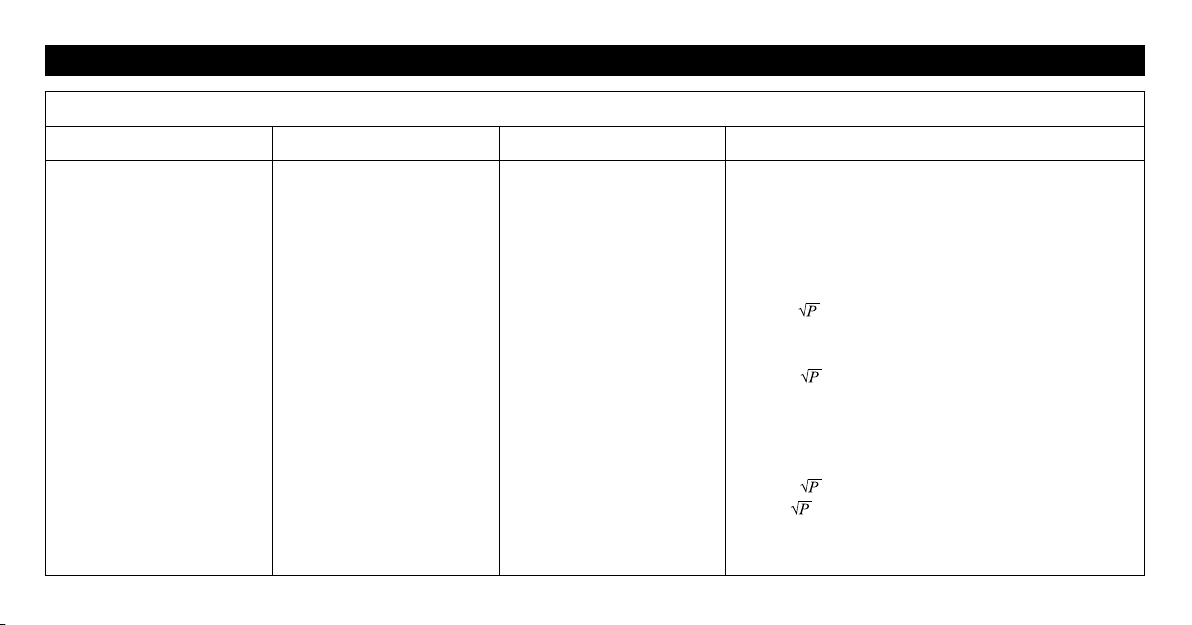
Portable and mobile RF communications equipment
should be used no closer to any part of the PM601
including cables, than the recommended separation
distance calculated from the equation appropriate to
the frequency of the transmitter.
Recommended separation distance
d = 1.16
150 kHz to 80 MHz
d = 0.58
150 kHz to 80 MHz
(The ISM bands and the amateur radio bands)
d = 0.35
80 MHz to 800 MHz
d = 0.7
800 MHz to 2.7 GHz
48
IMPORTANT INFORMATION REGARDING ELECTRO MAGNETIC COMPATIBILITY EMC
Electromagnetic immunity IEC60601-1-2
Immunity test IEC 60601 Test level Compliance level Electromagnetic environment –guidance
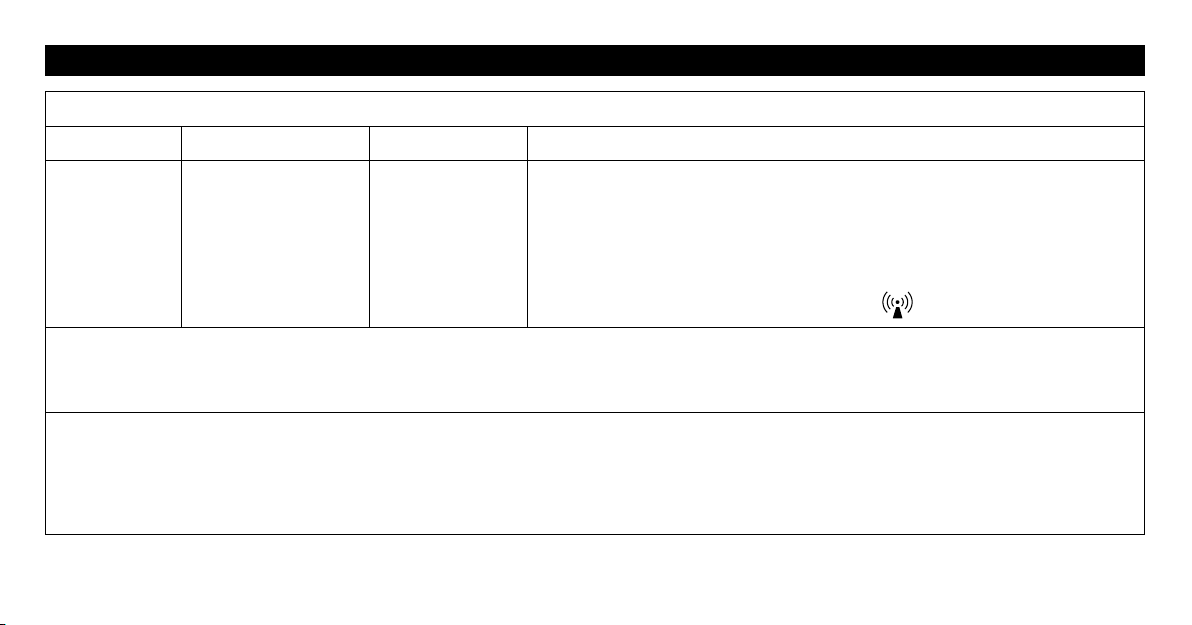
Where P is the maximum output power rating of the transmitter in watts (W)
according to the transmitter manufacturer and d is the recommended separation
distance in meters (m).
Field strengths from fixed RF transmitters as determined by an electromagnetic
site sur vey,
*2)
should be less than the compliance level in each frequency range.
Interference may occur in the vicinity of
equipment marked with the following symbol:
Note 1: At 80 MHz and 800 MHz, the higher frequency range applies.
Note 2: These guidelines may not apply in all situations. Electromagnetic propagation is affected by absorption and reflection from structures,
objects, and people.
*2)
Field strengths from fixed transmitters, such as base stations for radio (cellular/ cordless) telephones and land mobile radio, AM and FM radio
broadcast, and TV broadcast cannot be predicted theoretically with accuracy. To assess the electromagnetic environment due to fixed RF
transmitters, an electromagnetic site survey should be considered. If the measured field strength in the location in which the PM601 is used
exceeds the applicable RF compliance level above, the PM601 should be observed to verify normal operation. If abnormal performance is
observed, additional measures may be necessary, such as reorienting or relocating the PM601.
49
IMPORTANT INFORMATION REGARDING ELECTRO MAGNETIC COMPATIBILITY EMC
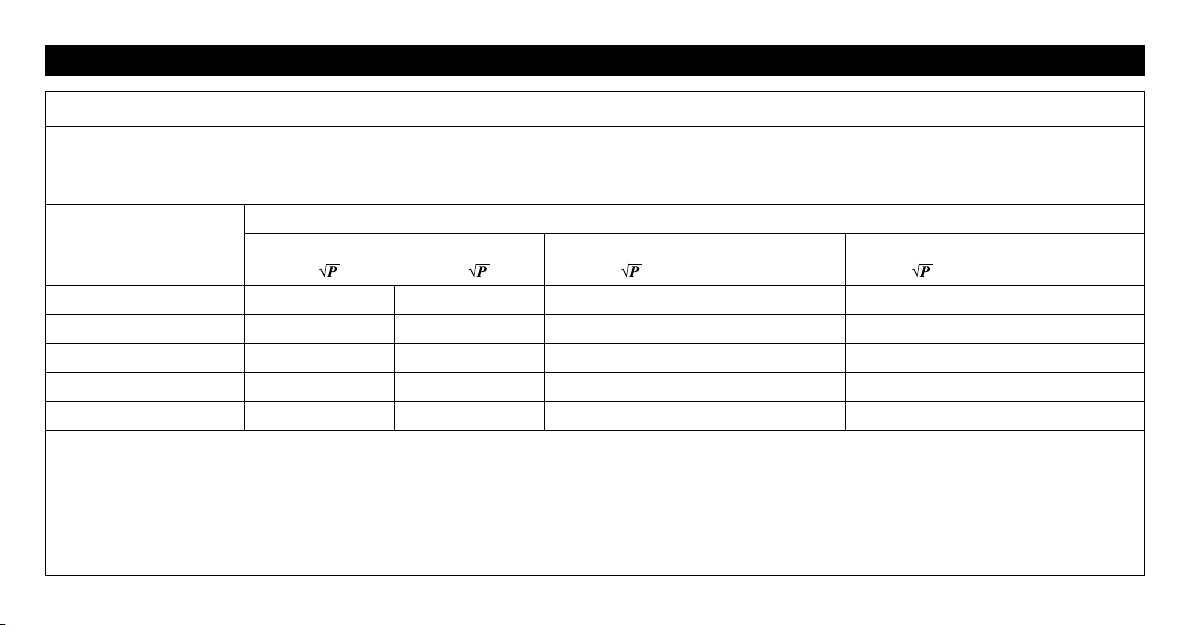
Recommended separation distance between portable and mobile RF communications equipment and the PM601
The PM601 is intended for use in an electromagnetic environment in which radiated RF disturbances are controlled. The customers or the users of
the PM601 can help prevent electromagnetic interference by maintaining a minimum distance between portable and mobile RF communications
equipment (transmitters) and the PM601 as recommended below, according to the maximum output power of the communications equipment.
Output Power of
Transmitter in Watt
Separation distance according to frequency of transmitter in meter
150 kHz to 80 MHz
d = 1.16
d = 0.58
80 MHz to 800 MHz
d = 0.35
800 MHz to 2.7 GHz
d = 0.7
0.01 0.12 0.06 0.04 0.07
0.1 0.37 0.18 0.11 0.22
1 1.16 0.58 0.35 0.7
10 3.67 1.8 1.1 2.2
100 11.6 5.8 3.5 7.0
For transmitters rated at a maximum output power not listed above, the recommended separation distance d in meters (m) can be estimated using
the equation applicable to the frequency of the transmitter, where P is the maximum output power rating of the transmitter in watts (W) according
to the transmitter manufacturer.
Note: At 80 MHz and 800 MHz, the separation distance for the higher frequency range applies
Note: These guidelines may not apply in all situations. Electromagnetic propagation is affected by absorption and reflection from structures,
objects, and people.

Manufactured for :
OMRON HEALTHCARE Co., Ltd.
53, Kunotsubo, Terado-cho, Muko,
Kyoto, 617-0002 JAPAN
Distributed by:
OMRON HEALTHCARE, INC.
1925 West Field Court,
Lake Forest, IL 60045 U.S.A.
OmronHealthcare.com
© 2017 OMRON HEALTHCARE, INC.
Made in China
The Bluetooth
®
word mark and logos are registered trademarks owned by
Bluetooth SIG, Inc. and any use of such marks by
OMRON HEALTHCARE Co., Ltd. is under license.
Other trademarks and trade names are those of their respective owners.
Apple and the Apple logo are trademarks of Apple Inc., registered in the U.S.
and other countries. App Store is a service mark of Apple Inc.
Android and the Google Play logo are trademarks of Google Inc.

For questions call: 1-800-634-4350
Pads are for Single Patient Use Only.
OmronHealthcare.com
3125420-0E