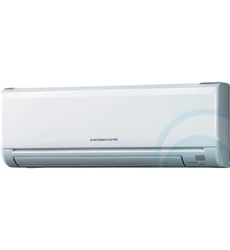
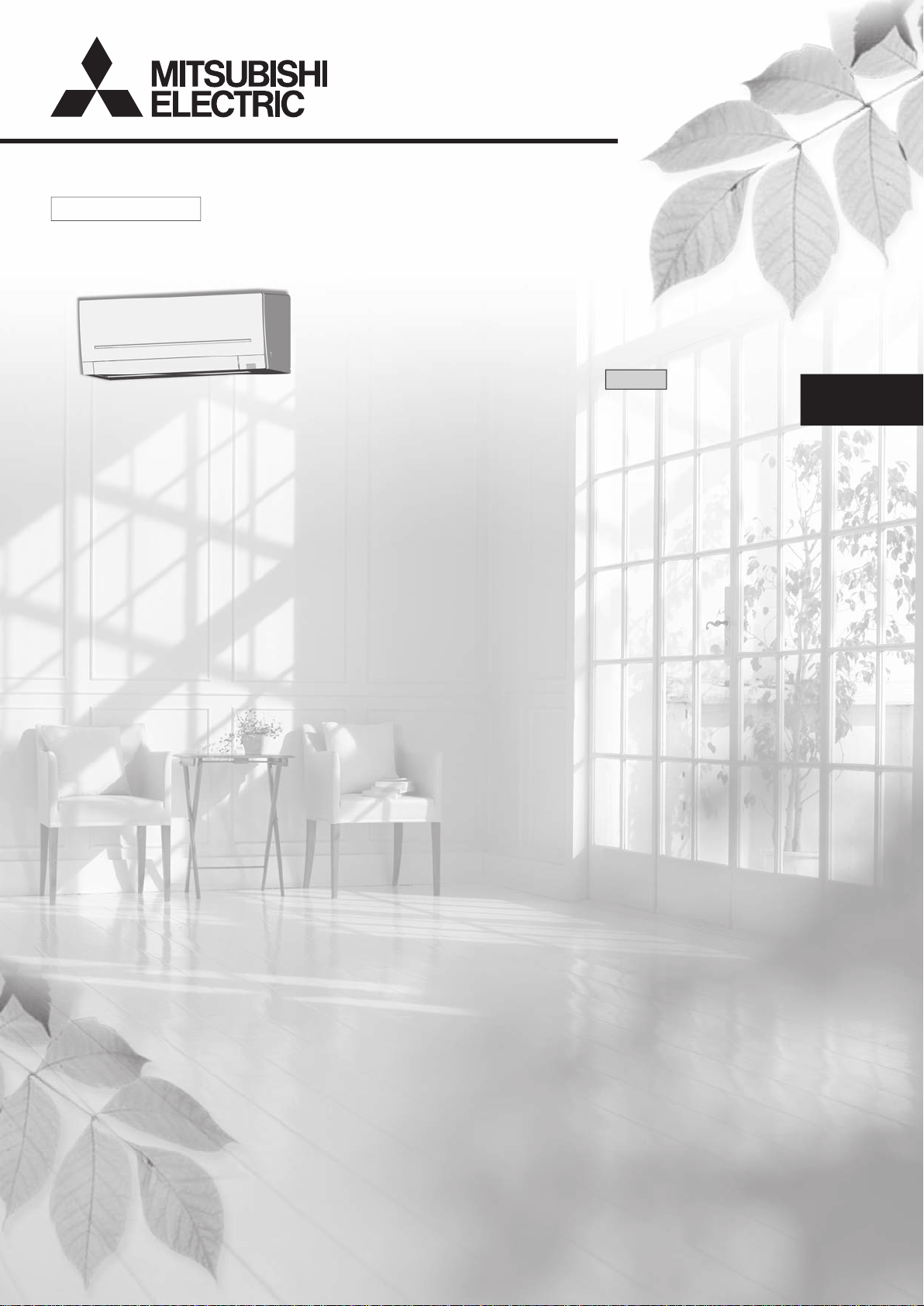
SPLIT-TYPE AIR CONDITIONERS
English
OPERATING INSTRUCTIONS
For user
• To use this unit correctly and safely, be sure to read these operating
instructions before use.
MSZ-AP22VGD MSZ-AP25VGD MSZ-AP35VGD MSZ-AP42VGD MSZ-AP50VGD
MSZ-AP22VGKD
MSZ-AP25VGKD
MSZ-AP35VGKD
MSZ-AP42VGKD
MSZ-AP50VGKD
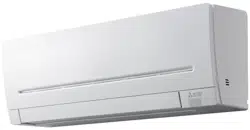
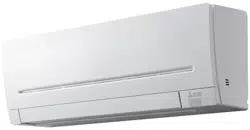
INDOOR UNIT
JG79Y333H01_6th.indd 1 2018/06/19 10:28:01
En-1
● OPERATING INSTRUCTIONS ●
WARNING
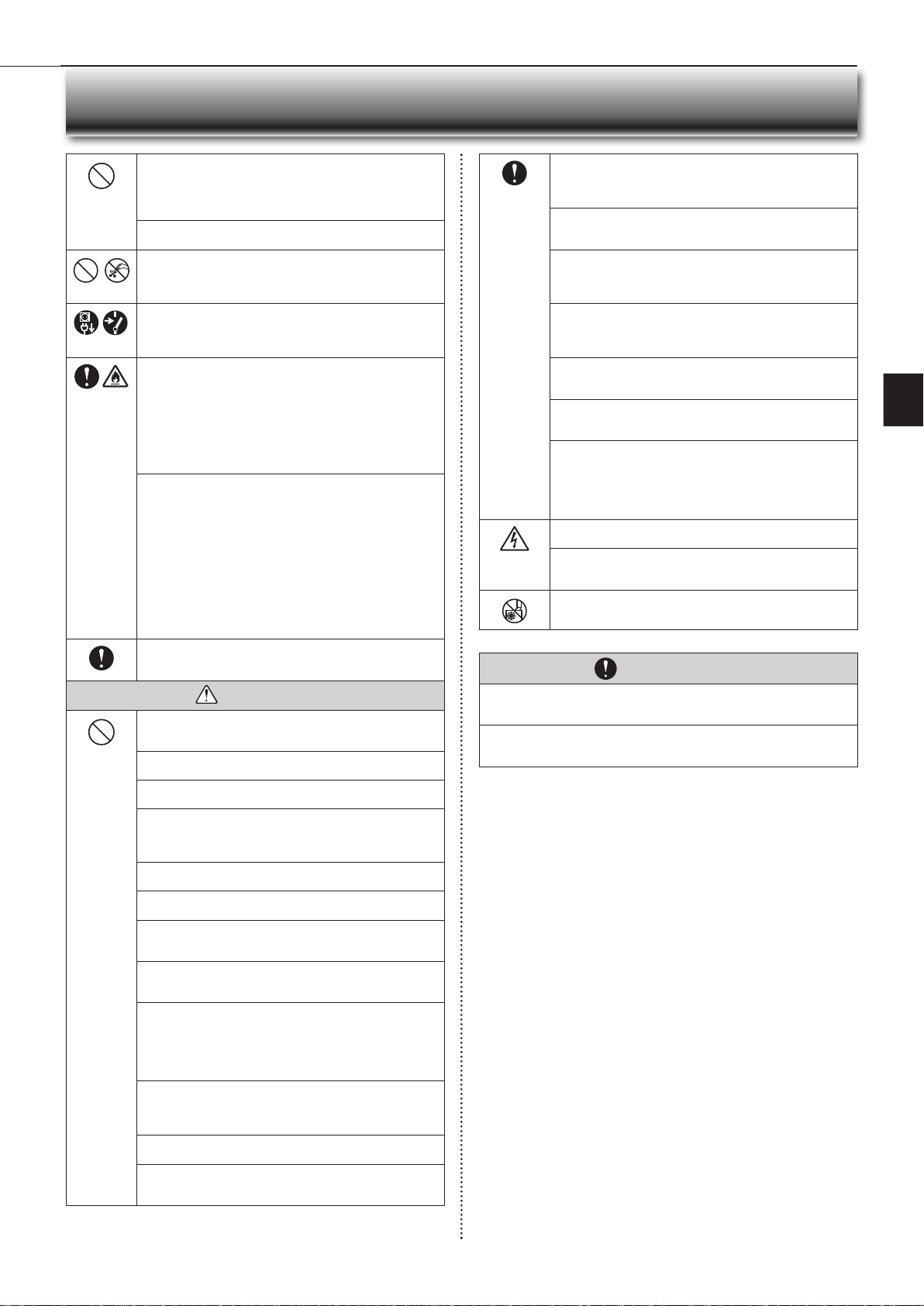
Do not connect the power cord to an intermediate point, use an
extension cord, or connect multiple devices to a single AC outlet.
• This may cause overheating, fi re, or electric shock.
Make sure the power plug is free of dirt and insert it securely into
the outlet.
• A dirty plug may cause fi re or electric shock.
Do not bundle, pull, damage, or modify the power cord, and do not
apply heat or place heavy objects on it.
• This may cause fi re or electric shock.
Do not turn the breaker OFF/ON or disconnect/connect the power
plug during operation.
• This may create sparks, which can cause fi re.
• After the indoor unit is switched OFF with the remote controller, make
sure to turn the breaker OFF or disconnect the power plug.
• Since rotating parts and parts which could cause an electric shock are used
in this product, be sure to read these “Safety Precautions” before use.
• Since the cautionary items shown here are important for safety, be sure to
observe them.
• After reading this manual, keep it together with the installation manual in a
handy place for easy reference.
• Be sure to receive a guarantee card from your dealer and check that the
purchased date and shop name, etc. are entered correctly.
Marks and their meanings
WARNING :
Incorrect handling could cause serious hazard, such as
death, serious injury, etc. with a high probability.
CAUTION :
Incorrect handling could cause serious hazard depending
on the conditions.
Do not expose your body directly to cool air for a prolonged length
of time.
• This could be detrimental to your health.
The unit should not be installed, relocated, disassembled, altered,
or repaired by the user.
• An improperly handled air conditioner may cause fi re, electric shock,
injury, or water leakage, etc. Consult your dealer.
• If the power supply cord is damaged, it must be replaced by the manu-
facturer or its service agent in order to avoid a hazard.
When installing, relocating, or servicing the unit, make sure that
no substance other than the specifi ed refrigerant (R32) enters the
refrigerant circuit.
• Any presence of foreign substance such as air can cause abnormal
pressure rise and may result in explosion or injury.
• The use of any refrigerant other than that specifi ed for the system will
cause mechanical failure, system malfunction, or unit breakdown. In the
worst case, this could lead to a serious impediment to securing product
safety.
Meanings of symbols used in this manual
: Be sure not to do.
: Be sure to follow the instruction.
: Never insert your fi nger or stick, etc.
: Never step onto the indoor/outdoor unit and do not put anything on
them.
: Danger of electric shock. Be careful.
: Be sure to disconnect the power supply plug from the power outlet.
: Be sure to shut off the power.
: Risk of fi re.
: Never touch with wet hand.
: Never splash water on the unit.
SAFETY PRECAUTIONS
CONTENTS
Meanings of symbols displayed on indoor unit and/or outdoor unit
WARNING
(Risk of fi re)
This unit uses a fl ammable refrigerant.
If refrigerant leaks and comes in contact with fi re or heating part, it will create harmful gas and there is risk of fi re.
Read the OPERATING INSTRUCTIONS carefully before operation.
Service personnel are required to carefully read the OPERATING INSTRUCTIONS and INSTALLATION MANUAL before operation.
Further information is available in the OPERATING INSTRUCTIONS, INSTALLATION MANUAL, and the like.
■ SAFETY PRECAUTIONS 1
■ NAME OF EACH PART 4
■ PREPARATION BEFORE OPERATION 5
■ SELECTING OPERATION MODES 6
■ FAN SPEED AND AIRFLOW DIRECTION ADJUSTMENT 7
■ I-SAVE OPERATION 8
■ ECONO COOL OPERATION 8
■ NIGHT MODE OPERATION 9
■ TIMER OPERATION (ON/OFF TIMER) 9
■ WEEKLY TIMER OPERATION 10
■ DEMAND RESPONSE AND INDOOR UNIT OPERATION (MUZ-VGD TYPE ONLY) 11
■ EMERGENCY OPERATION 11
■ AUTO RESTART FUNCTION 11
■ CLEANING 12
■ Wi-Fi INTERFACE SETTING UP (VGK
TYPE ONLY
)
13
■ WHEN YOU THINK THAT TROUBLE HAS OCCURRED 16
■ WHEN THE AIR CONDITIONER IS NOT GOING TO BE USED FOR A LONG TIME 17
■ INSTALLATION PLACE AND ELECTRICAL WORK 17
■ SPECIFICATIONS 18
JG79Y333H01_6th.indd 1 2018/06/19 10:28:02
En-2
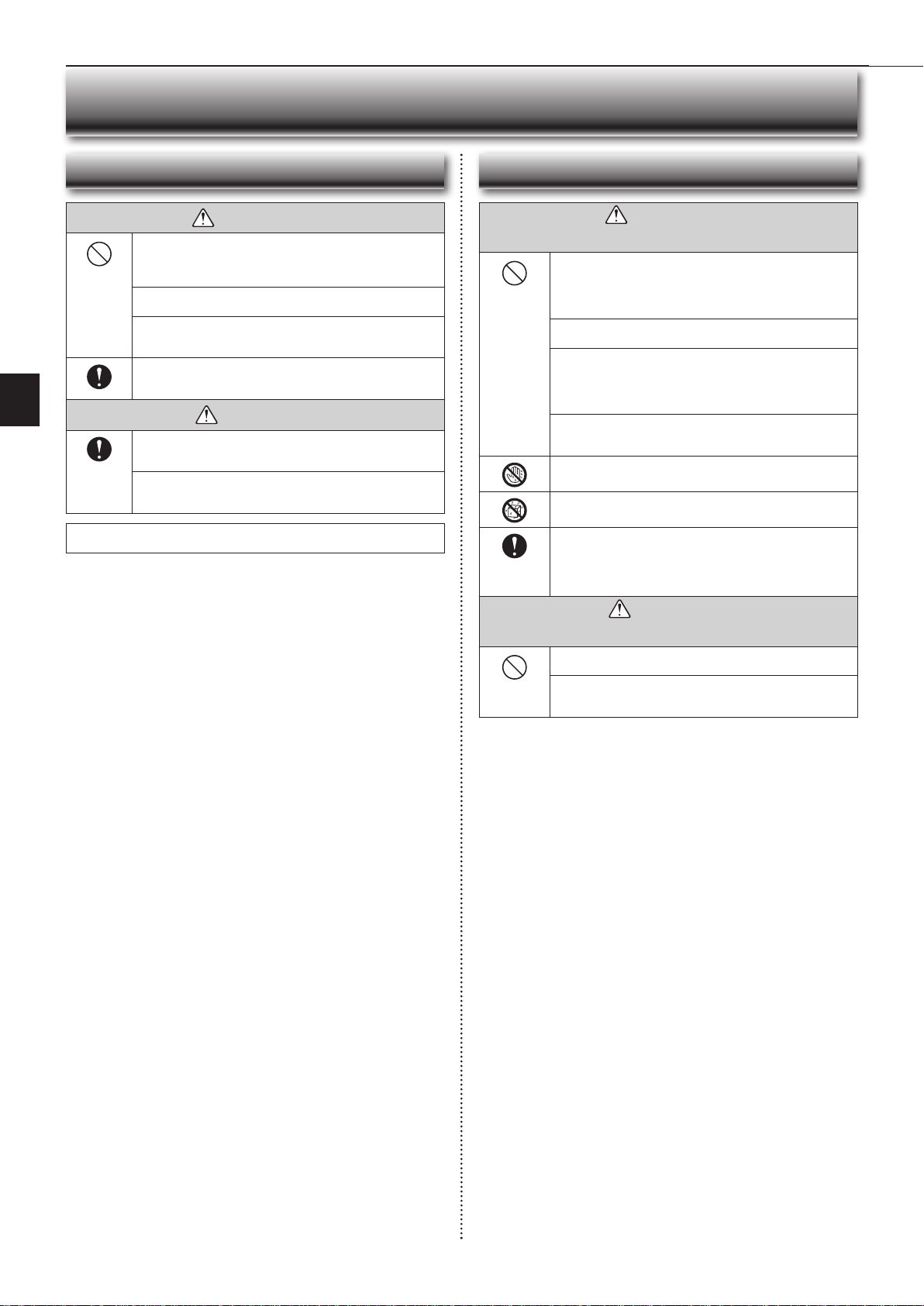
This appliance is not intended for use by persons (including children)
with reduced physical, sensory or mental capabilities, or lack of ex-
perience and knowledge, unless they have been given supervision or
instruction concerning use of the appliance by a person responsible
for their safety.
Children should be supervised to ensure that they do not play with
the appliance.
Do not insert your fi nger, a stick, or other objects into the air inlet
or outlet.
• This may cause injury, since the fan inside rotates at high speeds during
operation.
In case of an abnormal condition (such as a burning smell), stop the
air conditioner and disconnect the power plug or turn the breaker OFF.
• A continued operation in the abnormal state may cause a malfunction,
fi re, or electric shock. In this case, consult your dealer.
When the air conditioner does not cool or heat, there is a possibility of
refrigerant leakage. If any refrigerant leakage is found, stop operations
and ventilate the room well and consult your dealer immediately. If a
repair involves recharging the unit with refrigerant, ask the service
technician for details.
• The refrigerant used in the air conditioner is not harmful. Normally, it
does not leak. However, if refrigerant leaks and comes in contact with
fi re or heating part of such a fan heater, kerosene heater, or cooking
stove, it will create harmful gas and there is risk of fi re.
The user should never attempt to wash the inside of the indoor unit.
Should the inside of the unit require cleaning, contact your dealer.
• Unsuitable detergent may cause damage to plastic material inside
the unit, which may result in water leakage. Should detergent come in
contact with electrical parts or the motor, it will result in a malfunction,
smoke, or fi re.
• The appliance shall be stored in a room without continuously operating
ignition sources (for example: open fl ames, an operating gas appliance
or an operating electric heater).
• Be aware that refrigerants may not contain an odour.
• Do not use means to accelerate the defrosting process or to clean the
appliance, other than those recommended by the manufacturer.
• Do not pierce or burn.
This appliance is intended to be used by expert or trained users in
shops, in light industry and on farms, or for commercial use by lay
persons.
CAUTION
Do not touch the air inlet or the aluminum fi ns of the indoor/outdoor
unit.
• This may cause injury.
Do not use insecticides or fl ammable sprays on the unit.
• This may cause a fi re or deformation of the unit.
Do not expose pets or houseplants to direct airfl ow.
• This may cause injury to the pets or plants.
Do not place other electric appliances or furniture under the indoor/
outdoor unit.
• Water may drip down from the unit, which may cause damage or
malfunction.
Do not leave the unit on a damaged installation stand.
• The unit may fall and cause injury.
Do not step on an unstable bench to operate or clean the unit.
• This may cause injury if you fall down.
Do not pull the power cord.
• This may cause a portion of the core wire to break, which may cause
overheating or fi re.
Do not charge or disassemble the batteries, and do not throw them
into a fi re.
•
This may cause the batteries to leak, or cause a fi re or explosion.
Do not operate the unit for more than 4 hours at high humidity (80%
RH or more) and/or with windows or outside door left open.
• This may cause the water condensation in the air conditioner, which
may drip down, wetting or damaging the furniture.
• The water condensation in the air conditioner may contribute to growth
of fungi, such as mold.
Do not use the unit for special purposes, such as storing food,
raising animals, growing plants, or preserving precision devices
or art objects.
• This may cause deterioration of quality, or harm to animals and plants.
Do not expose combustion appliances to direct airfl ow.
• This may cause incomplete combustion.
Never put batteries in your mouth for any reason to avoid accidental
ingestion.
• Battery ingestion may cause choking and/or poisoning.
SAFETY PRECAUTIONS
Before cleaning the unit, switch it OFF and disconnect the power plug
or turn the breaker OFF.
• This may cause injury, since the fan inside rotates at high speeds during
operation.
When the unit will be unused for a long time, disconnect the power
plug or turn the breaker OFF.
• The unit may accumulate dirt, which may cause overheating or fi re.
Replace all batteries of the remote controller with new ones of the
same type.
• Using an old battery together with a new one may cause overheating,
leakage, or explosion.
If the battery fl uid comes in contact with your skin or clothes, wash
them thoroughly with clean water.
•
If the battery fl uid comes in contact with your eyes, wash them thoroughly
with clean water and immediately seek medical attention.
Ensure that the area is well-ventilated when the unit is operated
together with a combustion appliance.
• Inadequate ventilation may cause oxygen starvation.
Turn the breaker OFF when you hear thunder and there is a possibility
of a lightning strike.
• The unit may be damaged if lightning strikes.
After the air conditioner is used for several seasons, perform inspec-
tion and maintenance in addition to normal cleaning.
• Dirt or dust in the unit may create an unpleasant odor, contribute to
growth of fungi, such as mold, or clog the drain passage, and cause
water to leak from the indoor unit. Consult your dealer for inspection
and maintenance, which require specialized knowledge and skills.
Do not operate switches with wet hands.
• This may cause electric shock.
Do not clean the air conditioner with water or place an object that
contains water, such as a fl ower vase, on it.
• This may cause fi re or electric shock.
Do not step on or place any object on the outdoor unit.
• This may cause injury if you or the object falls down.
IMPORTANT
Dirty fi lters cause condensation in the air conditioner which will contribute to the
growth of fungi such as mold. It is therefore recommended to clean air fi lters every
2 weeks.
Before starting the operation, ensure that the horizontal vanes are in the closed posi-
tion. If operation starts when the horizontal vanes are in the open position, they may
not return to the correct position.
JG79Y333H01_6th.indd 2 2018/06/19 10:28:03
En-3
● OPERATING INSTRUCTIONS ●
WARNING
(Improper handling may have serious consequences, including serious
injury or death.)
This appliance can be used by children aged from 8 years and above
and persons with reduced physical, sensory or mental capabilities or
lack of experience and knowledge if they have been given supervi-
sion or instruction concerning use of the appliance in a safe way and
understand the hazards involved.
Children shall not play with the appliance. Cleaning and user mainte-
nance shall not be made by children without supervision.
Do not use the Wi-Fi interface nearby the medical electrical equipment
or people who have a medical device such as a cardiac pacemaker
or an implantable cardioverter-defi brillator.
• It can cause an accident due to malfunctions of the medical equipment
or device.
Do not install the Wi-Fi interface nearby the automatic control devices
such as automatic doors or fi re alarms.
• It can cause accidents due to malfunctions.
Do not touch the Wi-Fi interface with wet hands.
• It can cause damage to the device, electric shock, or fi re.
Do not splash water on the Wi-Fi interface or use it in a bathroom.
• It can cause damage to the device, electric shock, or fi re.
When the Wi-Fi interface is dropped, or the holder or cable is dam-
aged, disconnect the power supply plug or turn the breaker OFF.
• It may cause fi re or electric shock. In this case, consult your dealer.
•
This device complies with all Australia and New zealand
regulrements for EMC and electrical safety.
CAUTION
(Improper handling may have consequences, including injury or damage
to building.)
Do not step on unstable stepstool to set up or clean the Wi-Fi interface.
• It may cause injury if you fall down.
Do not use the Wi-Fi interface nearby other wireless devices, micro-
waves, cordless phones, or facsimiles.
• It can cause malfunctions.
For Wi-Fi interface
WARNING
Consult your dealer for installing the air conditioner.
• It should not be installed by the user since installation requires specialized
knowledge and skills. An improperly installed air conditioner may cause
water leakage, fi re, or electric shock.
Provide a dedicated power supply for the air conditioner.
• A non-dedicated power supply may cause overheating or fi re.
Do not install the unit where fl ammable gas could leak.
• If gas leaks and accumulates around the outdoor unit, it may cause an
explosion.
Earth the unit correctly.
• Do not connect the earth wire to a gas pipe, water pipe, lightning rod, or
a telephone earth wire. Improper earthing may cause electric shock.
CAUTION
Install an earth leakage breaker depending on the installation location
of the air conditioner (such as highly humid areas).
• If an earth leakage breaker is not installed, it may cause electric shock.
Ensure that the drain water is properly drained.
• If the drain passage is improper, water may drip down from the indoor/
outdoor unit, wetting and damaging the furniture.
In case of an abnormal condition
Immediately stop operating the air conditioner and consult your dealer.
For installation
SAFETY PRECAUTIONS
JG79Y333H01_6th.indd 3 2018/06/19 10:28:03

En-4
Operation indicator lamp
Remote control receiving
section
Emergency
operation
switch
Page 11
Horizontal vane
Air inlet
Air fi lter
Air cleaning fi lter
(Anti-Allergy
Enzyme fi lter)
(Electrostatic
anti-allergy
enzyme fi lter,
option)
Front panel
NAME OF EACH PART
Indoor unit Remote controller
Signal transmitting
section
Distance of signal :
About 6 m
Beep(s) is (are) heard from
the indoor unit when the
signal is received.
Operation dis-
play section
OFF/ON (stop/operate)
button
Temperature
buttons
Page 6
Operation
select button
Page 6
ECONO COOL
button
Page 8
FAN speed control
button
Page 7
VANE control button
Page 7
TIME, TIMER set but-
tons
Page 5, 9
Increase time
Decrease time
CLOCK button
Page 5
RESET button Page 5
Lid
Slide the lid down
to open the remote
controller. Slide it down
further to get to the
weekly timer buttons.
Only use the remote controller provided
with the unit.
Do not use other remote controllers.
If 2 or more indoor units are installed in
proximity to one another, an indoor unit
that is not intended to be operated may
respond to the remote controller.
i-save button
Page 8
WEEKLY TIMER set
buttons
Page 5, 10
Air outlet
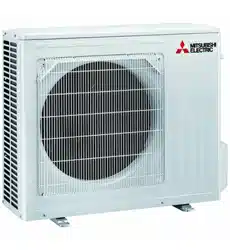
Outdoor unit
Outdoor units may be different in appearance.
Air inlet (back and side)
Refrigerant piping
Drainage hose
Air outlet
Drain outlet
WIDE VANE
button
Page 7
NIGHT MODE
button
Page 9
Battery replacement indicator Page 5
Heat exchanger
Remote controller holder
• Install the remote
controller holder in a
place where the signal
can be received by the
indoor unit.
• When the remote
controller is not used,
place it in this holder.
Wi-Fi interface
Page 13
JG79Y333H01_6th.indd 4 2018/06/19 10:28:04
En-5
● OPERATING INSTRUCTIONS ●
Before operation: Insert the power supply plug into the power outlet and/or
turn the breaker on.
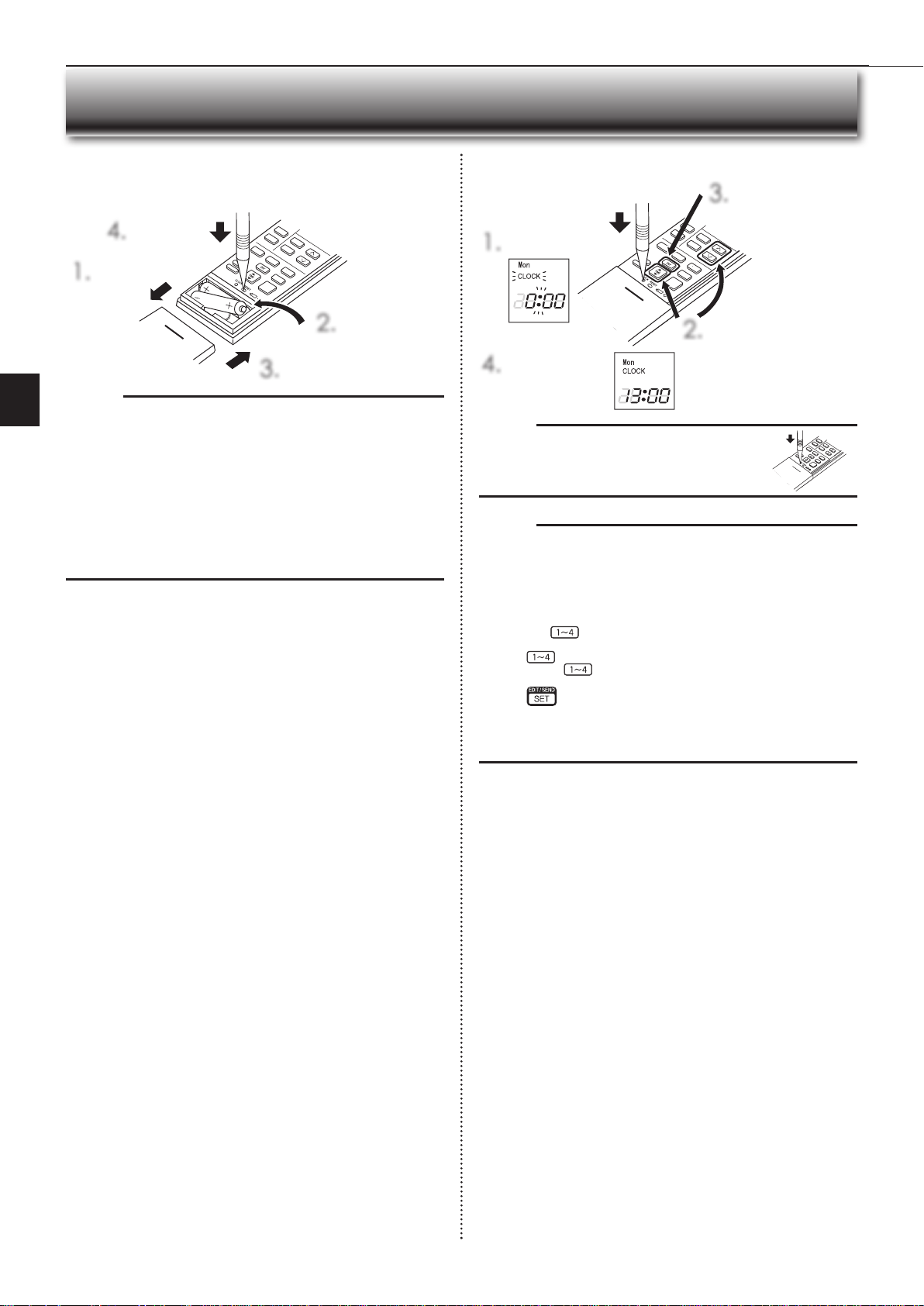
Installing the remote controller batteries
1.
Remove the front lid.
2.
Insert the negative
pole of AAA alkaline
batteries fi rst.
3.
Install the front lid.
4.
Press RESET.
Setting current time
1.
Press CLOCK.
4.
Press CLOCK again.
2.
Press either the TIME button
or the TIMER buttons to set
the time.
Each press increases/decreas-
es the time by 1 minute (10
minutes when pressed longer).
3.
Press the DAY button
to set the day.
PREPARATION BEFORE OPERATION
Note:
• Make sure the polarity of the batteries is correct.
• Do not use manganese batteries and leaking batteries. The remote controller
could malfunction.
• Do not use rechargeable batteries.
• The battery replacement indicator lights up when the battery is running low.
In about 7 days after the indicator starts lights up, the remote controller stops
working.
• Replace all batteries with new ones of the same type.
• Batteries can be used for approximately 1 year. However, batteries with ex-
pired shelf lives last shorter.
• Press RESET gently using a thin instrument.
If the RESET button is not pressed, the remote controller may not operate
correctly.
Note:
• Press CLOCK gently using a thin instrument.
Note:
How to set remote controller exclusively for a particular indoor unit
A maximum of 4 indoor units with wireless remote controllers can be used in
a room.
To operate the indoor units individually with each remote controller, assign a
number to each remote controller according to the number of the indoor unit.
This setting can be set only when all the following conditions are met:
• The remote controller is powered OFF.
(1) Hold down
button on the remote controller for 2 seconds to enter the
pairing mode.
(2) Press
button again and assign a number to each remote controller.
Each press of
button advances the number in the following order: 1 →
2 → 3 → 4.
(3) Press
button to complete the pairing setting.
After you turn the breaker ON, the remote controller that fi rst sends a signal
to an indoor unit will be regarded as the remote controller for the indoor unit.
Once they are set, the indoor unit will only receive the signal from the as-
signed remote controller afterwards.
JG79Y333H01_6th.indd 5 2018/06/19 10:28:05
En-6
AUTO mode (Auto change over)
The unit selects the operation mode according to the difference between the
room temperature and the set temperature. During AUTO mode, the unit
changes mode (COOL↔HEAT) when the room temperature is about 2°C
away from the set temperature for more than 15 minutes.
Note:
Auto Mode is not recommended if this indoor unit is connected to a MXZ
type outdoor unit. When several indoor units are operated simultaneously,
the unit may not be able to switch operation mode between COOL and
HEAT. In this case, the indoor unit becomes standby mode (Refer to table
of Operation indicator lamp).
COOL mode
Enjoy cool air at your desired temperature.
Note:
Do not operate COOL mode at very low outside temperatures (less than
-10°C). Water condensed in the unit may drip and wet or damage furni-
ture, etc.
Note:
Multi system operation
Two or more indoor units can be operated by one outdoor unit. When several
indoor units are operated simultaneously, cooling/dry/fan and heating opera-
tions cannot be done at the same time. When COOL/DRY/FAN is selected with
one unit and HEAT with another or vice versa, the unit selected last goes into
standby mode.
Operation indicator lamp
The operation indicator lamp shows the operation state of the unit.
Indication Operation state Room temperature
The unit is operating to reach the set
temperature
About 2°C or more
away from set tem-
perature
The room temperature is approach-
ing the set temperature
About 1 to 2°C from
set temperature
Standby mode (only during multi
system operation)
—
Lit Blinking Not lit
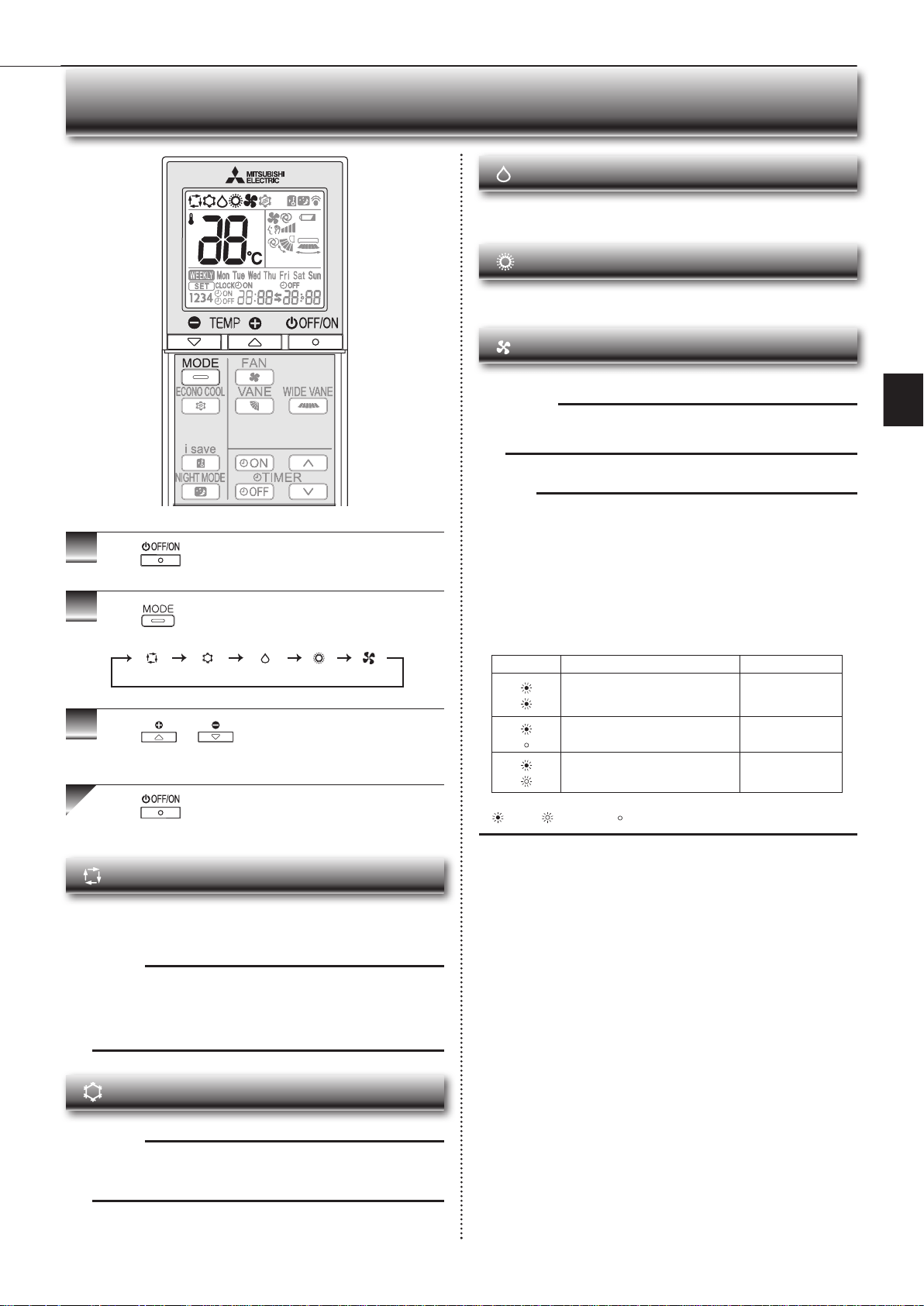
1
Press
to start the operation.
2
Press to select operation mode. Each press
changes mode in the following order:
3
Press or to set the temperature.
Each press raises or lowers the temperature by 1°C.
Press to stop the operation.
SELECTING OPERATION MODES
(AUTO) (COOL) (DRY) (HEAT) (FAN)
DRY mode
Dehumidify your room. The room may be cooled slightly.
Temperature cannot be set during DRY mode.
HEAT mode
Enjoy warm air at your desired temperature.
FAN mode
Circulate the air in your room.
Note:
After COOL/DRY mode operation, it is recommended to operate in the
FAN mode to dry inside the indoor unit.
JG79Y333H01_6th.indd 6 2018/06/19 10:28:07
En-7
● OPERATING INSTRUCTIONS ●
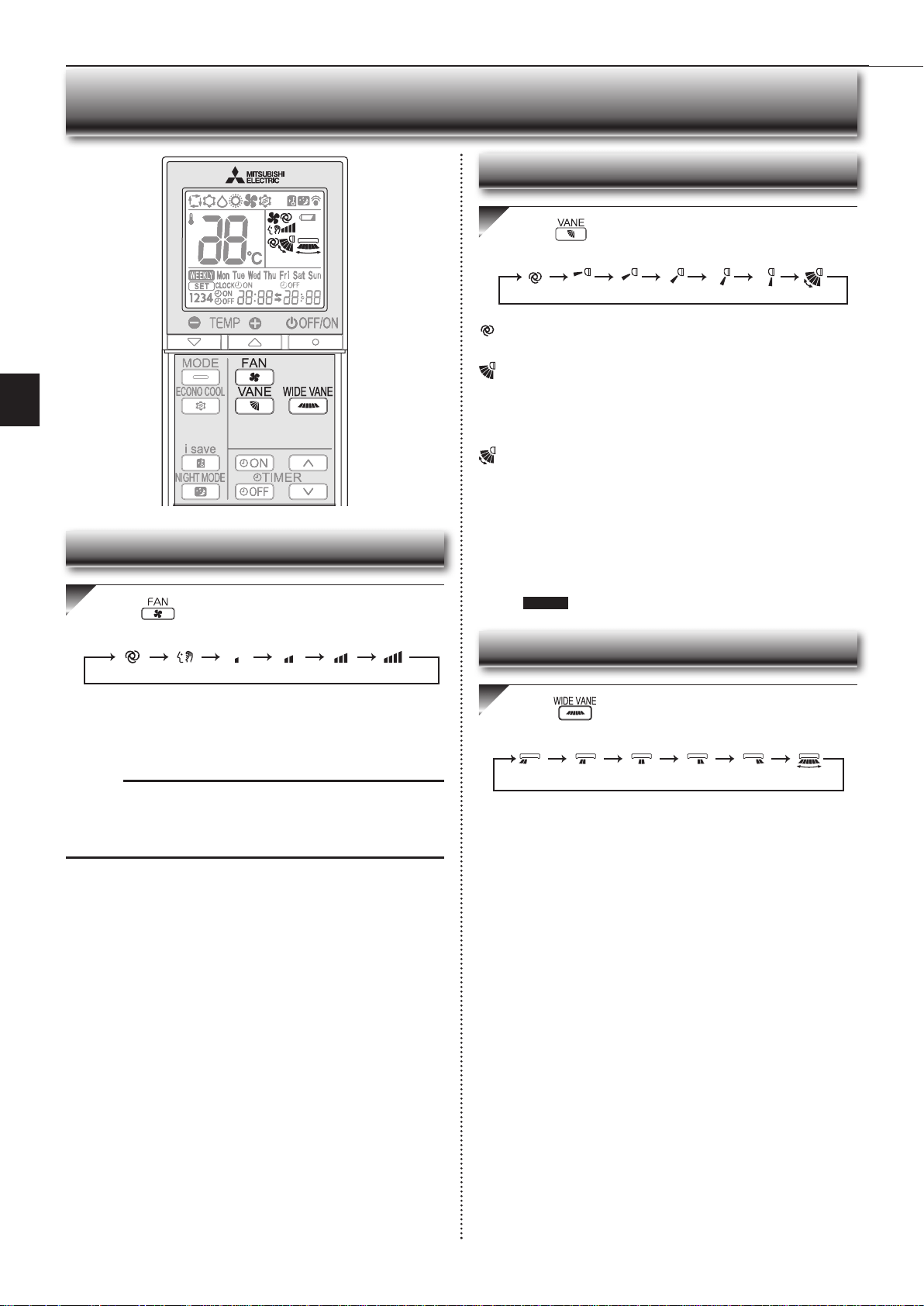
Press to select fan speed. Each press changes
fan speed in the following order:
• Two short beeps are heard from the indoor unit when set to AUTO.
• Use higher fan speed to cool/heat the room quicker. It is recommended
to lower the fan speed once the room is cool/warm.
• Use lower fan speed for quiet operation.
Note:
Multi system operation
When several indoor units are operated simultaneously by one outdoor unit for
heating operation, the temperature of the airfl ow may be low. In this case, it is
recommended to set the fan speed to AUTO.
(AUTO) (Quiet) (Low) (Med.) (High) (Super High)
Press to select airfl ow direction. Each press
changes airfl ow direction in the following order:
(AUTO) .........The vane is set to the most effi cient airfl ow direction. COOL/
DRY/FAN: horizontal position. HEAT: downward.
(Manual) .......For efficient air conditioning, select the upper position for
COOL/DRY, and the lower position for HEAT. If the lower
position is selected during COOL/DRY, the vane automatically
moves to the upward position after 0.5 to 1 hour to prevent
any condensation from dripping.
(Swing) .........The vane moves up and down intermittently.
• Two short beeps are heard from the indoor unit when set to AUTO.
• Always use the remote controller when changing the direction of air-
flow. Moving the horizontal vanes with your hands causes them to mal-
function.
• When the breaker is turned on, the horizontal vanes’ position will be
reset in about a minute, then the operation will start. The same is true
in the emergency cooling operation.
• When the horizontal vanes seem to be in an abnormal position, see
page 16 .
(AUTO) (1) (2) (3) (4) (5) (SWING)
FAN SPEED AND AIRFLOW DIRECTION ADJUSTMENT
Press to select airfl ow direction. Each press
changes airfl ow direction in the following order:
(
SWING
)
Left-right Airflow direction
Fan speed
Up-down Airflow direction
JG79Y333H01_6th.indd 7 2018/06/19 10:28:08

En-8
I-SAVE OPERATION
1
Press during COOL, ECONO COOL, HEAT
mode or NIGHT MODE to select i-save mode.
2
Set the temperature, fan speed, and airfl ow direction.
• The same setting is selected from the next time by simply pressing
.
• Two settings can be saved. (One for COOL, ECONO COOL, one for
HEAT)
• Select the appropriate temperature, fan speed, and airflow direction
according to your room.
Press again to cancel i-save operation.
• i-save operation also is cancelled when the MODE button is pressed.
Note:
Example of use:
1. Low energy mode
Set the temperature 2°C to 3°C warmer in COOL and cooler in HEAT mode.
This setting is suitable for unoccupied room, and while you are sleeping.
2. Saving frequently used settings
Save your preferred setting for COOL, ECONO COOL, HEAT mode and
NIGHT MODE. This enables you to select your preferred setting with a single
push of the button.
A simplifi ed set back function enables to recall the preferred (preset)
setting with a single push of the button. Press the button again
and you can go back to the previous setting in an instance.
ECONO COOL OPERATION
Press during COOL mode page 6 to start
ECONO COOL operation.
The unit performs swing operation vertically in various cycles according to the
temperature airflow.
Press again to cancel ECONO COOL operation.
• ECONO COOL operation is also cancelled when the VANE button is
pressed.
Swing airfl ow (change of airfl ow) makes you feel cooler than station-
ary airfl ow.
The set temperature and the airfl ow direction are automatically changed
by the microprocessor. It is possible to perform cooling operation with
keeping comfort. As a result energy can be saved.
JG79Y333H01_6th.indd 8 2018/06/19 10:28:09
En-9
● OPERATING INSTRUCTIONS ●
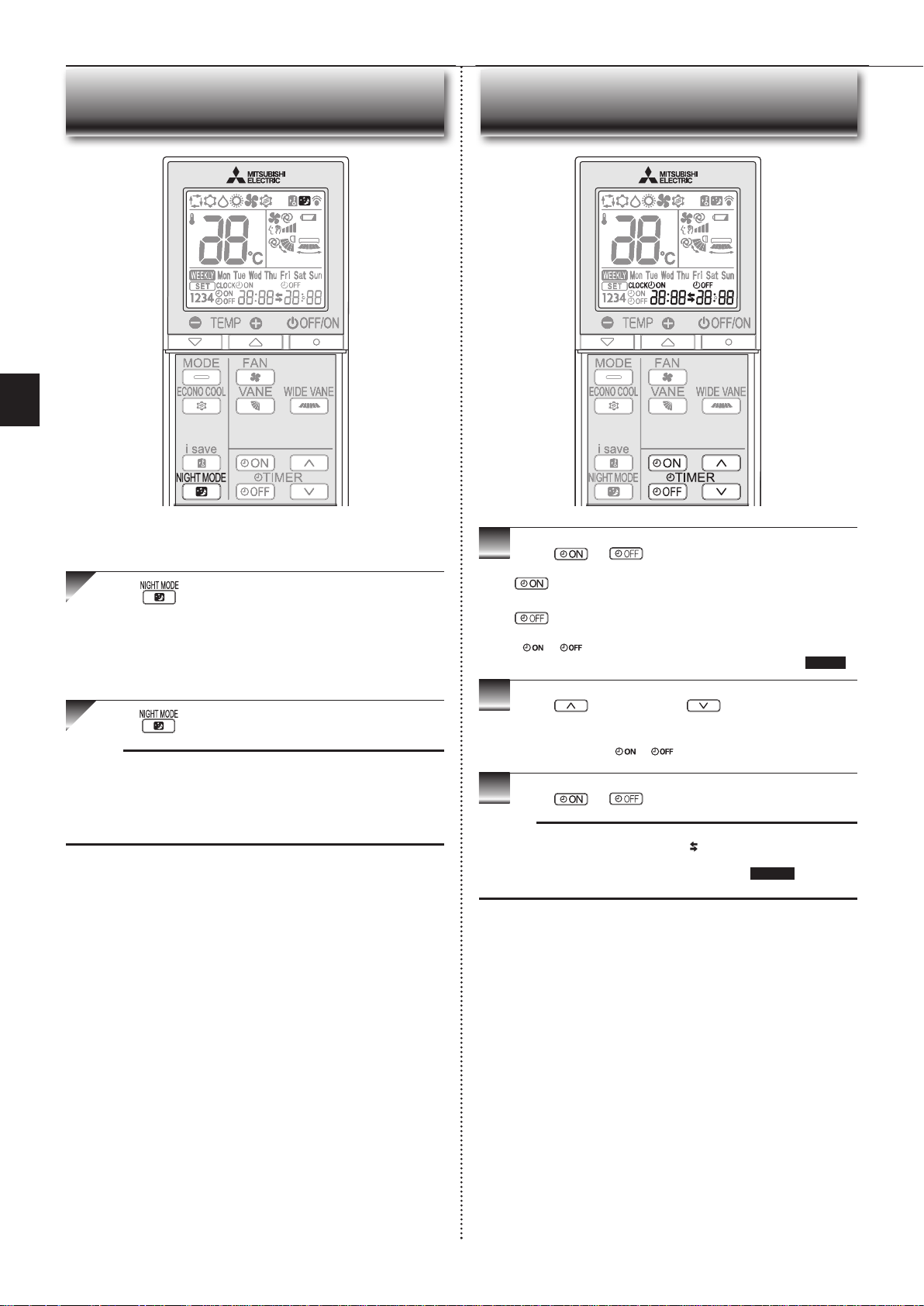
NIGHT MODE OPERATION
Press during operation to activate NIGHT MODE.
• The operation indicator lamp dims.
• The beep sound will be disabled except that emitted when the opera-
tion is started or stopped.
• Noise level of the outdoor unit will be lower than that mentioned in
SPECIFICATIONS.
Press again to cancel NIGHT MODE.
Note:
• The cooling/heating capacity may drop.
• Noise level of the outdoor unit may not change after start-up of the unit, dur-
ing the protection operation, or depending on other operating conditions.
• The fan speed of the indoor unit will not change.
•
The operation indicator lamp will be hard to be seen in a bright room.
•
Noise level of the outdoor unit will not decrease during Multi system operation.
NIGHT MODE changes the brightness of the operation indicator,
disables the beep sound and limits the noise level of the outdoor unit.
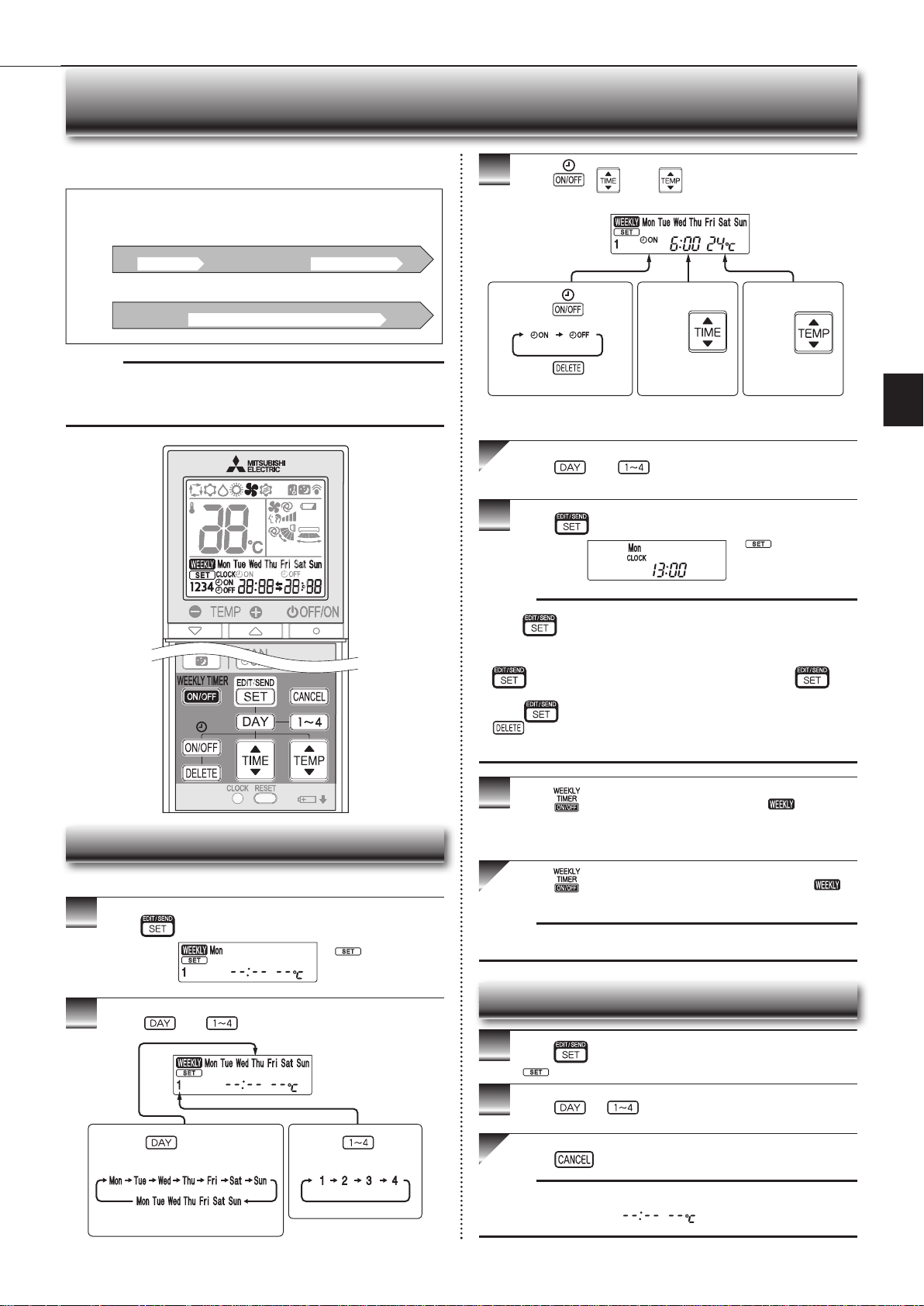
1
Press or during operation to set the timer.
(ON timer) : The unit turns ON at the set time.
(OFF timer) : The unit turns OFF at the set time.
* or blinks.
*
Make sure that the current time and day are set correctly.
Page 5
2
Press (Increase) and (Decrease) to set the
time of timer.
Each press increases or decreases the set time by 10 minutes.
• Set the timer while
or is blinking.
3
Press
or
again to cancel timer.
Note:
• ON and OFF timers can be set together. mark indicates the order of timer
operations.
• If power failure occurs while ON/OFF timer is set, see page 11 “Auto restart
function”.
TIMER OPERATION (ON/OFF TIMER)
JG79Y333H01_6th.indd 9 2018/06/19 10:28:10
En-10
WEEKLY TIMER OPERATION
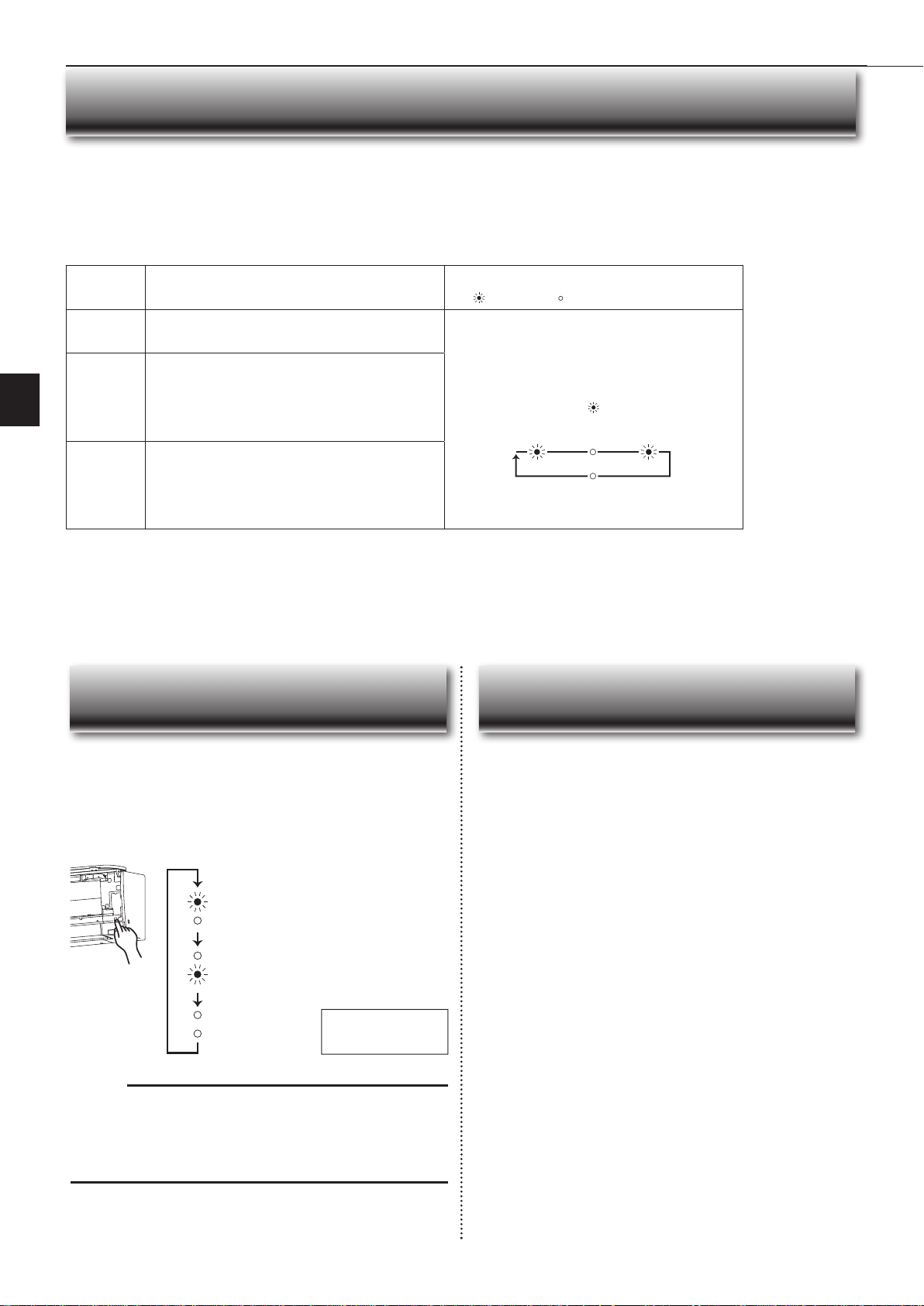
• A maximum of 4 ON or OFF timers can be set for individual days of the week.
• A maximum of 28 ON or OFF timers can be set for a week.
Setting the weekly timer
* Make sure that the current time and day are set correctly.
1
Press to enter the weekly timer setting mode.
2
Press and to select setting day and number.
3
Press , , and to set ON/OFF, time, and
temperature.
Press and to continue setting the timer for
other days and/or numbers.
4
Press to complete and transmit the weekly timer
setting.
Note:
• Press to transmit the setting information of weekly timer to the indoor
unit. Point the remote controller toward the indoor unit for 3 seconds.
• When setting the timer for more than one day of the week or one number,
does not have to be pressed per each setting. Press once
after all the settings are complete. All the weekly timer settings will be saved.
• Press
to enter the weekly timer setting mode, and press and hold
for 5 seconds to erase all weekly timer settings. Point the remote
controller toward the indoor unit.
5
Press to turn the weekly timer ON. ( lights.)
* When the weekly timer is ON, the day of the week whose timer setting
is complete, will light.
Press again to turn the weekly timer OFF. (
goes out.)
Note:
The saved settings will not be cleared when the weekly timer is turned OFF.
Checking weekly timer setting
1
Press to enter the weekly timer setting mode.
* blinks.
2
Press or to view the setting of the particular
day or number.
Press to exit the weekly timer setting.
Note:
When all days of the week are selected to view the settings and a different set-
ting is included among them,
will be displayed.
*
which was blink-
ing goes out, and the
current time will be
displayed.
*
blinks.
Note:
The simple ON/OFF timer setting is available while the weekly timer is on. In
this case, the ON/OFF timer has priority over the weekly timer; the weekly timer
operation will start again after the simple ON/OFF timer is complete.
E.g. : Runs at 24°C from waking up to leaving home, and runs at 27°C
from getting home to going to bed on weekdays.
Runs at 27°C from waking up late to going bed early on weekends.
Setting1 Setting2 Setting3 Setting4
Setting1 Setting2
6:00 8:30 17:30 22:00
8:00 21:00
24°C 27°C
ON OFF ON OFF
ON OFF
Mon
Fri
~
Sat
Sun
~
27°C
Pressing selects the day of
the week to be set.
Pressing selects
the setting number.
* All days can be selected.
E.g. : [Mon Tue ... Sun]
and [1] are selected.
E.g. : [ON], [6:00]
and [24°C] are
selected.
Pressing
selects
ON/OFF timer.
Pressing
deletes
timer setting.
Pressing
adjusts the time.
Pressing
adjusts the tem-
perature.
* Hold down the button to change the time quickly.
JG79Y333H01_6th.indd 10 2018/06/19 10:28:13
En-11
● OPERATING INSTRUCTIONS ●
Operation indicator lamp
When the remote controller cannot be used...
Emergency operation can be activated by pressing the emergency operation
switch (E.O.SW) on the indoor unit.
Each time the E.O.SW is pressed, the operation changes in
the following order:
If a power failure occurs or the main power is turned off during operation, “Auto
restart function” automatically starts operation in the same mode as the one set
with the remote controller just before the shutoff of the main power. When timer is
set, timer setting is cancelled and the unit starts operation when power is resumed.
If you do not want to use this function, please consult the service repre-
sentative because the setting of the unit needs to be changed.
Set temperature : 24°C
Fan speed : Medium
Horizontal vane : Auto
Emergency COOL
Emergency HEAT
Stop
Note:
• The fi rst 30 minutes of operation is test run. Temperature control does not
work, and fan speed is set to High.
• In the emergency heating operation, the fan speed gradually rises to blow out
warm air.
• In the emergency cooling operation, the horizontal vanes’ position will be
reset in about a minute, then the operation will start.
EMERGENCY OPERATION AUTO RESTART FUNCTION
Demand response
This unit has demand response capability which is compliant with AS/NZS 4755.3.1.
To activate this function, you need to make a contract with remote agents such as electric supply company, then this unit should be connected to Demand response enabling
devise (DRED). For further information, consult your dealer.
Demand response represents the automated alteration of an electrical product’s normal mode of operation in response to an initiating signal originating from or defi ned
by a remote agent.
This unit supports 3 Demand Response Modes (DRMs).
DRM Description of operation in this mode
Operation indicator lamp
Lit Not lit
DRM 1
Compressor off
The air conditioner does not perform cooling or heating opera-
tion during the demand response event.
Upper lamp is lit.
Lower lamp blinks.
2.5 sec 2.5 sec0.5 sec
2.5 sec
DRM 2
The air conditioner continues to perform cooling or heating
operation during the demand response event, but the elec-
trical energy consumed by the air conditioner in a half hour
period is not more than 50% of the total electrical energy
that would be consumed if operating at the rated capacity in
a half hour period.
DRM 3
The air conditioner continues to perform cooling or heating
operation during the demand response event, but the elec-
trical energy consumed by the air conditioner in a half hour
period is not more than 75% of the total electrical energy
that would be consumed if operating at the rated capacity in
a half hour period.
Note:
• DRM is automatically activated or released according to the signals from DRED.
DRM cannot be invalidated or changed manually.
• You might feel this unit does not suffi ciently perform cooling or heating operation during DRM.
• Operation settings can be changed as usual with the remote controller during DRM.
However, you might not feel cool or warm enough as DRM is prioritized.
DEMAND RESPONSE AND INDOOR UNIT OPERATION (DEMAND TYPE ONLY)
JG79Y333H01_6th.indd 11 2018/06/19 10:28:14
En-12
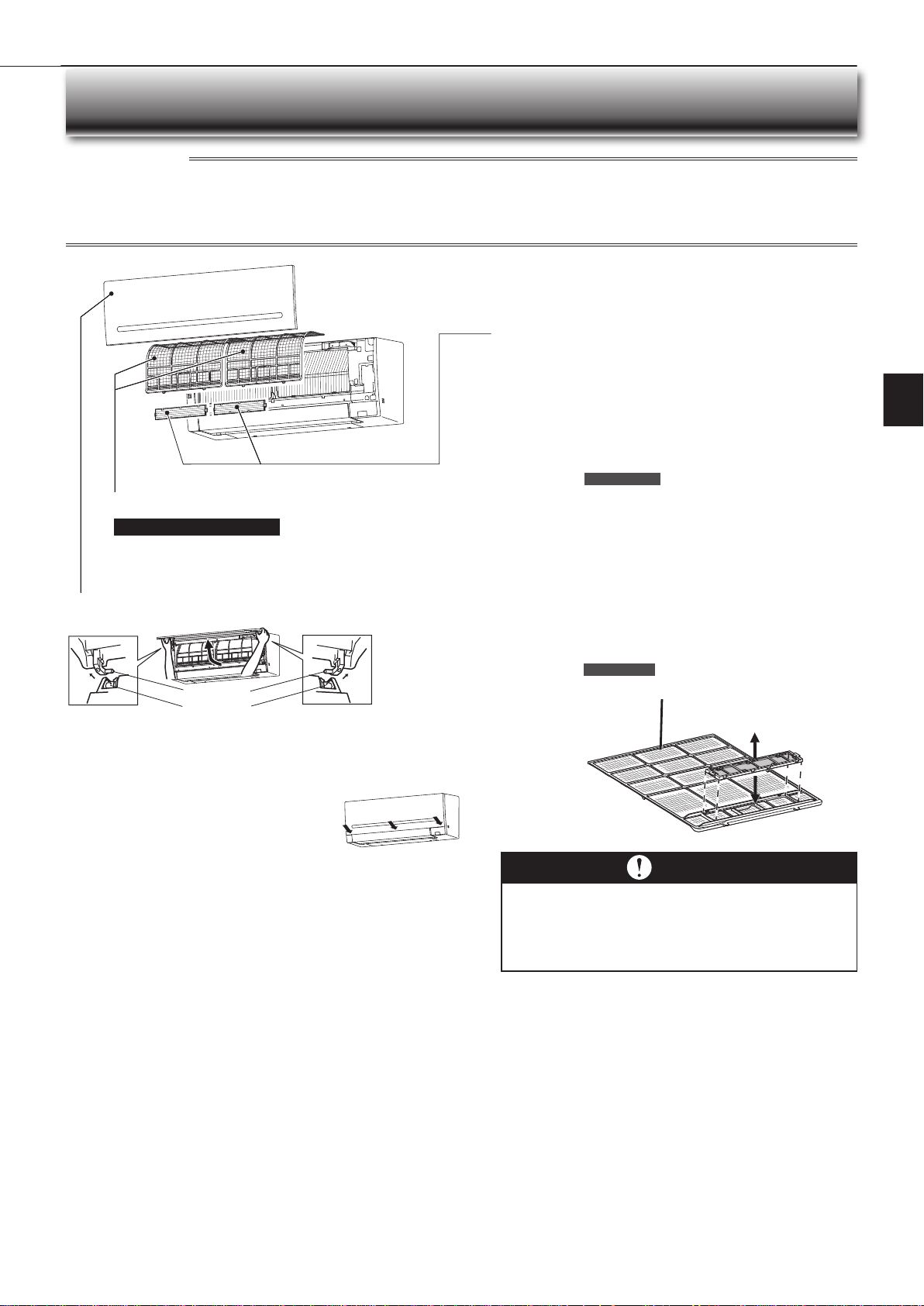
1. Lift the front panel until a “click” is heard.
2. Hold the hinges and pull to remove as shown in the illustration above.
• Wipe with a soft dry cloth or rinse it with water.
• Do not soak it in water for more than two hours.
• Dry it well in shade before installing it.
3. Install the front panel by following the removal proce-
dure in reverse. Close the front panel securely and
press the positions indicated by the arrows.
Instructions:
CLEANING
• Switch off the power supply or turn off the breaker before cleaning.
• Be careful not to touch the metal parts with your hands.
• Do not use benzine, thinner, polishing powder, or insecticide.
• Use only diluted mild detergents.
• Do not use a scrubbing brush, a hard sponge, or the like.
• Do not soak or rinse the horizontal vane.
• Do not use water hotter than 50°C.
• Do not expose parts to direct sunlight, heat, or fi re to dry.
• Do not apply excessive force on the fan as it may cause cracks or breakage.
Air fi lter (Air purifying fi lter)
• Clean every 2 weeks
• Remove dirt by a vacuum cleaner, or rinse with water.
• After washing with water, dry it well in shade.
Front panel
Air cleaning fi lter
(Anti-Allergy Enzyme fi lter)
Every 3 months:
• Remove dirt by a vacuum cleaner.
When dirt cannot be removed by vacuum cleaning:
•
Soak the fi lter and its frame in lukewarm water before rinsing it.
•
After washing, dry it well in shade.
Install all tabs of the air fi lter.
Every year:
• Replace it with a new air cleaning fi lter for best performance.
• Parts Number MAC-408FT-E
Hole
Hinge
Important
• Clean the fi lters regularly for best performance and to
reduce power consumption.
• Dirty fi lters cause condensation in the air conditioner
which will contribute to the growth of fungi such as
mold. It is therefore recommended to clean air fi lters
every 2 weeks.
(Electrostatic anti-allergy enzyme
fi lter, option)
Every 3 months:
• Remove dirt by a vacuum cleaner.
• Put it back to its original position, and install all tabs of the air
cleaning fi lter.
When dirt cannot be removed by vacuum cleaning:
• Soak the fi lter and its frame in lukewarm water before rinsing it.
• After washing, dry it well in shade. Install all tabs of the air fi lter.
Every year:
• Replace it with a new air cleaning fi lter for best performance.
• Parts Number MAC-2320FT
Pull to remove
from the air fi lter.
Attach to the air fi lter.
Air fi lter
JG79Y333H01_6th.indd 12 2018/06/19 10:28:15
En-13
● OPERATING INSTRUCTIONS ●
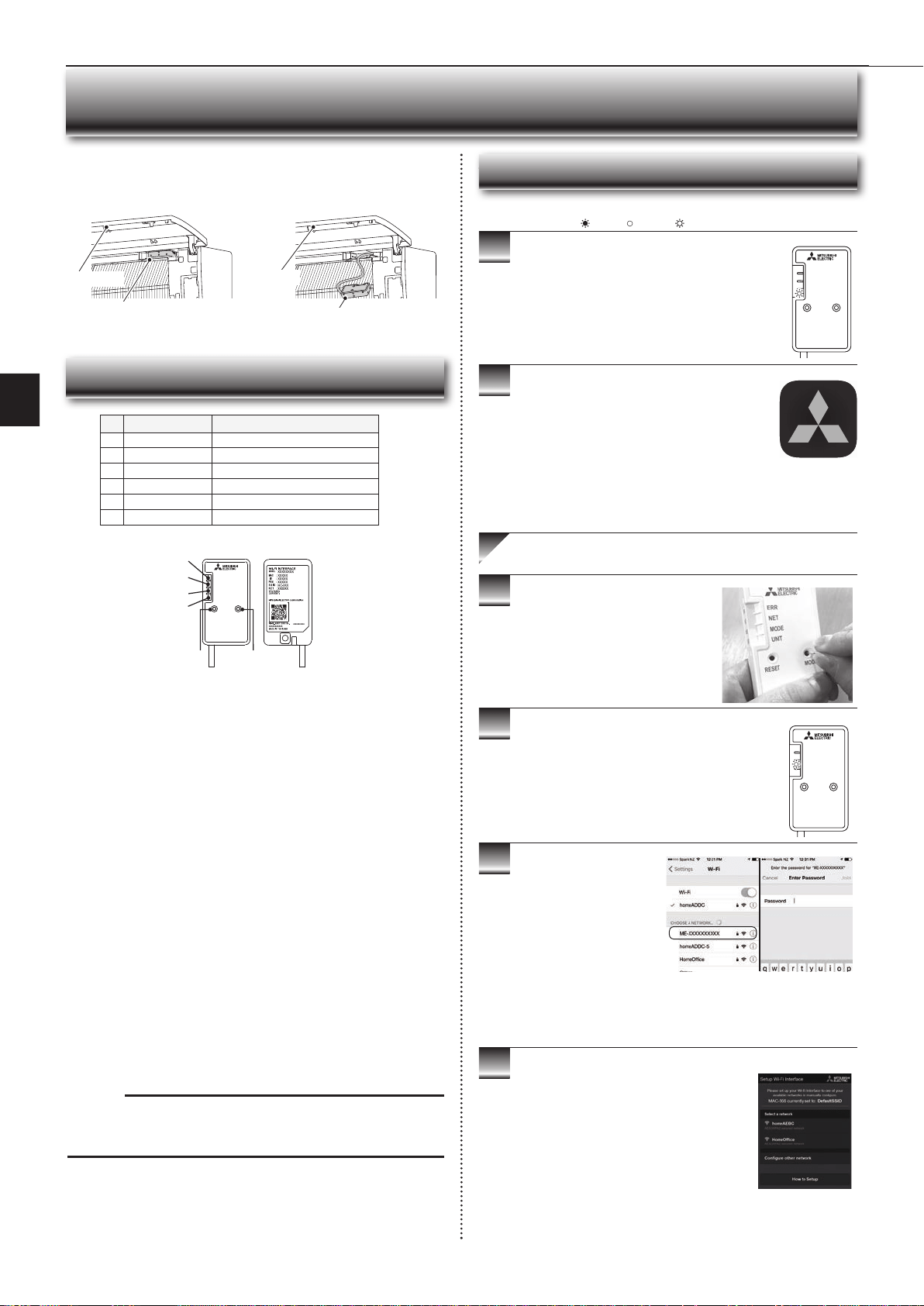
Wi-Fi INTERFACE SETTING UP (VGK TYPE ONLY)
This Wi-Fi interface, communicates the status information and controls
the commands from the server by connecting to the indoor unit.
Wi-Fi interface
Wi-Fi interface
Front panel
Front panel
Wi-Fi interface introduction
RESET
ERR
NET
MODE
UNIT
MODE
3
4
5
6
2
1
(1) MODE Button
WPS-Push
• Hold down the MODE Button for 2 seconds to start WPS-Push Pairing.
• When WPS-Push is enabled on the Wi-Fi interface, the MODE LED starts
fl ashing orange (every second) and the pairing can be completed by
enabling WPS-Push on the Router.
Access Point Mode
• Hold down the MODE Button for 7 seconds to start Access Point Mode.
• When Access Point Mode is enabled on the Wi-Fi interface, the MODE LED
starts fl ashing orange (every 5 seconds).
• To cancel Access Point Mode, hold down the MODE Button for 7 seconds
again and ensure that the MODE LED is no longer fl ashing.
WPS-PIN
• Hold down the MODE Button for 15 seconds to start WPS-PIN Pairing.
• When WPS-PIN is enabled on the Wi-Fi interface, MODE LED starts
fl ashing orange (every 0.5 seconds) and the pairing can be completed by
enabling WPS-PIN on the Router.
• Before using WPS-PIN, the PIN code of the Wi-Fi interface needs to be set
on the Router.
Note:
When the Wi-Fi interface is reset to the factory default, ALL the
confi guration information will be lost. Take great care in implementing this
operation.
(2) RESET Button
• Hold down the RESET Button for 2 seconds to reboot the system.
• Hold down the RESET Button for 15 seconds to initialise the Wi-Fi interface
to the factory default.
No Item Description
1
MODE Button Selects modes.
2
RESET Button Resets the system and ALL settings.
3
ERR LED (Orange) Shows the network error state.
4
NET LED (Green) Shows the network state.
5
MODE LED (Orange) Shows the Access Point Mode state.
6
UNIT LED (Green) Shows the indoor unit state.
3
4
5
6
Information for users
The following steps explain how to connect the Wi-Fi interface to a Router.
1
2
.
THERE ARE TWO OPTIONS OF
CONNECTING
RESET
ERR
NET
MODE
UNIT
MODE
RESET
ERR
NET
MODE
UNIT
MODE
Ensure the Wi-Fi interface is connected correctly as per
the previous section, ‘Connecting the Wi-Fi interface’.
UNIT LED should be fl ashing green only.
: ON : Flashing : OFF
KEY (LED LIGHTS):
Download and install Wi-Fi Control App to your
compatible Apple or Android smartphone/tablet
(search term: Mitsubishi Wi-Fi Control).
Wi-Fi Control
Activate Access Point Mode on your
Wi-Fi interface by using a small object to
press and hold the MODE Button for 7
seconds.
When Access Point Mode is enabled on the Wi-Fi
interface, MODE LED starts fl ashing orange (every 5
seconds).
Option 1 - Access Point Mode Pairing
Check the label on the back
of the interface for the SSID.
Open the Wi-Fi networks
screen on your smartphone/
tablet and connect to the
network with the same name
as the SSID. The network
password, labelled KEY, is
just under the SSID on the
interface.
You will now be connected to
this Wi-Fi interface
Open Wi-Fi Control App and follow the ‘How to
Setup’ instructions in the ‘Setup Wi-Fi interface’
section.
If the app does not go to this section, you are
not connected to the Wi-Fi interface’s Access
Point; please start process again.
You can either select your available Wi-Fi
Network, or manually confi gure a Wi-Fi Network.
JG79Y333H01_6th.indd 13 2018/06/19 10:28:18
En-14
9
10
3
4
5
6
7
8
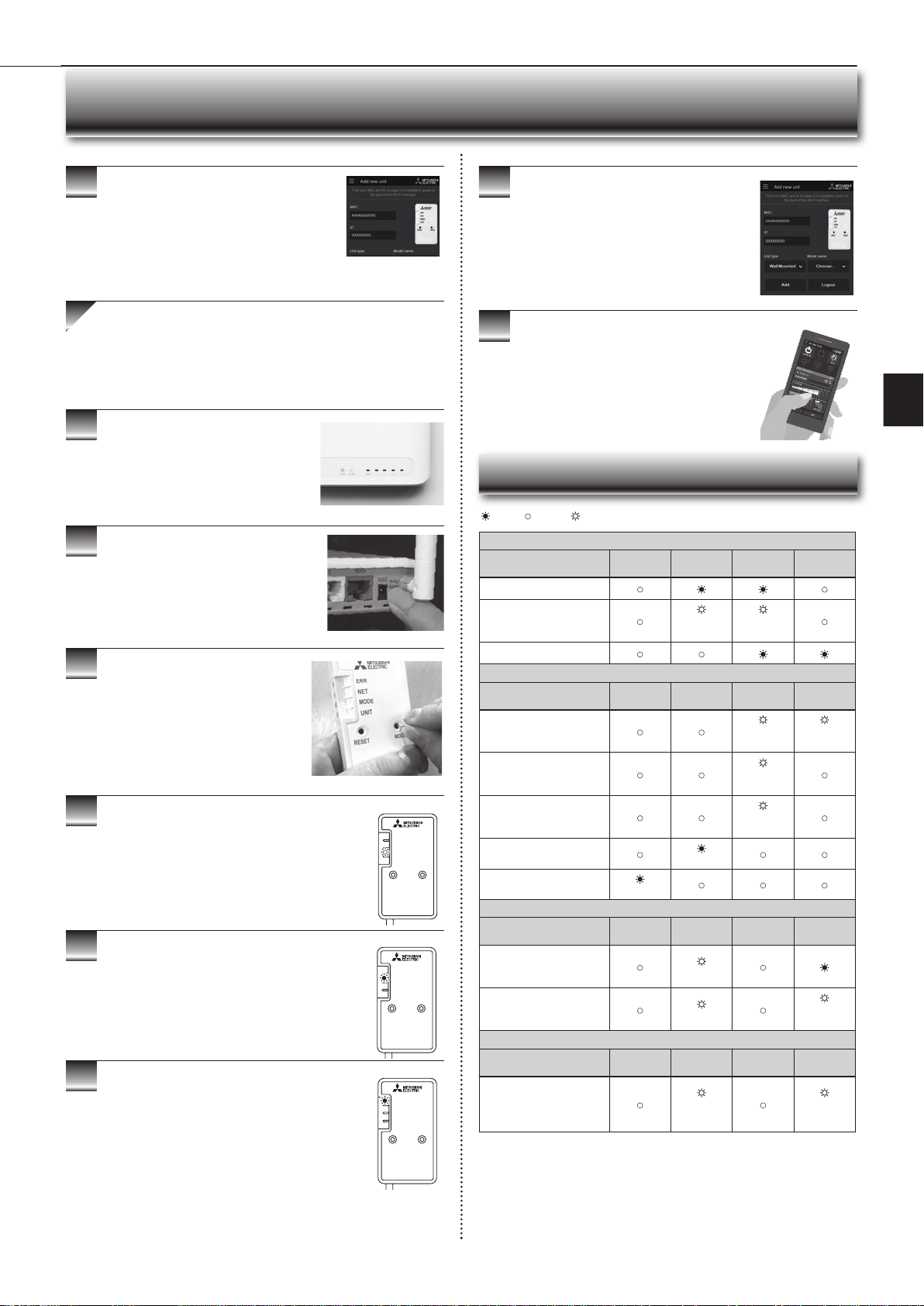
When WPS-Push is enabled on the Wi-Fi interface,
MODE LED starts fl ashing orange (every second).
Open Wi-Fi Control App. Enter MAC and ID into
‘Add new unit’ and select ‘Add’.
Once completed, control your heat pump via Wi-Fi.
7
Wi-Fi INTERFACE SETTING UP (VGK TYPE ONLY)
Once completed, control your heat pump via Wi-Fi.
RESET
ERR
NET
MODE
UNIT
MODE
RESET
ERR
NET
MODE
UNIT
MODE
● Software initialising
Description
ERR
(Orange)
NET
(Green)
MODE
(Orange)
UNIT
(Green)
Firmware updating
Firmware downloading
(every
second)
(every
second)
Reset to the factory default
● Wireless setting
Description
ERR
(Orange)
NET
(Green)
MODE
(Orange)
UNIT
(Green)
Access Point Mode
activated
(every 5
sec)
(every 5
sec)
WPS-PUSH Mode activated
(every
second)
WPS-PIN Mode activated
(every 0.5
sec)
Pairing process via WPS
completed
(5 sec)
Pairing process via WPS
failed
(5 sec)
● Connection to server in progress
Description
ERR
(Orange)
NET
(Green)
MODE
(Orange)
UNIT
(Green)
Communicating with server,
and starting up indoor unit
communication
(*1)
Communicating with server,
and communicating with
indoor unit
(*1)
(every 5
sec)
● Normal operation
Description
ERR
(Orange)
NET
(Green)
MODE
(Orange)
UNIT
(Green)
Communicating with server,
and communicating with
indoor unit
(every 5
sec)
(every 5
sec)
(*1) Details of fl ash pattern
• Every 0.5 sec: Searching for server.
• Every second: Registering the information of the Wi-Fi interface to server.
: ON : Flashing : OFF
Once completed, the MAC and ID will be fi lled in
‘Add new unit’. Select ‘Add’ and then control your
heat pump via Wi-Fi.
Option 2 - WPS-Push Pairing
• Please Note: The WPS and Router reset buttons may be
similar on some Routers.
• Please exercise caution as resetting your Router will erase
network confi guration.
Check Wi-Fi and WPS are enabled on your
Router. The connection procedure varies
depending on your Router – refer to your
Router’s manual for more information.
Activate WPS Mode on your Router. This
will be enabled for a set period allowing
approximately 2 minutes to complete the next
step. To do so, please refer to your Router’s
manual.
RESET
ERR
NET
MODE
UNIT
MODE
Activate WPS on your Wi-Fi interface by
using a small object to press and hold the
MODE Button for 2 seconds.
When pairing process is completed on the Wi-Fi
interface, the NET LED lights up solid green for 5
seconds.
If ERR LED lights up orange for 5 seconds at any stage,
there may be a problem; please start process again.
LED Pattern
JG79Y333H01_6th.indd 14 2018/06/19 10:28:20
En-15
● OPERATING INSTRUCTIONS ●
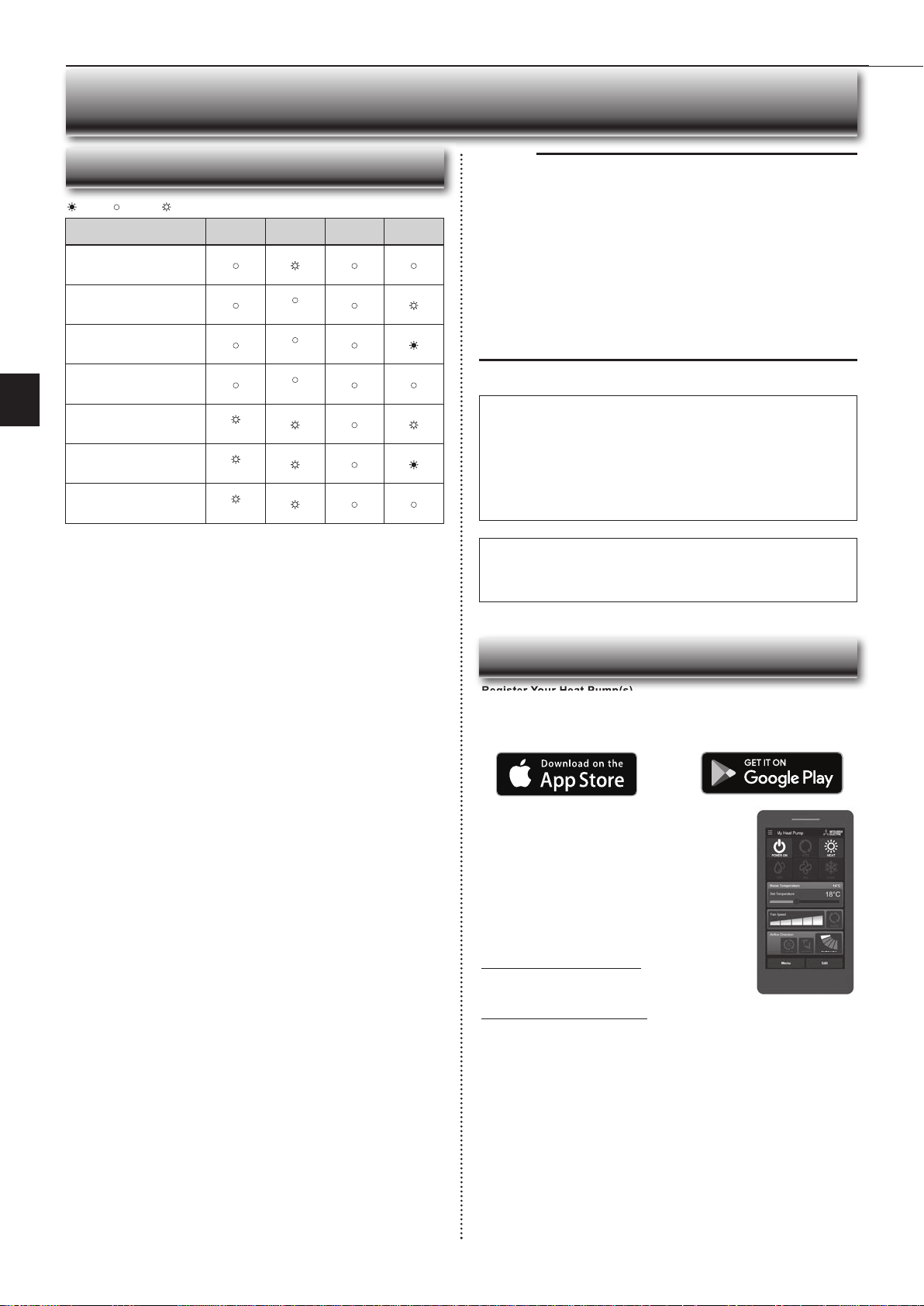
Description
ERR
(Orange)
NET
(Green)
MODE
(Orange)
UNIT
(Green)
Connection to server
established, and connection to
indoor unit failed
Connection to Router failed,
and connection to indoor unit
established
(*3)
Connection to Router failed,
and starting up indoor unit
connection
(*3)
Connection to Router failed,
and connection to indoor unit
failed
(*3)
Connection to server failed,
and connection to indoor unit
established
(*2)
Connection to server failed,
and starting up indoor unit
connection
(*2)
Connection to server failed,
and connection to indoor unit
failed
(*2)
(*2) Details of fl ash pattern
• Every 0.5 sec: IP address setting is invalid.Check DHCP Settings of the
Router, or check IP address settings of the Wi-Fi interface. If both settings are
correct but still the problem persists, push RESET Button for more than 15
seconds to retry the pairing.
• Every second: DNS setting is invalid.Check DNS Settings of the Router,
or check DNS address settings of the Wi-Fi interface. If both settings are
correct but still the problem persists, push RESETButton for more than 15
seconds to retry the pairing.
• Twice every 5 sec: Not connected to server. Check if the Router is connected
to the internet.
• Once every 5 sec: Not communicating with server properly. Push RESET
Button for 2 seconds.
(*3) Details when NET LED is OFF
The Wi-Fi interface failed to connect to the Router. Check the following, and pair
the Wi-Fi interface.
• Make sure that the communication distance is not too far between the Wi-Fi
interface and the Router.
• Make sure 2.4GHz is enabled on dual band Routers.
• Make sure that the Router uses WPA2-PSK(AES) encryption.
• Make sure that the number of connected devices to the Router does not
exceed the limit.
• Make sure that WPS is working on the Router.
• Make sure that the Router is compatible with the Wi-Fi interface.
• If Static IP has been set - make sure it is correct as per Router network settings.
If a problem regarding connecting your Router and the Wi-Fi interface persists,
please contact your local Mitsubishi Electric offi ce, as listed on the back of this
guide. A list of compatible Routers is also available.
: ON : Flashing : OFF
Wi-Fi INTERFACE SETTING UP (VGK TYPE ONLY)
Note:
• Ensure that the Router supports the WPA2-AES encryption setting before
starting the Wi-Fi interface setup.
• The End user should read and accept the terms and conditions of the Wi-Fi
service before using this Wi-Fi interface.
• To complete connection of this Wi-Fi interface to the Wi-Fi service, the Rout-
er may be required.
• This Wi-Fi interface will not commence transmission of any operational data
from the system until the End user registers and accepts the terms and con-
ditions of the Wi-Fi service.
• This Wi-Fi interface should not be installed and connected to any Mitsubishi
Electric system which is to provide application critical cooling or heating.
• Please write down the information regarding the Wi-Fi interface setting on the
last page of this manual, when you set up this Wi-Fi interface.
• At the time of relocation or disposal, reset the Wi-Fi interface to the factory
default.
Mitsubishi Electric’s Wi-Fi interface is designed for communication to
Mitsubishi Electric’s Wi-Fi service. Third party Wi-Fi interfaces cannot
connect to Mitsubishi Electric’s Wi-Fi service. Mitsubishi Electric is not
responsible for any (i) underperformance of a system or any product; (ii)
system or product fault; or (iii) loss or damage to any system or product;
which is caused by or arises from connection to and/or use of any third
party Wi-Fi interface or any third party Wi-Fi service with Mitsubishi Electric
equipment.
For the latest information regarding Wi-Fi Control:
New Zealand based enquiries please visit: www.mitsubishi-electric.co.nz/wifi
Australian based enquiries please visit: www.mitsubishielectric.com.au/wifi
Once registered you will be able to control your heat
pump with your smartphone, tablet or online account
using an internet connection.
(For a list of compatible devices, please visit the
Mitsubishi Electric website).
User Manual
A copy of the user manual, terms & conditions and
privacy policy can be downloaded at any time from the
Mitsubishi Electric website.
Mitsubishi Electric New Zealand
www.mitsubishi-electric.co.nz/wifi
Phone: 0800 639 434
Mitsubishi Electric Australia
www.mitsubishielectric.com.au/wifi
Phone: 1300 728 119
Register Your Heat Pump(s)
Thank you for choosing a Mitsubishi Electric Heat Pump with Wi-Fi Control.
Once your Wi-Fi interface is installed, either download the app (search term:
Mitsubishi Wi-Fi Control) or visit our website to register your heat pump(s).
*Apple and the Apple logo are trademarks of Apple Inc., registered in the U.S.
and other countries. App Store is a service mark of Apple Inc., registered in
the U.S. and other countries.
*Google Play and the Google Play logo are trademarks of Google Inc.
Troubleshooting
Register Your Heat Pump(s)
Mitsubishi Electric Wi-Fi Heat Pump Control
JG79Y333H01_6th.indd 15 2018/06/19 10:28:21
En-16
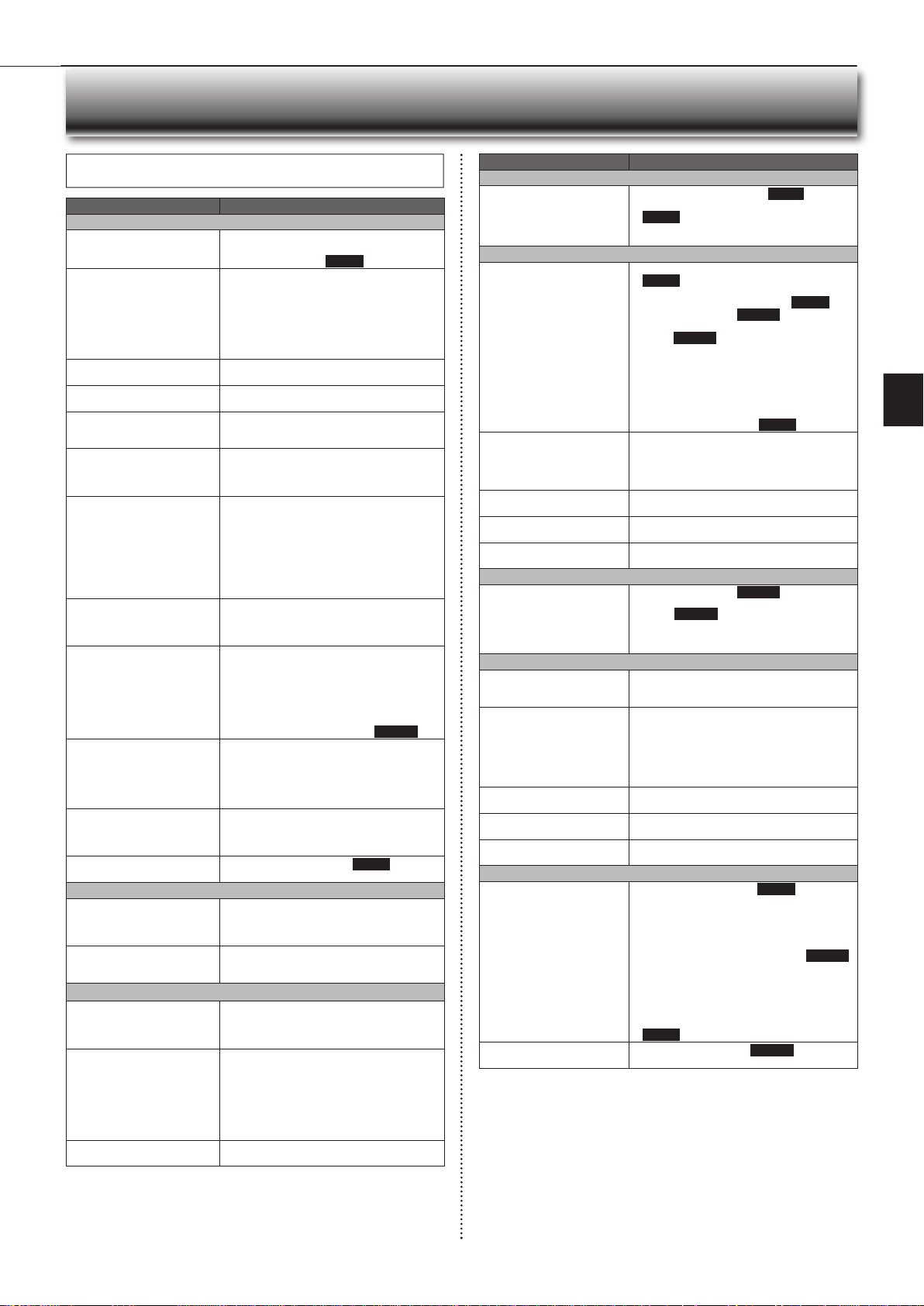
Even if these items are checked, when the unit does not recover from the
trouble, stop using the air conditioner and consult your dealer.
Symptom Explanation & Check points
Indoor Unit
The unit cannot be operated. • Is the breaker turned on?
• Is the power supply plug connected?
• Is the ON timer set? Page 9
The horizontal vane does not
move.
• Are the horizontal vane and the vertical vane
installed correctly?
• Is the fan guard deformed?
• When the breaker is turned on, the horizontal
vanes’ position will be reset in about a minute.
After the reset has completed, the normal hori-
zontal vanes’ operation resumes. The same is
true in the emergency cooling operation.
The unit cannot be operated for
about 3 minutes when restarted.
• This protects the unit according to instructions
from the microprocessor. Please wait.
Mist is discharged from the air
outlet of the indoor unit.
•
The cool air from the unit rapidly cools moisture
in the air inside the room, and it turns into mist.
The swing operation of the HORI-
ZONTAL VANE is suspended for a
while, then restarted.
• This is for the swing operation of the HORIZON-
TAL VANE to be performed normally.
When SWING is selected in
COOL/DRY/FAN mode, the
lower horizontal vane does not
move.
• It is normal that the lower horizontal vane does
not move when SWING is selected in COOL/
DRY/FAN mode.
The airfl ow direction changes
during operation.
The direction of the horizontal
vane cannot be adjusted with
the remote controller.
• When the unit is operated in COOL or DRY
mode, if the operation continues with air blow-
ing down for 0.5 to 1 hour, the direction of the
airfl ow is automatically set to upward position
to prevent water from condensing and dripping.
• In the heating operation, if the airfl ow tem-
perature is too low or when defrosting is being
done, the horizontal vane is automatically set
to horizontal position.
The operation stops for about
10 minutes in the heating
operation.
• Outdoor unit is in defrost.
Since this is completed in max. 10 minutes,
please wait. (When the outside temperature is
too low and humidity is too high, frost is formed.)
The unit starts operation by
itself when the main power is
turned on, but hasn’t received
sign from the remote controller.
• These models are equipped with an auto
restart function. When the main power is
turned off without stopping the unit with the
remote controller and is turned on again, the
unit starts operation automatically in the same
mode as the one set with the remote control-
ler just before the shutoff of the main power.
Refer to “Auto restart function”. Page 11
The two horizontal vanes touch
each other. The horizontal
vanes are in an abnormal posi-
tion. The horizontal vanes do
not return to the correct “close
position”.
Perform one of the following:
•
Turn off and on the breaker. Make sure the hori-
zontal vanes move to the correct “close position”.
• Start and stop the emergency cooling operation
and make sure the horizontal vanes move to the
correct “close position”.
The indoor unit discolors over
time.
• Although plastic turns yellow due to the infl uence
of some factors such as ultraviolet light and
temperature, this has no effect on the product
functions.
The operation indicator lamp is
dim. The unit does not beep.
• Is the NIGHT MODE set? Page 9
Multi system
The indoor unit which is not
operating becomes warm and a
sound, similar to water fl owing,
is heard from the unit.
• A small amount of refrigerant continues to fl ow
into the indoor unit even though it is not operat-
ing.
When heating operation is
selected, operation does not
start right away.
• When operation is started during defrosting of
outdoor unit is done, it takes a few minutes (max.
10 minutes) to blow out warm air.
Outdoor Unit
The fan of the outdoor unit does
not rotate even though the com-
pressor is running. Even if the
fan starts to rotate, it stops soon.
• When the outside temperature is low during
cooling operation, the fan operates intermittently
to maintain suffi cient cooling capacity.
Water leaks from the outdoor
unit.
• During COOL and DRY operations, pipe or pipe
connecting sections are cooled and this causes
water to condense.
• In the heating operation, water condensed on
the heat exchanger drips down.
• In the heating operation, the defrosting operation
makes ice forming on the outdoor unit melt and
drip down.
White smoke is discharged from
the outdoor unit.
• In the heating operation, vapor generated by the
defrosting operation looks like white smoke.
Symptom Explanation & Check points
Remote controller
The display on the remote
controller does not appear or it
is dim. The indoor unit does not
respond to the remote control
signal.
• Are the batteries exhausted? Page 5
• Is the polarity (+, -) of the batteries correct?
Page 5
• Are any buttons on the remote controller of other
electric appliances being pressed?
Does not cool or heat
The room cannot be cooled or
heated suffi ciently.
• Is the temperature setting appropriate?
Page 6
• Is the fan setting appropriate? Please change
fan speed to High or Super High. Page 7
• Are the fi lters clean? Page 12
•
Is the fan or heat exchanger of the indoor unit
clean?
Page 12
• Are there any obstacles blocking the air inlet or
outlet of the indoor or outdoor unit?
• Is a window or door open?
• It may take a certain time to reach the setting
temperature or may not reach that depending on
the size of the room, the ambient temperature,
and the like.
• Is the NIGHT MODE set? Page 9
The room cannot be cooled
suffi ciently.
• When a ventilation fan or a gas cooker is used
in a room, the cooling load increases, resulting
in an insuffi cient cooling effect.
• When the outside temperature is high, the cooling
effect may not be suffi cient.
The room cannot be heated
suffi ciently.
• When the outside temperature is low, the heating
effect may not be suffi cient.
Air does not blow out soon in
the heating operation.
• Please wait as the unit is preparing to blow out
warm air.
Poor cooling or heating perfor-
mance.
• Do you have an arrangement with your electric
company for Demand Response?
Airfl ow
The air from the indoor unit
smells strange.
• Are the fi lters clean? Page 12
• Is the fan or heat exchanger of the indoor unit
clean? Page 12
• The unit may suck in an odor adhering to the
wall, carpet, furniture, cloth, etc. and blow it out
with the air.
Sound
Cracking sound is heard. • This sound is generated by the expansion/con-
traction of the front panel, etc. due to change in
temperature.
“Burbling” sound is heard. • This sound is heard when the outside air is
absorbed from the drain hose by turning on the
range hood or the ventilation fan, making water
fl owing in the drain hose to spout out.
This sound is also heard when the outside air
blows into the drain hose in case the outside
wind is strong.
Mechanical sound is heard
from the indoor unit.
• This is the switching sound in turning on/off the
fan or the compressor.
The sound of water fl owing is
heard.
• This is the sound of refrigerant or condensed
water fl owing in the unit.
Hissing sound is sometimes
heard.
• This is the sound when the fl ow of refrigerant
inside the unit is changed.
Timer
Weekly timer does not operate
according to settings.
• Is the ON/OFF timer set? Page 9
• Transmit the setting information of the weekly
timer to the indoor unit again. When the infor-
mation is successfully received, a long beep will
sound from the indoor unit. If information fails to
be received, 3 short beeps will be heard. Ensure
information is successfully received. Page 10
• When a power failure occurs and the main power
turns off, the indoor unit built-in clock will be
incorrect. As a result, the weekly timer may not
work normally.
Be sure to place the remote controller where
the signal can be received by the indoor unit.
Page 5
The unit starts/stops the opera-
tion by itself.
• Is the weekly timer set? Page 10
WHEN YOU THINK THAT TROUBLE HAS OCCURRED
JG79Y333H01_6th.indd 16 2018/06/19 10:28:21
En-17
● OPERATING INSTRUCTIONS ●
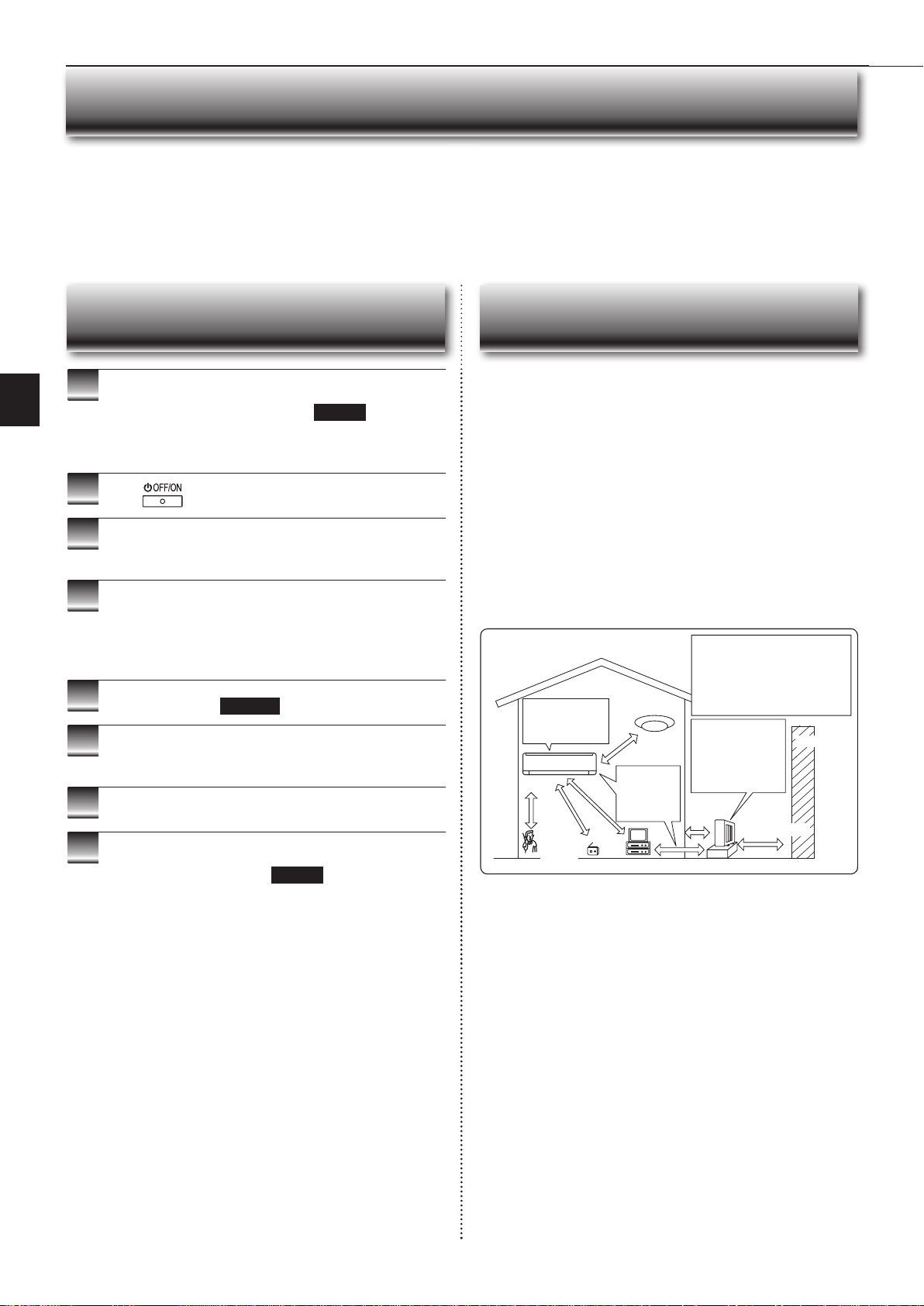
In the following cases, stop using the air conditioner and consult your dealer.
• When water leaks or drips from the indoor unit.
• When the operation indicator lamp blinks.
• When the breaker trips frequently.
• The remote control signal is not received in a room where an electronic ON/OFF type fl uorescent lamp (inverter-type fl uorescent lamp, etc.) is used.
• Operation of the air conditioner interferes with radio or TV reception. An amplifi er may be required for the affected device.
• When an abnormal sound is heard.
• When any refrigerant leakage is found.
WHEN YOU THINK THAT TROUBLE HAS OCCURRED
Installation place
Avoid installing the air conditioner in the following places.
• Where there is much machine oil.
• Salty places such as the seaside.
• Where sulfi de gas is generated such as hot spring, sewage, waste water.
• Where oil is splashed or where the area is fi lled with oily smoke (such as cook-
ing areas and factories, in which the properties of plastic could be changed
and damaged).
• Where there is high-frequency or wireless equipment.
• Where the air from the outdoor unit air outlet is blocked.
• Where the operation sound or air from the outdoor unit bothers the house next
door.
• The mounting height of indoor unit 1.8 m to 2.3 m is recommended. If it is
impossible, please consult your dealer.
• Do not operate the air conditioner during interior construction and fi nishing
work, or while waxing the fl oor. Before operating the air conditioner, ventilate
the room well after such work is performed. Otherwise, it may cause volatile
elements to adhere inside the air conditioner, resulting in water leakage or
scattering of dew.
Electrical work
• Provide an exclusive circuit for the power supply of the air conditioner.
• Be sure to observe the breaker capacity.
If you have any questions, consult your dealer.
INSTALLATION PLACE AND
ELECTRICAL WORK
1
Operate by COOL mode with the highest temperature
set or FAN mode for 3 to 4 hours. Page 6
• This dries the inside of the unit.
• Moisture in the air conditioner contributes to favorable conditions for
growth of fungi, such as mold.
2
Press
to stop the operation.
3
Turn off the breaker and/or disconnect the power sup-
ply plug.
4
Remove all batteries from the remote controller.
When using the air conditioner again:
1
Clean the air fi lter. Page 12
2
Check that the air inlet and outlet of the indoor and
outdoor units are not blocked.
3
Check that the earth is connected correctly.
4
Refer to the “PREPARATION BEFORE OPERATION”,
and follow the instructions. Page 5
WHEN THE AIR CONDITIONER IS NOT
GOING TO BE USED FOR A LONG TIME
To prevent the effects
of a fl uorescent lamp,
keep as far apart as
possible.
wall, etc.
Inverter-type
fl uorescent lamp
Keep a space
to prevent
the picture
distortion or
the noise.
1 m
or
more
Radio
100 mm or
more
TV
Cordless
phone or
Portable
phone
3 m or more
1 m
or more
The installation location of the outdoor
unit should be at least 3 m away from
the antennas for TV sets, radios, etc. In
areas where the reception is weak, pro-
vide greater space between the outdoor
unit and the antenna of the affected
device if operation of the air conditioner
interferes with radio or TV reception.
200 mm or more
For the optimum ef-
fi ciency and to extend
the life time of using,
the outdoor unit
should be installed in
a well-ventilated dry
place.
JG79Y333H01_6th.indd 17 2018/06/19 10:28:22
En-18
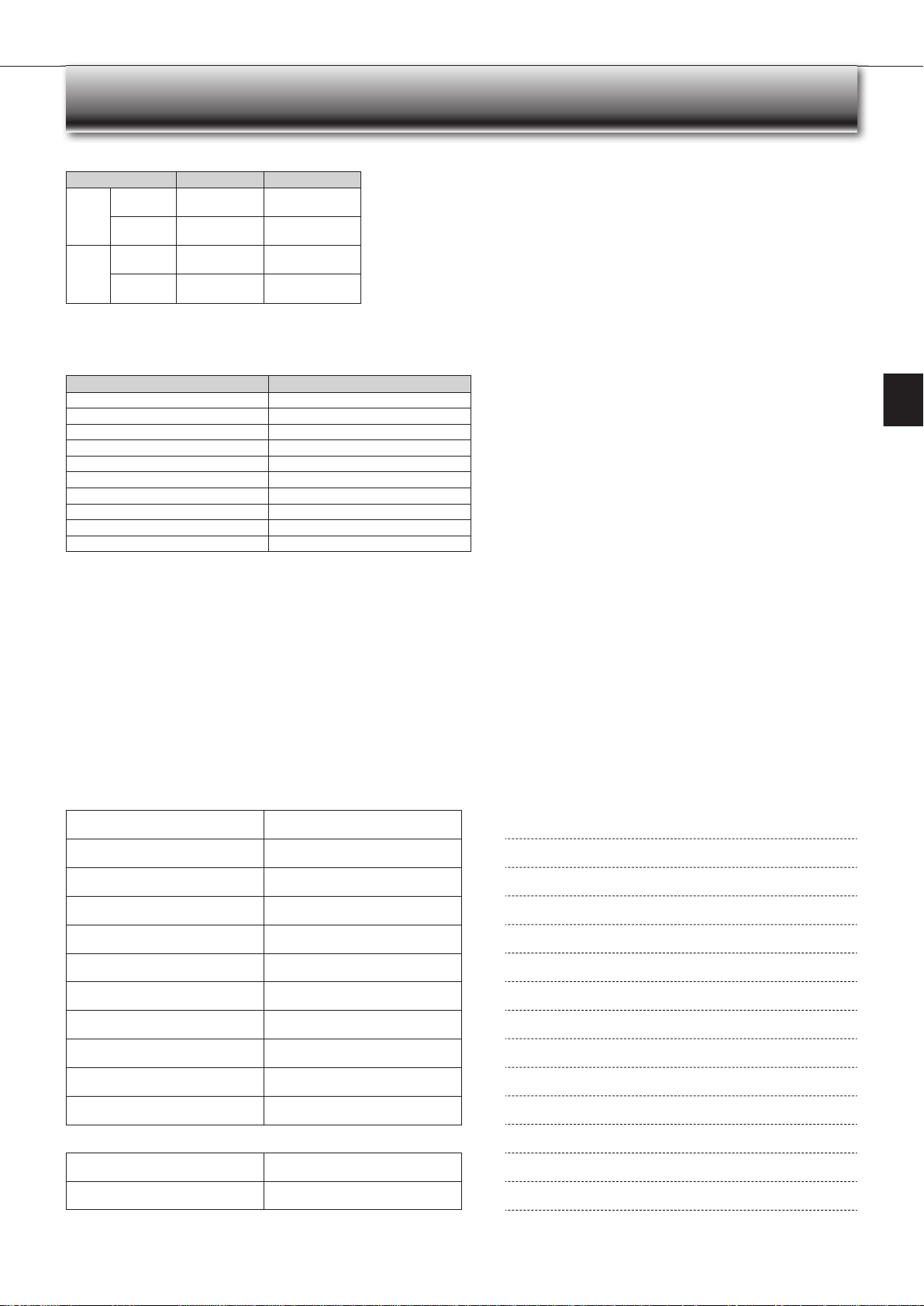
SPECIFICATIONS
Wi-Fi interface
Model MAC-568IFB3-E
Input Voltage DC12.7 V (from indoor unit)
Power consumption MAX 2 W
Size H×W×D (mm) 79×44×18.5
Weight (g) 60 (including cable)
Transmitter power level (MAX) 17.5 dBm @IEEE 802.11b
RF channel 1ch ~ 13ch (2412~2472 MHz)
Radio protocol IEEE 802.11b/g/n (20)
Encryption AES
Authentication WPA2-PSK
Software Version XX.00
Wi-Fi interface setting information
Indoor unit model name
Indoor unit serial number
Outdoor unit model name
Outdoor unit serial number
Wi-Fi interface MAC address (MAC)
Wi-Fi interface serial number (ID)
Wi-Fi interface PIN (PIN)
Wi-Fi interface SSID (SSID)
Wi-Fi interface KEY (KEY)
System commissioning date
Wi-Fi interface installation date
Installer contact details
Name
Telephone number
MEMO
Indoor Outdoor
Cooling
Upper limit
32°C DB
23°C WB
46°C DB
—
Lower limit
21°C DB
15°C WB
-10°C DB
—
Heating
Upper limit
27°C DB
—
24°C DB
18°C WB
Lower limit
20°C DB
—
-15°C DB
-16°C WB
Guaranteed operating range
DB : Dry Bulb
WB : Wet Bulb
JG79Y333H01_6th.indd 18 2018/06/19 10:28:22
HEAD OFFICE: TOKYO BUILDING, 2-7-3, MARUNOUCHI, CHIYODA-KU, TOKYO 100-8310, JAPAN
JG79Y333H01
JG79Y333H01_6th.indd 19 2018/06/19 10:28:22