Internet:
http://wwownw.
bosch–hausgeraete.de
5600 042 685 (8103)
aus Instructions for Use

aus
Index
Safety information 3. . . . . . . . .
Before using your appliance
for the first time 4. . . . . . . . . . . .
Washing dishes 5. . . . . . . . . . .
Your new dishwasher 6. . . . . .
The operating zone 7. . . . . . . .
Setting the wash programmes 8
Programme overview 9. . . . . .
Information about programme
sequence 10. . . . . . . . . . . . . . . .
Options/Standard settings 12. .
Filling the special salt container 18
Water softener 19. . . . . . . . . . . .
Filling the rinse-aid container 20
Detergents 21. . . . . . . . . . . . . . .
Not suitable for the dishwasher 24
Arranging crockery, glasses,
etc. in the dishwasher 25. . . . . .
Interrupting the programme 27.
Care and maintenance 29. . . . .
Fault finding 31. . . . . . . . . . . . . .
After-sales service 33. . . . . . . . .
Important Information 34. . . . . .
Installation 34. . . . . . . . . . . . . . . .
aus
3
Safety information
At time of delivery
Check packaging and dishwasher
immediately for signs of transport
damage. If the appliance is damaged,
do not put it into use but contact your
supplier without delay.
Please dispose of packaging materials
properly.
During installation
Site the dishwasher and connect it up in
accordance with the installation
instructions.
The dishwasher must not be connected
to the electricity supply while installation
is being carried out.
Ensure that the domestic wiring is
properly earthed.
The mains electricity supply must
conform to the details shown on the
dishwasher nameplate.
Do not connect the dishwasher to the
electricity supply via an extension
cable.
Not on all models:
The plastic housing on the water input
contains an electrically operated valve.
The connecting wires are inside the
inlet hose. Do not cut through this hose
and do not immerse the plastic housing
in water.
Built-under and built-in appliances
should always be installed under a
continuous work surface which is
attached to the adjacent cupboards, in
order to ensure that the appliance is
entirely stable.
After the appliance has been installed,
the mains plug should still be easily
accessible.
During normal use
Use the dishwasher solely in a
domestic environment and for its
designated purpose: washing
household tableware and other utensils.
Do not place any heavy objects or
stand on the door when it is open. The
appliance could tip forward.
The water inside the dishwasher is not
suitable for drinking.
Do not use solvents of any kind inside
your dishwasher. They could cause an
explosion.
Open the door very carefully if the
dishwasher is operating. There is a risk
of water squirting out.
If your family includes children
Do not permit small children to play with
or operate the dishwasher.
Keep children away from detergents
and rinse-aids.
Keep small children away from the
open door of the dishwasher. There
could still be some detergent left inside.
If a fault occurs
Repairs or other work on the
dishwasher should only be carried out
by a qualified specialist.
The dishwasher must be disconnected
from the electricity supply before any
repairs or other work are started. Pull
the mains plug out of the wall socket or
switch off at the fuse box. Grasp the
plug to remove it from the socket; do
not tug on the cable. Turn the water off
at the tap.
aus
4
4
When disposing of old
appliances
Appliances that have reached the end
of their service life should be rendered
inoperable in order to exclude the
possibility of subsequent accidents. Pull
the mains plug out of the wall socket,
cut through the connecting cable and
disable the door lock.
Take the appliance to a designated
waste disposal centre.
Getting to know your appliance
Please fold out the rear page of the
booklet to reveal illustrations of the
appliance. These should be referred to
when following the information on setting
up and using your appliance.
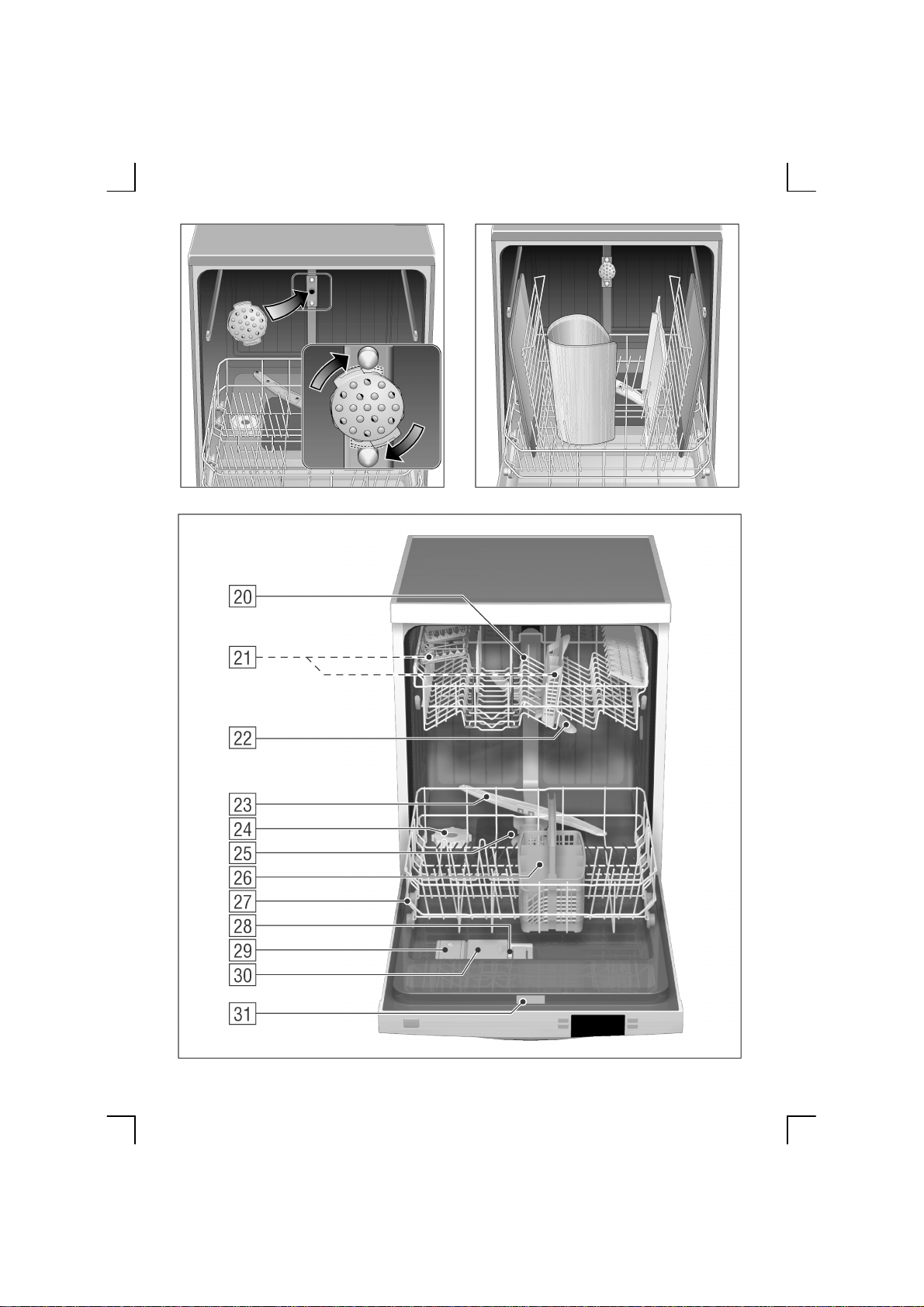
Appliance interior
20
Upper basket with 2-tiered cup rack
21
Additional cutlery basket for the top
basket *
22
Upper spray arm
23
Lower spray arm
24
Container for special salt with level
indicator *
25
Filters
26
Cutlery basket
27
Lower basket
28
Locking mechanism
29
Container for rinse-aid, with level
indicator
30
Detergent compartment
31
Nameplate
* not on all models
Before using your appliance
for the first time
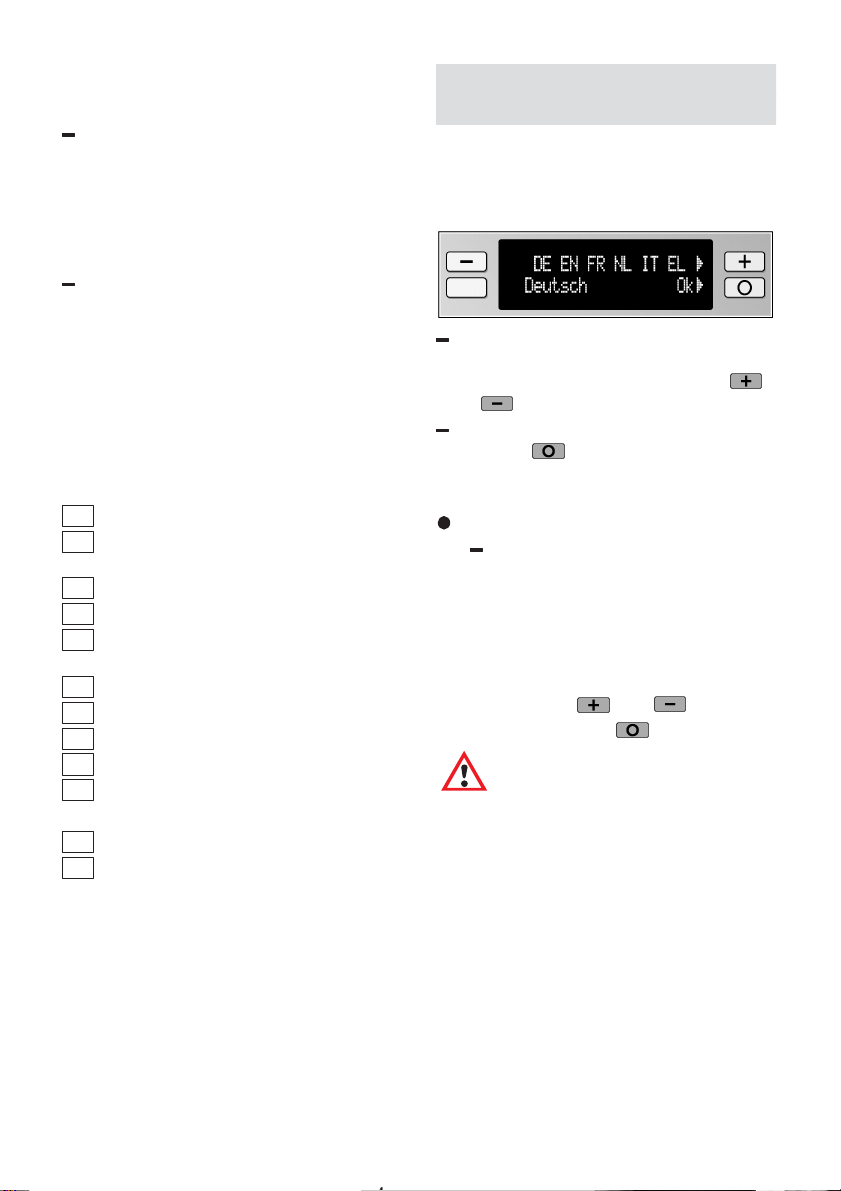
Before you can use your appliance for the
first time, you must select the language.
When the appliance has been switched
on, the following display is output:
“Deutsch” and the language
abbreviation “DE” flash. Select the
desired language by pressing the
or button.
Acknowledge your selection
with “ok”
.
All the subsequent clear text displays are
then displayed in the selected language.
Incorrect language displayed
The desired language can be
selected using the following
information.
1. Switch off the appliance.
2. Press and hold the main switch
until the display illuminates.
3. Select the desired language by
using the
and buttons.
4. Press the ”ok”
button to store.
Caution
Before starting the
appliance, you must
add dishwasher salt
and rinse–aid. This
procedure is described
in the sections on
“Adding dishwasher
salt” and “Adding
rinse–aid”.

aus
5
Washing dishes
Programme selection
The most appropriate programme can be
identified by comparing the type of dishes,
cutlery, etc., as well as the amount and
condition of the food residue, with the
details contained in the programme
overview.
Most of the work associated with
programme selection is performed by
the dishwasher. For example, through the
Auto Wash function, which adapts the
programme to the degree of dirt on the
dishes.
Example:
For mixed crockery with much –> little food
residue, which is not stuck hard, we
recommend the “Auto Wash” programme.
Programme data
The specified programme data is based
on standard operating conditions.
The values may deviate considerably
according to:
varying amounts of dishes
temperature of mains water supply
pressure of mains water supply
ambient temperature
fluctuations in the mains voltage
machine-related factors
(e.g. temperature, water volume, ...)
The consumption rates can be restricted to
a certain range when using the Auto Wash
function.
Water consumption rates are based on
a water hardness setting of 4.
Switching on the appliance
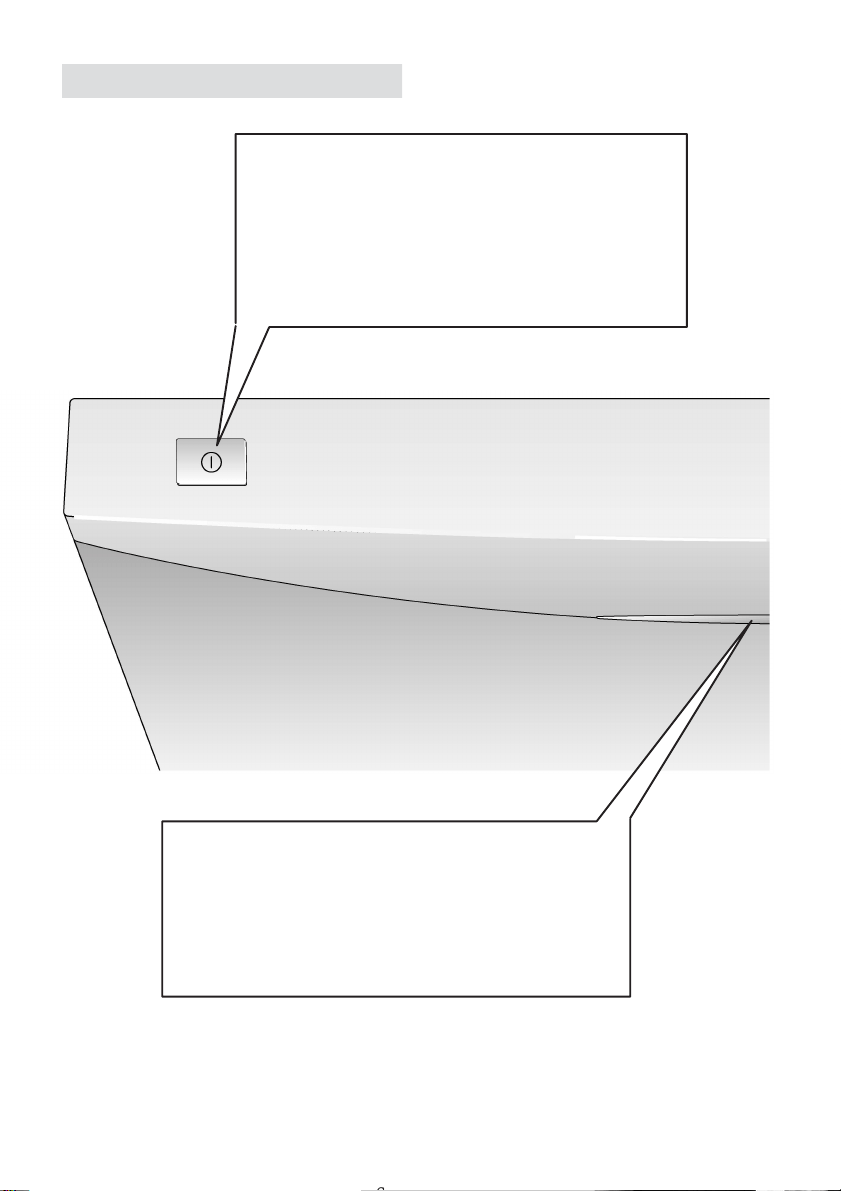
Switch on the main switch:
Provided “Refill with salt and rinse aid” is
not indicated in the display window, the
“Automatic wash” programme is always
displayed. To start the programme, press
the Start button.
aus
6
6
Your new dishwasher
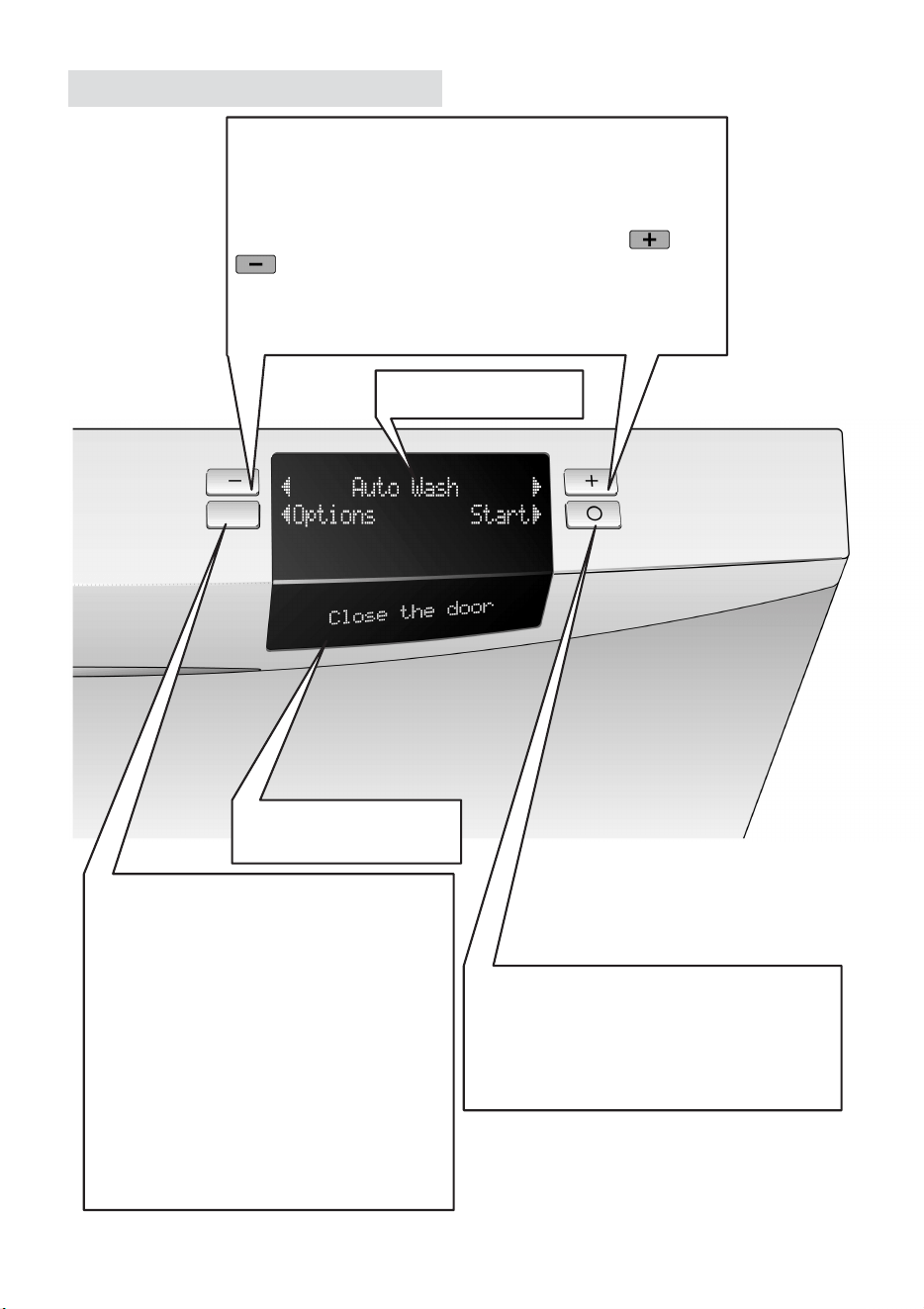
Master switch
Having switched on the master switch, the most
recently used washing programme Auto Wash.
If required, a different programme can be selected and
then started.
In the event that salt or rinse–aid needs to be added,
a refill message will appear first when the master
switch is switched on.
Door handle
The door is easy to open when the appliance is
switched off. As soon as the appliance is started, the
door is locked by means of an automatic lock. The
door can now only be opened using considerable
force. On completion of the washing programme, the
door can once again be opened with ease.
aus
7
The operating zone
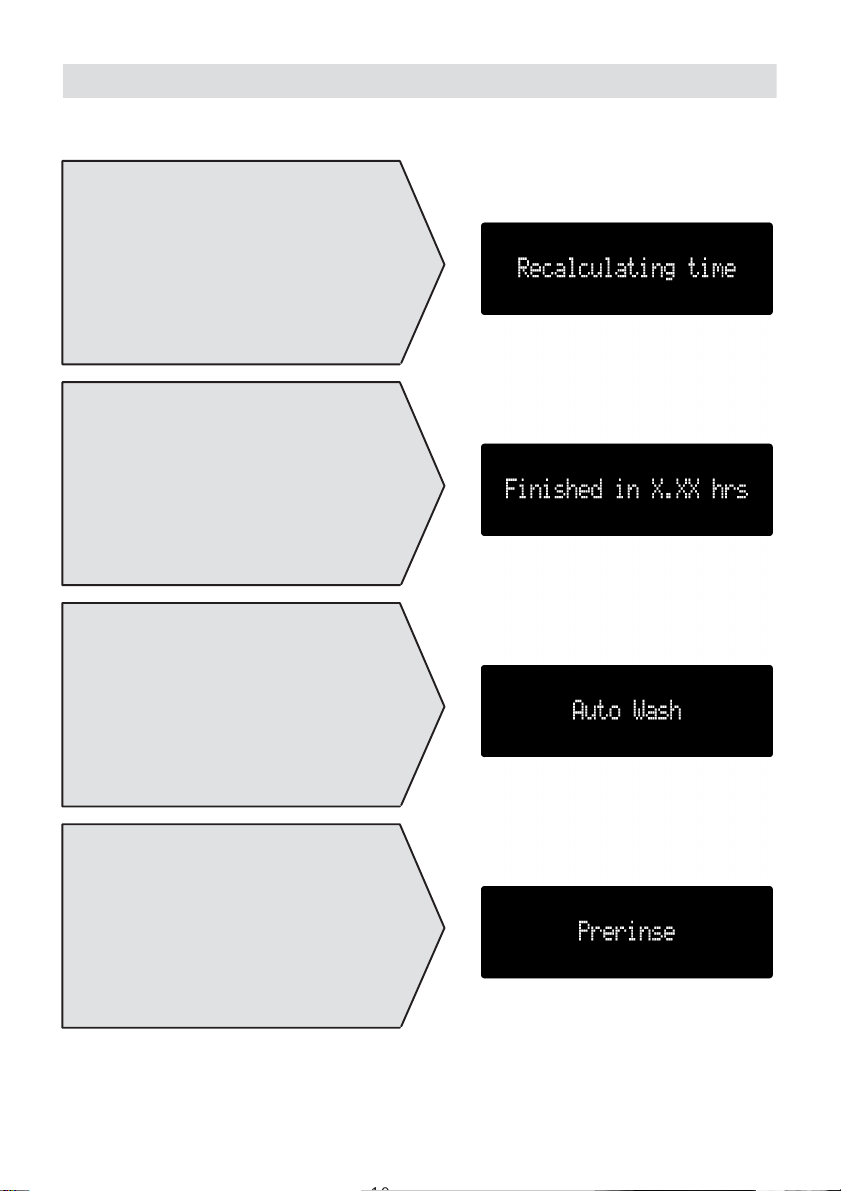
Upper display window
Display window on
the front of the door
Selection buttons
The top line of the display is where the programme,
setting and information options are illustrated. The
illuminated arrows indicate in which direction changes
can be made in the display window using the or
selection button. When no more changes can be
made, the arrow extinguishes and a brief acoustic
signal sounds.
Option and continue button
The Options menu command is only
displayed when in the Start menu (as
illustrated).
If the option button is pressed, the
following settings can be changed:
– Time preselection
– Reduce time
– Degree of drying
– Buzzer volume
– Water hardness
– Language
– Standard programmes
Start and confirmation button
This button is used to start the selected
washing programme or confirm a
selected setting / option.

aus
8
8
Setting the wash programmes
When the main switch has been switched on, the Automatic wash programme is
displayed which can be intensified by selecting Auto Plus Wash or attenuated with Auto
Gentle Wash.
To start the selected programme, press the start button .

aus
9
Programme overview
Mixed
Type of dishes
e.g. porcelain,
pans,
cutlery,
glasses,
etc.
Type of
food residue,
e.g. from ...
Amound of
food residue
Condition of
food residue
Wash
programme
Programme
sequence
AUTO
Cleaning
Intermediate
rinse
Rinsing with
Programme
data
Duration in minutes
Energy consumption
in kWh
Water consumption
in litres
Laboratory measurements pursuant to standard EN 50242
WASH
AUTO
WASH
AUTO
SUPER
QUICK
WASH
Soups,
puddings,
sauces,
potatoes,
pastries,
rice,
eggs,
fried foods
Soups,
potatoes,
pastries,
rice,
eggs,
fried foods
Coffee,
cakes,
milk,
sausages,
cold drinks,
salads
Prerinse
Rinse the
dishes if they
have been left
to stand for
several days
before being
washed in the
dishwasher.
PRERINSE
ONLY
DELICATE
Much –> Little
Insensitive Mixed Sensitive
Very
little
Stuck solid Fairly loose
The programme
sequence is optimized
and adapted in
accordance with how the
appliance is loaded and
how dirty the dishes are.
rinse-aid
WASH
60° - 70° 45° - 55° 35° - 45° 35°
90–110
1,20–1,40
14–20
100–130
1,00–1,20
12–18
80–100
0,80–1,00
10–16
30
0,60
10
19
0,10
4
aus
10
10
Information about programme sequence
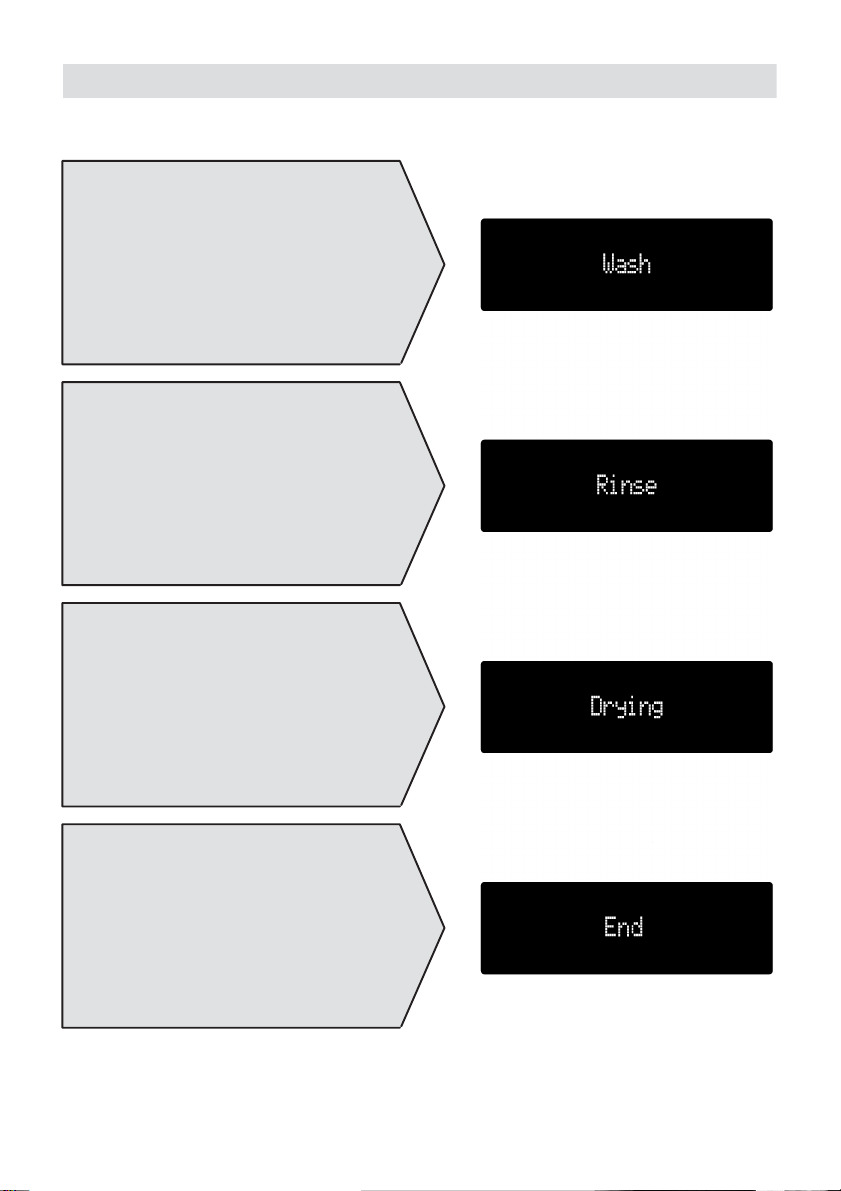
Recalculating time remaining
The expected programme duration is
recalculated depending on the amount and
degree of soiling of the dishes.
Finished in x.xx hours
Displays the remaining running time of the
programme.
Automatic washing
The currently selected programme is
displayed.
Pre-rinsing
The dishes are rinsed in this step of the
programme without detergent.
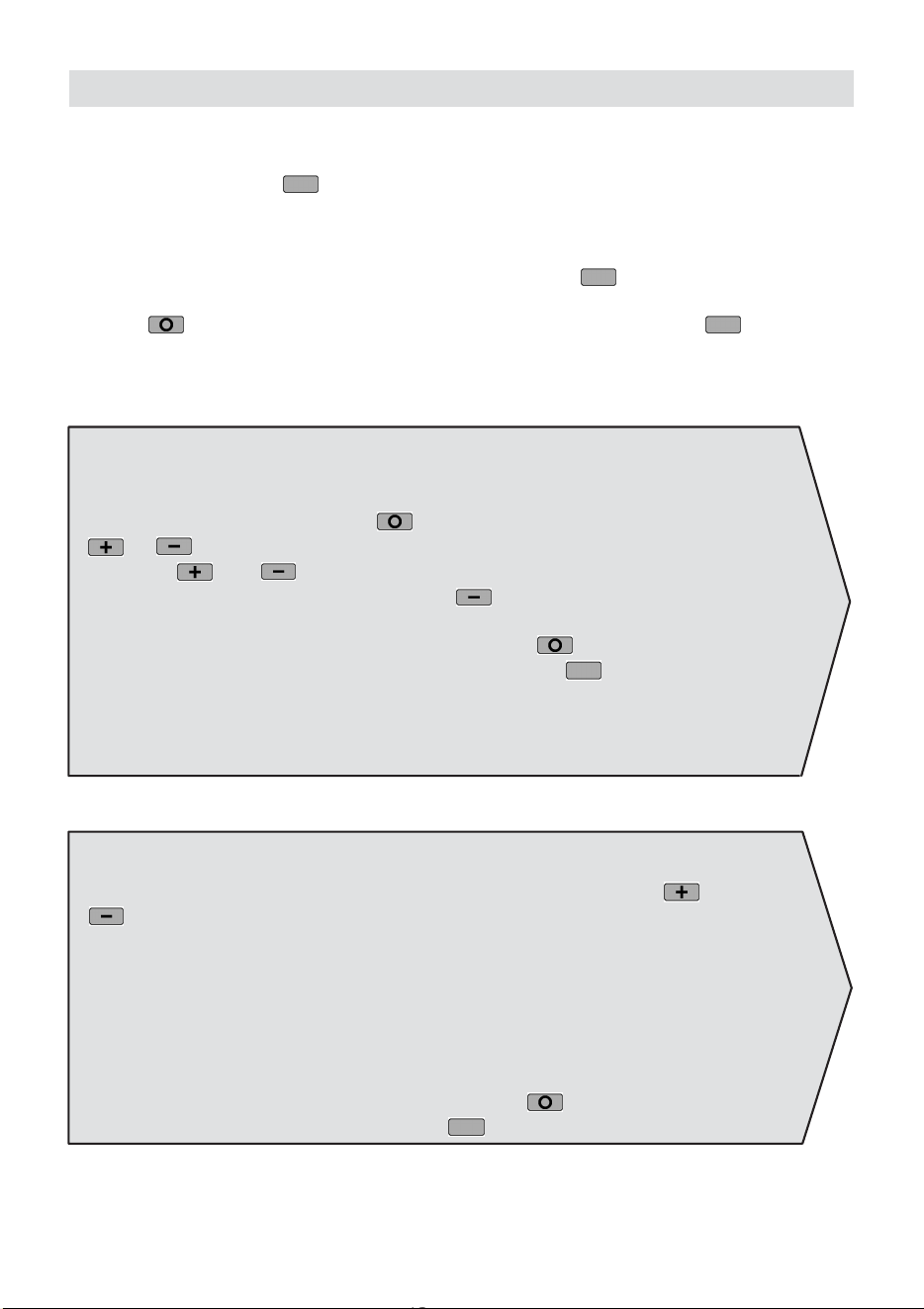
When the appliance has started, the following displays are indicated.
aus
11
Information about programme sequence
Wash
The dishes are optimally washed with
detergent and heated water.
Rinsing with rinse-aid
To prevent water marks on the dishes,
rinse-aid is automatically added.
Drying
The dishes are now dried.
End
The programme has ended. The dishes
can now be removed.
aus
12
12
Options/Standard settings
Standard settings
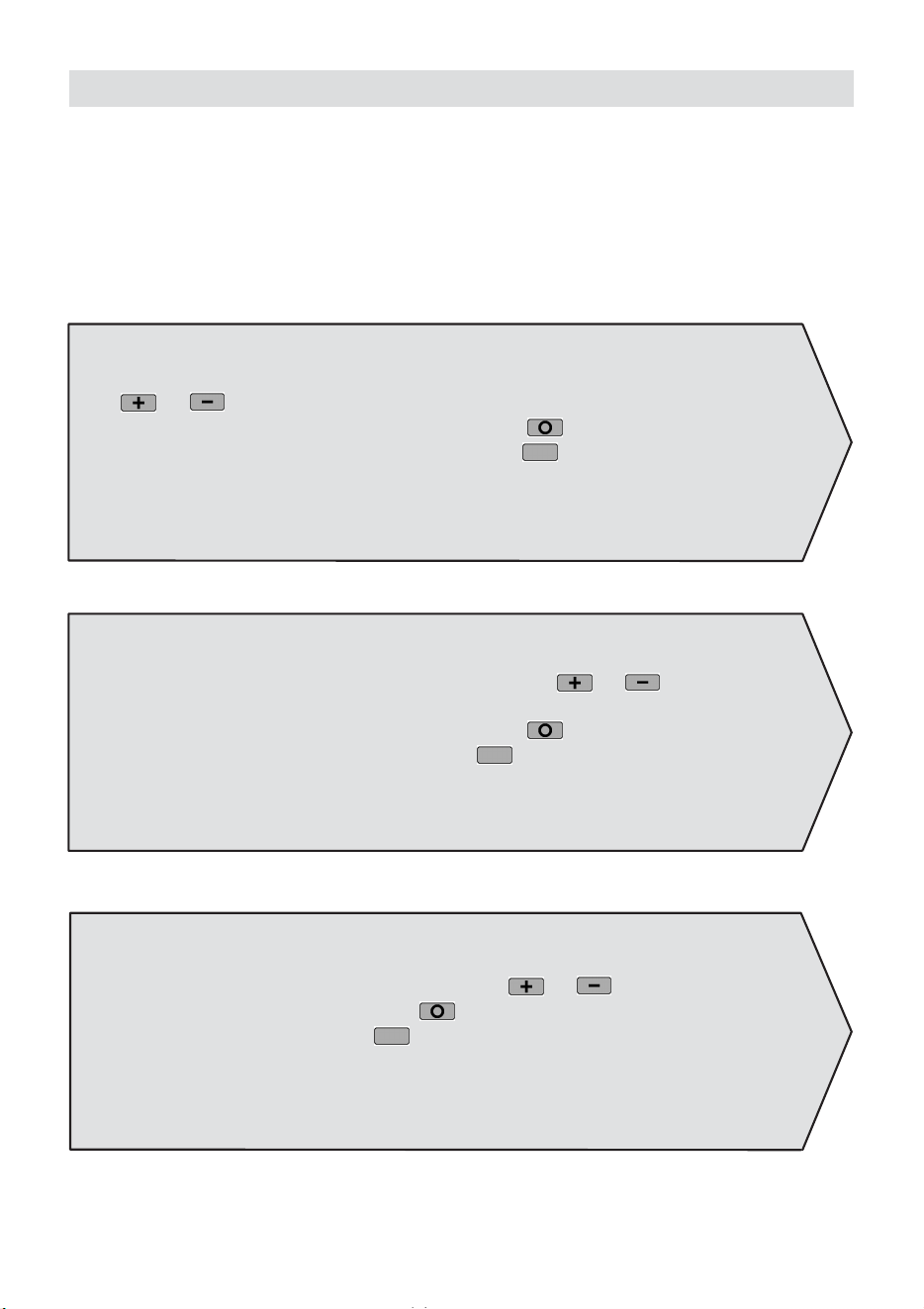
If the “Options” button is pressed once or more in the Main menu, the following
settings can be changed:
Time preselection / Reduce time / degree of drying / buzzer volume / water hardness /
language / standard programmes.
To jump to the next selection, press the “Options” button . You can jump from
any setting range back to the Main menu by pressing the “Main menu” control
button . To return to the Settings menu, press the “Options” button .
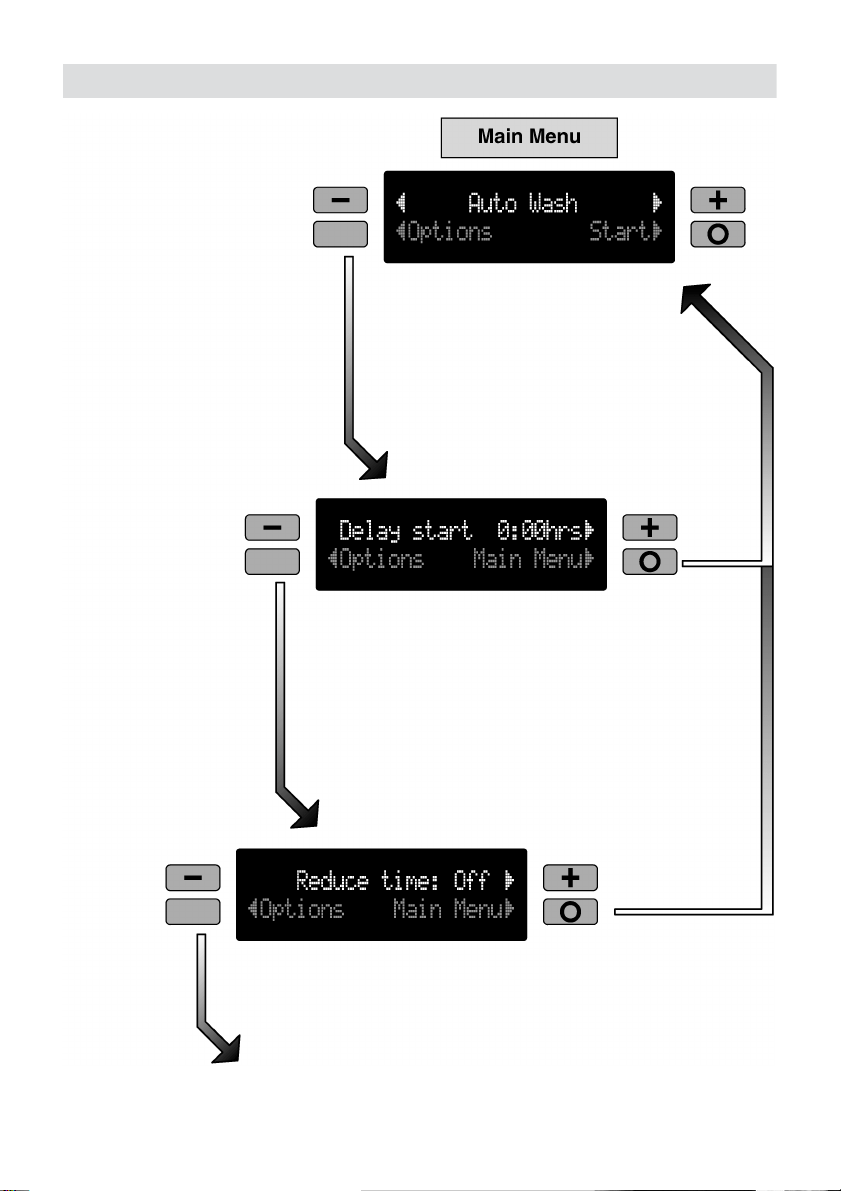
1. Time preselection
(Until the programme starts you can change the desired wash programme by
pressing the “Main menu” button
and then selecting the programme with the
or button).
Press the and buttons until the desired time is displayed.
To cancel the time preselection, press the
button until 0:00 is displayed.
The preselected time counts down as soon as the door has been closed.
To store the settings, press the “Main menu” button or switch to the next
setting “Reduce time” by pressing the “Options” button
.
2. Reduce time
You can switch the Reduce time function on or off by pressing the or
button
Reduce time: Off (factory setting)
The automatic function selects a programme which uses the lowest water and
energy consumption.
Reduce time: On
The automatic function selects a programme which has a short wash time. This
requires more water and energy.
Reduce time can be used with the automatic programmes only.
To store the setting, press the “Main menu” button
or switch to the next setting
“Drying” by pressing the “Options” button
.
aus
13
Options/Standard settings
aus
14
14
Options/Standard settings
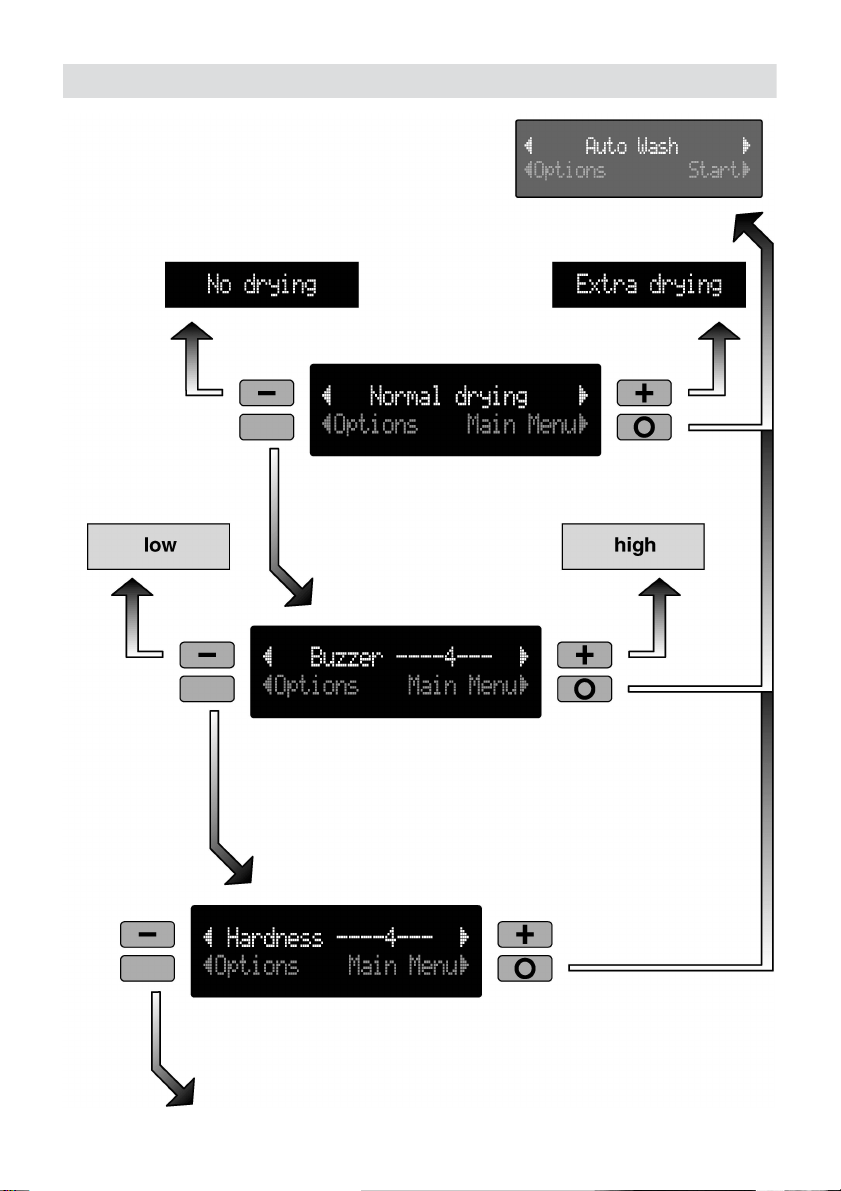
3. Degree of drying
Select the types of drying, “No drying”, “Normal drying”, “Extra drying”, by pressing
the or button.
To store the setting, press the “Main menu” button
or switch to the next setting
“Buzzer volume” by pressing the “Options” button
.
4. Buzzer volume
Select a buzzer volume between 0–6 by pressing the or button (e.g. for
the buzzer at the end of the programme).
To store the setting, press the “Main menu” button or switch to the next setting
“Hardness” by pressing the “Options” button
.
5. Water hardness
Select a value between 0 and 7 by pressing the or button. To store the
setting, press the “Main menu” button
or switch to the next setting “Language”
by pressing the “Options” button
.
aus
15
Options/Standard settings
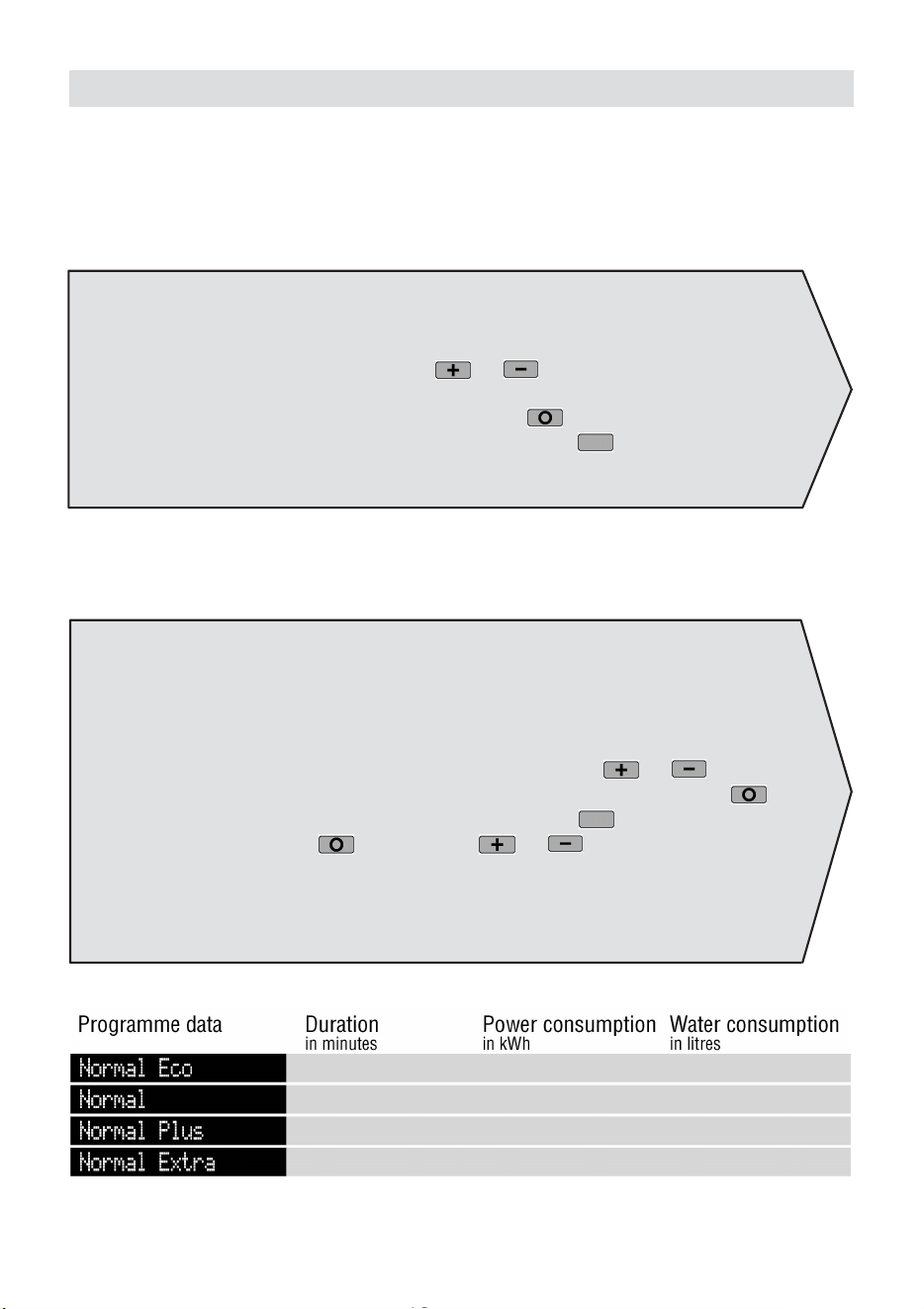
115
135
140 1,05
1,05
1,25
14,0
19,0
14,0
135 0,65 19,0
aus
16
16
Options/Standard settings
6. Language
The language selected when the appliance is switched on for the first time can be
changed. The current language flashes.
If another language is selected with the
or button, the display on the lower
line is also indicated in the new language.
To store the setting, press the “Main menu” button or switch to the next setting
“Standard programme” by pressing the “Options” button
.
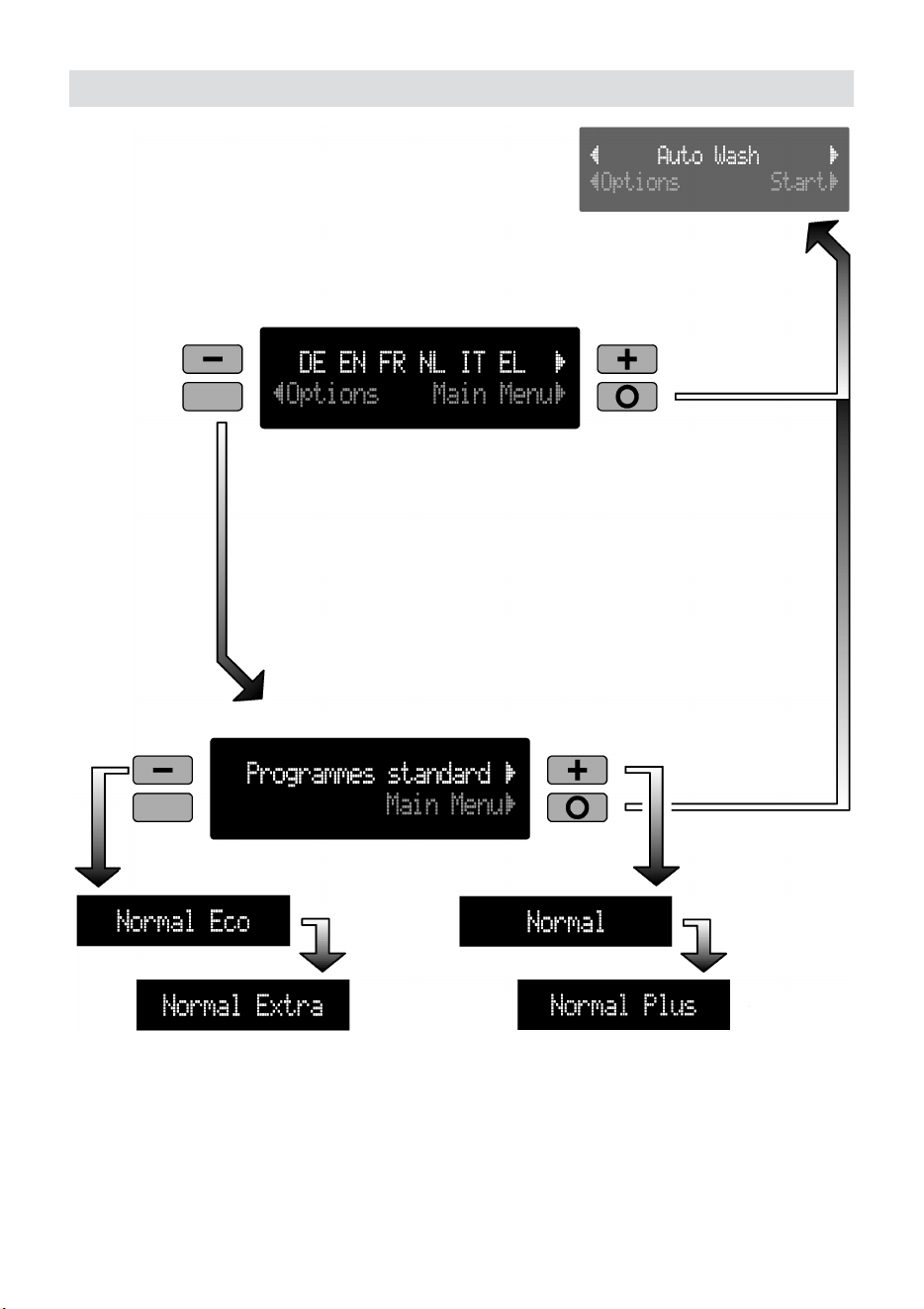
7. Standard programmes
In addition to Auto Wash you can also select the following conventional wash
programmes:
Normal, Normal Plus, Normal Eco, Normal Extra.
The desired standard programme can be selected with the or button.
To store the selected standard programme, press the “Main menu” button
.
To display the previous window, press the “Back” button
.
(If the “Main menu” button and then the or button are pressed after the
standard programme has been selected, the Auto Wash programme is displayed and
you are returned to the Main menu).
aus
17
Options/Standard settings

aus
18
18
Filling the special salt
container
How the salt works
While washing is taking place, salt is
automatically rinsed out of the salt
container into the water softener where it
dissolves the lime in the water.
The dissolved lime is pumped out of the
dishwasher. The water softening system is
then ready for the next load.
This process of regeneration can only
function when the salt is dissolved in
water.
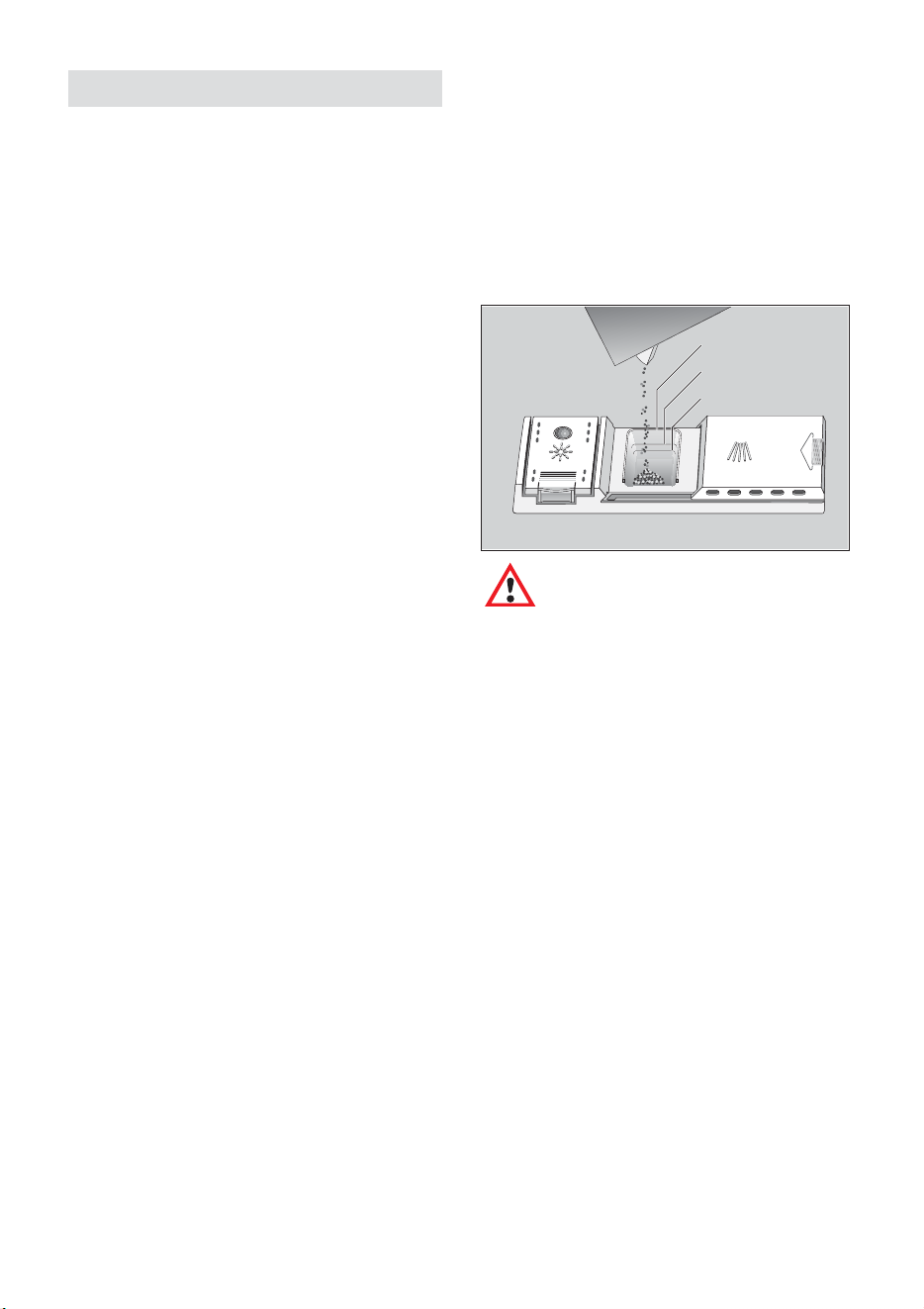
Unscrew the lid on the salt container
24 .
Before you use the dishwasher for the first
time, pour approx. 1 litre of water into the
salt container.
Use the salt filler supplied with the
dishwasher.
Tip in enough salt to fill the container to the
top (maximum of 1.5 kg). As you tip in salt,
some of the water is displaced and drains
away. When you have done this, clean off
any remnants of salt from the area round
the neck of the container. Screw the lid
back onto the container, ensuring that it is
not cross-threaded.
Note
When the control is set to
, it is
not necessary to fill up with salt
as none will be consumed while
the dishwasher is operating. The
LOW SALT indicator is switched
off. If the control is set between
and , then salt must be
added to the dispenser.
Warning!
Do not pour detergent into the
container for special salt. This
would destroy the water
softener.
If the salt level is low, the following
message is displayed in the window after
the dishwasher has been switched on:
”Refill with salt”
”Acknowledge”
If you would like to refill with salt later,
press the “Acknowledge”
button.
When the salt dispenser has been refilled,
the display is reset after a brief delay, i.e.
as soon as the salt concentration has
reached a sufficiently high level.
If you would like to wash the dishes
immediately after filling the salt dispenser,
press the “Acknowledge”
button.
aus
19
Water softener
In order to provide satisfactory rinsing
results, the dishwasher requires soft water,
i.e., containing little or no lime, otherwise
water stains will be left behind on the
dishes and interior containers.
If the tap water exceeds a certain level of
hardness, it must be softened, i.e.,
decalcified, so that it can be used in the
dishwasher.
This is achieved by adding a special salt
to the water softener inside the
dishwasher.
The water softener, that is the required
amount of salt, is set up according to how
hard the tap water is.
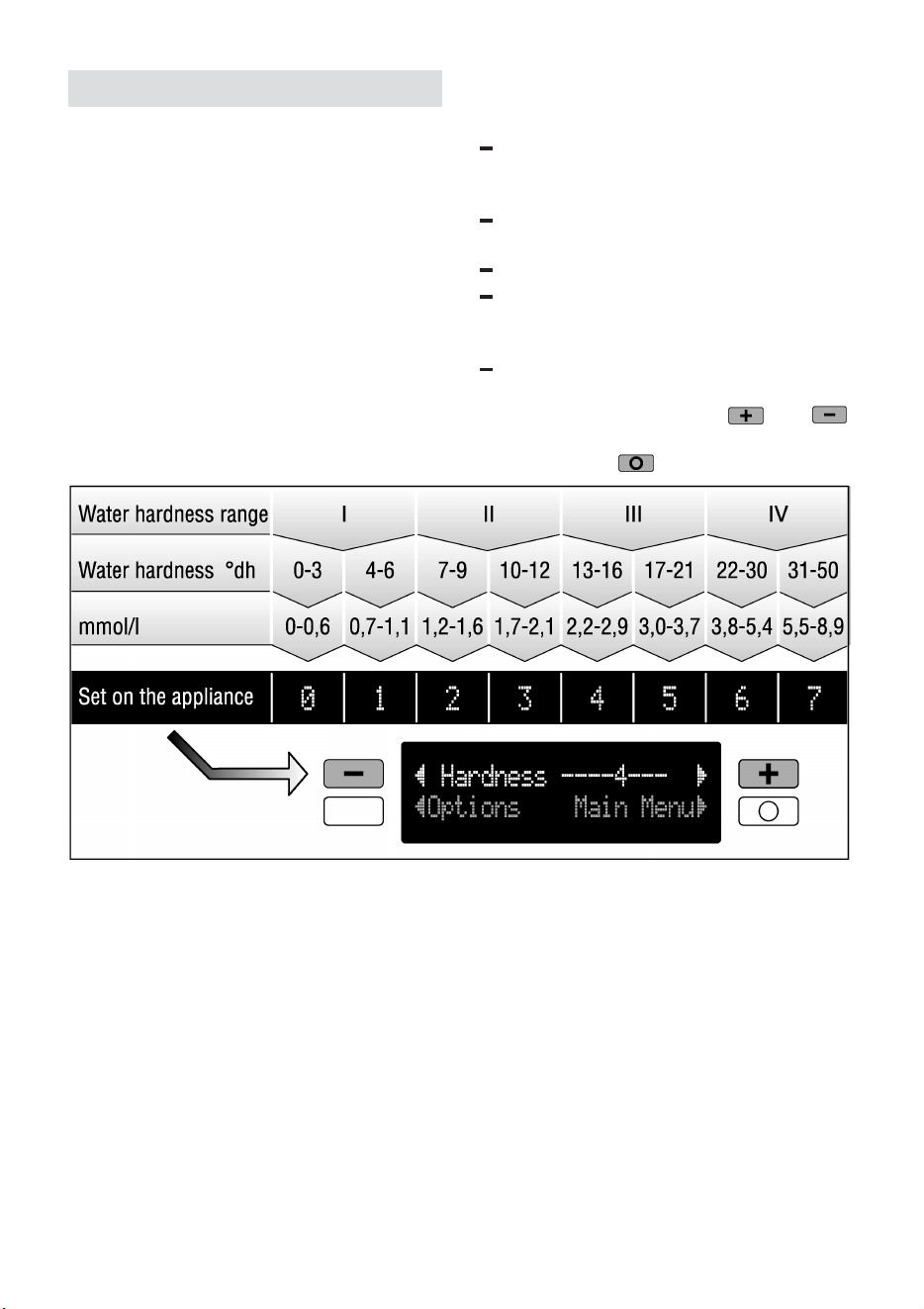
Setting the water softening
system
Find out the hardness value of your
mains water by contacting your local
water company or customer service.
The set value can be found in the
following water hardness table.
Switch on the main switch.
Press the “Option” button repeatedly
until “Hardness” is displayed on the
upper line of the window.
Set the hardness value as indicated in
the water hardness table by pressing
the two selection buttons
and
and acknowledge the setting by
pressing the
button.
aus
20
20
Filling the rinse-aid
container
The purpose of a rinse-aid is to prevent
the formation of water marks on tableware
and utensils, and to ensure that glasses
are clean and sparkling. The rinse-aid is
consumed during the washing process.
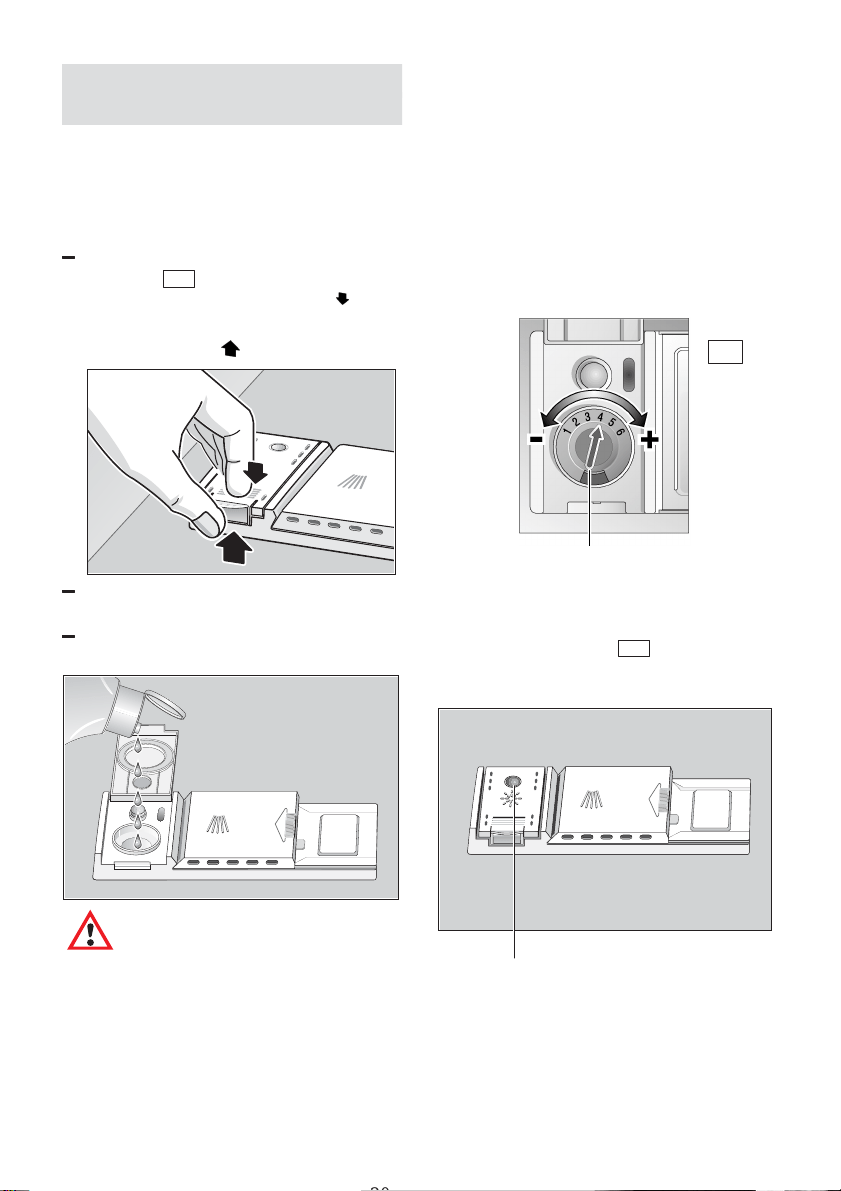
Fold back the lid on the rinse-aid
container
29 .
To open the lid, press the mark
on
the rinse-aid lid and simultaneously lift
the lid off the lug
.
Pour the rinse-aid into the filler hole
until the level indicator turns dark.
Close the lid, ensuring that you hear it
snap closed.
Important
Use only rinse-aids intended
for use in domestic
dishwashers.
Adjusting the amount of
rinse-aid
The amount of rinse-aid added to the
water can be varied by adjusting the
stepless control. The rinse-aid control has
been set to ”4” in the factory.
Do not alter the setting of the rinse-aid
control unless streaks (turn knob towards
”–”) or water marks (turn knob towards ”+”)
are left on the dishes.
29
rinse–aid control
Low rinse-aid indicator
As long as the rinse-aid refill indicator on
the panel or dispenser
29 has not
illuminated, there is sufficient rinse-aid in
the dishwasher.
LOW RINSE-AID indicator
aus
21
Detergents
Notes on detergents
You may use any brand of liquid or powder
detergent, as well as tablets, that have
been specifically designed for use in
domestic dishwashers (do not use normal
washing-up liquid!).
Nowadays there are three types of
dishwasher detergent available:
1. Those containing phosphates
and chlorine.
2. Those containing phosphates
but no chlorine.
3. Those containing neither phosphates
nor chlorine.
When a phosphate-free detergent is used
in conjunction with hard water, there is
a greater possibility that white marks will
be left behind on the dishes and glasses,
etc.
These can be prevented by pouring an
increased amount of detergent into the
dispenser.
Chlorine-free detergents have a reduced
bleaching effect. This may mean that tea
stains are not completely removed or
plastic items become discoloured.
This can be resolved by:
– using the “Auto Super Wash”
programme
– increasing the amount of detergent
– using a detergent that contains chloride
Check the label on the packaging to
determine whether a particular product is
suitable for use with silverware.
If you have any further questions, we
recommend that you contact the customer
advice departments of the respective
detergent manufacturer.
Detergent compartment with
measuring marks
The side of the detergent compartment is
marked with lines to help you determine
how much powder to add.
The capacity of the detergent container is
15 ml up to the bottom line and 25 ml up to
the middle line. When the compartment is
full it contains 40 ml.
40 ml
25 ml
15 ml
Important
If the lid on the detergent com-
partment is closed, press the
release lever to open the flap.
aus
22
22
Adding detergent
Tip detergent powder into the
corresponding compartment
30 .
Please observe the manufacturer’s
instructions printed on the detergent
packaging when determining the
correct dosage.
For the “Auto Super Wash” function,
pour an additional 10–15 ml of
detergent onto the inside of the
appliance door.
Reduce costs!
If your dishes are only
moderately dirty, you may be
able to use less detergent than
recommended.
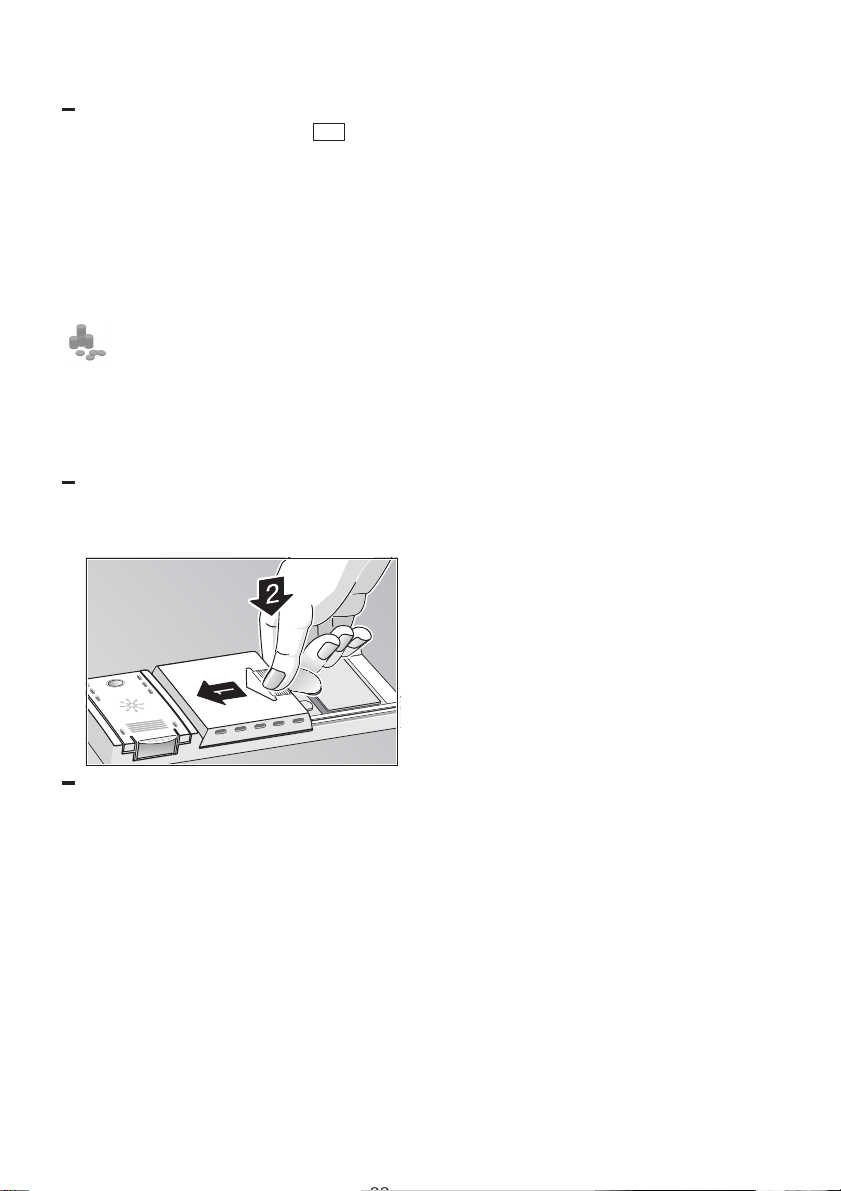
Close the lid on the detergent
compartment.
Press down the lid (1) until it clicks
shut (2).
If you are using detergent in tablet form,
read the manufacturer’s
recommendations on the packaging in
order to
determine where the tablets should be
placed inside the dishwasher (e.g. in
cutlery basket, detergent compartment,
etc.).
Make sure that the lid on the detergent
compartment is closed, even if you are
using tablets.

aus
23
CAUTION – IMPORTANT NOTE
ON THE USE OF
COMBINED CLEANING PRODUCTS
DEAR CUSTOMER
Please note the following when using ”combined cleaning
products” which eliminate the need for a rinsing agent or salt, for
example:
Some products with a built-in rinsing agent are only used to their
full effect in certain programmes.
This type of product does not generally produce the desired effect
with automatic programmes.
Products which eliminate the need for regeneration salt can only
be used within a certain water hardness range.
If you wish to use these combined products, please read the
instructions carefully and heed any notes on the packaging.
Contact the manufacturer of the cleaning agent if you have any
questions, particularly if:
the crockery is very wet once the programme has
finished.
limescale deposits are formed.
Any problems which arise as a direct result of the use of these
products are not covered by our warranty.
aus
24
24
Not suitable for the
dishwasher
What you should not put into
the dishwasher:
Cutlery and tableware manufactured in
whole or part from wood. They become
faded and unsightly in appearance.
Furthermore, the adhesives that are used
are not suitable for the temperatures that
occur inside the dishwasher. Delicate
decorative glassware and vases, special
antique or irreplaceable china. The
decorative patterns on such items will not
be dishwasher-proof.
Plastic objects that are not resistant to hot
water, copper and pewter utensils are also
not suitable. Decorative patterns printed or
painted onto the surface of crockery,
glasses, etc., aluminium and silver items
tend to become discoloured or faded if
washed in the dishwasher. Some types of
glass can become opaque in appearance
after they have been washed many times
in a dishwasher. Highly absorbent
materials, such as sponges and towels,
should never be placed in the dishwater.
Our recommendation:
In future, only purchase table or
kitchenware that has been confirmed as
being dishwasher-proof.
Important
Dishes or cutlery that have
been soiled by tobacco ash,
wax, lubricating grease or
paint, should not be put in the
dishwasher.
Damage to glassware and other
dishes
Possible causes:
type of glass or manufacturing process
chemical composition of detergent
Suggested remedy:
Use glassware or porcelain dishes that
have been marked ’dishwasher–proof’
by the manufacturer.
Use a mild detergent that is described
as ’kind to dishes’. If necessary, seek
further information from detergent
manufacturers.
To prevent damage, take glass and
cutlery out of the dishwasher as soon
as possible after the programme has
ended.
aus
25
Arranging crockery, glasses,
etc. in the dishwasher
Loading the dishwasher
Scrape off any large amounts of left-over
food. It is not necessary to rinse the dishes
under running water.
Place objects in the dishwasher in such a
way that
items such as cups, glasses, pots/pans,
etc. are stood upside down,
curved items, or those with recesses,
should be at a slant so that water can
run off,
they are stacked securely and cannot
tip over,
they do not prevent the spray arms from
rotating while washing takes place.
Very small items should not be washed in
the dishwasher as they could easily fall out
of the baskets.
Removing the dishes
To prevent water dripping from the top
basket onto the dishes in the lower basket,
we recommend that you empty the lower
basket first and then the top basket.
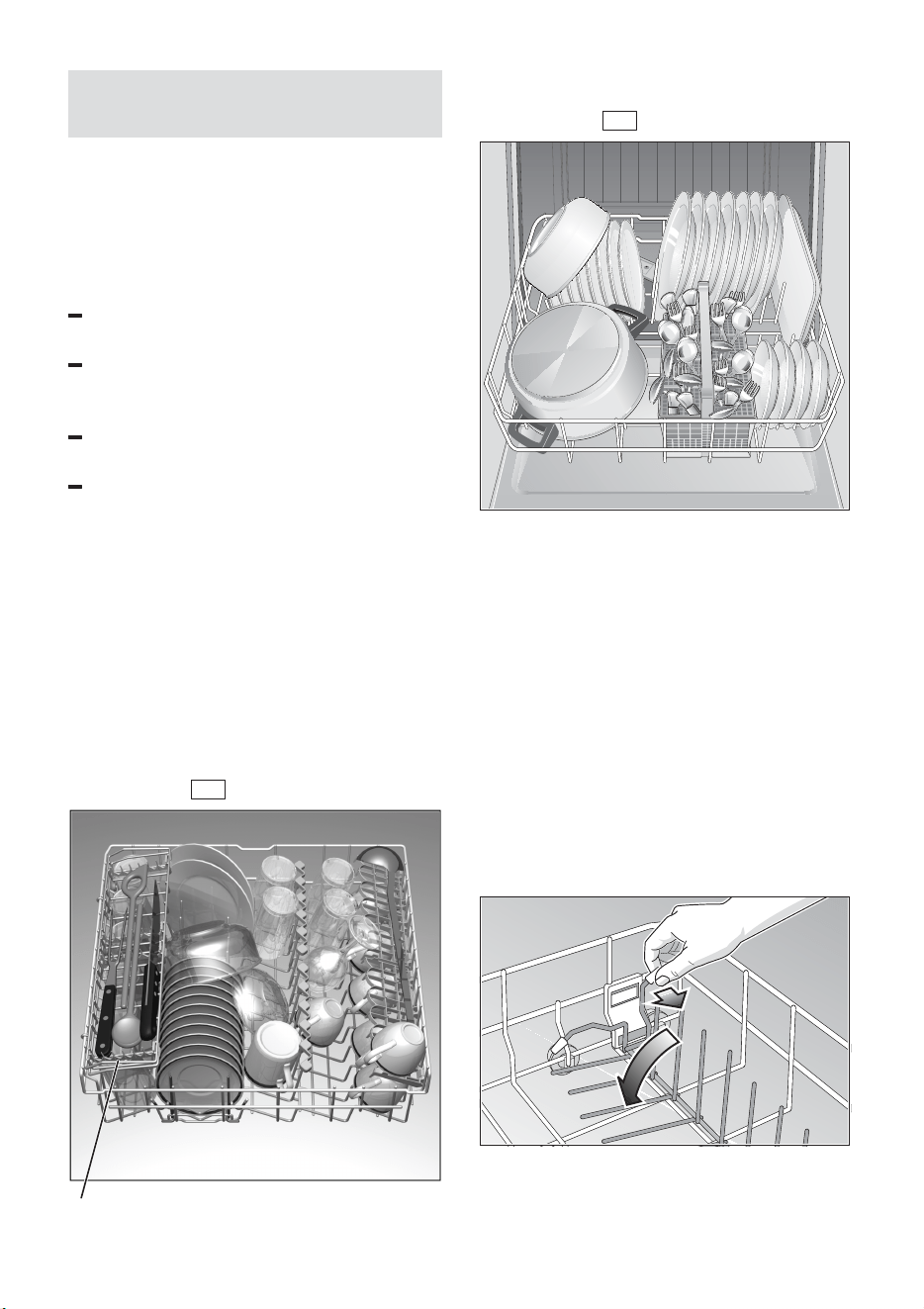
Cups and glasses
Upper basket 20
* on applicable models
Pots and pans
Lower basket 27
Cutlery
Cutlery should always be inserted in
random order with the handles pointing
downwards (take care with knife blades!).
This enables the jet of water to reach the
individual items more easily.
To prevent the risk of injury, place long and
pointed implements and knives on the
shelf (some models) or knife shelf
(available as an accessory).
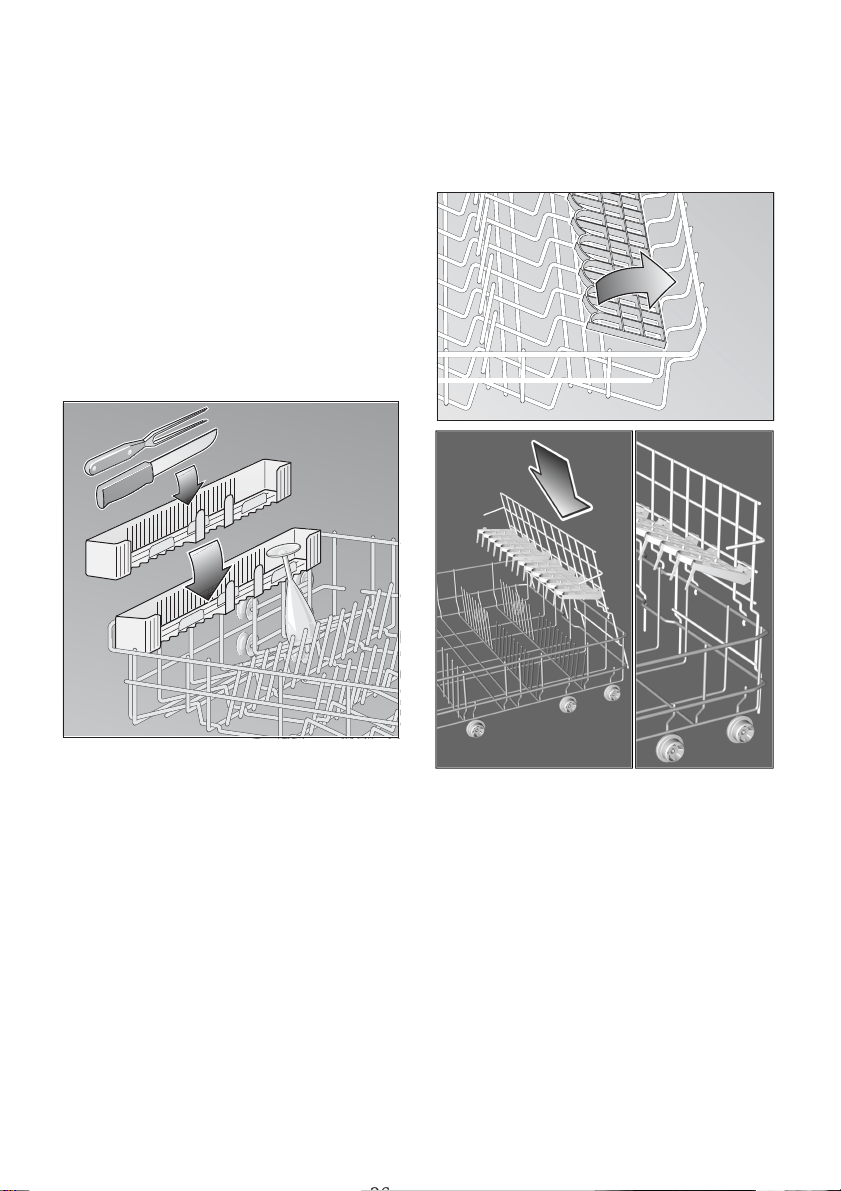
Folding spikes *
* on applicable models
To improve stacking of pots and pans, the
spikes can be folded down.
aus
26
26
Spray head for baking sheets *
* on applicable models
Please refer to the drawings enclosed in
the envelope
Large baking sheets or grids can be
cleaned with the aid of the special spray
head. Remove the top basket and attach
the spray head as shown in the drawing.
Arrange the baking sheets as illustrated,
so that the jet of water can reach all parts
of them (max. 4 baking sheets and
2 grids).
Knife rack *
* on applicable models
Shelf *
* not on all models
Lean tall glasses and those with long
stems against the shelf – not against other
items to be washed.
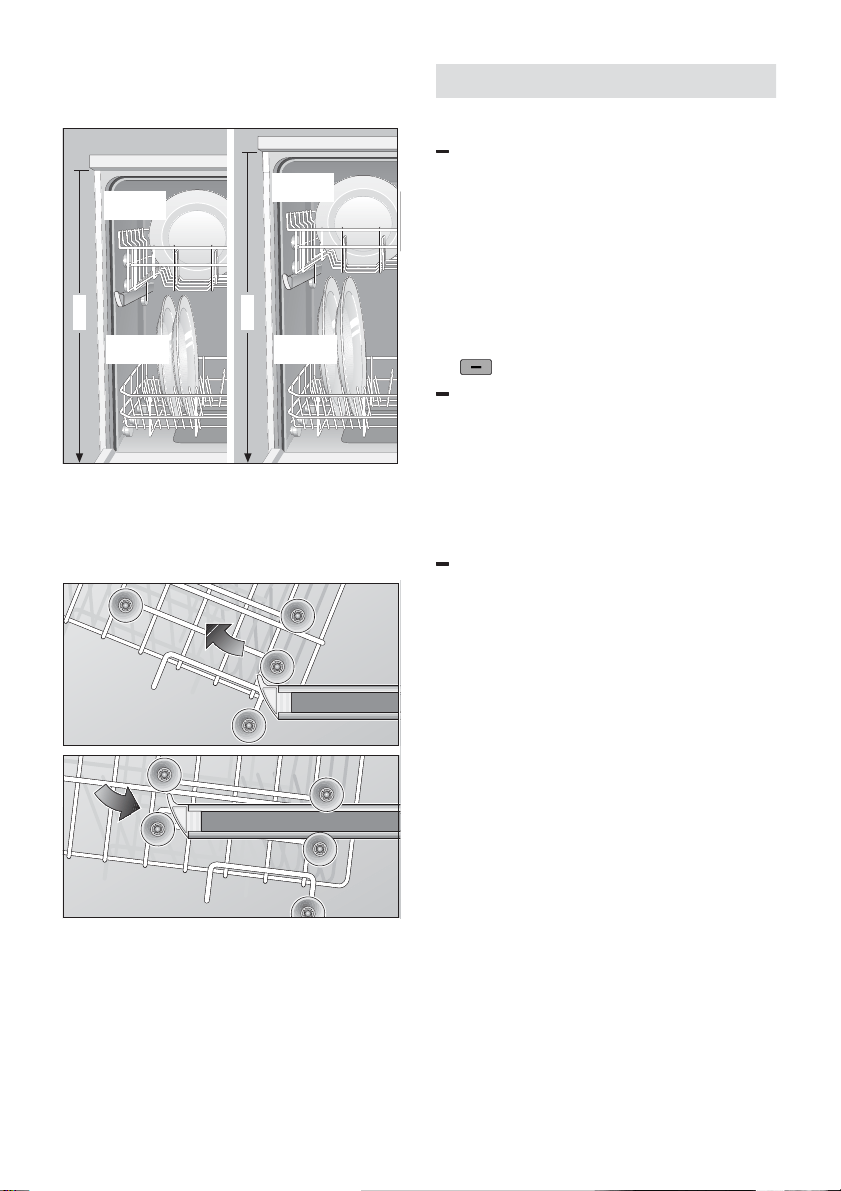
Note: When adjusting the upper rack to its
lower position please, remove
the special cup shelf to prevent the racks
interfering with each other.
Long items, serving cutlery, salad servers
or knives should be placed on the shelf so
that they do not obstruct the rotation of the
spray arms. The shelf can be folded back
when not required for use.
aus
27
Adjusting position of basket *
* not on all models
86cm
81cm
Ø max.
30/*25cm
Ø max.
20/*25cm
Ø max.
34/*29cm
Ø max.
20/*25cm
The top basket can be inserted on either
its upper or lower rollers, according to
requirement. This enables more height to
be gained for bigger dishes in either the
top or bottom basket.
Interrupting the programme
Interrupting the programme
Open the door. The following appears
in the display:
”Stop Programme”
”Close the door”
The “Close the door” message flashes.
If the programme is only to be
interrupted for a short time (e.g. to load
more dishes), the “Stop Programme”
button must not be pressed.
If hot water is connected to the
appliance or if the appliance has
already heated up, and the door is
opened, you should leave the door ajar
for a few minutes before closing it.
Otherwise the rapid heating up of the
air trapped in the appliance may cause
the door to burst open.
The programme will be continued when
the door is closed again.
aus
28
28
Stopping the programme
Open the door. The following appears
in the display:
”Stop Programme”
”Close the door”
The message “Close the door” flashes.
To stop the programme, press the
operating button for
“Stop Programme”
.
If any water still left in the machine is to
be pumped out, the door must be
closed.
”To pump out”
”Close the door”
The following appears in the front
display:
”Ready in 1 mins”
Once the pumping out time has expired,
“Finished” appears in the display.
The appliance can now be switched off.
Programme end
The following appears in the display at the
end of the programme:
”Finished”
The programme end is simultaneously
indicated by a buzzer tone.
Switching off the appliance
When “Finished” appears in the display,
you may:
Switch off the appliance by pressing the
master switch.
Unload the dishes once the appliance
has cooled.
Time remaining indicator
(expected programme duration)
The time remaining indicator is self-taught.
At the start of the programme, it indicates
the expected programme duration.
This value is based on the duration of the
previous programme or, when using for
the first time, on the duration recorded
during testing in the factory.
When the programme is in progress,
this indicator displays the time remaining
before the end of the programme.
The time remaining value may then be
revised depending on the water supply
temperature, degree of dirt, and amount of
dishes.
aus
29
Care and maintenance
Regular inspection and maintenance of
your appliance helps to prevent problems
from occurring. This saves time and
aggravation. You should therefore
carefully inspect the inside of your
dishwasher from time to time.
Overall condition of appliance
Check that no grease or scale has
accumulated on the inside of the
dishwasher.
If you discover any deposits:
Clean the interior of the dishwasher
thoroughly with a detergent solution.
Special Salt
When the salt level is low, your
dishwasher displays a message in the
window.
Rinse aid
When the rinse aid level is low, your
dishwasher displays a message in the
window.
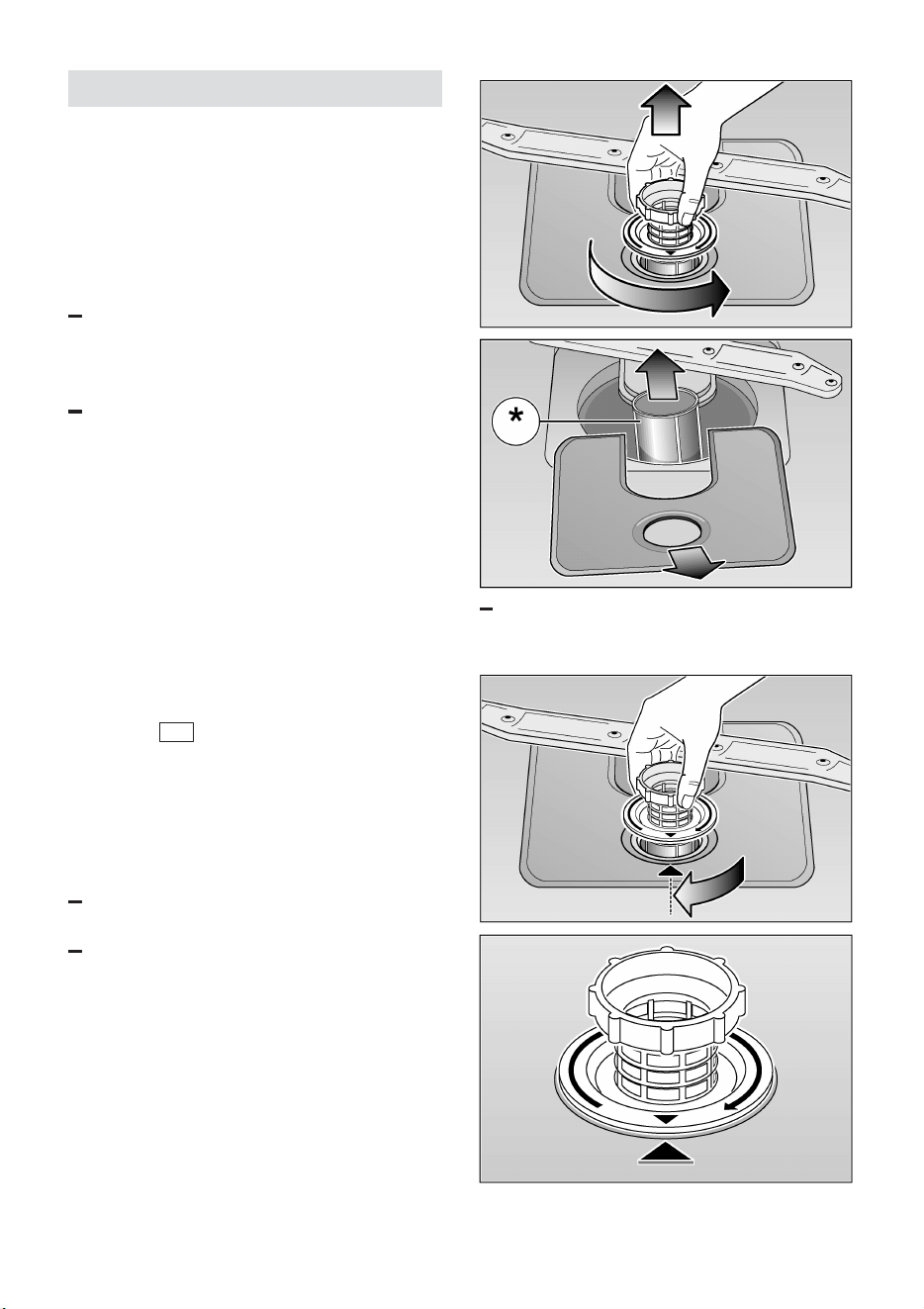
Filters
The filters 25 prevent larger remnants of
food or other objects from getting inside
the pump. This residue can occasionally
clog up the filters.
The filter system consists of a filter
cylinder, a flat fine filter and, depending on
the model, a microfilter (*).
Inspect the filters for obstructions every
time the dishwasher has been used.
By unscrewing the filter cylinder, you
can remove the filter system. Remove
any food remnants and clean the filters
under running water.
Reassembly:
Insert the filter system and screw down
with the filter cylinder.
aus
30
30
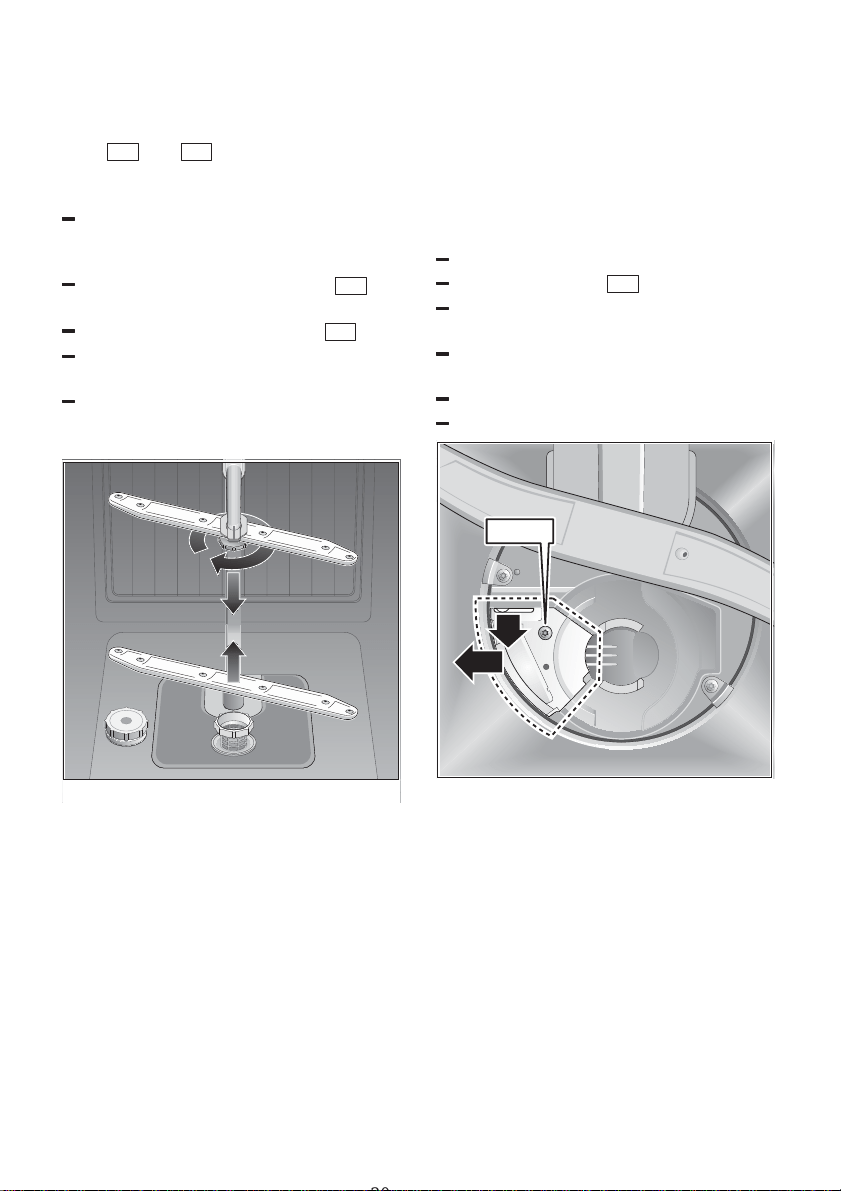
Spray arms
Lime and remnants of food in the washing
water can block the nozzles in the spray
arms 22 and 23 and the arm
mountings .
Inspect the nozzles in the spray arms
for blocked holes due to remnants of
food.
If necessary, pull the lower arm 23
upwards and lift it off.
Unscrew the upper spray arm 22 .
Clean both spray arms under running
water.
Refit the spray arms. Ensure that the
lower arm has locked into place and the
upper one is screwed tight.
0
1
2
3
Spray arms
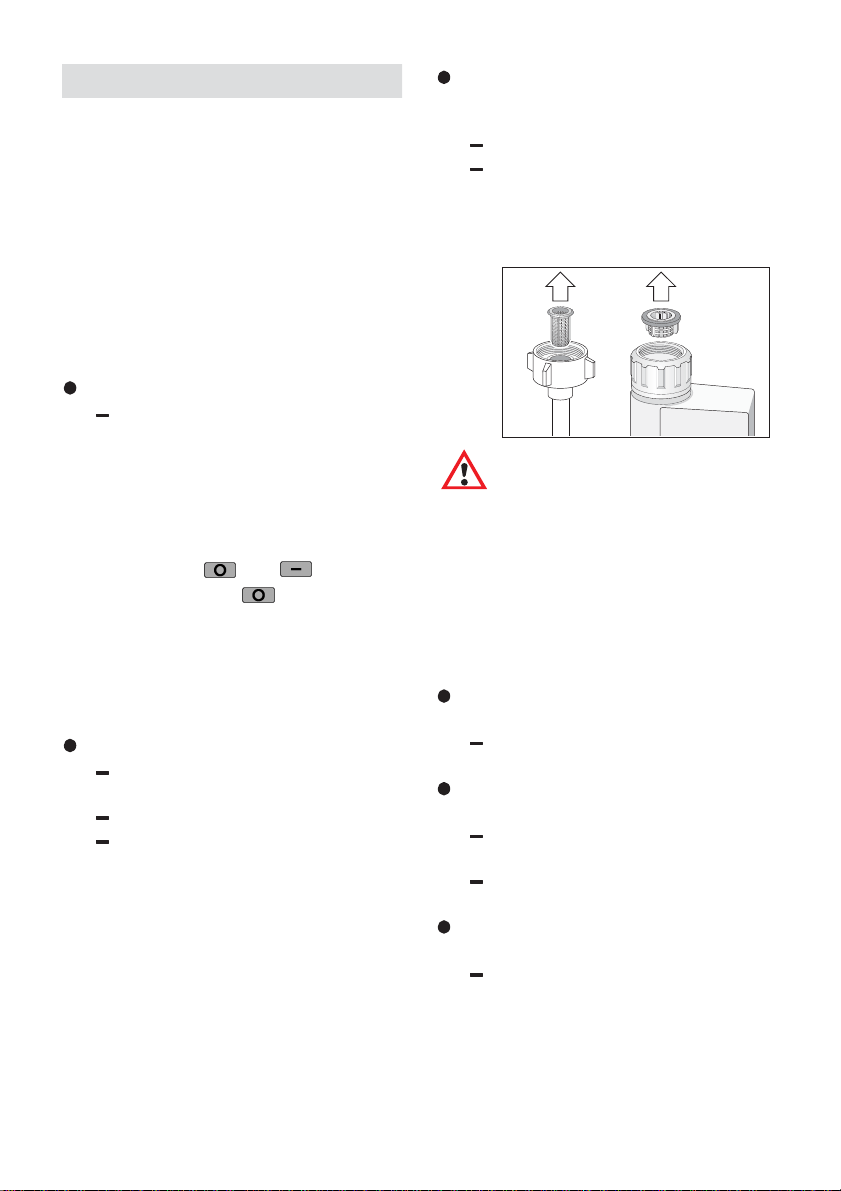
Pump
Larger remnants of food that have not
been trapped by the filters and have been
left in the water can cause a blockage in
the pump. The water is no longer pumped
out of the dishwasher and it can be seen
covering the filter.
Proceed as follows:
Ladle out as much water as possible.
Remove the filters 25 .
Undo the screw in the cover (Torx T 20)
and remove the cover.
Inspect the inside and remove any
obstructions that you find.
Re-insert the cover and screw down.
Re-insert the filters and screw down.
Torx T20
2
1
aus
31
Fault finding
Resolving minor problems
yourself
Experience has shown us that you can
resolve most problems that arise during
normal daily usage yourself, without
having to call out the after-sales service.
Not only does this save costs, but it also
means that the appliance is available for
use again that much sooner.
The following list of common occurrences
and their remedies should held you
identify the cause of most problems.
Incorrect language displayed
The desired language can be
selected using the following
information.
1. Switch off the appliance.
2. Press and hold the main switch
until the display illuminates.
3. Select the desired language by
using the
and buttons.
4. Press the ”ok”
button to store.
Problems ...
... when the appliance is
switched on
Appliance does not start up
Fault with fuse in mains electricity
supply.
Plug not inserted in wall socket.
Appliance door not closed
properly.
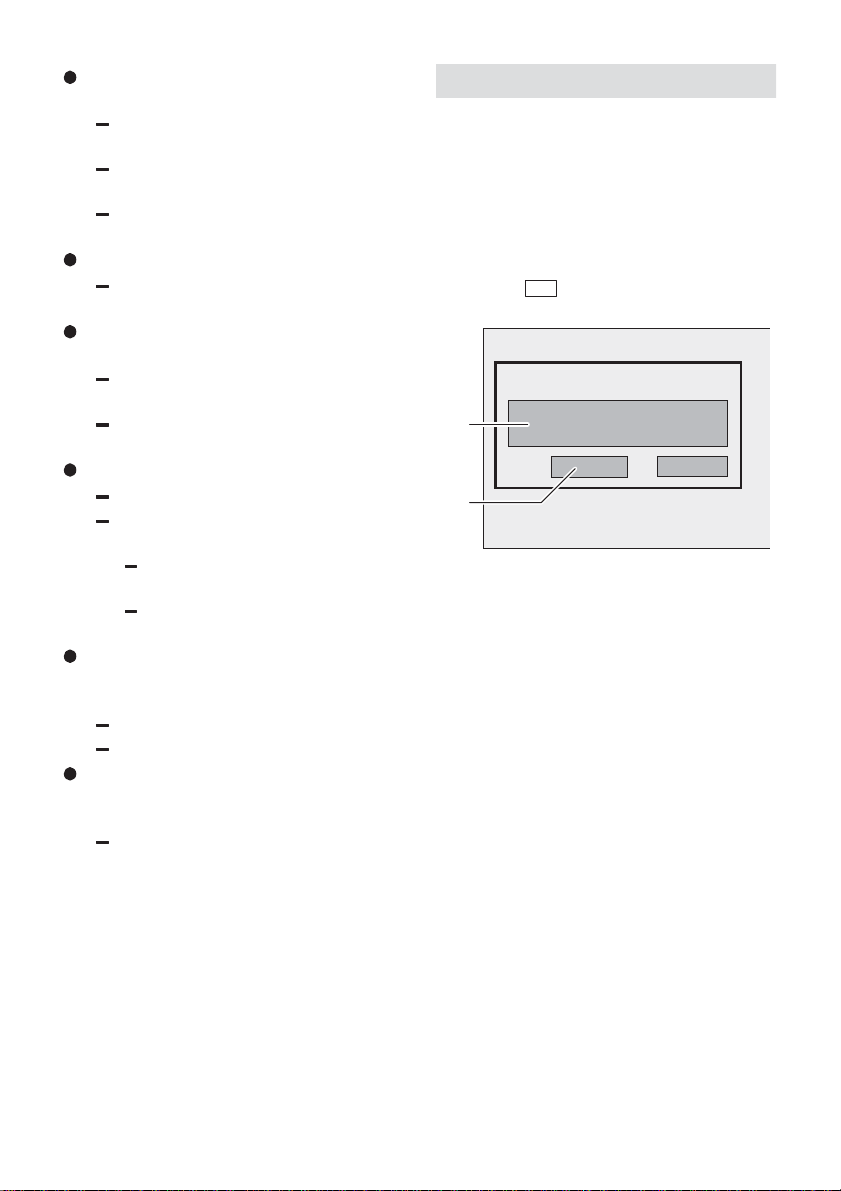
The “Check water supply” message
is displayed in the window on the
front of the door
Water tap not turned on.
Blocked strainer in water intake
hose.
The strainer is situated in the
Aqua-Stop or supply-hose
connection.
Caution
Do not forget that repairs
should only be carried out by
a qualified specialist. Improper
repairs can lead to
considerable equipment
damage as well as danger to
the user.
... with the appliance itself
Lower spray arm rotates with
difficulty
Spray arm is blocked by small
items or food residue.
Lid in detergent compartment
cannot be closed
Detergent compartment has been
overfilled.
Mechanism is clogged with
left-over detergent.
Left-over detergent stuck inside
dispenser
Compartment was damp when it
was filled up with detergent.
The compartment must be dry
before detergent is added.

aus
32
32
Water remains inside the appliance
after programme has ended
Blockage or kink in drainage hose.
Pump is jammed.
The rough, fine or micro filter is
blocked.
The programme is still running.
Wait for the programme to end.
Unusual amount of foam is created
Normal washing-up liquid has
been poured into the rinse-aid
container.
Appliance stops suddenly during
washing
Cut in electricity supply to
appliance.
Water supply has been
interrupted.
Knocking sound can be heard
during washing
A spray arm is knocking against
the dishes inside the appliance.
Ratting sound can be heard during
washing
The dishes have not been
arranged properly inside the
appliance.
Knocking sound coming from inlet
valves
This is caused by the way the
water pipes have been routed and
has no effect on appliance
operation. Corrective action is not
possible.
... with the dishes, cutlery, etc.
Left-over food is stick to the dishes,
cutlery, etc.
Dishwasher was not loaded
properly. Jets of water could not
reach all parts of the dishes, etc.
Too many items in the rack.
Items in the rack were touching
each other.
Not enough detergent was added
to dispenser.
Selected wash programme was
not intensive enough.
Rotation of spray arm was
obstructed by dishes, etc.
Nozzles in spray arm are blocked
by food residue.
The rough, fine or micro filter is
blocked.
Filters have been incorrectly fitted.
Waste-water pump is jammed.
Refer to section on “Maintenance
and care – waste-water pump”.
Plastic items are discoloured
Not enough detergent was added.
Detergent has insufficient
bleaching properties.
Use a detergent containing
a chemical bleaching agent.
White stains are left on the dishes,
glasses have a milky appearance
Not enough detergent was added.
Amount of rinse-aid was set too
low.
Although water is quite hard,
no salt has been put in appliance.
Water softener was set too low.
Lid on salt container is not
screwed tight.
If you used a phosphate-free
detergent, try a detergent
containing phosphates and
compare results.
aus
33
Dishes, cutlery, etc. have not been
dried
Selected programme did not
include drying function.
Amount of rinse-aid was set too
low.
Items were removed from
dishwasher too soon.
Glasses have a dull appearance
Amount of rinse-aid was set too
low.
Tea stains or traces of lipstick have
not been completely removed
Detergent does not have
a sufficient bleaching effect.
Washing temperature was set too
low.
Traces of rust on cutlery
Cutlery is not sufficiently rustproof.
Salt content in washing water is
too high.
Lid on salt container is not
screwed tight.
Too much salt was spilt while
filling container.
Glasses become clouded and
discoloured; coating cannot be
wiped off
Unsuitable detergent was used.
Glasses are not dishwasher-proof.
Smears left behind on glasses and
cutlery; glasses have acquired
a metallic appearance
Amount of rinse-aid set too high.
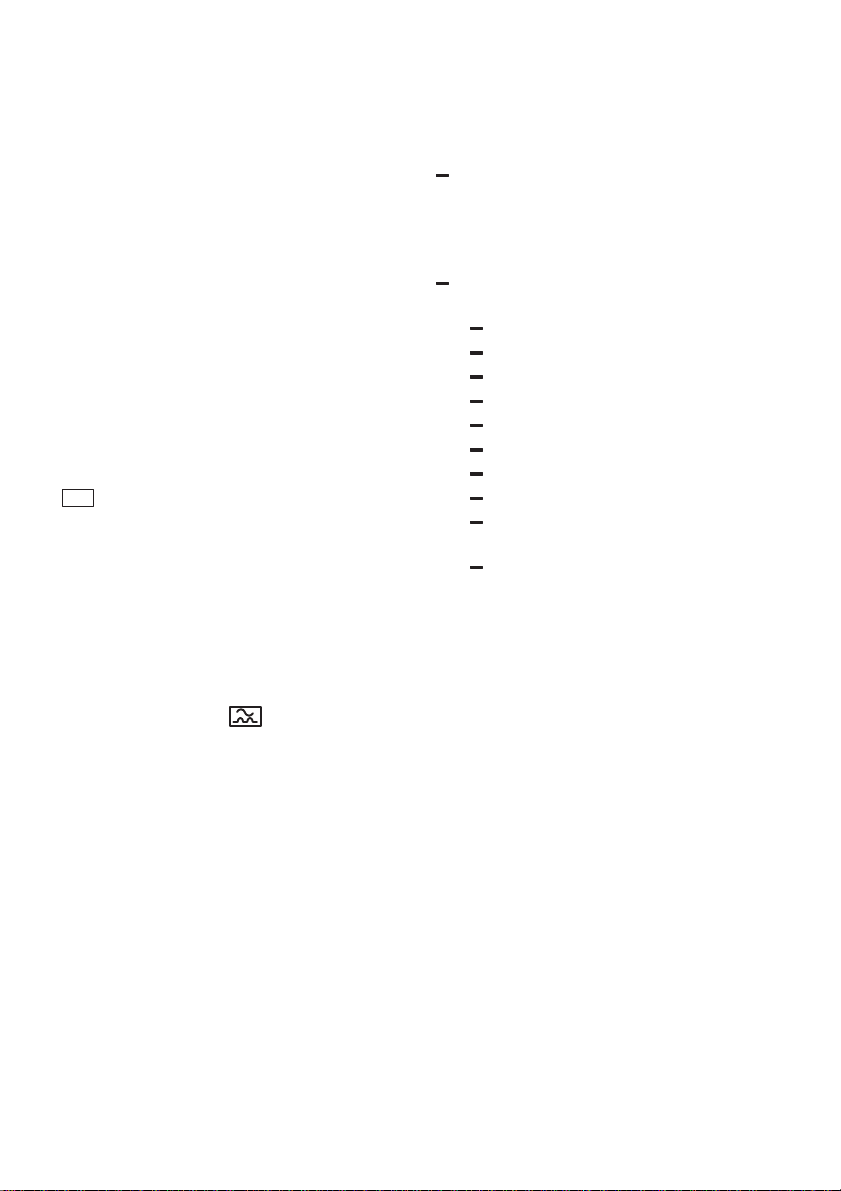
After-sales service
Please call your local after-sales service if
you are not able to resolve any problem
yourself. The address of your nearest
after-sales service can be found in the
after-sales service directory. When calling
the after-sales service, please specify the
appliance number (1) and the production
(FD) number (2) which are shown on the
nameplate
31 situated on the appliance
door.
FD
2
1

aus
34
34
Important Information
Notes on disposal
Old appliances are not worthless rubbish!
Environment-conscious recycling can
reclaim valuable raw materials.
On out-of service appliances, unplug
mains plug from receptacle. Cut off power
cord and discard with mains plug.
To prevent playing children from becoming
trapped and endangered, ensure that the
door locking mechanism is disabled.
The shipping package has protected your
new appliance on its way to your home.
All packaging materials are
environment-friendly and recyclable.
Please contribute to a better environment
by disposing of packaging materials in an
environmentally conscious manner.
Caution: Keep children away from
shipping carton and packaging
components. Danger of suffocation from
folding cartons and plastic film.
Please ask your dealer or inquire at your
local authority about current means of
disposal.
General information
Measures must be taken to ensure that
built-under and built-in units that are
subsequently re-sited as free-standing
appliances cannot topple over. This can
be achieved by bolting the dishwasher
to the wall or fitting it under a
continuous work surface which is
screwed to the adjacent cupboards.
For Switzerland only:
There are no restrictions on installing
the appliance between wooden or
plastic walls as part of a fitted kitchen. If
the appliance is not plugged into a wall
socket, it must be connected to the
mains via a separator for all poles
within the domestic wiring system. This
device must have a gap of at least
3 mm between open contacts, in order
to conform with relevant safety
regulations.
Installation
In order to function correctly the
dishwasher must be properly installed.
Specifications for the water intake and
waste-water drainage, as well as electrical
connections, must fulfil the criteria that are
set out in the following paragraphs and the
installation instructions.
When installing the dishwasher, carry out
tasks in the following order:
– check contents of delivery upon receipt,
– site dishwasher,
– connect drainage hose,
– connect inlet hose to water supply,
– connect dishwasher to electricity supply.
Checking contents of delivery
All functions of your dishwasher have
been thoroughly tested in the factory. A
small number of water marks have been
left on the dishwasher as a result. They
disappear as soon as the appliance is
used for the first time.
Siting the dishwasher
Dimensions associated with siting the
dishwasher are contained in the
installation instructions. Ensure that the
appliance is completely level by adjusting
the feet. Make sure that it is standing on a
firm surface.
Drainage connection
See the installation instructions for details
of procedure to be followed.
If necessary, fit a siphon trap (U-bend) with
a connecting piece for the drainage hose.
Connect the drainage hose to the trap
using the enclosed parts.
aus
35
Fresh-water connection
Connect the inlet hose to a water tap using
the enclosed parts and in accordance with
the installation instructions.
Water pressure:
Minimum 0,5 bar – maximum 10 bar.
If the water pressure is higher, install a
pressure reducing valve.
Flow rate:
Minimum of 10 litres per minute.
Water temperature:
We recommend cold water connection
only.
Electrical connection
This appliance should only be connected
to a 230/240 V AC source via a properly
installed earthed socket. See nameplate
31 for size of required fuse.
The socket must be installed close to the
dishwasher.
If you need to extend the mains
connecting lead, do not cut off the plug.
Replace the whole cable, which can be
disconnected at the junction box on the
rear of the appliance.
If the domestic wiring includes a residual-
current-operated (FI) circuit-breaker, make
sure that it bears the
mark, as only
this type conforms to the latest regulations
Disconnecting the dishwasher
Here too, it is important that tasks are
carried out in the correct sequence:
always unplug the appliance from the
mains electricity first of all.
Pull plug out of wall socket.
Turn off water supply.
Disconnect drain and water input hoses.
Remove screws in underside of work
surface. Detach base board, if fitted.
Pull out appliance and carefully withdraw
hoses at same time.
Transporting the dishwasher
Drain water from the dishwasher. Secure
all loose parts. The appliance should only
be transported in an upright position.
If the appliance is not kept upright
during transport, any water left inside
may seep into the control module and
cause subsequent errors with
programme functions.
The appliance must be drained in the
following sequence:
Turn on the tap.
Switch on the main switch.
Start the Auto programme.
Close the door.
Wait approx. 4 minutes.
Open the appliance door.
Cancel programme.
Close the door.
After another minute switch off the
appliance.
Turn off the tap.
Protection from freezing
temperatures
If the appliance is installed in a location
where there is a risk of freezing
temperatures (e.g. in a holiday home), all
water must be completely drained out of
the interior (see “Transporting the
dishwasher”).
Turn OFF the tap, disconnect the supply
hose and allow to drain.



Bosch Info–Team:
DE Tel. 0180 / 5 30 40 50
AT Tel. 0660 / 59 95
Internet:
http://www.bosch–hausgeraete.de
5 600 042 685 aus (8103)
635D