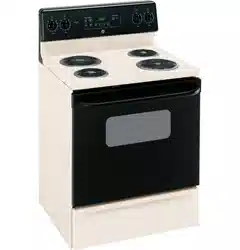
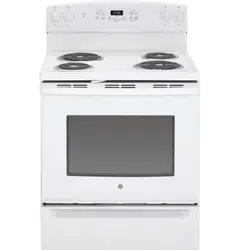
User Manual
Operating Instructions
Using the surface units.
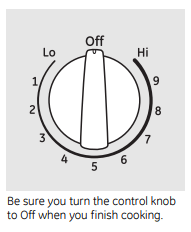
How to Set
Push the knob in and turn in either direction to the setting you want. At both Off and Hi the control clicks into position. You may hear slight clicking sounds during cooking, indicating the control is keeping the power level you set.
Indicator Lights (on radiant glass models only)
A HOT SURFACE or HOT COOKTOP(depending on model) indicator light will glow when any radiant element is turned on and will remain on until the surface is cool enough to touch.
A SURFACE UNIT on or BURNER ON(depending on model) indicator light will glow when any surface unit is on.
NOTE: The SURFACE UNIT or BURNER ON indicator light may glow between the surface control settings of Lo and Off, but there is no power to the surface units
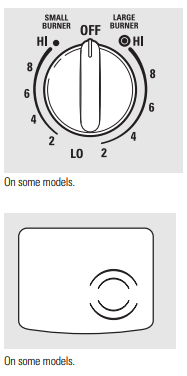
Dual Surface Unit and Control Knob (on some models)
The right front surface unit has 2 cooking sizes (6” and 9” or 9” and 12”) to select from so you can match the size of the unit to the size of the cookware you are using. To use the small surface unit, turn the control knob counterclockwise to the SMALL BURNER settings. To use the large surface unit, turn the control knob clockwise to the LARGE BURNER settings.
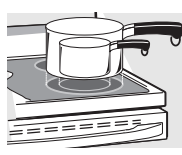
Using the radiant surface units. (on some models)
About the radiant surface units…
The radiant cooktop features heating units beneath a smooth glass surface.
NOTE: A slight odor is normal when a new cooktop is used for the first time. It is caused by the heating of new parts and insulating materials and will disappear in a short time.
The surface unit will cycle on and off to maintain your selected control setting.
It is safe to place hot cookware on the glass surface even when the cooktop is cool.
Even after the surface units are turned off, the glass cooktop retains enough heat to continue cooking. To avoid overcooking, remove pans from the surface units when the food is cooked. Avoid placing anything on the surface unit until it has cooled completely.
- Water stains (mineral deposits) are removable using the cleaning cream or full-strength white vinegar.
- Use of window cleaner may leave an iridescent film on the cooktop. The cleaning cream will remove this film.
- Don't store heavy items above the cooktop. If they drop onto the cooktop, they can cause damage.
- Do not use the surface as a cutting board.

Temperature Limiter
Every radiant surface unit has a temperature limiter.
The temperature limiter protects the glass cooktop from getting too hot.
The temperature limiter may cycle the surface units off for a time if:
- the pan boils dry.
- the pan bottom is not pflat.
- the pan is off-center.
- there is no pan on the unit.
Selecting types of cookware.
Stainless Steel: recommended
Aluminum:
heavy weight recommended
Good conductivity. Aluminum residues sometimes appear as scratches on the cooktop but can be removed if cleaned immediately. Because of its low melting point, thin weight aluminum should not be used.
Copper Bottom:
Copper may leave residues which can appear as scratches. The residues can be removed, as long as the cooktop is cleaned immediately. However, do not let these pots boil dry. Overheated metal can bond to glass cooktops. An overheated copper bottom pot will leave a residue that will permanently stain the cooktop if not removed immediately.
Porcelain Enamel Covered Cast Iron:
recommended
As long as the cookware is covered completely with porcelain enamel, this cookware is recommended. Caution is recommended for cast-iron cookware that is not completely covered with smooth porcelain enamel, as it may scratch the glass-ceramic cooktop
Glass-ceramic: usable, but not recommended
Poor performance. Will scratch the surface.
Stoneware: usable, but not recommended
Poor performance. May scratch the surface.
Home Canning Tips: usable, but not recommended
Be sure the canner is centered over the surface unit.
Make sure the canner is flat on the bottom.
Use recipes and procedures from reputable sources. These are available from manufacturers such as Ball® and Kerr® and the Department of AgricultureExtension Service.
To prevent burns from steam or heat, use caution when canning.

Surface Cookware Tips
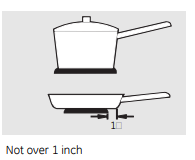
Use medium- or heavy-weight cookware. Aluminum cookware conducts heat faster than other metals. Cast-iron and coated cast-iron cookware are slow to absorb heat, but generally cook evenly at low to medium heat settings. Steel pans may cook unevenly if not combined with other metals. For best cooking results, pans should be flat on the bottom. Match the size of the saucepan to the size of the surface unit. The pan should not extendover the edge of the surface unit more than 1 inch.
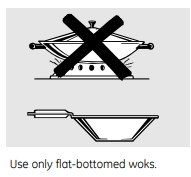
Wok Cooking
We recommend that you use only a flat- bottomed wok. They are available at your local retail store. Do not use woks that have support rings. Use of these types of woks, with or without the ring in place, can be dangerous. Placing the ring over the surface unit will cause a buildup of heat that will damage the porcelain cooktop. Do not try to use such woks without the ring. You could be seriously burned if the wok tips over.
Using the oven controls.
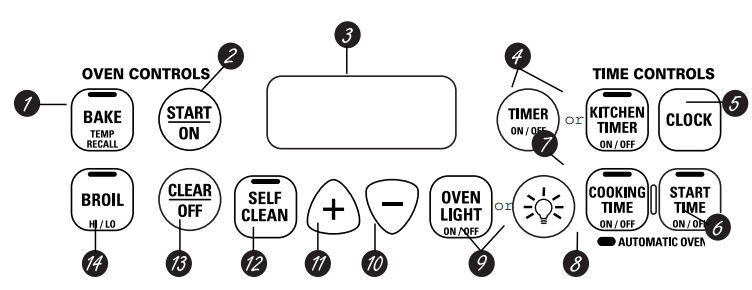
Oven Control, Clock and Timer Features and Settings
1 BAkE/TEMP RECAll Pad
Touch this pad to select the bake function.
BAKE light
Flashes while in edit mode—you can change the oven temperature at this point. Glows when the oven is in bake mode.
2 START/ON Pad
Must be touched to start any cooking or cleaning function.
3 Display
Shows the time of day, oven temperature, whether the oven is in the bake, broil or self�cleaning mode and the times set for the timer or automatic oven operations. The display will show PRE while preheating. When the oven reaches the selected temperature, the oven control will beep and the display will show the oven temperature.
If “F– and a number or letter” flash in the display and the oven control signals, this indicates a function error code.
If your oven was set for a timed oven operation and a power outage occurred, the clock and all programmed functions must be reset.
The time of day will flash in the display when there has been a power outage. Reset the clock.
If the function error code appears during the self�cleaning cycle, check the oven door latch. The latch handle may have been moved, even if only slightly, from the latched position. Make sure the latch is moved to the right as far as it will go.
Touch the CLEAR/OFF pad. Allow the oven to cool for one hour. Put the oven back into operation. If the function error code repeats, disconnect the power to the range and call for service.
4 KITCHEN TIMER ON/OFF or TIMER ON/OFF pad
Touch this pad to select the timer feature.
Then touch the + and – pads to adjust the timer.
TIMER light
Flashes while in edit mode—you can change the set time at this point. Glows when the timer has been activated. Flashes again when the time has run out until the control is reset.
5 ClOCk Pad
To set the clock, press this pad twice and then press the + and – pads. The time of day will flash in the display when the oven is first turned on.
6 START TIME ON/OFF Pad (on some models)
Use along with the COOKING TIME ON/OFF or SELF CLEAN pads to set the oven to start and stop automatically at a time you set.
START TIME light
Flashes while in edit mode—you can change the start time at this point. Glows when the function has been activated.
7 COOKINGTIMEON/OFF Pad (on some models)
Touch this pad and then touch the + or – pads to set the amount of time you want your food to cook. The oven will shut off when the cooking time has run out.
COOKING TIME light
Flashes while in edit mode—you can change the set time at this point. Glows when the function has been activated. Flashes again when the time has run out until the control is reset.
8 AUTOMATIC OVEN light (on some models)
This lights anytime the oven has been programmed using the COOKING TIME or START TIME functions.
9 OVEN LIGHT ON/OFF or  Pad
Pad
Touch this pad to turn the oven light on or off.
10 – Pad
Short taps to this pad will decrease the time or temperature by small amounts. Touch and hold the pad to decrease the time or temperature by larger amounts.
11 +Pad
Short taps to this pad will increase the time or temperature by small amounts. Touch and hold the pad to increase the time or temperature by larger amounts.
12 SELF CLEAN Pad (on some models)
Touch this pad to select the self-cleaning function. See the using the self-cleaning oven section.
CLEAN light
Flashes while in edit mode—you can change the length of time for the self-clean cycle at this point. Glows when the oven is in the self-clean cycle. After the self-clean cycle, the light will turn off. Unlatch the door.
13 ClEAR/OFF Pad
Touch this pad to cancel ALL oven operations except the clock and timer.
14 BROIL HI/LO Pad
Touch this pad to select the broil function.
BROIl light
Flashes while in edit mode—you can switch fromHI to LO BROIL at this point. Glows when the oven is in broil mode.
Indicator lights (on some pads)
EDIT mode lasts several seconds after the last pad press. START TIME ON/OFF and COOKINGTIME ON/OFF will be the only pads lit if either of these options is selected. (Example: START TIME is selected with BAKE—the START TIME pad will remain lit until the clock reaches the programmed time, at which point it will turn off and the BAKE/TEMP RECALL pad light will light up)
Using the oven.
Clock and Kitchen Timer (on some models)
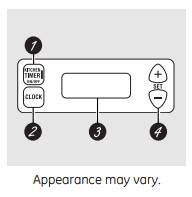
1 KITCHEN TIMER ON/OFF Pad
Touch this pad to select the timer feature.
2 CLOCK Pad
Touch this pad before setting the clock.
3 Display
Shows the time of day and the time set for the timer, cook time or start time.
4 SET +/- Pads
These pads allow you to set the clock and timer.
Oven Temperature Knob (on some models)
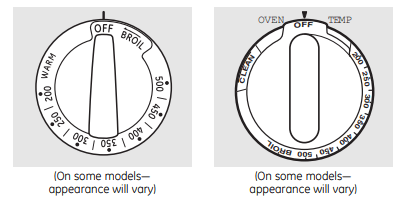
Turn this knob to the setting you want.
- The oven cycling light comes on during cooking
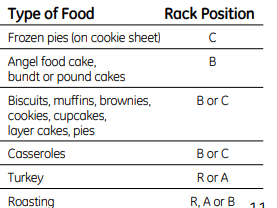
How to Set the Oven for Baking or Roasting (on models without an oven temperature knob)
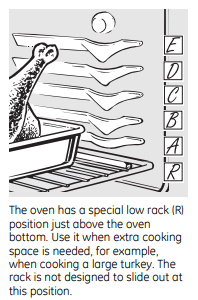
- Touch the BAKE pad.
- Touch the + or – pads until the desired temperature is displayed.
- Touch the START/ON pad.
- Check food for doneness at minimum time on recipe. Cook longer if necessary.
- Touch the CLEAR/OFF pad when baking is finished and then remove the food from the oven.
The oven will start automatically. The display will show PRE while preheating. When the oven reaches the selected temperature, the oven control will beep and the display will show the oven temperature.
To change the oven temperature during BAkE cycle, touch the BAKE pad and then the + or – pads to get the new temperature.
Type of Margarine Will Affect Baking Performance
Most recipes for baking have been developed using high fat products such as butter or margarine (80% fat). If you decrease the fat, the recipe may not give the same results as with a higher fat product.
Recipe failure can result if cakes, pies, pastries, cookies or candies are made with low fat spreads. The lower the fat content of a spread product, the more noticeable these differences become.
Federal standards require products labeled “margarine” to contain at least 80% fat by weight. Low-fat spreads, on the other hand, contain less fat and more water. The high moisture content of these spreads affects the texture and flavor of baked goods. For best results with your old favorite recipes, use margarine, butter or stick spreads containing at least 70% vegetable oil.
Preheating and Pan Placement
Preheat the oven if the recipe calls for it. To preheat, set the oven at the correct temperature. Preheating is necessary for good results when baking cakes, cookies, pastry and breads.
On some models, the display will show “PRE” while preheating. When the oven reaches the selected temperature, the oven control will beep and the display will show the oven temperature. For ovens without a preheat indicator light or tone, preheat 10 minutes.
Baking results will be better if baking pans are centered in the oven as much as possible. Pans should not touch each other or the walls of the oven. If you need to use two racks, stagger the pans so one is not directly above the other, and leave approximately 11⁄2″ from the front of the pan to the front of the rack.
Aluminum Foil
Do not use aluminum foil to line oven bottoms. The foil will trap heat below and upset the performance of the oven. Foil can melt and permanently damage the oven bottom. Damage from improper use of aluminum foil is not covered by the product warranty Foil may be used to catch spills by placing a sheet on a lower rack, several inches below the food .Do not use more foil than necessary and never entirely cover an oven rack with aluminum foil. Keep foil at least 1-1/2” from oven walls to prevent poor heat circulation.
How to Set the Oven for Broiling
On modelswithout an oven temperature knob:
- Place the meat or fish on a broiler grid in a broiler pan.
- Follow suggested rack positions in the Broiling Guide.
- Leave the door open to the broil stop position. The door stays open by itself, yet the proper temperature is maintained in the oven. Use LO Broil to cook foods such as poultry or thick cuts of meat thoroughly without over-browning them.
- Touch the BROIL HI/LO pad once for HI BROIL.
- To change to LO Broil, touch the Broil HI/LO pad again.
- Touch the START/ON pad.
- When broiling is finished, touch the CLEAR/OFF pad.
On models with an oven temperature knob:
- Place the meat or fish on a broiler grid in a broiler pan.
- Follow suggested rack positions in the Broiling Guide.
- Close the oven door.
- Turn the Oven Temperature Knob to BROIL.
- When broiling is finished, turn the Oven Temperature Knob to OFF.
Care and Cleaning
Using the self-cleaning oven.
Never force the latch handle. Forcing the handle will damage the door lock mechanism. The oven door must be closed and all controls set correctly for the cycle to work properly.
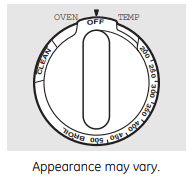
How to Set the Oven for Cleaning (on models with knobs)
Follow the directions in the Before a Clean
Cycle section.
1 Latch the door.
2 Turn the OVEN TEMP knob to CLEAN.
The Clean Time is 4 hours and 20 minutes. The self clean light will come on and stay on until the self clean cycle is complete.
The oven shuts off automatically when the clean cycle is complete.
3 After a clean cycle, turn the OVEN TEMP knob to OFF and slide the latch handle to the left as far as it will go.
To cancel self clean cycle, turn OVEN TEMP knob to off and slide latch to left as far as it will go. Wait until self clean light stops blinking. Use oven as desired.
NOTE: Never force the latch. If the oven is too hot, you will not be able to slide the latch. Allow the oven to cool.
How to Set the Oven for Cleaning (on some models with press pads)
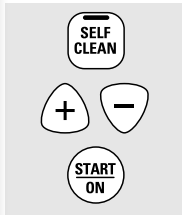
Follow the directions in the Before a Clean Cycle section.
1 Latch the door.
2 Touch the SELF CLEAN pad.
3 Touch the + or – pads until the desired Clean Time is displayed.
The Clean Time is normally 4 hours and 20 minutes. You can change the Clean Time to any time between 3 and 5 hours, depending on the amount of soil in your oven.
4 Touch the START/ON pad.
The self-clean cycle will automatically begin after CLEAN is displayed and the time countdown appears in the display.
While the oven is self-cleaning, you can touch the CLOCK pad to display the time of day.To return to the clean countdown, touch the SELF CLEAN pad.
The oven shuts off automatically when the clean cycle is complete, and 0:00 will flash in the display.
5 Slide the latch handle to the left as far as it will go and open the door.
NOTE: Never force the latch. If the oven is too hot, you will not be able to slide the latch Allow the oven to cool.
How to Delay the Start of Cleaning
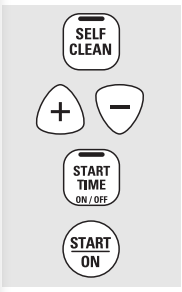
You can set the oven control to delay-start the oven, clean for a specific length of time and then turn off automatically.
Make sure the clock shows the correct time of day.
Follow the directions in the Before a Clean
Cycle section.
1 Latch the door.
NOTE: Never force the latch. If the oven is too hot, you will not be able to slide the latch. Allow the oven to cool.
2 Touch the SELF CLEAN pad.
3 Touch the + or – pads to set the Clean Time.
The Clean Time is preset for 4 hours and 20 minutes. You can change the Clean Time to any time between 3 and 5 hours, depending on the amount of soil in your oven. If a different Clean Time is desired, touch the + or – pads until the desired Clean Time is displayed.
Touch the START TIME pad.
Change the Start Time by touching the + or – pads. The start time will appear in the display.
5 Touch the START/ON pad.
The self-clean cycle will automatically begin at the time set.
While the oven is self-cleaning, you can touch the CLOCK pad to display the time of day. To return to the clean countdown, touch the SELF CLEAN pad.
The oven shuts off automatically when the clean cycle is complete, and 0:00 will flash in the display.
6 Slide the latch handle to the left as far as it will go and open the door.
To Stop a Clean Cycle
Touch the CLEAR/OFF pad. Wait until the oven has cooled below the locking temperature to unlatch the door. You will not be able to open the door right away unless the oven has cooled below the locking temperature.
Care and cleaning of the range
Painted Surfaces (on some models)
Painted surfaces include the sides of the range and the sides of the door trim. To clean the painted surfaces, use a hot, damp cloth with a mild detergent suitable for these surfaces. Use a clean, hot, damp cloth to remove soap. Dry with a dry, clean cloth. Do not use steel-wood pads, commercial oven cleaners, cleaning powders or other abrasive cleaners. They will damage the surface.
Stainless Steel Surfaces (on some models)
Do not use a steel wool pad; it will scratch the surface. To clean the stainless steel surface, use warm sudsy water or a stainless steel cleaner or polish. Always wipe the surface in the direction of the grain. Follow the cleaner instructions for cleaning the stainless steel surface.
To inquire about purchasing stainless steel appliance cleaner or polish, or to find the location of a dealer nearest you, please call our toll-free number: National Parts Center 800.626.2002 GEAppliances.com
Glass Window (on some models)
To clean the outside glass finish, use a glass cleaner. Rinse and polish with a dry cloth.
Care and cleaning of the range.
Oven Heating Elements
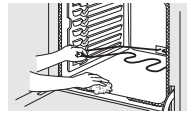
Do not clean the bake element or the broil element. Any soil will burn off when the elements are heated. To clean the oven floor, gently lift the bake element. Clean with warm soapy water. On some models, the bake element is not exposed and is under the oven floor. If spillovers, residue or ash accumulate on the oven floor, wipe up before self-cleaning.
Oven Racks
Clean the oven racks with an abrasive cleanser or scouring pad. After cleaning, rinse the racks with clean water and dry with a clean cloth. NOTE: Take the racks out of the oven before you begin the self-clean cycle or they may discolor. To make the racks slide more easily, apply a small amount of vegetable oil or cooking oil to a paper towel and wipe the edges of the oven racks with the paper towel.

Oven Light Replacement (on some models)
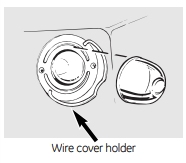
Be sure to let the light cover and bulb cool completely.
To remove the cover:
- Hold a hand under the cover so it doesn’t fall when released. With fingers of the same hand, firmly push back the wire cover holder. Lift off the cover. Do not remove any screws to remove the cover.
- Replace bulb with a 40-watt household appliance bulb.
To replace the cover:
- Place it into groove of the light receptacle. Pull wire forward to the center of the cover until it snaps into place.
- Connect electrical power to the range.
Storage Drawer Removal (on some models)
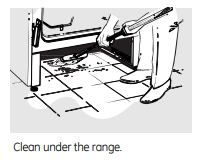
To remove the storage drawer:
- Pull the drawer out all the way.
- Tilt up the front and remove it.
To replace the storage drawer:
- Insert glides at the back of the drawer beyond the stop on range glides.
- Lift the drawer if necessary to insert easily.
- Let the front of the drawer down, then push in to close
Control Panel and Knobs
It’s a good idea to wipe the control panel after each use of the oven. Use a damp cloth to clean or rinse. For cleaning, use mild soap and water or a 50/50 solution of vinegar and water. For rinsing, use clean water. Polish dry with a soft cloth. Do not use abrasive cleansers, strong liquid cleaners, plastic scouring pads or oven cleaners on the control panel—they will damage the finish. The control knobs may be removed for easier cleaning. Make sure the knobs are in the OFF positions and pull them straight off the stems for cleaning. The knobs can be cleaned in a dishwasher or they may also be washed with soap and water. Make sure the insides of the knobs are dry before replacing. Replace the knobs in the OFF position to ensure proper placement.
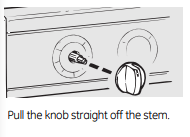
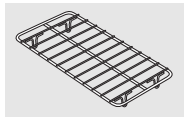
Warming Drawer Rack (on some models)
Clean the rack with detergent and water. After cleaning, rinse the rack with clean water and dry with a clean cloth.
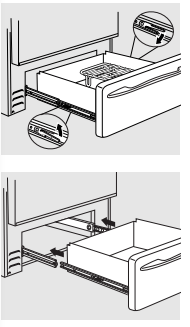
Removable Warming Drawer (on some models)
Most cleaning can be done with the drawer in place. However, the drawer may be removed if further cleaning is needed. Use soap and warm water to thoroughly clean.
To remove the warming drawer:
- Pull the drawer straight out until it stops.
- Press the left rail release up and press the right rail release down, while pulling the drawer forward and free.
To replace the warming drawer:
- Place the left drawer rail around the inner left rail guide and slide it in slightly to hook it.
- Place the right drawer rail around the inner right rail guide and slide it in slightly to hook it.
- Slide the drawer all the way in
Oven Vent
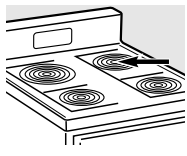
On glass cooktop models, the oven is vented through an opening at the rear of the cooktop. On coil cooktop models, the oven is vented through an opening under the right rear surface unit. Never cover the opening with aluminum foil or any other material.
Painted Surfaces (on some models)
Painted surfaces include the sides of the range and the sides of the door trim. To clean the painted surfaces, use a hot, damp cloth with a mild detergent suitable for these surfaces. Use a clean, hot, damp cloth to remove soap. Dry with a dry, clean cloth. Do not use steel-wood pads, commercial oven cleaners, cleaning powders or other abrasive cleaners. They will damage the surface.
Stainless Steel Surfaces (on some models)
Do not use a steel wool pad; it will scratch the surface. To clean the stainless steel surface, use warm sudsy water or a stainless steel cleaner or polish. Always wipe the surface in the direction of the grain. Follow the cleaner instructions for cleaning the stainless steel surface. To inquire about purchasing stainless steel appliance cleaner or polish, or to find the location of a dealer nearest you, please call our toll-free number: National Parts Center 800.626.2002 GEAppliances.com
Glass Window (on some models)
To clean the outside glass finish, use a glass cleaner. Rinse and polish with a dry cloth.
Cleaning the Glass Cooktop
Normal Daily Use Cleaning
ONLY use CERAMA BRYTEⓇ Ceramic Cooktop Cleaner on the glass cooktop. Other creams may not be as effective.
To maintain and protect the surface of your glass cooktop, follow these steps:
- Before using the cooktop for the first time, clean it with CERAMA BRYTE® Ceramic Cooktop Cleaner. This helps protect the top and makes cleanup easier.
- Dally use of CERAMA BRYTEⓇ Ceramic Cooktop Cleaner will help keep the cooktop looking new.
- Shake the cleaning cream well. Apply a few drops of CERAMA BRYTE® Ceramic Cooktop Cleaner directly to the cooktop.
- Use a paper towel or CERAMA BRYTEⓇ Cleaning Pad for Ceramic Cooktops to clean the entire cooktop surface.
- Use a dry cloth or paper towel to remove all cleaning residue. No need to rinse.

NOTE: It is very important that you DO NOT heat the cooktop until it has been cleaned thoroughly.
Burned-On Residue
NOTE: DAMAGE to your glass surface may occur if you use scrub pads other than those recommended.
- Allow the cooktop to cool.
- Spread a few drops of CERAMA BRYTE Ceramic Cooktop Cleaner on the entire burned residue area.
- Using the included CERAMA BRYTE® Cleaning Pad for Ceramic Cooktops, rub the residue area, applying pressure as needed.
- If any residue remains, repeat the steps listed above as needed.
- For additional protection, after all residue has been removed, polish the entire surface with CERAMA BRYTE® Ceramic Cooktop Cleaner and a paper towel.

Heavy, Burned-On Residue
- Allow the cooktop to cool.
- Use a single-edge razor blade scraper at approximately a 45° angle against the glass surface and scrape the soil. It will be necessary to apply pressure to the razor scraper in order to remove the residue.
- After scraping with the razor scraper, spread a few drops of CERAMA BRYTE® Ceramic Cooktop Cleaner on the entire burned residue area Use a CFRAMA BRYTEⓇ Cleaning Pad to remove any remaining residue.
- For additional protection, after all residue has been removed, polish the entire surface with CERAMA BRYTE® Ceramic Cooktop Cleaner and a paper towel.

Metal Marks and Scratches
1 Be careful not to slide pots and pans across your cooktop. It will leave metal markings on the cooktop surface. These marks are removable using the CERAMA BRYTE® Ceramic Cooktop Cleaner with the CERAMA BRYTE® Cleaning Pad for Ceramic Cooktops.
2 If pots with a thin overlay of aluminum or copper are allowed to boil dry, the overlay may leave black discoloration on the cooktop. This should be removed immediately before heating again or the discoloration may be permanent.
Cooktop Seal
To clean the cooktop seal around the edges of the glass, lay a wet cloth on it for a few minutes, then wipe clean with nonabrasive cleaners.
Glass surface—potential for permanent damage
Our testing shows that if you are cooking high sugar mixtures such as jelly or fudge and have a spillover, it can cause permanent damage to the glass surface unless the spillover is immediately removed
Damage from Sugary Spills and Melted Plastic
1. Turn off all surface units. Remove hot pans.
2. Wearing an oven mitt:
a. Use a single-edge razor blade scraper (CERAMA BRYTE® Ceramic Cooktop Scraper) to move the spill to a cool area on the cooktop.
b. Remove the spill with paper towels.
3. Any remaining spillover should be left until the surface of the cooktop has cooled.
4. Don’t use the surface units again until all of the residue has been completely removed.
TROUBLESHOOTING
Troubleshooting Tips ... Before you call for service
Save time and money! Review the charts on the following pages first and you may not need to call for service.
Radiant Cooktops
Surface units will not maintain a rolling boil or cooking is not fast enough
- Improper cookware being used.
- Use pans which are flat and match the diameter of the surface unit selected.
Surface units do not work properly
- A fuse in your home may be blown or the circuit breaker tripped.
- Replace the fuse or reset the circuit breaker.
- Cooktop controls improperly set.
- Check to see the correct control s set for the surface unit you are using.
Scratches (may appear as cracks) on cooktop glass surface
- Incorrect cleaning methods being used.
- Scratches are not removable. Tiny scratches will become less visible in time as a result of cleaning
- Cookware with rough bottoms being used or coarse particles (salt or sand) were between the cookware and the surface of the cooktop. Cookware has been slid across the cooktop surface.
- To avoid scratches, use the recommended cleaning procedures. Make sure bottoms of cookware are clean before use, and use cookware with smooth bottoms.
Areas of discoloration on the cooktop
- Food spillovers not cleaned before next use.
- See the Cleaning the glass cooktop section.
- Hot surface on a model with a light-colored cooktop.
- This is normal. The surface may appear discolored when it is hot. This is temporary and will disappear as the glass cools.
Plastic melted to the surface
- Hot cooktop came into contact with plastic placed on the hot cooktop.
- See the Cleaning the glass cooktop section as there is potential for permanent damage without proper care.
Pitting (or indentation) of the cooktop
- Hot sugar mixture spilled on the cooktop.
- Call a qualified technician for replacement.
Frequent cycling off and on of surface units
- Improper cookware being used.
- Use only flat cookware to minimize cycling.
Coil Cooktops
Surface units not functioning properly
- The surface units are not plugged in solidly.
- With the controls off, check to make sure the surface unit is plugged completely into the receptacle.
- The surface unit controls improperly set.
- Check to see the correct control is set for the surface unit you are using.
- The drip pans are not set securely in the cooktop.
- With the controls off, check to make sure the drip pan is in the recess in the cooktop and that the opening in the pan lines up with the receptacle
Oven—All Models
Oven light does not work
- Light bulb is loose or defective.
- Tighten or replace the bulb.
- Switch operating light is broken.
Food does not bake or roast properly
- Oven controls improperly set.
- See the using the oven section.
- Rack position is incorrect or the rack is not level.
- See the using the oven section.
- Incorrect cookware or cookware of improper size being used.
- See the using the oven section.
- Oven thermostat needs adjustment.
- See the Adjust the oven thermostat–Easy to do yourself! section
Oven will not work
- A fuse in your home may be blown or the circuit Replace the fuse or reset the circuit breaker. breaker tripped.
- Replace the fuse or reset the circuit breaker.
- Oven controls improperly set.
- See the Using the Oven section.
- On self-cleaning models, door left in the locked position
- If necessary, allow the oven to cool then unlock the door.
Food does not broil properly
- Oven is not set to BROIL.
- On models with a temperature knob, make sure you turn it all the way to the BROIL position. On models with a BROIL HI/LO pad, make sure it is turned on.
- Improper rack position being used.
- Food being cooked in a hot pan.
- For best results, use a pan designed for broiling.Make sure it is cool.
- Cookware not suited for broiling.
- For best results, use a pan designed for broiling.
- In some areas the power(voltage) may be low.
- Preheat the broil element for 10 minutes.
- Broil for the longest period of time recommended in the Broiling guide.
Control signals after entering cooking time or start time
- You forgot to enter a bake temperature or cleaning time.
- Touch the Bake pad and desired temperature or the Self Clean pad and desired clean time.
Display flashes "bAd" then "linE" with a is miswired.
- The installed connection from the house to the unit loud tone
- Contact installer or electrician to correct miswire.
Warming drawer will not work
- A fuse in your home may be blown or the circuit breaker tripped.
- Replace the fuse or reset the circuit breaker.
- The oven is self-cleaning.
- Wait for the self-clean cycle to finish and the oven to cool.
- Controls improperly set.
- See the using the warming drawer section
Excessive condensation in the drawer
- Liquid in drawer.
- Uncovered foods.
- Cover food with lid or aluminum foil.
- Temperature setting too high.
- Reduce temperature setting.
Food dries out in the warming drawer
- Moisture escaping.
- Cover food with lid or aluminum foil.
Oven temperature too hot or too cold
- Oven thermostat needs adjustment.
- See the Adjust the oven thermostat–Easy to do yourself! section
Clock and timer do not work
- A fuse in your home may be blown or the circuit breaker tripped.
- Replace the fuse or reset the circuit breaker.
- Plug on range is not completely inserted in the electrical outlet.
- Make sure electrical plug is plugged into a live, properly grounded outlet.
- Oven controls improperly set.
- See the Using the kitchen timer section.
- Clock display turned off
- Check Clock Display settings in the Special Features section
Display goes blank
- A fuse in your home may be blown or the circuit breaker tripped.
- Replace the fuse or reset the circuit breaker.
- The clock is turned off.
- See the Special Features section.
- Oven is in Sabbath Mode.
- Verify that the oven is not in Sabbath Mode. Special Features section.
Oven door is crooked
- The door is out of position.
- Because the oven door is removable, it sometimes gets out of position during installation. To straighten the door, re-install the door. See the Lift-Off Oven Door instructions in the Care and Cleaning section.
F- and a number or letter” flash in the display
- You have a function error code.
- Press the Cancel/Off pad. Allow the oven to cool for one hour. Put the oven back into operation.
- If the function code repeats.
- Disconnect all power to the oven for at least 30 seconds and then reconnect power. If the function error code repeats, call for service.
Power outage
- Power outage or surge
- Some models will automatically resume their setting once the power is restored. On models with a clock, you must reset the clock. If the oven was in use, you must reset it by pressing the CLEAR/OFF pad, setting the clock and resetting any cooking function
Display flashes
Unable to get the display to show "SF"
- Oven control pads were not touched properly.
- The Broil Hi/Lo and Bake pads must be touched at the same time and held for 3 seconds.
Oven makes clicking noise
- This is the sound of the heating element turning off and on during cooking functions.
Burning" or "oily" odor emitting from the vent
- This is normal in a new oven and will disappear in time.
- To speed the process, set a self-clean cycle for a minimum of 3 hours. See the Cleaning the Oven section.
Strong odor
- An odor from the insulation around the inside of the oven is normal for the first few clean cycle. times the oven is used.
- This is temporary and will go away after several uses or a self-clean
Self-Cleaning Models
Oven will not self-clean
- The temperature is too high to set a self-clean operation.
- Allow the oven to cool and reset the controls
- Oven controls improperly set.
- See the Cleaning the Oven section.
Crackling" or "popping" sound
- This is the sound of the metal heating and cooling during both the cooking and cleaning functions.
Excessive smoking during clean cycle
- Excessive soil
- Press the CLEAR/OFF pad. Open the windows to rid the room of smoke. Wait until the light on the SELF CLEAN pad goes off. Wipe up the excess soil and reset the clean cycle.
Oven not clean after a clean cycle
- Oven controls improperly set.
- See the Cleaning the Oven section.
- Oven was heavily soiled.
- Clean up heavy spillovers before starting the clean cycle.Heavily soiled ovens may need to self-clean again or for a longer period of time.
Oven door will not unlock
- Oven too hot
- Allow the oven to cool below locking temperature.
Self clean light blinks
- The OVEN TEMP knob has not when trying to set a been set to CLEAN when the self clean cycle latch was moved to the right.
- Set the OVEN TEMP knob to CLEAN. See the using the self-cleaning oven section.
- The latch was not moved to the right when the OVEN TEMP knob was set to CLEAN.
- Move the latch to the right as far as it will go. See the using the self-cleaning oven section.
Self clean light blinks during self clean cycle
- A power interruption occurred.
- Turn the OVEN TEMP knob to OFF and move the latch to the left as far as it will go. Reset the range controls to the desired settings. See the using the self-cleaning oven section.