Operating and Installation Instructions
Refrigerators
To prevent accidents and machine damage, read these instructions be-
fore installation or use.
en-US, CA M.-Nr. 10 785 080

Contents
2
IMPORTANT SAFETY INSTRUCTIONS ................................................................ 5
Caring for the environment ................................................................................ 13
Installation information....................................................................................... 14
Installation location ............................................................................................... 14
Climate class ....................................................................................................15
Installation notes ................................................................................................... 15
Load-bearing capacity of the niche floor ......................................................... 15
Door hinging..................................................................................................... 15
Adjoining cabinetry/units.................................................................................. 15
Ventilation......................................................................................................... 16
Side-by-side..................................................................................................... 16
Installation dimensions....................................................................................... 18
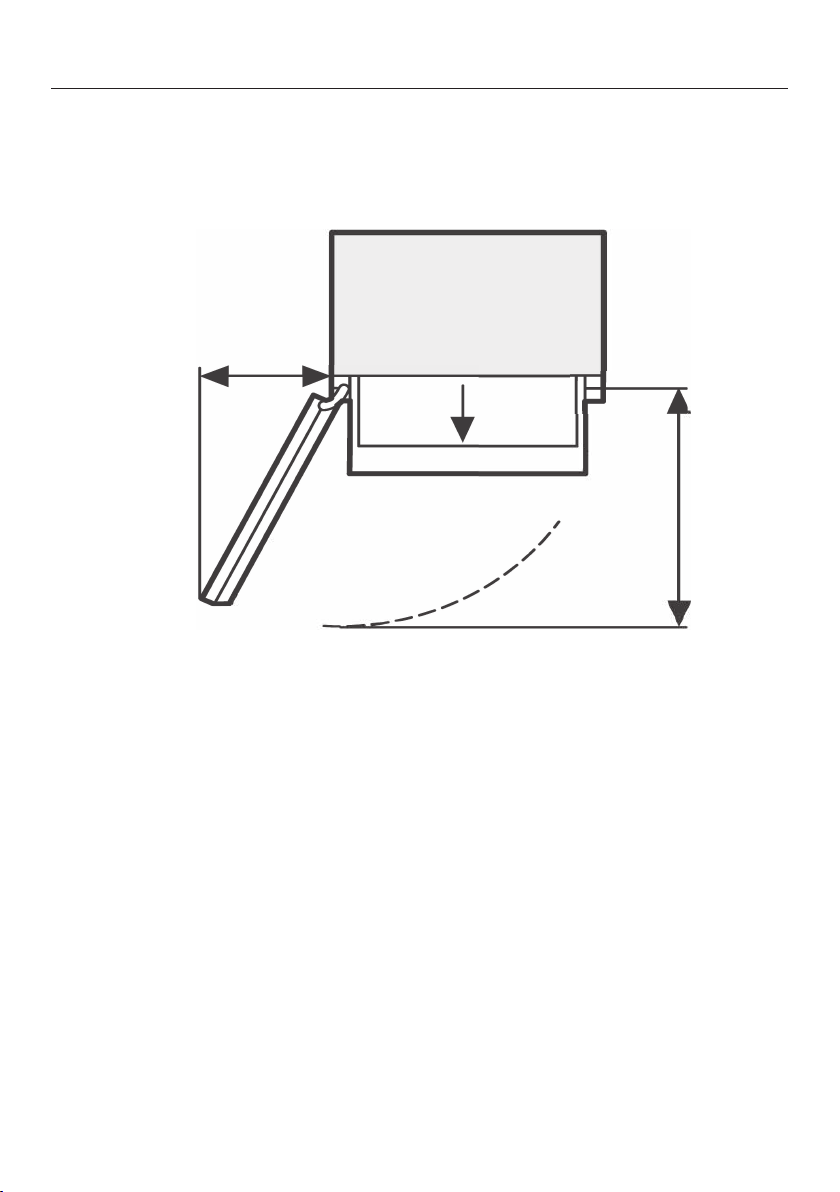
Dimensions when the appliance door is open (opening angle 90°) ...................... 22
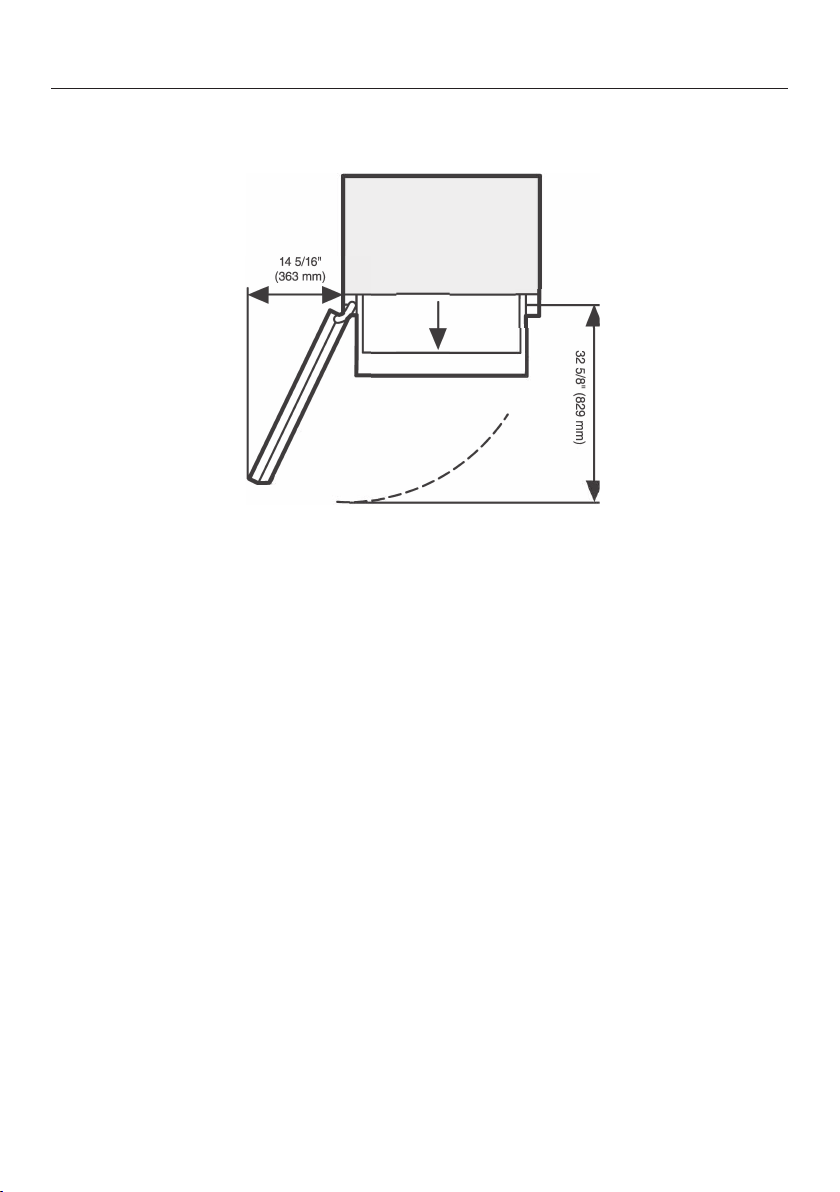
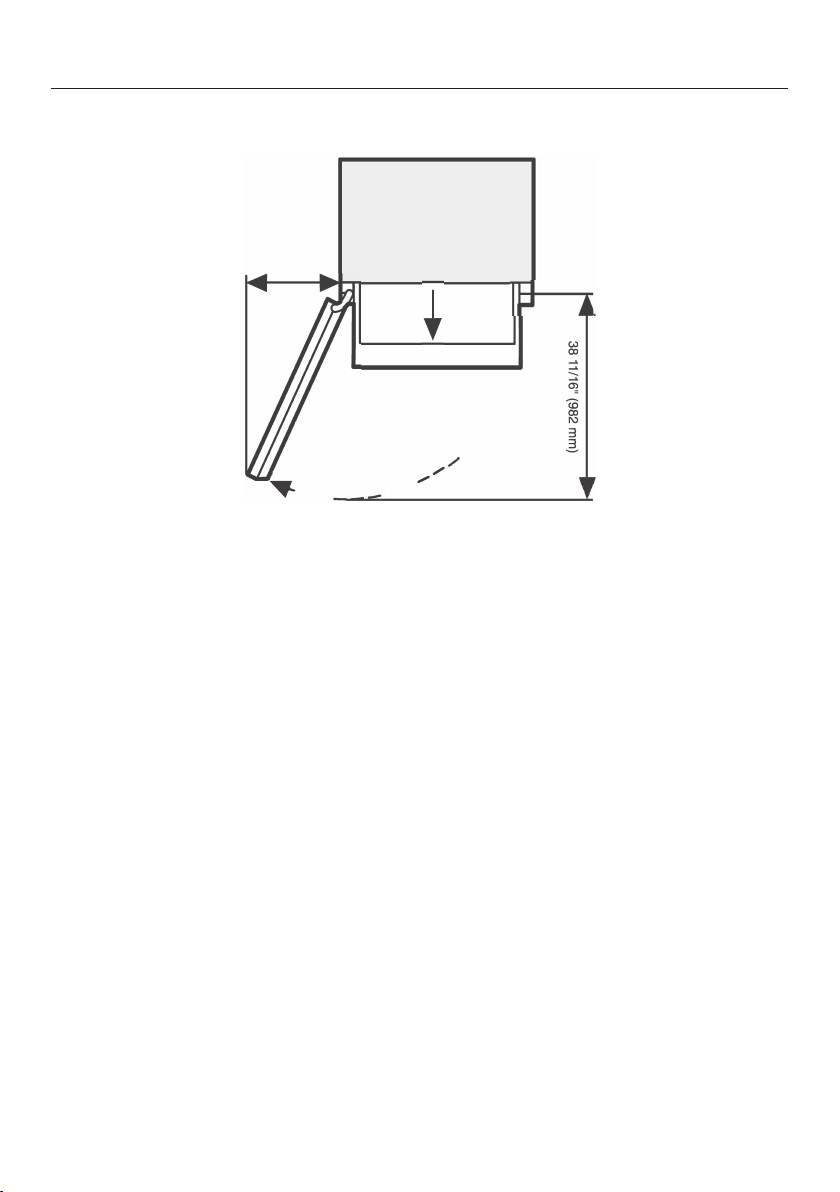
Dimensions when the appliance door is open (opening angle 115°) .................... 25
Building in the appliance .................................................................................... 28
Before starting....................................................................................................... 28
Tools required........................................................................................................ 28
Aligning the installation niche................................................................................ 29
Checking the installation niche ............................................................................. 29
Before installation.................................................................................................. 30
Preparing the installation niche ............................................................................. 31
Pushing the appliance into the niche .................................................................... 33
Aligning the appliance ........................................................................................... 35
Securing the appliance in the niche ...................................................................... 37
Securing the base cover plate and the baseboard ......................................... 38
Electrical connection .......................................................................................... 39
How to save energy............................................................................................. 41
Guide to the appliance........................................................................................ 43
Main screen........................................................................................................... 45
Settings mode .................................................................................................. 46
Symbols in settings mode ........................................................................... 47
Accessories ......................................................................................................... 48
Accessories supplied ............................................................................................ 48
Stainless steel front panels .............................................................................. 48
Optional accessories............................................................................................. 49

Contents
3
Before first use .................................................................................................... 50
Before first use ...................................................................................................... 50
Sticking on the SmartFresh zone labels...........................................................50
Inserting the Active AirClean filters .................................................................. 51
Using the appliance............................................................................................... 51
Starting up for the first time .............................................................................52
Switching on and off ........................................................................................... 53
Turning off for longer periods of time .................................................................... 53
Selecting additional settings.............................................................................. 54
Switching Keypad Lock on or off /................................................................ 54
Adjusting the temperature in the SmartFresh zone (dry compartment) .......... 54
Switching Eco Mode on or off .......................................................................... 55
Performing a Self Test....................................................................................... 55
Switching on Door Assistant ............................................................................. 56
Switching off Door Assistant............................................................................. 57
Setting up Miele@home.................................................................................... 58
Switching off Demo Mode.................................................................................. 62
Resetting the settings to their default settings ................................................ 62
Switching Sabbath Mode On/Off....................................................................... 64
Switching on, switching off, or resetting theDisplay Active AirClean Filter..... 65
The correct temperature..................................................................................... 67
...in the refrigerator section and in the SmartFresh zone ..................................... 67
Automatic cold air circulation (DynaCool) ............................................................. 67
Setting the temperature......................................................................................... 67
Adjusting the temperature in the dry compartment of the SmartFresh zone ... 68
Temperature range ...........................................................................................68
Using Automatic SuperCool............................................................................... 69
Door alarm ........................................................................................................... 70
Adjusting the interior fittings.............................................................................. 71
Moving the shelves in the appliance door............................................................. 71
Moving the adjustable shelves .............................................................................. 71
Removing the hanging drawer .............................................................................. 72
Removing compartments from the Fridge Zone ................................................... 72
Storing food in the refrigerator section............................................................. 73
Different storage zones ......................................................................................... 73
Food which is not suitable for storage in the refrigerator section ......................... 74
Notes on buying food............................................................................................ 75
Storing food correctly............................................................................................ 75

Contents
4
Storing food in the SmartFresh zone................................................................. 76
SmartFresh zone ................................................................................................... 76
Humidity-controlled compartment with moisture regulator .................................. 76
Regulating the humidity level in the humidity-controlled compartment........... 77
Dry compartment with adjustable temperature..................................................... 78
Automatic defrosting .......................................................................................... 80
Cleaning and care ............................................................................................... 81
Cleaning agents..................................................................................................... 81
Before cleaning the appliance............................................................................... 82
Interior and accessories ........................................................................................ 82
Cleaning the door seal .......................................................................................... 83
Cleaning the ventilation grilles............................................................................... 83
Frequently Asked Questions .............................................................................. 84
Causes of noises ................................................................................................. 89
Technical Service................................................................................................. 90
Contact in case of fault ......................................................................................... 90
Warranty ................................................................................................................ 90
Declaration of conformity................................................................................... 91
Copyright and licenses ....................................................................................... 92
IMPORTANT SAFETY INSTRUCTIONS
5
This appliance complies with all statutory safety requirements.
Please note that inappropriate use can lead to personal injury and
damage to property.
To avoid the risk of accidents and damage to the appliance,
please read these instructions carefully before using it for the first
time. They contain important notes on installation, safety, use and
maintenance.
Miele cannot be held liable for non-compliance with these instruc-
tions.
Keep these instructions in a safe place and ensure that new users
are familiar with the contents. Pass them on to any future owner.
Danger of injury!
This appliance is very heavy and can tip forwards when the door is
open.
Keep the appliance door shut until the appliance has been built in
and secured in its housing in accordance with the operating and
installation instructions.
Appropriate use
This appliance is intended for use in domestic households and
similar residential environments such as
– staff kitchen areas in shops, offices and other working environ-
ments
– farm houses and by clients in hotels, motels and other residential
type environments
– bed and breakfast type environments
– catering and similar non-retail applications.
This appliance is not intended for use outdoors, in damp environ-
ments or in places exposed to rain.

IMPORTANT SAFETY INSTRUCTIONS
6
This appliance is intended for domestic use only for cooling and
storing food and drink.
Any other usage is not supported by the manufacturer and could be
dangerous.
This appliance is not suitable for storing and keeping cool
medicines, blood plasma, laboratory preparations or other such ma-
terials or products. Incorrect use of the appliance for such purposes
can cause deterioration of the items stored. The appliance is not
suitable for use in areas where there is a risk of explosion.
Miele cannot be held liable for damage resulting from improper or in-
correct use of the appliance.
Persons (including children) which lack physical, sensory or men-
tal abilities or experience with the machine should not use it without
supervision or instruction by a responsible person.
Safety with children
To reduce the risk of injury, do not allow children to play in, on or
near the appliance.
The door hinges can cause injury. Keep children well away at all
times.
Ensure that any packing material is disposed of safely and kept
out of the reach of children. DANGER of suffocation!
Technical safety
The refrigerant system is tested for leaks. This appliance complies
with statutory safety requirements.
To avoid the risk of damage to the appliance, make sure that the
connection data (fuse rating, frequency and voltage) on the data
plate corresponds to the household supply.
Check that this is the case before connecting the appliance. Consult
a qualified electrician if in any doubt.

IMPORTANT SAFETY INSTRUCTIONS
7
The electrical safety of the appliance can only be guaranteed
when correctly grounded. It is essential that this standard safety re-
quirement is met. If in any doubt please have the electrical installa-
tion tested by a qualified electrician.
Reliable and safe operation of this appliance can only be assured
if it has been connected to the electricity supply.
The outlet must not be concealed behind the appliance and must
be easily accessible so that the appliance can be quickly discon-
nected from the electrical supply in case of an emergency.
If the power cord is damaged, it must be replaced by a Miele au-
thorized technician in order to protect the user from harm.
The electrical outlet must be properly grounded.
Do not connect the appliance to the electrical supply with a power
bar or extension cord. These are a fire hazard and do not guarantee
the required safety of the appliance.
If moisture gets into electrical components or into the power cord,
it could cause a short circuit. Therefore, do not operate the machine
in areas where there may be moisture or splashing water (e.g.,
garages, laundry rooms).
This appliance must not be installed and operated in mobile in-
stallations (e.g. on a ship).
Do not use a damaged appliance. It could be dangerous. Check
the appliance for visible signs of damage.
For safety reasons, this appliance may only be used after it has
been built in.
During installation, side-by-side heater installation, maintenance
and repair work, the appliance must be disconnected from the elec-
trical power supply. It is only completely isolated from the electricity
supply when:
– the circuit breaker has been tripped, or

IMPORTANT SAFETY INSTRUCTIONS
8
– the screw-type fuses on the electrical service panel have been re-
moved or
– the power cord has been unplugged. Pull on the plug and not on
the cord when removing it from the outlet.
Installation, repair, and maintenance work should only be per-
formed by a Miele-authorized service technician.
Work by unqualified persons could be dangerous and may void the
warranty.
Any manufacturer's warranty will be void if the appliance is not re-
paired by a Miele approved service technician.
Defective components should only be replaced by Miele original
parts. Only with these parts can the manufacturer guarantee the
safety of the appliance.
Correct use
The appliance is designed for use within a certain climate range
(ambient temperatures), and should not be used outside this range.
The climate range for your appliance is stated on the data plate in-
side the appliance. Installing it in a room with too low an ambient
temperature, e.g. a garage, will lead to the appliance switching off
for longer periods so that it cannot maintain the required tempera-
ture.
WARNING! DANGER of overheating! Do not cover or block the air
vents. This can impair the efficiency of the appliance, increase the
power consumption and cause damage to the appliance.
If storing food which contains a lot of fat or oil in the appliance,
make sure that it does not come into contact with plastic compo-
nents as this could cause stress cracks or break the plastic.
Do not store explosive materials in the appliance or any products
containing propellants (e.g. spray cans). Electrical components could
cause flammable vapors to ignite.
DANGER of fire and explosion.

IMPORTANT SAFETY INSTRUCTIONS
9
Do not operate any electrical equipment (e.g. an electric ice cream
maker) inside the appliance.
DANGER of sparking and explosion.
Use only genuine original Miele parts. If parts or accessories from
other manufacturers are used, the warranty may become invalid.
Stainless steel machines:
Adhesives will damage the coated stainless steel surface and
cause it to lose its dirt-repellent protective coating. Do not use sticky
notes, transparent adhesive tape, masking tape, or other types of
adhesive on the stainless steel surface.
The surface is easily scratched. Even magnets can cause scratch-
ing.

IMPORTANT SAFETY INSTRUCTIONS
10
Cleaning and maintenance
Do not use any oil or grease on the door seals.
They can cause the seals to deteriorate over time.
Never use a steam cleaner to clean the appliance.
The steam can reach the electrical components and cause a short
circuit.
Sharp edged or pointed objects will damage the evaporator, caus-
ing irreversible damage to the appliance. Do not use sharp edged or
pointed objects to
– remove frost or ice,
– separate frozen foods or remove ice trays.

IMPORTANT SAFETY INSTRUCTIONS
11
Transport
To avoid damage to the appliance, always transport it upright and
in its packaging.
DANGER of injury and damage. The appliance is very heavy and
must be transported by two people.

IMPORTANT SAFETY INSTRUCTIONS
12
Disposal of your old appliance
Children could become trapped in the machine and could suffo-
cate.
– Remove the machine doors.
– Remove the drawers.
– Leave the adjustable shelves in the machine so children cannot
climb inside.
DANGER of electric shock!
– Cut the plug off the power cord.
– Cut the power cord off the old appliance.
Dispose of them separately from the appliance.
Ensure that the appliance is not stored in the vicinity of gasoline or
inflammable gases and liquids during and after disposal.
Make sure that the coolant pipework is not damaged during dis-
posal to avoid uncontrolled leakage of oil and coolant (see data plate
for coolant type).
Splashes of coolant can cause damage to the eyes. Be careful not
to damage any part of the pipework while awaiting disposal, e.g. by
– puncturing the coolant channels in the evaporator,
– kinking any pipework,
– scratching the surface coating.
Caring for the environment
13
Disposal of packaging material
The packaging is designed to protect
the appliance from damage during
transportation. The packaging materials
used are selected from materials which
are environmentally friendly for disposal
and should be recycled.
Ensure that any plastic wrappings,
bags, etc. are disposed of safely and
kept out of the reach of children. Return
the packaging to your dealer.
Disposal of your old appliance
Electrical and electronic appliances
contain valuable materials. They also
contain certain substances, compounds
and components which were essential
for the proper functioning and safe use
of the equipment. Handling these mate-
rials improperly by disposing of them in
your household waste can be harmful to
your health and the environment. There-
fore, please do not dispose of your old
appliance with regular household waste
and follow local regulations on proper
disposal.
Consult with local authorities, dealers or
Miele in order to dispose of and recycle
electrical and electronic appliances.
Miele assumes no responsibility for
deleting any personal data left on the
appliance being disposed.
Take care not to damage the pipework
at the back of your appliance before or
during transportation to an authorized,
environmentally friendly collection de-
pot.
This way, coolant in the pipework and
oil in the compressor will be contained,
and will not leak into the environment.
Please ensure that your old appliance
does not pose a danger to children
while being stored prior to disposal.
See “IMPORTANT SAFETY INSTRUC-
TIONS” for more information.
Installation information
14
Risk of injury and damage.
This appliance must be built in, oth-
erwise it could tip over.
Keep the appliance door(s) shut until
the appliance has been built in and
secured in its housing in accordance
with the operating and installation in-
structions.
Fire hazard and risk of damage.
The appliance must not be installed
underneath a cooktop.
Installation location
This appliance should be installed in a
dry, well-ventilated room.
When deciding where to install your ap-
pliance, please bear in mind that the
energy consumption will increase if in-
stalled near to a heater, a cooker, or
other appliance that gives off heat. Di-
rect sunlight should also be avoided.
The higher the room temperature, the
longer the compressor has to run and
the higher the energy consumption is.
When installing the appliance, please
note:
– The electrical outlet must be easily
accessible in an emergency and not
concealed behind the appliance.
– The plug and power cord must not
touch the back of the appliance as
they could be damaged by vibrations
from the appliance.
– Do not plug other appliances into
electrical outlets behind this appli-
ance.
If installation near a heat source is un-
avoidable, observe the following mini-
mum distances between the appliance
and the heat source:
– At least 1 1/4" (3cm) to electric or
gas stoves
– At least 11 3/4" (30cm) to oil or coal-
based stoves
If it is not possible to observe these
minimum distances, an insulation plate
must be installed between the appli-
ance and the heat source.
Installation information
15
Climate class
The appliance is designed for use within
a certain climate range (ambient tem-
peratures) and should not be used out-
side this range. The climate range of the
appliance is stated on the data plate in-
side the appliance.
Climate
class
Room temperature
SN 50°F to 90°F / 10°C to 32°C
N 60°F to 90°F / 16°C to 32°C
ST 60°F to 100°F / 16°C to
38°C
T 60°F to 109°F / 16°C to
43°C
Operating in a room which is too cold
will cause the compressor to turn off for
too long, causing the internal tempera-
ture in the appliance to rise, resulting in
damage.
Risk of damage.
In environments with high humid-
ity, condensation may appear on the
external surfaces of the appliance.
This condensate can cause corrosion
on external appliance panels.
To prevent this, it is advisable to in-
stall the appliance in a dry and/or air-
conditioned room with sufficient ven-
tilation.
After installation, make sure that the
appliance door closes properly, that
the specified ventilation gaps are ad-
hered to, and that the appliance is in-
stalled in accordance with these in-
stallation instructions.
Installation notes
Load-bearing capacity of the niche
floor
The floor of the space where the appli-
ance is to be installed must be flat and
level.
It must be made from strong, rigid ma-
terial.
The appliance is extremely heavy when
fully loaded, and the floor it stands on
must be able to bear its weight. If nec-
essary, seek the advice of an architect
or structural engineer.
When fully loaded, the weight of the ap-
pliance is about:
K 2601 SF 776 lbs
(352 kg)
K 2801 SF, K 2811 SF 899 lbs
(408 kg)
K 2901 SF, K 2911 SF 1042 lbs
(473 kg)
Door hinging
The appliance is supplied with a
fixed hinge. If you need to change
the door hinging to the other side,
please contact the Miele Technical
Service.
On no account should you attempt
to change the door hinging yourself.
Adjoining cabinetry/units
The appliance is screwed to the adjoin-
ing cabinetry/units to the side and
above. For this reason, it is essential
that all cabinets/units are fixed to the
ground and/or wall.

Installation information
16
Ventilation
WARNING! Risk of fire!
Operation of the appliance is limited.
Keep the required ventilation gaps
free from obstruction.
Noncompliance with the specified di-
mensions for the ventilation grille will
cause the compressor to turn on
more often and run for longer peri-
ods.
This causes increased energy con-
sumption and an increased com-
pressor operating temperature,
which can result in damage to the
compressor.
Do not block the ventilation gaps.
They must also be cleaned on a reg-
ular basis to remove dust.
Side-by-side
This appliance can be installed side-by-
side with another refrigeration appli-
ance. The following overview will show
you which side-by-side options you
have with your appliance:
A side-by-side merging kit and a top
frame (KTF) are required for this. Both
are available from your Miele dealer or
Miele Technical Service.
Instructions for installing appliances
side-by-side can be found in the side-
by-side merging kit instruction man-
ual.
...with partition wall
The wall a between the side-by-side
appliances must be at least
5/8" (16mm) thick.
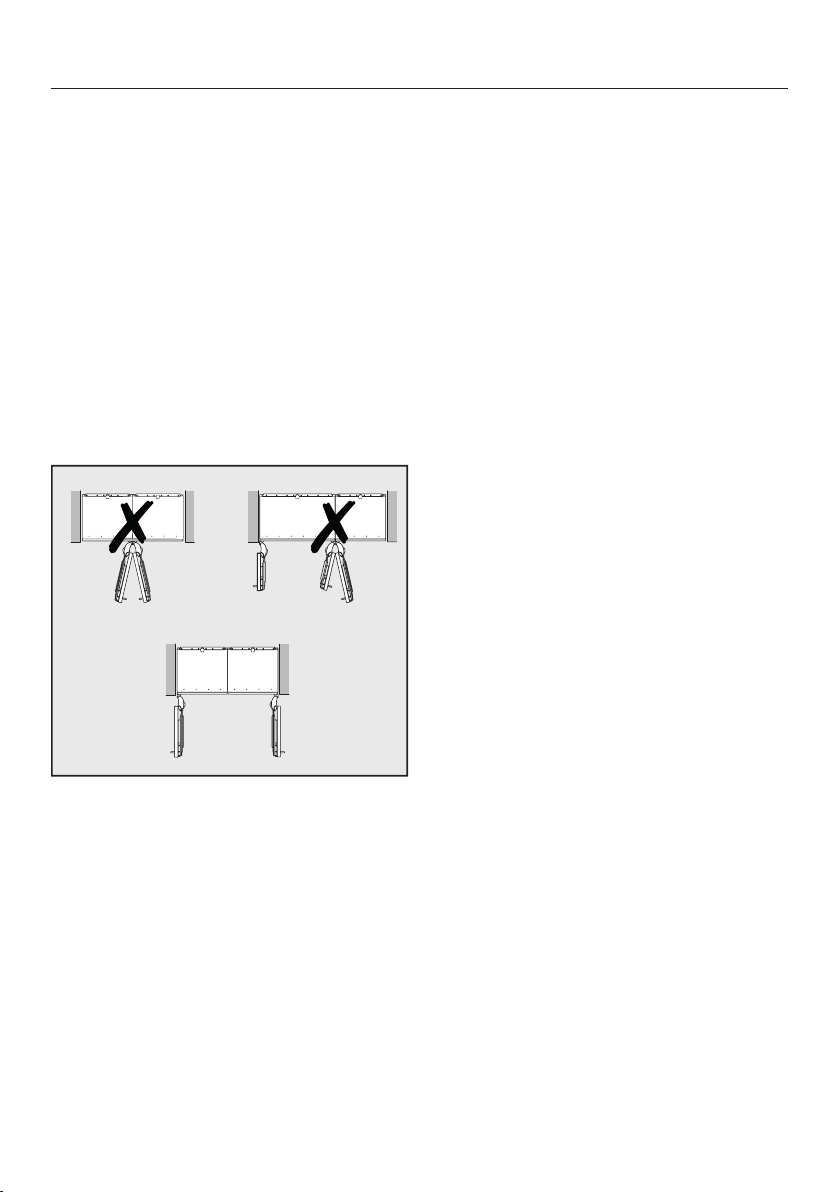
Installation information
17
The appliances are secured individually
in their niche using the supplied instal-
lation material.
If the partition wall a is narrower than
65/16" (160mm), you will need the
side panel heater from the side-by-side
installation kit to prevent condensation
from forming and any resulting damage.
If the partition wall a is thicker than
65/16" (160mm), you do not need the
side-by-side installation kit, nor the side
panel heater.
. . .without partition wall
If the appliances are to be installed next
to each other without a partition wall
between them, they will need to be
joined together with the side-by-side in-
stallation kit. In addition, you must in-
stall the side panel heater to prevent
condensation from forming and any re-
sulting damage.
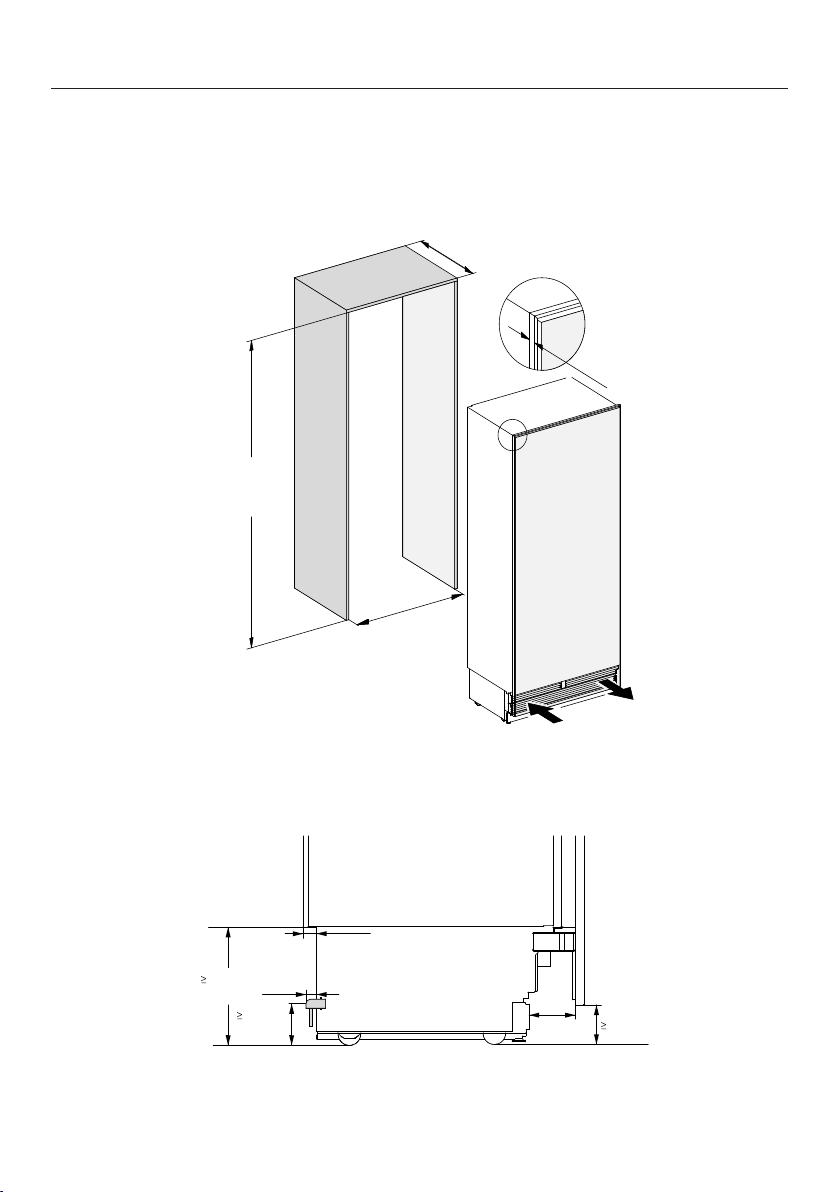
Installation dimensions
18
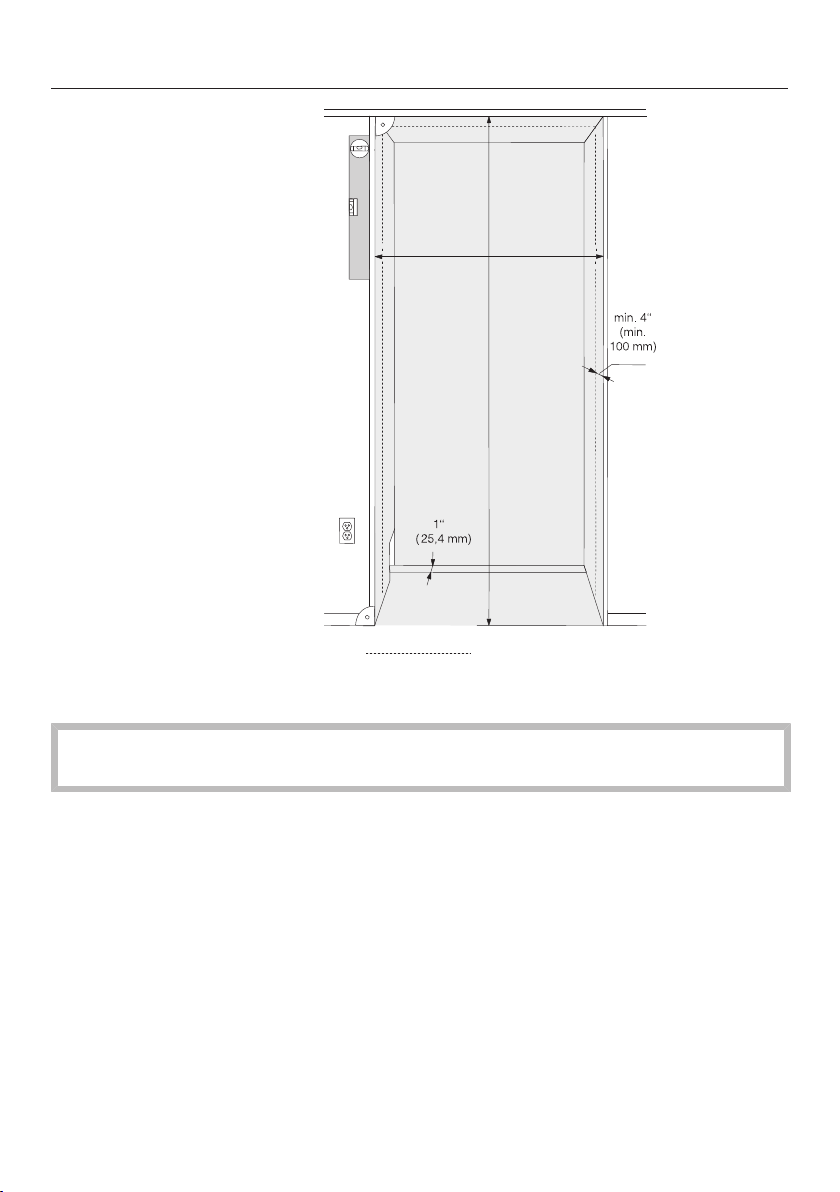
– The electrical connection must not be positioned higher than 9"(228.6mm)
above the floor.
The electrical outlet must not be concealed behind the appliance and must be
easily accessible in an emergency.
Installation dimensions
19
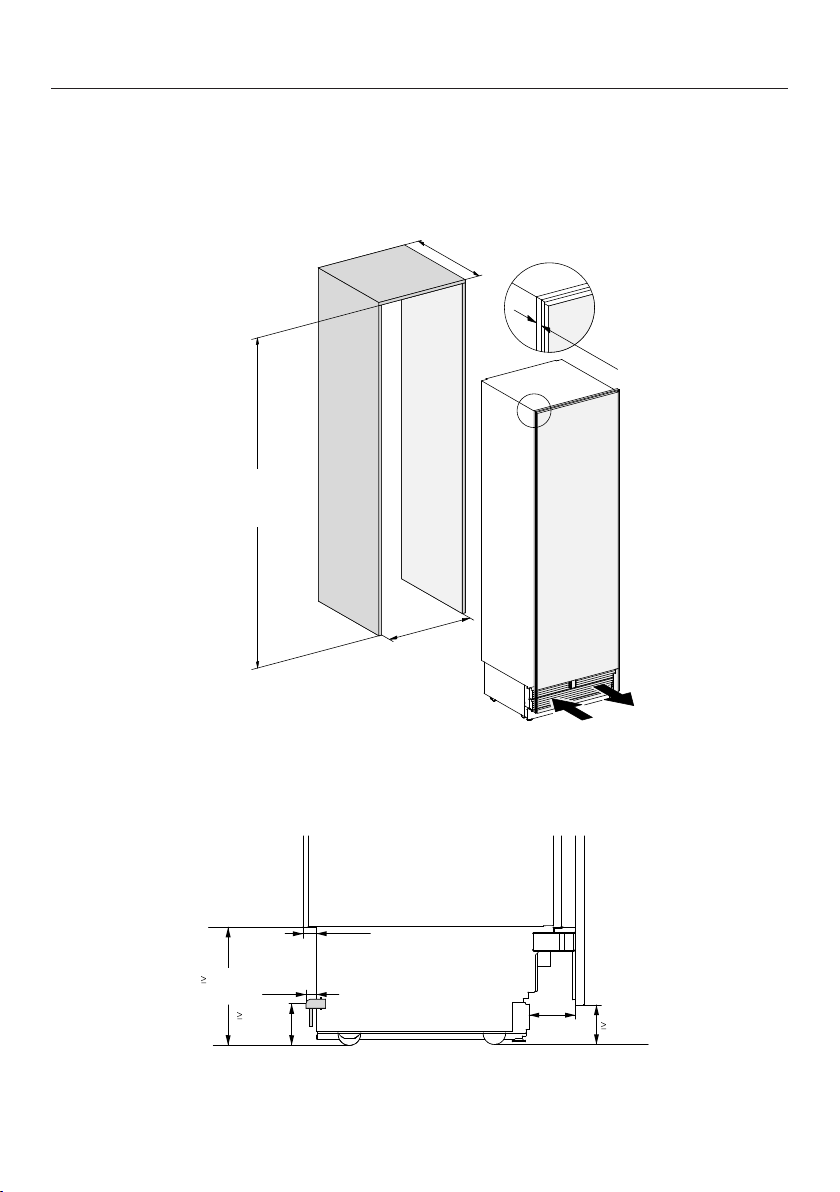
K 2601 SF
3/4"
(19 mm)
24"
(610 mm)
84" – 85 3/16"
(2134 – 2164 mm)
≥ 24"
(≥ 610 mm)
1 3/16"
(30 mm)
7/8"
(22 mm)
10 5/16"
(262 mm)
4"
(102 mm)
4"
(102 mm)
3 5/8"
(92 mm)
side view
Installation dimensions
20
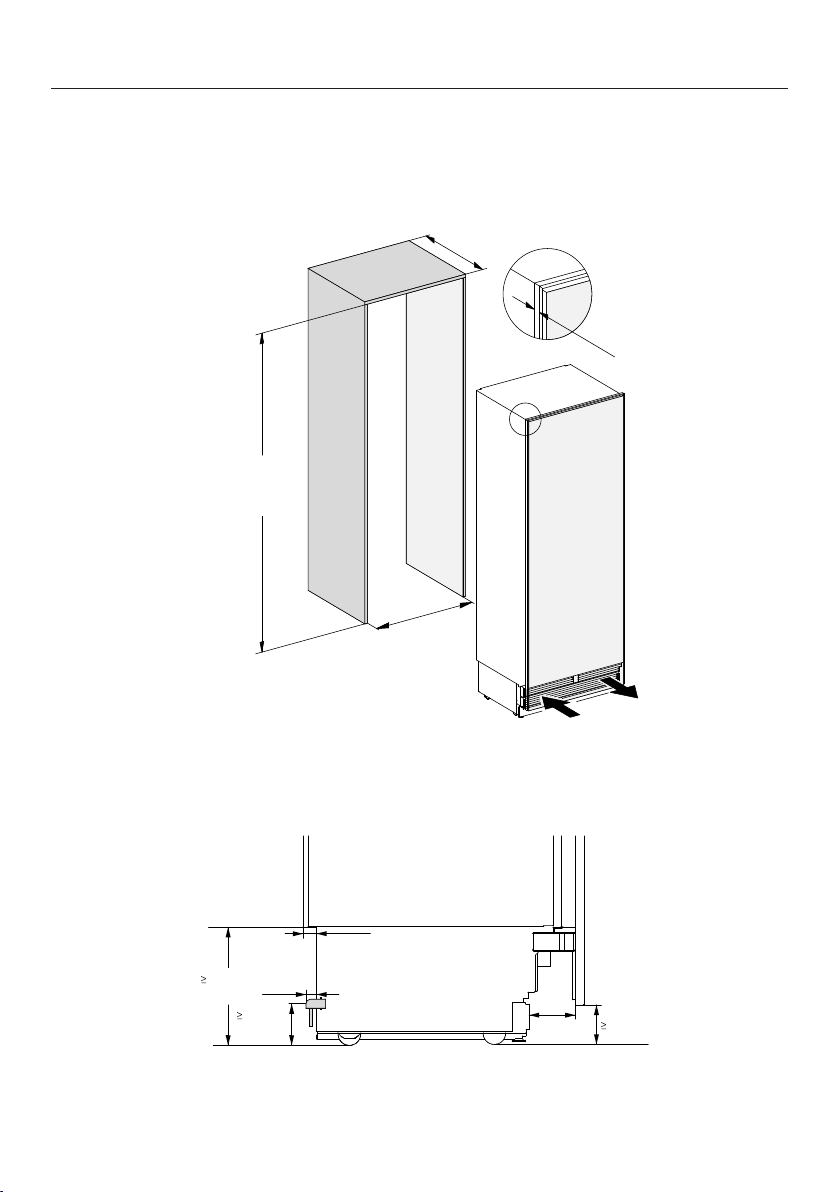
K 2801 SF, K 2811 SF
≥ 24"
(≥ 610 mm)
30"
(762 mm)
84" – 85 3/16"
(2134 – 2164 mm)
3/4"
(19 mm)
1 3/16"
(30 mm)
7/8"
(22 mm)
10 5/16"
(262 mm)
4"
(102 mm)
4"
(102 mm)
3 5/8"
(92 mm)
side view
Installation dimensions
21
K 2901 SF, K 2911 SF
3/4"
(19 mm)
≥ 24"
(≥ 610 mm)
36"
(915 mm)
84" – 85 3/16"
(2134 – 2164 mm)
1 3/16"
(30 mm)
7/8"
(22 mm)
10 5/16"
(262 mm)
4"
(102 mm)
4"
(102 mm)
3 5/8"
(92 mm)
side view
Installation dimensions
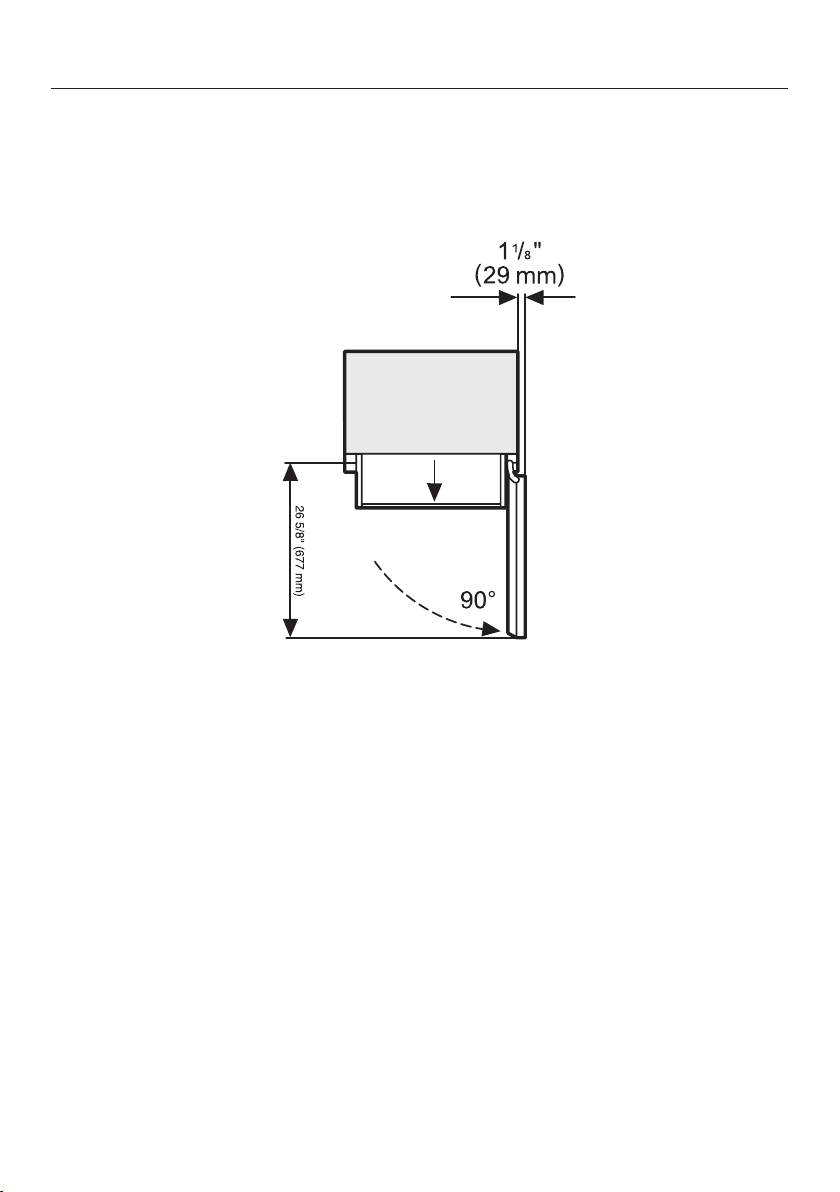
22
Dimensions when the appliance door is open
(opening angle 90°)
K 2601 SF
Installation dimensions
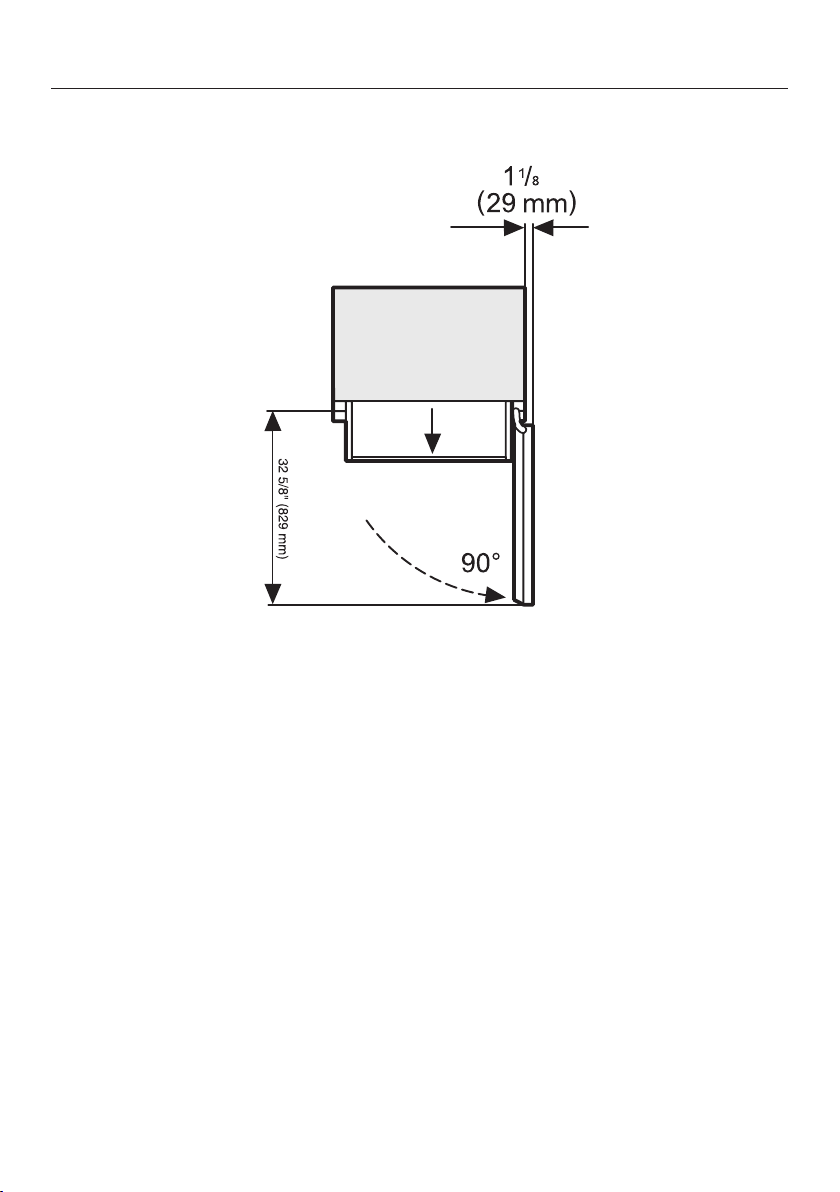
23
K 2801 SF, K 2811 SF
Installation dimensions
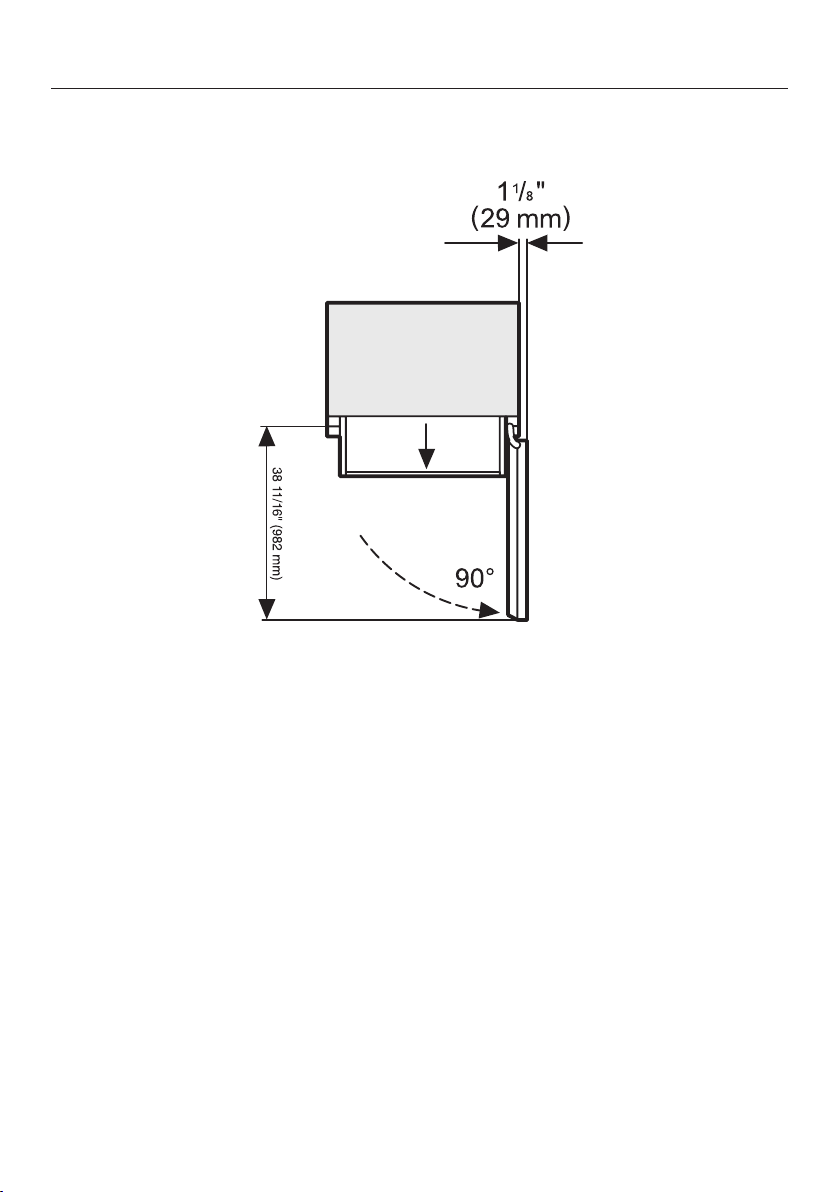
24
K 2901 SF, K 2911 SF
Installation dimensions
25
Dimensions when the appliance door is open
(opening angle 115°)
K 2601 SF
115
°
11 3/4"
(299 mm)
26 5/8" (677 mm)
Installation dimensions
26
K 2801 SF, K 2811 SF
115
°
Installation dimensions
27
K 2901 SF, K 2911 SF
16 7/8"
(428
mm)
115
°
--
/
/
/
,
Building in the appliance
28
Before starting...
It is essential to read these installa-
tion instructions carefully before
starting to install the appliance.
The appliance should be installed by
a suitably qualified tradesman in ac-
cordance with these installation in-
structions. Safe operation of the ap-
pliance is only assured if it has been
installed and connected in accor-
dance with the installation instruc-
tions.
Risk of damage and injury!
This appliance is very heavy and can
tip forwards when the door is open.
Keep the appliance door shut until
the appliance has been built in and
secured in its housing in accordance
with the operating and installation in-
structions.
The appliance is both large and
heavy. Installation must be carried
out by two people.
The appliance must be installed in ac-
cordance with local regulations. If local
regulations are not available, the follow-
ing regulations must be observed:
– in the USA: the National Electric
Code, ANSI/NFPA 70 - latest edition/
State and Municipal codes and/or lo-
cal codes.
– in Canada: the Canadian Electric
code C22.1 - latest edition/Provincial
and Municipal codes and/or local
codes.
Tools required
– Cordless drill
– TX20 screwdriver
– Hammer drill
– Drill bits in various sizes, depending
on materials
– Hammer
– Open-ended wrench
– Ratchet wrench, attachment: socket,
5/16" (8mm)
– Adhesive tape
– Utility knife
– Pipe wrench
– Level
– Tape measure
– Pencil
Other
– Step ladder
– Hand truck
Building in the appliance
29
Aligning the installation niche
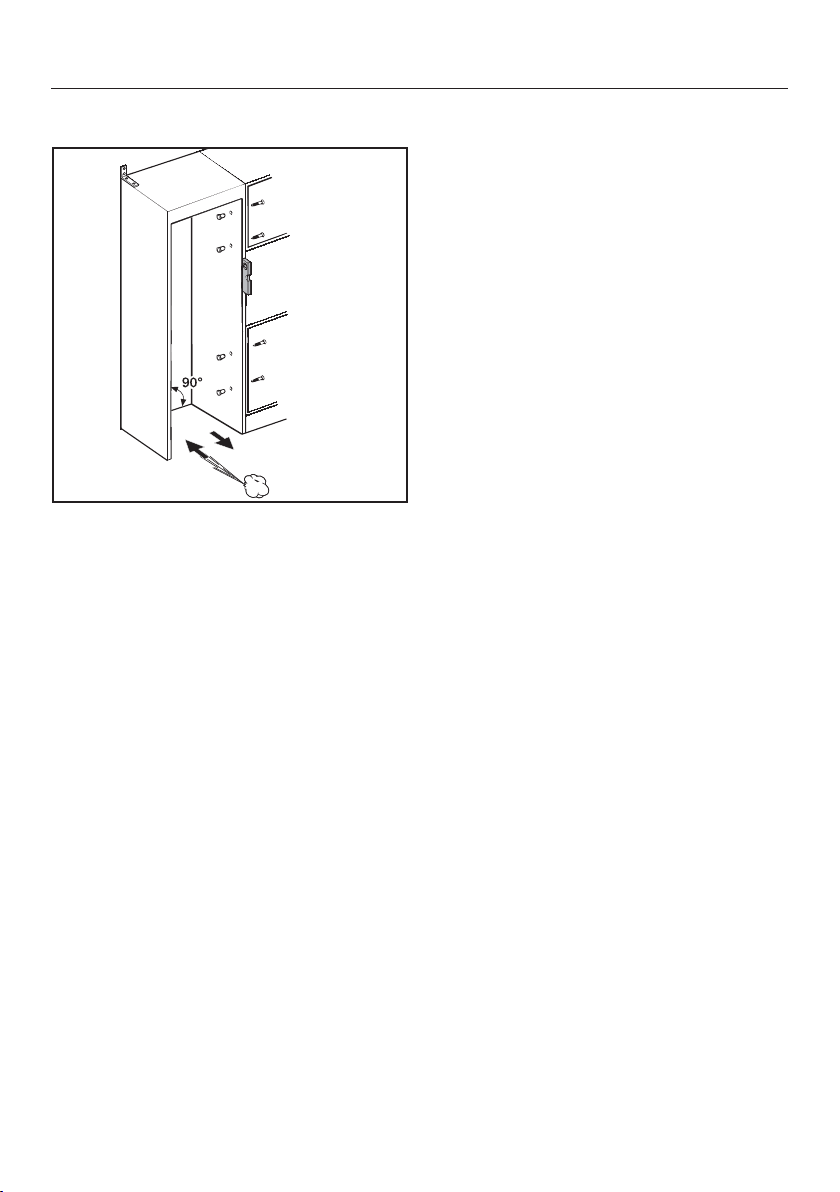
The installation niche must be carefully
aligned using a level before installing
the appliance. The niche corners must
be at 90°angles to each other, other-
wise the cabinet door will not sit
straight on all four corners.
– The side panels of the installation
niche must be even.
– The surrounding walls of the installa-
tion niche must be at least
5/8” (16mm) thick.
– The surrounding walls must be se-
curely fixed to the floor or wall.
– The shortened side walls must be at
least 4" (100mm) thick.
– The baseboard must be at least
1/2” (13mm) thick (preferably
3/4” (19mm)).
Checking the installation niche
Check the installation dimensions.
Check the position of the electrical
connections (see “Electrical connec-
tion”).
Check that all adjacent cabinets/units
are securely fixed to the wall. All adja-
cent cabinets/units must be securely
fixed to the wall.
Check the adjacent cabinets/units for
possible collisions when opening
doors (door opening angle).
Building in the appliance
30
Before installation
Heavy weight!
This appliance is very heavy and can
tip forwards when the door is open.
Before installation, remove any ac-
cessories from the back of the appli-
ance.
Check the appliance for damage dur-
ing transportation.
Do not install a damaged appliance.
Check that all parts at the back of the
appliance are unhindered.
To protect the floor when installing
the appliance, secure an off-cut of
flooring or similar material to the floor
in front of the installation area.
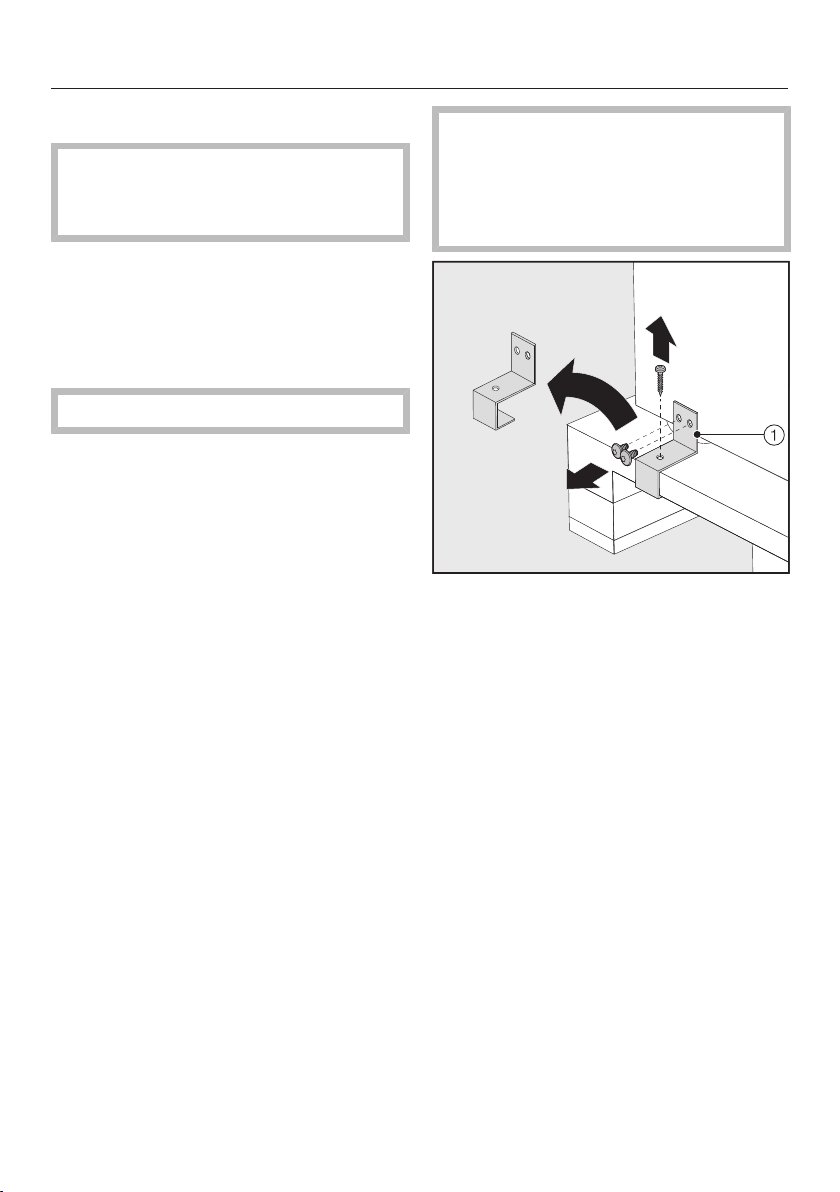
Risk of tipping over!
Make sure the appliance is no longer
secured to the pallet as soon as you
unscrew the brackets that fix the ap-
pliance to the pallet.
Unscrew the brackets .
With the help of several people as re-
quired, carefully lift the appliance
from the pallet, starting with the back
of the appliance.
As soon as you have set the appliance
upright, you can move it using the
rollers on the bottom.
Building in the appliance
31
Preparing the installation niche
Keep the appliance door closed
until the appliance is secured inside
the niche.
Risk of tipping over!
The installation niche must be fixed
to the wall behind it with several
screws. Only this can ensure that the
appliance will not tip over after being
installed.
Always use the provided anti-tip
brackets to secure the niche.
Due to the sheer size and weight of
the appliance, it needs to be ensured
that it cannot tip forwards once it is
built into the niche.
Using the installation equipment
Parts required for installation of the
appliance are supplied with the appli-
ance. The plastic bags supplied are
marked with letters for easy identifica-
tion.
When performing the individual as-
sembly steps, observe the letters
specified and use the matching plas-
tic bag with the required installation
equipment.
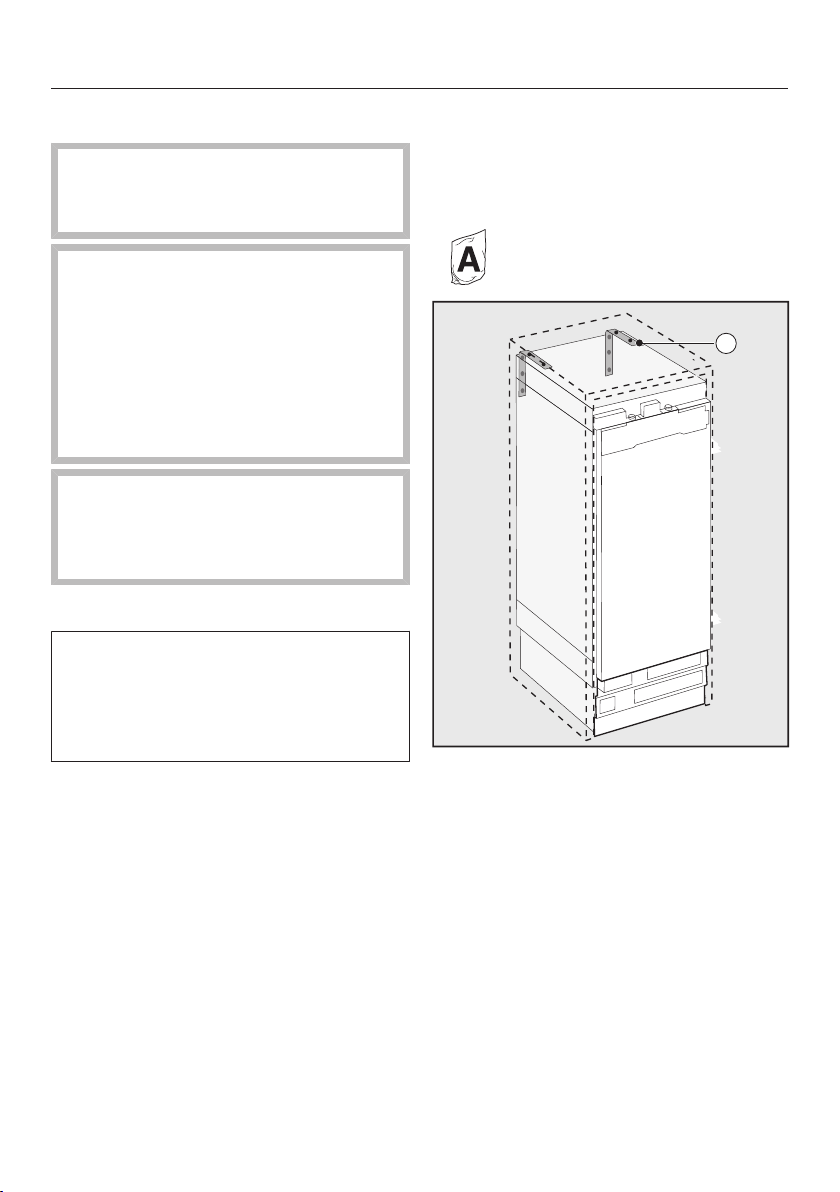
Securing the installation niche
The provided anti-tip brackets en-
sure the installation niche is securely
fixed to the wall.
2
Use 2 anti-tip brackets for each in-
dividual appliance or 4 anti-tip brack-
ets for each (side-by-side) combina-
tion of appliances.
Position the anti-tip brackets on
the left and right of the niche.
Building in the appliance
32
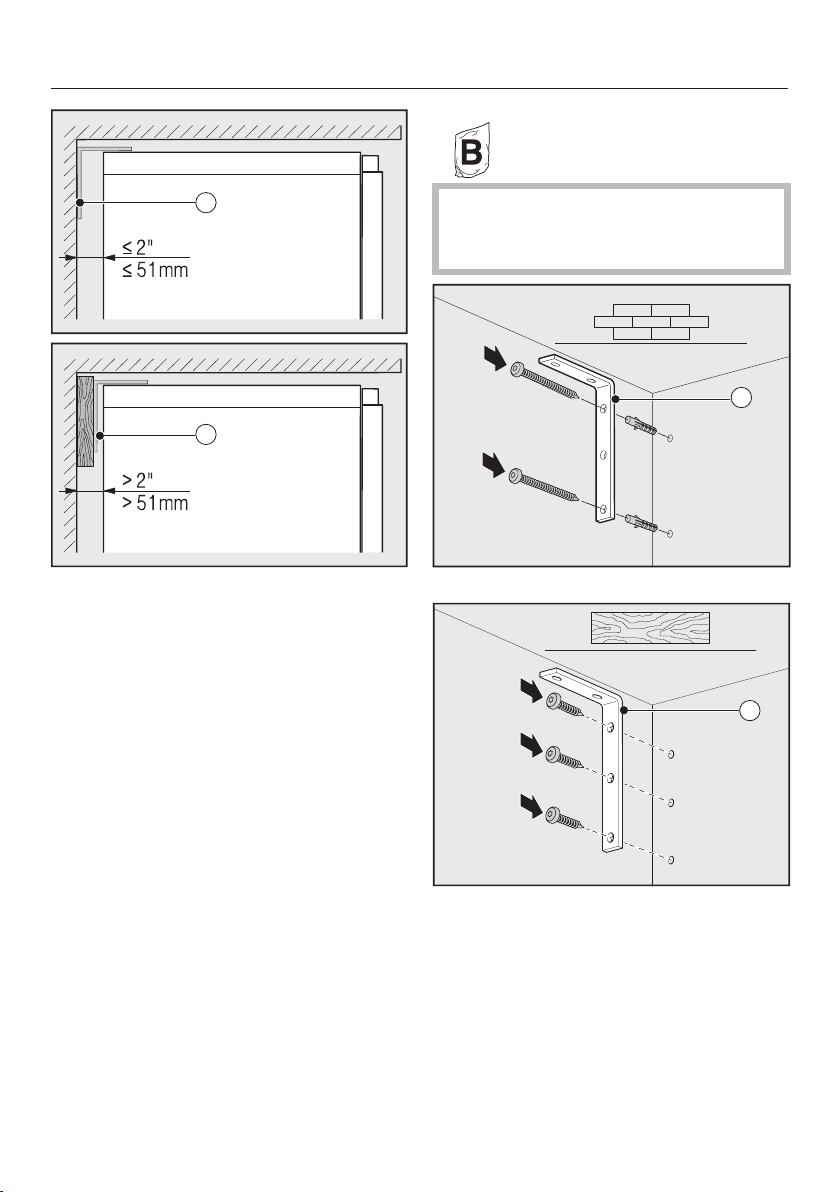
2
2
Make sure that the gap between the
appliance's rear wall and the installa-
tion niche does not exceed
2" (51mm).
Place a wooden wedge behind the
anti-tip brackets if necessary.
While holding the anti-tip brackets in
place, mark the necessary drill holes
on the rear wall of the installation
niche.
Fixing screws for different uses and
types of material are supplied in the
accompanying pack:
2
Securing to concrete wall
2
Securing to a wooden wall
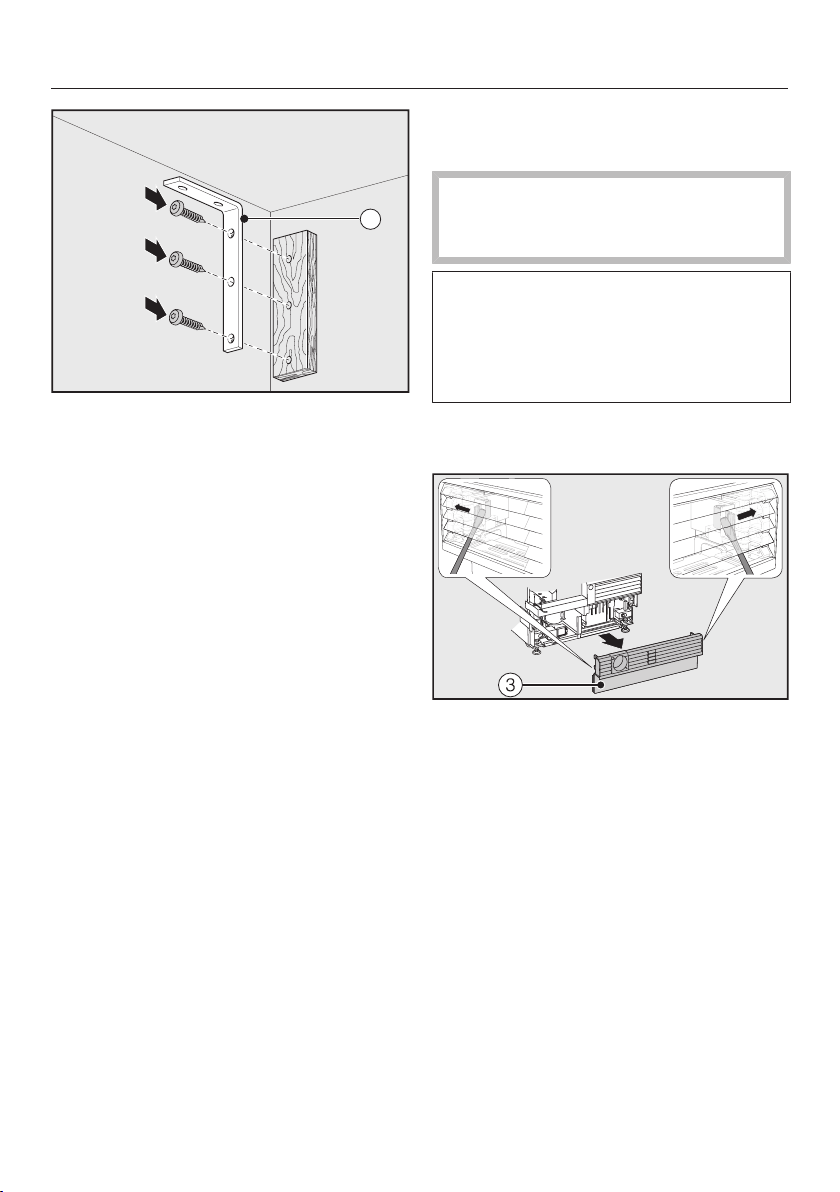
Building in the appliance
33
2
Securing with a wooden wedge
Secure the installation niche to the
wall using the anti-tip brackets .
Pushing the appliance into the
niche
Then push the appliance into the
niche, taking care not to damage the
electrical connection!
If you are installing several appliances
side by side, now secure the appli-
ances to one another (see the instruc-
tions for the side-by-side installation
kit).
Remove the baseboard from the
appliance base as follows:
Carefully guide a flat-head screw-
driver through the grate in the base-
board on both sides and use it to
push the internal plastic latches out-
wards to release the baseboard.
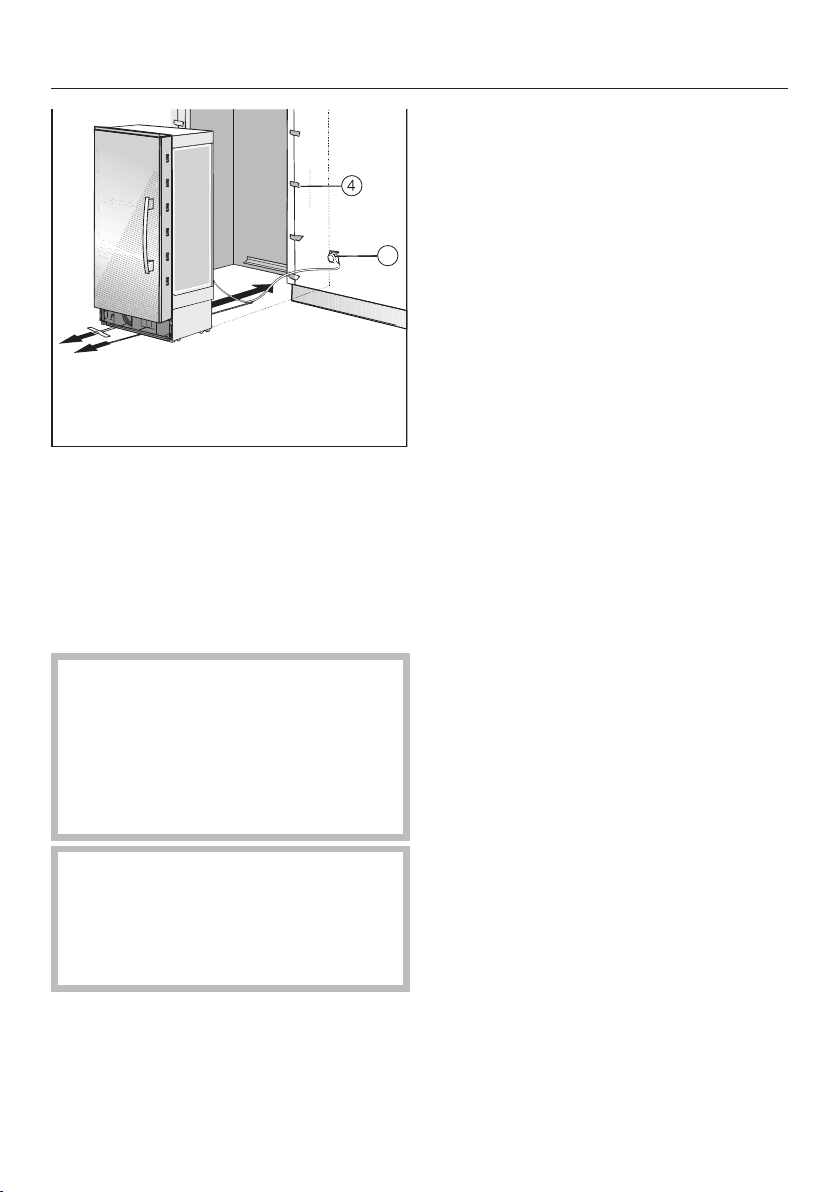
Building in the appliance
34
5
Affix edge protection to the adja-
cent cabinet fronts.
Insert the plug connector at the back
of the appliance (see “Electrical con-
nection”).
Insert the plug into the electrical
socket.
The electrical outletshould be close
to the appliance and easily accessi-
ble.
Otherwise, it must be possible to
switch the appliance on and off us-
ing an external all-pole switch with a
sufficient contact gap.
Risk of short circuit and over-
loading!
When installing appliances side by
side, each appliance must have its
own separate outlet.
Tip: To secure the power cord to pre-
vent it becoming caught:
Tie a piece of string to the middle of the
cord and as the appliance is being
pushed into the niche, pull the cord for-
ward underneath the appliance.
Carefully push the appliance into the
niche.
If the appliance cannot be pushed
into the niche (because the floor is
uneven, for example), unscrew the
rear feet slightly (see “Aligning the ap-
pliance”) and slide the appliance into
the niche.
Remove the edge protection from
the adjacent cabinet fronts.
Building in the appliance
35
Aligning the appliance
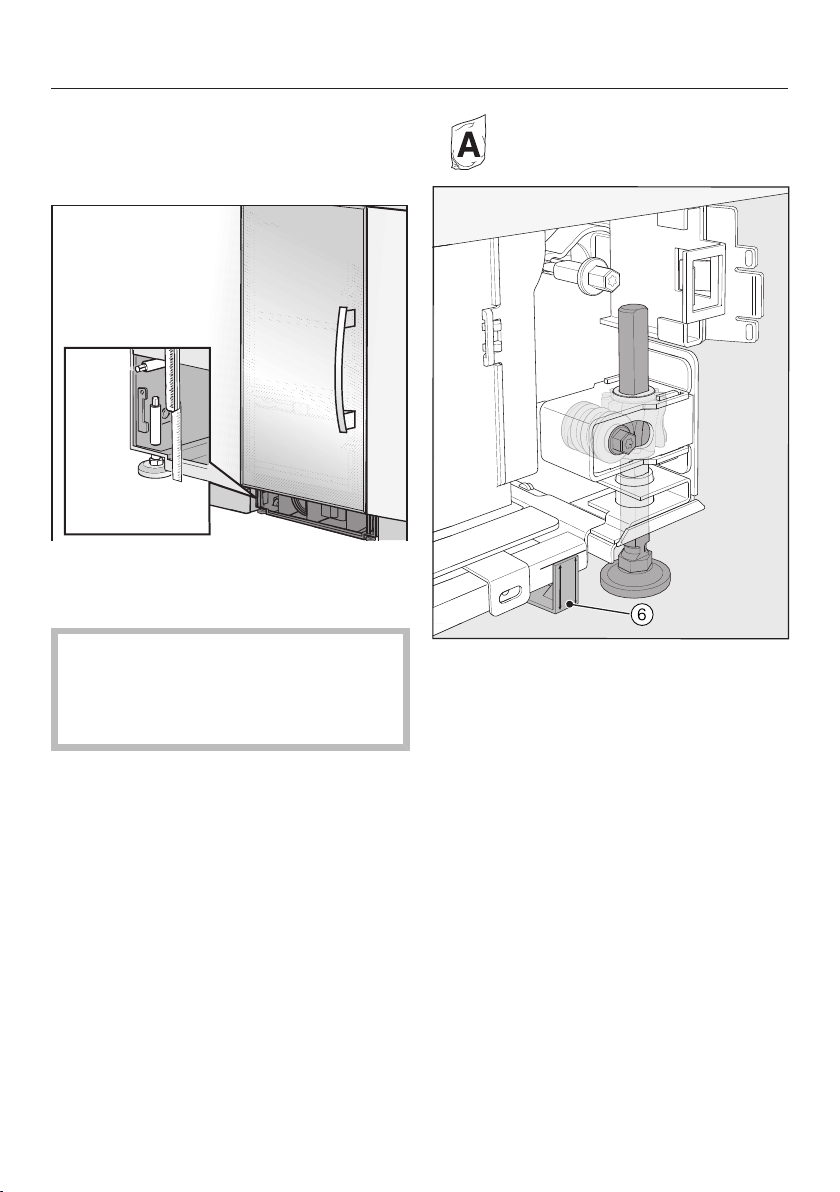
Align the appliance with neighboring
cabinet fronts.
The adjustable feet at the front and
back of the appliance can all be ad-
justed from the front.
Risk of damage!
Do not under any circumstances
use a cordless screwdriver to adjust
the front and rear feet.
Position the supplied spacers on
both sides on the markings next to
the adjustable feet at the front of the
appliance.
Building in the appliance
36
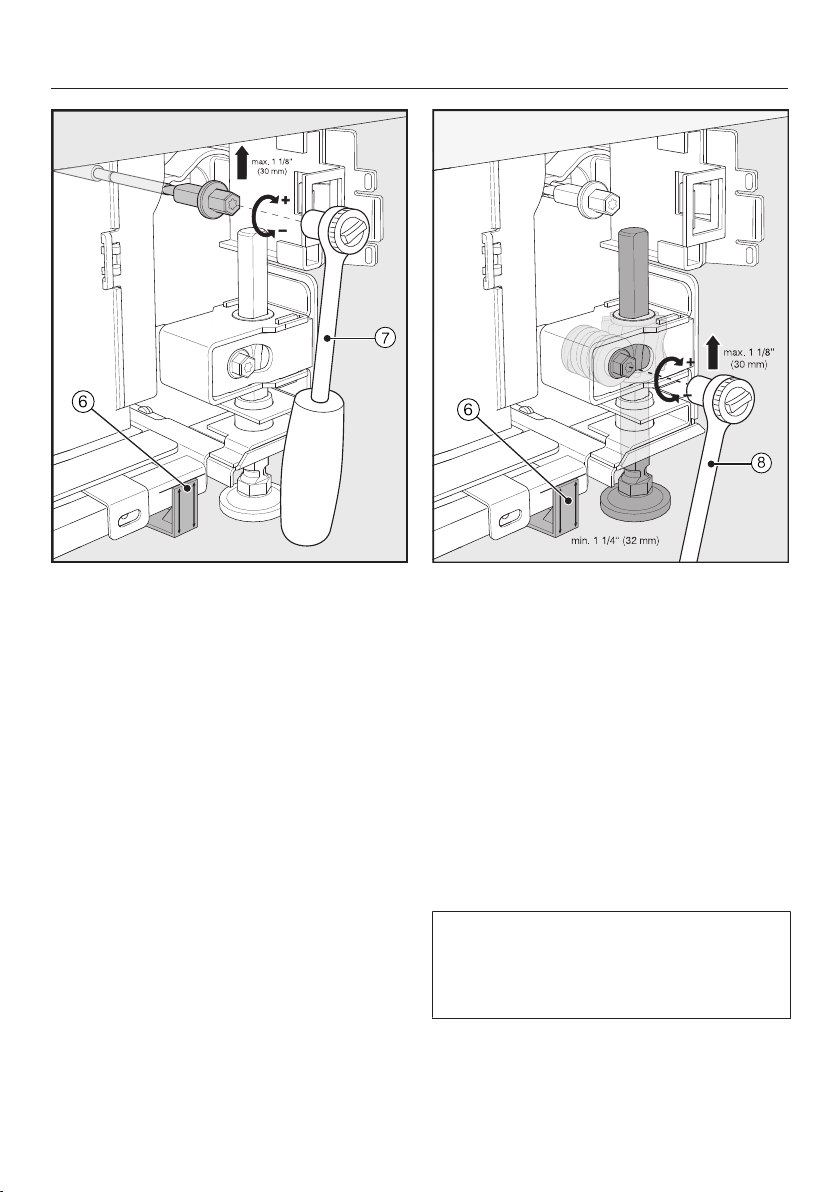
Adjust the rear feet with a ratchet
(attachment: 5/16" (8mm) socket) or
a TX20 screwdriver.
Adjust the front feet with a ratchet
(attachment: 5/16" (8mm) socket) or
a TX20 screwdriver.
Tip: Proceed carefully when adjusting
the feet, alternating between the left
and right feet.
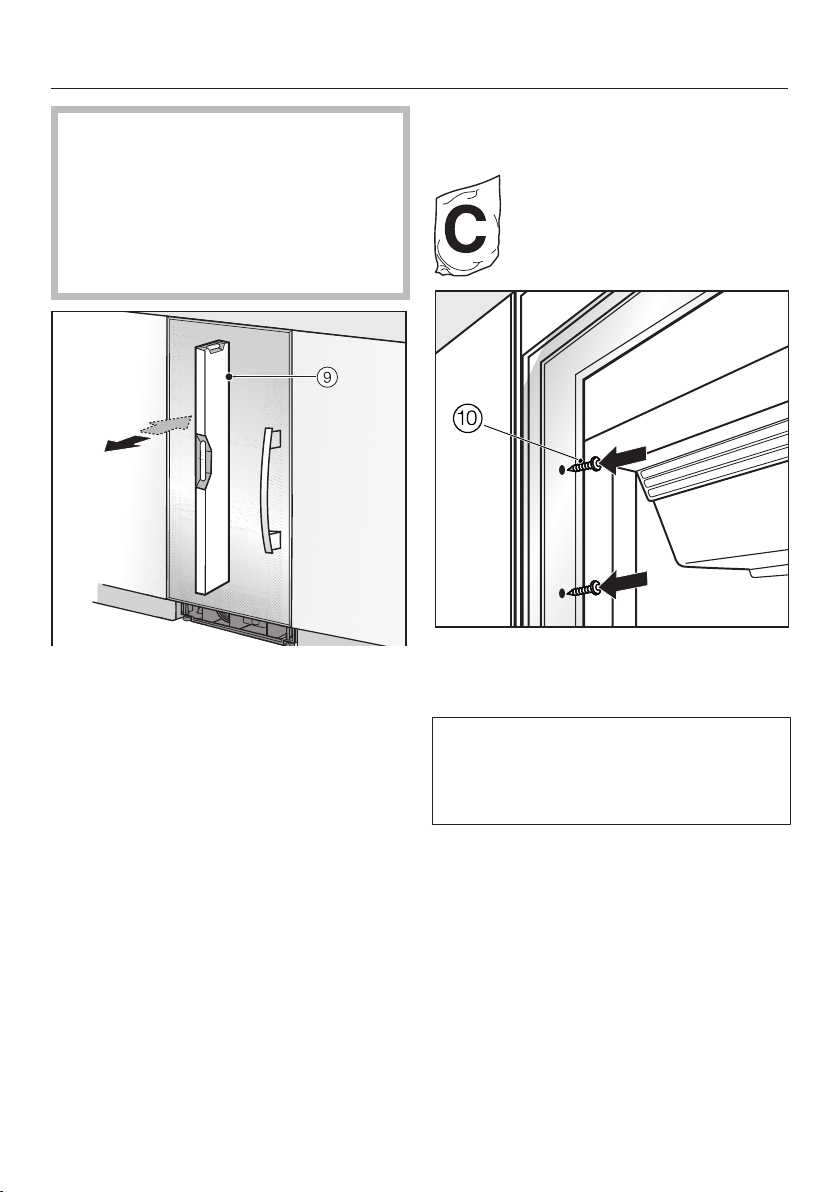
Unscrew the feet and on both
sides at least until the marking on the
base is aligned with the required
11/4" (32mm) on the spacer. The
standard dimension of 11/4" (32mm)
relates to a niche height of
84" (2134mm).
It is important to align the feet to a
height of at least 11/4" (32mm) so
that the appliance's ventilation works
properly via the base.
Building in the appliance
37
Risk of damage!
Unscrew the feet only until the
marking on the base is aligned to a
maximum of 27/16" (62mm) (max.
niche height of 85 3/16" (2164mm)).
Otherwise the rear foot adjustment
will be damaged.
Use a level to check the alignment
of the appliance.
Securing the appliance in the
niche
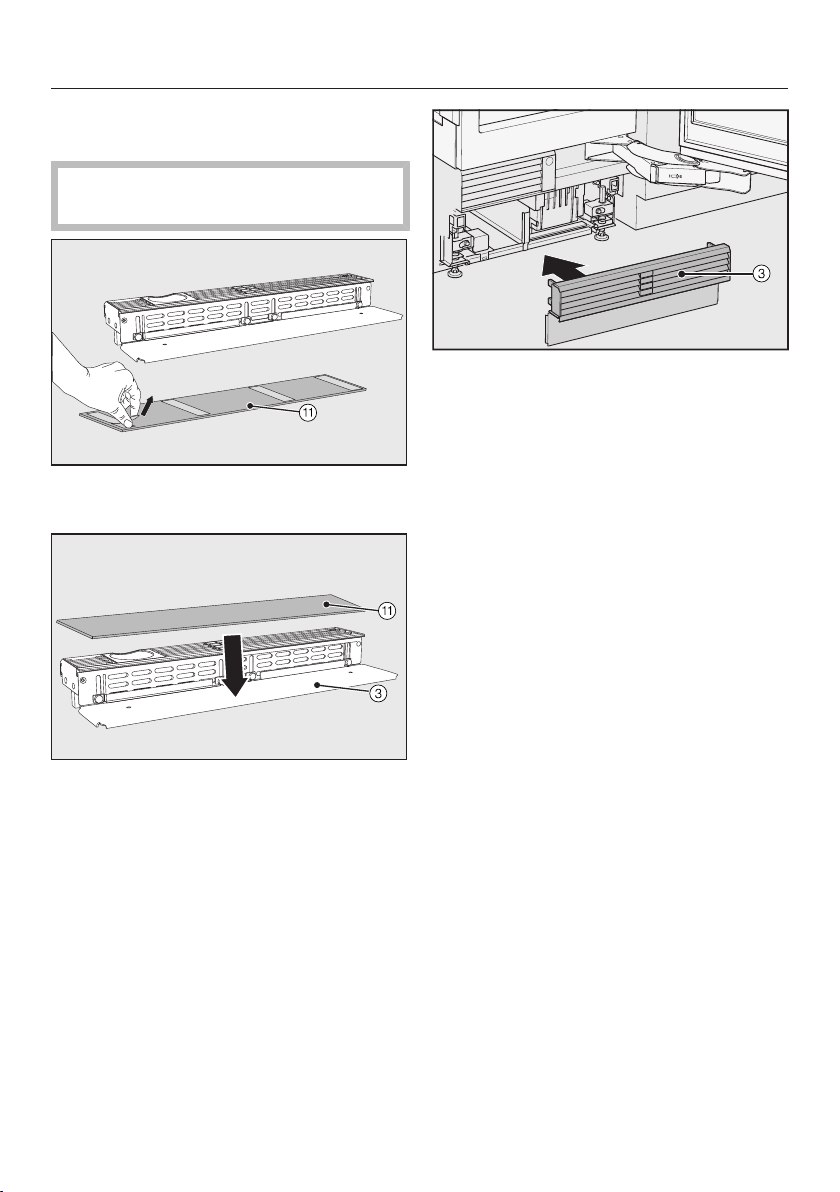
Use the screws supplied to secure
the refrigeration appliance on both
sides.
In a side-by-side combination, only
the external panels of the two appli-
ances can be secured to the cabinet
wall.
Building in the appliance
38
Securing the base cover plate and
the baseboard
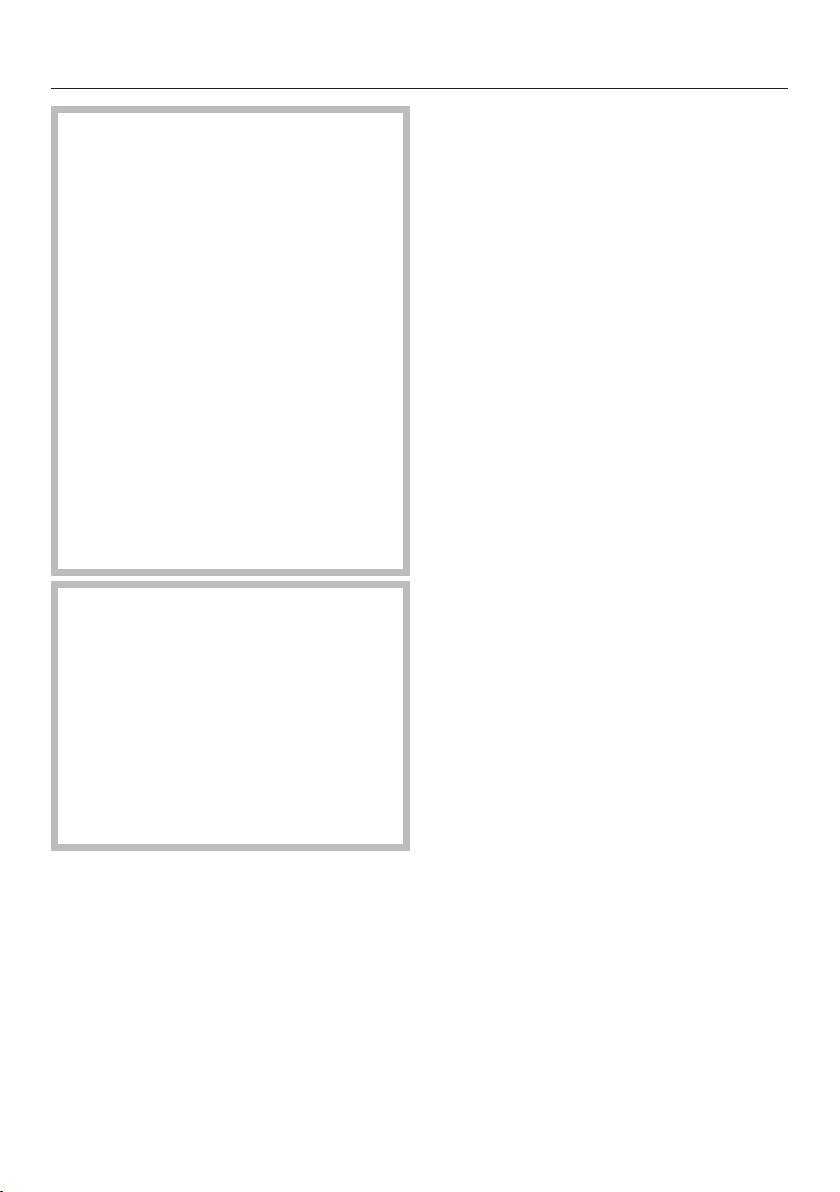
Do not cover the vents in the base.
This will damage the appliance!
Remove the film from the base cover
plate .
Secure the base cover plate to the
baseboard.
Click the baseboard onto the bot-
tom of the appliance base.
Electrical connection
39
Risk of electric shock!
The appliance must only be switched
on when it has been installed in ac-
cordance with the installation in-
structions.
Ground the appliance.
The appliance must not be grounded
via a gas pipe.
If in doubt, have a suitably qualified
and experienced electrician check
that the installation complies with rel-
evant regulations.
Do not install a fuse into neutral cur-
rent or grounding electrical circuit.
Do not use extension cords or un-
grounded (two prong) adapters.
Do not use a frayed or damaged
power cord.
Risk of electric shock!
For protection against electric shock,
this appliance is equipped with a
pole-free plug which is protected
against reverse polarity. The electri-
cal outlet must be properly
grounded.
Do not remove the round grounding
connector pin from the plug.
Use only a grounded plug adapter.
Wait for 1hour after installation before
plugging the appliance into the power
supply. This allows coolant and refriger-
ator oil to settle in accordance with reg-
ulations.
Ensure that the voltage of the power
supply corresponds with the connection
voltage of the appliance. A power sup-
ply of 110–120V, 60Hz and 10–
16Amp, which is protected by a power
switch or a fuse, is required to operate
the appliance.
The manufacturer recommends operat-
ing the appliance on a dedicated circuit
to avoid overloading the electrical cir-
cuit.
All relevant legal electrical, fire, and
building regulations must be observed
when installing the electrical outlet and/
or the appliance.
In certain countries, appliances are re-
quired to be connected to the electrical
supply via a wall-mounted ON/OFF
switch.
To avoid the risk of fire, electric shock,
or other injuries, the appliance must be
installed and connected by a suitably
qualified electrician in accordance with
all relevant local and national regula-
tions and standards, including fire pre-
vention.
The socket must not be concealed be-
hind the appliance and must be easily
accessible so that the appliance can be
quickly disconnected from the electrical
supply in case of an emergency.
Electrical connection
40
If the outlet is no longer accessible after
installation, an additional means of dis-
connection must be provided for all
poles. Suitable means of disconnection
include switches with an all-pole dis-
connect device with a contact opening
of at least 1/8" (3mm). These can be
circuit breakers, fuses, and relays.
The plug and power cord must not
come into contact with the back of the
appliance as vibrations can cause dam-
age to these components. This could
result in a short circuit.
Do not plug other appliances into elec-
trical outlet behind this appliance.
Do not connect the appliance to a
stand-alone inverter such as those used
with an autonomous energy source e.g.,
solar power.
When the appliance is turned on, power
surges could result in a safety switch-
off. This can damage the electronics.
The appliance must not be used with
so-called energy saving devices ei-
ther. These reduce the amount of en-
ergy supplied to the appliance, causing
it to overheat.
If the power cord needs to be replaced,
this must be performed by a qualified
technician.
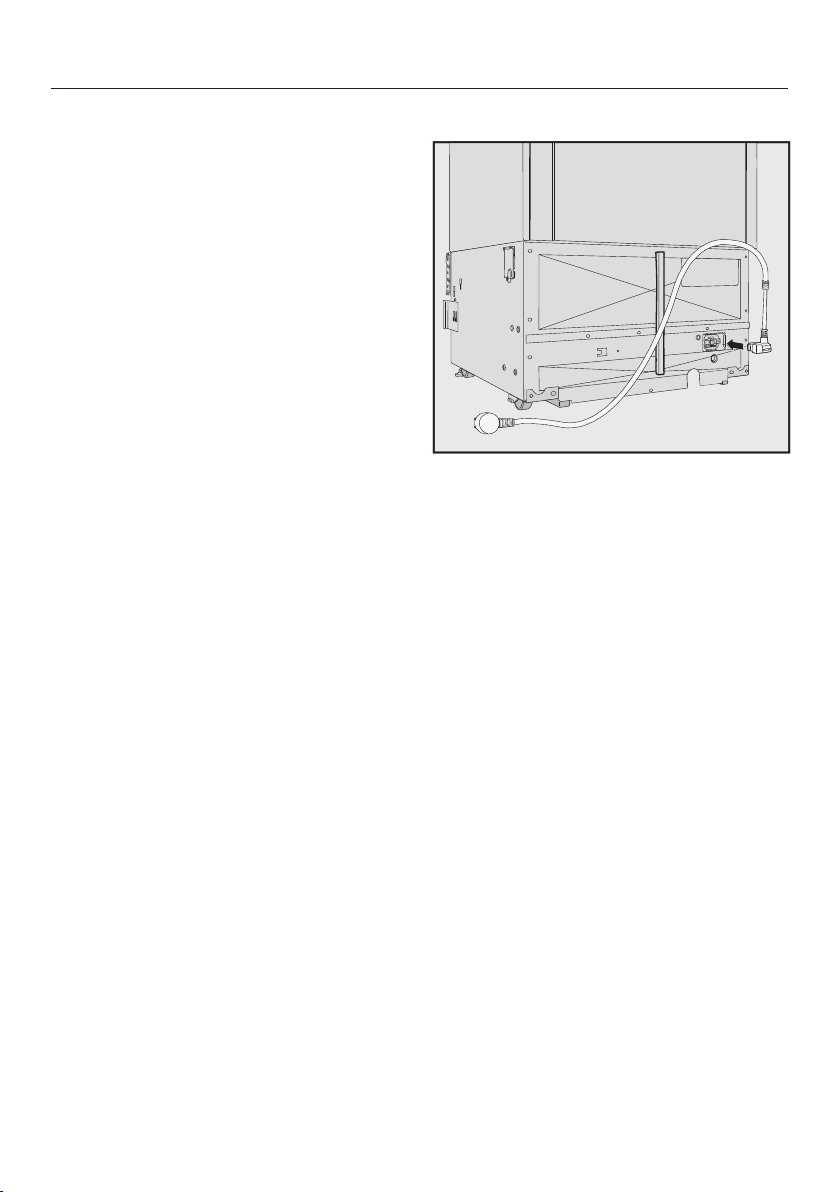
Connecting the appliance
Insert the plug into the back of the
appliance.
Make sure that the plug has clicked into
position correctly.
Insert the plug into the electrical out-
let and switch on.
The appliance is now connected to the
electricity supply:
Follow the steps described in “Switch-
ing the appliance on and off”, section
“Switching on the appliance”.
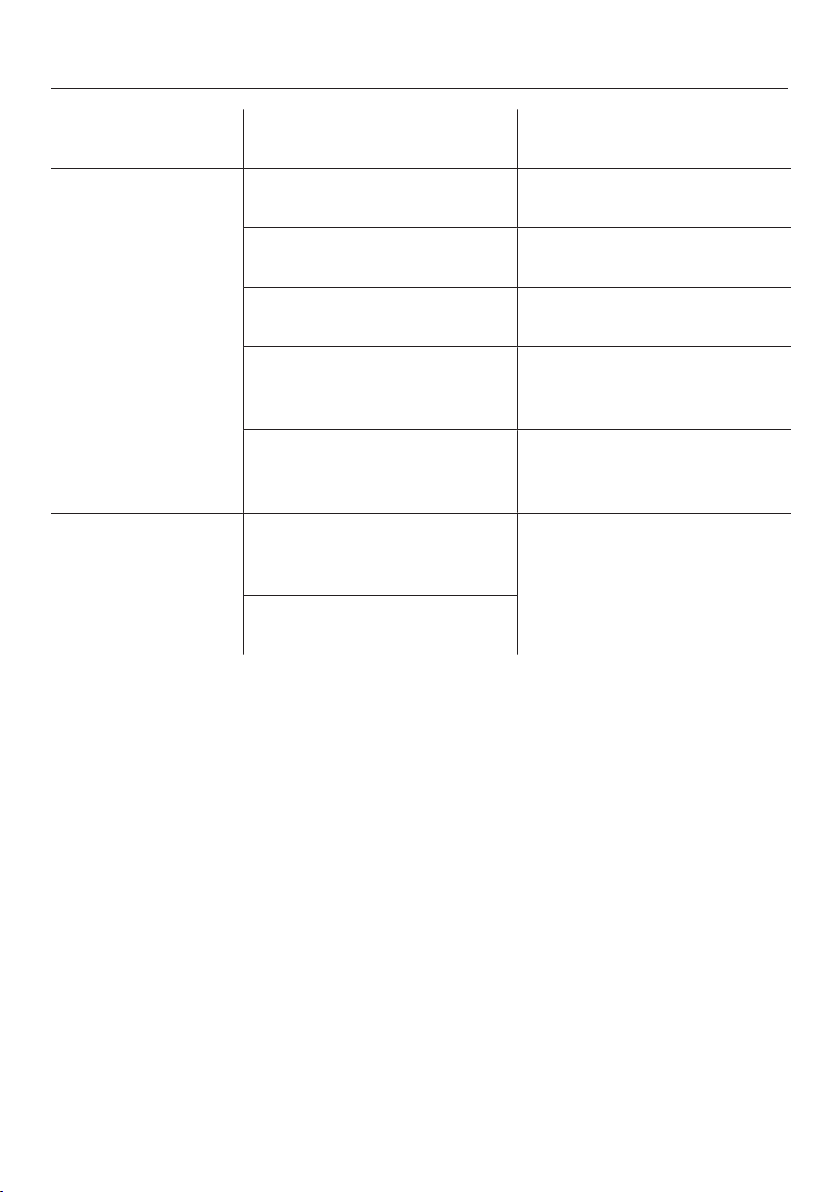
How to save energy
41
Normal
energy consumption
Increased
energy consumption
Installation /
Maintenance
In a well-ventilated room. In an enclosed, poorly venti-
lated room.
Protected from direct sun-
light.
In direct sunlight.
Away from heat sources (ra-
diator, range/oven).
Near a heat source (radiator,
oven).
Where the ideal room tem-
perature is approx. 68°F
(20°C).
Where the ambient room
temperature is above 77°F
(25°C).
Air vents uncovered and
dusted regularly.
Where the ventilation open-
ings are blocked and full of
dust.
Temperature
setting
39°F to 41°F (4°C to 5°C) in
the refrigerator section
The lower the temperature in
the appliance, the higher the
energy consumption.
SmartFresh drawer close to
32°F (0°C)

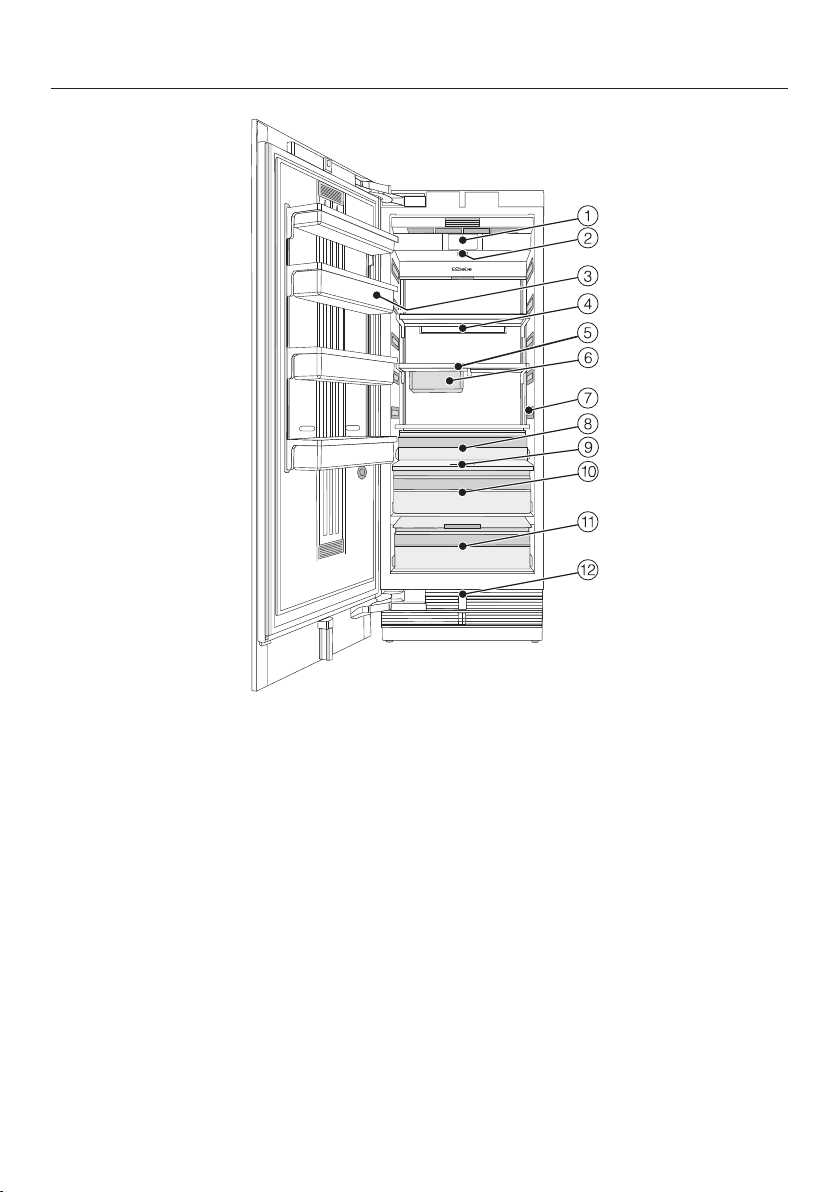
How to save energy
42
Normal
energy consumption
Increased
energy consumption
Use The drawers, and shelves
are arranged as they were
when the appliance was de-
livered.
Only open the door when
necessary and for as short a
time as possible. Store food
in an organized way.
Frequent opening of the
door for long periods will
cause a loss of coldness.
The appliance will try to cool
down and the compressor
will run for longer periods.
When shopping, use a
cooler bag and place the
food in the appliance as
soon as possible.
Replace any food removed
as quickly as possible, be-
fore it warms up too much.
Allow hot food and drinks to
cool down before placing
them in the appliance.
Hot food or food at room
temperature raises the tem-
perature inside the refrigera-
tion appliance. The appli-
ance will try to cool down
and the compressor will run
for longer periods.
Store food well packaged or
covered.
The evaporation or conden-
sation of liquids in the refrig-
erator section will cause a
loss of coldness.
Place frozen food in the re-
frigerator section to defrost.
Do not overfill the appliance
in order to allow the air to
circulate.
Poor air circulation will
cause a loss of coldness.
Guide to the appliance
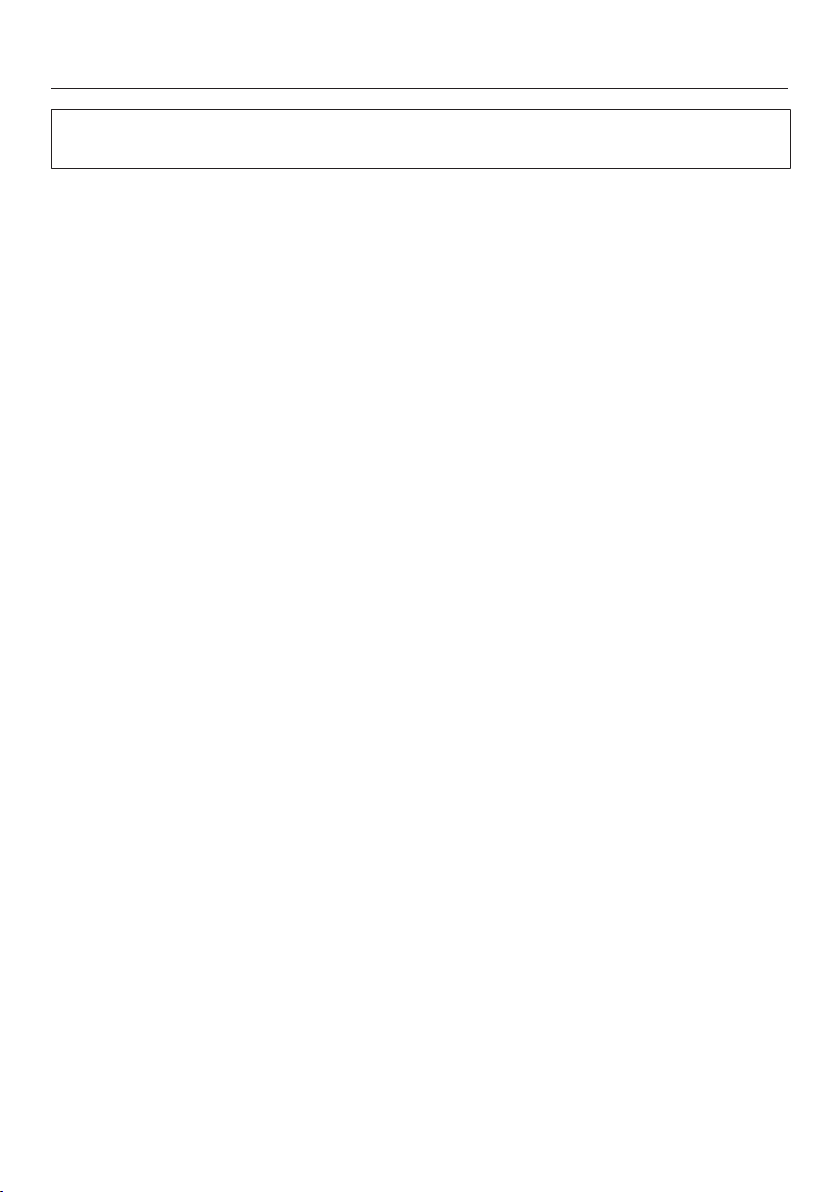
43
a
Display
b
On/Off switch
c
Door shelves in the appliance door
d
Holder for the Active AirClean filter
e
Shelves
f
Hanging drawer
g
Interior lighting
h
Fruit and vegetable drawer
i
Moisture regulator
j
Humidity-controlled compartment with moisture regulator for fruit and vegeta-
bles
k
Dry compartment with temperature adjustment for food which goes off quickly
l
Automatic door opening
Guide to the appliance
44
The dry compartment in the SmartFresh zone fulfills the requirements of a cold
storage compartment according to ENISO15502.
Guide to the appliance
45
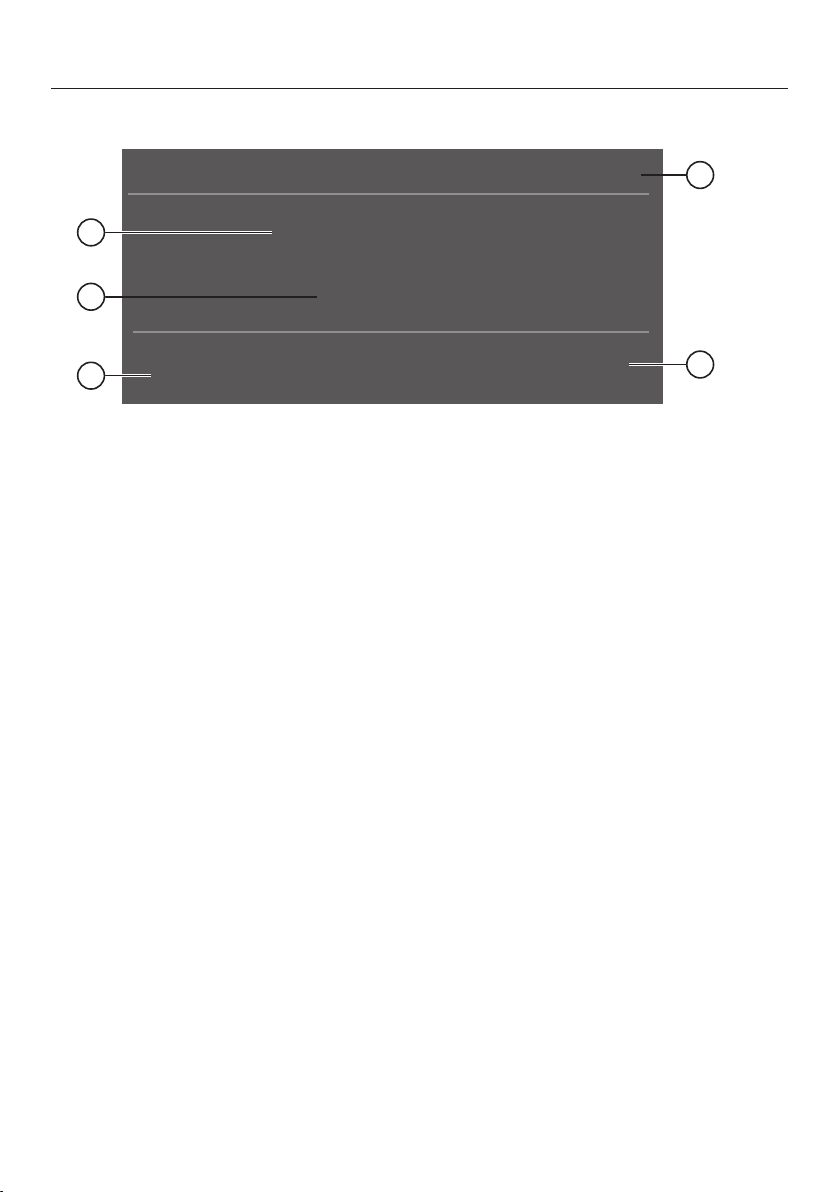
Main screen
°F
39
1
2
3
4
5
a
Automatic SuperCool display
(only visible when the Automatic SuperCool function has been switched on)
b
Temperature display (target temperature)
c
Sensor control
for setting the temperature
d
Display for Miele@home connection status
(only visible when Miele@home has been set up)
e
Sensor control
for adjusting various settings in settings mode
Guide to the appliance
46
Settings mode
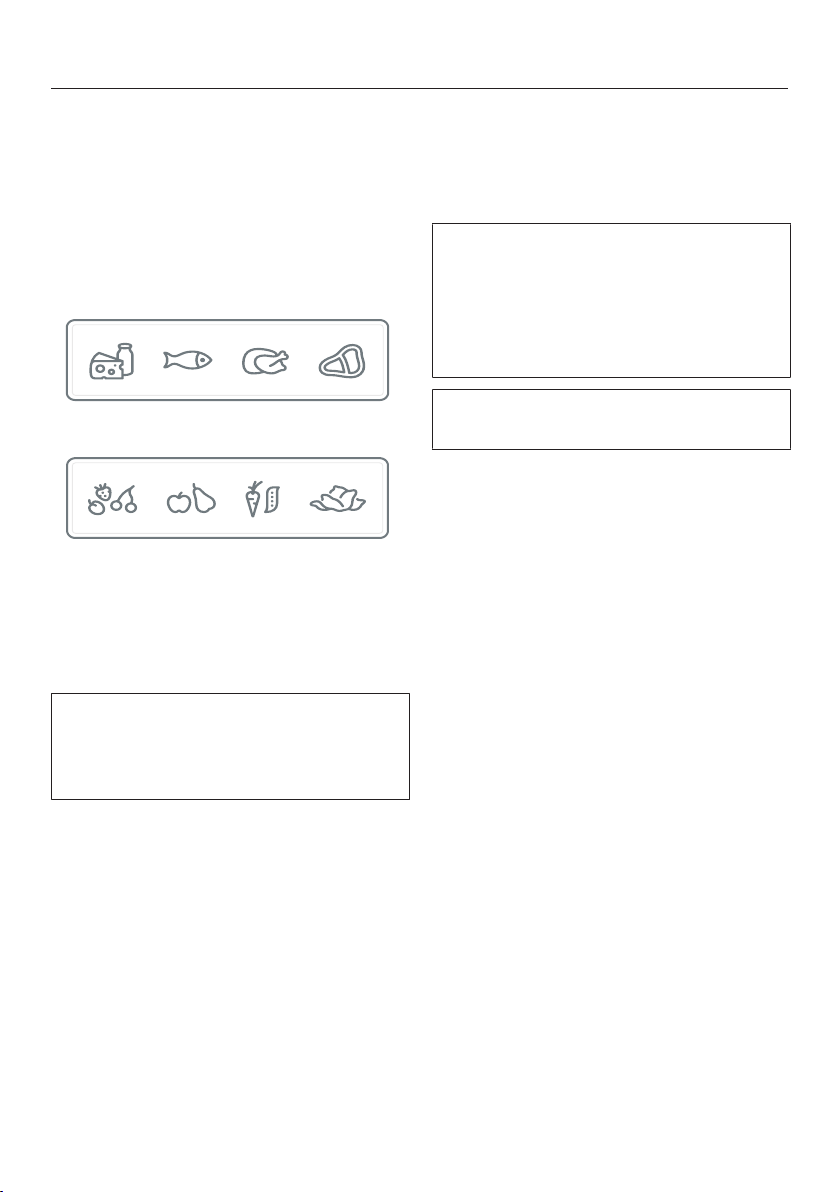
The following icons can be selected in settings mode:
Symbol Function
Language Set
Display Brightness Adjust (darker to brighter)
Color Scheme Set (dark or bright)
/ Buzzer Tones Adjust the volume or switch off the Buzzer Tones
completely (e.g., for the door alarm)
/
Keypad Tone Adjust the volume or switch off the Keypad Tone
completely
°F/°C Temperature Unit Set (°Fahrenheit or ° Celsius)
/ Keypad Lock Switch on or off
(see “Selecting additional settings”)
MasterFresh Adjust the temperature in the dry compartment
(see “Selecting additional settings”)
Eco Mode Switch on or off
(see “Selecting additional settings”)
Self Test The system restarts and is checked for faults or
malfunctions
(see “Selecting additional settings”)
Door Assistant Switch on (Push2Open or Pull2Open) or switch off
(see “Selecting additional settings”)
Miele@home Set up, deactivate, or query WLAN connection
status
(see “Selecting additional settings”)
* Demo Mode Switch off
* (only visible when Demo Mode, is switched on
see “Selecting additional settings”)
Factory Default Reset to default settings
(see “Selecting additional settings”)
Sabbath Mode Switch on or off
(see “Selecting additional settings”)

Guide to the appliance
47
Display Active Air-
Clean Filter
Switch on or off or reset
(see “Selecting additional settings”)
Symbols in settings mode
/ Scroll in settings mode or select a setting
/ Change a setting (e.g., display brightness)
OK Confirm a setting
Exit the menu level
Accessories
48
Accessories supplied
Appliance plug
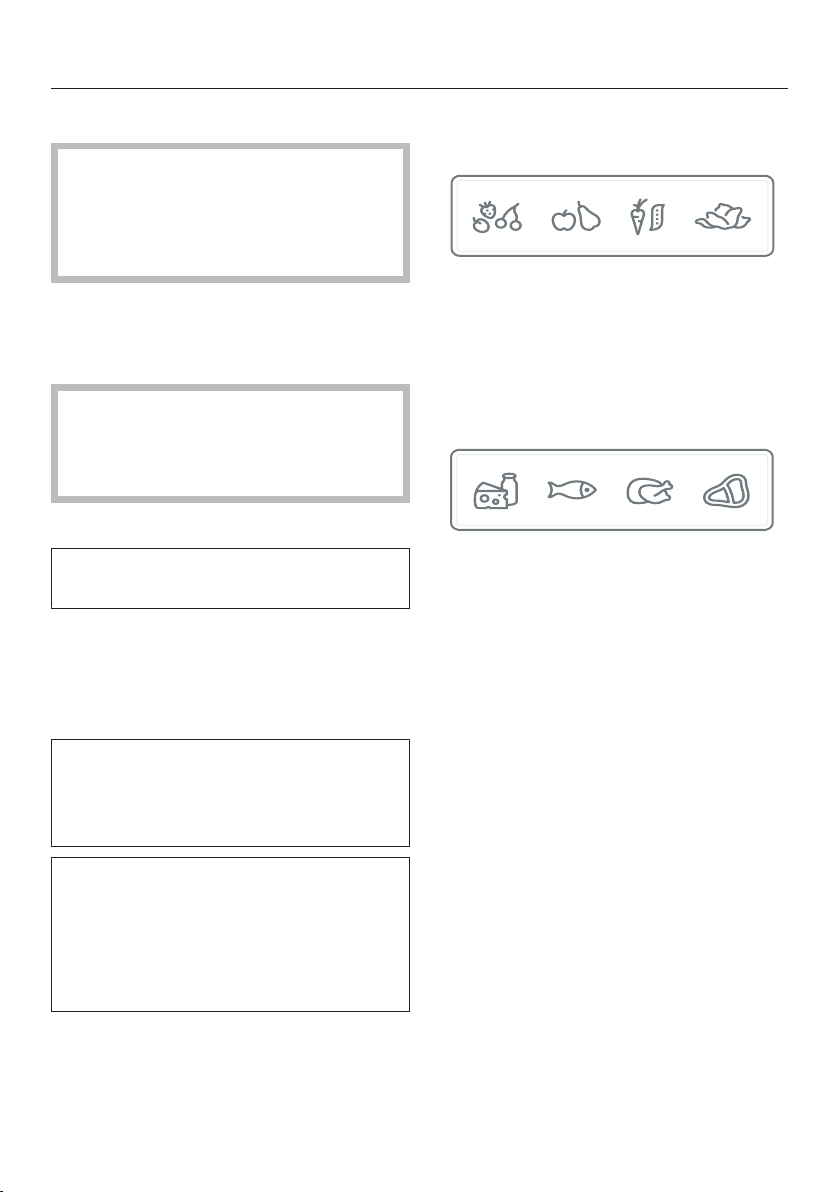
Labels for the SmartFresh zone
Each type of food has its own charac-
teristics which determine the specific
storage conditions it requires.
Dry compartment label
Humidity-controlled compartment label
The labels for the two compartments in
the SmartFresh zone help you to
choose the right type of food to ensure
ideal storage conditions.
Stick the labels onto the compart-
ments in the SmartFresh zone as de-
scribed under “Before first use” in “Ini-
tial commissioning”.
Active AirClean filters
This Active AirClean filters neutralize
unpleasant odors in the refrigerator sec-
tion for optimal air quality.
The holder for the Active AirClean fil-
ters is in the refrigerator section. Insert
the Active AirClean filters supplied as
described under “Inserting the Active
AirClean filters” in “Initial commission-
ing”.
We recommend replacing the Active
AirClean filters every 6months.
Stainless steel front panels
Stainless steel front panels in stainless
steel-look give your appliance a high-
quality appearance.

Accessories
49
Optional accessories
A range of useful Miele accessories and
care products are available for your ap-
pliance.
Active AirClean filters
See “Accessories supplied” for a de-
scription.
Side-by-side merging kit and top
frame (KTF)
For installing two or more appliances
next to each other.
Hinge pockets
The hinge pockets can be used to
change the door hinging on the appli-
ance.
The door hinging must only be replaced
by Miele Technical Service.
Accessories are available to order via
the Miele Webstore, from Miele di-
rectly (see back cover for contact de-
tails) or from your Miele dealer.
Before first use
50
Before first use
Allow the appliance to stand for ap-
prox. 1hour prior to connecting it to
the power supply.
This will help prevent any malfunc-
tions.
Packaging material
Remove all packaging material from
the inside of the appliance.
Leftover tape residue.
Always remove all packaging mate-
rial, including adhesive tape, before
switching on the appliance.
Cleaning
Please refer to the relevant instruc-
tions in “Cleaning and care”.
Clean the inside of the appliance and
the accessories.
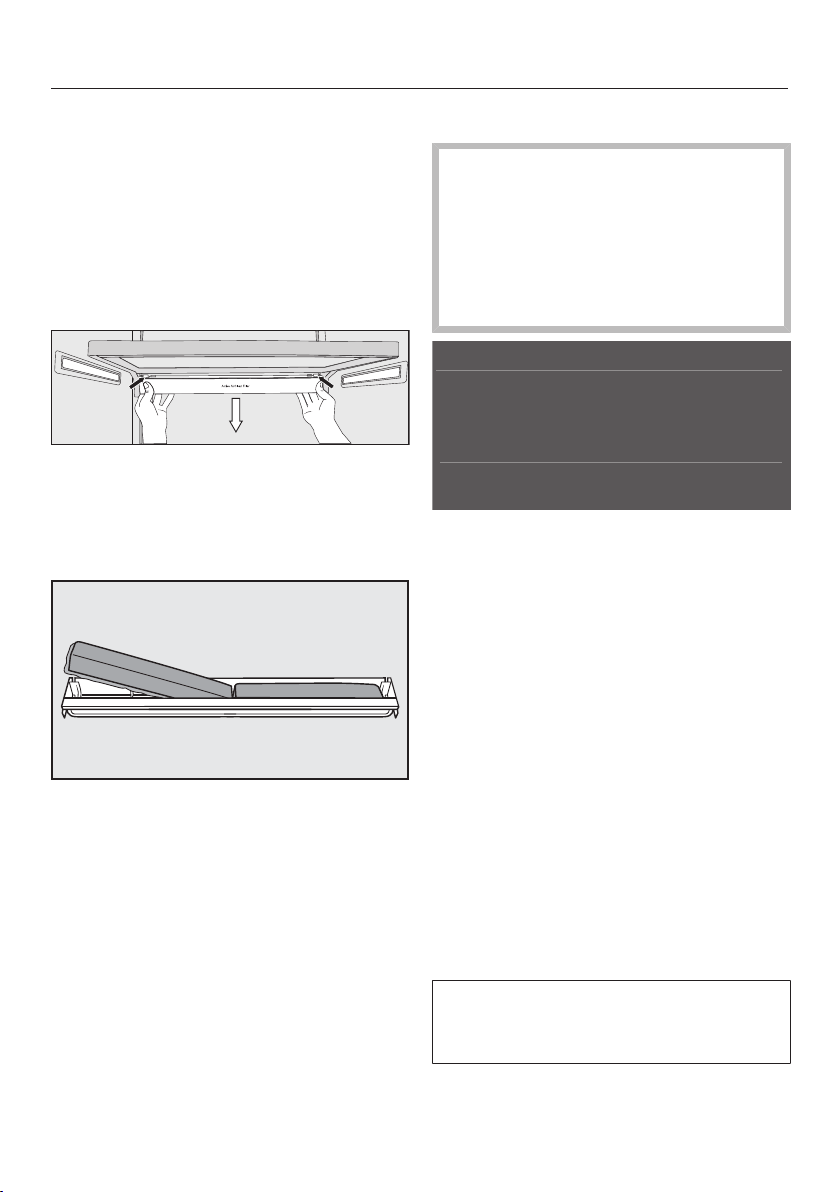
Sticking on the SmartFresh zone la-
bels
The labels supplied for the two com-
partments in the SmartFresh zone help
you to choose the right type of food to
ensure ideal storage conditions.
Please note that the refrigeration ap-
pliance must be switched off when
sticking on the labels, as the labels will
not adhere to a cold surface. Further-
more, there should not be any dust or
grease on the surface.
Stick the labels on as described be-
low:
– Humidity-controlled compartment
for fruit and vegetables
Remove the label from the foil and
stick it onto the frame of the humid-
ity-controlled compartment (see
“Product description”).
– Dry compartment for food which
goes off quickly
Remove the label from the foil and
stick it onto the frame of the dry com-
partment (see “Product description”).
Tip: If you are not satisfied with the po-
sitioning of the labels, you can easily
pull them off and stick them on again.
In addition, they can be removed with-
out leaving any residue.
Before first use
51
Inserting the Active AirClean filters
Your refrigeration appliance is equipped
with 2Active AirClean filters which neu-
tralize unpleasant odors in the Fridge
Zone.
The holder for the Active AirClean filters
is located under each of the shelves in
the Fridge Zone.
To remove the holder for the Active
AirClean filters, press against the re-
tainers on both sides of the holder
from the rear and pull the holder
downwards diagonally from the shelf.
Insert the two Active AirClean filters
supplied with the surrounding edge
pointing downwards into the holder.
To replace the holder, press against
the retainers on both sides from the
rear and, using the retainers, clamp it
into the gap on the shelf from below.
Using the appliance
The touch display can be scratched
by pointed or sharp objects, e.g.,
pens.
Only touch the display with your fin-
gers.
If your fingers are cold, the touch
display may not react.
°F
39
The symbols underneath the tempera-
ture display can be selected directly by
touch; the symbols and text in or above
the temperature display can only be
displayed.
...in settings mode
Touch the symbol to open settings
mode.
Use the arrow buttons and to
select the function whose settings
you wish to adjust.
Confirm your selection with OK.
Adjust the settings using either the
arrow buttons and or sensors
and.
Confirm your selection with OK.
The setting with the colored back-
ground is always the selected setting;
it can be confirmed directly with OK.
Before first use
52
Select if you wish to switch to the
previous menu level or terminate the
process.
Every touch of the display is con-
firmed with an audible keypad tone.
You can switch off this keypad tone in
settings mode.
Starting up for the first time
Open the appliance door.
Turn the appliance on by pressing the
On/Off switch.
The appliance will start to cool and the
interior lighting will come on when the
appliance door is opened.
Miele will then appear in the appliance
display.
When you turn the appliance on for
the first time, you will be asked to
make following settings:
– Set the Language
(if you accidentally select the wrong
Language, return to settings mode
and use the symbol to change the
language),
– Set Temperature Unit: °C (degrees Cel-
sius) or °F (degrees Fahrenheit),
– Set up Miele@home:
Select Continue if you wish to set up
Miele@home now (to do this, following
the instructions under “Selecting ad-
ditional settings”, section “Set up
Miele@home”).
Select Skip if you would prefer to set
up Miele@home later.
Use the and arrow buttons to
select the correct setting and touch
OK to confirm your selection.
Select if you want to return to the
previous menu level.
Set-up Successfully Completed appears in
the display.
Confirm the first use with OK.
Your appliance has been successfully
set up and is ready for use.
The main screen appears on the dis-
play.
You cannot terminate the initial start-
up process. The only way to terminate
the process is to switch off the appli-
ance, though the process will continue
when the appliance is switched back
on.
Switching on and off
53
Switching on the appliance
Open the appliance door.
Turn the appliance on by pressing the
On/Off switch.
°F
39
The refrigeration appliance will start to
cool and the interior lighting will come
on when the appliance door is opened.
Miele will then appear on the main
screen in the appliance display.
To enable the temperature to get suf-
ficiently cold inside the appliance, al-
low the appliance to run for a few
hours before placing food in it.
Switching off the appliance
Turn the appliance off by pressing the
On/Off switch.
The cooling and interior lighting are
switched off.
Please note: The appliance is not
disconnected from the power supply
when the On/Off switch is in the
“Off” position!
Turning off for longer periods
of time
If the appliance is not going to be used
for a longer period of time, e.g. while on
vacation:
turn the appliance off,
unplug the appliance or trip the cir-
cuit breaker,
clean the appliance,
leave the door ajar to air the appli-
ance and avoid odors building up in-
side the appliance.
If, during a long absence, the appli-
ance is switched off but not cleaned
and the door is left shut, there is a
danger of bacteria building up inside
the appliance.
Selecting additional settings
54
In settings mode, certain settings
can be adjusted and functions selected,
allowing you to adjust the machine to
suit your requirements.
The following section only describe the
functions in settings mode that re-
quire further explanation.
The door alarm and other warnings
are automatically disabled when the
appliance is in settings mode .
Switching Keypad Lock on or
off /
Switch on Keypad Lock if you wish to
protect your appliance from unwanted
temperature changes or other uninten-
tional adjustments in settings mode .
In settings mode , use the and
arrow buttons to select Keypad Lock
and touch OK to confirm your selec-
tion.
Use the arrow buttons and to
switch the keypad lock On or Off and
confirm your selection with OK.
The keypad lock will not be activated
until you close the appliance door.
Nothing will appear in the display to in-
dicate that the keypad lock is switched
on.
The message Press OK for 6 seconds to
unlock will appear in the display if you
select a sensor control while the keypad
lock is switched on.
Follow the instructions on the display.
The display is unlocked briefly so you
can adjust the settings as required.
Closing the appliance door will reacti-
vate the keypad lock.
Adjusting the temperature in
the SmartFresh zone (dry com-
partment)
In settings mode, use the and
arrow buttons to select MasterFresh
and select OK to confirm your selec-
tion.
Use the and sensors to select
the desired temperature and touch
OK to confirm your selection.
Touch the sensor if you wish to
terminate the process.
The segment bar displays 5 segments;
the temperature is adjusted in incre-
ments of approx.1°.
The factory default setting for the tem-
perature in the dry compartment is
32°F (0°C).

Selecting additional settings
55
Switching Eco Mode on or off
Eco Mode is useful when going on va-
cation if for example you do not wish to
switch the appliance off completely and
do not need a high degree of cooling.
Energy consumption in Eco Mode is
lower than in normal operation.
The refrigerator section is regulated to a
temperature of 43°F (6°C), the dry com-
partment in the SmartFresh zone to
34°F (1°C).
If the SuperCool function is turned
on, this will be turned off when Eco
mode is selected.
In settings mode , use the and
arrow buttons to select Eco Mode and
select OK to confirm your selection.
Use the arrow buttons and to
switch the Eco Mode On or Off and
confirm your selection with OK.
The change in temperature to
43°F(6°C) on the display is the only in-
dication that Eco Mode is switched on.
Tip: You can also switch off the Eco
Mode function by directly adjusting the
temperature (see “The correct tem-
perature”, section “Setting the tempera-
ture”).
Performing a Self Test
Perform a Self Test if you are concerned
that your appliance is not working prop-
erly and want to check if it is suffering
from any problems.
In settings mode , use the and
arrow buttons to select Self Test and
select OK to confirm your selection.
Touch the sensor control if you
wish to terminate the process.
The Self Test starts and the appliance is
checked for any faults or malfunctions.
– The message System Restarting ap-
pears in the display if the Self Test
does not discover any faults or mal-
functions.
– If the Self Test does discover any
faults or malfunctions, they are indi-
cated as error messages in the dis-
play.
An alarm also sounds.
If you find the alarm disruptive, you
can switch it off in advance by touch-
ing the sensor control .
Make a note of the error message(s)
displayed.
Contact Technical Service and inform
them of the error message(s) on the
display.
Confirm the message with OK.
System Restarting appears in the display.
The appliance briefly switches off and
then back on automatically.
Self test completed appears in the dis-
play.
Confirm the message with OK.
Selecting additional settings
56
The main screen appears on the display
again.
Switching on Door Assistant
You can choose between the two Door
Assistants Push2Open and Pull2Open.
The default Door Assistant is
Push2Open.
The Push2Open Door Assistant is suit-
able for cabinet fronts without handles.
The door will then open automatically
when you gently press against it.
The Pull2Open Door Assistant is suitable
for cabinet fronts with handles. The ap-
pliance door can be opened easily with
little force.
When the Door Assistant is switched
on, repeatedly closing the appliance
door early can lead to damage or
malfunctions.
Refrain from holding onto or closing
the appliance door while automatic
door opening is still extended. If you
have indeed closed the appliance
door, leave it closed for 5minutes.
Automatic door opening resets itself.
Switching on Push2Open
In settings mode , use the and
arrow buttons to select Door Assistant
and select OK to confirm your selec-
tion.
Use the and arrow buttons to
select Mode and touch OK to confirm
your selection.
Use the and arrow buttons to
select Push2Open and touch OK to
confirm your selection.
Touch the sensor control to return
to the previous menu level.
- Adjusting the intensity
You can also adjust the intensity of the
Push2Open function. The lower the in-
tensity, the less force required when
pushing against the door.
In settings mode , use the and
arrow buttons to select Door Assistant
and select OK to confirm your selec-
tion.
In settings mode , use the and
arrow buttons to select Intensity and
select OK to confirm your selection.
Use the and arrow buttons to
select the desired intensity (Low,
Medium, High) and touch OK to con-
firm your selection.
- Adjusting the duration of the Auto-
Close function
You can also adjust the duration for
how long the appliance door will remain
open until it closes automatically.
In settings mode , use the and
arrow buttons to select Door Assistant
and select OK to confirm your selec-
tion.
In settings mode , use the and
arrow buttons to select AutoClose and
select OK to confirm your selection.
Use the and sensor controls to
select the duration (5 to 30 seconds)
and touch OK to confirm your selec-
tion.
Selecting additional settings
57
To protect against inadvertent open-
ing: if you do not pull the appliance
open, it will close again by itself after a
duration defined by you (see “Set Au-
toClose duration”).
Pull2Open
In settings mode, use the and
arrow buttons to selectDoor Assistant
and selectOK to confirm your selec-
tion.
Use the and arrow buttons to
selectMode and touchOK to confirm
your selection.
Use the and arrow buttons to
selectPull2Open and touchOK to
confirm your selection.
Touch the sensor control to return
to the previous menu level.
– Adjusting the intensity
You can also adjust the intensity of the
Pull2Openfunction. The lower the inten-
sity, the less force is required when
pulling the door.
In settings mode, use the and
arrow buttons to selectDoor Assistant
and selectOK to confirm your selec-
tion.
In settings mode, use the and
arrow buttons to selectIntensity and
selectOK to confirm your selection.
Use the and arrow buttons to
select the desired intensity (Low,
Medium, High) and touchOK to con-
firm your selection.
Switching off Door Assistant
In settings mode , use the and
arrow buttons to select Door Assistant
and select OK to confirm your selec-
tion.
Use the and arrow buttons to
select Mode and touch OK to confirm
your selection.
Use the and arrow buttons to
select Off and touch OK to confirm
your selection.
Touch the sensor control to return
to the previous menu level.
Selecting additional settings
58
Setting up Miele@home
Your appliance is equipped with an in-
tegrated WiFi module.
Connectivity is deactivated at the fac-
tory.
To use this feature, you will need:
– a WiFi network
– the Miele@mobile app
– a Miele user account. The user ac-
count can be created via the
Miele@mobile app.
The Miele@mobile app will guide you as
you connect your appliance to your
home WiFi network.
Once your appliance is connected to
your WiFi network you can use the app
to carry the following activities, for ex-
ample:
– Make certain settings on your appli-
ance
– Display information on the operating
state of your appliance
– Set up a Miele@home network with
additional WiFi-capable Miele appli-
ances
Connecting your appliance to your WiFi
network will increase energy consump-
tion, even when the appliance is
switched off.
Make sure that the signal of your
WiFi network is sufficiently strong in
the place where you want to set up
your appliance.
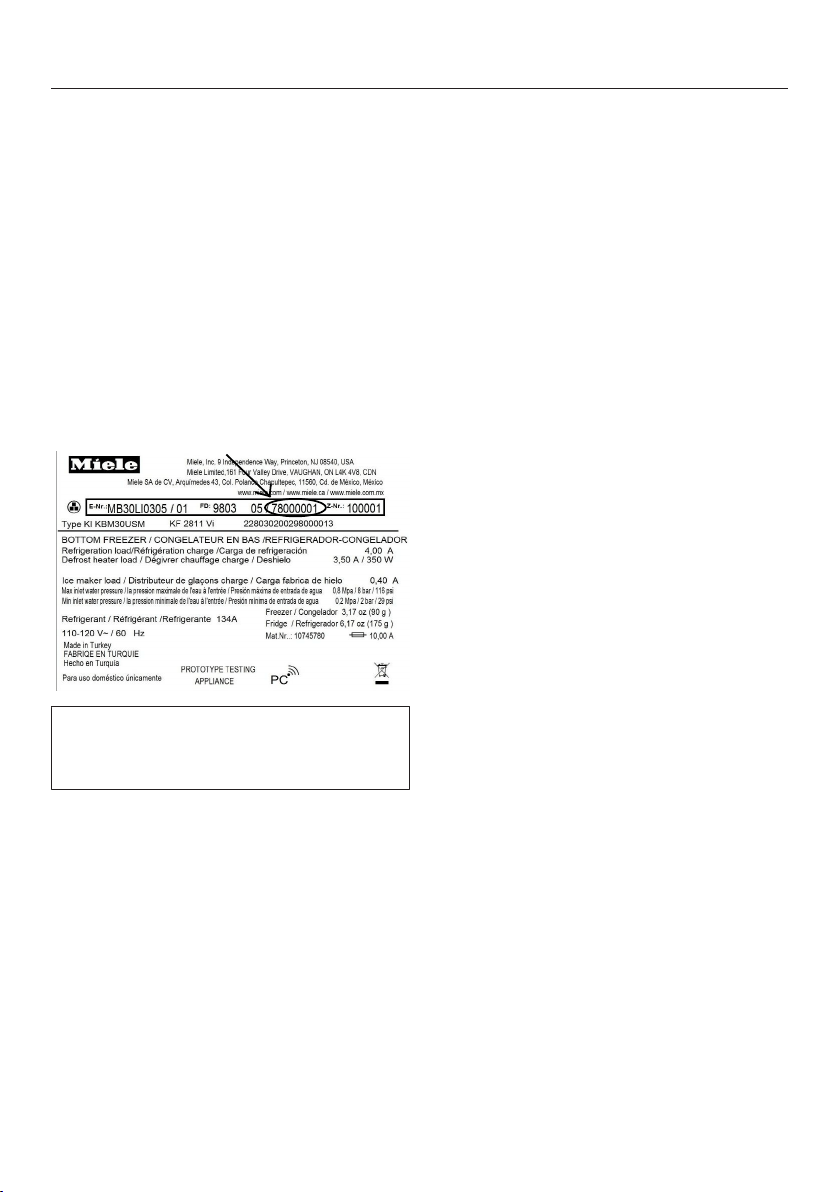
Miele@mobile app
The Miele@mobile app is available to
download free of charge from the Apple
App Store
®
or from the Google Play™
Store.
Please observe and follow the safety
information and warnings in these
operating instructions including when
you are operating your appliance
with the Miele@mobile app.
Selecting additional settings
59
Connecting your appliance via the
Miele@mobile app
You will also require the following to log
in:
– the password to your WLAN network
– the password to your appliance
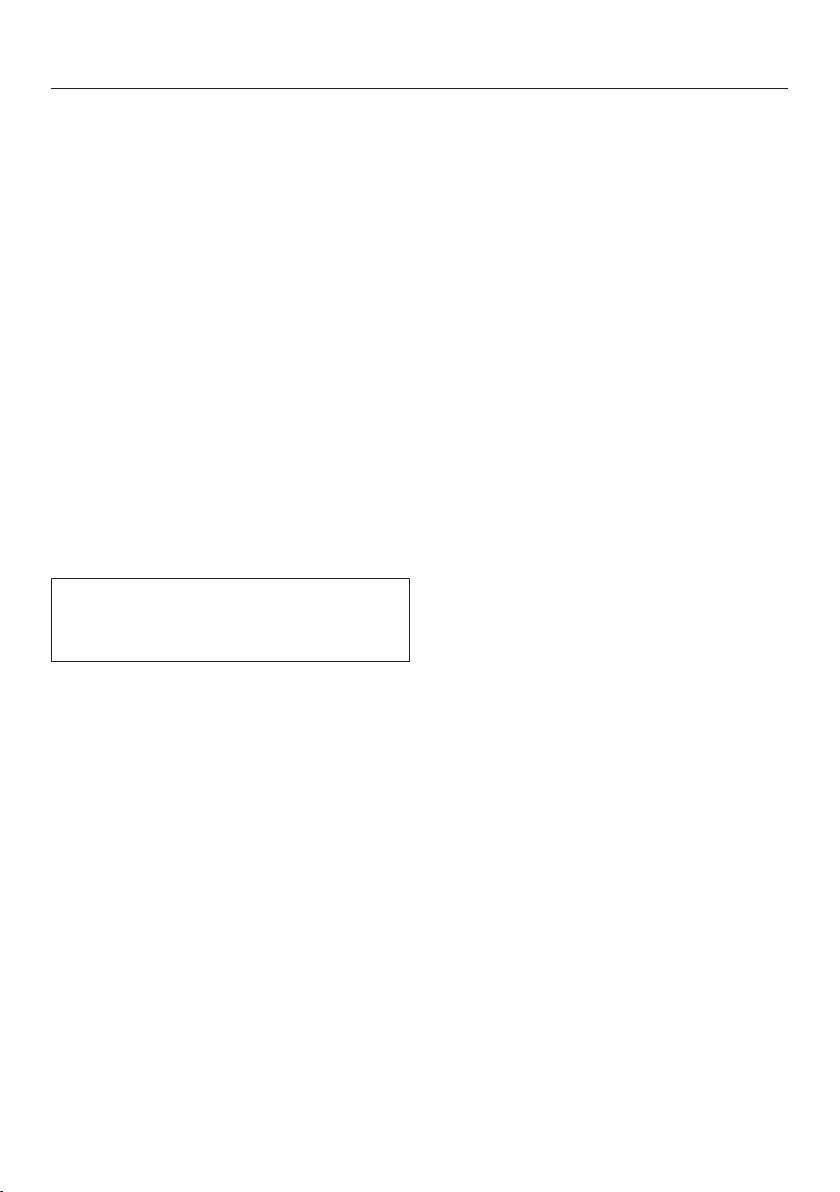
Your appliance's password is its serial
number, which can be found on the
data plate.
You will find the data plate inside your
appliance.
If your serial number is “78000001” for
example, your password will be
“78000001”.
In settings mode , use the and
arrow buttons to select Miele@home
and select OK to confirm your selec-
tion.
Set up will appear in the display.
Confirm your selection with OK.
Use the and arrow buttons to
select via the App and touch OK to
confirm your selection.
Open the Miele@mobile app and fol-
low the instructions in the app.
As soon as your appliance has been
integrated into your WLAN network,
the message Connection successful ap-
pears in your appliance's display.
Confirm the process with OK again.
If the WLAN connection is active, will
appear in the display.
Selecting additional settings
60
Connecting your appliance via WPS
Your router must be equipped with the
WPS function for this connection op-
tion.
In settings mode , use the and
arrow buttons to select Miele@home
and select OK to confirm your selec-
tion.
Set up will appear in the display.
Confirm your selection with OK.
Use the and arrow buttons to
select via WPS and touch OK to con-
firm your selection.
Now follow the instructions in the dis-
play.
Confirm the process with OK.
To be able to use the Miele@home
functions, you also have to register
your appliance in the app.
As soon as your appliance has been
integrated into your home network via
WPS, the message Connection suc-
cessful appears in the display.
Confirm the process with OK again.
If the WLAN connection is active, will
appear in the display.
Deactivating Miele@home
In settings mode , use the and
arrow buttons to select Miele@home
and touch OK to confirm your selec-
tion.
Use the and arrow buttons to
select Deactivate and touch OK to
confirm your selection.
Deactivation successful appears in the
display.
Confirm the message with OK.
Your appliance is now disconnected
from your WLAN network.
The symbol will go out in the display.
Selecting additional settings
61
Activating Miele@home
If you have already activated
Miele@home and then disconnected
the connection, you can still reactivate
the connection.
In settings mode , use the and
arrow buttons to select Miele@home
and touch OK to confirm your selec-
tion.
Use the and arrow buttons to
select Activate and touch OK to con-
firm your selection.
Activation successful appears in the dis-
play.
Confirm the message with OK.
If the WLAN connection is active, will
appear in the display.
Checking the WLAN connection sta-
tus
In settings mode , use the and
arrow buttons to select Miele@home
and select OK to confirm your selec-
tion.
Use the and arrow buttons to
select Connection status and touch OK
to confirm your selection.
Information about the WLAN connec-
tion status will then appear in the dis-
play:
– connected: there is a strong con-
nection,
– connected: there is an average
connection,
– connected: there is a weak con-
nection,
– : disconnected.
Setting up Miele@home again
If you have changed your WiFi network,
you can set up Miele@home again for
your appliance.
In settings mode, use the and
arrow buttons to selectMiele@home
and selectOK to confirm your selec-
tion.
Use the and arrow buttons to
selectSet up again and touchOK to
confirm your selection.
Reset configuration?appears on the dis-
play.
Use the and arrow buttons to
selectYes orNo and touchOK to
confirm your selection.
Selecting additional settings
62
Switching off Demo Mode
Demo mode allows the appliance to
be presented in the showroom with-
out the cooling system being
switched on. Do not activate this set-
ting for domestic use.
If Demo mode has been switched on
as a default setting, will show in the
display.
In settings mode, use the and
arrow buttons to select Demo Mode
and select OK to confirm your selec-
tion.
Press OK for 4 seconds to deactivate ap-
pears in the display.
Follow the instructions on the display
and touch and hold the sensor con-
trol OK for 4seconds.
The countdown Demo Mode will deacti-
vate in seconds. will appear in the dis-
play.
Demo Mode deactivated. The appliance will
cool down. appears in the display.
Confirm the message with OK.
The main screen appears in the display
again.
Resetting the settings to their
default settings
You can reset the appliance's settings
to their default settings.
In settings mode , use the and
arrow buttons to select Factory Default
and select OK to confirm your selec-
tion.
Use the and arrow buttons to
select Reset and touch OK to confirm
your selection.
After a brief delay, Settings Reset ap-
pears in the display.
Confirm the message with OK.
The initial start-up process restarts (see
“Starting up for the first time”).
Selecting additional settings
63
The appliance's settings will be reset to
the following values:
Function Default settings
Language English
Display
Brightness
Average value
(4 of 7 segments)
Color
Scheme
Dark
/
Buzzer
Tones
Average value
(4 of 7 segments)
/
Keypad
Tone
Average value
(4 of 7 segments)
°F /
°C
Tempera-
ture Unit
°Fahrenheit
/
Keypad
Lock
Switched off
Master-
Fresh
32°F (0°C)
(2 of 5 segments)
Eco Mode Switched off
Door As-
sistant
Push2open
Miele@ho
me
Switched off
Sabbath
Mode
Switched off
Display Ac-
tive Air-
Clean Filter
Switched on
Tempera-
ture in the
refrigerator
section
37°F (4°C)
Tempera-
ture in the
dry com-
partment
32°F (0°C)
Selecting additional settings
64
Switching Sabbath Mode On/
Off
The appliance offers a Sabbath Mode
for the purposes of religious obser-
vance.
If Sabbath Mode is switched on, ap-
pears in the display.
When Sabbath Mode is switched on,
you cannot make any settings on your
appliance.
Ensure that the appliance door is
properly closed, as visual and audible
alarms are switched off in Sabbath
mode.
In settings mode, use the and
arrow buttons to select Sabbath Mode
and select OK to confirm your selec-
tion.
Use the and arrow buttons to
select On or Off and touch OK to con-
firm your selection.
When Sabbath Mode is switched on,
appears in the display and the display
brightness is reduced (the display does
not change when the appliance door is
closed).
When Sabbath Mode is switched on,
the following functions are switched off:
– Door Assistant
(for cabinet fronts without handles,
the appliance door will have to be
pulled from the bottom or side)
– Lighting
– All audible and visual signals,
– Temperature display
– The Automatic SuperCool function (if
previously switched on)
You can still select:
– The sensor control for Settings
Mode so that Sabbath mode can
be switched off.
The Sabbath Mode function will switch
off automatically after approx.
125hours.
Danger of food poisoning!
Any power failure during Sabbath
Mode will not be shown on the dis-
play. After a power failure, the appli-
ance will restart in Sabbath Mode.
When power is restored, no notifica-
tion of the power failure will appear
on the display.
If there is a power failure during Sab-
bath mode, check the quality of the
food.
Selecting additional settings
65
Switching on, switching off, or
resetting theDisplay Active
AirClean Filter
Approximately every 6months, the Ac-
tive AirClean filter display will remind
you to change the Active AirClean filters
(see “Inserting the Active AirClean fil-
ters” in “Before first use”). Change Active
AirClean Filterwill appear in the display.
The first time the Active AirClean fil-
ters need to be changed, the display
will remind you automatically; the re-
minder does not need to be switched
on separately.
After the Active AirClean filters have
been changed, the Active AirClean filter
reminder display must be reset (see
“Resetting the Active AirClean filter dis-
play”).
If the Active AirClean filter reminder
display is not reset, it will appear again
after 7days.
If you do not require the Active Air-
Clean filter reminder display, it can be
switched off (see “Switching off
theDisplay Active AirClean Filter”).
New Active AirClean filters are avail-
able from Miele Technical Service,
your Miele dealer, or online.
Switching on theDisplay Active Air-
Clean Filter
If theDisplay Active AirClean Filter has
been switched off once, it must be
switched on again if required.
In settings mode, use the and
arrow buttons to selectDisplay Active
AirClean Filter and selectOK to confirm
your selection.
Use the and arrow buttons to
selectOn and touchOK to confirm
your selection.
TheDisplay Active AirClean Filter has
been switched on.
Switching off theDisplay Active Air-
Clean Filter
If you do not require theDisplay Active
AirClean Filter, you can switch it off.
In settings mode, use the and
arrow buttons to selectDisplay Active
AirClean Filter and selectOK to confirm
your selection.
Use the and arrow buttons to
selectOff and touchOK to confirm
your selection.
TheDisplay Active AirClean Filterhas
been switched off.
Resetting theDisplay Active AirClean
Filter
TheDisplay Active AirClean Filter must be
reset each time the filter is replaced, so
that it is displayed again after 6months.
In settings mode, use the and
arrow buttons to selectDisplay Active
AirClean Filter and selectOK to confirm
your selection.

Selecting additional settings
66
Use the and arrow buttons to
selectReset and touchOK to confirm
your selection.
The Change Active AirClean Filtermessage
disappears from the display.
The Display Active AirClean Filter has
been reset.
The correct temperature
67
It is very important to set the correct
temperature for storing food in the ap-
pliance. Bacteria will cause food which
is not stored at the correct temperature
to deteriorate rapidly. Temperature influ-
ences the growth rate of these bacteria.
Reducing the temperature reduces their
growth rate.
The temperature in the appliance will
rise:
– The more often the door is opened
and the longer it is kept open
– The more food that is stored in it
– The warmer the food is which is be-
ing put into it
– The higher the ambient temperature
surrounding it. The appliance is de-
signed for use within specific ambi-
ent temperatures (climate range). Do
not use in ambient temperatures for
which it is not designed.
...in the refrigerator section
and in the SmartFresh zone
We recommend a temperature of 39°F
(4°C) in the refrigerator section.
We recommend a temperature of 32°F
(0°C) in the dry compartment of the
SmartFresh zone.
However, if you would like it to be
warmer or colder, e.g., when storing
fish, you can adjust the temperature in
the dry compartment.
Automatic cold air circulation
(DynaCool)
The fan automatically turns on when the
cooling system for the refrigerator sec-
tion turns on. It distributes the tempera-
ture in the refrigerator section to all ar-
eas evenly so that all the food inside will
be chilled to about the same degree.
Setting the temperature
Touch the symbol for setting the
temperature.
The previously set temperature will ap-
pear.
Set the temperature you want with
the and sensor controls. Keep-
ing your finger on the sensor control
changes the temperature continu-
ously.
Confirm the temperature setting with
OK or wait approx. 8seconds after
the last touch of the sensor. This tem-
perature will be automatically
adopted.
Tip: The newly set temperature can also
be confirmed and adopted by closing
the appliance door.
The temperature display always shows
the required temperature.
If you have adjusted the temperature,
wait for approximately 6hours if the
appliance is not very full and for ap-
proximately 24hours if the appliance
is full before checking the temperature
display. It will take this long for an accu-
rate reading to be given.

The correct temperature
68
If, after this time, the temperature is
still too high or too low, adjust it
again.
Adjusting the temperature in the dry
compartment of the SmartFresh zone
The temperature in the dry compart-
ment of the SmartFresh zone is main-
tained at approx. 32°F (0°C). However,
if you would like it to be warmer or
colder, you can adjust the temperature
slightly (see “Adjusting the temperature
in the SmartFresh zone (dry compart-
ment)” in “Selecting additional set-
tings”).
Tip: You can select a lower setting for
storing, for example, particularly deli-
cate fish. A slightly higher temperature
is preferable for storing ready-to-eat
food, for example.
Temperature range
The temperature in the refrigerator sec-
tion can be set between 36°F (2°C) and
46°F (8°C).
The temperature in the dry compart-
ment in the SmartFresh zone can be set
between 30°F (-1°C) and 37°F (3°C).

Using Automatic SuperCool
69
SuperCool function
The SuperCool function can be used to
rapidly reduce the temperature in the
Fridge Zone to its lowest setting (de-
pending on the room temperature).
SuperCool is particularly recommended
for the rapid chilling of large amounts of
fresh food or drink.
Switching on SuperCool
Touch the symbol in the display for
setting the temperature.
Then touch the symbol for turning
on the SuperCool function.
The symbol is highlighted in color
and the new temperature setting of
36°F (2°C) appears in the display.
Confirm the setting with OK or wait
approx. 8seconds after the last press
of the button. The setting will be au-
tomatically adopted.
The appliance will now run at maximum
power.
Switching off SuperCool
Touch the symbol in the display for
setting the temperature.
The symbol is highlighted in color
and a temperature value of 36°F (2°C) is
shown in the display.
Touch the symbol to turn off the
SuperCool function.
The symbol is no longer highlighted
in color and the previous temperature
setting appears again in the display.
Confirm the setting with OK or wait
approx. 8seconds after the last press
of the button. The setting will be au-
tomatically adopted.
The appliance will then continue run-
ning at normal power.
If you do not turn off the SuperCool
function, it will turn itself off automati-
cally after approx. 6hours. The appli-
ance will then run at normal power
again.
Tip: To save energy, the SuperCool
function can be turned off once food
and drinks are sufficiently chilled.

Door alarm
70
The appliance is fitted with a warning
system to avoid increased energy con-
sumption if the door is left open.
An alarm will sound if the appliance
door has been left open for longer than
approx. 2minutes.
The message Close the door also ap-
pears in the display.
As soon as the door is closed, the
alarm will stop and the message in the
display will go out.
Turning the door alarm off early
If the alarm disturbs you, it can be
turned off early.
Touch the OK sensor control in the
display.
The alarm stops and the message dis-
appears from the display.
After a certain time the alarm will sound
again and the message will reappear in
the display until the appliance door is
closed.
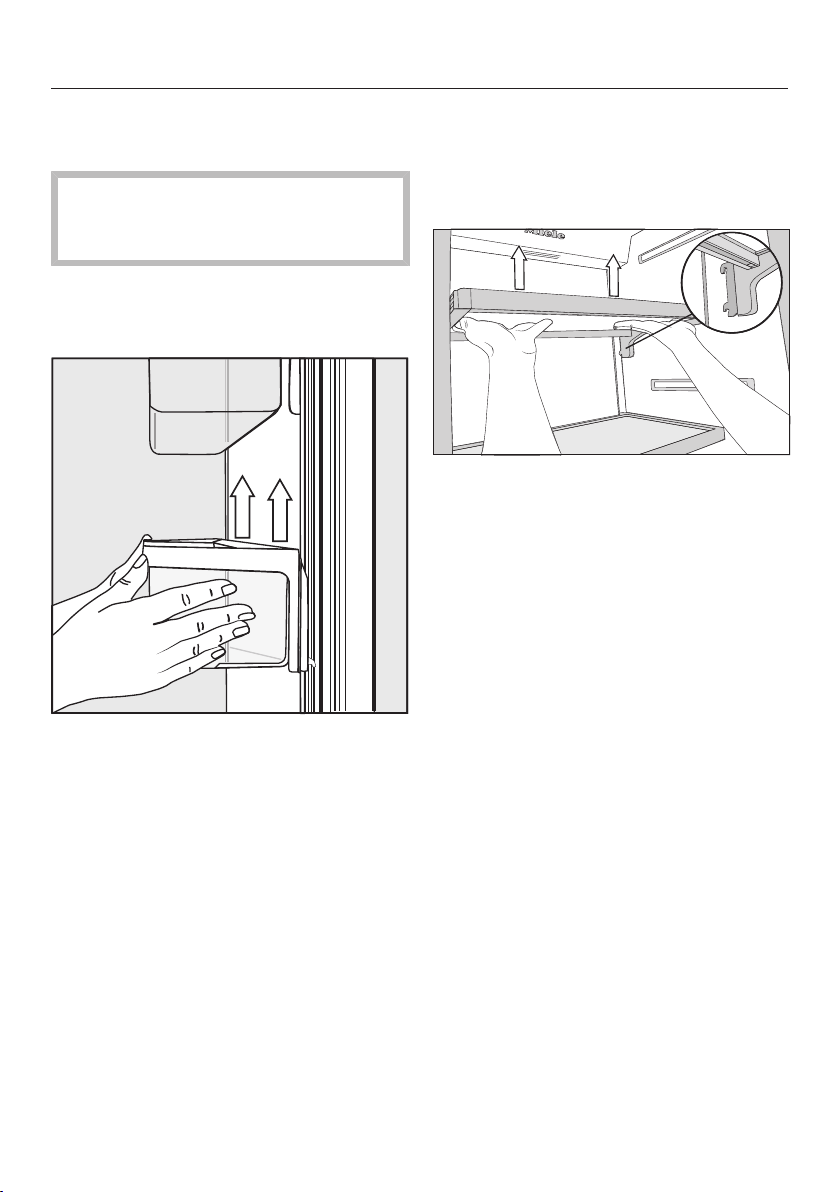
Adjusting the interior fittings
71
Moving the shelves in the ap-
pliance door
Danger of injury!
Only move the shelves in the door
when they are empty.
The shelves can be moved when load-
ing and unloading and for cleaning or
they can be removed completely:
Hold the shelf on the frame with both
hands and lift it slightly so that it can
be lifted with the catches on both
sides over the guide.
Remove the shelf or place it in the re-
quired position at the back with the
catches in the guides at the same
height.
Make sure that the shelf is straight.
Tip: For the purposes of loading and
unloading or cleaning, the clip-in con-
tainers in the shelves can be removed
from their holders completely.
Moving the adjustable shelves
If necessary, the adjustable shelves can
be removed or their height can be ad-
justed:
Hold the shelf on both sides and raise
it slightly so that it can be lifted with
the catches over the guide at the
back.
Pull the shelf forwards.
Remove the shelf or place it in the re-
quired position, with the catches en-
gaged at the back.
Make sure that the shelf is straight.
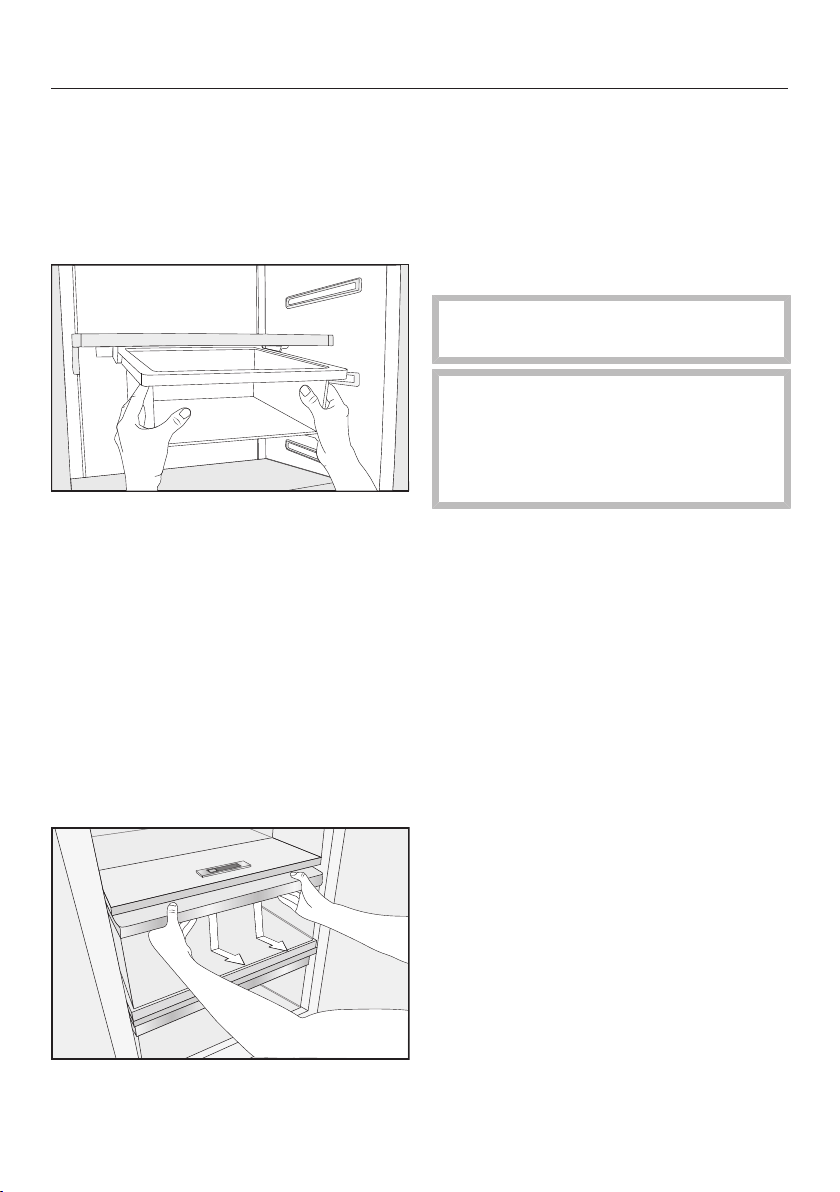
Adjusting the interior fittings
72
Removing the hanging drawer
The hanging drawer can be moved to
the left or right if required.
To clean the hanging drawer, remove it
as follows:
Pull the hanging drawer straight out
to lift it over the pull-out stops.
To reinsert the hanging drawer, push
it straight into the guide.
Removing compartments from
the Fridge Zone
The compartments in the Fridge Zone
are on telescopic runners, and can be
removed for filling, emptying, or clean-
ing purposes:
Pull the compartment out a little bit.
Using both hands, grasp the com-
partment frame from below and push
the compartment downwards so that
the rear end disengages and lifts up-
wards.
Pull the compartment forwards to re-
move it.
Push the runners back in again to
avoid damaging them!
Be careful not to wash away the spe-
cial lubricant in the telescopic run-
ners during cleaning.
Wipe the telescopic runners with a
damp cloth to clean them.
To reinsert the compartment, position
it on the telescopic runners so that it
clicks into place.
Storing food in the refrigerator section
73
Always observe USDA food safety
guidelines.
Risk of fire from electrical appli-
ances.
Operating electrical devices in the
appliance can cause sparks to form.
Do not operate any electrical devices
inside the appliance.
Risk of explosion due to
flammable mixes of gases.
Electrical components can cause
flammable mixes of gases to ignite.
Do not store any explosive materials
or products containing flammable
propellants (e.g., spray cans) in the
appliance. The spray cans in ques-
tion can be identified by the contents
printed on the can or by a flame
symbol. Electrical components can
cause escaping gases to ignite.
Risk of damage due to greasy or
oily foods.
If storing food which contains a lot of
fat or oil in the appliance or the door,
make sure that it does not come into
contact with plastic components as
this could cause stress cracks or
break the plastic.
Make sure that no fat or oil leaks
onto the plastic parts of the appli-
ance.
Different storage zones
Due to natural air circulation, there are
different temperature zones in the re-
frigerator section.
Cold, heavy air sinks to the lowest sec-
tion of the refrigeration section. Make
use of the different zones when placing
food in the appliance.
Tip: To allow air to circulate efficiently,
do not pack food too closely together in
the refrigerator.
If there is insufficient air circulation,
the cooling performance will de-
crease and energy consumption will
increase.
Do not cover the fan in the rear wall
of the appliance.
Tip: Do not store food in such a way
that it touches the rear wall of the refrig-
erator section as it may freeze to the
rear wall.
This appliance has DynamicCooling,
which helps to keep an even tempera-
ture when the fan is running. When
DynamicCooling is turned on, the dif-
ference between the various zones is
less pronounced.

Storing food in the refrigerator section
74
Warmest area
The warmest area in the refrigerator
section is in the top section of the door.
Use this for storing butter so that it re-
mains spreadable and cheese so that it
retains its flavor.
Coldest area
The coldest area in the refrigerator sec-
tion is inside the appliance at the back.
The temperature in the dry compart-
ment of the SmartFresh zone is even
colder.
Use this area in the refrigerator section
and in the dry compartment of the
SmartFresh zone for all delicate and
highly perishable food, e.g.:
– Fish, meat, poultry
– Cold cuts, ready-made meals
– Dishes or baked goods containing
eggs or cream
– Fresh dough, cake mixtures, pizza
dough, or pie dough
– Raw milk cheese and other raw milk
products
– Pre-packed vegetables and other
fresh food whose best-before date
requires storage at a temperature of
at least 39°F (4°C).
Food which is not suitable for
storage in the refrigerator sec-
tion
Not all food is suitable for refrigeration
at temperatures below 41°F (5°C) be-
cause it is sensitive to cold. Depending
on the type of food, the appearance,
consistency, flavor, and/or vitamin con-
tent may be altered if stored at too cold
a temperature.
Foods which are sensitive to cold in-
clude:
– Pineapples, avocados, bananas,
pomegranates, mangoes, melons,
papayas, passion fruit, citrus fruits
such as lemons, oranges, mandarins,
grapefruits
– Fruit (which is not yet ripe)
– Eggplants, cucumbers, potatoes,
peppers, tomatoes, zucchini
– Hard cheeses (e.g., Parmesan)

Storing food in the refrigerator section
75
Notes on buying food
The freshness of food when first placed
in the appliance is an important factor
in determining how long it stays fresh,
and how long it can be kept in the ap-
pliance.
Take into account the use-by date and
the correct storage temperature.
Time out of the refrigerator, e.g., trans-
porting food in a warm car, should be
kept to a minimum.
Tip: Take a cool bag when shopping,
and load food in the appliance as soon
as possible.
Storing food correctly
Food should generally be stored cov-
ered or packaged in the refrigerator
section (there are some exceptions to
this rule in the PerfectFresh zone - see
below). This will prevent food smells
from affecting other foods, food from
drying out, and also any cross-contami-
nation of bacteria. This is especially im-
portant for storing animal products.
The shelf life of food can be significantly
increased by setting the correct tem-
perature and maintaining good stan-
dards of hygiene.
Storing food in the SmartFresh zone
76
SmartFresh zone
The SmartFresh zone provides ideal
storage conditions for fruit, vegetables,
fish, meat, and dairy products. Food
stays fresh considerably longer while
retaining both flavor, and vitamins.
The SmartFresh zone comprises a hu-
midity-controlled and a dry compart-
ment.
– Depending on the moisture-regulator
setting, the humidity-controlled
compartment is particularly suitable
for storing fruit and vegetables.
– The dry compartment is suitable for
storing perishable foods such as
fish, meat, and dairy products.
Humidity-controlled compart-
ment with moisture regulator
The humidity level in the humidity-con-
trolled compartment can be regulated
to approximately suit the food being
stored. Food retains its own moisture if
stored at a higher humidity and so does
not dry out as quickly. This allows it to
stay crisp and fresh for longer.
The moisture released by food in stor-
age is kept within the humidity-con-
trolled compartment drawer. The closer
the air humidity in the humidity-con-
trolled compartment is to the humidity
content of the food, the crisper and
fresher the food remains over a longer
period, as the water content of the food
is largely retained.
The moisture level greatly depends on
the type and quantity of food being
stored, if stored unwrapped.
The temperature in the humidity-con-
trolled compartment is approximately
equivalent to the temperature in the
conventional refrigerator section.
Remember that the fresher the food
when it is placed in the appliance, the
longer it will stay fresh!
Storing food in the SmartFresh zone
77
Slide control at = moisture in-
creased slightly
We recommend this setting if you
store very large quantities of fruits and
vegetables in the humidity-controlled
compartment. The slide control partially
closes the vents in the compartment so
that some of the moisture present is re-
tained.
Slide control at = moisture in-
creased
We recommend this setting if you
store small to large quantities of fruits
and vegetables in the humidity-con-
trolled compartment. The slide control
closes the vents in the compartment
completely so that all of the moisture
present is retained.
Tip: If the humidity level is too high and
a lot of moisture has collected in the
compartment, select the setting.
If the quantity of food being stored in
this compartment is small, the moisture
level may be too low. If you are only
storing a small amount of food, wrap it
in airtight packaging.
The humidity level in the humidity con-
trolled compartment is determined by
the type and quantity of food being
stored when it is not packaged.
Increased moisture in the humidity-
controlled compartment can, in
some circumstances, cause a build-
up of condensate.
This should be removed with a cloth.
Regulating the humidity level in the
humidity-controlled compartment
The slide control is used to regulate the
amount of moisture in the humidity con-
trolled compartment with settings
to.
Slide the control to the left or
right depending on the setting re-
quired.

Storing food in the SmartFresh zone
78
Dry compartment with ad-
justable temperature
The temperature in the dry compart-
ment is maintained at 30 to 37°F (-1 to
3°C). While lower than the temperature
in a standard refrigerator, this is the op-
timum temperature range for storing
fresh food which is not sensitive to
cold. The deterioration process is de-
celerated at this temperature range so
food can be stored without loss of
freshness for considerably longer than
in a standard refrigerator.
However, if you would like it to be
warmer or colder, e.g., when storing
fish, you can adjust the temperature
slightly (see “Adjusting the temperature
in the SmartFresh zone (dry compart-
ment)” in “Selecting additional set-
tings”).
The humidity level is similar to that in
the conventional refrigerator section.
The dry compartment is suitable for
storing perishable foods such as:
– Fresh fish and shellfish
– Meat and poultry
– Deli salads
– Dairy products such as yogurt,
cheese, cream, etc.
– Any type of food can in fact be stored
in this compartment, as long as it is
packaged.
Please note that foods rich in protein
deteriorate faster than others.
Shellfish, for example, deteriorates
faster than fish, and fish deteriorates
faster than meat.
For hygiene reasons, always keep these
foods covered or wrapped in this
compartment.
Take food out of the dry compartment
approximately 30to60minutes before
using it. The aroma and taste do not
fully develop until the food has
reached room temperature.
Max. load of the
drawers in the
SmartFresh zone
K26x1Vi/SF 55 lb (25kg)
K28x1Vi/SF 77 lb (35kg)
K29x1Vi/SF 100 lb (45kg)

Storing food in the SmartFresh zone
79
The following tips may help if you find that food you have stored does not
keep well (for example, the food wilts or becomes withered after only a short
storage time):
Only place fresh food in the appliance as the initial condition of the food is cru-
cial to maintaining freshness.
Clean the SmartFresh zone before storing food in it.
Very wet food should be dried off before storing it in the humidity-controlled
compartment.
Do not store food which is sensitive to cold in the dry compartment (see “Food
which is not suitable for storing in the refrigerator section”).
Allocate the appropriate settings to food you wish to store (e.g., humid or dry
storage).
Store food loose in the humidity-controlled compartment.
A high humidity level in the humidity-controlled compartment is achieved by the
moisture present in the food being stored.
If the humidity level is not high enough (e.g., too little food is being stored), it can
be increased by placing a damp sponge in the drawer.
If you think that the temperature in the dry compartment is too high or too low,
adjust the temperature in the compartment (see “Temperature range” in “The
correct temperature”). If ice crystals start to form on the floor of the dry com-
partment, increase the temperature as otherwise the cold temperature will dam-
age the food.
If too much water collects at the bottom of the humidity-controlled compart-
ment, dry it with a cloth. If necessary, dry food before placing it in the appliance
or place a rack at the bottom of the humidity-controlled compartment to allow
water to drain off.
Automatic defrosting
80
WARNING! DANGER of injury
and damage!
Do not use any mechanical or other
types of aids which are not recom-
mended by the manufacturer to ac-
celerate the defrosting process.
Refrigerator section and
SmartFresh drawer
The refrigerator section and the Smart-
Fresh drawer defrost automatically.
Condensate and frost can build up on
the back wall of the refrigerator section
and the SmartFresh drawer while in use.
You do not need to remove this, as it
will defrost and evaporate automatically
with the warmth generated by the appli-
ance.

Cleaning and care
81
WARNING! DANGER of electric
shock!
Unplug the appliance or trip the cir-
cuit breaker.
WARNING! Fire hazard!
Do not damage the coolant
pipework.
Do not let water get into the elec-
tronic unit or the lighting.
Do not use a steam cleaner. Steam
from a steam cleaning appliance
could reach the electrical compo-
nents and cause a short circuit.
The data plate located inside the ap-
pliance must not be removed. It con-
tains information which is required in
the event of a service call.
Cleaning agents
To avoid damaging the surfaces of your
appliance, do not use
– cleaning products containing soda,
ammonia, acid, or chloride,
– lime scale removers,
– abrasive cleaning products, such as
scouring powder, scouring liquid, or
pumice stones,
– cleaners containing solvents,
– stainless steel cleaners,
– dishwasher detergent,
– oven sprays,
– glass cleaning agents,
– hard, abrasive sponges and brushes,
such as pot scrubbers,
– eraser sponges,
– sharp metal scrapers.
Cleaning and conditioning agents
used inside the appliance must be
food safe.
Use warm water and liquid dish soap.
The following pages contain impor-
tant information on cleaning.
Cleaning and care
82
Before cleaning the appliance
Turn the appliance off completely by
pressing the On/Off switch.
Unplug the appliance or switch off
the fuse.
Take any food out of the appliance
and store it in a cool place.
Take out all other removable parts for
cleaning (see “Adjusting the interior
fittings”).
Interior and accessories
Clean the appliance regularly, or at
least once a month.
Clean up any spills, stains, or food
immediately. Do not allow them to
dry and stick to the appliance.
Clean the appliance with a solution of
lukewarm water and liquid dish soap.
Rinse all parts by hand. Do not wash
in a dishwasher.
After cleaning, wipe with clean water
and dry with a soft cloth.
Leave the door open to air the appli-
ance sufficiently for a short while and
to prevent odor buildup.
Aluminum frames
The frames to the shelves inside the ap-
pliance and the door shelves are par-
tially made from aluminum.
Aluminum is a dynamic material. The re-
flection and appearance of aluminum
changes in different lights and environ-
ments and depending on the angle you
observe it from. It is also susceptible to
scratching.
The aluminum frames may become
discolored or damaged if soiling is left
on for too long. Remove any soiling
immediately.
Cleaning and care
83
Appliance front
The appliance front has a special high-
quality finish (Clean Touch Steel). This is
resistant to soiling and is very easy to
clean.
Do not use stainless steel
cleaning agent on these surfaces,
as it will damage the finish.
Do not use Miele stainless steel
conditioning agent on these sur-
faces, as it will cause noticeable
smearing.
If soiling is allowed to sit for any
length of time, it may become im-
possible to remove.
Surfaces may be discolored or al-
tered.
It is therefore best to remove soiling
from the appliance front immediately.
All surfaces are easily scratched.
Contact with unsuitable cleaning
agents can alter or discolor the sur-
faces.
See the information on “Cleaning
agents” at the beginning of this sec-
tion.
Clean the surfaces with a clean
sponge and a solution of warm water
and liquid dish soap. A clean, damp
microfiber cloth without cleaning
agent can also be used for cleaning.
After cleaning, wipe with clean water
and dry with a soft cloth.
Cleaning the door seal
Do not use any grease or oil on the
door seal as these will cause the seal
to deteriorate and become porous
over time.
The door seal should be cleaned reg-
ularly with clean water and then
wiped thoroughly dry with a soft
cloth.
Cleaning the ventilation grilles
A build-up of dust will increase the en-
ergy consumption of the appliance.
The air vents should be cleaned on a
regular basis with a brush or vacuum
cleaner (you could use a Miele vac-
uum cleaner dusting brush, for exam-
ple).
After cleaning
Replace all shelves and accessories
in the appliance.
Reconnect to the power supply and
switch the appliance back on.
Switch on the SuperCool function for
a while so that the refrigerator section
can cool down quickly.
Switch off the SuperFrost function as
soon as the temperature in the freezer
is a constant 0°F (-18°C) or colder.
Place food back in the appliance and
close the door.
Frequently Asked Questions
84
With the help of the following guide minor faults in the performance of the ma-
chine, some of which may result from incorrect operation, can be remedied with-
out contacting the Service Department.
This guide may help you to find the reason for the fault, and how to correct it.
To prevent cold from escaping, open the appliance doors as little as possible un-
til the fault has been corrected.
Problem Possible cause and solution
If you are concerned
that your appliance is
not working properly,
you can perform a Self
Test. Your appliance will
be checked for any
faults or malfunctions.
Any errors identified during the Self Test are shown on
the display.
Perform a Self Test (see “Additional settings”, sec-
tion “Performing a Self Test ”).
Contact Technical Service and inform them of the
error message(s) on the display.
The appliance is not
getting cold and the in-
terior lighting does not
come on when the ap-
pliance door is opened.
The appliance has not been turned on.
Turn the appliance on. The temperature appears in
the display.
The plug is not properly plugged into the electrical
outlet.
Insert the plug into the outlet.
The fuse has tripped. There could be a fault with the
appliance, the household electrical wiring, or another
appliance.
Contact a technician or the Technical Service de-
partment.
Frequently Asked Questions
85
Problem Possible cause and solution
The compressor is turn-
ing on more frequently
and for longer periods
of time; the temperature
in the appliance is too
low.
The ventilation gaps in the cabinetry have been cov-
ered or become too dusty.
Do not block the ventilation gaps.
Clean the ventilation gaps on a regular basis to re-
move any dust.
The door has been opened too frequently, or a large
amount of food has just been put in at once.
Only open the door when necessary and for as
short a time as possible.
After a while, the temperature will return to normal by
itself.
The appliance door is not properly closed.
Close the door.
After a while, the temperature will return to normal by
itself.
The ambient temperature is too high. The higher the
ambient temperature, the longer the compressor has
to run.
See “Installation location”.
The appliance was not properly installed in the niche.
See “Installation - Building in the appliance”.
The compressor is turn-
ing on more frequently
and for longer periods
of time; the temperature
in the appliance is too
low.
The temperature setting is too low.
Correct the temperature setting.
The SuperCool function is still turned on.
To save energy, you can turn SuperCool off early
yourself.
The compressor comes
on less and less often
and for shorter periods
of time. The tempera-
ture in the appliance
rises.
This is not a fault. The temperature is too high.
Correct the temperature setting.
Check the temperature again after 24hours.
The compressor runs
continuously.
Not a fault. To save energy, the compressor runs at a
lower speed when less cooling is required. This in-
creases the compressor run time.
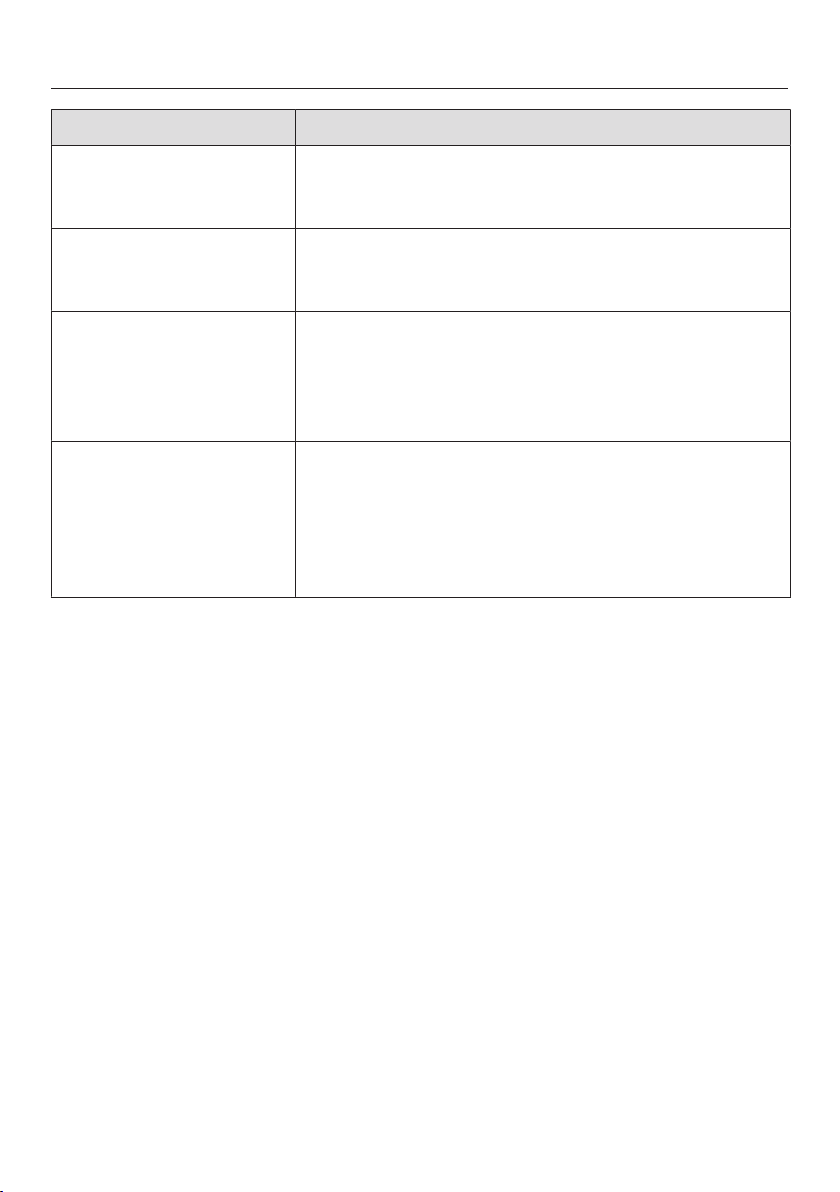
Frequently Asked Questions
86
Problem Possible cause and solution
An alarm sounds. The appliance door has been open for longer than
3minutes.
Close the appliance door.
No alarm sounds de-
spite the appliance door
being open.
You have switched off the audible signal.
Switch the audible signal back on using Settings
mode .
The appliance door
cannot be opened.
The Pull2OpenDoor Assistant is switched on but the
appliance has a handle-free cabinet front.
For handle-free cabinet fronts, switch on the
Push2OpenDoor Assistant (see “Switching on the
Door Assistant” in “Selecting additional settings”).
The appliance door
cannot be opened when
Sabbath Mode is
switched on.
The Push2OpenDoor Assistant is switched on at the
same time as Sabbath Mode.
When Sabbath Mode is switched on, the Door As-
sistant is deactivated.
Pull the appliance door open from below or from
the side.
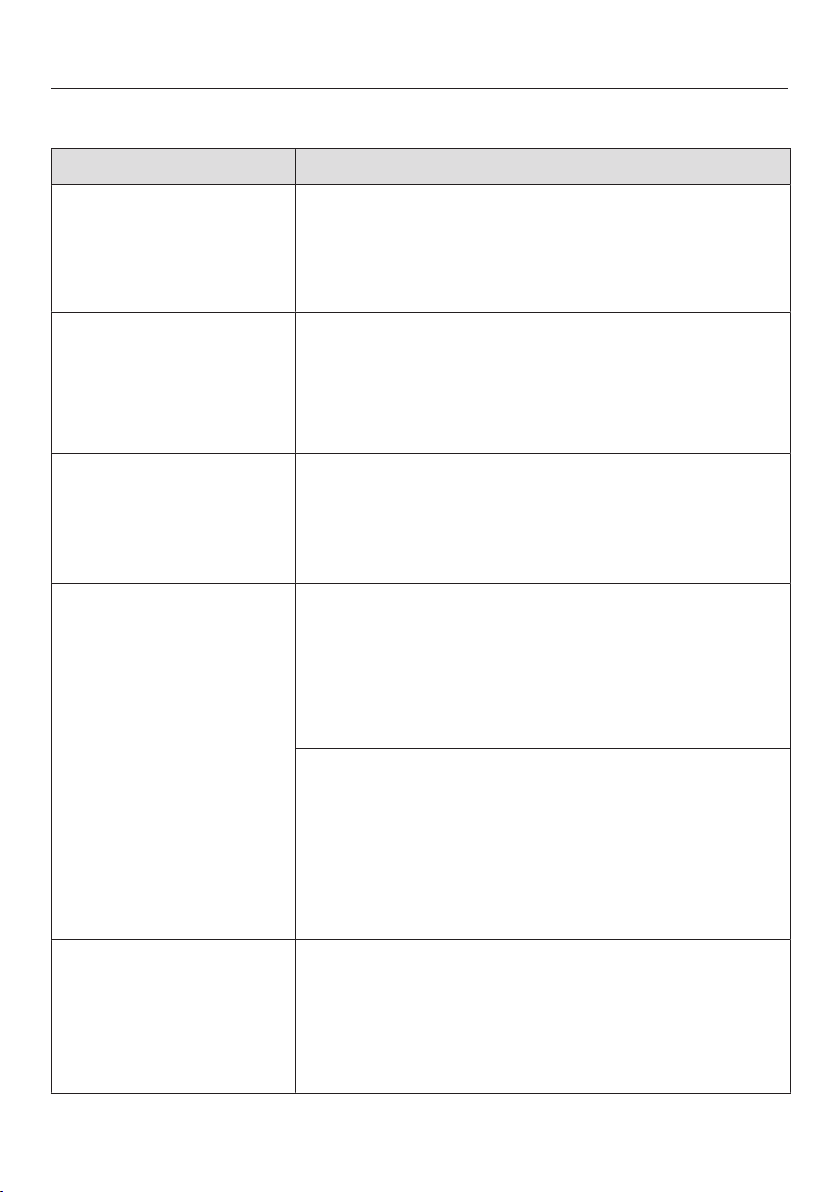
Frequently Asked Questions
87
Messages in the display
Message Possible cause and solution
The alarm symbol
and the sensor for one
of the sections have lit
up on the display, and
an alarm is sounding.
The door alarm has been activated.
Close the appliance door. The alarm symbol
will go out and the alarm will stop.
The warning sounds
and the message Close
the door appears in the
display.
The appliance door is open.
Close the appliance door.
If you wish to turn the alarm off early, touch the
sensor control OK in the display.
The alarm will stop.
The temperature display
is dark and is shown
in the display.
Sabbath Mode is turned on: The interior lighting is
turned off and the appliance is cooling down.
You can switch off Sabbath Mode at any time (see
“Selecting additional settings”, section “Switching
Sabbath Mode on and off”).
“F Please contact Miele
Technical Service.” ap-
pears in the display and
an alarm sounds.
There is a fault.
Make a note of the fault message if necessary.
Contact Technical Service.
To turn the alarm off, touch the symbol.
The error message does not disappear from the dis-
play until the error has been rectified.
The voltage level is too high/low.
Observe the connection data under “Electrical
connections”.
Contact Technical Service if necessary.
To turn the alarm off, touch the symbol.
The error message does not disappear from the dis-
play until the error has been rectified.
is shown in the dis-
play. The machine does
not get cold, but the
machine controls are
working.
Demo Mode is switched on. Demo mode allows the
appliance to be presented in the showroom without
the cooling system being turned on. Do not activate
this setting for domestic use.
Switch off Demo mode (see “Selecting additional
settings”, section “Switching off Demo Mode ”).
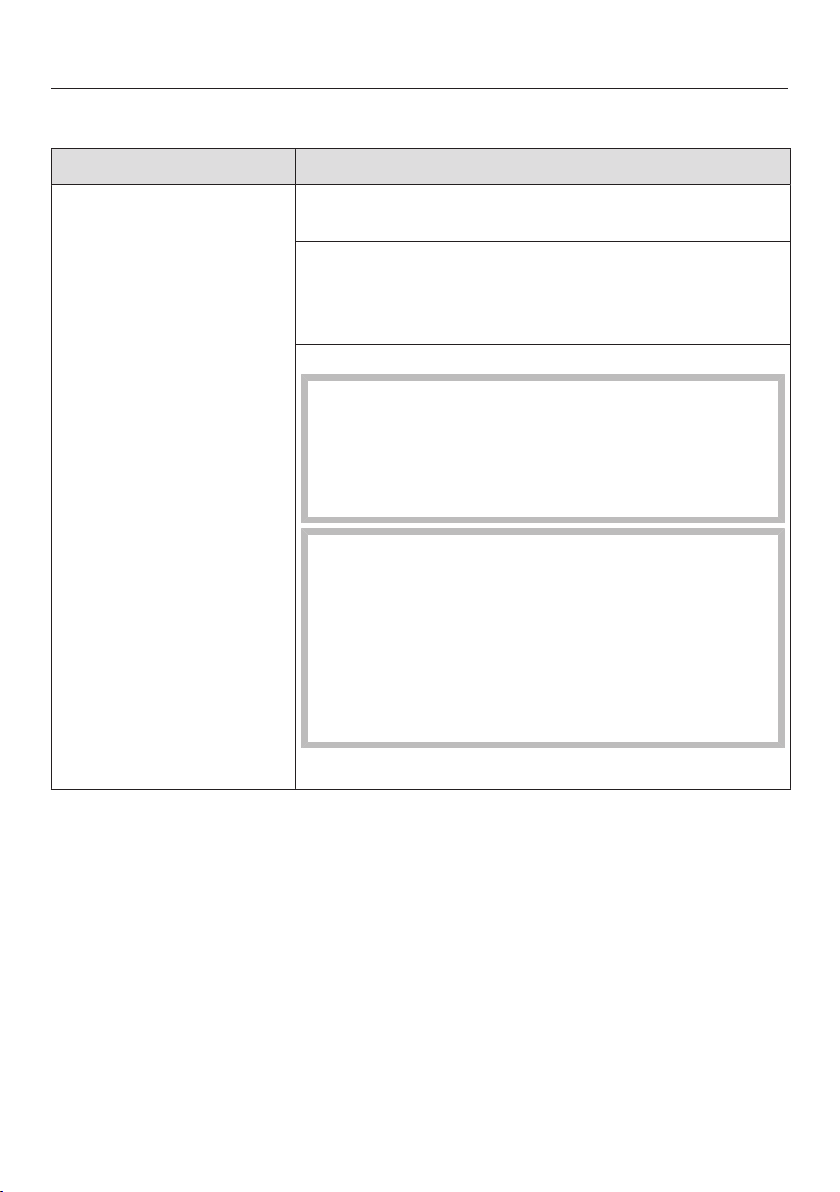
Frequently Asked Questions
88
The interior lighting is not working.
Problem Possible cause and solution
The interior lighting is
not working.
The appliance has not been turned on.
Turn the appliance on.
Sabbath Mode is switched on: The temperature dis-
play is dark and is shown in the display.
You can switch off Sabbath Mode at any time via
Settings mode .
There is a fault.
Risk of electric shock!
There are live electrical components under the
lighting cover.
The LED lighting may only be repaired or replaced
by Technical Service.
Risk of injury from LED lighting! The light inten-
sity corresponds to laser beam class 1/1M.
The lighting covers must not be removed or dam-
aged, or be removed due to damage. This could
cause injury to your eyes.
Do not look into the LED lighting (laser beam class
1/1M) with optical instruments (e.g., a magnifying
glass).
Contact Technical Service.
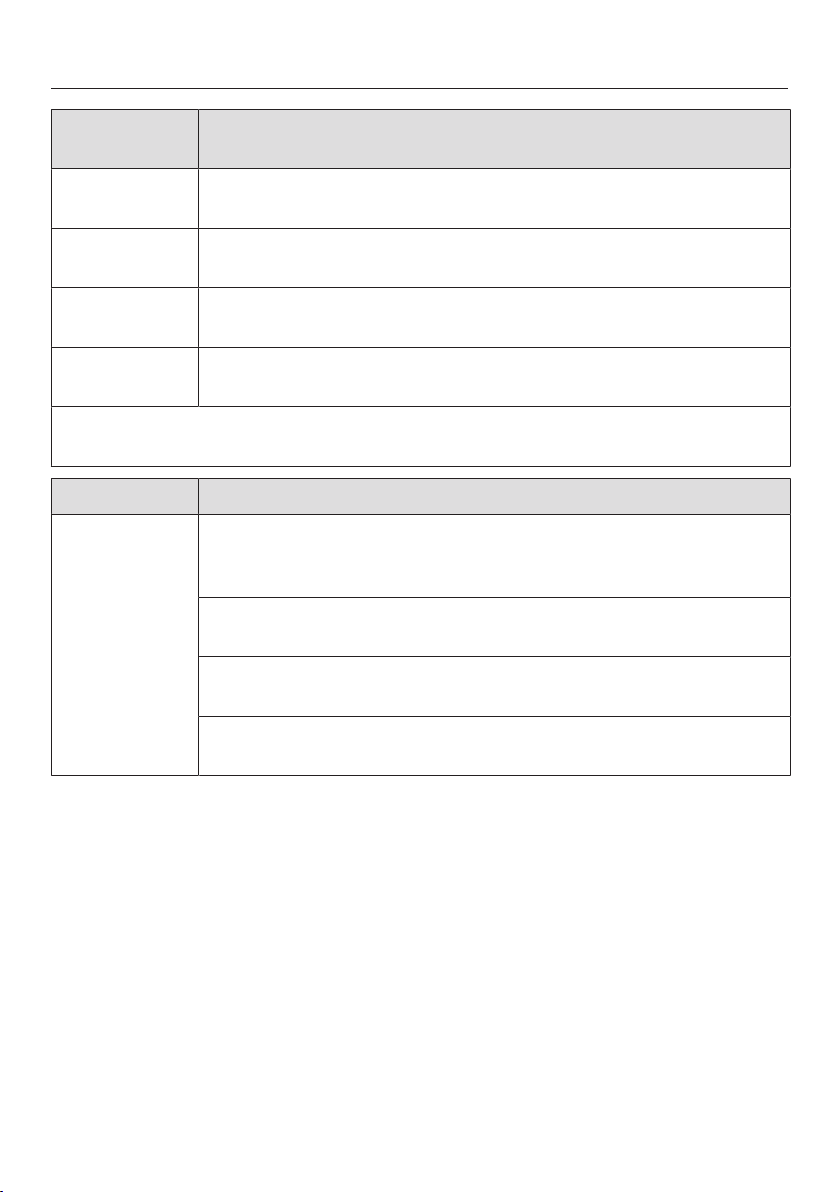
Causes of noises
89
Normal
noises
Cause
Brrrrr... A humming noise is made by the motor (compressor). This noise
can get louder for brief periods when the motor switches on.
Blub, blub... A gurgling noise can be heard when the coolant circulates
through the pipes.
Click... Clicking sounds occur whenever the thermostat switches the
motor on or off.
Crack... A cracking sound can be heard when materials expand inside
the appliance.
Please bear in mind that a certain amount of noise is unavoidable (from the com-
pressor and the coolant circulating through the system).
Noises Cause and solution
Rattling,
clinking
The appliance is uneven. Realign the appliance using a level, by
raising or lowering the adjustable feet underneath the appliance
or placing something underneath it.
The appliance is touching another machine or piece of furniture.
Move it away.
Drawers, baskets or shelves are jiggling or are stuck. Check all
removable parts and refit them correctly if required.
Bottles or containers are touching each other. Separate them a
little.
Technical Service
90
Contact in case of fault
In the event of a fault which you cannot
remedy yourself, please contact your
Miele dealer or Miele Technical Service.
Contact information for Miele Techni-
cal Service can be found at the end of
this document.
Please quote the model and serial num-
ber of your appliance when contacting
Miele. Both pieces of information can
be found on the data plate.
You will find the data plate inside your
appliance.
Warranty
For more information about warranty
conditions, please contact Miele Tech-
nical Service.

Declaration of conformity
91
Frequency band 2,412 GHz –
2,462 GHz
Maximum trans-
mitting power
< 100 mW

Copyright and licenses
92
Miele uses software to operate and control the appliance.
The copyright authorization from Miele and other relevant software suppliers must
be respected.
Miele and its suppliers reserve the rights to the software components.
In particular the following are prohibited:
– Copying and distribution
– Modifications and derivations
– Decompression, reverse engineering, disassembling, and other such reductions
of software
Components which fall under GNU General Public Licence and further Open
Source licenses are integrated into the software.
An overview of the integrated Open Source components and a copy of the current
license can be obtained at http://www.miele.com/device-software-licenses. You
will need to enter the specific product name.
Miele will provide the source code for all components of software licensed under
the GNU General Public Licence and comparable Open Source licenses.
For source code requests, please e-mail [email protected].



9 Independence Way
Princeton, NJ 08540
Phone:
Fax:
www.mieleusa.com
U.S.A.
Miele, Inc.
National Headquarters
Please have the model and serial number
of your appliance available when
contacting Technical Service.
Canada
Importer
Miele Limited
Headquarters and Miele Centre
800-843-7231
609-419-4298
Technical Service & Support
Phone:
Fax:
161 Four Valley Drive
Vaughan, ON L4K 4V8
www.miele.ca
800-999-1360
888-586-8056
Customer Care Centre
Phone:
800-565-6435
905-532-2272
International Headquarters
Miele & Cie. KG
Carl-Miele-Straße 29
33332 Gütersloh
Germany

M.-Nr. 10 785 080 / 01en-US, CA
K 2601 SF, K 2801 SF, K 2811 SF, K 2901 SF, K 2911 SF