
Quick Start Guide

2
Thank you for your Polk purchase. If you have a question or comment,
please feel free to call or email us.
Technical Assistance
In North America, call Polk Customer Service at
800-377-POLK(7655) (M–F, 9 a.m.–5:30 p.m. EST)
Outside the US, call +1-410-358-3600
email polkcs@polkaudio.com
Polk Audio
1 Viper Way, Vista, CA 92081
U.S.A.
The complete owner’s manual can be found online at
www.polkaudio.com/products/SR1
Polk Audio is a DEI Holdings, Inc. Company. Polk Audio and Polk, are registered trademarks of Polk Audio, LLC.
Chromecast Built-in is a trademark of Google Inc.
All other trademarks, product names, logos, and brands referenced herein are the property of their respective owners.

3
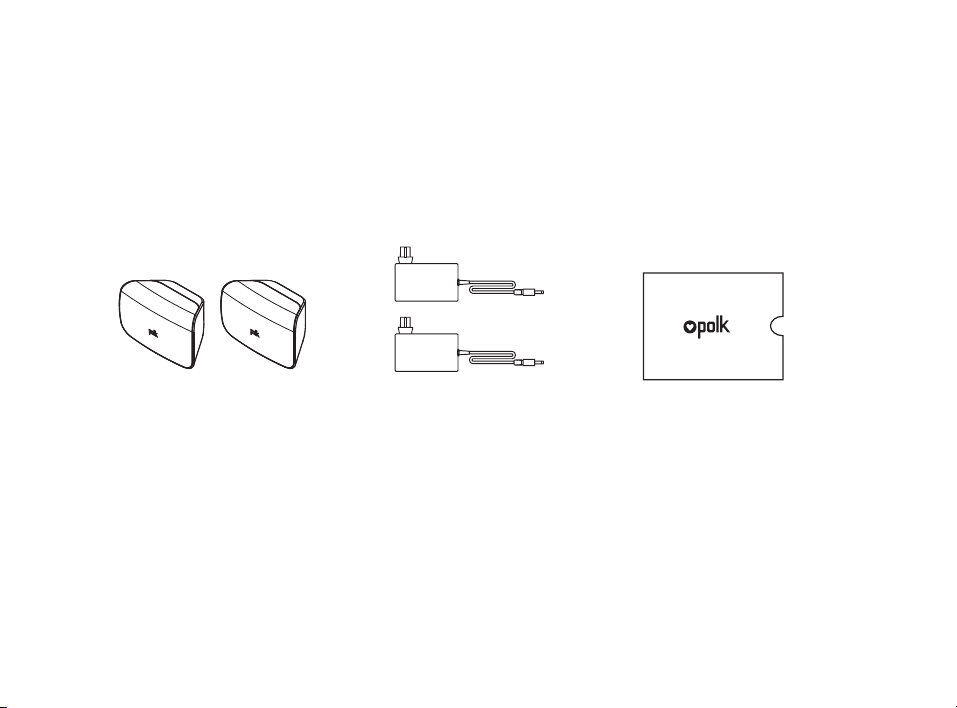
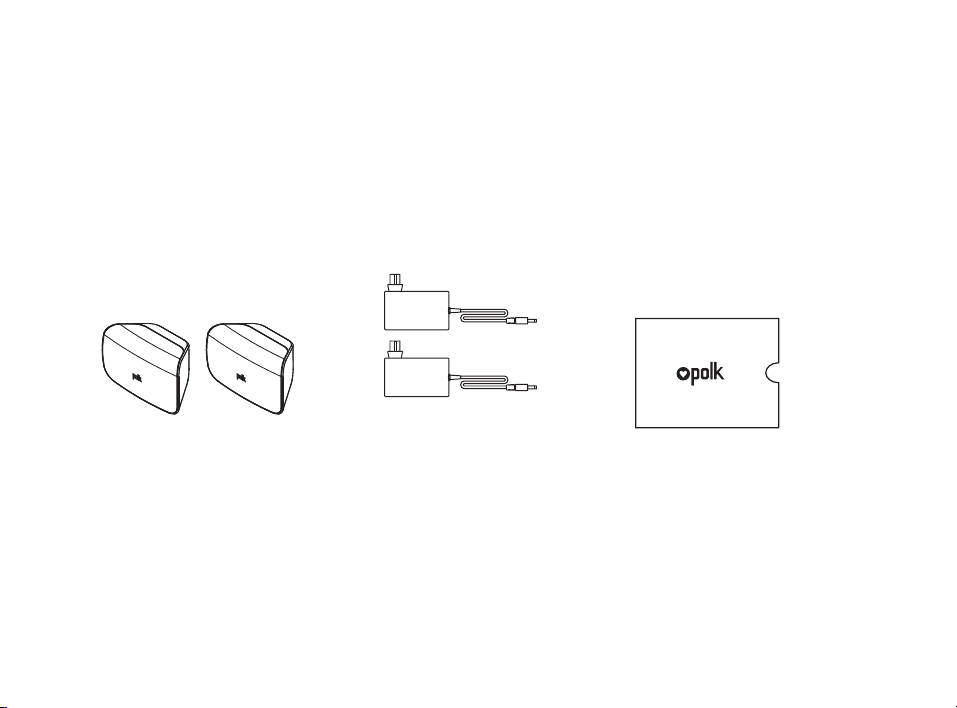
What’s in the Box
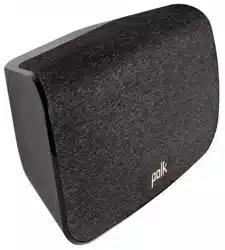
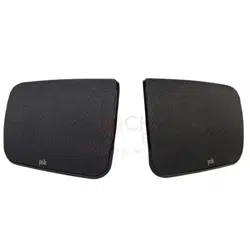
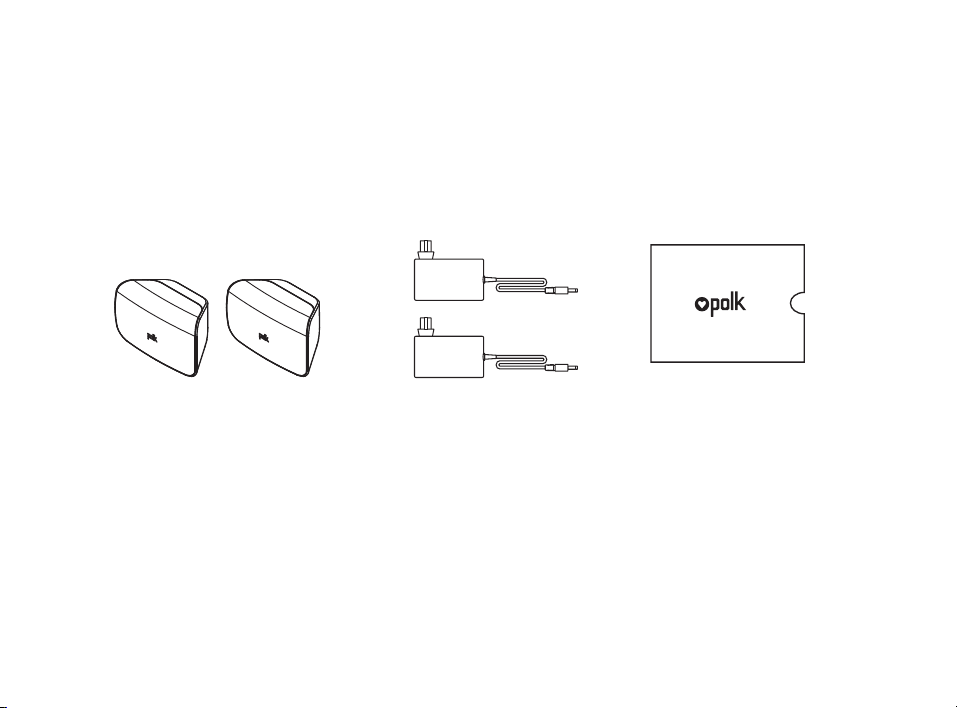
(2) SR1 Wireless Surrounds
(2) Surrounds
Power Supply
Product Literature
4
SYNC POWER
15V 1.2A
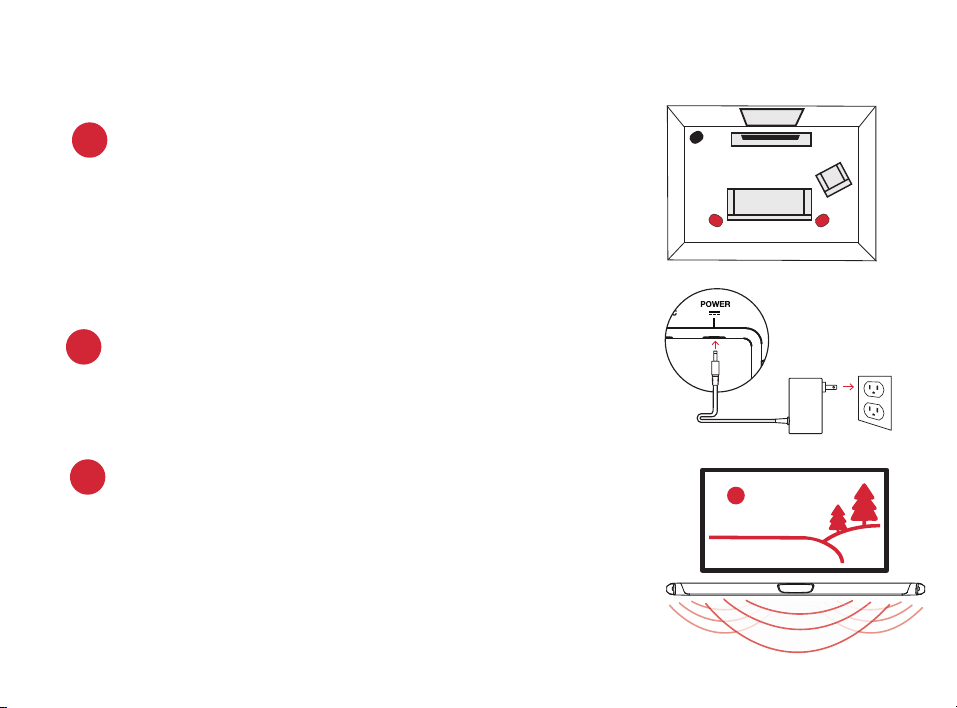
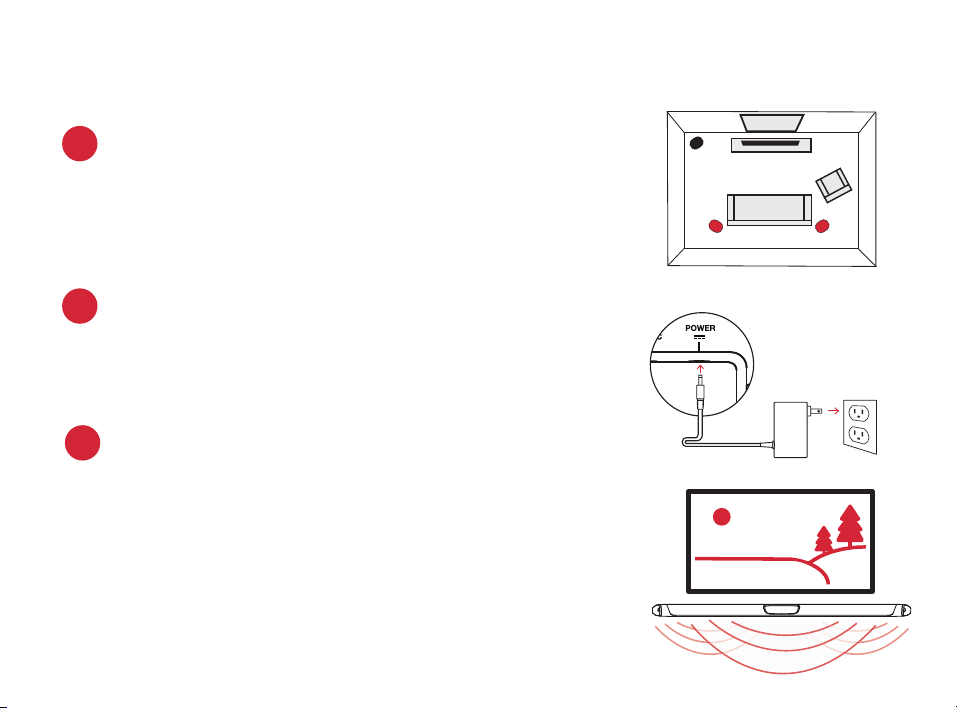
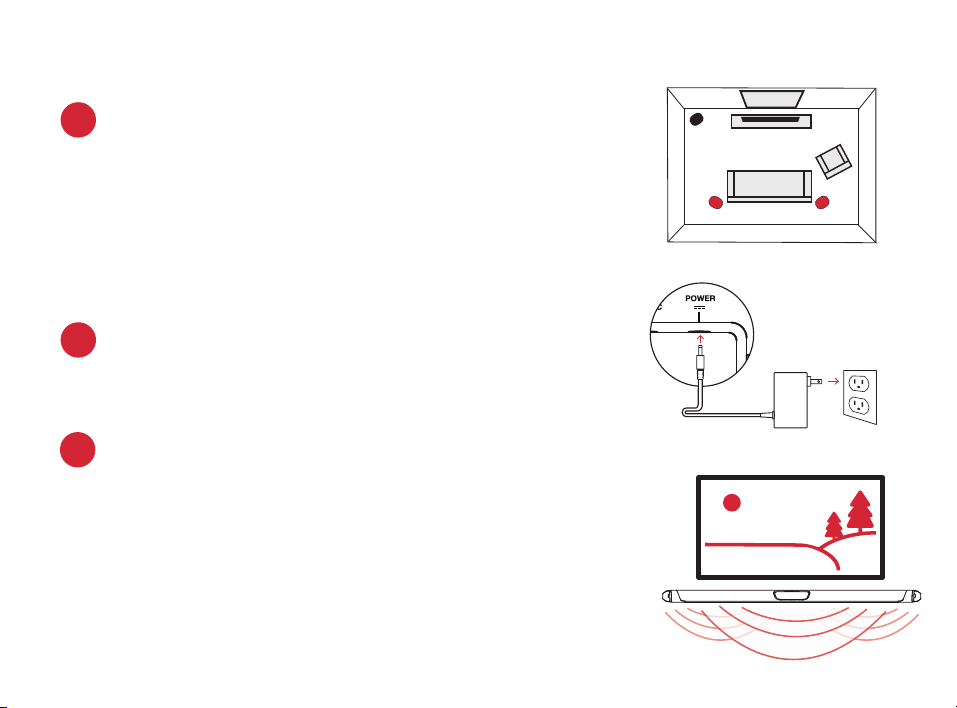
Placing or mounting the surrounds
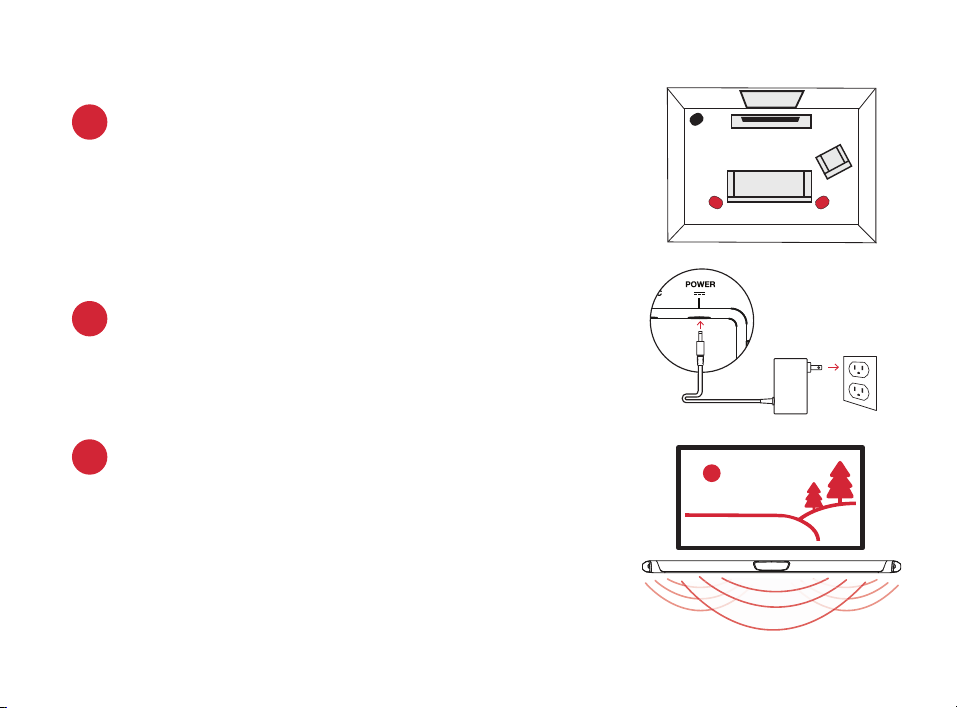
Place the surround speakers on the left and right
sides and equidistant from the main listening
position. Make sure you place the speaker marked
“L” on the left and the speaker marked “R” on
the right. If you decide to mount the surrounds,
Please refer to the wall mounting template for
instructions.
1.
2.
Connecting the surrounds to an AC outlet
A fl ashing green light will be visible on the back of the
surrounds until you have manually synced the bar, sub,
and surrounds.
Surrounds
TV
L R
Verifying your connections
Turn on your TV and verify that you are seeing video and
hearing sound from the sound bar.
If you do not hear sound and do not see any lights on the
front of your sound bar, press the power button on the
sound bar to turn it on.
Note: If you are hearing sound from both your TV and your sound bar, you
must manually turn o your TV speakers using the Settings Menu on your TV.
Please refer to your TV’s owner’s manual for instructions.
3.
Setup
Connecting to Your Surround Speakers

5
4. Syncing the Surround Speakers to the Soundbar
Note: You must sync BOTH surround speakers AND the subwoofer.
Sync the Subwoofer
1) Press the power button on the soundbar to turn it on.
2) On the back of the SOUNDBAR, press and hold the SYNC button until you hear a
tone (about 3-4 seconds) and then release the button. The SUB and SURR lights
above the SYNC button will flash green
3) On the back of the SUBWOOFER, press and hold the SYNC button until you hear
a tone (about 10 seconds) and the light on the back of the subwoofer turns solid
green.
Sync the Surround Speakers
4) On the back of EACH of the SURROUND SPEAKERS, press and hold the SYNC
button until the light on the bottom of the speaker turns solid green (about 10 sec-
onds).
5) When BOTH LEFT and RIGHT surround speakers are paired to the bar you will hear
a tone from the bar.
NOTE: If you hear a two note descending tone from the bar syncing failed. Please try
again.
6
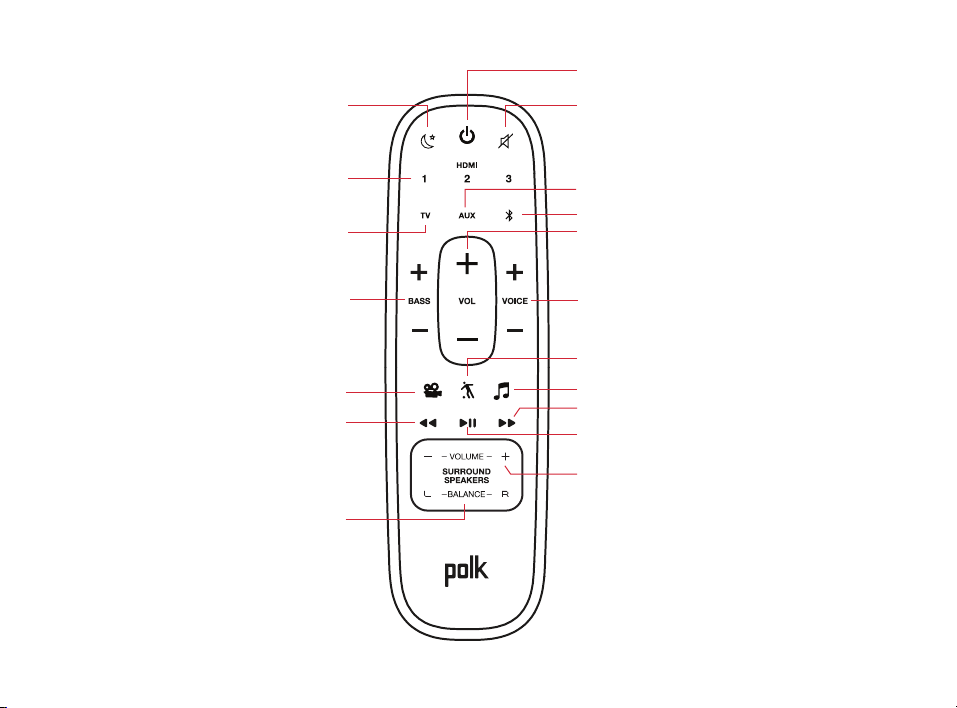
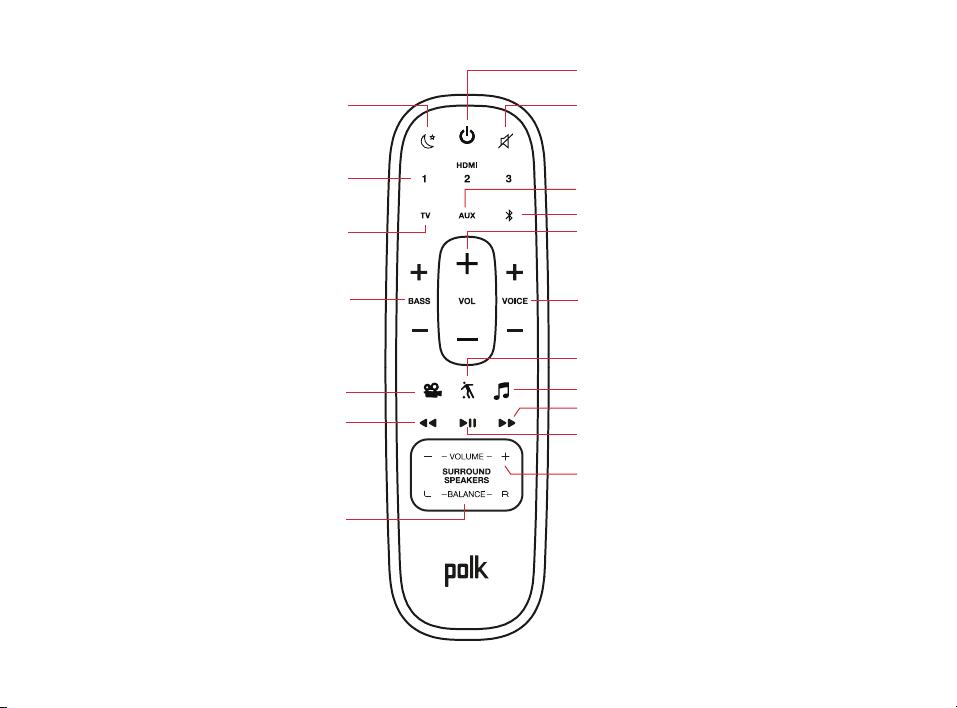
Remote Control
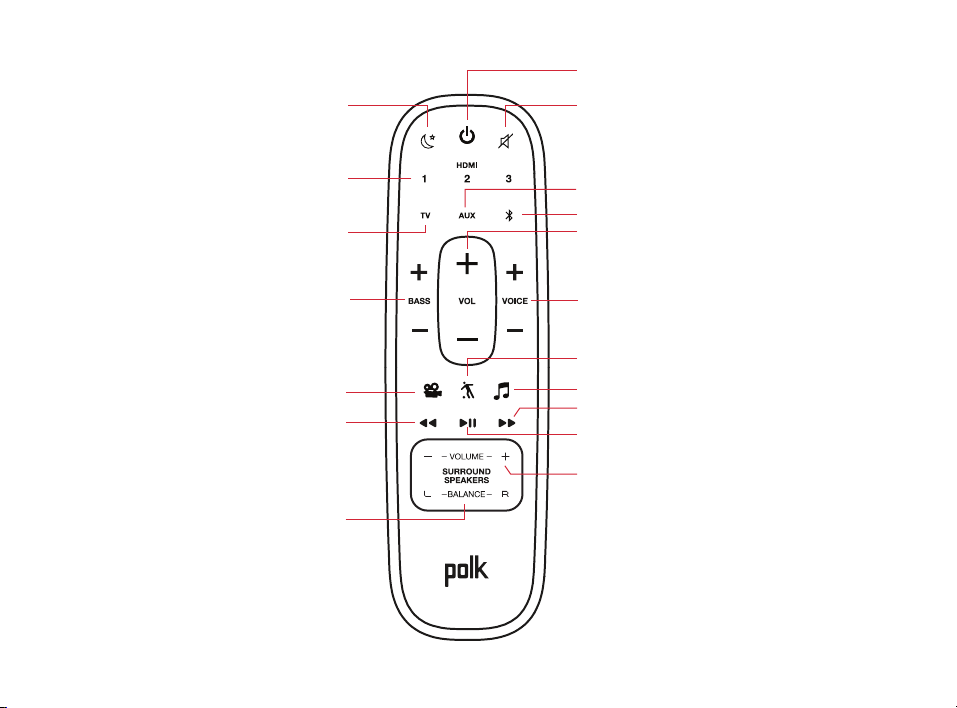
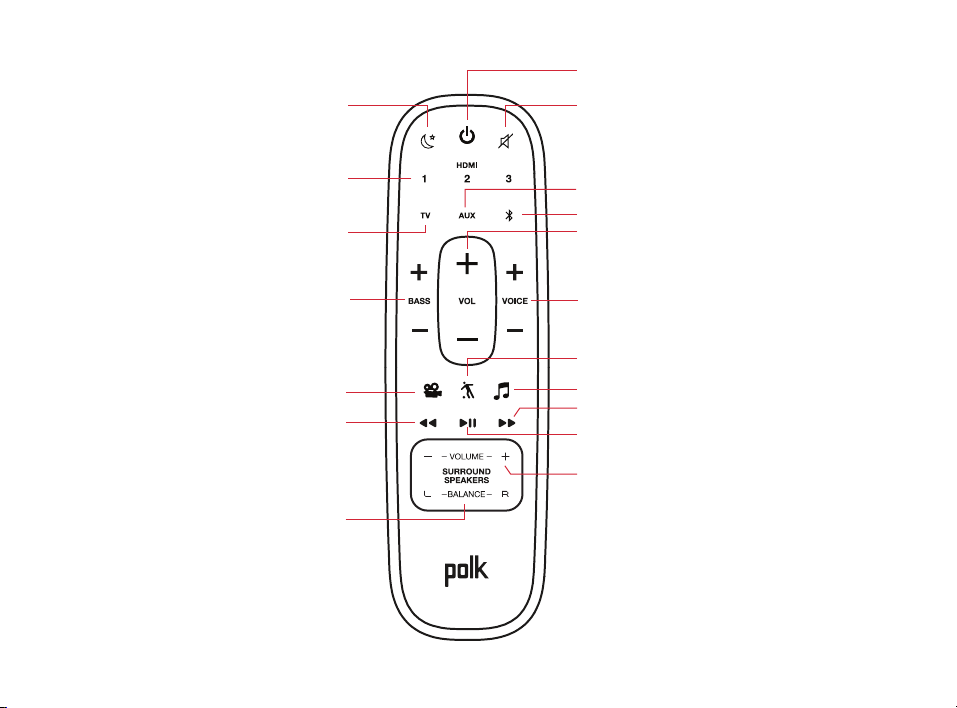
Power On/O
Mute
Play/Pause
Sport Mode
Surround Volume
Up/Down
(available when wireless surrounds
are used)
Surround Balance
Left/Right
(available when wireless
surrounds are used)
AUX Input
Bluetooth®
VoiceAdjust
Up/Down
TV Input
Night Mode
HDMI Inputs
Back
Bass
Up/Down
Movie Mode
Forward
Master Volume
Up/Down
Music Mode
7
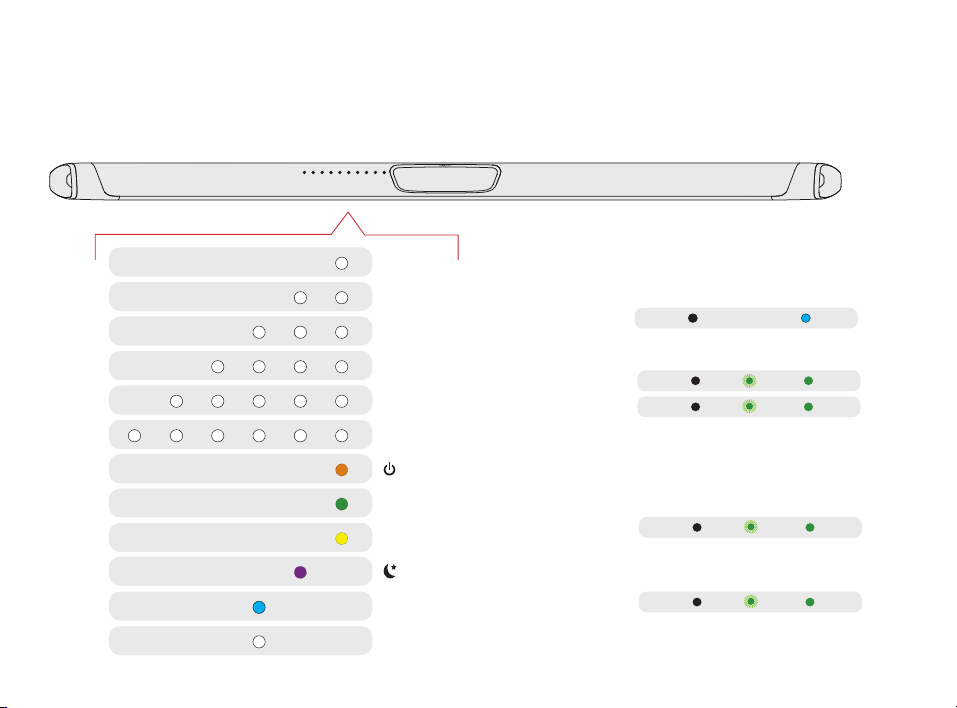
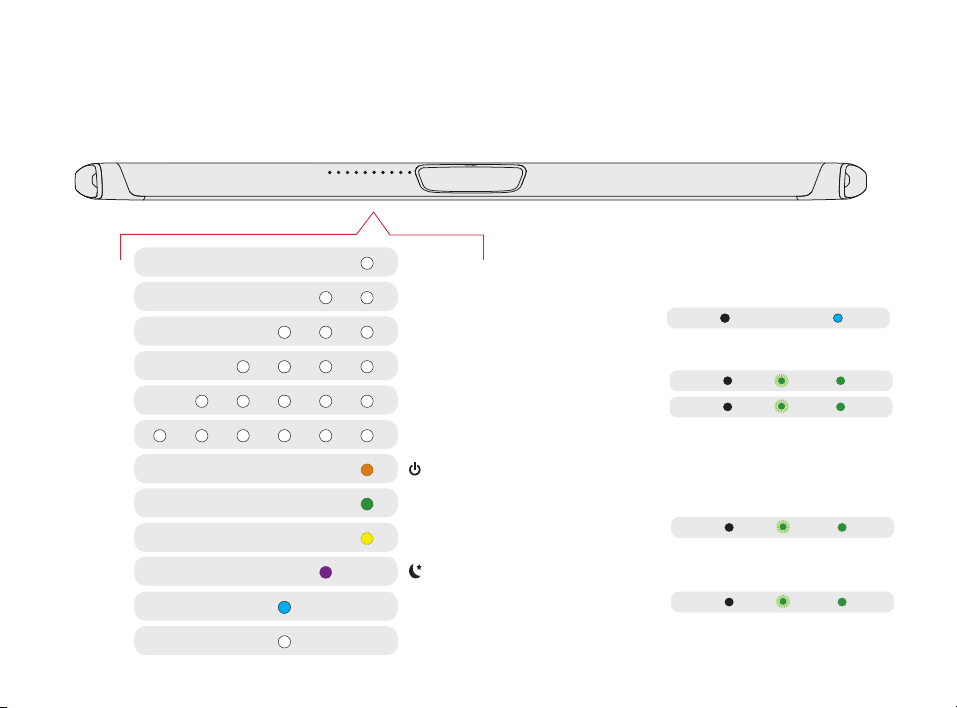
Visual Indicators
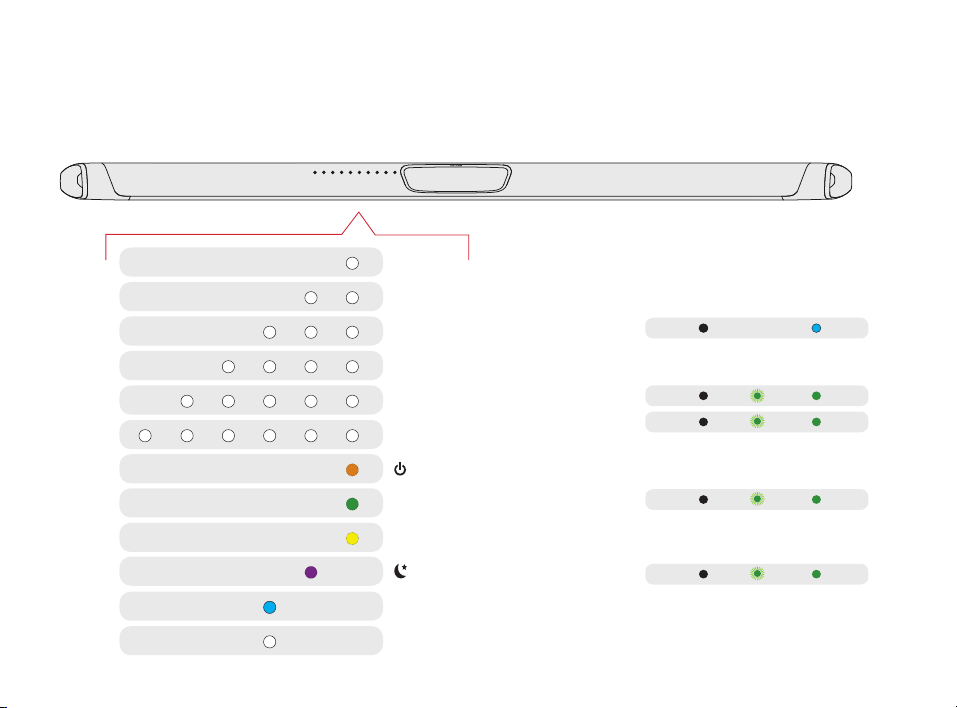
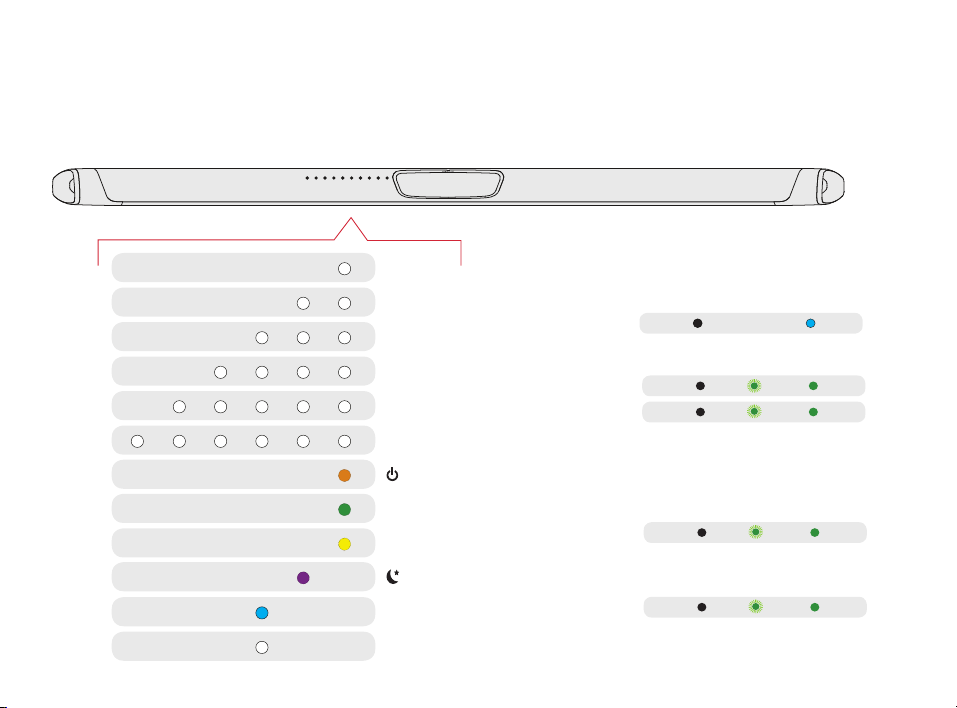
The front of the sound bar contains a horizontal row of lights that provide status indications,
such as source, volume and listening modes.
HDMI 1
WI-FI
OFF
NOT CONNECTED
FLASHING
PAIRING MODE
SOLID
CONNECTED
SUB
SUB
SURROUNDS
SURROUNDS
HDMI 2
HDMI 3
HDMI (ARC)
OPTICAL
AUX
ON
NIGHT MODE
DOLBY CONTENT
DTS CONTENT
CHROMECAST BUILT-IN
BLUETOOTH
Back of Bar
Back of Subwoofer
Back of Surround Speakers
8
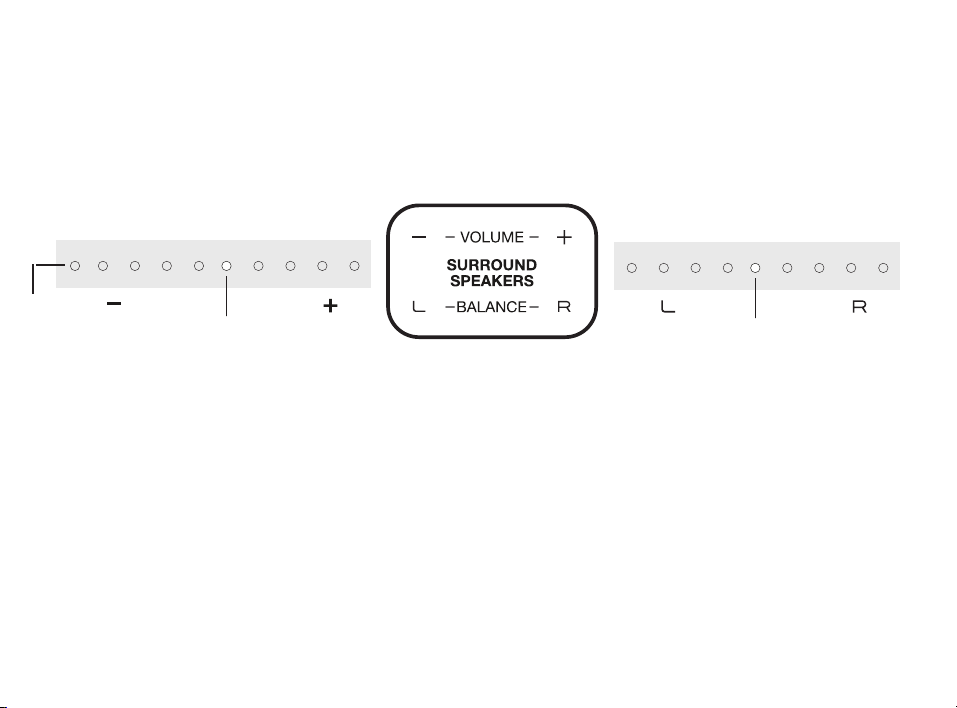
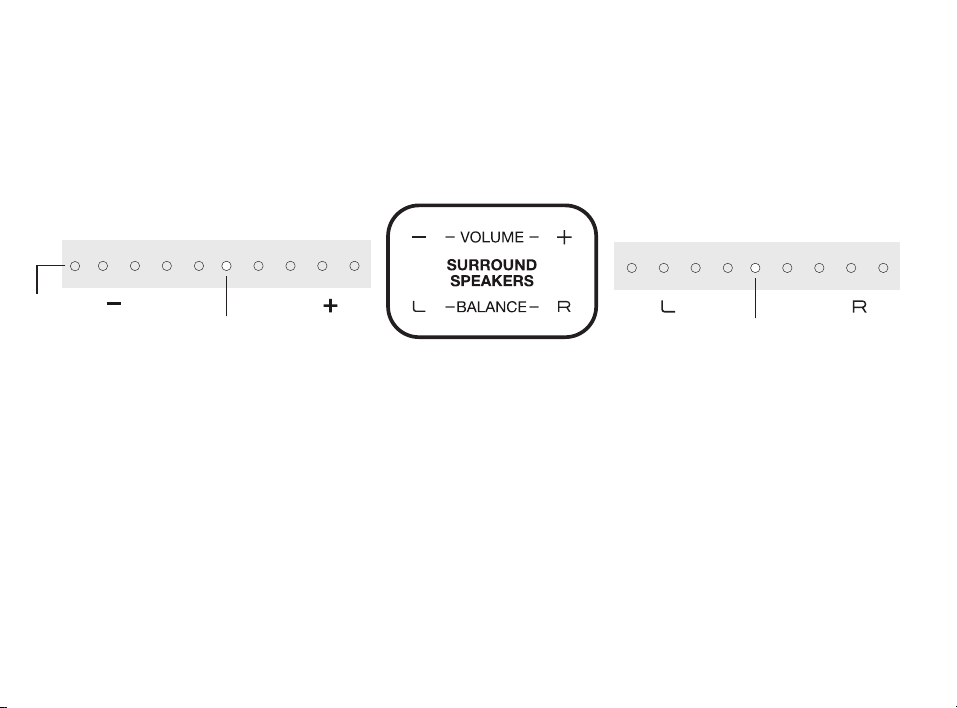
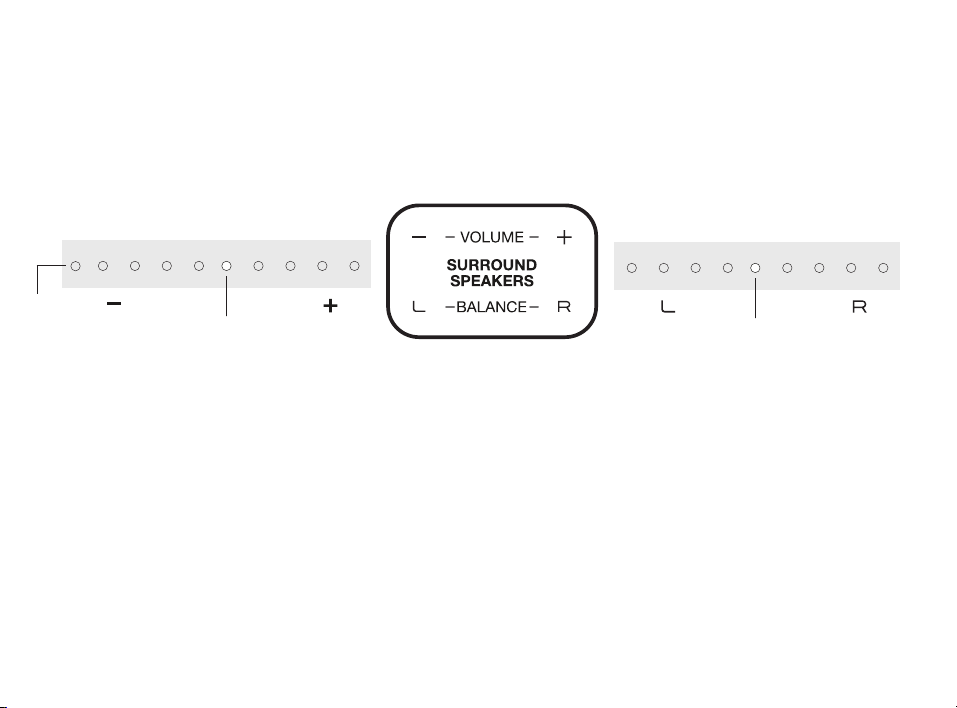
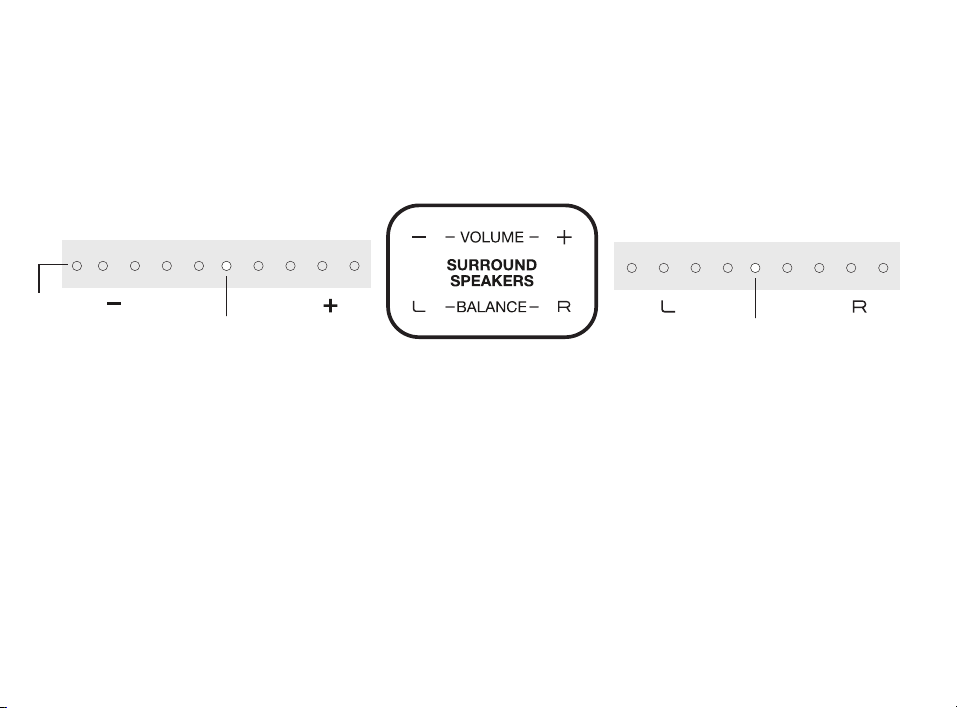
Optimizing Your Surround Speakers
Volume Control
Easily adjust volume of the
surround speakers for more or less
impact.
Balance Control
Easily adjust the balance of the
surround speakers based on your
listening position.
DEFAULT
LEVEL
DEFAULT
LEVEL
Sound Bar lights
Sound Bar lights
Surround
mute
9
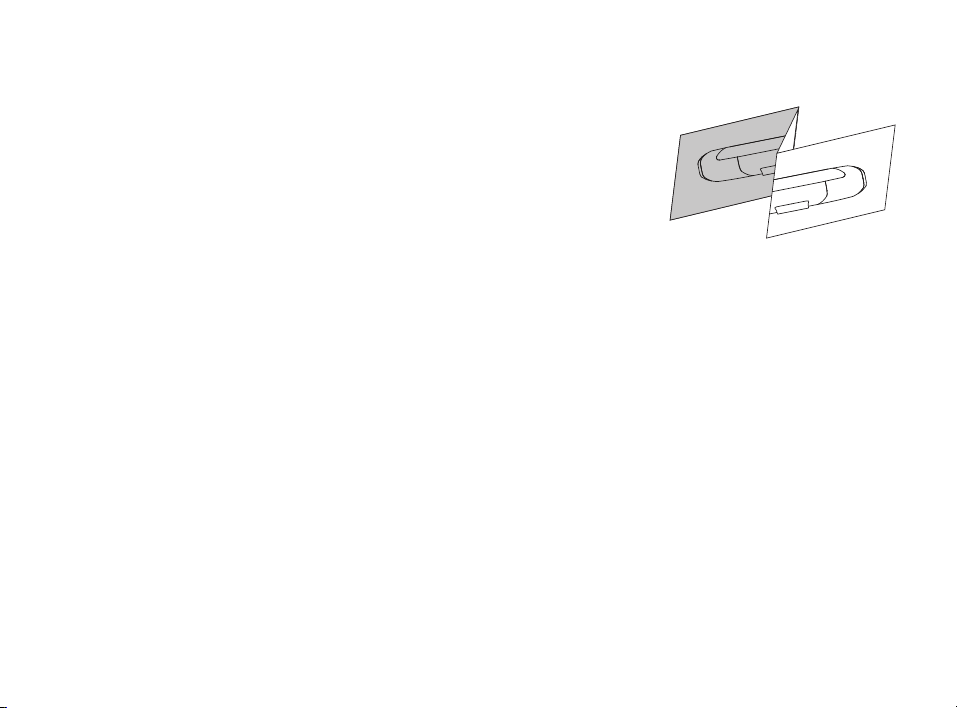
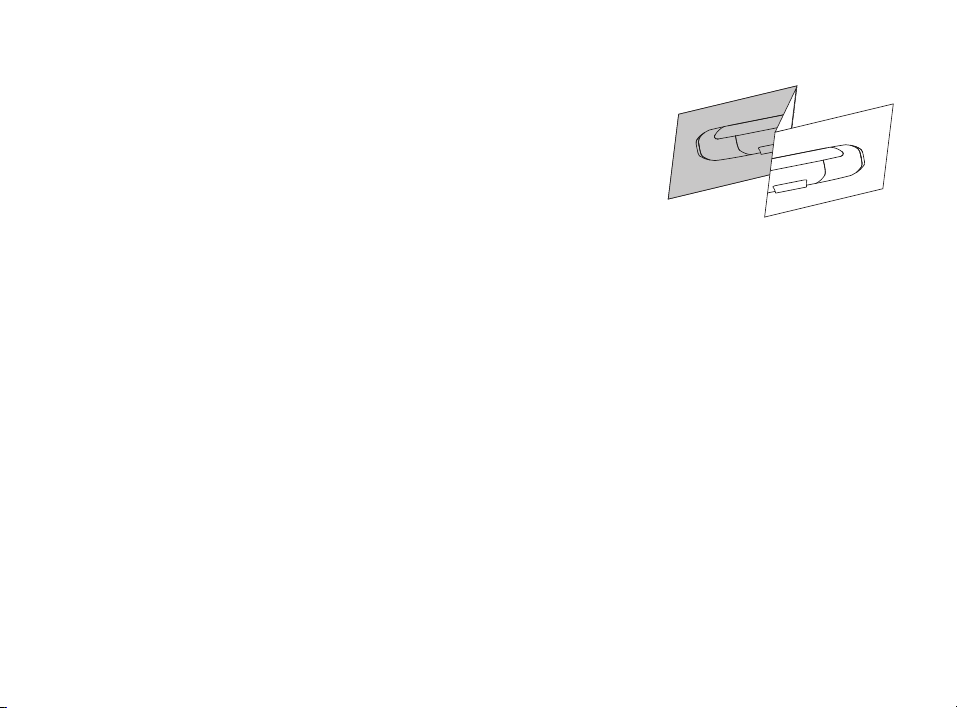
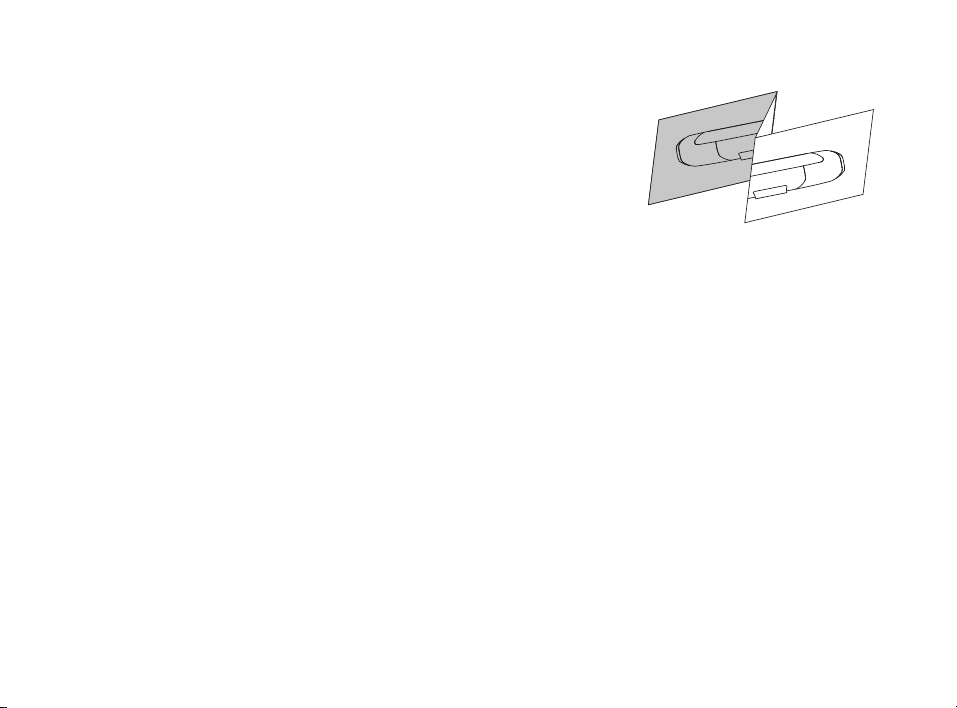
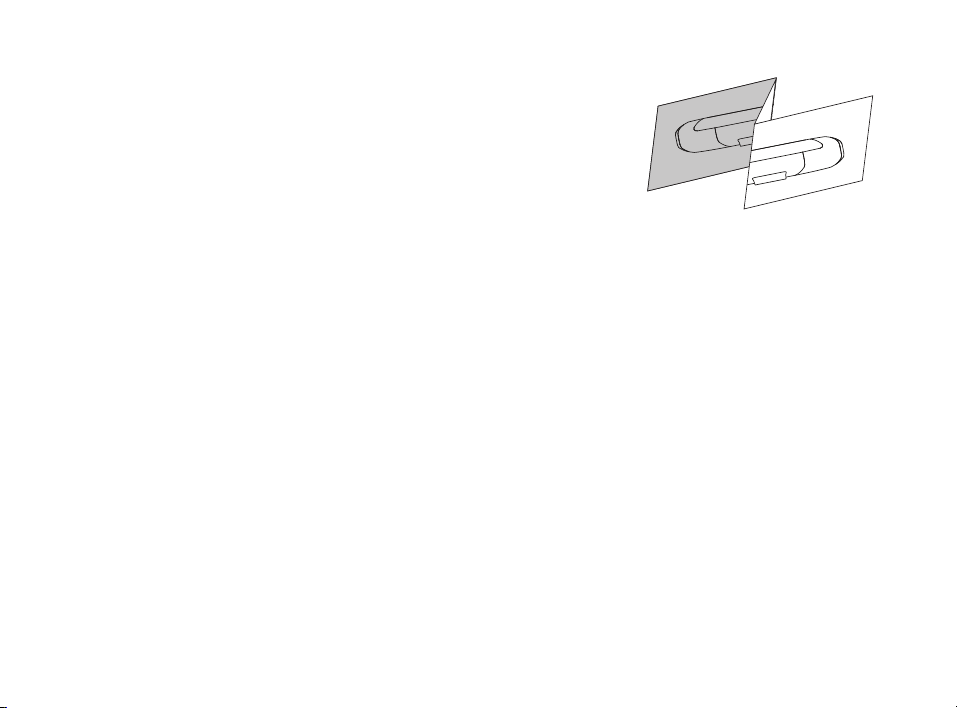
Wall mounting your SR1 Wireless Surround Speakers
A wall mounting template is provided for wall mounting the
surround speakers. For proper installation, please refer to the
instructions printed on the template. Screws for attaching the
surrounds to the wall are not included. Choose the screw type
and length appropriate to your home’s construction. If in doubt,
consult a professional.
I Don’t Hear Sound from my Surround Speakers
1) Verify that the left and right surrounds speakers are plugged in to a power source.
2) Check the green light on the back of each speaker.
• If it is solid green, turn up the Surround Volume using the remote control.
• If it is flashing green you need to sync the surround speaker to the soundbar using the
following instructions

10
Merci pour votre achat d’un produit Polk. Si vous avez des questions ou des commentaires,
n’hésitez pas à nous appeler ou à nous envoyer un courriel.
Assistance technique
En Amérique du Nord, contactez le service à la clientèle de Polk au
800-377-POLK(7655) (L–V, 9 h –17 h 30 HNE)
À l’extérieur des États-Unis, composez le +1-410-358-3600
Courriel polkcs@polkaudio.com
Polk Audio
1 Viper Way, Vista, CA 92081
U.S.A.
Vous trouverez le manuel du propriétaire complet au
www.polkaudio.com/products/SR1
Polk Audio est une entreprise DEI Holdings, Inc. Polk Audio et Polk sont des marques déposées de Polk Audio, LLC.
Chromecast Built-in est une marque déposée de Google Inc.
Toutes les autres marques déposées, nom de produits, marques et logos qui sont mentionnés dans ce document sont la
propriété de leurs détenteurs respectifs .
FR
11
Contenu de la boîte
(2) haut-parleurs
ambiophoniques
sans fil SR1
(2) blocs d’alimentation pour
haut-parleurs ambiophoniques
Documentation sur le produit
12
SYNC POWER
15V 1.2A
Positionnement de la barre audio
Pour profi ter au maximum de votre expérience
d’écoute, centrez la barre audio sous le téléviseur.
Remarque : Pour des instructions de montage mural,
consultez la section Installation avancée à la page 15
et le diagramme d’installation compris.
1.
2.
Branchement des haut-parleurs à une sortie AC
Un feu vert fi xe apparaîtra à l’arrière des haut-
parleurs ambiophoniques afi n d’indiquer qu’ils sont
correctement branchés à la barre audio.
haut-parleurs
ambiophoniques
TV
L
R
Vérifi cation de vos connexions
Allumez votre télé et vérifi ez si vous voyez la vidéo et si
vous entendez le son à partir de votre barre de son.
Si vous n’entendez pas le son et vous ne voyez pas les
lumières sur le devant de votre barre de son, appuyez sur le
bouton d’alimentation sur la barre de son pour l’allumer.
Remarque : Si vous entendez des sons en provenance de votre téléviseur et de la barre
audio, vous devez manuellement désactiver les haut-parleurs du téléviseur à partir du
menu des réglages du téléviseur. Veuillez consulter le manuel du propriétaire de votre
téléviseur pour des instructions.
3.
Installation
Couvrant vos environs à la barre de son

13
4. Synchroniser les haut-parleurs ambiophoniques à la barre de son
Note : Vous devez synchroniser les DEUX haut-parleurs ambiophoniques ET le caisson
de graves.
Synchroniser le caisson de graves avec la barre de son
1) Appuyez sur le bouton d’alimentation sur la barre de son pour l’allumer.
2) À l’arrière de la BARRE DE SON, appuyez et maintenez le bouton SYNC (environ 3 à
4 secondes) jusqu’à ce que vous entendiez une tonalité puis relâchez le bouton. Les
lumières SUN et SURR au-dessus du bouton SYNC clignoteront en vert.
3) À l’arrière du CAISSON DE GRAVES, appuyez sur le bouton SYNC (environ 10
secondes) jusqu’à ce que vous entendiez une tonalité et la lumière à l’arrière du
caisson de graves s’illumine en vert de façon continue.
Synchroniser des haut-parleurs ambiophoniques
1) À l’arrière de CHACUN des HAUT-PARLEURS AMBIOPHONIQUES, appuyez et
maintenez le bouton SYNC (environ 10 secondes) jusqu’à ce que la lumière au bas du
haut-parleur soit verte en continu.
2) Lorsque les deux haut-parleurs ambiophoniques, GAUCHE et DROITE, sont
synchronisés avec la barre, vous entendrez une tonalité provenant de la barre de son.
NOTE : Si vous entendez un son à deux tonalités descendantes provenant de la barre de
son, cela signifie que la synchronisation a échoué. Veuillez essayer à nouveau.
14
Télécommande
Marche/Arrêt
Muet
Lecture/Pause
Mode sport
Volume ambiophonique
En haut/Vers le bas
(disponible pour les systèmes
ambiophoniques sans fil)
Équilibre ambiophonique
Gauche/Droite
(disponible pour les systèmes
ambiophoniques sans fil)
Entrée AUX
Bluetooth®
VoiceAdjust
En haut/Vers le bas
Entrée TV
Mode nocturne
Entrées HDMI
Retour
Basse
En haut/Vers le bas
Mode cinéma
Avance rapide
Volume principal
En haut/Vers le bas
Mode musique
15
Indicateurs Visuels
Le devant de la barre contient une rangée de DEL qui indiquent l’état du système, comme la
source, le volume et les modes d’écoute.
HDMI 1
WI-FI
FIX
CONNECTÉ
BASSE
BASSE
AMBIOPHONIQUE
AMBIOPHONIQUE
DEL de l’arrière de la
DEL de l’arrière du
caisson de basse
HDMI 2
HDMI 3
HDMI (ARC)
OPTIQUE
AUX
ACTIF
MODE NOCTURNE
CONTENU DOLBY
CONTENU DTS
CHROMECAST BUILT-IN
BLUETOOTH
FLASHING
MODE COUPLAGE
Arrière du caisson des graves
Arrière des haut-parleurs
ambiophoniques
ÉTEINT
NON CONNECTÉ
16
Contrôle du volume
Réglez facilement le volume pour
accroître ou réduire l’impact.
Contrôle de l’équilibre
Réglez facilement l’équilibre sonore
gauche et droit.
Équilibre
droit
Plus de
volume
Équilibre
gauche
Moins de
volume
NIVEAU
PAR DÉFAUT
NIVEAU
PAR DÉFAUT
Surround
mute
Optimiser vos haut-parleurs ambiophoniques
Lumières de la barre de son
Lumières de la barre de son
17
Fixation murale de MagniFi MAX
Un gabarit d’installation murale est fourni pour installer les haut-
parleurs ambiophoniques au mur. Pour eectuer une installation
adéquate, veuillez lire les instructions imprimées sur le gabarit. Les
vis pour fixer les haut-parleurs ambiophoniques au mur ne sont pas
comprises. Choisissez le type et la longueur de vis appropriés selon
la construction de votre résidence.
Si vous avez des doutes, consultez un professionnel.
Je n’entends pas de son de mon caisson des graves
1) Vérifiez si le caisson de graves est branché à une prise de courant.
2) Vérifiez la lumière verte à l’arrière de votre caisson de graves.
• Si la lumière verte est continue, augmentez le volume des graves à l’aide de la télécommande.
• Si la lumière verte clignote, vous devez synchroniser votre caisson de graves avec la barre de
son en suivant les instructions suivantes :

18
Gracias por su compra en Polk. Si tiene alguna pregunta o comentario, no dude en llamarnos
o enviarnos un correo electrónico.
Asistencia técnica
En Norteamérica, llame al Servicio al Cliente de Polk al
800-377-POLK(7655) (L-V, 9 a. m.-5:30 p. m. EST)
Fuera de los EE. UU., llame a +1-410-358-3600
Email polkcs@polkaudio.com
Polk Audio
1 Viper Way, Vista, CA 92081
U.S.A.
El manual completo del propietario se puede encontrar en línea en
www.polkaudio.com/products/SR1
Polk Audio es una empresa de DEI Holdings, Inc. Polk Audio y Polk son marcas registradas de Polk Audio, LLC. El
Chromecast incorporado es una marca comercial de Google Inc.
Todas las demás marcas comerciales, nombres de productos, logotipos y marcas mencionados en este documento son
propiedad de sus respectivos dueños.
ES
19
Qué contiene la caja
(2) altavoces surround
inalámbricos SR1
(2) fuente de alimentación
de altavoces surround
Literatura de producto
20
SYNC POWER
15V 1.2A
Ubicación o montaje del sonido envolvente
Coloque los altavoces envolventes en los lados
izquierdo y derecho y equidistantes de la posición
principal de audición. Asegúrese de colocar el
altavoz marcado como “L” en la izquierda y el
altavoz marcado como “R” en la derecha. Si decide
montar los altavoces, consulte la plantilla de
montaje en pared para poder ver las instrucciones.
1.
2.
Conexión de los altavoces surround a una toma de CA
Una luz verde sólida será visible en la parte posterior
de los altavoces surround para indicar que se han
conectado correctamente a la barra de sonido.
altavoces surround
inalámbricos
TV
L R
Verifi cando sus conexiones
Encienda el televisor y compruebe que está viendo
vídeo y oyendo sonido desde la barra de sonido.
Si no oye el sonido y no ve ninguna luz en la parte
delantera de su barra de sonido, pulse el botón de
encendido en la barra de sonido para encenderlo.
Nota: Si está escuchando sonido desde el televisor y la barra de sonido,
debe desactivar manualmente los altavoces del televisor mediante el
menú de confi guración del televisor. Por favor, consulte el manual del
propietario de su televisor para obtener instrucciones.
3.
Confi guración
Conexión al televisor

21
4. Sincronizar los altavoces envolventes a la Barra de sonido
Nota: debe sincronizar AMBOS altavoces envolventes Y el subwoofer.
Sincronizar el Subwoofer
1) Presione el botón de encendido en la barra de sonido para encenderla.
2) En la parte trasera de la BARRA DE SONIDO, pulse y mantenga pulsado el botón
de SINCRONIZACIÓN (SYNC) hasta que oiga un tono (unos 3-4 segundos,
aproximadamente) y luego suelte el botón. Las luces SUB y SURR que se encuentran
por encima del botón SYNCH se pondrán de color verde
3) En la parte trasera del SUBWOOFER, pulse y mantenga pulsado el botón SYNC
hasta que oiga un tono (unos 10 segundos) y l luz en la parte trasera del subwoofer
se torna de un verde sólido.
Sincronizar los altavoces envolventes
1) En la parte trasera de CADA UNO de los ALTAVOCES ENVOLVENTES, pulse y
mantenga pulsado el botón SYNC hasta que la luz en la parte baja del altavoces se
torne verde sólido (aproximadamente 10 segundos).
2) Cuando AMBOS altavoces envolventes, tanto el DERECHO como el IZQUIERDO,
estén emparejados con la barra, escuchará un tono de la barra.
NOTA: si oye, desde la barra, un tono de dos notas que descienden, la sincronización ha
fallado. Por favor, inténtelo de nuevo.
22
Mando a distancia
Encendido On/O
Silenciar
Reproducir/Pausar
Modo deportes
Volumen de surround
Izquierda/derecha (disponible
cuando se usen los altavoces
surround inalámbricos)surround
inalámbricos)
Equilibrio surround
Izquierda/derecha (disponible
cuando se usen los altavoces
surround inalámbricos)surround
inalámbricos)
Entrada Aux
Bluetooth®
VoiceAdjust
Arriba/abajo
Entrada TV
Modo nocturno
Entradas HDMI
Atrás
Bajo
Arriba/abajo
Modo película
Adelante
Volumen principal
Arriba/abajo
Modo música
23
Indicadores Visuales
La parte frontal de la barra de sonido contiene una fila horizontal de las luces LED que
proporcionan indicaciones de estado, tales como la fuente, el volumen y los modos de audio.
HDMI 1
WI-FI
SÓLIDO
CONECTADO
SUB
SUB
ALTAVOCES
ALTAVOCES
LED de atrás de la
HDMI 2
HDMI 3
HDMI (ARC)
ÓPTICO
AUX
ACTIF
MODO NOCTURNO
CONTENIDO DOLBY
CONTENIDO DTS
CHROMECAST INCORPORADO
BLUETOOTH
FLASHING
MODO DE EMPAREJAMIENTO
Parte trasera del Subwoofer
Parte trasera de los
altavoces envolventes
APAGADO
NO CONECTADO
24
Control de volumen
Facilidad para ajustar el volumen
con más o menos impacto.
Control de equilibrio
Ajuste fácilmente el equilibrio de
sonido a la izquierda y a la derecha.
Équilibre
droit
Plus de
volume
Équilibre
gauche
Moins de
volume
NIVEAU
PAR DÉFAUT
NIVEAU
PAR DÉFAUT
Surround
mute
Optimizar sus altavoces envolventes
Luces de la barra de sonido Luces de la barra de sonido
25
Montaje en la pared de su Magnifi MAX
Su barra de sonido incluye una plantilla de montaje en pared
y soportes de pared. Consulte la plantilla de montaje en pared
para obtener instrucciones. Los tornillos para fijar los soportes
a la pared no están incluidos. Elija el tipo y longitud de tornillo
apropiado para la construcción de su casa. En caso de duda,
consulte a un profesional.
No escucho sonido desde mi altavoces envolventes
1) Asegúrese de que el altavoces envolventes está conectado a una fuente de energía.
2) Confirme que la luz verde de la parte trasera del altavoces envolventes está encendida.
• Si es un verde sólido, suba el Bajo usando el mando a distancia.
• Si es un verde parpadeante, tendrá que sincronizar el altavoces envolventes con la barra de
sonido siguiendo las instrucciones que aparecen a continuación

26
Grazie per aver acquistato un prodotto Polk. Per qualsiasi domanda o commento, cntattaci
via telefono o email.
Assistenza tecnica
In North America, chiama il Polk Customer Service al
800-377-POLK(7655) (lun.-ven., 9 a.m.–5:30 p.m. EST)
Fuori dagli Stati Uniti, chiama il +1-410-358-3600
Email polkcs@polkaudio.com
Polk Audio
1 Viper Way, Vista, CA 92081
U.S.A.
Il manuale dell’utente completo è disponibile online all’indirizzo
www.polkaudio.com/products/SR1
Polk Audio è una compagnia di DEI Holdings, Inc. Polk Audio e Polk, sono trademark registrati di Polk Audio, LLC.
Chromecast integrato è un trademark di Google Inc.
Tutti gli altri trademark, nomi dei prodotti, loghi e marchi qui riportati sono proprietà dei rispettivi proprietari.
IT
27
Contenuto della confezione
(2) SR1 casse
satellite wireless
(2) alimentatori per
casse satellite
La letteratura del prodotto
28
SYNC POWER
15V 1.2A
Posa o montaggio dei diff usori surround
Posiziona gli altoparlanti surround sui lati sinistro
e destro, equidistanti dalla posizione di ascolto
principale. Assicurati di posizionare l’altoparlante
contrassegnato “L” a sinistra e l’altoparlante
contrassegnato con “R” a destra. Se decidi di
montare i diff usori, fai riferimento al modello di
montaggio a parete per le istruzioni.
1.
2
Collega le casse satellite ad una presa elettrica
Sul retro delle casse apparirà una luce verde fi ssa che
indica una corretta connessione alla sound bar.
altavoces surround
inalámbricos
TV
L R
Verifi ca delle connessioni
Accendi il televisore e verifi ca di poter visualizzare le
immagini e udire suoni dalla soundbar.
Se non senti l’audio, e non vedi alcuna luce sulla parte
anteriore della soundbar, premi il pulsante di alimentazione
sulla soundbar per accenderla.
Nota: se il suono proviene sia dalla TV che dalla sound bar devi disattivare
manualmente gli altoparlanti della tua TV dal menù impostazioni della tua TV.
Vedi le istruzioni sul manuale utente della tua TV.
3.
Installazione
Collega alla tua TV

29
4. Sincronizzazione degli altoparlanti surround con la soundbar
Nota: devi sincronizzare i diusori surround E il subwoofer.
Sincronizzazione del subwoofer
1) Premi il pulsante di alimentazione sulla soundbar per accenderla.
2) Sul retro della SOUNDBAR, tieni premuto il pulsante SYNC fino a quando non
senti un tono (circa 3-4 secondi) e rilascia il pulsante. Le spie SUB e SURR sopra il
pulsante SYNC lampeggeranno in verde.
3) Sul retro del SUBWOOFER, tieni premuto il pulsante SYNC fino a quando non senti
un tono (circa 10 secondi) e la luce sul retro del subwoofer diventa verde.
Sincronizzazione degli altoparlanti surround
1) Sul retro di ognuno dei DIFFUSORI SURROUND, tieni premuto il pulsante SYNC
finché la luce sul fondo dell’altoparlante non diventa verde (circa 10 secondi).
2) Quando entrambi gli altoparlanti surround SINISTRO e DESTRO sono accoppiati alla
barra, si sentirà un avviso dalla stessa.
NOTA: se senti un tono discendente a due note significa che la sincronizzazione è fallita.
Riprova.
30
Telecomando
Accensione/Spegnimento
Muto
Suonare/Pausa
Modalità sportiva
Volume surround
su/giù
(Disponibile quando vengono
utilizzati i surround wireless)
Equilibrio surround
a sinistra/a destra
(Disponibile quando vengono
utilizzati i surround wireless)
Ingresso Aux
Bluetooth®
VoiceAdjust
su/giù
Ingresso TV
Modalità Notturna
Ingresso HDMI
Indietro
Basso
su/giù
Modalità Filmato
Inoltrare
Volume principale
su/giù
Modalità musicale
31
FISSA
CONECTADO
FLASHING
MODALITÀ DI ACCOPPIAMENTO
Retro del subwoofer
Retro degli altoparlanti surround
SPENTA
NON CONNESSA
Indicatori Visivi
La parte frontale della sound bar contiene una striscia orizzontale di luci LED che forniscono
indicazioni di stato, quali fonte, volume e modalità d’ascolto.
HDMI 1
WI-FI
SUB
SUB
BORDATURA
BORDATURA
LED sul retro della barra
HDMI 2
HDMI 3
HDMI (ARC)
Ottico
AUX
ENERGIA
MODO NOCTURNO
CONTENUTO DOLBY
CONTENUTO DTS
CHROMECAST INCORPORATO
BLUETOOTH
32
Controllo del volume
Regola facilmente il volume per un
impatto maggiore o minore.
Controlla il balance
Regola facilmente il balance per
regolare correttamente il suono a
destra e sinistra
Balance
sinistro
Più volume
Balance
destro
Meno volume
LIVELLO
PREDEFINITO
LIVELLO
PREDEFINITO
Surround
mute
Ottimizzazione dei diusori surround
Luci della soundbar
Luci della soundbar
33
Montaggio a muro della tua MagniFi MAX & SR1 casse
satellite wireless
La tua sound bar include una dima per il montaggio a muro
dei supporti ed una dima per il montaggio a muro delle
casse satellite. Fai riferimento alla dima per il montaggio a
muro per le istruzioni. Le viti per il fissaggio dei supporti non
sono incluse. Scegli viti di lunghezza e tipo adatti alla tua
costruzione. In caso di dubbi, consulta un professionista.
Non sento alcun suono dal mio altoparlanti surround
1) Verifica che il altoparlanti surround sia collegato ad una fonte di alimentazione.
2) Controlla la luce verde sul retro del altoparlanti surround.
• Se è verde fissa, aumenta i bassi utilizzando il telecomando.
• Se lampeggia, devi sincronizzare il altoparlanti surround con la soundbar utilizzando le
seguenti istruzioni

34
Vielen Dank für Ihren Einkauf bei Polk. Sollten Sie Fragen oder Kommentare haben, zögern
Sie bitte nicht, uns anzurufen oder eine E-Mail zu schreiben.
Technischer Support
In Nordamerika den Polk-Kundenservice unter
800-377-POLK(7655) anrufen (M–F, 9:00–17:30 EST)
Außerhalb der USA rufen Sie bitte unter +1-410-358-3600
Email polkcs@polkaudio.com
Polk Audio
1 Viper Way, Vista, CA 92081
U.S.A.
Das vollständige Handbuch finden Sie unter folgender Adresse:
www.polkaudio.com/products/SR1
Polk Audio ist Teil der DEI Holdings, Inc. Company. Polk Audio und Polk sind registrierte Handelsmarken von Polk Audio,
LLC. Chromecast Built-in ist eine Handelsmarke von Google Inc.
Alle anderen hier aufgeführten Handelsmarken, Produktnamen, Logos und Marken gehören dem jeweiligen Eigentümer.
DE
35
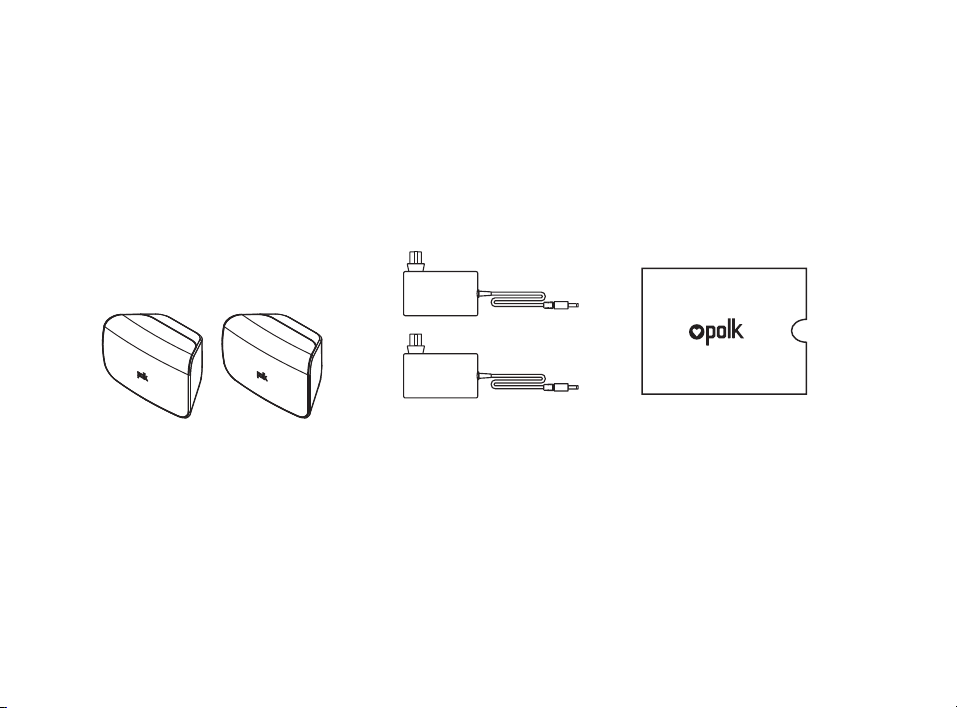
Was ist im Paket
(2) SR1 Wireless Surrounds
(2) Surrounds Netzteil
Produktunterlagen
36
SYNC POWER
15V 1.2A
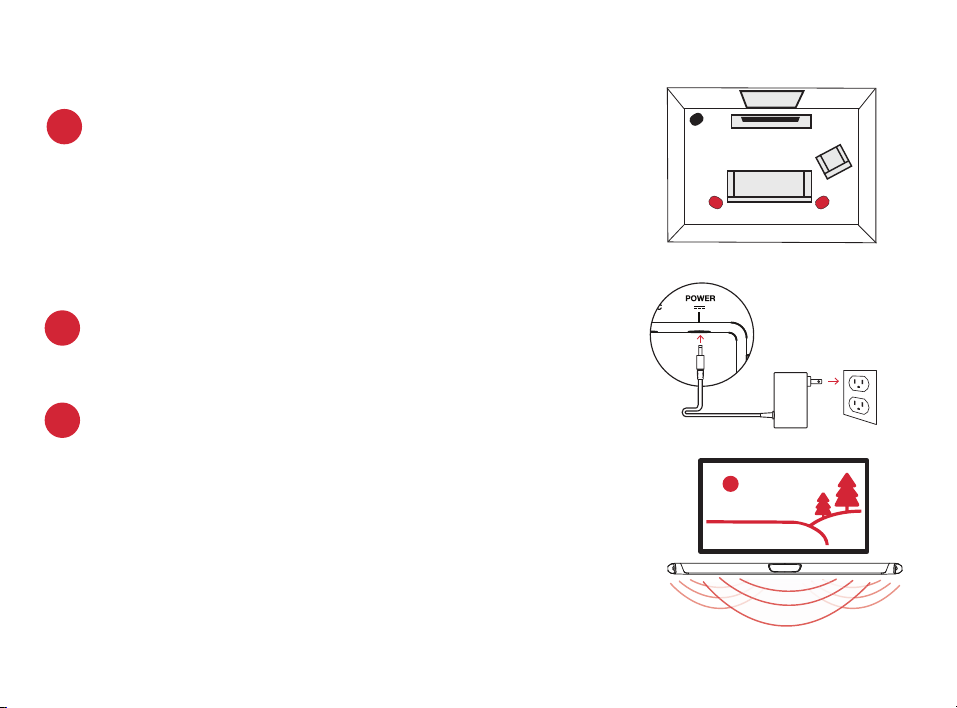
Die Platzierung oder Montage Ihrer Surround-Lautsprecher
Platzieren Sie die Surround-Lautsprecher auf der hinten links und
rechts und in gleichem Abstand zu Ihrer „Haupthörposition“ wie die
Frontlautsprecher. Stellen Sie sicher, dass Sie den Lautsprecher mit
der Aufschrift „L“ auf der linken Seite und den Lautsprecher mit der
Aufschrift „R“ auf der rechten Seite aufstellen. Wenn Sie sich dafür
entscheiden, Ihre Surround-Lautsprecher an der Wand zu montieren,
dann lesen Sie bitte die Anleitung zur Wandmontage durch, um konkrete
Anweisungen dazu zu erhalten.
1.
2.
Verbindung des Surrounds mit einer Steckdose
An der Rückseite schaltet sich eine grüne Lampe ein und zeigt die
korrekte Verbindung der Surrounds mit der Sound Bar an.
altavoces surround
inalámbricos
TV
L R
Ihre Verbindungen werden überprüft.
Schalten Sie Ihren Fernseher ein und vergewissern Sie sich, dass Sie ein
laufendes TV-Programm oder ein Video (z. B. von einer DVD etc.) auf dem
Bildschirm sehen. Prüfen Sie jetzt, ob Sie den dazugehörigen Ton von der
Soundleiste hören.
Wenn Sie keinen Ton hören und auch keine Lichter an der Vorderseite der
Soundleiste sehen sollten, dann betätigen Sie bitte den Netzschalter an der
Soundleiste, um sie einzuschalten.
Hinweis: Ist der Sound sowohl vom Fernseher als auch von der Sound Bar
zu hören, müssen die TV-Lautsprecher über das Einstellungsmenü am
Fernseher ausgeschaltet werden. Im Handbuch zum Fernseher fi nden Sie
weitere Hinweise.
3.
Konfi guration
Verbindung mit dem Fernseher

37
4.
Die Synchronisierung der Surround-Lautsprecher mit der Sound-Leiste
Hinweis: Sie müssen SOWOHL die Surround-Lautsprecher ALS AUCH den Subwoofer
synchronisieren.
Die Synchronisierung des Subwoofers
1) Betätigen Sie den Netzschalter an der Soundleiste, um sie einzuschalten.
2) Halten Sie auf der Rückseite der SOUNDLEISTE die „SYNC“-Taste so lange gedrückt, bis Sie
einen Signalton hören (nach ca. 3-4 Sekunden), und lassen Sie dann die Taste los. Die „SUB“-
und „SURR“-Kontrollleuchten über der „SYNC“-Taste sollten jetzt grün blinken.
3) Halten Sie auf der Rückseite der SUBWOOFERS die „SYNC“-Taste so lange gedrückt, bis Sie
einen Signalton hören (nach ca. 10 Sekunden). Das Licht auf der Rückseite des Subwoofers
sollte jetzt konstant grün leuchten.
Die Synchronisierung der Surround-Lautsprecher
4) Halten Sie die „SYNC“-Taste auf der Rückseite jedes einzelnen der beiden SURROUND-
LAUTSPRECHER so lange gedrückt, bis das Licht an der Unterseite des Lautsprechers konstant
grün leuchtet (nach ca. 10 Sekunden).
5) Wenn SOWOHL der LINKE als auch der RECHTE Surround-Lautsprecher mit der Soundleiste
gekoppelt sind, dann werden Sie einen Signalton von der Soundleiste hören.
HINWEIS: Wenn Sie einen in der Tonlage abfallenden Doppelton von der Soundleiste hören sollten,
dann ist bei der Synchronisierung ein Fehler aufgetreten. Bitte versuchen Sie es in diesem Fall
erneut.
38
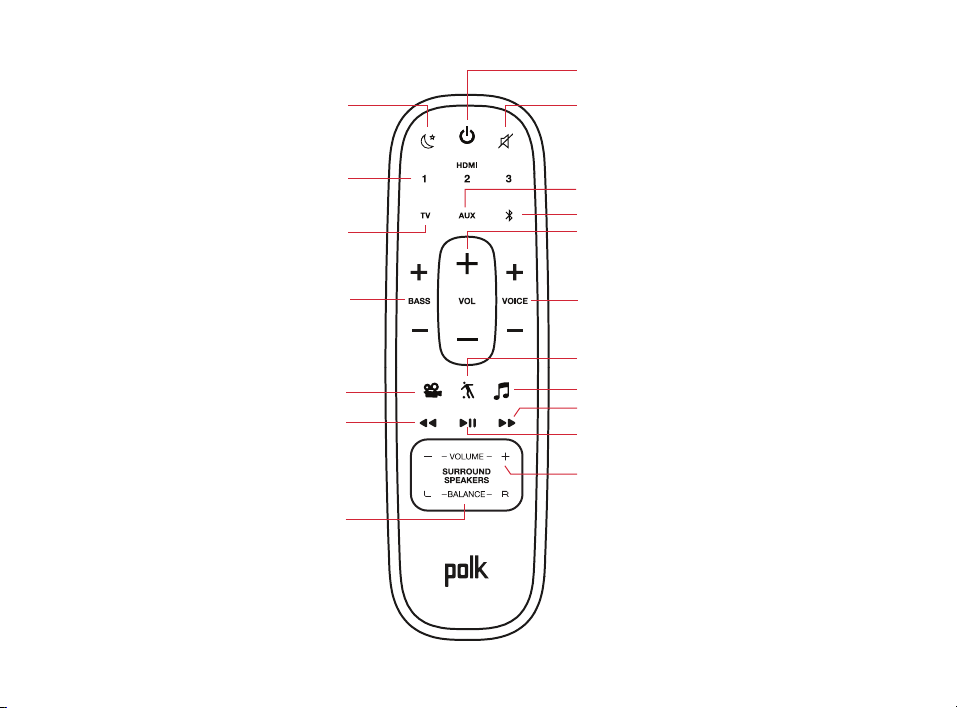
Fernbedienung
Power On/O
Mute
Play/Pause
Sport Mode
Surround-Lautstärke
Up/Down
(verfügbar, wenn wireless Surrounds
verwendet werden
Surround Balance
Links/Rechts
(verfügbar, wenn wireless
Surrounds verwendet werden
AUX Input
Bluetooth®
VoiceAdjust
Up/Down
TV Input
Night Mode
HDMI Inputs
Back
Basso
Up/Down
Movie Mode
Forward
VoiceAdjust
Up/Down
Music Mode
39
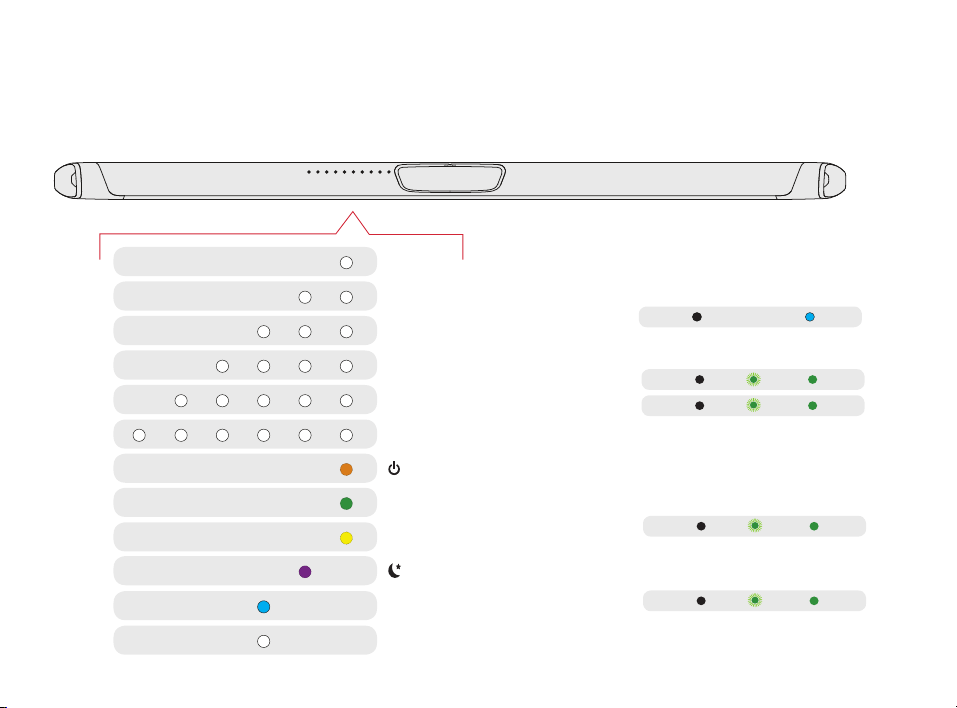
Visuelle Kontrollanzeigen
An der Vorderseite der Sound Bar befindet sich eine horizontale Linie von LED-Lampen, die
verschiedene Status anzeigen, wie Source, Lautstärke und Hörmodi.
HDMI 1
WI-FI
DAUERLICHT
CONNECTED
SUB
SUB
SURROUNDS
SURROUNDS
Hintere LED-Leiste
HDMI 2
HDMI 3
HDMI (ARC)
OPTICAL
AUX
ON
NIGHT MODE
DOLBY CONTENT
DTS CONTENT
CHROMECAST BUILT-IN
BLUETOOTH
FLASHING
KOPPLUNGSMODUS
Rückseite des Subwoofer
Rückseite der Surround-Lautsprecher
AUS
NICHT VERBUNDEN
40
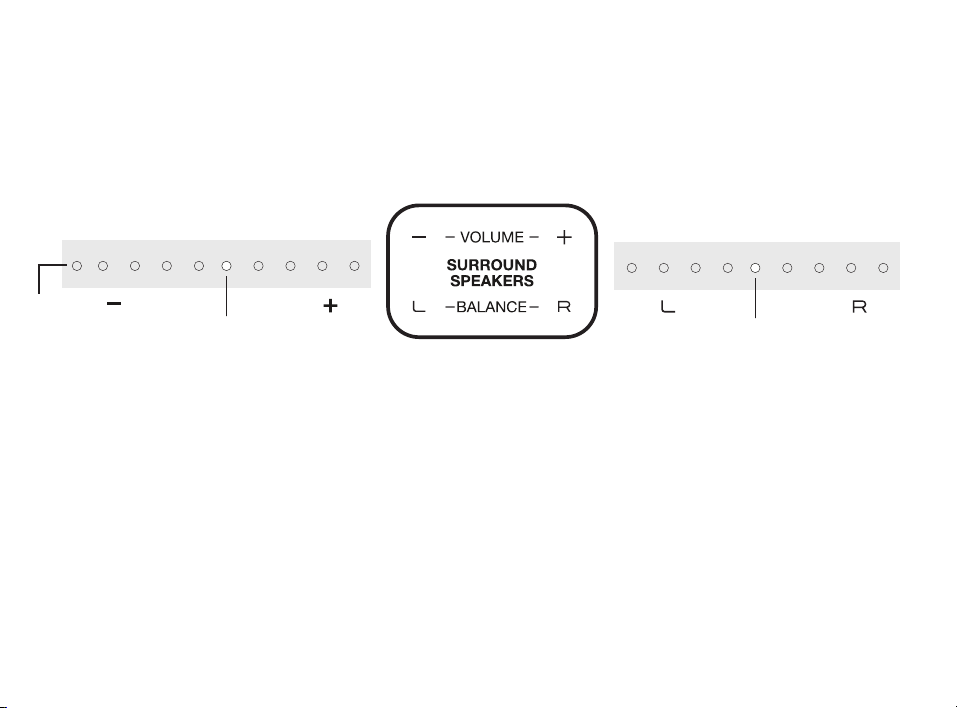
Lautstärkeregelung
Benutzerfreundliche Einstellung der
Lautstärke für mehr oder weniger
Ton.
Balance-Steuerung
Benutzerfreundliche Einstellung der
Balance zwischen den linken und
rechten Lautsprechern.
Balance
Rechts
Mehr
Lautstärke
Balance
Links
Weniger
Lautstärke
STANDARDLEVEL
STANDARDLEVEL
Surround
mute
Die Optimierung Ihrer Surround-Lautsprecher
Soundleiste-Kontrollleuchten Soundleiste-Kontrollleuchten
41
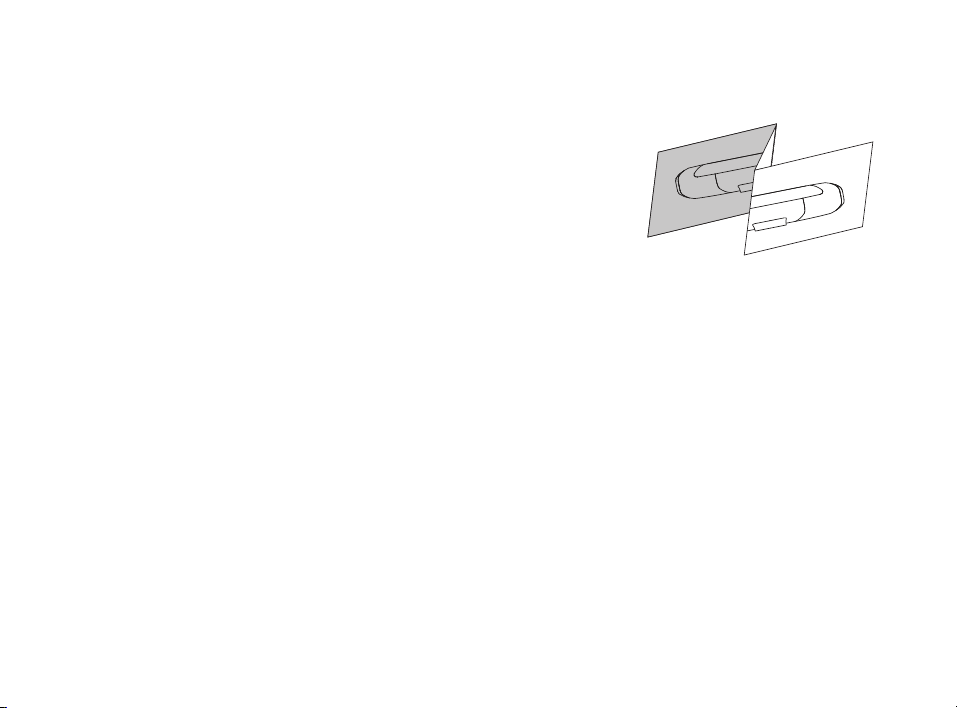
Ihren MagniFi MAX & SR1 Wireless Surrounds an der Wand befestigen
Eine Wandhalterungsschablone für die Wandmontage der
Surround-Lautsprecher befindet sich im Lieferumfang. Für eine
ordnungsgemäße Installation beachten Sie bitte die Anweisungen,
die auf der Schablone abgedruckt sind. Die zum Befestigen der
Surround-Lautsprecher an der Wand benötigten Schrauben
sind nicht enthalten. Wählen Sie z. B. in einem Baumarkt den
passenden Schraubentyp und die richtige Länge aus, je nach dem
Material der betreenden Wand in Ihrem Haus. Im Zweifelsfall
sollten Sie einen Fachmann konsultieren.
Ich höre keinen Basston von meinem Surround-Lautsprecher.
1) Stellen Sie sicher, dass der Surround-Lautsprecher an das Stromnetz angeschlossen ist.
2) Überprüfen Sie, ob das grüne Licht auf der Rückseite des Surround-Lautsprecher leuchtet.
• Wenn es grün leuchtet, dann drehen Sie die Bassregelung mit Hilfe der Fernbedienung hoch.
• Wenn es grün blinkt, dann müssen Sie den Surround-Lautsprecher mit Hilfe der folgenden
Anleitung mit der Soundleiste synchronisieren

42

43

1 Viper Way
Vista, CA 92081
800-377-7655
www.polkaudio.com
HBP3835B