W10439276A
1
PROPER DISPOSAL OF
YOUR OLD REFRIGERATOR
IMPORTANT: Child entrapment and suffocation are not problems of the
past. Junked or abandoned refrigerators are still dangerous, even if
they will sit for “just a few days.” If you are getting rid of your old
refrigerator, please follow these instructions to help prevent accidents.
Before You Throw Away Your Old Refrigerator or Freezer:
■ Take off the doors.
■ Leave the shelves in place so that children may not easily climb
inside.
LEARN MORE
In an effort to conserve natural resources, this refrigerator includes a condensed User Guide. A complete User Instructions
manual for your model can be downloaded at www.whirlpool.com/manuals. The model number is located on the inside
wall of the refrigerator compartment. To request a printed copy of the User Instructions manual, call 1-800-253-1301.
(Shipping and handling fees may apply.)
Register your refrigerator at www.whirlpool.com.
User Guide
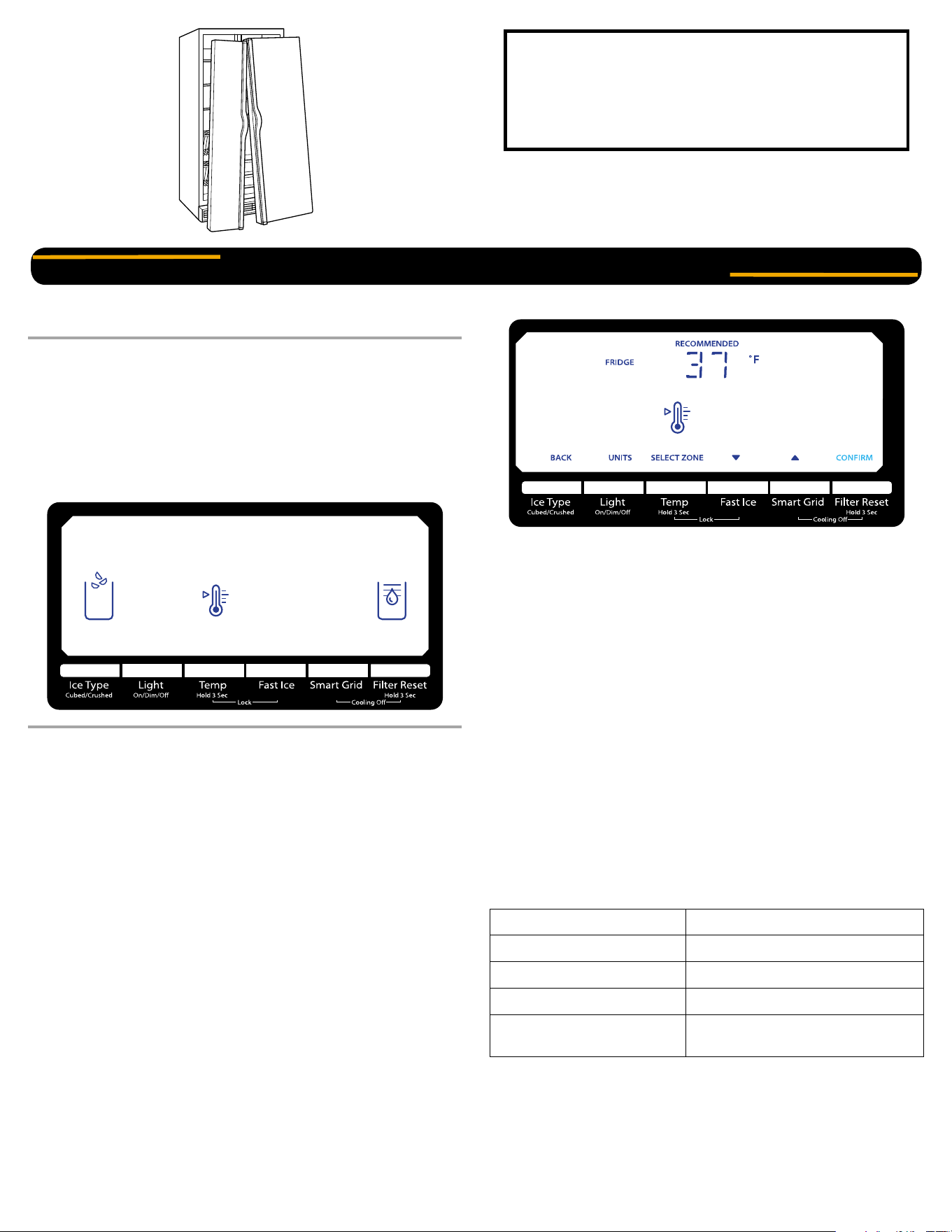
Side by Side Refrigerator
You can be killed or seriously injured if you don’t immediately follow instructions.
You can be killed or seriously injured if you don’t follow instructions.
All safety messages will tell you what the potential hazard is, tell you how to reduce the chance of injury, and tell you what can happen if the
instructions are not followed.
Your safety and the safety of others are very important.
We have provided many important safety messages in this manual and on your appliance. Always read and obey all safety messages.
This is the safety alert symbol.
This symbol alerts you to potential hazards that can kill or hurt you and others.
All safety messages will follow the safety alert symbol and either the word “DANGER” or “WARNING.”
These words mean:
DANGER
WARNING
IMPORTANT SAFETY INSTRUCTIONS
WARNING:
To reduce the risk of fire, electric shock, or injury when using your refrigerator, follow these basic precautions:
SAVE THESE INSTRUCTIONS
■ Plug into a grounded 3 prong outlet.
■ Do not remove ground prong.
■ Do not use an adapter.
■ Do not use an extension cord.
■ Disconnect power before servicing.
■ Replace all parts and panels before operating.
■ Remove doors from your old refrigerator.
■ Use nonflammable cleaner.
■ Keep flammable materials and vapors, such as gasoline, away from
refrigerator.
■ Use two or more people to move and install refrigerator.
■ Disconnect power before installing ice maker (on ice maker kit ready
models only).
■ Use a sturdy glass when dispensing ice (on some models).
■ Do not hit the refrigerator glass doors (on some models).
State of California Proposition 65 Warnings:
WARNING: This product contains one or more chemicals known to the State of California to cause cancer.
WARNING: This product contains one or more chemicals known to the State of California to cause birth defects or other reproductive harm.
Suffocation Hazard
Remove doors from your old refrigerator.
Failure to do so can result in death or brain damage.
WARNING
2
Using the Controls
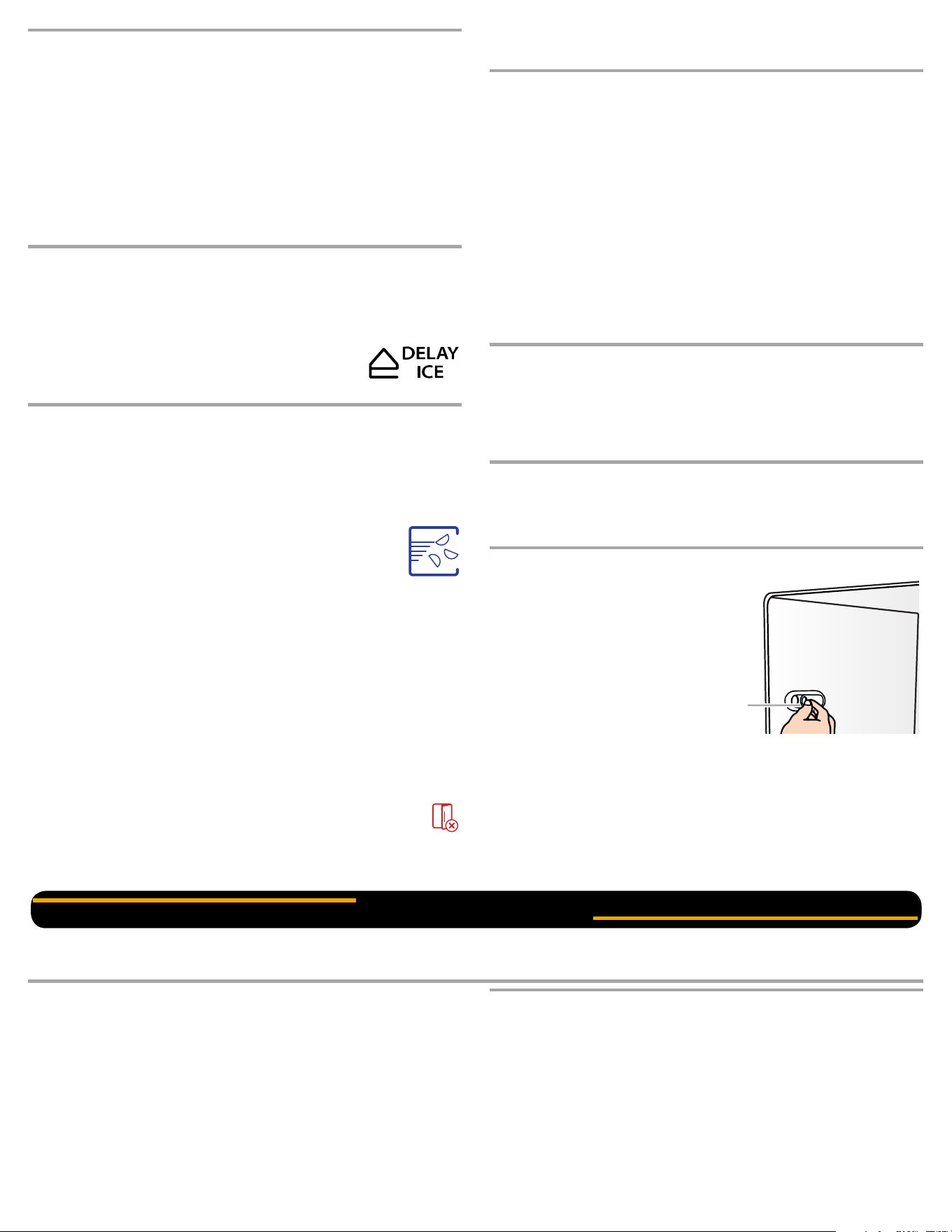
The refrigerator and freezer controls are located on the dispenser
panel.
IMPORTANT: The display screen on the dispenser control panel will
turn off automatically and enter “sleep” mode when the control buttons
and dispenser pads have not been used for 2 minutes or more. While in
“sleep” mode, the first press of a control button will only reactivate the
display screen, without changing any settings.
■ Touch any control button on the dispenser panel to activate the
display screen. The home screen will appear as shown.
Adjusting the Controls
For your convenience, your refrigerator and freezer controls are preset
at the factory. When you first install your refrigerator, make sure that the
controls are still set to the “mid-settings.” The factory recommended set
points are 37°F (3°C) for the refrigerator and 0°F (-18°C) for the freezer.
IMPORTANT:
■ Wait 24 hours before you put food into the refrigerator. If you add
food before the refrigerator has cooled completely, your food may
spoil.
NOTE: Adjusting the set points to a colder than recommended
setting will not cool the compartments any faster.
■ If the temperature is too warm or too cold in the refrigerator or
freezer, first check the air vents to be sure they are not blocked
before adjusting the controls.
■ The preset settings should be correct for normal household usage.
The controls are set correctly when milk or juice is as cold as you
like and when ice cream is firm.
■ Wait at least 24 hours between adjustments. Recheck the
temperatures before other adjustments are made.
To view and adjust the set points, press and hold the TEMP button for
3 seconds. When adjust mode is activated, adjusting information will
appear on the display screen.
NOTE: To view Celsius temperatures, press the LIGHT button when
adjust mode is activated. To return the display setting to Fahrenheit,
press LIGHT again.
■ When adjust mode is activated, the display screen shows the
refrigerator set point and “FRIDGE” appears.
■ Press SMART GRID to raise the set point, or press FAST ICE to
lower the set point.
■ When you have finished viewing (and adjusting if desired) the
refrigerator set point, press TEMP to change the display to show
the freezer set point. When the zone has been changed,
“FREEZER” appears on the display screen.
■ Press SMART GRID to raise the set point, or press FAST ICE to
lower the set point.
■ When you have finished viewing (and adjusting if desired) both the
refrigerator and freezer set points, press FILTER to save the
settings.
NOTE: To exit without saving changes, press ICE TYPE at any time
while in adjust mode, or allow about 60 seconds of inactivity and
adjust mode will turn off automatically.
When adjusting temperature set points, use the following chart as a
guide.
The set point range for the refrigerator is 33°F to 45°F (0°C to 7°C).
The set point range for the freezer is -5°F to 5°F (-21°C to -15°C).
Important information to know about disposal of
refrigerants:
Dispose of refrigerator in accordance with Federal and Local
regulations. Refrigerants must be evacuated by a licensed,
EPA certified refrigerant technician in accordance with
established procedures.
OPERATING YOUR REFRIGERATOR
CONDITION: TEMPERATURE ADJUSTMENT:
REFRIGERATOR too cold REFRIGERATOR Setting 1° higher
REFRIGERATOR too warm REFRIGERATOR Setting 1° lower
FREEZER too cold FREEZER Setting 1° higher
FREEZER too warm /
Too little ice
FREEZER Setting 1° lower
3
Cooling On/Off
Your refrigerator and freezer will not cool when cooling is turned off.
■ To turn cooling off, press and hold the SMART GRID and FILTER
buttons at the same time for 3 seconds.
IMPORTANT: To avoid unintentionally locking the dispenser or
changing other settings, be sure to press both buttons at exactly the
same time.
When cooling is off, “COOLING OFF” will appear on the display
screen.
■ Press and hold SMART GRID and FILTER for 3 seconds again to
turn cooling back on.
Smart Grid
See the “Smart Refrigerator” instruction sheet for information about
setting up Smart Grid functionality, turning it on and off, receiving
important notifications, and taking advantage of available features.
Delay Ice
For information about the Delay Ice feature that is
associated with Smart Grid functionality, see the
“Smart Refrigerator” instruction sheet.
Additional Features
Fast Ice
The Fast Ice feature assists with temporary periods of heavy ice use by
increasing ice production over a 24-hour period.
IMPORTANT: This feature only works if the ice maker is turned on. See
“Ice Maker and Storage Bin.”
■ Press FAST ICE to turn on the Fast Ice feature. When
the feature is on, the Fast Ice icon will appear on the
dispenser display screen. The Fast Ice setting will
remain on for 24 hours unless manually turned off.
■ To manually turn off the Fast Ice feature, press FAST ICE again or
adjust the freezer temperature set point. The Fast Ice icon will
disappear when the feature is off.
NOTE: If increased ice production is desired at all times, change the
freezer set point to a lower setting. Setting the freezer to a colder
temperature may make some foods, such as ice cream, harder.
Door Ajar Alarm
The Door Ajar Alarm feature sounds an alarm when the refrigerator or
freezer door is open for 5 minutes and the product cooling is turned on.
The alarm will repeat every 2 minutes. Close both doors to turn it off.
The feature then resets and will reactivate when either door is left open
again for 5 minutes.
NOTE: To mute the audible alarm while keeping the doors open,
such as while cleaning the inside of the refrigerator, press any
button on the control panel. The alarm sound will be temporarily
turned off, but the Door Ajar icon will still be displayed on the dispenser
control panel.
Convertible Drawer Temperature Control
(on some models)
The control can be adjusted to properly chill meats or vegetables. The
air inside the pan is cooled to avoid “spot” freezing and can be set to
keep meats at the National Livestock and Meat Board recommended
storage temperatures of 28° to 32°F (-2° to 0°C).
To store meat:
Set the control to one of the three MEAT settings to store meat at its
optimal storage temperature.
To store vegetables:
Set the control to VEG to store vegetables at their optimal storage
temperatures.
NOTE: If food starts to freeze, move the control to the right (less cold),
toward the VEG setting. Remember to wait 24 hours between
adjustments.
Crisper Humidity Control (on some models)
You can control the amount of humidity in the moisture-sealed crisper.
Adjust the control to any setting between LOW and HIGH.
LOW (open) for best storage of fruits and vegetables with skins.
HIGH (closed) for best storage of fresh, leafy vegetables.
Chilled Door Bin (on some models)
Cool air from the freezer is directed to the refrigerator door bin directly
beneath the vents.
NOTE: The dairy compartment and can rack are not associated with
the Chilled Door Bin feature.
Chilled Door Bin Control
The chilled door bin control is located
on the left-hand side of the refrigerator
compartment.
■ Slide the door chill control to the
left to reduce the flow of cold air to
the bin and make it less cold.
■ Slide the door chill control to the
right to increase the flow of cold
air to the bin and make it colder.
Water and Ice Dispensers
NOTES:
■ The dispensing system will not operate when either door
(refrigerator or freezer) is open.
■ Allow 24 hours for the refrigerator to cool down and chill water.
■ Allow 24 hours to produce the first batch of ice. Discard the first
three batches of ice produced. Wait 72 hours for full ice production.
■ The display screen on the dispenser control panel will turn off
automatically and enter “sleep” mode when the control buttons and
dispenser pads have not been used for 2 minutes or more. While in
“sleep” mode, the first press of a control button will only reactivate
the display screen, without changing any settings.
Flush the Water System
Air in the water dispensing system can cause the water dispenser to
drip. After connecting the refrigerator to a water source or replacing the
water filter, flush the water system. Flushing the water dispensing
system forces air from the water line and filter, and prepares the water
filter for use.
NOTE: As air is cleared from the system, water may spurt out of the
dispenser.
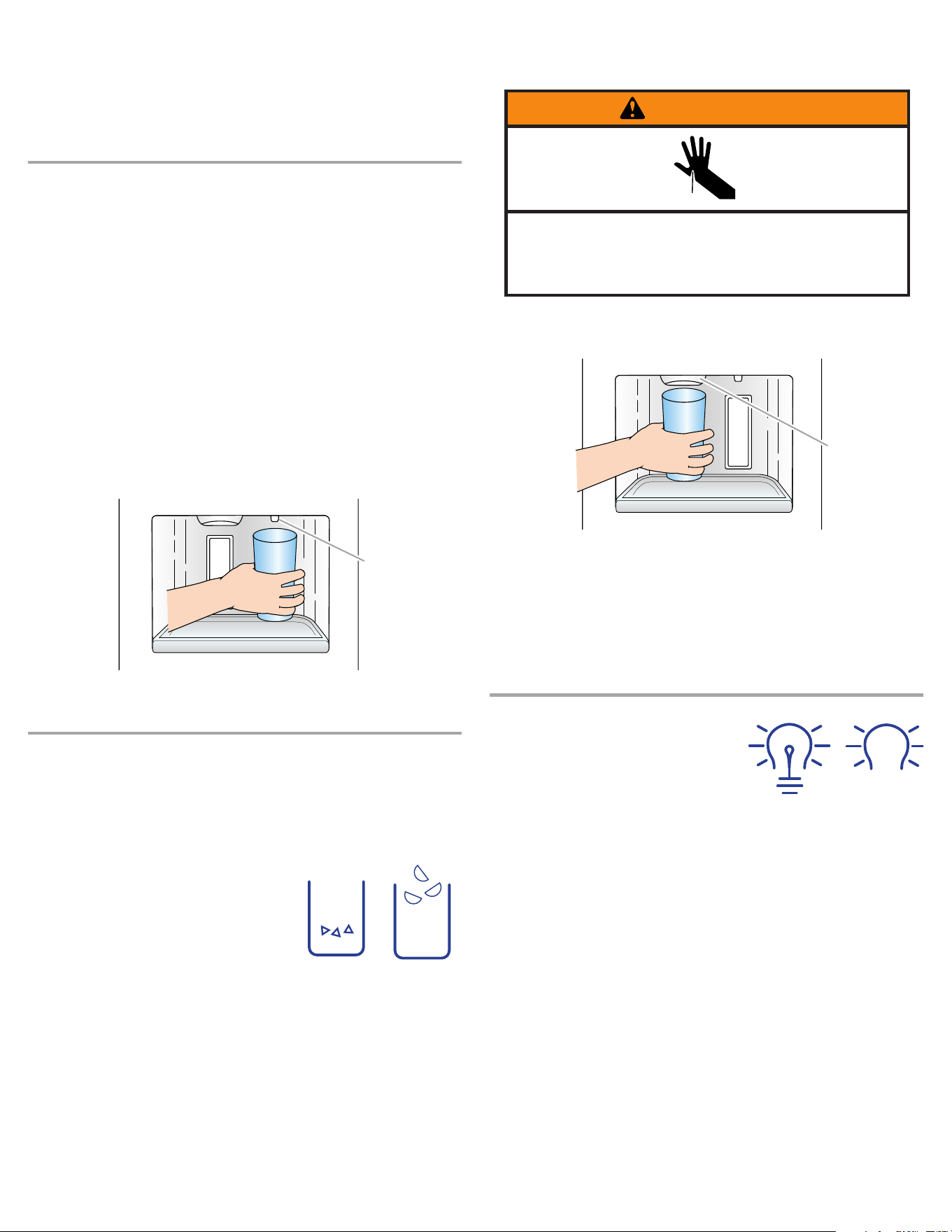
A
A. Chilled door bin control
ICE AND WATER
4
1. Using a sturdy container, depress and hold the water dispenser
pad for 5 seconds, then release it for 5 seconds.
2. Repeat Step 1 until water begins to flow.
3. Once water begins to flow, continue depressing and releasing the
dispenser pad (5 seconds on, 5 seconds off) until a total of 3 gal.
(12 L) has been dispensed.
Additional flushing may be required in some households.
The Water Dispenser
IMPORTANT:
■ Dispense at least 1 qt (1 L) of water every week to maintain a fresh
supply.
■ If the flow of water from the dispenser decreases, it could be
caused by low water pressure.
■ With the water filter removed, dispense 1 cup (237 mL) of
water. If 1 cup of water is dispensed in 8 seconds or less, the
water pressure to the refrigerator meets the minimum
requirement.
■ If it takes longer than 8 seconds to dispense 1 cup of water,
the water pressure to the refrigerator is lower than
recommended. See “Water Supply Requirements” (in the User
Instructions or the Installation Instructions and Owner’s
Manual) or “Problem Solver” for suggestions.
To Dispense Water:
1. Press a sturdy glass against the water dispenser pad. Hold the
glass close to the water dispenser spout to ensure that the water
dispenses into the glass.
2. Remove the glass to stop dispensing.
The Ice Dispenser
Ice dispenses from the ice maker storage bin in the freezer when the
dispenser pad is pressed. To turn off the ice maker, see “Ice Maker and
Storage Bin.”
Your ice maker can produce both crushed and cubed ice. Before
dispensing ice, select which type of ice you prefer by pressing the ICE
TYPE button.
The display screen indicates which type of
ice is selected.
For crushed ice, cubes are crushed before
being dispensed. This may cause a slight
delay when dispensing crushed ice. Noise
from the ice crusher is normal, and pieces
of ice may vary in size. When changing
from crushed to cubed, a few ounces of
crushed ice will be dispensed along with the first cubes.
To Dispense Ice:
1. Make sure the desired type of ice is selected. To switch between
cubed and crushed, press ICE TYPE.
2. Press a sturdy glass against the ice dispenser pad. Hold the glass
close to the ice guide to ensure that the ice dispenses into the
glass.
IMPORTANT: You do not need to apply a lot of pressure to the pad
in order to activate the ice dispenser. Pressing hard will not make
the ice dispense faster or in greater quantities.
3. Remove the glass to stop dispensing.
NOTE: Ice may continue to dispense for several seconds after
removing the glass from the pad. The dispenser may continue to
make noise for a few seconds after dispensing.
The Dispenser Light
When you use the dispenser, the light
will automatically turn on. If you want the
light to be on continuously, you may
choose either ON or DIM. The display
screen indicates which mode is selected.
ON: Press LIGHT to turn the dispenser
light on.
DIM: Press LIGHT a second time to select DIM mode. The dispenser
light will remain on, but at a lower intensity.
OFF: Press LIGHT a third time to turn the dispenser light off.
The dispenser lights are LEDs that cannot be changed. If it appears
that your dispenser lights are not working, see “Problem Solver” for
more information.
A. Water dispenser spout
A
CRUSHED
CUBED
A. Ice guide
Cut Hazard
Use a sturdy glass when dispensing ice.
Failure to do so can result in cuts.
WARNING
A
ON
DIM
5
The Dispenser Lock
The dispenser can be turned off for easy cleaning or to avoid
unintentional dispensing by small children and pets.
NOTE: The lock feature does not shut off power to the refrigerator, to
the ice maker, or to the dispenser light. It simply deactivates the
controls and dispenser pads. To turn off the ice maker, see “Ice Maker
and Storage Bin.”
■ Press and hold the TEMP and FAST ICE buttons at the same time
for 3 seconds to lock the dispenser.
IMPORTANT: To avoid unintentionally locking the dispenser or
changing other settings, be sure to press both buttons at exactly the
same time.
■ Press and hold the TEMP and FAST ICE buttons at the
same time again to unlock the dispenser.
The display screen indicates when the dispenser is locked.
Ice Maker and Storage Bin
■ Allow 24 hours to produce the first batch of ice. Discard the first
three batches of ice produced.
■ The quality of your ice will be only as good as the quality of the
water supplied to your ice maker. Avoid connecting the ice maker to
a softened water supply. Water softener chemicals (such as salt)
can damage parts of the ice maker and lead to poor quality ice. If a
softened water supply cannot be avoided, make sure the water
softener is operating properly and is well maintained.
■ Do not use anything sharp to break up the ice in the storage bin.
This can cause damage to the ice container and the dispenser
mechanism.
■ Do not store anything on top of or in the ice maker or storage bin.
Turning the Ice Maker On/Off:
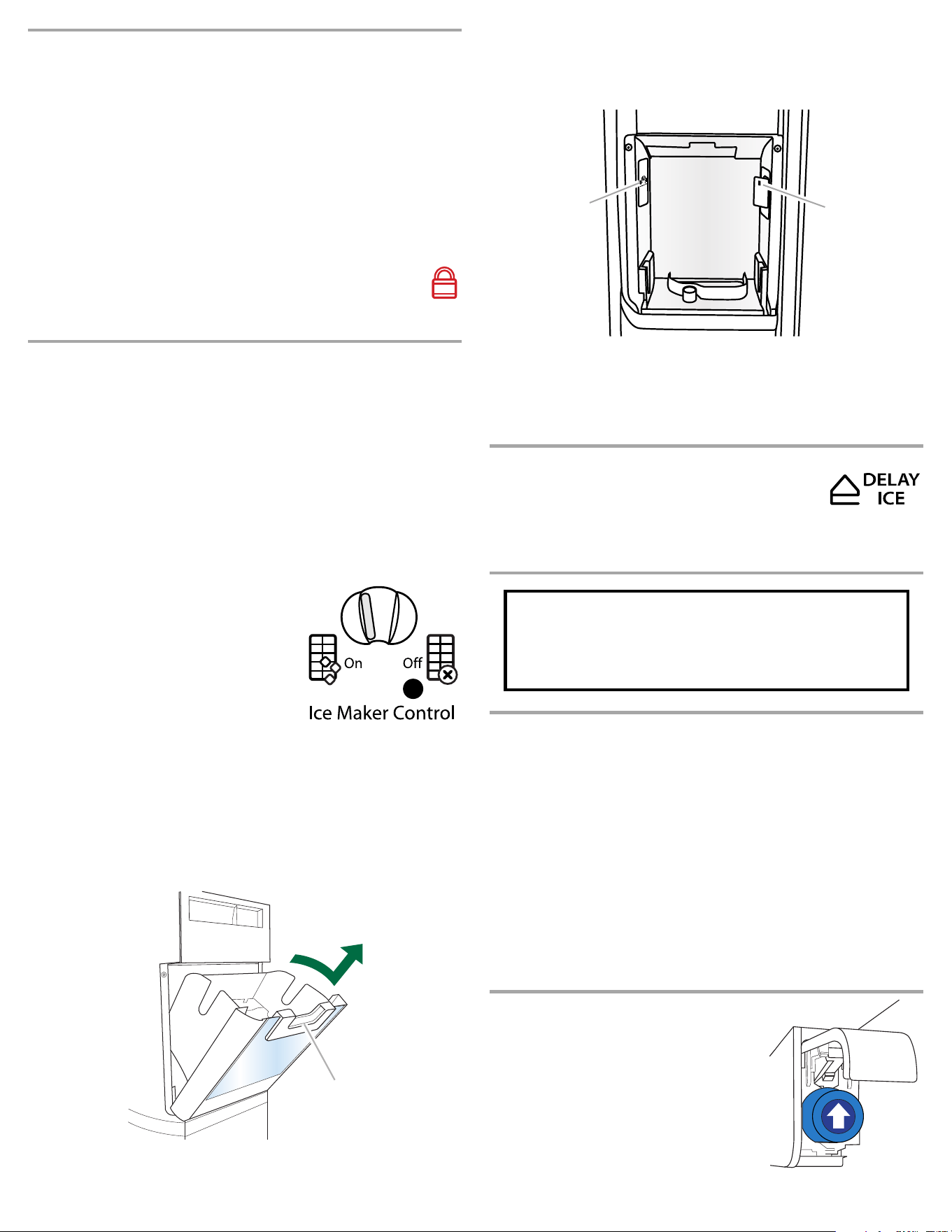
The On/Off switch can only be accessed
when the ice storage bin has been removed.
The switch is located on the freezer door, on
the left side of the wall that surrounds the ice
storage bin. See the following section for bin
removal instructions.
■ To turn on the ice maker, slide the
control to the ON (left) position.
■ To manually turn off the ice maker, slide
the control to the OFF (right) position.
NOTE: The ice maker has an automatic shutoff to keep the storage bin
from overfilling during normal operation. The ice maker sensors will
automatically stop ice production, but the control will remain in the
ON (left) position.
Removing and Replacing the Ice Storage Bin:
1. Press down the release lever and tilt the bucket outward. Use both
hands to hold the base of the storage bin, then lift it up and out.
NOTE: It is not necessary to turn the ice maker control to the
OFF (right) position when removing the storage bin. The sensor
cover (“flipper door”), located on the right wall of the freezer door,
stops the ice maker from producing ice if the door is open or the
storage bin is removed.
2. Replace the bin by sliding it onto the door, then tilting it back into
an upright position. The release lever will click when the bin is
securely in place.
Delay Ice
Smart Grid Event notifications can affect ice
production. For information about the Delay Ice
feature that is associated with Smart Grid functionality,
see the “Smart Refrigerator” instruction sheet.
Water Filtration System
Water Filter Status Light
The water filter status light will help you know when to change your
water filter.
■ When the dispenser control panel’s water filter status display
changes to “ORDER,” this tells you that it is almost time to change
the water filter cartridge.
■ Replace the water filter cartridge when the water filter status display
changes to “REPLACE.”
If water flow to your water dispenser or ice maker decreases noticeably,
change the filter sooner. The filter should be replaced at least every
6 months, depending on your water quality and usage.
■ After changing the water filter, reset the status light by pressing and
holding the FILTER button for 3 seconds. When the system is reset,
the “ORDER” and “REPLACE” icons will disappear from the display
screen.
Changing the Water Filter
1. Locate the water filter in the top-right
corner of the refrigerator compartment.
2. Lift open the filter cover door. The filter
will be released and then be ejected as
the door is opened.
3. When the door is completely open, pull
the filter straight out.
NOTE: There may be some water in the
filter. Some spilling may occur. Use a
towel to wipe up any spills.
A. Release lever
A
A. On/Off switch
B. Sensor cover
B
A
Do not use with water that is microbiologically unsafe or
of unknown quality without adequate disinfection before
or after the system. Systems certified for cyst reduction
may be used on disinfected waters that may contain
filterable cysts.
6
4. Take the new filter out of its packaging and remove the covers from
the O-rings. Be sure the O-rings are still in place after the covers
are removed.
5. With the arrow pointing up, align the new filter with the filter
housing and slide it into place. The filter cover door will
automatically begin to close as the new filter is inserted.
6. Close the filter cover door completely in order to snap the filter into
place. You may need to press hard.
7. Flush the water system. See “Water and Ice Dispensers.”
The following accessories are available for your refrigerator. To order an
accessory, call 1-800-442-9991 and ask for the part number listed
below or contact your authorized Whirlpool dealer. In Canada, call
1-800-807-6777.
affresh
®
Stainless Steel Cleaner:
Order Part #W10355016
In Canada, order Part #W10355016B
affresh
®
Stainless Steel Wipes:
Order Part #W10355049
In Canada, order Part #W10355049B
affresh
®
Kitchen & Appliance Cleaner:
Order Part #W10355010
In Canada, order Part #W10355010B
Water Filter:
Order Part #W10295370 (P4RFWB)
Air Filter:
Order Part #W10311524
ACCESSORIES
For recommendations that may help you avoid a service call, scan the code at left with your mobile
device, or visit www.whirlpool.com/product_help.
For a complete Problem Solver listing with more information about additional topics, see the
Installation Instructions and Owner’s Manual provided with your refrigerator, or visit our website and
download the User Instructions for your model.
PROBLEM Possible Causes and/or Recommended Solutions
Refrigerator
will not
operate
■ Not connected to an electrical supply - Plug the power cord into a grounded 3 prong outlet. Do not use an extension cord.
■ No power to the electrical outlet - Plug in a lamp to see if the outlet is working.
■ Household fuse has blown or circuit breaker has tripped - Replace the fuse or reset the circuit breaker. If the problem
continues, contact a licensed electrician.
■ Control or cooling is not turned on - Turn on the refrigerator control, or turn cooling on. See “Using the Controls.”
■ New installation - Following installation, allow 24 hours for the refrigerator and freezer to cool completely.
NOTE: Adjusting the temperature control(s) to the coldest setting will not cool either compartment (refrigerator or freezer)
more quickly.
PROBLEM SOLVER
Electrical Shock Hazard
Plug into a grounded 3 prong outlet.
Do not remove ground prong.
Do not use an adapter.
Do not use an extension cord.
Failure to follow these instructions can result in death,
fire, or electrical shock.
WARNING

7
Refrigerator
seems noisy
The compressor in your new refrigerator regulates temperature more efficiently and uses less energy than older models. During
various stages of operation, you may hear normal operating sounds that are unfamiliar.
The following noises are normal:
■ Buzzing/Clicking - Heard when the water valve opens and closes to dispense water or fill the ice maker. If the refrigerator is
connected to a water line, this is normal. If the refrigerator is not connected to a water line, turn off the ice maker.
■ Cracking/Crashing - Heard when ice is ejected from the ice maker mold.
■ Popping - Heard when the inside walls contract/expand, especially during initial cooldown.
■ Pulsating/Whirring - Heard when the fans/compressor adjust to optimize performance during normal operation.
■ Rattling - Heard when water passes through the water line, or due to the flow of refrigerant. Rattling may also come from
items placed on top of the refrigerator.
■ Water running or gurgling - Heard when ice melts during the defrost cycle and water runs into the drain pan.
■ Sizzling - Heard when water drips onto the heater during the defrost cycle.
Motor seems
to run too
much
■ Your new refrigerator has an energy-efficient motor - The refrigerator may run longer than you’re used to, because the
compressor and fans operate at lower speeds that are more energy-efficient. This is normal.
NOTE: Your refrigerator may run even longer if the room is warm, a large load of food is added, the doors are opened often, or
if a door has been left open.
Temperature
is too warm
■ New installation - Following installation, allow 24 hours for the refrigerator and freezer to cool completely.
NOTE: Adjusting the temperature control(s) to the coldest setting will not cool either compartment (refrigerator or freezer)
more quickly.
■ Doors are opened often or not closed completely - This allows warm air to enter the refrigerator. Minimize door openings,
keep the doors fully closed, and make sure both doors are properly sealed.
■ Air vents are blocked - Remove items that are immediately in front of the vents.
■ Large amount of warm food recently added - Allow several hours for the refrigerator to return to its normal temperature.
■ Controls are not set correctly for the surrounding conditions - Adjust the controls to a colder setting. Check the
temperature again in 24 hours.
SMART FEATURES Possible Causes and/or Recommended Solutions
Low/no ice production ■ Smart Delay and/or Delay Ice activated - The Smart Grid feature allows the refrigerator to detect when the
electric grid is in a period of peak usage or peak rates. When Smart Grid functionality is activated, ice production
may be delayed for up to 4 hours, depending on the type of Smart Grid notification received. To return to normal
ice production, press the SMART GRID button on the dispenser control panel. Both the Smart Grid and Delay
Ice icons will disappear from the display screen.
PROBLEM Possible Causes and/or Recommended Solutions
8
WHIRLPOOL CORPORATION MAJOR APPLIANCE WARRANTY
LIMITED WARRANTY
For one year from the date of purchase, when this major appliance is operated and maintained according to instructions attached to or furnished
with the product, Whirlpool Corporation or Whirlpool Canada LP (hereafter “Whirlpool”) will pay for Factory Specified Parts and repair labor to
correct defects in materials or workmanship that existed when this major appliance was purchased. Service must be provided by a Whirlpool
designated service company. YOUR SOLE AND EXCLUSIVE REMEDY UNDER THIS LIMITED WARRANTY SHALL BE PRODUCT REPAIR AS
PROVIDED HEREIN. This limited warranty is valid only in the United States or Canada and applies only when the major appliance is used in the
country in which it was purchased. Proof of original purchase date is required to obtain service under this limited warranty.
ITEMS EXCLUDED FROM WARRANTY
This limited warranty does not cover:
1. Replacement parts or repair labor if this major appliance is used for other than normal, single-family household use or when it is used in a
manner that is inconsistent to published user or operator instructions and/or installation instructions.
2. Service calls to correct the installation of your major appliance, to instruct you on how to use your major appliance, to replace or repair house
fuses, or to correct house wiring or plumbing.
3. Service calls to repair or replace appliance light bulbs, air filters or water filters. Consumable parts are excluded from warranty coverage.
4. Damage resulting from accident, alteration, misuse, abuse, fire, flood, acts of God, improper installation, installation not in accordance with
electrical or plumbing codes, or use of products not approved by Whirlpool.
5. Cosmetic damage, including scratches, dents, chips or other damage to the finish of your major appliance, unless such damage results from
defects in materials or workmanship and is reported to Whirlpool within 30 days from the date of purchase.
6. Any food or medicine loss due to refrigerator or freezer product failures.
7. Pickup and delivery. This major appliance is intended to be repaired in your home.
8. Repairs to parts or systems resulting from unauthorized modifications made to the appliance.
9. Expenses for travel and transportation for product service if your major appliance is located in a remote area where service by an authorized
Whirlpool servicer is not available.
10. The removal and reinstallation of your major appliance if it is installed in an inaccessible location or is not installed in accordance with
Whirlpool's published installation instructions.
11. Replacement parts or repair labor on major appliances with original model/serial numbers that have been removed, altered or cannot be
easily determined.
12. Discoloration, rust, or oxidation of stainless steel surfaces.
DISCLAIMER OF IMPLIED WARRANTIES
IMPLIED WARRANTIES, INCLUDING ANY IMPLIED WARRANTY OF MERCHANTABILITY OR IMPLIED WARRANTY OF FITNESS FOR A
PARTICULAR PURPOSE, ARE LIMITED TO ONE YEAR OR THE SHORTEST PERIOD ALLOWED BY LAW. Some states and provinces do not
allow limitations on the duration of implied warranties of merchantability or fitness, so this limitation may not apply to you. This warranty gives
you specific legal rights, and you also may have other rights that vary from state to state or province to province.
LIMITATION OF REMEDIES; EXCLUSION OF INCIDENTAL AND CONSEQUENTIAL DAMAGES
YOUR SOLE AND EXCLUSIVE REMEDY UNDER THIS LIMITED WARRANTY SHALL BE PRODUCT REPAIR AS PROVIDED HEREIN.
WHIRLPOOL SHALL NOT BE LIABLE FOR INCIDENTAL OR CONSEQUENTIAL DAMAGES. Some states and provinces do not allow the
exclusion or limitation of incidental or consequential damages, so these limitations and exclusions may not apply to you. This warranty gives you
specific legal rights, and you also may have other rights that vary from state to state or province to province.
If outside the 50 United States and Canada, contact your authorized Whirlpool dealer to determine if another warranty applies. 6/08
For additional product information, in the U.S.A., visit www.whirlpool.com.
In Canada, visit www.whirlpool.ca.
If you do not have access to the Internet and you need assistance using your product or you would like to schedule service, you may contact
Whirlpool at the number below.
Have your complete model number ready. You can find your model number and serial number on the label, located on the inside wall of the
refrigerator compartment.
For assistance or service in the U.S.A., call 1-800-253-1301. In Canada, call 1-800-807-6777.
If you need further assistance, you can write to Whirlpool with any questions or concerns at the address below:
In the U.S.A.:
Whirlpool Brand Home Appliances
Customer eXperience Center
553 Benson Road
Benton Harbor, MI 49022-2692
In Canada:
Whirlpool Brand Home Appliances
Customer eXperience Centre
200 – 6750 Century Ave.
Mississauga, Ontario L5N 0B7
Please include a daytime phone number in your correspondence.
Please keep all provided instructions and your model number information for future reference.
WARRANTY
W10439276A
®
/™ ©2012 Whirlpool. All rights reserved.
7/12
Printed in Mexico