
www.lg.com
19M35A
20M35A
22M35A
24M35A
19M35D
20M35D
22M35D
24M35D
LED LCD MONITOR MODEL
ENGLISH
OWNER’S MANUAL
LED LCD MONITOR
Please read this manual carefully before operating
your set and retain it for future reference.

2
ENG
ENGLISH
TABLE OF CONTENTS
CONTENTS
3 ASSEMBLINGANDPREPAR-
ING
3 Unpacking
4 Partsandbuttons
5 SettinguptheMonitorset
5 - AttachingtheStandBase
5 - DetachingtheStandBase
6 - Mountingonatable
6 - Usingthecableholder
8 - Mountingonawall
9 USINGTHEMONITORSET
9 ConnectingtoaPC
9 - D-SUBconnection
9 - DVI-Dconnection
11 CUSTOMIZINGSETTINGS
12 CustomizingSettings
12 - MenuSettings
13 -Picture
14 -Color
15 -Display
16 -Others
17 READERSetting
18 FUNC.Setting
18 -SUPERENERGYSAVING
19 -PictureMode
20 -DUALDISPLAY
20 -DUALWEB
21 TROUBLESHOOTING
23 SPECIFICATIONS
23 19M35A
24 19M35D
25 20M35A
27 20M35D
29 22M35A
30 22M35D
31 24M35A
32 24M35D
33 PresetModes(Resolution)
34 Indicator
35 PROPERPOSTURE
35 ProperpostureforusingtheMonitorset.
3
ENG
ENGLISH
ASSEMBLING AND PREPARING
ASSEMBLINGANDPREPARING
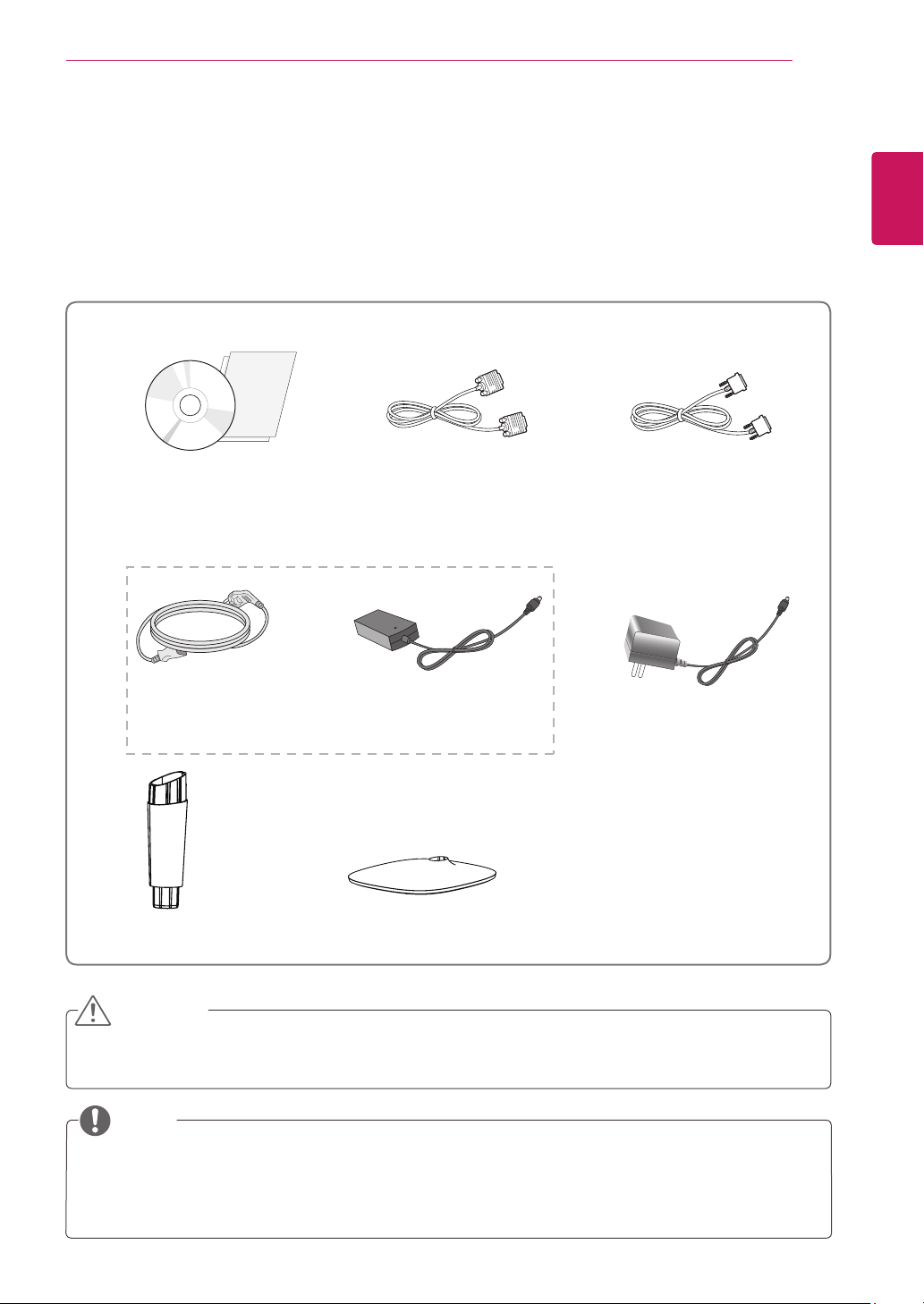
Unpacking
Checkyourproductboxforthefollowingitems.Ifthereareanymissingaccessories,contactthelocal
dealerwhereyoupurchasedyourproduct.Theillustrationsinthismanualmaydifferfromtheactualproduct
andaccessories.
Donotuseanyunapprovedaccessoriestoensurethesafetyandproductlifespan.
Anydamagesorinjuriesbyusingunapprovedaccessoriesarenotcoveredbythewarranty.
Theaccessoriessuppliedwithyourproductmayvarydependingonthemodel.
Productspecificationsorcontentsinthismanualmaybechangedwithoutpriornoticeduetoupgrade
ofproductfunctions.
CAUTION
NOTE
StandBody StandBase
CD(Owner'sManual)/
Card
D-SUBCable
(Dependingonthecountry) (Dependingonthecountry)
PowerCord
AC-DCAdapter
AC-DCAdapter
or
DVI-DCable
(Thiscableisnotincludedinall
countries.)
(19M35D,20M35D,22M35D,24M35D)
5
ENG
ENGLISH
ASSEMBLING AND PREPARING
Attachthe
StandBody
tothemonitorset.
Attachthe
StandBase
.
Tightenthescrewtotheright.
SettinguptheMonitorset
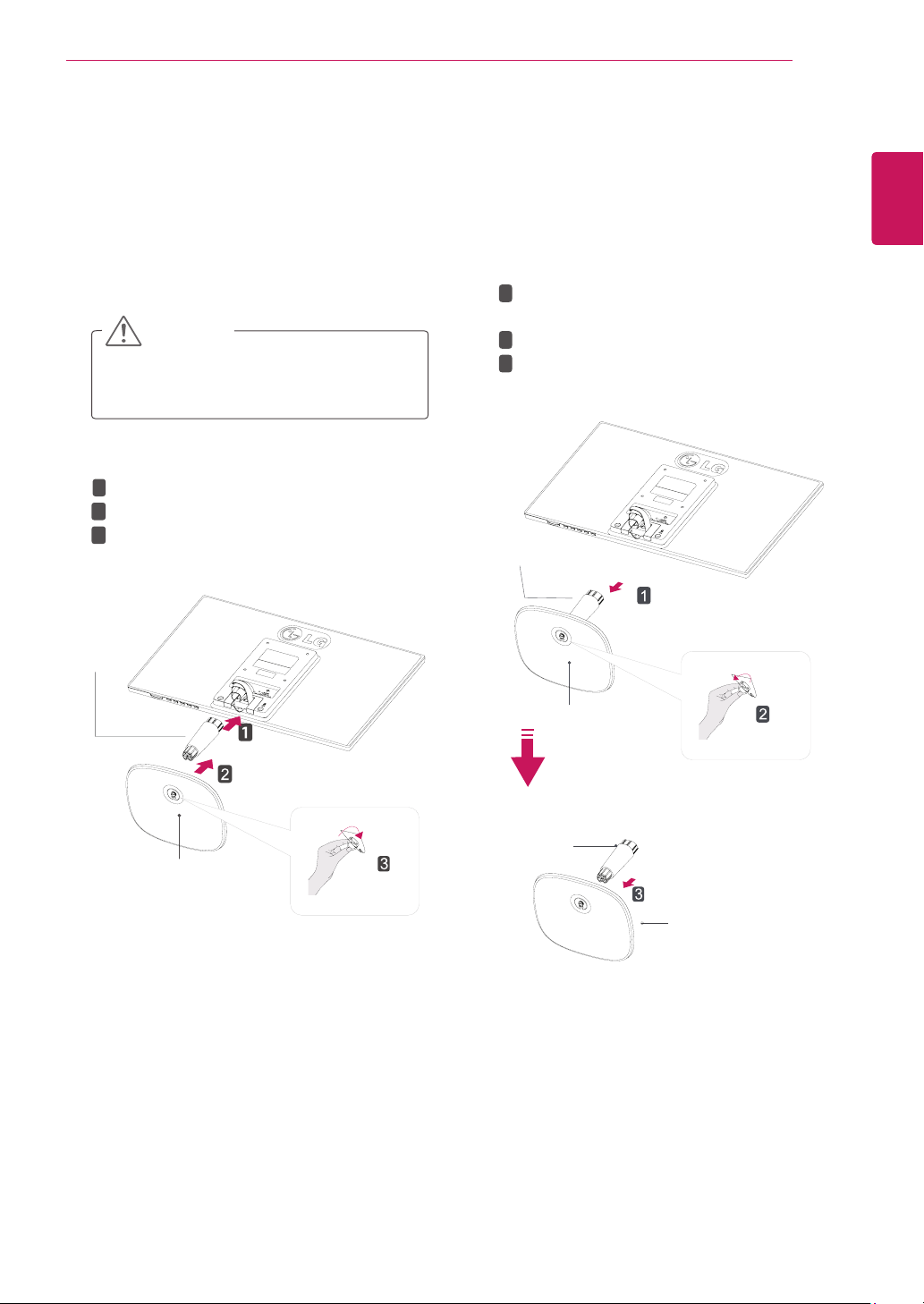
AttachingtheStandBase
1
PlacetheMonitorsetwiththescreenside
downonaflatandcushionedsurface.
Layafoammatorsoftprotectivecloth
onthesurfacetoprotectthescreenfrom
damage.
CAUTION
2
StandBase
StandBody
1
2
3
DetachingtheStandBase
1
PlacetheMonitorsetwiththescreenside
downonaflatandcushionedsurface.
StandBase
StandBase
StandBody
StandBody
Pulloutthe
StandBody
and
StandBase
fromthemonitorset.
Turnthescrewtotheleft.
Pulloutthe
StandBase
.
1
2
3
2
6
ENG
ENGLISH
ASSEMBLING AND PREPARING
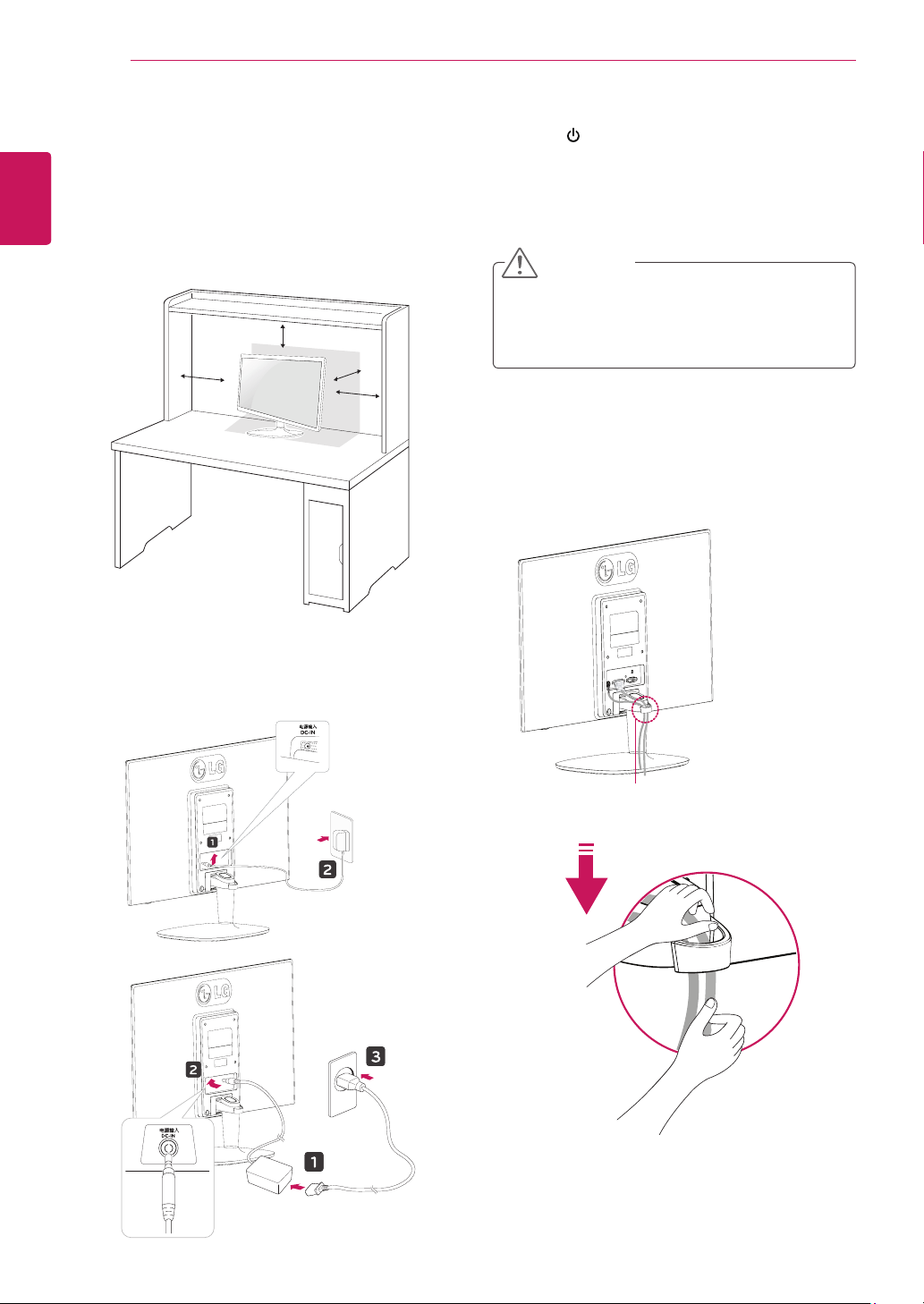
Mountingonatable
1
LiftandtilttheMonitorsetintoitsupright
positiononatable.
Leavea10cm(minimum)spacefromthewall
forproperventilation.
Usingthecableholder
2
ConnecttheAC-DCAdapterandPowerCord
toawalloutlet.
3
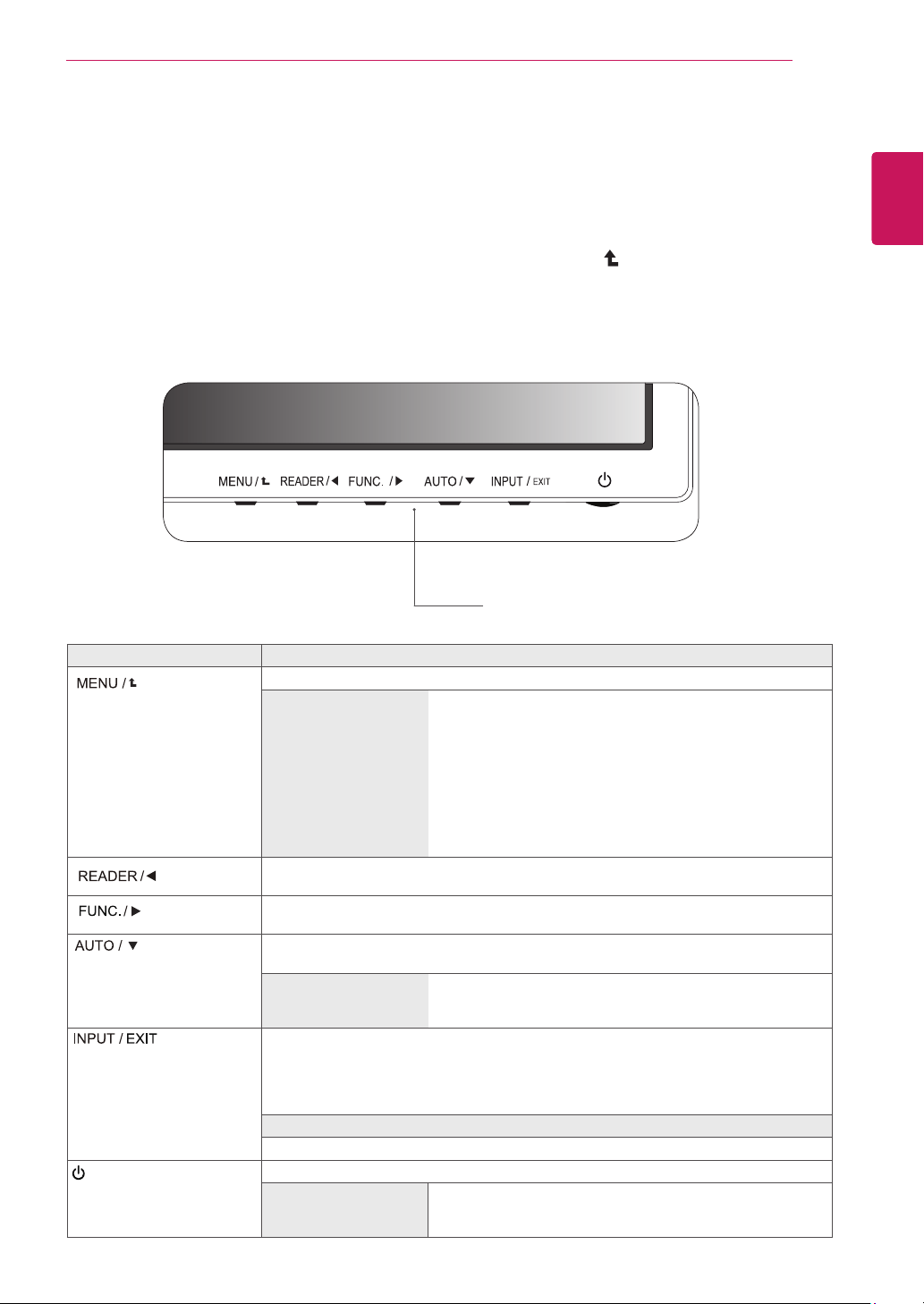
Press (Power)buttononthebottomswitch
paneltoturnthepoweron.
10 cm
10 cm
10 cm
10 cm
Unplugthepowercordbeforemovingthe
Monitortoanotherlocation.Otherwiseelectric
shockmayoccur.
CAUTION
Cableholder
or
7
ENG
ENGLISH
ASSEMBLING AND PREPARING
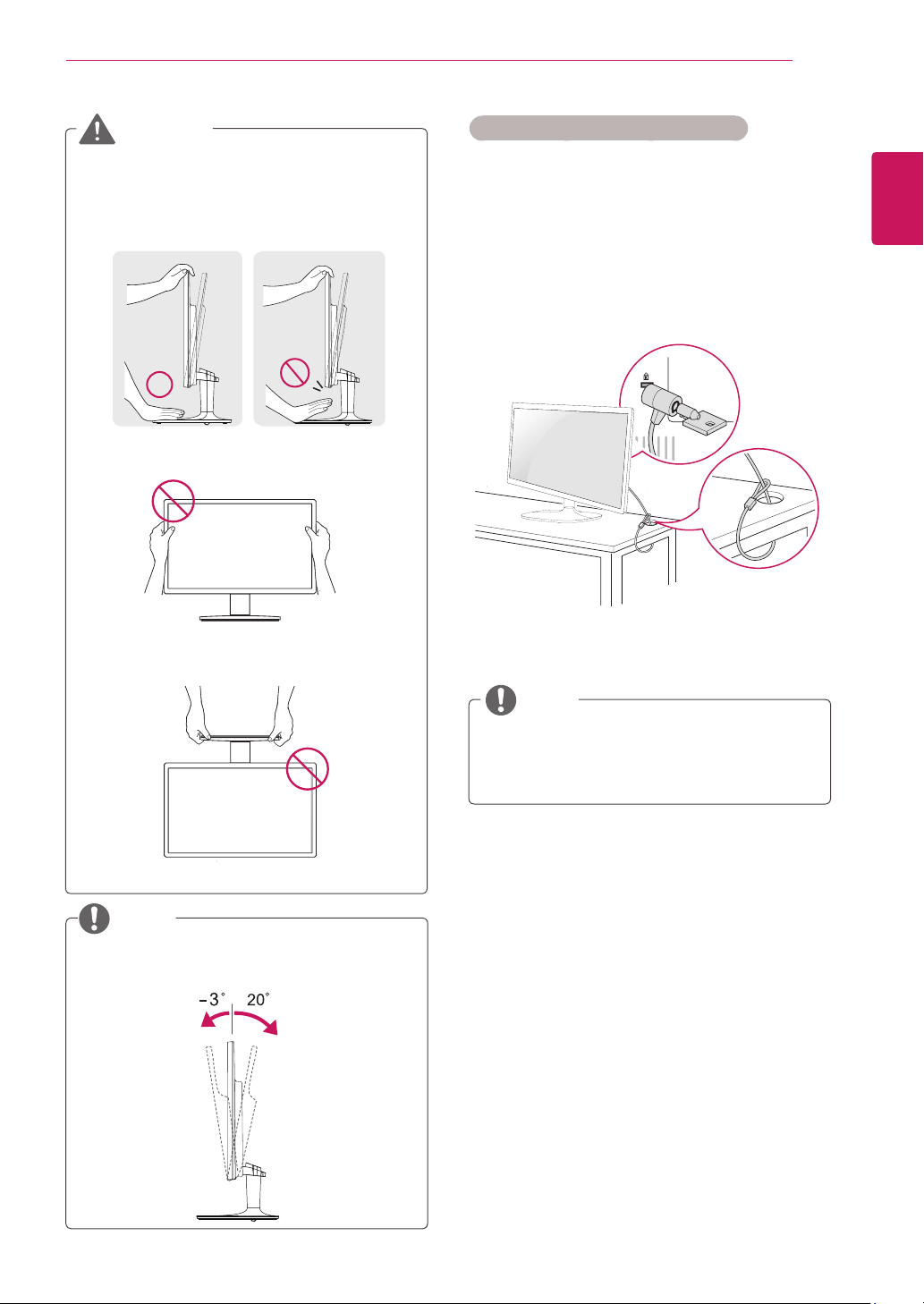
UsingtheKensingtonsecuritysystem
TheKensingtonsecuritysystemconnectoris
locatedatthebackoftheMonitorset.Formore
informationofinstallationandusing,refertothe
manualsuppliedwiththeKensingtonsecurity
systemorvisit
http://www.kensington.com
.
ConnecttheKensingtonsecuritysystemcable
betweentheMonitorsetandatable.
TheKensingtonsecuritysystemisoptional.
Youcanobtainitfrommostelectronicsstores.
NOTE
Whenyouadjusttheangle,donotholdthe
bottomoftheMonitorsetframeasshownon
thefollowingillustration,asmayinjureyour
fingers.
Donottouchorpressthescreenwhen
adjustingtheangleofthemonitor.
Donotholdthissetlikebelowpicture.Monitor
screencandetachfromstandbaseandinjure
yourbody.
WARNING
Tiltfrom+20to-3degreesupordowntoadjust
theangleoftheMonitorsettosuityourview.
NOTE
Front Rear
8
ENG
ENGLISH
ASSEMBLING AND PREPARING
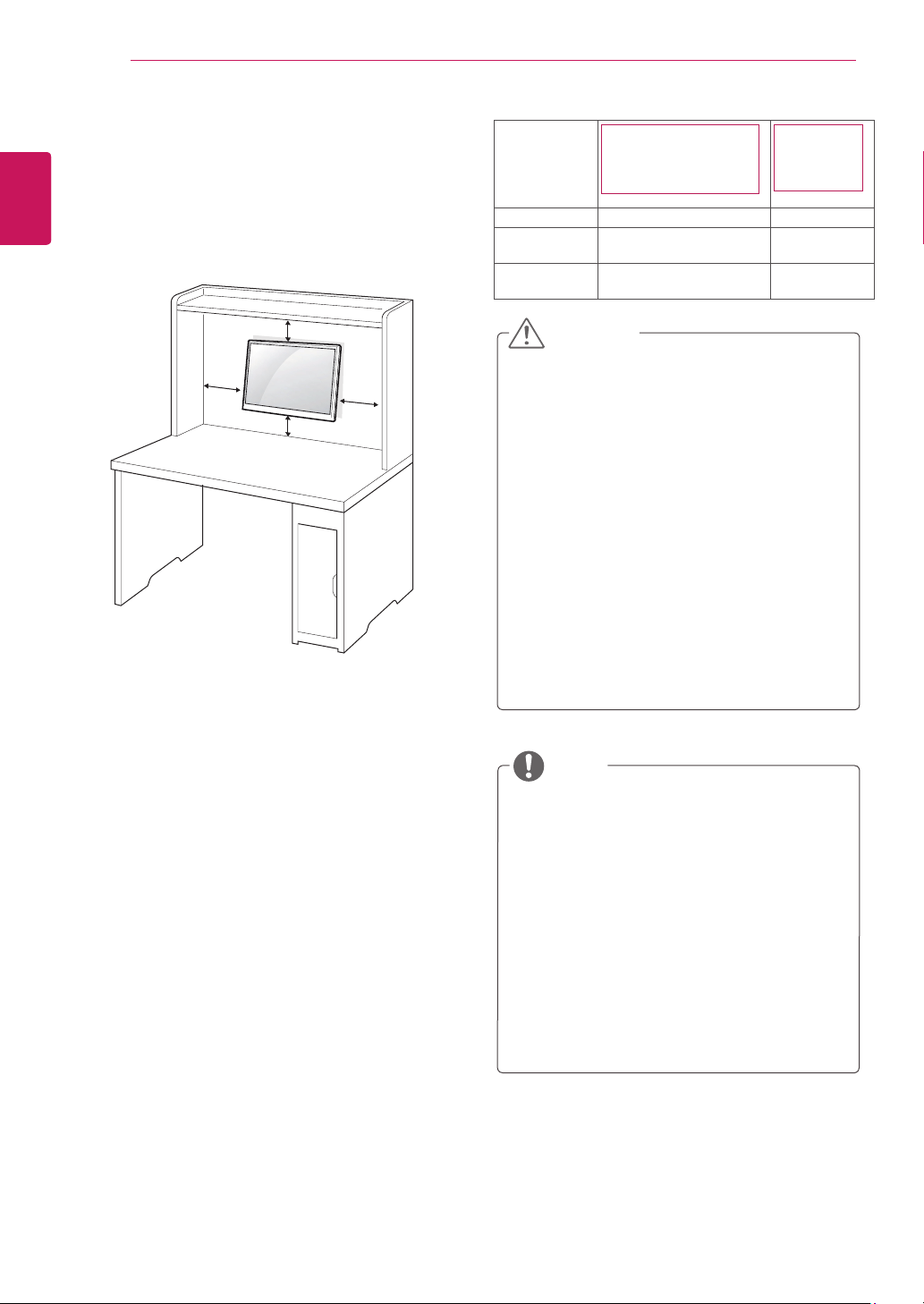
Mountingonawall
Forproperventilation,allowaclearanceof10cm
oneachsideandfromthewall.Detailed
instructionsareavailablefromyourdealer,seethe
optionalTiltWallMountingBracketInstallationand
SetupGuide.
IfyouintendtomounttheMonitorsettoawall,
attachWallmountinginterface(optionalparts)to
thebackoftheset.
WhenyouinstalltheMonitorsetusingawall
mountinginterface(optionalparts),attachit
carefullysoitwillnotdrop.
1
Please,Usethescrewandwallmountinterface
inaccordancewithVESAStandards.
2
Ifyouusescrewlongerthanstandard,the
monitormightbedamagedinternally.
3
Ifyouuseimproperscrew,theproductmightbe
damagedanddropfrommountedposition.In
thiscase,LGElectronicsisnotresponsiblefor
it.
4
VESAcompatible.
5
PleaseuseVESAstandardasbelow.
784.8mm(30.9inch)andunder
*WallMountPadThickness:2.6mm
*Screw:Φ4.0mmxPitch0.7mmx
Length10mm
787.4mm(31.0inch)andabove
*PleaseuseVESAstandardwallmountpad
andscrews.
10 cm
10 cm
10 cm
10 cm
Disconnectthepowercordfirst,andthen
moveorinstalltheMonitorset.Otherwise
electricshockmayoccur.
IfyouinstalltheMonitorsetonaceilingor
slantedwall,itmayfallandresultinsevere
injury.
UseonlyanauthorizedLGwallmount
andcontactthelocaldealerorqualified
personnel.
Donotovertightenthescrewsasthismay
causedamagetotheMonitorsetandvoid
yourwarranty.
Useonlyscrewsandwallmountsthat
meettheVESAstandard.Anydamages
orinjuriesbymisuseorusinganimproper
accessoryarenotcoveredbythewarranty.
UsethescrewsthatarelistedontheVESA
standardscrewspecifications.
Thewallmountkitwillincludeaninstallation
manualandnecessaryparts.
Thewallmountbracketisoptional.Youcan
obtainadditionalaccessoriesfromyourlocal
dealer.
Thelengthofscrewsmaydifferdepending
onthewallmount.Besuretousetheproper
length.
Formoreinformation,refertothe
instructionssuppliedwiththewallmount.
CAUTION
NOTE
Model
19M35A 19M35D
20M35A 20M35D
22M35A 22M35D
24M35A
24M35D
VESA(AxB) 75x75 100x100
Standard
screw
M4 M4
Numberof
screws
4 4
9
ENG
ENGLISH
USING THE MONITOR SET
USINGTHEMONITORSET
ConnectingtoaPC
YourMonitorsetsupportsPlug&Play*.
*Plug&Play:APCrecognizesaconnected
devicethatusersconnecttoaPCandturn
on,withoutdeviceconfigurationoruser
intervention.
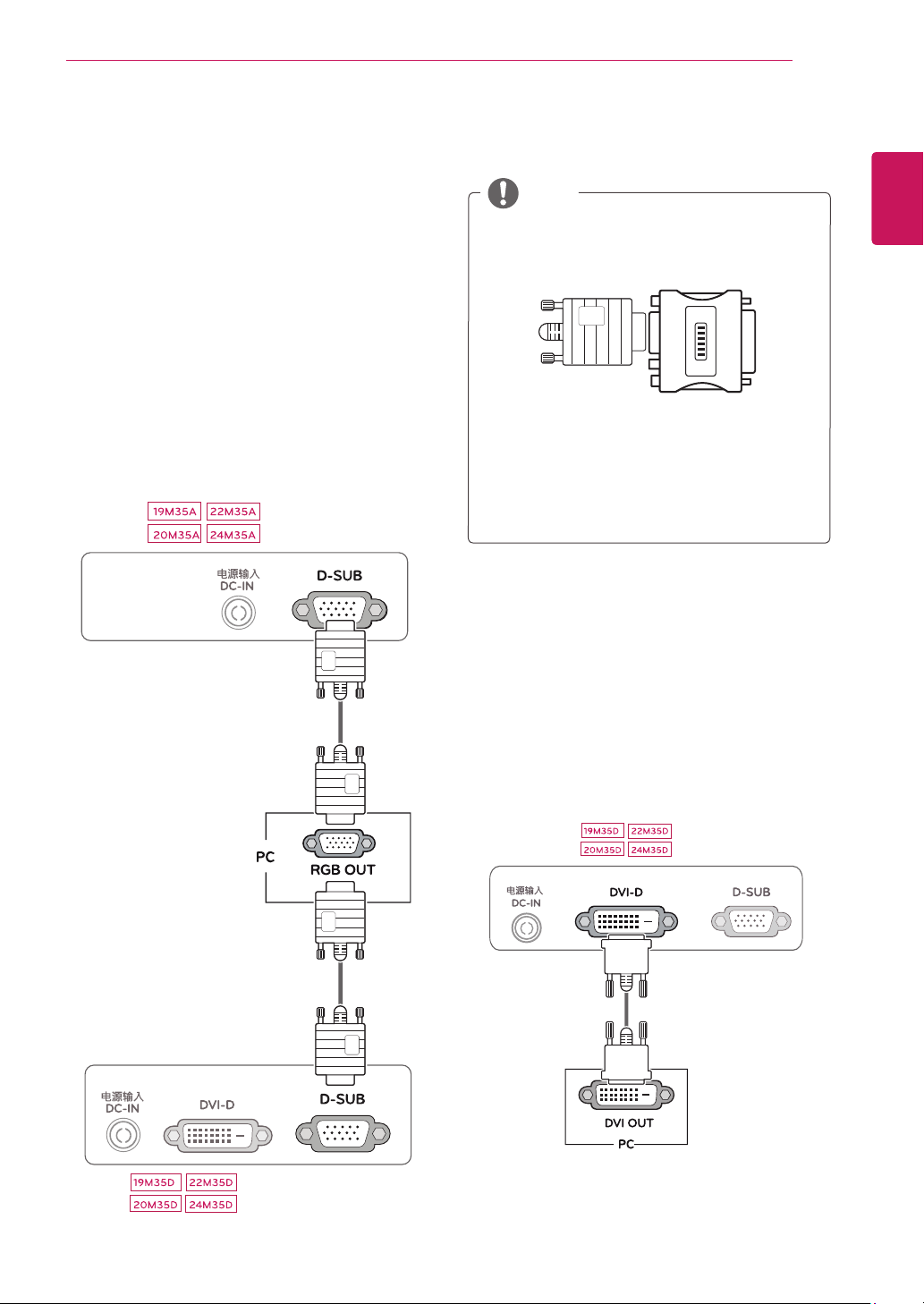
D-SUBconnection
TransmitsanalogvideofromyourPCtothe
Monitorset.ConnectthePCandtheMonitorset
withthesuppliedD-sub15pinsignalcableas
showninthefollowingillustrations.
Macadapter
ForAppleMacintoshuse,aseparateplug
adapterisneededtochangethe15pin
highdensity(3row)D-SUBVGAconnector
onthesuppliedcabletoa15pin2row
connector.
WhenusingaD-Subsignalinputcable
connectorforMacintosh
NOTE
DVI-Dconnection
TransmitsadigitalvideosignalfromyourPCto
theMonitorset.ConnectthePCandtheMonitor
setwithaDVIcableasshowninthefollowing
illustrations.
10
ENG
ENGLISH
USING THE MONITOR SET
WhenyouwanttousetwoPCinourMonitor,
pleaseconnectthesignalcable(D-SUB/
DVI-D)respectivelyinMonitorset.
IfyouturntheMonitorsetonwhileitiscold,
thescreenmayflicker.Thisisnormal.
Somered,green,orbluespotsmayappear
onthescreen.Thisisnormal.
"SelfImageSetting"Function.
Thisfunctionprovidestheuserwithoptimal
displaysettings.Whentheuserconnects
themonitorforthefirsttime,thisfunction
automaticallyadjuststhedisplaytooptimal
settingsforindividualinputsignals.(Only
supportedinAnalogMode)
‘AUTO’Function.
Whenyouencounterproblemssuchas
blurryscreen,blurredletters,screenflicker
ortiltedscreenwhileusingthedeviceor
afterchangingscreenresolution,pressthe
AUTOfunctionbuttontoimproveresolution.
(OnlysupportedinAnalogMode)
NOTE NOTE
SelfImageSettingFunction
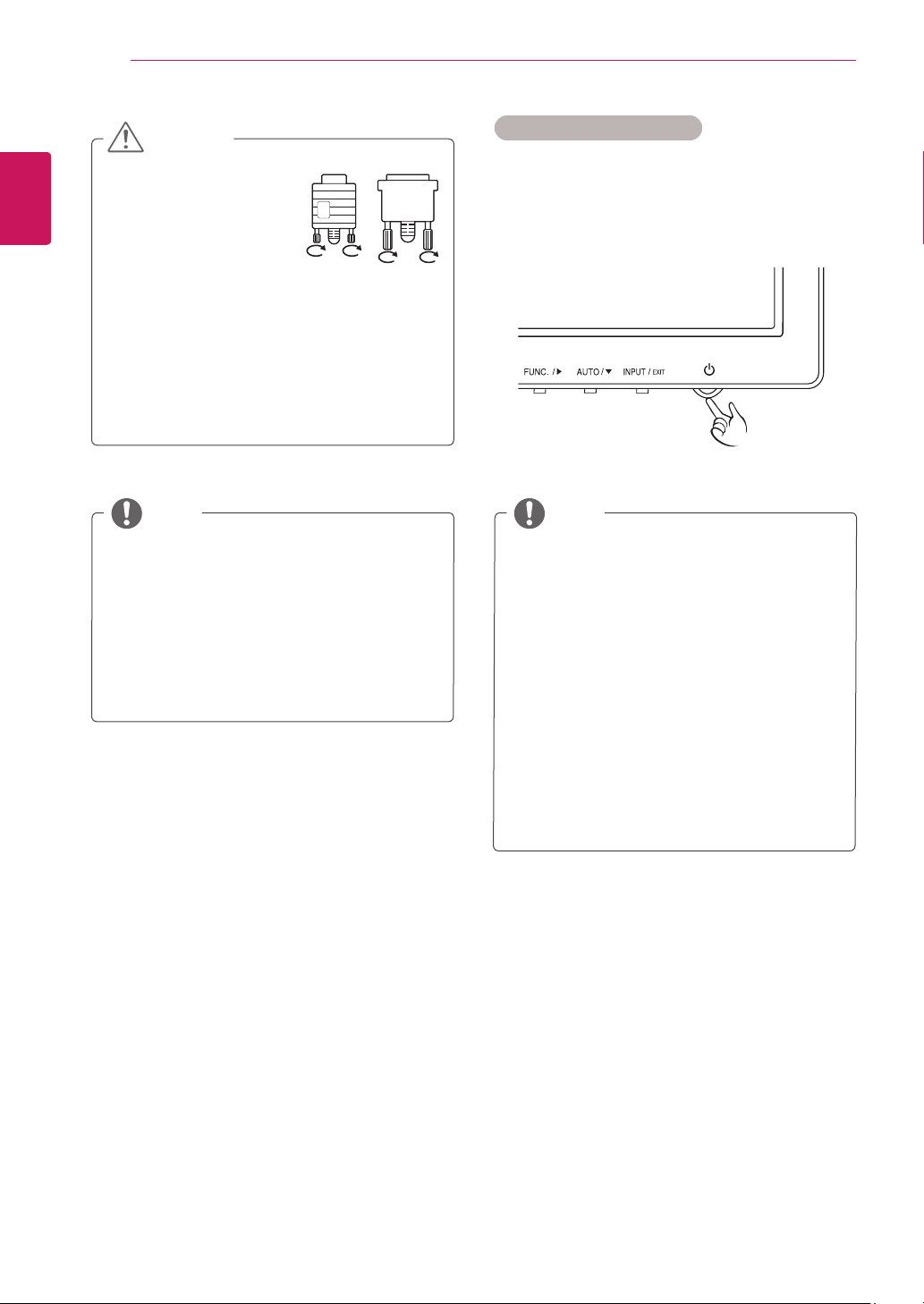
Pressthepowerbuttononthebottompanelto
turnthepoweron.Whenmonitorpoweristurned
on,the"
SelfImageSetting
"Functionisexecuted
automatically.(OnlysupportedinAnalogMode)
Connectthesignal
inputcableandtighten
itbyturningthescrews
clockwise.
Donotpressthescreenwithyourfingerfor
alongtimeasthismayresultintemporary
distortiononthescreen.
Avoiddisplayingafixedimageonthe
screenforalongperiodoftimetoprevent
imageburn.Useascreensaverifpossible.
CAUTION
11
ENG
ENGLISH
CUSTOMIZING SETTINGS
CUSTOMIZINGSETTINGS
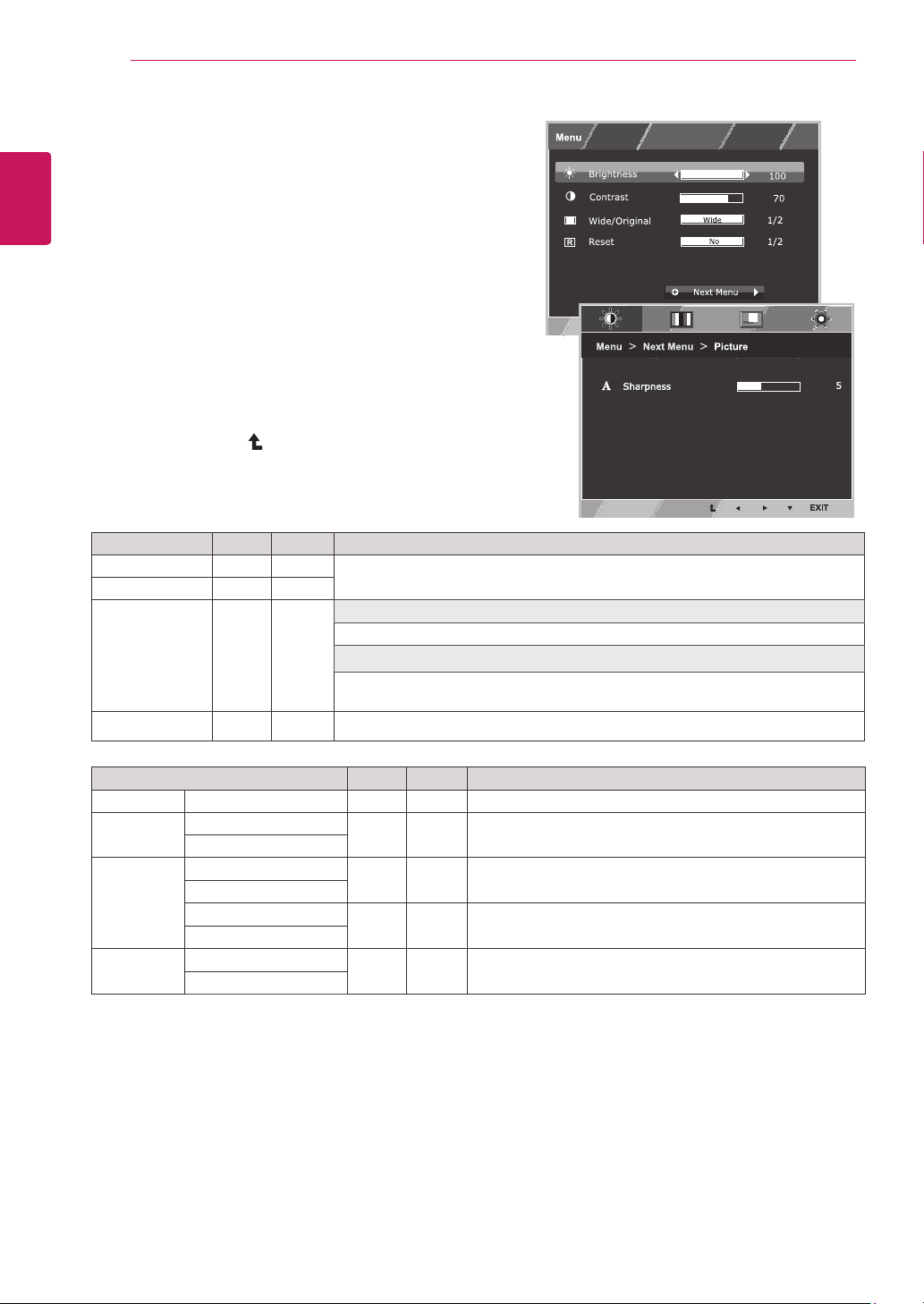
1
PressthedesiredbuttononthebottomoftheMonitorset.
2
ChangethevalueofthemenuitembypressingthebuttonsonthebottomoftheMonitorset.
Toreturntotheuppermenuorsetothermenuitems,usetheuparrow( )button.
3
Select
EXIT
toleavetheOSDmenu.
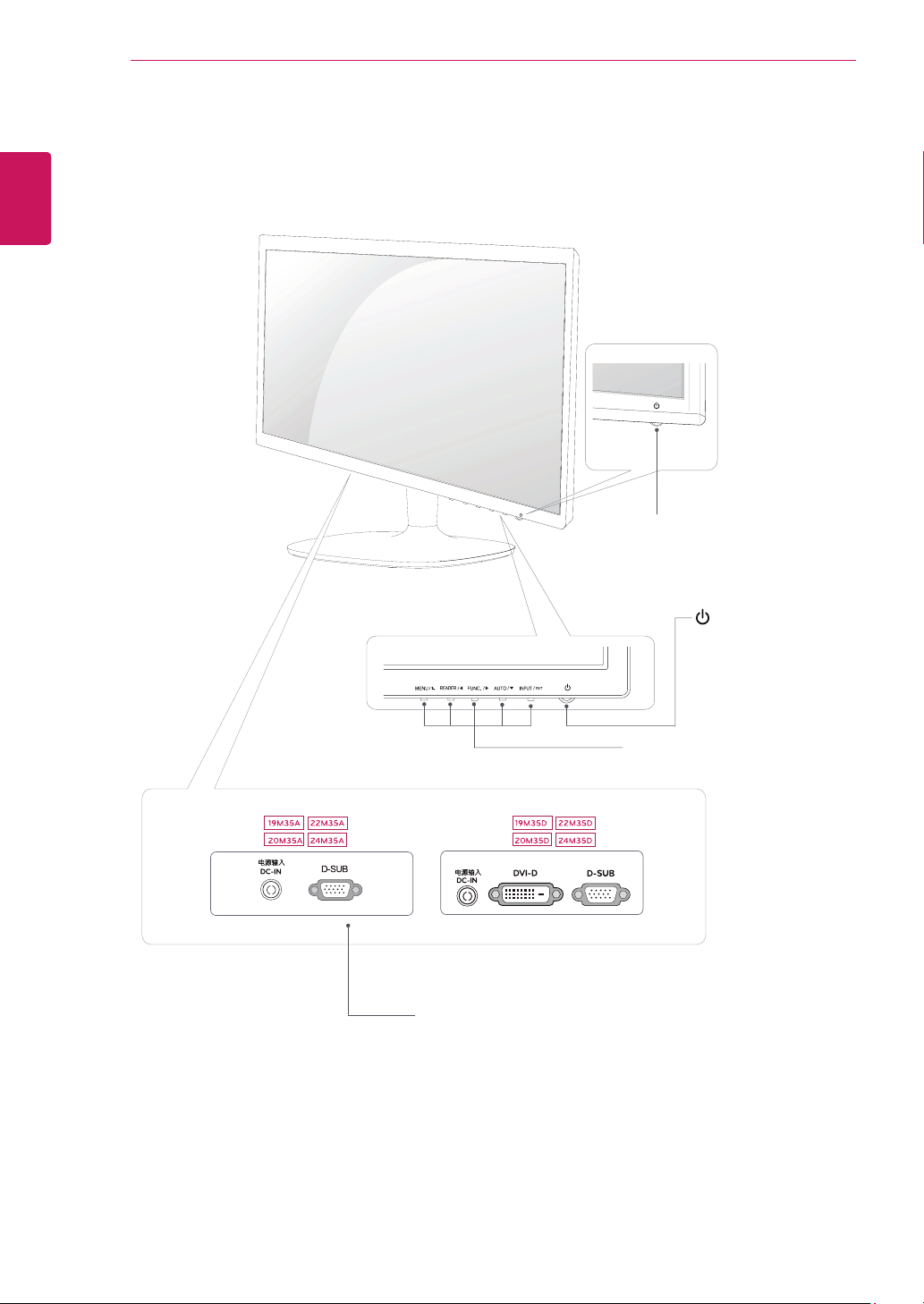
MonitorsetButtons
Button Description
Accessesthemainmenus.(Seep.12)
OSDLocked/OSD
Unlocked
Thisfunctionallowyoutolockthecurrentcontrolsettings,so
thattheycannotbeinadvertentlychanged.
PressandholdtheMENUbuttonforseveralseconds.Then
OSDof“OSDLock”willappear.Afterthat,usercanselect
lockorunlockbypressingleft/rightbutton.
Ifuserselectsthe“Lock”iconbypressingthe“OK”button,
themessage“OSDLocked”willappear.Otherwise,“OSD
Unlocked”willappear.Afterselectingthe“Lock”,Ifyouwant
tochangetoUnlock,youcanpushthe“MENU”buttonfor
severalseconds.Themessage“OSDUnlocked”willappear.
UsethisbuttontoenterReaderModemenu.Itsfunctionworkstodisplayscreenas
paper-likepictureforEyecomfort.Ifyouwanttomoreinformation(Seep.17).
UsethisbuttontoenterSUPERENERGYSAVING,PictureMode,DUALDISPLAY,
DUALWEBmenus.(Seep.18~20)
Whenadjustingyourdisplaysettings,alwayspresstheAUTObuttonontheMONITOR
SETUPOSD.(OnlysupportedinAnalogMode)
Thebestdisplaymode 19M35A/19M35D:1366x768
20M35A/20M35D:1600x900
22M35A/22M35D/24M35A/24M35D:1920x1080
Youcanchoosetheinputsignal.
• Whentwoinputsignalsareconnected,youcanselecttheinputsignal(D-SUB/DVI-D)
youwant.
• Whenonlyonesignalisconnected,itisautomaticallydetected.Thedefaultsettingis
D-SUB.
EXIT
EXITtheOSD(OnScreenDisplay).
(PowerButton)
Turnsthepoweronoroff.
PowerIndicator Thepowerindicatorstayswhiteifthedisplayisrunning
properly(OnMode).IfthedisplayisinSleepMode,thepower
indicatorblinkswhite.
12
ENG
ENGLISH
CUSTOMIZING SETTINGS
CustomizingSettings
MenuSettings
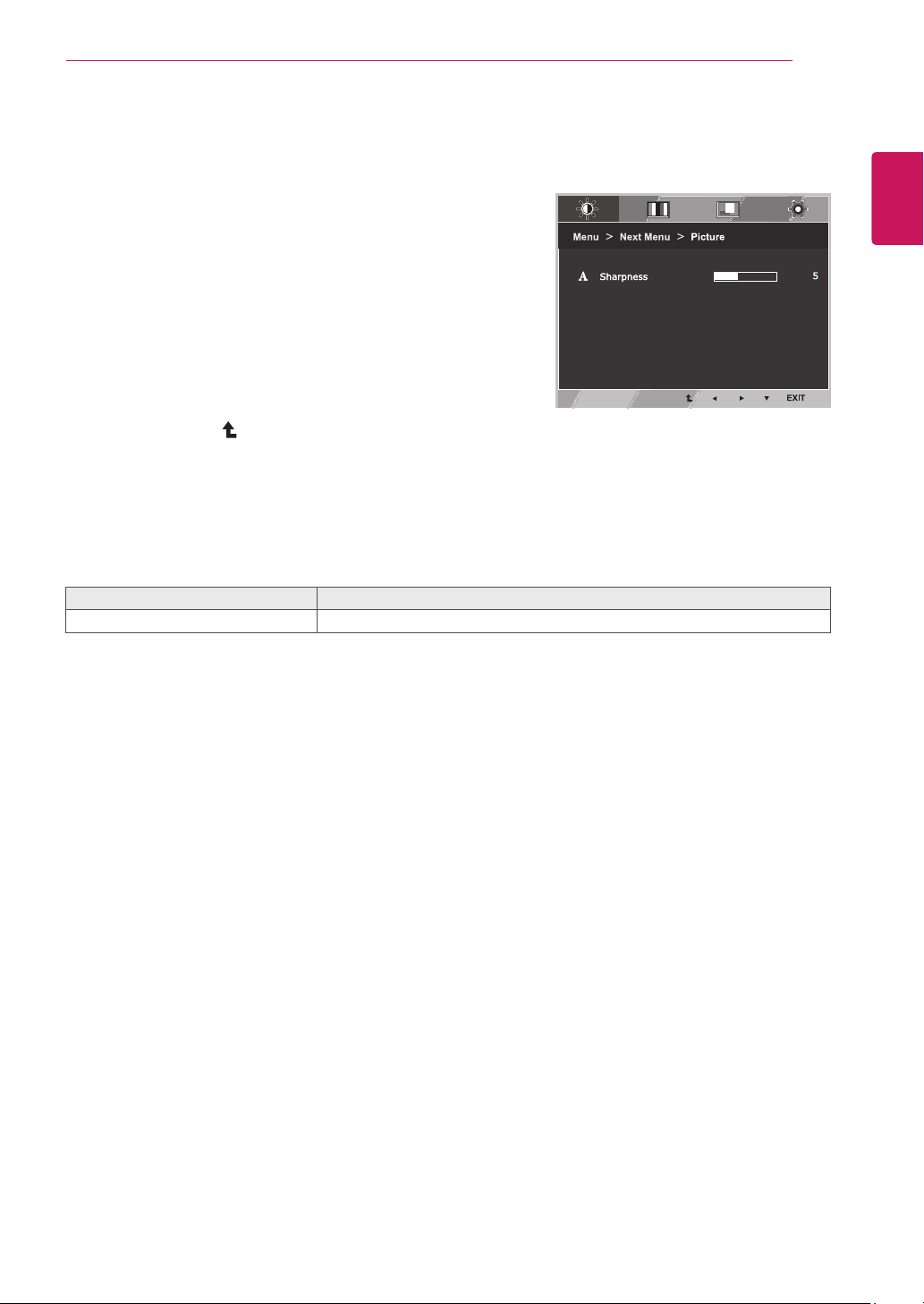
1
Press
MENU
buttononthebottomoftheMonitorset
todisplaythe
Menu
OSD.
2
Settheoptionsbypressingthe◄or►or▼
buttons.
3
Selectthe"
NextMenu
"buttontoenterthemore
optionsettings.
4
Select
EXIT
toleavetheOSDmenu.
Toreturntotheuppermenuorsetothermenuitems,
usetheuparrow( )button.
Eachoptionisexplainedbelow.
Menu>NextMenu Analog Digital Description
Picture Sharpness ● ●
Toadjusttheclearnessofthescreen
Color Gamma
● ●
Tocustomizethecolorofthescreen
ColorTemp
Display Horizontal
●
Toadjustthepositionofthescreen
Vertical
Clock
●
Toimprovetheclarityandstabilityofthescreen
Phase
Others Language
● ●
Tocustomizethescreenstatusforauser'soperating
environment
PowerIndicator
Analog:
D-SUB(Analogsignal)input.
Digital:
DVI-D(Digitalsignal)input.
Menu Analog Digital Description
Brightness ● ●
Toadjustthebrightnessofthescreen
Contrast ● ●
Wide/Original
● ●
Wide
Switchtofullscreenmodeaccordingtoinputimagesignal.
Original
Changetheinputimagesignalratiotooriginal.
*ThisfunctionworksonlyifinputresolutionislowerthanMonitorsetratio(16:9).
Reset
● ●
Restoreallfactorydefaultsettings.Pressthe
◄
,
►
buttonstoresetimmediately.
13
ENG
ENGLISH
CUSTOMIZING SETTINGS
Picture
1
Press
MENU
buttononthebottomoftheMonitorset
todisplaythe
Menu
OSD.
2
Selectthe"
NextMenu
"buttontoenterthemore
optionsettings.
3
Enterto
Picture
bypressingthe▼button.
4
Settheoptionsbypressingthe◄or►or▼
buttons.
5
Select
EXIT
toleavetheOSDmenu.
Toreturntotheuppermenuorsetothermenuitems,
usetheuparrow( )button.
Eachoptionisexplainedbelow.
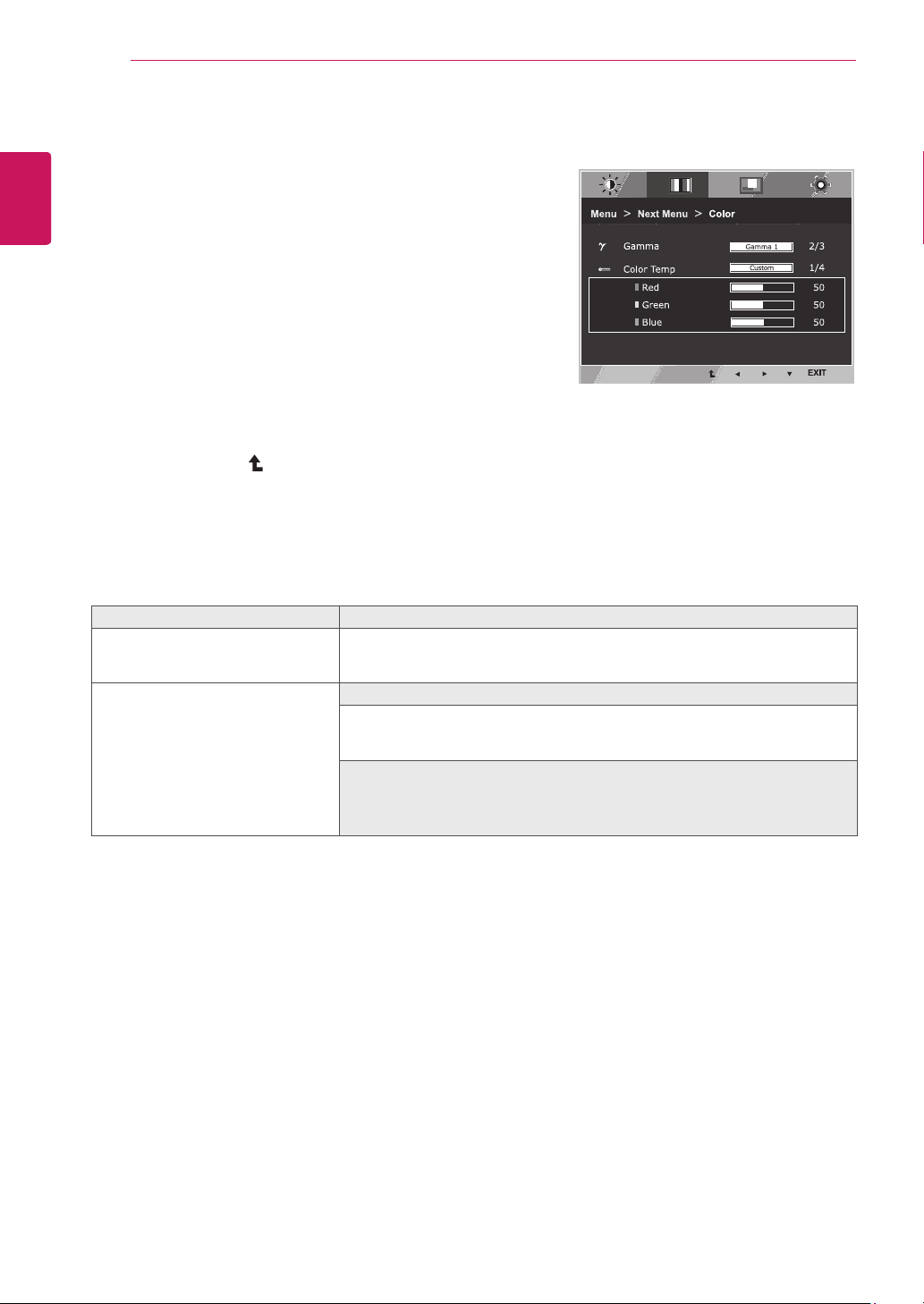
Menu>NextMenu>Picture Description
Sharpness Toadjusttheclearnessofthescreen.
14
ENG
ENGLISH
CUSTOMIZING SETTINGS
Color
1
Press
MENU
buttononthebottomoftheMonitorset
todisplaythe
Menu
OSD.
2
Selectthe"
NextMenu
"buttontoenterthemore
optionsettings.
3
Select
Color
bypressingthe►button.
4
Enterto
Color
bypressingthe▼button.
5
Settheoptionsbypressingthe◄or►or▼
buttons.
6
Select
EXIT
toleavetheOSDmenu.
Toreturntotheuppermenuorsetothermenuitems,
usetheuparrow( )button.
Eachoptionisexplainedbelow.
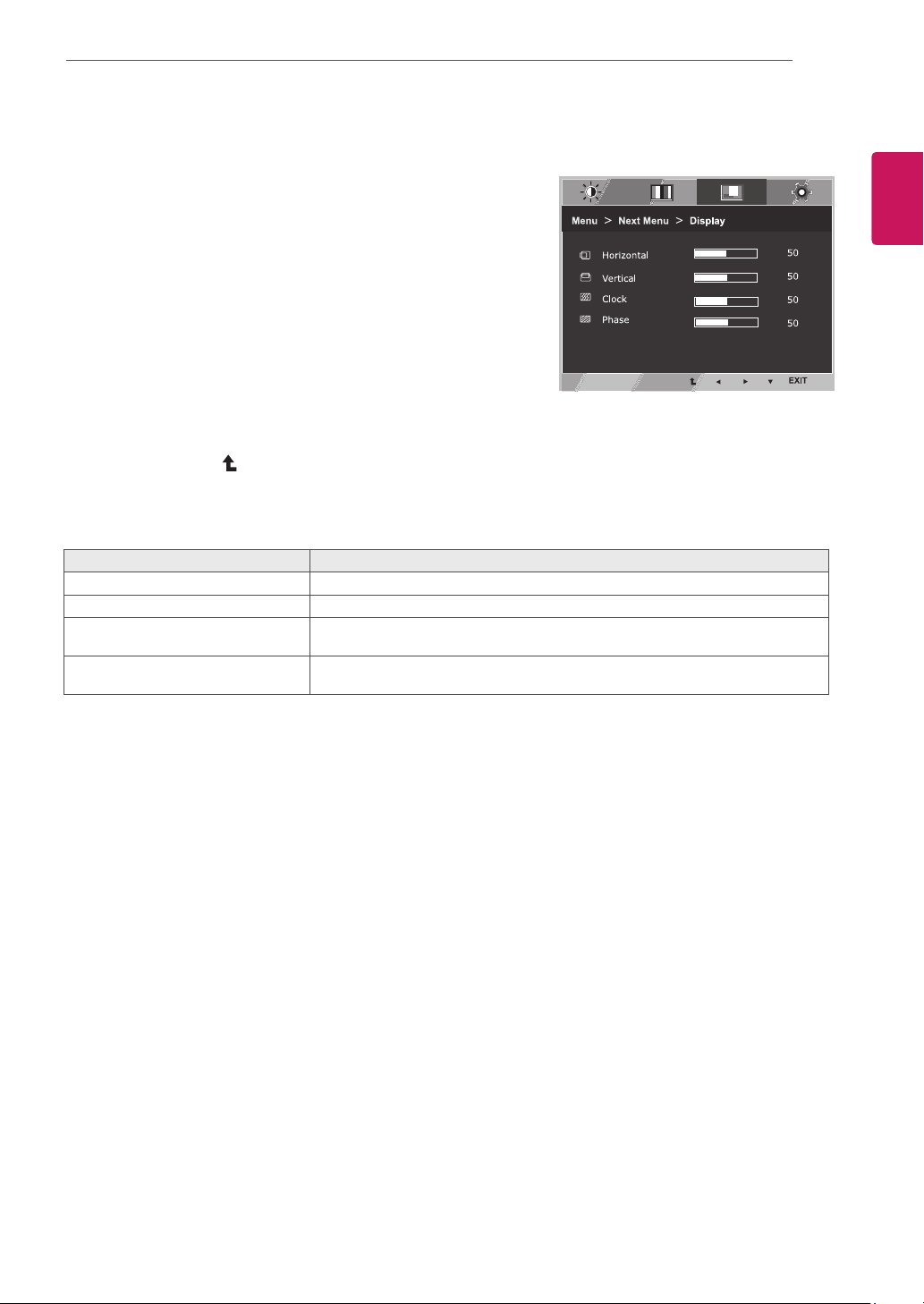
Menu>NextMenu>Color Description
Gamma Setyourowngammavalue.:Gamma0,Gamma1,Gamma2onthemonitor,
highgammavaluesdisplaywhitishimagesandlowgammavaluesdisplay
blackishimages.
ColorTemp Custom
•Red:
Setyourownredcolorlevels.
•Green:
Setyourowngreencolorlevels.
•Blue:
Setyourownbluecolorlevels.
Selectthescreencolor.
Warm:
Setthescreentowarmcolortemperature(morered).
Medium:
Setthescreentomediumcolortemperature.
Cool:
Setthescreentocoolcolortemperature(moreblue).
15
ENG
ENGLISH
CUSTOMIZING SETTINGS
Display
1
Press
MENU
buttononthebottomoftheMonitorset
todisplaythe
Menu
OSD.
2
Selectthe"
NextMenu
"buttontoenterthemore
optionsettings.
3
Select
Display
bypressingthe►button.
4
Enterto
Display
bypressingthe▼button.
5
Settheoptionsbypressingthe◄or►or▼
buttons.
6
Select
EXIT
toleavetheOSDmenu.
Toreturntotheuppermenuorsetothermenuitems,
usetheuparrow( )button.
Eachoptionisexplainedbelow.
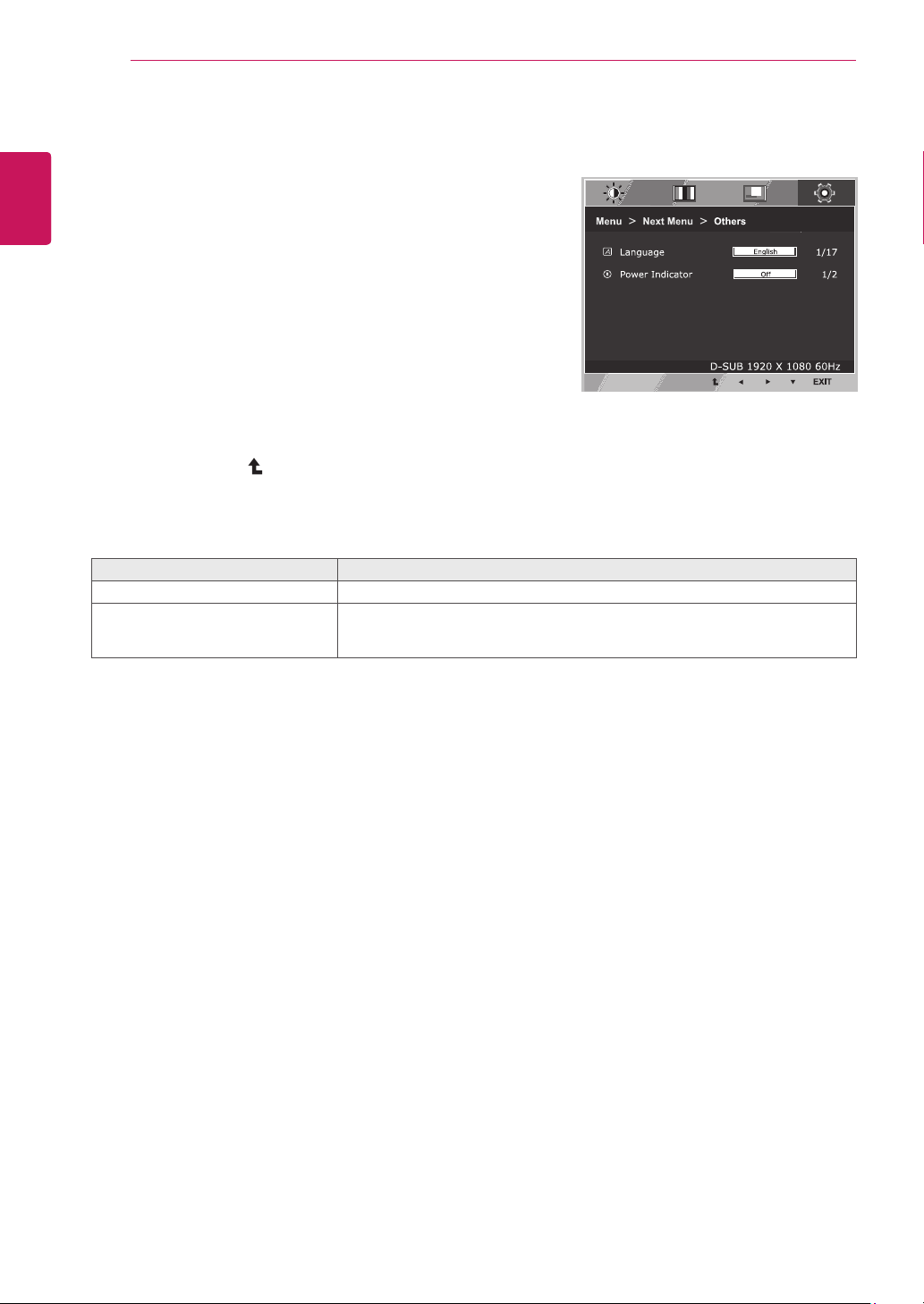
Menu>NextMenu>Display Description
Horizontal Tomoveimageleftandright.
Vertical Tomoveimageupanddown.
Clock Tominimizeanyverticalbarsorstripesvisibleonthescreenbackground.The
horizontalscreensizewillalsochange.
Phase Toadjustthefocusofthedisplay.Thisitemallowsyoutoremoveanyhorizontal
noiseandclearorsharpentheimageofcharacters.
16
ENG
ENGLISH
CUSTOMIZING SETTINGS
Others
1
Press
MENU
buttononthebottomoftheMonitorset
todisplaythe
Menu
OSD.
2
Selectthe"
NextMenu
"buttontoenterthemore
optionsettings.
3
Select
Others
bypressingthe►button.
4
Enterto
Others
bypressingthe▼button.
5
Settheoptionsbypressingthe◄or►or▼
buttons.
6
Select
EXIT
toleavetheOSDmenu.
Toreturntotheuppermenuorsetothermenuitems,
usetheuparrow( )button.
Eachoptionisexplainedbelow.
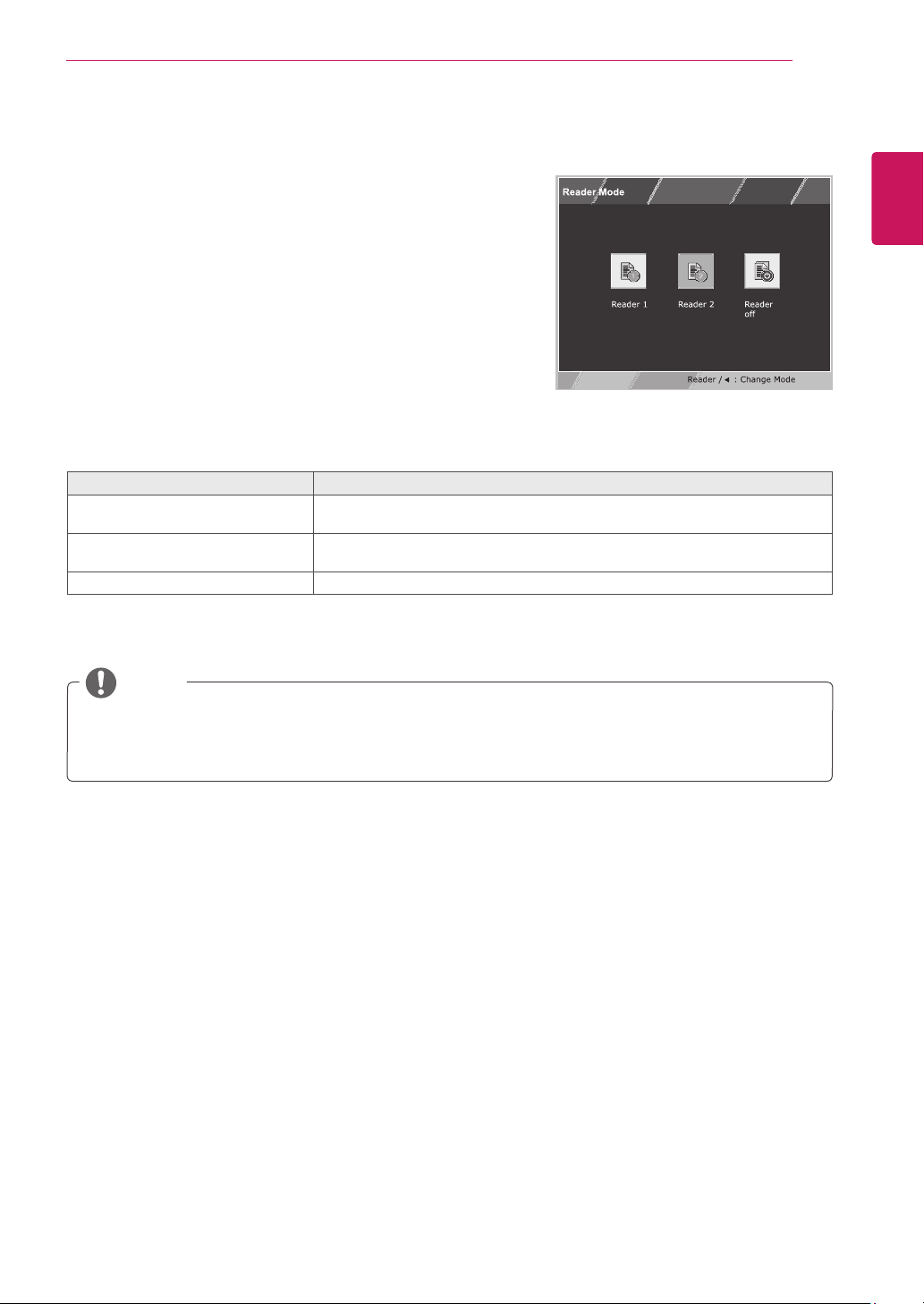
Menu>NextMenu>Others Description
Language Tochoosethelanguageinwhichthecontrolnamesaredisplayed.
PowerIndicator Usethisfunctiontosetthepowerindicatoronthebottomsideofthemonitorto
OnorOff.IfyousetOff,itwillgooff.
IfyousetOnatanytime,thepowerindicatorwillautomaticallybeturnedon.
17
ENG
ENGLISH
CUSTOMIZING SETTINGS
READERSetting
1
Press
READER
buttononthebottomoftheMonitor
settodisplaythe
ReaderMode
OSD.
2
Settheoptionsbypressingthe◄buttons.
ReaderMode Description
Reader1 Itisamodethatthescreenisadjustedtothebestforthenewspaper.Ifyou
wantscreenmorebright,youcancontrolbrightnessinMenuOSD.
Reader2 Itisamodethatthescreenisadjustedtothebestforthecartoon.Ifyouwant
screenmorebright,youcancontrolbrightnessinMenuOSD.
ReaderOff Itisamodethatreadermodeisoff.
Eachoptionisexplainedbelow.
NOTE
IfoptionofReaderModeisReader1orReader2,PictureModewillautomaticallybeCustomand
SuperEnergySavingwillautomaticallybeOff.
18
ENG
ENGLISH
CUSTOMIZING SETTINGS
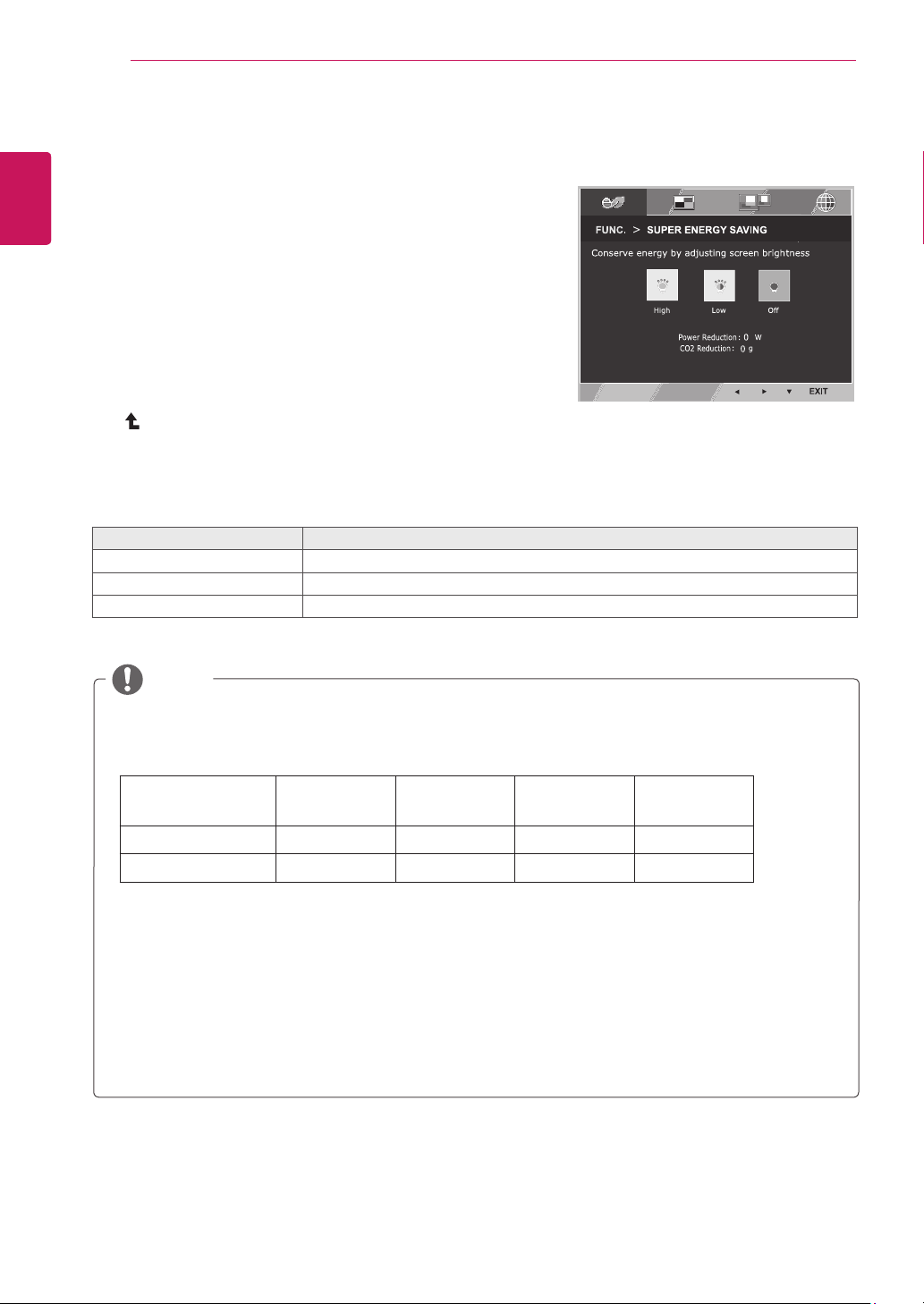
SUPERENERGYSAVING
1
Press
FUNC.
buttononthebottomoftheMonitorsetto
displaythe
FUNC.
OSD.
2
Enterto
SUPERENERGYSAVING
bypressingthe▼
button.
3
Settheoptionsbypressingthe◄or►or▼buttons.
4
Select
EXIT
toleavetheOSDmenu.Toreturntothe
uppermenuorsetothermenuitems,usetheuparrow
( )button.
Eachoptionisexplainedbelow.
SUPERENERGYSAVING Description
High
EnablesSUPERENERGYSAVINGyoucansaveenergywiththisenergy-highefficientfunction.
Low
EnablesSUPERENERGYSAVINGyoucansaveenergywiththisenergy-lowefficientfunction.
Off DisablesSUPERENERGYSAVING.
TOTALPOWERREDUCTION
:Howmuchpowerissavedwhileusingthemonitor.
TOTALCO2REDUCTION
:ChangetheTOTALPOWERREDUCTIONtoCO2.
SAVINGDATA(W/h)
470mm
(18.5inch)
494mm
(19.5inch)
546mm
(21.5inch)
600mm
(23.6inch)
SUPERSAVING(High)
2W/h 3W/h 4W/h 4W/h
SUPERSAVING(Low)
1W/h 1W/h 2W/h 2W/h
SavingDatadependsonthePanel.So,thosevaluesshouldbedifferentfromeachpanelandpanel
vendor.IfoptionofSuperEnergySavingisHighorLow,monitorluminancebecomehigherorlower
dependonsource.
LGcalculatedthesevaluesbyusing
“broadcastvideosignal”
(includingbroadcastvideo:IEC62087)
SUPERSAVINGreferstohowmuchpowercanbesavedusingtheSUPERENERGYSAVING
function.
IfoptionofSuperEnergySavingisHighorLow,PictureModewillautomaticallybeCustomand
ReaderModewillautomaticallybeReaderOff.
NOTE
FUNC.Setting
19
ENG
ENGLISH
CUSTOMIZING SETTINGS
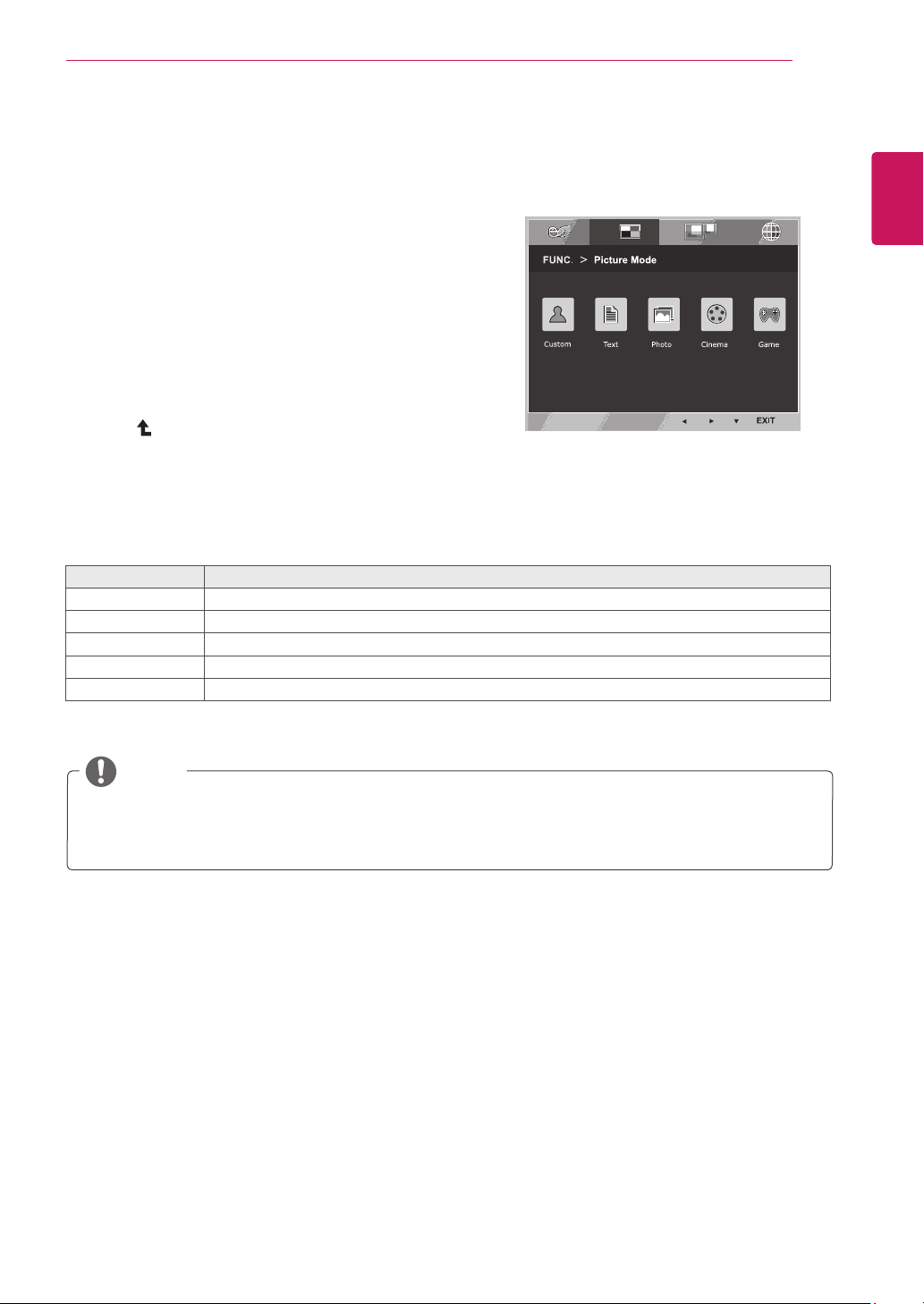
PictureMode
1
Press
FUNC.
buttonon thebottomoftheMonitorset
todisplaythe
FUNC.
OSD.
2
Select
PictureMode
bypressingthe►button.
3
Enterto
PictureMode
bypressingthe▼button.
4
Settheoptionsbypressingthe◄or►buttons.
5
Select
EXIT
toleavetheOSDmenu.Toreturntothe
uppermenuorsetothermenuitems,usetheup
arrow( )button.
PictureMode Description
Custom Itisamodethattheusercanadjusteachelement.ItcanadjustthecolormodeoftheMainMenu.
Text Itisamodethatthescreenisadjustedtothebestforthetextworks.
Photo Itisamodethatthescreenisadjustedtothebesttoviewpictures.
Cinema Itisamodethatthescreenisadjustedtothebesttoviewthevideos.
Game Itisamodethatthescreenisadjustedtothebesttoplayagame.
Eachoptionisexplainedbelow.
NOTE
IfoptionofPictureModeisnon-Custom,ReaderModewillautomaticallybeReaderOffandSuper
EnergySavingwillautomaticallybeOff.
20
ENG
ENGLISH
CUSTOMIZING SETTINGS
NOTE
Whenmonitorgoestopowersavingmodewithpcsavingoption->Pressinganybutton->OSD
appearandusershouldpressdualbutton->Usercanbringbacktonormalmode.
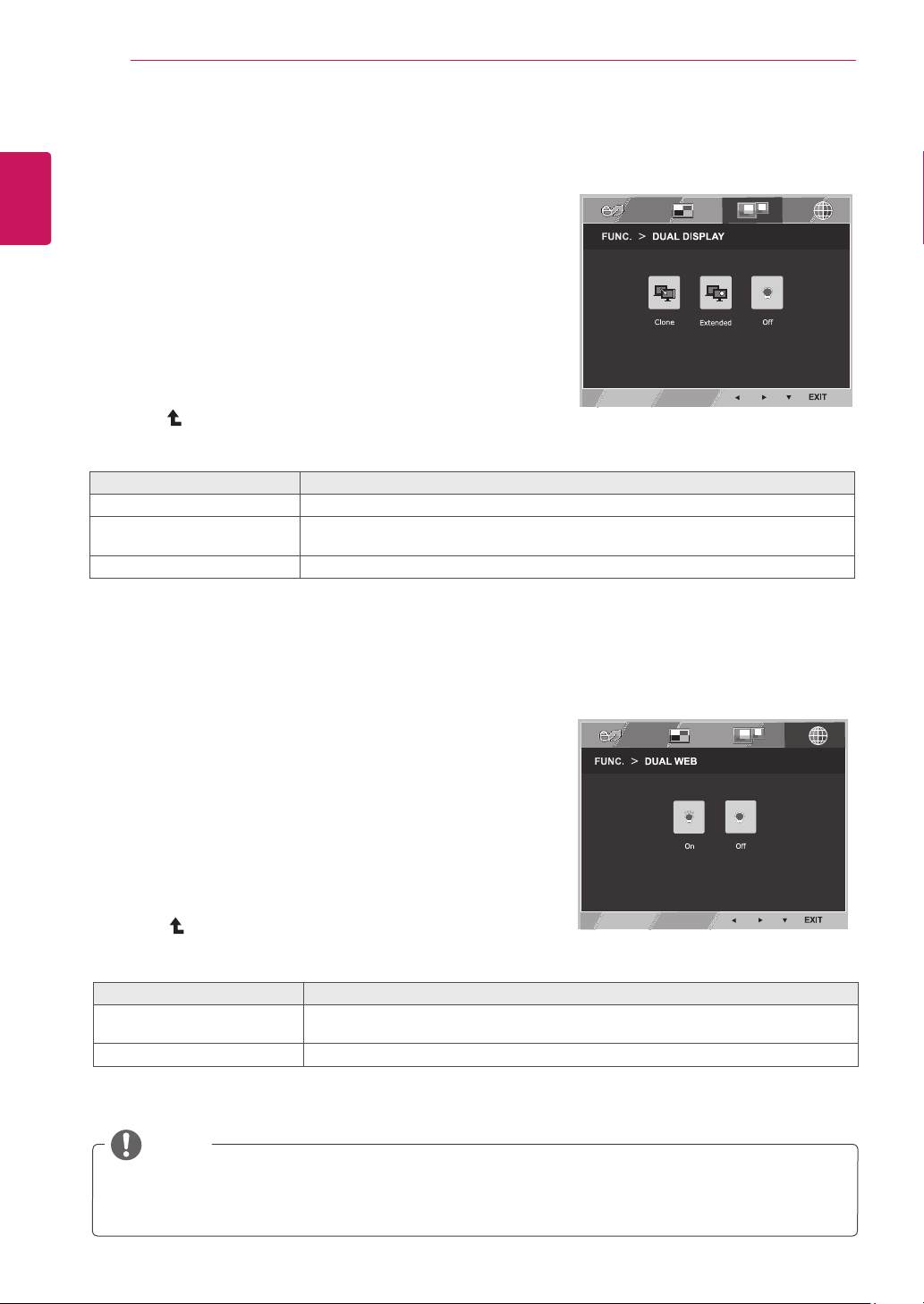
DUALDISPLAY
1
Press
FUNC.
buttononthebottomoftheMonitorset
todisplaythe
FUNC.
OSD.
2
Select
DUALDISPLAY
bypressingthe►button.
3
Enterto
DUALDISPLAY
bypressingthe▼button.
4
Settheoptionsbypressingthe◄or►buttons.
5
Select
EXIT
toleavetheOSDmenu.Toreturntothe
uppermenuorsetothermenuitems,usetheup
arrow( )button.
*Beforeusingbelowfunctions,pleaseinstallDUALSMARTSOLUTIONprogramme.
Eachoptionisexplainedbelow.
DUALDISPLAY Description
Clone ByselectingClone,usercanusesecondarymonitorasdonemodeofprimarymonitor.
Extended ByselectingExtended,usercanusesecondarymonitorasextendedmodeofprimary
monitor.
Off IfselectOff,DUALDISPLAYisoff.
DUALWEB
1
Press
FUNC.
buttononthebottomoftheMonitorset
todisplaythe
FUNC.
OSD.
2
Select
DUALWEB
bypressingthe►button.
3
Enterto
DUALWEB
bypressingthe▼button.
4
Settheoptionsbypressingthe◄or►buttons.
5
Select
EXIT
toleavetheOSDmenu.Toreturntothe
uppermenuorsetothermenuitems,usetheup
arrow( )button.
*Beforeusingbelowfunctions,pleaseinstallDUALSMARTSOLUTIONprogramme.
Eachoptionisexplainedbelow.
DUALWEB Description
On Helpusertobrowsewebefficientlybydividinginhalf.Helptoarrangeandmove
windowsonscreen.Helpusertocontroldividedwindowsratio.
Off IfselectOff,DUALWEBisoff.
21
ENG
ENGLISH
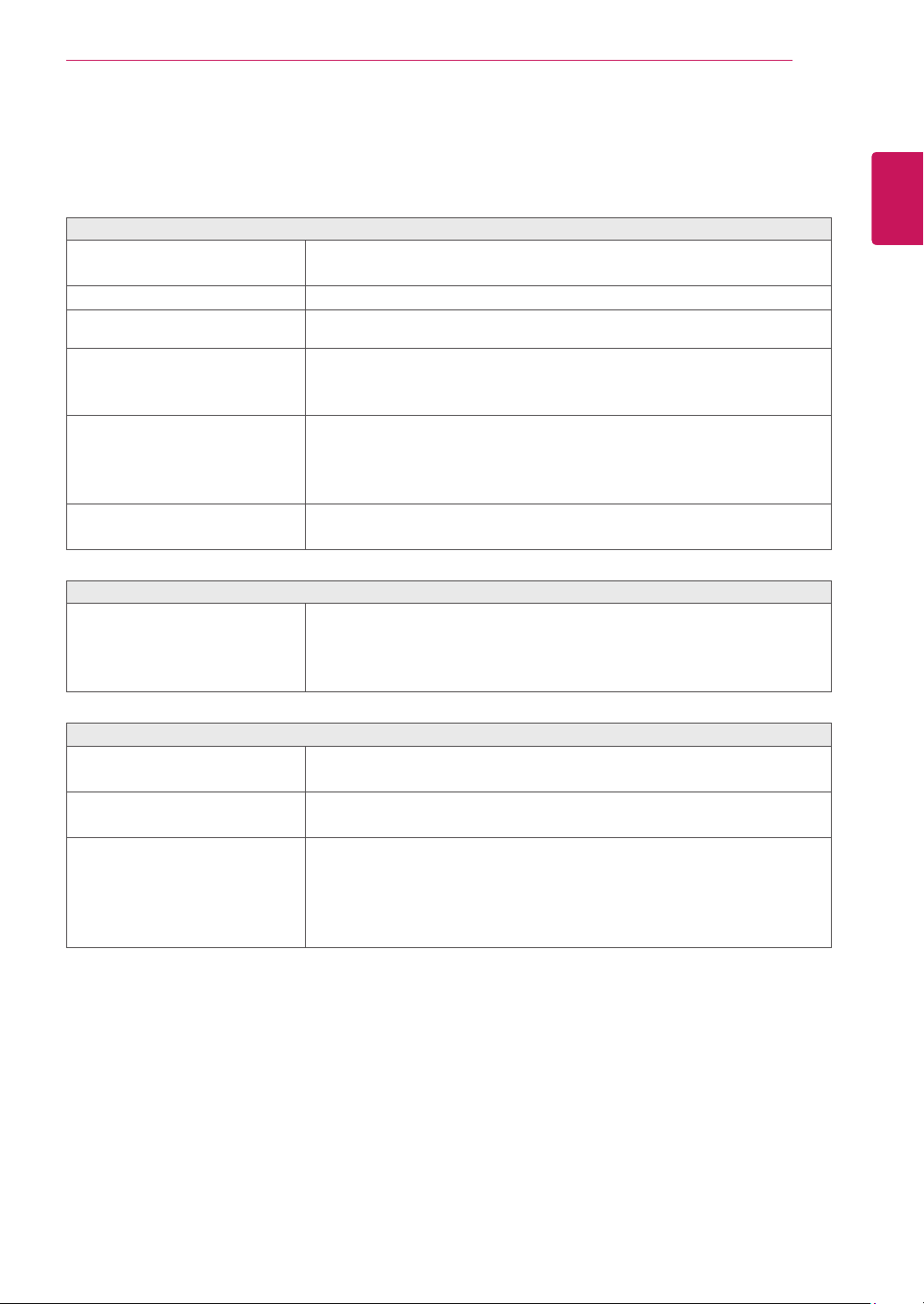
TROUBLESHOOTING
TROUBLESHOOTING
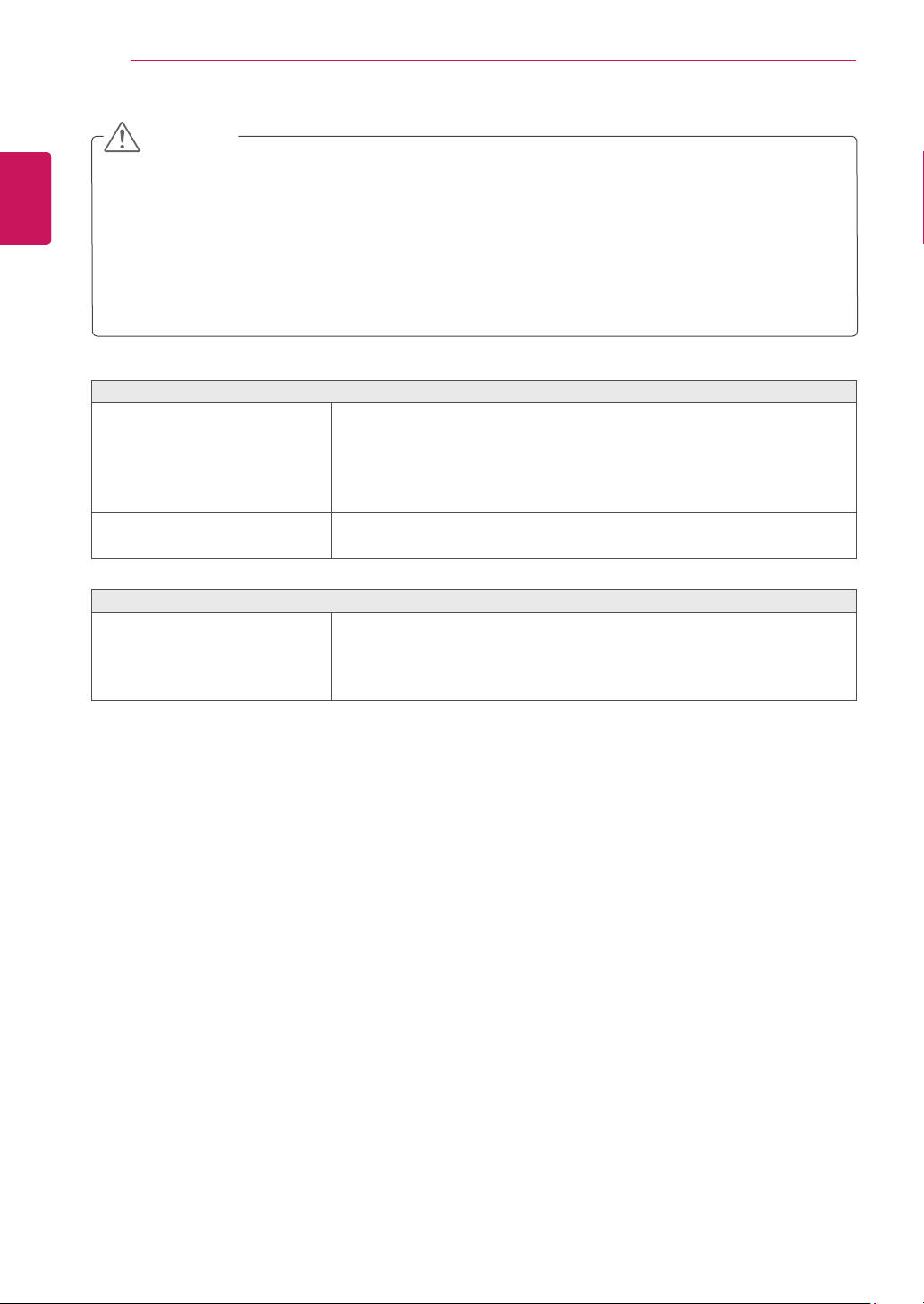
Checkthefollowingbeforecallingforservice.
Noimageappears
Isthepowercordofthedisplay
connected?
Checkandseeifthepowercordisconnectedproperlytothepower
outlet.
Isthepowerindicatorlighton?
PressthePowerbutton.
Isthepoweronandthepower
indicatorWhite?
Adjustthebrightnessandthecontrast.
Isthepowerindicatorflickering?
Ifthedisplayisinpowersavingmode,trymovingthemouseor
pressinganykeyonthekeyboardtobringupthescreen.
TrytoturnonthePC.
Doyouseean"OUTOFRANGE"
messageonthescreen?
ThismessageappearswhenthesignalfromthePC(videocard)is
outofhorizontalorverticalfrequencyrangeofthedisplay.Seethe
'Specifications'sectionofthismanualandconfigureyourdisplay
again.
Doyouseea"NOSIGNAL"
messageonthescreen?
Whenthemonitorison"No-Signal"in5minutes,themonitorgoesto
DPMmode.
Doyouseea"OSDLOCKED"messageonthescreen?
Doyousee“OSDLOCKED”when
youpushMENUbutton?
Youcansecurethecurrentcontrolsettings,sothattheycannotbe
inadvertentlychanged.YoucanunlocktheOSDcontrolsatanytime
bypushingtheMENUbuttonforseveralseconds:themessage“OSD
UNLOCKED”willappear.
Displayimageisincorrect
DisplayPositionisincorrect.
Pressthe
AUTO
buttontoautomaticallyadjustyourdisplayimageto
theidealsetting.
Onthescreenbackground,vertical
barsorstripesarevisible.
Pressthe
AUTO
buttontoautomaticallyadjustyourdisplayimageto
theidealsetting.
Anyhorizontalnoiseappearingin
anyimageorcharactersarenot
clearlyportrayed.
Pressthe
AUTO
buttontoautomaticallyadjustyourdisplayimageto
theidealsetting.
Check
ControlPanel►Display►Settings
andadjustthedisplay
totherecommendedresolutionoradjustthedisplayimagetotheideal
setting.Setthecolorsettinghigherthan24bits(truecolor).
22
ENG
ENGLISH
TROUBLESHOOTING
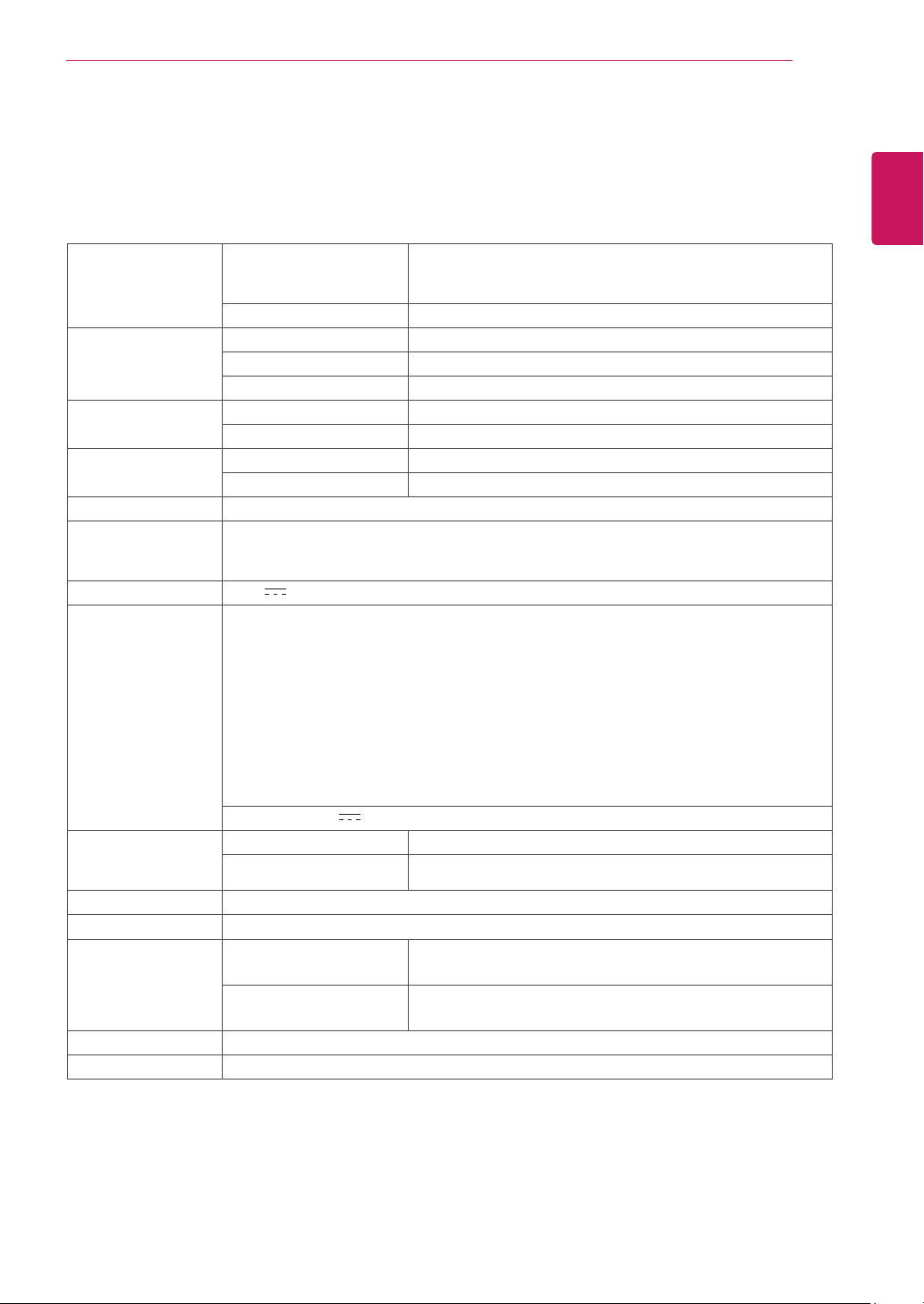
Displayimageisincorrect
Thescreencolorismonoor
abnormal.
Checkifthesignalcableisproperlyconnectedanduseascrewdriver
tofastenifnecessary.
Makesurethevideocardisproperlyinsertedintheslot.
Setthecolorsettinghigherthan24bits(truecolor)at
ControlPanel
►
Settings
.
Thescreenblinks.
Checkifthescreenissettointerlacemodeandifyes,changeittothe
recommendresolution.
Doyouseean"Unrecognizedmonitor,Plug&Play(VESADDC)monitorfound"message?
Haveyouinstalledthedisplay
driver?
BesuretoinstallthedisplaydriverfromthedisplaydriverCD(or
diskette)thatcomeswithyourdisplay.Or,youcanalsodownloadthe
driverfromourwebsite:http://www.lg.com.
MakesuretocheckifthevideocardsupportsPlug&Playfunction.
Check
ControlPanel►Display►Settings
andseeifthefrequencyortheresolutionwere
changed.Ifyes,readjustthevideocardtotherecommendresolution.
Iftherecommendedresolution(optimalresolution)isnotselected,lettersmaybeblurredandthe
screenmaybedimmed,truncatedorbiased.Makesuretoselecttherecommendresolution.
ThesettingmethodcandifferbycomputerandO/S(OperationSystem),andresolutionmentioned
abovemaynotbesupportedbythevideocardperformance.Inthiscase,pleaseasktothecomputer
orthevideocardmanufacturer.
CAUTION
23
ENG
ENGLISH
SPECIFICATIONS
SPECIFICATIONS
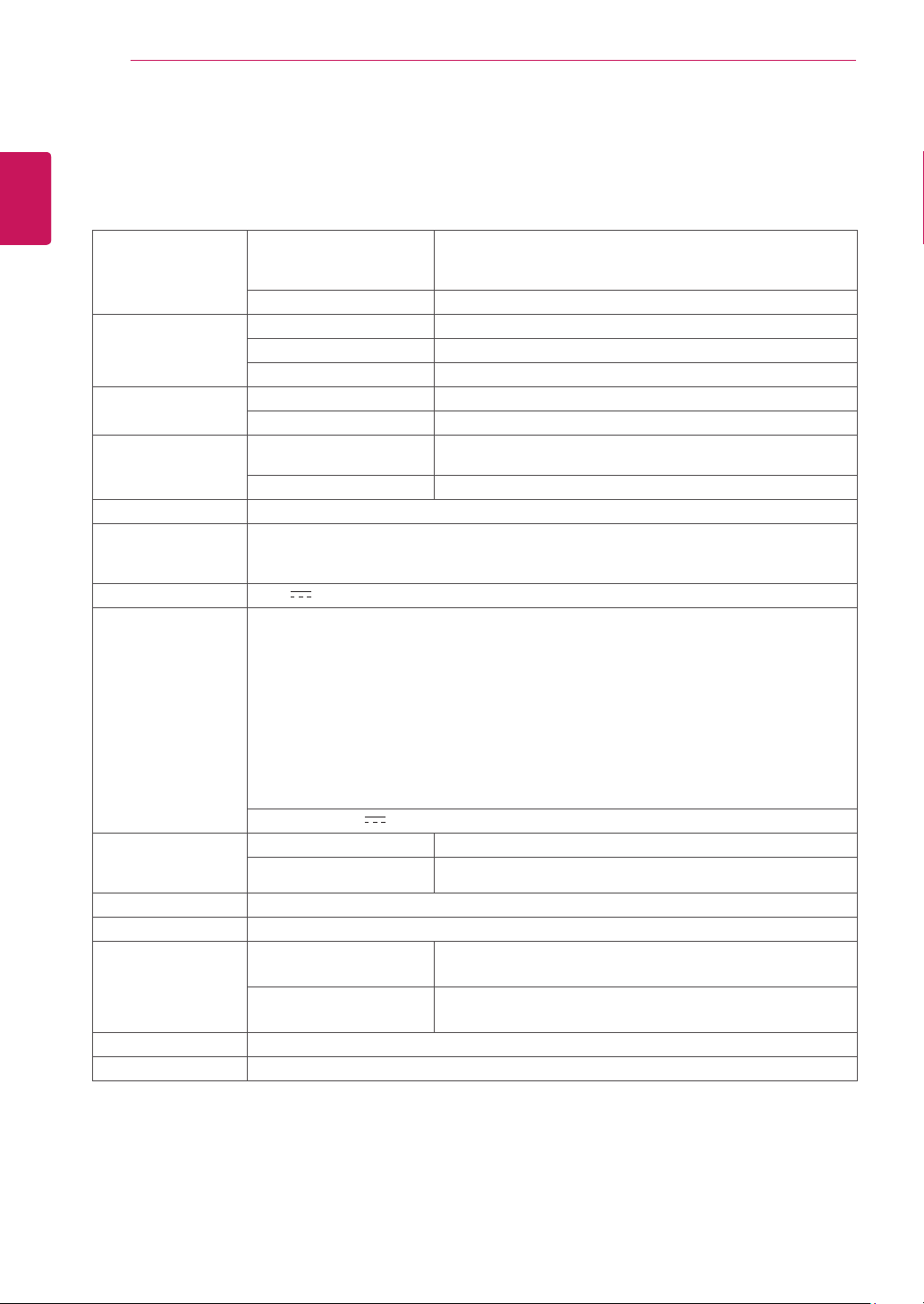
Display ScreenType 47.0cm(18.5inch)FlatPanelActivematrix-TFTLCDAnti-
Glarecoating
Visiblediagonalsize:47.0cm
PixelPitch 0.3mmx0.3mm(PixelPitch)
SyncInput HorizontalFrequency 30kHzto61kHz(Automatic)
VerticalFrequency 56Hzto75Hz(D-SUB)
InputForm SeparateSync.
VideoInput SignalInput 15pinD-SUBConnector
InputForm RGBAnalog(0.7Vp-p/75ohm)
Resolution Max D-SUB(Analog):1366x768@60Hz
Recommend VESA1366x768@60Hz
Plug&Play DDC2B(Analog)
Power
Consumption
OnMode:13W(ENERGYSTAR®standard)*
SleepMode≤0.3W
OffMode≤0.3W
PowerInput 19V
0.8A
AC-DCAdapter
TypeADS-18SG-19-319016G,manufacturedbySHENZHENHONORELECTRONIC
orTypeADS-18FSG-1919016GPG,manufacturedbySHENZHENHONORELECTRONIC
orTypeADS-18FSG-1919016GPI,manufacturedbySHENZHENHONORELECTRONIC
orTypeADS-18FSG-1919016GPCU,manufacturedbySHENZHENHONORELECTRONIC
orTypeADS-18FSG-1919016GPB,manufacturedbySHENZHENHONORELECTRONIC
orTypeLCAP42,manufacturedbyLIENCHANGELECTRONICENTERPRISE
orTypeLCAP36-A,manufacturedbyLIENCHANGELECTRONICENTERPRISE
orTypeLCAP36-E,manufacturedbyLIENCHANGELECTRONICENTERPRISE
orTypeLCAP36-I,manufacturedbyLIENCHANGELECTRONICENTERPRISE
orTypeLCAP36-U,manufacturedbyLIENCHANGELECTRONICENTERPRISE
OUTPUT:
19V 0.84A
Dimensions
(WidthxHeightx
Depth)
WithStand 44.1cmx37.2cmx18.5cm
WithoutStand 44.1cmx27.8cmx9.8cm
Weight 2.1kg
TiltRange -3°to20°
Environmental
conditions
OperatingTemperature
OperatingHumidity
10°Cto35°C
10%to80%
StorageTemperature
StorageHumidity
-20°Cto60°C
5%to90%non-Condensing
StandBase Attached(),Detached(O)
Powercord Wall-outlettype
Productspecificationsshownabovemaybechangedwithoutpriornoticeduetoupgradeofproduct
functions.
*Thepowerconsumptionlevelcanbedifferentbyoperatingconditionandmonitorsetting.
*TheOnmodepowerconsumptionismeasuredwithENERGYSTAR®teststandard.
*ENERGYSTAR®isaUSregisteredmarkoftheUnitedStatesEnvironmentalProtectionAgency.
19M35A
24
ENG
ENGLISH
SPECIFICATIONS
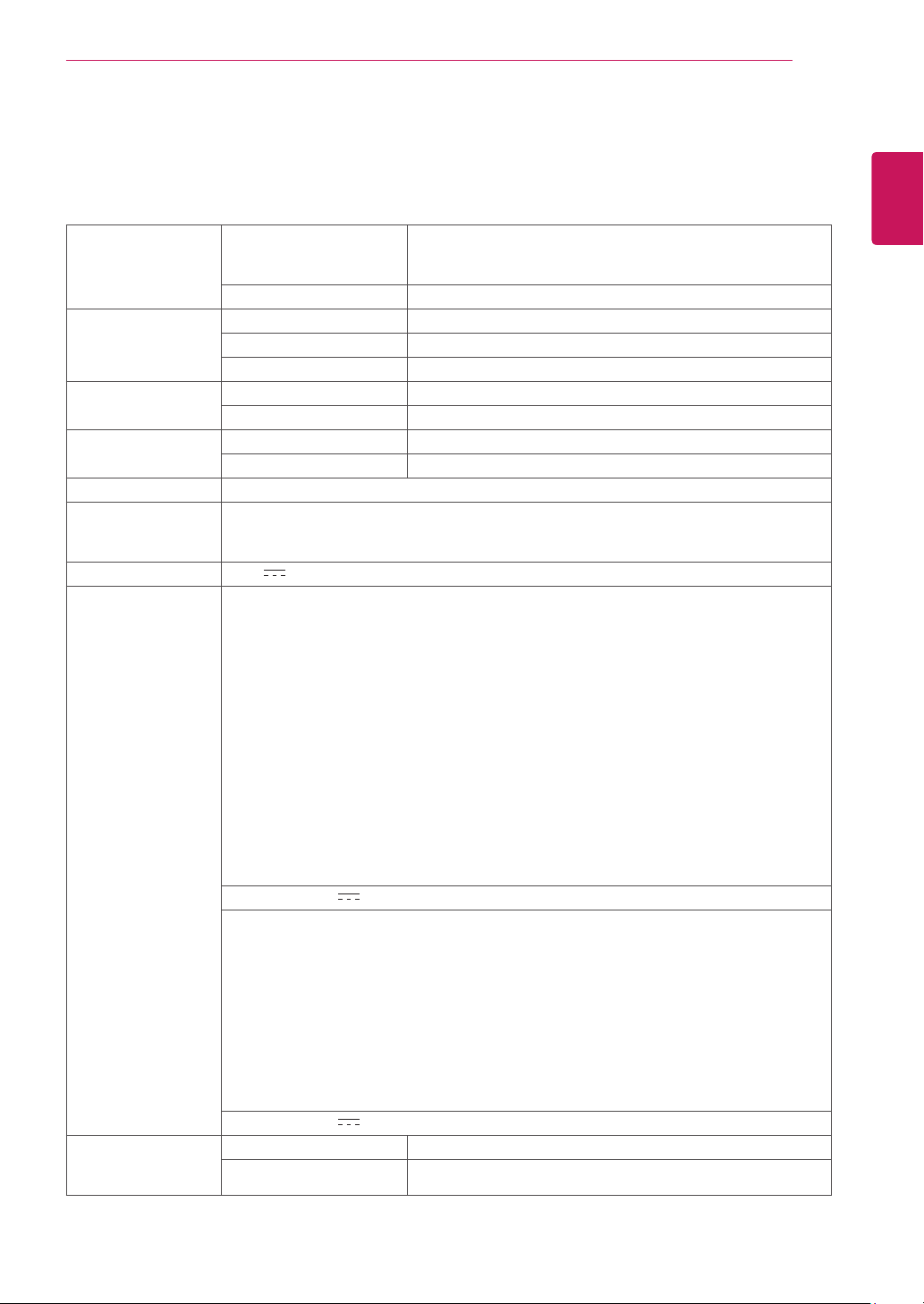
Display ScreenType 47.0cm(18.5inch)FlatPanelActivematrix-TFTLCDAnti-
Glarecoating
Visiblediagonalsize:47.0cm
PixelPitch 0.3mmx0.3mm(PixelPitch)
SyncInput HorizontalFrequency 30kHzto61kHz(Automatic)
VerticalFrequency 56Hzto75Hz(D-SUB,DVI-D)
InputForm SeparateSync.Digital
VideoInput SignalInput 15pinD-SUBConnector/DVI-DConnector(Digital)
InputForm RGBAnalog(0.7Vp-p/75ohm),Digital
Resolution Max D-SUB(Analog):1366x768@60Hz
DVI(Digital):1366x768@60Hz
Recommend VESA1366x768@60Hz
Plug&Play DDC2B(Analog,Digital)
Power
Consumption
OnMode:13W(ENERGYSTAR®standard)*
SleepMode≤0.3W
OffMode≤0.3W
PowerInput 19V
0.8A
AC-DCAdapter
TypeADS-18SG-19-319016G,manufacturedbySHENZHENHONORELECTRONIC
orTypeADS-18FSG-1919016GPG,manufacturedbySHENZHENHONORELECTRONIC
orTypeADS-18FSG-1919016GPI,manufacturedbySHENZHENHONORELECTRONIC
orTypeADS-18FSG-1919016GPCU,manufacturedbySHENZHENHONORELECTRONIC
orTypeADS-18FSG-1919016GPB,manufacturedbySHENZHENHONORELECTRONIC
orTypeLCAP42,manufacturedbyLIENCHANGELECTRONICENTERPRISE
orTypeLCAP36-A,manufacturedbyLIENCHANGELECTRONICENTERPRISE
orTypeLCAP36-E,manufacturedbyLIENCHANGELECTRONICENTERPRISE
orTypeLCAP36-I,manufacturedbyLIENCHANGELECTRONICENTERPRISE
orTypeLCAP36-U,manufacturedbyLIENCHANGELECTRONICENTERPRISE
OUTPUT:
19V 0.84A
Dimensions
(WidthxHeightx
Depth)
WithStand 44.1cmx37.2cmx18.5cm
WithoutStand 44.1cmx27.8cmx9.8cm
Weight 2.1kg
TiltRange -3°to20°
Environmental
conditions
OperatingTemperature
OperatingHumidity
10°Cto35°C
10%to80%
StorageTemperature
StorageHumidity
-20°Cto60°C
5%to90%non-Condensing
StandBase Attached(),Detached(O)
Powercord Wall-outlettype
Productspecificationsshownabovemaybechangedwithoutpriornoticeduetoupgradeofproduct
functions.
*Thepowerconsumptionlevelcanbedifferentbyoperatingconditionandmonitorsetting.
*TheOnmodepowerconsumptionismeasuredwithENERGYSTAR®teststandard.
*ENERGYSTAR®isaUSregisteredmarkoftheUnitedStatesEnvironmentalProtectionAgency.
19M35D
SPECIFICATIONS
25
ENG
ENGLISH
SPECIFICATIONS
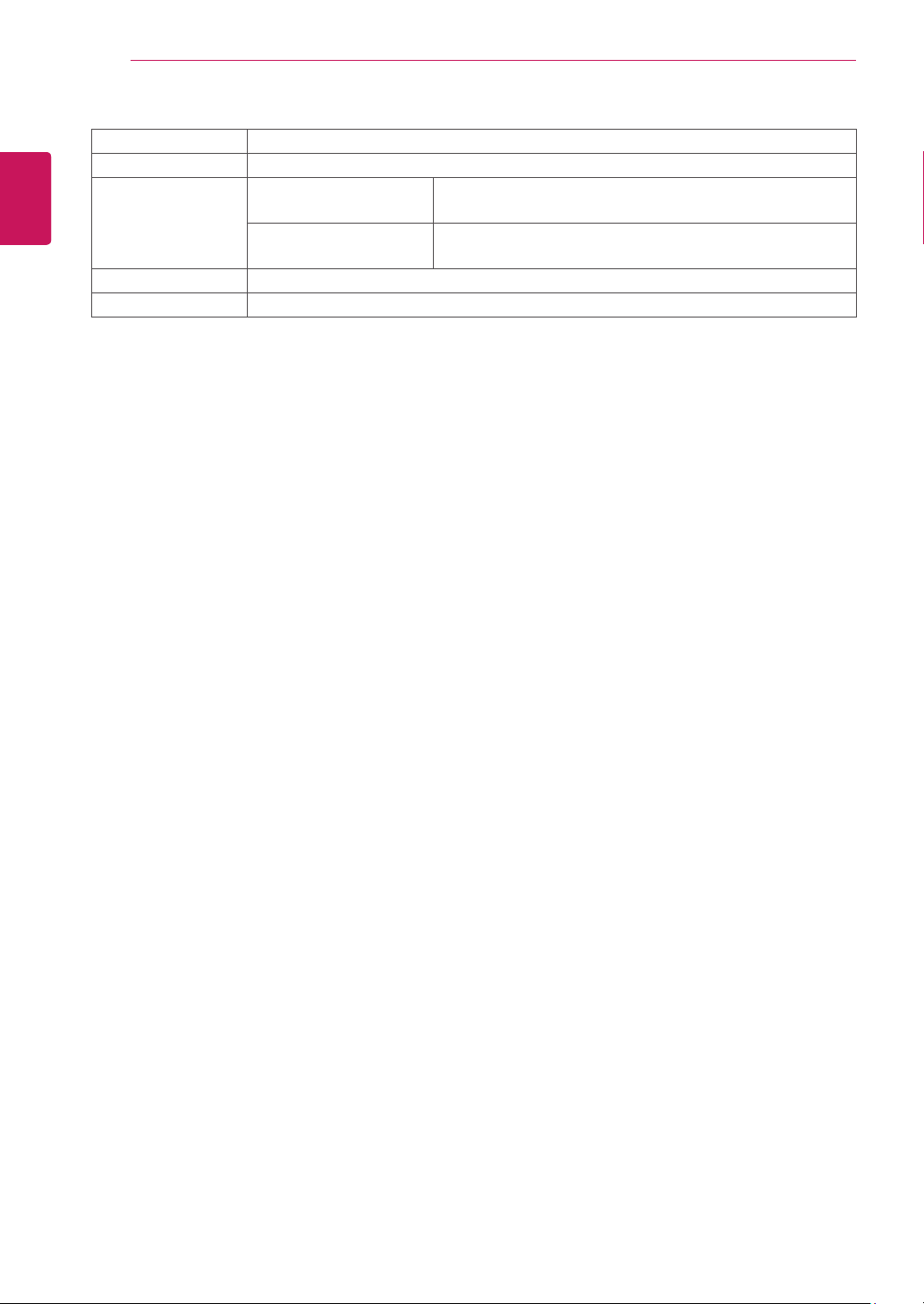
Display ScreenType 49.4cm(19.5inch)FlatPanelActivematrix-TFTLCDAnti-
Glarecoating
Visiblediagonalsize:49.4cm
PixelPitch 0.271mmx0.262mm(PixelPitch)
SyncInput HorizontalFrequency 30kHzto83kHz(Automatic)
VerticalFrequency 56Hzto75Hz(D-SUB)
InputForm SeparateSync.
VideoInput SignalInput 15pinD-SUBConnector
InputForm RGBAnalog(0.7Vp-p/75ohm)
Resolution Max D-SUB(Analog):1600x900@60Hz
Recommend VESA1600x900@60Hz
Plug&Play DDC2B(Analog)
Power
Consumption
OnMode:16W(ENERGYSTAR®standard)*
SleepMode≤0.3W
OffMode≤0.3W
PowerInput 19V
0.8A
AC-DCAdapter
TypeADS-40SG-19-319025G,manufacturedbySHENZHENHONORELECTRONIC
orTypeADS-40FSG-1919025GPG-1,manufacturedbySHENZHENHONORELECTRONIC
orTypeADS-40FSG-1919025GPBR-1,manufacturedbySHENZHENHONORELECTRONIC
orTypeADS-40FSG-1919025GPI-1,manufacturedbySHENZHENHONORELECTRONIC
orTypeADS-40FSG-1919025GPCU-1,manufacturedbySHENZHENHONORELECTRONIC
orTypeADS-40FSG-1919025GPB-2,manufacturedbySHENZHENHONORELECTRONIC
orTypeLCAP21,manufacturedbyLIENCHANGELECTRONICENTERPRISE
orTypeLCAP26-A,manufacturedbyLIENCHANGELECTRONICENTERPRISE
orTypeLCAP26-E,manufacturedbyLIENCHANGELECTRONICENTERPRISE
orTypeLCAP26-I,manufacturedbyLIENCHANGELECTRONICENTERPRISE
orTypeLCAP26-B,manufacturedbyLIENCHANGELECTRONICENTERPRISE
orTypePSAB-L203A,manufacturedbyLGInnotekCo.,Ltd
orTypePSAB-L202B,manufacturedbyLGInnotekCo.,Ltd
orTypePSAB-L202C,manufacturedbyLGInnotekCo.,Ltd
orTypePSAB-L202D,manufacturedbyLGInnotekCo.,Ltd
OUTPUT:
19V 1.3A
TypeADS-18SG-19-319016G,manufacturedbySHENZHENHONORELECTRONIC
orTypeADS-18FSG-1919016GPG,manufacturedbySHENZHENHONORELECTRONIC
orTypeADS-18FSG-1919016GPI,manufacturedbySHENZHENHONORELECTRONIC
orTypeADS-18FSG-1919016GPCU,manufacturedbySHENZHENHONORELECTRONIC
orTypeADS-18FSG-1919016GPB,manufacturedbySHENZHENHONORELECTRONIC
orTypeLCAP42,manufacturedbyLIENCHANGELECTRONICENTERPRISE
orTypeLCAP36-A,manufacturedbyLIENCHANGELECTRONICENTERPRISE
orTypeLCAP36-E,manufacturedbyLIENCHANGELECTRONICENTERPRISE
orTypeLCAP36-I,manufacturedbyLIENCHANGELECTRONICENTERPRISE
orTypeLCAP36-U,manufacturedbyLIENCHANGELECTRONICENTERPRISE
OUTPUT:
19V 0.84A
Dimensions
(WidthxHeightx
Depth)
WithStand 46.3cmx38.1cmx18.5cm
WithoutStand 46.3cmx28.7cmx9.8cm
20M35A
SPECIFICATIONS
26
ENG
ENGLISH
SPECIFICATIONS
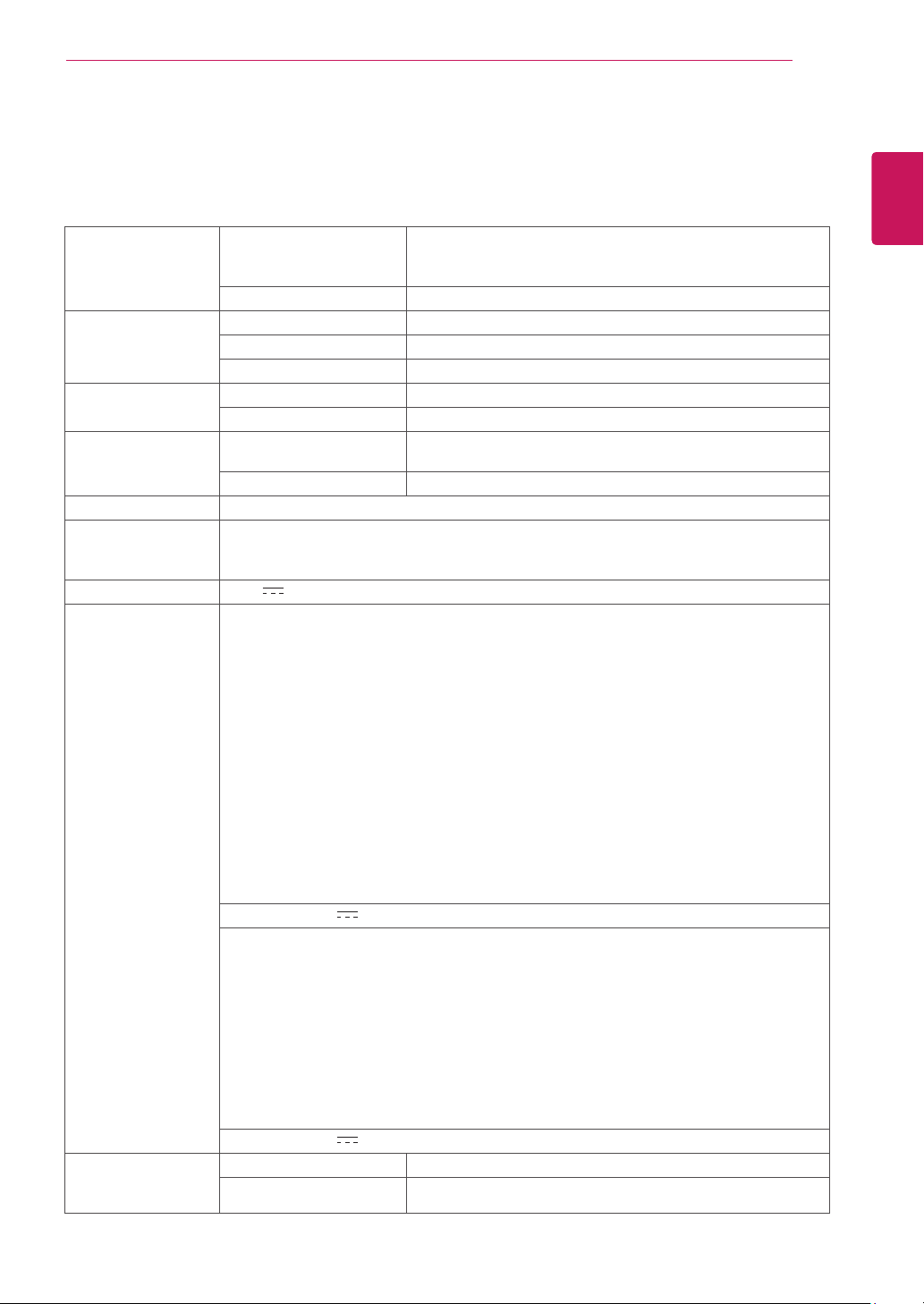
Weight 2.2kg
TiltRange -3°to20°
Environmental
conditions
OperatingTemperature
OperatingHumidity
10°Cto35°C
10%to80%
StorageTemperature
StorageHumidity
-20°Cto60°C
5%to90%non-Condensing
StandBase Attached(),Detached(O)
Powercord Wall-outlettype
Productspecificationsshownabovemaybechangedwithoutpriornoticeduetoupgradeofproduct
functions.
*Thepowerconsumptionlevelcanbedifferentbyoperatingconditionandmonitorsetting.
*TheOnmodepowerconsumptionismeasuredwithENERGYSTAR®teststandard.
*ENERGYSTAR®isaUSregisteredmarkoftheUnitedStatesEnvironmentalProtectionAgency.
27
ENG
ENGLISH
SPECIFICATIONS
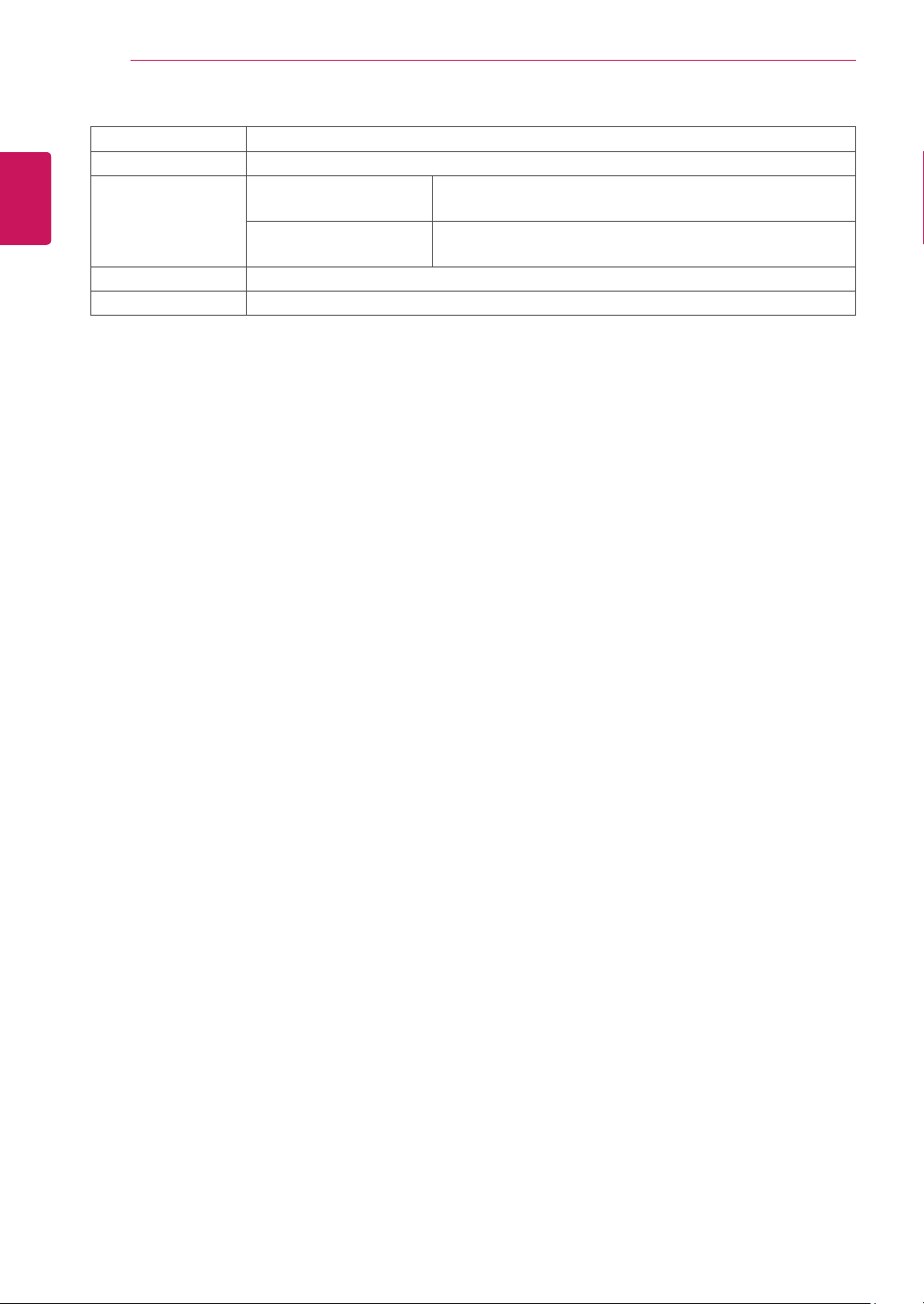
Display ScreenType 49.4cm(19.5inch)FlatPanelActivematrix-TFTLCDAnti-
Glarecoating
Visiblediagonalsize:49.4cm
PixelPitch 0.271mmx0.262mm(PixelPitch)
SyncInput HorizontalFrequency 30kHzto83kHz(Automatic)
VerticalFrequency 56Hzto75Hz(D-SUB,DVI-D)
InputForm SeparateSync.Digital
VideoInput SignalInput 15pinD-SUBConnector/DVI-DConnector(Digital)
InputForm RGBAnalog(0.7Vp-p/75ohm),Digital
Resolution Max D-SUB(Analog):1600x900@60Hz
DVI(Digital):1600x900@60Hz
Recommend VESA1600x900@60Hz
Plug&Play DDC2B(Analog,Digital)
Power
Consumption
OnMode:16W(ENERGYSTAR®standard)*
SleepMode≤0.3W
OffMode≤0.3W
PowerInput 19V
0.8A
AC-DCAdapter
TypeADS-40SG-19-319025G,manufacturedbySHENZHENHONORELECTRONIC
orTypeADS-40FSG-1919025GPG-1,manufacturedbySHENZHENHONORELECTRONIC
orTypeADS-40FSG-1919025GPBR-1,manufacturedbySHENZHENHONORELECTRONIC
orTypeADS-40FSG-1919025GPI-1,manufacturedbySHENZHENHONORELECTRONIC
orTypeADS-40FSG-1919025GPCU-1,manufacturedbySHENZHENHONORELECTRONIC
orTypeADS-40FSG-1919025GPB-2,manufacturedbySHENZHENHONORELECTRONIC
orTypeLCAP21,manufacturedbyLIENCHANGELECTRONICENTERPRISE
orTypeLCAP26-A,manufacturedbyLIENCHANGELECTRONICENTERPRISE
orTypeLCAP26-E,manufacturedbyLIENCHANGELECTRONICENTERPRISE
orTypeLCAP26-I,manufacturedbyLIENCHANGELECTRONICENTERPRISE
orTypeLCAP26-B,manufacturedbyLIENCHANGELECTRONICENTERPRISE
orTypePSAB-L203A,manufacturedbyLGInnotekCo.,Ltd
orTypePSAB-L202B,manufacturedbyLGInnotekCo.,Ltd
orTypePSAB-L202C,manufacturedbyLGInnotekCo.,Ltd
orTypePSAB-L202D,manufacturedbyLGInnotekCo.,Ltd
OUTPUT:
19V 1.3A
TypeADS-18SG-19-319016G,manufacturedbySHENZHENHONORELECTRONIC
orTypeADS-18FSG-1919016GPG,manufacturedbySHENZHENHONORELECTRONIC
orTypeADS-18FSG-1919016GPI,manufacturedbySHENZHENHONORELECTRONIC
orTypeADS-18FSG-1919016GPCU,manufacturedbySHENZHENHONORELECTRONIC
orTypeADS-18FSG-1919016GPB,manufacturedbySHENZHENHONORELECTRONIC
orTypeLCAP42,manufacturedbyLIENCHANGELECTRONICENTERPRISE
orTypeLCAP36-A,manufacturedbyLIENCHANGELECTRONICENTERPRISE
orTypeLCAP36-E,manufacturedbyLIENCHANGELECTRONICENTERPRISE
orTypeLCAP36-I,manufacturedbyLIENCHANGELECTRONICENTERPRISE
orTypeLCAP36-U,manufacturedbyLIENCHANGELECTRONICENTERPRISE
OUTPUT:
19V 0.84A
Dimensions
(WidthxHeightx
Depth)
WithStand 46.3cmx38.1cmx18.5cm
WithoutStand 46.3cmx28.7cmx9.8cm
20M35D
SPECIFICATIONS
28
ENG
ENGLISH
SPECIFICATIONS
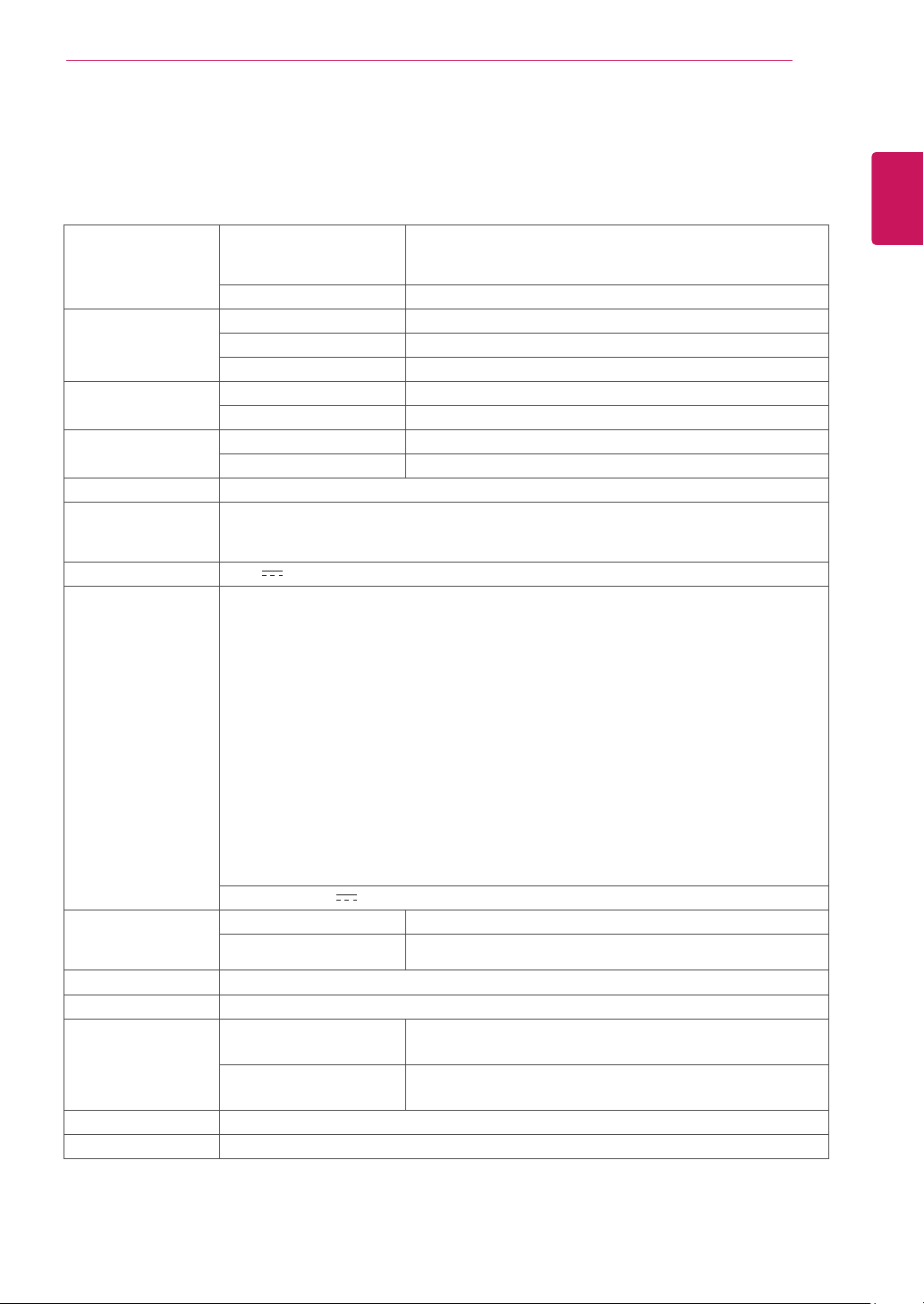
Weight 2.2kg
TiltRange -3°to20°
Environmental
conditions
OperatingTemperature
OperatingHumidity
10°Cto35°C
10%to80%
StorageTemperature
StorageHumidity
-20°Cto60°C
5%to90%non-Condensing
StandBase Attached(),Detached(O)
Powercord Wall-outlettype
Productspecificationsshownabovemaybechangedwithoutpriornoticeduetoupgradeofproduct
functions.
*Thepowerconsumptionlevelcanbedifferentbyoperatingconditionandmonitorsetting.
*TheOnmodepowerconsumptionismeasuredwithENERGYSTAR®teststandard.
*ENERGYSTAR®isaUSregisteredmarkoftheUnitedStatesEnvironmentalProtectionAgency.
29
ENG
ENGLISH
SPECIFICATIONS
SPECIFICATIONS
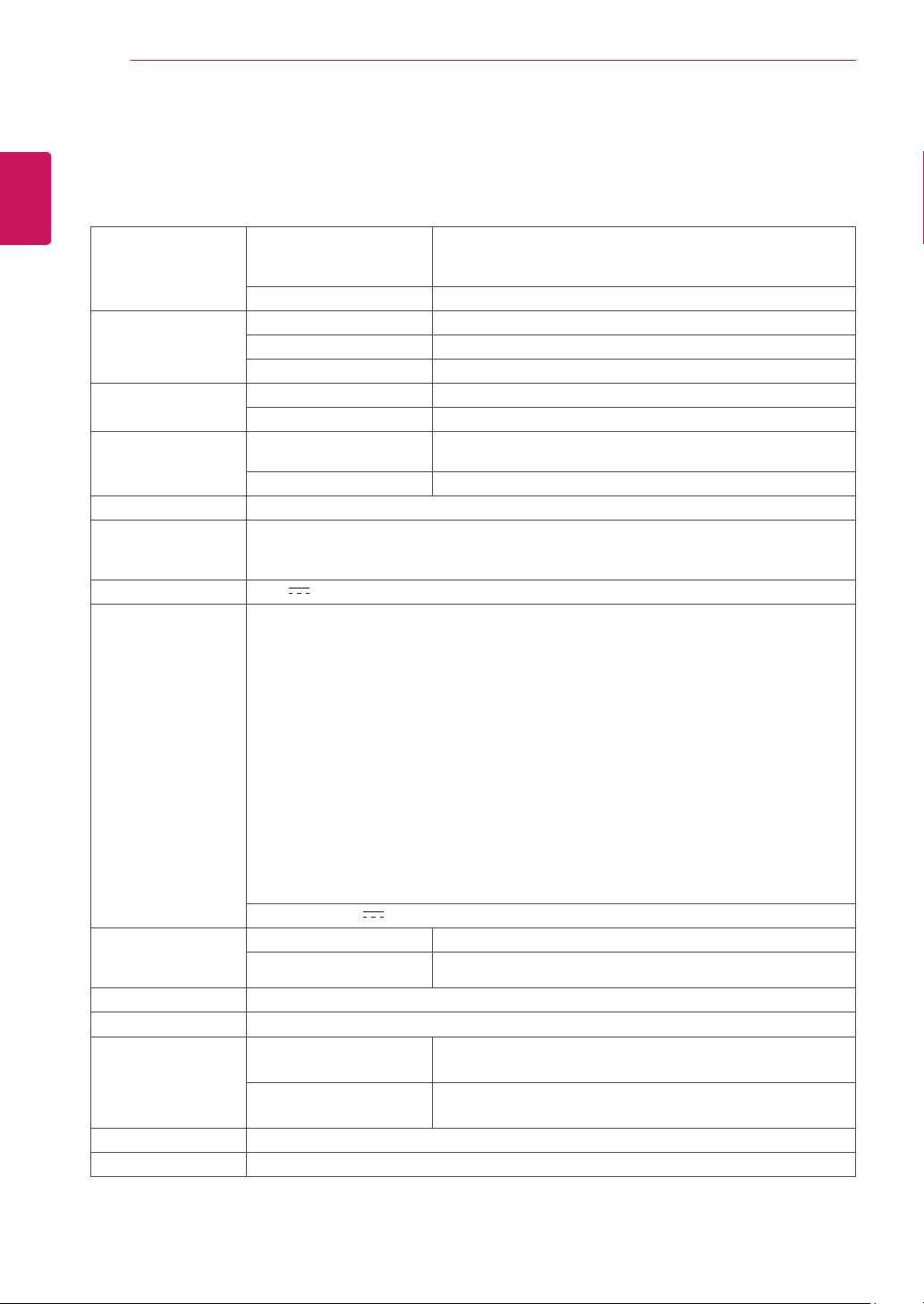
Display ScreenType 54.6cm(21.5inch)FlatPanelActivematrix-TFTLCDAnti-
Glarecoating
Visiblediagonalsize:54.6cm
PixelPitch 0.248mmx0.248mm(PixelPitch)
SyncInput HorizontalFrequency 30kHzto83kHz(Automatic)
VerticalFrequency 56Hzto75Hz(D-SUB)
InputForm SeparateSync.
VideoInput SignalInput 15pinD-SUBConnector
InputForm RGBAnalog(0.7Vp-p/75ohm)
Resolution Max D-SUB(Analog):1920x1080@60Hz
Recommend VESA1920x1080@60Hz
Plug&Play DDC2B(Analog)
Power
Consumption
OnMode:18W(ENERGYSTAR®standard)*
SleepMode≤0.3W
OffMode≤0.3W
PowerInput 19V
1.2A
AC-DCAdapter
TypeADS-40SG-19-319025G,manufacturedbySHENZHENHONORELECTRONIC
orTypeADS-40FSG-1919025GPG-1,manufacturedbySHENZHENHONORELECTRONIC
orTypeADS-40FSG-1919025GPBR-1,manufacturedbySHENZHENHONORELECTRONIC
orTypeADS-40FSG-1919025GPI-1,manufacturedbySHENZHENHONORELECTRONIC
orTypeADS-40FSG-1919025GPCU-1,manufacturedbySHENZHENHONORELECTRONIC
orTypeADS-40FSG-1919025GPB-2,manufacturedbySHENZHENHONORELECTRONIC
orTypeLCAP21,manufacturedbyLIENCHANGELECTRONICENTERPRISE
orTypeLCAP26-A,manufacturedbyLIENCHANGELECTRONICENTERPRISE
orTypeLCAP26-E,manufacturedbyLIENCHANGELECTRONICENTERPRISE
orTypeLCAP26-I,manufacturedbyLIENCHANGELECTRONICENTERPRISE
orTypeLCAP26-B,manufacturedbyLIENCHANGELECTRONICENTERPRISE
orTypePSAB-L203A,manufacturedbyLGInnotekCo.,Ltd
orTypePSAB-L202B,manufacturedbyLGInnotekCo.,Ltd
orTypePSAB-L202C,manufacturedbyLGInnotekCo.,Ltd
orTypePSAB-L202D,manufacturedbyLGInnotekCo.,Ltd
OUTPUT:
19V 1.3A
Dimensions
(WidthxHeightx
Depth)
WithStand 50.9cmx40.9cmx21.5cm
WithoutStand 50.9cmx31.6cmx9.8cm
Weight 2.6kg
TiltRange -3°to20°
Environmental
conditions
OperatingTemperature
OperatingHumidity
10°Cto35°C
10%to80%
StorageTemperature
StorageHumidity
-20°Cto60°C
5%to90%non-Condensing
StandBase Attached(),Detached(O)
Powercord Wall-outlettype
Productspecificationsshownabovemaybechangedwithoutpriornoticeduetoupgradeofproduct
functions.
*Thepowerconsumptionlevelcanbedifferentbyoperatingconditionandmonitorsetting.
*TheOnmodepowerconsumptionismeasuredwithENERGYSTAR®teststandard.
*ENERGYSTAR®isaUSregisteredmarkoftheUnitedStatesEnvironmentalProtectionAgency.
22M35A
30
ENG
ENGLISH
SPECIFICATIONS
SPECIFICATIONS
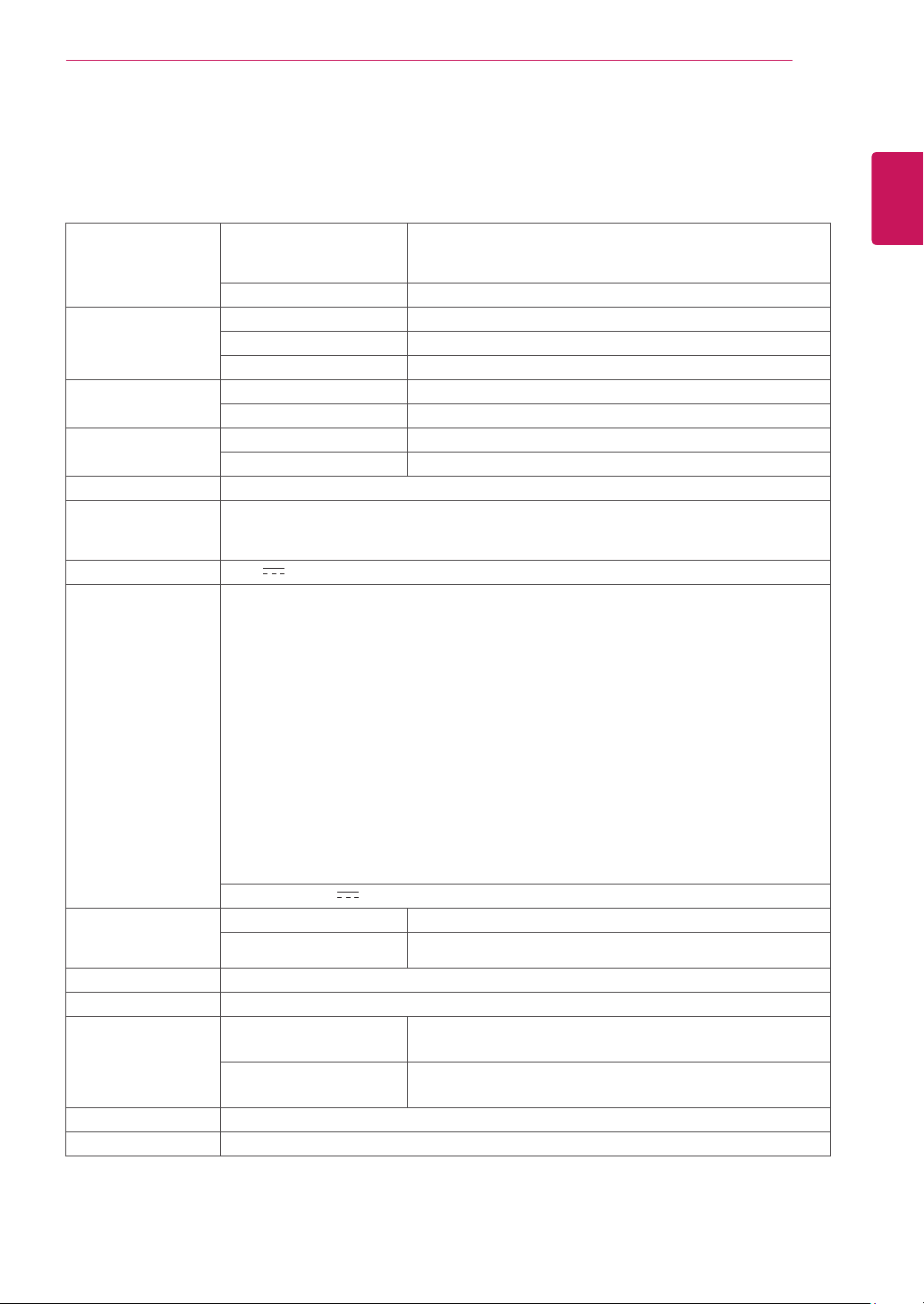
Display ScreenType 54.6cm(21.5inch)FlatPanelActivematrix-TFTLCDAnti-
Glarecoating
Visiblediagonalsize:54.6cm
PixelPitch 0.248mmx0.248mm(PixelPitch)
SyncInput HorizontalFrequency 30kHzto83kHz(Automatic)
VerticalFrequency 56Hzto75Hz(D-SUB,DVI-D)
InputForm SeparateSync.Digital
VideoInput SignalInput 15pinD-SUBConnector/DVI-DConnector(Digital)
InputForm RGBAnalog(0.7Vp-p/75ohm),Digital
Resolution Max D-SUB(Analog):1920x1080@60Hz
DVI(Digital):1920x1080@60Hz
Recommend VESA1920x1080@60Hz
Plug&Play DDC2B(Analog,Digital)
Power
Consumption
OnMode:18W(ENERGYSTAR®standard)*
SleepMode≤0.3W
OffMode≤0.3W
PowerInput 19V
1.2A
AC-DCAdapter
TypeADS-40SG-19-319025G,manufacturedbySHENZHENHONORELECTRONIC
orTypeADS-40FSG-1919025GPG-1,manufacturedbySHENZHENHONORELECTRONIC
orTypeADS-40FSG-1919025GPBR-1,manufacturedbySHENZHENHONORELECTRONIC
orTypeADS-40FSG-1919025GPI-1,manufacturedbySHENZHENHONORELECTRONIC
orTypeADS-40FSG-1919025GPCU-1,manufacturedbySHENZHENHONORELECTRONIC
orTypeADS-40FSG-1919025GPB-2,manufacturedbySHENZHENHONORELECTRONIC
orTypeLCAP21,manufacturedbyLIENCHANGELECTRONICENTERPRISE
orTypeLCAP26-A,manufacturedbyLIENCHANGELECTRONICENTERPRISE
orTypeLCAP26-E,manufacturedbyLIENCHANGELECTRONICENTERPRISE
orTypeLCAP26-I,manufacturedbyLIENCHANGELECTRONICENTERPRISE
orTypeLCAP26-B,manufacturedbyLIENCHANGELECTRONICENTERPRISE
orTypePSAB-L203A,manufacturedbyLGInnotekCo.,Ltd
orTypePSAB-L202B,manufacturedbyLGInnotekCo.,Ltd
orTypePSAB-L202C,manufacturedbyLGInnotekCo.,Ltd
orTypePSAB-L202D,manufacturedbyLGInnotekCo.,Ltd
OUTPUT:
19V 1.3A
Dimensions
(WidthxHeightx
Depth)
WithStand 50.9cmx40.9cmx21.5cm
WithoutStand 50.9cmx31.6cmx9.8cm
Weight 2.6kg
TiltRange -3°to20°
Environmental
conditions
OperatingTemperature
OperatingHumidity
10°Cto35°C
10%to80%
StorageTemperature
StorageHumidity
-20°Cto60°C
5%to90%non-Condensing
StandBase Attached(),Detached(O)
Powercord Wall-outlettype
Productspecificationsshownabovemaybechangedwithoutpriornoticeduetoupgradeofproduct
functions.
*Thepowerconsumptionlevelcanbedifferentbyoperatingconditionandmonitorsetting.
*TheOnmodepowerconsumptionismeasuredwithENERGYSTAR®teststandard.
*ENERGYSTAR®isaUSregisteredmarkoftheUnitedStatesEnvironmentalProtectionAgency.
22M35D
31
ENG
ENGLISH
SPECIFICATIONS
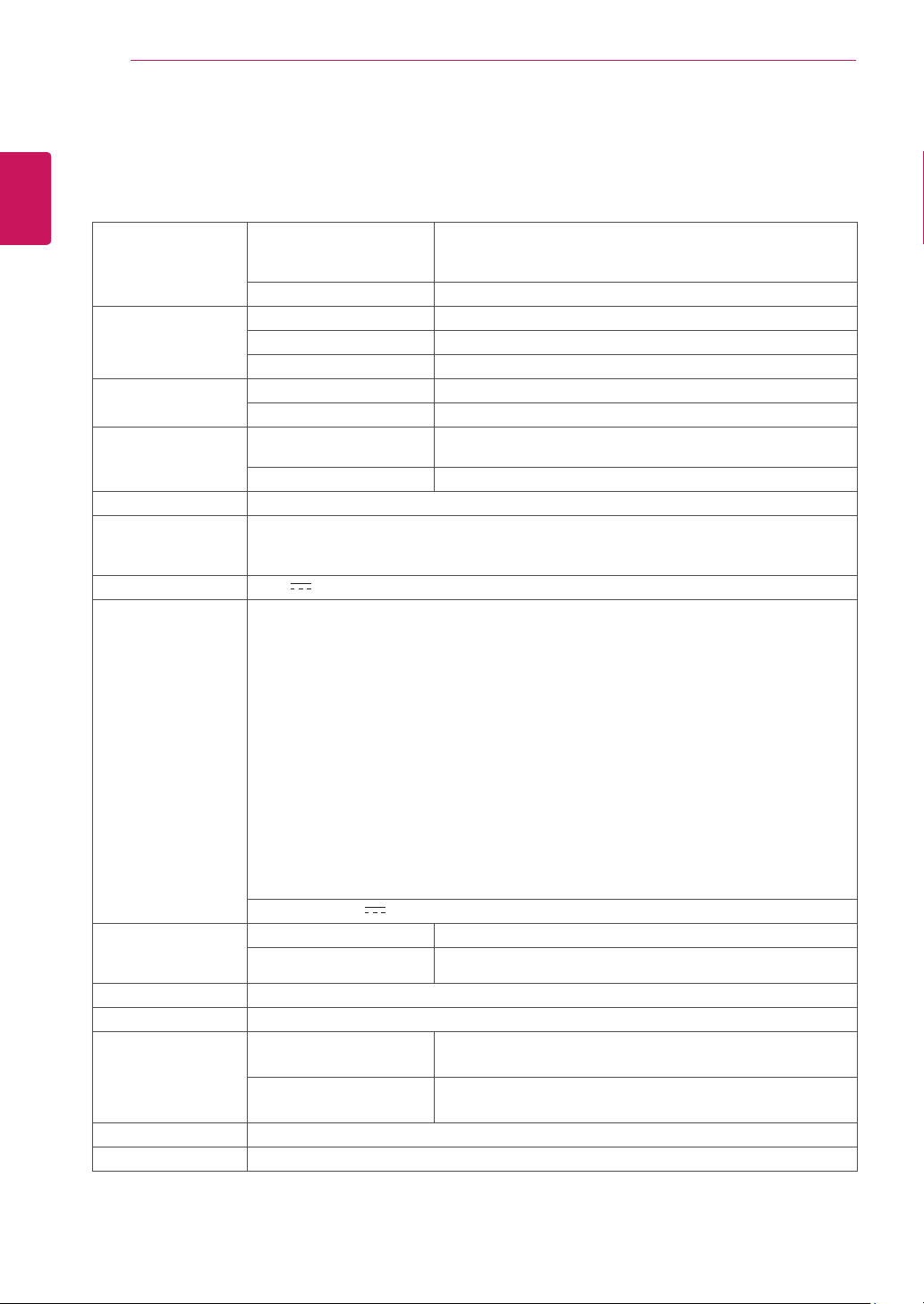
Display ScreenType 60.0cm(23.6inch)FlatPanelActivematrix-TFTLCDAnti-
Glarecoating
Visiblediagonalsize:60.0cm
PixelPitch 0.272mmx0.272mm(PixelPitch)
SyncInput HorizontalFrequency 30kHzto83kHz(Automatic)
VerticalFrequency 56Hzto75Hz(D-SUB)
InputForm SeparateSync.
VideoInput SignalInput 15pinD-SUBConnector
InputForm RGBAnalog(0.7Vp-p/75ohm)
Resolution Max D-SUB(Analog):1920x1080@60Hz
Recommend VESA1920x1080@60Hz
Plug&Play DDC2B(Analog)
Power
Consumption
OnMode:19W(ENERGYSTAR®standard)*
SleepMode≤0.3W
OffMode≤0.3W
PowerInput 19V 1.3A
AC-DCAdapter
TypeADS-40SG-19-319025G,manufacturedbySHENZHENHONORELECTRONIC
orTypeADS-40FSG-1919025GPG-1,manufacturedbySHENZHENHONORELECTRONIC
orTypeADS-40FSG-1919025GPBR-1,manufacturedbySHENZHENHONORELECTRONIC
orTypeADS-40FSG-1919025GPI-1,manufacturedbySHENZHENHONORELECTRONIC
orTypeADS-40FSG-1919025GPCU-1,manufacturedbySHENZHENHONORELECTRONIC
orTypeADS-40FSG-1919025GPB-2,manufacturedbySHENZHENHONORELECTRONIC
orTypeLCAP21,manufacturedbyLIENCHANGELECTRONICENTERPRISE
orTypeLCAP26-A,manufacturedbyLIENCHANGELECTRONICENTERPRISE
orTypeLCAP26-E,manufacturedbyLIENCHANGELECTRONICENTERPRISE
orTypeLCAP26-I,manufacturedbyLIENCHANGELECTRONICENTERPRISE
orTypeLCAP26-B,manufacturedbyLIENCHANGELECTRONICENTERPRISE
orTypePSAB-L203A,manufacturedbyLGInnotekCo.,Ltd
orTypePSAB-L202B,manufacturedbyLGInnotekCo.,Ltd
orTypePSAB-L202C,manufacturedbyLGInnotekCo.,Ltd
orTypePSAB-L202D,manufacturedbyLGInnotekCo.,Ltd
OUTPUT:
19V 1.3A
Dimensions
(WidthxHeightx
Depth)
WithStand 55.6cmx43.8cmx21.5cm
WithoutStand 55.6cmx34.1cmx9.8cm
Weight 3.0kg
TiltRange -3°to20°
Environmental
conditions
OperatingTemperature
OperatingHumidity
10°Cto35°C
10%to80%
StorageTemperature
StorageHumidity
-20°Cto60°C
5%to90%non-Condensing
StandBase Attached(),Detached(O)
Powercord Wall-outlettype
Productspecificationsshownabovemaybechangedwithoutpriornoticeduetoupgradeofproduct
functions.
*Thepowerconsumptionlevelcanbedifferentbyoperatingconditionandmonitorsetting.
*TheOnmodepowerconsumptionismeasuredwithENERGYSTAR®teststandard.
*ENERGYSTAR®isaUSregisteredmarkoftheUnitedStatesEnvironmentalProtectionAgency.
SPECIFICATIONS
24M35A
32
ENG
ENGLISH
SPECIFICATIONS
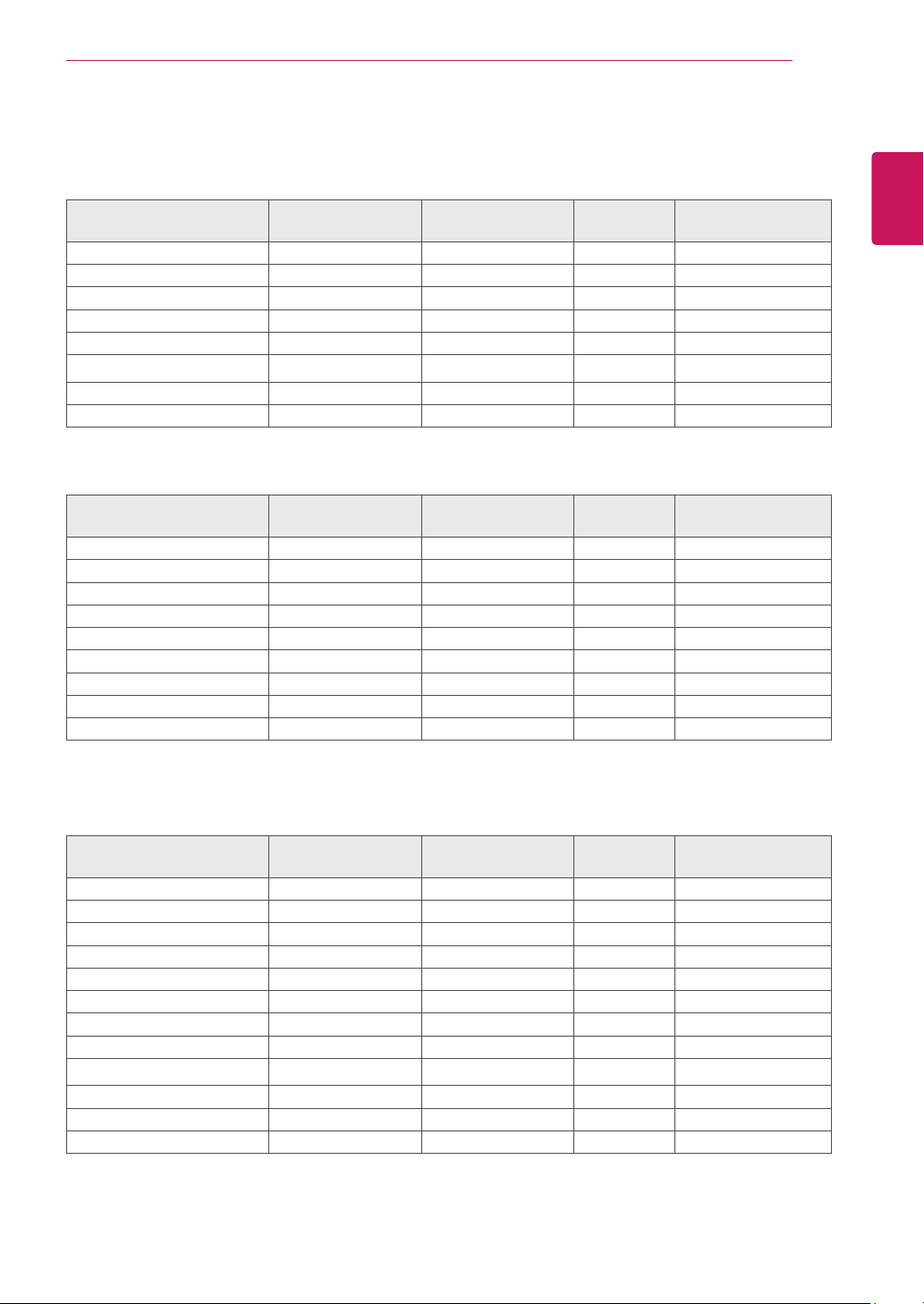
Display ScreenType 60.0cm(23.6inch)FlatPanelActivematrix-TFTLCDAnti-
Glarecoating
Visiblediagonalsize:60.0cm
PixelPitch 0.272mmx0.272mm(PixelPitch)
SyncInput HorizontalFrequency 30kHzto83kHz(Automatic)
VerticalFrequency 56Hzto75Hz(D-SUB,DVI-D)
InputForm SeparateSync.Digital
VideoInput SignalInput 15pinD-SUBConnector/DVI-DConnector(Digital)
InputForm RGBAnalog(0.7Vp-p/75ohm),Digital
Resolution Max D-SUB(Analog):1920x1080@60Hz
DVI(Digital):1920x1080@60Hz
Recommend VESA1920x1080@60Hz
Plug&Play DDC2B(Analog,Digital)
Power
Consumption
OnMode:19W(ENERGYSTAR®standard)*
SleepMode≤0.3W
OffMode≤0.3W
PowerInput 19V 1.3A
AC-DCAdapter
TypeADS-40SG-19-319025G,manufacturedbySHENZHENHONORELECTRONIC
orTypeADS-40FSG-1919025GPG-1,manufacturedbySHENZHENHONORELECTRONIC
orTypeADS-40FSG-1919025GPBR-1,manufacturedbySHENZHENHONORELECTRONIC
orTypeADS-40FSG-1919025GPI-1,manufacturedbySHENZHENHONORELECTRONIC
orTypeADS-40FSG-1919025GPCU-1,manufacturedbySHENZHENHONORELECTRONIC
orTypeADS-40FSG-1919025GPB-2,manufacturedbySHENZHENHONORELECTRONIC
orTypeLCAP21,manufacturedbyLIENCHANGELECTRONICENTERPRISE
orTypeLCAP26-A,manufacturedbyLIENCHANGELECTRONICENTERPRISE
orTypeLCAP26-E,manufacturedbyLIENCHANGELECTRONICENTERPRISE
orTypeLCAP26-I,manufacturedbyLIENCHANGELECTRONICENTERPRISE
orTypeLCAP26-B,manufacturedbyLIENCHANGELECTRONICENTERPRISE
orTypePSAB-L203A,manufacturedbyLGInnotekCo.,Ltd
orTypePSAB-L202B,manufacturedbyLGInnotekCo.,Ltd
orTypePSAB-L202C,manufacturedbyLGInnotekCo.,Ltd
orTypePSAB-L202D,manufacturedbyLGInnotekCo.,Ltd
OUTPUT:
19V 1.3A
Dimensions
(WidthxHeightx
Depth)
WithStand 55.6cmx43.8cmx21.5cm
WithoutStand 55.6cmx34.1cmx9.8cm
Weight 3.0kg
TiltRange -3°to20°
Environmental
conditions
OperatingTemperature
OperatingHumidity
10°Cto35°C
10%to80%
StorageTemperature
StorageHumidity
-20°Cto60°C
5%to90%non-Condensing
StandBase Attached(),Detached(O)
Powercord Wall-outlettype
Productspecificationsshownabovemaybechangedwithoutpriornoticeduetoupgradeofproduct
functions.
*Thepowerconsumptionlevelcanbedifferentbyoperatingconditionandmonitorsetting.
*TheOnmodepowerconsumptionismeasuredwithENERGYSTAR®teststandard.
*ENERGYSTAR®isaUSregisteredmarkoftheUnitedStatesEnvironmentalProtectionAgency.
SPECIFICATIONS
24M35D
33
ENG
ENGLISH
SPECIFICATIONS
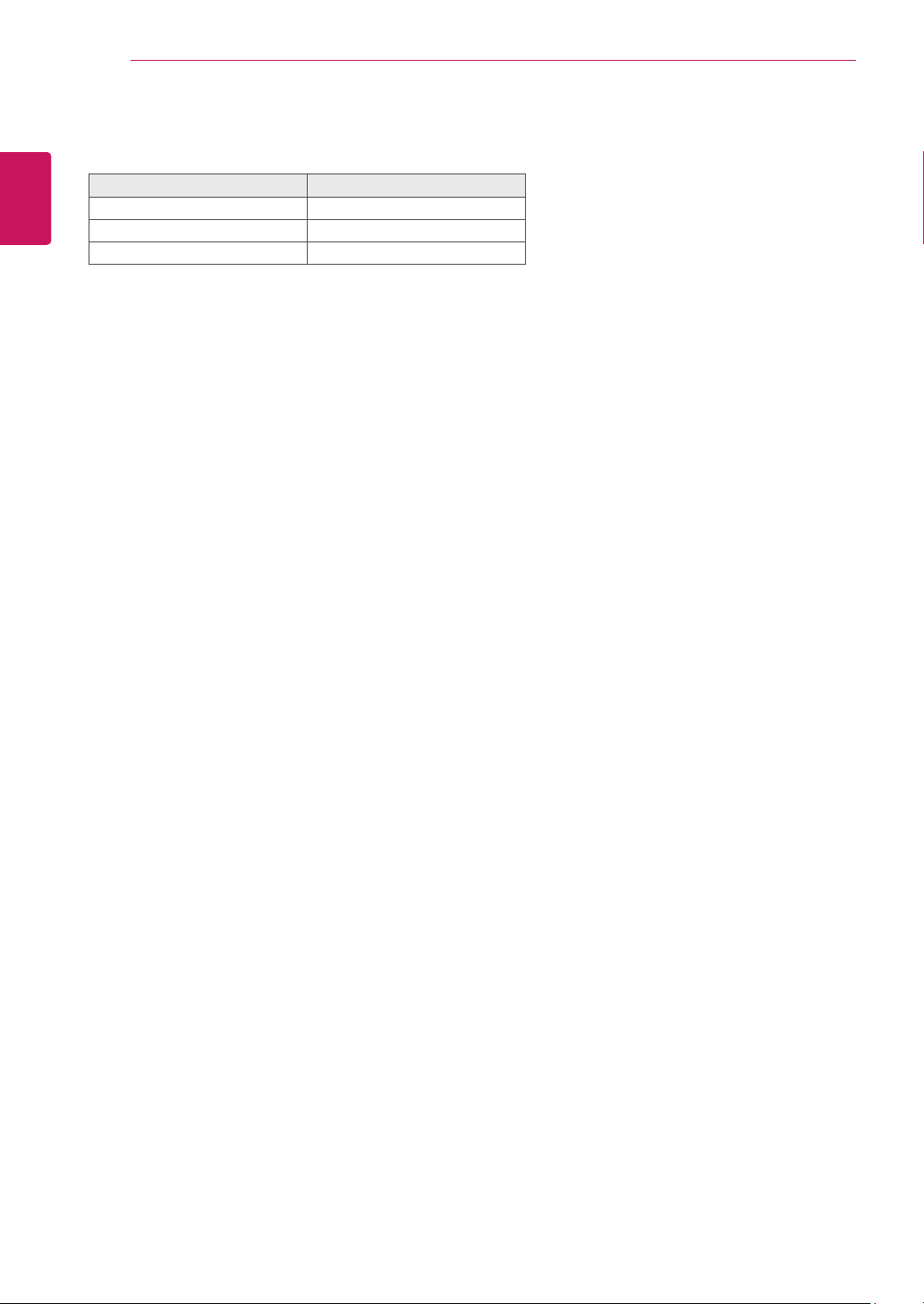
PresetModes(Resolution)
19M35A/19M35D
DisplayModes(Resolution)
Horizontal
Frequency(kHz)
Vertical
Frequency(Hz)
Polarity(H/V)
720x400 31.468 70 -/+
640x480 31.469 60 -/-
640x480 37.500 75 -/-
800x600 37.879 60 +/+
800x600 46.875 75 +/+
832x624 49.725 75 -/-
1024x768 48.363 60 -/-
1366x768 47.712 60 +/+ RecommendMode
20M35A/20M35D
DisplayModes(Resolution)
Horizontal
Frequency(kHz)
Vertical
Frequency(Hz)
Polarity(H/V)
720x400 31.468 70 -/+
640x480 31.469 60 -/-
640x480 37.500 75 -/-
800x600 37.879 60 +/+
800x600 46.875 75 +/+
1024x768 48.363 60 -/-
1024x768 60.023 75 +/+
1152x864 67.500 75 +/+
1600x900 60.000 60 +/+ RecommendMode
22M35A/22M35D/24M35A/24M35D
DisplayModes(Resolution)
Horizontal
Frequency(kHz)
Vertical
Frequency(Hz)
Polarity(H/V)
720x400 31.468 70 -/+
640x480 31.469 60 -/-
640x480 37.500 75 -/-
800x600 37.879 60 +/+
800x600 46.875 75 +/+
1024x768 48.363 60 -/-
1024x768 60.023 75 +/+
1152x864 67.500 75 +/+
1280x1024 63.981 60 +/+
1280x1024 79.976 75 +/+
1680x1050 65.290 60 -/+
1920x1080 67.500 60 +/+ RecommendMode
34
ENG
ENGLISH
SPECIFICATIONS
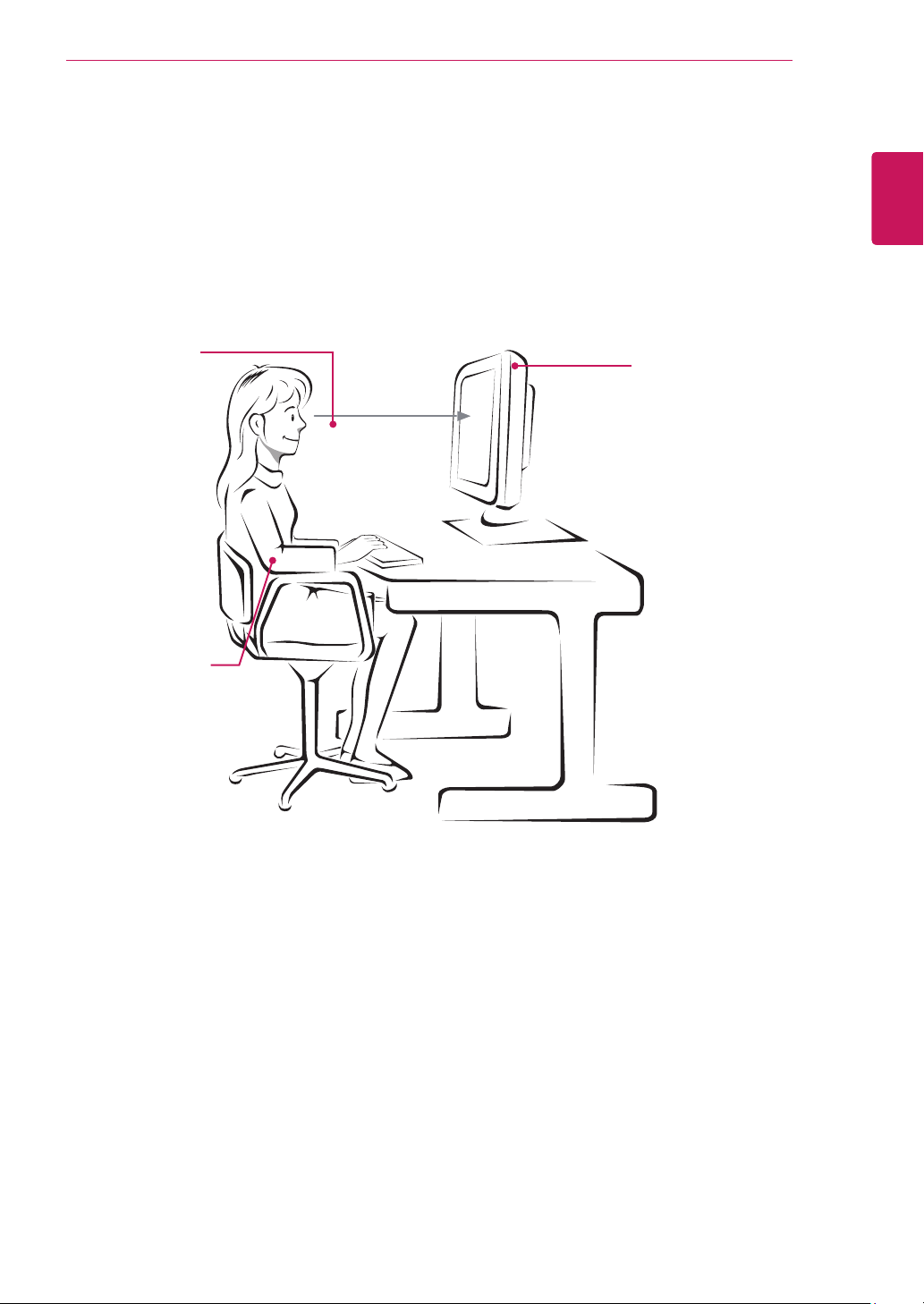
Indicator
Mode LEDColor
OnMode White
SleepMode BlinkingWhite
OffMode Off
35
ENG
ENGLISH
PROPER POSTURE
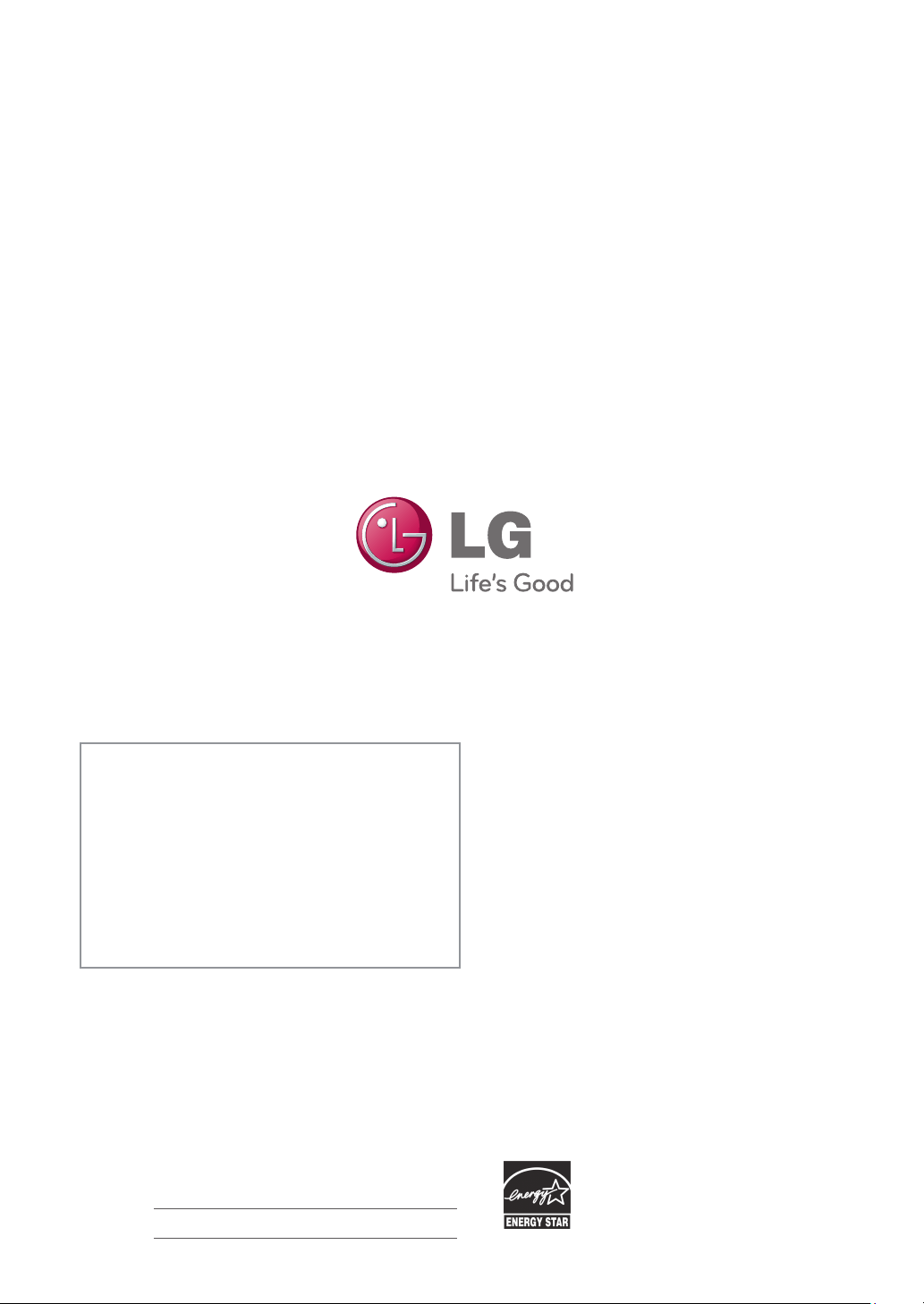
ProperpostureforusingtheMonitorset.
PROPERPOSTURE
Adjustthe
Monitorsetand
yourpostureto
allowyoutoview
imagesatthe
optimalviewing
angle.
Placeyourhands
gentlyonthe
keyboard,keeping
yourarmsbentat
theelbowsand
horizontallyoutright.
Adjustthelocationofthe
Monitorsettoavoidit
reflectinglight.
Make sure to read the Safety Precautions before
using the product.
Keep the Owner’s Manual (CD) in an accessible
place for future reference.
The model and serial number of the SET is
located on the back and one side of the SET.
Record it below should you ever need service.
MODEL
SERIAL
*above information is only for USA FCC Regulatory
Declaration of Conformity
Trade Name: LG
Model : 19M35AA,19M35DA,20M35ASA,
20M35DSA,22M35AA,22M35DA,
24M35AA,24M35DA
Responsible Party: LG Electronics Inc.
Address : 1000 Sylvan Ave. Englewood Cliffs
NJ 07632 U.S.A
TEL: 201-266-2534
As an ENERGY STAR Partner LGE
U. S. A.,Inc. has determined that this
product meets the ENERGY STAR
guidelines for energy efficiency.
ENERGY STAR is a set of power-saving
guidelines issued by the U.S.Environmental
Protection Agency(EPA).



