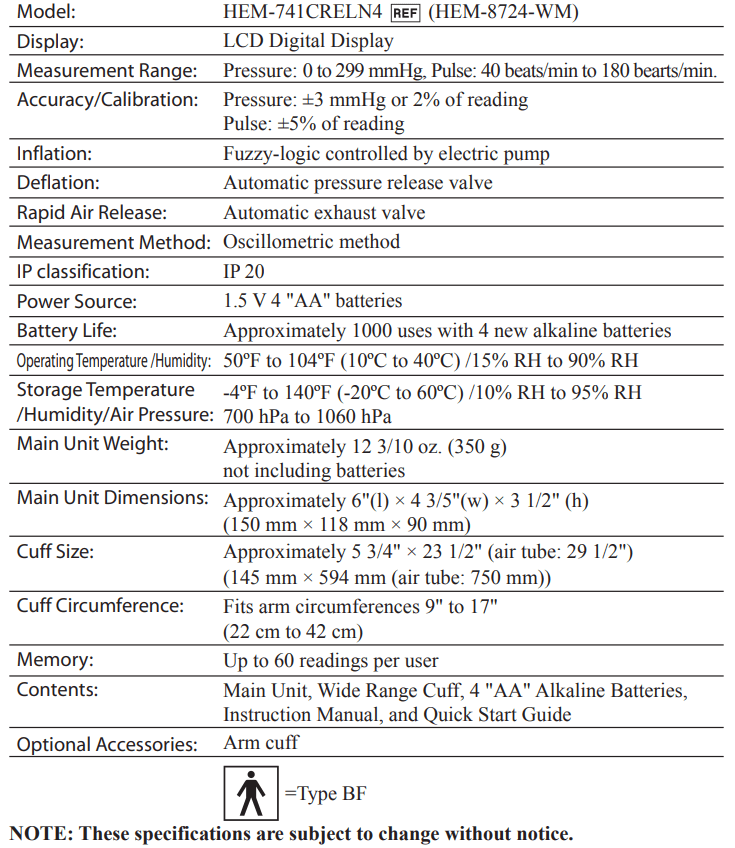
INSTRUCTION MANUAL Pressure Monitor
BEFORE TAKING A MEASUREMENT
To ensure a reliable reading follow these recommendations:
- Avoid eating, drinking alcohol, smoking, exercising, and bathing for 30 minutes before taking a measurement. Rest for at least 5 minutes before taking the measurement.
- Stress raises blood pressure. Avoid taking measurements during stressful times.
- Measurements should be taken in a quiet place.
- Remove tight-fitting clothing from your arm.
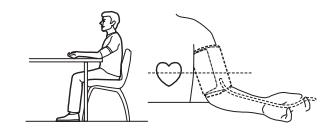
- Sit on a chair with your feet flat on the floor. Rest your arm on table so that the cuff is at the same level as your heart.
- Remain still and do not talk during the measurement.
- Keep a record of your blood pressure and pulse readings for your physician. A single measurement does not provide an accurate indication of your true blood pressure. You need to take and record several readings over a period of time. Try to measure your blood pressure at the same time each day for consistency
KNOW YOUR UNIT
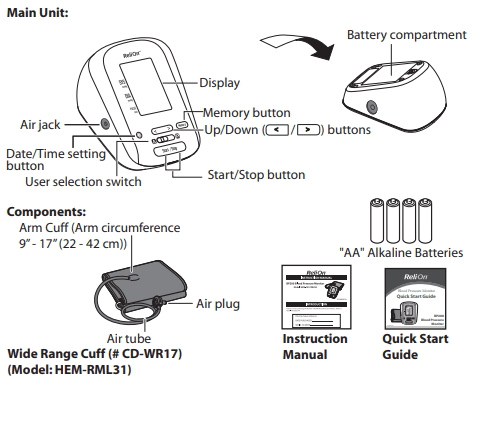
UNIT DISPLAY
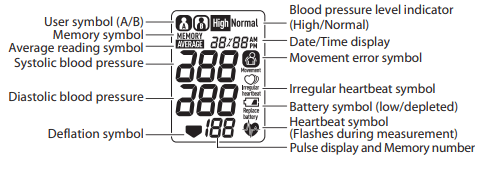
DISPLAY SYMBOLS
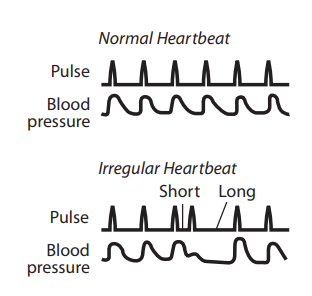
IRREGULAR HEARTBEAT SYMBOL (  )
)
- When the monitor detects an irregular rhythm two or more times during the measurement, the Irregular Heartbeat Symbol will appear on the display with the measurement values.
- An irregular heartbeat rhythm is defined as a rhythm that varies by 25% less or 25% more than the average rhythm detected while the monitor is measuring the systolic and diastolic blood pressure.
- If the irregular heartbeat symbol displays with your measurement values, we recommend you consult your physician. Follow the directions of your doctor.
MOVEMENT ERROR SYMBOL ( )
)
- The Movement Error Symbol is displayed if you move your body during the measurement. Please remove the arm cuff, and wait 2-3 minutes. Re-apply the arm cuff and take another measurement.
AVERAGE READING SYMBOL ( )
)
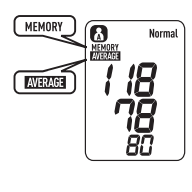
- The Average Reading Symbol is displayed when you press and hold the
 button for more than 3 seconds. The average reading based on the last 3 measurement values taken within 10 minutes appears on the display screen.
HEARTBEAT SYMBOL ( )
)
- The Heartbeat symbol flashes on the display at every heartbeat during the measurement.
BLOOD PRESSURE LEVEL INDICATOR ( )
)
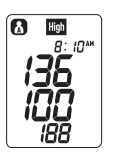
- If your Systolic Blood Pressure is 135 mmHg or above and/or the Diastolic Blood Pressure is 85 mmHg or above, the High Blood pressure level indicator (
 ) will display when the measurement value is displayed.
- If the measurements are within the standard range, the Normal Blood pressure level indicator (
 ) will display.
2013 ESH/ESC Guidelines for the management of arterial hypertension
Definitions of hypertension by office and home blood pressure levels
| |
Office |
Home |
| Systolic Blood Pressure |
≥ 140 mmHg |
≥ 135 mmHg |
| Diastolic Blood Pressure |
≥ 90 mmHg |
≥ 85 mmHg |
These are from statistical values for blood pressure.
BATTERY INSTALLATION
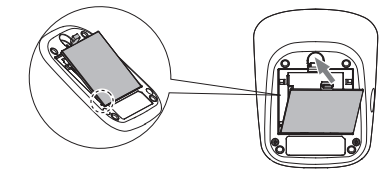
1. Press the hook on the top of the battery cover and lift the cover off in the direction of the arrow.
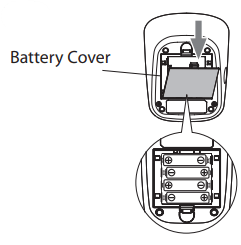
2. Install 4 "AA" size batteries so the + (positive) and - (negative) polarities match the polarities of the battery compartment as indicated.
3. Replace the battery cover
NOTES:
- When the depleted battery symbol (
 ) appears on the display, turn the monitor off, then replace all batteries at the same time. Long life alkaline batteries are recommended.
- Turn the unit off before replacing the batteries. If the batteries are removed while the unit is still on, the date and time will be reset to that of the previous use. The measurement values are not deleted.
- When the batteries are replaced, you may need to reset the date and time. If “-:--” appears on the display, refer to “Setting the Date and Time”.
- The batteries included with the device may have a shorter life.
SETTING THE DATE AND TIME
Set the monitor to the correct date and time before taking a measurement for the first time or after replacing the batteries
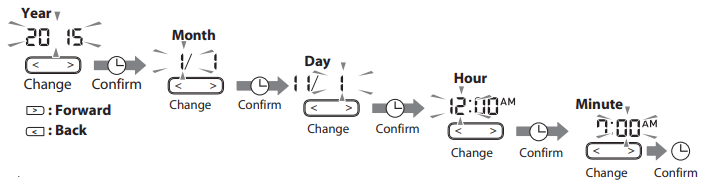
- Press the
 button to show the year
- Push
 or
or  button to change the year. The year can be set between 2015 and 2045. When the display reaches 2045, it will return to 2015
- Push the button to confirm the year and then the month flashes. Repeat the same steps to change the month, day, hour, and minute. NOTE: Press and hold or button to increase the date and time values faster.
- Press the Start/Stop button to turn the monitor off.
APPLYING THE ARM CUFF
APPLYING THE CUFF ON THE LEFT ARM
- Make sure the air plug is securely inserted in the main unit.
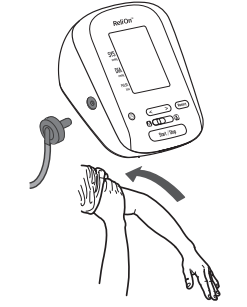
- Remove tight-fitting clothing from your upper arm.
- Apply the cuff to your left upper arm so the air tube is centered on the inside of your arm and aligned with your middle finger. The air tube runs down the inside of your arm. The bottom of the cuff should be approximately 1/2 inch (1 - 2 cm) above your elbow.
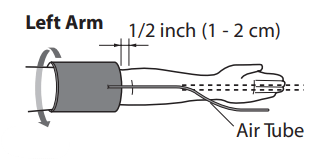
- Wrap the cuff firmly in place around your arm using the cloth fastening in the direction of the arrow.
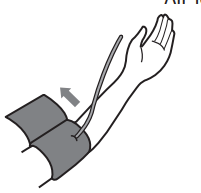
APPLYING THE CUFF ON THE RIGHT ARM
- When taking a measurement using the right arm, use this instruction for Step 3.
- Apply the cuff to your right upper arm so the air tube runs along the inside of your arm. The bottom of the cuff should be approximately 1/2 inch (1 - 2 cm) above your elbow.
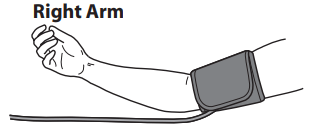
- NOTES:
- Be careful not to rest your arm on the air tube. This will restrict the flow of air to the cuff.
- When you take a measurement on the right arm, the air tube will be at the side of your elbow. Be careful not to rest your arm on the air tube.
TAKING A MEASUREMENT
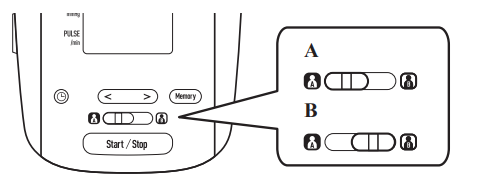
The monitor is designed to store the blood pressure and the pulse rate in the memory for two people (USER A or USER B) every time a measurement is completed.
- Sit on a chair with your feet flat on the floor. Place your arm on a table so the cuff is level with your heart. Remain still and do not talk during measurement.
- Select your user ID (A or B).
- Press the Start/Stop button. All symbols appear on the display. The cuff starts to inflate automatically. As the cuff inflates, the monitor automatically determines your ideal inflation level. Remain still and do not move your arm until the entire measurement process is completed
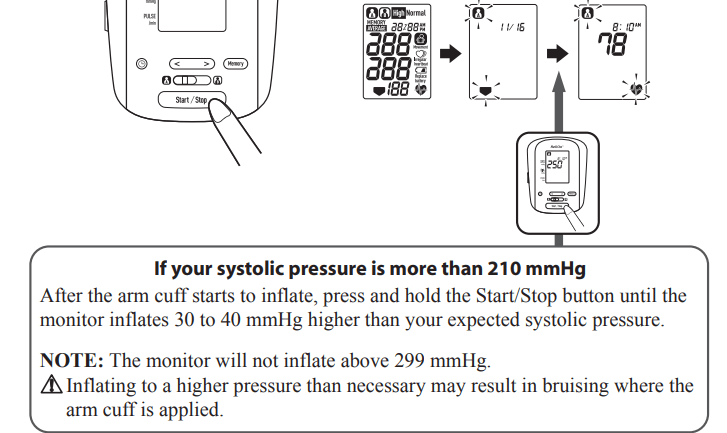
NOTE: To stop the inflation or measurement, push the Start/Stop button. The monitor will stop inflating, start deflating, and will turn off.
4. Inflation stops automatically and the measurement is started. As the cuff deflates, decreasing numbers appear on the display and the Heartbeat Symbol ( ) flashes.
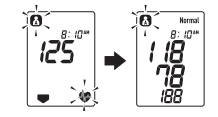
5. When the measurement is complete, the arm cuff completely deflates. Your blood pressure and pulse rate are displayed.
6. Remove the arm cuff.
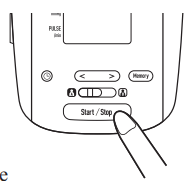
7. Press the Start/Stop button to turn the monitor off.
NOTES
- The monitor will automatically turn off after 2 minutes.
- Wait 2-3 minutes before taking another measurement. Waiting between measurements allows the arteries to return to the condition prior to taking a measurement. You may need to increase the wait time depending on your individual physiological characteristics.
USING THE MEMORY FUNCTION
The monitor automatically stores the results up to 60 sets for each user (A and B). It can also calculate an average value based on the last 3 measurement values taken within 10 minutes
TO VIEW THE MEASUREMENT VALUES STORED IN MEMORY
- Select your USER ID (A or B).
- Press the
 button to display the set of measurement values. The Memory number appears for a second before the pulse rate is displayed. The most recent reading is numbered “1”.
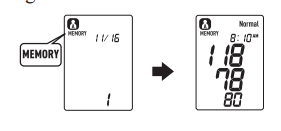
3. Press the or button to view the values stored in the memory.
- : To view the older values
- : To view the more recent values
NOTES
- If the memory is full, the monitor will delete the oldest value.
- The date and time are alternately displayed with the measurement values
- When viewing the measurement value taken without setting the date and time, "-:--" is displayed instead of the date and time.
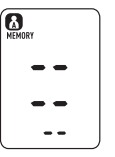
- If there are no measurement values stored in the memory, the screen to the right is displayed.
4. Press the Start/Stop button to turn the monitor off.
TO VIEW THE AVERAGE READING
- Select your USER ID (A or B).
- Press and hold the button for more than 3 seconds.
TO DELETE ALL VALUES STORED IN THE MEMORY
The values stored in the memory are deleted by USER ID.
You cannot partially delete values stored in the memory. All values for the user you select will be deleted.
1. Select your USER ID (A or B).
2. Press the button to turn the monitor on.
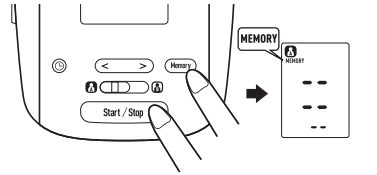
3. When the memory symbol (MEMORY ) appears, while pressing and holding the button, press the Start/Stop button for 3 seconds to delete all values in the memory
4. Press the Start/Stop button to turn the monitor off.
NOTE: The monitor will automatically turn off after 2 minutes.
CARE AND MAINTENANCE
To keep your blood pressure monitor in the best condition and protect the unit from damage, follow the directions listed below:
- Do not forcefully bend the arm cuff or air tube. Do not fold tightly.
- Clean the monitor with a soft dry cloth. Do not use any abrasive or volatile cleaners. Do not attempt to clean the cuff.
- CAUTION Do not submerge the device or any of the components in water. Do not subject the monitor to extreme hot or cold temperatures, humidity or direct sunlight.
- CAUTION Store the device and the components in a clean, safe location.
- CAUTION Do not subject the monitor to strong shocks, such as dropping the unit on the floor.
- Remove the batteries if the unit will not be used for three months or longer. Always replace all the batteries with new ones at the same time.
- Use the unit in a manner consistent with the instructions provided in this manual.
- CAUTION Use only authorized parts and accessories. Parts and accessories not approved for use with the device may damage the unit.
- CAUTION Changes or modification not approved by the manufacturer will void the user warranty. Do not disassemble or attempt to repair the unit or components.
Troubleshooting
ERROR INDICATORS
| SYMBOL |
CAUSE |
CORRECTION |
 |
Irregular heartbeats are detected. |
Remove the arm cuff. Wait 2-3 minutes and then take another measurement.
Repeat the steps in "TAKING A MEASUREMENT". If this error continues to appear, contact your physician.
|
 |
Movement during measurement. |
Remain still and do not talk during the measurement.
Carefully read and repeat the steps in "TAKING A MEASUREMENT".
|
 |
Batteries are low. |
Recommend to replace the batteries with new ones ahead of time.
Refer to "BATTERY INSTALLATION".
|
 |
Batteries are depleted. |
Replace the four batteries.
Refer to "BATTERY INSTALLATION".
|
 |
Air plug disconnected.
Arm cuff not applied correctly.
Air is leaking from the arm cuff
|
Insert the plug securely. Refer to "APPLYING THE ARM CUFF".
Apply the arm cuff correctly. Refer to "APPLYING THE ARM CUFF".
Replace the cuff with a new one.
|
 |
Cuff over or under inflated. |
Repeat measurement. Remain still and do not talk during measurement. Refer to "TAKING A MEASUREMENT".
If "E2" appears repeatedly, inflate the cuff manually until it is 30 to 40 mmHg above your previous measurement result. Refer to "TAKING A MEASUREMENT"
|
 |
The arm cuff was inflated above 299 mmHg when inflating the cuff manually |
Do not inflate the cuff above 299 mmHg. Refer to "TAKING A MEASUREMENT" |
 |
Movement during measurement |
Repeat measurement. Remain still and do not talk during measurement. Refer to "TAKING A MEASUREMENT". |
 |
Clothing is interfering with the arm cuff |
Remove any clothing interfering with the arm cuff. Refer to "APPLYING THE ARM CUFF". |
 |
Device error. |
Contact Customer Service. |
TROUBLESHOOTING TIPS
| PROBLEM |
CAUSES AND SOLUTIONS |
| No power. No display appears on the unit. |
Replace all four batteries with new ones. Check the battery installation for proper placement of the battery polarities. |
| Measurement values appear too high or too low. |
Blood pressure varies constantly. Many factors including stress, time of day, how you wrap the cuff, may affect your blood pressure. Review the sections "BEFORE TAKING A MEASUREMENT" and "TAKING A MEASUREMENT". |
SPECIFICATIONS