User Manual
USING THE RANGE
Surface Units - Knob Models
WARNING FIRE HAZARD: Never leave the range unattended with the cooktop on medium or high settings. Keep flammable items away from the cooktop. Turn off all controls when done cooking. Failure to follow these instructions can result in fire, serious injury or death.
Throughout this manual, features and appearance may vary from your model.
NOTE: Before using the cooktop for the first time, clean it with CERAMA BRYTE® Ceramic Cooktop Cleaner. This helps protect the top and makes cleanup easier.
How to Set
Push the knob in and turn in either direction to the setting you want.
A surface ON indicator light will glow when any surface unit is on
For glass cooktop surfaces:
A HOT COOKTOP indicator light will:
- come on when the unit is hot to the touch.
- stay on even after the unit is turned off.
- stay on until the unit is cooled to approximately 150°F.
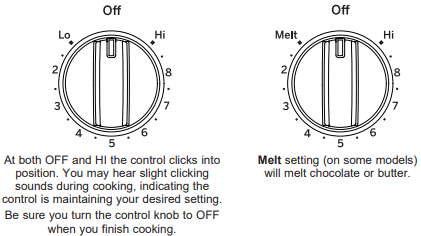
Dual and Triple Surface Units and Control Knobs (on some models)
The surface unit has 2 or 3 cooking sizes to select from so you can match the size of the unit to the size of the cookware you are using.
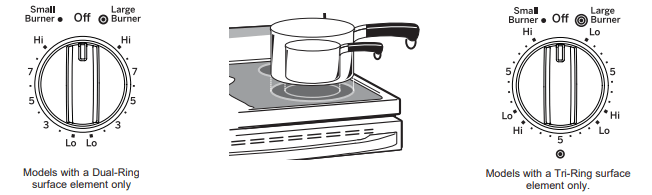
Using the Warming Zone (on some models)
WARNING
FOOD POISON HAZARD: Bacteria may grow in food at temperatures below 140°F.
- Always start with hot food. Do not use warm setting to heat cold food.
- Do not use warm setting for more than 2 hours.
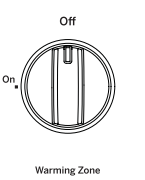
The WARMING ZONE, located in the back center of the glass surface, will keep hot, cooked food at serving temperature. Always start with hot food. Do not use to heat cold food. Placing uncooked or cold food on the WARMING ZONE could result in foodborne illness.
To turn the WARMING ZONE on, press Warming Zone ON/OFF, select Lo, Med or Hi with the number pads, and press Start.
To turn the WARMING ZONE off, press the Warming Zone ON/OFF pad.
For best results, all foods on the WARMING ZONE should be covered with a lid or aluminum foil. When warming pastries or breads, the cover should be vented to allow moisture to escape.
The initial temperature, type and amount of food, type of pan, and the time held will affect the quality of the food.
Always use pot holders or oven mitts when removing food from the WARMING ZONE, since cookware and plates will be hot.
NOTE: The surface warmer will not glow red like the cooking elements.
Surface Units - Knob-Free Models
Radiant Glass Cooktop
The surface unit will cycle on and off to maintain your selected control setting. This is normal. For glass cooktop surfaces: A HOT COOKTOP indicator light will:
- come on when the units is hot to the touch.
- stay on ecen after the units is turned off.
- stay on until the units is cooled to approximately 150°F.
To Turn On a Surface Unit:
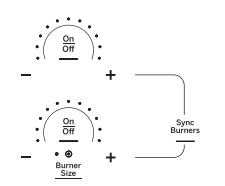
1. Touch the On/Off pad, then touch the + or - pad.
2. Use the + or - pad to choose the desired power setting.
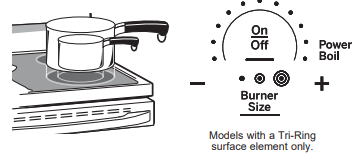
3. For the dual and triple surface units, touch the Burner Size pad to select the desired burner size.
To Turn Off a Surface Unit:
Touch the On/Off pad.
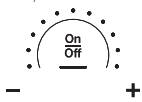
Dual and Triple Surface Units (on some models)
The surface unit has 2 or 3 cooking sizes to select from so you can match the size of the unit to the size of the cookware you are using.
Sync Burner Feature
This feature allows you to synchronize the left rear and left front burners to create one large cooking zone for griddle cooking. To use this feature, press the Sync Burners pad. You may then use either the left front or left rear +/- pads to adjust the power of both burners simultaneously. To unsync, press either burner's On/Off pad.
Using the Warming Zone
To Use the Warming Zone:
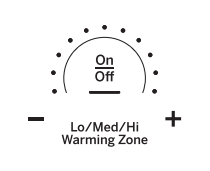
1. Touch the Warming Zone On/Off pad.
2. Use the + or - pad to choose the desired Lo/Med/Hi setting.
To Turn Off the Warming Zone:
Touch the Warming Zone On/Off pad
Surface Units - All Models
Home Canning Tips
Be sure the canner is centered over the surface unit.
Make sure the canner is flat on the bottom.
To prevent burns from steam or heat, use caution when canning.
Use recipes and procedures from reputable sources. These are available from manufacturers such as Ball® and Kerr® and the Department of Agriculture Extension Service.
Flat-bottomed canners are recommend. Use of water bath canners with rippled bottoms may extend the time required to bring the water to a boil.
For Models With a Radiant Glass Cooktop
The radiant cooktop features heating units beneath a smooth glass surface.
NOTE: A slight odor is normal when a new cooktop is used for the first time. It is caused by the heating of new parts and insulating materials and will disappear in a short time.
NOTE: On models with light-colored glass cooktops, it is normal for the cooking zones to change color when hot or cooling down. This is temporary and will disappear as the glass cools to room temperature.
The surface unit will cycle on and off to maintain your selected control setting.
It is safe to place hot cookware on the glass surface even when the cooktop is cool.
Even after the surface units are turned off, the glass cooktop retains enough heat to continue cooking. To avoid overcooking, remove pans from the surface units when the food is cooked. Avoid placing anything on the surface unit until it has cooled completely.
- Water stains (mineral deposits) are removable using the cleaning cream or full-strength white vinegar.
- Use of window cleaner may leave an iridescent film on the cooktop. The cleaning cream will remove this film.
- Don't store heavy items above the cooktop. If they drop onto the cooktop, they can cause damage.
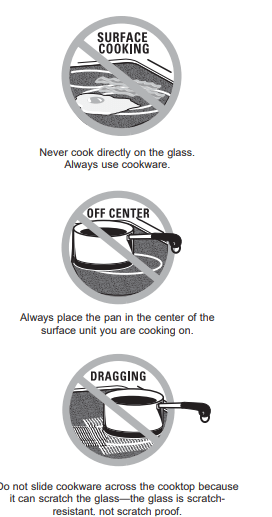
- Do not use the surface as a cutting board.
Temperature Limiter on Radiant Glass Cooktops
Every radiant surface unit has a temperature limiter.
The temperature limiter protects the glass cooktop from getting too hot.
The temperature limiter may cycle the surface units off for a time if:
- the pan boils dry.
- the pan bottom is not pflat.
- the pan is off-center.
- there is no pan on the unit.
Cookware for Radiant Glass Cooktop
The following information will help you choose cookware which will give good performance on glass cooktops.
NOTE: Follow all cookware manufacturer's recommendations when using any type of cookware on the ceramic cooktop.
Recommended
Stainless Steel
Aluminum: heavy weight recommended
Good conductivity. Aluminum residues sometimes appear as scratches on the cooktop but can be removed if cleaned immediately. Because of its low melting point, thin weight aluminum should not be used.
Copper Bottom:
Copper may leave residues which can appear as scratches. The residues can be removed, as long as the cooktop is cleaned immediately. However, do not let these pots boil dry. Overheated metal can bond to glass cooktops. An overheated copper bottom pot will leave a residue that will permanently stain the cooktop if not removed immediately.
Enamel (painted) on Cast Iron:
recommended if bottom of pan is coated
Avoid/Not Recommended
Enamel (painted) on Steel:
Heating empty pans can cause permanent damage to cooktop glass.
The enamel can melt and bond to the ceramic cooktop.
Glass-ceramic:
Poor performance. Will scratch the surface.
Stoneware:
Poor performance. May scratch the surface.
Cast Iron:
not recommended-unless designed specifically for glass cooktops
Poor conductivity and slow to absorb heat. Will scratch the cooktop surface.

For Best Results
- Place only dry pans on the surface elements. Do not place lids on the surface elements, particularly wet lids. Wet pans and lids may stick to the surface when cool.
- Do not use woks that have support rings. This type of wok will not heat on glass surface elements.
- We recommend that you use only a flat-bottomed wok. They are available at your local retail store. The bottom of the wok should have the same diameter as the surface element to ensure proper contact.
- Some special cooking procedures require specific cookware such as pressure cookers or deep-fat fryers. All cookware must have flat bottoms and be the correct size.

WiFi Connect
Connecting your WiFi Connect Enabled oven (on some models) Your GE Appliances oven is designed to provide you with two-way communication between your appliance and smart device. By using the GE Appliances WiFi Connect features, you will be able to control essential oven operations such as temperature settings, timers and cooking modes using your smartphone or tablet.
What you will need
Your GE Appliances oven uses your existing home WiFi network to communicate between the appliance and your smart device. In order to setup your GE Appliances oven, you will need to gather some information:
1. Each GE Appliances oven has a connected appliance information label that includes an Appliance Network Name and Password. These are the two important details that you will need to connect to the appliance. The label is typically located inside the door of the oven or drawer.
Connected Appliance Information
FCC: ZKJ-WCATA001
IC: 10229A-WCATA001
MAC ID: XX - XX - XX - XX - XX - XX
Network: GE_XXXXXX_XXXX
Password: XXXXXXXX
PT. NO. 229C6272G001-0
2. Have your smart phone or tablet ready with the ability to access the internet and download apps.
3. You will need to know the password of your home WiFi router. Have this password ready while you are setting up your GE Appliances oven.
Connect your GE Appliances oven
- On your smart phone to learn more about connected appliance features and to download the appropriate app.
- Follow the app onscreen instructions to connect your GE Appliances oven.
- Once the process is complete, the connection light located on your GE Appliances oven display will stay on solid and the app will confirm you are connected.
- If the connection light does not turn on or is blinking, follow the instructions on the app to reconnect. If issues continue please call 800.220.6899 and ask for assistance regarding oven wireless connectivity.
To connect additional smart devices, repeat steps 1 and 2.
Note that any changes or modifications to the remote enable device installed on this oven that are not expressly approved by the manufacturer could void the user’s authority to operate the equipment.
Oven Controls
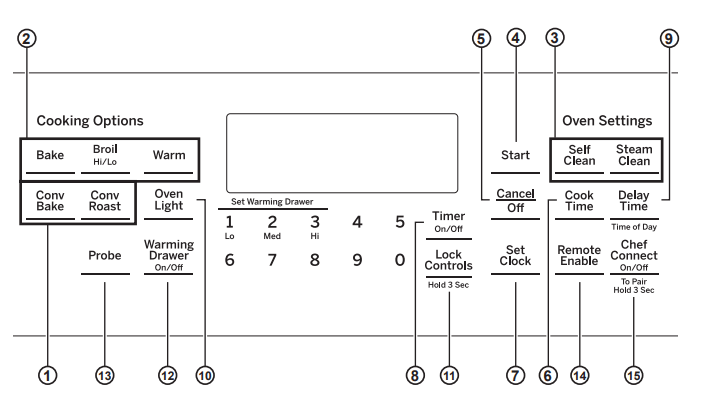
- Convection Cooking Modes: Convection cooking modes use increased air circulation to improve performance. The type of benefit depends on the mode. Your oven has the following convection cooking modes: Convection Bake and Convection Roast. See the Cooking Modes section for more information.
- Traditional Cooking Modes: Your oven has the following traditional cooking modes: Bake and Broil Hi/Lo. See the Cooking Modes section for more information.
- Clean: Your oven may have Self Clean. See the Cleaning the Oven section for important information about using this mode.
- Start: Must be pressed to start any cooking, cleaning, or timed function.
- Cancel/Off: Cancels ALL oven operations except the clock and timer, Warming Drawer and Warming Zone.
- Cook Time: Counts down cooking time and turns off the oven when the cooking time is complete. Press the Cook Time pad, use the number pads to program a cooking time in hours and minutes, then press Start. This can only be used with Bake, Convection Bake, and Convection Roast .
- Clock: Sets the oven clock time. Press the Set Clock pad twice and the number pads to program the clock. Press Start to save the time.
- Timer On/Off : Works as a countdown timer. Press the Timer On/Off pad and the number pads to program the time in hours and minutes. Press the Start pad. The timer countdown is complete. To turn the timer off press the Timer On/Off pad.
- Delay Time: Delays when the oven will turn on. Use this to set a time when you want the oven to start. Press the Delay Time pad and use the number pads to program the time of day for the oven to turn on then press Start. Press the desired cooking mode and temperature then press Start. A Cook Time may also be programmed if desired. Follow the directions under Cook Time for setting this feature. This can only be used with Bake, Convection Bake and Self-Clean.
- Oven Light: Turns the oven light on or off.
- Lock Controls: Locks out the control so that pressing the pads does not activate the controls. Press and hold the number pads or the Lock Controls pad, for three seconds to lock or unlock the control. Cancel/ Off is always active, even when the control is locked.
- Warming Drawer (on some models): Will keep hot, cooked foods at serving temperature. Press the Warming Drawer pad. Use the number pad to select the temperature setting. Press 1 for Low, 2 for Medium or 3 for High, then press Start. Drawer is below the Oven.
- Probe (on some models): Monitors internal food temperature and turns the oven off when the food reaches the programmed temperature. Insert the probe, program the cooking mode, and program the probe temperature. See the Cooking Modes section for more information. The probe can only be used with Bake and Convection Roast.
- Remote Enable (on some models): Allows you to control your oven remotely. The oven must be connected to WiFi before Remote Enable can be activated. For instructions on how to connect your oven, see the WiFi Connect section of this manual. REMOTE STARTING YOUR OVEN
 Remote To be able to start the oven remotely, press the Remote Enable pad and the Remote LED will turn on in the display. The oven can now be remotely started with a connected device. This appliance is configurable to allow remote operation at any time. Do not store any items inside, on top. or near the surface units sensitive items inside, on top or near the surface units of the appliance. The Remote LED must be lit to start the oven remotely. The Remote LED is not required to change the oven settings or to turn the oven off. After using the oven, remember to verify that the Remote LED is lit if you wish to start the oven remotely in the future.
- Chef Connect: This is a Bluetooth® pairing feature for use with other compatible Chef Connect enabled products like an over-the-range microwave oven or range hood. To pair those products to the range, press and hold the Chef Connect pad for 3 seconds and follow the corresponding instructions included with the mating Chef Connect enabled product if needed. The range will cancel pairing mode after two minutes if no mating device is detected.
Special Features
There are several different special features on your range.
- To enter the Special Features menu, press the Bake and Broil pads at the same time and hold for three seconds. "OFFSEt" will appear in the display.
- Scroll through Special Features menu using the 8 pad for down and the 3 pad for up.
- To select a feature to change, or to confirm a change, press the 0 pad.
- To cancel a change and return to the Special Features menu, press the 6 pad. To exit the Special Features menu, press the 6 pad again.
Adjust the Oven Temperature (OFFSET)
This feature allows the oven baking and convection baking temperature to be adjusted up to 35°F hotter or down to 35°F cooler. Use this feature if you believe your oven temperature is too hot or too cold and wish to change it. This adjustment affects Bake and Convection
Bake modes. No other cooking modes are affected.
Using the number pads to navigate as described above, select "OFFSET". A number between positive and negative 35 will display. Use the 8 or 3 pads to increase or decrease the offset value. Save and confirm by pressing the 0 pad.
End of Timer Signals (End tonE)
This is the tone that signals the end of a timer. The tone can be continuous (Cont) or one repeating beep (bEEP). A continuous setting will continue to sound a tone until a button on the control is pressed.
Fahrenheit or Celsius Temperature Display (dEg Unit)
The oven control is set to use Fahrenheit temperatures (F), but you can change it to use Celsius temperatures (C).
Clock Configuration (Cloc cFg)
This feature specifies how the time of day will be displayed. You can select a standard 12-hour clock or (12) 24-hour military time (24).
Clock Display (Cloc diSP)
This feature specifies whether the clock appears in the display. It may be On or Off.
Sound Volume (Sound)
This feature allows the oven tone volume to be adjusted between high (Hi), medium (rEg), low (Lo), and off (OFF). The control will sound the oven tone at the new volume level each time the sound level is changed.
12-hour Shutoff (2H ShutoFF)
This feature shuts the oven down after 12 hours of continuous operation. It may be enabled or disabled.
Sabbath Mode
The Sabbath mode feature complies with standards set forth by Star K. Some of these standards that will be noticed by the consumer include the disabling of tones, disabling of oven lights, and delays of about 30 seconds to one minute on display changes Only continuous baking or timed baking is allowed in the Sabbath mode Cooking in the
Sabbath mode is a two-step process, first the Sabbath mode must be set and then the bake mode must be set.
Setting the Sabbath Mode
- Press the Bake and Broil pads at the same time and hold until the special features menu is displayed.
- Use the 3 or 8 number pads to scroll through the special features until "SAbbAth" is displayed and then press 0. Refer to the graphic in the Special Features section to see how the number keys are mapped.
- Use the 3 or 8 number pads to scroll through the options until "On" is shown in the display, then press the 0 number pad to save the setting. Press 6 to exit the Special Features menu. A single bracket "]" will appear in the display indicating that the Sabbath mode is set. The clock will not be displayed. Continuous bake or timed bake can now be programmed.
Starting a Continuous Bake
- Press the Bake pad.
- If the desired temperature is 350F, press Start. If a different cooking temperature is desired, use the through 5 number pads or Timer pad to select a preset cooking temperature, then press Start. Refer to the graphic below to determine which pad sets the desired cooking temperature.
After a delay, a second bracket "][" will appear in the display indicating that the oven is baking.

Adjusting the Temperature
- Press Bake, use the 1 through 5 number pads and the Timer pad to select a different preset cooking temperature, and press Start.
- Since no feedback is given during temperature change, an oven thermometer can be used to confirm temperature changes.
Starting a Timed Bake
- Press the Bake pad.
- If the desired temperature is 350F, use the 6 through number pads or the Lock Control pad to select a cooking time. If a cooking temperature other than 350F is desired, use the 1 through 5 number pads or the Timer pad to select a preset cooking temperature, then select the cooking time. Refer to the graphic on this page to determine which pad sets the desired cooking temperature and cooking time.
- Press Start.
After a delay, a second bracket "] [ will appear in the display indicating that the oven is baking. When the cook time expires, the display will change back to a single bracket "]" indicating that the oven is no longer baking. No tone will sound when the cook time is complete.
Exit the Sabbath Mode
Exiting the Sabbath mode should be done after the Sabbath is over.
- Press Cancel/Off to end any bake mode that may be running.
- Press Bake and Broil pads at the same time and hold until the Special Features menu is displayed.
- Use the 3 or 8 number pads to scroll through the special features until "SAbbAth" is displayed, then press 0.
- Use the 3 or 8 number pads to scroll through the options until "OFF" is displayed and press 0 to save the setting. Press the 6 number pad to exit the Special Features menu.
Sabbath Mode Power Outage Note
If a power outage occurs while the oven is in Sabbath Mode, the unit will return to Sabbath Mode when power is restored, however the oven will return to the off state even if it was in the middle of a bake cycle when the power outage occurred.
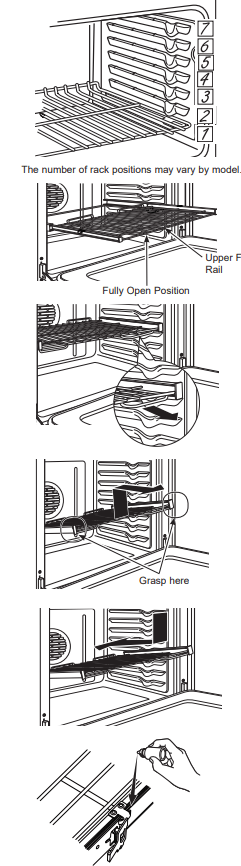
Oven Racks
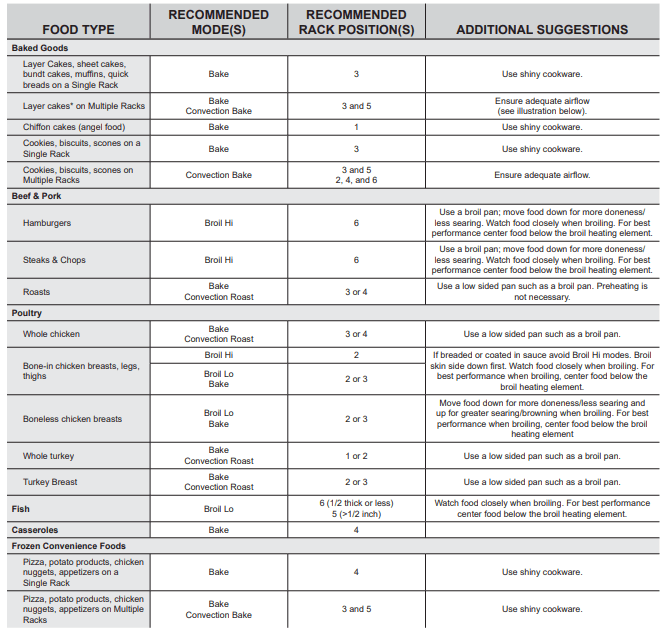
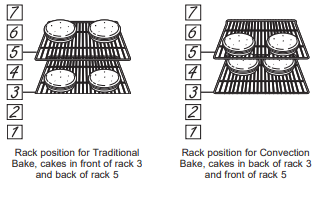
Recommended rack positions for various types of foods are provided in the Cooking Guide. Adjusting rack position is one way to impact cooking results. For example, if you would prefer darker tops on cakes, muffins, or cookies, try moving food one rack position higher. If you find foods are too brown on top try moving them down next time.
When baking with multiple pans and on multiple racks, ensure there is at least 1½" between pans to allow sufficient space for air to flow.
To avoid possible burns, place the racks in the desired position before you turn the oven on.
Extension Racks
Always pull the rack out by its upper front rail to its fully open position, when placing or removing cookware.
If extension racks are difficult to extend, lubricate the racks with the graphite lubricant provided with your oven. Remove the rack from the oven, remove debris in the side tracks with a paper towel, shake the graphite lubricant and place 4 small drops on the two bottom tracks of the left and right sides. Open and close the rack several times to distribute the lubricant.
To order additional graphite lubricant, rsee the Accessories and Consumer Support sections at the end of this manual.
To Remove An Extension Rack:
- Make sure the rack is pushed all the way into the oven so that side paddles on the rack disengage from the oven support.
- Slide the rack toward you to the bump (stop position) on the rack support.
- Firmly grasp both sides of the rack frame and the sliding rack, tilt the front end up and pull it out.
To Replace An Extension Rack:
- Firmly grasp both sides of the rack frame and the sliding rack.
- Place the curved end of the rack (stop-locks) onto the oven supports, tilt up the front of the rack and push it in as far as it will go.
If extension racks are difficult to replace or remove, wipe the oven rack supports with vegetable oil. Do not wipe oil on the rack slides.
To Lubricate the Paddle:
Shake lubricant and apply to the moving parts of the paddle mechanisms as shown.
Aluminum Foil and Oven Liners
CAUTION
Do not use any type of foil or oven liner to cover the oven bottom. These items can trap heat or melt, resulting in damage to the product and risk of shock, smoke or fire. Damage from improper use of these items is not covered by the product warranty.
Foil may be used to catch spills by placing a sheet on a lower rack, several inches below the food. Do not use more foil than necessary and never entirely cover an oven rack with aluminum foil. Keep foil at least 1-1/2" from oven walls to prevent poor heat circulation.
Cookware
Cookware Guidelines
The material, finish, and size of cookware affect baking performance.
Dark, coated and dull pans absorb heat more readily than light, shiny pans. Pans that absorb heat more readily can result in a browner, crisper, and thicker crust. If using dark and coated cookware check food earlier than minimum cook time. If undesirable results are obtained with this type of cookware consider reducing oven temperature by 25° F next time.
Shiny pans can produce more evenly cooked baked goods such as cakes and cookies.
Glass and ceramic pans heat slowly but retain heat well. These types of pans work well for dishes such as pies and custards.
Air insulated pans heat slowly and can reduce bottom browning.
Keep cookware clean to promote even heating.
Cooking Modes
Your new oven has a variety of cooking modes to help you get the best results. These modes are described below. Refer to the Cooking Guide section for recommendations for specific foods. Remember, your new oven may perform differently than the oven it is replacing. NOTE: Remove unused racks when using the oven for faster preheat, improved efficiency and optimal performance.
Baking and Roasting Modes
Select a mode for baking and roasting based on the type and quantity of food you are preparing. When preparing baked goods such as cakes, cookies, and pastries always preheat the oven first. Follow recipe recommendations for food placement. If no guidelines are provided, center food in the oven.
Traditional Bake
The traditional bake mode is intended for single rack cooking. This mode uses heat primarily from the lower element but also from the upper element to cook food. To use this mode press the Bake pad, enter a temperature, and then press Start. Preheating is generally recommended when using this mode.
Convection Bake
The Convection Bake mode is intended for baking on multiple racks at the same time. This mode uses heat primarily from the rear element but also heat from the upper and lower elements, along with air movement from the convection fan to enhance cooking evenness. Your oven is equipped with Auto Recipe Conversion, so it is not necessary to convert the temperature when using this mode. Baking time might be slightly longer for multiple racks than what would be expected for a single rack. To use this mode press the Convection Bake pad, enter a temperature, and then press Start. Always preheat when using this mode.
Convection Roast
The Convection Roast mode is intended for roasting whole cuts of meat on a single rack. This mode uses heat from the lower, upper, and rear elements along with air movement from the convection fan to improve browning and reduce cooking time. It is not necessary to convert temperature. Check food earlier than the recipe suggested time when using this mode or use a meat probe. To use this mode press the Convection Roast pad, enter a temperature, and then press Start. It is not necessary to preheat when using this mode.
Broiling Modes
Always broil with the door closed. Monitor food closely while broiling. Use caution when broiling on upper rack positions as placing food closer to the broil element increases smoking, spattering, and the possibility of fats igniting. For best performance center food below the broil heating element. Broiling on rack position 7 is not recommended.
Try broiling foods that you would normally grill. Adjust rack positions to adjust the intensity of the heat to the food. Place foods closer to the broil element when a seared surface and rare interior is desired. Thicker foods and foods that need to be cooked through should be broiled on a rack position farther from the broiler or by using Broil Lo.
Broil Hi
The Broil Hi mode uses intense heat from the upper element to sear foods. Use Broil Hi for thinner cuts of meat and/ or foods you prefer less done on the interior. To use this mode press the Broil pad once and then press Start. It is not necessary to preheat when using this mode.
Broil Lo
The Broil Lo mode uses less intense heat from the upper element to cook food thoroughly while also producing surface browning. Use Broil Lo for thicker cuts of meat and/or foods that you would like cooked all the way through. To use this mode press the Broil pad twice and then press Start. It is not necessary to preheat when using this mode.
Warm
To use this mode, press the Warm pad then press Start. Cover foods that need to remain moist and do not cover foods that should be crisp. Preheating is not required. Do not use warm to heat cold food other than crisping crackers, chips or dry cereal. It is also recommended that food not be kept warm for more than 2 hours.
Probe (on some models)
Internal food temperature is frequently used as an indicator of doneness, especially for roasts and poultry. The Probe mode monitors the internal food temperature and turns the oven off when the internal food temperature reaches the programmed temperature.
The temperature probe can only be used with Bake, Convection Bake, and Convection Roast modes.
To use the probe with preheating:
- Press the desired cook mode (Bake, Convection Bake, or Convection Roast) pad and enter the desired cooking temperature.
- Insert the probe into the food (see Proper Probe Placement Guidelines in this section).
- Once the oven is preheated, place the food in the oven and connect the probe to the probe outlet, making sure it is fully inserted. Use caution, the oven walls and probe outlet are hot.
- Program the probe temperature by pressing the Probe pad and entering the desired food temperature. The maximum internal food temperature that you can set is 200º F.
To use the probe without preheating:
- Insert the probe into the food (see Proper Probe Placement Guidelines in this section).
- Place the food in the oven and connect the probe into the probe outlet in the oven.
- Program the desired probe and cooking mode settings by pressing the Probe pad and entering the desired food temperature, then pressing the cook mode pad (Bake, Convection Bake, or Convection Roast) and entering the desired cooking temperature.
Proper Probe Placement Guidelines
After preparing the meat and placing it on the cooking pan follow these guidelines for proper probe placement.
- Insert the probe completely into the meat, up to the handle, such that the point of the probe will rest in the center of the thickest part of the meat.
- The probe should not touch bone, fat or gristle.
- For whole poultry insert the probe into the thickest part of the breast.
- For bone less roasts, insert the probe into the center of the roast.
- For bone-in ham or lamb, insert the probe into the center of the lowest large muscle or joint.
- For casseroles or dishes such as meatloaf, insert the probe into the center of the dish.
- For fish, insert the probe from just above the gill into the meatiest area, parallel to the backbone.
Check the temperature at other locations in the food with a food thermometer once the probe temperature is reached to ensure that all portions of the food have reached desired temperatures.
Probe Care Guidelines
- Use of probes other than the one provided with this product may result in damage to the probe.
- Use the handles of the probe and plus when inserting and removing them from the meat and outlet
- To avoid damaging your probe, do not use tongs to pull on the cable when removing it.
- To avoid breaking the probe, make sure food is completely defrosted before inserting the probe.
- To prevent possible burns, do not unplug the probe from the outlet until the oven has cooled.
- Never leave the probe inside the oven during s self or steam clean cycle.
- Do not store the probe in the oven.
Cooking guide
Warming Drawer (on some models)
When Using the Warming Drawer
The warming drawer will keep hot, cooked foods warm. Always start with hot food. Do not use to heat cold food other than crisping crackers, chips or dry cereal.
Do not line the warming drawer or pan with aluminum foil. Foil is an excellent heat insulator and will trap heat beneath it. This will upset the performance of the drawer and could damage the interior finish.
Allow approximately 25 minutes for the warming drawer to preheat.
- Do not put liquid or water in the warming drawner.
- All foods placed in the warming drawer should be covered with a lid or aluminum foil. When warming pastries or breads, the cover should be vented to allow moisture to escape.
- Food should be kept hot in its cooking container or transferred to a heat-safe serving dish.
NOTE: Plastic containers or plastic wrap will melt if in direct contact with the drawer, pan or a hot utensil. Melted plastic may not be removable and is not covered under your warranty.
- Remove serving spoons, etc., before placing containers in warming drawer.
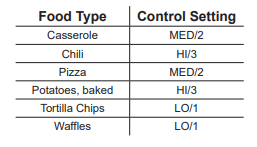
Temperature Selection Chart
To keep several different foods hot, set the control to the food needing the highest setting.
- The temperature, type and amount of food, and the time held will affect the quality of the food.
- Repeated opening of the drawer allows the hot air to escape and the food to cool.
- With large loads it may be necessary to use a higher warming drawer setting and cover some of the cooked food items.
- Do not use plastic containers or plastic wrap.
To Crisp Stale Items
- Place food in low-sided dishes or pans.
- Preheat on LO/1 setting.
- Check crispness after 45 minutes. Add time as needed.
To Warm Serving Bowls and Plates
To warm serving bowls and plates, set the control on LO/1.
- Use only heat-safe sishes.
- If you want to heat fine china, please check with the manufacturer of the dishes for their maximum heat tolerance.
- You may warm empty serving dishes while preheating the drawer.
CARE AND CLEANING
Cleaning the Range - Exterior
Be sure all controls are off and all surfaces are cool before cleaning any part of the range.
WARNING
If your range is removed for cleaning, servicing or any reason, be sure the anti-tip device is reengaged properly when the range is replaced. Failure to take this precaution could result in tipping of the range and can result in death or serious burns to children or adults.
Control Knobs
The control knobs may be removed for easier cleaning. Make sure the knobs are in the OFF positions and pull them straight off the stems for cleaning.
The knobs can be cleaned in a dishwasher or they may also be washed with soap and water. Make sure the inside of the knobs are dry before replacing.
Replace the knobs, in the OFF position to ensure proper placement.
Control Lockout
If desired, the touch pads may be deactivated before cleaning.
See Lock Controls in the Oven Controls section in this manual.
Clean up splatters with a damp cloth.
Remove heavier soil with warm, soapy water. Do not use abrasives of any kind.
Reactivate the touch pads after cleaning.
Control Panel
It's a good idea to wipe the control panel after each use.
Clean with mild soap and water or vinegar and water, rinse with clean water and polish dry with a soft cloth.
Do not use abrasive cleansers, strong liquid cleansers, plastic scouring pads or oven cleaners on the control panel - they will damage the finish, including Black Stainless Steel.
Oven Exterior
Do not use oven cleaners, abrasive cleansers, strong liquid cleansers, steel wool, plastic scouring pads, or cleaning powders on the interior or exterior of the oven.
Clean with a mild soap and water or vinegar and water solution. Rinse with clean water and dry with a soft cloth.
When cleaning surfaces, make sure that they are at room temperature and not in direct sunlight.
If stain on the door vent trim is persistent, use a mild abrasive cleaner and a sponge-scrubber for best results.
Spillage of marinades, fruit juices, tomato sauces and basting liquids containing acids may cause discoloration and should be wiped up immediately. Let hot surfaces cool, then clean and rinse.
Painted Surfaces
Painted surfaces include the sides of the range and the door, top of control panel, maintop trims and the drawer front. Clean these with soap and water or a vinegar and water solution.
Do not use commercial oven cleaners, cleaning powders, steel wool or harsh abrasives on any painted surface.
Stainless Steel Surfaces (on some models)
Do not use a steel wool pad; it will scratch the surface.
To clean the stainless steel surface, use warm sudsy water or a stainless steel cleaner or polish. Always wipe the surface in the direction of the grain. Follow the cleaner instructions for cleaning the stainless steel surface. Cleaners with oxalic acid such as Bar Keepers Friend Soft Cleanser™ will remove surface rust, tarnish and small blemishes. Use only a liquid cleanser free of grit and rub in the direction of the brush lines with a damp, soft sponge.
To inquire about purchasing cleaning products including stainless steel appliance cleaner or polish, see the Accessories and Consumer Support sections at the end of this manual.
Cleaning the Range - Interior
The interior of your new oven can be cleaned manually or by using Steam Clean or Self Clean modes.
Spillage of marinades, fruit juices, tomato sauces and basting liquids containing acids may cause discoloration and should be wiped up immediately. Let hot surfaces cool, then clean and rinse.
Manual Cleaning
Do not use oven cleaners, abrasive cleaners, strong liquid cleansers, steel wool, scouring pads, or cleaning powders on the interior of the oven. Clean with a mildsoap and water or vinegar and water solution. Rinse with clean water and dry with a soft cloth. When cleaning surfaces, make sure that they are at room temperature.
Steam Clean Mode
Steam clean is intended to clean small spills using water and a lower cleaning temperature than Self-Clean. To use the Steam Clean feature, wipe grease and soils from the oven. Pour one cup of water into the bottom of the oven. Close the door. Press the Steam Clean pad and then press Start. The oven door will lock. You can not open the door during the 30 minute steam clean as this will decrease the steam clean performance. At the end of the steam clean cycle the door will unlock. Wipe out any excess water and any remaining soil.
Self Clean Mode
Read Self-Cleaning Oven Safety Instructions at the beginning of this manual before using Self Clean Mode. Self clean uses very high temperatures to clean the oven interior. The oven door will lock when using this feature. Before operating the self-clean cycle, wipe up grease and soils from the oven. Remove all items from the oven other than enameled (dark color) racks. Shiny or silver racks, the meat probe, and any cookware or other items should all be removed from the oven before initiating a self-clean cycle. Close the door. Press the Self Clean pad and a default self-clean time is displayed. The clean time can be changed to any time between 3:00 and hours by using the number pads to enter a different time and pressing Start. For heavily soiled ovens, the maximum 5 hour clean time is recommended. If you wish to use the default time, press the Start pad immediately after pressing the Clean pad. The oven will turn off automatically when the self-clean cycle is complete. The door will stay locked until the oven has cooled down. After the oven has cooled down wipe any ash out of the oven. We recommend venting your kitchen with an open window or using a ventilation fan or hood during the first self-clean cycle.
Soil on the front frame of the range and outside the gasket on the door will need to be cleaned by hand. Clean these areas with hot water, soap-filled steel-wool pads or cleansers such as Soft Scrub. Rinse well with clean water and dry.
Do not clean the gasket. The fiberglass material of the oven door gasket cannot withstand abrasion. It is essential for the gasket to remain intact. If you notice it becoming worn or frayed, replace it.
Make sure the oven light bulb cover is in place and the oven light is off.
IMPORTANT: The health of some birds is extremely sensitive to the fumes given off during the self-cleaning cycle of any range. Move birds to another well-ventilated room.
On Some Models:
The surface units are automatically disabled during the self-clean cycle. Make sure that all surface unit controls are turned off at all times during the self-clean cycle.
Any surface unit that is set to an "on" position while the self-clean cycle is operating will automatically come on after the self-clean cycle is finished, and could result in an "on" unattended surface unit. Wait until the self-clean cycle is finished to set and use the surface units.
Racks
All racks can be washed with warm, soapy water.
Enameled (not shiny) racks can be left in the cavity during self clean.
Racks may be more difficult to slide, especially after a self-clean. Put some vegetable oil on a soft cloth or paper towel and rub onto the left and right edges.
Oven Heating Elements
Do not clean the bake element or the broil element. Any soil will burn off when the elements are heated.
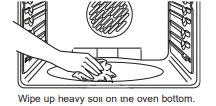
The bake element is not exposed and is under the oven floor. Clean the oven floor with warm, soapy water.
Cleaning the Glass Cooktop
Normal Daily Use Cleaning
ONLY use CERAMA BRYTEⓇ Ceramic Cooktop
Cleaner on the glass cooktop. Other creams may not be as effective.
To maintain and protect the surface of your glass cooktop, follow these steps:
- Before using the cooktop for the first time, clean it with CERAMA BRYTE® Ceramic Cooktop Cleaner. This helps protect the top and makes cleanup easier.
- Dally use of CERAMA BRYTEⓇ Ceramic Cooktop Cleaner will help keep the cooktop looking new.
- Shake the cleaning cream well. Apply a few drops of CERAMA BRYTE® Ceramic Cooktop Cleaner directly to the cooktop.
- Use a paper towel or CERAMA BRYTEⓇ Cleaning Pad for Ceramic Cooktops to clean the entire cooktop surface.
- Use a dry cloth or paper towel to remove all cleaning residue. No need to rinse.

NOTE: It is very important that you DO NOT heat the cooktop until it has been cleaned thoroughly.
Burned-On Residue
NOTE: DAMAGE to your glass surface may occur if you use scrub pads other than those recommended.
- Allow the cooktop to cool.
- Spread a few drops of CERAMA BRYTE Ceramic Cooktop Cleaner on the entire burned residue area.
- Using a CERAMA BRYTE® Cleaning Pad for Ceramic Cooktops, rub the residue area, applying pressure as needed.
- If any residue remains, repeat the steps listed above as needed.
- For additional protection, after all residue has been removed, polish the entire surface with CERAMA BRYTE® Ceramic Cooktop Cleaner and a paper towel.

Heavy, Burned-On Residue
- Allow the cooktop to cool.
- Use a single-edge razor blade scraper at approximately a 45° angle against the glass surface and scrape the soil. It will be necessary to apply pressure to the razor scraper in order to remove the residue.
- After scraping with the razor scraper, spread a few drops of CERAMA BRYTE® Ceramic Cooktop Cleaner on the entire burned residue area Use a CFRAMA BRYTEⓇ Cleaning Pad to remove any remaining residue.
- For additional protection, after all residue has been removed, polish the entire surface with CERAMA BRYTE® Ceramic Cooktop Cleaner and a paper towel.

Metal Marks and Scratches
1. Be careful not to slide pots and pans across your cooktop. It will leave metal markings on the cooktop surface.
These marks are removable using the CERAMA BRYTE® Ceramic Cooktop Cleaner with a CERAMA BRYTEⓇ Cleaning Pad for Ceramic Cooktops.
2. If pots with a thin overlay of aluminum or copper are allowed to boil dry, the overlay may leave black discoloration on the cooktop.
This should be removed immediately before heating again or the discoloration may be permanent.
NOTE: Carefully check the bottom of pans for roughness that would scratch the cooktop.
Cooktop Seal
To clean the cooktop seal around the edges of the glass, lay a wet cloth on it for a few minutes, then wipe clean with nonabrasive cleaners.

Damage from Sugary Spills and Melted Plastic
Special care should be taken when removing hot substances to avoid permanent damage of the glass surface. Sugary spillovers (such as jellies, fudge, candy, syrups) or melted plastics can cause pitting of the surface of your cooktop (not covered by the warranty) unless the spill is removed while still hot. Special care should be taken when removing hot substances.
Be sure to use a new, sharp razor scraper.
Do not use a dull or nicked blade.
1 Turn off all surface units. Remove hot pans.
2 Wearing an oven mitt:
a. Use a single-edge razor blade scraper to move the spill to a cool area on the cooktop.
b. Remove the spill with paper towels.
3. Any remaining spillover should be left until the surface of the cooktop has cooled.
4. Don't use the surface units again until all of the residue has been completely removed.
NOTE: If pitting or indentation in the glass surface has already occurred, the cooktop glass will have to be replaced. In this case, service will be necessary.
Oven Light
WARNING: SHOCK OR BURN HAZARD: Before replacing oven light bulb, disconnect the electrical power to the range at the main fuse or circuit breaker panel. Failure to do so may result in electric shock or burn.
CAUTION: BURN HAZARD: The glass cover and bulb should be removed when cool. Touching hot glass with bare hands or a damp cloth can cause burns.
Oven Light Replacement (on some models)
To remove:
- Turn the glass cover counterclockwise 1/4 turn until the tabs of the glass cover clear the grooves of the socket. Wearing latex gloves may offer a better grip.
- Using gloves or a dry cloth, remove the bulb by pulling it straight out.
To replace:
- Use a new 120/130-volt halogen bulb, not to exceed watts. Replace the bulb with the same type of bulb that was removed. Be sure the replacement bulb is rated 120 volts or 130 volts (NOT 12 volts).
- Using gloves or a dry cloth, remove the bulb from its packaging. Do not touch the bulb with bare fingers. Oil from skin will damage the bulb and shorten its life.
- Push the bulb straight into the receptacle all the way.
- Place the tabs of the glass cover into the grooves of the socket. Turn the glass cover clockwise 1/4 turn. For improved lighting inside the oven, clean the glass cover frequently using a wet cloth. This should be done when the oven is completely cool
- Reconnect electrical power to the oven.

Oven Door
The door is very heavy. Be careful when removing and lifting the door.
Do not lift the door by the handle.
To remove the door:
- Fully open the door.
- Pull the hinge locks down toward the door frame, to the unlocked position. A tool, such as a small flat- blade screwdriver, may be required.
- Firmly grasp both sides of the door at the top.
- Close door to the door removal position. The door should be open approximately 3" with no obstruction above the door.
- Lift door up and out until both hinge arms are clear of the slots.

To replace the door:
- Firmly grasp both sides of the door at the top.
- Starting on the left side, with the door at the same angle as the removal position, seat the indentation of the hinge arm into the bottom edge of the hinge slot. The notch in the hinge arm must be fully seated into the bottom of the slot. Repeat for right side.
- Fully open the door. If the door will not fully open, the indentation is not seated correctly in the bottom edge of the slot.
- Push the hinge locks up against the front frame of the oven cavity, to the locked position.
- Close the oven door.

Storage Drawer (on some models)
To remove the drawer:
1. Pull the drawer out until it stops.
2. Lift the front of the drawer until the stops clear the guides.
3. Remove the drawer.
To replace the drawer:
1. Place the drawer rails on the guides.
2. Push the drawer back until it stops.
3. Lift the front of the drawer and push back until the stops clear the guides.
4. Lower the front of the drawer and push back until it closes.

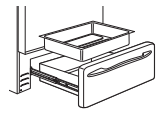
Removable Warming Drawer Pan (on some models)
NOTE: Allow warming drawer to cool before removing pan.
NOTE: Wipe spills promptly after each use. Never place, use or self-clean the drawer pan in the upper oven.
Warming drawer has a removable pan for easy cleaning. Clean with hot, soapy water and a sponge or dish towel. Dry with a clean cloth. Replace the pan in the warming drawer.
Probe (on some models)
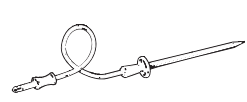
The temperature probe may be cleaned with soap and water or a soap-filled scouring pad. Cool the temperature probe before cleaning. Scour stubborn spots with a soap-filled scouring pad, rinse and dry. To order additional temperature probes, see the Accessories and Consumer Support sections at the end of this manual.
- Do not immerse the temperature probe in water.
- Do not store the temperature probe in the oven.
- Do not leave the temperature probe inside the oven during a self or steam clean cycle.
TROUBLESHOOTING
Troubleshooting Tips ... Before you call for service
Save time and money! Review the charts on the following pages first and you may not need to call for service.
Surface units will not maintain a rolling boil or cooking is not fast enough
- Improper cookware being used.
- Use pans which are flat and match the diameter of the surface unit selected.
- In some areas, the power (voltage) may be
- Cover pan with a lid until desired heat is obtained.
Surface units do not work properly
- A fuse in your home may be blown or the circuit breaker tripped.
- Replace the fuse or reset the circuit breaker.
- Cooktop controls improperly set.
- Check to see the correct control s set for the surface unit you are using.
Surface unit stops glowing when turned to a lower setting
- The unit is still on and hot.
Scratches (may appear as cracks) on cooktop glass surface
- Incorrect cleaning methods being used.
- Scratches are not removable. Tiny scratches will become less visible in time as a result of cleaning
- Cookware with rough bottoms being used or coarse particles (salt or sand) were between the cookware and the surface of the cooktop. Cookware has been slid across the cooktop surface.
- To avoid scratches, use the recommended cleaning procedures. Make sure bottoms of cookware are clean before use, and use cookware with smooth bottoms.
Areas of discoloration on the cooktop
- Food spillovers not cleaned before next use.
- See the Cleaning the glass cooktop section.
- Hot surface on a model with a light-colored cooktop.
- This is normal. The surface may appear discolored when it is hot. This is temporary and will disappear as the glass cools.
Plastic melted to the surface
- Hot cooktop came into contact with plastic placed on the hot cooktop.
- See the Cleaning the glass cooktop section as there is potential for permanent damage without proper care.
Pitting (or indentation) of the cooktop
- Hot sugar mixture spilled on the cooktop.
- Call a qualified technician for replacement.
Frequent cycling off and on of surface units
- Improper cookware being used.
- Use only flat cookware to minimize cycling.
My new oven doesn't cook like my old one. Is something wrong with the temperature settings?
- Your new oven has a different cooking system from your old oven and therefore may cook differently than your old oven.
- For the first few uses, follow your recipe times and temperatures carefully. If you still think your new oven is too hot or too cold, you can adjust the temperature yourself to meet your specific cooking preference. See the Special Features section. NOTE: This adjustment affects Bake, and Convection Bake temperatures; it will not affect Convection Roast, Broil or Clean.
Food does not hake properly
- Ovan controls improperly sat
- See the Cooking Modes section
- Rack position is incorrect or rack is not level.
- See the Cooking Modes section and Cooking Guide.
- Incorrect cookware or cookware of improper size being used.
- See the Cookware section.
- Oven temperature needs adjustment.
- See the Special Features section.
- Ingredient substitution
- Substituting ingredients can change the recipe outcome.
Food does not broil properly
- Oven controls improperly set.
- Make sure you select the appropriate broil mode.
- Improper rack position being used.
- See Cooking Guide for rack location suggestions.
- Food being cooked in a hot pan.
- Make sure cookware is cool.
- Cookware not suited for broiling.
- Use a pan specifically designed for broiling.
- Aluminum foil used on the broiling pan and grid has not been fitted properly and slit as recommended.
- If using aluminum foil conform to pan slits.
- In some areas the power (voltage) may be low.
- Preheat the broil element for 10 minutes.
Oven temperature too hot or too cold
- Oven temperature needs adjustment.
- See the Special Features section.
Oven does not work or appears not to work
- A fuse in your home may be blown or the circuit Replace the fuse or reset the circuit breaker. breaker tripped.
- Replace the fuse or reset the circuit breaker.
- Oven controls improperly set.
- See the Using the Oven section.
- Oven is in Sabbath Mode.
- Verify that the oven is not in Sabbath Mode.See the Special Features section
Crackling" or "popping" sound
- This is the sound of the metal heating and cooling during both the cooking and cleaning functions.
Why is my range making a "clicking" noise when using my oven?
- Your range cycles the heating elements by turning relays on and off to maintain the oven temperature.
Clock and timer do not work
- A fuse in your home may be blown or the circuit breaker tripped.
- Replace the fuse or reset the circuit breaker.
- Plug on range is not completely inserted in the electrical outlet.
- Make sure electrical plug is plugged into a live, properly grounded outlet.
- Oven controls improperly set.
- See the Using the kitchen timer section.
- Clock display turned off
- Check Clock Display settings in the Special Features section
Storage drawer won't close
- Power cord may be obstructing drawer in the lower back of the range.
- Reposition the drawer and power cord. See the Storage Drawer Removal instructions in the Care and cleaning of the range section.
- Drawer slide or rail improperly aligned with support
- Reposition the drawer. See the Storage Drawer Removal instructions in the Care and cleaning of the range section.
Oven door is crooked
- The door is out of position.
- Because the oven door is removable, it sometimes gets out of position during installation. To straighten the door, re-install the door. See the Lift-Off Oven Door instructions in the Care and Cleaning section.
Oven will not work remotely
- Router issues, no wireless signal, etc.
- Oven is not connected
- For assistance with oven wireless network connectivity, please call 800.220.6899.
Oven light stays on while cooking
- Preheat Notification Lighting feature enabled
- Reference the Special Features section if you wish to disable this feature.
Oven light does not work
- Light bulb is loose or defective.
- Pad operating light is broken.
Oven will not self-clean
- The temperature is too high to set a self-clean operation.
- Allow the oven to cool and reset the controls
- Oven controls improperly set.
- See the Cleaning the Oven section.
Excessive smoking during clean cycle
- Excessive soil or grease.
- Press the Cancel/Off pad. Open the windows to rid the room of smoke. Wait until the LOCKED light goes off. Wipe up the excess soil and reset the clean cycle.
Excessive smoking during broiling
- Food too close to burner element.
- Lower the rack position of the food.
Oven door will not open after a clean cycle
- Oven too hot.
- Allow the oven to cool below locking temperature.
Oven not clean after a clean cycle
- Oven controls improperly set.
- See the Cleaning the Oven section.
- Oven was heavily soiled.
- Clean up heavy spillovers before starting the clean cycle.Heavily soiled ovens may need to self-clean again or for a longer period of time.
" DOOR LOCK"  flashes in the display
- The self-clean cycle has been selected but the door is not closed.
DOOR LOCK  light is on when you want to cook
- The oven door is locked because the temperature inside the oven has not dropped below the locking temperature.
- Press the Cancel/Off pad. Allow the oven to cool.
F- and a number
- You have a function error code.
- Press the Cancel/Off pad. Allow the oven to cool for one hour. Put the oven back into operation.
- If the function code repeats.
- Disconnect all power to the oven for at least 30 seconds and then reconnect power. If the function error code repeats, call for service.
Display goes blank
- A fuse in your home may be blown or the circuit breaker tripped.
- Replace the fuse or reset the circuit breaker.
- The clock is turned off.
- See the Special Features section.
- Oven is in Sabbath Mode.
- Verify that the oven is not in Sabbath Mode. Special Features section.
Power outage, clock flashes
- Power outage or surge
- Reset the clock. If the oven was in use, you must reset it by pressing the Cancel/Off pad, setting the clock and resetting any cooking function
Burning" or "oily" odor emitting from the vent
- This is normal in a new oven and will disappear in time.
- To speed the process, set a self-clean cycle for a minimum of 3 hours. See the Cleaning the Oven section.
Strong odor
- An odor from the insulation around the inside of the oven is normal for the first few clean cycle. times the oven is used.
- This is temporary and will go away after several uses or a self-clean
Fan noise (one some models)
- A convection fan may automatically turn on and off.
- This is normal. The fan is designed to operate intermittently to maximize cooking evenness. The convection fan will operate during preheat of the bake cycle. The fan will turn off after the oven is heated to the set temperature. This is normal.
- A cooling fan may automatically turn on
- This is normal on some models. The cooling fan will turn off and on to cool internal parts. It may run after the oven is turned off.
My oven door glass appears to be "tinted" or have a rainbow" color. Is this defective?
- No. The inner oven glass is coated with a heat barrier to reflect the heat back into the oven to prevent heat loss and keep the outer door cool while baking.
- This is normal. Under certain light or angles, you may see this tint or rainbow color.
Sometimes the oven takes longer to preheat to the same temperature
- Cookware or food in oven.
- The cookware or food in the oven will cause the oven to take longer to preheat. Remove items to reduce preheat time.
- Number of racks in oven.
- Adding more racks to the oven will cause the oven to take longer to preheat. Remove some racks.
- Differents cooking modes.
- The different cooking modes use different preheat methods to heat the oven for the specific cooking mode. Some modes will take longer than others.
Display flashes
Unable to get the display to show "SF"
- Oven control pads were not touched properly.
- The Broil Hi/Lo and Bake pads must be touched at the same time and held for 3 seconds.
Control signals after entering cooking time or start time
- You forgot to enter a bake temperature or cleaning time.
- Touch the Bake pad and desired temperature or the Self Clean pad and desired clean time.
Oven racks are difficult to slide
- The shiny, silver-colored racks were cleaned in a self-clean cycle.
- Apply a small amount of vegetable oil to a paper towel and wipe the edges of the oven racks with the paper towel. Do not spray with Pam or other lubricant sprays.
Drawer does not slide smoothly or drags
- The drawer is out of alignment.
- Fully extend the drawer and push it all the way in. See the Care and cleaning of the range section.
- Drawer is over-loaded or load is unbalanced.
- Reduce weight. Redistribute drawer contents.
Steam from the vent
- When using the ovens, it is normal to see steam coming out of the oven vents. As the number of racks or amount of food being cooked increases, the amount of visible steam will increase.
Warming drawer will not work
- A fuse in your home may be blown or the circuit breaker tripped.
- Replace the fuse or reset the circuit breaker.
- Controls improperly set.
- See the Using the warming drawer section.
Excessive condensation in the drawer
- Liquid in drawer.
- Uncovered foods.
- Cover food with lid or aluminum foil.
- Temperature setting too high.
- Reduce temperature setting.
Food dries out in the warming drawer
- Moisture escaping.
- Cover food with lid or aluminum foil.
- Drawer not fully closed.
- Push drawer in until latch engages.
Water remaining on oven floor after Steam Clean cycle
- This is normal.
- Remove any remaining water with a dry cloth or sponge.
Oven will not steam clean
- Display flashes HOT.
- Allow the oven to cool to room temperature and reset the controls.
- Oven controls improperly set.
- See the Using Steam Clean section.
- Oven door is not closed.
- Make sure you close the door to start steam clean cycle.
Oven will not work remotely (on some models)
- Router issues, no wireless signal, etc.
- Oven is not connected.
- For assistance with oven wireless network connectivity, please call 800.220.6899.