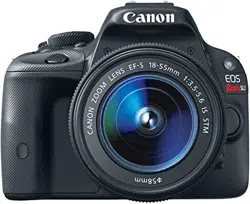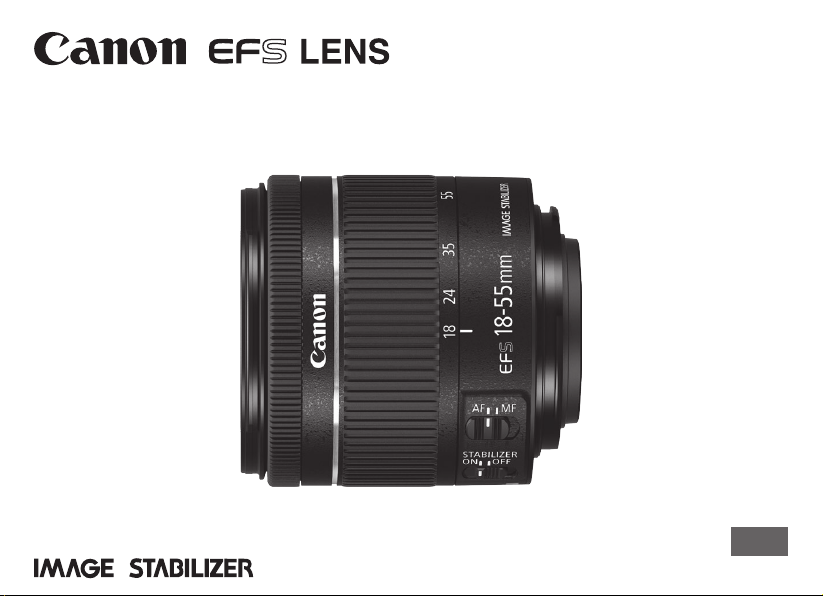
EF-S18-55mm f/4-5.6 IS STM
Instructions
ENG
ENG-1
Thank you for purchasing a Canon product.
The Canon EF-S18-55mm f/4-5.6 IS STM is a
standard zoom lens for EOS cameras* that
support EF-S lenses.
* ThelenscanonlybeusedwithcompatibleEOS
cameras.Forcompatibilityinformation,please
checkthecamera’sinstructionmanual,product
catalogortheCanonwebsite.
“IS”standsforImageStabilizer.
“STM”standsforsteppingmotor.
Camera Firmware
Pleaseusethelatestversionofrmwarewiththe
camerainuse.Fordetailsonwhetherthermwareis
thelatestversionornot,andfordetailsonupdatingthe
rmware,pleasechecktheCanonwebsite.
Conventions used in this instruction
Warningtopreventlensorcameramalfunction
ordamage.
Supplementarynotesonusingthelensand
takingpictures.

ENG-2
Precautionstoensurethatthecameraisused
safely.Readtheseprecautionsthoroughly.Make
surealldetailsareobservedinordertoprevent
risksandinjurytotheuserandotherpeople.
Warning
Detailspertainingtorisksthatmay
resultindeathorseriousinjury.
Do not look at the sun or a bright light source
through the lens or single-lens reflex camera.
Doingsocouldresultinlossofvision.Lookingatthe
sundirectlythroughthelensisespeciallyhazardous.
Whether it is attached to the camera or not, do
not leave the lens under the sun without the
lens cap attached.Thisistopreventthelensfrom
concentratingthesun’srays,whichcouldcauseare.
Caution
Detailspertainingtorisksthatmay
resultininjury.
Do not leave the camera in locations subject to
high or low temperatures. Thismayresultinthe
camerabecomingexcessivelyhotorcold,whichmay
causeburnsorotherinjurieswhentouched.
Caution
Detailspertainingtorisksthatmay
resultindamagetoproperty.
Donotleavethelensinexcessiveheatsuchasina
carindirectsunlight.Hightemperaturescancausethe
lenstomalfunction.
Safety Precautions
ENG-3
General Precautions
Handling Precautions
Ifthelensistakenfromacoldenvironmentintoa
warmone,condensationmaydeveloponthelens
surfaceandinternalparts.Topreventcondensationin
thiscase,rstputthelensintoanairtightplasticbag
beforetakingitfromacoldtowarmenvironment.Then
takeoutthelensafterithaswarmedgradually.Dothe
samewhentakingthelensfromawarmenvironment
intoacoldone.
Pleasealsoreadanylensrelatedhandlingprecautions
listedinyourcamera’sinstructionmanual.

ENG-4
Shooting Precautions
Thelensutilizesasteppingmotortomovethefocuslenswhenthepowerisswitchedonand
duringzooming.
1. Initial focus lens resetting operations
Thelensperformsaninitialresetofthefocuslenswhenthecameraisswitchedon.Whenthelensisattachedto
thefollowingcameras*,aninitialresetwillbeperformed,aswhenoperationisresumedfromanautopoweroff
state.
Thelenswillmoveinandoutoffocusduringinitialreset.
2. Lens sleep mode
WhenthecameraisON,thelenswillenterthesleepmodeinordertoconservepowerifitisnotoperatedfor
acertainperiodoftime.Thelenswillalsoconstantlybeinthesleepmodewhenthecamera’sautopoweroff
functionisineffect.Thefocuslenswillnotbeoperatedwhenthelensisinthesleepmode.
Focusingbyrotatingthefocusingringisnotpossiblewhenthelensisinthesleepmode.
Thelenswillmoveinandoutoffocusifthezoomringisrotatedwhenthelensisinthesleepmode.
Toexitsleepmode,presstheshutterbuttonhalfway.
* Applicabletothefollowingcameras:
EOS7DMarkII,
EOS7D,EOS70D,EOS60D,EOS60Da,EOS50D,EOS40D,EOS30D,EOS20D,EOS20Da,
EOSREBELT3i/600D,EOSREBELT2i/550D,EOSREBELT1i/500D,EOSREBELXSi/450D,EOSREBELT5/1200D,
EOSREBELT3/1100D,EOSREBELXS/1000D,EOSDIGITALREBELXTi/400DDIGITAL,EOSDIGITALREBEL
XT/350DDIGITAL,EOSDIGITALREBEL/300DDIGITAL
General Precautions

ENG-5
ThisdevicecomplieswithPart15oftheFCCRules.
Operationissubjecttothefollowingtwoconditions:(1)This
devicemaynotcauseharmfulinterference,and(2)this
devicemustacceptanyinterferencereceived,including
interferencethatmaycauseundesiredoperation.
Donotmakeanychangesormodicationstotheequipment
unlessotherwisespeciedintheinstructions.Ifsuch
changesormodicationsshouldbemade,youcouldbe
requiredtostopoperationoftheequipment.
Thisequipmenthasbeentestedandfoundtocomplywith
thelimitsforaclassBdigitaldevice,pursuanttopart15
oftheFCCRules.Theselimitsaredesignedtoprovide
reasonableprotectionagainstharmfulinterferenceina
residentialinstallation.Thisequipmentgenerates,usesand
canradiateradiofrequencyenergyand,ifnotinstalledand
usedinaccordancewiththeinstructions,maycauseharmful
interferencetoradiocommunications.
However,thereisnoguaranteethatinterferencewillnot
occurinaparticularinstallation.Ifthisequipmentdoes
causeharmfulinterferencetoradioortelevisionreception,
whichcanbedeterminedbyturningtheequipmentoffand
on,theuserisencouragedtotrytocorrecttheinterference
byoneormoreofthefollowingmeasures:
•Reorientorrelocatethereceivingantenna.
•Increasetheseparationbetweentheequipmentand
receiver.
•Connecttheequipmentintoanoutletonacircuitdifferent
fromthattowhichthereceiverisconnected.
•Consultthedealeroranexperiencedradio/TVtechnician
forhelp.
CANICES-3(B)/NMB-3(B)
ENG-6
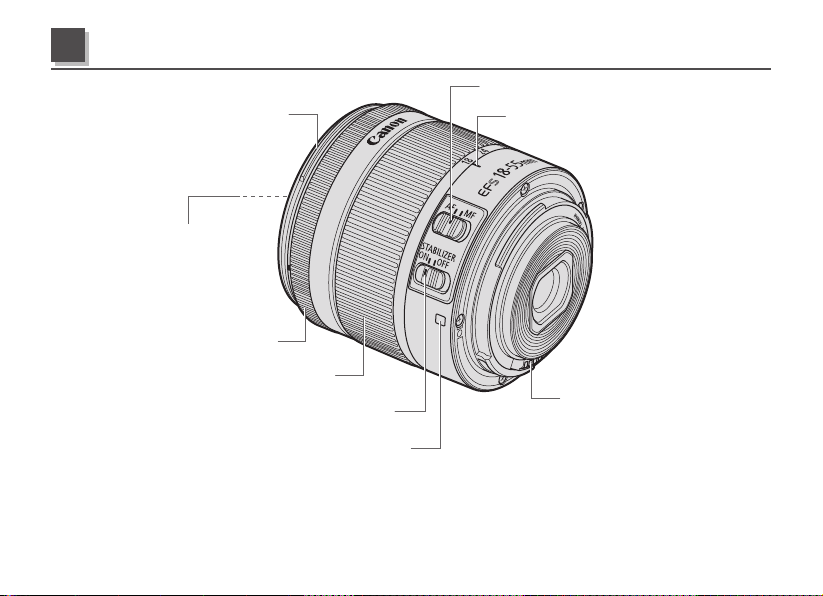
Hoodmount(→8)
Zoomring(→8)
Filtermountingthread
(→11)
Focusingring(→7)
Lensmountindex(→7)
Imagestabilizerswitch(→9)
Focusmodeswitch(→7)
Zoompositionindex(→8)
Contacts(→7)
Fordetailedinformation,referencepagenumbersareprovidedinparentheses(→**).
Nomenclature
ENG-7
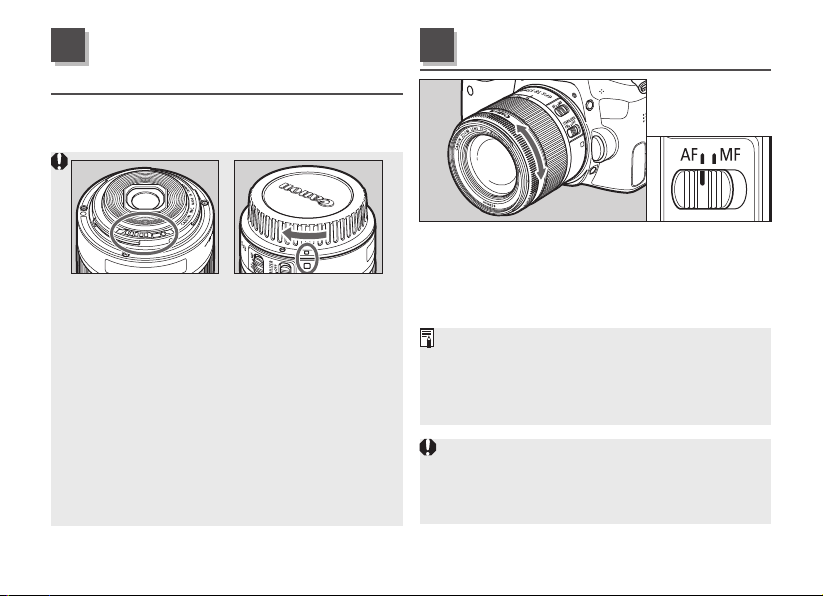
See your camera’s instructions for details on
mounting and detaching the lens.
Afterdetachingthelens,placethelenswith
therearenduptopreventthelenssurfaceand
contactsfromgettingscratched.
Contactsthatarescratched,soiled,orhave
ngerprintsonthemmayresultinfaulty
connectionsorcorrosion,whichmayleadto
malfunctions.Ifthecontactsgetsoiled,clean
themwithasoftcloth.
Attachthelenscapanddustcapwhen
disconnectingthelens.Whenattachingthe
dustcap,alignthelensmountindexwiththe
indexofthedustcapandrotateinaclockwise
directionasshownintheillustration.Followthe
reverseproceduretodetachit.
Toshootinautofocus(AF)mode,setthefocus
modeswitchtoAF.
Touseonlymanualfocusing(MF),setthefocus
modeswitchtoMF,andfocusbyturningthe
focusingring.
WhenAFoperationissetto[ONESHOT],manual
focusispossibleafterautofocusinghasbeen
completedbycontinuingtopresstheshutterbutton
halfway(Full-timemanualfocus).Therearetimes
whencamerasettingchangesarerequired.
Quicklyrotatingthefocusingringmayresultin
delayedfocus.
Focusingbyrotatingthefocusingringisnot
possiblewhenthecameraisOFF.
Mounting and
Detaching the Lens
1
Setting the Focus Mode
2
ENG-8
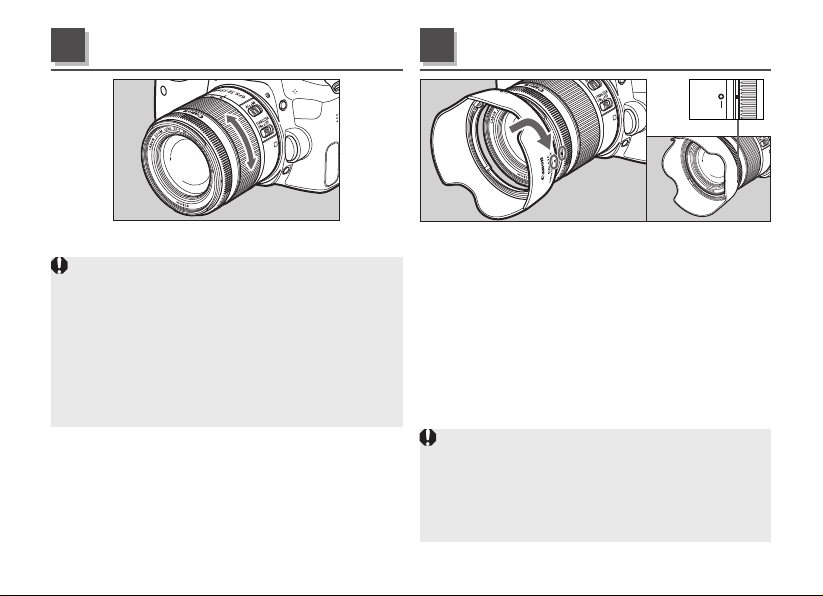
Tozoom,turnthelens’zoomring.
Besuretonishzoomingbeforefocusing.
Zoomingafterfocusingcanaffectthefocus.
Blurringmaytemporarilyoccurifthezoomringis
quicklyrotated.
Thelenswillmoveinandoutoffocusifthe
zoomringisrotatedwhenthecameraisOFF.
Zoomingduringstillimageexposurewillresultin
delayedfocus.Thiscausesanystreaksoflight
thatarecapturedduringexposuretobeblurred.
TheEW-63Choodcutsoutunwantedlightand
protectsthefrontofthelensfromrain,snow,and
dust.
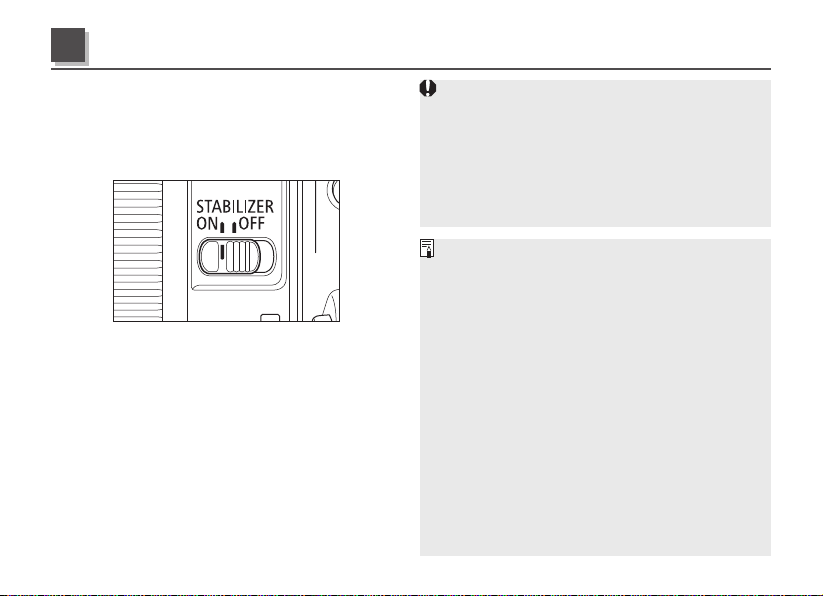
Toattachthehood,alignthehood’sattachment
positionmarkwiththereddotonthefrontofthe
lens,thenturnthehoodasshownbythearrow
untilthelens’reddotisalignedwiththehood’s
stoppositionmark.
Thehoodcanbereverse-mountedonthelens
forstorage.
Ifthehoodisnotattachedproperly,vignetting
(darkeningoftheperimeterofthepicture)mayoccur.
Graspandrotatethebaseofthehoodwhen
attachinganddetachingit.Therearecasesin
whichitmaybecomedeformedifthehoodis
rotatedwithitgraspedneartotherim.
Hood (sold separately)
4
Zooming
3
ENG-9
YoucanusetheimagestabilizerinAForMF
mode.
Thisfunctionprovidesoptimalimagestabilization
dependingonshootingconditions(suchas
shootingstillsubjectsandfollowingshots).
1 Set the STABILIZER switch to ON.
Ifyouarenotgoingtousetheimagestabilizer
function,settheswitchtoOFF.
2
When you press the shutter button halfway,
the Image Stabilizer will start operating.
Makesuretheimageintheviewnderisstable,
thenpresstheshutterbuttontherestoftheway
downtotakethepicture.
TheImageStabilizercannotcompensatefora
blurredshotcausedbyasubjectthatmoved.
TheImageStabilizermaynotbefullyeffective
ifyoushootfromaviolentlyshakingvehicleor
othertransportation.
TheImageStabilizerconsumesmorepower
thannormalshooting,resultinginfewershots
andashortermovieshootingtime.
Whenshootingastillsubject,itcompensatesfor
camerashakeinalldirections.
Itcompensatesforverticalcamerashakeduring
followingshotsinahorizontaldirection,and
compensatesforhorizontalcamerashakeduring
followingshotsinaverticaldirection.
Whenyouuseatripod,theImageStabilizer
shouldbeturnedofftosavebatterypower.
E
venwithamonopod,theImageStabilizerwill
beaseffectiveasduringhand-heldshooting.
However,dependingontheshootingconditions,
therearecasesinwhichtheImageStabilizer
effectmaybelesseffective.
T
heimagestabilizerfunctionalsooperateswhenthe
lensisusedwithanextensiontubeEF12IIorEF25II.
TheImageStabilizerwilloperateevenwhenyou
pressthebuttonassignedtotheAFfunctionwith
thecamera’sCustomFunctions.
Image Stabilizer
5
ENG-10
Insemi-darkenedareassuchasindoorsor
outdoorsatnight.
Inlocationswhereashphotographyis
prohibited,suchasartmuseumsandtheater
stages.
Insituationswhereyourfootingisuncertain.
Insituationswherefastshuttersettings
cannotbeused.
Whenpanningsubjectsinmotion.
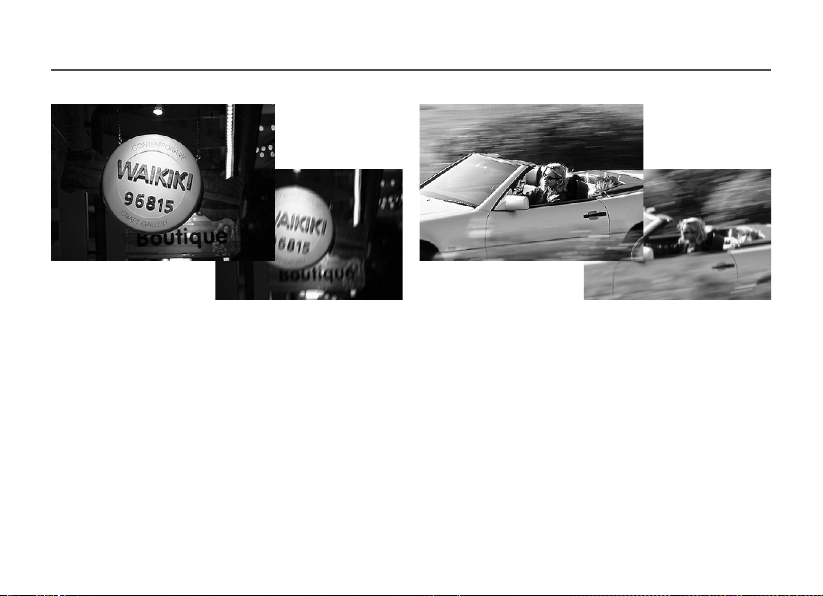
The image stabilizer for this lens is effective for hand-held shots in the following conditions.
OFF
ON
OFF
ON
Image Stabilizer
ENG-11
Attachinga250Dor500D(58mm)Close-up
Lensenablesclose-upphotography.
Themagnicationwillbeasfollows.
Close-upLens250D:0.08x-0.37x
Close-upLens500D:0.04x-0.31x
MFmodeisrecommendedforaccuratefocusing.
Youcanattachlterstotheltermounting
threadonthefrontofthelens.
Onlyoneltermaybeattached.
Ifyouneedapolarizinglter,usetheCanon
CircularPolarizingFilterPL-CB(58mm).
Detachthehoodwhenadjustingthepolarizing
lter.
Filters
(sold separately)
6
Close-up Lenses
(sold separately)
7
Extension Tubes
(sold separately)
8
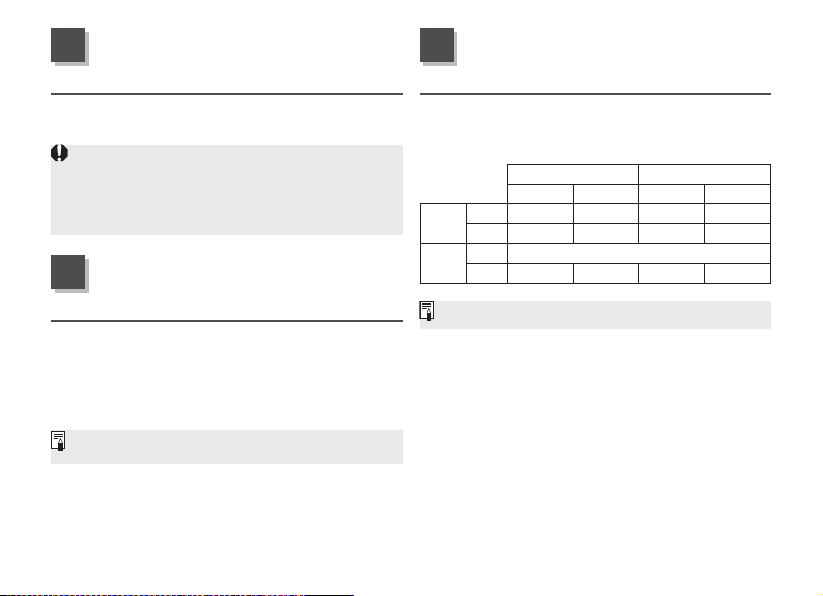
YoucanattachextensiontubeEF12IIorEF25
IIformagniedshots.Theshootingdistance
andmagnicationareshownbelow.
FocusingDistanceRange(mm)
Magnication(×)
Closedistance Longdistance Closedistance Longdistance
EF12II
18mm
120 128 0.82 0.66
55mm
175 344 0.55 0.23
EF25II
18mm
Incompatible
55mm
160 231 0.91 0.51
MFmodeisrecommendedforaccuratefocusing.
ENG-12
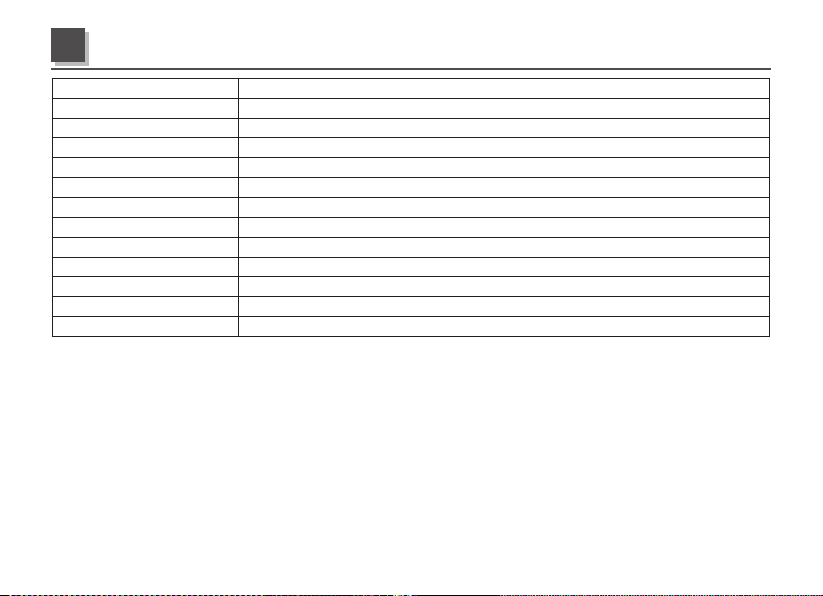
Focal Length/Aperture 18-55mmf/4-5.6
Lens Construction 10groups,12elements
Minimum Aperture f/22-32
Angle of View Diagonal:74°20′-27°50′,Vertical:45°30′-15°40′,Horizontal:64°30′-23°20′
Min. Focusing Distance 0.25m/0.82ft.
Max. Magnification 0.25x(at55mm)
Field of View Approx.148x228–59x89mm/5.83x8.98–2.32x3.50inch(at0.25m/0.82ft.)
Filter Diameter 58mm
Max. Diameter and Length 66.5x61.8mm/2.62x2.43inch
Weight Approx.215g/7.6oz.
Hood EW-63C(soldseparately)
Lens Cap E-58II
Case LP1014(soldseparately)
Equivalentto29-88mminthe35mmlmformat.
Thelenslengthismeasuredfromthemountsurfacetothefrontendofthelens.Add24.2mmwhen
includingthelenscapanddustcap.
Thesizeandweightlistedareforthelensonly,exceptasindicated.
Extenderscannotbeusedwiththislens.
Aperturesettingsarespeciedonthecamera.Thecameraautomaticallycompensatesforvariations
intheaperturesettingwhenthecameraiszoomedinorout.
AlldatalistedismeasuredaccordingtoCanonstandards.
Productspecicationsandappearancearesubjecttochangewithoutnotice.
Specications
ENG-13
Only for European Union and EEA (Norway, Iceland and Liechtenstein)
Thissymbolindicatesthatthisproductisnottobedisposedofwithyourhouseholdwaste,accordingtothe
WEEEDirective(2012/19/EU)andnationallegislation.Thisproductshouldbehandedovertoadesignated
collectionpoint,e.g.,onanauthorizedone-for-onebasiswhenyoubuyanewsimilarproductortoan
authorizedcollectionsiteforrecyclingwasteelectricalandelectronicequipment(EEE).Improperhandlingof
thistypeofwastecouldhaveapossiblenegativeimpactontheenvironmentandhumanhealthdueto
potentiallyhazardoussubstancesthataregenerallyassociatedwithEEE.Atthesametime,your
cooperationinthecorrectdisposalofthisproductwillcontributetotheeffectiveusageofnaturalresources.Formore
informationaboutwhereyoucandropoffyourwasteequipmentforrecycling,pleasecontactyourlocalcityoffice,waste
authority,approvedWEEEschemeoryourhouseholdwastedisposalservice.Formoreinformationregardingreturnand
recyclingofWEEEproducts,pleasevisit
www.canon-europe.com/weee.

CT1-8614-000 0716Ni © CANON INC. 2016