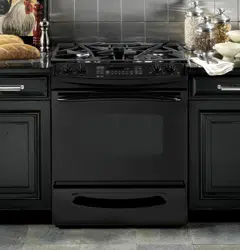
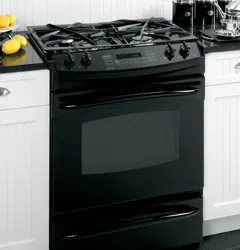
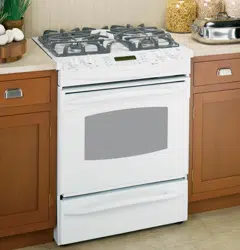
Owner 's Manual Gas Range
Operating Instructions
Using the gas surface burners.
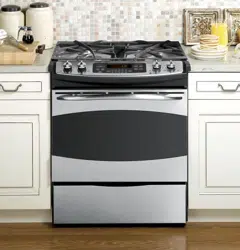
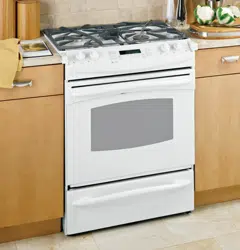
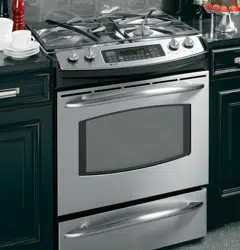
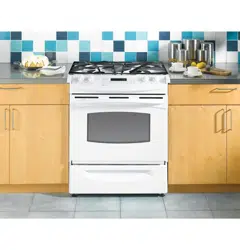
Throughout this manual, features and appearance may vary from your model.
Before Lighting a Gas Burner
- Make sure all grates on the range are in place before using any burner.
- If your range has the Range Lock-Out feature, make sure it is disabled before attempting to light the surface burners.
After Lighting a Gas Burner
- Do not operate the burner for an extended period of time without cookware on the grate. The finish on the grate may chip without cookware to absorb the heat.
- Be sure the burners and grates are cool before you place your hand. a pot holder. cleaning cloths or other materials on them.
How to Light a Gas Surface Burner
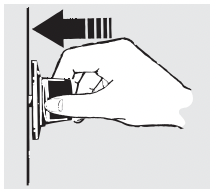
Push the control knob in and turn it to the LITE position.
You will hear a clicking noise—the sound of the electric spark igniting the burner.
After the flame lights. turn the knob to adjust the flame size. If the knob stays at LITE, it will continue to click.
When one burner is turned to LITE, all the burners spark. Do not attempt to disassemble or clean around any burner while another burner is on. An electric shock may result. which could cause you to knock over hot cookware.
Sealed Gas Burners
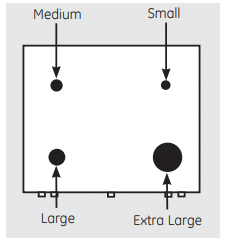
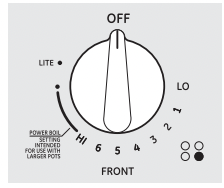
Your gas range cooktop has four sealed gas burners. They offer convenience. cleanability and flexibility to be used in a wide range of cooking applications.
The smallest burner in the right rear position is the simmer burner. This burner can be turned to LO for a very low simmer setting. It provides precise cooking performance for delicate foods such as sauces or foods that require low heat for along cooking time.
The medium (left rear) and the large (left front) burners are the primary burners for most cooking. These general-purpose burners can be turned from HI to LO to suit a wide range of cooking needs.
The extra large burner (right front) is the maximum output burner. Like the other three burners. it can be turned from HI to LO for a wide range of cooking applications; however, this burner is designed to quickly bring large amounts of liquid to a boil. It has a special POWER BOIL setting designed to be used with cookware 10 inches or larger in diameter.
How to Select Flame Size
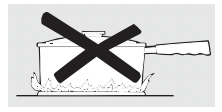
For safe handling of cookware. never let the flames extend up the sides of the cookware.
Watch the flame, not the knob, as you reduce heat. The flame size on a gas burner should match the cookware you are using.
Any flame larger than the bottom of the cookware is wasted and only serves to heat the handle.
Top-of-Range Cookware
- Aluminum: Medium-weight cookware is recommended because it heats quickly and evenly. Most foods brown evenly in an aluminum skillet. Use saucepans with tight fitting lids when cooking with minimum amounts of water.
- Cast-Iron: If heated slowly, most skillets will give satisfactory results.
- Enamelware: Under some conditions. the enamel of some cookware may melt. Follow cookware manufacturer's recommendations for cooking methods.
- Glass: There are two types of glass cookware— those for oven use only and those for top-of range cooking (saucepans. coffee and teapots). Glass conducts heat very slowly.
- Heatproof Glass Ceramic: Can be used for either surface or oven cooking. It conducts heat very slowly and cools very slowly. Check cookware manufacturer's directions to be sure it can be used on gas ranges.
- Stainless Steel: This metal alone has poor heating properties and is usually combined with copper, aluminum or other metals for improved heat distribution. Combination metal skillets usually work satisfactorily if they are used with medium heat as the manufacturer recommends.
Stove Top Grills
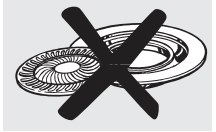
Do not use stove top grills on your sealed gas burners. If you use the stove top grill on the sealed gas burner. it will cause incomplete combustion and can result in exposure to carbon monoxide levels above allowable current standards. This can be hazardous to your health.
Wok This Way
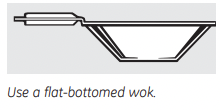
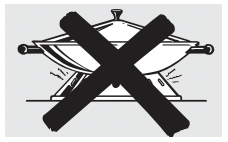
We recommend that you use a 14-inch (35.6 cm) or smaller flat-bottomed wok. Make sure the wok bottom sits flat on the grate. They are available at your local retail store.
Only a flat-bottomed wok should be used.
Do not use a flat-bottomed wok on a support ting. Placing the ring over the burner or grate may cause the burner to work improperly, resulting in carbon monoxide levels above allowable standards. This could be dangerous to your health.
In Case of Power Failure
In case of a power failure. you can light the gas surface burners on your range with a match. Hold a lit match to the burner, then push in and turn the control knob to the LITE position. Use extreme caution when lighting burners this way. Surface burners in use when an electrical power failure occurs will continue to operate normally.
NOTE: If range lock-out is in use at the time of a power failure. the surface burners cannot be lit.
Using the oven controls. (on some models)
(Throughout this manual. features and appearance may vary from your model.)
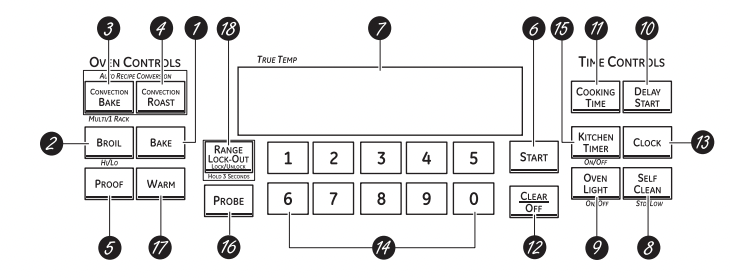
 Oven Control Clock and Timer Features and Settings
 BAKE Pad
Touch to select the bake function.
 BROIL HI/LO Pad
Touch to select the broil function.
 CONVECTION BAKE MULTI/1 RACK Pad
Touch to select baking with the convection function.
 CONVECTION ROAST Pad
Touch to select roasting with the convection function.
 PROOF Pad
Touch to select a warm environment useful for rising yeast-leavened products.
 START Pad
Must be touched to start any cooking or cleaning function.
 Display
Shows the time of day. oven temperature. whether the oven is in the bake. broil or self-cleaning mode. the times set for the timer or automatic oven operations. and if the range is locked.
If “F- and a number or letter” flash in the display and the oven control signals. this indicates a function error code. Touch the CLEAR/OFF pad. Allow the oven to cool for one hour. Put the oven back into operation. If the function error code repeats. disconnect the power to the oven and call for service.
If your oven was set for a timed oven operation and a power outage occurred. the clock and all programmed functions must be reset.
The time of day will flash in the display when there has been a power outage.
 SELF CLEAN STD/LOW Pad
Touch to select self-cleaning function. See the Using the self-cleaning oven section.
 OVEN LIGHT ON/OFF Pad
Touch to turn the oven light on or off.
 DELAY START Pad
Use along with COOKING TIME or SELF CLEAN STD/LOW pads to set the oven to start and stop automatically at a time you set.
 COOKING TIME Pad
Touch and then touch the number pads to set the amount of time you want your food to cook. The oven will shut off when the cooking time has run out.
 CLEAR/OFF Pad
Touch to cancel ALL oven operations except the clock. timer and range lock-out.
 CLOCK Pad
Touch before setting the clock.
 Number Pads
Use to set any function requiring numbers such as the time of day on the clock. the timer. the oven temperature. the internal food temperature. the start time and length of operation for timed baking and self-cleaning.
 KITCHEN TIMER ON/OFF Pad
Touch to select the timer feature.
 PROBE Pad
Touch when using the probe to cook food.
 WARM Pad
Touch to keep cooked foods warm. See the How to Set the Oven for Warming section.
 RANGE LOCK-OUT Pad
Touch and hold the RANGE LOCK-OUT pad for 3 seconds to lock/unlock the surface burners. oven burners and control panel so they cannot be activated.
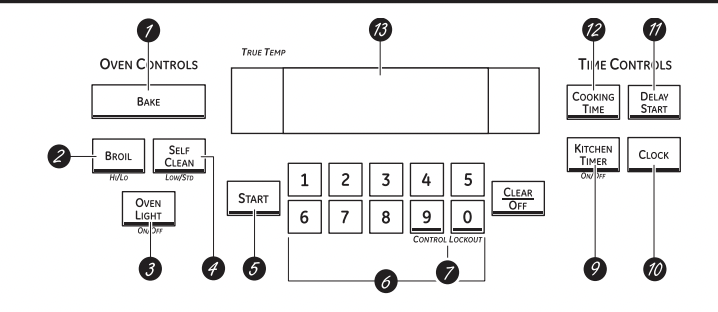
BAKE Pad
Touch to select the bake function.
BROIL HI/LO Pad
Touch to select the broil function.
OVEN LIGHT Pad
Touch to turn the oven light on or off.
SELF CLEAN LOW/STD Pad
Touch to select self-cleaning function. See the Using the self-cleaning oven section.
START Pad
Must be touched to start any cooking or cleaning function.
Number Pads
Use to set any function requiring numbers such as the time of day on the clock. the timer. the oven temperature. the internal food temperature. the start time and length of operation for timed baking and self-cleaning.
CONTROL LOCKOUT
The control lockout is 9 and 0. Touch and hold the 9 and 0 pads at the same time for 3 seconds.
CLEAR/OFF Pad
Touch to cancel ALL oven operations except the clock. timer and control lock-out.
KITCHEN TIMER ON/OFF Pad
Touch to select the timer feature.
CLOCK Pad
Touch before setting the clock.
DELAY START Pad
Use along with COOKING TIME or SELF CLEAN
LOW/STD pads to set the oven to start and stop automatically at a time you set.
COOKING TIME Pad
Touch and then touch the number pads to set the amount of time you want your food to cook. The oven will shut off when the cooking time has run out.
Display
Shows the time of day. oven temperature. whether the oven is in the bake. broil or self-cleaning mode and the times set for the timer or automatic oven operations.
If “F- and a number or letter” flash in the display and the oven control signals. this indicates a function error code. Touch the CLEAR/OFF pad. Allow the oven to cool for one hour. Put the oven back into operation. If the function error code repeats. disconnect the power to the oven and call for service.
If your oven was set for a timed oven operation and a power outage occurred. the clock and all programmed functions must be reset.
The time of day will flash in the display when there has been a power outage.
Using the oven.
To avoid possible burns. place the racks in the desired position before you turn the oven on.
Before you begin
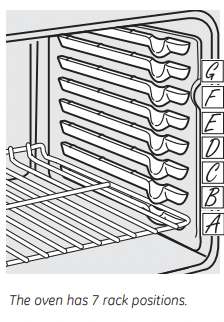
The racks have stops. so that when placed correctly on the supports, they will stop before coming completely out, and will not tilt.
When placing and removing cookware, pull the rack out until it stops.
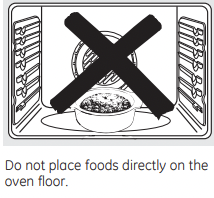
The bake burner is under the oven floor. Do not place foods on the oven bottom for cooking.
To remove a rack, pull it toward you, tilt the front end up and pull it out.
To replace, place the end of the rack (stop locks) on the support, tilt up the front and push the rack in.
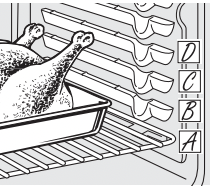
 CAUTION: when you are using the rack in the lowest position (A), you will need to use caution when pulling the rack out. We recommend that you pull the rack out several inches and then, using two pot holders, pull the rack out by holding the sides of it. The rack is low and you could be burned if you place your hand in the middle of the rack and pull all the way out. Be very careful not to burn your hand on the door when using the rack in the lowest position (A).
How to Set the Oven for Baking or Roasting
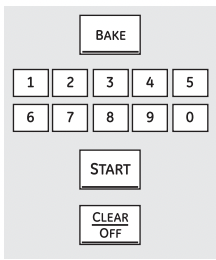
- Touch the BAKE pad.
- Touch the number pads to set the desired temperature.
- Touch the START pad.
- Check food for doneness at minimum time on recipe. Cook longer if necessary.
- Touch the CLEAR/OFF pad when cooking is complete.
NOTE: A cooling fan will automatically turn on and off to cool internal parts. This is normal. and the fan may continue to run even after the oven in turned off.
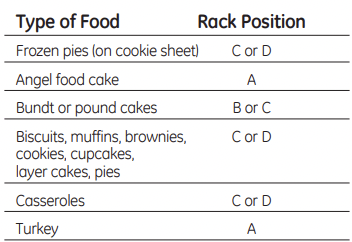
If baking four cake layers at the same time. place two layers on rack B and two layers on rack D. Stagger pans on the rack so one is not directly above the other.
Preheating and Pan Placement
Preheat the oven if the recipe calls for it. Preheating is necessary for good results when baking cakes. cookies. pastry and breads.
To preheat, set the oven at the correct temperature. The control will beep when the oven is preheated and the display will show your set temperature. The preheat time will vary depending on the temperature setting.
Baking results will be better if baking pans are centered in the oven as much as possible. If baking with more than one pan, place the pans so each has at least 1” (2.5 cm) to 11/2” (3.8 cm) of air space around it.
Aluminum Foil
Do not use aluminum foil to line oven bottoms. The foil will trap heat below and upset the performance of the oven. Foil can melt and permanently damage the oven bottom. Damage from improper use of aluminum foil is not covered by the product warranty.
Foil may be used to catch spills by placing a sheet on a lower rack, several inches below the food .Do not use more foil than necessary and never entirely cover an oven rack with aluminum foil. Keep foil at least 1-1/2” from oven walls to prevent poor heat circulation.
Oven Moisture
As your oven heats up. the temperature change of the air in the oven may cause water droplets to form on the door glass. These droplets are harmless and will evaporate as the oven continues to heat up.
Oven Vent
Your oven is vented through one vent located toward the rear of the range. Do not block this vent when cooking in the oven—it is important that the flow of hot air from the oven and fresh air to the oven burner be uninterrupted.
Avoid touching the vent openings or nearby surfaces during oven or broiler operation— they may become hot.
- Handles of pots and pans on the cooktop may become hot if left too close to the vent.
- Do not leave plastic items on the cooktop— they may melt if left too close to the vent.
- Do not leave any items on the cooktop. The hot air from the vent may ignite flammable items and will increase pressure in closed containers. which may cause them to burst.
- Metal items will become very hot if they are left on the cooktop. and could cause burns.
Power Outage
CAUTION: Do not make any attempt to operate the electric ignition oven during an electrical power failure. The oven or broiler cannot be lit during a power failure. Gas will not flow unless the glow bar is hot.
If the oven is in use when a power failure occurs. the oven burner shuts off and cannot be re-lit until power is restored. This is because the flow of gas is automatically stopped and will not resume when power is restored until the glow bar has reached operating temperature.
How to Set the Oven for Broiling
IMPORTANT: To avoid possible burns. place the racks in the desired position before you turn the oven on.
- Place the meat or fish on a broiler grid in a broiler pan.
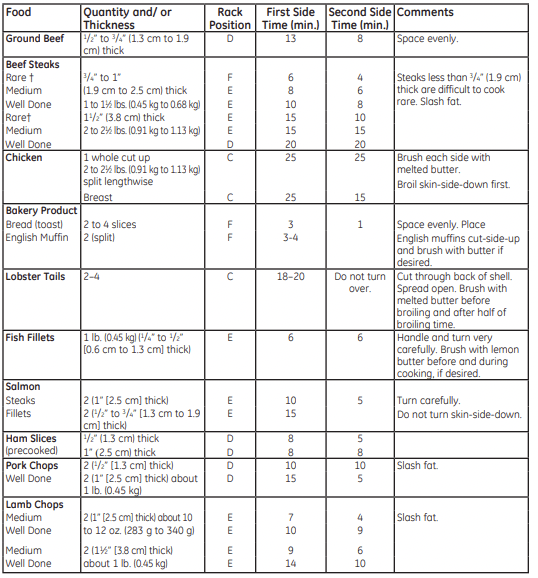
- Follow suggested rack positions in the Broiling Guide
- The oven door must be closed during
- Touch the BROIL HI/LO pad once for HI Broil. To change to LO Broil. touch the BROIL HI/ LO pad again. Use LO Broil to cook foods such as poultry or hick cuts of meat thoroughly without over browning them.
- Touch the START pad.
- When broiling is finished. touch the CLEAR/ OFF pad.
Serve the food immediately. and leave the pan outside the oven to cool during the meal for easiest cleaning.
NOTE: Broil will not work if the temperature probe is plugged in.
Broiling Guide
The size, weight, thickness, starting temperature and your preference of doneness will affect broiling times. This guide is based on meats at refrigerator temperature.
Using the clock and timer.
To Set the Clock
The clock must be set to the correct time of day for the automatic oven timing functions to work properly. The time of day cannot be changed during a timed baking or self-cleaning cycle.
- Touch the CLOCK pad.
- Touch the number pads.
- Touch the START pad.
To Set the Timer
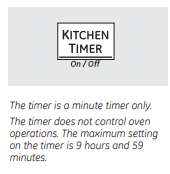
- Touch the KITCHEN TIMER ON/OFF pad.
- Touch the number pads until the amount of time you want shows in the display. For example. to set 2 hours and 45 minutes. touch 2. 4 and 5 in that order. If you make a mistake touch the KITCHEN
- TIMER ON/OFF pad and begin again.
- Touch the START pad.
After touching the START pad. SET disappears; this tells you the time is counting down. although the display does not change until one minute has passed. Seconds will not be shown in the display until the last minute is counting down.
5. When the timer reaches :00. the control will beep 3 times followed by one beep every 6 seconds until the KITCHEN TIMER ON/OFF padis touched.
The 6-second tone can be canceled by following the steps in the Special features of your oven control section under Tones at the End of a Timed Cycle.
To Reset the Timer
If the display is still showing the time remaining. you may change it by touching the KITCHEN
ON/OFF pad. then touch the number pads until the time you want appears in the display.
If the remaining time is not in the display (clock. delay start or cooking time are in the display). recall the remaining time by touching the KITCHEN TIMER ON/OFF pad and then touching the number pads to enter the new time you want.
To Cancel the Timer
Touch the KITCHEN TIMER ON/OFF pad twice.
Using the range or control lock-out.
Range Lock-Out (on some models)
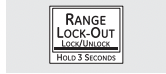
Your control will allow you to lock out the surface burners. oven burners and control panel so they cannot be activated.
To lock/unlock the controls:
- Turn all surface burners off.
- Touch and hold the RANGE LOCK-OUT pad for 3 seconds until the display shows LOC ON.
- To unlock the control. touch and hold the RANGE LOCK-OUT pad for 3 seconds until the display shows LOC OFF.
When this feature is on and the touch pads are touched. the control will beep and the display will show LOC ON.
- The control lock-out mode affects all controls. No controls will work when this feature is activated.
- The adjustment will be retained in memory after a power failure.
Control Lockout (on some models)
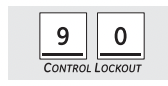
Your control will allow you to lock out the touch pads so they cannot be activated when pressed.
To lock/unlock the controls:
- Touch the 9 and 0 pads at the same time for 3 seconds. until the display shows LOC ON.
- To unlock the control. touch the 9 and 0 pads at the same time for 3 seconds. until the display shows LOC OFF.
When this feature is on and the touch pads are touched. the control will beep and the display will show LOC ON.
- The control lock-out mode affects all touch pads. No touch pads will work when this feature is activated.
- The adjustment will be retained in memory after a power failure.
Using the timed baking and roasting features. (on some models)
NOTE: Foods that spoil easily—such as milk. eggs. fish. stuffings. poultry and pork—should not be allowed to sit for more than 1 hour before or after cooking. Room temperature promotes the growth of harmful bacteria. Be sure that the oven light is off because heat from the bulb will speed harmful bacteria growth.
How to Set an Immediate Start and Automatic Stop
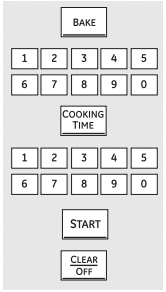
The oven will turn on immediately and cook for a selected length of time. At the end of the cooking time the oven will turn off automatically.
- Touch the BAKE pad.
- Using the number pads. enter the desired temperature.
- Touch the COOKING TIME pad.
NOTE: If your recipe requires preheating. you may need to add additional time to the length of the cooking time.
4. Using the number pads. enter the desired baking time. The oven temperature and the cooking time that you entered will be displayed.
5. Touch the START pad.
The display will show the changing temperature (starting at 100°F [38°C]) and the cooking time. The display starts changing once the temperature reaches 100°F (38°C).
The oven will continue to cook for the programmed amount of time. then shut off automatically. unless the WARM feature was set. See the How to Set the Oven for Warming section.
6. Touch the CLEAR/OFF pad to clear the display.
How to Set a Delayed Start and Automatic Stop
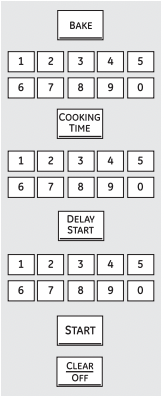
You can set the oven control to delay-start the oven. cook for a specific length of time and then turn off automatically.
Make sure the clock shows the correct time of day.
- Touch the BAKE pad.
- Using the number pads. enter the desired temperature.
- Touch the COOKING TIME pad.
NOTE: If your recipe requires preheating. you may need to add additional time to the length of the cooking time.
4. Using the number pads. enter the desired baking time.
5. Touch the DELAY START pad.
6. Using the number pads. enter the time of day you want the oven to turn on and start cooking.
7. Touch the START pad.
NOTE: An attention tone will sound if you are using timed baking and do not touch the START pad after entering the baking temperature.
If you would like to check the times you have set. touch the DELAY START pad to check the start time you have set or touch the COOKING TIME pad to check the length of cooking time you have set.
When the oven turns on at the time of day you have set. the display will show the changing temperature (starting at 100°F [38°C]) and the cooking time. The display starts changing once the temperature reaches 100°F (38°C).
The oven will continue to cook for the programmed amount of time. then shut off automatically. unless the WARM feature was set. See the How to Set the Oven for Warming section.
8. Touch the CLEAR/OFF pad to clear the display.
Care and cleaning of the range.
Be sure all controls are off and all surfaces are cool before cleaning any part of the range.

WARNING: If your range is removed for cleaning. servicing or any reason. be sure the anti-tip device is reengaged properly when the range is replaced. Failure to take this precaution could result in tipping of the range and cause injury.
How to Remove Protective Shipping Film and Packaging Tape
Carefully grasp a corner of the protective shipping film with your fingers and slowly peel it from the appliance surface. Do not use any sharp items to remove the film. Remove all of the film before using the appliance for the first time.
To assure no damage is done to the finish of the product. the safest way to remove the adhesive from packaging tape on new appliances is an application of a household liquid dishwashing detergent. Apply with a soft cloth and allow to soak.
NOTE: The adhesive must be removed from all parts. It cannot be removed if it is baked on.
Burner Caps and Heads
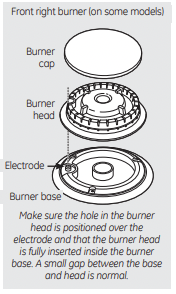
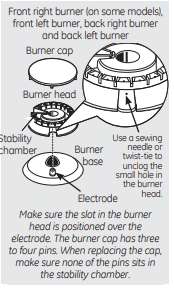
The burner assemblies should be washed regularly and. of course. after spillovers.
Turn all controls off before removing burner parts.
The burner grates. burner heads and burner caps can be removed for easy cleaning.
The electrode of the spark igniter is exposed beyond the surface of the burner base. When cleaning the cooktop. be careful not to snag the electrode of the spark igniter with your cleaning cloth. Damage to the igniter could occur. To avoid snagging a cloth on the spark igniter. leave the burner heads in place when cleaning the cooktop.
Be careful not to push in any cooktop controls while cleaning the cooktop. Aslight electrical shock might result which could cause you to knock over hot cookware.
Wash burner parts with an all-purpose non abrasive cleaner and warm water. Soak stubborn soil. Dry them with a cloth—do not reassemble while wet.
To reassemble. replace the burner head first. then the burner cap and finally the burner grate.
CAUTIONS DO NOT OPERATE THE BURNER WITHOUT ALL BURNER PARTS IN PLACE.
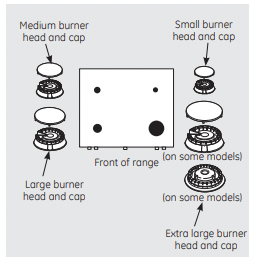
Make sure that the heads and caps are replaced in the correct locations. There is one small. one medium. one large and one extra large burner head and cap.
Burner Grates and Vent Grille
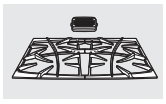
Porcelain enamel burner grates and the vent grille should be washed regularly and. of course. after spillovers.
The grates may be washed either in the dishwasher or you may wash them in hot soapy water and rinse with clean water. You may also use abrasive cleaners and scouring pads to clean burner grates and the vent grille. Dry the grates and grille with a cloth—don't put them back on the cooktop wet.
To get rid of burned-on food. place the grates and grille in a covered container. Add 1/4 cup (59 L) ammonia and let them soak several hours or overnight. Wash. rinse well and dry.
Although they're durable. the grates and grille will gradually lose their shine. regardless of the best care you can give them. This is due to their continual exposure to high temperatures.
Do not operate a burner for an extended period of time without cookware on the grate. The finish on the grate may chip without cookware to absorb the heat.
After cleaning. replace the center vent grille first. Replace the side grates so that the center extensions are oriented toward the center of the cooktop. The rear center extensions should slightly overlap the vent grille. Make sure the grates are positioned securely over the burners and that they are stable and level.
Rubber Grate Feet
For stability, your cooktop has rubber feet on the burner grates. If any of these rubber feet should become damaged or lost, replace them immediately.
Cooktop Surface
To avoid damaging the porcelain enamel surface of the cooktop and to prevent it from becoming dull. clean up spills right away. Foods with a lot of acid (tomatoes. sauerkraut. fruit juices. etc.) or foods with high sugar content could cause a dull spot if allowed to set.
When the surface has cooled. wash and rinse. For other spills such as fat spatterings. etc. wash with soap and water once the surface has cooled. Then rinse and polish with a dry cloth.
NOTE: Do not store flammable materials in an oven. drawer or near the cooktop. Do not store or use combustible materials. gasoline or other flammable vapors and liquids in the vicinity of this or any other appliance.
NOTE: Do not lift the cooktop. Lifting the oo can lead to damage and improper operation of the range.
NOTE: For stainless steel cooktops. refer to the Stainless steel surfaces section.
Control Knobs
The control knobs may be removed for easier cleaning.
Make sure the knobs are in the OFF positions and pull them straight off the stems for cleaning.
The knobs can be cleaned in a dishwasher or they may also be washed with soap and water. Make sure the insides of the knobs are dry before replacing.
Replace the knobs in the OFF position to ensure proper placement.
Oven Racks
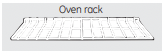
All oven racks may be cleaned by hand with an abrasive cleaner or steel wool. After cleaning. rinse the racks with clean water and dry with a clean cloth. Gray porcelain-coated oven racks may remain in the oven during the self-cleaning cycle without being damaged. The shiny. silver colored oven racks may remain in the oven during the self-cleaning cycle. but they will lose their luster and become hard to slide.
It will be necessary to grease all oven rack side edges with a light coating of vegetable oil after cleaning them by hand or in the oven. This will help maintain the ease of sliding the racks in and out of the oven.
Oven Light Replacement (on some models)
WARNING Shock or Bun Harzard : Before replacing oven light bulb. disconnect the electrical power to the range at the main fuse or circuit breaker panel. Failure to do so may result in electric shock or burn.
CAUTION BURN HAZARD: The glass cover and bulb should be removed when cool.Touching hot glass with bare hands or a damp cloth can cause burns.
To remove:
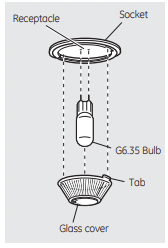
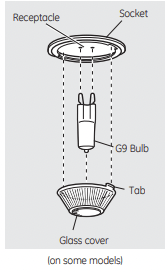
- Turn the glass cover counterclockwise 1/4 turn until the tabs of the glass cover clear the grooves of the socket. Wearing latex gloves may offer a better grip.
- Using gloves or a dry cloth. remove the bulb by pulling it straight out.
To replace:
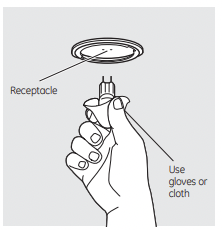
- Use anew 120/130-volt halogen bulb. not to exceed 50 watts. Replace the bulb with the same type of bulb that was removed. Your model will have one of the two types shown on the left. To determine the correct replacement bulb. check the bulb terminals. Bulbs with 2 straight pin terminals are G6.35 bulbs. Bulbs with 2 looped terminals are G9 bulbs. (Do not interchange.) Be sure the replacement bulb is rated 120 volts or 130 volts (NOT 12 volts).
- Using gloves or a dry cloth. remove the bulb from its packaging. Do not touch the bulb with bare fingers. Oil from skin will damage the bulb and shorten its life.
- Push the bulb straight into the receptacle all the way.
- Place the tabs of the glass cover into the grooves of the socket. Turn the glass cover clockwise 1/4 turn. For improved lighting inside the oven. clean the glass cover frequently using a wet cloth. This should be done when the oven is completely cool.
- Reconnect electrical power to the oven.
Oven Light Replacement (on some models)
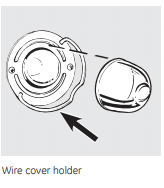
Be sure to let the light cover and bulb cool completely.
To remove the cover:
1. Hold a hand under the cover so. it doesn't fall when released. With fingers of the same hand. firmly push back the wire cover holder. Lift off the cover.
Do not remove any screws to remove the cover.
2. Replace bulb with a 40-watt appliance bulb.
To replace the cover:
- Place it into groove of the light receptacle. Pull wire forward to the center of the cover until it snaps into place.
- Connect electrical power to the range.
Cleaning the Oven Door
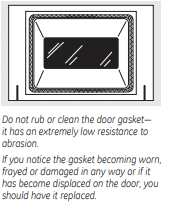
To clean the inside of the door:
- Because the area inside the gasket is cleaned during the self-clean cycle. you do not need to clean this by hand.
- The area outside the gasket and the door liner can be cleaned with a soap-filled or plastic scouring pad. hot water and detergent. Rinse well with a vinegar and water solution.
To clean the outside of the door:
- Use soap and water to thoroughly clean the top. sides and front of the oven door. Rinse well. You may also use a glass cleaner to clean the glass on the outside of the door. Do not let water drip into the vent openings.
- If any stain on the door vent trim is persistent. use a soft abrasive cleaner and a sponge-scrubber for best results.
- Spillage of marinades. fruit juices. tomato sauces and basting materials containing acids may cause discoloration and should be wiped up immediately. When surface is cool. clean and rinse.
- Do not use oven cleaners. cleaning powders or harsh abrasives on the outside of the door.
Lift-Off Oven Door

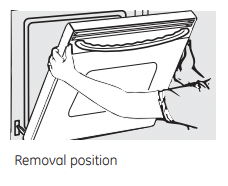
The door is very heavy. Be careful when removing and lifting the door.
Do not lift the door by the handle.
To remove the door:
- Fully open the door.
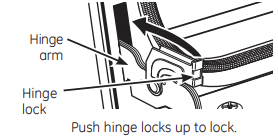
- Pull the hinge locks down toward the door frame. to the unlocked position. A tool, such as a small flat-blade screwdriver, may be required.
- Firmly grasp both sides of the door at the top.
- Close door to the door removal position. which is halfway between the broil stop position and fully closed.
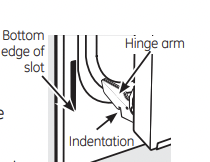
- Lift door up and out until the hinge arm is clear of the slot.
To replace the door:
- Firmly grasp both sides of the door at the top.
- With the door at the same edge as the removal position, seat the indentation of the hinge arm into the bottom edge of the hinge slot. The notch in the hinge arm must be fully seated into the bottom of the slot.
- Fully open the door. If the door will not fully open. the indentation is not seated correctly in the bottom edge of the slot.
- Push the hinge locks up against the front frame of the oven cavity to the locked position.
- Close the oven door.
Removable Oven Floor
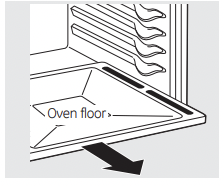
To remove the oven floor for easier cleaning:
- Remove the oven door using the instructions in the Lift-Off Oven Door section.
- Grasp oven floor slots on each side and pull it out.
- Clean the oven floor with warm soapy water.
IMPORTANT: Always replace the removable floor before the next use.
Stainless Steel Surfaces (on some models)
Do not use a steel wool pad; it will scratch the surface.
To clean the stainless steel surface. use warm sudsy water or a stainless steel cleaner or polish. Always wipe the surface in the direction of the grain. Follow the cleaner instructions for cleaning the stainless steel surface.
Painted Surfaces
Painted surfaces include the top and sides of the door, and the drawer front. Clean these with soap and water or a vinegar and water solution.
Do not use commercial oven cleaners. cleaning powders, steel wool or harsh abrasives on any painted surface.
Oven Vent
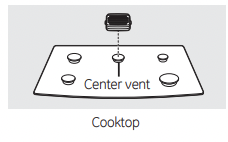
The oven is vented through an opening in the cooktop under the grille.
Never cover the opening with aluminum foil or any other material. This would prevent the oven vent from working properly.
Control Panel
If desired, the touch pads may be turned off before cleaning.
See the Range Lock-Out or Control Lock-Out section.
Clean up splatters with a damp cloth.
You may also use a glass cleaner.
Remove heavier soil with warm soapy water. Do not use abrasives of any kind.
Turn on the touch pads after cleaning.
Storage Drawer Removal
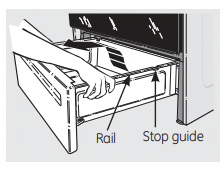
To remove the drawer:
- Pull the drawer out until it stops.
- Lift the front of the drawer until the stops clear the guides.
- Remove the drawer.
To replace the drawer:
- Place the drawer rails on the guides.
- Push the drawer back until it stops.
- Lift the front of the drawer and push back until the stops clear the guides.
- Lower the front of the drawer and push back until it closes.
Before you call for service
 Troubleshooting Tips
Save time and money! Review the charts on the following pages first and you may not need to call for service.
Burners have yellow or yellow-tipped flames
The combustion quality of burner flames needs to be determined visually.
- Use the illustrations below to determine if your burner flames are normal. If burner flames look like A. call for service. Normal burner flames should look like B or C, depending on the type of gas you use. With LP gas, some yellow tipping on outer cones is normal.
 A-Yellow flames. Call for service
 B-Yellow tips on outer cones. Normal for LP gas
 C-Soft blue flames. Normal for natural gas
Control knobs will not turn
Knob isn’t pushed down.
- To turn from the OFF position. push the knob in and then turn.
Burners do not light activated.
Range Lock-Out feature is
- Allow the range to cool down and touch and hold the RANGE LOCK-OUT pad (on some models) for 3 seconds until the display shows LOC OFF.
Plug on range is not completely inserted in the electrical outlet.
- Make sure electrical plug is plugged into a live, properly grounded outlet.
Gas supply not connected or turned on.
- See the Installation Instructions that came with your range.
A fuse in your home may be blown or the circuit breaker tripped.
- Replace the fuse or reset the circuit breaker.
Burner parts not replaced correctly.
- See the Care and cleaning of the range section.
Range Lock-Out or Control Lock-Out is feature activated
- If LOC ON appears in the display. the range control is locked. Turn this feature off to use the range. See the Range Lock-Out or Control Lock-Out section.
Ticking sound of spark igniter persists after burner lights
Control knob is still in the LITE position
- Turn the knob out of the LITE position to the desired setting.
- Turn the burner off and relight. If ticking is still present, call for service.
Burner flames very large or yellow
Improper air to gas ratio.
- If range is connected to LP gas, check all steps in the Installation Instructions that came with your range.
Oven light does not work
Light bulb is loose or defective.
- Tighten or replace the bulb.
Switch operating light is broken.
Oven will not work
Plug on range is not completely inserted in the electrical outlet.
- Make sure electrical plug is plugged into a live. properly grounded outlet.
A fuse in your home may be blown or the circuit breaker tripped.
- Replace the fuse or reset the circuit breaker.
Oven controls improperly set.
- See the Using the oven section.
Food does not bake or roast properly
Oven controls improperly set.
- See the Using the oven section.
Rack position is incorrect or the rack is not level.
- See the Using the oven section.
Incorrect cookware or cookware of improper size being used.
- See the Using the oven section.
Oven thermostat needs adjustment.
- See the Adjust the oven thermostat - Do it yourself! section.
Food does not broil properly
Oven controls improperly set.
- Make sure you touch the BROIL HI/LO pad.
Improper rack position being used.
Cookware not suited for broiling.
- For best results, use a pan designed for broiling.
The probe is plugged into the outlet in the oven.
- Unplug and remove the probe from the oven.
In some areas the power (voltage) may be low.
- Preheat the broil element for 10 minutes.
- Broil for the longest period of time recommended in the Broiling Guide.
Set convection baking temperature automatically reduces by 25°F (14°C)
The Auto Recipe Conversion feature is on to automatically reduce the set regular baking temperature by the recommended 25°F (14°C) for convection baking.
- See Auto Recipe Conversion in the Special Features section for more information.
Oven temperature too hot or too cold
Oven thermostat needs adjustment.
- See the Adjust the oven thermostat - Do it yourself! section.
Oven door is crooked
The door is out of position.
- Because the oven door is removable, it sometimes gets out of position during installation. Remove and replace the oven door. See the Lift-Off Oven Door section.
Storage drawer is crooked
Rear drawer support is on top of the guide rail.
- Reposition the drawer. See the Storage Drawer Removal instructions in the Care and cleaning of your range section.
Storage drawer won't close
Power cord may be obstructing drawer in the lower back of the range.
- Reposition the drawer and power cord. See the Storage Drawer Removal instructions in the Care and cleaning of your range section.
Rear drawer support is on top of the guide rail.
- Reposition the drawer. See the Storage Drawer Removal instructions in the Care and cleaning of your range section.
Oven racks are difficult to slide
The shiny, silver-colored racks (if so equipped) were cleaned in a self-clean cycle. The gray porcelain-coated racks (if so equipped) were improperly cleaned.
- Apply a small amount of vegetable oil to a paper towel and wipe the edges of the oven racks with the paper towel. Do not spray with Pam or other lubricant sprays.
Clock and timer do not work
Plug on range is not completely inserted in the electrical outlet.
- Make sure electrical plug is plugged into a live, properly grounded outlet.
A fuse in your home may be blown or the circuit breaker tripped.
- Replace the fuse or reset the circuit breaker.
Oven controls improperly set.
- See the Using the clock and timer section.
“Crackling” or “popping” sound
This is the sound of the metal heating and cooling during both the cooking and cleaning functions.
Oven will not self-clean
Surface burner is on.
- Turn all surface burners off.
The oven temperature is too high to set a self-clean operation.
- Allow the range to cool and reset the controls.
Oven controls improperly set.
- See the Using the self-cleaning oven section.
The probe is plugged into the outlet in the oven.
- Remove the probe from the oven.
Excessive smoking during a clean cycle
Excessive soil.
- Touch the CLEAR/OFF pad. Open the windows to rid the room of smoke. Wait until the LOCKED light goes off. Wipe up the excess soil and reset the clean cycle.
Oven door will not open after a clean cycle
Oven too hot.
- Allow the oven to cool below locking temperature.
Oven not clean after a clean cycle
Oven controls not properly set.
- See the Using the self-cleaning oven section.
Oven was heavily soiled.
- Clean up heavy spillovers before starting the clean cycle. Heavily soiled ovens may need to self-clean again or for a longer period of time.
“LOCKED” flashes in the display
The self-clean cycle has been selected but the door is not closed.
“LOCKED” light is on when you want to cook
The oven door is locked because the temperature inside the oven has not dropped below the locking temperature.
- Touch the CLEAR/OFF pad. Allow the oven to cool.
“F—and a number or letter” flash in the display
You have a function error code.
- Touch the CLEAR/OFF pad. Put the oven back into operation.
If the function code repeats.
- Disconnect all power to the range for at least 30 seconds and then reconnect power. If the function error code repeats, call for service.
Control signals after entering cooking time or start time
You forgot to enter a bake temperature or cleaning time.
- Touch the BAKE pad and desired temperature or the SELF CLEAN STD/LOW or SELF CLEAN LOW/STD pad and desired clean time.
Display goes blank
A fuse in your home may . be blown or the circuit breaker tripped.
- Replace the fuse or reset the circuit breaker.
The clock is in the black-out mode.
- See the Special features of your oven control section.
Display flashes
Power failure.
Unable to get the display to show “SF”
Oven control pads were not touched properly.
- The BROIL HI/LO and BAKE pads must be touched at the same time and hold for 3 seconds.
“Probe” appears in the display
This is reminding you to enter a probe temperature after plugging in the probe.
- Enter a probe temperature.
Power outage, clock flashes
Power outage or surge.
- Reset the clock. If the oven was in use, you must reset it by touching the CLEAR/OFF pad, setting the clock and resetting any cooking function.
Steam from the vent
When using the convection feature, it is normal to see steam coming out of the oven vent. As the number of racks or amount of food being cooked increases, the amount of visible steam will increase.
“Burning” or “oily” odor emitting from the vent
This is normal in a new oven and will disappear in time.
- To speed the process, set a self-clean cycle for a minimum of 3 hours. See the Using the self-cleaning oven section.
Strong odor
An odor from the insulation around the inside of the oven is normal for the first few times the oven is used.
Fan noise
A cooling fan or a convection fan (depending on the function you are using) may automatically turn on and off.
- This is normal. The cooling fan will turn off and on to cool internal parts. It may run after the oven is turned OFF. The convection fan will cycle on and off until the function is over or the door is opened.
LOC shows in the display
The Range Lock-Out feature is activated.
- Be sure the surface burner controls are turned OFF. Turn this feature off to use the range. See the Range Lock-Out section.