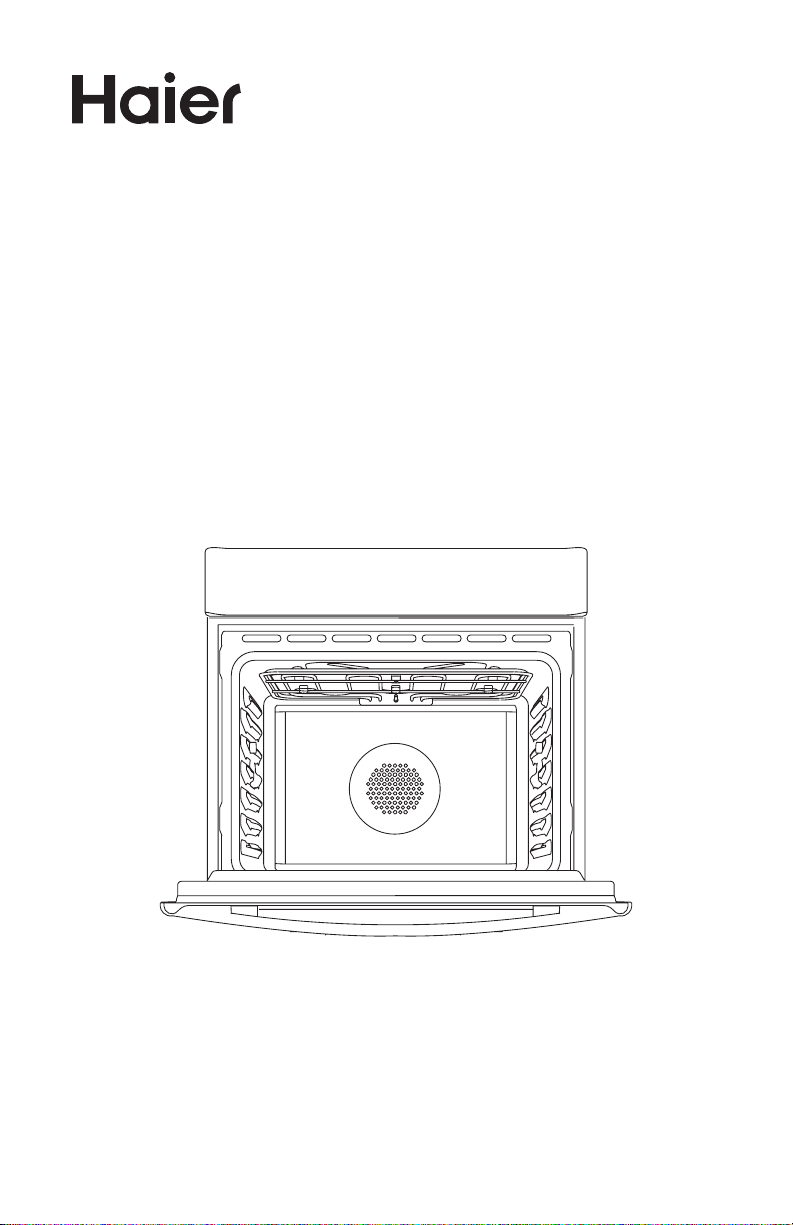
24” Built-in Oven
Four encastré 24”
Horno empotrado 24”
User Manual
Guide de l’utilisateur
Manual del usuario
HCW2360AES


1
TABLE OF CONTENTS
OVEN SAFETY INSTRUCTIONS ...........................................................................2
FEATURES OF YOUR OVEN .................................................................................6
GENERAL OVEN INFORMATION ..........................................................................7
GENERAL OVEN TIPS ..........................................................................................8
ELECTRONIC CONTROL ................................................................................... 10
COOKING WITH THE CONVECTION OVEN ....................................................... 15
OVEN MODES ................................................................................................... 16
QUICK TIPS ....................................................................................................... 19
CONVECTION COOKING ...........................................................................................19
CONVECTION BAKE TIPS AND TECHNIQUES ...................................................20
BAKE TIPS AND TECHNIQUES .......................................................................... 22
CONVECTION BROIL TIPS AND TECHNIQUES ..................................................23
BROIL TIPS AND TECHNIQUES ......................................................................... 24
CONVECTION ROAST TECHNIQUES ................................................................. 26
OVEN CARE ...................................................................................................... 29
General Cleaning..........................................................................................................29
OVEN FINISHES / CLEANING METHODS ...........................................................30
Automatic self-cleaning ..............................................................................................31
OVEN DOOR REMOVAL .................................................................................... 32
REPLACING AN OVEN LIGHT ............................................................................33
TROUBLESHOOTING ........................................................................................ 34
LIMITED WARRANTY ........................................................................................ 36
RECORD KEEPING
Thank you for purchasing this Haier
product. This user manual will help you
get the best performance from your
new oven.
For future reference, record the model
and serial number located on the inside
frame of the oven, and the date of
purchase.
Staple your proof of purchase to this
manual to aid in obtaining warranty
service if needed.
___________________________________
Model number
___________________________________
Serial number
___________________________________
Date of purchase
2
OVEN SAFETY INSTRUCTIONS
Your safety and the safety of others are very important.
We have provided many important safety messages in this manual and
on your appliance. Always read and obey all safety messages.
DANGER
WARNING
CAUTION
This is the safety alert symbol.
This symbol alerts you to potential hazards that can
kill or hurt you and others. All safety messages will
follow the safety alert symbol and either the word
“DANGER,” “WARNING” or “CAUTION.”
These words mean:
An imminently hazardous situation. You
could be killed or seriously injured if you
don’t immediately follow instructions.
A potentially hazardous situation
which, if not avoided, could result in
death or serious bodily injury.
A potentially hazardous situation
which, if not avoided, may result in
moderate or minor injury.
All safety messages will tell you what the potential hazard is, tell you
how to reduce the chance of injury, and tell you what can happen if the
instructions are not followed.
WARNING
The California Safe Drinking Water and Toxic Enforcement Act requires
the Governor of California to publish a list of substances known to the
State of California to cause cancer, birth defects, or other reproductive
harm, and requires businesses to warn of potential exposure to such
substances.
This product contains a chemical known to the State of California to
cause cancer, birth defects, or other reproductive harm. This appliance
can cause low-level exposure to some of the substances listed,
including benzene, formaldehyde, carbon monoxide, toluene, and soot.
3
WARNINGS FOR ELECTRIC INSTALLATION
WARNING
Electrical Shock Hazard
Installation and service must be performed by a qualified installer or
service agency.
The models may be powered at 240V or 208V.
Always disconnect the power before servicing this unit.
This appliance must be properly grounded.
Failure to do so could result in death or serious injury.
IMPORTANT SAFETY
INSTRUCTIONS
WARNING: To reduce the risk of re, electrical shock, injury to persons,
or damage when using the cooktop, follow basic precautions, including
the following:
Proper Installation
•
This appliance must be
properly installed and
electrically grounded by a
qualied technician. Connect
only to properly grounded
outlet. See “Grounding
Instructions” found in the
Installation Instructions.
•
This appliance should
be serviced only by a
qualied service technician.
Contact the nearest
authorized service center
for examination, repair or
adjustment.
•
Do not repair or replace
any part of the oven unless
specically recommended.
Refer service to an authorized
servicer.
•
Do not operate this appliance
if it is not working properly or
if it has been damaged, until
an authorized servicer has
examined it.
•
Install or locate this appliance
only in accordance with the
Installation Instructions.
•
Use this oven only as intended
by the manufacturer. If you
have any questions, contact
the manufacturer.

4
IMPORTANT SAFETY
INSTRUCTIONS
•
Do not cover or block any
openings on this appliance.
•
Use this appliance only for
its intended use as described
in this manual. Do not use
corrosive chemicals, vapors,
or nonfood products in this
appliance. This type of oven is
specically designed to heat
or cook. It is not designed
for industrial or laboratory
use. The use of corrosive
chemicals in heating or
cleaning will damage the
appliance.
To reduce the risk of re in the
oven cavity:
•
Do not store ammable
materials in or near the oven.
•
Do not use water on a grease
re. Smother re or use a
dry chemical or foam-type
extinguisher.
•
It is highly recommended that
a re extinguisher be readily
available and highly visible
next to any cooking appliance.
•
Do not overcook food.
Carefully attend oven if paper,
plastic or other combustible
materials are placed inside
the oven.
•
Do not use the cavity for
storage purposes. Do not
leave paper products, cooking
utensils or food in the cavity
when not being used.
•
If materials inside the oven
should ignite, keep oven door
closed. Turn oven o and
disconnect the circuit at the
circuit breaker box.
•
Be sure the blower fan runs
whenever the oven is in
operation. If the fan does not
operate, do not use the oven.
Call an authorized service
center.
•
Never use the oven to warm
or heat a room.
Personal Safety
•
Do not allow children to use
this appliance unless closely
supervised by an adult.
Children and pets should not
be left alone or unattended in
the area where the appliance
is in use. Never allow children
to sit or stand on any part of
the oven.
•
Do not store items of interest
to children above the oven.
If children should climb onto
the appliance to reach these
items, they could be seriously
injured.
•
For personal safety, wear
proper clothing. Loose tting
or garments with hanging
sleeves should never be worn
while using this appliance.
•
Tie long hair so that it doesn’t
hang loose.
•
Do not touch heating
elements or interior surfaces
of oven.
•
The heating elements may be
hot even though they are dark
in color. Interior surfaces of
an oven become hot enough
to cause burns.

5
IMPORTANT SAFETY
INSTRUCTIONS
•
During and after use, do not
touch or let clothing or other
ammable materials contact
the heating elements or the
interior surfaces of the oven
until they have had sucient
time to cool.
•
The trim on the top and sides
of the oven door may become
hot enough to cause burns.
•
Use care when opening the
door. Open the door slightly
to let hot air or steam escape
before removing or replacing
food.
•
Do not heat unopened
food containers. Build-up
of pressure may cause the
container to burst and cause
injury.
•
Always place oven racks in
desired location while oven is
cool. If a rack must be moved
while oven is hot, do not let
pot holder contact the hot
heating elements.
•
Use only dry pot holders.
Moist or damp pot holders
on hot surfaces may result in
burns from steam. Do not let
pot holder touch hot heating
elements. Do not use a towel
or other bulky cloth.
Safety for the Self-cleaning
Oven:
•
Before self-cleaning the oven,
remove the broiler pan, oven
racks (only when not made of
porcelain), other utensils and
excess soft spillage.
•
Conrm that the door locks
and will not open once both
selectors are in CLEAN
position and the door lock
icon appears. If the door
does not lock, turn the cook
mode selector to OFF and
do not run Self-Clean. Call an
authorized servicer.
•
Do not clean the door gasket.
It is essential for a good seal.
Care should be taken not to
rub, damage, move or remove
the door gasket.
•
Do not use commercial
oven cleaners or oven liner
protective coatings of any
kind in or around any part of
the oven.
•
Clean only oven parts listed in
this manual.
•
Other surfaces of the
appliance may become hot
enough to cause burns -
among these surfaces are for
example: oven vent openings
and surfaces near these
openings, oven doors, and
windows of oven doors.
READ AND SAVE THESE
INSTRUCTIONS
6
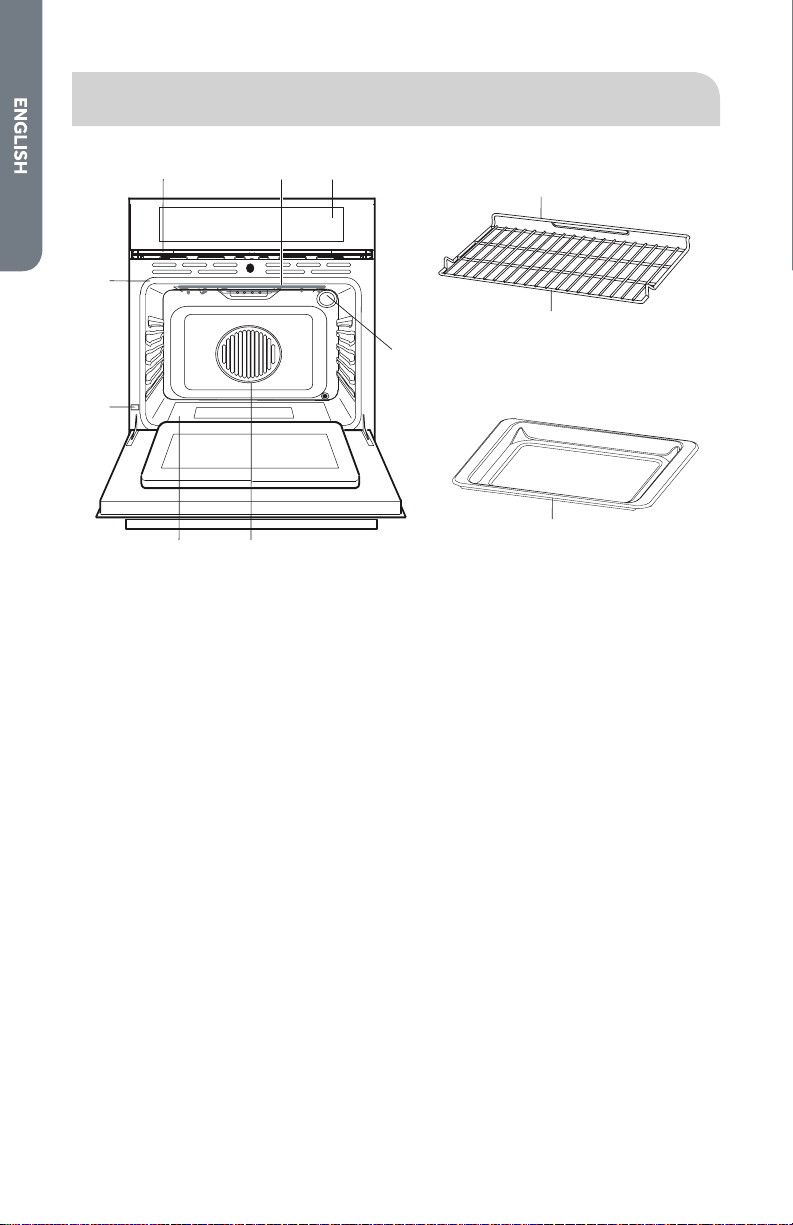
FEATURES OF YOUR OVEN
h
g
d
ac
i
j
k
b
ef
a Cooling Vents
b Broil Element
c Control Panel
d Door Gasket
e Oven Light
f Convection Fan and Element
g Bottom Element (not visible)
h Model and Serial # Plate
i Oven Rack Back
j Oven Rack Front
k Drip Pan

7
GENERAL OVEN INFORMATION
WARNING
Fire Hazard
Remove all packing and foreign materials from the oven. Any material
of this sort left inside may melt or burn when the appliance is used.
Failure to do so can result in death or fire.
240 V VS. 208 V CONNECTION
Most oven installations will have a 240 V connection. If your oven is installed with
208 V, the preheat time may be slightly longer than with 240 V. The oven is designed
to assure the same clean time at 208 V.
HEATING FIRST TIME
Heat the empty appliance to the maximum temperature in order to remove any
manufacturing residues, which could aect the food with unpleasant odors.
DRIP PAN
Place the drip pan (provided) on the bottom shelf of the oven to prevent any sauce
and/or grease from dripping onto the bottom of the oven only when broiling food.
For all other types of cooking, never use the bottom shelf and never place anything
on the bottom of the oven when it is in operation because this could damage the
enamel. Always place your cookware (dishes, aluminum foil, etc.) On the oven rack.
HIGH ALTITUDE BAKING
When cooking at high altitude, recipes and cooking time will vary from the standard.
POWER FAILURE
When the appliance is connected to the electrical supply or when there has been a
power cut,the symbol for Time ashes automatically.
ERROR
In the event of an error the display ashes and beeps continuously. Disconnect
appliance from the power supply and call a qualied technician.
BEEPS
Signal that the set temperature has been reached. Beeps also signal the end of a
function or an oven fault.

8
GENERAL OVEN TIPS
DEFAULT SETTINGS
The Cooking Modes automatically select a suitable temperature. These can be
changed when a dierent one is needed.
OVEN CONDENSATION AND TEMPERATURE
•
It is normal for a certain amount of moisture to evaporate from the food during
any cooking process. The amount depends on the moisture content of the food.
The moisture may condense on any surface cooler than the inside of the oven,
such as the control panel.
•
Your new oven has an electronic temperature sensor that allows maintaining
an accurate temperature. Your previous oven may have had a mechanical
thermostat that drifted gradually over time to a higher temperature. It is normal
that you may need to adjust your favorite recipes when cooking in a new oven.
OPERATIONAL SUGGESTIONS
•
Use the Cooking Charts as a guide.
•
Do not set any weight on the open oven door.
•
Use the interior oven lights to view the food through the oven door window
rather than opening the door frequently.
UTENSILS
•
Glass baking dishes absorb heat. Reduce oven temperature 25 °F (15 °C) when
baking in glass.
•
Use pans that give the desired browning. The type of nish on the pan will help
determine the amount of browning that will occur.
•
Shiny, smooth metal or light non-stick /anodized pans reect heat, resulting
lighter more delicate browning. Cakes and cookies require this type of utensil.
•
Dark, rough or dull pans will absorb heat resulting in a browner, crisper crust. Use
this type for pies.
•
For brown, crisp crusts, use dark non-stick/anodized or dark, dull metal utensils
or glass bake ware. Insulated baking pans may increase the length of cooking
time.
•
Place the dripping pan provided on the bottom shelf of the oven to prevent
any sauce and/or grease from dripping onto the bottom of the oven only when
grilling food.
9
OVEN RACKS
•
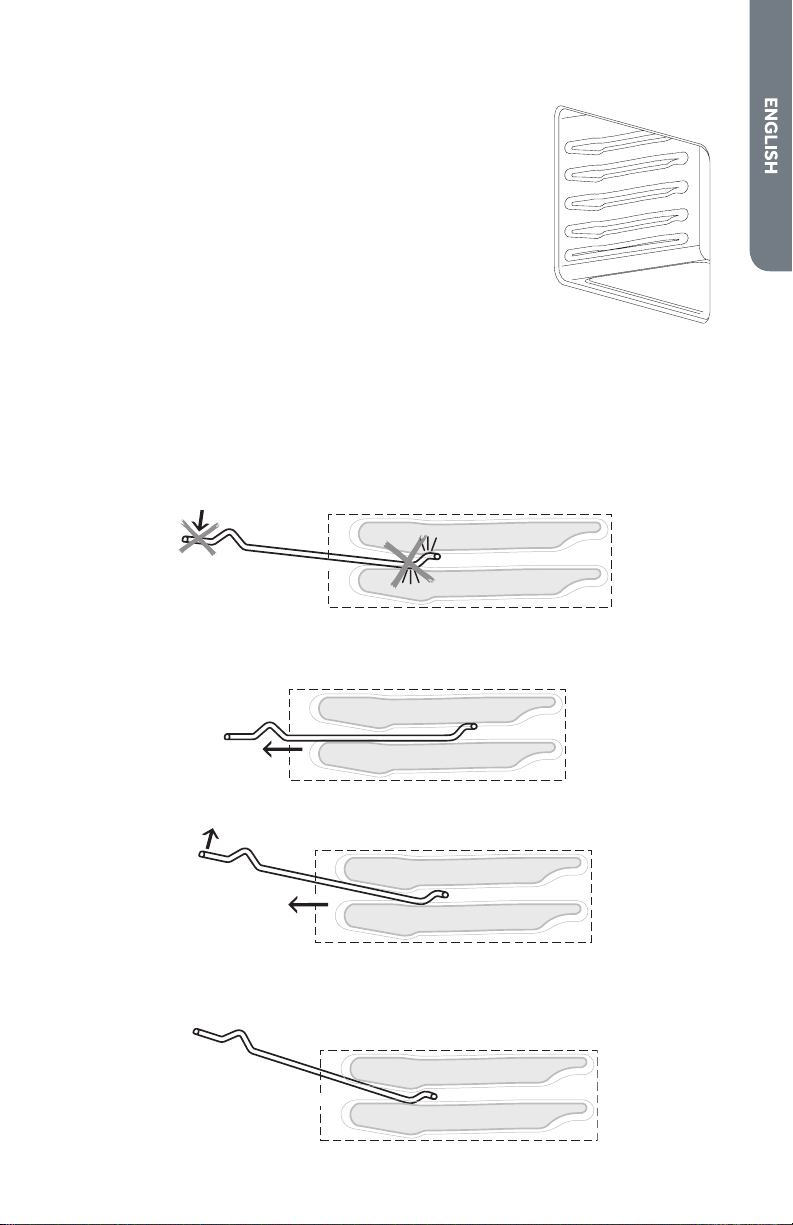
The oven has rack guides at four levels as shown in the
illustration.
•
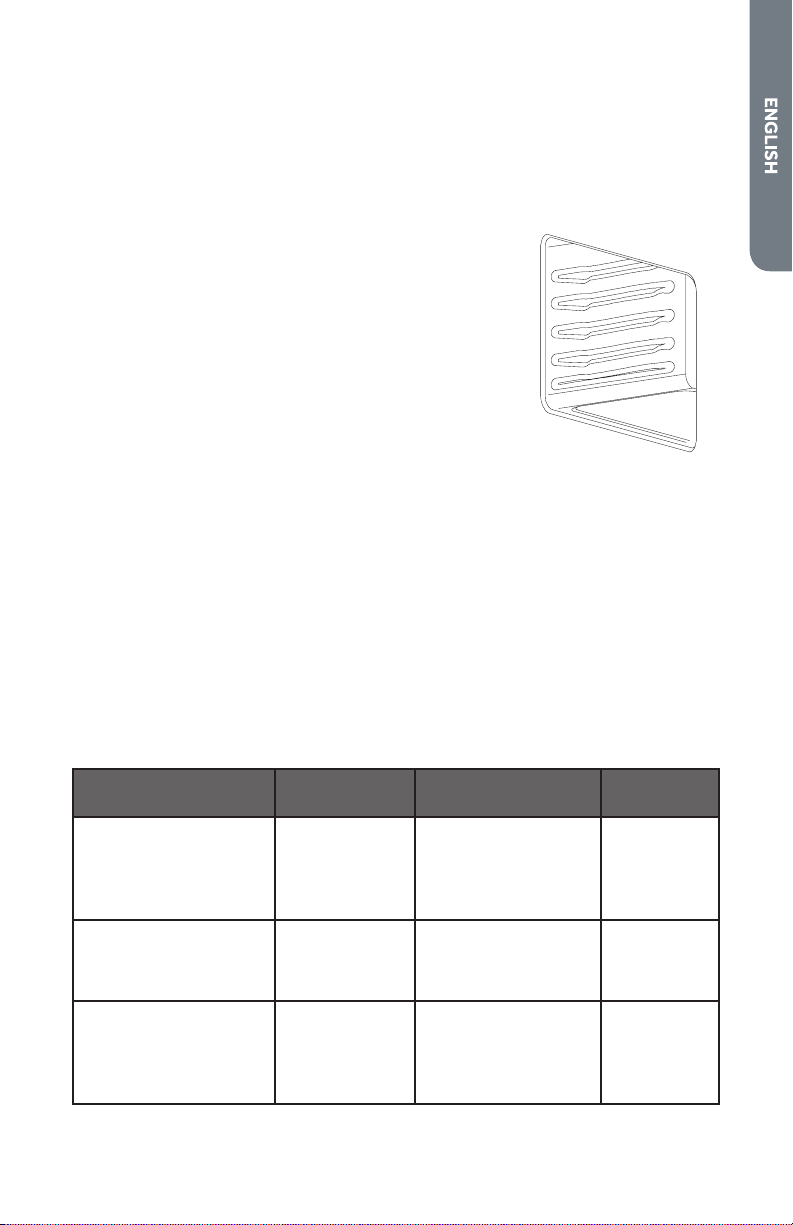
Rack positions are numbered from the bottom rack guide
(#1) to the top (#4).
•
Check Cooking Charts for best rack positions to use
when cooking.
•
Each level guide consists of paired supports formed in the
walls on each side of the oven cavity.
•
Always be sure to position the oven racks before turning
on the oven. Make sure that the racks are level once they
are in position.
4
3
2
1
Please refer to illustration on “Features of Your Oven” if there is any question as to
which side is the front or top of the rack.
•
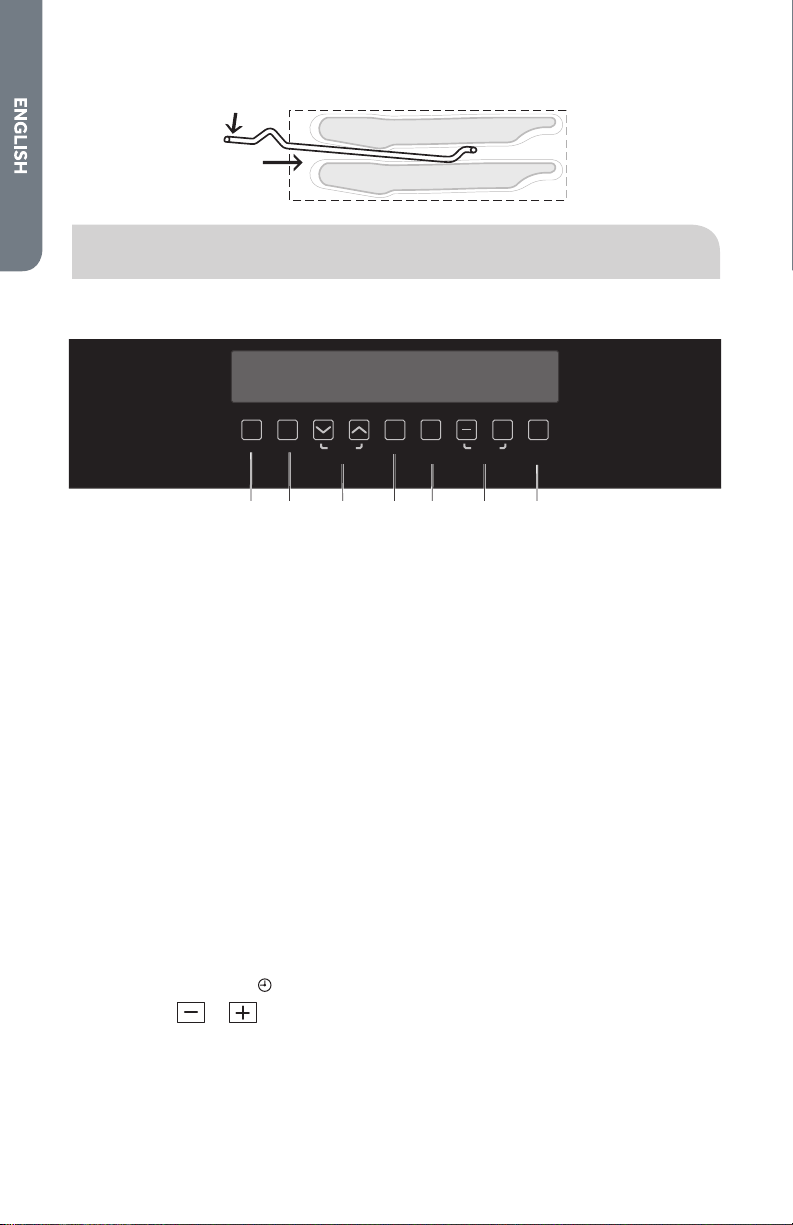
The racks are designed to stop when pulled forward to their limit.
IMPORTANT: Never use aluminum foil to cover the oven racks or to line the oven. It
can cause damage to the oven liner if heat is trapped under the foil.
IMPORTANT: Make sure you do not force it to avoid damage to the enamel.
To remove oven rack from the oven:
1. Pull rack forward.
2. Lift rack up at front and then remove it.
To replace an oven rack:
1. Place rear of rack between rack level guides
10
2. While lifting front of rack, slide rack in all the way while lowering the front.
ELECTRONIC CONTROL
CONTROL PANEL DESCRIPTION
Lock
On/O
Favorite
Select
Functions
Fast
Preheat
Adjust
Temp/Time
Clock/
Timer
+
ab cdefg
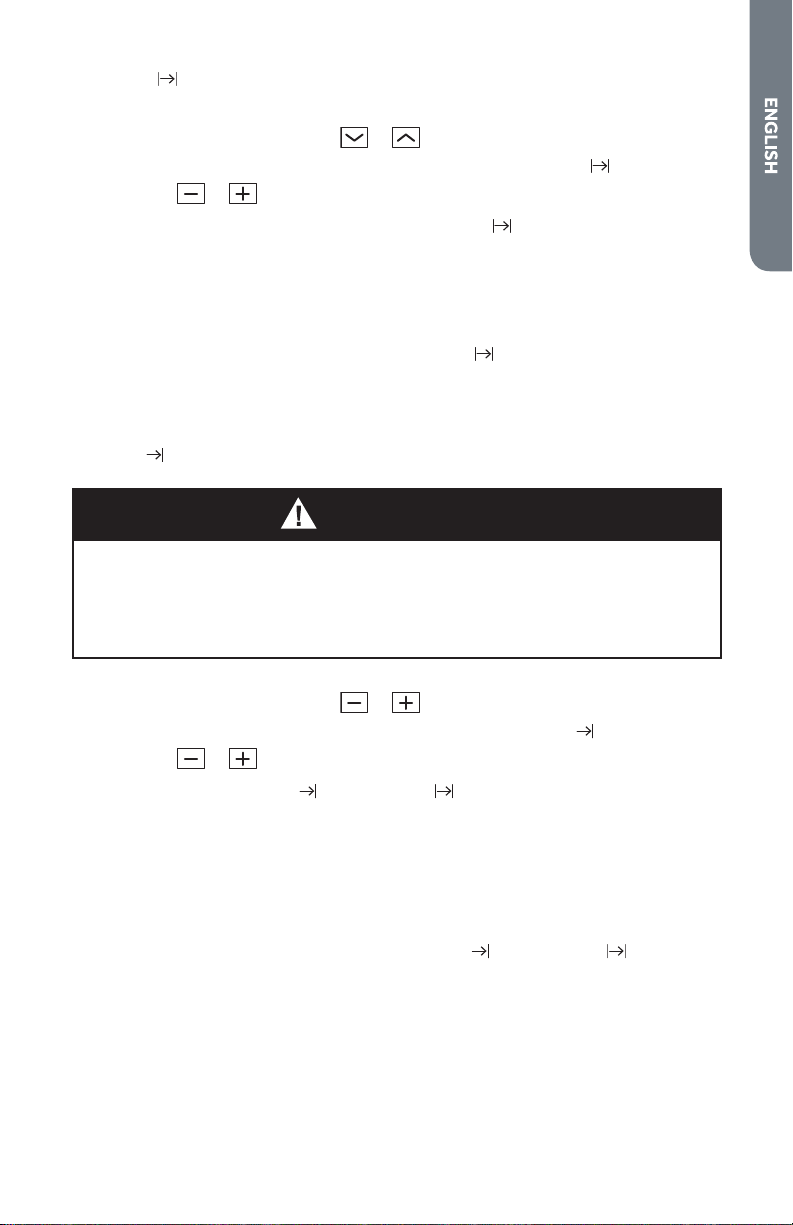
a Lock Button
b On/O Button
c Oven Function Selector Buttons
d Favorite Button
e Fast Preheat Button
f Temp/Time Adjust Buttons
g Clock/Timer Button
•
Always turn the appliance on rst by pressing the On/O button.
•
When the selected function is lit, the oven begins to heat up or the time set
begins to count down.
•
When the selected temperature is reached, a signal sounds.
•
The oven light is turned on as long as an oven function is started.
•
The oven light automatically turns o 10 minutes after the end of a cooking
cycle.
•
Turn o oven using the On/O button.
SETTING THE TIME OF DAY
The oven operates only when the time has been set.
1. To change a time that has already been set, press CLOCK/TIMER repeatedly until
the symbol for Time
ashes.
2. Using the
or button, set the current time.
After about 5 seconds, the ashing stops and the clock displays the time of day.
The oven is now ready for use.

11
TOUCHPAD SOUND
Turning OFF touchpad sound
1. Turn o the appliance using the On/O button.
2. Press and hold the
and buttons at the same time until a signal sounds
(approx. 2 seconds). The touchpad sound is now o.
Turning ON touchpad Sound
1. Press and hold the
and buttons at the same time until a signal sounds
(approx. 2 seconds). The touchpad sound is reactivated.
SELECTING THE OVEN FUNCTION
1. Turn on the oven with the On/O button.
2. Press the
or button repeatedly until the desired oven function appears.
•
A suggested temperature appears on the temperature display.
•
If the suggested temperature is not changed within approx. 5 seconds, the
oven begins to heat up.
CHANGING THE OVEN TEMPERATURE
Press the or button, to raise or lower the temperature.
The setting changes in steps of 5°.
THERMOMETER SYMBOL
•
The slowly rising thermometer symbol indicates how hot the oven is as it heats
up.
•
The three segments of the thermometer symbol show that Fast Preheat is
working.
FAST PREHEAT
After an oven function is selected, with the use of the additional function Fast
Preheat the empty oven can be preheated in a relatively short time.
IMPORTANT: Do not put the food to be cooked into the oven, until Fast Preheat is
completed and the oven is operating using the desired function.
1. Set the desired function. If necessary, change the suggested temperature.
2. Press FAST PREHEAT. The symbol
lights up:
The bars ashing one after another show that Fast Preheat is operating.
When the set temperature is reached, the bars of the heat indicator light up. An
audible signal sounds. The symbol
goes out.
The oven now continues heating according to the pre-set oven function and
temperature. You can now place the food in the oven.

12
FAVORITE
The Favorite function can be used to save a setting which is used frequently.
1. Set oven function, temperature and if necessary the clock functions Clock time
and/or End time .
2. Press and hold FAVORITE for approx. 2 seconds, until a signal sounds. The
setting is saved.
To save another setting, press FAVORITE for approx. 2 seconds. The previously
saved setting is replaced by the new one.
Starting the Favorite function
1. Turn the oven on using the button On/O.
2. Press FAVORITE to call up the saved setting.
CLOCK FUNCTIONS
•
After a clock function has been selected, the corresponding symbol ashes
for approx. 5 seconds. During this time, the desired time-of-day can be set or
modied using the or button.
•
When the desired time-of-day has been set, the symbol continues to ash for
approx. 5seconds. After this the symbol lights up. The set Countdown begins
to count down.
•
The time set for Cook time and End time begins to count down after the
selected function starts.
Countdown
To set a countdown. A signal sounds after the time has elapsed.
This function does not aect the operation of the oven.
1. Press the Clock Functions
button repeatedly until the symbol for Countdown
ashes.
2. Set the desired Countdown time using the
or button (max. 99.00
minutes).
After approx. 5 seconds the display shows the time remaining.
The symbol for Countdown
lights up.
When the time set has elapsed, an audible signal sounds for 2 minutes. “0.00”
lights up and the symbol for Countdown
ashes.
To turn o the audible signal:
Press any button.
13
Cook time
To set how long the oven is to be in use.
1. Select oven function and using
or button select temperature.
2. Press CLOCK/TIMER repeatedly until the symbol for Clock time
ashes.
3. Using the
or button set the desired cooking time.
The oven turns itself on. The symbol for Cook time
lights up.
By repeatedly pressing CLOCK/TIMER, the current time can be called up.
When the time has elapsed, an audible signal sounds for 2 minutes.
The oven turns itself o.
“0.00” is displayed and the symbol for Cook time
ashes.
To turn o the audible signal:
Press any button.
End time
Food Poisoning Hazard
Do not let food sit in oven more than one hour before or after cooking.
Doing so can result in food poisoning or sickness.
WARNING
To set when the oven is to turn o again.
1. Select oven function and using
or button select temperature.
2. Press CLOCK/TIMER repeatedly until the symbol for End time
ashes.
3. Using the
or button set the desired turn-o time.
The symbols for End time
and Cook time light up.
The oven will automatically turn itself on.
By repeatedly pressing CLOCK/TIMER, the current time can be called up.
When the time has elapsed, an audible signal sounds for 2 minutes.
The oven turns itself o.
“0.00” is displayed and the symbols for End time
and Cook time ash.
To turn o the audible signal:
Press any button.
14
Cook time and End time combined
Food Poisoning Hazard
Do not let food sit in oven more than one hour before or after cooking.
Doing so can result in food poisoning or sickness.
WARNING
Cook time and End time can be used simultaneously, if the oven is to be turned
on and o automatically at a later time.
1. Select oven function and temperature.
2. Using the Cook time
function, set the time that the dish needs to cook,
e.g.,1hour.
3. Using the End time
function, set the time at which the dish is to be ready, e.g.
2:05.
The symbols for Cook time
and End time light up.
The oven turns on automatically at the time calculated, e.g. 1:05.
When the set cooking time has elapsed, an audible signal sounds for 2 minutes.
The oven turns itself o, e.g. 2:05.
OTHER FUNCTIONS
Turning o the display
You can save energy by turning o the display.
1. If required, turn o the appliance using the On/O button.
2. Press CLOCK/TIMER and
at the same time until the display goes out.
As soon as the appliance is turned on again, the display comes on automatically
When the appliance is next turned o, the display goes out again.
Turning on the display
1. If required, turn o the appliance using the On/O button.
2. Press CLOCK/TIMER and
at the same time until the display comes on again.
LOCK FUNCTION
As soon as the Lock is engaged, the appliance can no longer be turned on.
Activating the Lock
1. If necessary, turn on the appliance using the On/O button.
No oven function must be selected.
2. Press and hold LOCK until
appears in the display.
The child safety device is now activated.

15
Deactivating the Lock
1. To activate, turn on the appliance using the On/O button.
2. Press and hold LOCK until
disappears from the display.
Lock is now deactivated and the appliance is again ready for use.
COOKING WITH THE CONVECTION OVEN
In a conventional oven, the heat sources cycle on and o to maintain an average
temperature in the oven cavity.
As the temperature gradually rises and falls, gentle air currents are produced within
the oven. This natural convection tends to be inecient because the currents are
irregular and slow. In this convection system the heat is “conveyed” by a fan that
provides continuous circulation of the hot air. This European Convection system
provides state-of-the-art engineering and advanced design to create the nest
convection oven. In standard convection ovens, a fan simply circulates the hot air
around the food. The system is characterized by the combination of an additional
heating element located around the convection fan and the venting panel that
distributes heated air in three dimensions: along the sides, the top, and the full
depth of the oven cavity. This European Convection system aids in maintaining a
more even oven temperature throughout the oven cavity.
The circulating air aids in speeding up the baking process and cooks the food more
evenly. By controlling the movement of heated air, convection cooking produces
evenly browned foods that are crispy on the outside yet moist inside. Convection
cooking works best for breads and pastries as well as meats and poultry. Air-
leavened foods like Angel food cakes, soués, and cream pus rise higher than in
a conventional oven. Meats stay juicy and tender while the outside is avorful and
crisp.
By using European Convection, foods can be cooked at a lower temperature and
cooking times can be shorter.
When using this mode, the standard oven temperature should be lowered by 25 °F
(15 °C). Foods requiring less cooking time should be checked slightly earlier than
normal. For best results, foods should be cooked uncovered, in low-sided pans
to take advantage of the forced air circulation. When using the Convection Roast
mode, the standard oven temperature does not need to be reduced.
ADVANTAGES OF CONVECTION COOKING
•
Baking on multiple racks at the same time is possible with even results.
•
Multiple-rack baking saves time.
•
Prepare whole meals at once with no avor transfer
•
Requires no specialized bake ware.
•
Dehydrates herbs, fruits and vegetables
•
Saves time and energy.
•
Convection broiling allows for extraordinary grilling with thicker cuts of food.
16
OVEN MODES
Selects the oven function. Each of the functions listed below can be used only with
the correct temperature.
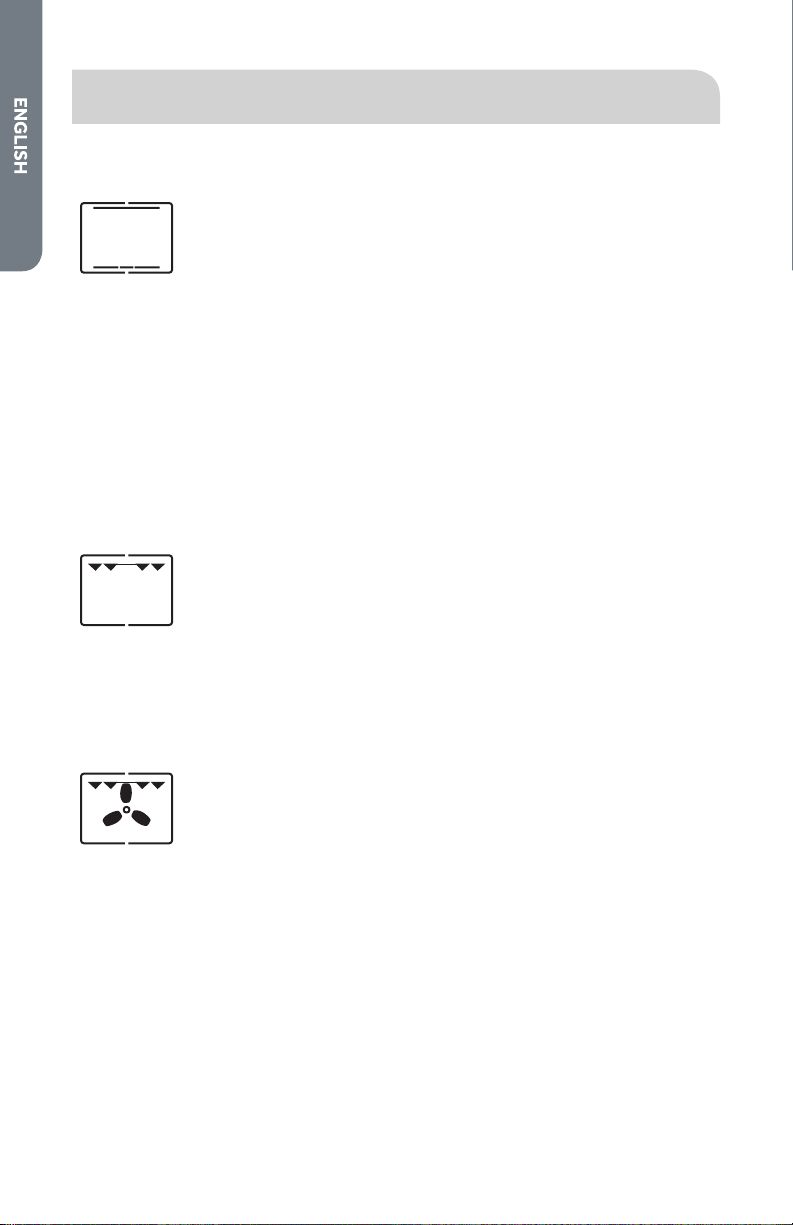
Bake Mode
The top and bottom heating elements will appear.
This is the classic, traditional type of oven which has
been perfected, with exceptional heat distribution
and reduced energy consumption. The convection
oven is still unequaled when it comes to cooking
dishes made up of several ingredients, e.g. cabbage
with ribs, etc. Excellent results are achieved when
preparing veal or beef-based dishes which need to
cook slowly and require basting or the addition of
liquid. It nonetheless remains the best system for
baking cakes as well as fruit and cooking using covered
casserole dishes for oven baking. When cooking in
Bake mode, only use one drip pan or cooking rack at a
time, otherwise the heat distribution will be uneven.
Using the dierent rack heights available, you can
balance the amount of heat between the top and the
bottom of the oven. Select from among the various
rack heights based on whether the dish needs more or
less heat from the top.
High Broil
The top central heating elements comes on. The
extremely high and direct temperature of the grill
makes it possible to brown the surface of meats and
roasts while locking the juices in to keep them tender.
High Broil is also highly recommended for dishes
that require a high temperature on the surface: beef
steaks, veal, rib steak, lets, hamburgers etc.
Cook food with the oven door ajar.
Some grilling examples are included in the “Practical
Cooking Advice ”paragraph.
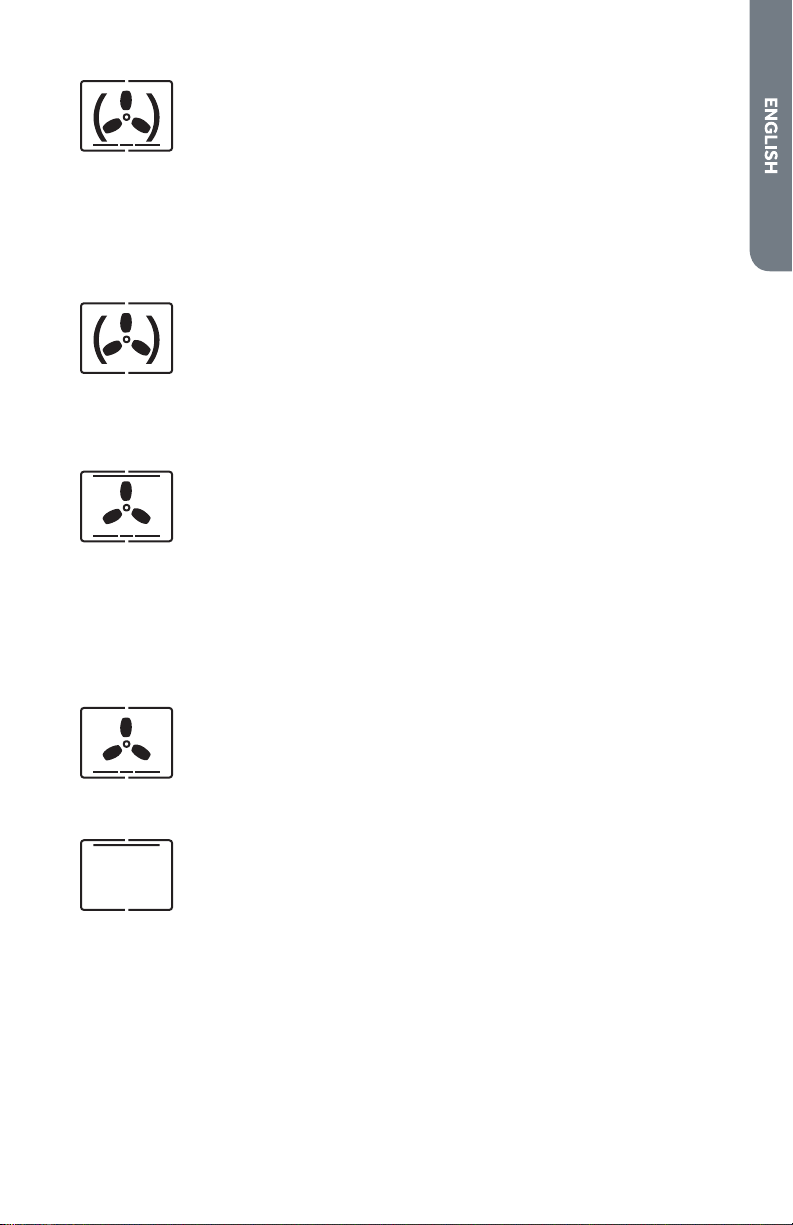
Convection
Broil
The top central heating elements and the fan
appear. This combination of features increases the
eectiveness of the unidirectional thermal radiation
of the heating elements through forced circulation
of the air throughout the oven. This helps prevent
food from burning on the surface, allowing the heat
to penetrate right into the food. Excellent results
are achieved with kebabs made with meats and
vegetables, sausages, ribs lamb chops, chicken in a
spicy sauce, quail, pork chops, etc.
Cook food in Convection Broil mode with the oven
door shut.
This mode is also ideal for cooking sh steaks, like
swordsh, stued cuttlesh etc.
17
Convection
Bake
The bottom and circle heating elements, as well as
the fan, will appear. This combination rapidly heats
the oven due to the large amounts of power used
by the appliance, which results in the production
of considerable heat coming prevalently from the
bottom.
The Convection Bake mode is ideal for foods requiring
high temperatures to cook, like pizzas and large
roasts. Only use one oven tray or rack at a time.
However,if more than one is used, these must be
turned halfway through the cooking process.
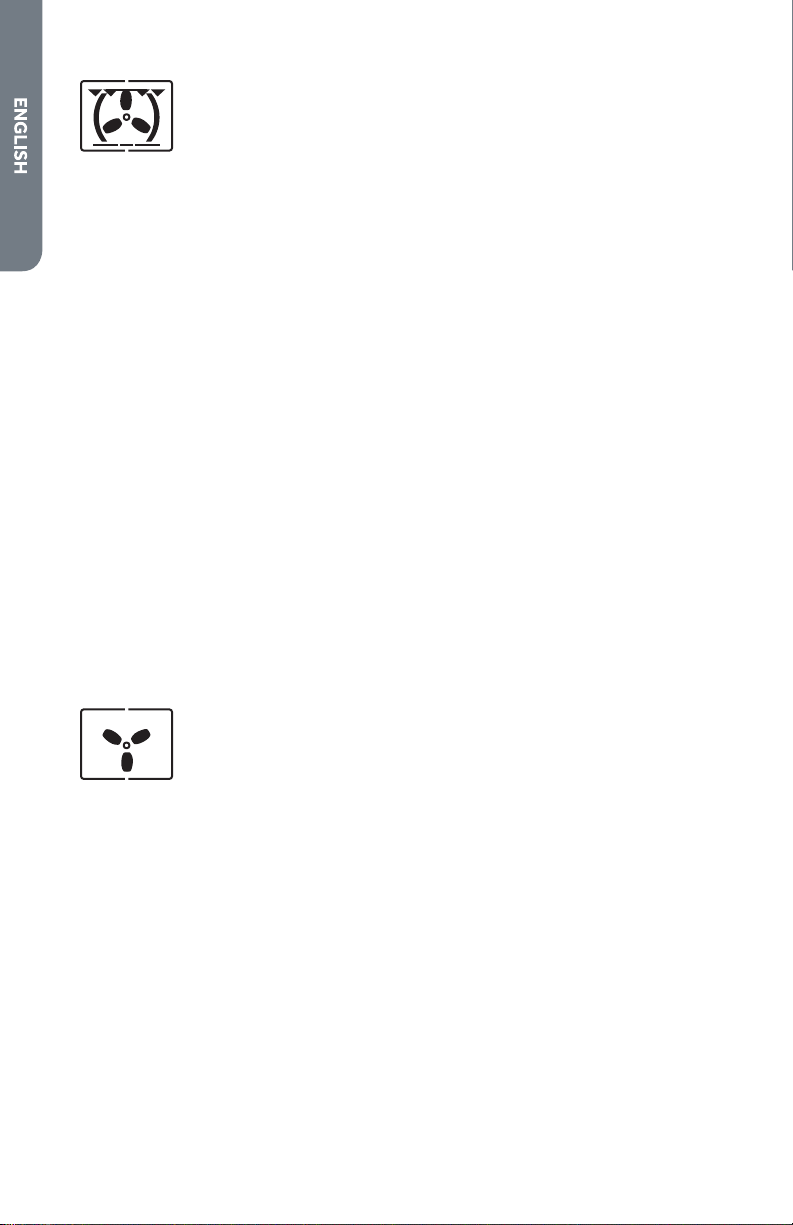
True
European
Convection
The rear heating element and the fan appear. Delicate
heat is distributed uniformly throughout the oven.
This mode is ideal for baking and cooking delicate
foods-especially cakes that need to rise-and for the
preparation of certain tartlets on 3 shelves at the
same time. Here are a few examples: cream pus,
sweet and savory biscuits, savory pus, Swiss rolls
and small portions of vegetables au gratin, etc.
Convection
Roast Mode
The top and bottom heating elements, as well as
the fan, will appear, guaranteeing constant heat
distributed uniformly throughout the oven.
This mode is especially recommended for cooking
prepacked food quickly (as pre-heating is not
necessary), such as for example: frozen or pre-cooked
food) as well as for a few “home-made”dishes.
The best results when cooking using the Convection
Roast mode are obtained if you use one pan only;
placed on the second rack from the bottom. See the
table entitled “Practical Cooking Advice”.
Pizza
The bottom heating element and the fan appear.
Suitable for pastries, cakes and non-dry sweets
in baking tins or moulds. Excellent results are also
obtained in cooking requiring above all heat from the
bottom.
You are advised to put the pan on a low level.
Low Broil
The top heating elements comes on. This mode can
be used to brown food at the end of cooking.
18
Multi-
Cooking
Mode
The top and bottom heating elements, as well as the
fan, will appear alternately. Since the heat remains
constant and uniform throughout the oven, the air
cooks and browns food uniformly over its entire
surface. With this mode, you can also cook various
dishes at the same time, as long as their respective
cooking temperatures are the same. A maximum of
2 racks can be used at the same time, following the
instructions in the section entitled: “Cooking On More
Than One Rack”.
This cooking mode is particularly recommended
for dishes requiring a gratin nish or for those
requiring considerably prolonged cooking times,
such as for example: lasagne, pasta backs, roast
chicken and potatoes, etc. Moreover the excellent
heat distribution makes it possible to use lower
temperatures when cooking roasts. This results in
less loss of juices, meat which is more tender and a
decrease in the loss of weight for the roast. The Multi-
cooking mode is especially suited for cooking sh,
which can be prepared with the addition of a limited
amount of condiments, thus maintaining their avor
and appearance. Excellent results can be attained
when cooking vegetable-based side dishes like
courgettes, aubergines, peppers, etc.
Desserts: this mode is also perfect for baking
leavened cakes.
Moreover, this mode can also be used to thaw
quickly white or red meat and bread by setting the
temperature to 80. To thaw more delicate foods,
set the thermostat to 60 or use only the cold air
circulation feature by setting the thermostat to 0.
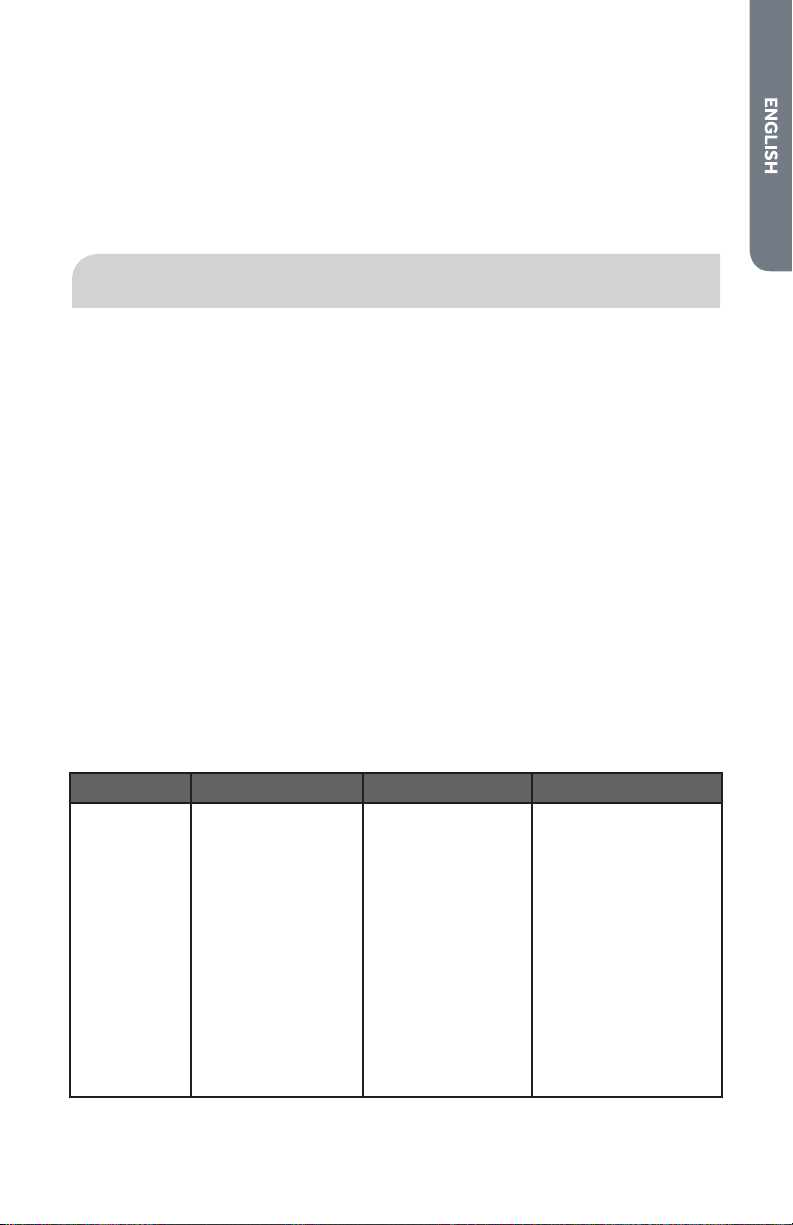
Defrost
Mode
The fan only appears. The fan located on the
bottom of the oven makes the air circulate at room
temperature around the food. This is recommended
for the defrosting of all types of food, but in particular
for delicate types of food which do not require heat,
such as for example: ice cream cakes, cream or
custard desserts, fruit cakes. By using the fan, the
defrosting time is approximately halved. In the case
of meat, sh and bread, it is possible to accelerate
the process using the “Baking”mode and setting the
temperature to 80-100.
19
COOLING VENTILATION
In order to cool down the exterior of the appliance, this model is equipped with a
cooling fan, which comes on automatically when the oven is hot.
When the fan is on, a normal ow of air can be heard exiting between the oven door
and the control panel.
NOTE: When cooking is done, the fan stays on until the oven cools down suciently.
QUICK TIPS
CONVECTION COOKING
ABOUT CONVECTION COOKING
Standard cooking modes (Bake, Broil, etc.) use heat radiated from one or more
elements to cook food. Convection modes use both heat from the elements and
fans in the back of the oven to continuously circulate the heated air throughout the
oven.
ADVANTAGES OF CONVECTION COOKING
•
Even baking, browning and crisping.
•
Juices and avors are sealed in.
•
Air leavened foods such as cream pus, soués, meringues and breads are
higher and lighter.
•
Multiple rack cooking.
•
No special bake ware required.
•
Saves time and energy.
DO NOT use Convection Bake for meats. Use Convection Roast instead.
Mode Use this mode for: For Best results Quick Cooking Tip
Convection
Bake
•
Large quantities
of food on
multiple racks.
•
Pastries, breads,
snack, foods
and appetizers.
•
Use low-sided,
uncovered
pans.
•
Center baking
sheets side
to side on the
oven rack.
•
Reduce recipe
temperature by
25°F (15 °C).
•
Check food for
doneness early:
If recipe calls for
Check food
1 - 15 min. - 3 min.
early
6 - 30 min. - 5 min.
early
31 min.-1hr. - 10 min.
early
20
Convection
Broil
•
Thicker, tender,
cuts of meat,
poultry and sh.
•
DO NOT use
this mode for
browning breads
or casseroles.
•
Meats should
be at least 1”
thick.
•
No conversion
from standard
Broil is necessary.
•
Refer to
Convection Broil
Chart in this
Manual for cooking
times.
Convection
Roast
•
Large, tender
cuts of meat
and poultry
such as roast or
whole chicken.
•
DO NOT cover
meat or use
cooking bags
•
Refer to
Convection
Roast Chart in
this Manual for
cooking times
•
Do NOT
change recipe
temperature
CONVECTION BAKE TIPS AND TECHNIQUES
Reduce recipe baking temperatures by 25°F (15°C).
•
For best results, foods should be cooked uncovered, in low-sided pans to take
advantage of the forced air circulation. Use shiny aluminum pans for best results
unless otherwise specied.
•
Heatproof glass or ceramic can be used. Reduce temperature by another 25°F
(15 °C) when using heatproof glass dishes for a total reduction of 50 °F (30 °C).
•
Dark metal pans may be used. Note that food may brown faster when using dark
metal bake ware.
•
The number of racks used is determined by the height of the food to be cooked.
•
Baked items, for the most part, cook extremely well in convection. Do not try to
convert recipes such as custards, quiches, pumpkin pie, or cheesecakes, which
do not benet from the convection-heating process. Use the regular Bake mode
for these foods.
•
Multiple rack cooking for oven meals is done on rack positions 1, 2, 3, 4 and 5. All
ve racks can be used for cookies, biscuits and appetizers.
•
2 rack baking: Use positions 1 and 3.
•
3 rack baking: Use positions 2, 3 and 4 or 1, 3 and 5.
•
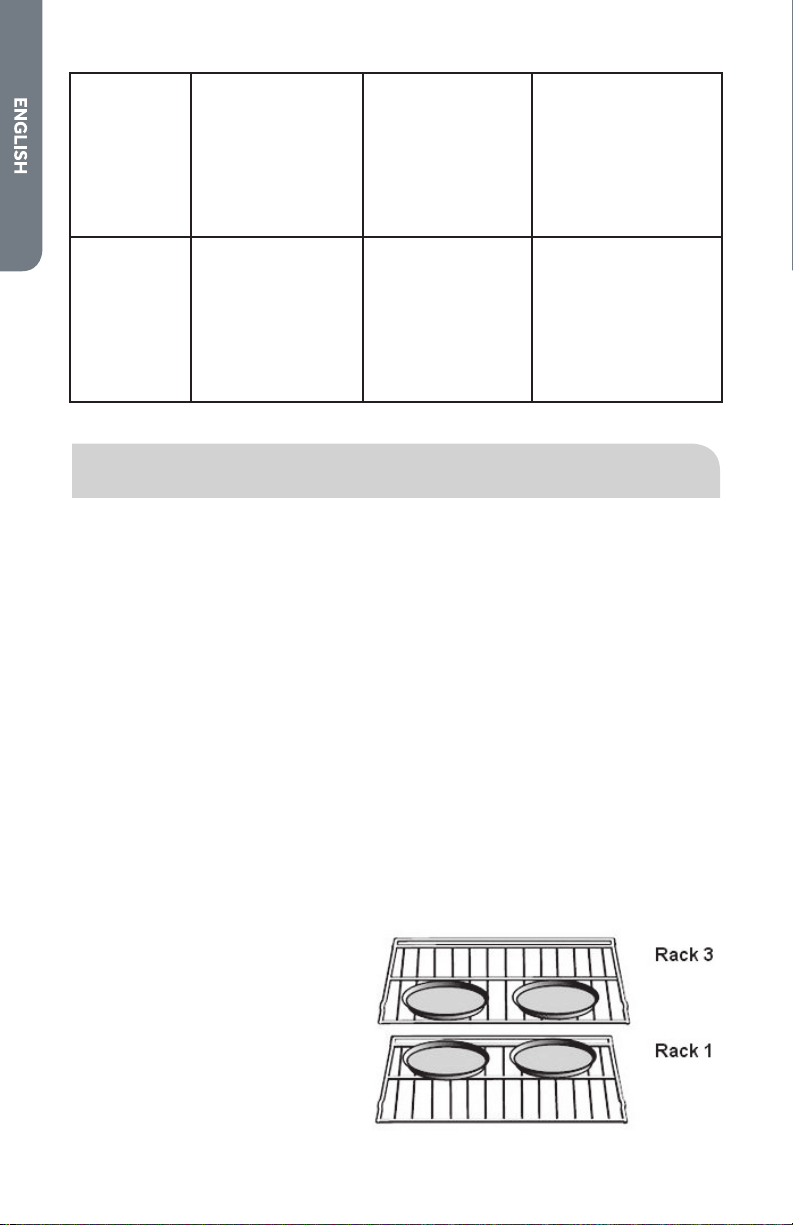
When baking four cake layers
at the same time, stagger
pans so that one pan is not
directly above another. For
best results, place cakes on
front of upper rack and back
of lower rack (See graphic at
right). Allow 1” - 1½” (2.5 -
3cm) air space around pans.
21
•
Converting your own recipe can be easy. Choose a recipe that will work well in
convection.
•
Reduce the temperature and cooking time if necessary. It may take some trial
and error to achieve a perfect result. Keep track of your technique for the next
time you want to prepare the recipe using convection.
FOODS RECOMMENDED FOR CONVECTION BAKE MODE:
Appetizers Biscuits Coee Cakes, Cookies (2 to 4 racks)
Yeast Breads, Cream Pus, Popovers, Casseroles, and
One-dish Entrées, Oven Meals (rack positions 1, 2,
3), Air-leavened Foods (Soués, Meringue-Topped
Desserts, Angel Food Cakes, Chion Cakes)
4
3
2
1
QUICK AND EASY RECIPE TIPS
Converting from standard BAKE to CONVECTION BAKE:
•
Reduce the temperature by 25°F (15 °C).
•
Use the same baking time as Bake mode if under 10 to 15 minutes.
•
Foods with a baking time of less than 30 minutes should be checked
for doneness 5 minutes earlier than in standard bake recipes.
•
If food is baked for more than 40 to 45 minutes, bake time should be
reduced by 25%.
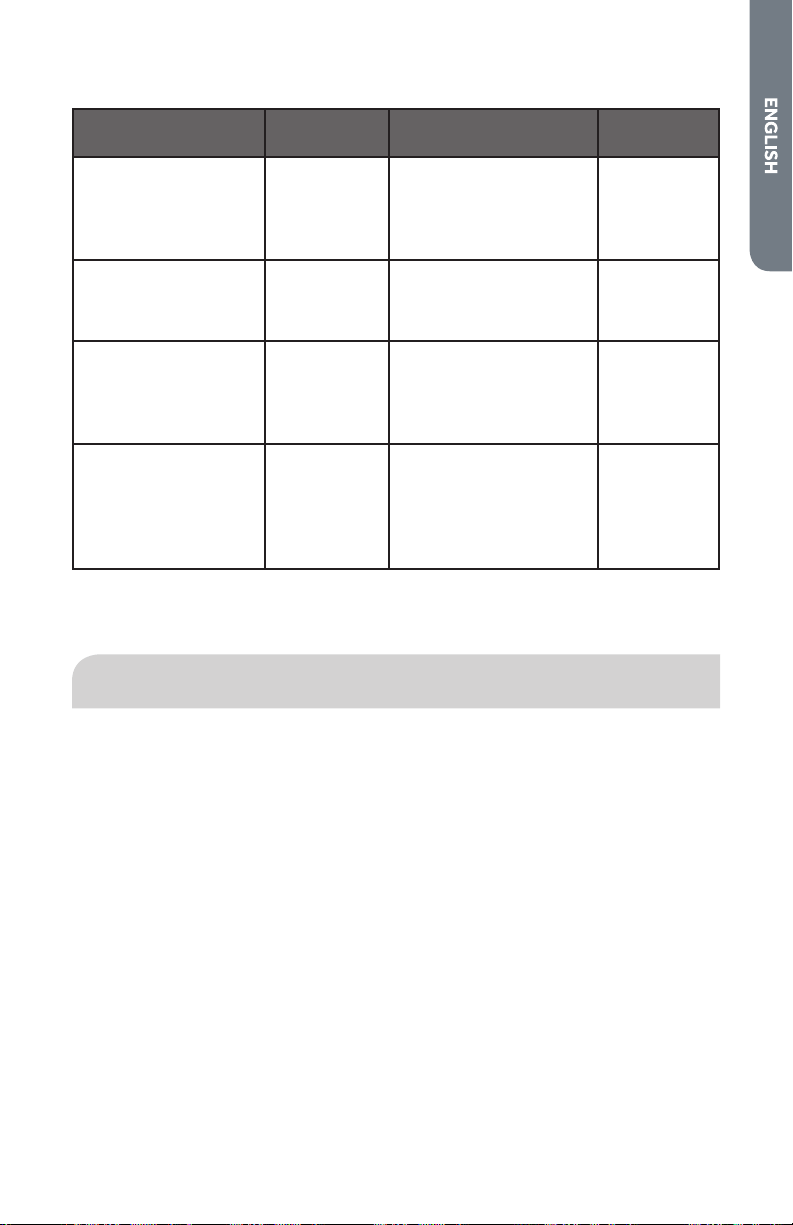
CONVECTION BAKE CHART
•
Reduce standard recipe temperature by 25°F (15 °C) for Convection Bake.
•
Temperatures have been reduced in this chart.
FOOD ITEM
RACK
POSITION
TEMP. °F ( °C)
(PREHEATED OVEN)
TIME (Min.)
Cake
Cupcakes
Bundt Cake
Angel Food
2
1
1
325 (165)
325 (165)
325 (165)
16-20
37-43
25-35
Pie
2 crust, fresh, 9”
2 crust, frozen fruit, 9”
2
2
350-400 (175-205)
350 (175)
35-45
68-78
Cookies
Sugar
Chocolate Chip
Brownies
2
2
2
325-350 (165-175)
325-350 (165-175)
325 (165)
8-12
10-15
25-30

22
Breads
Yeast bread loaf, 9x5
Yeast rolls
Biscuits
Muns
2
2
2
2
350 (175)
350-375 (175-190)
375 (190)
400 (205)
15-22
10-15
6-10
13-16
Pizza (Multiple rack
cooking)
Frozen
Fresh
1 and 3
1 and 3
375-425 (190-220)
375-425 (190-220)
12-18
8-14
The TEMP and TIME in the chart above are for the 240 V setting.
This chart is a guide. Follow recipe or package directions and adjust temperatures /
time appropriately.
BAKE TIPS AND TECHNIQUES
Baking is cooking with heated air. Both upper and lower elements in the oven are
used to heat the air but no fan is used to circulate the heat.
Follow the recipe or convenience food directions for baking temperature, time and
rack position. Baking time will vary with the temperature of ingredients and the size,
shape and nish of the baking utensil.
GENERAL GUIDELINES
•
For best results, bake food on a single rack with at least 1” - 1-½” (2,5 - 3 cm)
space between utensils and oven walls.
•
Use one rack when selecting the Bake Mode.
•
Check for doneness at the minimum time.
•
Use metal bake ware (with or without a non-stick nish), heatproof glass, glass-
ceramic, pottery or other utensils suitable for the oven.
•
When using heatproof glass, reduce temperature by 25 °F (15 °C) from
recommended temperature.
•
Use baking sheets with or without sides or jelly roll pans.
•
Dark metal pans or nonstick coatings will cook faster with more browning.
Insulated bake ware will slightly lengthen the cooking time for most foods.
•
Do not use aluminum foil or disposable aluminum trays to line any part of the
oven. Foil is an excellent heat insulator and heat will be trapped beneath it. This
will alter the cooking performance and can damage the nish of the oven.
•
Avoid using the opened oven door as a shelf to place pans.
23
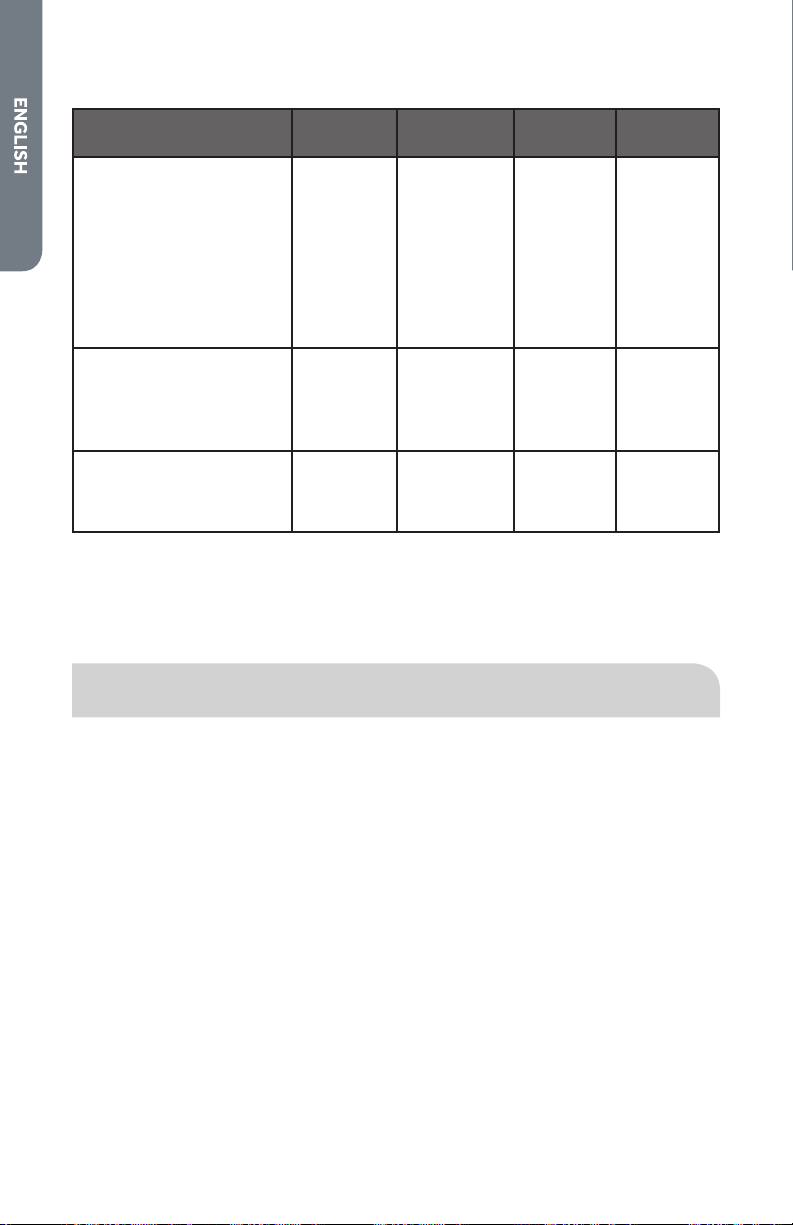
BAKE CHART
FOOD ITEM
RACK
POSITION
TEMP. °F ( °C)
(PREHEATED OVEN)
TIME (Min.)
Cake
Cupcakes
Bundt Cake
Angel Food
2
1
1
350 (175)
350 (175)
350 (175)
19-22
40-45
35-39
Pie
2 crust, fresh, 9”
2 crust, frozen fruit, 9”
2
2
375-400 (190-205)
375 (190)
45-50
68-78
Cookies
Sugar
Chocolate Chip
Brownies
2
2
2
350-375 (175-190)
350-375 (175-190)
350 (175)
8-10
8-13
29-36
Breads
Yeast bread loaf, 9x5
Yeast rolls
Biscuits
Muns
2
2
2
2
375 (190)
375-400 (190-205)
375-400 (190-205)
425 (220)
18-22
12-15
7-9
15-19
The TEMP and TIME in the chart above are for the 240 V setting.
This chart is a guide. Follow recipe or package directions and adjust temperatures /
time appropriately.
CONVECTION BROIL TIPS AND TECHNIQUES
•
Place rack in the required position needed before turning on the oven.
•
Use Convection Broil mode with the oven door closed.
•
Do not preheat oven. (This means, “PREHEAT” indication automatically appears
when the Convection Broil mode is selected, so place food inside the oven
before selecting the Cooking mode)
•
Use the 2-piece broil pan. (Without the 2-piece pan there may be a risk of re
with drip of the fat from the meat).
•
Turn meats once halfway through the cooking time (see Convection Broil Chart).
24
CONVECTION BROIL CHART
FOOD AND THICKNESS
RACK
POSITION
OVEN TEMP
°F (°C)
TIME SIDE
1 (Min.)*
TIME SIDE
2 (Min.)*
Beef
Steak (1” or more)
Medium rare
Medium
Well
Hamburgers (1” or more)
Medium
Well
4
4
4
4
4
450 (230)
450 (230)
450 (230)
550 (290)
550 (290)
10-12
15-17
16-18
9-11
11-13
10-12
13-15
13-15
5-8
8-10
Poultry
Chicken Quarters
Chicken Halves
Chicken Breasts
4
3
4
450 (230)
450 (230)
450 (230)
18-20
25-27
14-16
13-15
15-18
10-14
Pork
Pork Chops (1¼” or more)
Sausage - fresh
4
4
450 (230)
450 (230)
13-15
4-6
12-14
3-5
The TEMP. and TIME in the chart above are for the 240 V setting.
* Broiling and convection broiling times are approximate and may vary slightly.
Cooking times are indicative and also depend on the thickness and the starting
temperature of the meat before cooking.
BROIL TIPS AND TECHNIQUES
•
Place rack in the required position needed before turning on the oven.
•
Use Broil mode with the oven door closed.
•
Preheat oven for 5 minutes before use.
•
Use the 2-piece broil pan. (Without using a 2-piece pan may have risk of re with
drip of the fat from the meat.
NOTE: For best results use only the center of the width of the broil pan.
•
Turn meats once halfway through the cooking time (see Broil Chart).
25
BROIL CHART
Food and
Thickness
Rack
Position
Broil
Setting
Time Side 1
(Min.)*
Time Side 2
(Min.)*
Beef
Steak (1” or more)
Medium rare
Medium
Well
Hamburgers (1” or
more)
Medium
Well
5
5
5
4
4
L 5
L 5
L 5
L 5
L 5
5-7
6-8
8-10
8-13
10-15
4-6
5-7
7-9
11
8-12
Poultry
Breast (bone-in)
Thigh (very well
done)
4
4
L 4
L 3
10-12
28-30
8-10
13-15
Pork
Pork Chops (1”)
Sausage - fresh
Ham Slice (1/2”)
5
5
5
L 5
L 5
L 5
7-9
5-7
4-6
5-7
3-5
3-5
Seafood
Fish Filets, 1”
Buttered
4 L 4 10-14 N/A
Lamb
Chops (1”)
Medium Rare
Medium
Well
5
5
5
L 5
L 5
L 5
5-7
6-8
7-9
4-6
4-6
5-7
Bread
Garlic Bread, 1”
slices
Garlic Bread, 1”
slices
4
3
L 5
L 5
2-3
4-6
N/A
The BROIL SETTING and TIME in the chart above are for the 240 V setting.
* Broiling and convection broiling times are approximate and may vary slightly.
Cooking times are indicative and also depend on the thickness and the starting
temperature of the meat before cooking.
26
Food Service Temperature Guidelines from FSIS (USDA food Safety &
Inspection Service)
140 °F
(60 °C)
Ham, precooked (to Reheat) 165 °F
(74 °C)
Stung (cooked alone or
in bird)
145 °F
(63 °C)
Fresh beef, Veal, Lamb (medium
rare)
Leftovers & Casseroles
160 °F
(71 °C)
Ground Meat & Meat mixtures
(Beef, Pork, Veal, Lamb)
170 °F
(77 °C)
Fresh beef, Veal, Lamb
(well done)
Fresh beef, Veal, Lamb (medium) Poultry breast
Fresh Pork (medium) Fresh Pork (well done)
Fresh Ham (raw) 180 °F
(82 °C)
Chicken and Turkey
(Whole)
Egg Dishes Poultry (thighs and
wings)
165 °F
(74 °C)
Ground Meat & Meat mixtures
(Turkey, Chicken)
Duck and Goose
NOTE: Eggs (alone, not used in a recipe) – cook until yolk & white are rm
CONVECTION ROAST TECHNIQUES
•
Do not preheat for Convection Roast. (This mean, “PREHEAT” indication is
automatically appear when the Convection Roast mode is selected, but place
food inside the oven before selecting the Cooking mode.)
•
Roast in a low-sided, uncovered pan.
•
When roasting whole chickens or turkey, tuck wings behind back and loosely tie
legs with kitchen string.
•
Use the 2-piece broil pan for roasting uncovered. (Without the 2-piece pan, may
have risk of re with the drip of the fat from the meat.)
WARNING
Burn Hazard
Use an oven mitt to remove temperature probe.
Do not touch broil element.
Failure to do so can result in burns.
•
Use the probe or a meat thermometer to determine the doneness by checking
internal temperature (see Convection Roast Chart).
27
•
Double-check the internal temperature of meat or poultry by inserting meat
thermometer into another position.
•
Large poultry may also need to be covered with foil (and pan roasted) during a
portion of the roasting time to prevent over-browning.
•
The minimum safe internal temperature for stung in poultry is 165°F (74°C).
•
After removing the item from the oven, cover loosely with foil for 10 to 15
minutes before carving, if necessary, to increase the nal foodstu temperature
by 5° to 10 °F (3° to 6° C).
QUICK AND EASY RECIPE TIPS
Converting from standard bake to convection roast:
•
Temperature does not have to be lowered.
•
Roasts, large cuts of meat and poultry generally take 10-20% less cooking time.
Check doneness early.
•
Casseroles or pot roasts that are baked covered in CONVECTION ROAST will
cook in about the same amount of time.
CONVECTION ROAST CHART
MEATS
WEIGHT
lb (kg)
RACK
POSITION
OVEN
TEMP °F
(°C)
TIME
(Min.
per lb)
INTERNAL TEMP.
°F (°C)
Beef
Rib Roast
4-6 (2-3) 2
325 (165)
18-22
20-25
145 (63) medium
rare
160 (71) medium
Rib Eye
Roast,
(boneless)
4-6 (2-3) 2 325 (165) 18-22
20-25
145 (63) medium
rare
160 (71) medium
Rump, Eye,
Tip, Sirloin
(boneless)
3-6 (1,5-3) 2 325 (165) 18-22
20-25
145 (63) medium
rare
160 (71) medium
Tenderloin
Roast
2-3 (1-1,5) 2 425 (220) 15-20 145 (63) medium
rare
Pork
Loin Roast
(boneless or
bone-in)
Shoulder
5-8 (2,5-4)
3-6 (1,5-3)
2
2
350 (175)
350 (175)
18-22
20-25
160 (71) medium
160 (71) medium
28
Poultry
Chicken
whole, not
stued
Turkey, not
stued
Turkey, not
stued
Turkey, not
stued
Turkey Breast
Cornish Hen
3-4 (1,5-2)
12-15
(6-7,5)
16-20
(8-10)
21-25
(10,5-
12,5)
3-8 (1,5-4)
1 - 1½
(0,5-0,75)
2
1
1
1
1
2
375 (190)
325 (165)
325 (165)
325 (165)
325 (165)
350 (175)
20-23
10-14
9-11
6-10
15-20
45-75
total
180 (82)
180 (82)
180 (82)
180 (82)
170 (77)
180 (82)
Lamb
Half Leg
Whole Leg
3-4 (1,5-2)
6-8 (3-4)
2
1
325 (165)
325 (165)
20-27
25-32
20-27
25-32
160 (71) medium
170 (77) well
160 (71) medium
170 (77) well
The TEMP and TIME in the chart above are for the 240 V setting.
Cooking times are indicative and also depend on the thickness and the starting
temperature of the meat before cooking.
29
OVEN CARE
GENERAL CLEANING
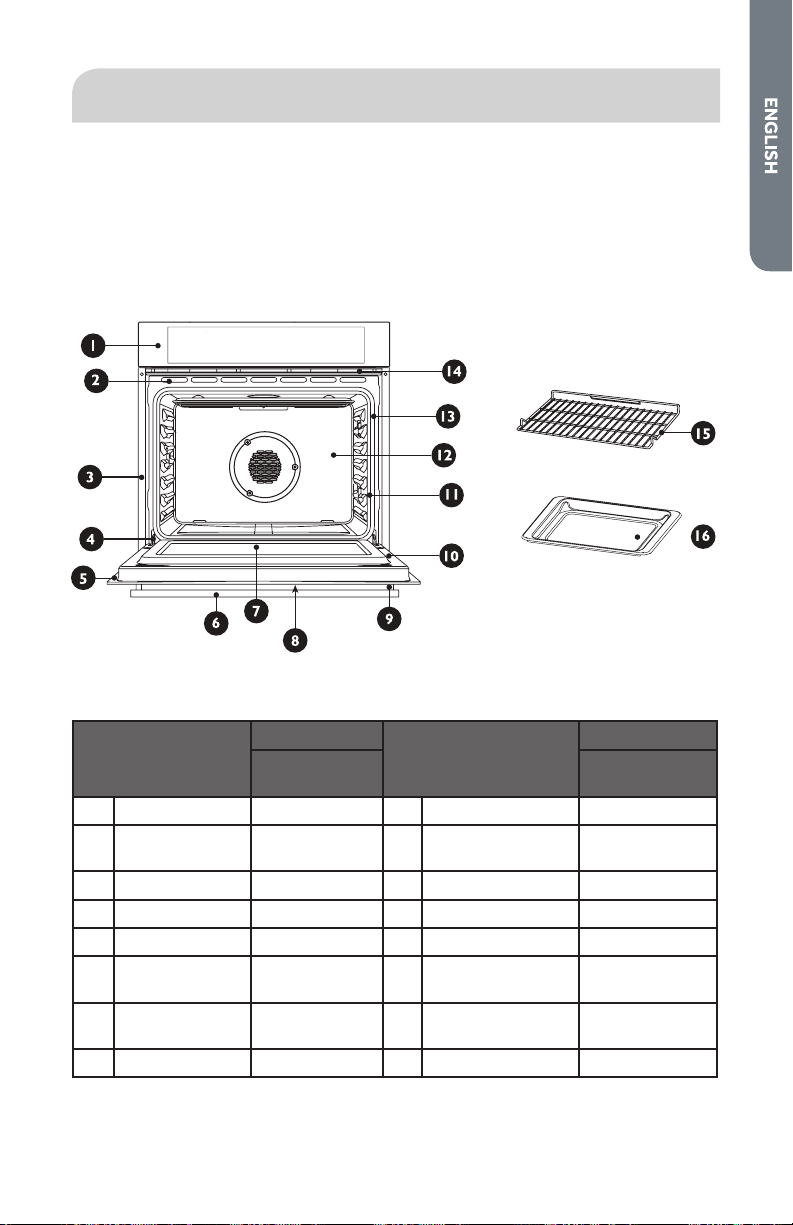
HOW TO USE THE CLEANING CHART
1. Locate the number of the part to be cleaned in the illustration below.
2. Find the part name in the Cleaning Chart.
3. Match the letter with the cleaning method on following page.
CLEANING CHART
Part
Cleaning Method
Part
Cleaning Method
Stainless Steel
Oven
Stainless Steel
Oven
1 Control Panel C-G 9 End Caps D
2 Door Cooling
Vent
E 10 Interior Oven
Door
E
3 Side Trim D 11 Oven Front Frame E
4 Bottom Trim D 12 Oven Cavity E
5 Door Frame E 13 Door Gasket B
6 Door Handle G 14 Oven Cooling
Vents
D
7 Interior Door
Windows
F 15 Oven Rack A
8 Door Front C&G 16 Drip Pan E
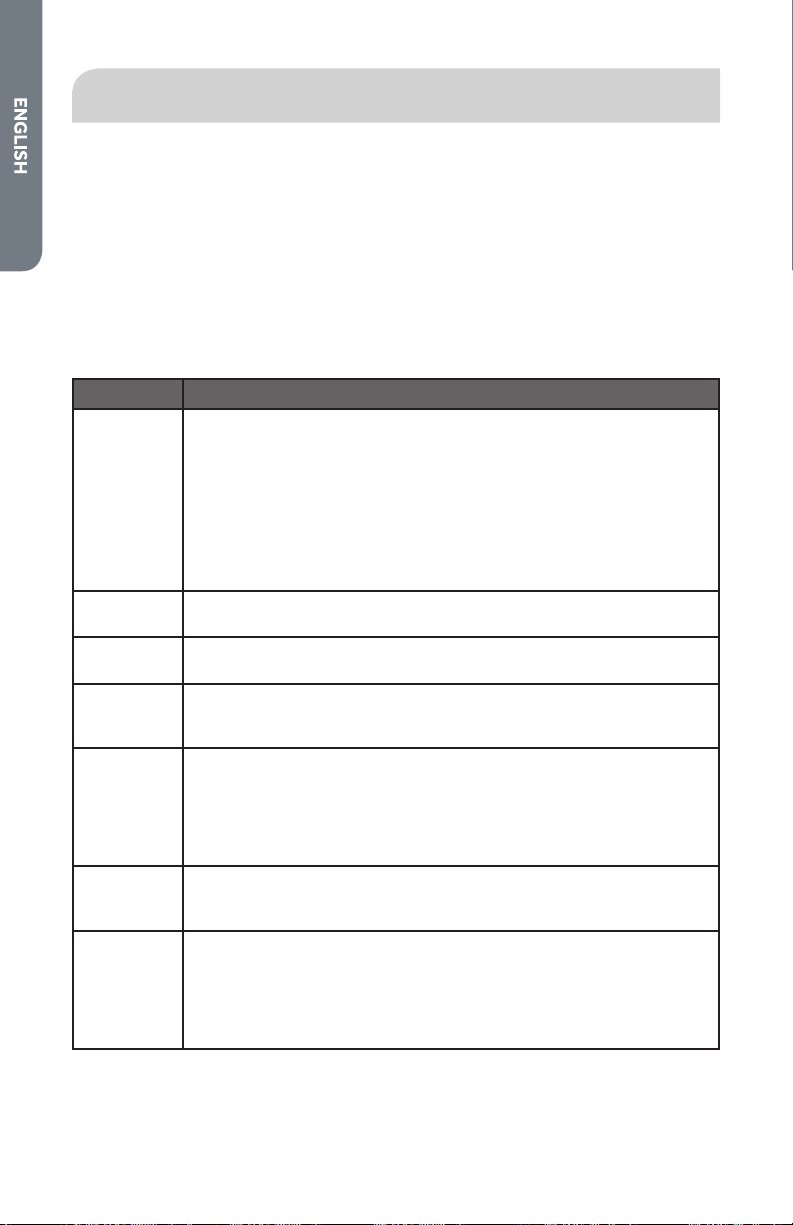
Please refer to the following chart for Cleaning Method.
30
OVEN FINISHES / CLEANING METHODS
The entire oven can be safely cleaned with a soapy sponge, rinsed and dried. If
stubborn soil remains, follow the recommended cleaning methods below.
•
Always use the mildest cleaner that will do the job.
•
Rub metal nishes in the direction of the grain.
•
Use clean, soft cloths, sponges or paper towels.
•
Rinse thoroughly with a minimum of water so it does not drip into door slots.
•
Dry to avoid water marks.
The cleaners listed below indicate types of products to use and are not being
endorsed. Use all products according to package directions.
Part Cleaning Method
A Chrome
Plated
Wash with hot sudsy water. Rinse thoroughly and dry. Or, gently rub
with Soft Scrub
®
, Bon-Ami
®
, Comet
®
, Ajax
®
, Brillo
®
or S.O.S.
®
pads
as directed.
Easy O
®
or Dow
®
Oven Cleaners (cold oven formula) can be used,
but may cause darkening and discoloration.
Racks may be cleaned in the oven during the Self-Cleaning mode.
However, chromed racks will lose their shiny nish and permanently
change to a metallic gray.
B Fiberglass
Knit
DO NOT HAND CLEAN GASKET.
C Glass Spray Windex
®
or Glass Plus
®
onto a cloth rst, then wipe to clean.
Use Fantastik
®
or Formula 409
®
to remove grease spatters.
D Painted Clean with hot sudsy water or apply Fantastik
®
or Formula 409
®
rst to a clean sponge or paper towel and wipe clean. Avoid using
powdered cleansers and steel wool pads.
E Porcelain Immediately wipe up acidic spills like fruit juice, milk and tomatoes
with a dry towel. Do not use a moistened sponge/towel on hot
porcelain. When cool, clean with hot sudsy water or apply Bon-
Ami
®
or Soft Scrub
®
to a damp sponge. Rinse and dry. For stubborn
stains, gently use Brillo
®
or S.O.S.
®
pads. It is normal for porcelain to
craze (ne lines) with age due to exposure from heat and food soil.
F Reective
Glass
Clean with hot sudsy water and sponge or plastic scrubber. Rub
stubborn stains with vinegar, Windex
®
, ammonia or Bon-Ami
®
DO
NOT USE HARSH ABRASIVES.
G Stainless Always wipe or rub with grain. Clean with a soapy sponge then rinse
and dry. Or, wipe with Fantastik
®
or Formula 409
®
sprayed onto a
paper towel. Protect and polish with Stainless Steel Magic
®
and a
soft cloth. Remove water spots with a cloth dampened with white
vinegar. Use Zud
®
, Cameo
®
, Bar Keeper’s Friend
®
or RevereWare
Stainless Steel Cleaner
®
, to remove heat discoloration.

31
AUTOMATIC SELF-CLEANING
The oven is heated to approximately 480°F. Any food residues from roasting,
broiling and baking are burned to ash.
Self-Cleaning Chart
Level Degree of Cleaning Duration
1 Low Approx. 1.25 hours
2 Medium Approx. 1.50 hours
3 Intensive Approx. 2.00 hours
BEFORE SELF-CLEANING
•
Remove all cookware and accessories that are unsuitable for self-cleaning from
the oven.
•
Food residue, grease and meat juices are ammable. Wipe the oven and the
accessories that are to be cleaned in the oven with a damp cloth.
•
Clean the door and along the edges of the oven around the seal. Do not scour
the seal.
•
Make sure that the oven door is closed before you start cleaning.
CLEANING ACCESSORIES IN THE OVEN
Insert the universal pan at shelf position 2 from the bottom for self-cleaning.
The wire broil rack is not suitable for self-cleaning
Never clean metal pans and dishes that have been coated with a non-stick coating
using the automatic self-cleaning function. High temperatures can cause poisonous
gases to be formed from the non-stick coating-risk of serious damage to health.
SELECTING THE AUTOMATIC SELF-CLEANING FUNCTION
1. Turn on the oven by pressing the On/O button.
2. Press the
or button repeatedly until the Automatic Self-Cleaning “P” and
2.00 appears in the display.
•
A suggested Cleaning Level appears on the temperature display.
•
If the suggested Cleaning level is not changed within approx. 5 seconds, the
oven begins to heat up.
3. Using the
or button, set the desired Duration.
32
OVEN DOOR REMOVAL
The oven door weighs 30 lbs (14kg). For ease of installation and more thorough
cleaning, some oven doors may be removed.
IMPORTANT:
•
Make sure oven is cool and power to the oven has been turned o before
removing the door.
•
The oven door is heavy and fragile, and the door front is glass. Use both hands,
and grasp only the sides of the oven door to remove.
•
Be sure that both levers are securely in place before removing the door.
•
Do not force door open or closed.
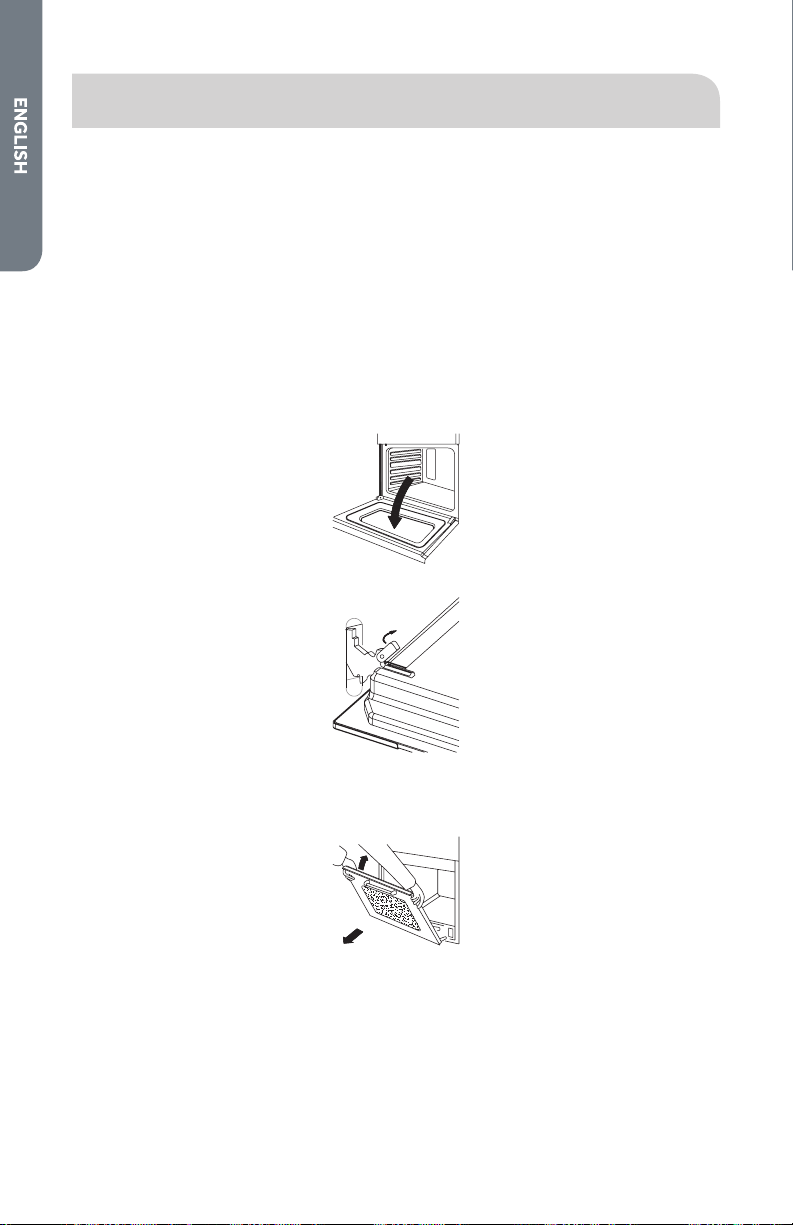
To remove the oven door:
1. Open the door fully.
2. Lift up and turn the small levers situated on the two hinges.
4. Grasp the door by its two outer edges, and then shut it slowly but not
completely.
5. Pull the door toward you, pulling it out of its seat.
6. Replace the door by reversing the above steps.
33
REPLACING AN OVEN LIGHT
WARNING
Electrical Shock Hazard
Make sure the oven and lights are cool and power to the oven has been
turned off before replacing the light bulb(s).
The lenses must be in place when using the oven. The lenses serve to
protect the light bulb from breaking.
The lenses are made of glass. Handle carefully to avoid breakage.
Failure to do so could result in death, electric shock, cuts or burns.
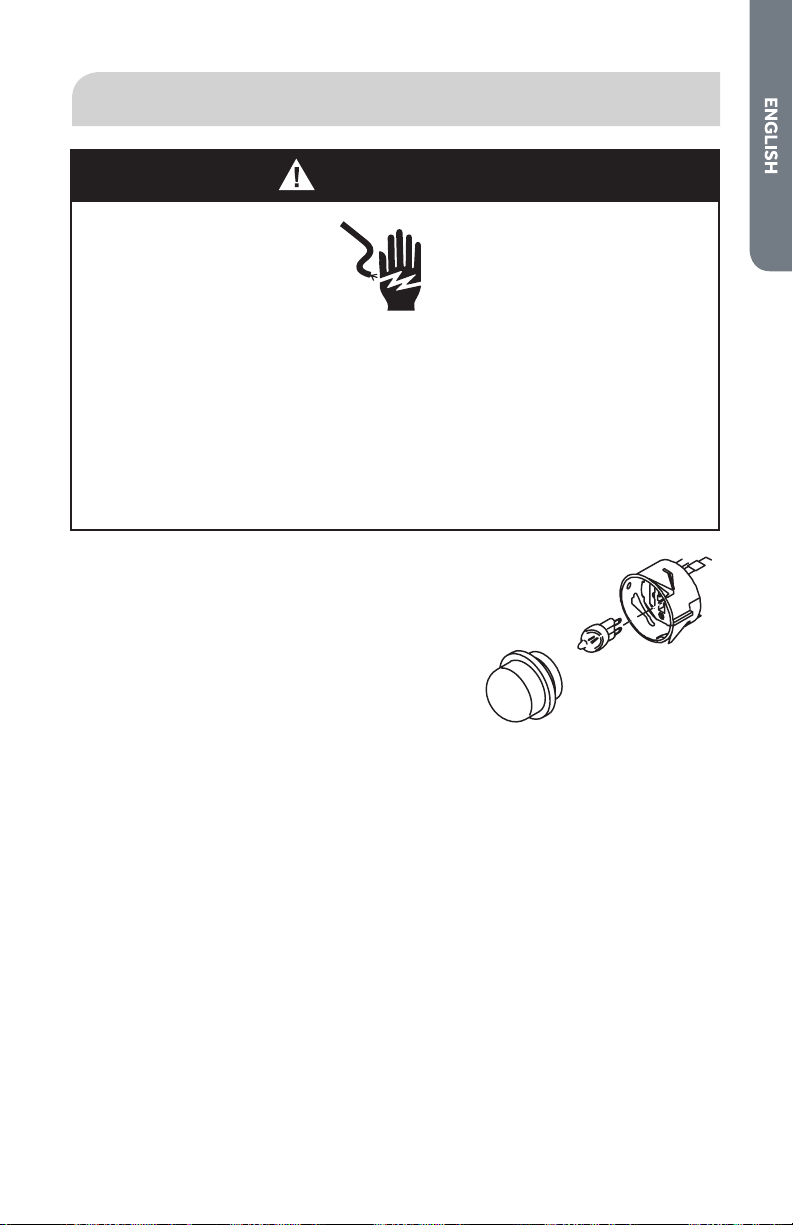
TO REPLACE A LIGHT BULB
Before replacing, make sure the oven is o and cool.
1. Disconnect power at the main power supply
(fuse or breaker box).
2. Remove the glass cover of the lamp-holder.
3. Remove the lamp and replace with a lamp
resistant to high temperatures with the following
characteristics:
•
Voltage: 208-240V
•
Wattage: 25W
•
Type: E 14
4. Replace the glass cover.
5. Turn power back on at the main power supply (fuse or breaker box).
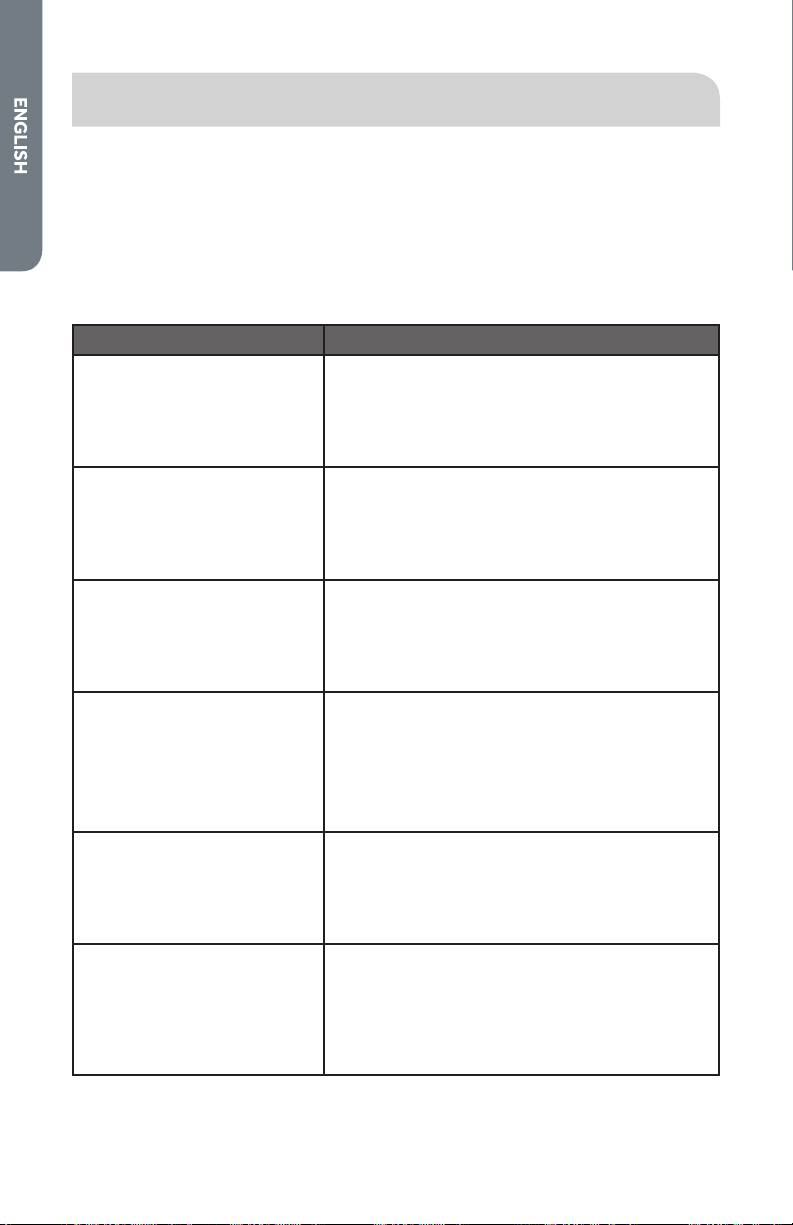
34
TROUBLESHOOTING
SOLVING BAKING AND ROASTING PROBLEMS
With either Bake or Convection Bake and Convection Roast poor results can occur
for many reasons other than a malfunction of the oven. Check the chart below for
causes of the most common problems. Since the size, shape and material of baking
utensils directly aect the baking results, the best solution may be to replace old
baking utensils that have darkened and warped with age and use. Check the Baking
Charts.
Baking and Roasting Problem Cause
Food browns unevenly
•
Oven not preheated
•
Aluminum foil on oven rack or oven bottom
•
Baking utensil too large for recipe
•
Pans touching each other or oven walls
Food too brown on bottom
•
Oven not preheated
•
Using glass, dull or darkened metal pans
•
Incorrect rack position
•
Pans touching each other or oven walls
Food is dry or has shrunk
excessively
•
Oven temperature too high
•
Baking time too long
•
Oven door opened frequently
•
Pan size too large
Food is baking or roasting too
slowly
•
Oven temperature too low
•
Oven not preheated
•
Oven door opened frequently
•
Tightly sealed with aluminum foil
•
Pan size too small
Piecrusts do not brown on
bottom or crust is soggy
•
Baking time not long enough
•
Using shiny steel pans
•
Incorrect rack position
•
Oven temperature is too low
Cakes pale, at and may not
be done inside
•
Oven temperature too low Incorrect baking
time
•
Cake tested too soon
•
Oven door opened too often
•
Pan size may be too large
35
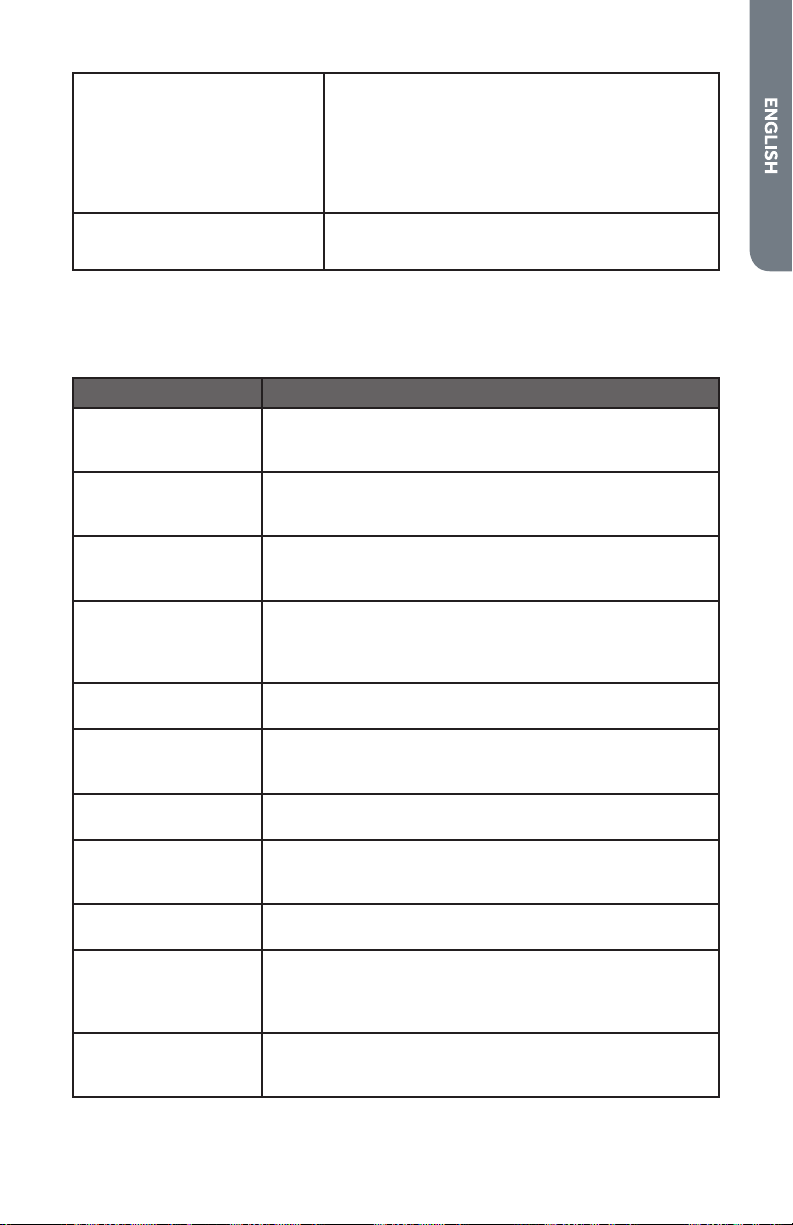
Cakes high in middle with
crack on top
•
Oven temperature too high
•
Baking time too long
•
Pans touching each other or oven walls
•
Incorrect rack position
•
Pan size too small
Piecrust edges too brown
•
Oven temperature too high
•
Edges of crust too thin
SOLVING OPERATIONAL PROBLEMS
Before calling for service, check the following to avoid unnecessary service charges.
Oven Problem Problem Solving Steps
The oven display
stays OFF
Turn o power at the main power supply (fuse or breaker
box). Turn breaker back on. If condition persists, call an
authorized service center.
Cooling fan continues
to run after oven is
turned o
The fan turns o automatically when the electronic
components have cooled suciently.
Oven is not heating Check the circuit breaker or fuse box to your house.
Make sure there is proper electrical power to the oven.
Make sure the oven temperature has been selected.
Oven is not cooking
evenly
Check oven calibration. Adjust calibration if necessary.
Refer to cook charts for recommended rack position.
Always reduce recipe temperature by 25 °F (15 °C) when
baking with Convention Bake mode.
Oven temperature is
too hot or too cold
The oven thermostat needs adjustment. See Calibrating
Oven Temperature.
Oven light is not
working properly
Replace or reinsert the light bulb if loose or defective.
Touching the bulb with ngers may cause the bulb to
burn out.
Oven light stays on
Check for obstruction in oven door. Check to see if hinge
is bent or door switch broken.
Cannot remove lens
cover on light
There may be a soil build-up around the lens cover. Wipe
lens cover area with a clean dry towel prior to attempting
to remove the lens cover.
Clock and timer are
not working properly
Make sure there is proper electrical power to the oven.
See the Clock and Timer sections.
Excessive moisture
When using bake mode, preheat the oven rst.
Convection Bake and Convection Roast will eliminate
any moisture in oven (this is one of the advantages of
convection).
Porcelain chips
When oven racks are removed and replaced, always tilt
racks upward and do not force them to avoid chipping the
porcelain.
FOR MORE HELP, VISIT HAIER.COM OR CALL THE CONSUMER
HELP LINE AT 1-877-377-3639.

36
LIMITED WARRANTY
IN-HOME SERVICE
FULL TWO YEAR WARRANTY
For 24 months from the date of original retail
purchase, Haier will repair or replace any part
free of charge including labor that fails due to
a defect in materials or workmanship.
Haier may replace or repair at their sole
discretion any part, sub system including the
entire product.
Product must be accessible, without
encumbrance and installed properly to
receive for warranty repair service.
LIMITED WARRANTY
NOTE: This warranty commences on the
date the item was purchased, and the original
purchase receipt must be presented to the
authorized service representative before
warranty repairs are rendered.
Exceptions: Commercial Use Warranty
90 days labor from date of original purchase
90 days parts from date of original
purchase
No other warranty applies.
FOR WARRANTY SERVICE
All service must be performed by a Haier
authorized service center. For the name and
telephone number of the nearest authorized
service center, please call 1-877-337-3639.
Before calling please have available the
following information:
Model number and serial number of your
appliance. The name and address of the
dealer you purchased the unit from and the
date of purchase.
A clear description of the problem.
A proof of purchase (sales receipt).
This warranty covers home appliance
services within the contiguous United
States and Canada and where available in
Alaska, Hawaii and Puerto Rico.
What is not covered by this warranty:
Replacement or repair of household fuses,
circuit breakers, wiring or plumbing.
A product whose original serial number has
been removed or altered.
Any service charges not specically identied
as normal such as normal service area or
hours.
Replacement of light bulbs.
Damage to clothing.
Damage incurred in shipping.
Damage caused by improper installation or
maintenance.
Damage from misuse, abuse accident, re,
ood, or acts of nature.
Damage from service other than an
authorized Haier dealer or service center.
Damage from incorrect electrical current,
voltage or supply.
Damage resulting from any product
modication, alteration or adjustment not
authorized by Haier.
Adjustment of consumer operated controls
as identied in the owner’s manual.
Hoses, knobs, lint trays and all attachments,
accessories and disposable parts.
Labor, service transportation, and shipping
charges for the removal and replacement of
defective parts beyond the initial 24-month
period.
Damage from other than normal household
use.
Any transportation and shipping charges.
THIS LIMITED WARRANTY IS GIVEN
IN LIEU OF ALL OTHER WARRANTIES,
EXPRESS ED OR IMPLIED, INCLUDING BUT
NOT LIMITED TO, THE WARRANTIES OF
MERCHANTABILITY AND FITNESS FOR A
PARTICULAR PURPOSE
The remedy provided in this warranty is
exclusive and is granted in lieu of all other
remedies.
This warranty does not cover incidental
or consequential damages, so the above
limitations may not apply to you. Some
states do not allow limitations on how long
an implied warranty lasts, so the above
limitations may not apply to you.
This warranty gives you specic legal rights,
and you may have other rights, which vary
from state to state.
Haier America
Wayne, NJ 07470


IMPORTANT
Do Not Return This Product To The Store
If you have a problem with this product, please contact the
“Haier Customer Satisfaction Center” at
1-877-337-3639.
DATED PROOF OF PURCHASE, MODEL #, AND SERIAL #
REQUIRED FOR WARRANTY SERVICE
IMPORTANT
Ne pas Réexpédier ce Produit au Magasin
Pour tout problème concernant ce produit, veuillez contacter
le service des consommateurs “Haier Customer Satisfaction Center” au
1-877-337-3639.
UNE PREUVE D’ACHAT DATEE EST REQUISE POUR BENEFICIER DE LA GARANTIE.
IMPORTANTE
No regrese este producto a la tienda
Si tiene algún problema con este producto, por favor contacte el
“Centro de Servicio al Consumidor de Haier” al
1-877-337-3639 (Válido solo en E.U.A).
NECESITA UNA PRUEBA DE DE COMPRA FECHADA, NÚMERO DE MODELO
Y DE SERIE PARA EL SERVICIO DE LA GARANTÍA
Made in China
Fabriqué en Chine
Hecho en China
Haier America
Wayne, NJ 07470
HCW2360AES
Issued: March 2015 Printed in China Part # 00XXXXXXXXX
