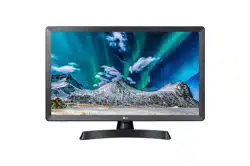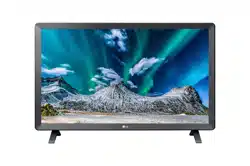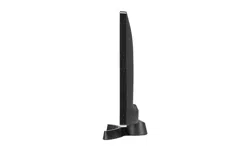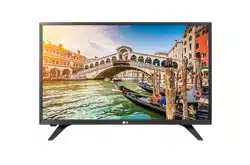

LED TV
28TK420S
AAA
www.lg.com
Depending on country / Në varësi të shtetit / В зависимост от страната / Ovisno o zemlji / V závislosti na
regionu / Zavisno od države / Afhankelijk van het land / En función del país / Sõltub riigist / Selon les pays /
Abhängig vom Land / Ανάλογα με τη χώρα / A seconda del Paese / Елге байланысты / Atkarīgs no valsts /
Priklausomai nuo šalies / Во зависност од земјата / Országfüggő / Zależnie od kraju / Dependendo do país /
În funcţie de ţară / В зависимости от страны / Závisí od krajiny / Odvisno od države / Залежно від країни /
Mamlakatga bog’liq ravishda / /
Ülkeye bağlı
(M4 x L14)
X 2
(M4 X L10)
X 4
*MFL70541102*
(1804-REV00)
English Read Safety and Reference.
Shqip Lexo Siguria dhe referencat.
Български Прочетете Безопасност и справки.
Hrvatski Pročitajte Sigurnost i reference.
Česky Přečtěte si část Bezpečnost a
reference.
Srpski Pročitajte Bezbednost i informacije.
Nederlands Lees Veiligheid en referentie goed door.
Español Leer Seguridad y Referencias.
Eesti Lugege Ohutus ja viited.
Français Lire le document Sécurité et référence.
Deutsch Bitte lesen Sie die Sicherheitshinweise
und Referenzen.
Ελληνικά Ανάγνωση Ασφάλεια και αναφορά.
Italiano Leggere Sicurezza e informazioni di
riferimento.
Қазақша Қауіпсіздік нұсқаулық бөлімін
оқыңыз.
Latviešu Izlasiet Drošībai un uzziņai.
Lietuvių k. Perskaitykite „Saugumas ir nuorodos“.
Македонски Прочитајте во Безбедносни информации и
референтни материјали.
Magyar Lásd: Biztonsági óvintézkedések.
Polski Przeczytaj Zasady bezpieczeństwa i
informacje dodatkowe.
Português Consulte o manual Segurança e Referência.
Română Citiţi Siguranţă şi referinţe.
Русский Прочитайте Руководство по технике
безопасности.
Slovenčina Prečítajte si časť Bezpečnosť a referencie.
Slovenščina Preberite Varnostne informacije in napotki.
Українська Прочитайте Правила безпеки та довідкова
інформація.
O’zbekcha Xavfsizlik va ma’lumotnomani o’qing.
Türkçe Güvenlik ve Referans bölümünü
okuyun.
1
2
B
A
USB IN
5 V 0.5 A
▲ PCMCIA ▲
CARD SLOT
A
L
R
R
HDMI IN
COMPONENT IN
D
C
-IN
(19 V )
VIDEO AUDIO
(MONO)
COMPONENT IN
AV IN
COMPONENT IN
VIDEO
AUDIO
VIDEO
AUDIO
(MONO)
(MONO)
Y
P
B PR
L
R
Y
P
B
P
R
L
R
2
1(ARC)
LAN
OPTICAL
DIGITAL
AUDIO OUT
HDMI OUT
AUDIO OUT
DVI OUT
AV IN
YPB PR
L
R
VIDEOAUDIO
VIDEOAUDIO
ANTENNA
/CABLE IN
13/18 V
700 mA Max
LNB
Satellite IN
AV IN
B
B
A
DC-IN
(
19 V
)
DC-IN
(
19 V
)
1
1
1
2
2
2
3
3 4
English
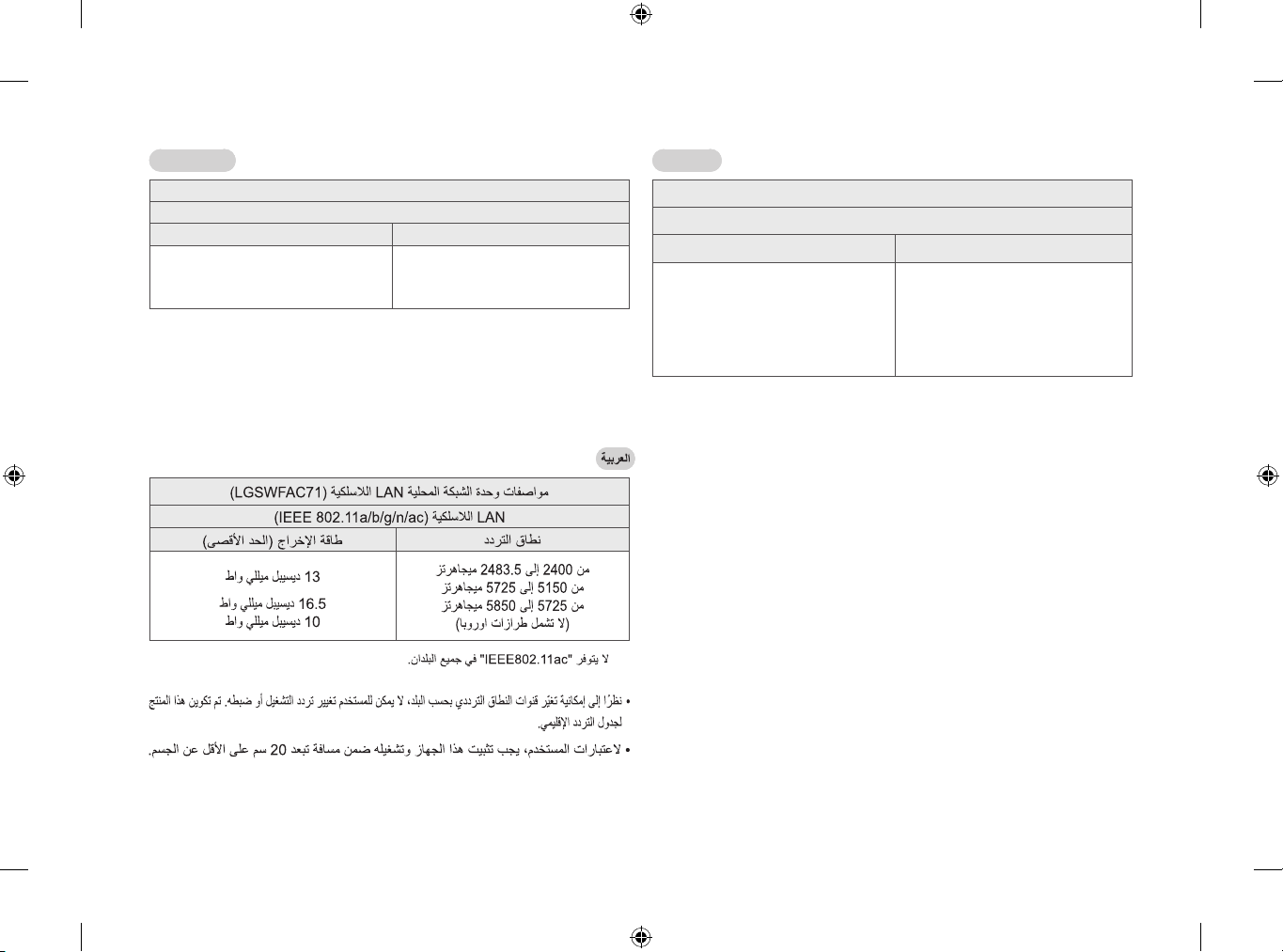
Wireless LAN module(LGSWFAC71) Specication
Wireless LAN (IEEE 802.11a/b/g/n/ac)
Frequency Range Output Power(Max.)
2400 to 2483.5 MHz
5150 to 5725 MHz
5725 to 5850 MHz (Not for EU)
13 dBm
16.5 dBm
10 dBm
* “IEEE 802.11ac” is not available in all countries.
y As band channels can vary per country, the user cannot change or adjust the operating frequency.
This product is congured for the regional frequency table.
y For consideration of the user, this device should be installed and operated with a minimum distance
of 20 cm between the device and the body.
LAN (LGSWFAC71)
LAN (IEEE 802.11a/b/g/n/ac)
(.)
2 400 2 483,5 MHz
5 150 5 725 MHz
5 725 5 850 MHz ( )
13 dBm
16,5 dBm
10 dBm
* “IEEE802.11ac” .
y ,
.
.
y
20 cm .
ČESKY
Technické údaje modulu bezdrátové sítě LAN (LGSWFAC71)
Bezdrátové sítě LAN (IEEE 802.11a/b/g/n/ac)
Frekvenční rozsah Výstupní výkon (max.)
2 400 až 2 483,5 MHz
5 150 až 5 725 MHz
5 725 až 5 850 MHz (Pro státy mimo EU)
13 dBm
16,5 dBm
10 dBm
* Standard “IEEE802.11ac” není dostupný ve všech zemích.
y Kanály pásma se mohou vrůzných zemích lišit. Uživatel proto nemůže změnit ani upravit provozní
frekvenci. Tento produkt je nastaven podle regionální tabulky frekvencí.
y Informace pro uživatele: Toto zařízení by mělo být instalováno apoužíváno sminimální vzdáleností
20cm mezi zařízením avaším tělem.
DEUTSCH
Spezikation für WLAN-Modul (LGSWFAC71)
WLAN (IEEE 802.11a/b/g/n/ac)
Frequenzbereich Ausgangsleistung (Max.)
2.400 bis 2.483,5MHz
5.150 bis 5.725MHz
5.725 bis 5.850MHz (Für Nicht-EU-Länder)
13 dBm
16,5 dBm
10 dBm
* “IEEE802.11ac” ist in einigen Ländern nicht verfügbar.
y Da sich Frequenzkanäle je nach Land unterscheiden können, kann der Benutzer die Betriebsfre-
quenz nicht ändern oder anpassen. Dieses Gerät ist entsprechend der regionalen Frequenztabelle
eingestellt.
y Dieses Gerät sollte zum Schutz des Benutzers mit einem Mindestabstand von 20cm zwischen Gerät
und Körper installiert und verwendet werden.
ΕΛΛΗΝΙΚΑ
Προδιαγραφέ ονάδα ασύρατου LAN (LGSWFAC71)
Ασύρατου LAN (IEEE 802.11a/b/g/n/ac)
Εύρο συχνοτήτων Ισχύ εξόδου (έγ.)
2.400 έω 2.483,5 MHz
5.150 έω 5.725 MHz
5.725 έω 5.850 MHz (Για χώρε εκτό E.Ε.)
13 dBm
16,5 dBm
10 dBm
* Το “IEEE802.11ac” δεν είναι διαθέσιο σε όλε τι χώρε.
y Καθώ τα κανάλια ζώνη πορεί να διαφέρουν ανά χώρα, ο χρήστη δεν πορεί να αλλάξει ή να
προσαρόσει τη συχνότητα λειτουργία. Αυτό το προϊόν έχει διαορφωθεί για τον πίνακα τοπικών
συχνοτήτων.
y Προ ενηέρωση του χρήστη, αυτή η συσκευή θα πρέπει να εγκατασταθεί και να λειτουργήσει ε
ελάχιστη απόσταση 20 εκ. εταξύ τη συσκευή και του σώατο.
ESPAÑOL
Especicación del módulo de LAN inalámbrico (LGSWFAC71)
LAN inalámbrico (IEEE 802.11a/b/g/n/ac)
Rango de frecuencias Potencia de salida (máx.)
De 2.400 a 2.483,5 MHz
De 5.150 a 5.725 MHz
De 5.725 a 5.850 MHz (Fuera de la UE)
13 dBm
16,5 dBm
10 dBm
* “IEEE802.11ac” no está disponible en todos los países.
y Dado que los canales de banda pueden variar según el país, el usuario no puede cambiar ni ajustar
la frecuencia de funcionamiento. Este producto está congurado para la tabla de frecuencias de la
región.
y Por seguridad del usuario, este dispositivo se debe instalar y utilizar con una distancia mínima de 20
cm entre el dispositivo y el cuerpo.
EESTI
Traadita LAN mooduli (LGSWFAC71) andmed
Traadita LAN (IEEE 802.11a/b/g/n/ac)
Sagedusvahemik Väljundvõimsus (max.)
2400 kuni 2483,5MHz
5150 kuni 5725 MHz
5725 kuni 5850 MHz (Väljaspool ELi)
13 dBm
16,5 dBm
10 dBm
* Standard “IEEE802.11ac” ei ole kõikides riikides kättesaadav.
y Kasutaja ei saa töösagedust muuta ega reguleerida, kuna kanalite sagedused on riigiti erinevad.
Toode on kongureeritud vastavalt piirkondlike sagedusalade tabelile.
y Kasutaja ohutuse tagamiseks tuleb seade paigaldada ja seda kasutada nii, et seadme ja keha
vaheline kaugus oleks vähemalt 20 cm.
FRANÇAIS
Spécications du module LAN sans l (LGSWFAC71)
Sans l LAN (IEEE 802.11a/b/g/n/ac)
Plage de fréquence Puissance en sortie (max.)
2400 à 2483,5MHz
5150 à 5725 MHz
5725 à 5850MHz (Hors Europe)
13 dBm
16,5 dBm
10 dBm
* La norme“IEEE802.11ac” n’est pas disponible dans tous les pays.
y Les canaux de bande pouvant varier selon le pays, l’utilisateur ne peut pas modier ni régler la
fréquence de fonctionnement. Ce produit est conguré conformément au tableau de fréquences
régionales.
y Pour plus de sécurité, ce périphérique doit être installé et utilisé à une distance minimale de 20cm
de votre corps.
HRVATSKI
Specikacije modula za bežični LAN (LGSWFAC71)
bežični LAN (IEEE 802.11a/b/g/n/ac)
Frekventni raspon Izlazna snaga (maks.)
2.400 do 2.483,5 MHz
5.150 do 5.725 MHz
5.725 do 5.850 MHz (Za države izvan EU)
13 dBm
16,5 dBm
10 dBm
* Standard “IEEE802.11ac” nije dostupan u svim zemljama.
y Budući da se frekvencijski pojasi kanala mogu razlikovati ovisno o zemlji, korisnik ne može
mijenjati niti prilagođavati radnu frekvenciju. Proizvod je konguriran sukladno tablici regionalnih
frekvencija.
y Uređaj se iz sigurnosnih razloga prilikom montiranja i rada treba nalaziti najmanje 20 cm od
korisnika.
MAGYAR
A vezeték nélküli LAN modul (LGSWFAC71) specikációja
Vezeték nélküli LAN (IEEE 802.11a/b/g/n/ac)
Frekvencia-tartomány Kimeneti teljesítmény (max.)
2400 - 2483,5 MHz
5150 - 5725 MHz
5725 - 5850 MHz (Az Európai Unión kívüli orszá-
gokra vonatkozóan)
13 dBm
16,5 dBm
10 dBm
* Az “IEEE 802.11ac” nem érhető el minden országban.
y Mivel a sávcsatornák országonként eltérhetnek, a felhasználó nem változtathatja meg vagy állíthat-
ja be a működési frekvenciát. Ezt a terméket a regionális frekvenciatáblázat szerint állították be.
y A felhasználó biztonsága érdekében legalább 20 centiméteres távolságnak kell lennie a teste és a
készülék között, a felszerelés és működtetés közben.
ITALIANO
Speciche tecniche del modulo Wireless LAN (LGSWFAC71)
LAN wireless (IEEE 802.11a/b/g/n/ac)
Gamma di frequenza Potenza in uscita (Max.)
Da 2.400 a 2.483,5 MHz
Da 5.150 a 5.725 MHz
Da 5.725 a 5.850 MHz (Fuori dall’UE)
13 dBm
16,5 dBm
10 dBm
* Lo standard “IEEE802.11ac” non è disponibile in tutti i paesi.
y Dal momento che i canali della banda possono variare in base al paese, l’utente non può modicare
o regolare la frequenza operativa. Questo prodotto è congurato in base alla tabella di frequenza
regionale.
y Nel rispetto della salute dell’utente, questo dispositivo deve essere installato e utilizzato a una
distanza minima di 20 cm dal corpo umano.
ҚАЗАҚША
Сымсыз LAN модулінің (LGSWFAC71) техникалық сипаттамасы
LAN (IEEE 802.11a/b/g/n/ac)
Жиілік диапазоны Шығыс қуаты (макс.)
2400 - 2483,5 МГц
5150 - 5725 МГц
5725 - 5850 МГц (Non ЕО үшін)
13 дБм
16,5 дБм
10 дБм
* “IEEE802.11ac” барлық елдерде қолжетімді бола бермейді.
y Диапазон арналары елге байланысты әртүрлі болатындықтан,
пайдаланушы жұмыс жиілігін өзгерте немесе реттей алмайды. Бұл өнім
аймақтық жиілік кестесіне сәйкес конфигурацияланады.
y Пайдаланушыға ескерту: бұл құрылғы адам денесі мен құрылғының
арасында ең азы 20 см аралықта орнатылып, пайдаланылуы қажет.
LIETUVIŲ K.
Belaidžio LAN modulio (LGSWFAC71) specikacijos
Belaidis LAN (IEEE 802.11a/b/g/n/ac)
Dažnių diapazonas Išvesties galia (maks.)
2400 – 2483,5 MHz
5150 – 5725 MHz
5725 – 5850 MHz (Skirta ne ES)
13 dBm
16,5 dBm
10 dBm
* “IEEE802.11ac” galimas ne visose šalyse.
y Kadangi kanalų diapazonai skiriasi įvairiose šalyse, vartotojas negali keisti arba reguliuoti veikimo
dažnio. Šis produktas yra sukongūruotas pagal regioninę dažnių lentelę.
y Vartotojas turi sumontuoti ir naudoti šį įrenginį ne mažesniu nei 20 cm atstumu nuo įrenginio ir
kūno.
LATVIEŠU
Bezvadu LAN moduļa (LGSWFAC71) specikācija
Bezvadu LAN (IEEE 802.11a/b/g/n/ac)
Frekvenču diapazons Izejas jauda (maks.)
No 2400 līdz 2483,5MHz
No 5150 līdz 5725 MHz
No 5725 līdz 5850MHz (Ārpus ES)
13 dBm
16,5 dBm
10 dBm
* “IEEE802.11ac” nav pieejams visās valstīs.
y Tā kā joslas kanāli dažādās valstīs var atšķirties, lietotājs nevar mainīt vai pielāgot darba frekvenci.
Šis produkts ir kongurēts reģionālo frekvenču tabulai.
y Lietotājam jāņem vērā, ka ierīce jāuzstāda un jālieto, ievērojot vismaz 20 cm attālumu starp ierīci
un ķermeni.
МАКЕДОНСКИ
LAN (LGSWFAC71)
LAN (IEEE 802.11a/b/g/n/ac)
(.)
2.400 2.483,5 MHz
5.150 5.725 MHz
5.725 5.850 MHz ( )
13 dBm
16,5 dBm
10 dBm
* “IEEE802.11ac” .
y ,
.
.
y ,
20 cm .
NEDERLANDS
Specicatie van de WLAN-module (LGSWFAC71)
Draadloze LAN (IEEE 802.11a/b/g/n/ac)
Frequentiebereik Uitgangsvermogen (max.)
2400 tot 2483,5 MHz
5150 tot 5725 MHz
5725 tot 5850 MHz (Voor buiten de EU)
13 dBm
16,5 dBm
10 dBm
* “IEEE802.11ac” is niet in alle landen beschikbaar.
y Omdat bandkanalen kunnen verschillen per land, kan de gebruiker de bedieningsfrequentie niet
wijzigen of aanpassen. Dit product is gecongureerd voor de regionale frequentietabel.
y Het is optimaal voor de gebruiker als dit apparaat op minimaal 20 cm van het lichaam wordt
geïnstalleerd en bediend.
POLSKI
Dane techniczne bezprzewodowego modułu LAN (LGSWFAC71)
Karta sieciowa wi- (IEEE 802.11a/b/g/n/ac)
Zakres częstotliwości Moc wyjściowa (maks.)
2400 – 2483,5MHz
5150 – 5725MHz
5725 – 5850MHz (Poza terytorium Unii
Europejskiej)
13 dBm
16,5 dBm
10 dBm
* Standard “IEEE802.11ac” nie jest dostępny we wszystkich krajach.
y Z uwagi na to, że kanały pasma mogą różnić się w zależności od kraju, użytkownik nie może zmienić
bądź regulować częstotliwości pracy. Produkt został skongurowany zgodnie z tabelą częstotliwości
dla danego regionu.
y Podczas montażu lub użytkowania urządzenia nie należy zbliżać się do niego na odległość mniejszą
niż 20cm.
PORTUGUÊS
Especicação do módulo LAN sem os (LGSWFAC71)
LAN sem os (IEEE 802.11a/b/g/n/ac)
Intervalo de frequência Potência de saída (máx.)
2400 a 2483,5 MHz
5150 a 5725 MHz
5725 a 5850 MHz (Para países fora da União
Europeia)
13 dBm
16,5 dBm
10 dBm
* O padrão “IEEE802.11ac” não se encontra disponível em todos os países.
y Uma vez que os canais de banda podem variar consoante o país, o utilizador não pode alterar nem
ajustar a frequência de funcionamento. Este produto está congurado para a tabela de frequência
regional.
y À atenção do utilizador: este dispositivo deve ser instalado e utilizado a uma distância mínima de 20
cm entre o dispositivo e o corpo.
ROMÂNĂ
Specicaiile modulului LAN fără r (LGSWFAC71)
LAN fără r (IEEE 802.11a/b/g/n/ac)
Domeniu de frecvene Putere de ieșire (Max.)
2.400 - 2.483,5 MHz
5.150 - 5.725 MHz
5.725 - 5.850 MHz (Pentru non-EU)
13 dBm
16,5 dBm
10 dBm
* “IEEE802.11ac” nu este disponibil în toate ările.
y Deoarece canalele de bandă pot varia în funcie de ară, utilizatorul nu poate modica sau regla
frecvena de operare. Acest produs este congurat pentru tabelul de frecvene regionale.
y Pentru respect faă de utilizator, acest dispozitiv trebuie instalat și operat la o distană minimă de 20
cm între dispozitiv și corp.
РУССКИЙ
(LGSWFAC71)
LAN (IEEE 802.11a/b/g/n/ac)
(.)
2400 – 2483,5
5150 – 5725
5725 – 5850 ( , )
13
16,5
10
* “IEEE802.11ac” .
y ,
.
.
y
20 .
SLOVENČINA
Technické parametre modulu pre bezdrôtovú sieť LAN (LGSWFAC71)
Bezdrôtovú sieť LAN (IEEE 802.11a/b/g/n/ac)
Frekvenčný rozsah Výstupný výkon (max.)
2 400 až 2 483,5 MHz
5 150 až 5 725 MHz
5 725 až 5 850 MHz (Pre krajiny mimo EÚ)
13 dBm
16,5 dBm
10 dBm
* Štandard “IEEE802.11ac” nie je dostupný vo všetkých krajinách.
y Kanály pásma sa môžu líšiť vzávislosti od krajiny, používateľ preto nemôže zmeniť ani upraviť
prevádzkovú frekvenciu. Tento produkt je nastavený na regionálnu tabuľku frekvencií.
y Informácia pre používateľov: Toto zariadenie by malo byť namontované apoužívané vminimálnej
vzdialenosti 20cm medzi zariadením apoužívateľom.
SLOVENŠČINA
Specikacije brezžičnega adapterja LAN (LGSWFAC71)
brezžičnega omrežja LAN (IEEE 802.11a/b/g/n/ac)
Frekvenčni razpon Izhodna moč (največ)
2.400 do 2.483,5 MHz
5.150 do 5.725 MHz
5.725 do 5.850 MHz (Za države izven EU)
13 dBm
16,5 dBm
10 dBm
* “IEEE802.11ac” ni na voljo v vseh državah.
y Pasovni kanali se lahko razlikujejo med državami, zato uporabnik ne more spremeniti ali prilagoditi
delovne frekvence. Izdelek je konguriran v skladu s podatki v tabeli z regionalnimi frekvencami.
y Naprava naj bo nameščena in uporabljana najmanj 20cm od uporabnikovega telesa.
SHQIP
Specikimet e modulit LAN (LGSWFAC71)
LAN me valë (IEEE 802.11a/b/g/n/ac)
Shkalla e frekuencës Fuqia në dalje (Maks.)
2400 në 2483,5 MHz
5150 në 5725 MHz
5725 në 5850 MHz (Për vendet jashtë BE-së)
13 dBm
16,5 dBm
10 dBm
* “IEEE802.11ac” nuk disponohet në të gjitha shtetet.
y Duke qenë se kanalet e bandës mund të ndryshojnë sipas shtetit, përdoruesi nuk mund të ndryshojë
apo të rregullojë frekuencën funksionale. Ky produkt është konruruar për tabelës rajonale të
frekuencave.
y Për t’u marrë parasysh nga përdoruesi, pajisja duhet të instalohet dhe të vihet në punë në një
distancë prej së paku 20 cm midis pajisjes dhe trupit.
SRPSKI
Specikacije bežičnog LAN modula (LGSWFAC71)
Bežični LAN (IEEE 802.11a/b/g/n/ac)
Frekvencijski opseg Izlazna snaga (maksimalna)
2.400 do 2.483,5 MHz
5.150 do 5.725 MHz
5.725 do 5.850 MHz (Za države izvan EU)
13 dBm
16,5 dBm
10 dBm
* “IEEE802.11ac” nije dostupan u svim državama.
y Budući da se kanali iz opsega razlikuju u zavisnosti od države, korisnik ne može da izmeni ili
prilagodi radnu frekvenciju. Ovaj uređaj je kongurisan prema tabeli regionalnih frekvencija.
y Zbog bezbednosti korisnika, tokom montaže i rada uređaj treba da se nalazi najmanje 20 cm od
korisnika.
УКРАЇНСЬКА
(LGSWFAC71)
’ (IEEE 802.11a/b/g/n/ac)
(.)
2400 - 2483,5
5150 - 5725
5725 - 5850 ( )
13
16,5
10
* “IEEE802.11ac” .
y ,
.
.
y 20
.
*
TÜRKÇE
Kablosuz LAN modülü (LGSWFAC71) teknk özellkler
Kablosuz LAN (IEEE 802.11a/b/g/n/ac)
Frekans Aralığı Çıkış Gücü (Maks.)
2.400 - 2.483,5 MHz
5.150 - 5.725 MHz
5.725 - 5.850 MHz (AB Dışındak
Ülkeler İçn)
13 dBm
16,5 dBm
10 dBm
* “IEEE802.11ac” tüm ülkelerde mevcut değldr.
yBant kanalları ülkelere göre değşeblr bu nedenle kullanıcı çalış-
ma frekansını değştremez ya da ayarlayamaz. Bu ürün bölgesel
frekans tablosuna uygun olarak yapılandırılmıştır.
yKullanıcının optmum rahatlığı çn bu aygıt, aygıt ve beden arasın-
da en az 20 cm mesafe olacak şeklde kurulmalı ve çalıştırılmalıdır.



ENG
ENGLISH
2
Table of contents
Licenses -------------------------------------------3
Open source software notice information 3
Preparing -----------------------------------------3
Lifting and moving the TV ------------------- 4
Setting up the TV -------------------------------4
Using the Joystick button --------------------5
Mounting on a table ---------------------------5
Mounting on a wall ----------------------------6
Connections (notications) -----------------7
Remote control ---------------------------------8
Maintenance ----------------------------------- 10
Troubleshooting------------------------------ 10
Specications --------------------------------- 11
ENGENGLISH
3
Licenses
Supported licenses may dier by model. For more information about
licenses, visit www.lg.com.
Open source software
notice information
To obtain the source code under GPL, LGPL, MPL, and other open
source licenses, that is contained in this product, please visit http://
opensource.lge.com.
In addition to the source code, all referred license terms, warranty
disclaimers and copyright notices are available for download.
LG Electronics will also provide open source code to you on CD-ROM
for a charge covering the cost of performing such distribution (such
as the cost of media, shipping, and handling) upon email request to
opensourc[email protected].
This oer is valid for a period of three years after our last shipment of
this product. This oer is valid to anyone in receipt of this information.
Preparing
NOTE
y Image shown may dier from your TV.
y Your TV’s OSD (On Screen Display) may dier slightly from that
shown in this manual.
y The available menus and options may dier from the input source or
product model that you are using.
y New features may be added to this TV in the future.
y The TV can be placed in standby mode in order to reduce the power
consumption. And the TV should be turned o if it will not be
watched for some time, as this will reduce energy consumption.
y The energy consumed during use can be signicantly reduced if the
level of brightness of the picture is reduced, and this will reduce the
overall running cost.
y The items supplied with your product may vary depending on the
model.
y Product specications or contents of this manual may be changed
without prior notice due to upgrade of product functions.
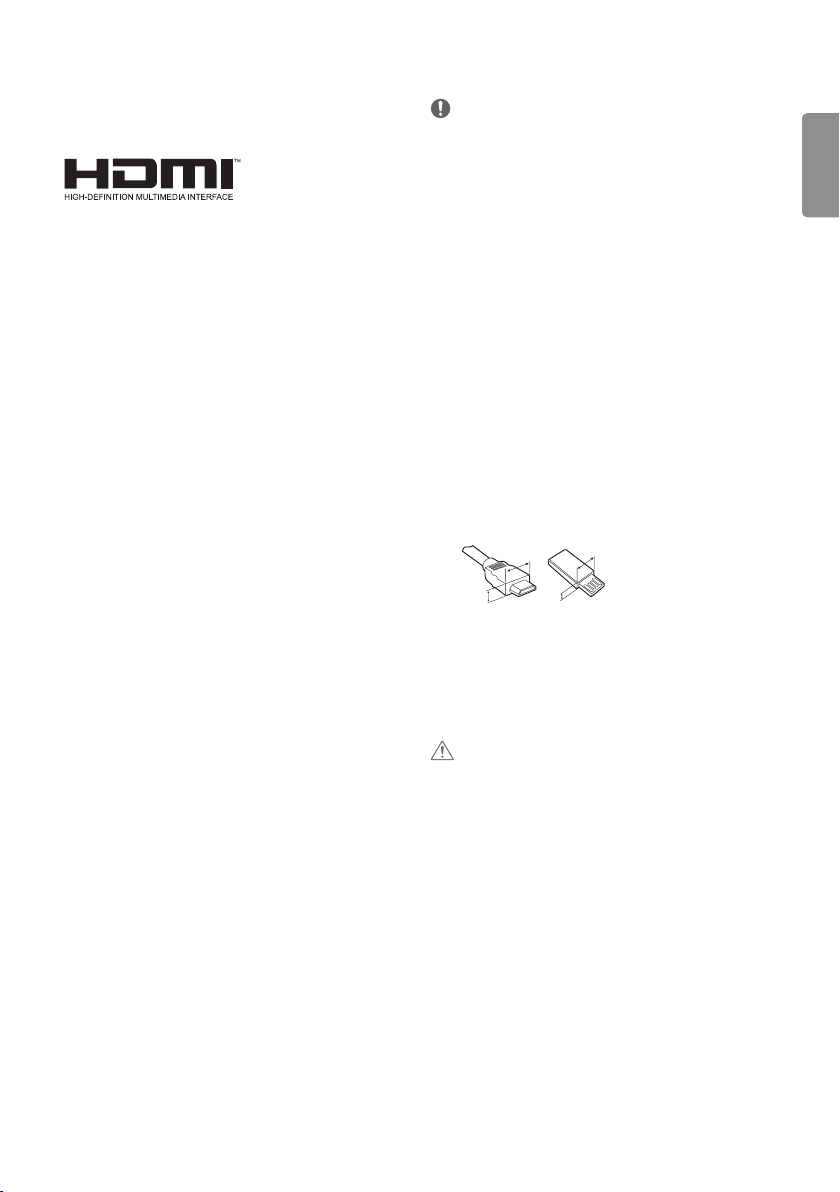
y For an optimal connection, HDMI cables and USB devices should
have bezels less than 10 mm thick and 18 mm width. Use an
extension cable that supports USB 2.0 if the USB cable or USB
memory stick does not t into your TV’s USB port.
A
B
A
B
*A
<
=
10 mm
*B
<
=
18 mm
y Use a certied cable with the HDMI logo attached. If you do not use
a certied HDMI cable, the screen may not display or a connection
error may occur.
y Recommended HDMI cable types
- High-Speed HDMI®/™ cable
- High-Speed HDMI®/™ cable with Ethernet
CAUTION
y Do not use any unapproved items to ensure the safety and product
life span.
y Any damage or injuries caused by using unapproved items are not
covered by the warranty.
ENG
ENGLISH
4
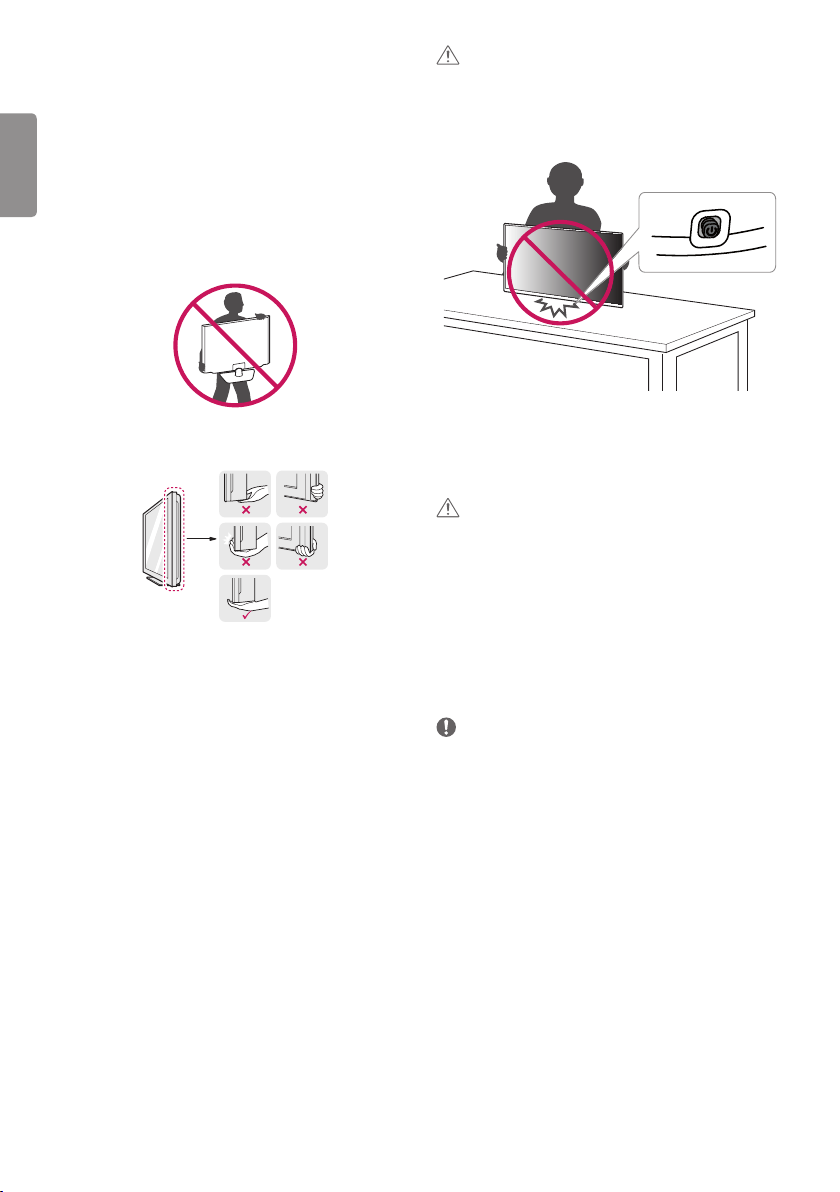
Lifting and moving the TV
Please note the following advice to prevent the TV from being
scratched or damaged and for safe transportation regardless of its
type and size.
y It is recommended to move the TV in the box or packing material
that the TV originally came in.
y Before moving or lifting the TV, disconnect the power cord and all
cables.
y When holding the TV, the screen should face away from you to avoid
damage.
y Hold the top and bottom of the TV frame rmly. Make sure not to
hold the transparent part, speaker, or speaker grill area.
y When transporting the TV, do not expose the TV to jolts or excessive
vibration.
y When transporting the TV, keep the TV upright, never turn the TV on
its side or tilt towards the left or right.
y Do not apply excessive pressure to cause exing/bending of frame
chassis as it may damage screen.
CAUTION
y Avoid touching the screen at all times, as this may result in damage
to the screen.
y When handling the TV, be careful not to damage the protruding
joystick button. (Depending on model)
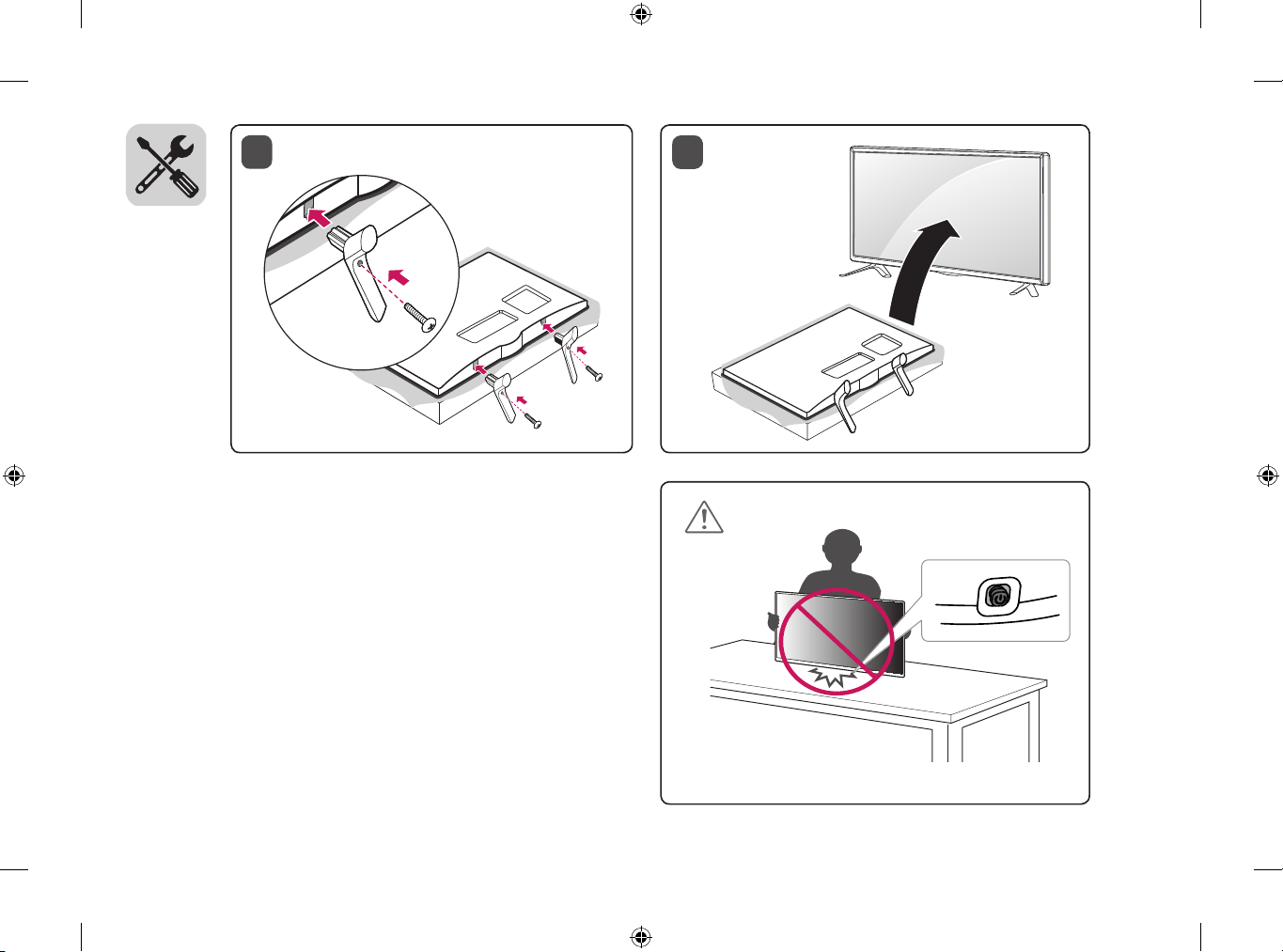
Setting up the TV
CAUTION
y When attaching the stand to the TV set, place the screen facing
down on a cushioned table or at surface to protect the screen from
scratches.
y Do not carry the TV upside-down by holding the stand body (or
stand base) as this may cause it to fall o, resulting in damage or
injury.
y Do not apply foreign substances (oils, lubricants, etc.) to the screw
parts when assembling the product. (Doing so may damage the
product.)
NOTE
y Remove the stand before installing the TV on a wall mount by
performing the stand attachment in reverse.
ENGENGLISH
5
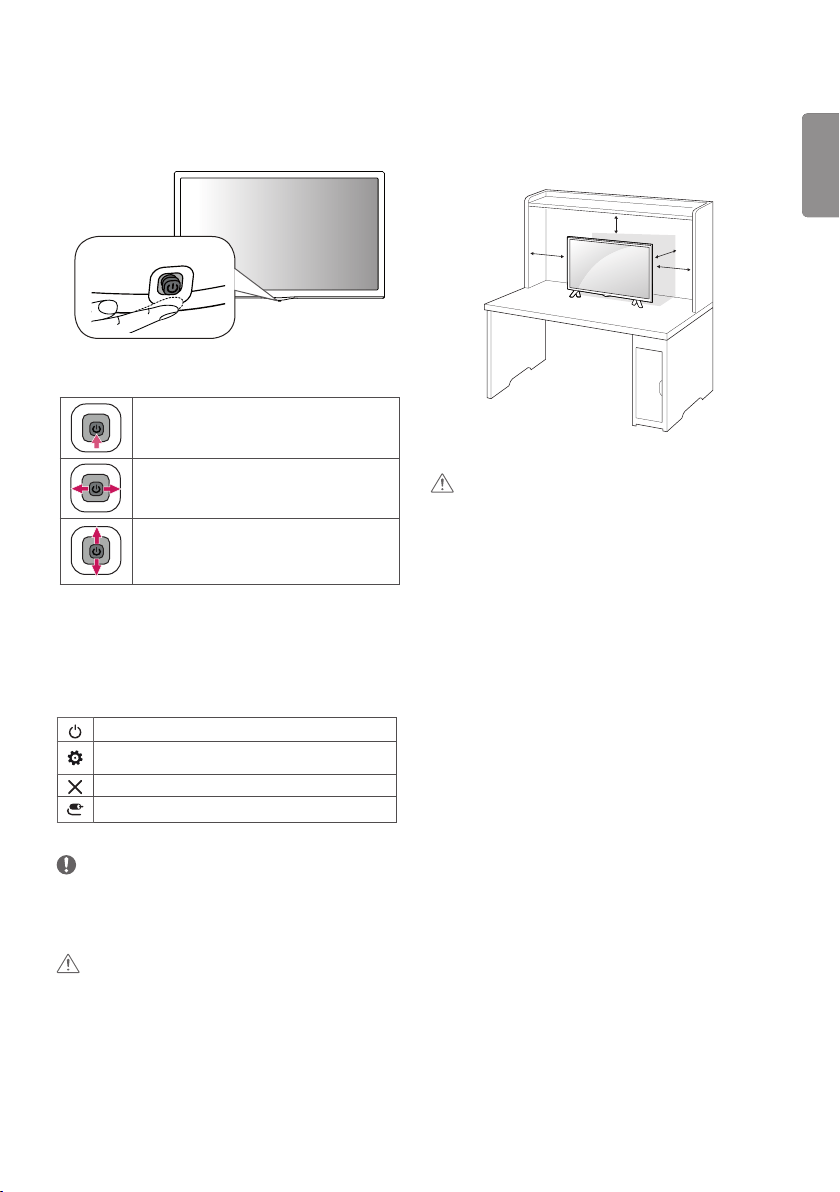
Using the Joystick button
You can simply operate the TV functions, pressing or moving the
button.
y Image shown may dier from your TV.
Basic functions
Power On (Press)
Power O (Press and hold
1
)
Volume Control
Programmes Control
1 If the menu button is on the screen, pressing and holding the
button will let you exit the menu.
Adjusting the menu
When the TV is turned on, press the joystick button one time. You can
adjust the menu items pressing or moving the buttons.
Turns the power o.
Accesses the setting menu.
Clears on-screen displays and returns to TV viewing.
Changes the input source.
NOTE
y If you press the joystick button rst, you may not be able to adjust
the volume level and saved programmes.
CAUTION
y When your nger over the joystick button and push it to the up,
down, left or right, be careful not to press the joystick button.
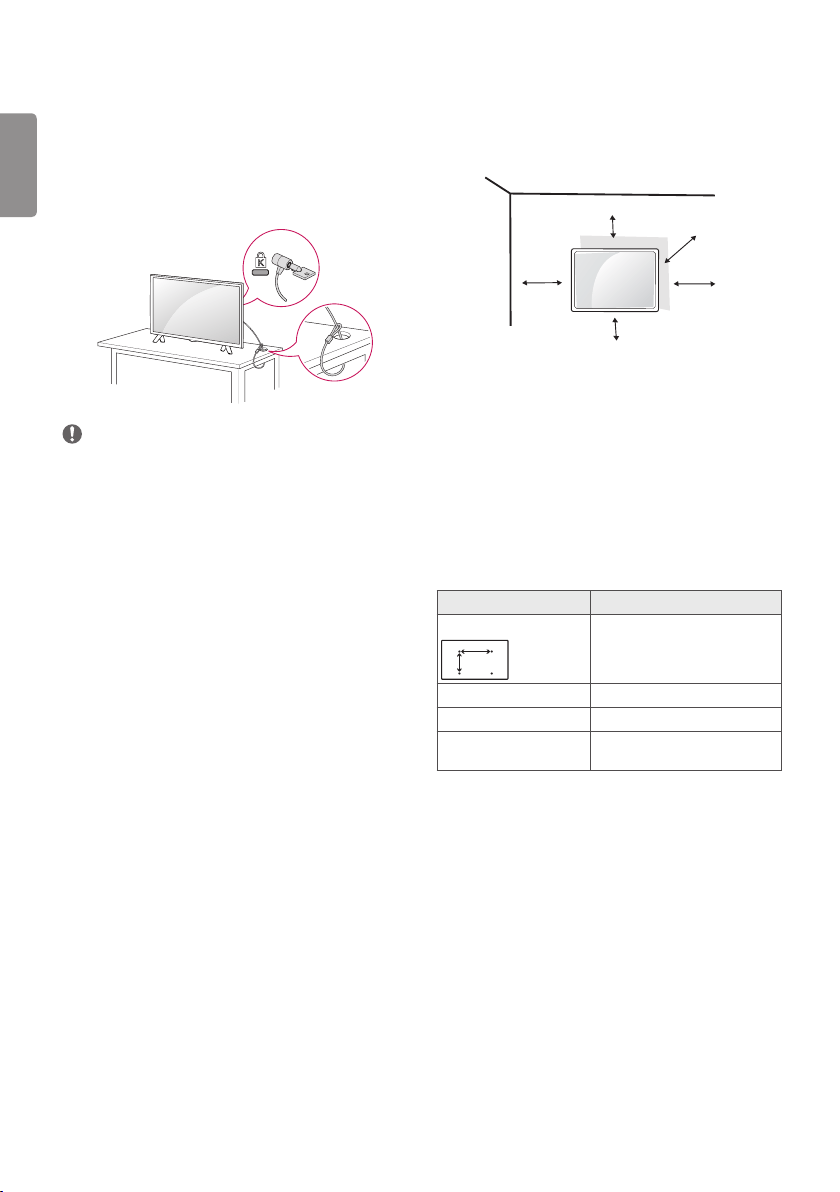
Mounting on a table
y Image shown may dier from your TV.
1 Lift and tilt the TV into its upright position on a table.
- Leave a 100 mm (minimum) space from the wall for proper
ventilation.
100 mm
100 mm
100 mm
100 mm
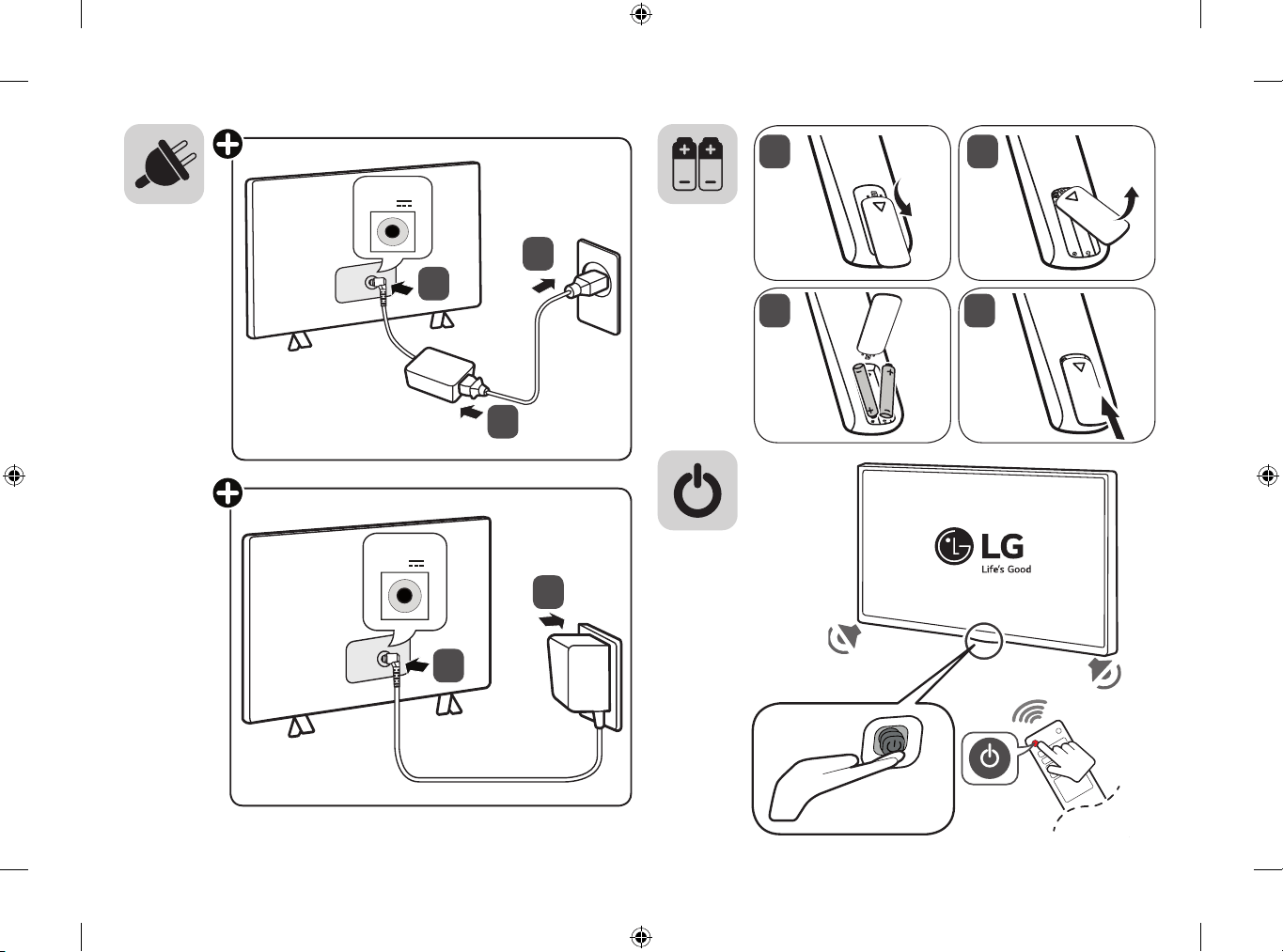
2 Connect the AC-DC Adapter and power cord to a wall outlet.
CAUTION
y Do not place the TV near or on sources of heat, as this may result in
re or other damage.
y Please be sure to connect the TV to the AC/DC power adapter before
connecting the TV’s power plug to a wall power outlet.
ENG
ENGLISH
6
Mounting on a wall
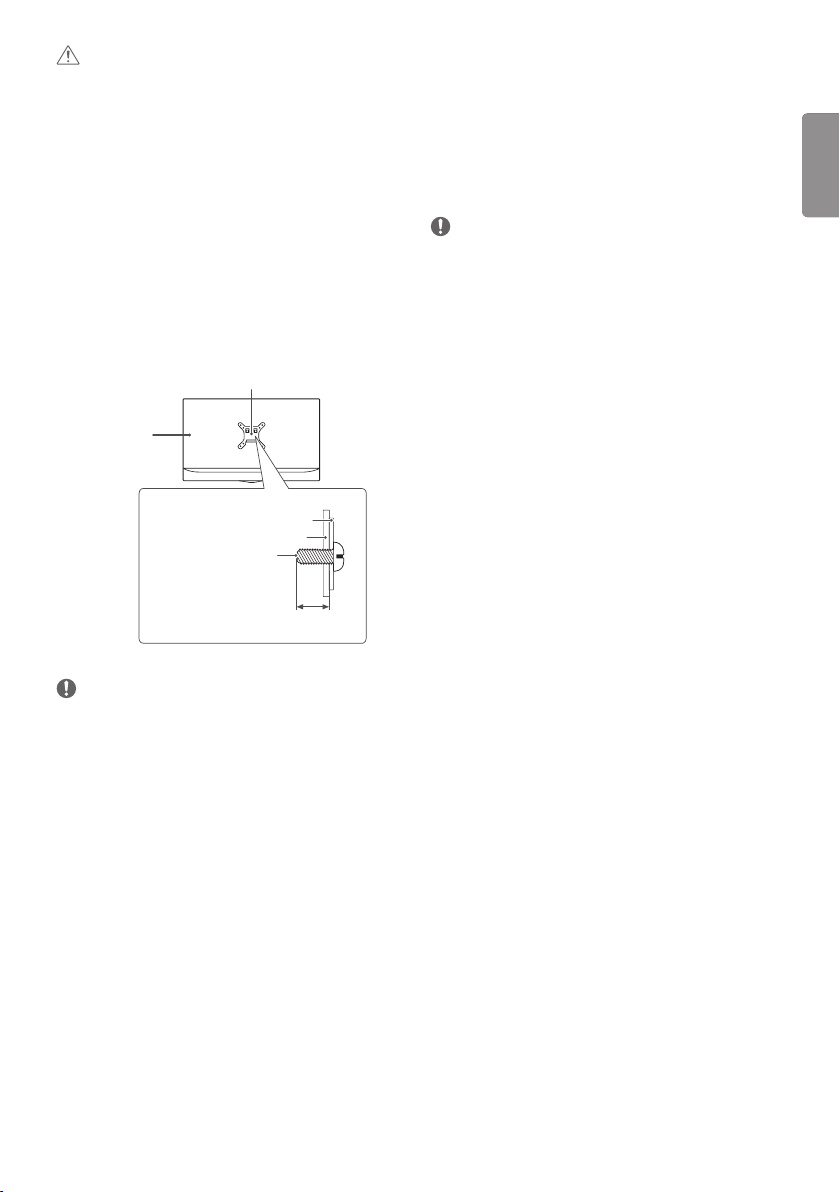
For proper ventilation, allow a clearance of 100 mm on each side and
from the wall. Detailed installation instructions are available from your
dealer, see the optional Tilt Wall Mounting Bracket Installation and
Setup Guide.
100 mm
100 mm
100 mm
100 mm
100 mm
If you intend to mount the TV to a wall, attach Wall mounting interface
(optional parts) to the back of the TV.
When you install the TV using the wall mounting interface (optional
parts), attach it carefully so it will not drop.
1 If you use screw longer than standard, the TV might be damaged
internally.
2 If you use improper screw, the product might be damaged and
drop from mounted position. In this case, LG Electronics is not
responsible for it.
Separate purchase (Wall mounting bracket)
Model 28TK420S
Wall mount (A x B) (mm)
A
B
100 x 100
Standard screw M4 x L10
Number of screws 4
Wall mount bracket
(optional)
RW120
Using the kensington security system
(This is not available for all models.)
y Image shown may dier from your TV.
The Kensington security system connector is located at the rear of
the TV. For more information of installation and using, refer to the
manual provided with the Kensington security system or visit http://
ww w.kensington.com. Connect the Kensington security system cable
between the TV and a table.
NOTE
y The Kensington security system is optional. You can obtain
additional accessories from most electronics stores.
ENGENGLISH
7
CAUTION
y Must use the enclosed screw in the box. (Depending on model)
y Disconnect the power rst, and then move or install the TV.
Otherwise electric shock may occur.
y If you install the TV on a ceiling or slanted wall, it may fall and result
in severe injury.
y Use an authorized LG wall mount and contact the local dealer or
qualied personnel.
y Do not over tighten the screws as this may cause damage to the TV
and void your warranty.
y Use the screws and wall mounts that meet the VESA standard. Any
damages or injuries by misuse or using an improper accessory are
not covered by the warranty.
y Screw length from outer surface of back cover should be under 8
mm.
Wall mount Pad
Back Cover
Standard screw
: M4 x L10
Wall mount Pad
Back Cover
Max.8 mm
NOTE
y Use the screws that are listed on the VESA standard screw
specications.
y The wall mount kit includes an installation manual and necessary
parts.
y The wall mount bracket is optional. You can obtain additional
accessories from your local dealer.
y The length of screws may dier depending on the wall mount. Be
sure to use the proper length.
y For more information, refer to the instructions supplied with the
wall mount.
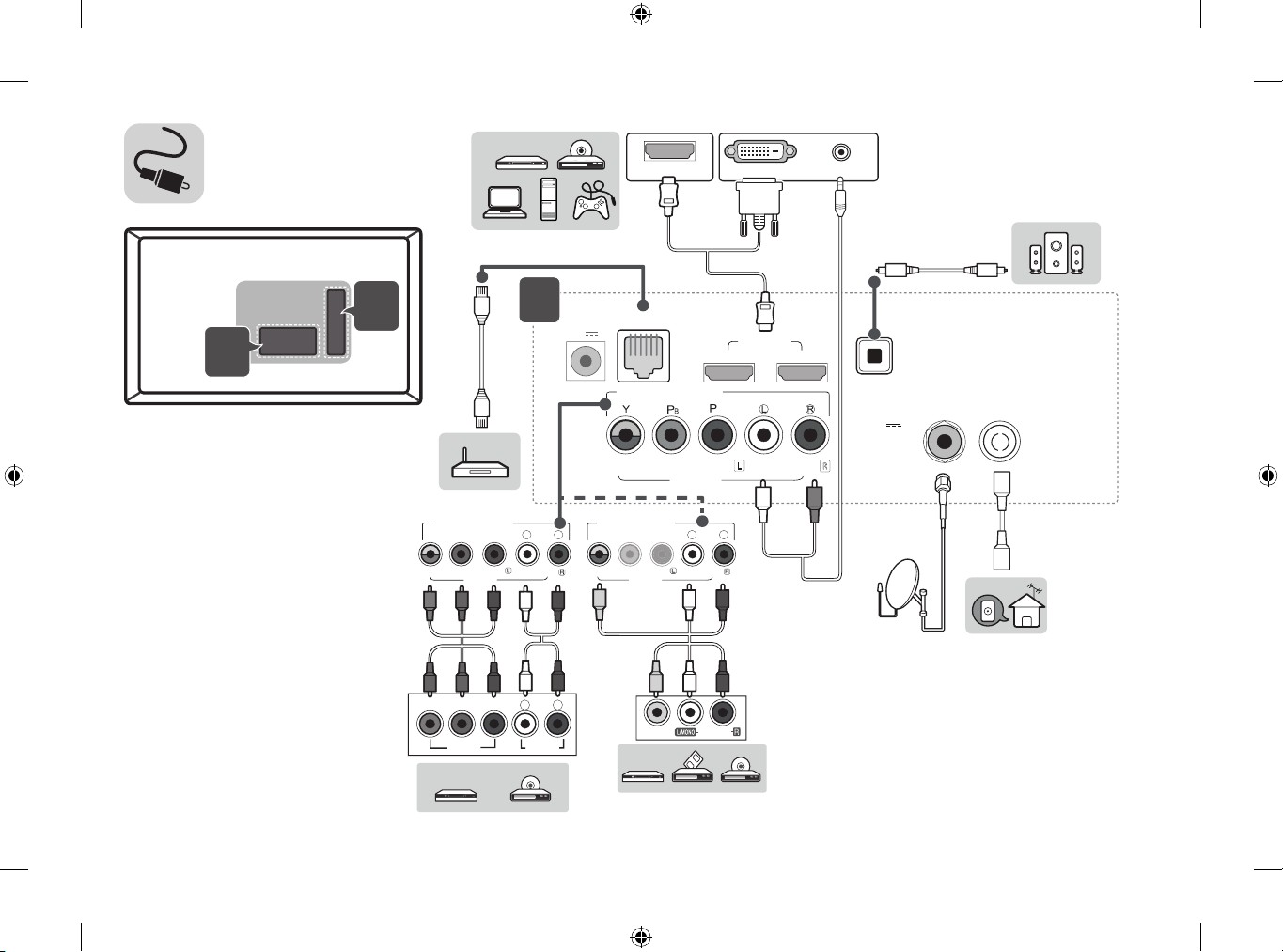
Connections (notications)
Connect various external devices to the TV and switch input modes
to select an external device. For more information about an external
device’s connection, refer to the manual supplied with each device.
Available external devices are: HD receivers, DVD players, VCRs, audio
systems, USB storage devices, PC, gaming devices, and other external
devices.
NOTE
y The external device connection may dier from the model.
y Connect external devices to the TV regardless of the order of the
TV port.
y If you record a TV programme on a DVD recorder or VCR, make
sure to connect the TV signal input cable to the TV through a DVD
recorder or VCR. For more information of recording, refer to the
manual provided with the connected device.
y Refer to the external equipment’s manual for operating instructions.
y If you connect a gaming device to the TV, use the cable supplied
with the gaming device.
y In PC mode, there may be noise associated with the resolution,
vertical pattern, contrast or brightness. If noise is present, change
the PC output to another resolution, change the refresh rate to
another rate or adjust the brightness and contrast on the Picture
menu until the picture is clear.
y In PC mode, some resolution settings may not work properly
depending on the graphics card.
Antenna connection
Connect the TV to a wall antenna socket with an RF cable (75 Ω)
(Not Provided).
y Use a signal splitter to use more than 2 TVs.
y If the image quality is poor, install a signal amplier properly to
improve the image quality.
y If the image quality is poor with an antenna connected, try to
realign the antenna in the correct direction.
y An antenna cable and converter are not supplied.
y Supported DTV Audio : MPEG, Dolby Digital, Dolby Digital Plus,
HE-AAC
ENG
ENGLISH
8
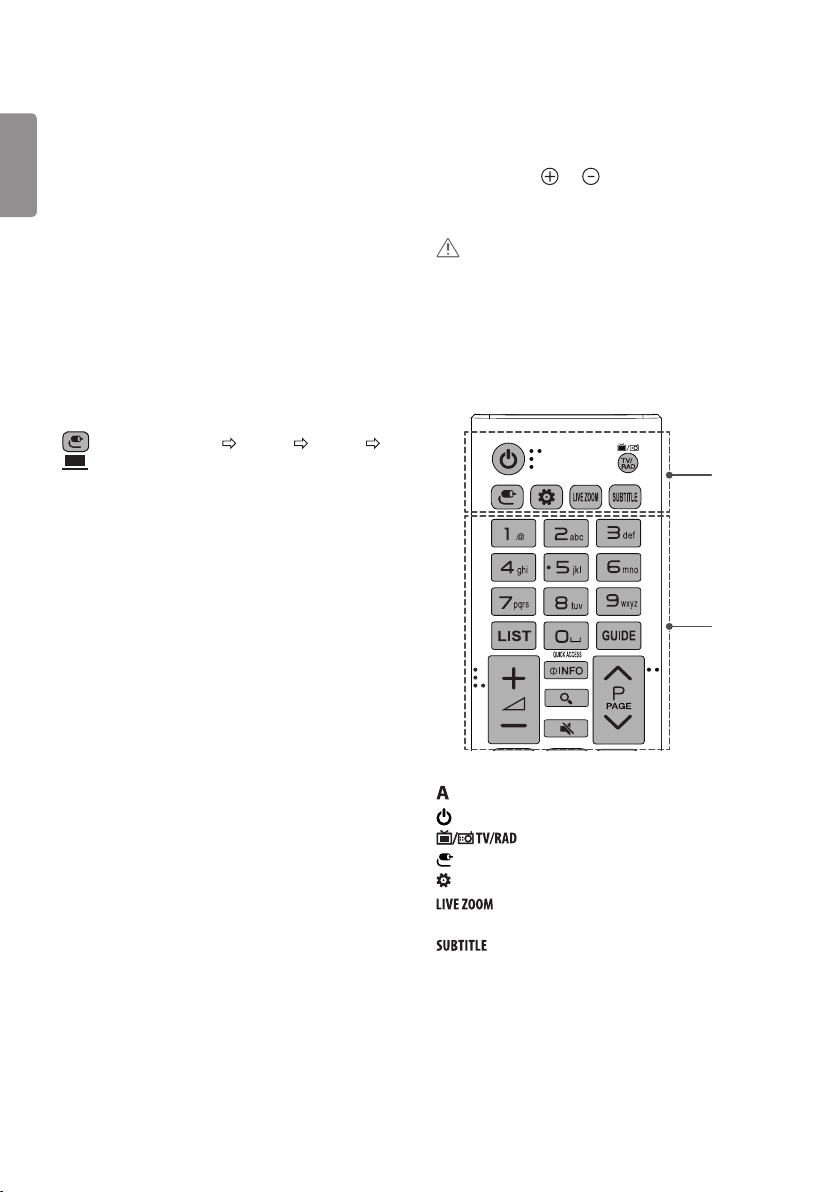
Remote control
The descriptions in this manual are based on the buttons on the
remote control. Please read this manual carefully and use the TV
correctly.
To replace batteries, open the battery cover, replace batteries (1.5
V AAA) matching the and ends to the label inside the
compartment, and close the battery cover. To remove the batteries,
perform the installation actions in reverse.
CAUTION
y Do not mix old and new batteries, as this may damage the remote
control.
y The remote control will not be included for all sales market.
Make sure to point the remote control toward the remote control
sensor on the TV.
* To use the button, press and hold for more than 3 seconds.
1
2
A
B
(Power) Turns the TV on or o.
Selects Radio, TV and DTV programme.
(INPUT) Changes the input source.
(Q.Settings) Accesses the Quick Settings.
By zooming in on the selected area, you can view it in
full screen.
Recalls your preferred subtitle in digital mode.
Satellite dish connection
(Only satellite models)
Connect the TV to a satellite dish to a satellite socket with a satellite
RF cable (75 Ω).
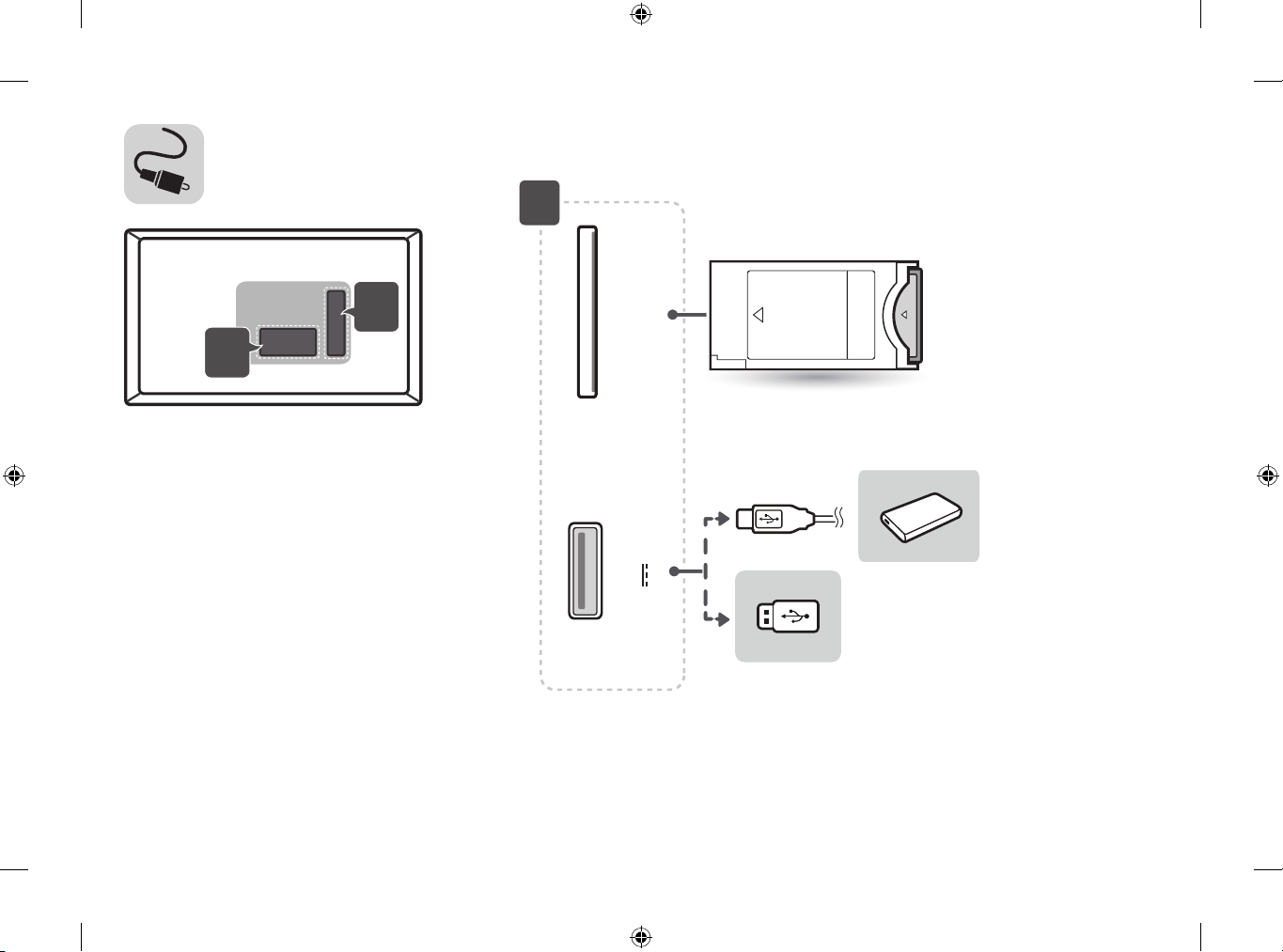
CI module connection
(Depending on model)
View the encrypted (pay) services in digital TV mode.
y Check if the CI module is inserted into the PCMCIA card slot in the
right direction. If the module is not inserted properly, this can cause
damage to the TV and the PCMCIA card slot.
y If the TV does not display any video and audio when CI+ CAM is
connected, please contact to the Terrestrial/Cable/Satellite Service
Operator.
PC connection
When connecting your PC to the HDMI input, set the HDMI input’s
Input Label to PC
(INPUT) (Remote control) All Inputs EDIT ICON
PC
Other connections
Connect your TV to external devices. For the best picture and audio
quality, connect the external device and the TV with the HDMI cable.
Some separate cable is not provided.
y Supported HDMI Audio format:
Dolby Digital / Dolby Digital Plus (32 kHz, 44.1 kHz, 48 kHz), DTS
(44.1 kHz, 48 kHz), PCM (32 kHz, 44.1 kHz, 48 kHz, 96 kHz, 192 kHz)
(Depending on model)
ENGENGLISH
9
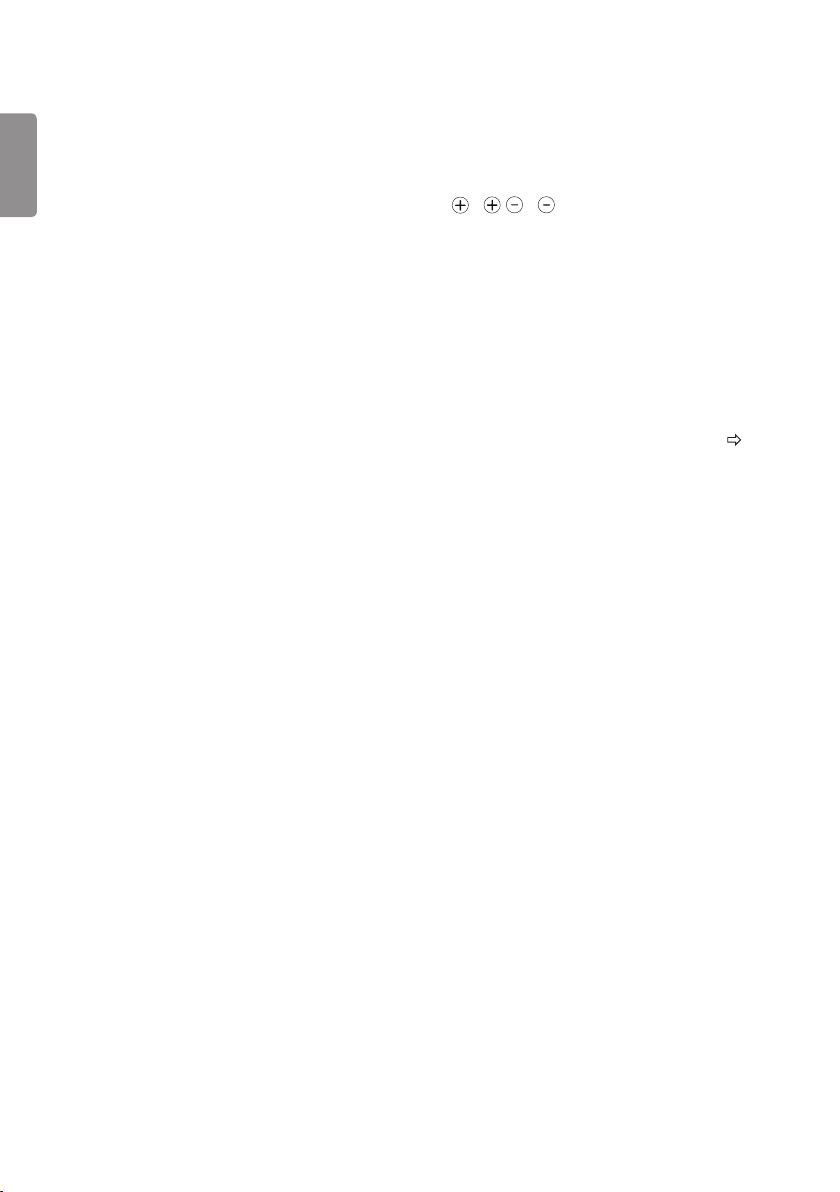
Number buttons Enters numbers.
Alphabet buttons Enters letters.
Accesses the saved programme list.
(Space) Opens an empty space on the screen keyboard.
Shows programme guide.
* You can access apps or Live TV using the number
buttons corresponding to the features.
Adjusts the volume level.
Views the information of the current programme and screen.
(SEARCH) Search for content such as TV programmes, movies and
other videos, or perform a web search by entering text in the search
bar.
(MUTE) Mutes all sounds.
Scrolls through the saved programmes.
Moves to the previous or next screen.
1
2
C
D
, Streaming Service buttons Connects to the Video Streaming
Service.
(HOME) Shows the Home menu.
* Shows the previous history.
Returns to the previous level.
Clears on-screen displays and returns to TV viewing.
Navigation buttons (up/down/left/right) Scrolls through menus
or options.
Selects menus or options and conrms your input.
Teletext buttons ( ) These buttons are used for
teletext.
* Provides content related to the program you are
currently watching.
Audio descriptions function will be enabled.
Starts to record and displays record menu.
(Only Time Machine
Ready
supported model)
Returns to LIVE TV.
Control buttons ( ) Controls media contents.
, , , These access special functions in some
menus.
ENG
ENGLISH
10
Maintenance
Cleaning your TV
Clean your TV regularly to keep the best performance and to extend
the product lifespan.
y Make sure to turn the power o and disconnect the power cord and
all other cables rst.
y When the TV is left unattended and unused for a long time,
disconnect the power cord from the wall outlet to prevent possible
damage from lightning or power surges.
Screen, frame, cabinet and stand
To remove dust or light dirt, wipe the surface with a dry, clean, and
soft cloth.
To remove major dirt, wipe the surface with a soft cloth dampened in
clean water or a diluted mild detergent. Then wipe immediately with
a dry cloth.
y Avoid touching the screen at all times, as this may result in damage
to the screen.
y Do not push, rub, or hit the screen surface with your ngernail or a
sharp object, as this may result in scratches and image distortions.
y Do not use any chemicals as this may damage the product.
y Do not spray liquid onto the surface. If water enters the TV, it may
result in re, electric shock, or malfunction.
Power cord
Remove the accumulated dust or dirt on the power cord regularly.
Preventing “Image burn” or “Burn-in” on
your TV screen
y If a xed image displays on the TV screen for a long period of time,
it will be imprinted and become a permanent disgurement on
the screen. This is “image burn” or “burn-in” and not covered by the
warranty.
y If the aspect ratio of the TV is set to 4:3 for a long period of time,
image burn may occur on the letterboxed area of the screen.
y Avoid displaying a xed image on the TV screen for a long period of
time (2 or more hours for LCD) to prevent image burn.
Troubleshooting
Cannot control the TV with the remote control.
y Check the remote control sensor on the product and try again.
y Check if there is any obstacle between the product and the remote
control.
y Check if the batteries are still working and properly installed
( to , to ).
No image display and no sound is produced.
y Check if the product is turned on.
y Check if the power cord is connected to a wall outlet.
y Check if there is a problem in the wall outlet by connecting other
products.
The TV turns o suddenly.
y Check the power control settings. The power supply may be
interrupted.
y Check if the Sleep Timer / Timer Power Off is activated in the
Timers settings.
y Check if the Auto Power Off is activated in the General Eco
Mode settings. (Depending on model)
y If there is no signal while the TV is on, the TV will turn o
automatically after 15 minutes of inactivity.
When connecting to the PC (HDMI), 'No Signal' or 'Invalid
Format' is displayed.
y Turn the TV o/on using the remote control.
y Reconnect the HDMI cable.
y Restart the PC with the TV on.
ENGENGLISH
11
Specications
Product specications may be changed without prior notice due to upgrade of product functions.
Models
Dimensions (W x H x D) (mm) Weight (kg)
Power consumption
Power
requirement
With stand Without stand With stand Without stand
28TK420S 641.5 x 428.7 x 159.2 641.5 x 396.3 x 59.5 4.6 4.5 28 W 19 V 2.0 A
Wireless module specication
y As band channels can vary per country, the user cannot change or adjust the operating frequency. This product is congured for the regional
frequency table.
y For consideration of the user, this device should be installed and operated with a minimum distance of 20 cm between the device and the body.
0197
0197
Wireless LAN module(LGSWFAC71) Specication
Wireless LAN (IEEE 802.11a/b/g/n/ac)
Frequency Range Output Power(Max.)
2400 to 2483.5 MHz
5150 to 5725 MHz
5725 to 5850 MHz (Not for EU)
13 dBm
16.5 dBm
10 dBm
* "IEEE 802.11ac" is not available in all countries.
ENG
ENGLISH
12
AC/DC Adapter
Manufacturer: Lien Chang
Model: LCAP16B-E, LCAP21C
Manufacturer: Honor
Model: ADS-45FSN-19 19040GPG,
ADS-45SN-19-3 19040G
In: AC 100 – 240 V ~ 50/60 Hz
Out: DC 19 V 2.1 A
CI module Size (W x H x D) 100.0 mm x 55.0 mm x 5.0 mm
Environment
condition
Operating Temperature 0 °C to 40 °C
Operating Humidity Less than 80 %
Storage Temperature -20 °C to 60 °C
Storage Humidity Less than 85 %
(Depending on country)
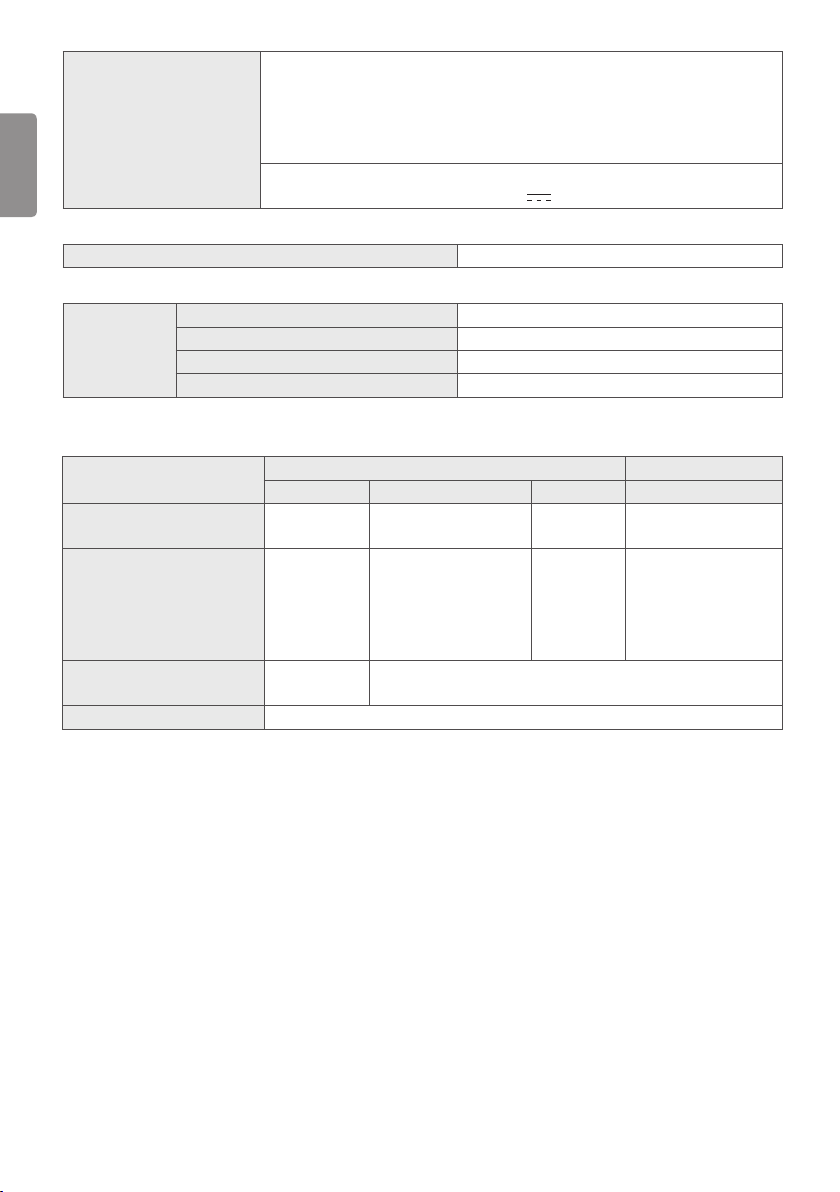
Digital TV Analogue TV
Satellite Terrestrial Cable Terrestrial / Cable
Television system DVB-S/S2*
DVB-T
DVB-T2*
DVB-C
PAL/SECAM B/G, D/K,
I,SECAM L
Programme coverage 950 ~ 2,150 Mhz
VHF III : 174 ~ 230 Mhz
UHF IV : 470 ~ 606 Mhz
UHF V : 606 ~ 862 Mhz
S Band II : 230 ~ 300 Mhz
S Band III : 300 ~ 470 Mhz
46 ~ 890 Mhz 46 ~ 862 Mhz
Maximum number of
storable programmes
6,000 2,000
External antenna impedance 75 Ω
* Only DVB-T2/C/S2 support models.
ENGENGLISH
13
WARNING!
Never place a television set in an unstable location. A television
set may fall, causing serious personal injury or death. Many
injuries, particularly to children, can be avoided by taking simple
precautions such as:
y Using cabinets or stands recommended by the manufacturer of
the television set.
y Only using furniture that can safely support the television set.
y Ensuring the television set is not overhanging the edge of the
supporting furniture.
y Not placing the television set on tall furniture (for example,
cupboards or bookcases) without anchoring both the furniture
and the television set to a suitable support.
y Not placing the television set on cloth or other materials that
may be located between the television set and supporting
furniture.
y Educating children about the dangers of climbing on furniture to
reach the television set or its controls.
If your existing television set is being retained and relocated, the
same considerations as above should be applied.
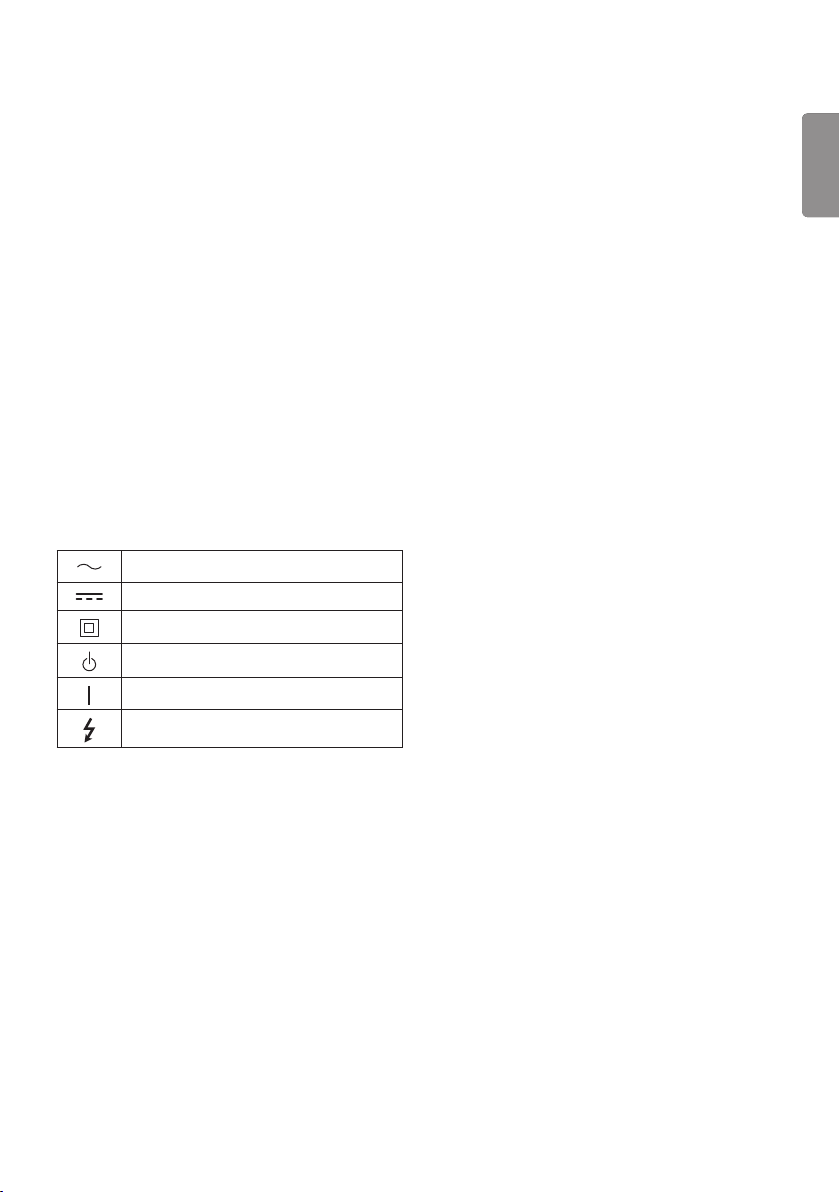
Symbols
Refers to alternating current(AC).
Refers to direct current(DC).
Refers to class II equipment.
Refers to stand-by.
Refers to “ON” (power).
Refers to dangerous voltage.
MODEL
SERIAL
Record the model number and serial
number of the TV.
Refer to the label on the back cover
and quote this information to your
dealer when requiring any service.