TQBM0049-1
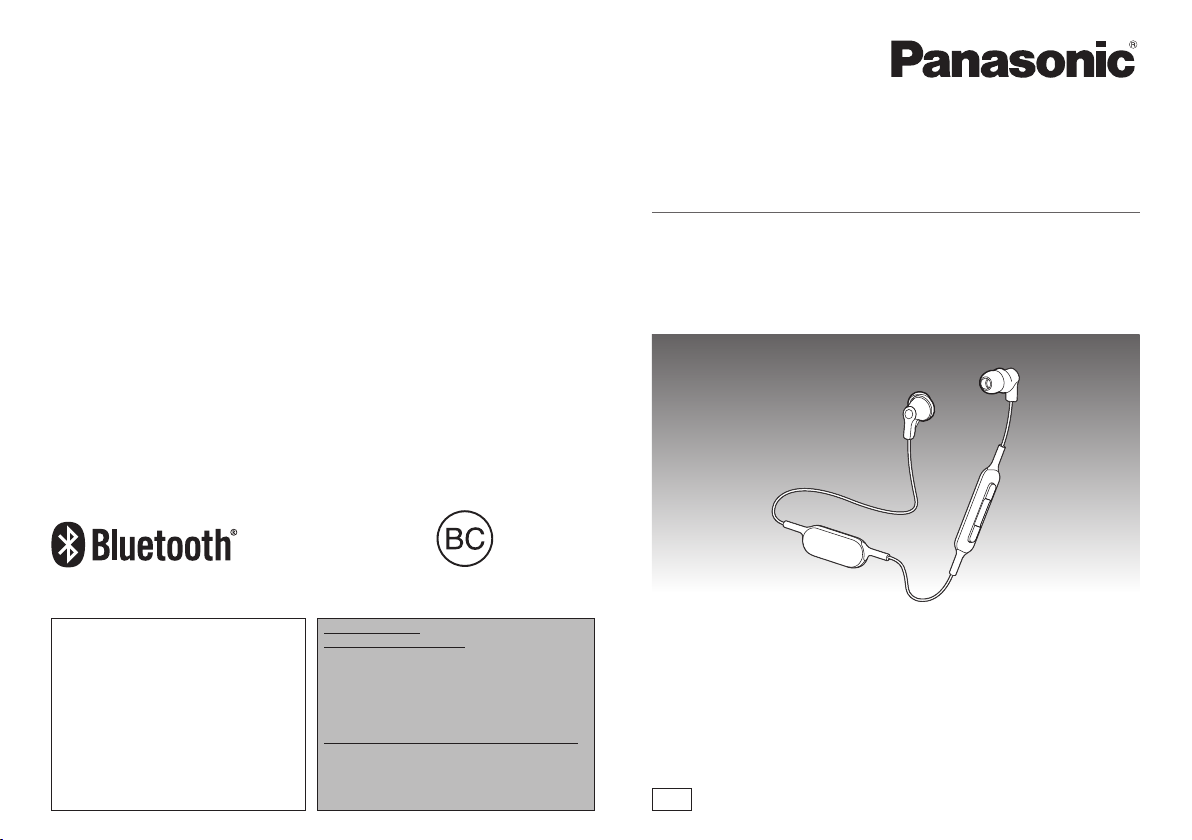
Owner’s Manual
Digital Wireless Stereo Earphones
Model No. RP-HJE120B
PP
If you have any questions, visit:
In the U.S.A.:
http://shop.panasonic.com/support
In Canada:
www.panasonic.ca/english/support
Pour toute question, visitez :
www.panasonic.ca/french/support
For U.S.A. only /
Pour les É.-U. seulement
The warranty can be found on “Basic Owner’s
Manual”.
Register online at
http://shop.panasonic.com/support
(U.S. customers only)
For Canada only / Pour le Canada seulement
The warranty can be found on “Basic Owner’s
Manual”.
La garantie se trouve dans le
« Manuel d’utilisation Fonctions de base ».
2
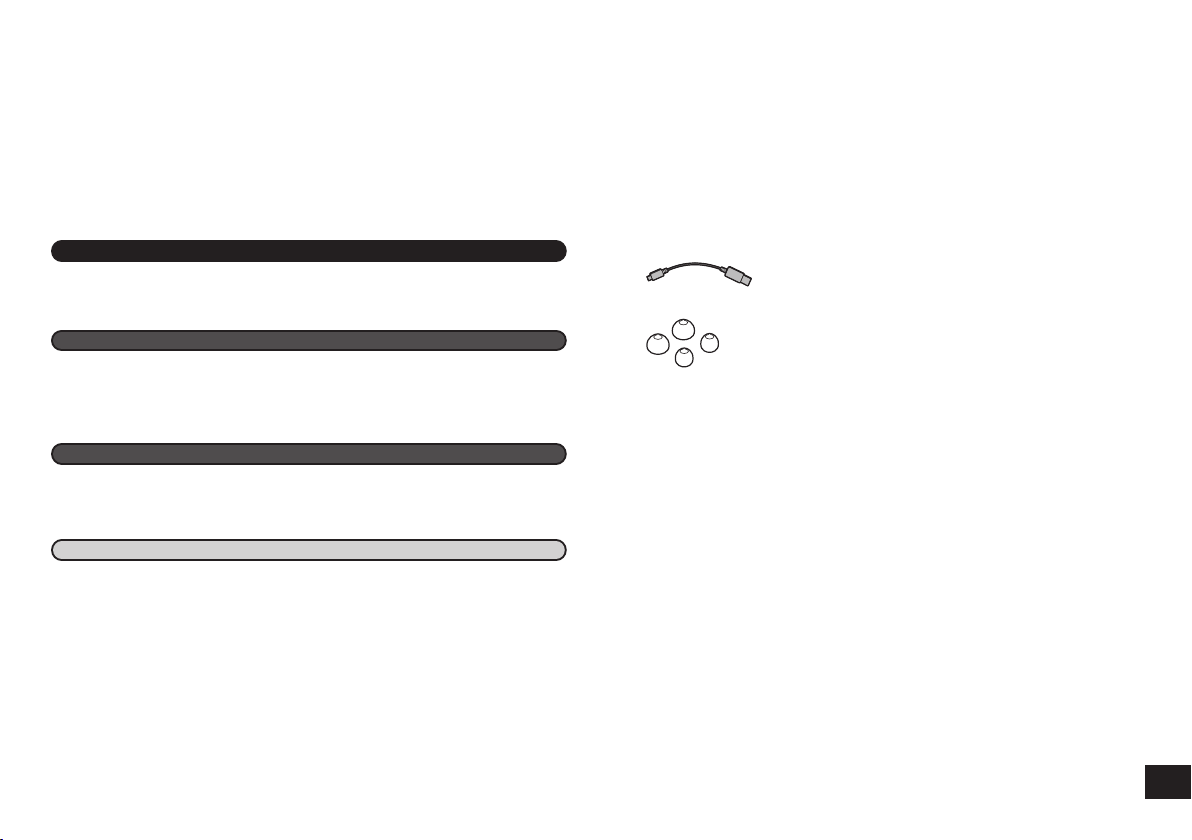
Please check and identify the supplied accessories.
Only for U.S.A.:
To order accessories, refer to “Limited Warranty” on “Basic Owner’s
Manual”.
Only for Canada:
To order accessories, contact the dealer from whom you have made your
purchase.
1 USB charging cord
1 Earpieces set (L, S)
• M-size earpieces are attached at the time of purchase.
Table of contents
Before use
Before use
Dear customer
Thank you for purchasing this product.
Please read these instructions carefully before using this product, and save this
manual for future use.
Accessories
Accessories .............................................................................................................. 2
Safety precautions .................................................................................................... 3
Part names ............................................................................................................... 4
Charging ................................................................................................................... 4
Turning the power on/off ........................................................................................... 5
Connecting a Bluetooth
®
device ............................................................................... 5
How to wear the earphones...................................................................................... 6
Listening to music ..................................................................................................... 6
Making a phone call.................................................................................................. 7
Useful functions ........................................................................................................ 7
Restoring to the factory settings ............................................................................... 7
Maintenance ............................................................................................................. 8
Copyright, etc. .......................................................................................................... 8
About Bluetooth
®
...................................................................................................... 8
Troubleshooting guide .............................................................................................. 9
Specifications ......................................................................................................... 10
Useful information................................................................................................... 10
To remove the battery when disposing of this unit.................................................. 11
Preparation
Operation
Other
3
■
Unit
• Avoid using or placing this unit near sources of heat.
• Do not use while operating a motorized vehicle. It may create a traffic hazard
and is illegal in many areas.
• Do not listen with this unit at high volume in places where you need to hear
sounds from the surrounding environment for safety, such as at railroad
crossings, and construction sites.
■
Earpieces
• Keep the earpieces out of reach of children to prevent swallowing.
• Securely attach the earpieces. If they are left in the ears after coming off, injury
or sickness may be caused.
■
Allergies
• Discontinue use if you experience discomfort with the earphones or any other
parts that directly contact your skin.
• Continued use may cause rashes or other allergic reactions.
■
USB
• Do not use any other USB charging cords except the supplied one.
Caution: Use only the supplied USB charging cord when connecting to a
computer.
THE FOLLOWING APPLIES ONLY IN THE U.S.A. AND CANADA.
This device complies with Part 15 of FCC Rules and Industry Canada’s
licence-exempt RSSs. Operation is subject to the following two conditions: (1)
this device may not cause interference, and (2) this device must accept any
interference, including interference that may cause undesired operation of this
device.
FCC ID : ACJ-RP-HJE120B
Model : RP-HJE120B
IC : 216A-HJE120B
This transmitter must not be co-located or operated in conjunction with any other
antenna or transmitter.
This equipment complies with FCC/IC radiation exposure limits set forth for an
uncontrolled environment and meets the FCC radio frequency (RF) Exposure
Guidelines and RSS-102 of the IC radio frequency (RF) Exposure rules. This
equipment has very low levels of RF energy that is deemed to comply without
testing of specific absorption ratio (SAR).
Safety precautions
THE FOLLOWING APPLIES ONLY IN THE U.S.A.
FCC Note:
This equipment has been tested and found to comply with the limits for a Class B
digital device, pursuant to Part 15 of the FCC Rules.
These limits are designed to provide reasonable protection against harmful
interference in a residential installation. This equipment generates, uses, and
can radiate radio frequency energy and, if not installed and used in accordance
with the instructions, may cause harmful interference to radio communications.
However, there is no guarantee that interference will not occur in a particular
installation. If this equipment does cause harmful interference to radio or
television reception, which can be determined by turning the equipment off and
on, the user is encouraged to try to correct the interference by one or more of the
following measures:
• Reorient or relocate the receiving antenna.
• Increase the separation between the equipment and receiver.
• Connect the equipment into an outlet on a circuit different from that to which
the receiver is connected.
• Consult the dealer or an experienced radio/TV technician for help.
Any unauthorized changes or modifications to this equipment would void the
user’s authority to operate this device.
This device complies with Part 15 of the FCC Rules. Operation is subject to the
following two conditions: (1) This device may not cause harmful interference, and
(2) this device must accept any interference received, including interference that
may cause undesired operation.
Responsible Party: Panasonic Corporation of North America
Two Riverfront Plaza, Newark, NJ 07102-5490
Support Contact: http://shop.panasonic.com/support
FCC CAUTION
Any changes or modifications not expressly approved by the party responsible for
compliance could void the user’s authority to operate this equipment.
Operation is subject to the following two conditions:
(1) This device may not cause harmful interference, and (2) this device must
accept any interference received, including interference that may cause undesired
operation.
THE FOLLOWING APPLIES ONLY IN CANADA.
CAN ICES-3(B)/NMB-3(B)
4
10
11
9
1
4
2
3
5
6
8
7
The product illustrations may differ from the actual product.
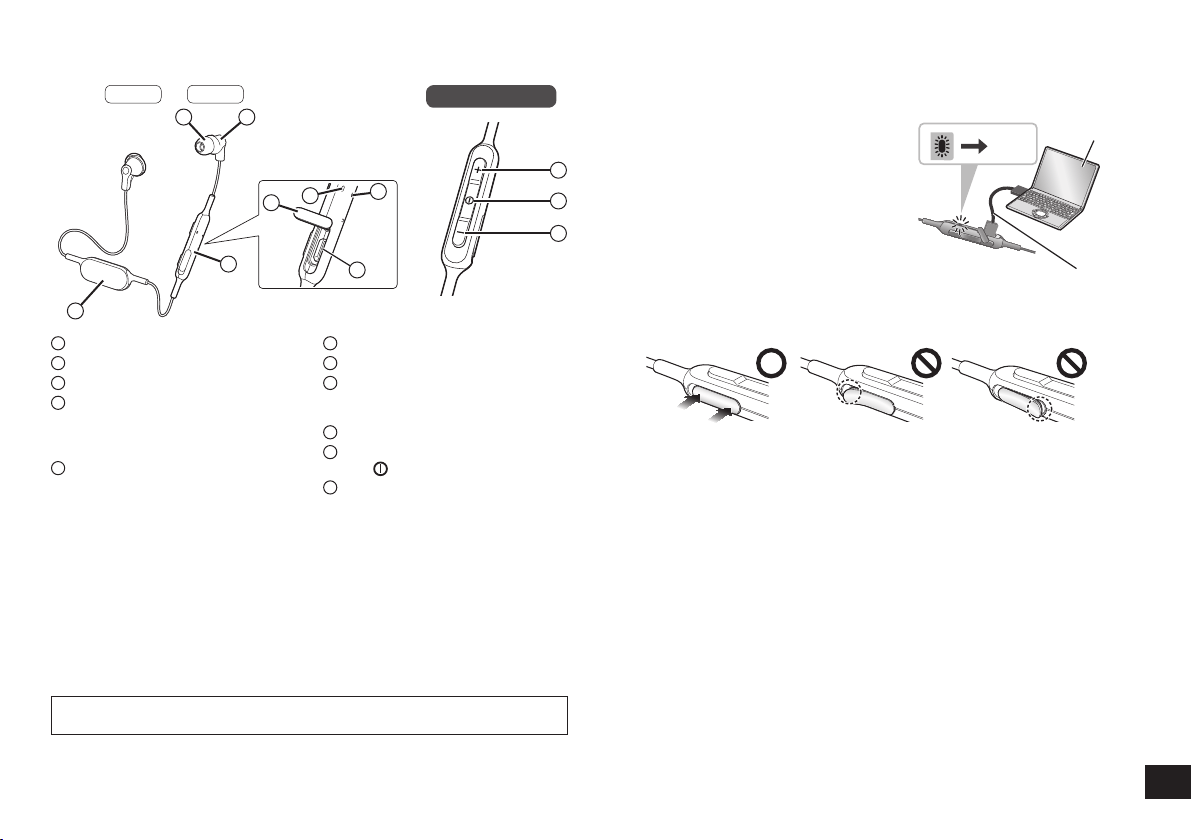
Part names
1
Earphone
2
Earpiece
3
Remote controller
4
LED indicator light*
• The number of blinks or color
notifies the status of the unit.
(* hereafter referred to as “LED”)
5
Charging terminal (DC IN)
• Open the USB lid and connect the
USB charging cord (supplied) to
this terminal when charging. (See
“Charging”)
6
USB lid
7
Microphone
8
Battery case
(Please remove the battery when
disposing of this product.
→ P. 11
)
9
Volume + / Next
10
Power / Pairing / Play / Pause /
Call
11
Volume – / Previous
Remote controller
The rechargeable battery (installed in the unit) is not charged initially. Charge
the battery before using the unit.
1
Connect this unit to a computer
using the USB charging cord
• Within approximately 3 seconds after
the connection is established, the LED
on the remote controller will light in red.
• The LED lights in red when charging
is in progress. When charging is
completed, the LED will go out.
•
Charging will take approximately
1.5 hours from empty state to fully
charged. (Quick charging time for
60 minutes operation: Approx. 20 minutes)
USB charging cord (supplied)
Computer
Off
1.5 hours
2
Close the charging terminal cover securely
■
Do not touch the charging terminal with wet hand
• If sweat or liquid is attached to the charging terminal, malfunction may occur.
■
Note
• The Bluetooth
®
feature cannot be used when this unit is connected to a computer
using the USB charging cord.
• Charge in a room temperature of between 10 °C and 35 °C (50 ºF and 95 ºF).
• If PC used for charging enters “sleep mode”, charging may not take place.
Charging
Preparation
Left Right
■
Note
• Excessive sound pressure from earphones and headphones can cause hearing
loss.
• Listening at full volume for long periods may damage the user’s ears.
• Do not use any other USB charging cords except the supplied one.
• When using the unit, do not cover the remote controller with the palm of your
hand. The Bluetooth
®
connection may be blocked.
To avoid product damage, do not expose this product to rain, sweat, water or
other liquids.

5
Connecting a Bluetooth
®
device
1
Press and hold the power of this unit for
approx. 3 seconds until the LED (blue) blinks
• A beep will sound, and the LED (blue) on the remote
controller will blink slowly.
Power
LED
To turn the power off
• Press and hold
for approximately 3 seconds.
A beep will sound and the power will be turned off.
■
Note
• When the unit is not operated for approximately 5 minutes, the power will
automatically turn off. (See “Auto power off” (→ P. 7))
Turning the power on/off
Preparation
• Place the Bluetooth
®
device within approx. 1 m (3.3 feet) from the unit.
• Check the device operation using its operation instructions as required.
Pairing (Registration) this unit with the Bluetooth
®
device for
connection
1
Press and hold the power button of this unit until the LED blinks
When pairing a device for the first time : approx. 3 seconds
When pairing a second or subsequent devices : approx. 5 seconds
• The unit starts to search for the Bluetooth
®
device for connection, and the
LED will blink in blue and red alternately.
2
Turn on the power of the Bluetooth
®
unit, and enable the
Bluetooth
®
function
3
Select “RP-HJE120B” from the
Bluetooth
®
device’s menu
• The MAC address “□□□□□□” (“□”
stands for a character that is unique
to each set.) may be displayed
before “RP-HJE120B” is displayed.
• If prompted for a passkey, input the
passkey “0000 (four zeros)” of this
unit.
Bluetooth
Bluetooth
RP-HJE120B
Device
ON
Select
(Ex.)
4
Check the connection with the
Bluetooth
®
device on the unit
• The LED will blink in blue and red
alternately until the connection with
the device is completed. When an
electronic sound beeps and the LED
(blue) blinks twice every approx.
2 seconds, pairing (registration) is
completed. (Connection established)
■
Note
• If connection to a device is not established within approximately 5 minutes, the
unit will be turned off. Perform pairing again.
• You can pair up to 8 Bluetooth
®
devices with this unit. If a 9th device is paired,
the device with the oldest connection will be replaced. To use it, perform pairing
again.
6
Listening to music
If the Bluetooth
®
compatible device supports the “A2DP” and “AVRCP” Bluetooth
®
profiles, music can be played back with remote control operations on the unit.
• A2DP (Advanced Audio Distribution Profile): Transmits audio to the unit.
• AVRCP (Audio/Video Remote Control Profile):
Allows remote control of the device using the unit.
1
Connect the Bluetooth
®
device and the unit (→ P. 5)
2
Select and play the music on the Bluetooth
®
device
• The selected music is output to the earphones of the unit.
Operating time of battery
Battery type Operating time
Rechargeable battery (installed in the unit) Approx. 4 hours 20 minutes
Operating time may be less depending on the operating conditions.
■
Attention
• The unit might leak sound depending on the volume level.
• When the volume is increased to near maximum level, music may sound
distorted. Decrease the volume until the distortion is cleared.
Remote controlling
You can control the Bluetooth
®
device using the unit.
• Depending on Bluetooth
®
devices, some functions below do not work, or work
differently via operation of the unit.
(Operation example)
Play / Pause / Call
Press Play / Pause / Call
Press twice
quickly
Reject the incoming
call / Switch the calling
device
Previous / Next / Volume
+
Press Increase the volume
Press and
hold
Forward to the start of
next track
−
Press Decrease the volume
Press and
hold
Return to the start of
current track
Remote controller
Volume + / Next
Volume – /
Previous
Play / Pause / Call
■
Note
• The volume can be adjusted in 15 levels.
When the maximum or minimum volume is reached, a beep will sound.
• “Increase/Decrease the volume” function is not available while pause.
Operation
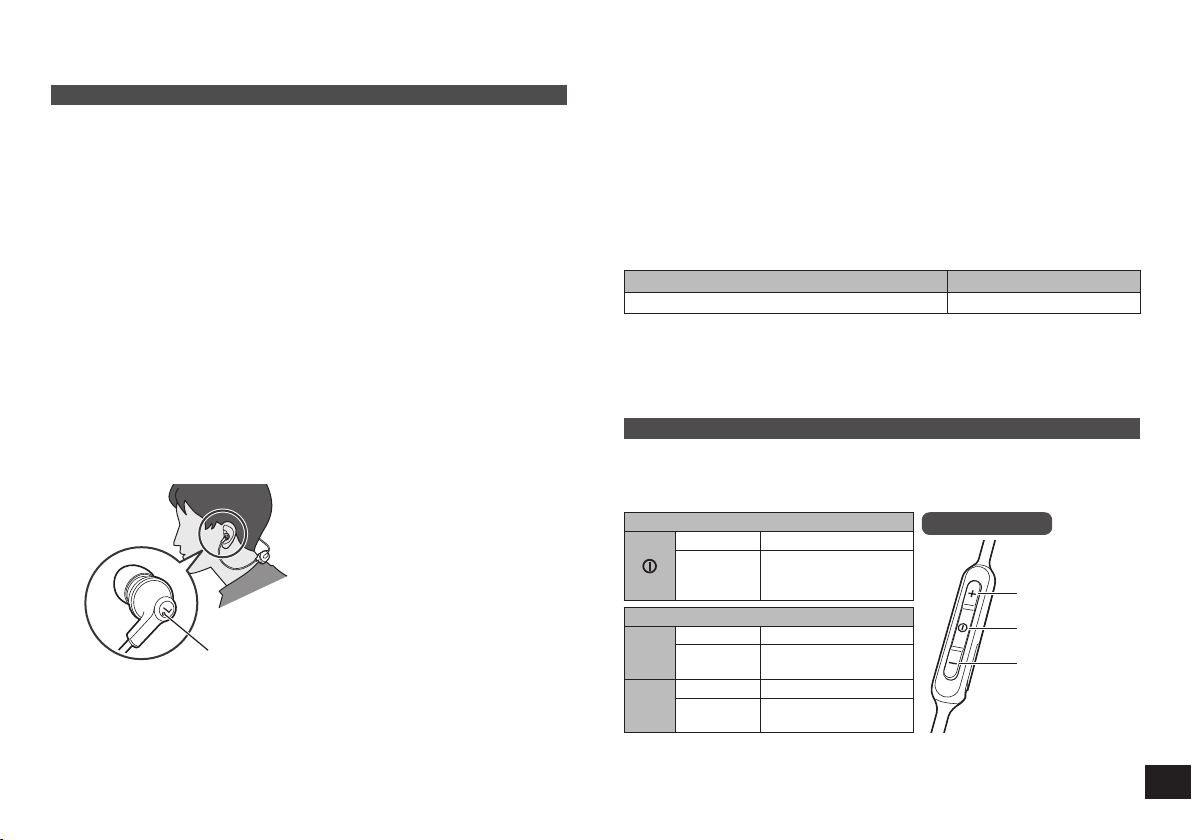
How to wear the earphones
The left earphone has the marking point as shown in the illustration.
Marking point
■
Attension
• M-size earpieces are attached at the time of purchase. If they are not the right
size, replace them with S or L-size earpieces (supplied).
Connecting a paired Bluetooth
®
device
1
Turn on the unit
• Press and hold the power button of this unit for approx. 3 seconds until the
LED (blue) blinks.
• A beep will sound, and the LED (blue) will blink slowly.
2
Perform steps 2 and 3 of “Pairing (Registration) this unit with the
Bluetooth
®
device for connection” (→ P. 5)
• When the LED (blue) blinks twice every approx. 2 seconds, pairing
(registration) is completed. (Connection established)
■
Note
• This unit remembers the device lastly connected. Connection may be
automatically established after step 1 (see above).
• If connection to a device is not established within approximately 5 minutes, the
unit will be turned off. Perform pairing again. (→ P. 5)
7
Making a phone call
With Bluetooth
®
enabled phones (cell phones or smartphones) that support the
“HSP” or “HFP” Bluetooth
®
profile, you can use the unit for phone calls.
• HSP (Headset Profile):
This profile can be used to receive monaural sounds and establish two-way
communication using the microphone on the unit.
• HFP (Hands-Free Profile):
In addition to the HSP functions, this profile has the incoming and outgoing calls
function.
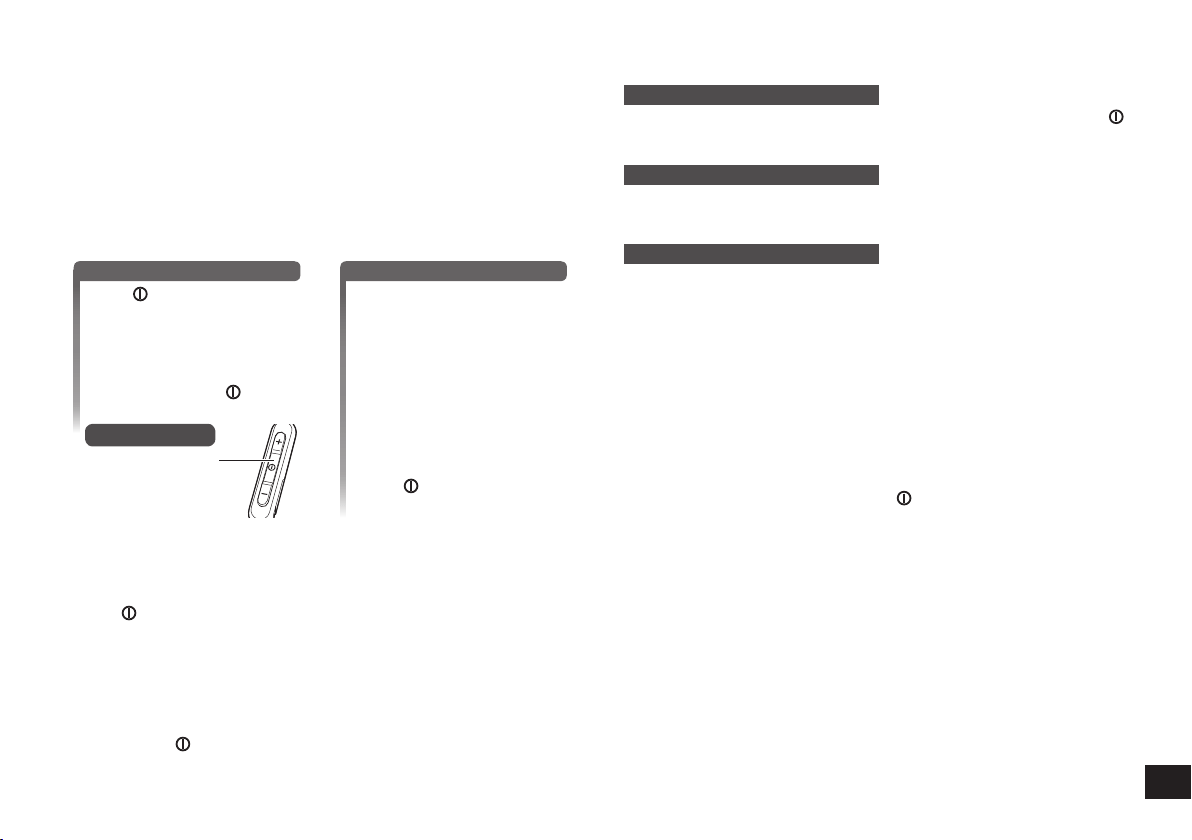
1
Connect the Bluetooth
®
enabled phone and unit
2
When answering an incoming call
Press on the unit and
answer the call
•
During an incoming call, ringtone
will sound from the earphones
and the LED will blink.
• (HFP only) To reject the
incoming call, press
twice
quickly until the ringtone stops.
Remote controller
Call
When making an outgoing call
Make an outgoing call on
the Bluetooth
®
enabled
phone
• Also refer to the operating
manual for the Bluetooth
®
enabled phone.
(Checking and operation steps on the
unit are explained below)
• During an outgoing call, ringtone
will sound from the earphones
and the LED will blink.
• To cancel the outgoing call,
press
.
A beep will sound.
3
Start talking
• The LED will repeatedly blink 2 times during a call.
• The volume can be adjusted during a phone call. For setting instructions, see
“Remote controlling”. (→ P. 6)
4
Press to end the phone call
• A beep will sound.
■
Note
• There may be instances when hands free setting needs to be done on the
Bluetooth
®
enabled phone.
• Depending on the Bluetooth
®
enabled phone, you may hear incoming and
outgoing call ringtones of the phone from the unit.
• (HFP only) Press
twice quickly on the unit. The calling device will be switched
between the Bluetooth
®
enabled phone and the unit.
Other
Useful functions
Resetting the unit
This unit can be reset when all operations are rejected. To reset the unit, push
button for 10 seconds. All the previous operations will be canceled. (The pairing
device information will not be deleted.)
Auto power off
If the unit is silent for approximately 5 minutes and operations for Bluetooth
®
devices are idle during that period, a beep will sound and the power will be
automatically turned off.
LED indicator light
When the battery level is low during use of the unit, the blue blinking LED on the
remote controller will change to red. A beep will sound every 1 minute. When the
battery runs out, the power will turn off.
Restoring to the factory settings
When you want to delete all pairing device information, etc., you can restore the
unit to the factory settings (original settings upon purchase). Charge the battery
before restoring the unit.
1 Turn the power off, and press and hold
for approximately 5 seconds
• Start searching for Bluetooth
®
devices to connect.
2 Press and hold + and − for 5 seconds or more simultaneously while
searching
• The LED will blink fast in blue. The unit will restore to the factory settings.
■
Attention
• When pairing a device again, delete the registering information (Device:
“RP-HJE120B”) from the Bluetooth
®
device’s menu, and register this unit with the
Bluetooth
®
device again. (→ P. 5)
8
Panasonic bears no responsibility for data and/or information that is
compromised during a wireless transmission.
■
Frequency band used
This unit uses the 2.4 GHz frequency band.
■
Certification of this unit
• This unit conforms to frequency restrictions and has received certification
based on frequency laws. Thus, a wireless permit is not necessary.
• The actions below are punishable by law in some countries:
– Taking apart/modifying the unit.
– Removing specification indications.
■
Restrictions of use
• Wireless transmission and/or usage with all Bluetooth
®
equipped devices is
not guaranteed.
• All devices must conform to standards set by Bluetooth SIG, Inc.
• Depending on the specifications and settings of a device, it can fail to connect
or some operations can be different.
• This system supports Bluetooth
®
security features. But depending on the
operating environment and/or settings, this security may not be sufficient.
Transmit data wirelessly to this system with caution.
• This system cannot transmit data to a Bluetooth
®
device.
■
Range of use
Use this unit at a maximum range of 10 m (33 feet).
The range can decrease depending on the environment, obstacles or
interference.
■
Interference from other devices
• This unit may not function properly and troubles such as noise and sound
jumps may arise due to radio wave interference if this unit is located too close
to other Bluetooth
®
devices or the devices that use the 2.4 GHz band.
• This unit may not function properly if radio waves from a nearby broadcasting
station, etc. is too strong.
■
Intended usage
• This unit is for normal, general use only.
• Do not use this system near an equipment or in an environment that is
sensitive to radio frequency interference (example: airports, hospitals,
laboratories, etc.).
About Bluetooth
®
Clean this unit with a dry and soft cloth.
• Do not use solvents including benzine, thinner, alcohol, kitchen detergent, a
chemical wiper, etc. This might cause the exterior case to be deformed or the
coating to come off.
Keeping the battery performance
• During the long period of disuse, full charge this unit once every 6 months to
keep the battery performance.
Copyright, etc.
●
The Bluetooth
®
word mark and logos are registered trademarks owned by
Bluetooth SIG, Inc. and any use of such marks by Panasonic Corporation is
under license.
Other trademarks and trade names are those of their respective owners.
●
Other system names and product names appearing in this document are in
general the registered trademarks or trademarks of the respective developer
companies.
Note that the ™ mark and ® mark do not appear in this document.
Maintenance
The serial number of this product can be found on the tag.
Please note them in the space provided below and keep for future reference.
MODEL NUMBER RP-HJE120B
SERIAL NUMBER
User memo:
DATE OF PURCHASE
DEALER NAME
DEALER ADDRESS
TELEPHONE NUMBER

9
Before requesting service, make the following checks. If you are in doubt about
some of the check points, or if the remedies indicated in the chart do not solve the
problem, refer to “Customer Services Directory” on “Basic Owner’s Manual” if you
reside in the U.S.A., or refer to “CONTACT INFORMATION” on “Basic Owner’s
Manual” if you reside in Canada.
General
The unit does not respond
• Push button for 10 seconds. The unit will be reset.
(The pairing device information will not be deleted.)
Power supply and charging
If you are having difficulty charging the unit
• Make sure the computer is turned on and is not on standby or sleep mode.
• Is the USB port you are currently using working properly? If your computer has
other USB ports, unplug the connector from its current port and plug it into one of
the other ports.
• If the steps mentioned above are not applicable, unplug the USB charging cord
and plug it in again.
• If the charge time and operating time become shortened, the battery may have
run down. (Number of charging times of the installed battery: Approximately
300.)
Charging takes longer
• Charge in a room temperature of between 10 °C and 35 °C (50 ºF and 95 ºF).
LED does not light during charging
• Is the USB charging cord (supplied) connected firmly to the USB terminal of the
computer? (→ P. 4)
The power does not turn on
• Is the unit being charged? The power cannot be turned on during charging.
(→ P. 4)
Bluetooth
®
device connection
The device cannot be connected
• Delete the pairing information for this unit from the Bluetooth
®
device, then pair
them again. (→ P. 5)
Troubleshooting guide
Sound and audio volume
No sound
• Make sure that the unit and the Bluetooth
®
device are connected correctly.
(→ P. 5)
• Check if music is playing on the Bluetooth
®
device.
• Make sure that the unit is turned on and the volume is not set too low.
• Pair and connect the Bluetooth
®
device and the unit again. (→ P. 5)
Low volume
• Increase the volume of the unit. (→ P. 6)
• Increase the volume on the Bluetooth
®
device.
Sound from the device is cut off / Sound quality is bad
• Sound may be disrupted if signals are blocked. Do not fully cover this unit with
the palm of your hand, etc.
• The device may be out of the 10 m (33 feet) communication range. Move the
device closer to this unit.
• Remove any obstacle between this unit and the device.
• Switch off any wireless LAN device when not in use.
• A communication problem may arise if the battery is not fully charged. Charge
the unit. (→ P. 4)
Phone calls
You cannot hear the other person
• Make sure that the unit and the Bluetooth
®
enabled phone are turned on.
• Check if the unit and the Bluetooth
®
enabled phone are connected. (→ P. 5)
• Check the audio settings of the Bluetooth
®
enabled phone. Switch the calling
device to the unit if it is set to the Bluetooth
®
enabled phone. (→ P. 5)
• If the volume of the other person’s voice is too low, increase the volume of both
the unit and the Bluetooth
®
enabled phone.
10
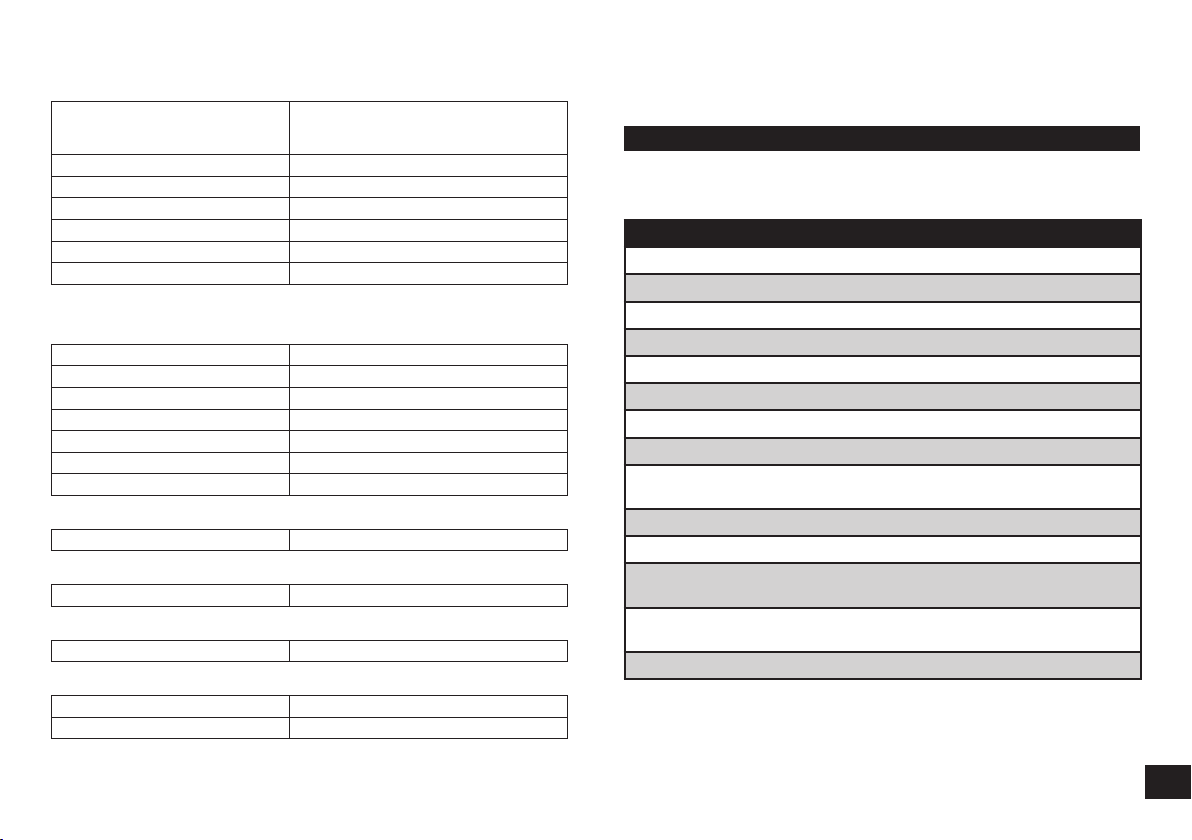
■
General
Power supply
DC 5 V, 0.6 W
(Internal battery: 3.7 V
(Li-polymer 90 mAh))
Operating time*
1
Approx. 4 hours 20 minutes
Charging time*
2
(25 ºC (77 ºF)) Approx. 90 minutes
Charging temperature range 10 ºC to 35 ºC (50 ºF to 95 ºF)
Operating temperature range 0 ºC to 40 ºC (32 ºF to 104 ºF)
Operating humidity range 35%RH to 80%RH (no condensation)
Mass (Weight) Approx. 12 g (0.4 oz)
*
1
It may be shorter depending on the operating conditions.
*
2
Time taken to recharge from empty to full.
■
Bluetooth
®
section
Bluetooth
®
system specification Ver. 4.1
Wireless equipment classification Class 2 (2.5 mW)
Frequency band 2402 MHz to 2480 MHz
Max RF power 4 dBm (EIRP)
Supported profiles A2DP, AVRCP, HSP, HFP
Supported codec SBC
Operating distance Up to 10 m (33 ft.)
■
Speaker section
Driver units 9 mm (3/8 in.)
■
Terminal section
DC IN DC 5 V, 0.6 W
■
Microphone section
Type Mono
■
Accessory section
USB charging cord 0.1 m (0.3 ft.)
Earpieces set L, S
●
Specifications are subject to change without notice.
Specifications Useful information
Customer Service
Customer Service Directory
Obtain products information and operative assistant; localize the closer
distributor or Service Center; buy spare parts and accessories by our
Web Site to Latin American:
COUNTRY WEB SITE CONTACT CENTER
Panama www.panasonic.com/pa/soporte/ 800-7262
Colombia www.panasonic.com/co/soporte/ 01-8000-947262
Ecuador www.panasonic.com/ec/soporte/ 1-800-726276
Costa Rica www.panasonic.com/cr/soporte/ 800-7262737
El Salvador www.panasonic.com/sv/soporte/ 800-7262
Guatemala www.panasonic.com/gt/soporte/ 1-801-811-7262
Uruguay www.panasonic.com/uy/soporte/ 0-800-7262
Paraguay www.panasonic.com/uy/soporte/ 0-800-11-7262
Chile www.panasonic.com/cl/soporte/ 800-390-602
022-797-5000
Peru www.panasonic.com/pe/soporte/ 0800-00726
Venezuela www.panasonic.com/ve/soporte/ 800-7262-800
Mexico www.panasonic.com/mx/soporte/ 01800-847-7262
55-5000-1200
Argentina www.panasonic.com/ar/soporte/ 0800-333-7262
0810-321-7262
Dominican Republic
www.panasonic.com/do/soporte/ 809-200-8000
(For Latin American Countries Only)
11
To remove the battery when disposing of this unit
The following instructions are not intended for repairing purposes but for
the disposal of this unit. This unit is not restorable once disassembled.
When disposing of this unit, take out the battery installed in this unit and recycle it.
Danger
As the rechargeable battery is specifically for this product, do not use it for any other
device.
Do not charge the removed battery.
• Do not heat or expose to flame.
• Do not leave the battery(ies) in a car exposed to direct sunlight for a long period of time with
doors and windows closed.
• Do not pierce the battery with a nail, subject it to an impact, or dismantle or modify it.
• Do not let the wires touch any other metal or each other.
• Do not carry or store the battery with a necklace, hair pin, or the like.
Doing so may cause the battery to generate heat, ignite, or rupture.
Warning
Do not place the removed battery, and other items within reach of infants.
Accidental swallowing of such an item may have an adverse effect on the body.
• In the event that you think such an item has been swallowed, consult a doctor immediately.
In the event of fluid leaking from the battery, take the following measure, and do not touch
the fluid with bare hands.
Fluid entering into an eye may cause loss of eyesight.
• Wash the eye with water immediately without rubbing it, and then consult a doctor.
Fluid getting on your body or clothes may cause inflammation of the skin or injury.
• Sufficiently rinse with clean water, and then consult a doctor.
A lithium-ion polymer rechargeable battery is built in to the battery case. Please
discard according to local regulations.
When disposing this product, disassemble properly by following the procedure, and
remove the internal rechargeable battery.
• Disassemble after the battery runs out.
• When disposing of the battery, please contact your local authorities or dealer and ask for the
correct method of disposal.
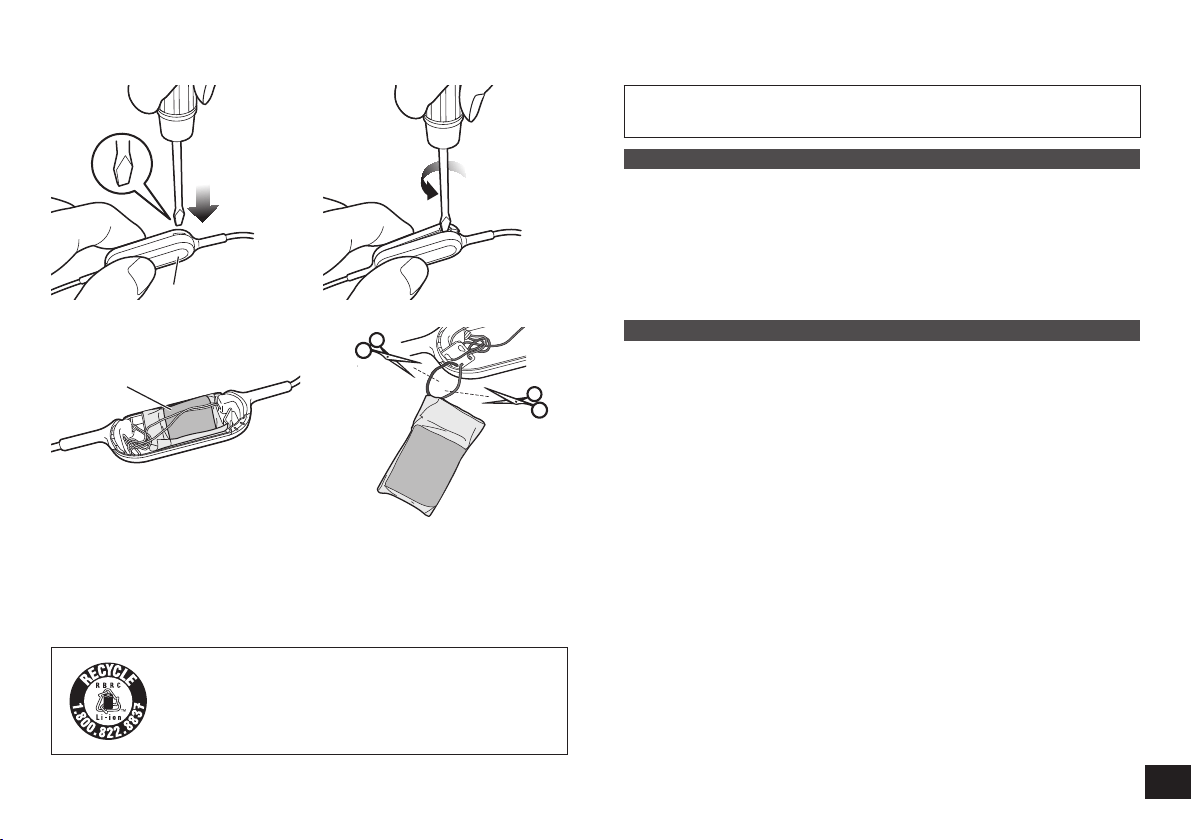
1
Put a straight-slot screwdriver (commercially available) into the battery
case.
• Make sure to keep fingers away from the tip of the screwdriver.
• Select a screwdriver to be large enough for a space under the joint part.
2
Use the screwdriver for leverage, push and open the battery case.
• Be careful not to touch the battery with the screwdriver.
3
Hold the battery and remove it.
4
Pull off the battery and separate it from the battery case by cutting off the
wires, one by one, with scissors.
• Insulate the wire parts of the removed battery with cellophane tape.
• Do not damage or dismantle the battery.
(For US and Canada only)
A lithium ion battery that is recyclable powers the product you
have purchased. Please call 1-800-8-BATTERY for information
on how to recycle this battery.
1
Battery case
2
Battery
3 4

TQBM0049-1
M0317KZ1067
© Panasonic Corporation 2017
Panasonic Canada Inc.
5770 Ambler Drive, Mississauga, Ontario L4W 2T3
www.panasonic.com
Panasonic Corporation of North America
Two Riverfront Plaza, Newark, NJ 07102-5490
http://shop.panasonic.com/
En