created by: Impala Services Ltd.Page size: 80 x 90 mm
B0773J4N43, B0773JKMXZ, B0773CDT69
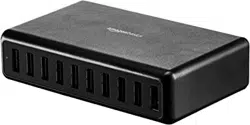
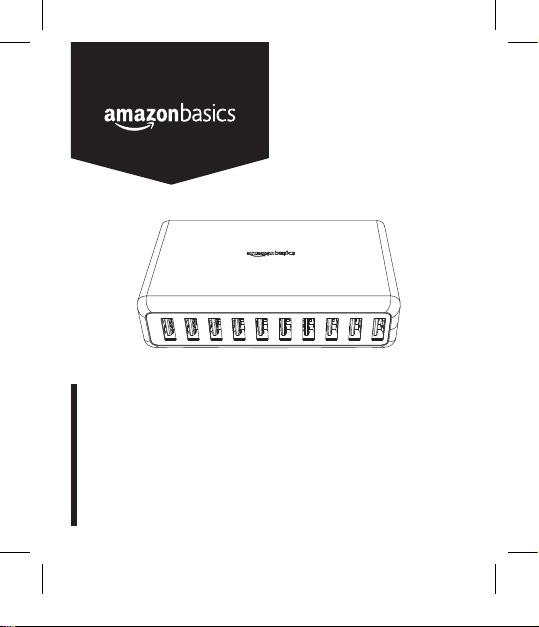
60 W 10-Port USB Wall Charger
Chargeur Mural De 60 W à 10 Ports USB
10-Port USB-Steckernetzteil, 60 W
Caricabatterie Da Muro, 60 W, 10 Porte USB
Cargador USB De Pared, 10 Puertos, 60 W
60W 10-ポート USB ウォールチャージャー
60W,10 接口 USB 墙式充电器
103535-B0773J4N43-10-Port Charger-UM-GLO-V03.indb 1 4/11/18 4:51 PM
English ..................................... 3
Français ................................. 10
Deutsch .................................. 17
Italiano ................................... 23
Español .................................. 29
日本語 ..................................... 35
中文 ........................................ 41
103535-B0773J4N43-10-Port Charger-UM-GLO-V03.indb 2 4/11/18 4:51 PM
3
Welcome Guide
•
English
60W 10-Port USB Wall Charger
Contents:
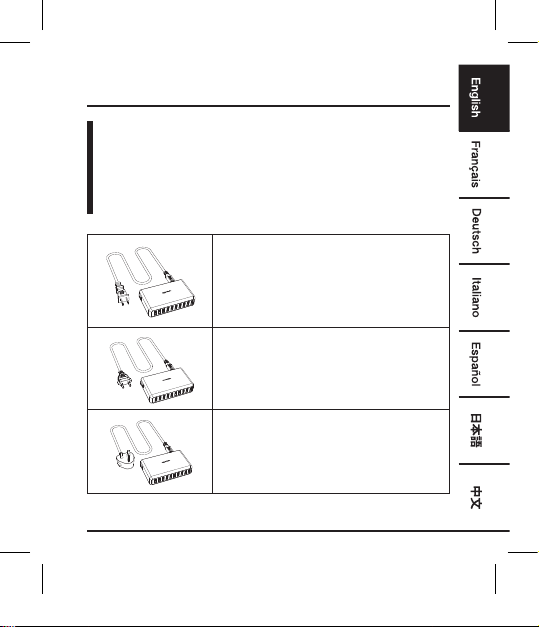
Before getting started, ensure the package contains the
following components:
Plug Type A
Used in: North and Central America,
Japan
Plug Type C
Used in: Europe
Plug Type G (UK PLUG)
Used in: UK, Ireland, Cyprus, Malta,
Malaysia, Singapore, Hong Kong
NOTE: Only one of the above-listed plug types is included.
103535-B0773J4N43-10-Port Charger-UM-GLO-V03.indb 3 4/11/18 4:51 PM
4
Operation
NOTE: You can charge or operate ten USB devices simultaneously
using the wall charger. The output current per slot is
max. 2.4 A (max. 12 A for all slots).
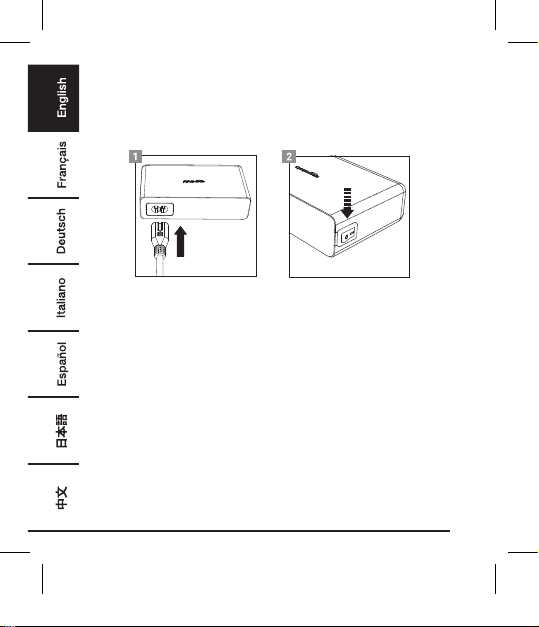
• Make sure the product is switched off (on/off switch in position O).
• Plug the power cord into the product’s socket.
• Connect the switched-off USB device to the wall charger.
• Connect the power plug to a common household power outlet.
• Press I on the on/off switch to turn on the wall charger. The power
indicator on the wall charger lights up to indicate the wall charger
is operational.
• Your USB device is now charging. Should you wish to operate the
USB device, you may turn it on now.
• Turn off the USB device before disconnecting the wall charger
from the power outlet.
• Press O on the on/off switch to turn off the product.
• Unplug the wall charger after use.
103535-B0773J4N43-10-Port Charger-UM-GLO-V03.indb 4 4/11/18 4:51 PM
5
Cleaning and Maintenance
• Always unplug the product from the wall outlet before cleaning.
• Clean the product with a dry, lint-free cloth.
• Always store the product in a dry place.
Safety and Compliance
• Use the product only as instructed. Read all instructions before
operating the product.
• Do not pull the power plug out of the power outlet by the power
cord and do not wrap the power cord around the product.
• Regularly check the power plug and power cord for damage. If the
supply cord is damaged, it must be replaced by a special cord or
assembly available from the manufacturer or its service agent.
• Do not disassemble any of the components. Refer all services to
qualified personnel only.
• Do not place or store the product in a humid area and do not
expose it to water or rain.
• The device is not a toy. Keep it out of the reach of children and pets.
• Do not leave packaging material lying around carelessly. These
may become dangerous playing material for children.
• Protect the product from extreme temperatures, direct sunlight,
strong jolts, flammable gases, vapours and solvents.
• Also observe the safety and operating instructions of any other
devices which are connected to the product.
• Disconnect the product from the power outlet and the USB
devices when it is not in use.
• Never connect or disconnect the product if your hands are wet.
• Make sure that your device meets the product’s power
requirements (see Specifications).
103535-B0773J4N43-10-Port Charger-UM-GLO-V03.indb 5 4/11/18 4:51 PM
6
FCC Statement
This equipment has been tested and found to comply with the limits
for a Class B digital device, pursuant to Part 15 of the FCC Rules.
These limits are designed to provide reasonable protection against
harmful interference in a residential installation. This equipment
generates, uses and can radiate radio frequency energy and, if not
installed and used in accordance with the instructions, may cause
harmful interference to radio communications. However, there is no
guarantee that interference will not occur in a particular installation.
If this equipment does cause harmful interference to radio or television
reception, which can be deter-mined by turning the equipment off and
on, the user is encouraged to try to correct the interference by one or
more of the following measures:
• Reorient or relocate the receiving antenna.
• Increase the separation between the equipment and receiver.
• Connect the equipment into an outlet on a circuit different from
that to which the receiver is connected.
• Consult the dealer or an experienced radio/TV technician for help.
Changes or modifications not expressly approved by the party
responsible for compliance may cause interference and void the user’s
authority to operate the equipment. This device complies with Part 15
of the FCC Rules. Operation is subject to the following two conditions:
(1) This device may not cause harmful interference, and (2) this device
must accept any interference received, including interference that may
cause undesired operation.
IC Regulatory Statement
This Class B digital apparatus complies with Canadian
ICES-3(B)/NMB-3(B).
103535-B0773J4N43-10-Port Charger-UM-GLO-V03.indb 6 4/11/18 4:51 PM
7
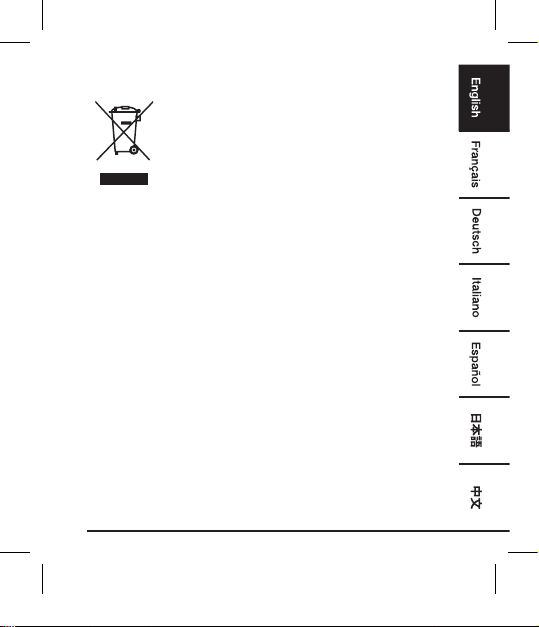
WEEE
Regulatory information: Disposal of Waste Electrical
and Electronic Equipment (WEEE) The Waste
Electrical and Electronic Equipment (WEEE) Directive
aims to minimize the impact of electrical and
electronic goods on the environment, by increasing
re-use and recycling and by reducing the amount of
WEEE going to landfill. The symbol on this product
or its packaging signifies that this product must
be disposed separately from ordinary household
wastes at its end of life. Be aware that this is your
responsibility to dispose of electronic equipment
at recycling centers in order to conserve natural
resources. Each country should have its collection
centers for electrical and electronic equipment
recycling. For information about your recycling drop
off area, please contact your related electrical and
electronic equipment waste management authority,
your local city office, or your house hold waste
disposal service.
103535-B0773J4N43-10-Port Charger-UM-GLO-V03.indb 7 4/11/18 4:51 PM
8
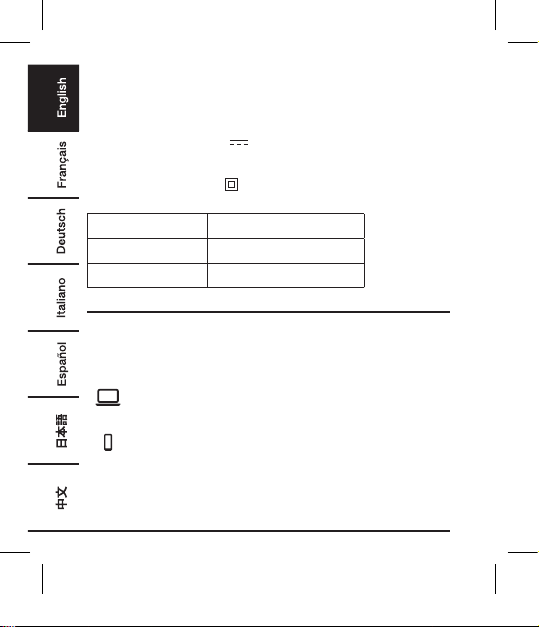
Specications
Input voltage 100-240 V
~
, 50/60 Hz
Input current 1.5 A max
Output voltage 5 V
Output current 12 A (each port 2.4 A max)
Protection Class
II /
Plug Type A B0773J4N43
Plug Type C B0773CDT69
Plug Type G B0773JKMXZ
Warranty Information
To obtain a copy of the warranty for this product:
For US - Visit amazon.com/AmazonBasics/Warranty
For UK - Visit amazon.co.uk/basics-warranty
— or —
Contact Customer Service at 1-866-216-1072
103535-B0773J4N43-10-Port Charger-UM-GLO-V03.indb 8 4/11/18 4:51 PM
9
Feedback
Love it? Hate it?
Let us know with a customer review.
AmazonBasics is committed to delivering customer-driven products
that live up to your high standards. We encourage you to write a
review sharing your experiences with the product.
Please visit: amazon.com/review/review-your-purchases#
For further services:
Visit amazon.com/gp/help/customer/contact-us
— or —
Contact Customer Service at 1-866-216-1072
103535-B0773J4N43-10-Port Charger-UM-GLO-V03.indb 9 4/11/18 4:51 PM
10
Guide de Bienvenue
•
Français
Chargeur Mural De 60 W à 10 Ports USB
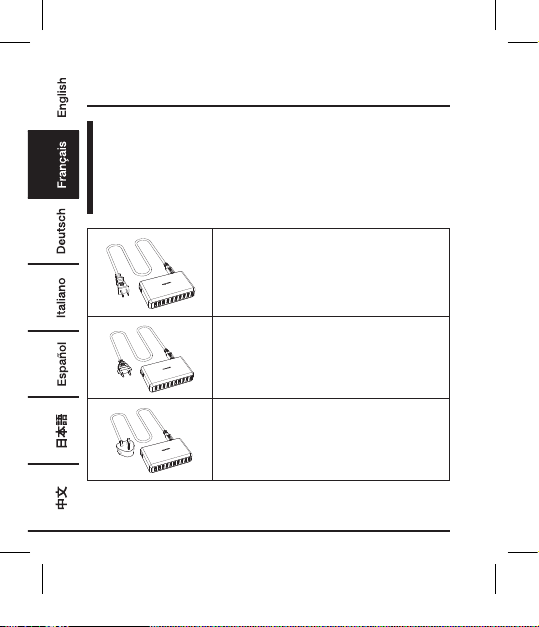
Contenu:
Avant de commencer, veuillez vous assurer que l’emballage
contient les composants suivants:
Type de fiches A
Utilisé en/au: Amérique du Nord et
Centrale, Japon
Type de fiches C
Utilisé en/au: Europe
Type de fiches G (FICHE BRITANNIQUE)
Utilisé en/au: Royaume-Uni, Irlande,
Chypre, Malte, Malaisie, Singapour,
Hong Kong
REMARQUE: Uniquement l’un des types de fiches listés ci-dessus
est inclus.
103535-B0773J4N43-10-Port Charger-UM-GLO-V03.indb 10 4/11/18 4:51 PM
11
Fonctionnement
REMARQUE: Vous pouvez recharger ou utiliser dix périphériques
USB en même temps à l’aide du chargeur mural. Le
courant de sortie par port est de 2,4 A au maximum
(12 A au maximum pour l’ensemble des ports).
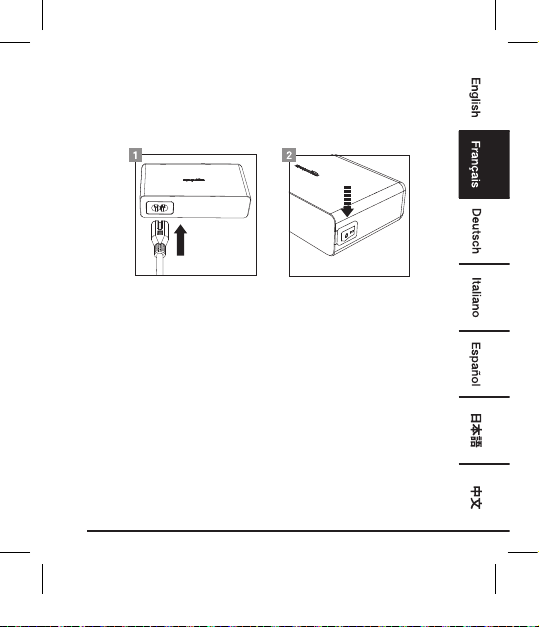
• Assurez-vous que le produit est bien hors tension (commutateur
on/off positionné sur O).
• Branchez le cordon d’alimentation sur la prise du produit.
• Branchez le périphérique USB éteint sur le chargeur mural.
• Branchez la fiche secteur sur une prise de courant domestique
commune.
• Appuyez sur I sur le commutateur on/off pour mettre le chargeur
mural sous tension. Le voyant d’alimentation du chargeur mural
s’allume pour indiquer que le chargeur mural est opérationnel.
• Votre périphérique USB est à présent en cours de chargement. Si
vous souhaitez utiliser le périphérique USB, vous pouvez à présent
le mettre sous tension.
• Mettez le périphérique USB hors tension avant de débrancher le
chargeur mural de la prise de courant.
• Appuyez sur O sur le commutateur on/off pour mettre le produit
hors tension.
• Débranchez le chargeur mural après utilisation.
103535-B0773J4N43-10-Port Charger-UM-GLO-V03.indb 11 4/11/18 4:51 PM
12
Nettoyage et Entretien
•
Débranchez toujours le produit de la prise de courant avant de
procéder à son nettoyage.
• Nettoyez le produit à l’aide d’un chiffon sec et non pelucheux.
• Rangez toujours le produit dans un endroit sec.
Sécurité Et Conformité
• Utilisez le produit uniquement comme indiqué. Lisez l’ensemble
des instructions avant d’utiliser le produit.
• Ne pas retirer la fiche secteur de la prise de courant en tirant sur le
cordon d’alimentation, et ne pas enrouler le cordon d’alimentation
autour du produit.
• Vérifiez régulièrement l’état du cordon d’alimentation et de la
fiche d’alimentation afin de déceler tout dommage éventuel. Si le
cordon d’alimentation est endommagé, il doit être remplacé par un
cordon spécial disponible auprès du fabricant ou de son service
de réparation.
• Ne démontez aucun des composants. Confiez tout type de
réparations ou d’entretien exclusivement à du personnel qualifié.
• Ne placez pas et ne rangez pas le produit dans une zone humide,
et ne l’exposez pas à l’eau ou à la pluie.
•
Cet appareil n'est pas un jouet. Maintenez le produit hors de la portée
des enfants et des animaux domestiques.
• Ne laissez pas traîner négligemment les matériaux d’emballage. Ils
peuvent devenir des jouets dangereux pour les enfants.
103535-B0773J4N43-10-Port Charger-UM-GLO-V03.indb 12 4/11/18 4:51 PM
13
• Maintenez le produit à l’abri des températures extrêmes, de la
lumière directe du soleil, des chocs violents, des gaz, vapeurs et
solvants inflammables.
• Respectez également les consignes de sécurité et d'utilisation de
tout autre appareil raccordé au produit.
• Débranchez le produit de la prise de courant et des périphériques
USB lorsque vous ne l’utilisez pas.
• Ne jamais brancher ou débrancher le produit si vos mains sont
mouillées.
• Assurez-vous que votre périphérique est conforme aux exigences
du produit en termes d’alimentation (voir les Caractéristiques).
Déclaration Réglementaire De l’IC
Cet appareil numérique de Classe B est conforme à la norme
canadienne ICES-3(B)/NMB-3(B).
103535-B0773J4N43-10-Port Charger-UM-GLO-V03.indb 13 4/11/18 4:51 PM
14
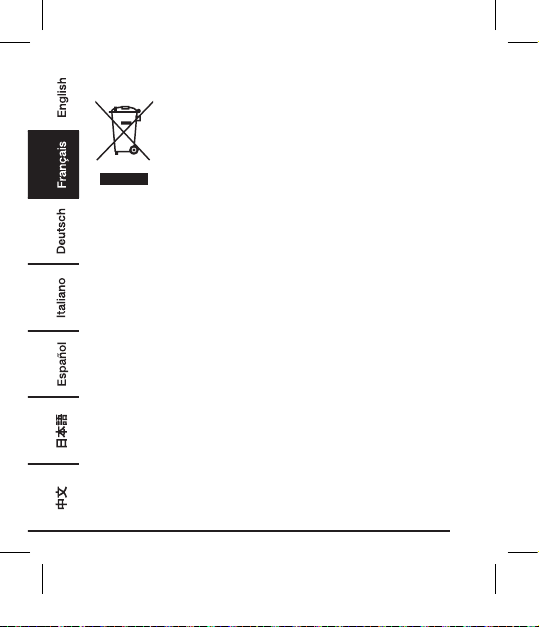
DEEE
Informations réglementaires: Élimination des
déchets d’équipements électriques et électroniques
(DEEE)
La directive relative aux déchets d’équipements
électriques et électroniques (DEEE) vise à réduire
au minimum l’impact des produits électriques et
électroniques sur l’environnement, en augmentant
la réutilisation et le recyclage et en réduisant la
quantité de DEEE mis en décharge. Le symbole
figurant sur ce produit ou sur son emballage signifie
que ce produit doit être mis au rebut séparément
des ordures ménagères ordinaires en fin de vie.
Gardez à l’esprit que la responsabilité vous incombe
de mettre au rebut les équipements électroniques
dans des centres de recyclage afin de contribuer à
la préservation des ressources naturelles. Chaque
pays doit disposer de centres de collecte dédiés
au recyclage des équipements électriques et
électroniques. Pour plus d’informations sur les zones
de recyclage de votre localité, veuillez contacter les
autorités responsables de la gestion des déchets
d’équipements électriques et électroniques de
votre commune, votre mairie ou le service local de
traitement des ordures ménagères.
103535-B0773J4N43-10-Port Charger-UM-GLO-V03.indb 14 4/11/18 4:51 PM
15
Caractéristiques
Tension d’entrée 100 à 240 V
~
, 50/60 Hz
Courant d’entrée 1,5 A max
Tension de sortie 5 V
Courant de sortie 12 A (2,4 A max pour chaque port)
Classe de
protection
II /
Type de fiches A B0773J4N43
Type de fiches C B0773CDT69
Type de fiches G B0773JKMXZ
Informations Sur La Garantie
Pour obtenir une copie de la garantie portant sur ce produit:
Veuillez visiter amazon.fr/basics-garantie
— ou —
Contactez le service clients au 08 00 94 77 15
103535-B0773J4N43-10-Port Charger-UM-GLO-V03.indb 15 4/11/18 4:51 PM
16
Vos Avis
Vous l’adorez? Vous le détestez?
Faites-le nous savoir en laissant un commentaire.
AmazonBasics s’engage à vous offrir des produits axés sur les
besoins de la clientèle et répondant à vos normes élevées. Nous
vous encourageons à rédiger un commentaire visant à partager vos
expériences sur le produit.
Veuillez visiter : amazon.fr/review/review-your-purchases#
Pour obtenir d’autres services:
Veuillez visiter amazon.fr/gp/help/customer/
contact-us
— ou —
Contactez le service clients au 08 00 94 77 15
103535-B0773J4N43-10-Port Charger-UM-GLO-V03.indb 16 4/11/18 4:51 PM
17
Bedienungsanleitung
•
Deutsch
10-Port USB-Steckernetzteil, 60 W
Inhalt:
Bevor Sie beginnen, prüfen Sie, ob die Verpackung die
folgenden Teile enthält:
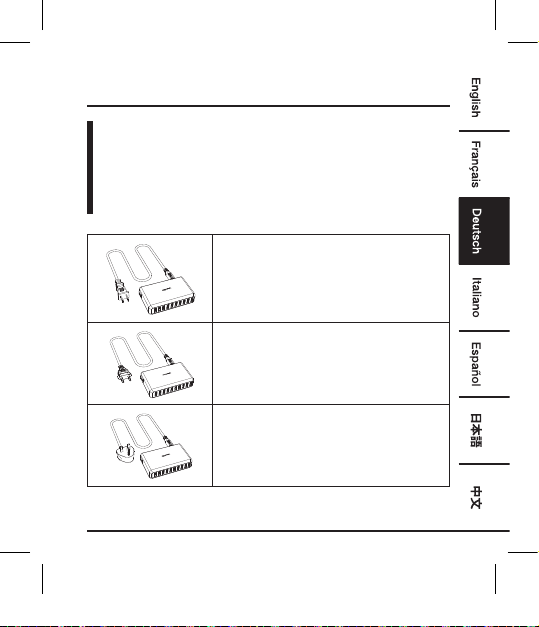
Steckertyp A
Zur Verwendung in: Nord- und
Mittelamerika, Japan
Steckertyp C
Zur Verwendung in: Europa
Steckertyp G (UK-STECKER)
Zur Verwendung in: Großbritannien,
Irland, Zypern, Malta, Malaysia,
Singapur, Hongkong
HINWEIS: Es ist nur einer der oben aufgeführten Steckertypen enthalten.
103535-B0773J4N43-10-Port Charger-UM-GLO-V03.indb 17 4/11/18 4:51 PM
18
Betrieb
HINWEIS: Sie können zur selben Zeit zehn USB-Geräte am Netzteil
laden oder in Betrieb nehmen. Der Ausgangsstrom
pro Steckplatz beträgt max. 2,4 A (max. 12 A für alle
Steckplätze).
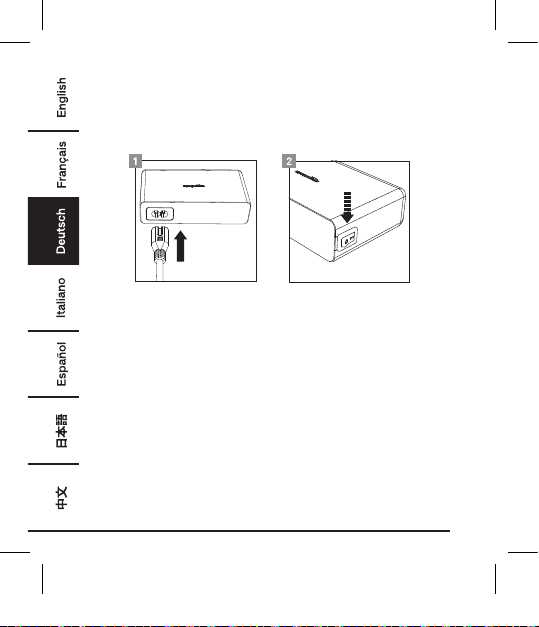
• Achten Sie darauf, dass das Produkt ausgeschaltet ist (Ein/Aus-
Schalter in Position O).
• Schließen Sie das Netzkabel an die Buchse des Produktes an.
• Schließen Sie das ausgeschaltete USB-Gerät an das Netzteil an.
• Schließen Sie den Netzstecker an eine normale Steckdose an.
• Drücken Sie am Ein/Aus-Schalter auf I, um das Netzteil
einzuschalten. Die Betriebsanzeige am Netzteil leuchtet auf, um
anzuzeigen, dass das Netzteil betriebsbereit ist.
• Ihr USB-Gerät wird jetzt geladen. Wenn Sie das USB-Gerät
bedienen möchten, können Sie es jetzt einschalten.
• Schalten Sie das USB-Gerät aus, bevor Sie das Netzteil von der
Steckdose trennen.
• Drücken Sie am Ein-/Ausschalter auf O, um das Produkt
auszuschalten.
• Trennen Sie das Netzteil nach der Verwendung vom Stromnetz.
103535-B0773J4N43-10-Port Charger-UM-GLO-V03.indb 18 4/11/18 4:51 PM
19
Reinigung und Pege
• Trennen Sie das Produkt vor der Reinigung immer vom Stromnetz.
• Reinigen Sie das Produkt mit einem trockenen, fusselfreien Tuch.
• Bewahren Sie das Produkt immer an einem trockenen Ort auf.
Sicherheit und Konformität
•
Verwenden Sie das Produkt nur den Anweisungen entsprechend.
Lesen Sie alle Anweisungen, bevor Sie das Produkt in Betrieb nehmen.
• Ziehen Sie den Netzstecker nicht am Netzkabel aus der Steckdose
und wickeln Sie das Kabel nicht um das Produkt.
• Überprüfen Sie den Netzstecker und das Netzkabel regelmäßig auf
Beschädigungen. Wenn das Netzkabel beschädigt ist, muss es
durch ein spezielles Kabel oder ein Ersatzteil, das beim Hersteller
oder seinem Händler erhältlich ist, ersetzt werden.
• Zerlegen Sie keine der Einzelteile. Lassen Sie alle Services
ausschließlich von qualifizierten Personen durchführen.
• Verwenden oder lagern Sie das Produkt nicht in feuchter
Umgebung und setzen Sie es keinem Wasser oder Regen aus.
•
Das Produkt ist kein Spielzeug. Von Kindern und Haustieren fernhalten.
• Lassen Sie Verpackungsmaterialien nicht unachtsam herumliegen.
Diese können Gefahrensituationen verursachen, falls Kinder damit
spielen.
• Schützen Sie das Produkt vor extremen Temperaturen, direkter
Sonneneinstrahlung, starkem Aufprall, brennbaren Gasen,
Dämpfen und Lösungsmitteln.
• Beachten Sie außerdem die Sicherheitshinweise und
Gebrauchsanleitungen anderer Geräte, die mit diesem Produkt
verbunden werden.
• Trennen Sie das Produkt von der Steckdose und dem USB-Gerät,
wenn es nicht benutzt wird.
103535-B0773J4N43-10-Port Charger-UM-GLO-V03.indb 19 4/11/18 4:51 PM
20
•
Verbinden bzw. trennen Sie das Produkt niemals mit nassen Händen.
• Vergewissern Sie sich, dass Ihr Gerät den Leistungsanforderungen
des Produktes entspricht (siehe Technische Daten).
RichtlinieüberElektro-undElektronik-
Altgeräte
Vorgeschriebene Informationen: Entsorgung von
Elektro- und Elektronik-Altgeräten
Die Richtlinie über Elektro- und Elektronik-
Altgeräte zielt darauf ab, die Auswirkungen von
elektrischen und elektronischen Waren auf die
Umwelt zu minimieren, durch Steigerung der
Wiederverwendung und des Recyclings sowie
durch Reduktion der Anzahl an Elektro- und
Elektronik-Altgeräten, die auf Mülldeponien landen.
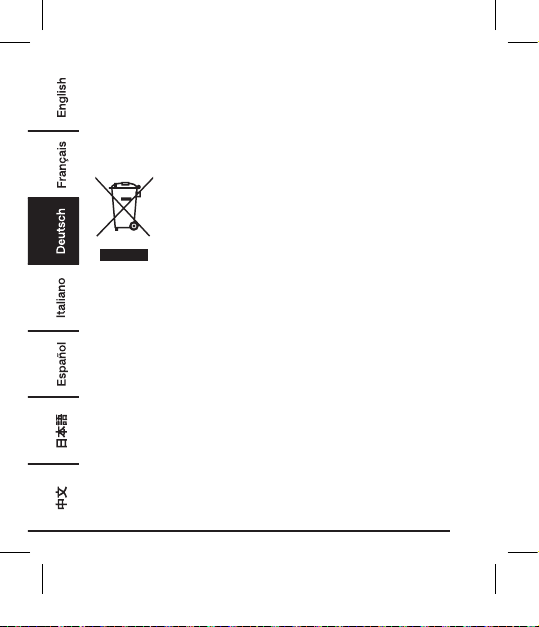
Das Symbol auf dem Produkt oder der Verpackung
weist darauf hin, dass das Produkt am Ende
seiner Nutzungsdauer separat vom normalen
Hausmüll entsorgt werden muss. Beachten Sie,
dass es in Ihrer Verantwortung liegt, elektronische
Geräte in Recycling-Zentren zu entsorgen, um die
natürlichen Ressourcen zu erhalten. Jedes Land
sollte Sammelzentren für das Recycling elektrischer
und elektronischer Geräte haben. Für Informationen
zu Ihren Recycling-Abgabestellen kontaktieren Sie
bitte Ihre Abfallwirtschaftsbehörde für Elektro- und
Elektronikgeräte, Ihre örtlichen Behörden oder Ihr
Abfallentsorgungsunternehmen.
103535-B0773J4N43-10-Port Charger-UM-GLO-V03.indb 20 4/11/18 4:51 PM
21
Technische Daten
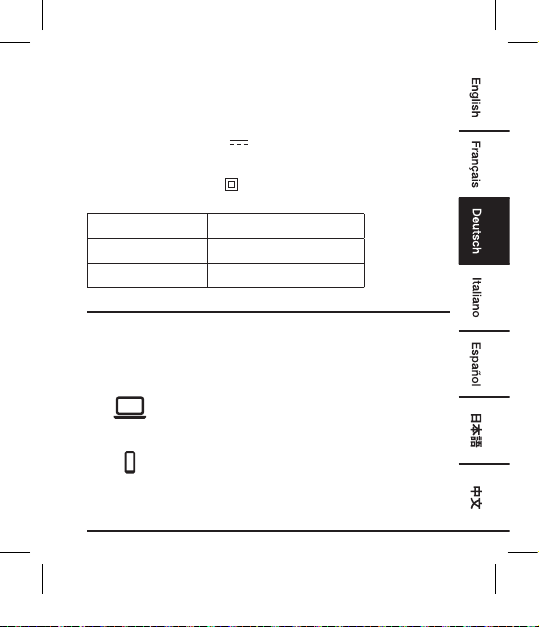
Eingangsspannung
100-240 V
~
, 50/60 Hz
Eingangsstrom max 1,5 A
Ausgangsspannung
5 V
Ausgangsstrom 12 A (max. 2,4 A pro Port)
Schutzklasse
II /
Steckertyp A B0773J4N43
Steckertyp C B0773CDT69
Steckertyp G B0773JKMXZ
Gewährleistung
Eine Kopie der Gewährleistung für dieses Produkt erhalten Sie unter
Besuchen Sie amazon.de/basics-garantie
— oder —
Wenden Sie sich an den Kundendienst unter
08 00-3 63 84 69
103535-B0773J4N43-10-Port Charger-UM-GLO-V03.indb 21 4/11/18 4:51 PM
22
Feedback
Gefällt es Ihnen? Gefällt es Ihnen nicht?
Dann bewerten Sie das Produkt auf unserer Webseite!
AmazonBasics setzt sich für die Bereitstellung kundenorientierter
Produkte ein, um Ihre hohen Qualitätsstandards zu erfüllen. Bitte
schreiben Sie eine Rezension, in der Sie Ihre Erfahrungen mit dem
Produkt teilen.
Bitte besuchen Sie: amazon.de/review/review-your-purchases#
Möchten Sie mehr wissen?
Besuchen Sie amazon.de/gp/help/customer/
contact-us
— oder —
Wenden Sie sich an den Kundendienst unter
08 00-3 63 84 69
103535-B0773J4N43-10-Port Charger-UM-GLO-V03.indb 22 4/11/18 4:51 PM
23
Guida di Benvenuto
•
Italiano
Caricabatterie Da Muro, 60W,
10 Porte USB
Contenuto:
Prima di iniziare, assicurarsi che la confezione contenga i
seguenti componenti:
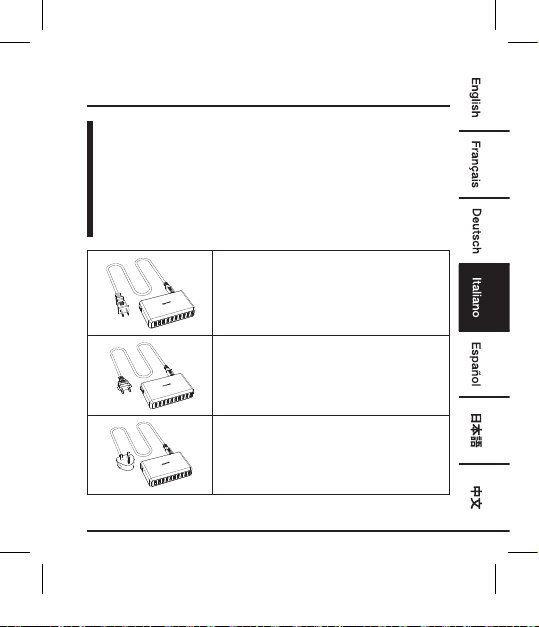
Spina tipo A
Usata in: America settentrionale e
centrale, Giappone
Spina tipo C
Usata in: Europa
Spina tipo G (Regno Unito)
Usata in: Regno Unito, Irlanda, Cipro,
Malta, Malesia, Singapore, Hong Kong
NOTA: è incluso solo uno dei tipi di spina elencati sopra.
103535-B0773J4N43-10-Port Charger-UM-GLO-V03.indb 23 4/11/18 4:51 PM
24
Funzionamento
NOTA: utilizzando il caricabatterie da muro è possibile caricare o
operare dieci dispositivi USB contemporaneamente. La
corrente di uscita per slot è max. 2,4 A (max. 12 A per tutti
gli slot).
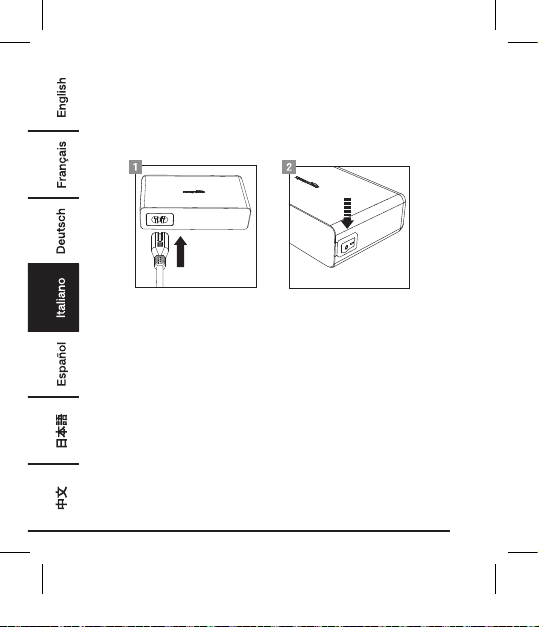
• Assicurarsi che il prodotto sia spento (interruttore ON/OFF in
posizione O).
• Inserire il cavo di alimentazione nella presa del prodotto.
• Collegare il dispositivo USB spento al caricabatterie da muro.
• Collegare la spina a una normale presa domestica.
• Premere I sull'interruttore ON/OFF per accendere il caricabatterie
da muro. L'indicatore di accensione sul caricabatterie da muro si
illumina a indicare che il caricabatterie è operativo.
• Il dispositivo USB è ora in carica. Per utilizzarlo, accendere il
dispositivo USB.
• Spegnere il dispositivo USB prima di scollegare il caricabatterie da
muro dalla presa elettrica.
• Premere O sull'interruttore ON/OFF per spegnere il prodotto.
• Scollegare il caricabatterie da muro dopo l'uso.
103535-B0773J4N43-10-Port Charger-UM-GLO-V03.indb 24 4/11/18 4:51 PM
25
Pulizia e Manutenzione
• Scollegare sempre il prodotto dalla presa elettrica prima di pulire.
• Pulire il prodotto con un panno asciutto e privo di lanugine.
• Conservare sempre il prodotto in un luogo asciutto.
Sicurezza e Conformità
• Utilizzare il prodotto solo nel rispetto delle istruzioni. Leggere tutte
le istruzioni prima di utilizzare il prodotto.
• Non estrarre la spina dalla presa elettrica tirando il cavo di
alimentazione né avvolgere il cavo attorno al prodotto.
• Controllare regolarmente il cavo e la spina di alimentazione per
eventuali danni. In caso di danno al cavo di alimentazione, esso
deve essere sostituito con un cavo speciale o l'apposito gruppo
disponibile presso il costruttore o il suo addetto all'assistenza.
• Non disassemblare alcun componente. Per gli interventi di
assistenza, rivolgersi esclusivamente a personale qualificato.
• Non posizionare o conservare il prodotto in aree umide, e non
esporre a pioggia o acqua.
•
Questo prodotto non è un giocattolo. Tenere fuori dalla portata di
bambini e animali domestici.
• Non lasciare il materiale di imballaggio incustodito. Potrebbe
costituire un giocattolo pericoloso per i bambini.
• Proteggere il prodotto da temperature estreme, luce diretta del
sole, forti urti e gas, vapori e solventi infiammabili.
• Rispettare le istruzioni operative e di sicurezza di qualsiasi altro
dispositivo collegato al prodotto.
103535-B0773J4N43-10-Port Charger-UM-GLO-V03.indb 25 4/11/18 4:51 PM
26
• Scollegare il prodotto dalla presa elettrica e il dispositivo USB
quando inutilizzato.
• Non collegare o scollegare mai il prodotto con le mani bagnate.
• Assicurarsi che il dispositivo soddisfi i requisiti di alimentazione del
prodotto (vedere le specifiche).
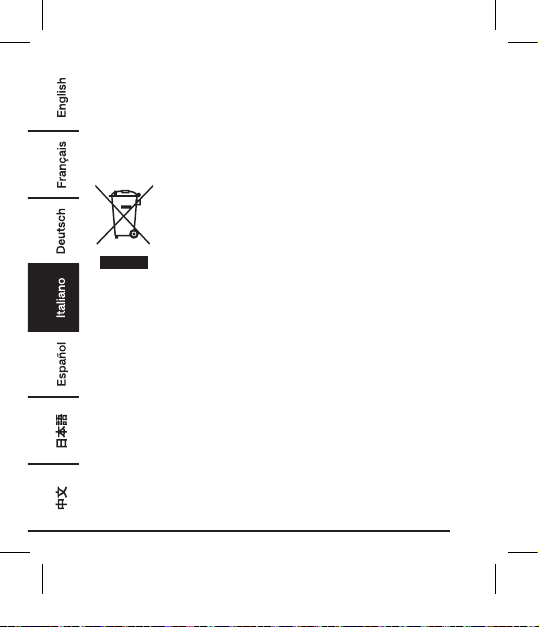
RAEE
Informazioni normative: Smaltimento dei Rifiuti di
Apparecchiature Elettriche ed Elettroniche (RAEE)
La Direttiva sui rifiuti di apparecchiature elettriche
ed elettroniche (RAEE) mira a minimizzare l'impatto
di suddette apparecchiature sull'ambiente,
aumentando le pratiche di riutilizzo e riciclo
e riducendo la quantità di rifiuti RAEE inviati
in discarica. Il simbolo su questo prodotto o
sull’imballaggio indica che il prodotto dovrà essere
smaltito separatamente dai rifiuti domestici al
termine del suo ciclo di vita. Si noti che l'utente è
responsabile dello smaltimento delle apparecchiature
elettroniche presso i centri di riciclo al fine di
contribuire a preservare le risorse naturali. Ogni
Paese deve disporre dei propri centri di raccolta per
il riciclo di apparecchiature elettriche ed elettroniche.
Per informazioni sui luoghi in cui avviene la raccolta
per il riciclo, contattare le autorità competenti per la
gestione dei rifiuti di apparecchiature elettriche ed
elettroniche, l’ufficio municipale locale o il servizio di
smaltimento dei rifiuti domestici.
103535-B0773J4N43-10-Port Charger-UM-GLO-V03.indb 26 4/11/18 4:51 PM
27
Speciche
Tensione d’ingresso 100-240 V
~
, 50/60 Hz
Corrente di ingresso 1,5 A max
Tensione d’uscita 5 V
Corrente di uscita 12 A (2,4 A max per ogni porta)
Classe di protezione
II /
Spina tipo A B0773J4N43
Spina tipo C B0773CDT69
Spina tipo G B0773JKMXZ
Informazioni Di Garanzia
Per ottenere una copia della garanzia del prodotto:
Visita amazon.de/basics-garantie
— o —
Contattare il Servizio Clienti al
800 62 88 05
103535-B0773J4N43-10-Port Charger-UM-GLO-V03.indb 27 4/11/18 4:51 PM
28
Feedback
Ti piace? Oppure no?
Faccelo sapere scrivendo la tua recensione.
AmazonBasics si impegna a distribuire prodotti orientati al cliente che
siano all’altezza degli standard più elevati. Pertanto, invitiamo i clienti
a scrivere una recensione per condividere le proprie esperienze con
il prodotto.
Visitare:
amazon.it/review/review-your-purchases
Per ulteriori servizi:
Visita amazon.it/gp/help/customer/contact-us
— o —
Contattare il Servizio Clienti al
800 62 88 05
103535-B0773J4N43-10-Port Charger-UM-GLO-V03.indb 28 4/11/18 4:51 PM
29
Guía de Bienvenida
•
Español
Cargador USB De Pared,
10 Puertos, 60W
Contenido:
Antes de comenzar, compruebe que el embalaje incluye los
siguientes componentes:
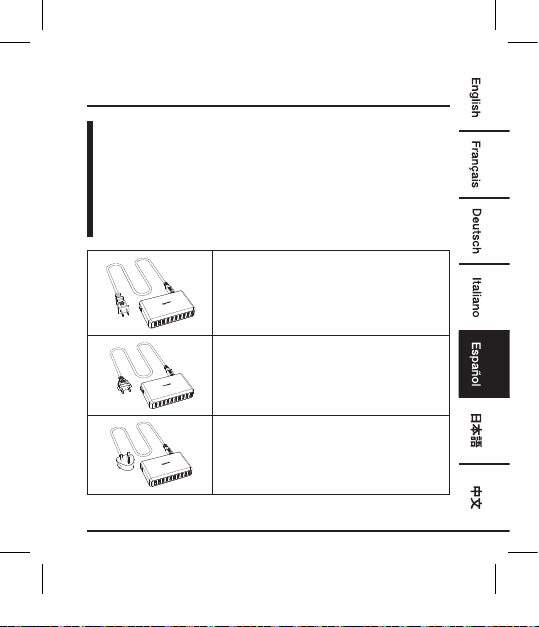
Enchufe Tipo A
Utilizado en: América del Norte y
Central, Japón
Enchufe Tipo C
Utilizado en: Europa
Enchufe Tipo G (ENCHUFE UK)
Utilizado en: Reino Unido, Irlanda,
Chipre, Malta, Malasia, Singapur, Hong
Kong
NOTA: Solo se incluye uno de los tipos de enchufes indicados más arriba.
103535-B0773J4N43-10-Port Charger-UM-GLO-V03.indb 29 4/11/18 4:51 PM
30
Funcionamiento
NOTA: Puede cargar o utilizar diez dispositivos USB simultáneamente
con el cargador de pared. La corriente de salida por ranura es
de 2,4 A máx. (12 A para todas las ranuras).
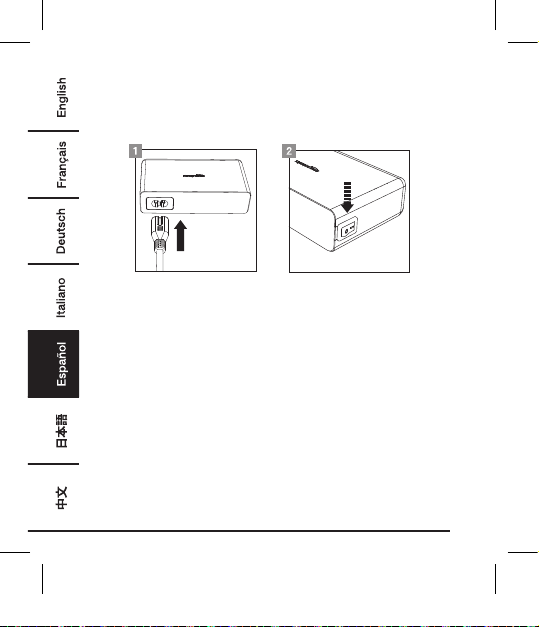
• Compruebe que el producto está apagado (interruptor de
encendido/apagado a la posición O).
• Enchufe el cable de alimentación a la toma del aparato.
• Conecte el dispositivo USB apagado al cargador de pared.
• Conecte el enchufe a una toma de corriente doméstica.
• Presione I en el interruptor de encendido/apagado para activar el
cargador de pared. El indicador de alimentación del cargador de
pared se ilumina para indicar que está en funcionamiento.
• El dispositivo USB está cargando. Si desea utilizar el dispositivo
USB, ahora ya puede encenderlo.
• Apague el dispositivo USB antes de desconectar el cargador de
pared de la toma de corriente.
• Presione O en el interruptor de encendido/apagado para apagar
el aparato.
• Desenchufe el cargador de pared después de usarlo.
103535-B0773J4N43-10-Port Charger-UM-GLO-V03.indb 30 4/11/18 4:51 PM
31
Limpieza y Mantenimiento
•
Desenchufe siempre el aparato de la toma de corriente antes de
limpiarlo.
• Límpielo con un paño seco y sin pelusa.
• Guarde siempre el producto en un lugar fresco y seco.
Seguridad y Cumplimiento
• Utilice el producto solo como indican las instrucciones. Lea todas
instrucciones antes de utilizar el producto.
• No desenchufe tirando del cable de alimentación y no enrolle el
cable alrededor del aparato.
• Compruebe con regularidad si el enchufe y el cable están
dañados. Si el cable de alimentación está dañado, debe ser
sustituido por un cable especial o conjunto disponible por el
fabricante o su servicio técnico.
• No desmonte ninguno de los componentes. Todas la tareas de
reparación deben ser realizadas solo por profesionales.
• No coloque o guarde el producto en una zona húmeda y no lo
exponga al agua o a la lluvia.
•
El producto no es un juguete. Manténgalo fuera del alcance de niños
y mascotas.
• No deje el material del embalaje tirado y desatendido. Podría
convertirse en un juguete peligroso para los niños.
• Proteja el producto de las temperaturas extremas, de la luz solar
directa, de sacudidas fuertes, de gases inflamables, vapores y
disolventes.
•
Asimismo, observe las instrucciones de seguridad y de funcionamiento
de cualquier otro dispositivo conectado al producto.
103535-B0773J4N43-10-Port Charger-UM-GLO-V03.indb 31 4/11/18 4:51 PM
32
• Desconecte el aparato de la toma de corriente y los dispositivos
USB cuando no los utilice.
• Nunca conecte o desconecte el producto con las manos mojadas.
• Compruebe que su dispositivo cumple con los requisitos de
alimentación del producto (véase Especificaciones).
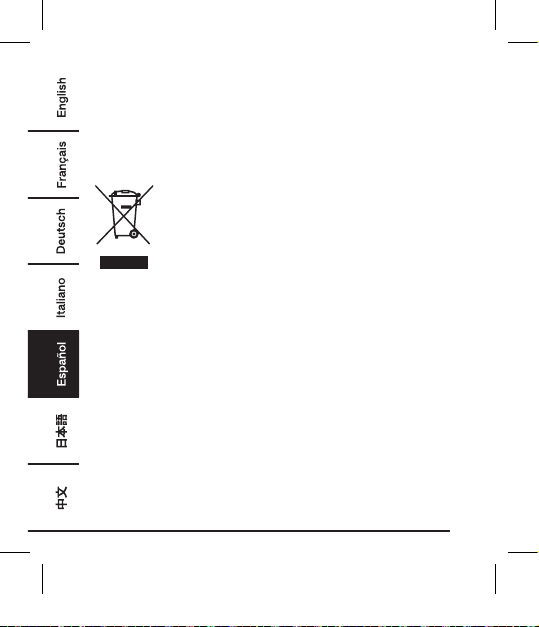
RAEE
Información reglamentaria: Eliminación de los
residuos de aparatos eléctricos y electrónicos
(RAEE)
El objetivo de la Directiva sobre residuos de aparatos
eléctricos y electrónicos (RAEE) es minimizar el
impacto de los bienes eléctricos y electrónicos en
el medio ambiente, aumentando la reutilización y el
reciclaje y reduciendo la cantidad de RAEE que van
a los vertederos. El símbolo en este producto o en
su embalaje indica que debe eliminarse separado de
los residuos domésticos al final de su vida útil. Tenga
en cuenta que es su responsabilidad desechar el
equipamiento electrónico en los puntos de reciclaje
adecuados para conservar los recursos naturales.
Cada país tiene sus puntos de recogida para el
reciclaje del equipamiento eléctrico y electrónico.
Para información acerca de su zona de recogida de
residuos, contacte con su autoridad de gestión de
residuos de aparatos eléctricos y electrónicos, con
su oficina local o con su servicio de eliminación de
residuos domésticos.
103535-B0773J4N43-10-Port Charger-UM-GLO-V03.indb 32 4/11/18 4:51 PM
33
Especicaciones
Tensión de entrada 100-240 V
~
, 50/60 Hz
Corriente de entrada 1,5 A máx.
Tensión de salida 5 V
Corriente de salida 12 A (cada puerto 2,4 A máx.)
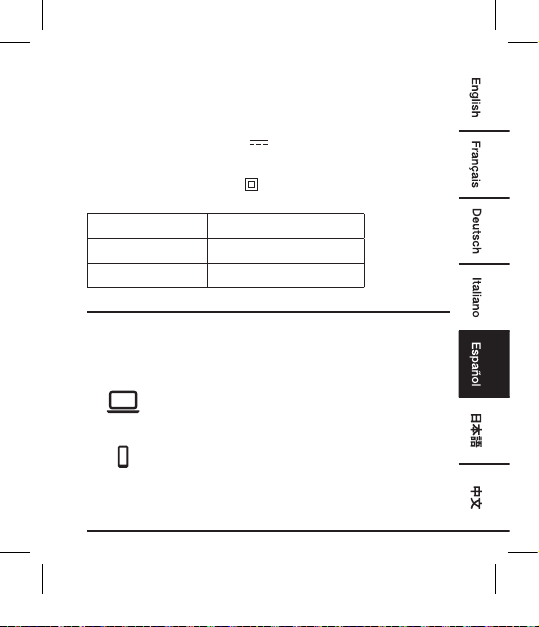
Clase de protección
II /
Enchufe Tipo A B0773J4N43
Enchufe Tipo C B0773CDT69
Enchufe Tipo G B0773JKMXZ
Información Sobre La Garantía
Para obtener una copia de la garantía de este producto:
Visite amazon.de/basics-garantie
— o —
Póngase en contacto con Atención al cliente en el
0900 803 711
103535-B0773J4N43-10-Port Charger-UM-GLO-V03.indb 33 4/11/18 4:51 PM
34
Comentarios
¿Le encanta? ¿No le gusta nada?
Escriba una opinión como cliente.
En AmazonBasics nos comprometemos a proveer productos
pensados para satisfacer a nuestros clientes y que estén a la altura de
sus elevados estándares de calidad. Le animamos a que escriba una
opinión sobre su experiencia con el producto.
Por favor, visite: amazon.es/review/review-your-purchases#
Para otros servicios:
Visite amazon.es/gp/help/customer/contact-us
— o —
Póngase en contacto con Atención al cliente en el
0900 803 711
103535-B0773J4N43-10-Port Charger-UM-GLO-V03.indb 34 4/11/18 4:51 PM
35
ウ ェ ル カ ム ガ イド
•
日本語
60W 10-ポート USB ウォールチャー
ジャー
内 容:
スタートする前に、パッケージに以下のものが含まれていることを
必 ず 確 認 してくだ さい 。
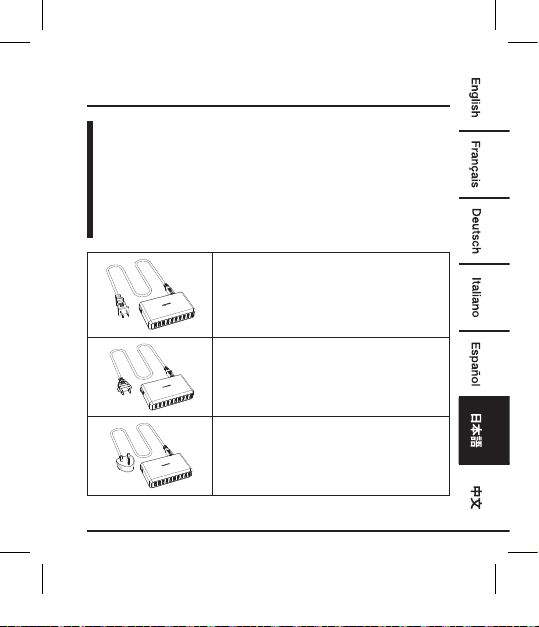
プラグタイプ A
使用国:北米および中米、日本
プラグタイプ C
使用国:ヨーロッパ
プラグタイプ G (英国プラグ)
使用国:英連邦、アイルランド、キプロ
ス、マルタ、マレーシア、シンガポー
ル、香港
注 意:含まれるのは 上 記プラグタイプ のうちのひとつのみです。
103535-B0773J4N43-10-Port Charger-UM-GLO-V03.indb 35 4/11/18 4:51 PM
36
操作
注意: ウォールチャージャーを使って、10基の USB デバイスを同
時に充電または操作することができます。スロットごとのア
ウトプットは最大 2.4 A(両スロット最大 12 A)です。
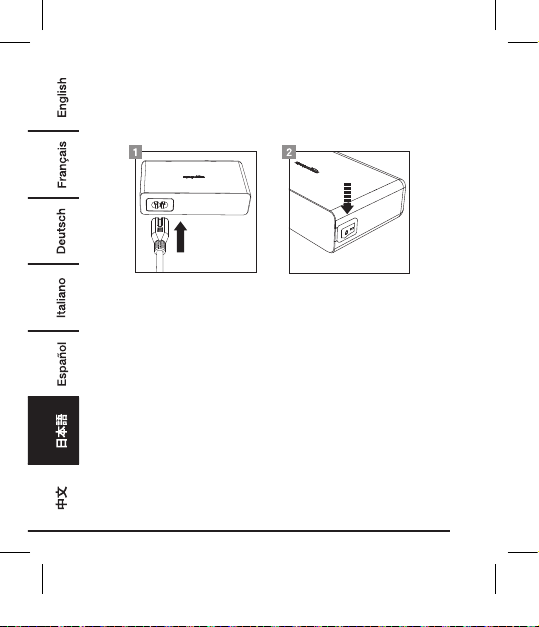
• 製品の電源が切れていることを確認してください(オン/オフス
イッチの位置は O).
• コードを製品のソケットにさし込みます。
• 電源を入れていない USB デバイスをウォールチャージャーに
接続します。
• ウォールチャージャーを通常の家庭用電源に接続します。
• オン/オフスイッチのI を押すとウォールチャージャーの電源が
入ります。製品のパワーインジケーターが点灯し、パワーチャ
ージャーが操作可能な状態であることを知らせます。
• USB デバイスの充電が開始されました。USB デバイスの操作を
お望みであれば、電源を入れていただくことができます。
• USB デバイスの電源は、ウォールチャージャー を電源から抜く
前に切っておきます。
• オン・オフスイッチのO を押すと電源が切れます。
•
ご使用後はウォールチャージャーをプラグから抜いてください。
103535-B0773J4N43-10-Port Charger-UM-GLO-V03.indb 36 4/11/18 4:51 PM
37
掃除およびメンテナンス
• 掃除前には必ず製品を電源から抜いてください。
• 製品は乾いたリントフリークロスできれいにしてください。
• 製品は常に乾燥した場所に保管してください。
安全および守るべきこと
• 製品は説明に従ってのみお使いください。製品を操作なさる前
に取扱説明書をしっかりお読みください。
• プラグを抜くときはコードを引っ張らないよう注意し、またコ
ードを製品にぐるぐると巻きつけないでください。
• プラグとコードに破損がないか、定期的に点検してください。
サプライコードにダメージがある場合は、メーカーやサービス
エージェントにて入手可能な特別なコードまたはアッセンブリ
ーで置き換えてください。
• 部品はどれであっても取り外さないでください。修理は資格の
ある人のみが行うようにしてください。
• 製品の保管は湿度のある場所を避け、水や雨にさらされること
がないようにしてください。
•
この装置はおもちゃではありません。お子様やペットの手の届か
ないところに置いてください。
• 梱包材料がそこいらに放置されていることがないようにしてく
ださい。お子様の遊び材料となる恐れがあります。
• 製品が極端な高温や低温、直射日光、強い衝撃、可燃性のガ
ス、蒸気や溶剤などにさらされることがないようにしてくだ
さい。
• また、製品を接続した他のデバイスの安全および操作の説明も
注意してお読みください。
103535-B0773J4N43-10-Port Charger-UM-GLO-V03.indb 37 4/11/18 4:51 PM
38
• 製品を使用しないときは電源および USB デバイスからはずし
てください。
• 手が濡れている場合はプラグを入れるまたは抜くことは絶対に
しないでください。
• デバイスが製品の動作電力(「仕様」参照)に見合っているこ
とを確認してくださ(い。
規格
インプット電圧 100-240 V
~
、50/60 Hz
入力電流 最大 1.5 A
アウトプット電圧 5 V
出力電流 12 A (各ポート最大 2.4 A )
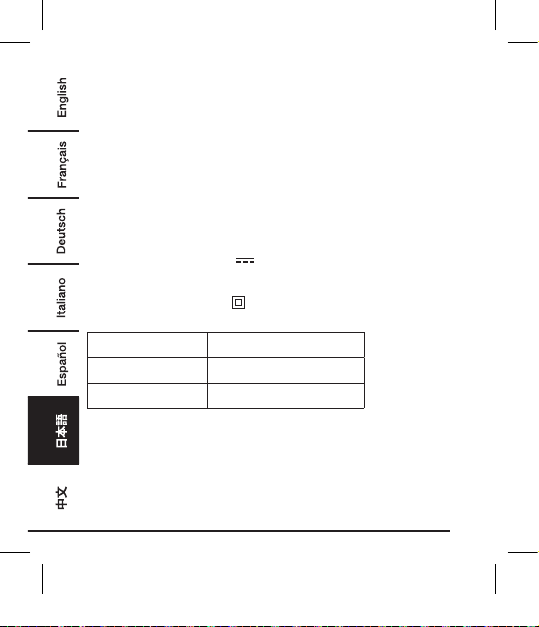
保護等級
II /
プラグタイプ A
B0773J4N43
プラグタイプ C
B0773CDT69
プラグタイプ G
B0773JKMXZ
103535-B0773J4N43-10-Port Charger-UM-GLO-V03.indb 38 4/11/18 4:51 PM
39
保証について
この製品の保証書のコピーを入手するには:
ホ ー ム ペ ー ジ: amazon.jp/AmazonBasics/Warranty
- または -
カスタマー サービス 0120-899-276 にご 連 絡ください 。
103535-B0773J4N43-10-Port Charger-UM-GLO-V03.indb 39 4/11/18 4:51 PM
40
フィードバ ック
気に入っていただけましたか?お気に召しませんで
したか?
カスタマーレビューでお知らせください 。
Amazonベーシック は、皆様の高い水準に答えることのできるような消費
者志向型の製品をお届けするのを旨としています。この製品についてのレ
ビューで 製 品 についてのご意 見をお聞か せください。
レ ビ ュ ー は こ ちら へ: amazon.jp/review/review-your-purchases#
更 な る サ ー ビ ス に つ い て は:
こちらのリンク へ amazon.jp/gp/help/customer/
contact-us
- または -
カスタマー サービス 0120-899-276 にご 連 絡くだ さい 。
103535-B0773J4N43-10-Port Charger-UM-GLO-V03.indb 40 4/11/18 4:51 PM
41
欢迎指南
•
中文
60W,10 接口 USB 墙式充电器
内装物:
在开始组装之前,确保包装内包含以下组件:
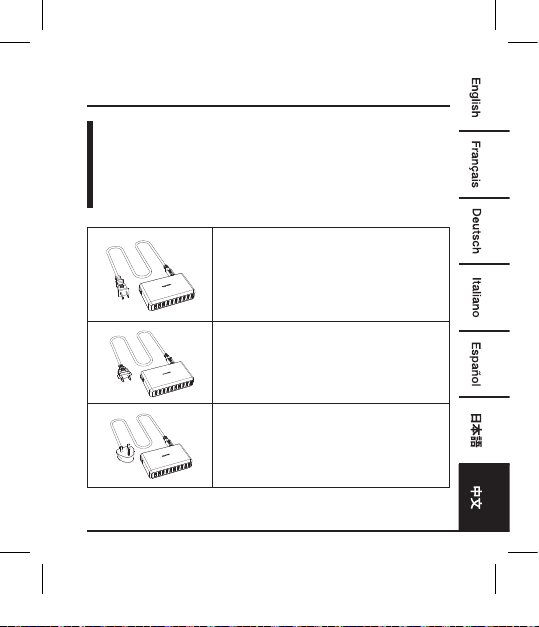
插头类型 A
用于:北美洲、中美洲、日本
插头类型 C
用于:欧洲
插头类型 G(英式插头)
用于:英国、爱尔兰、塞浦路斯、马耳
他、马来西亚、新加坡、中国香港
注意:仅包含上述列出的插头类型中的一种。
103535-B0773J4N43-10-Port Charger-UM-GLO-V03.indb 41 4/11/18 4:51 PM
42
操作
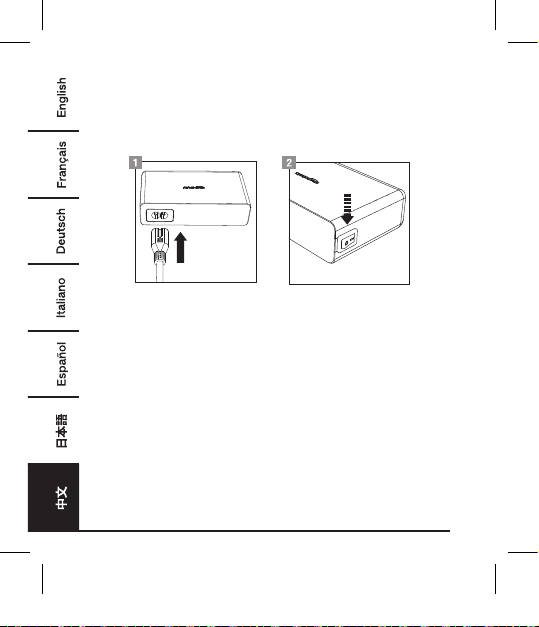
注意: 您可以使用墙式充电器,同时为十个 USB 设备充电或者对它
们进行操作。每个插槽的最大输出电流为 2.4 A(所有插槽总
共最大为 12 A)。
• 确保产品处于关闭状态(on/off 开关位于位置 O)。
• 将电源线插入产品的插口里。
• 将关闭着的 USB 设备连接至墙式充电器。
• 将电源插头连接至普通家用电源插座上。
• 按下 on/off 开关上的 I,开启墙式充电器。墙式充电器上的电源指
示灯亮起,指示墙式充电器可使用。
• 您的 USB 设备正在充电。如您想要运行 USB 设备,现在可以开
启它了。
• 在断开墙式充电器与电源插座的连接前,关闭 USB 设备。
• 按下 on/off 开关上的 O,关闭墙式充电器。
• 使用后,拔下墙式充电器。
103535-B0773J4N43-10-Port Charger-UM-GLO-V03.indb 42 4/11/18 4:51 PM
43
清洁和保养
• 清洁前,总是从壁装电源插座上拔下此产品。
• 使用干燥的无绒布清洁产品。
• 总是将产品存放于干燥处。
安全和注意事项
• 仅按指导说明使用产品。操作产品前阅读所有指导说明。
• 勿通过拉拔电源线将电源插头从电源插座中拔出,且勿将电源线
缠绕于产品上。
• 定期检查电源插头和电源线是否损坏。如果电源线损坏,必须
使用在制造商处或者其服务代理机构购得的特殊电线或者装配
替换。
• 勿拆开任何组件。仅向具备资格的人员申请服务。
• 勿将产品放置或者存放于潮湿地方,勿将其暴露于水里或雨里。
• 本设备并非玩具。请将其置于儿童和宠物接触不到的地方。
•
不要将包装材料散乱放在周围。儿童玩耍这些材料可能发生危险。
• 避免产品受到极端温度、阳光直射、强烈颠簸、易燃气体、水蒸
汽和溶剂影响。
• 另请遵守与产品相连的任何其他设备的安全和操作说明。
• 不使用时,断开产品和电源插座及 USB 设备的连接。
• 手湿时,永远不要插、拔产品。
• 确保您的设备符合产品的电源要求(参看规格)。
103535-B0773J4N43-10-Port Charger-UM-GLO-V03.indb 43 4/11/18 4:51 PM
44
规格
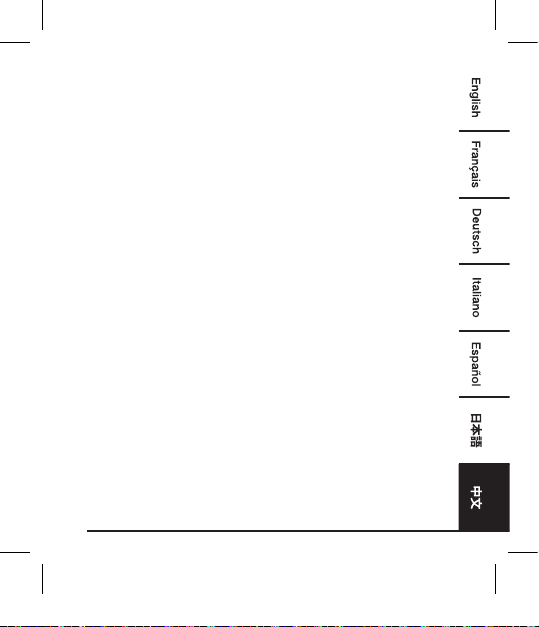
输入电压 100-240 V
~
,50/60Hz
输入电流 最大 1.5 A
输出电压 5 V
输出电流 12 A(每个接口最大 2.4 A)
保护等级
II /
插头类型 A
B0773J4N43
插头类型 C
B0773CDT69
插头类型 G
B0773JKMXZ
保修信息
如需获得此产品的保修信息:
访问 amazon.cn/AmazonBasics/Warranty
— 或 —
拨打 400-810-5666 联系客服人员
103535-B0773J4N43-10-Port Charger-UM-GLO-V03.indb 44 4/11/18 4:51 PM
45
反馈
喜欢这款产品?不喜欢这款产品?
让我们通过客户评论了解您的想法和意见。
亚马逊倍思以客户为导向,致力于供应满足客户高标准的产品。我们
邀请您填写评论,分享您使用产品的体验。
请访问:amazon.cn/review/review-your-purchases
如需更多服务:
访问 amazon.cn/gp/help/customer/contact-us
— 或 —
拨打 400-810-5666 联系客服人员
103535-B0773J4N43-10-Port Charger-UM-GLO-V03.indb 45 4/11/18 4:51 PM
MADE IN CHINA
amazon.com/AmazonBasics
103535-B0773J4N43-10-Port Charger-UM-GLO-V03.indb 46 4/11/18 4:51 PM