
www.lg.com
19M35A
20M35A
22M35A
24M35A
19M35D
20M35D
22M35D
24M35D
22M34D
22M33D
LED LCD MONITOR MODEL
ENGLISH
OWNER’S MANUAL
LED LCD MONITOR
Please read this manual carefully before operating
your set and retain it for future reference.

WARNING: This product contains chemicals known to the State of California to cause cancer and birth defects or other
reproductive harm. Wash hands after handling.

2
ENG
ENGLISH
TABLE OF CONTENTS
CONTENTS
3 ASSEMBLINGANDPREPAR-
ING
3 Unpacking
4 Parts and buttons
5 Moving and Lifting the Monitor
6 Setting up the Monitor set
6 - Attaching the Stand Base
6 - Detaching the Stand Base
7 - Mounting on a table
7 - Using the cable holder
9 - Mounting on a wall
10 USINGTHEMONITORSET
10 Connecting to a PC
10 - D-SUB connection
10 - DVI-D connection
12 CUSTOMIZINGSETTINGS
13 Customizing Settings
13 - Menu Settings
14 - Picture
15 - Color
16 - Display
17 - Others
18 READER Setting
19 FUNC. Setting
19 - SUPER ENERGY SAVING
20 - Picture Mode
21 - DUAL DISPLAY
21 - DUAL WEB
22 TROUBLESHOOTING
24 SPECIFICATIONS
24 19M35A
25 19M35D
26 20M35A
28 20M35D
30 22M35A
31 22M35D/22M34D/22M33D
32 24M35A
33 24M35D
34 Preset Modes (Resolution)
35 Indicator
36 PROPERPOSTURE
36 Proper posture for using the Monitor set.
3
ENG
ENGLISH
ASSEMBLING AND PREPARING
ASSEMBLINGANDPREPARING
Unpacking
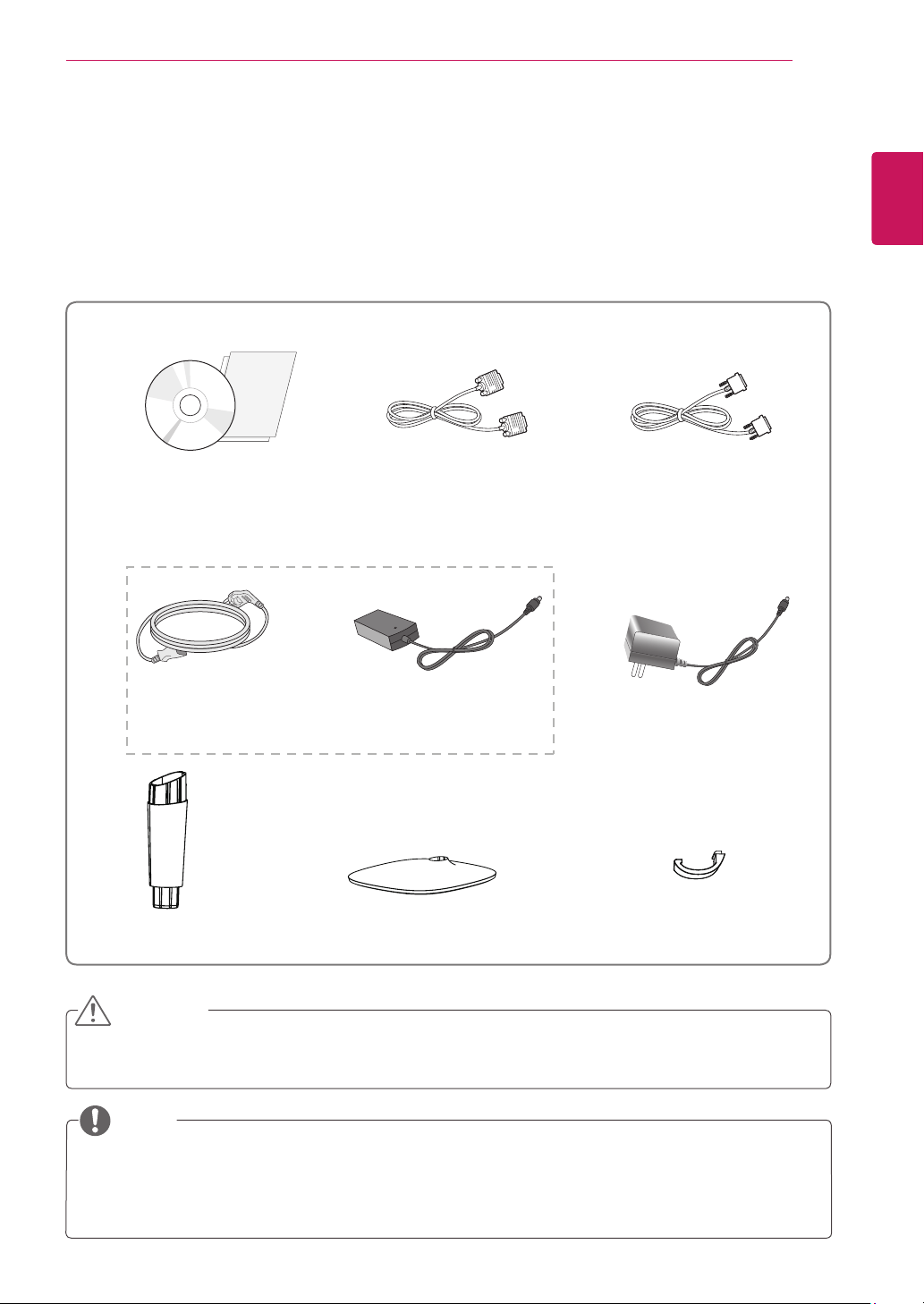
Check your product box for the following items. If there are any missing accessories, contact the local
dealer where you purchased your product. The illustrations in this manual may differ from the actual product
and accessories.
Do not use any unapproved accessories to ensure the safety and product life span.
Any damages or injuries by using unapproved accessories are not covered by the warranty.
The accessories supplied with your product may vary depending on the model.
Product specifications or contents in this manual may be changed without prior notice due to upgrade
of product functions.
CAUTION
NOTE
StandBody StandBase
CD(Owner'sManual)/
Card
D-SUBCable
( Depending on the country ) ( Depending on the country )
PowerCord
AC-DCAdapter
AC-DCAdapter
or
DVI-DCable
(This cable is not included in all
countries.)
(19M35D,20M35D,22M35D,24M35D,
22M34D,22M33D)
Cableholder
5
ENG
ENGLISH
ASSEMBLING AND PREPARING
MovingandLiftingtheMonitor
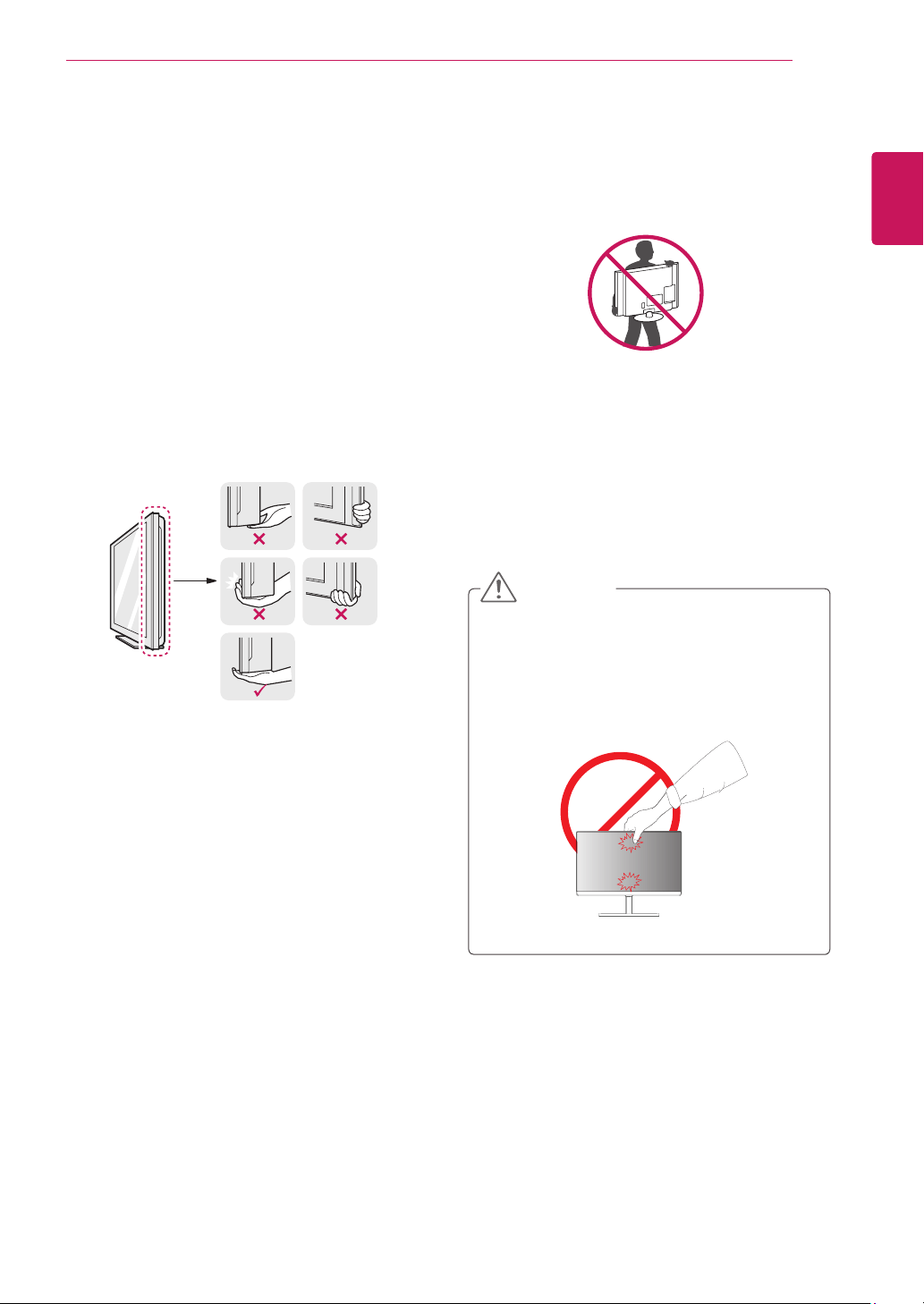
When moving or lifting the monitor, follow these
instructions to prevent the monitor from being
scratched or damaged and to ensure safe trans-
portation regardless of its shape or size.
As far as possible, avoid touching the moni-
tor screen. This may result in damage to the
screen or some of the pixels used to create
images.
It is advisable to place the monitor in the
original box or packing material before at-
tempting to move it.
Before moving or lifting the monitor, discon-
nect the power cord and all cables.
Hold the top and bottom of the monitor frame
firmly. Do not hold the panel itself.
When holding the monitor, the screen should
face away from you to prevent it being
scratched.
When moving the monitor, avoid any strong
shock or vibrations to the product.
When moving the monitor, keep it upright,
never turn the monitor on its side or tilt it
sideways.
CAUTION
6
ENG
ENGLISH
ASSEMBLING AND PREPARING
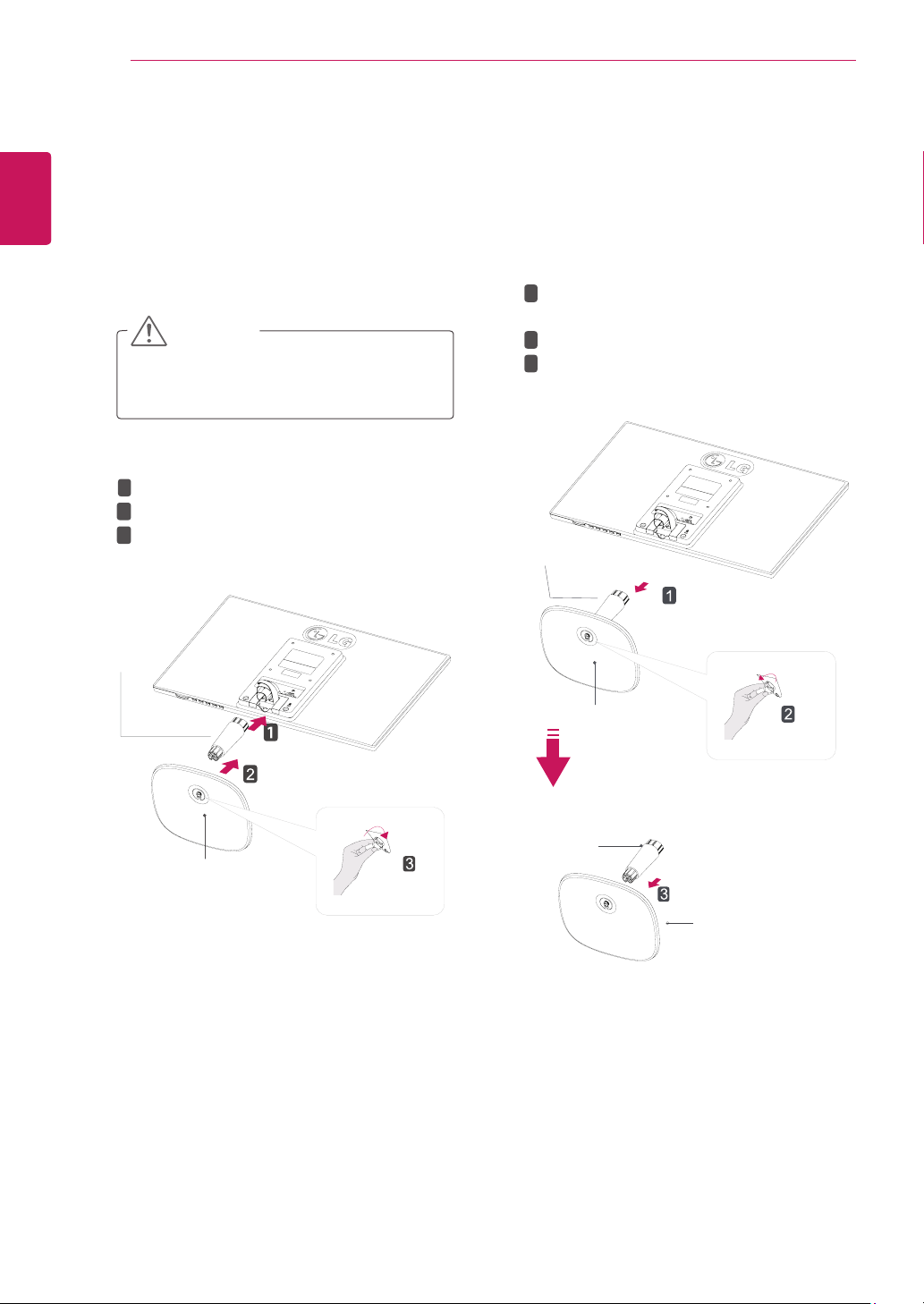
Attach the
StandBody
to the monitor set.
Attach the
StandBase
.
Tighten the screw to the right.
SettinguptheMonitorset
AttachingtheStandBase
1
Place the Monitor set with the screen side
down on a flat and cushioned surface.
Lay a foam mat or soft protective cloth
on the surface to protect the screen from
damage.
CAUTION
2
StandBase
StandBody
1
2
3
DetachingtheStandBase
1
Place the Monitor set with the screen side
down on a flat and cushioned surface.
StandBase
StandBase
StandBody
StandBody
Pull out the
StandBody
and
StandBase
from the monitor set.
Turn the screw to the left.
Pull out the
StandBase
.
1
2
3
2
7
ENG
ENGLISH
ASSEMBLING AND PREPARING
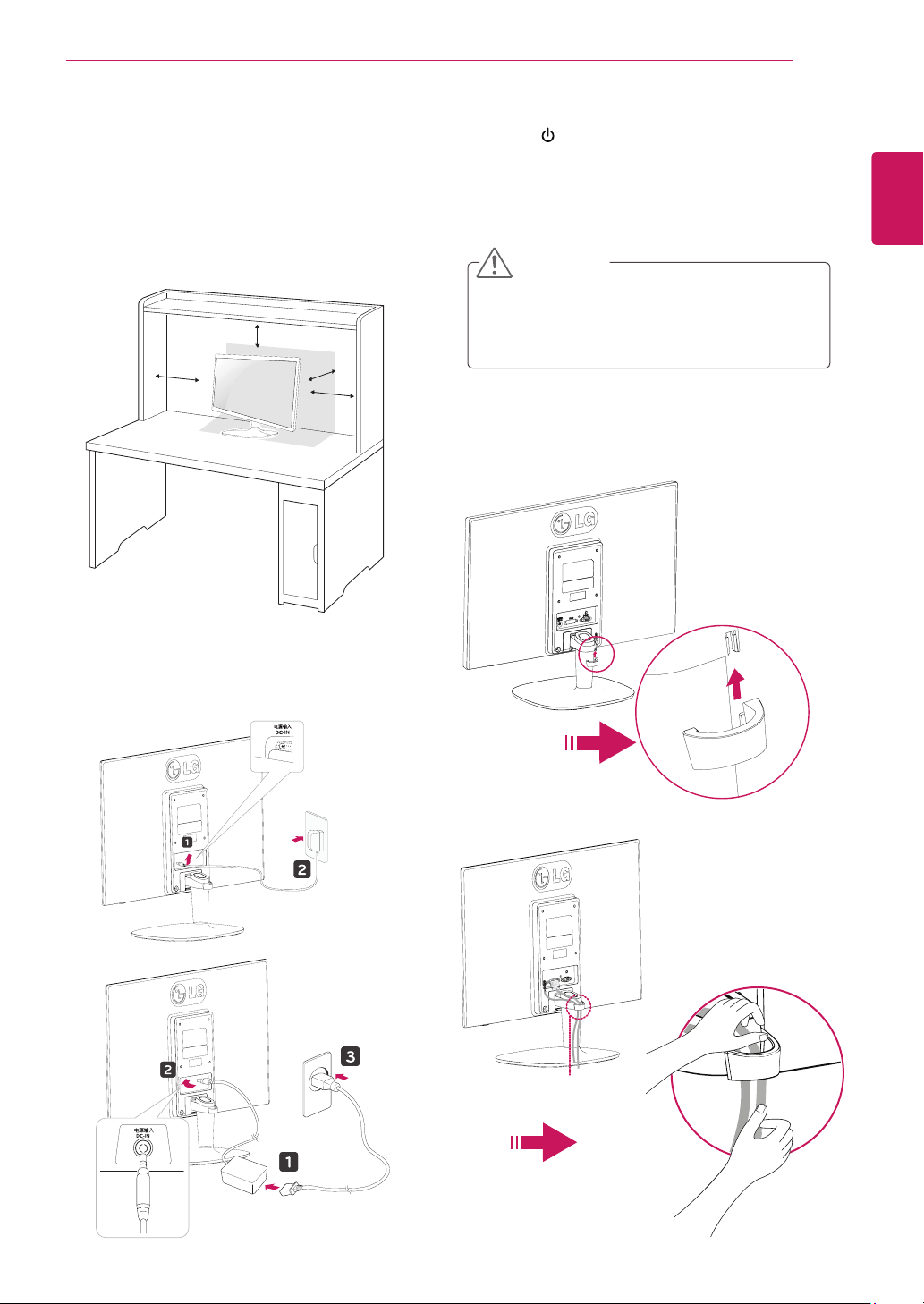
Mountingonatable
1
Lift and tilt the Monitor set into its upright
position on a table.
Leave a 10 cm (minimum) space from the wall
for proper ventilation.
Usingthecableholder
2
Connect the AC-DC Adapter and Power Cord
to a wall outlet.
3
Press (Power) button on the bottom switch
panel to turn the power on.
10 cm
10 cm
10 cm
10 cm
Unplug the power cord before moving the
Monitor to another location. Otherwise electric
shock may occur.
CAUTION
Cableholder
or
8
ENG
ENGLISH
ASSEMBLING AND PREPARING
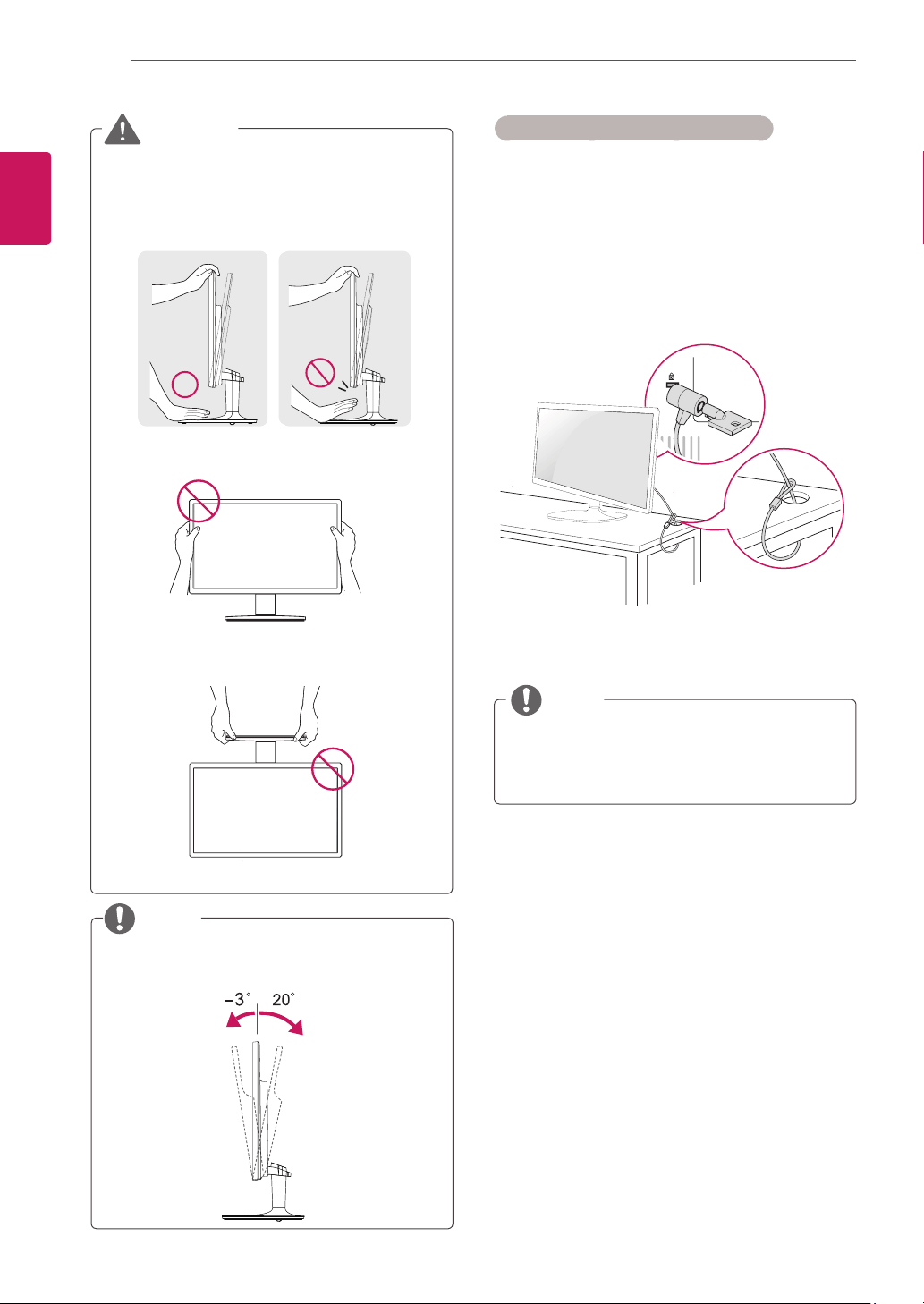
Using the Kensington security system
The Kensington security system connector is
located at the back of the Monitor set. For more
information of installation and using, refer to the
manual supplied with the Kensington security
system or visit
http://www.kensington.com
.
Connect the Kensington security system cable
between the Monitor set and a table.
The Kensington security system is optional.
You can obtain it from most electronics stores.
NOTE
When you adjust the angle, do not hold the
bottom of the Monitor set frame as shown on
the following illustration, as may injure your
fingers.
Do not touch or press the screen when
adjusting the angle of the monitor.
Do not hold this set like below picture.Monitor
screen can detach from stand base and injure
your body.
WARNING
Tilt from +20 to -3 degrees up or down to adjust
the angle of the Monitor set to suit your view.
NOTE
Front Rear
9
ENG
ENGLISH
ASSEMBLING AND PREPARING
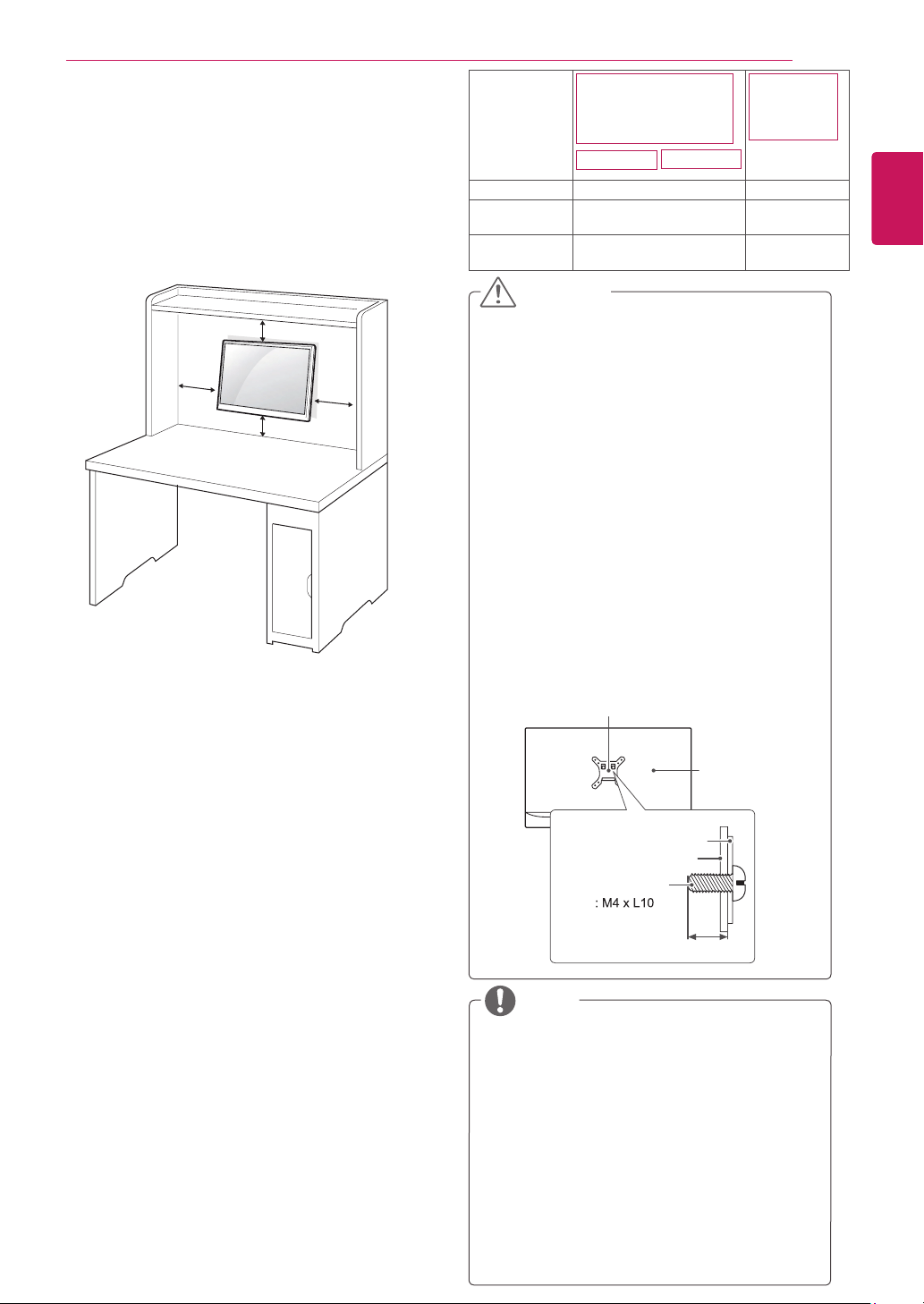
Mountingonawall
For proper ventilation, allow a clearance of 10 cm
on each side and from the wall. Detailed
instructions are available from your dealer, see the
optional Tilt Wall Mounting Bracket Installation and
Setup Guide.
If you intend to mount the Monitor set to a wall,
attach Wall mounting interface (optional parts) to
the back of the set.
When you install the Monitor set using a wall
mounting interface (optional parts), attach it
carefully so it will not drop.
1
Please, Use the screw and wall mount interface
in accordance with VESA Standards.
2
If you use screw longer than standard, the
monitor might be damaged internally.
3
If you use improper screw, the product might be
damaged and drop from mounted position. In
this case, LG Electronics is not responsible for
it.
4
VESA compatible only with respect to screw
mounting interface dimensions and mounting
screw specifications.
5
Please use VESA standard as below.
784.8 mm (30.9 inch) and under
* Wall Mount Pad Thickness : 2.6 mm
* Screw : Φ 4.0 mm x Pitch 0.7 mm x
Length 10 mm
787.4 mm (31.0 inch) and above
* Please use VESA standard wall mount pad
and screws.
10 cm
10 cm
10 cm
10 cm
Disconnect the power cord first, and then
move or install the Monitor set. Otherwise
electric shock may occur.
If you install the Monitor set on a ceiling or
slanted wall, it may fall and result in severe
injury.
Use only an authorized LG wall mount
and contact the local dealer or qualified
personnel.
Do not over tighten the screws as this may
cause damage to the Monitor set and void
your warranty.
Use only screws and wall mounts that meet
the VESA standard. Any damages or injuries
by misuse or using an improper accessory
are not covered by the warranty.
Screw length from outer surface of back
cover should be under 8mm.
Use the screws that are listed on the VESA
standard screw specifications.
The wall mount kit will include an installation
manual and necessary parts.
The wall mount bracket is optional. You can
obtain additional accessories from your local
dealer.
The length of screws may differ depending
on the wall mount. Be sure to use the proper
length.
For more information, refer to the
instructions supplied with the wall mount.
CAUTION
NOTE
Model
19M35A 19M35D
20M35A 20M35D
22M35A 22M35D
22M34D
24M35A
24M35D
VESA(AxB) 75 x 75 100 x 100
Standard
screw
M4 M4
Numberof
screws
4 4
Wall mount Pad
Wall mount Pad
Back Cover
Back Cover
Standard screw
Max.8mm
22M33D
10
ENG
ENGLISH
USING THE MONITOR SET
USINGTHEMONITORSET
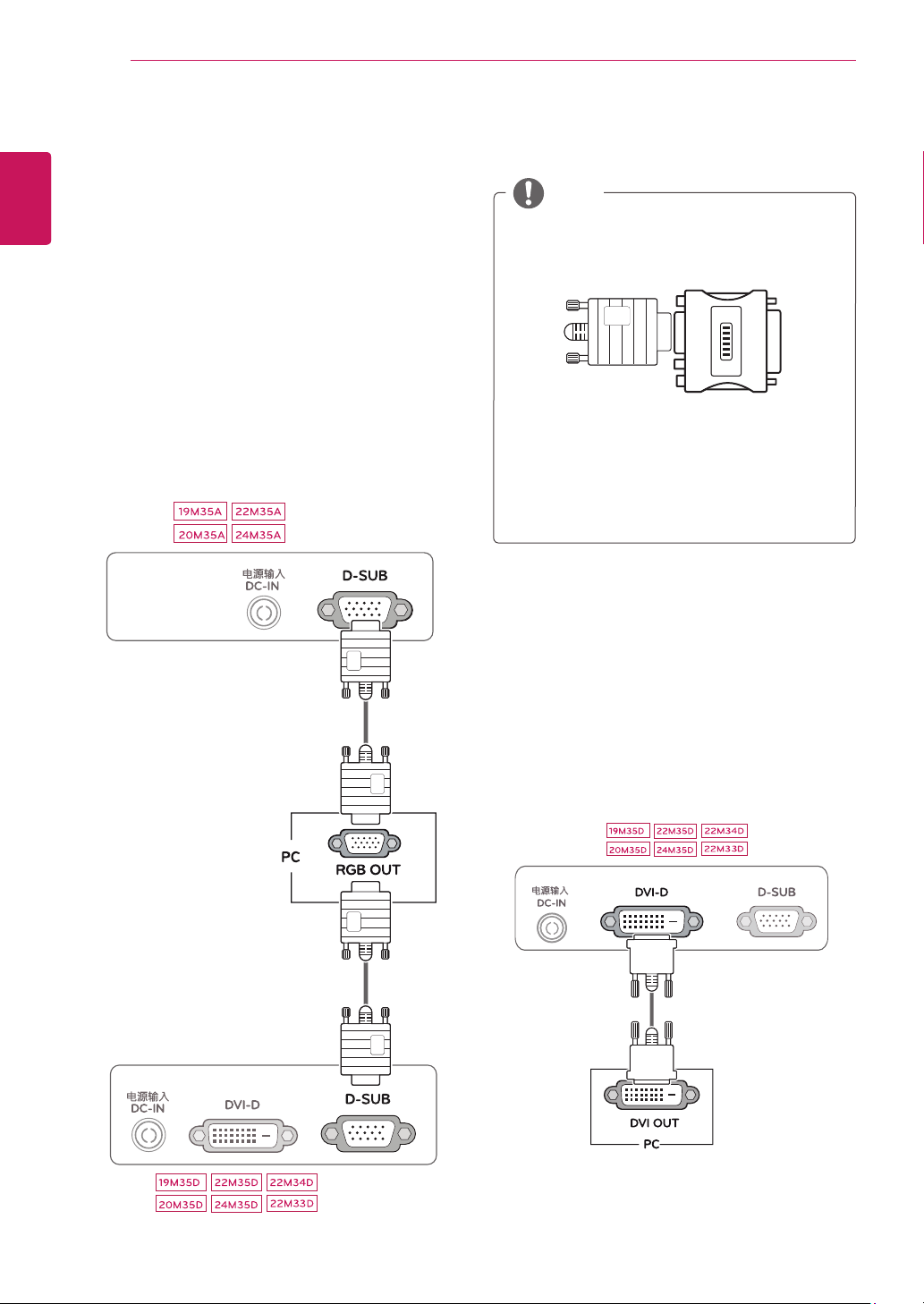
ConnectingtoaPC
Your Monitor set supports Plug & Play*.
*Plug & Play: A PC recognizes a connected
device that users connect to a PC and turn
on, without device configuration or user
intervention.
D-SUBconnection
Transmits analog video from your PC to the
Monitor set. Connect the PC and the Monitor set
with the supplied D-sub 15 pin signal cable as
shown in the following illustrations.
Macadapter
For Apple Macintosh use, a separate plug
adapter is needed to change the 15 pin
high density (3 row) D-SUB VGA connector
on the supplied cable to a 15 pin 2 row
connector.
When using a D-Sub signal input cable
connector for Macintosh
NOTE
DVI-Dconnection
Transmits a digital video signal from your PC to
the Monitor set. Connect the PC and the Monitor
set with a DVI cable as shown in the following
illustrations.
11
ENG
ENGLISH
USING THE MONITOR SET
When you want to use two PC in our Monitor,
please connect the signal cable(D-SUB/
DVI-D) respectively in Monitor set.
If you turn the Monitor set on while it is cold,
the screen may flicker. This is normal.
Some red, green, or blue spots may appear
on the screen. This is normal.
"SelfImageSetting"Function.
This function provides the user with optimal
display settings.When the user connects
the monitor for the first time, this function
automatically adjusts the display to optimal
settings for individual input signals.(Only
supported in Analog Mode)
‘AUTO’Function.
When you encounter problems such as
blurry screen, blurred letters, screen flicker
or tilted screen while using the device or
after changing screen resolution, press the
AUTO function button to improve resolution.
(Only supported in Analog Mode)
NOTE NOTE
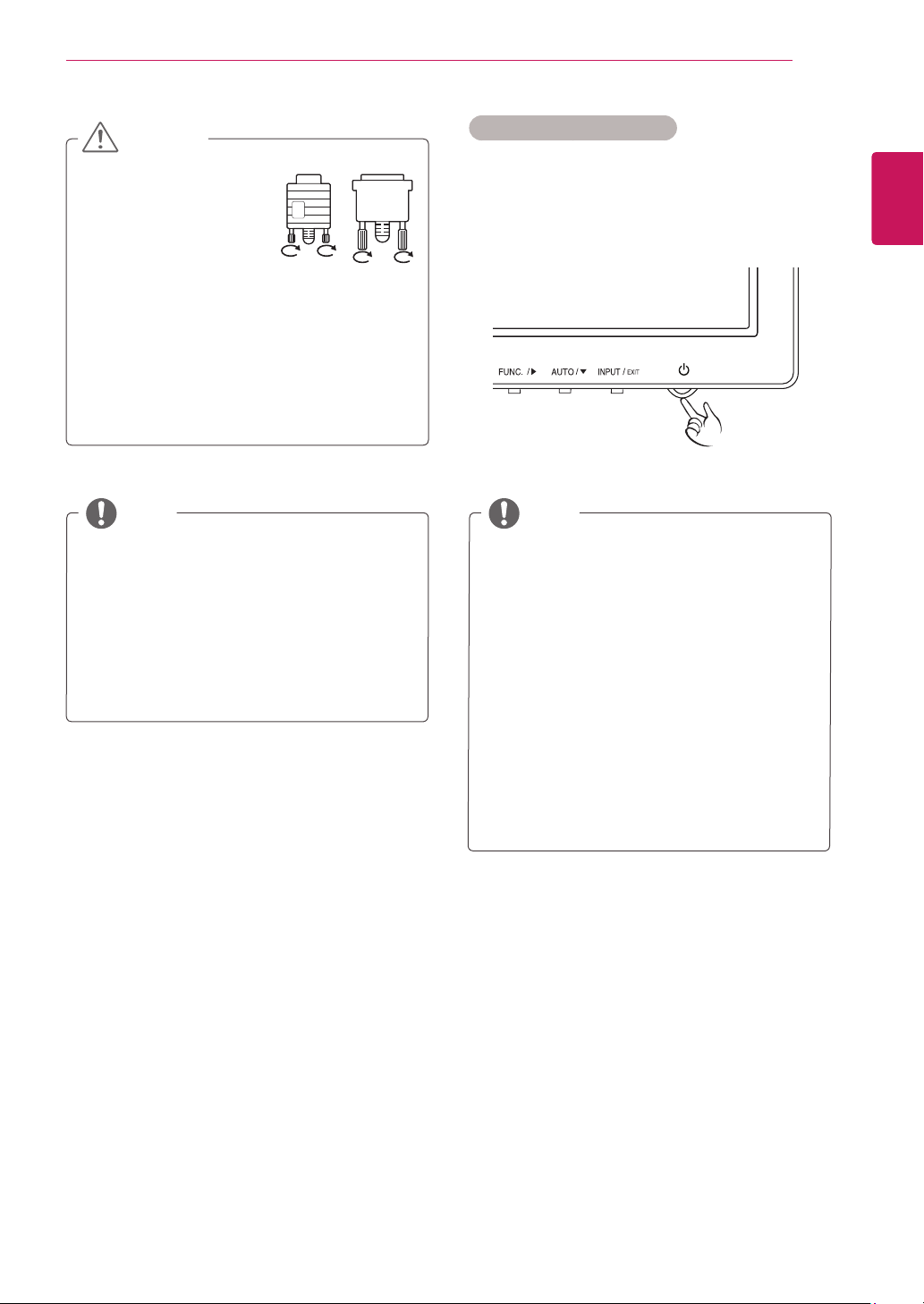
Self Image Setting Function
Press the power button on the bottom panel to
turn the power on. When monitor power is turned
on, the "
SelfImageSetting
" Function is executed
automatically. (Only supported in Analog Mode)
Connect the signal
input cable and tighten
it by turning the screws
clockwise.
Do not press the screen with your finger for
a long time as this may result in temporary
distortion on the screen.
Avoid displaying a fixed image on the
screen for a long period of time to prevent
image burn. Use a screensaver if possible.
CAUTION
12
ENG
ENGLISH
CUSTOMIZING SETTINGS
CUSTOMIZINGSETTINGS
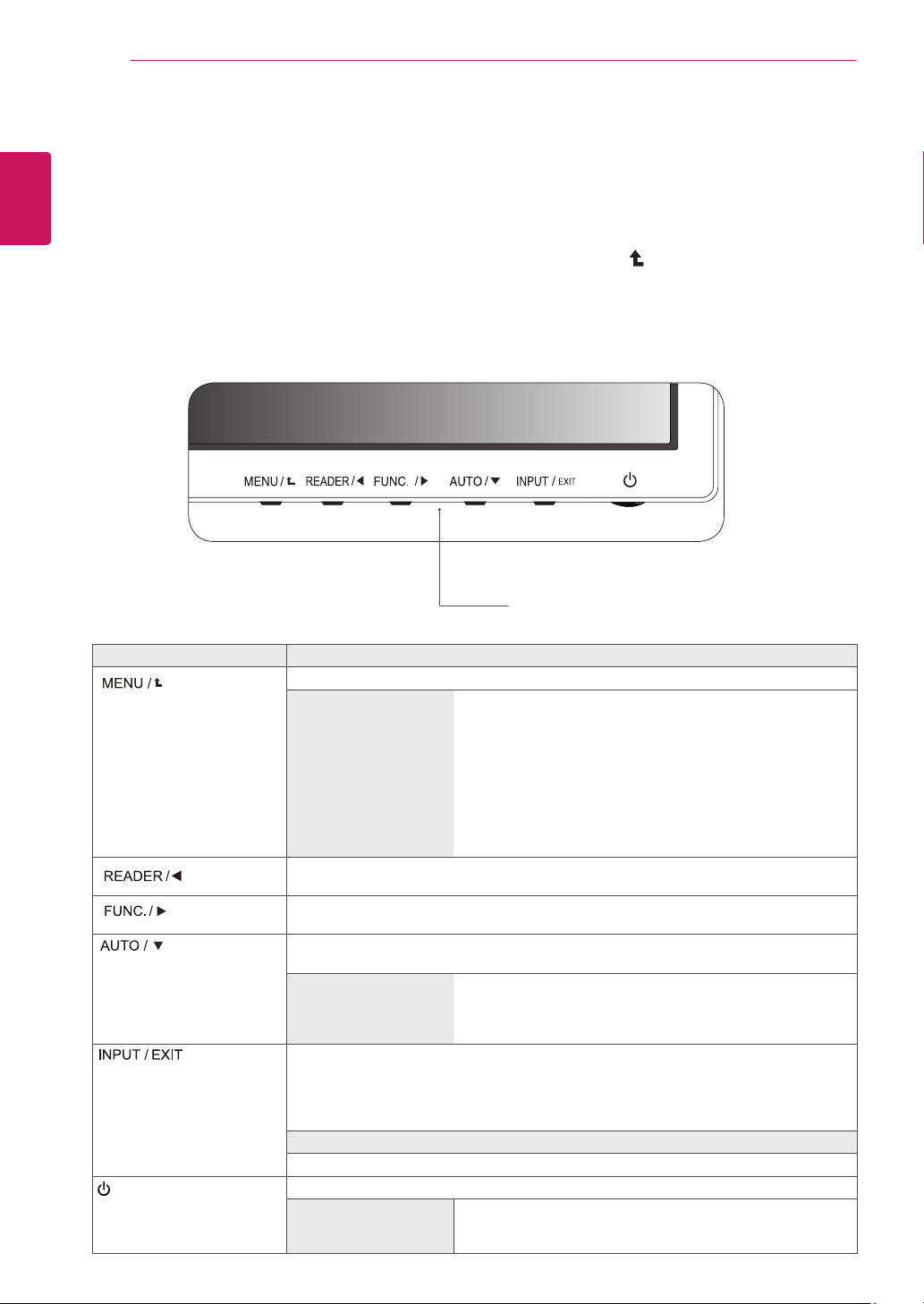
1
Press the desired button on the bottom of the Monitor set.
2
Change the value of the menu item by pressing the buttons on the bottom of the Monitor set.
To return to the upper menu or set other menu items, use the up arrow ( ) button.
3
Select
EXIT
to leave the OSD menu.
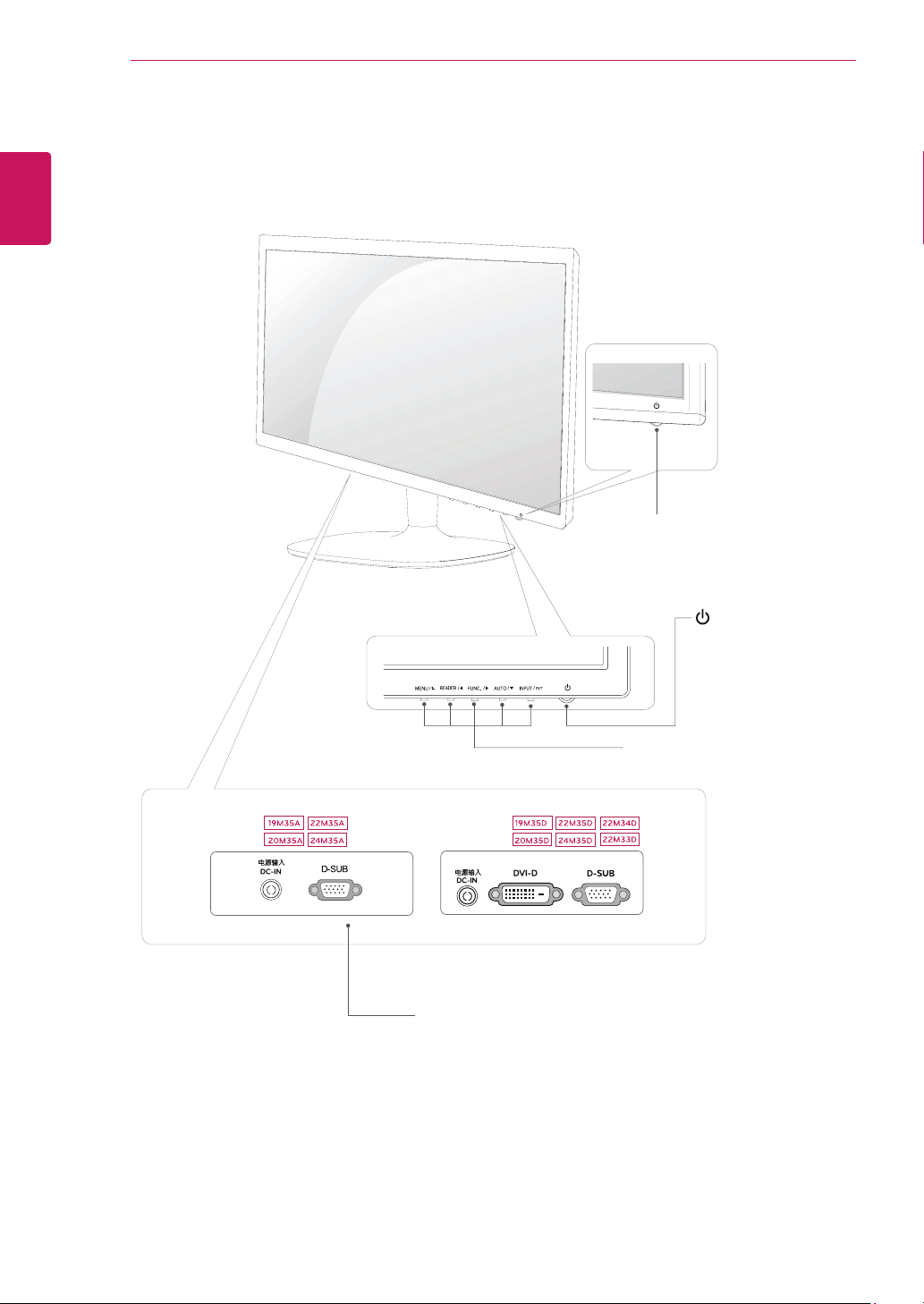
MonitorsetButtons
Button Description
Accesses the main menus.(See p.13)
OSDLocked/OSD
Unlocked
This function allow you to lock the current control settings, so
that they cannot be inadvertently changed.
Press and hold the MENU button for several seconds. Then
OSD of “OSD Lock” will appear. After that, user can select
lock or unlock by pressing left/right button.
If user selects the “Lock” icon by pressing the “OK” button,
the message “OSD Locked” will appear. Otherwise, “OSD
Unlocked” will appear. After selecting the “Lock”, If you want
to change to Unlock, you can push the “MENU” button for
several seconds. The message “OSD Unlocked” will appear.
Use this button to enter Reader Mode menu. Its function works to display screen as
paper-like picture for Eye comfort.If you want to more information(See p.18).
Use this button to enter SUPER ENERGY SAVING, Picture Mode, DUAL DISPLAY,
DUAL WEB menus.(See p.19~21)
When adjusting your display settings, always press the AUTO button on the MONITOR
SETUP OSD. (Only supported in Analog Mode)
Thebestdisplaymode 19M35A/19M35D:1366 x 768
20M35A/20M35D:1600 x 900
22M35A/22M35D/22M34D/22M33D/24M35A/24M35D:1920 x
1080
You can choose the input signal.
• When two input signals are connected, you can select the input signal (D-SUB/DVI-D)
you want.
• When only one signal is connected, it is automatically detected. The default setting is
D-SUB.
EXIT
EXIT the OSD(On Screen Display).
(Power Button)
Turns the power on or off.
PowerIndicator The power indicator stays white if the display is running
properly (On Mode). If the display is in Sleep Mode, the power
indicator blinks white.
13
ENG
ENGLISH
CUSTOMIZING SETTINGS
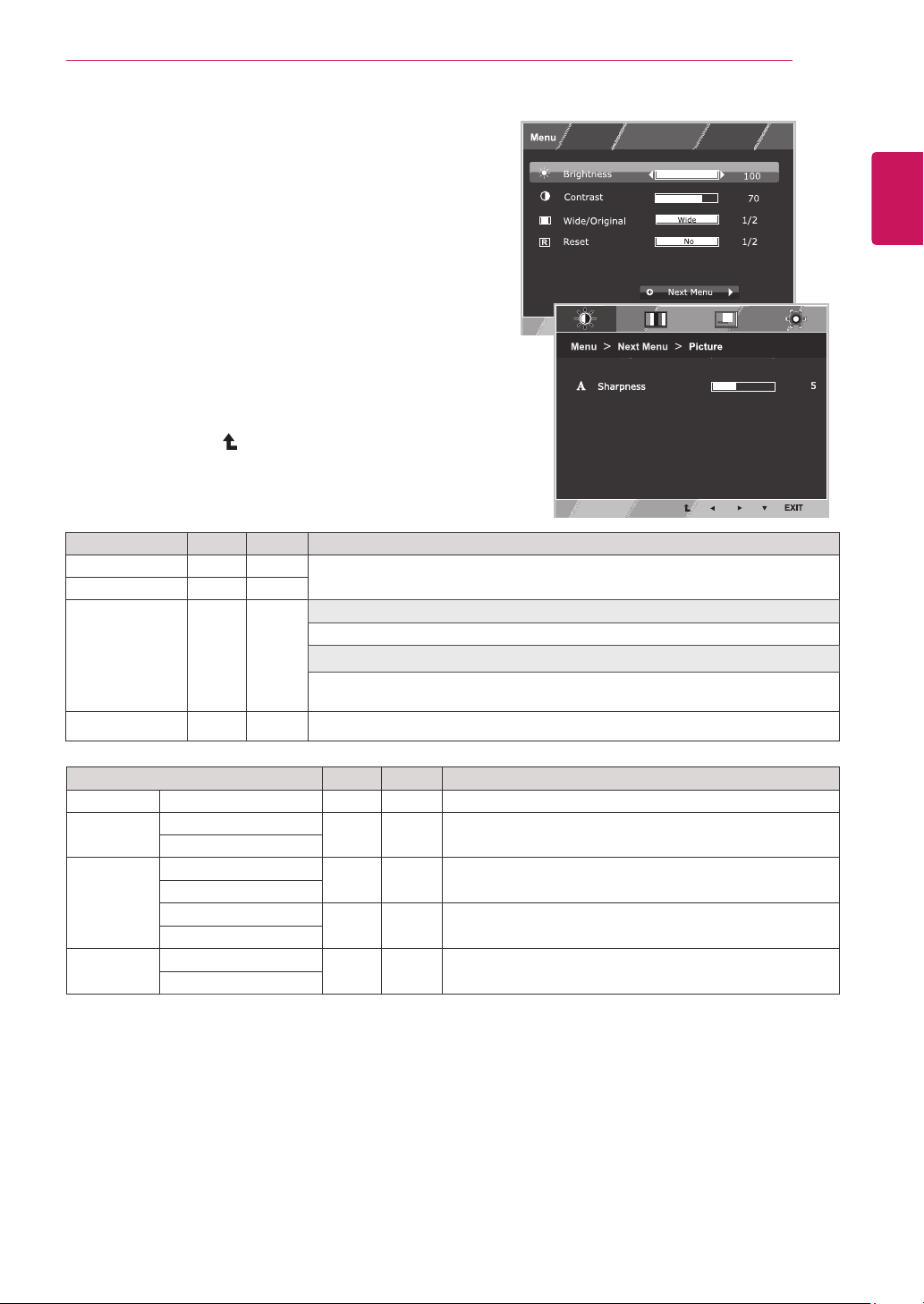
CustomizingSettings
MenuSettings
1
Press
MENU
button on the bottom of the Monitor set
to display the
Menu
OSD.
2
Set the options by pressing the ◄ or ► or ▼
buttons.
3
Select the "
NextMenu
" button to enter the more
option settings.
4
Select
EXIT
to leave the OSD menu.
To return to the upper menu or set other menu items,
use the up arrow ( ) button.
Each option is explained below.
Menu>NextMenu Analog Digital Description
Picture Sharpness ● ●
To adjust the clearness of the screen
Color Gamma
● ●
To customize the color of the screen
ColorTemp
Display Horizontal
●
To adjust the position of the screen
Vertical
Clock
●
To improve the clarity and stability of the screen
Phase
Others Language
● ●
To customize the screen status for a user's operating
environment
PowerIndicator
Analog:
D-SUB(Analog signal) input.
Digital:
DVI-D(Digital signal) input.
Menu Analog Digital Description
Brightness ● ●
To adjust the brightness of the screen
Contrast ● ●
Wide/Original
● ●
Wide
Switch to full screen mode according to input image signal.
Original
Change the input image signal ratio to original.
* This function works only if input resolution is lower than Monitor set ratio (16:9).
Reset
● ●
Restore all factory default settings. Press the
◄
,
►
buttons to reset immediately.
14
ENG
ENGLISH
CUSTOMIZING SETTINGS
Picture
1
Press
MENU
button on the bottom of the Monitor set
to display the
Menu
OSD.
2
Select the "
NextMenu
" button to enter the more
option settings.
3
Enter to
Picture
by pressing the ▼ button.
4
Set the options by pressing the ◄ or ► or ▼
buttons.
5
Select
EXIT
to leave the OSD menu.
To return to the upper menu or set other menu items,
use the up arrow ( ) button.
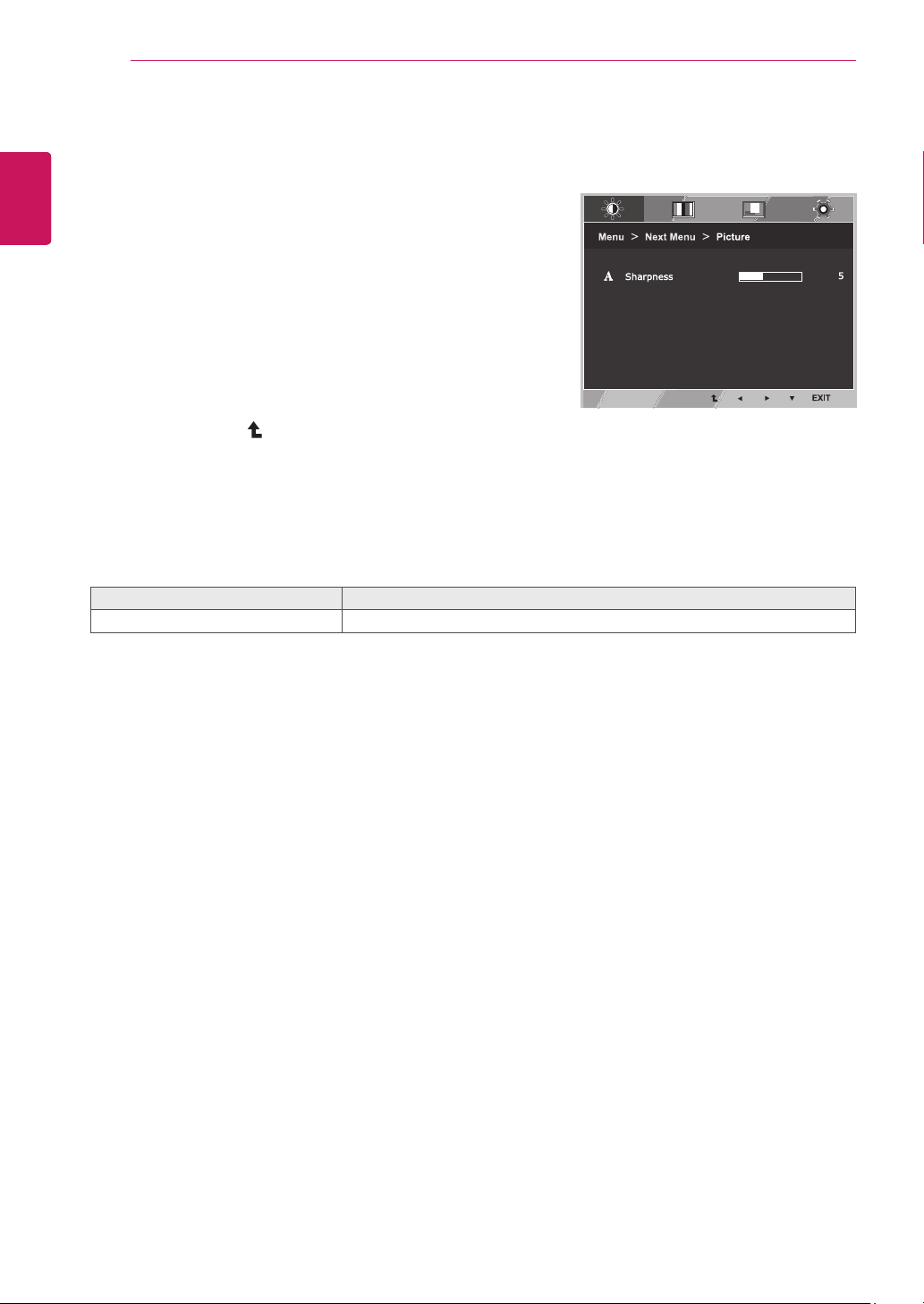
Each option is explained below.
Menu>NextMenu>Picture Description
Sharpness To adjust the clearness of the screen.
15
ENG
ENGLISH
CUSTOMIZING SETTINGS
Color
1
Press
MENU
button on the bottom of the Monitor set
to display the
Menu
OSD.
2
Select the "
NextMenu
" button to enter the more
option settings.
3
Select
Color
by pressing the ► button.
4
Enter to
Color
by pressing the ▼ button.
5
Set the options by pressing the ◄ or ► or ▼
buttons.
6
Select
EXIT
to leave the OSD menu.
To return to the upper menu or set other menu items,
use the up arrow ( ) button.
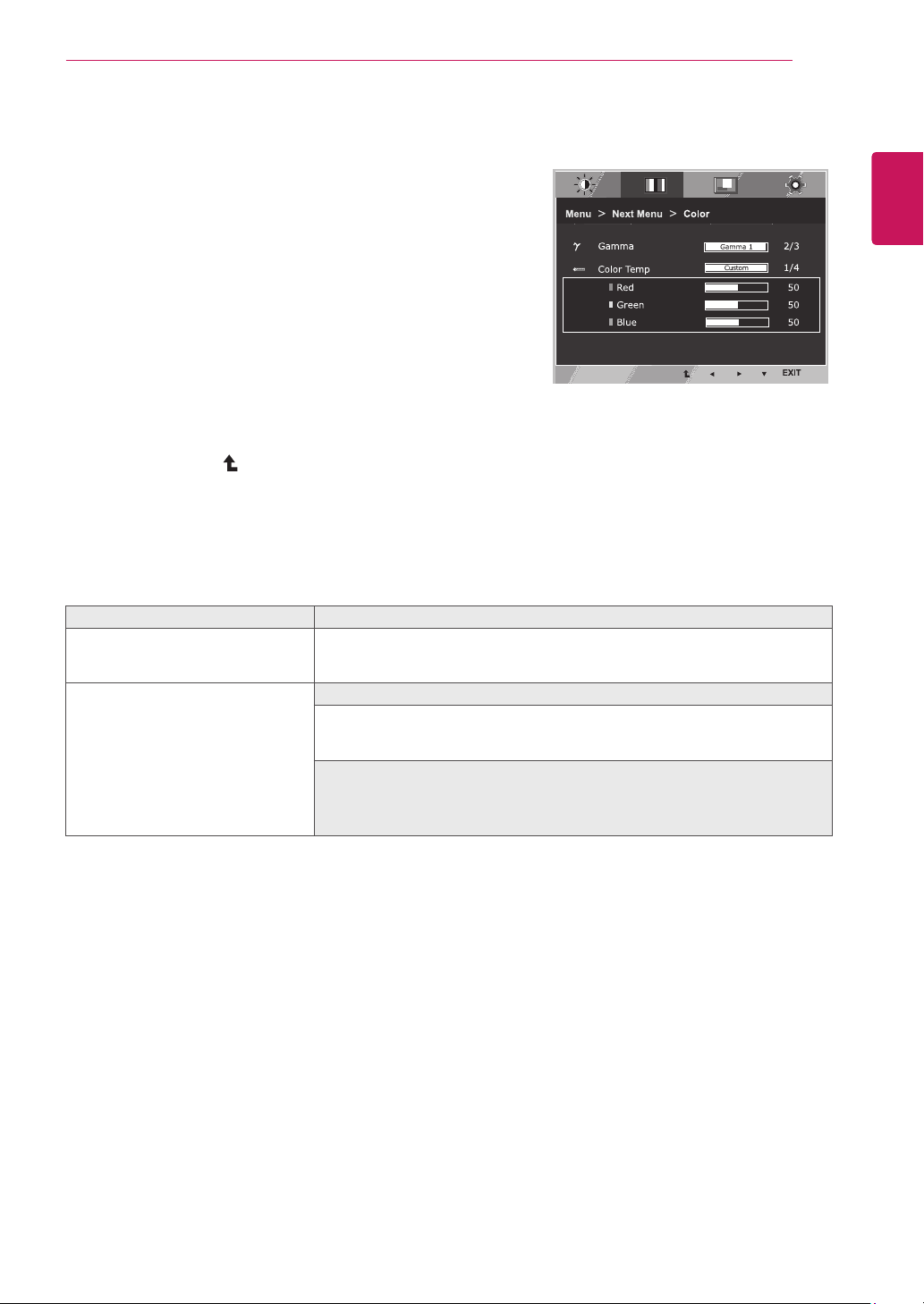
Each option is explained below.
Menu>NextMenu>Color Description
Gamma Set your own gamma value. : Gamma 0, Gamma 1, Gamma 2 on the monitor,
high gamma values display whitish images and low gamma values display
blackish images.
ColorTemp Custom
•Red:
Set your own red color levels.
•Green:
Set your own green color levels.
•Blue:
Set your own blue color levels.
Select the screen color.
Warm:
Set the screen to warm color temperature (more red).
Medium:
Set the screen to medium color temperature.
Cool:
Set the screen to cool color temperature (more blue).
16
ENG
ENGLISH
CUSTOMIZING SETTINGS
Display
1
Press
MENU
button on the bottom of the Monitor set
to display the
Menu
OSD.
2
Select the "
NextMenu
" button to enter the more
option settings.
3
Select
Display
by pressing the ► button.
4
Enter to
Display
by pressing the ▼ button.
5
Set the options by pressing the ◄ or ► or ▼
buttons.
6
Select
EXIT
to leave the OSD menu.
To return to the upper menu or set other menu items,
use the up arrow ( ) button.
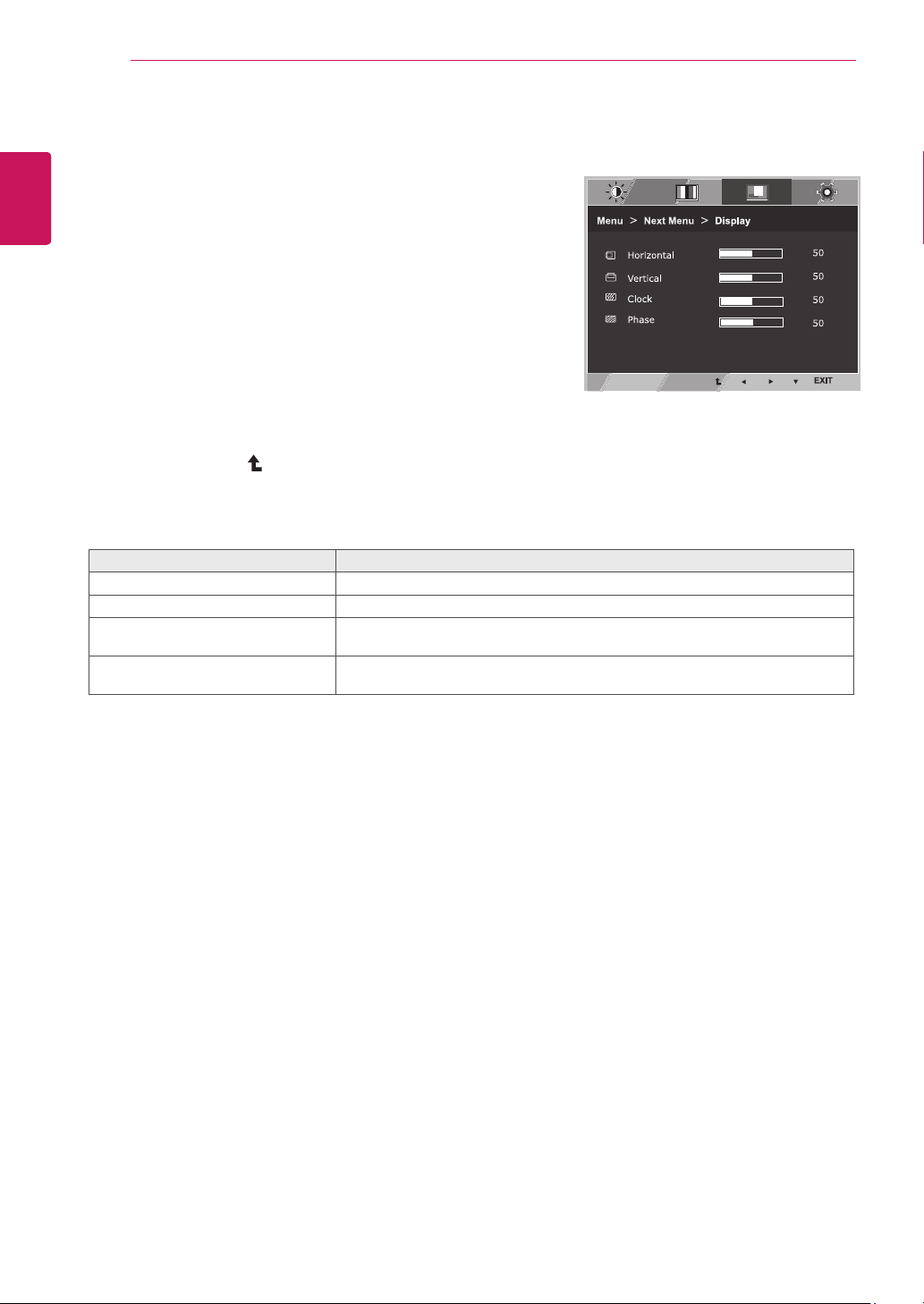
Each option is explained below.
Menu>NextMenu>Display Description
Horizontal To move image left and right.
Vertical To move image up and down.
Clock To minimize any vertical bars or stripes visible on the screen background.The
horizontal screen size will also change.
Phase To adjust the focus of the display. This item allows you to remove any horizontal
noise and clear or sharpen the image of characters.
17
ENG
ENGLISH
CUSTOMIZING SETTINGS
Others
1
Press
MENU
button on the bottom of the Monitor set
to display the
Menu
OSD.
2
Select the "
NextMenu
" button to enter the more
option settings.
3
Select
Others
by pressing the ► button.
4
Enter to
Others
by pressing the ▼ button.
5
Set the options by pressing the ◄ or ► or ▼
buttons.
6
Select
EXIT
to leave the OSD menu.
To return to the upper menu or set other menu items,
use the up arrow ( ) button.
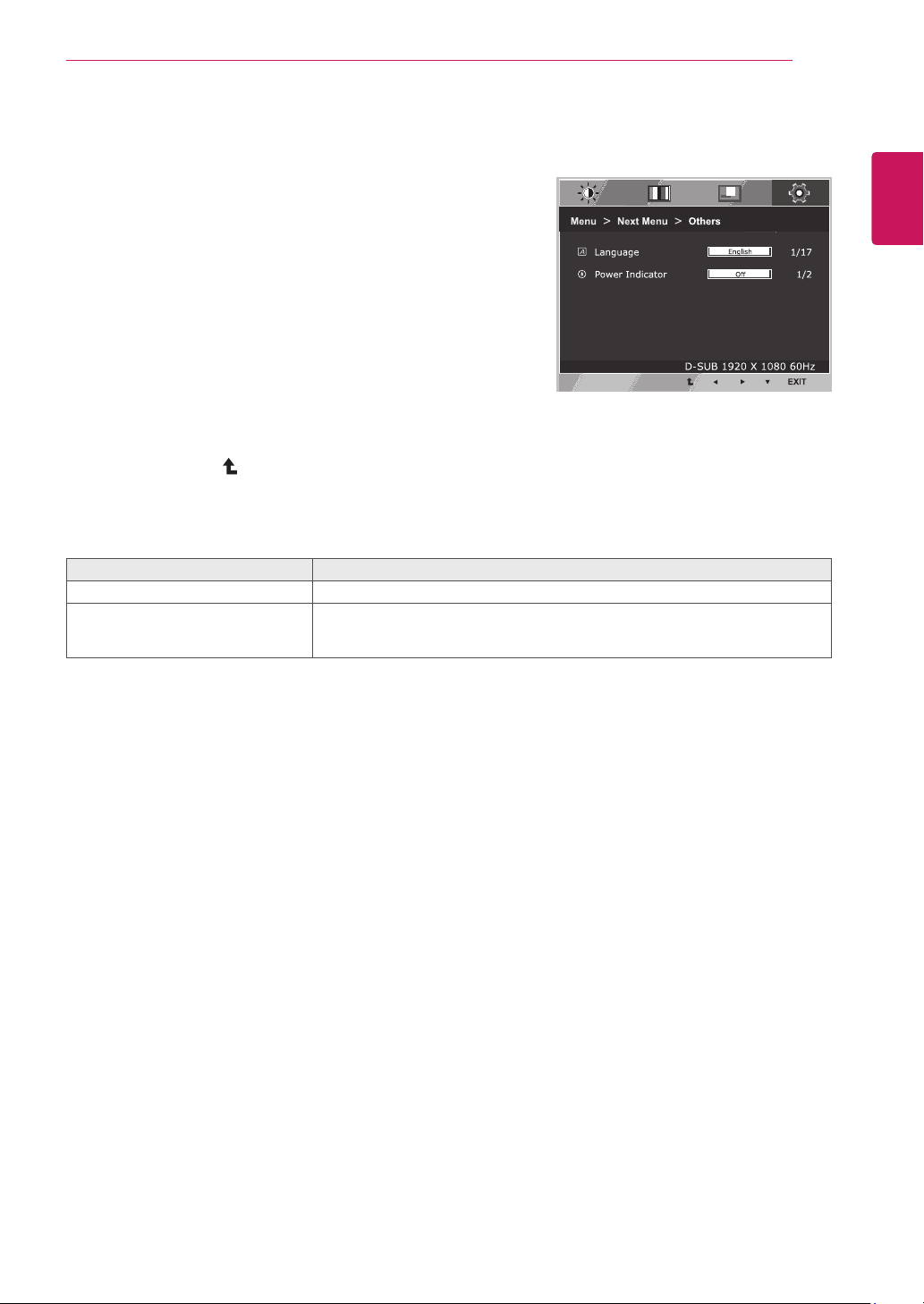
Each option is explained below.
Menu>NextMenu>Others Description
Language To choose the language in which the control names are displayed.
PowerIndicator Use this function to set the power indicator on the bottom side of the monitor to
On or Off.If you set Off, it will go off.
If you set On at any time, the power indicator will automatically be turned on.
18
ENG
ENGLISH
CUSTOMIZING SETTINGS
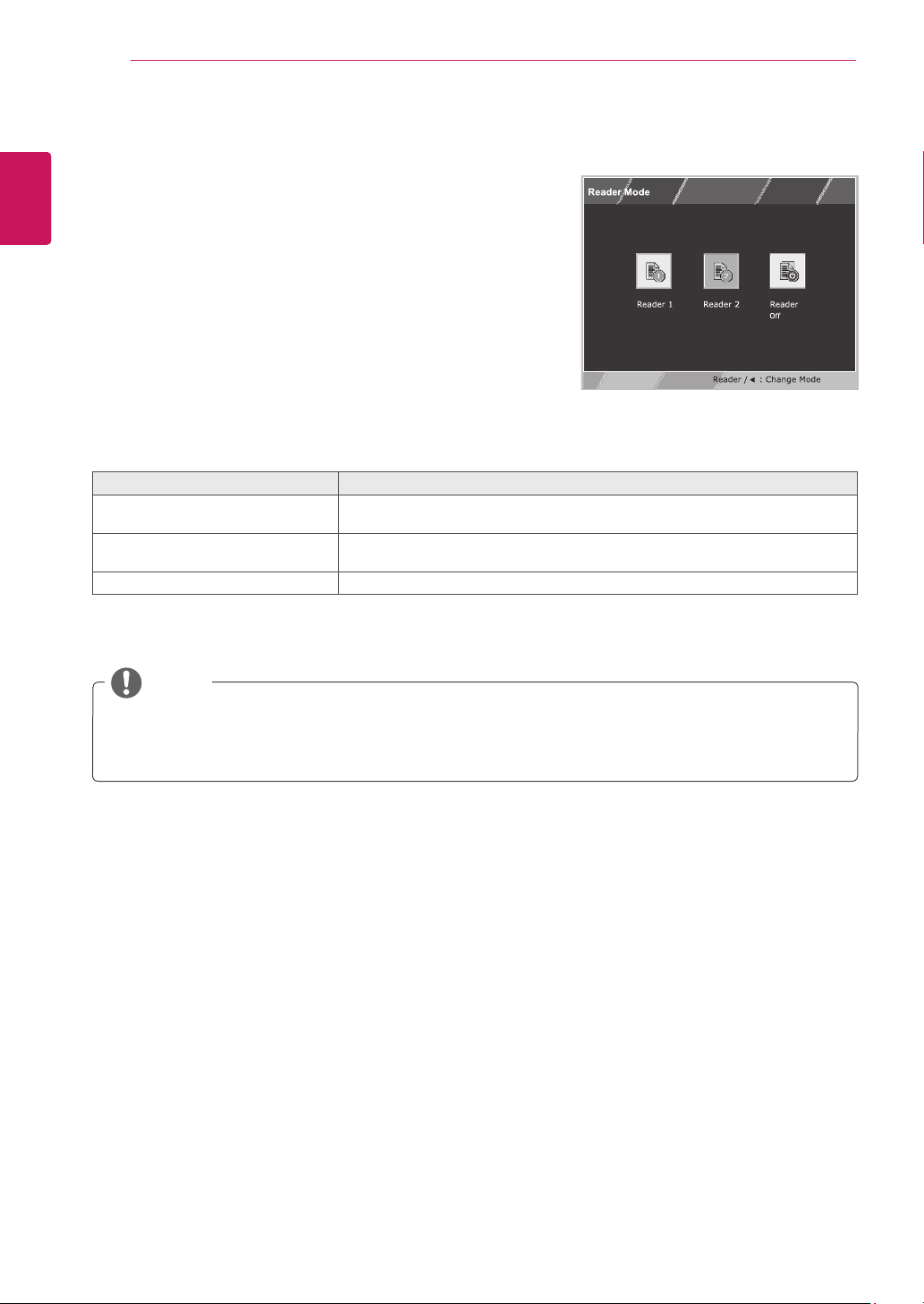
READERSetting
1
Press
READER
button on the bottom of the Monitor
set to display the
ReaderMode
OSD.
2
Set the options by pressing the ◄ buttons.
ReaderMode Description
Reader1 It is a mode that the screen is adjusted to the best for the newspaper. If you
want screen more bright, you can control brightness in Menu OSD.
Reader2 It is a mode that the screen is adjusted to the best for the cartoon. If you want
screen more bright, you can control brightness in Menu OSD.
ReaderOff It is a mode that reader mode is off.
Each option is explained below.
NOTE
If option of Reader Mode is Reader 1 or Reader 2, Picture Mode will automatically be Custom and
Super Energy Saving will automatically be Off.
19
ENG
ENGLISH
CUSTOMIZING SETTINGS
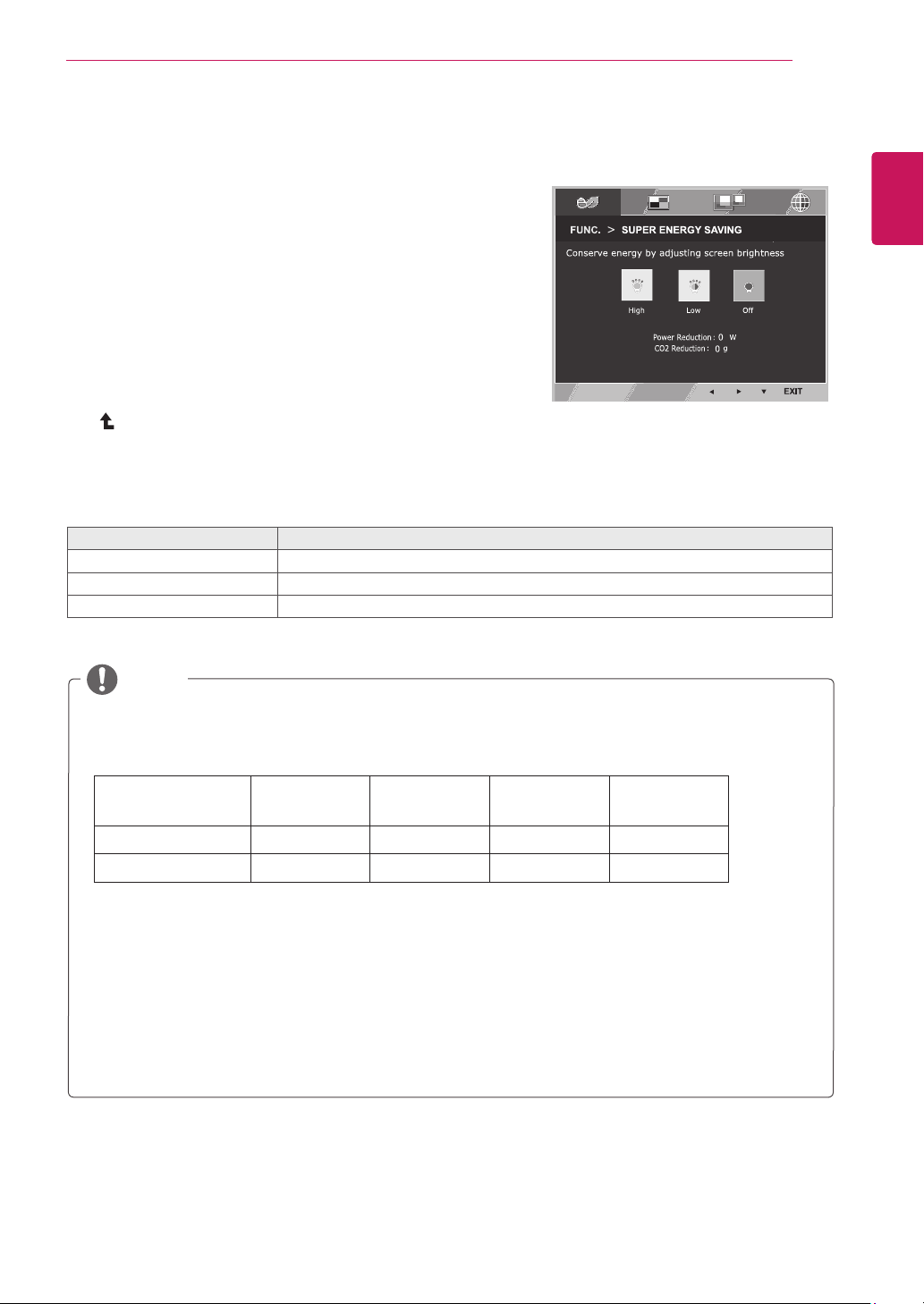
SUPERENERGYSAVING
1
Press
FUNC.
button on the bottom of the Monitor set to
display the
FUNC.
OSD.
2
Enter to
SUPERENERGYSAVING
by pressing the ▼
button.
3
Set the options by pressing the ◄ or ► or ▼buttons.
4
Select
EXIT
to leave the OSD menu.To return to the
upper menu or set other menu items, use the up arrow
( ) button.
Each option is explained below.
SUPERENERGYSAVING Description
High
Enables SUPER ENERGY SAVING you can save energy with this energy- high efficient function.
Low
Enables SUPER ENERGY SAVING you can save energy with this energy- low efficient function.
Off Disables SUPER ENERGY SAVING.
TOTALPOWERREDUCTION
: How much power is saved while using the monitor.
TOTALCO2REDUCTION
: Change the TOTAL POWER REDUCTION to CO2.
SAVINGDATA(W/h)
470 mm
(18.5 inch)
494 mm
(19.5 inch)
546 mm
(21.5 inch)
600 mm
(23.6 inch)
SUPER SAVING(High)
2 W/h 3 W/h 4 W/h 4 W/h
SUPER SAVING(Low)
1 W/h 1 W/h 2 W/h 2 W/h
Saving Data depends on the Panel. So,those values should be different from each panel and panel
vendor.If option of Super Energy Saving is High or Low, monitor luminance become higher or lower
depend on source.
LG calculated these values by using
“broadcastvideosignal”
(including broadcast video: IEC 62087)
SUPER SAVING refers to how much power can be saved using the SUPER ENERGY SAVING
function.
If option of Super Energy Saving is High or Low, Picture Mode will automatically be Custom and
Reader Mode will automatically be Reader Off.
NOTE
FUNC.Setting
20
ENG
ENGLISH
CUSTOMIZING SETTINGS
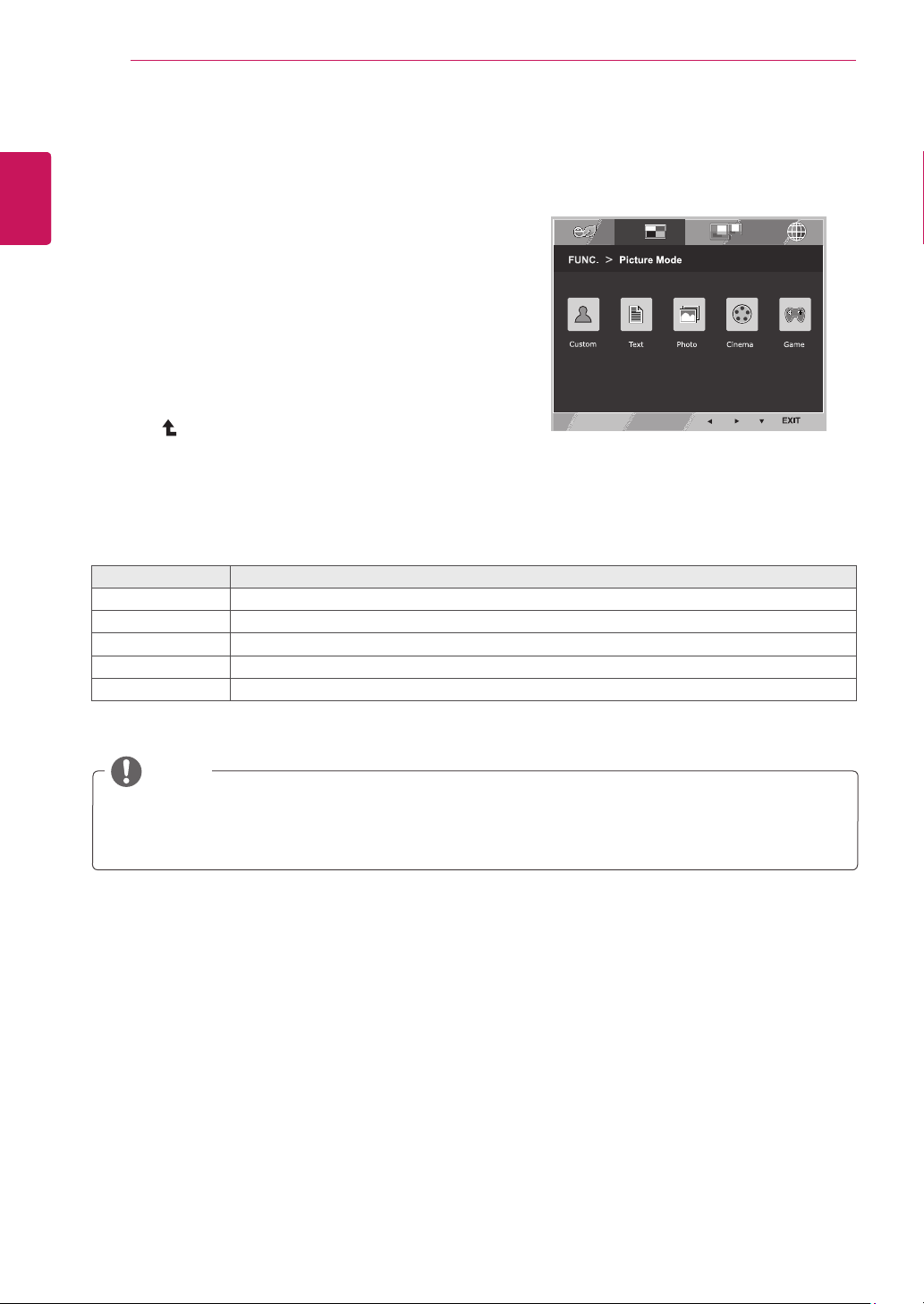
PictureMode
1
Press
FUNC.
button on the bottom of the Monitor set
to display the
FUNC.
OSD.
2
Select
PictureMode
by pressing the ► button.
3
Enter to
PictureMode
by pressing the ▼ button.
4
Set the options by pressing the ◄ or ► buttons.
5
Select
EXIT
to leave the OSD menu.To return to the
upper menu or set other menu items, use the up
arrow( )button.
PictureMode Description
Custom It is a mode that the user can adjust each element. It can adjust the color mode of the Main Menu.
Text It is a mode that the screen is adjusted to the best for the textworks.
Photo It is a mode that the screen is adjusted to the best to view pictures.
Cinema It is a mode that the screen is adjusted to the best to view the videos.
Game It is a mode that the screen is adjusted to the best to play a game.
Each option is explained below.
NOTE
If option of Picture Mode is non-Custom , Reader Mode will automatically be Reader Off and Super
Energy Saving will automatically be Off.
21
ENG
ENGLISH
CUSTOMIZING SETTINGS
NOTE
When monitor goes to power saving mode with pc saving option-> Pressing any button -> OSD
appear and user should press dual button -> User can bring back to normal mode.
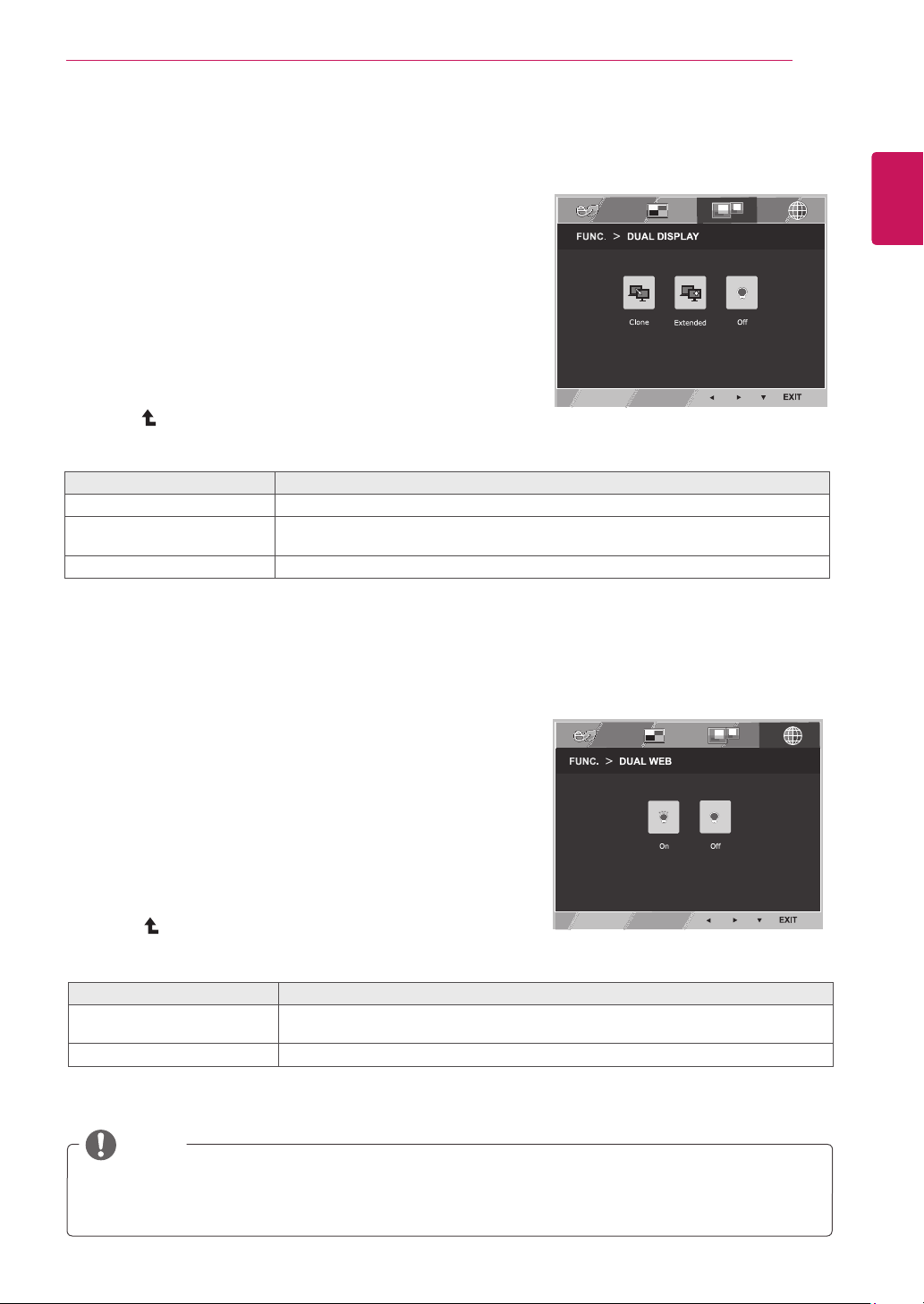
DUALDISPLAY
1
Press
FUNC.
button on the bottom of the Monitor set
to display the
FUNC.
OSD.
2
Select
DUALDISPLAY
by pressing the ► button.
3
Enter to
DUALDISPLAY
by pressing the ▼ button.
4
Set the options by pressing the ◄ or ► buttons.
5
Select
EXIT
to leave the OSD menu.To return to the
upper menu or set other menu items, use the up
arrow ( ) button.
* Before using below functions, please install DUAL SMART SOLUTION programme.
Each option is explained below.
DUALDISPLAY Description
Clone By selecting Clone,user can use secondary monitor as done mode of primary monitor.
Extended By selecting Extended,user can use secondary monitor as extended mode of primary
monitor.
Off If select Off,DUAL DISPLAY is off.
DUALWEB
1
Press
FUNC.
button on the bottom of the Monitor set
to display the
FUNC.
OSD.
2
Select
DUALWEB
by pressing the ► button.
3
Enter to
DUALWEB
by pressing the ▼ button.
4
Set the options by pressing the ◄ or ► buttons.
5
Select
EXIT
to leave the OSD menu.To return to the
upper menu or set other menu items, use the up
arrow ( ) button.
* Before using below functions, please install DUAL SMART SOLUTION programme.
Each option is explained below.
DUALWEB Description
On Help user to browse web efficiently by dividing in half. Help to arrange and move
windowson screen. Help user to control dividedwindows ratio.
Off If select Off,DUAL WEB is off.

22
ENG
ENGLISH
TROUBLESHOOTING
TROUBLESHOOTING
Checkthefollowingbeforecallingforservice.
Noimageappears
Is the power cord of the display
connected?
Check and see if the power cord is connected properly to the power
outlet.
Is the power indicator light on?
Press the Power button.
Is the power on and the power
indicator White?
Adjust the brightness and the contrast.
Is the power indicator flickering?
If the display is in power saving mode, try moving the mouse or
pressing any key on the keyboard to bring up the screen.
Try to turn on the PC.
Do you see an "OUT OF RANGE"
message on the screen?
This message appears when the signal from the PC (video card) is
out of horizontal or vertical frequency range of the display. See the
'Specifications' section of this manual and configure your display
again.
Do you see a "NO SIGNAL"
message on the screen?
When the monitor is on "No-Signal" in 5 minutes, the monitor goes to
DPM mode.
Doyouseea"OSDLOCKED"messageonthescreen?
Do you see “OSD LOCKED” when
you push MENU button?
You can secure the current control settings, so that they cannot be
inadvertently changed. You can unlock the OSD controls at any time
by pushing the MENU button for several seconds: the message “OSD
UNLOCKED” will appear.
Displayimageisincorrect
Display Position is incorrect.
Press the
AUTO
button to automatically adjust your display image to
the ideal setting.
On the screen background, vertical
bars or stripes are visible.
Press the
AUTO
button to automatically adjust your display image to
the ideal setting.
Any horizontal noise appearing in
any image or characters are not
clearly portrayed.
Press the
AUTO
button to automatically adjust your display image to
the ideal setting.
Check
ControlPanel►Display►Settings
and adjust the display
to the recommended resolution or adjust the display image to the ideal
setting. Set the color setting higher than 24 bits (true color).
23
ENG
ENGLISH
TROUBLESHOOTING
Displayimageisincorrect
The screen color is mono or
abnormal.
Check if the signal cable is properly connected and use a screwdriver
to fasten if necessary.
Make sure the video card is properly inserted in the slot.
Set the color setting higher than 24 bits (true color) at
ControlPanel
►
Settings
.
The screen blinks.
Check if the screen is set to interlace mode and if yes, change it to the
recommend resolution.
Doyouseean"Unrecognizedmonitor,Plug&Play(VESADDC)monitorfound"message?
Have you installed the display
driver?
Be sure to install the display driver from the display driver CD (or
diskette) that comes with your display. Or, you can also download the
driver from our web site: http://www.lg.com.
Make sure to check if the video card supports Plug&Play function.
Check
ControlPanel►Display►Settings
and see if the frequency or the resolution were
changed. If yes, readjust the video card to the recommend resolution.
If the recommended resolution (optimal resolution) is not selected, letters may be blurred and the
screen may be dimmed, truncated or biased. Make sure to select the recommend resolution.
The setting method can differ by computer and O/S (Operation System), and resolution mentioned
above may not be supported by the video card performance. In this case, please ask to the computer
or the video card manufacturer.
CAUTION
24
ENG
ENGLISH
SPECIFICATIONS
SPECIFICATIONS
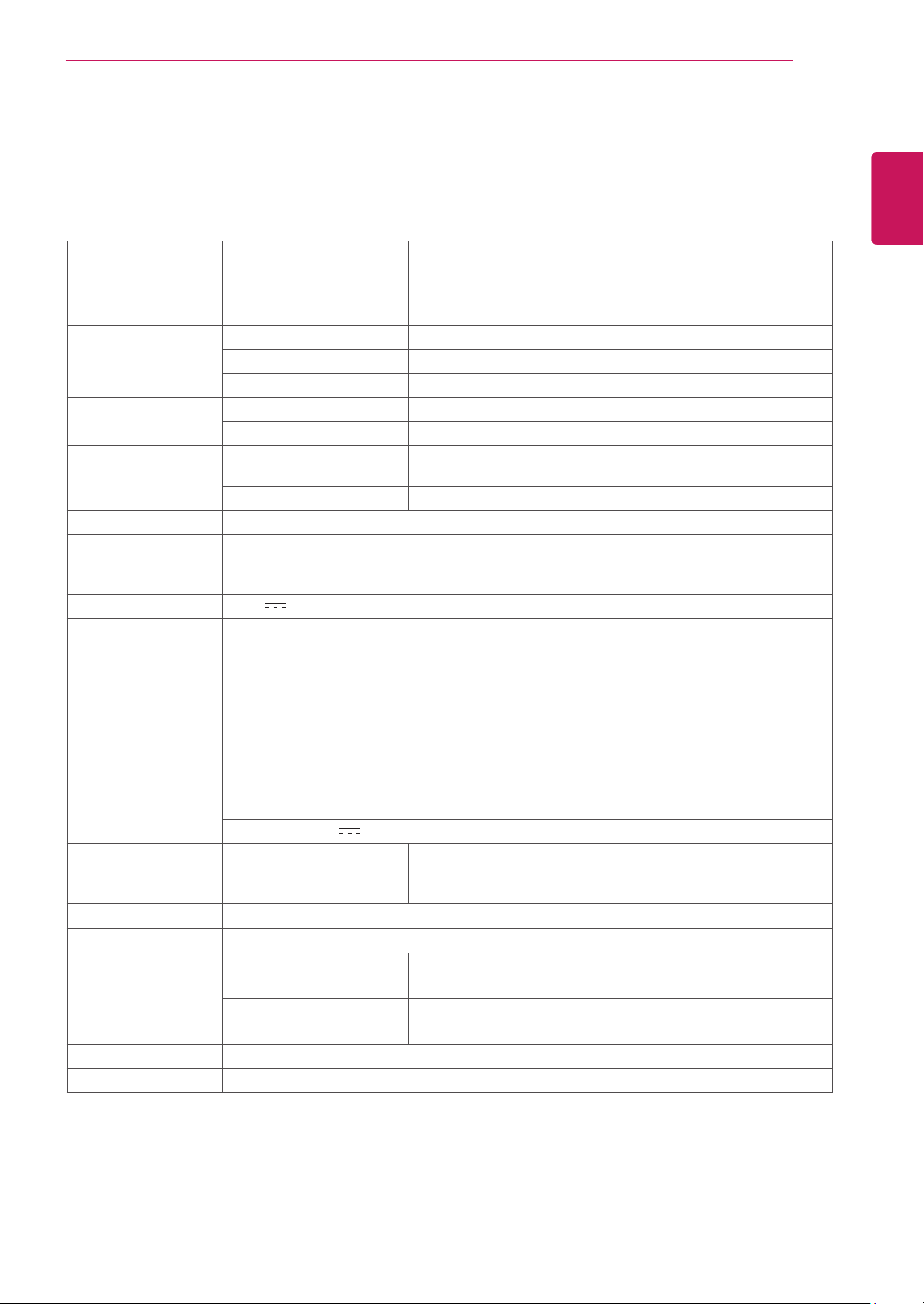
Display ScreenType TFT (Thin Film Transistor) LCD (Liquid Crystal Display)
Panel,Anti-Glare coating
47.0 cm visible diagonal (18.5 inch)
PixelPitch 0.3 mm x 0.3 mm (Pixel Pitch)
SyncInput HorizontalFrequency 30 kHz to 61 kHz (Automatic)
VerticalFrequency 56Hz to 75Hz (D-SUB)
InputForm Separate Sync.
VideoInput SignalInput 15 pin D-SUB Connector
InputForm RGB Analog (0.7 Vp-p/ 75 ohm)
Resolution Max D-SUB(Analog) : 1366 x 768 @ 60 Hz
Recommend VESA 1366 x 768 @ 60 Hz
Plug&Play DDC 2B(Analog)
Power
Consumption
On Mode : 13 W (ENERGY STAR® standard)*
Sleep Mode ≤ 0.3 W
Off Mode ≤ 0.3 W
PowerInput 19 V
0.8 A
AC-DCAdapter
Type ADS-18SG-19-3 19016G, manufactured by SHENZHEN HONOR ELECTRONIC
or Type ADS-18FSG-19 19016GPG, manufactured by SHENZHEN HONOR ELECTRONIC
or Type ADS-18FSG-19 19016GPI, manufactured by SHENZHEN HONOR ELECTRONIC
or Type ADS-18FSG-19 19016GPCU, manufactured by SHENZHEN HONOR ELECTRONIC
or Type ADS-18FSG-19 19016GPB, manufactured by SHENZHEN HONOR ELECTRONIC
or Type LCAP42, manufactured by LIEN CHANG ELECTRONIC ENTERPRISE
or Type LCAP36-A, manufactured by LIEN CHANG ELECTRONIC ENTERPRISE
or Type LCAP36-E, manufactured by LIEN CHANG ELECTRONIC ENTERPRISE
or Type LCAP36-I, manufactured by LIEN CHANG ELECTRONIC ENTERPRISE
or Type LCAP36-U, manufactured by LIEN CHANG ELECTRONIC ENTERPRISE
OUTPUT:
19 V 0.84 A
Dimensions
(WidthxHeightx
Depth)
WithStand 44.1 cm x 37.2 cm x 18.5 cm
WithoutStand 44.1 cm x 27.8 cm x 9.8 cm
Weight 2.1 kg
TiltRange -3° to 20°
Environmental
conditions
OperatingTemperature
OperatingHumidity
10°C to 35 °C
10 % to 80 %
StorageTemperature
StorageHumidity
-20°C to 60 °C
5 % to 90 % non-Condensing
StandBase Attached ( ), Detached (O)
Powercord Wall-outlet type
Product specifications shown above may be changed without prior notice due to upgrade of product
functions.
* The power consumption level can be different by operating condition and monitor setting.
* The On mode power consumption is measured with ENERGY STAR® test standard.
* ENERGY STAR® is a US registered mark of the United States Environmental Protection Agency.
19M35A
25
ENG
ENGLISH
SPECIFICATIONS
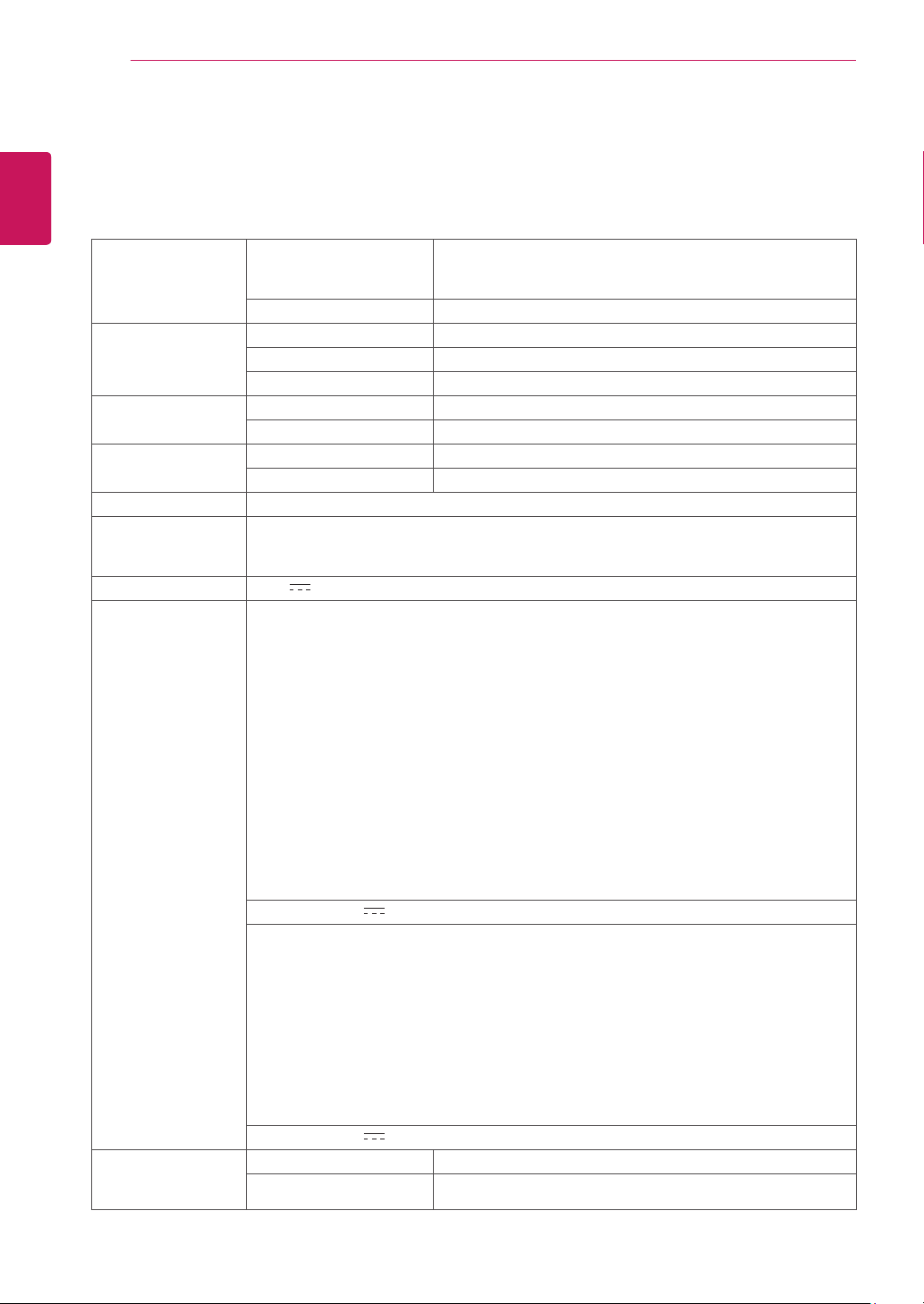
Display ScreenType TFT (Thin Film Transistor) LCD (Liquid Crystal Display)
Panel,Anti-Glare coating
47.0 cm visible diagonal (18.5 inch)
PixelPitch 0.3 mm x 0.3 mm (Pixel Pitch)
SyncInput HorizontalFrequency 30 kHz to 61 kHz (Automatic)
VerticalFrequency 56Hz to 75Hz (D-SUB, DVI-D)
InputForm Separate Sync. Digital
VideoInput SignalInput 15 pin D-SUB Connector /DVI-D Connector (Digital)
InputForm RGB Analog (0.7 Vp-p/ 75 ohm),Digital
Resolution Max D-SUB(Analog) : 1366 x 768 @ 60 Hz
DVI (Digital) : 1366 x 768 @ 60 Hz
Recommend VESA 1366 x 768 @ 60 Hz
Plug&Play DDC 2B(Analog,Digital)
Power
Consumption
On Mode : 13 W (ENERGY STAR® standard)*
Sleep Mode ≤ 0.3 W
Off Mode ≤ 0.3 W
PowerInput 19 V
0.8 A
AC-DCAdapter
Type ADS-18SG-19-3 19016G, manufactured by SHENZHEN HONOR ELECTRONIC
or Type ADS-18FSG-19 19016GPG, manufactured by SHENZHEN HONOR ELECTRONIC
or Type ADS-18FSG-19 19016GPI, manufactured by SHENZHEN HONOR ELECTRONIC
or Type ADS-18FSG-19 19016GPCU, manufactured by SHENZHEN HONOR ELECTRONIC
or Type ADS-18FSG-19 19016GPB, manufactured by SHENZHEN HONOR ELECTRONIC
or Type LCAP42, manufactured by LIEN CHANG ELECTRONIC ENTERPRISE
or Type LCAP36-A, manufactured by LIEN CHANG ELECTRONIC ENTERPRISE
or Type LCAP36-E, manufactured by LIEN CHANG ELECTRONIC ENTERPRISE
or Type LCAP36-I, manufactured by LIEN CHANG ELECTRONIC ENTERPRISE
or Type LCAP36-U, manufactured by LIEN CHANG ELECTRONIC ENTERPRISE
OUTPUT:
19 V 0.84 A
Dimensions
(WidthxHeightx
Depth)
WithStand 44.1 cm x 37.2 cm x 18.5 cm
WithoutStand 44.1 cm x 27.8 cm x 9.8 cm
Weight 2.1 kg
TiltRange -3° to 20°
Environmental
conditions
OperatingTemperature
OperatingHumidity
10°C to 35 °C
10 % to 80 %
StorageTemperature
StorageHumidity
-20°C to 60 °C
5 % to 90 % non-Condensing
StandBase Attached ( ), Detached (O)
Powercord Wall-outlet type
Product specifications shown above may be changed without prior notice due to upgrade of product
functions.
* The power consumption level can be different by operating condition and monitor setting.
* The On mode power consumption is measured with ENERGY STAR® test standard.
* ENERGY STAR® is a US registered mark of the United States Environmental Protection Agency.
19M35D
SPECIFICATIONS
26
ENG
ENGLISH
SPECIFICATIONS
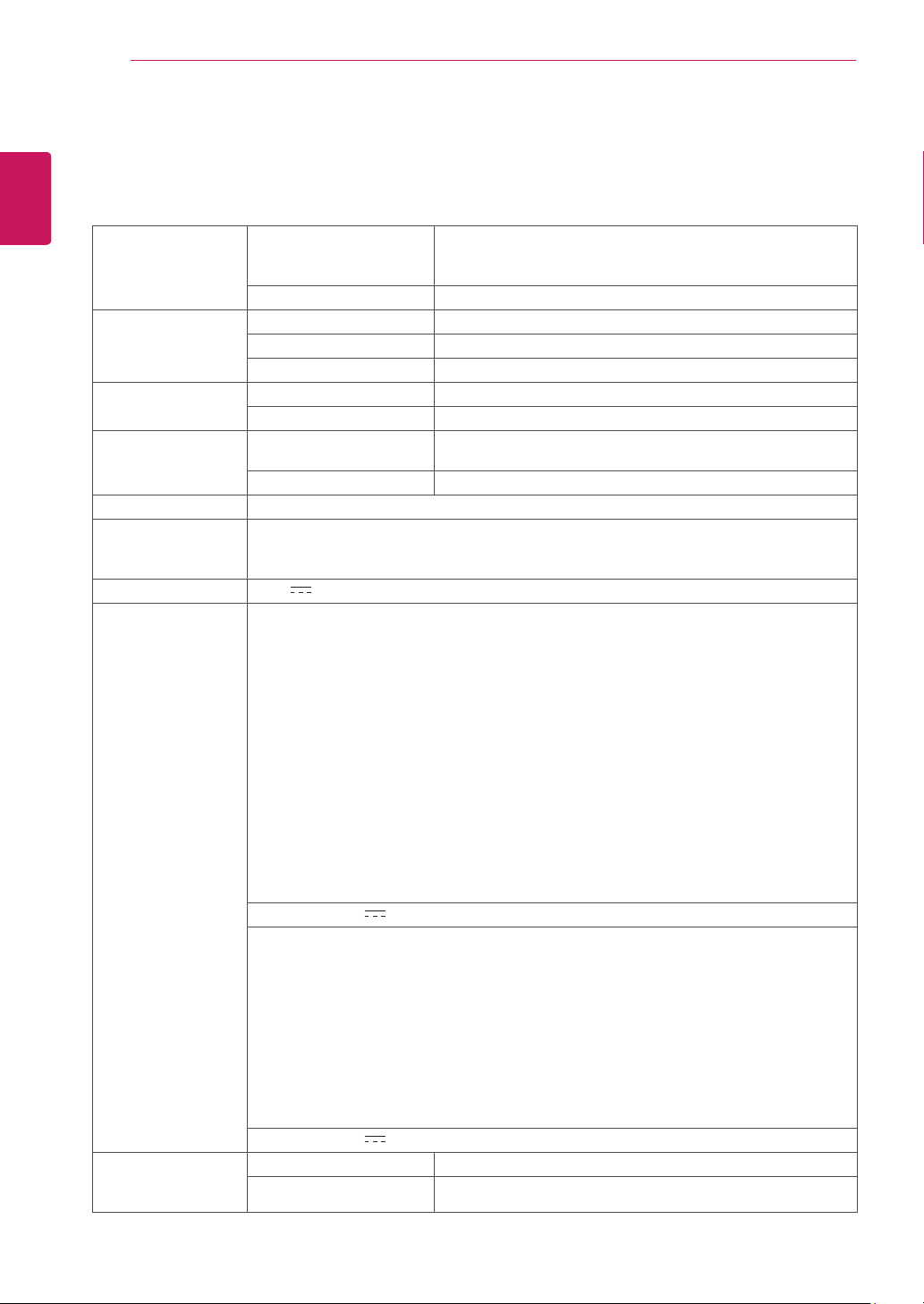
Display ScreenType TFT (Thin Film Transistor) LCD (Liquid Crystal Display)
Panel,Anti-Glare coating
49.4 cm visible diagonal (19.5 inch)
PixelPitch 0.271 mm x 0.262 mm (Pixel Pitch)
SyncInput HorizontalFrequency 30 kHz to 83 kHz (Automatic)
VerticalFrequency 56Hz to 75Hz (D-SUB)
InputForm Separate Sync.
VideoInput SignalInput 15 pin D-SUB Connector
InputForm RGB Analog (0.7 Vp-p/ 75 ohm)
Resolution Max D-SUB(Analog) : 1600 x 900 @ 60 Hz
Recommend VESA 1600 x 900 @ 60 Hz
Plug&Play DDC 2B(Analog)
Power
Consumption
On Mode : 16 W (ENERGY STAR® standard)*
Sleep Mode ≤ 0.3 W
Off Mode ≤ 0.3 W
PowerInput 19 V
0.8 A
AC-DCAdapter
Type ADS-40SG-19-3 19025G, manufactured by SHENZHEN HONOR ELECTRONIC
or Type ADS-40FSG-19 19025GPG-1, manufactured by SHENZHEN HONOR ELECTRONIC
or Type ADS-40FSG-19 19025GPBR-1, manufactured by SHENZHEN HONOR ELECTRONIC
or Type ADS-40FSG-19 19025GPI-1, manufactured by SHENZHEN HONOR ELECTRONIC
or Type ADS-40FSG-19 19025GPCU-1, manufactured by SHENZHEN HONOR ELECTRONIC
or Type ADS-40FSG-19 19025GPB-2, manufactured by SHENZHEN HONOR ELECTRONIC
or Type LCAP21, manufactured by LIEN CHANG ELECTRONIC ENTERPRISE
or Type LCAP26-A, manufactured by LIEN CHANG ELECTRONIC ENTERPRISE
or Type LCAP26-E, manufactured by LIEN CHANG ELECTRONIC ENTERPRISE
or Type LCAP26-I, manufactured by LIEN CHANG ELECTRONIC ENTERPRISE
or Type LCAP26-B, manufactured by LIEN CHANG ELECTRONIC ENTERPRISE
or Type PSAB-L203A, manufactured by LG Innotek Co.,Ltd
or Type PSAB-L202B, manufactured by LG Innotek Co.,Ltd
or Type PSAB-L202C, manufactured by LG Innotek Co.,Ltd
or Type PSAB-L202D, manufactured by LG Innotek Co.,Ltd
OUTPUT:
19 V 1.3 A
Type ADS-18SG-19-3 19016G, manufactured by SHENZHEN HONOR ELECTRONIC
or Type ADS-18FSG-19 19016GPG, manufactured by SHENZHEN HONOR ELECTRONIC
or Type ADS-18FSG-19 19016GPI, manufactured by SHENZHEN HONOR ELECTRONIC
or Type ADS-18FSG-19 19016GPCU, manufactured by SHENZHEN HONOR ELECTRONIC
or Type ADS-18FSG-19 19016GPB, manufactured by SHENZHEN HONOR ELECTRONIC
or Type LCAP42, manufactured by LIEN CHANG ELECTRONIC ENTERPRISE
or Type LCAP36-A, manufactured by LIEN CHANG ELECTRONIC ENTERPRISE
or Type LCAP36-E, manufactured by LIEN CHANG ELECTRONIC ENTERPRISE
or Type LCAP36-I, manufactured by LIEN CHANG ELECTRONIC ENTERPRISE
or Type LCAP36-U, manufactured by LIEN CHANG ELECTRONIC ENTERPRISE
OUTPUT:
19 V 0.84 A
Dimensions
(WidthxHeightx
Depth)
WithStand 46.3 cm x 38.1 cm x 18.5 cm
WithoutStand 46.3 cm x 28.7 cm x 9.8 cm
20M35A
SPECIFICATIONS
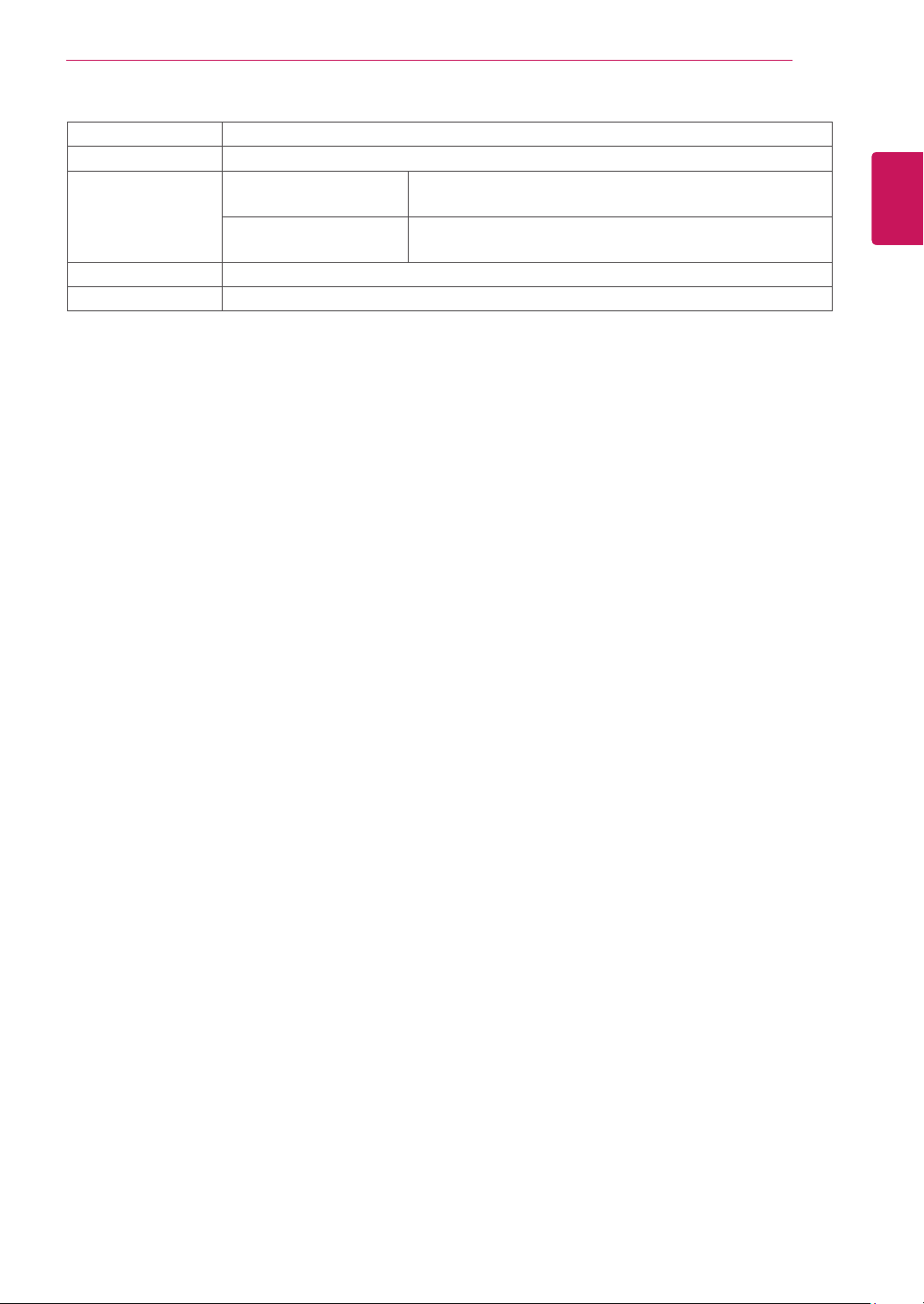
27
ENG
ENGLISH
SPECIFICATIONS
Weight 2.2 kg
TiltRange -3° to 20°
Environmental
conditions
OperatingTemperature
OperatingHumidity
10°C to 35 °C
10 % to 80 %
StorageTemperature
StorageHumidity
-20°C to 60 °C
5 % to 90 % non-Condensing
StandBase Attached ( ), Detached (O)
Powercord Wall-outlet type
Product specifications shown above may be changed without prior notice due to upgrade of product
functions.
* The power consumption level can be different by operating condition and monitor setting.
* The On mode power consumption is measured with ENERGY STAR® test standard.
* ENERGY STAR® is a US registered mark of the United States Environmental Protection Agency.
28
ENG
ENGLISH
SPECIFICATIONS
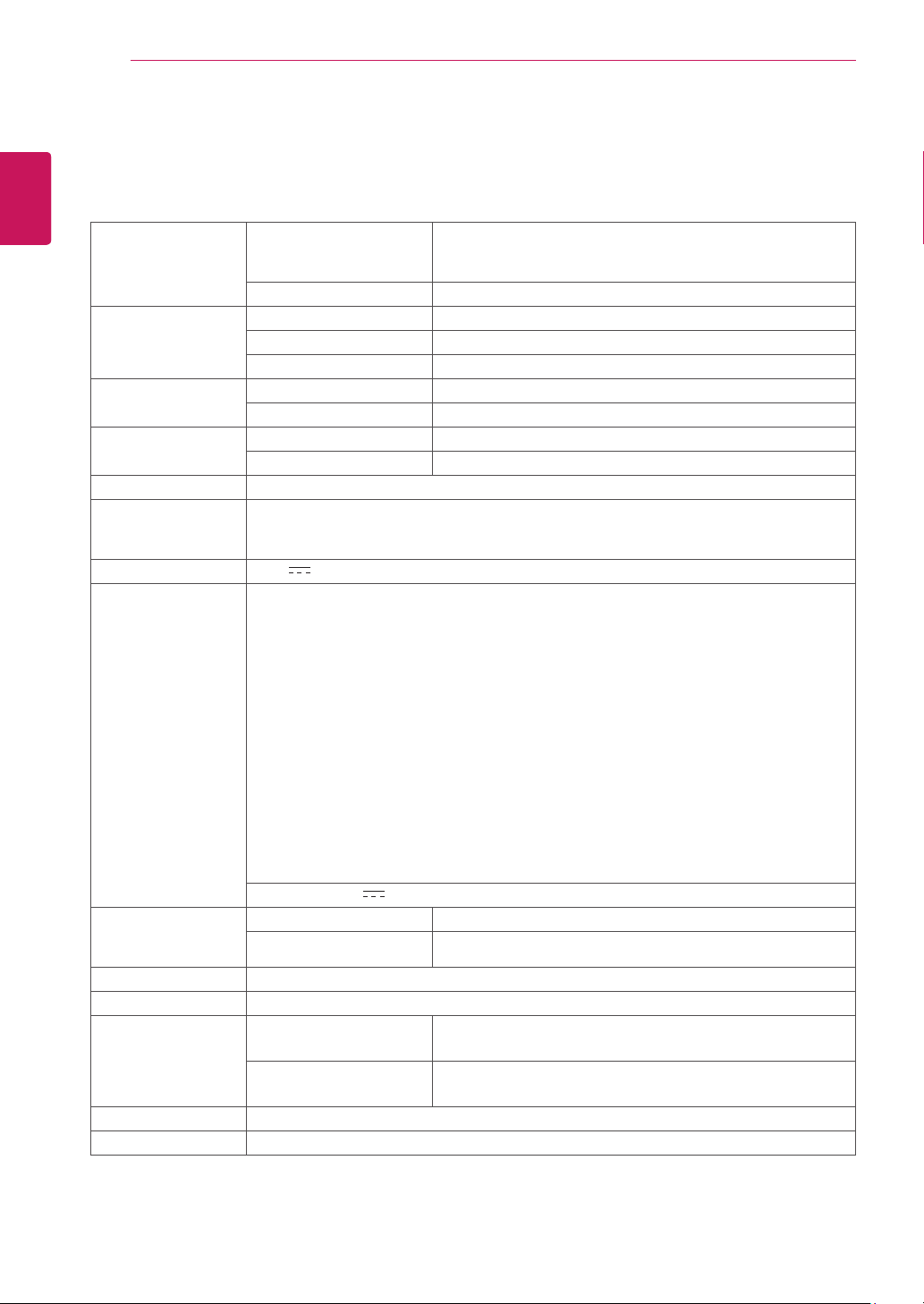
Display ScreenType TFT (Thin Film Transistor) LCD (Liquid Crystal Display)
Panel,Anti-Glare coating
49.4 cm visible diagonal (19.5 inch)
PixelPitch 0.271 mm x 0.262 mm (Pixel Pitch)
SyncInput HorizontalFrequency 30 kHz to 83 kHz (Automatic)
VerticalFrequency 56Hz to 75Hz (D-SUB, DVI-D)
InputForm Separate Sync. Digital
VideoInput SignalInput 15 pin D-SUB Connector /DVI-D Connector (Digital)
InputForm RGB Analog (0.7 Vp-p/ 75 ohm),Digital
Resolution Max D-SUB(Analog) : 1600 x 900 @ 60 Hz
DVI (Digital) : 1600 x 900 @ 60 Hz
Recommend VESA 1600 x 900 @ 60 Hz
Plug&Play DDC 2B(Analog,Digital)
Power
Consumption
On Mode : 16 W (ENERGY STAR® standard)*
Sleep Mode ≤ 0.3 W
Off Mode ≤ 0.3 W
PowerInput 19 V
0.8 A
AC-DCAdapter
Type ADS-40SG-19-3 19025G, manufactured by SHENZHEN HONOR ELECTRONIC
or Type ADS-40FSG-19 19025GPG-1, manufactured by SHENZHEN HONOR ELECTRONIC
or Type ADS-40FSG-19 19025GPBR-1, manufactured by SHENZHEN HONOR ELECTRONIC
or Type ADS-40FSG-19 19025GPI-1, manufactured by SHENZHEN HONOR ELECTRONIC
or Type ADS-40FSG-19 19025GPCU-1, manufactured by SHENZHEN HONOR ELECTRONIC
or Type ADS-40FSG-19 19025GPB-2, manufactured by SHENZHEN HONOR ELECTRONIC
or Type LCAP21, manufactured by LIEN CHANG ELECTRONIC ENTERPRISE
or Type LCAP26-A, manufactured by LIEN CHANG ELECTRONIC ENTERPRISE
or Type LCAP26-E, manufactured by LIEN CHANG ELECTRONIC ENTERPRISE
or Type LCAP26-I, manufactured by LIEN CHANG ELECTRONIC ENTERPRISE
or Type LCAP26-B, manufactured by LIEN CHANG ELECTRONIC ENTERPRISE
or Type PSAB-L203A, manufactured by LG Innotek Co.,Ltd
or Type PSAB-L202B, manufactured by LG Innotek Co.,Ltd
or Type PSAB-L202C, manufactured by LG Innotek Co.,Ltd
or Type PSAB-L202D, manufactured by LG Innotek Co.,Ltd
OUTPUT:
19 V 1.3 A
Type ADS-18SG-19-3 19016G, manufactured by SHENZHEN HONOR ELECTRONIC
or Type ADS-18FSG-19 19016GPG, manufactured by SHENZHEN HONOR ELECTRONIC
or Type ADS-18FSG-19 19016GPI, manufactured by SHENZHEN HONOR ELECTRONIC
or Type ADS-18FSG-19 19016GPCU, manufactured by SHENZHEN HONOR ELECTRONIC
or Type ADS-18FSG-19 19016GPB, manufactured by SHENZHEN HONOR ELECTRONIC
or Type LCAP42, manufactured by LIEN CHANG ELECTRONIC ENTERPRISE
or Type LCAP36-A, manufactured by LIEN CHANG ELECTRONIC ENTERPRISE
or Type LCAP36-E, manufactured by LIEN CHANG ELECTRONIC ENTERPRISE
or Type LCAP36-I, manufactured by LIEN CHANG ELECTRONIC ENTERPRISE
or Type LCAP36-U, manufactured by LIEN CHANG ELECTRONIC ENTERPRISE
OUTPUT:
19 V 0.84 A
Dimensions
(WidthxHeightx
Depth)
WithStand 46.3 cm x 38.1 cm x 18.5 cm
WithoutStand 46.3 cm x 28.7 cm x 9.8 cm
20M35D
SPECIFICATIONS
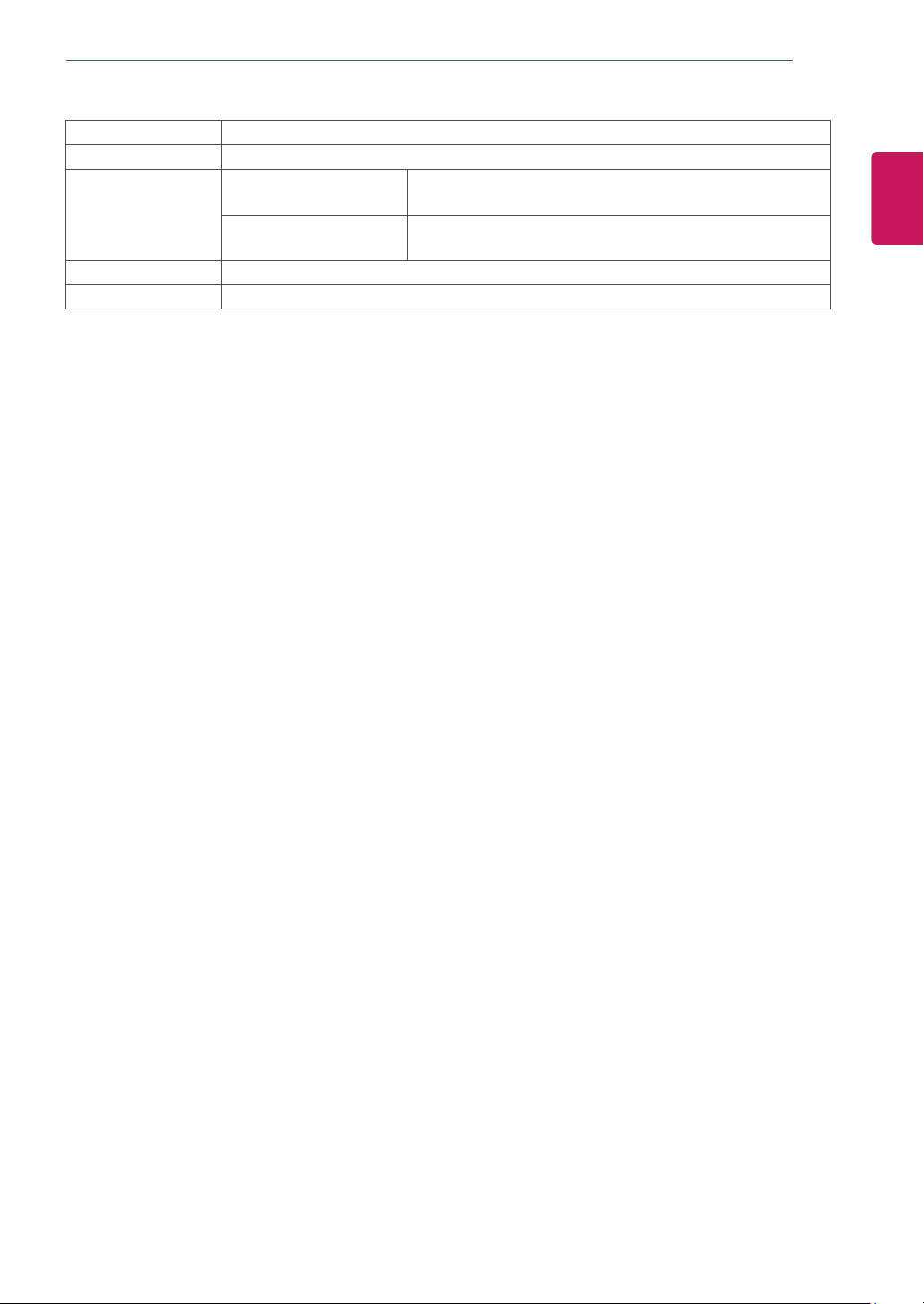
29
ENG
ENGLISH
SPECIFICATIONS
Weight 2.2 kg
TiltRange -3° to 20°
Environmental
conditions
OperatingTemperature
OperatingHumidity
10°C to 35 °C
10 % to 80 %
StorageTemperature
StorageHumidity
-20°C to 60 °C
5 % to 90 % non-Condensing
StandBase Attached ( ), Detached (O)
Powercord Wall-outlet type
Product specifications shown above may be changed without prior notice due to upgrade of product
functions.
* The power consumption level can be different by operating condition and monitor setting.
* The On mode power consumption is measured with ENERGY STAR® test standard.
* ENERGY STAR® is a US registered mark of the United States Environmental Protection Agency.
30
ENG
ENGLISH
SPECIFICATIONS
SPECIFICATIONS
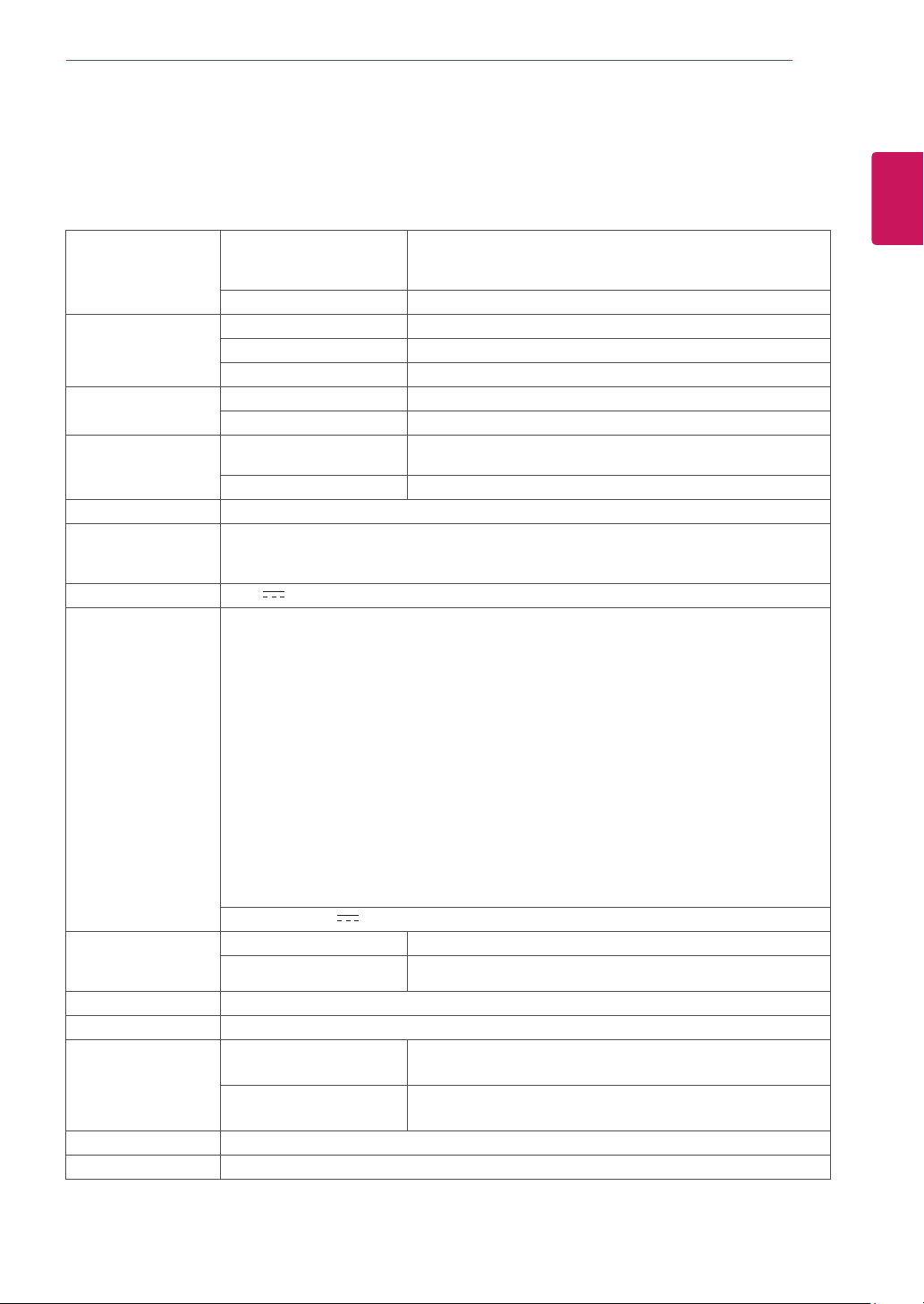
Display ScreenType TFT (Thin Film Transistor) LCD (Liquid Crystal Display)
Panel,Anti-Glare coating
54.6 cm visible diagonal (21.5 inch)
PixelPitch 0.248 mm x 0.248 mm (Pixel Pitch)
SyncInput HorizontalFrequency 30 kHz to 83 kHz (Automatic)
VerticalFrequency 56Hz to 75Hz (D-SUB)
InputForm Separate Sync.
VideoInput SignalInput 15 pin D-SUB Connector
InputForm RGB Analog (0.7 Vp-p/ 75 ohm)
Resolution Max D-SUB(Analog) : 1920 x 1080 @ 60 Hz
Recommend VESA 1920 x 1080 @ 60 Hz
Plug&Play DDC 2B(Analog)
Power
Consumption
On Mode : 18 W (ENERGY STAR® standard)*
Sleep Mode ≤ 0.3 W
Off Mode ≤ 0.3 W
PowerInput 19 V
1.2 A
AC-DCAdapter
Type ADS-40SG-19-3 19025G, manufactured by SHENZHEN HONOR ELECTRONIC
or Type ADS-40FSG-19 19025GPG-1, manufactured by SHENZHEN HONOR ELECTRONIC
or Type ADS-40FSG-19 19025GPBR-1, manufactured by SHENZHEN HONOR ELECTRONIC
or Type ADS-40FSG-19 19025GPI-1, manufactured by SHENZHEN HONOR ELECTRONIC
or Type ADS-40FSG-19 19025GPCU-1, manufactured by SHENZHEN HONOR ELECTRONIC
or Type ADS-40FSG-19 19025GPB-2, manufactured by SHENZHEN HONOR ELECTRONIC
or Type LCAP21, manufactured by LIEN CHANG ELECTRONIC ENTERPRISE
or Type LCAP26-A, manufactured by LIEN CHANG ELECTRONIC ENTERPRISE
or Type LCAP26-E, manufactured by LIEN CHANG ELECTRONIC ENTERPRISE
or Type LCAP26-I, manufactured by LIEN CHANG ELECTRONIC ENTERPRISE
or Type LCAP26-B, manufactured by LIEN CHANG ELECTRONIC ENTERPRISE
or Type PSAB-L203A, manufactured by LG Innotek Co.,Ltd
or Type PSAB-L202B, manufactured by LG Innotek Co.,Ltd
or Type PSAB-L202C, manufactured by LG Innotek Co.,Ltd
or Type PSAB-L202D, manufactured by LG Innotek Co.,Ltd
OUTPUT:
19 V 1.3 A
Dimensions
(WidthxHeightx
Depth)
WithStand 50.9 cm x 40.9 cm x 21.5 cm
WithoutStand 50.9 cm x 31.6 cm x 9.8 cm
Weight 2.6 kg
TiltRange -3° to 20°
Environmental
conditions
OperatingTemperature
OperatingHumidity
10°C to 35 °C
10 % to 80 %
StorageTemperature
StorageHumidity
-20°C to 60 °C
5 % to 90 % non-Condensing
StandBase Attached ( ), Detached (O)
Powercord Wall-outlet type
Product specifications shown above may be changed without prior notice due to upgrade of product
functions.
* The power consumption level can be different by operating condition and monitor setting.
* The On mode power consumption is measured with ENERGY STAR® test standard.
* ENERGY STAR® is a US registered mark of the United States Environmental Protection Agency.
22M35A
31
ENG
ENGLISH
SPECIFICATIONS
SPECIFICATIONS
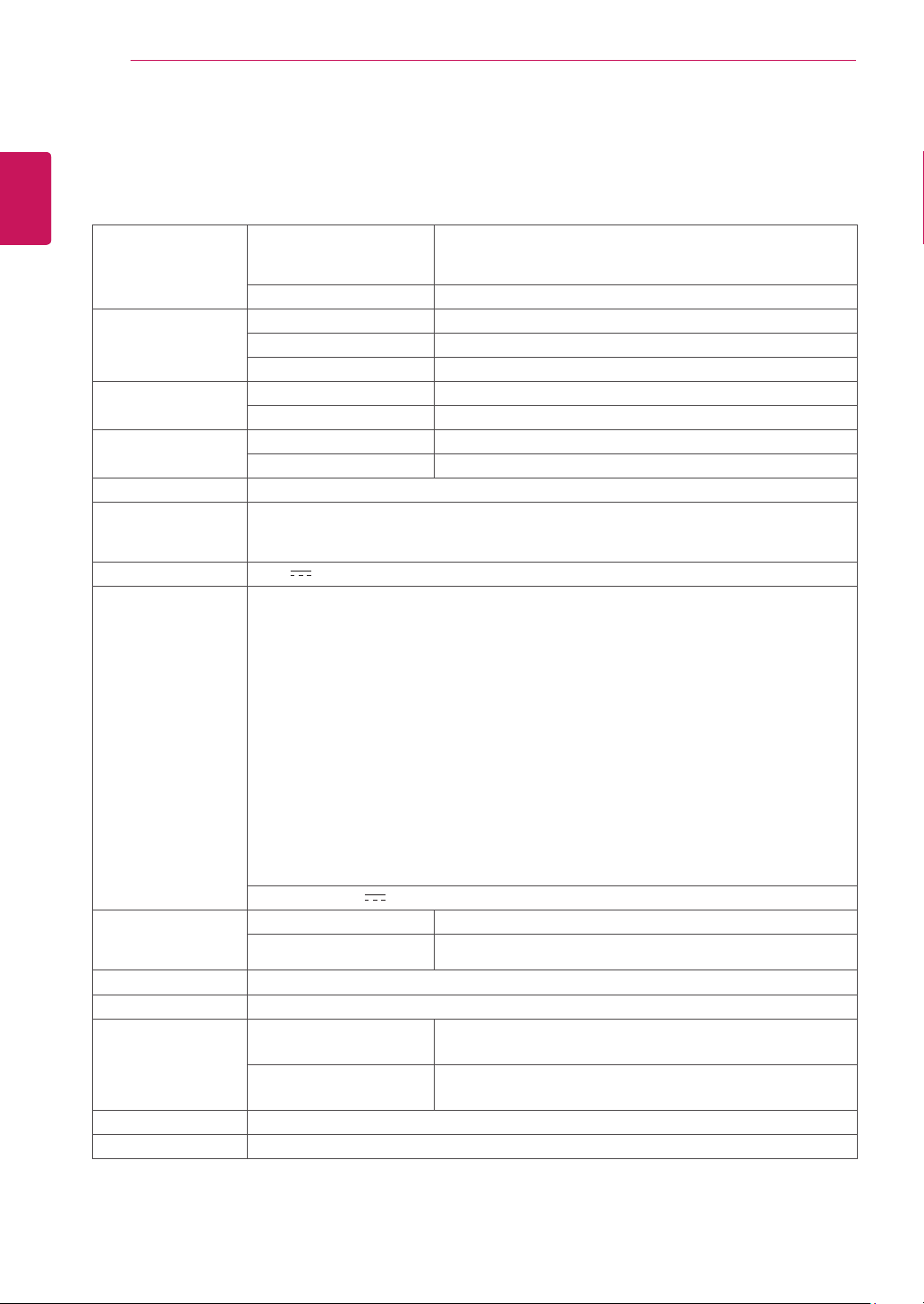
Display ScreenType TFT (Thin Film Transistor) LCD (Liquid Crystal Display)
Panel,Anti-Glare coating
54.6 cm visible diagonal (21.5 inch)
PixelPitch 0.248 mm x 0.248 mm (Pixel Pitch)
SyncInput HorizontalFrequency 30 kHz to 83 kHz (Automatic)
VerticalFrequency 56Hz to 75Hz (D-SUB, DVI-D)
InputForm Separate Sync. Digital
VideoInput SignalInput 15 pin D-SUB Connector /DVI-D Connector (Digital)
InputForm RGB Analog (0.7 Vp-p/ 75 ohm), Digital
Resolution Max D-SUB(Analog) : 1920 x 1080 @ 60 Hz
DVI (Digital) : 1920 x 1080 @ 60 Hz
Recommend VESA 1920 x 1080 @ 60 Hz
Plug&Play DDC 2B(Analog,Digital)
Power
Consumption
On Mode : 18 W (ENERGY STAR® standard)*
Sleep Mode ≤ 0.3 W
Off Mode ≤ 0.3 W
PowerInput 19 V
1.2 A
AC-DCAdapter
Type ADS-40SG-19-3 19025G, manufactured by SHENZHEN HONOR ELECTRONIC
or Type ADS-40FSG-19 19025GPG-1, manufactured by SHENZHEN HONOR ELECTRONIC
or Type ADS-40FSG-19 19025GPBR-1, manufactured by SHENZHEN HONOR ELECTRONIC
or Type ADS-40FSG-19 19025GPI-1, manufactured by SHENZHEN HONOR ELECTRONIC
or Type ADS-40FSG-19 19025GPCU-1, manufactured by SHENZHEN HONOR ELECTRONIC
or Type ADS-40FSG-19 19025GPB-2, manufactured by SHENZHEN HONOR ELECTRONIC
or Type LCAP21, manufactured by LIEN CHANG ELECTRONIC ENTERPRISE
or Type LCAP26-A, manufactured by LIEN CHANG ELECTRONIC ENTERPRISE
or Type LCAP26-E, manufactured by LIEN CHANG ELECTRONIC ENTERPRISE
or Type LCAP26-I, manufactured by LIEN CHANG ELECTRONIC ENTERPRISE
or Type LCAP26-B, manufactured by LIEN CHANG ELECTRONIC ENTERPRISE
or Type PSAB-L203A, manufactured by LG Innotek Co.,Ltd
or Type PSAB-L202B, manufactured by LG Innotek Co.,Ltd
or Type PSAB-L202C, manufactured by LG Innotek Co.,Ltd
or Type PSAB-L202D, manufactured by LG Innotek Co.,Ltd
OUTPUT:
19 V 1.3 A
Dimensions
(WidthxHeightx
Depth)
WithStand 50.9 cm x 40.9 cm x 21.5 cm
WithoutStand 50.9 cm x 31.6 cm x 9.8 cm
Weight 2.6 kg
TiltRange -3° to 20°
Environmental
conditions
OperatingTemperature
OperatingHumidity
10°C to 35 °C
10 % to 80 %
StorageTemperature
StorageHumidity
-20°C to 60 °C
5 % to 90 % non-Condensing
StandBase Attached ( ), Detached (O)
Powercord Wall-outlet type
Product specifications shown above may be changed without prior notice due to upgrade of product
functions.
* The power consumption level can be different by operating condition and monitor setting.
* The On mode power consumption is measured with ENERGY STAR® test standard.
* ENERGY STAR® is a US registered mark of the United States Environmental Protection Agency.
22M35D/22M34D/22M33D
32
ENG
ENGLISH
SPECIFICATIONS
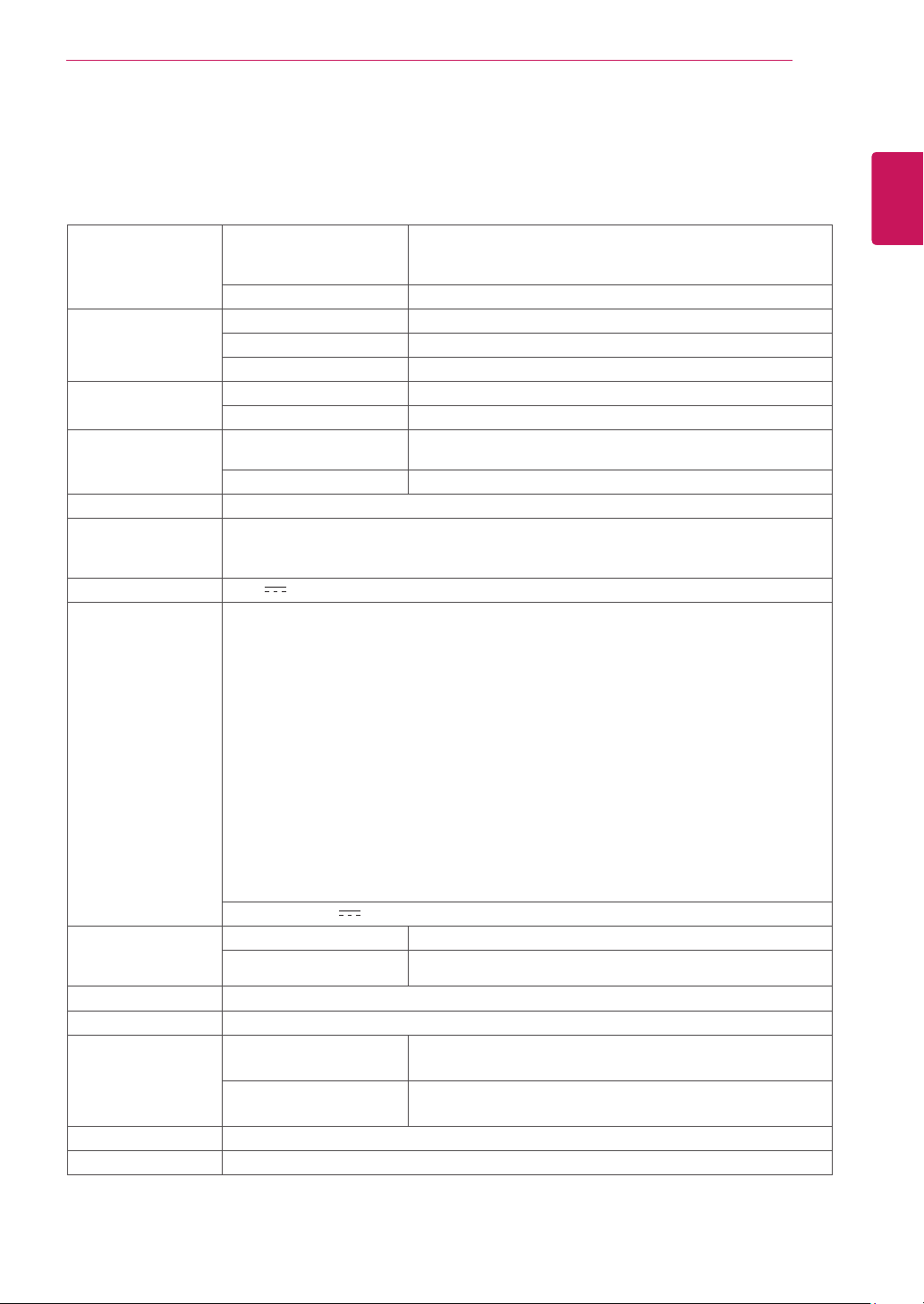
Display ScreenType TFT (Thin Film Transistor) LCD (Liquid Crystal Display)
Panel,Anti-Glare coating
60.0 cm visible diagonal (23.6 inch)
PixelPitch 0.272 mm x 0.272 mm (Pixel Pitch)
SyncInput HorizontalFrequency 30 kHz to 83 kHz (Automatic)
VerticalFrequency 56Hz to 75Hz (D-SUB)
InputForm Separate Sync.
VideoInput SignalInput 15 pin D-SUB Connector
InputForm RGB Analog (0.7 Vp-p/ 75 ohm)
Resolution Max D-SUB(Analog) : 1920 x 1080 @ 60 Hz
Recommend VESA 1920 x 1080 @ 60 Hz
Plug&Play DDC 2B(Analog)
Power
Consumption
On Mode : 19 W (ENERGY STAR® standard)*
Sleep Mode ≤ 0.3 W
Off Mode ≤ 0.3 W
PowerInput 19 V 1.3 A
AC-DCAdapter
Type ADS-40SG-19-3 19025G, manufactured by SHENZHEN HONOR ELECTRONIC
or Type ADS-40FSG-19 19025GPG-1, manufactured by SHENZHEN HONOR ELECTRONIC
or Type ADS-40FSG-19 19025GPBR-1, manufactured by SHENZHEN HONOR ELECTRONIC
or Type ADS-40FSG-19 19025GPI-1, manufactured by SHENZHEN HONOR ELECTRONIC
or Type ADS-40FSG-19 19025GPCU-1, manufactured by SHENZHEN HONOR ELECTRONIC
or Type ADS-40FSG-19 19025GPB-2, manufactured by SHENZHEN HONOR ELECTRONIC
or Type LCAP21, manufactured by LIEN CHANG ELECTRONIC ENTERPRISE
or Type LCAP26-A, manufactured by LIEN CHANG ELECTRONIC ENTERPRISE
or Type LCAP26-E, manufactured by LIEN CHANG ELECTRONIC ENTERPRISE
or Type LCAP26-I, manufactured by LIEN CHANG ELECTRONIC ENTERPRISE
or Type LCAP26-B, manufactured by LIEN CHANG ELECTRONIC ENTERPRISE
or Type PSAB-L203A, manufactured by LG Innotek Co.,Ltd
or Type PSAB-L202B, manufactured by LG Innotek Co.,Ltd
or Type PSAB-L202C, manufactured by LG Innotek Co.,Ltd
or Type PSAB-L202D, manufactured by LG Innotek Co.,Ltd
OUTPUT:
19 V 1.3 A
Dimensions
(WidthxHeightx
Depth)
WithStand 55.6 cm x 43.8 cm x 21.5 cm
WithoutStand 55.6 cm x 34.1 cm x 9.8 cm
Weight 3.0 kg
TiltRange -3° to 20°
Environmental
conditions
OperatingTemperature
OperatingHumidity
10°C to 35 °C
10 % to 80 %
StorageTemperature
StorageHumidity
-20°C to 60 °C
5 % to 90 % non-Condensing
StandBase Attached ( ), Detached (O)
Powercord Wall-outlet type
Product specifications shown above may be changed without prior notice due to upgrade of product
functions.
* The power consumption level can be different by operating condition and monitor setting.
* The On mode power consumption is measured with ENERGY STAR® test standard.
* ENERGY STAR® is a US registered mark of the United States Environmental Protection Agency.
SPECIFICATIONS
24M35A
33
ENG
ENGLISH
SPECIFICATIONS
Display ScreenType TFT (Thin Film Transistor) LCD (Liquid Crystal Display)
Panel,Anti-Glare coating
60.0 cm visible diagonal (23.6 inch)
PixelPitch 0.272 mm x 0.272 mm (Pixel Pitch)
SyncInput HorizontalFrequency 30 kHz to 83 kHz (Automatic)
VerticalFrequency 56Hz to 75Hz (D-SUB, DVI-D)
InputForm Separate Sync. Digital
VideoInput SignalInput 15 pin D-SUB Connector /DVI-D Connector (Digital)
InputForm RGB Analog (0.7 Vp-p/ 75 ohm), Digital
Resolution Max D-SUB(Analog) : 1920 x 1080 @ 60 Hz
DVI (Digital) : 1920 x 1080 @ 60 Hz
Recommend VESA 1920 x 1080 @ 60 Hz
Plug&Play DDC 2B(Analog,Digital)
Power
Consumption
On Mode : 19 W (ENERGY STAR® standard)*
Sleep Mode ≤ 0.3 W
Off Mode ≤ 0.3 W
PowerInput 19 V 1.3 A
AC-DCAdapter
Type ADS-40SG-19-3 19025G, manufactured by SHENZHEN HONOR ELECTRONIC
or Type ADS-40FSG-19 19025GPG-1, manufactured by SHENZHEN HONOR ELECTRONIC
or Type ADS-40FSG-19 19025GPBR-1, manufactured by SHENZHEN HONOR ELECTRONIC
or Type ADS-40FSG-19 19025GPI-1, manufactured by SHENZHEN HONOR ELECTRONIC
or Type ADS-40FSG-19 19025GPCU-1, manufactured by SHENZHEN HONOR ELECTRONIC
or Type ADS-40FSG-19 19025GPB-2, manufactured by SHENZHEN HONOR ELECTRONIC
or Type LCAP21, manufactured by LIEN CHANG ELECTRONIC ENTERPRISE
or Type LCAP26-A, manufactured by LIEN CHANG ELECTRONIC ENTERPRISE
or Type LCAP26-E, manufactured by LIEN CHANG ELECTRONIC ENTERPRISE
or Type LCAP26-I, manufactured by LIEN CHANG ELECTRONIC ENTERPRISE
or Type LCAP26-B, manufactured by LIEN CHANG ELECTRONIC ENTERPRISE
or Type PSAB-L203A, manufactured by LG Innotek Co.,Ltd
or Type PSAB-L202B, manufactured by LG Innotek Co.,Ltd
or Type PSAB-L202C, manufactured by LG Innotek Co.,Ltd
or Type PSAB-L202D, manufactured by LG Innotek Co.,Ltd
OUTPUT:
19 V 1.3 A
Dimensions
(WidthxHeightx
Depth)
WithStand 55.6 cm x 43.8 cm x 21.5 cm
WithoutStand 55.6 cm x 34.1 cm x 9.8 cm
Weight 3.0 kg
TiltRange -3° to 20°
Environmental
conditions
OperatingTemperature
OperatingHumidity
10°C to 35 °C
10 % to 80 %
StorageTemperature
StorageHumidity
-20°C to 60 °C
5 % to 90 % non-Condensing
StandBase Attached ( ), Detached (O)
Powercord Wall-outlet type
Product specifications shown above may be changed without prior notice due to upgrade of product
functions.
* The power consumption level can be different by operating condition and monitor setting.
* The On mode power consumption is measured with ENERGY STAR® test standard.
* ENERGY STAR® is a US registered mark of the United States Environmental Protection Agency.
SPECIFICATIONS
24M35D
34
ENG
ENGLISH
SPECIFICATIONS
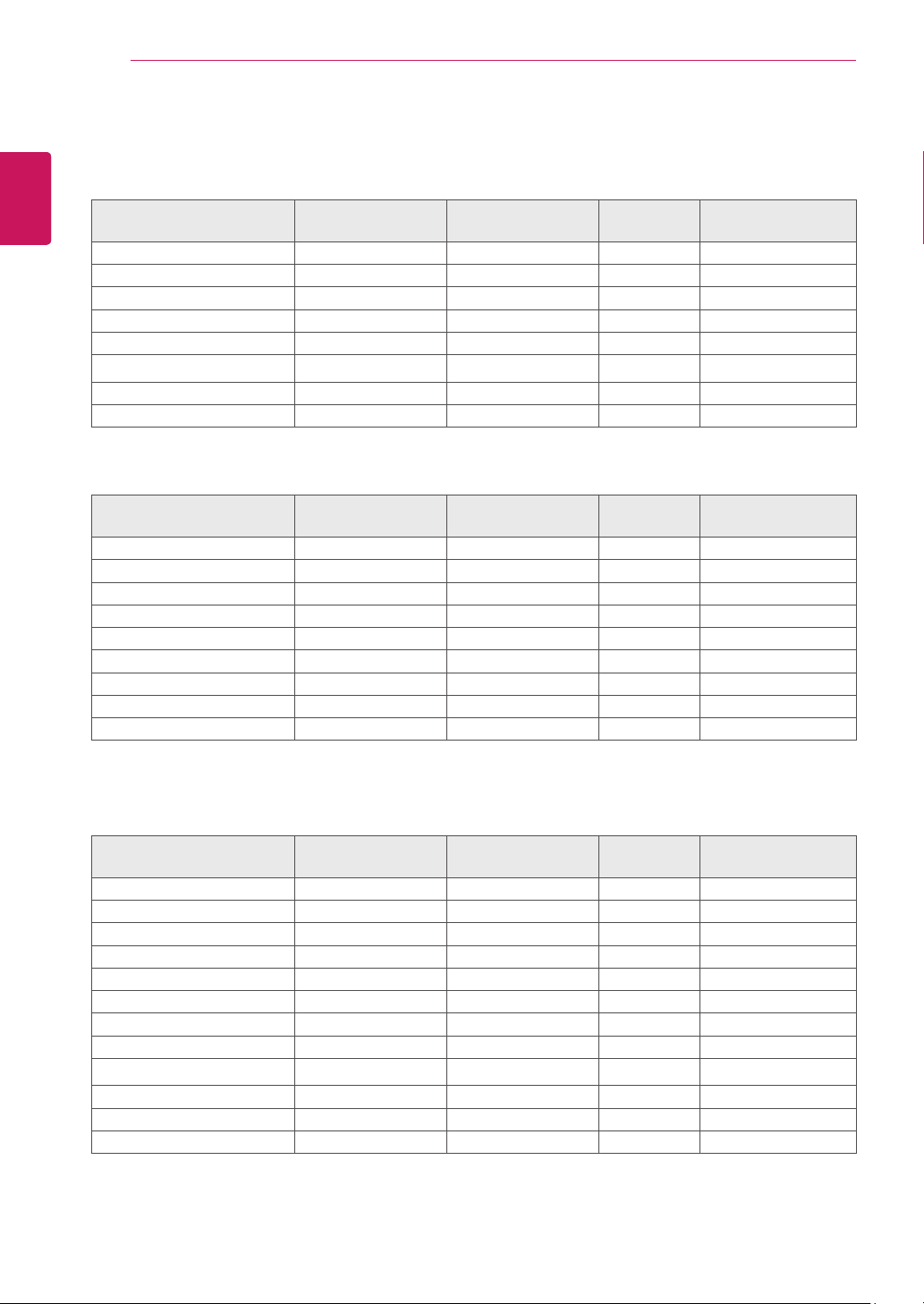
PresetModes(Resolution)
19M35A/19M35D
DisplayModes(Resolution)
Horizontal
Frequency(kHz)
Vertical
Frequency(Hz)
Polarity(H/V)
720 x 400 31.468 70 -/+
640 x 480 31.469 60 -/-
640 x 480 37.500 75 -/-
800 x 600 37.879 60 +/+
800 x 600 46.875 75 +/+
832 x 624 49.725 75 -/-
1024 x 768 48.363 60 -/-
1366 x 768 47.712 60 +/+ Recommend Mode
20M35A/20M35D
DisplayModes(Resolution)
Horizontal
Frequency(kHz)
Vertical
Frequency(Hz)
Polarity(H/V)
720 x 400 31.468 70 -/+
640 x 480 31.469 60 -/-
640 x 480 37.500 75 -/-
800 x 600 37.879 60 +/+
800 x 600 46.875 75 +/+
1024 x 768 48.363 60 -/-
1024 x 768 60.023 75 +/+
1152 x 864 67.500 75 +/+
1600 x 900 60.000 60 +/+ Recommend Mode
22M35A/22M35D/22M34D/22M33D/24M35A/24M35D
DisplayModes(Resolution)
Horizontal
Frequency(kHz)
Vertical
Frequency(Hz)
Polarity(H/V)
720 x 400 31.468 70 -/+
640 x 480 31.469 60 -/-
640 x 480 37.500 75 -/-
800 x 600 37.879 60 +/+
800 x 600 46.875 75 +/+
1024 x 768 48.363 60 -/-
1024 x 768 60.023 75 +/+
1152 x 864 67.500 75 +/+
1280 x 1024 63.981 60 +/+
1280 x 1024 79.976 75 +/+
1680 x 1050 65.290 60 -/+
1920 x 1080 67.500 60 +/+ Recommend Mode
35
ENG
ENGLISH
SPECIFICATIONS
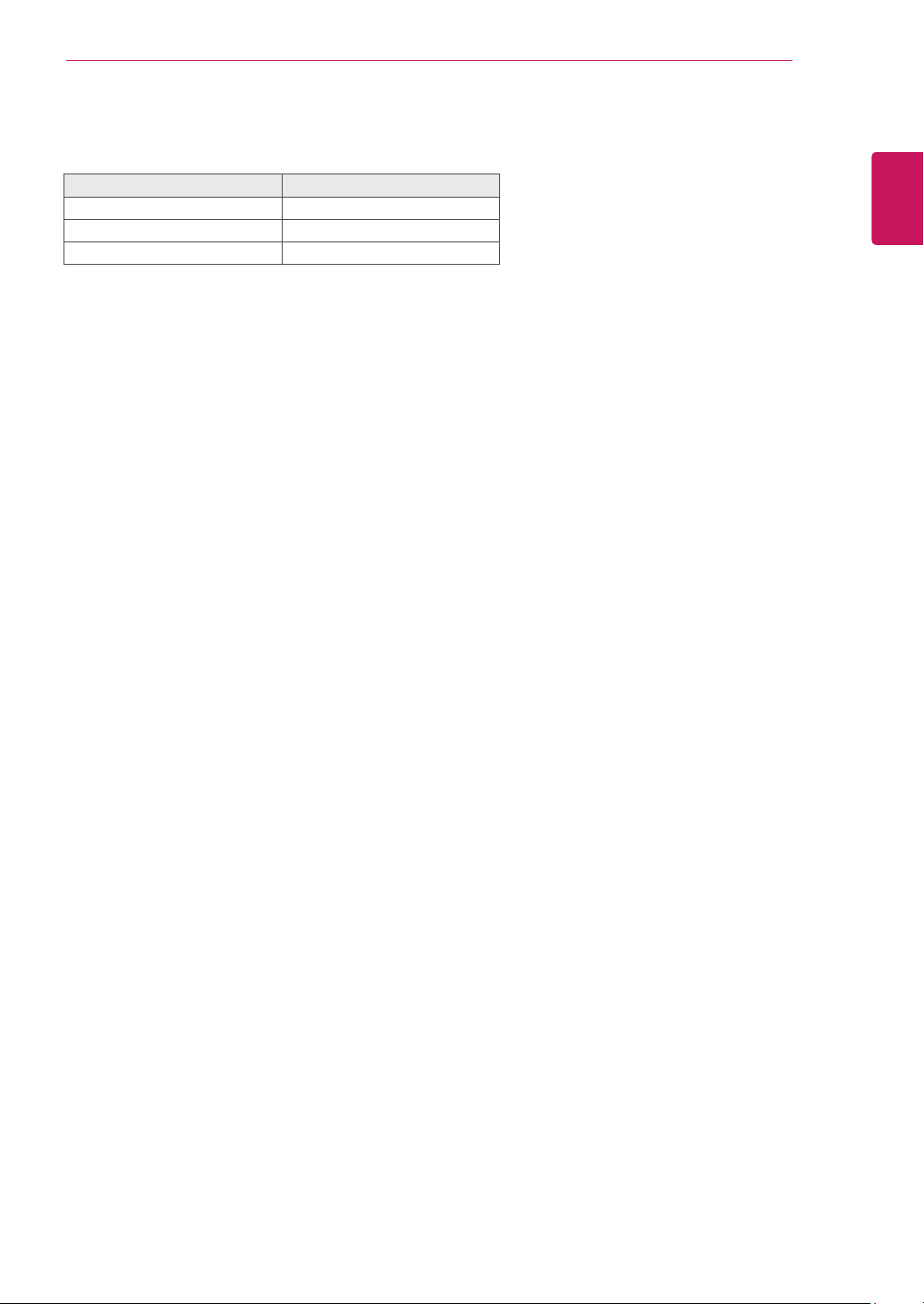
Indicator
Mode LEDColor
On Mode White (only 15 seconds)
Sleep Mode Blinking White
Off Mode Off
36
ENG
ENGLISH
PROPER POSTURE
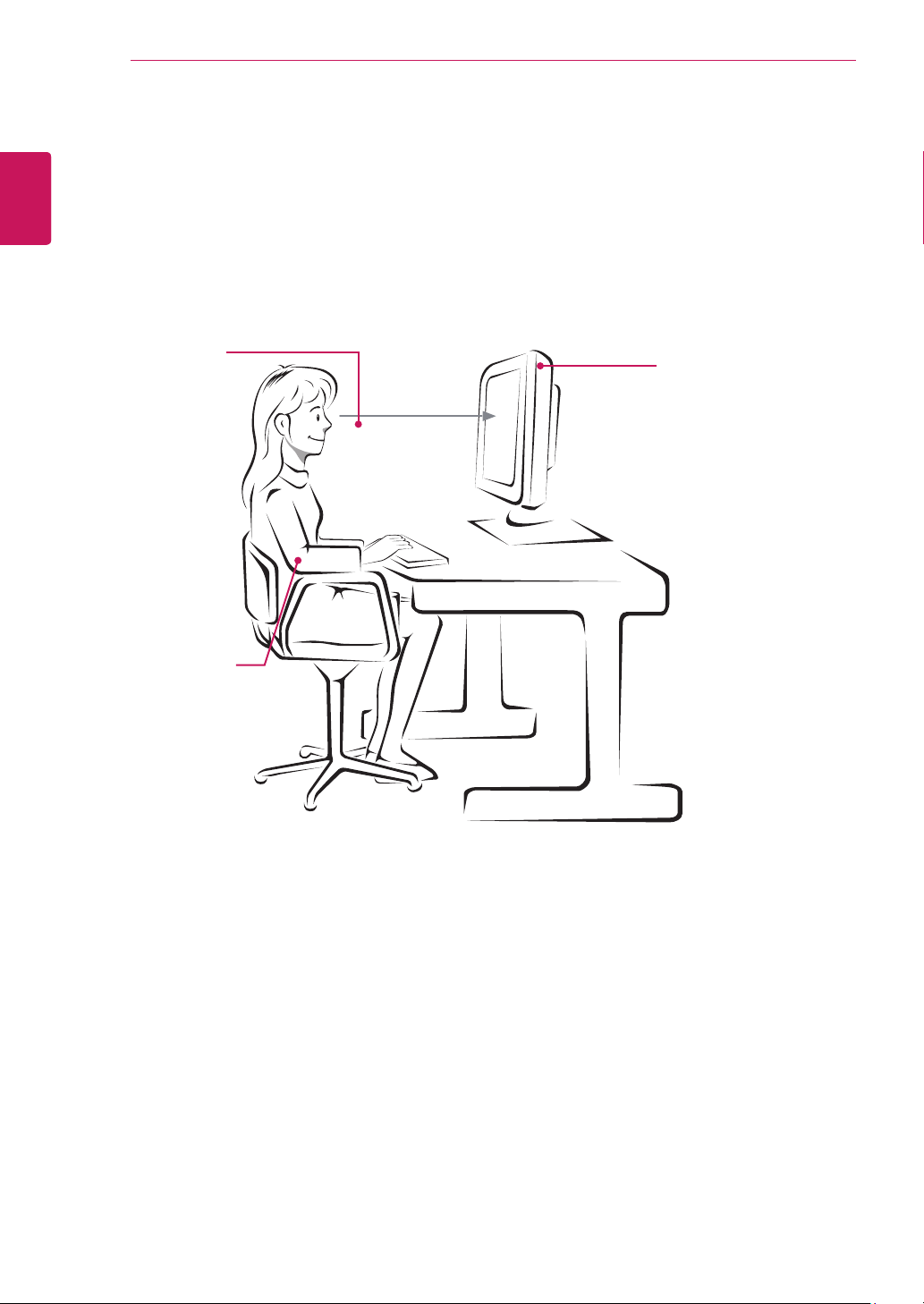
ProperpostureforusingtheMonitorset.
PROPERPOSTURE
Adjust the
Monitor set and
your posture to
allow you to view
images at the
optimal viewing
angle.
Place your hands
gently on the
keyboard, keeping
your arms bent at
the elbows and
horizontally outright.
Adjust the location of the
Monitor set to avoid it
reflecting light.
Make sure to read the Safety Precautions before
using the product.
Keep the Owner’s Manual (CD) in an accessible
place for future reference.
The model and serial number of the SET is
located on the back and one side of the SET.
Record it below should you ever need service.
MODEL
SERIAL
*above information is only for USA FCC Regulatory
Declaration of Conformity
Trade Name: LG
Model : 19M35AA,19M35DA,20M35ASA,
20M35DSA,22M35AA,22M35DA,
24M35AA,24M35DA,22M34DA,
22M33DA
Responsible Party: LG Electronics Inc.
Address : 1000 Sylvan Ave. Englewood Cliffs
NJ 07632 U.S.A
TEL: 201-266-2534
As an ENERGY STAR Partner LGE
U. S. A.,Inc. has determined that this
product meets the ENERGY STAR
guidelines for energy efficiency.
ENERGY STAR is a set of power-saving
guidelines issued by the U.S.Environmental
Protection Agency(EPA).

