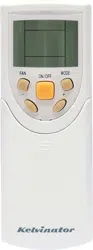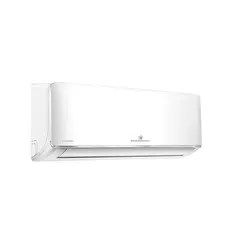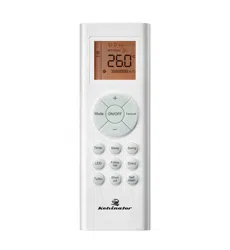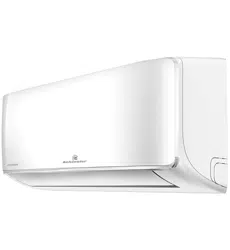
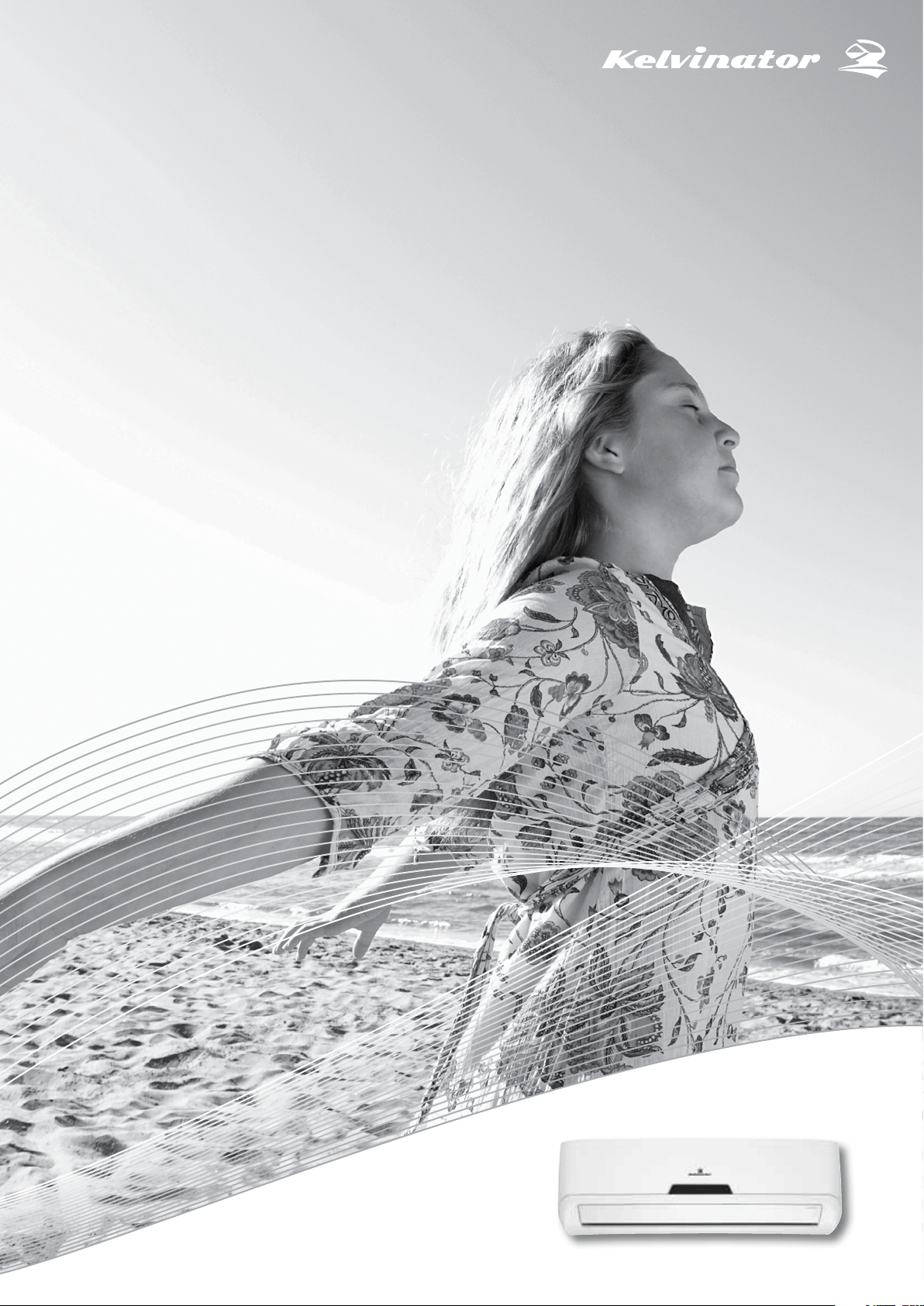
Inverter Split System Room Air Conditioner
User Manual
KSV26CRE, KSV26HRE, KSV35CRE, KSV35HRE,
KSV53HRE, KSV62HRE, KSV70CRE, KSV70HRE,
KSV80HRE
Refrigerant R32
2 Contents Kelvinator Air Conditioning
Congratulations and thank you for choosing our Inverter split
system room air conditioner. We are sure you will find
your new air conditioner a pleasure to use. Before you use
the air conditioner, we recommend that you read through
the entire user manual, which provides the description of
the air conditioner and its functions.
To avoid the risks that are always present when you use an
electrical appliance, it is important that the air conditioner
is installed correctly and that you read the safety instructions
carefully to avoid misuse and hazards.
We recommend that you keep this instruction booklet
for future reference and pass it on to any future owners.
After unpacking the air conditioner please check it is not
damaged. If in doubt, do not use the air conditioner but
contact your local Electrolux Customer Care Centre.
environmental tip
Information on disposal for users
Please dispose of those materials through your local
recycling depot or by placing them in appropriate
collection containers.
your local authorities and ask for the correct method
of disposal.
refrigerant warning
This unit uses refrigerant R32 and must be disposed of
by a licensed refrigeration mechanic with knowledge of
appropriate gas reclamation methods.
caution
children or infirm persons without supervision.
do not play with the air conditioner.
maintenance of this unit.
shall be performed by authorised personnel only.
with the national wiring Standards by authorised
personnel only.
Safety Instructions
Warnings ....................................................................................... 3
Prior to operation ......................................................................... 4
Product description
Diagram ......................................................................................... 5
Indoor display unit ....................................................................... 6
Remote control ............................................................................. 7
First use ......................................................................................... 9
How to operate the air conditioner
Automatic operation.................................................................. 10
Cooling/Heating/Fan only operation ...................................... 10
Dehumidifying operation .......................................................... 10
Setting the clock ........................................................................ 11
Timer operation ......................................................................... 12
Eco operation ............................................................................. 13
Emergency operation ................................................................ 15
Operating temperature ............................................................. 15
Maintenance
Cleaning the filters ..................................................................... 16
Operating tips
Operation tips ............................................................................ 18
Troubleshooting tips .................................................................. 19
Warranty
Warranty instructions ................................................................ 23
Congratulations Contents
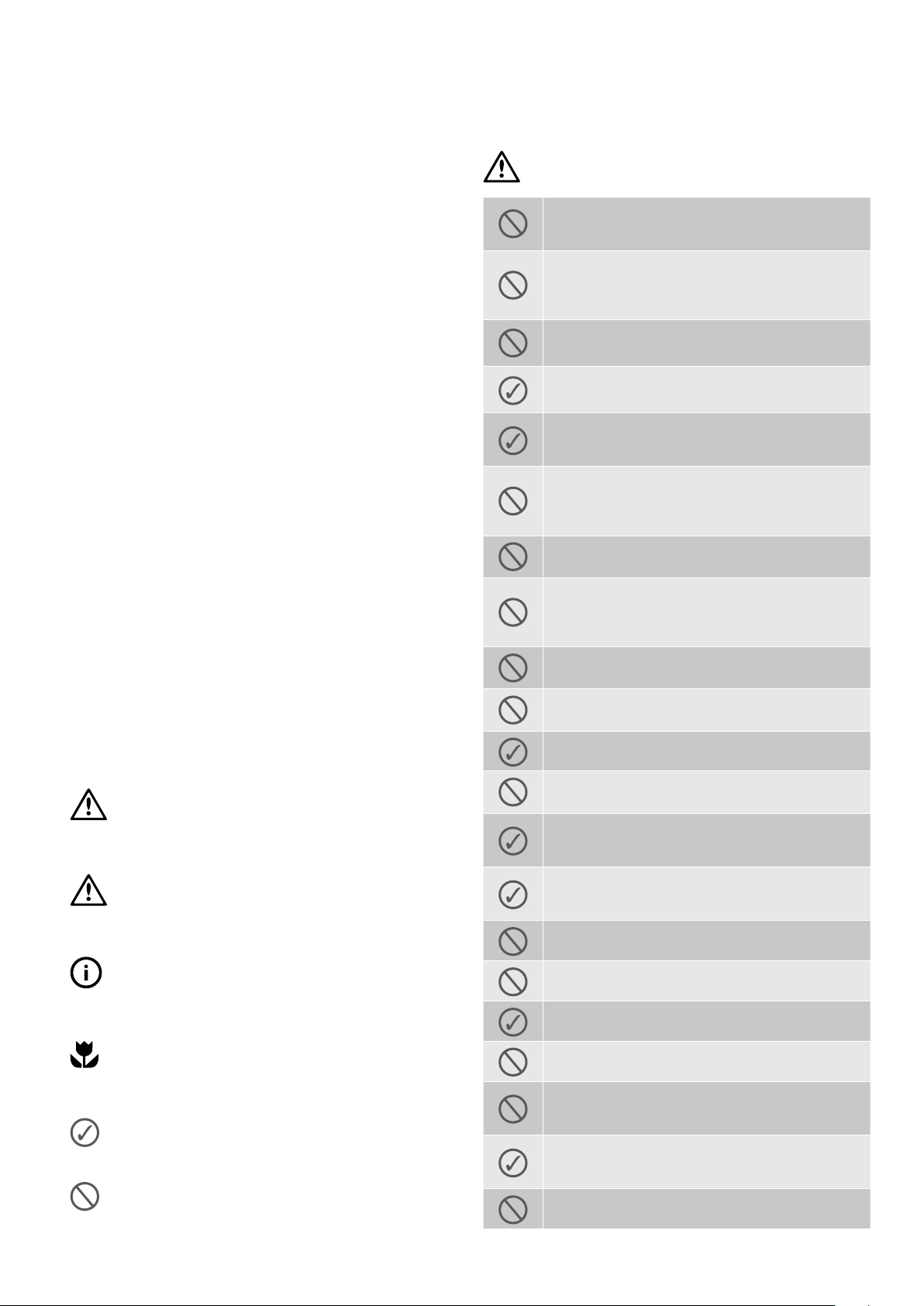
warning
Do not use means to accelerate the defrosting
process or to clean, other than those recommended
by the manufacturer.
Do not store the appliance in a room with continuously
operating ignition sources (for example open flames,
an operating electric heater or an operating gas
appliance with a continuously lit pilot flame).
Do not pierce or burn.
Be aware that the refrigerant may be odourless.
Ensure the unit is properly connected to the power.
Excess heat generation caused by incorrect
connection may result in an electric shock or fire.
Do not operate or stop the unit by switching on or
off at the power source.
This may cause an electric shock or fire due to excess
heat generation.
Do not damage or use an unspecified power cord.
This may cause an electric shock or fire.
Do not modify power cord length or share the outlet
with other appliances.
This may cause an electric shock or fire due to excess
heat generation.
Do not operate with wet hands or in damp environment.
This may cause an electric shock.
Do not direct airflow at room occupants only.
This could damage your health.
Always ensure that the unit is correctly earthed.
No earthing may cause electric shock.
Do not allow water to run into electric parts.
It may cause failure of the unit or electric shock.
Always install circuit breaker and a dedicated
power circuit.
Improper installation may cause fire and electric shock.
Disconnect the power if strange sounds, smells,
or smoke come from the unit.
It may cause fire and electric shock.
Do not drink water drained from air conditioner.
It contains contaminants and could make you sick.
Do not open the unit during operation.
It may cause electric shock.
Use correctly rated circuit breaker or fuse.
There is risk of fire or electric shock.
Do not use the power cord close to heating appliances.
It may cause fire and electric shock.
Do not use the power cord near flammable gas or
combustibles, such as gasoline, benzene, thinner, etc.
It may cause an explosion or fire.
Ventilate room before operating air conditioner if
there is a gas leakage from another appliance.
It may cause explosion, fire and burns.
Do not disassemble or modify unit.
It may cause failure and electric shock.
Safety instructions
Kelvinator Air Conditioning Important safety instructions 3
maintenance of this unit.
connected and commissioned by a licensed contractor.
(including children) with reduced physical, sensory
or mental capabilities, or lack of experience and
knowledge, unless they have been given supervision or
instruction concerning use of the appliance by a person
responsible for their safety.
do not play with the air conditioner.
shall be performed by authorised personnel only.
the national wiring standards and the electricity suppliers
service rules by authorised personnel only.
to undertake such work.
adjusting vertical louvres.
How to properly use and maintain your air conditioner
Just a little preventative care on your part can save you
a great deal of time and money over the life of your air
in the chart of troubleshooting tips. If you review the chart
of Troubleshooting Tips first, you may not need to call
for service.
warning
This symbol indicates information concerning your
personal safety
caution
This symbol indicates information on how to avoid
damaging the appliance
tips and information
This symbol indicates tips and information about
use of the appliance
environmental tip
This symbol indicates tips and information about
economical and ecological use of the appliance
This symbol indicates always do this
This symbol indicates never to do this
4 Important safety instructions Kelvinator Air Conditioning
Prior to Operation
1 Contact an installation specialist for installation.
2 Plug in the power plug properly.
3 Do not use a damaged or non-standard power cord.
4 Do not share the same outlet with other appliances.
5 Do not use an extension cord.
6 Do not start/stop operation by plugging /unplugging
the power cord.
Usage
1 Exposure to direct airflow to occupants, pets or plants
for an extended period of time could be hazardous to
your health.
2 Due to the possibility of oxygen deficiency, ventilate
the room when used together with stoves or other
heating devices.
3 Do not use this air conditioner for non-specified special
purposes ( e.g. preserving precision devices, food, pets,
plants, and art objects). Usage in such a manner could
harm your property.
Cleaning and maintenance
1 Do not touch the metal parts of the unit when removing
the filter. Injuries can occur when handling sharp
metal edges.
2 Do not use water to clean inside the air conditioner.
Exposure to water can destroy the insulation, leading to
possible electric shock.
3 When cleaning the unit, first make sure that the power
and circuit breaker are turned off.
Service
For repair and maintenance, contact your authorised
service dealer.
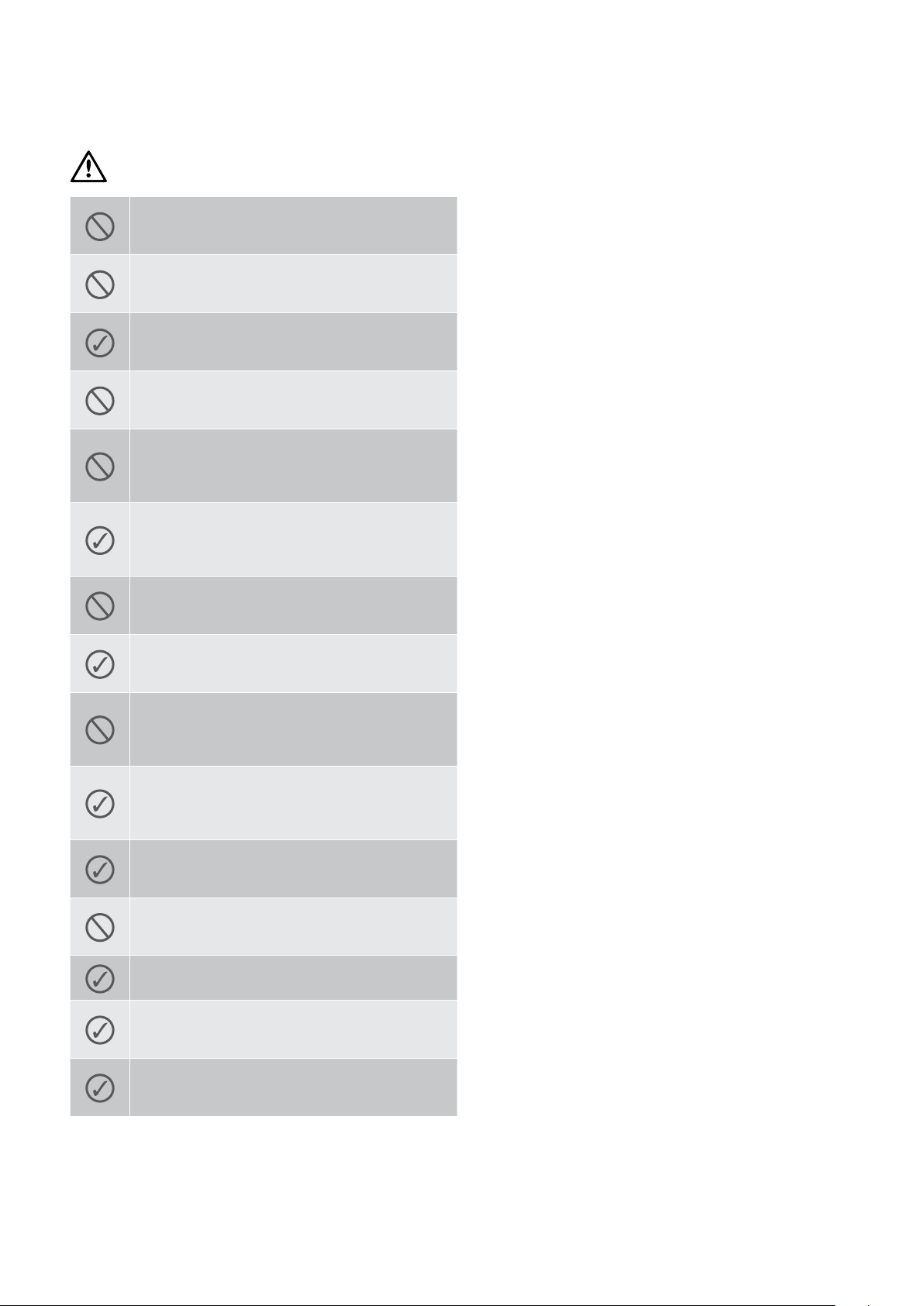
caution
When the air filter is to be removed, do not touch the
metal parts of the unit.
It may cause an injury.
Do not clean the air conditioner with water.
Water may enter the unit and degrade the insulation.
It may cause an electric shock.
Ventilate the room well when used together with
a stove, etc.
An oxygen shortage may occur.
Do not put a pet or house plant where it will be
exposed to direct air flow.
This could injure the pet or plant.
Do not use for special purposes.
Do not use this air conditioner to preserve precision
devices, food, pets, plants, and art objects. It may
Stop operation and close the window in storm
or hurricane.
Operation with windows open may allow rain inside,
soaking carpets and furniture.
Do not place obstacles around air-inlets or inside
of air-outlet.
It may cause failure of appliance or accident.
Turn off at the main power switch if the unit will not
be used for a long period of time.
It may cause failure of the unit or fire.
Do not use strong detergent such as wax or thinner.
Use a soft cloth for cleaning.
Appearance may be deteriorated due to change
of product colour or scratching of its surface.
Ensure that the installation bracket of the outdoor
appliance is not damaged due to prolonged exposure.
If bracket is damaged, the unit may fall and damage
may occur.
Always insert the filters securely. Clean filter once
every two weeks.
Operation without filters may cause failure.
Do not place heavy object on the power cord and
take care so that the cord is not compressed.
There is danger of fire or electric shock.
Use caution when unpacking and installing.
Sharp edges could cause injury.
If water enters the unit, turn the unit off and
disconnect the power, contact a qualified
service technician.
Hold the plug by the head of the power plug when
taking it out.
Failure to do so may cause electric shock and damage.
Safety instructions
Kelvinator Air Conditioning Product description 5
Indoor unit
Outdoor unit
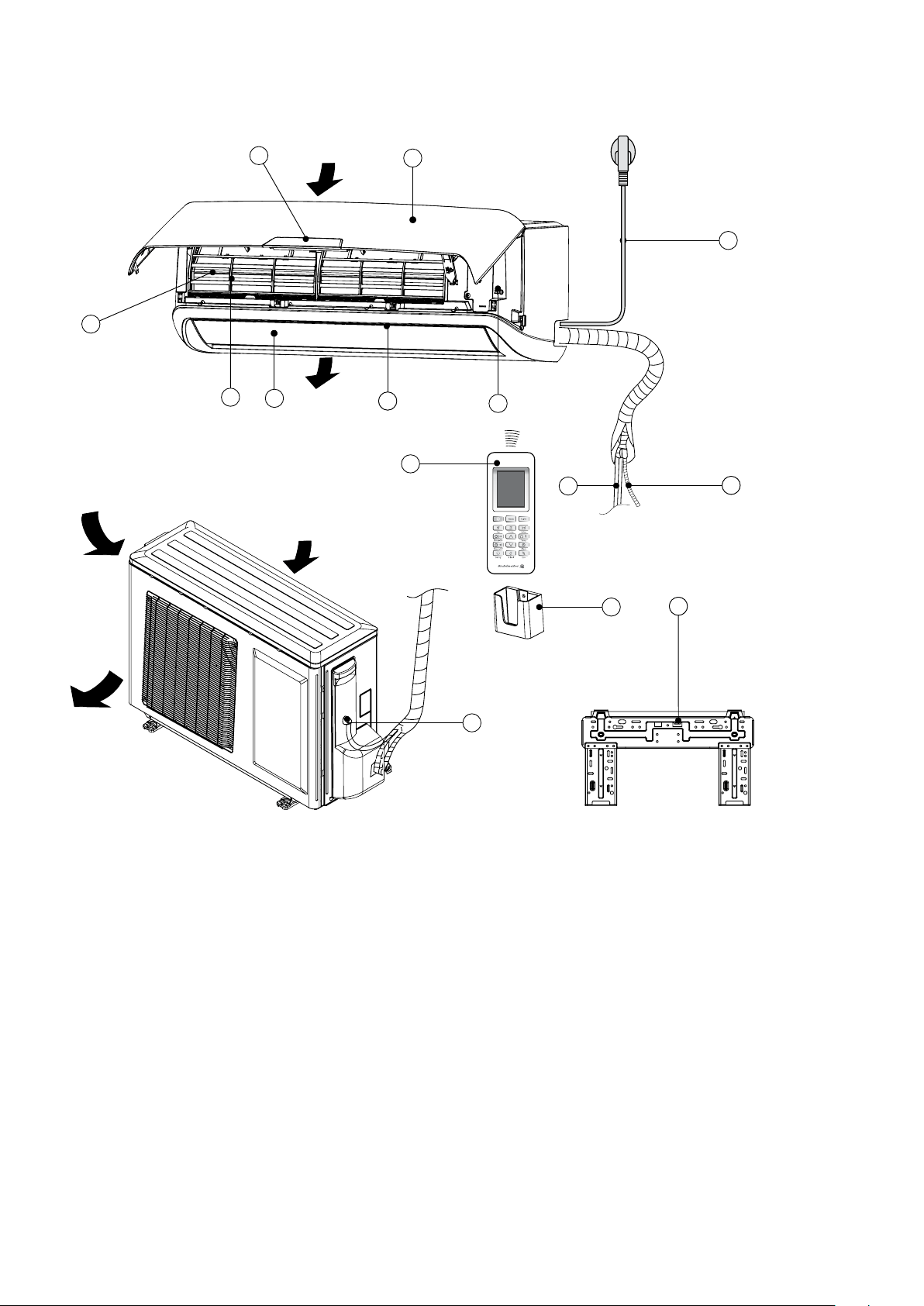
Product Description
1. Front panel
2. Digital display
3. Air filter (behind the dust filter)
4. Pre-dust filter
5. Horizontal louvres
6. Vertical louvres
8. Remote control
9. Remote control holder
10. Refrigerant pipe (if applicable)
11. Drain hose (if applicable)
12 Power cable (if applicable)
14 Connecting cable (if applicable)
NOTE: All the pictures in this manual are for explanation
purpose only. Your air conditioner may be slightly different.
The actual shape shall prevail.
1
2
3
4
5
6
7
8
10
9
14
13
11
12
Air inlet
Air inlet
(rear)
Air inlet
(side)
Air outlet
Air outlet
6 Indoor display unit Kelvinator Air Conditioning
Indoor display unit
will blink for about 1 second on the display of the
remote control.
caution
other materials block the signals from the remote control
to the indoor unit.
Do not expose the remote control to direct sunlight
or heat.
exposed to direct sunlight, the air conditioner may not
function properly. Use curtains to prevent the sunlight
from falling on the receiver.
• Ifotherelectricalappliancesreacttotheremote
control, either move these appliances or consult your
local dealer.
Replacing batteries
The remote control uses two AAA dry cell batteries.
1 Slide the cover of the battery compartment off according
to the arrow direction, then replace the old batteries with
new ones.
2 Insert the new batteries making sure that the (+) and (-) of
the batteries are installed correctly.
3 Reattach the cover by sliding it back into position. The
remote control clock will need to be reset after replacing
the batteries.
NOTE: Do not dispose batteries as unsorted municipal
waste. Collection of such waste separately for special
treatment is necessary.
tips and information
batteries, otherwise, it may cause problems with the
remote control.
the batteries as old batteries may leak or corrode and
damage the remote control.
remove and refit the batteries. If abnormal operation
continues, replace with new batteries.
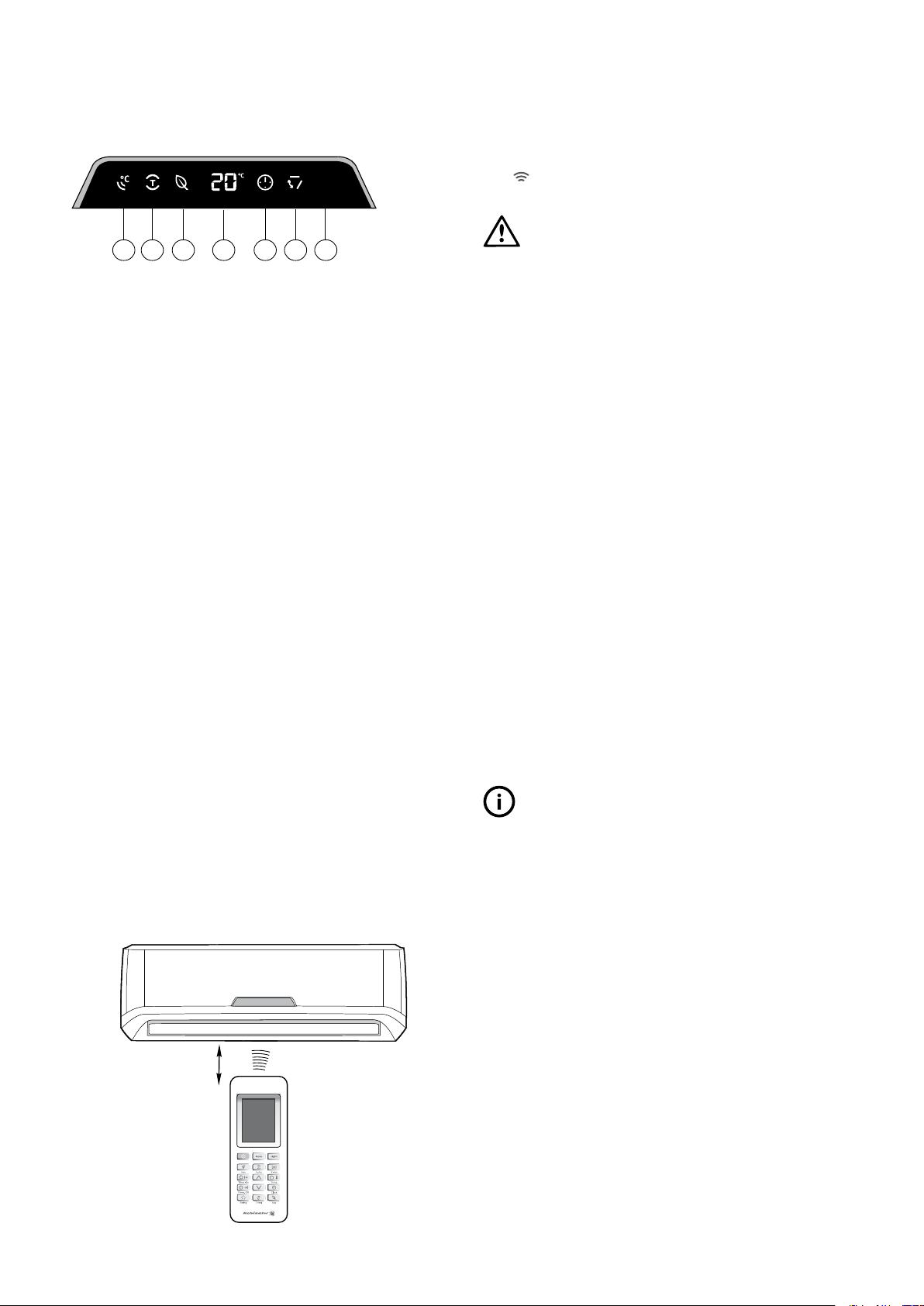
1 I feel indicator
2 Turbo indicator
3 Eco (economy) indicator
4 Temperature indicator
Displays the temperature settings when the
air conditioner is in operation.
5 Timer indicator
ON or OFF.
6 Swing indicator
7 Signal receiver
Receives signal from the remote control.
Remote control
Location of the remote control
receiver of the indoor unit (a distance of up to 8m is allowed).
automatically transmits a signal to the indoor unit at the
specified time.
proper signal transmission, a time lag of up to 15 minutes
may occur.
1 2 3 4 5 6 7
up to 8 metres
Kelvinator Air Conditioning Using the remote control 7
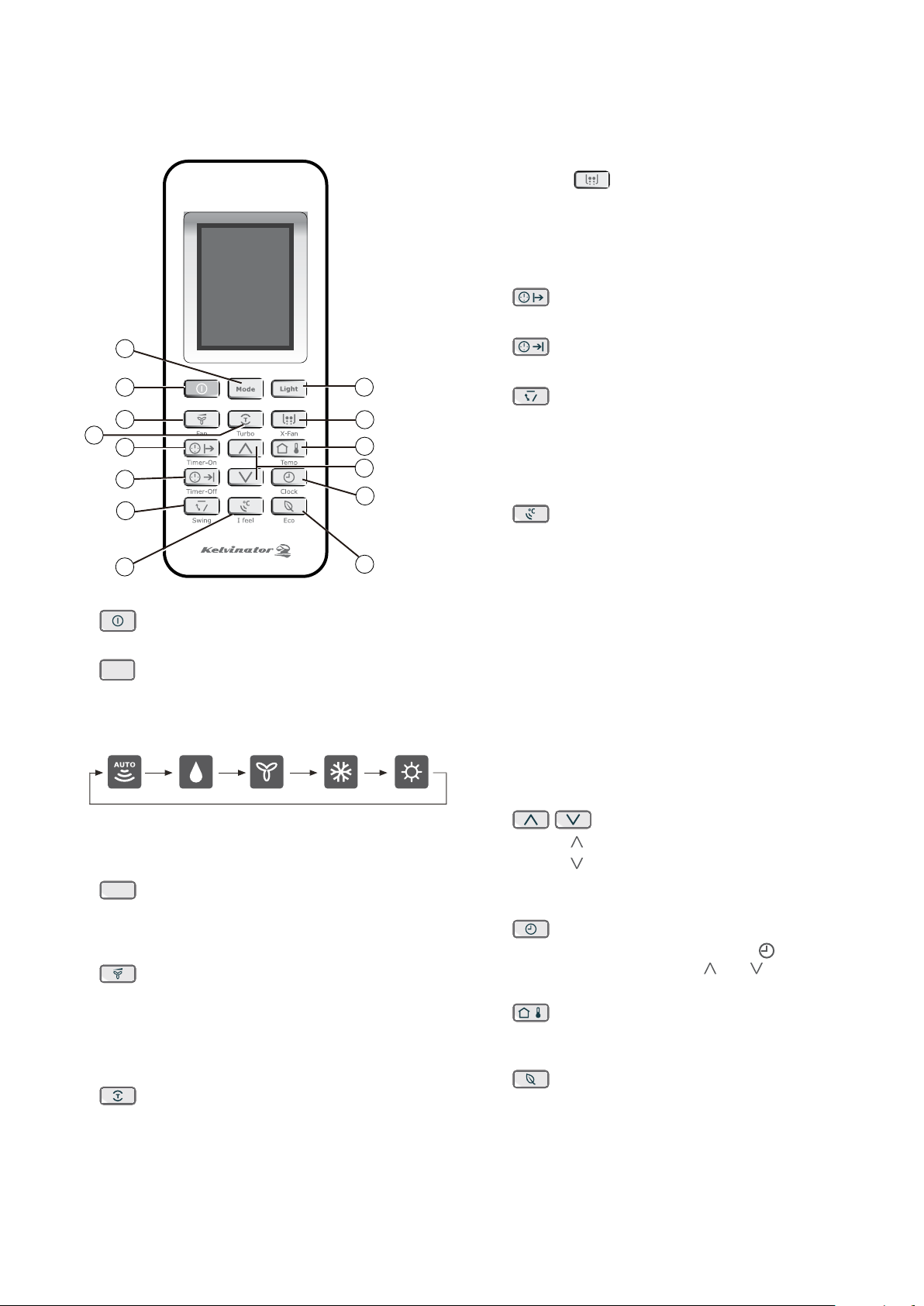
6 X-FAN Function
Press the
X-FAN button to activate the X-FAN
function.
After the unit is turned off, the indoor fan will continue
to operate for 10 minutes to remove all moisture from
the indoor unit and prevent bacteria and mildew from
growing.
7
TIMER ON Button
Press this button to set the start time.
8
TIMER OFF Button
Press this button to set the start time.
9
SWING Button
Press this button to change the swing angle of the
louvre. The angle of the horizontal louvre will adjust by
6 degrees with each press of the button. If you keep
pressing the button for 2 or more seconds, the louvre
will swing up and down automatically.
10
I FEEL Button
Push this button to initiate the I FEEL feature,
the remote displays the temperature at its location.
The remote control will send this signal to the air
conditioner in 3 minute intervals until you press the I
FEEL button again. The air conditioner will automatically
cancel the I FEEL feature if it does not receive the signal
during any 7 minute interval.
NOTE: The I FEEL feature is not available under
DRY and FAN mode. Shifting the operating mode
or turning off the unit will cancel the I FEEL feature
automatically. The remote control needs to be
within 8m reach of the indoor unit for the I FEEL
mode to work appropriately.
11 CONTROL Buttons
Press the button to increase the temperature setting.
Press the
button to decrease the temperature setting.
In or CLOCK functions, use these
buttons to adjust the timer or set the clock.
12
CLOCK Button
Press this button and the Clock symbol
will blink.
and to set the time
you want.
13
TEMP (Temperature) Button
Press this button to change the remote control display of
the set temperature to the room temperature.
14
ECO (Economy) Button
Press this button to go into the Energy-Saving operating
mode. Press it again to cancel. This function is ideal for
maintaining a comfortable sleeping temperature.
1 ON/OFF Button
Push this button to start or stop operation.
2
Mode
MODE Select Button
Each time you push the button, a mode is selected in
AUTO
DEHUMIDIFY
COOL
FAN
HEAT
NOTE: Cooling Only models have no HEAT mode.
3
Light
LIGHT Button
Press this button to switch the indicating lights of the
indoor unit ON or OFF. The normal condition at start up
is ON.
4
FAN Button
speed can be progressively selected. When the unit is
turned on, Auto fan speed is the default.
Low speed.
5
TURBO Button
Press this button in COOL or HEAT mode to put the fan
into the high speed Turbo mode and the air conditioner
will work at maximum power.
Press again to cancel this function.
Remote control
2
1 3
6
13
11
12
14
4
5
7
8
9
10
8 Using the remote control Kelvinator Air Conditioning
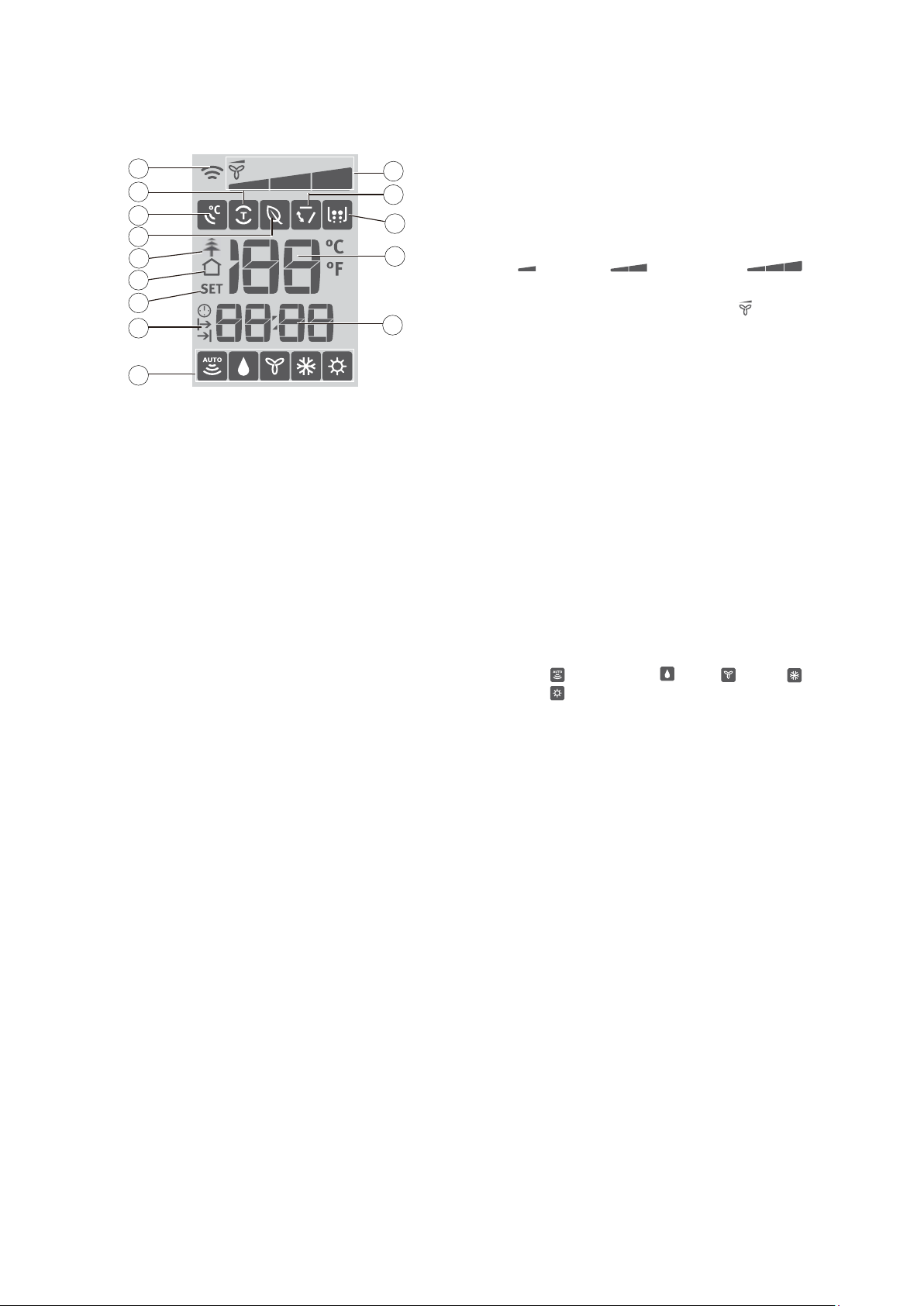
8 TIMER ON/OFF Display
Displays when the Timer On/Off function is activated.
9 FAN SPEED Display
Displays the selected fan speed in the following
LOW MEDIUM HIGH
and AUTO. In Auto speed, only the symbol
is displayed.
10 SWING Display
Displays when the function is selected.
11 X-FAN Display
Displays when the X-Fan function is activated by pressing
Turbo and Healthy buttons at the same time (for models
with active plasma function) or by pressing X-Fan button
(for models without active plasma function).
12 TEMPERATURE Display
Displays the room or set temperature in °C or ºF.
No display in Fan mode.
13 TIME Display
Displays the Clock time (must be set) and/or the on/off
time of the timer.
14 MODE Display
Displays the current operation mode, including
Auto (
), Dehumidify ( ), Fan ( ), Cool ( ) and
Heat (
).
NOTE: The Cool model does not offer a Heating option.
1
2
3
4
5
6
7
8
14
9
10
11
12
13
1 TRANSMISSION Indicator
Displays when the remote control transmits signals to the
indoor unit.
2 TURBO Display
Displays when TURBO function is active.
3 I FEEL Display
Displays when the I FEEL function is active.
4 ECO Display
Displays when ECO function is active.
5 ACTIVE PLASMA Display (Active Plasma models only)
Displays when function is selected. This
function is not available for this range of air conditioners.
6 Room Temperature Display
Displays when the temperature shown on the LCD
screen is room temperature. It can be switched on/off by
pressing the button.
7 Programmed TEMPERATURE Display
Lights up when the remote control displays the set
temperature. It can be switched on/off by pressing the
button.
Remote control display indicator
Kelvinator Air Conditioning Using the remote control 9
1 Ensure the unit is plugged in and power is available.
2 Be sure the batteries are inserted correctly in the remote
control (the lights on the remote control will be on).
3 Set the time with the CONTROL buttons and confirm by
pressing the CLOCK button.
4 Point the remote control at the indoor unit and press
ON/OFF button to turn the unit on.
The default operating mode is AUTO. Once you select
the operating mode with the remote control, the
memory. The next time the air conditioner will start
operating under the same conditions when you simply
push the ON/OFF button of the remote control.
tips and information
In case of a power cut, the unit being switched off at
the powerpoint, or when changing the remote control
batteries, the microprocessor will return to AUTO mode.
Using the remote control
Automatic operation
When you set the air conditioner to AUTO mode, it will
automatically select cooling, heating (only for reverse
cycle models), or fan only operation depending on which
temperature you have selected and the ambient room
temperature. Once you have selected the operating mode,
Thereafter, the air conditioner will start operating under the
same conditions when you simply push the ON/OFF button
on the remote control.
Start
Ensure the unit is plugged in and power is available.
The OPERATION indicator on the display panel of the
indoor unit starts flashing.
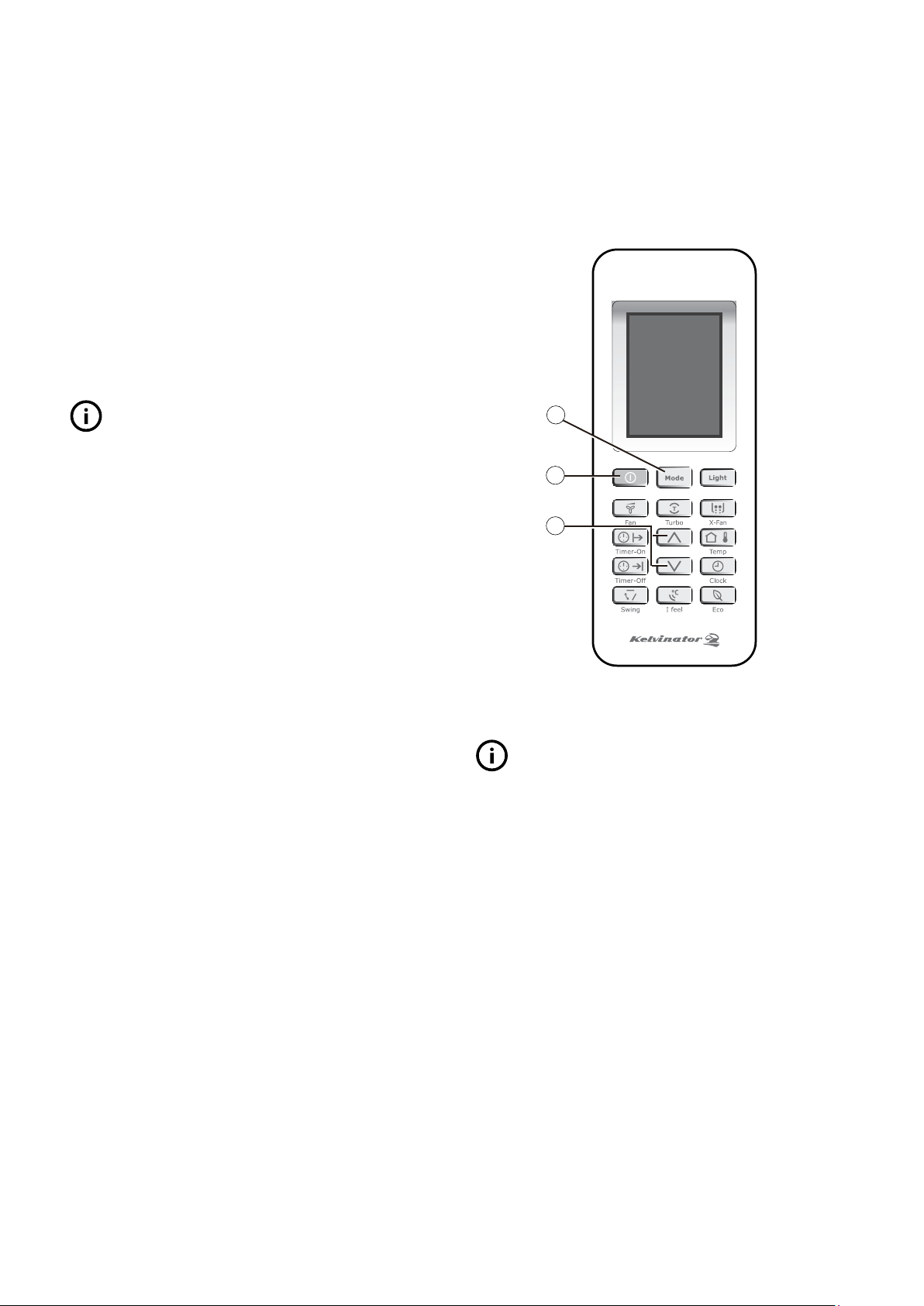
1 ON/OFF Button
Press this button to turn the air conditioner on.
The temperature indicator on the indoor unit display
lights up.
2 Button
Press to select AUTO.
3 CONTROL Buttons
Set the desired temperature (normally, set between 21ºC
to 28ºC). The air conditioner will begin functioning after
approximately 3 minutes.
Stop
1 ON/OFF Button
Press this button again to turn the air conditioner off. The
horizontal louvre returns to the closed position upon
shut down.
2
1
3
If the AUTO mode is not achieving the temperature you
tips and information
When the AUTO operating mode is selected, the fan speed
will be automatically controlled and cannot be set.
First use
10 Operating the air conditioner Kelvinator Air Conditioning
When you select the FAN operating mode the air conditioner
will recirculate the indoor air.
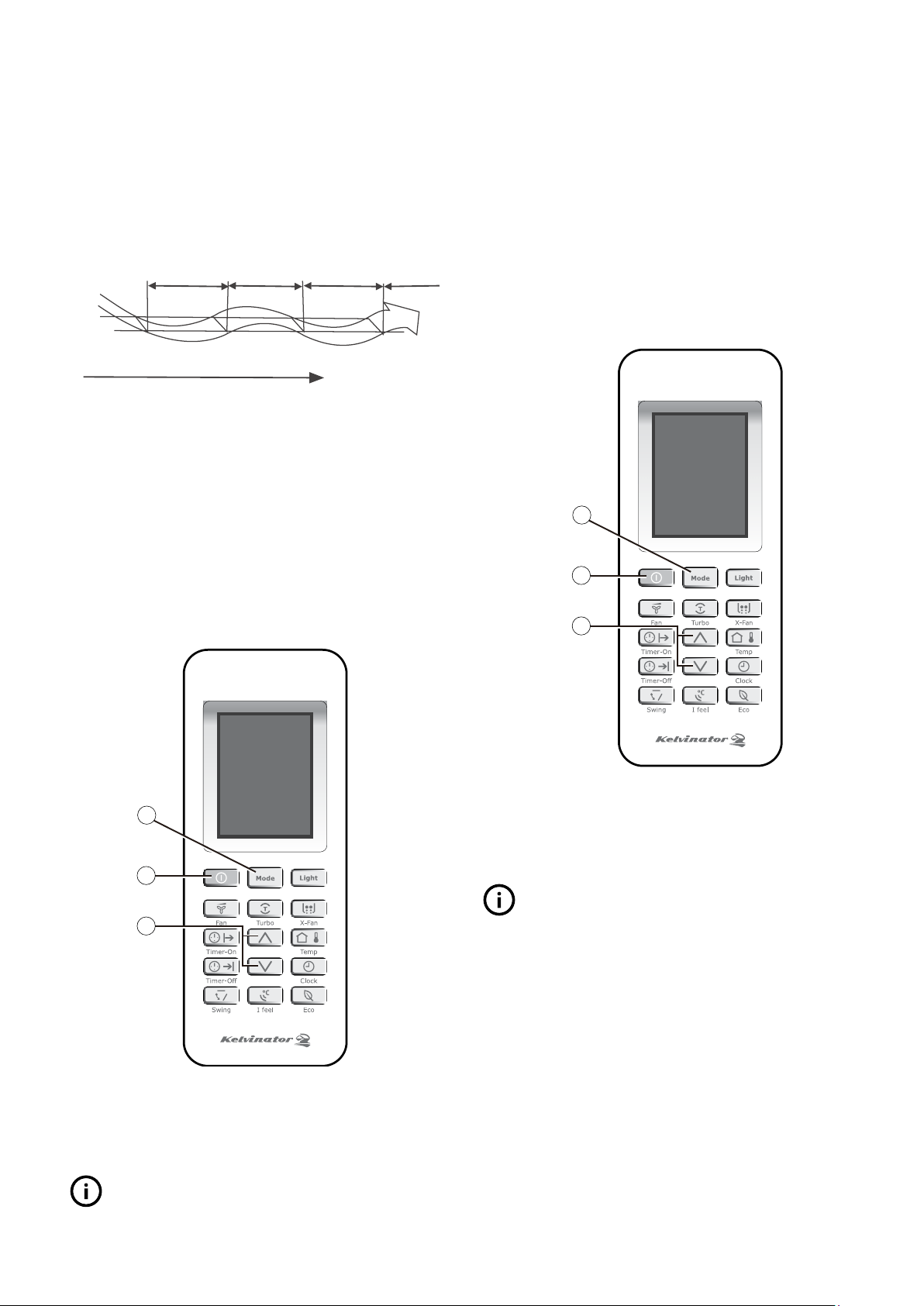
1 ON/OFF Button
Press this button to turn the air conditioner on. The
temperature indicator on the indoor unit display lights up.
2 Button
Press to select FAN.
3 FAN Button
2
1
3
Stop
1 ON/OFF Button
Press this button again to turn the air conditioner off. The
horizontal louvre returns to the closed position upon
shut down.
tips and information
The temperature cannot be set through the remote control
in FAN operating mode.
No fan speed indication displays on the remote control if
Auto fan speed is selected.
between the set temperature and the actual room temperature.
The temperature is regulated while dehumidifying through
off, or by turning the FAN only operation on or off.
fan cooling fan cooling
programmed temperature
time
Start
Ensure the unit is plugged in and power is available.
The OPERATION indicator on the display panel of the indoor
unit starts flashing.
1 ON/OFF Button
Press this button to turn the air conditioner on. The
temperature indicator on the indoor unit display lights up.
2 Button
3 CONTROL Buttons
Set the desired temperature (normally, set between
21ºC to 28ºC).
2
1
3
Stop
1 ON/OFF Button
Press this button again to turn the air conditioner off. The
horizontal louvre returns to the closed position upon
shut down.
tips and information
In DEHUMIDIFY mode the fan speed is fixed at Low, and
Turbo function can be used.
Dehumidifying operation Fan operation
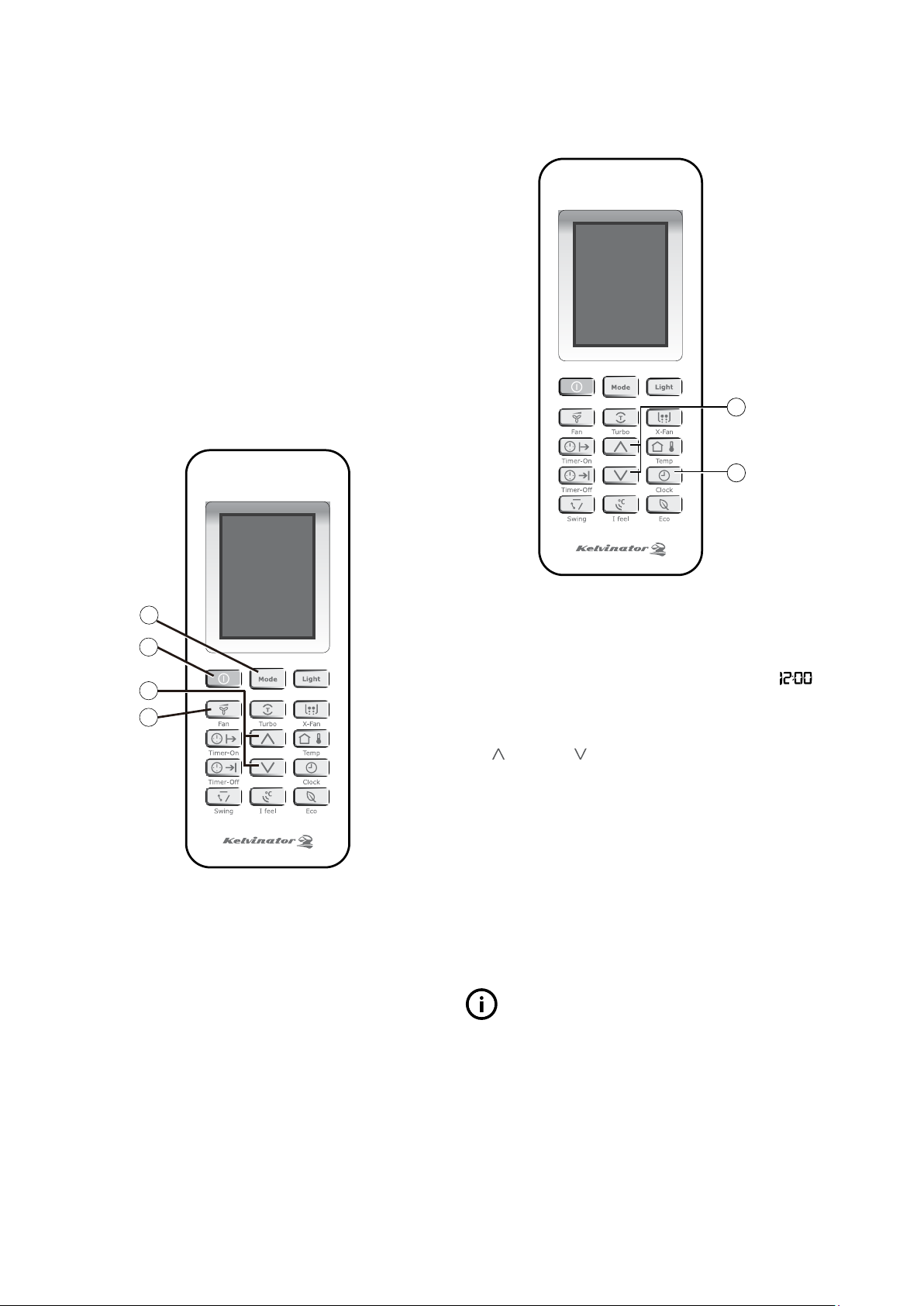
Kelvinator Air Conditioning Operating the air conditioner 11
1
2
Before you start operating the air conditioner, set the clock on
the remote control using the following instructions. The clock
panel on the remote control will display the time regardless of
whether the air conditioner is in operation or not.
After batteries are inserted in the remote control,
will
display and begin to flash.
1 CONTROL buttons
Set the desired time by pressing the CONTROL
Forward Backward
Each time you press the buttons the time will move
forward or backward by 1 minute. Holding the button
down will scroll more rapidly through the time display.
2 CLOCK Button
When the desired time is achieved, press the CLOCK
button again or after 5 seconds with no operation, the
clock time stops flashing and the clock is set.
3 Re-set the Clock
Press the CLOCK button and the clock display will start
to flash.
Follow step 1 and 2 to set the new time.
tips and information
• Theclocktimerusesa24hourclockmode.
• Thedefaulttimeforremotecontrolis12:00PMandit
will revert to this when the batteries are changed.
Start
Ensure the unit is plugged in and power is available.
The OPERATION indicator on the display panel of the indoor
unit starts flashing.
1 ON/OFF Button
Press this button to turn the air conditioner on. The
temperature indicator on the indoor display unit lights up.
2 Button
Press to select to COOL or HEAT (where applicable).
3 CONTROL Buttons
Set the desired temperature (normally, set between
21ºC to 28ºC).
4 FAN Button
AUTO, LOW,
and . The default fan speed is AUTO.
2
1
3
4
Stop
1 ON/OFF Button
Press this button again to turn the air conditioner off.
The horizontal louvre returns to the closed position upon
shut down.
Setting the clockCooling and heating operation
12 Operating the air conditioner Kelvinator Air Conditioning
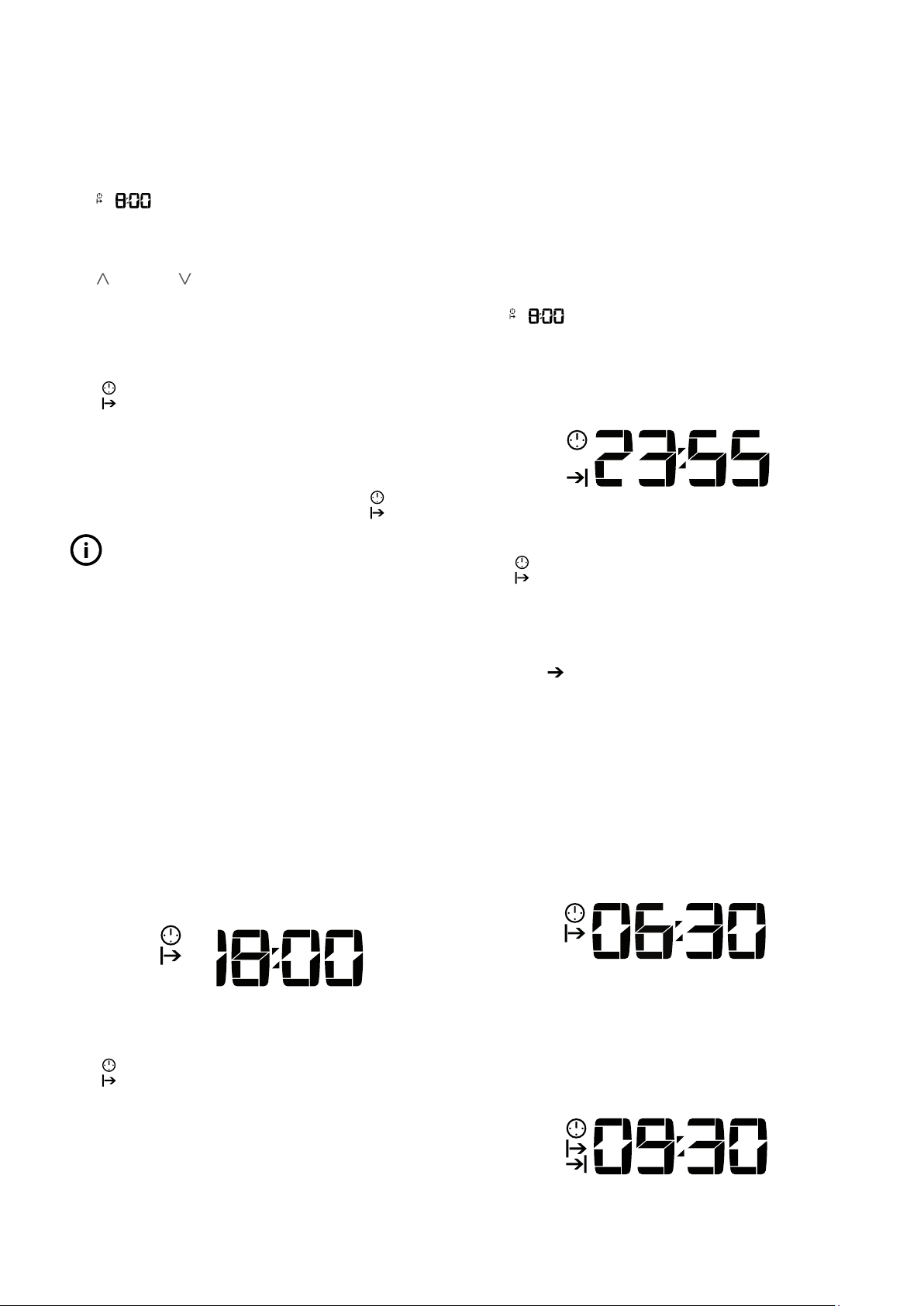
Timer-Off Operation (Timer Stop Operation)
This function is recommended when you want the unit to be
turned off automatically (e.g. bedtime). The air conditioner
will automatically stop operating at the set time.
Example: It is 6:00 PM and you want the air conditioner to
turn off at 11:55 PM.
will flash on the display of the remote control
the very first time the operation is used. With
2 Set the desired time by pressing repeatedly or holding
down the CONTROL
display of the remote control.
3 Confirm the set time by pointing the remote control at
the indoor unit and pressing the
button again.
symbol will stay on the remote control’s display.
The Timer indicator on the display panel of indoor unit
will be illuminated.
Combined Timer
Timer-On
Timer-Off
(Off-Start-Stop operation)
This function is recommended when you want to turn the air
conditioner on before waking up and turn it off after leaving
the house.
Example: It is 10:00 PM and you want to start the air
conditioner at 6:30 AM and stop it at 9:30 AM.
2 Set the desired time by pressing repeatedly or holding
down the CONTROL
display of the remote control.
3 Confirm the set time by pointing the remote control
at the indoor unit and pressing the button
again.
4 Press the button.
5 Set the desired time by pressing repeatedly or holding
down the CONTROL
display of the remote control.
Timer-On Operation
will flash on the display of the remote control
the very first time the operation is used. With
2 Set the desired time by pressing the CONTROL
Forward Backward
Each time you press the buttons, the time will move
forward or backward by 1 minute. Holding the button
down will scroll more rapidly through the time display.
3 Point the remote control to the indoor unit, confirm the
set time by pressing the button.
symbol will stay on the remote control’s display.
Check that the Timer indicator on the display panel of
indoor unit is illuminated.
Cancelling the Settings
Point the remote control at the indoor unit and press the
on the
remote control is turned off.
tips and information
• Thetimerfunctionsetbytheremotecontroldepends
on the clock time. Check that the clock on the remote
control is set correctly in order to prevent error.
• Theeffectiveoperationtimesetbytheremotecontrol
is limited to 24 hours.
Examples of Timer Settings
Timer-On Operation (Timer Start Operation)
This function is recommended when you want the unit to
be turned on automatically before returning home. The air
conditioner will automatically start operating at the set time.
Example: It is 8:00 AM and you want the air conditioner to
start working at 6:00 PM.
1 Press the button.
2 Set the desired time by pressing repeatedly or holding
down the CONTROL
display of the remote control.
3 Confirm the set time by pointing the remote control at
the indoor unit and pressing the
button again.
symbol will stay on the remote control’s display.
The Timer indicator on the display panel of indoor unit
will be illuminated.
Timer settings
Kelvinator Air Conditioning Operating the air conditioner 13
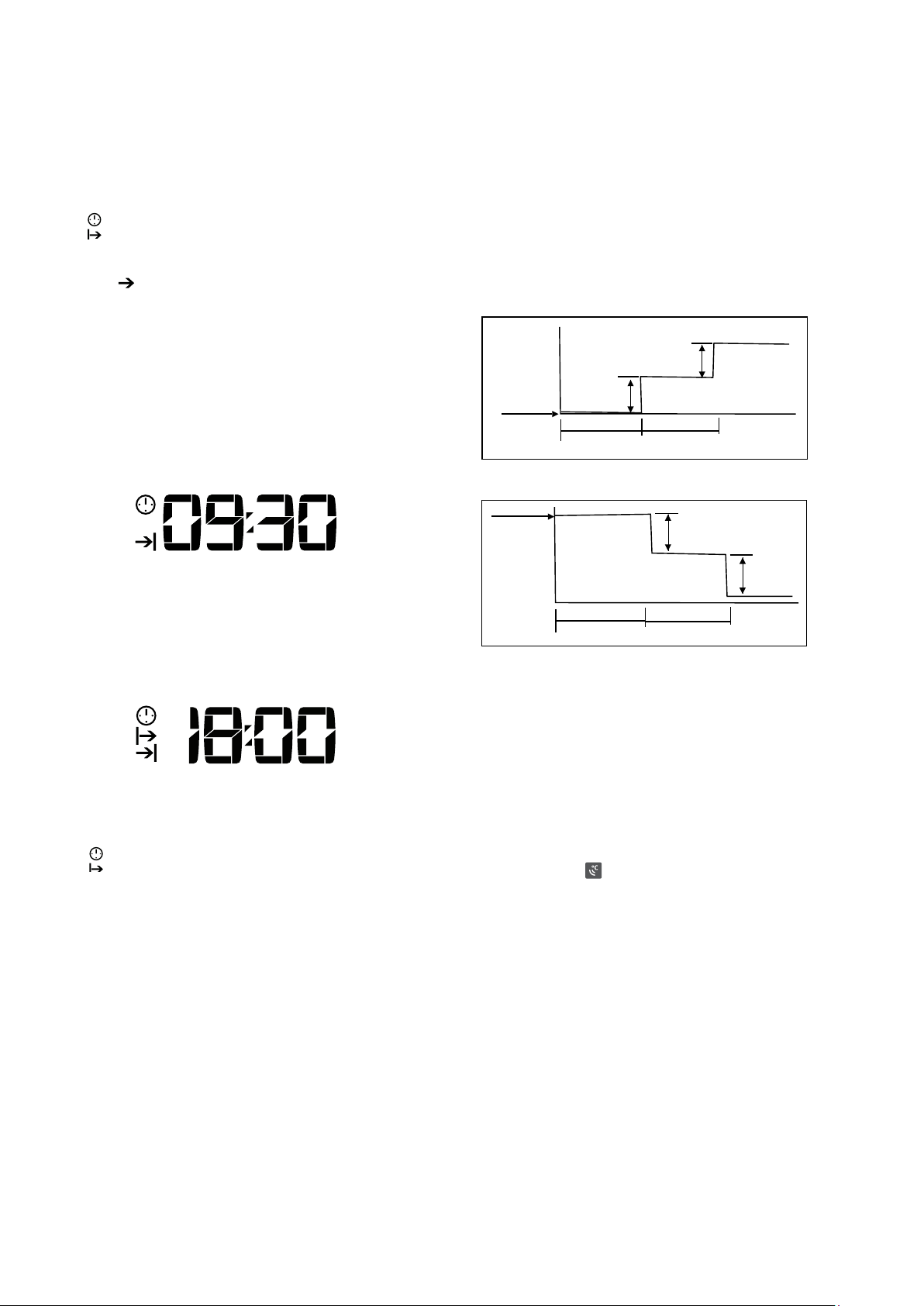
Press ECO button in COOL or HEAT (if applicable) mode, the
air conditioner will automatically increase (in COOL mode) or
decrease (in HEAT mode) 1ºC per hour for 2 hours. The set
temperature will be steady for the next 5 hours then the unit
will stop.
This function saves energy and is recommended for
maintaining a comfortable sleeping temperature.
1°C
1°C
1°C
1°C
Cooling
Heating
1 hour
1 hour
1 hour
1 hour
Set temp.
Set temp.
I FEEL function
When the I FEEL function is activated, the remote control
works as a remote thermostat, providing accurate
temperature control and maximum comfort.
Point the remote control to the indoor unit and press the
I FEEL button. A beep from the indoor unit confirms that this
function is activated.
The I FEEL symbol
will stay on the display of the remote
control until I FEEL button is pressed again.
The air conditioner will operate to reach the set temperature
at the location of the remote control.
The remote control sends the temperature information at its
location to the indoor unit every ten (10) minutes.
I FEEL operation if no
temperature information is received from the remote control
for eleven (11) successive minutes.
6 Confirm the set time by pointing the remote control at
the indoor unit and pressing the
button again.
symbol will stay on the remote control display and
the function is activated.
Timer-Off
Timer-On
(On-Stop-Start operation)
This function is recommended when you want to turn the air
conditioner off after going to bed and start it again before
waking up in the morning or returning home.
Example: It is 8:00 AM and you want to stop the air
conditioner at 9:30AM and restart at 6:00PM.
2 Set the desired time by pressing repeatedly or holding
of the remote control.
3 Confirm the set time by pointing the remote control at
the indoor unit and pressing the button
again.
4 Press the button.
5. Set the desired time by pressing repeatedly or holding
of the remote control.
6 Confirm the set time by pointing the remote control at
the indoor unit and pressing the
button again.
symbol will stay on the remote control’s display and
the function is activated.
Economy (Eco) operation
14 Operating the air conditioner Kelvinator Air Conditioning
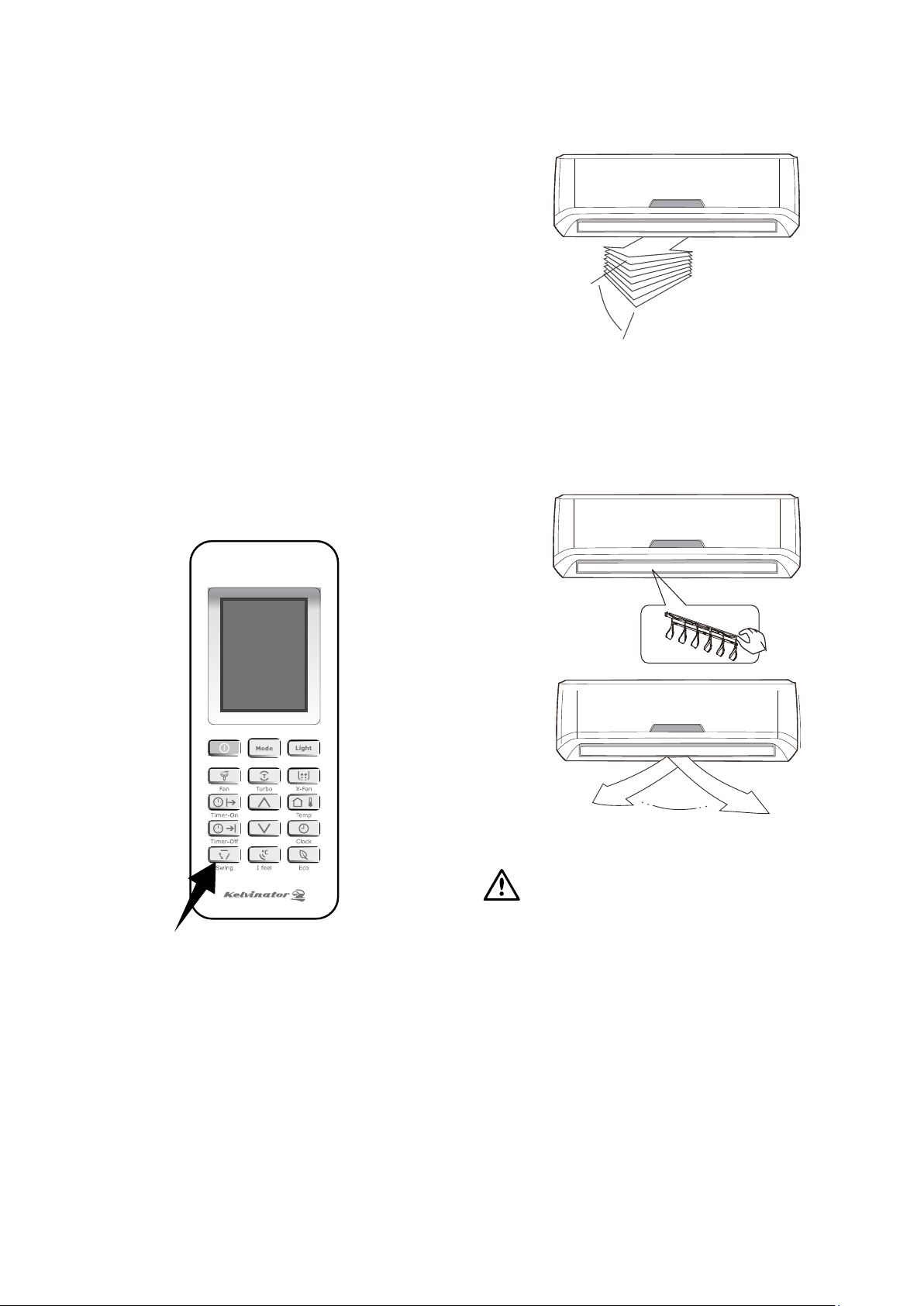
Range Up and down airflow
To adjust the horizontal (left/right) airflow
direction manually
turned off as fingers coming into contact with the fan
may be injured.
Right lever of the vertical louvre arm.
Vertical
louvre
Range
left and right airflow
caution
button will be disabled when the air
conditioner is not in operation (even if the Timer-On is set).
mode. Otherwise, condensation may form on the surface of
the horizontal louvre and drop onto the floor or furnishings.
cause a malfunction during operation. If the louvre
malfunctions, stop the air conditioner and restart it.
too small, as cooling or heating performance may be
affected by restricted airflow.
in closed position.
operation), the horizontal louvre may generate a sound
for 10 seconds, this is a normal part of the operation.
Additional options
1 Smart restart function
The air conditioner automatically resumes the previous
settings after a power failure.
2 Removable panel
The front panel of indoor unit can be easily removed for
cleaning and maintenance.
3 Self diagnosis and auto protection
This air conditioner can detect malfunctions, showing
the diagnosis on the display of the indoor unit with an
error code. The air conditioner will change operation
automatically for self-protection.
Airflow direction control
uneven room temperatures.
To set the vertical (up/down) airflow direction automatically
button on the remote control, the
horizontal louvre will swing up and down automatically.
button again and the louvre will stay where it is.
button again and the louvre will start
moving up and down automatically.
How to use the indoor unit
Kelvinator Air Conditioning Operating the air conditioner 15
Operating temperature ranges
Indoor side
DB/WB°C
Outdoor side
DB/WB°C
32/23 43/26
21/15 21/-
27/- 24/18
20/- -7/-8
The operating temperature range (outdoor temperature)
for cooling only model is 21ºC~43ºC, for reverse cycle (heat
pump) models is -7ºC~43ºC.
If the air conditioner is used outside of the above conditions,
certain control features may come into operation and cause
the unit to function abnormally.
Optimal Operation
at people or pets.
level. Do not adjust the unit to excessive temperature
levels.
mode, otherwise, product performance will be reduced.
control to select the desired time for start-up and
shut-down.
as it reduces the efficiency of the unit and may cause
damage to the air conditioner.
heating performance may be reduced.
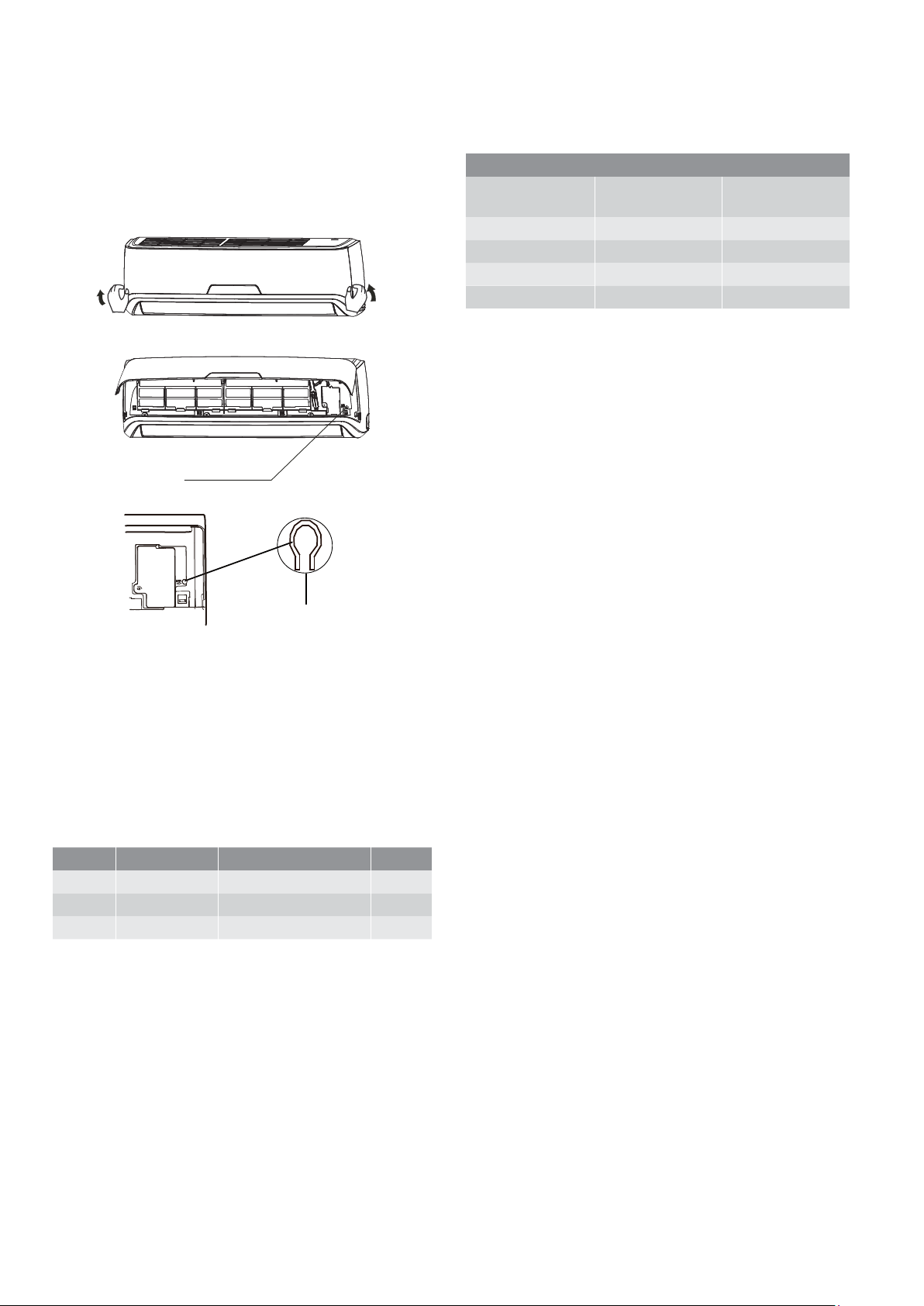
When the remote control is lost or fails to operate, please
use the manual switch on the indoor unit. The air conditioner
will operate in AUTO mode and the temperature setting or
fan speed cannot be changed.
manual control
button
manual control
button
mode. The air conditioner will select the mode COOL,
HEAT (heat pump model only) and FAN automatically
according to the room temperature for reaching the
best comfort.
conditioner off.
The operation mode is seen in the following table.
Mode Model Temperature setting Airflow
AUTO 25°C (COOL, FAN) AUTO
AUTO 25°C (COOL, FAN) AUTO
AUTO 20°C (HEAT ) AUTO
Emergency operation Operating Temperature
Kelvinator Air Conditioning
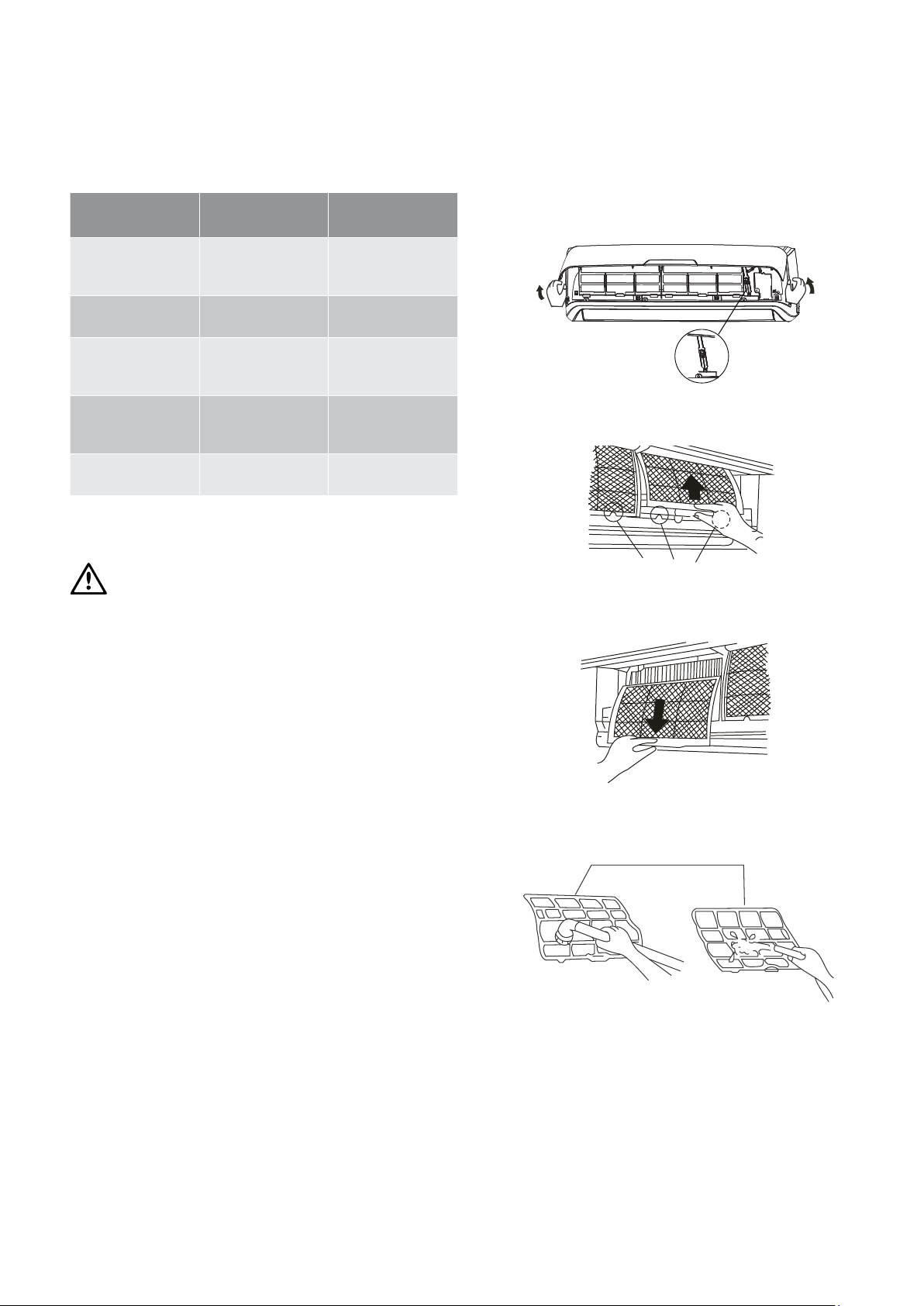
A clogged air filter reduces the cooling efficiency of this unit.
Please clean the filter every month or more often if necessary.
1 Lift the front panel of the indoor unit until it stops with
full support of the bracket.
panel
bracket
2 Hold the dust filter handle and lift it up slightly to take it
out of the filter holder.
dust filter handle
3 Pull the dust filter downwards out of the indoor unit.
Clean the dust filter with a vacuum cleaner or water, then
dry out of direct sunlight.
The following maintenance operations must be performed
regularly.
Item
Maintenance
operations
Recommended
frequency
Air filters Clean
Every month or
more often if
necessary
Air freshening filter
Change/replace
a new one
Every 4 months
Unit casing Clean
Every month or
more often if
necessary
Water tray and
evacuation piping
Clean and
check for
obstructions
Each season before
start up*
Indoor/outdoor coils Clean
Each season before
start up*
personnel only.
warning
Stop the air conditioner and disconnect the power supply
before cleaning.
Indoor unit and remote control cleaning
control.
indoor unit if it is extremely dirty.
cleaned with water then wiped with a dry cloth.
they may damage the unit.
the unit.
similar solvents for cleaning. These may cause the plastic
surface to crack or deform.
may cause deformation or discolouration.
NOTE: Supply power must be disconnected before cleaning
the indoor unit.
Maintenance Cleaning the filters
dust filter

Kelvinator Air Conditioning Cleaning the air filters 17
General maintenance
If the air conditioner is not going to be used for a long period
unit to completely dry out.
cleaning. Do not attempt to do this yourself. Contact
your dealer or service technician.
Checks before operation
conditioner has not been used for a long time.
warning
Do not touch the metal parts of the unit when removing the
filter. Injuries can occur when handling sharp metal edges.
Do not use water to clean inside the air conditioner.
Exposure to water can destroy the insulation, leading to
possible electric shock.
When cleaning the unit, first make sure that the power and
circuit breaker are turned off.
4 The healthy air freshening filters (if applicable) like Active
carbon filter / BIO filter / Vitamin C filter / Silver ion filter
are fixed on the dust filter.
Remove the healthy air filters from the support frame of
the dust filter.
Clean the healthy air filters at least every three (3) months
and replace every 6 months.
Clean with vacuum cleaner if possible.
5 Install the healthy air filters back in position.
6 Install the upper portion of the dust filters back into the
unit, taking care that the left and right edges line up
correctly and place dust filters into position.
dust filter
plasma filter

18 Operating tips Kelvinator Air Conditioning
Noises coming from the air conditioner
is running or has just stopped running. This is the sound
of the refrigerant flowing or coming to a stop.
compressor is running or just stopped running. This
is caused by heat expansion and cold contraction of
the plastic parts in the unit when the temperature is
changing.
original position when power is first turned on.
Dust is blown out from the indoor unit
not been used for a long time or during first use of
the unit.
A peculiar smell comes out from the indoor unit
permeated from building material, furniture or smoke.
The air conditioner turns to FAN only mode from COOL or
HEAT mode
the compressor will stop automatically, and the air
conditioner turns to FAN mode.
The compressor will start again when the indoor
temperature rises in COOL mode or falls in HEAT mode
to the set point.
Condensation
cooling or drying for a long time when the relative
humidity is more than 80% (with doors and windows
open).
Set the vertical louvre to its maximum angle (to the floor)
and High fan speed. Close the doors and windows.
Other interferences
Lightning or a car wireless telephone operating nearby may
cause the unit to malfunction. Disconnect the unit with power
and then re-connect the unit with power again. Push ON/
OFF button on the remote control to restart operation.
X-Fan function
The indoor unit may keep running after you switch off the
unit by pressing ON/OFF button. Please check whether
the X-Fan function is switched off.
Operating tips
The following events may occur during normal operation.
1 Protection of the air conditioner
Compressor protection
Anti-freezing
ambient temperature, frost may be formed on the
heat exchanger. When the indoor heat exchanger
temperature decreases below 0ºC, the compressor will
stop operation to protect the unit.
Defrosting
when the outdoor temperature is low but humidity is
high, resulting in low heating efficiency.
When this occurs, the air conditioner will stop heating
and start defrosting automatically. The defrosting time
may vary from 3 to 12 minutes.
During defrosting, the fan motors of the indoor unit
and outdoor unit will stop. The indoor indicator flashes
a malfunction. After defrosting is finished, the heating
operation will resume automatically.
Anti-cold air
5 minutes if the indoor heat exchanger does not reach a
1 Heating operation has just started.
2 Auto defrosting is just finished.
3 Heating at a low temperature.
This is in order to prevent cold air being blown into the
room.
Gentle breeze
1 In HEAT mode, the unit is turned on, the compressor
does not reach the starting condition.
2 In HEAT mode, the temperature reaches the set
value and the compressor stops running for
about 1 minute.
A white mist is coming out from the indoor unit
differences between air inlet and air outlet in COOL
mode in an indoor environment that has a high relative
humidity.
from defrosting process when the air conditioner restarts
in HEAT mode operation after defrosting.
Kelvinator Air Conditioning Troubleshooting 19
The pressure in the refrigeration system is low and could
result in the unit breaking down.
Ask a certified installer to adjust the pressure.
If the trouble has not been corrected, please contact a local
dealer or the nearest customer service centre. Be sure to
inform them of the detailed malfunctions and unit model.
The air conditioner is not user serviceable. Incorrect repair
may cause electric shock or fire.
Please contact an authorised service centre for professional
repair.
warning
If one of the following situations occur, immediately stop
the air conditioner, disconnect the power, and contact the
authorised service centre.
indoor unit.
flashing cannot be stopped by disconnecting the power
and then connecting it again.
Troubleshooting
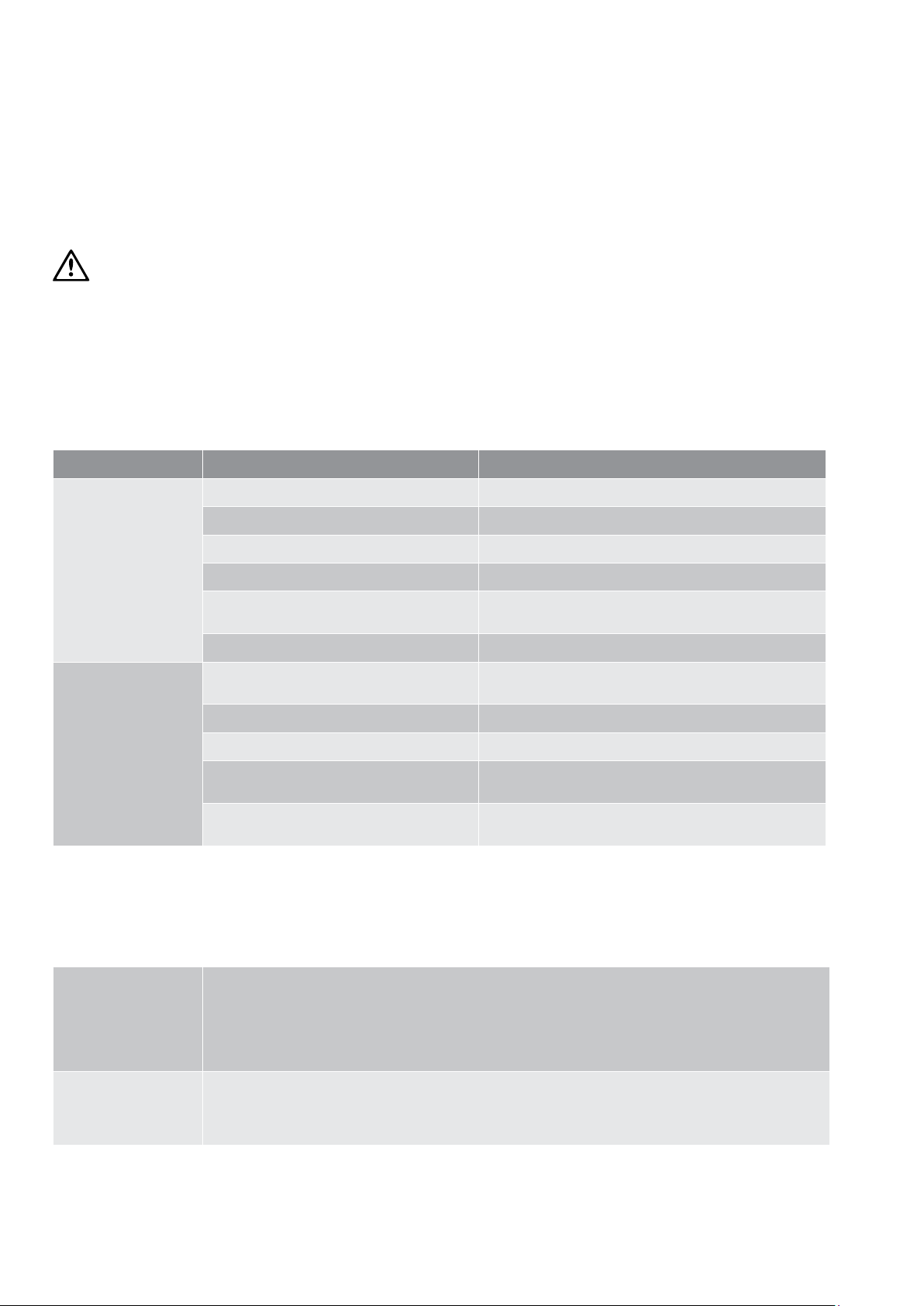
Problem Possible cause Solution
The unit does not start
Power cut Wait for power to be restored
The unit may have become unplugged Check that the plug is securely in wall receptacle
Fuse may have blown Replace the fuse
Voltage is too high or too low Have a Certified Electrician test the voltage
Batteries in remote control may have been
exhausted
Replace the batteries
The time you have set with timer is incorrect Wait or cancel timer setting
The unit does not
cool or heat (if
applicable) the room
very well while air
flows out from the
air conditioner
Inappropriate temperature setting
Set the temperature correctly. For details please refer to
Air filter is blocked Clean the air filter
Doors or windows are open Close the doors and windows
Air inlet or outlet of indoor or outdoor unit
has been blocked
Clear the obstructions away first, then restart the unit
been activated
Wait for 3 minutes
Normal function of the air conditioner
The following symptoms do not indicate air conditioner malfunction.
Air is not blown out
immediately in
heat mode
The unit is designed to not blow cold air on HEAT mode, when the indoor heat exchanger is in one of the
a) When heating has just started.
b) Defrosting.
c) Low temperature heating.
The indoor or outdoor fan stop running when defrosting (cooling and heating models only).
The unit turns to
Fan mode from
cool or heat mode
automatically
When the room temperature reaches the temperature setting on air conditioner, the compressor will stop
automatically, and the air conditioner turns to FAN only mode.
The compressor will start again when the room temperature rises on COOL mode or falls on HEAT mode
(for cooling & heating models only) to the set point.
20 Troubleshooting Kelvinator Air Conditioning
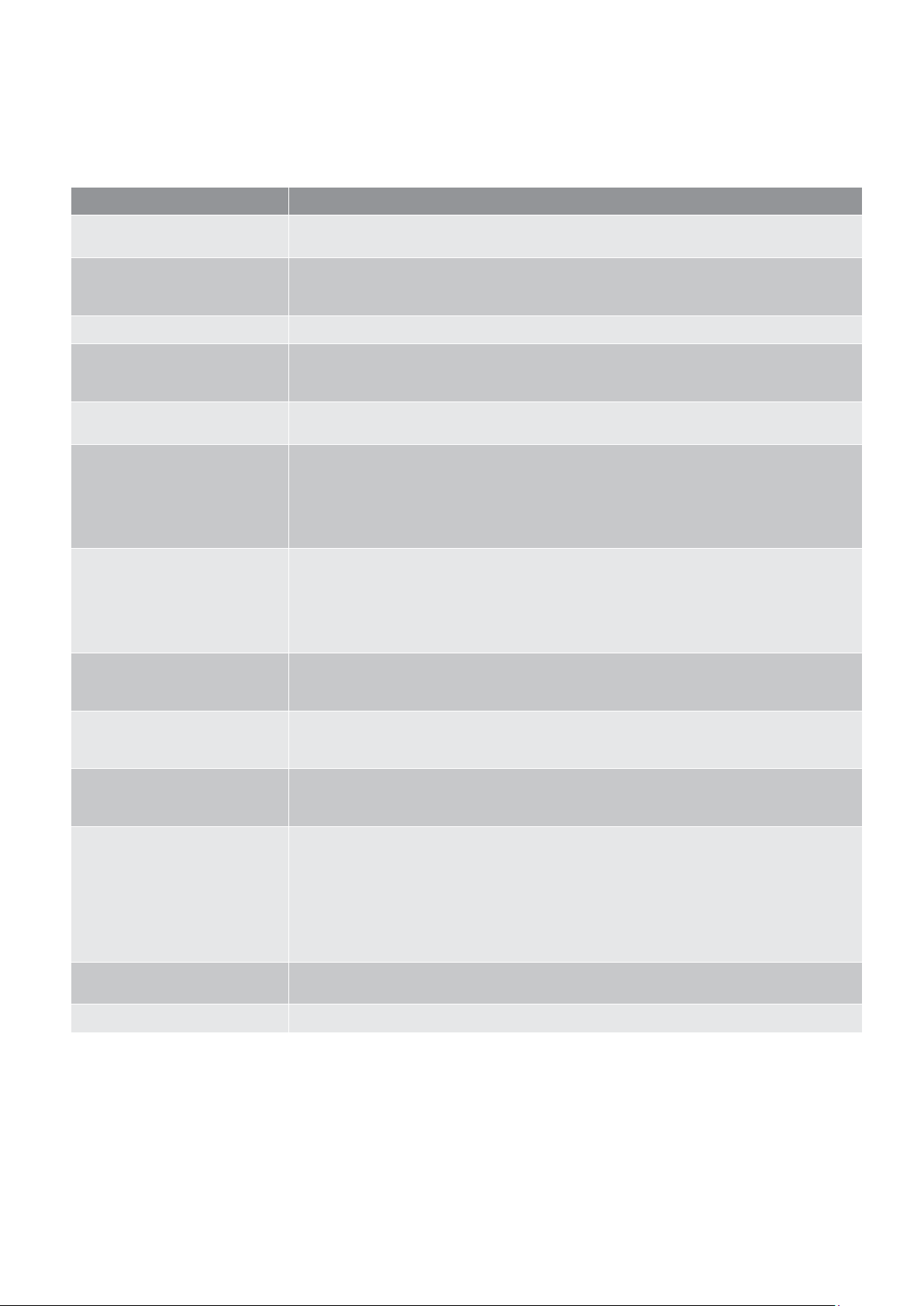
Troubleshooting
Problem Cause
The unit does not operate
The unit does not operate if it is turned on immediately after it is turned off. This is to protect the
unit compressor. Please wait for about 3 minutes before turning the unit on again.
Odours are emitted
Some odours may be emitted from the indoor unit. This is the result of room smells (such as
furniture, tobacco, etc) which have been taken into the unit.
Consult your authorised service centre for cleaning if the odours persist.
“Water flowing” noise
The swishing noise like water flowing is the refrigerant flowing inside the unit.
Mist is emitted in COOL mode
During cooling operation, a thin mist may be seen emitted from the indoor unit due to high room
temperature and humidity. After a period of time, the mist will disappear as the room temperature
and humidity decrease.
Cracking noise
This is the sound of friction caused by expansion and/or contraction of panel or other parts due to
the change of temperature.
The unit cannot be started up
Cooling/Heating effect is poor
Water leakage of indoor unit
Water leakage of outdoor unit
Noise from indoor unit
in the reverse direction.
Indoor unit cannot blow air
order to prevent cold air (within 2 minutes).
the outdoor and the indoor heat exchanger. The unit will defrost automatically and indoor unit
will stop blowing air for 2-3 minutes.
condensing water being vapourised again.
Moisture on the air outlet
If the unit operates at high humidity for a long time, moisture may be generated on the air outlet
grill and then drip off.
H1code:defrosting
This is normal. The unit is in defrosting operation and heating will recommence soon.
Please check the following prior to contacting your Electrolux Service Centre.
Kelvinator Air Conditioning Notes 21
Problem Cause
The unit does not operate
The unit does not operate if it is turned on immediately after it is turned off. This is to protect the
unit compressor. Please wait for about 3 minutes before turning the unit on again.
Odours are emitted
Some odours may be emitted from the indoor unit. This is the result of room smells (such as
furniture, tobacco, etc) which have been taken into the unit.
Consult your authorised service centre for cleaning if the odours persist.
“Water flowing” noise
The swishing noise like water flowing is the refrigerant flowing inside the unit.
Mist is emitted in COOL mode
During cooling operation, a thin mist may be seen emitted from the indoor unit due to high room
temperature and humidity. After a period of time, the mist will disappear as the room temperature
and humidity decrease.
Cracking noise
This is the sound of friction caused by expansion and/or contraction of panel or other parts due to
the change of temperature.
The unit cannot be started up
Cooling/Heating effect is poor
Water leakage of indoor unit
Water leakage of outdoor unit
Noise from indoor unit
in the reverse direction.
Indoor unit cannot blow air
order to prevent cold air (within 2 minutes).
the outdoor and the indoor heat exchanger. The unit will defrost automatically and indoor unit
will stop blowing air for 2-3 minutes.
condensing water being vapourised again.
Moisture on the air outlet
If the unit operates at high humidity for a long time, moisture may be generated on the air outlet
grill and then drip off.
H1code:defrosting
This is normal. The unit is in defrosting operation and heating will recommence soon.
Notes
22 Notes Kelvinator Air Conditioning
Notes
Kelvinator Air Conditioning Warranty 23
This document sets out the terms and conditions of the product
warranties for Electrolux Appliances. It is an important document.
Please keep it with your proof of purchase documents in a safe place
for future reference should you require service for your Appliance.
1. In this warranty:
(a) ‘acceptable quality’ as referred to in clause 10 of this warranty has the
same meaning referred to in the ACL;
(b) ‘ACL’ means Schedule 2 to the Competition and Consumer
Act 2010;
(c) ‘Appliance’ means any Electrolux product purchased by you and
accompanied by this document;
(d) ‘ASC’ means Electrolux authorised service centres;
(e) ‘Electrolux’ means Electrolux Home Products Pty Ltd of 163
O’Riordan Street, Mascot NSW 2020, ABN 51 004 762 341 in respect
of Appliances purchased in Australia and Electrolux (NZ) Limited
(collectively ‘Electrolux’) of 3-5 Niall Burgess Road, Mount Wellington,
in respect of Appliances purchased in New Zealand;
(f) ‘major failure’ as referred to in clause 10 of this warranty has the same
meaning referred to in the ACL and includes a situation when an
Appliance cannot be repaired or it is uneconomic for Electrolux,
at its discretion, to repair an Appliance during the Warranty Period;
(g) ‘Warranty Period’ means the Appliance is warranted against
manufacturing defects in Australia and New Zealand for the period of
60 months, subject to this warranty and to the customer meeting the
Warranty Condition.
(h) ‘Warranty Condition’ means:
(i) evidence by the customer that the Appliance was installed by a
licensed air conditioner installer in Australia and in accordance with
Electrolux installation guidelines as set out in the installation manual;
(ii) the Appliance rating is correct for the size and thermal
characteristics of the room;
(iii) the Appliance has been regularly maintained in accordance
with Electrolux guidelines set out in the user manual;
(iv) the Appliance is designed for providing human comfort and
should be used under ambient conditions as set out in the
productspecicationsandgeneralairqualityconditions.
(i) ‘you’ means the purchaser of the Appliance not having purchased
the Appliance for re-sale, and ‘your’ has a corresponding meaning.
2. This warranty only applies to Appliances purchased and used in Australia or
New Zealand in normal domestic appliactions and is in addition to (and does
not exclude, restrict, or modify in any way) any non-excludable statutory
warranties in Australia or New Zealand.
3. During the Warranty Period Electrolux or its ASC will, at no extra charge if
your Appliance is readily accessible for service, without special equipment
and subject to these terms and conditions, repair or replace any parts which
it considers to be defective. Electrolux or its ASC may use remanufactured
parts to repair your Appliance. You agree that any replaced Appliances or
parts become the property of Electrolux. This warranty does not apply to
lightglobes,batteries,ltersorsimilarperishableparts.
4. Parts and Appliances not supplied by Electrolux are not covered by
this warranty.
5. To the extent permitted by law, you will bear the cost of transportation,
travel and delivery of the Appliance to and from Electrolux or its ASC. If you
reside outside of the service area, you will bear the cost of:
(a) travel of an authorised representative;
(b) transportation and delivery of the Appliance to and from Electrolux
or its ASC.
In all instances, unless the Appliance is transported by Electrolux or an Electrolux
authorised representative, the Appliance is transported at the owner’s cost and
risk while in transit to and from Electrolux or its ASC.
6. Proof of purchase is required before you can make a claim under
this warranty.
7. You may not make a claim under this warranty unless the defect claimed is
due to faulty or defective parts or workmanship. Electrolux is not liable in the
following situations (which are not exhaustive):
(a) the Appliance is damaged by:
(i) accident
(ii) misuse or abuse, including failure to properly maintain or service
(iii) normal wear and tear
(iv) power surges, electrical storm damage or incorrect power supply
(v) incomplete or improper installation
(vi) incorrect, improper or inappropriate operation
(vii) insect or vermin infestation
(viii) failure to comply with any additional instructions supplied with the
Appliance;
(b) theApplianceismodiedwithoutauthorityfromElectroluxinwriting;
(c) the Appliance’s serial number or warranty seal has been removed
or defaced;
(d) the Appliance was serviced or repaired by anyone other than Electrolux,
an authorised repairer or ASC.
8. This warranty, the contract to which it relates and the relationship between
you and Electrolux are governed by the law applicable where the Appliance
was purchased. Where the Appliance was purchased in New Zealand for
commercial purposes the Consumer Guarantee Act does not apply.
9. To the extent permitted by law and subject to your non-excludable
statutory rights and warranties, Electrolux excludes all warranties and
liabilities (other than as contained in this document) including liability for any
loss or damage whether direct or indirect arising from your purchase, use or
non use of the Appliance.
10. For Appliances and services provided by Electrolux in Australia, the
Appliances come with a guarantee by Electrolux that cannot be excluded
under the ACL. You are entitled to a replacement or refund for a major failure
and for compensation for any other reasonably foreseeable loss or damage.
You are also entitled to have the Appliance repaired or replaced if the
Appliance fails to be of acceptable quality and the failure does not amount
toamajorfailure.Thebenetstoyougivenbythiswarrantyareinaddition
to your other rights and remedies under a law in relation to the Appliances or
services to which the warranty relates.
11. At all times during the Warranty Period, Electrolux shall, at its discretion,
determine whether repair, replacement or refund will apply if an Appliance
has a valid warranty claim applicable to it.
12. For Appliances and services provided by Electrolux in New Zealand, the
Appliances come with a guarantee by Electrolux pursuant to the provisions
of the Consumer Guarantees Act, the Sale of Goods Act and the Fair
Trading Act.
13. To enquire about claiming under this warranty, please follow these steps:
(a) carefully check the operating instructions, user manual and the terms of
this warranty;
(b) have the model and serial number of the Appliance available;
(c) have the proof of purchase (e.g. an invoice) available;
(d) telephone the numbers shown below.
14. You accept that if you make a warranty claim, Electrolux and its ASC may
exchange information in relation to you to enable Electrolux to meet its
obligations under this warranty.
Warranty
FOR SALES IN AUSTRALIA AND NEW ZEALAND
APPLIANCE: KELVINATOR SPLIT SYSTEM AIR CONDITIONER
Important Notice
Before calling for service, please ensure that the steps listed in clause 13 above have been followed.
FOR SERVICE
ortondtheaddressofyournearest
state service centre in Australia
PLEASE CALL 13 13 49
For the cost of a local call (Australia only)
SERVICE AUSTRALIA
ELECTROLUX HOME PRODUCTS
www.electrolux.com.au
FOR SPARE PARTS
ortondtheaddressofyournearest
state spare parts centre in Australia
PLEASE CALL 13 13 50
For the cost of a local call (Australia only)
FOR SERVICE
ortondtheaddressofyournearest
authorised service centre in New Zealand
FREE CALL 0800 10 66 10
(New Zealand only)
SERVICE NEW ZEALAND
ELECTROLUX (NZ) Limited
www.electrolux.co.nz
FOR SPARE PARTS
ortondtheaddressofyournearest
state spare parts centre in New Zealand
FREE CALL 0800 10 66 20
(New Zealand only)
KSSAC_Warr_Aug13
© 2013 Electrolux Home Products Pty Ltd ABN 51 004 762 341
If you’d like further information about Kelvinator
appliances, please visit your retailer, phone or email
our Customer Care team or visit our website.
Kelvinator. We are part of the Electrolux family.
Share more of our thinking at www.electrolux.com.au