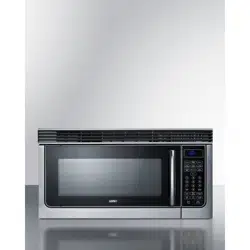
USER GUIDE
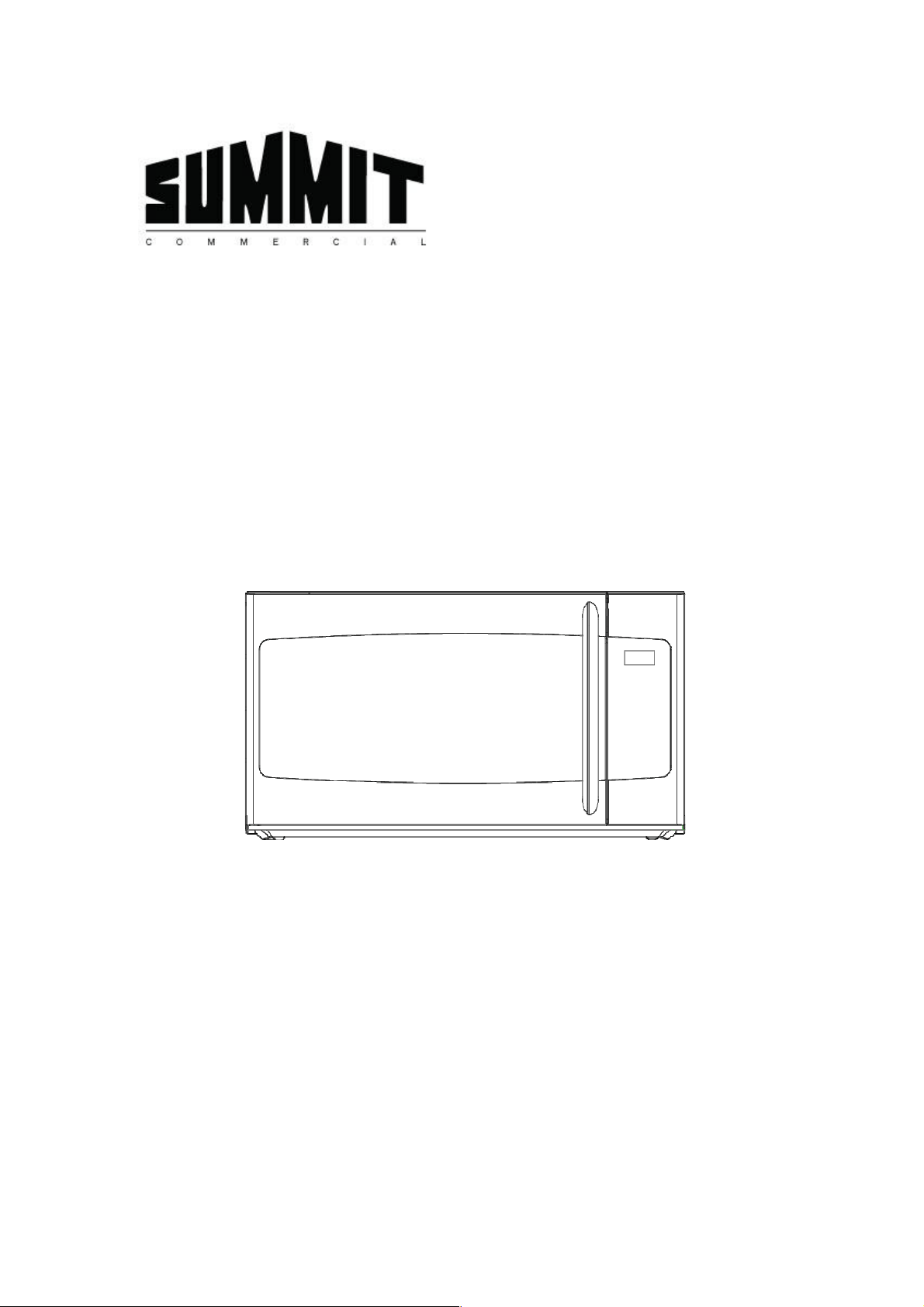
1.6Cu.Ft. Oven-the-Range Microwave
MODEL:OTRSS301
Please read these instructions carefully before installing and operating the oven.
Felix Storch, Inc.
Summit Appliance Division
770 Garrison Avenue
Bronx, New York 10474
www.summitappliance.com
An ISO 9001:2015 registered company
1
CONTENTS
IMPORTANT SAFETY INSTRUCTIONS ...................................................................................... 2
PRECAUTIONS TO AVOID POSSIBLE EXPOSURE TO EXCESSIVE MICROWAVE ENERGY ......... 4
UNPACKING INSTRUCTIONS ................................................................................................... 4
GROUNDING INSTRUCTIONS ................................................................................................. 5
INFORMATION YOU NEED TO KNOW .................................................................................... 6
SPECIFICATIONS ................................................................................................................... 10
FEATURES DIAGRAM ............................................................................................................ 11
CONTROL PANEL FEATURES ................................................................................................. 12
BASIC CONTROLS .................................................................................................................. 14
Funcon descripon: .................................................................................................... 14
Seng the Clock ........................................................................................................... 14
Seng Microwave cooking program ............................................................................ 14
Mul stage cooking ....................................................................................................... 15
Light Control .................................................................................................................. 15
Vent Fan Control ........................................................................................................... 15
SPECIAL FEATURES ............................................................................................................... 16
Auto cook menu ............................................................................................................ 16
Kids Meals ..................................................................................................................... 17
Weight Defrost .............................................................................................................. 18
1Lb Defrost .................................................................................................................... 18
Time Defrost .................................................................................................................. 18
OTHER CONVENIENT FEATURES .......................................................................................... 19
Add 30Sec ...................................................................................................................... 19
Seng the Time ............................................................................................................ 19
Eco Mode ...................................................................................................................... 19
Child Lock ...................................................................................................................... 19
CLEANING AND MAINTENANCE.......................................................................................... 20
LIMITED WARRANTY.............................................................................................................23
2
When using electrical appliances, basic safety precauons should be followed, including the following:
WARNING - To reduce the risk of burns, electric shock, fire, and injury to persons or exposure to
excessive microwave energy:
Read all instrucons before using the appliance.
Read and follow the specific "PRECAUTIONS TO AVOID POSSIBLE EXPOSURE TO EXCESSIVE
MICROWAVE ENERGY" on page 4.
This appliance must be grounded. Connect only to properly grounded outlet. See "GROUNDING
INSTRUCTIONS” on page 5.
Install or locate this appliance only in accordance with the provided installaon instrucons.
Some products such as whole eggs and sealed containers -for example, closed glass jars- are able
to explode and should not be heated in this oven.
Use this appliance only for its intended use as described in this manual. Do not use corrosive
chemicals or vapors in this appliance. This type of oven is specifically designed to heat, cook, or
dry food. It is not designed for industrial or laboratory use.
As with any appliance, close supervision is necessary when used by children.
To reduce the risk of fire in the oven cavity:
- Do not overcook food. Carefully aend appliance when paper, plasc, or other combusble
materials are placed inside the oven to facilitate cooking.
- Remove wire twist-es from paper or plasc bags before placing bag in oven.
- If materials inside the oven should ignite, keep oven door closed, turn oven off, and
disconnect the power cord or shut off power at the fuse or circuit breaker panel.
- Do not use the cavity for storage purposes. Do not leave paper products, cooking utensils or
food in the cavity when not in use.
Liquids, such as water, coffee, or tea can be overheated beyond the boiling point without
appearing to be boiling due to surface tension of the liquid. Visible bubbling or boiling when the
container is removed from the microwave oven is not always present. THIS COULD RESULT IN
VERY HOT LIQUIDS SUDDENLY BOILING OVER WHEN A SPOON OR OTHER UTENSIL IS INSERTED
INTO THE LIQUID. To reduce the risk of injury:
- Do not overheat the liquid.
- Sr the liquid both before and halfway through heang it.
- Do not use straight-sided containers with narrow necks.
- Aer heang, allow the container to stand in the microwave oven for a short me before
removing the container.
- Use extreme care when inserng a spoon or other utensil into the container.
Do not heat oil or fat for deep-frying. It is difficult to control the temperature of oil in microwave
ovens.
Pierce foods with heavy skins such as potatoes, whole squash, apples and chestnuts before
cooking.
The contents of feeding boles and baby jars should be srred or shaken and the temperature
IMPORTANT SAFETY INSTRUCTIONS
3
should be checked before serving in order to avoid burns.
Cooking utensils may become hot because of heat transferred from the heated food. Potholders
may be needed to handle the utensil.
Do not cover or block any openings on the appliance.
Do not store or use this appliance outdoors. Do not use this product near water, for example,
near a kitchen sink, in a wet basement, near a swimming pool, or similar locaons.
Do not operate this appliance if it has a damaged cord or a plug, if it is not working properly or if it
has been damaged or dropped.
Do not immerse cord or plug in water. Keep cord away from heated surface. Do not let cord hang
over edge of table or counter.
Use only thermometers, that
are specifically designed for use in microwave ovens.
Do not operate any heang or cooking appliance beneath this appliance.
Be certain the glass tray and roller rings are in place when you operate the oven
This appliance should be serviced only by qualified service personnel, contact nearest authorized
service facility for examinaon, repair, or adjustment.
When cleaning surfaces of door and oven that come together on closing the door, use only mild,
nonabrasive soaps, or detergents applied with a sponge or so cloth.
VENTILATING HOODS
- Clean Venlang Hoods Frequently-Grease should not be allowed to accumulate on hood or
filter.
- When flaming foods under the hood, turn the fan on.
Use care when cleaning the vent-hood filter. Corrosive cleaning agents, such as lye-based oven
cleaners, may damage the filter.
Suitable for use above both gas and electric cooking equipment.
This equipment generates, uses and can radiate radio frequency energy and, if not installed and
used in accordance with the instrucons, may cause harmful interference to radio
communicaons. However, there is no guarantee that interference will not occur in a parcular
installaon. If this equipment does cause harmful interference to radio or television recepon,
which can be determined by turning the equipment off and on, the user is encouraged to try to
correct the interference by one or more of the following measures:
- Reorient or relocate the receiving antenna.
- Increase the separaon between the equipment and receiver.
- Connect the equipment into an outlet on a circuit different from that to which the receiver is
connected.
- Consult the dealer or an experienced radio/TV technician for help.
SAVE THESE INSTRUCTIONS
4
(a) Donotattempttooperatethisovenwiththedooropensinceopen‐dooroperationcanresultin
harmfulexposuretomicrowaveenergy.Itisimportantnottodefeatortamperwiththesafety
interlocks.
(b) Do not place any object between the oven front face and the door or
allow soil or cleaner
residuetoaccumulateonsealingsurfaces.
(c) Donotoperatetheovenifitisdamaged.Itisparticularlyimportantthatthe oven door close
properlyandthatthereisnodamagetothe:
① Door(bent),
② Hingesandlatches(brokenorloosened),
③ Doorsealsand
sealingsurfaces.
(d) The oven should not be adjusted or repaired by anyone except properly qualified service
personnel.
UnpackingandExaminingYourOven
Carefullyremoveovenfromcarton.SAVETHECARTONASITMAYMAKEINSTALLATIONEASIER.
Remove:
1. Allpackingmaterialsfrominsidetheovencavity;however,DONOTREMOVETHEWAVEGUIDE
COVER,whichislocatedontheceilingintheovencavity.ChecktoseethatthereareInstallation
Instructions,WallTemplate,TopCabinetTem plate,bagofInstallationHardware,CharcoalFilter
andExhaustDamperAssembly.Readenclosuresand
SAVEtheOwner’ sInstructions.
2. Thefeaturestickerfromtheoutsideofthedoor,ifthereisone.
Check the oven for any damage, such as misaligned or bent door, damaged door seals and sealing
surfaces,brokenorloosedoorhingesandlatchesanddentsinsidethecavityoronthedoor.Ifthereis
any
damage,donotoperatetheovenandcontactyourdealer.
SeeInstallationInstructionformoredetails.
PRECAUTIONSTOAVOIDPOSSIBLEEXPOSURE
TOEXCESSIVEMICROWAVEENERGY
UNPACKINGINSTRUCTIONS
5
This appliance must be grounded. In the event of an electrical short circuit, grounding reduces the risk
of electric shock by providing an escape wire for the electric current. This appliance is equipped with a
cord having a grounding wire with a grounding plug. The plug must be plugged into an outlet that is
properly installed and grounded.
WARNING- Improper use of the grounding plug can result in a risk of electric shock.
Consult a qualified electrician or serviceman if the grounding instrucons are not completely
understood or if doubt exists as to whether the appliance is properly grounded. If it is necessary to use
an extension cord, use only a 3-wire extension cord that has a 3-blade grounding plug, and a 3-slot
receptacle that will accept the plug on the appliance. The marked rang of the extension
cord shall be
equal to or greater than the electrical rang of the appliance.
Electrical Requirements
The electrical requirements are a 120 volt 60 Hz, AC only, 20 amp. It is recommended that a separate
circuit serving only the oven be provided. The oven is equipped with a 3-prong grounding plug. It must
be plugged into a wall receptacle that is properly installed and grounded.
Power Supply Cord
1. A short power supply cord is provided to reduce the risks resulng from becoming entangled in or
tripping over a longer cord.
2. Longer cord sets or extension cords are available and may be used if care is exercised in their use.
3. If long cord or extension cord is used:
a) The marked electrical rang of the cord set or extension cord should be at least as great as
the electrical rang of
the appliance.
b) The extension cord must be a grounding-type 3-wire cord, and The longer cord should be
arranged so that it will not drape over the counter top or table top where it can be pulled on
by children or tripped over unintenonally.
NOTES:
1. If you have any quesons about the grounding or electrical instrucons, consult a qualified
electrician or service person.
2. Neither Summit nor the dealer can accept any liability for damage to the oven or personal injury
resulng from failure to observe the electrical connecon procedures.
Radio or TV Interference
Should there be any interference caused by the microwave oven to your radio or TV, check that the
microwave oven is on a different circuit, relocate the radio or TV as far away from the oven as feasible
or check posion and signal of receiving antenna.
GROUNDING INSTRUCTIONS
6
ABOUTYOUROVEN
NEVERusetheovenwithouttheturntableandsupportnorturntheturntableoversothatalargedish
couldbeplacedintheoven.Theturntablewillturnbothclockwiseandanticlockwise.
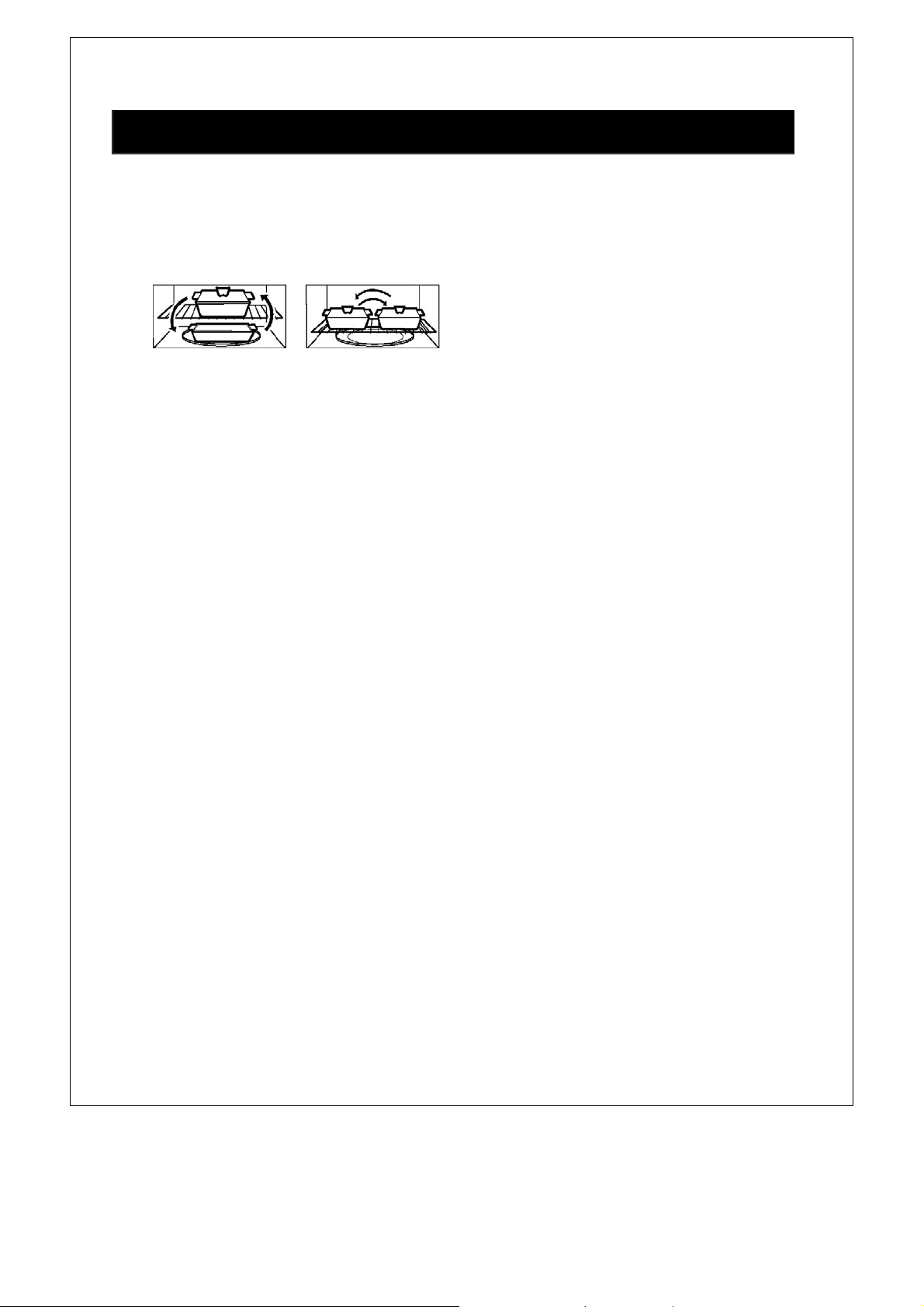
Theshelfgivesyoutheoptiontoreheatmorethanonedishoffoodatthesametime.
Toreheaton2
levels:
y Switchplacesafter½thetime.
y Makesuretheshelfispositionedproperlyinsidethemicrowavetopreventdamagetotheoven
fromarcing.
y Donotuseamicrowavebrowningdishontheshelf.Theshelfcouldoverheat.
y Donotusetheovenwiththeshelf
onthemicrowavefloor.Thiscoulddamagethemicrowave.
y Usepotholderswhenhandlingtheshelf‐itmaybehot.
y Donotusetheshelfwhencookingpopcorn.
ALWAYShavefoodintheovenwhenitisontoabsorbthemicrowaveenergy.
Whenusingtheovenatpower
levelsbelow100%,youmayhearthemagnetroncyclingonandoff.
Condensation is a normal part of microwave cooking. Room humidity and the moisture in food will
influencetheamountofmoisturethatcondensesintheoven.Generally,coveredfoodswillnotcause
asmuchcondensationasuncoveredones.
Ventilationopeningsmustnotbeblocked.
Inusingrecipesorpackagedirections,checkfoodaminuteortwobeforetheminimumtimeandadd
timeaccordingly.
ABOUTMICROWAVECOOKING
Arrangefoodcarefully.Placethickestareastowardsoutsideofdish.
y
Watchcookingtime.Cookfortheshortest
amountoftimeindicatedandaddmoreasneeded.
Foodseverelyovercookedcansmokeorignite.
y Coverfoodswhilecooking.Checkrecipeorcookbookforsuggestions:papertowels,waxpaper,
microwaveplasticwraporalid.Coverspreventspatteringandhelpfoodstocookevenly.
y Shield with small flat
pieces of aluminum foil any thin areas of meat or poultry to prevent
overcookingbeforedense,thickareasarecookedthoroughly.
y Stirfoodsfromoutsidetocenterofdishonceortwiceduringcooking,ifpossible.
y Turn foods over once during microwaving to speed cooking of such foods
as chicken and
hamburgers.Largeitemslikeroastsmustbeturnedoveratleastonce.
y Rearrangefoodssuchasmeatballshalfwaythroughcookingbothfromtoptobottomandfrom
thecenterofthedishtotheoutside.
y Add standing time. Remove food from oven and stir, if possible.
Cover for standing time that
allowsthefoodtofinishcookingwithoutovercooking.
y Checkfordoneness.Lookforsignsindicatingthatcookingtemperatureshavebeenreached.
y Donenesssignsinclude:
INFORMATIONYOUNEEDTOKNOW
7
- Food steams throughout, not just at edge.
- Center boom of dish is very hot to the touch.
- Poultry thigh joins move easily.
- Meat and poultry show no pinkness.
- Fish is opaque and flakes easily with a fork.
ABOUT FOOD
FOOD DO DON’T
Eggs,
sausages,
fruits &
vegetable
Puncture egg yolks before cooking to
prevent “explosion”.
Pierce skins of potatoes, apples, squash,
hot dogs and sausages so that steam
escapes.
Cook egg in shells.
Reheat whole eggs.
Popcorn
Use specially bagged popcorn for the
microwave oven.
Listen while popping corn for the
popping to slow to 1 or 2 seconds or
use special Popcorn pad.
Pop popcorn in regular
brown bags or glass bowls.
Exceed maximum me on
popcorn package.
Baby food
Transfer baby food to small dish and
heat carefully, srring oen. Check
temperature before serving.
Put nipples on boles aer heang and
shake thoroughly. “Wrist” test before
feeding.
Heat disposable boles.
Heat boles with nipples on.
Heat baby food in original
jars.
General
Cut baked goods with filling aer
heang to release steam and avoid
burns.
Sr liquids briskly before and aer
heang to avoid “erupon”.
Use deep bowl, when cooking liquids or
cereals, to prevent boilovers.
Heat or cook in closed glass
jars or airght containers.
Heat cans in the microwave as
harmful bacteria may not be
destroyed.
Deep fat fry.
Dry wood, gourds, herbs or
wet papers.
8
ABOUT SAFETY
Check foods to see that they are cooked to the following recommended temperatures.
TEMP FOOD
160℉
...for fresh pork, ground meat, boneless white poultry, fish, seafood, egg dishes and
frozen prepared food.
165℉
…for leover, ready-to-reheat refrigerated, and deli and carry-out “fresh” food.
170℉ …white meat of poultry.
180℉ …dark meat of poultry.
To test for doneness, insert a meat thermometer in a thick or dense area away from fat or bone.
NEVER leave the thermometer in the food during cooking, unless it is approved for microwave
oven use.
ALWAYS use potholders to prevent burns when handling utensils that are in contact with hot
food. Enough heat from the food can transfer through utensils to cause skin burns.
Avoid steam burns by direcng steam away from the face and hands. Slowly li the farthest edge
of a dish’s covering and carefully open popcorn and oven cooking bags away from the face.
Stay near the oven while it’s in use and check cooking progress frequently so that there is no
chance of overcooking food.
NEVER use the cavity for storing cookbooks or other items.
Select, store and handle food carefully to preserve its high quality and minimize the spread of
food borne bacteria.
Keep waveguide cover clean. Food residue can cause arcing and/or fires.
Use care when removing items from the oven so that utensil, your clothes or accessories do not
touch the safety door latches.
ABOUT UTENSILS AND COVERINGS
It is not necessary to buy all new cookware. Many pieces already in your kitchen can be used
successfully in your new microwave oven. Make sure the utensil does not touch the interior walls
during cooking.
9
Use these utensils for safe microwave cooking and reheang
glass ceramic
heat-resistant glass
microwave-safe plascs
paper plates
microwave-safe poery, stoneware and porcelain
browning dish
These items can be used for short me reheang of foods that have lile fat or sugar in them:
wood, straw, wicker
DO NOT USE
metal pans and bake ware
dishes with metallic trim
non-heat-resistant glass
non-microwave-safe plasc
recycled paper bags
food storage bags
metal twist-es
Should you wish to check if a dish is safe for microwaving, place the empty dish in the oven and
microwave on HIGH for 30 seconds. A dish which becomes very hot should not be used.
The following coverings are ideal:
Paper towels are good for covering foods for reheang and absorbing fat while cooking bacon.
Wax paper can be used for cooking and reheang.
Plasc wrap that is specially marked for microwave use can be used for cooking and reheang.
DO NOT allow plasc wrap to touch food. Vent so steam can escape.
Lids that are microwave-safe are a good choice because heat is kept near the food to hasten
cooking.
Oven cooking bags are good for large meats or foods that need tenderizing. DO NOT use metal
twist es. Remember to slit bag so steam can escape.
How to use aluminum foil in your microwave oven:
Small flat pieces of aluminum foil placed smoothly on the food can be used to shield areas that
are either defrosng or cooking too quickly.
Foil should not come closer than one inch to any surface of the oven.
ACCESSORIES There are many microwave accessories available for purchase. Evaluate carefully
before you purchase so that they meet your needs. A microwave-safe thermometer will assist you in
determining correct doneness and assure you that foods have been cooked to safe temperatures.
Summit is not responsible for any damage to the oven when accessories are used
ABOUT CHILDREN AND THE MICROWAVE
Children below the age of 7 should use the microwave oven with a supervising person very near
to them. Between the ages of 7 and 12, the supervising person should be in the same room.
The children must be able to reach the oven comfortably; if not, he/she should stand on a sturdy
stool.
At no me should anyone be allowed to lean or swing on the oven door.
10
y Childrenshouldbetaughtallsafetyprecautions;usepotholders,removecoveringscarefullyand
payspecialattentiontopackagesthatcrispfoodbecausetheymaybeextrahot.
y Don’tassumethatbecauseachildhasmasteredonecookingskillhe/shecancookeverything.
y Childrenneedtolearnthatthe
microwaveovenisnotatoy.
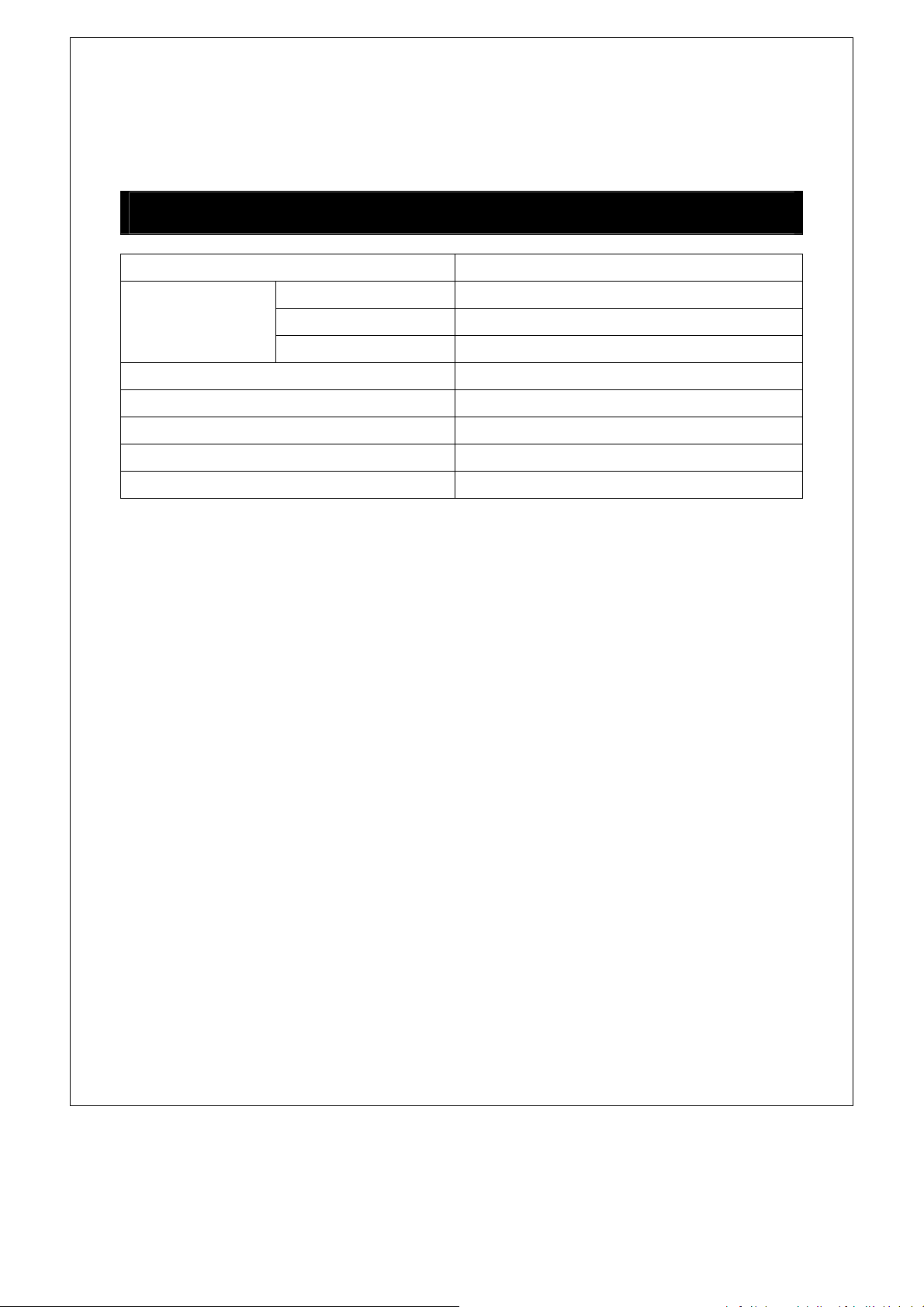
PowerSupply 120V20AC60HzSinglephase
Microwave
PowerConsumption 1650W
OutputPower 1000W
Frequency 2450MHz
OutsideDimensions 16
7
/
8
”(H)×29
7
/
8
”(W)×17
11
/
16
”(D)
CavityDimensions 10
3
/
16
”(H)×21
5
/
16
”(W)×14
10
/
16
”(D)
OvenCapacity 1.6Cu.Ft.
CookingUniformity Turntable/StirrerFanSystem
Weight Approx.(net)55.1lb
SPECIFICATIONS
11
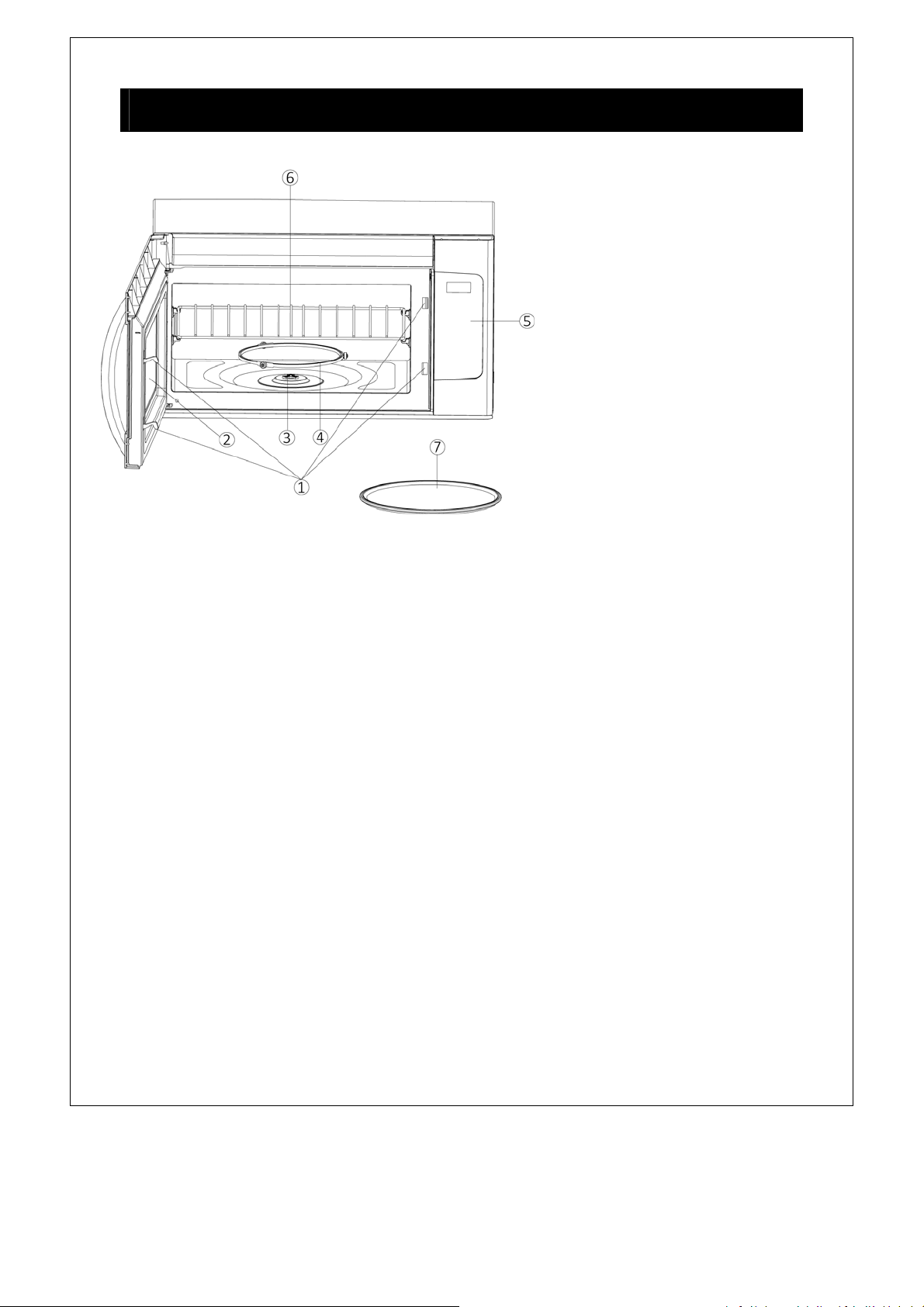
1. DoorSafetyLockSystem
2. OvenWindow
3. Shaft
4. RollerRing
5. ControlPanel
6. Shelf
7. GlassTray
FEATURESDIAGRAM
12
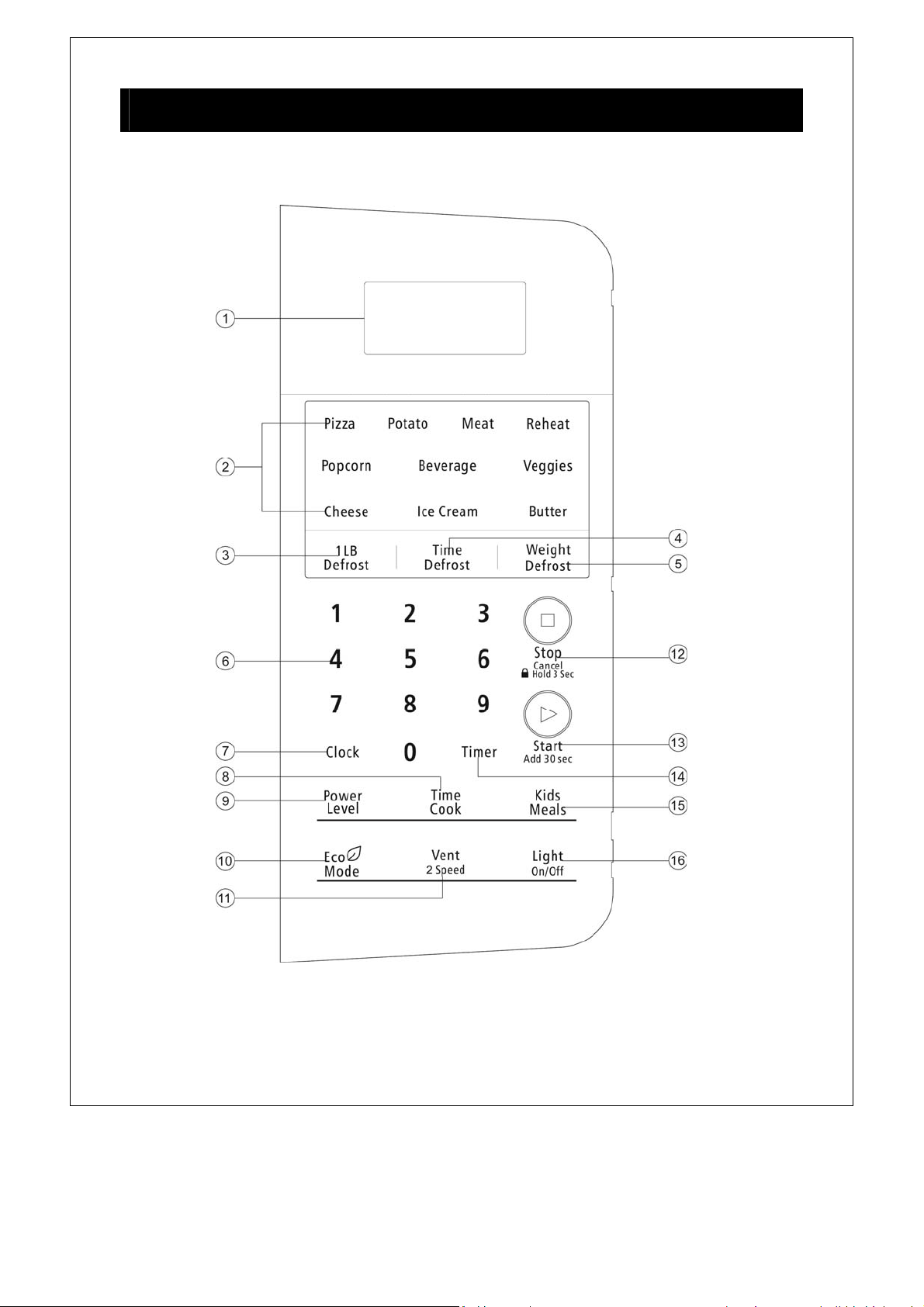
Your microwave oven control panel lets you select the desired cooking funcon quickly and easily. All
you have to do is touch the necessary Command pad. The following is a list of all the Command and
Number pads located on the control panel. For more informaon on these features, see the operaon
secon.
1. Display. The display includes a clock and indicators to tell you me of day, cooking me sengs
and cooking funcons selected.
2. Auto Cook Menu. Use for instant sengs of popular daily use. (Such us Pizza, Potato, Meat,
CONTROL PANEL FEATURES

13
Reheat, Popcorn, Beverage, Veggies, Cheese, Ice Cream, Buer).
3. 1 LB Defrost. Touch this buon to defrost frozen food quickly.
4. Time Defrost. Use to defrost food based on me entered.
5. Weight Defrost. Use to defrost food based on weight entered.
6. Number. Touch number pads to enter cooking me, power level or food weight.
7. Clock. Touch the pad to enter the me of day.
8. Time Cook. Touch this pad to set cooking me.
9. Power Level. Touch this pad to set cooking power level.
10. Eco Mode. Touch this pad to set power save mode.
11. Vent 2 Speed. Touch this pad to change vent speed.
12. Stop/Cancel. Touch this pad to stop the oven or press this pad for 3 seconds to set child lock.
13. Start/Add 30 Sec. Touch to start the oven; also use
to start the oven quickly at full power or use to
add cooking me.
14. Timer. Touch this pad to set kitchen mer.
15. Kids Meals. Select type of dish to reheat Chicken nuggets, Hot dogs, french fries, Frozen
sandwiches.
16. Light On/Off. Touch this pad to turn the light on high/low or off.
14
Learn about your microwave oven.
CAUTION
To avoid risk of personal injury or property damage, do not operate the microwave oven
empty.
To avoid risk of personal injury or property damage, do not use stoneware, aluminum foil,
metal utensils, or metal trimmed utensils in the microwave oven.
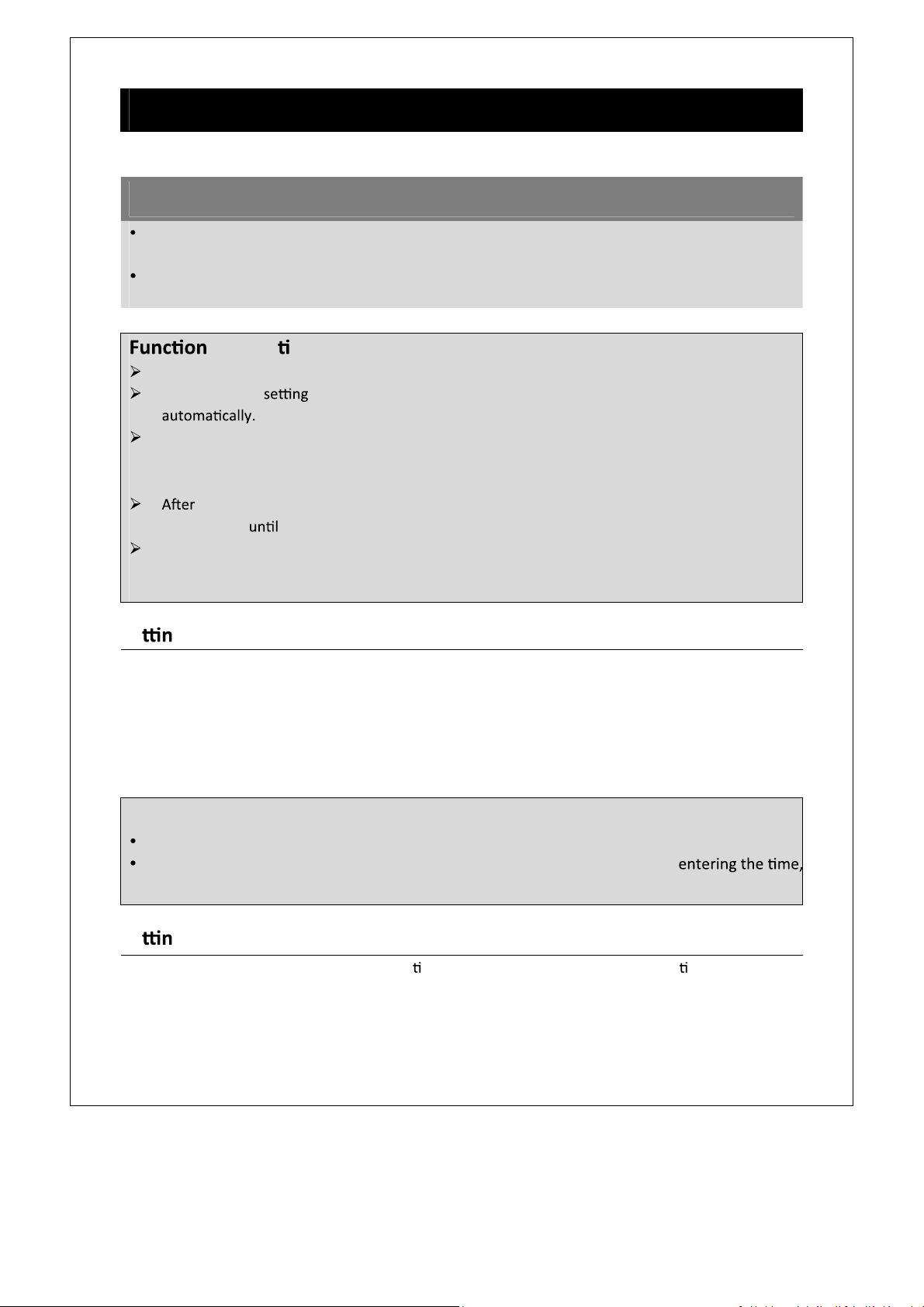
Se g the Clock
This is a 12 or 24 hour clock. In standby mode, touch Clock pad once to choose 12 hour clock and if
you want to choose 24 hour clock, press the pad again
Example: Suppose you want to set the clock for 8:08 am.
1. In standby mode, touch
Clock pad once or twice.
2. Press number pads
8, 0, 8, the display will show”08:08”.
3. Touch
Start/Add 30Sec to confirm
Se g Microwave cooking program
For microwave cooking, cooking power and me should be set. The longest cooking me you can set is
99 minutes, 99 seconds. Press
Power Level pad once and then press number pads to choose cooking
power level.
BASIC CONTROLS
descrip on:
When the oven is first plugged in, the display will show “12:00” and “:” flashing.
When cooking is interrupted for 1 minute, the system will return to the standby mode
During cooking, if you press Stop/Cancel pad once or open the door, the program will be
paused, close the door, then press Start/Add 30Sec pad to resume, but if you press
Stop/Cancel pad twice, the program will be canceled.
ending cooking, “END” will display and the system will sound beeps to remind user every
two minutes user presses lecnaC/potS pad or opens the door.
SIGNALS DURING OVEN SETTINGS
ONE SIGNAL: Oven accepts the entry.
TWO SIGNALS: Oven does not accept the entry, please check and try again.
NOTE:
During cooking, you can press Clock pad to check the clock.
“00:00” will display and two beeps will sound to remind user to resume
if your entered me is beyond the scope of clock when you set the clock.
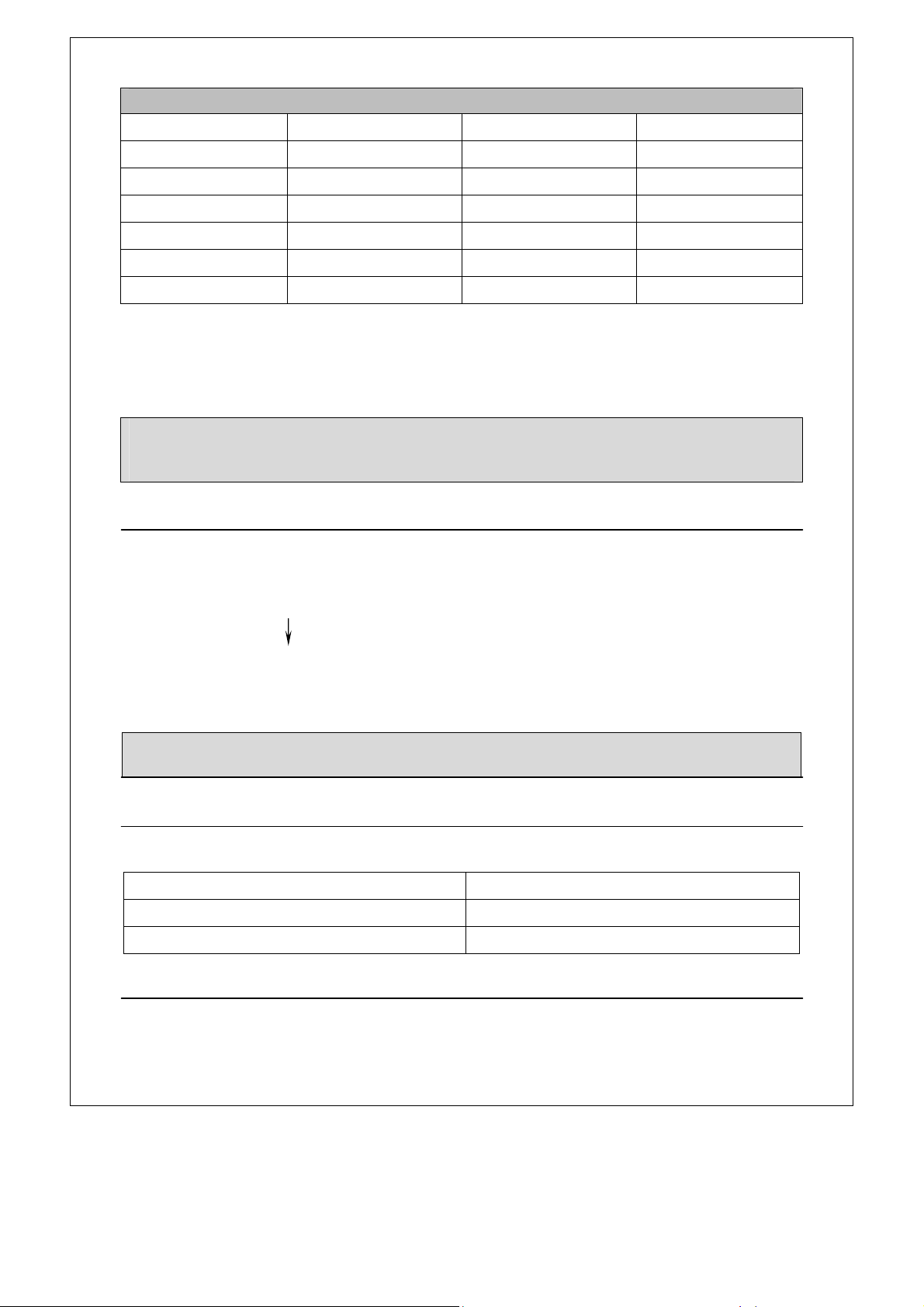
15
Usenumberpadto choosecookingpowerlevel
PressNumberpad Powerlevel(Display) PressNumberpad Powerlevel(Display)
1、0
100%(PL10) 4 40%(PL‐4)
9 90%(PL‐9) 3 30%(PL‐3)
8 80%(PL‐8) 2 20%(PL‐2)
7 70%(PL‐7) 1 10%(PL‐1)
6 60%(PL‐6) 0 0%(PL‐0)
5 50%(PL‐5)
Forexample,supposeyouwanttocookat80%powerlevelfor10minutes.
1. Instandbymode,press
TimeCookpadonce.
2. Usethenumberpadstoentercookingtime.
3. Touch
PowerLevelpadonce,andthenusethenumberpad“8”toselect80%powerlevel.
4. Touch
Start/Add30Secpadtoconfirm.
Multistagecooking
Forbestresults,somerecipescallfordifferentcookingpowerduringdifferentstagesofacookcycle.You
canprogramyouroventoswitchfromonepowertoanotherforupto2stages.
Forexample,supposeyouwanttosetthefollowingcookingprogram.
Microwavecooking
Microwavecooking
1.
Inwaitingmode,inputthefirstMicrowavecooking.DonottouchStart/Add30Secpad
2. Press
TimeCookpadonce,andtheninputthesecondMicrowavecooking.
3. TouchStart/Add30Sectostart.
LightControl
Thisfeatureisdesignedfortheconvenienceofdoingthingsoutsidetheoven.Toturnonthelightat
thebottomoftheoven,press
LightOn/Offpad:
Press
LightOn/Offbutton
WorkingMode
Once On
Twice Off
VentFanControl
Yourovencanbeusedasarangehood.Whenitisturnedon,thefanmotorstartsfilteringoutsmoke,
odors,andgreasegeneratedfromcooking.
NOTE:DuringcookingyoucanpressPowerleveltocheckthepowerlevel,andyoucanadjustthe
powerlevelbypressingnumberpadswhenthedisplayshowsthepowerlevel.
NOTE:Automenu,defrostandKidsmealscannotbe setinmultistagecookingprogram.
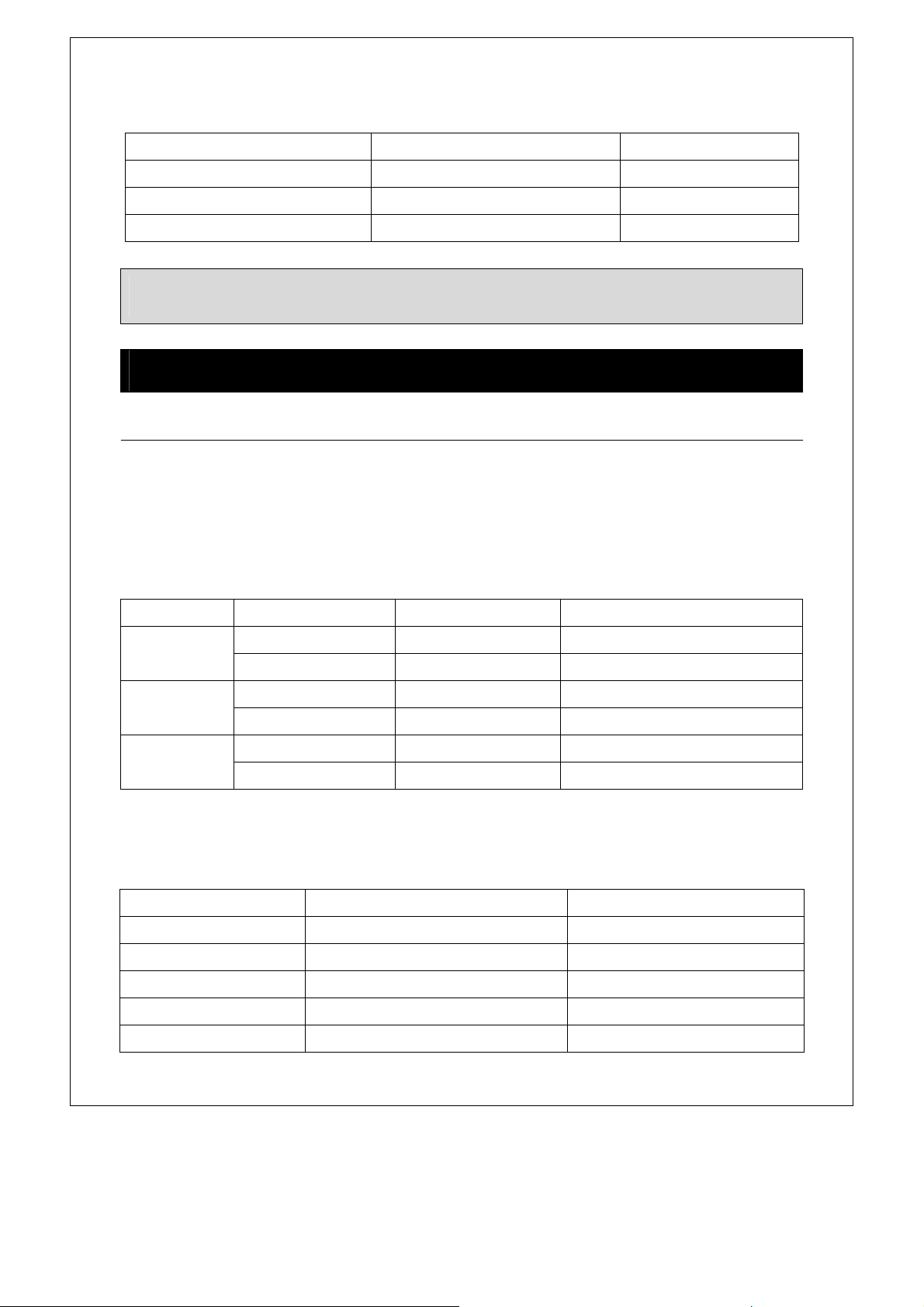
16
Instandbymode,theventfanismanualcontrol. ContinuouslypressingVent/2 Speedcanchoosethree
cyclegears:
Press
Vent/2Speedbutton
WorkingMode
Display
Once Lowwind
Vent.L
Twice HighWind
Vent.H
3times Turnoff
PutOut
Autocookmenu
For foods such as Butter, Cheese and Ice cream, it is not necessary to program the time and the
cookingpower.Itissufficienttoindicatethetypeoffoodthatyouwanttocookaswellastheweight
ofthisfood.
Î Butter,CheeseorIcecream
1. Pressthefood(Butter,CheeseandIcecream)padonce.
2. Usenumberpad“1”,”2”toselecttheamount(accordingtotheamountinthetablebelow).
3. Touch
Start/Add30Secpadtoconfirm.
Food Amount Pressnumberpad Totaltime
Butter
1 1 1:00
2 2 1:30
Cheese
1(4oz) 1 1:00
2(8oz) 2 1:30
Icecream
1 1 0:30
2 2 0:45
Î Pizza, Potato,Meat,ReheatandVeggies
1. Pressthefoodpaddesired(Pizza,Potato,Meat,ReheatorVeggies).
2. Usenumberpad(0‐9)toenterfoodweight.
3. Touch
Start/Add30Secpadtostartcooking.
Food Weight ranges Powerlevel
Pizza 10oz~28oz PL10
Potato 1oz~48oz PL10
Meat 1oz~32oz PL10
Reheat 1oz~37oz PL10
Veggies 1oz~48oz PL10
NOTE: When cooking is started, the suction fan automatically works into a low wind gear, and
“Vent.L”willdisplay.Duringcookinginasession,youcanchooselowwindorhighwindgear.
SPECIALFEATURES
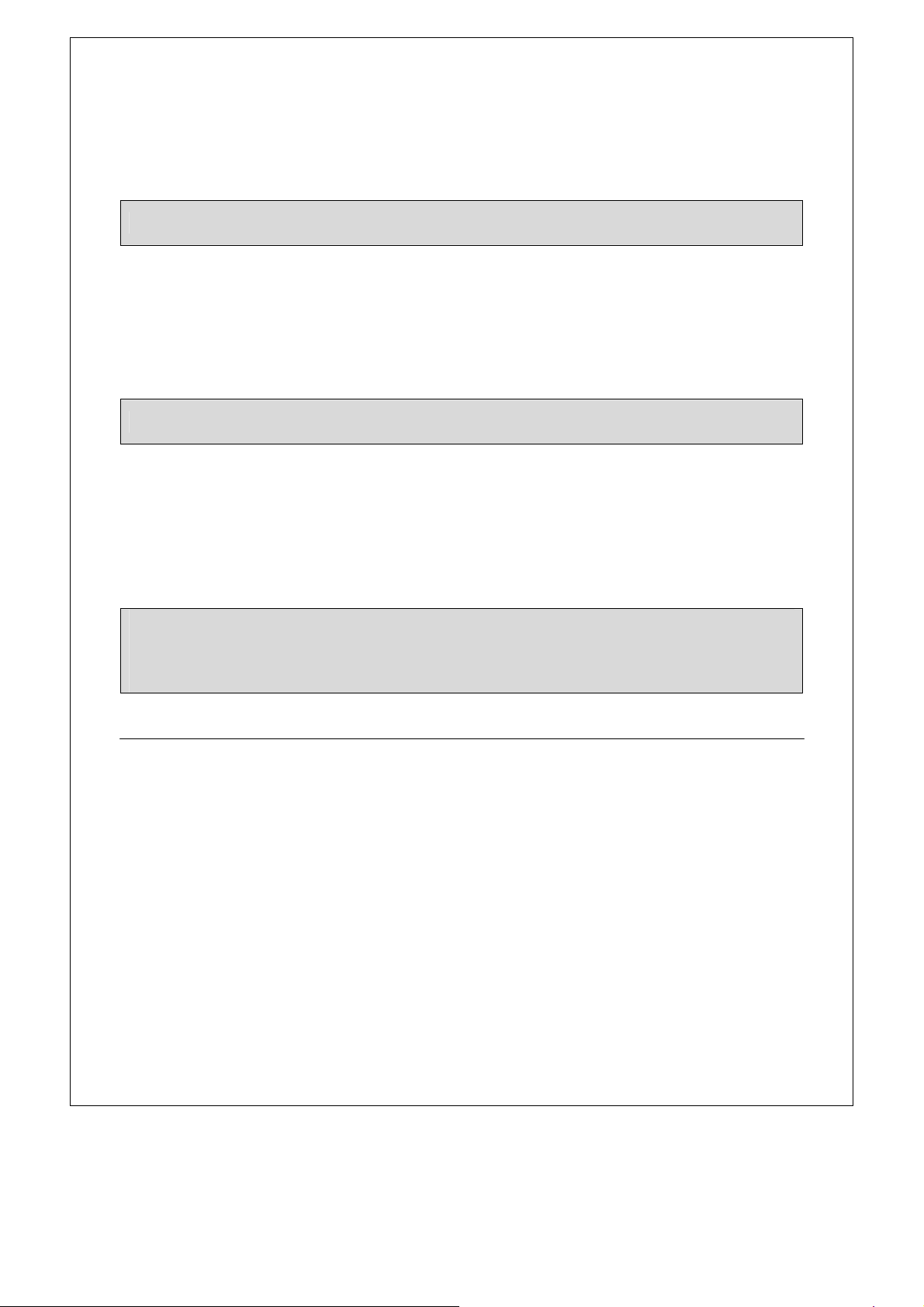
17
Example,youwanttocook10ozmeat.
1. Placemeatintotheovenandclosethedoor.
2. Press
Meatpadonce.
3. Pressnumberpad toenterweight.
4. Touch
Start/Add30Secpadtostartcooking.
Î Popcorn
Popcornletsyoupopcommerciallypackagedmicrowavepopcorn.Forexampleyouwanttocooka3.5
ozbagofmicrowavepopcorn.
1. Placethefoodintotheovenandclosethedoor.
2. Press
Popcornpadonce,thedisplaywillshow”2:05”and“START”.
3. Press
Start/Add30Secpad,thesystemstartstocookimmediately.
Î Beverage
Forexample,youwanttoreheattwocupsofcoffee.
1. Placecoffeeintotheovenandclosethedoor.
2. Press
Beveragepadonce,thedisplaywilldisplay“1”.
3. Pressnumberpad
“2”tochoosetwocups.
4. Press
Start/Add30Secpadtostartcooking.
KidsMeals
UsingKidsMealsletsyouheatcommonmicrowave‐preparedfoodswithoutneedingtoprogramtimes
andcookpower.
ForHotdogsandFrozensandwiches:
1. Pressthe
KidsMealspadonce.
2. Pressnumberpad
“2or4”tochooseHotdogsorFrozensandwiches.
3. Press
Start/Add30Sectoconfirmyourchoice. The display will show ”1” and“START”.
4. Press
Start/Add30Secpadtostartcooking
ForChickennuggetsandfrenchfries:
1. Pressthe
KidsMealspadonce.
2. Pressnumberpad
“1or3”tochooseChickennuggetsorfrenchfries.
3. Press
Start/Add30Sectoconfirmyourchoice.Thedisplaywillshow”4”and“START”.
4. Pressnumberpad“1or2”tochoosethefoodweight(1for4oz,2for8oz).
5. Press
Start/Add30Secpadtostartcooking.
NOTE:Formeattheovenwillpausetoremindusertoturnthefoodoverforuniformcooking.
NOTE:Popcornautomaticallysetsthecookingtimefora3.5oz.bagofmicrowavepopcorn.
NOTE: Forbeverages,you canchoose theamountbytouchingnumberpad1to6,andthedisplay
willshownumberofservingsinsteadofweight.Beveragesheatedwiththebeveragecategorymay
beveryhot.Removethecontainerwithcare.
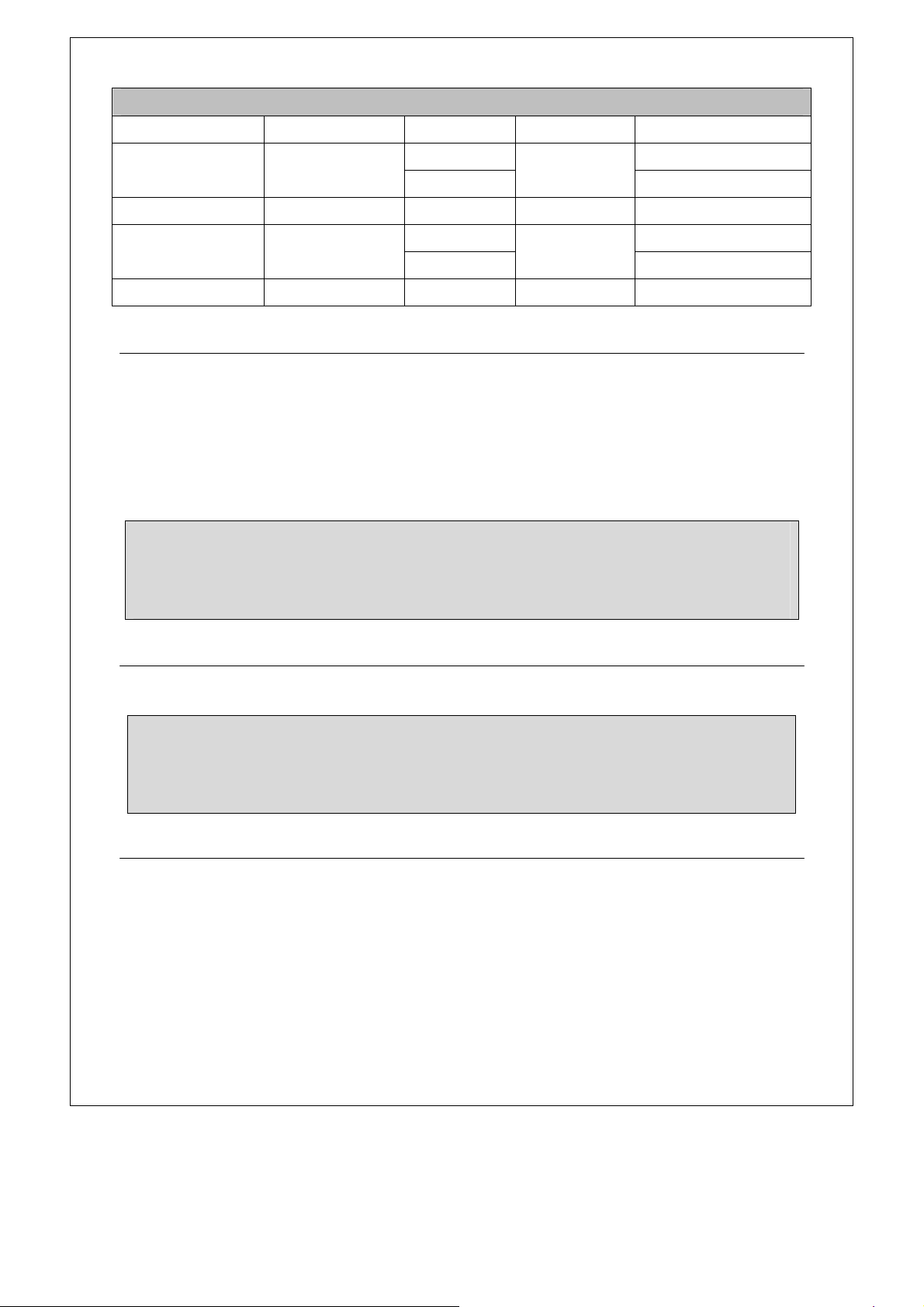
18
KIDSMEALS
Category Pressnumberpad Weight Powerlevel Cookingtime
Chickennuggets 1
4oz
PL‐6
01:30
8oz 02:30
Hotdogs 2 1 PL‐6 01:30
Frenchfries 3
4oz
PL‐6
01:30
8oz 02:30
FrozenSandwiches 4 1 PL‐8 01:20
WeightDefrost
The oven allows you todefrost food based on the weightentered by user.The defrosting timeand
powerlevelareautomaticallysetoncethefoodcategoryandtheweightareprogrammed.Thefrozen
foodweightrangesis1~96oz.
Supposeyouwanttodefrostgroundmeat(15OZ.).
1. Touch
WeightDefrostpadonce.
2. Pressnumberpadto enterweight.
3. Touch
Start/Add30Secpadtoconfirm.
1LbDefrost
Thisfeatureallowsyoutodefrostfoodquickly.
Instandby,press
1LbDefrostpadonce,thesystemstartsdefrostingautomatically.
TimeDefrost
Ifthefoodweightexceedsthemaximumweight recommended,youneedtousetimedefrost.
Supposeyouwanttodefrostgroundmeat(12:34).
1. Touch
TimeDefrostpadonce,“00:00”and“DEF.”willdisplay.
2. Enterdefrostingtimebytouchingthenumberpad
1、2、3、4.
3. Touch
Start/Add30Secpadtoconfirm.
NOTE:
y During defrost, the oven will pause and sound beep to remind user to turn the food over,
afterthat,pressStart/Add30Secpadtoresume.
y Usesmallsmoothstripsofaluminumfoiltocoveredgesandthinnersectionsofthefood.
NOTE:
y During defrost,the oven willpause and sound beep to reminduser to turnthe food over,
afterthat,pressStart/Add30Secpadtoresume.
y Usesmallsmoothstripsofaluminumfoiltocoveredgesandthinnersectionsofthefood.
19
Add30Sec
Instandbymode,simplytouchtheStart/Add 30Secpadrepeatedlytosetcooktimeandtheoven
willstartcookingimmediatelyat100%powerlevel.
SettingtheTime
Supposeyouwanttotimea3minutescooking.
1. Instandbymodeorcookingprocess,touch
Timerpadonce,“00:00”and“TIMER”willdisplay.
2. Usethenumberpadstoentertime.
3. Touch
Start/Add30Secpad.
EcoMode
To set: In standby mode, press Eco Mode pad once to enter the power mode. At this point, the
displayisclosed,pressanykey,returntostandbystatus,thedisplaywillshow normal, buttheoven
does not exit power mode. If there is not any operation within 1 minute, the system automatically
entersthepowersaving
mode.
To cancel: After setting eco mode, in standby mode, press Eco Mode pad once, the oven drop
out power saving mode. At this moment, oven cannot enter power save mode if there are not
any operationswithin1minute.
ChildLock
The child lock prevents unsupervised operation by children and this program only works in standby
mode
Toset,instandbymode,pressandhold
Stop/Cancelfor3seconds.LOCKisindicatedonthedisplay.
NOTE:
y Duringdefrost,theovenwillpauseandsoundbeeptoremindusertoturnthefoodover,
afterthat,pressStart/Add30Secpadtoresume.
y Thelongestdefrostingtimeyoucansetis99minutesand99seconds.
y Pleaseremembertoplacethefoodonamicrowave‐safedish,notinaplasticcontainer
OTHERCONVENIENTFEATURES
NOTE: You can also extend cooking time (except auto cook and 1Lb defrost) by touching the
Start/Add30Secduringcooking(eachtouchfor30secondsupto99minutesand99seconds).
NOTE:
y Thelongesttimeyoucansetis99minutes,99seconds.
y Onceyouhavesetthetimerfunction,ineithercookingorstandbymode,youcancheckthe
countdown by press Timer pad and you can touch Stop/Cancel to cancel the timer
functionwhenthedisplayshowstimertime.
20
To cancel, press and hold Stop/Cancel for 3 seconds. LOCK indicaon disappears.
Exterior
The outside surface is precoated steel and plasc. Clean the outside with mild soap and water; rinse
and dry with a so cloth. Do not use any type of household or abrasive cleaner.
Door
Wipe the window on both sides with a damp cloth to remove any spills or spaers. Metal parts will be
easier to maintain if wiped frequently with a damp cloth. Avoid the use of spray and other harsh
cleaners as they may stain, streak or dull the door surface.
Touch Control Panel
Care should be taken in cleaning the touch control panel. If the control panel becomes soiled, open the
oven door before cleaning. Wipe the panel with a cloth dampened slightly with water only. Dry with a
so cloth. D
o not scrub or use any sort of chemical cleaners. Close
door and touch STOP/CANCEL.
Interior
Cleaning is easy because lile heat is generated to the interior surfaces; therefore, there is no baking
and seng of spills or spaering. To clean the interior surfaces, wipe with a so cloth and warm water.
DO NOT USE ABRASIVE OR HARSH CLEANERS OR SCOURING PADS. For heavier soil, use baking
soda or
a mild soap; rinse thoroughly with hot water.
Waveguide Cover
The waveguide cover is located on the ceiling in the oven cavity. It is made from mica so requires
special care. Keep the waveguide cover clean to assure good oven performance. Carefully wipe with a
damp cloth any food spaers from the surface of the cover immediately aer they occur. Built
-up
splashes
may overheat and cause smoke or possibly catch fire. DO NOT REMOVE THE WAVEGUIDE
COVER.
Fan
The fan will automacally start when heat rises from range surface units or burners. This protects the
microwave oven from excessive temperature rise. The fan will stay on unl the temperature decrease.
It cannot be turned off manually during this me.
CLEANING AND MAINTENANCE

21
For other uses, select either HI or LO speed.
Odor Removal
Occasionally, a cooking odor may remain in the oven. To remove, combine 1 cup water, grated peel
and juice of 1 lemon and several whole cloves in a 2-cup glass measuring cup. Boil for several minutes
using 100% power. Allow to set in oven unl cool. Wipe interior with a
so cloth.
Turntable/Turntable Support
The turntable and turntable support can be removed for easy cleaning. Wash them in mild, sudsy
water; for stubborn stains use a mild cleanser and non-abrasive scouring sponge as described above.
They are also dishwasher-proof. Use upper rack of dishwasher. The turntable motor sha
is not sealed,
so excess water or spills should be wiped up immediately.
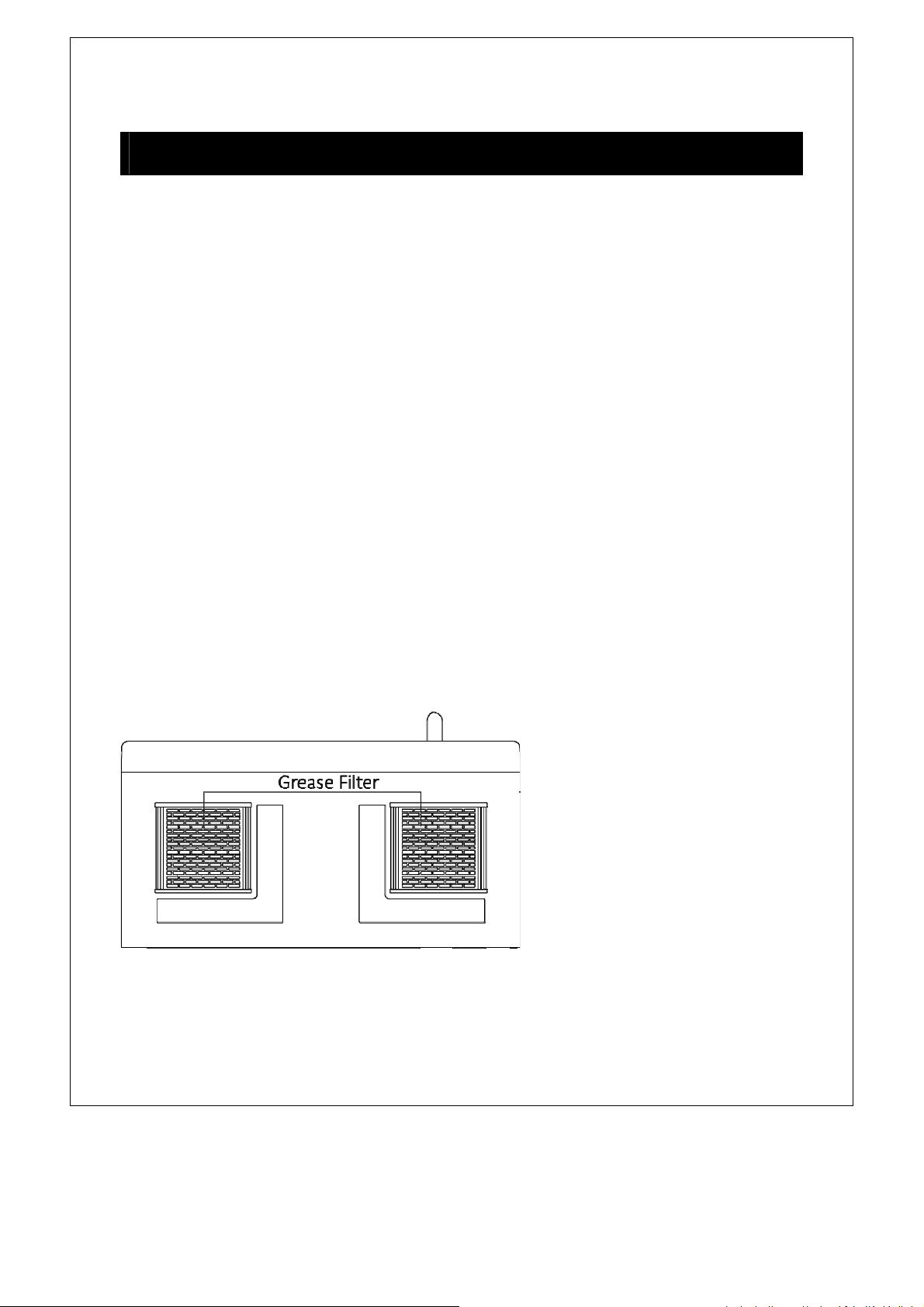
Grease Filters
Filters should be cleaned at least once a month. Never operate the fan or oven without the filters in
place.
Pull down slightly on the tab toward the front of the oven and remove the filter. Repeat for the other
filter.
Soak the filter in a sink or dish pan filled
with hot water and detergent. DO NOT use ammonia or other
alkali; they will react with the filter material and darken it.
Agitate and scrub with a brush to remove embedded dirt.
Rinse thoroughly and shake dry.
Replace by fing the filter back into the opening.
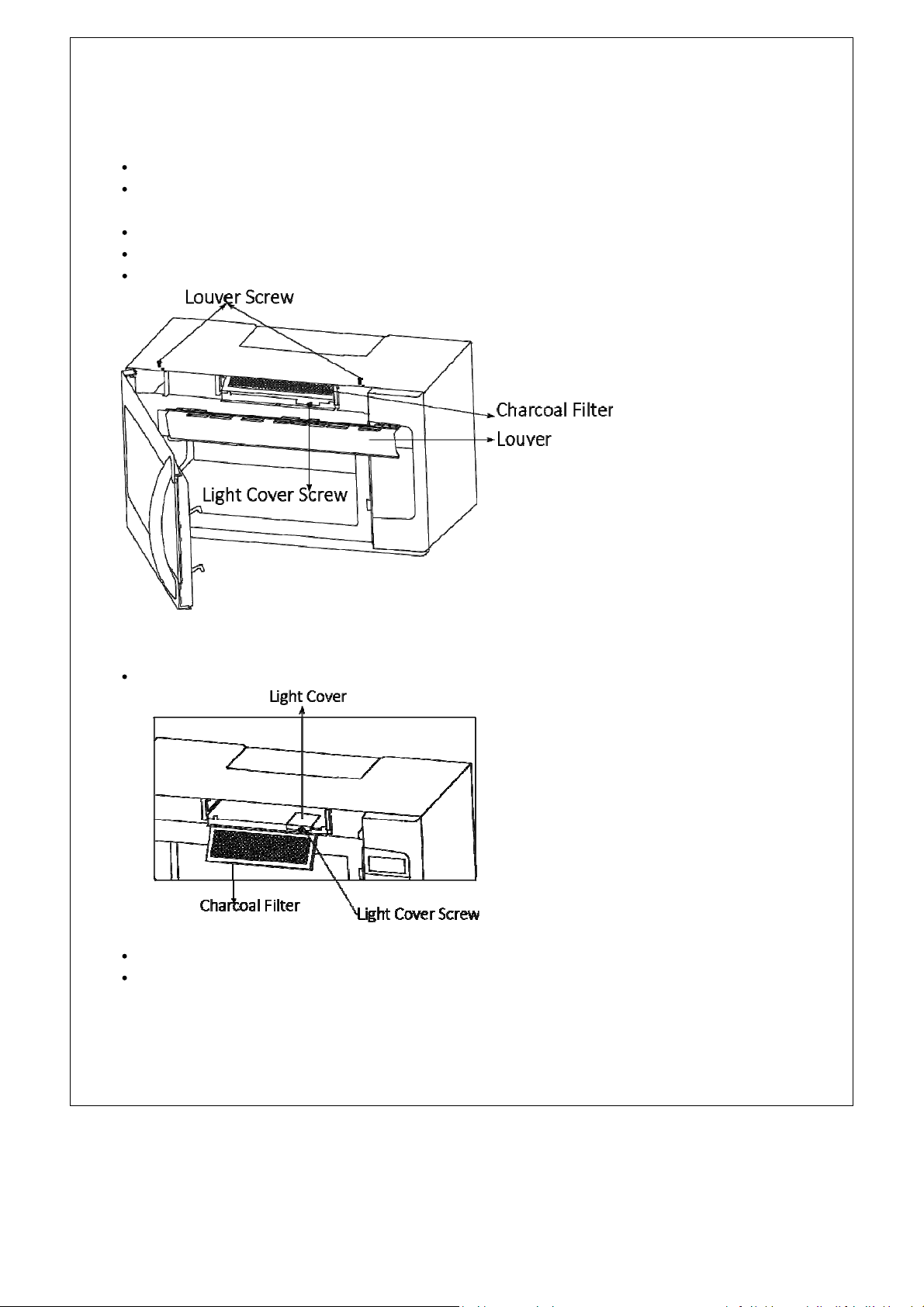
Light
To replace light bulbs, first disconnect power to the oven at the circuit breaker panel or by unplugging.
To release cover, remove the screw on the light cover. (See illustraon.)
DO NOT USE A BULB LARGER THAN 30 WATTS.
Close light cover and secure with screw removed in step
2.
CAUTION:
Light cover may become very hot. Do not touch glass when light is on.
22
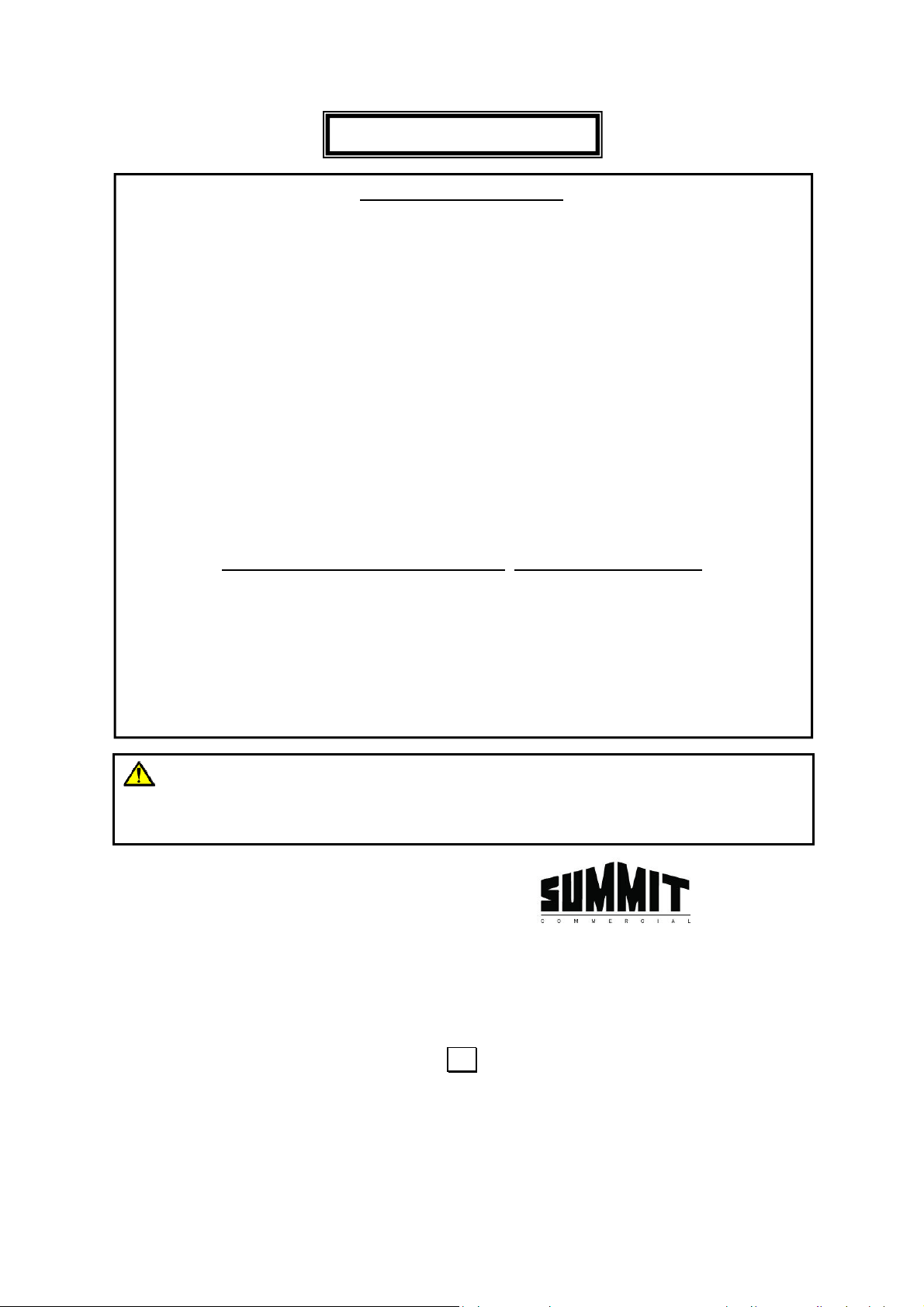
Charcoal Filter
Charcoal filter is used for nonvented, recirculated installaon. The filter should be changed every 6 to
12 months depending on use.
Disconnect power to the oven at the circuit breaker panel or by unplugging.
Remove the louver mounng screw from the top center of the louver and push down
carefully on
the tab at each end of the louver to disengage it. (See illustraon.)
Pull the louver away from the unit.
Change the charcoal filter.
Carefully push the louver back into place and replace the screw removed in step 2.
Oven Light
Remove the louver per instrucons 1~3 above and charcoal filter, if used.
Open light cover located behind filter mounng by carefully pulling up on the front edge.
DO NOT USE A BULB LARGER THAN 30 WATTS.
Replace the oven light cover by carefully pushing into place. Replace the charcoal filter, if used.
Push the louver back into place and replace the louver mounng screw
23
LIMITED WARRANTY
90-DAY LIMITED WARRANTY
Within the 48 contiguous United States, for 90 days from the date of purchase, when this appliance is operated and
maintained according to instructions attached to or furnished with the product, warrantor will pay for factory-specified
parts and repair labor to correct defects in materials or workmanship. Service must be provided by a designated service
company. Outside the 48 states, all parts are warranted for 90 days from manufacturing defects. Plastic parts, shelves
and cabinets are warranted to be manufactured to commercially acceptable standards, and are not covered from
damage during handling or breakage.
ITEMS WARRANTOR WILL NOT PAY FOR:
1. Service calls to correct the installation of your appliance, to instruct you how to use your appliance, to replace or
repair fuses or to correct wiring or plumbing.
2. Service calls to repair or replace appliance
light bulbs or broken shelves. Consumable parts (such as filters) are
excluded from warranty coverage.
3. Damage resulting from accident, alteration, misuse, abuse, fire, flood, acts of God, improper installation, installation
not in accordance with electrical or plumbing codes, or use of products not approved by warrantor.
4. Replacement parts or repair labor costs for units operated outside the United States.
5. Repairs to parts or systems resulting from unauthorized modifications made to the appliance.
6. The removal and reinstallation of your appliance if it is installed in an inaccessible location or is not installed in
accordance with published installation instructions.
DISCLAIMER OF IMPLIED WARRANTIES; LIMITATION OF REMEDIES
CUSTOMER'S SOLE AND EXCLUSIVE REMEDY UNDER THIS LIMITED WARRANTY SHALL BE PRODUCT REPAIR
AS PROVIDED HEREIN. IMPLIED WARRANTIES, INCLUDING WARRANTIES OF MERCHANTABILITY OR FITNESS
FOR A PARTICULAR PURPOSE, ARE LIMITED TO 90 DAYS. WARRANTOR SHALL NOT BE LIABLE FOR
INCIDENTAL OR CONSEQUENTIAL DAMAGES. SOME STATES DO NOT ALLOW THE EXCLUSION OR LIMITATION
OF INCIDENTAL OR CONSEQUENTIAL DAMAGES, OR LIMITATIONS ON THE DURATION OF IMPLIED
WARRANTIES OF MERCHANTABILITY OR FITNESS, SO THESE EXCLUSIONS OR LIMITATIONS MAY NOT APPLY
TO YOU. THIS WARRANTY GIVES YOU SPECIFIC LEGAL RIGHTS AND
YOU MAY ALSO HAVE OTHER RIGHTS,
WHICH VARY FROM STATE TO STATE.
FELIX STORCH, INC.
770 Garrison Avenue
Bronx, NY 10474
Phone: (718) 893-3900
Fax: (844) 478-8799
www.summitappliance.com
For parts and accessory ordering,
troubleshooting and helpful hints, visit:
www.summitappliance.com/support
Printed in China
WARNING: This product can expose you to chemicals including Nickel
(Metallic) which is known to the State of California to cause cancer.
For more information go to www.P65Warnings.ca.gov
Note: Nickel is a component in all stainless steel and some other metal components.