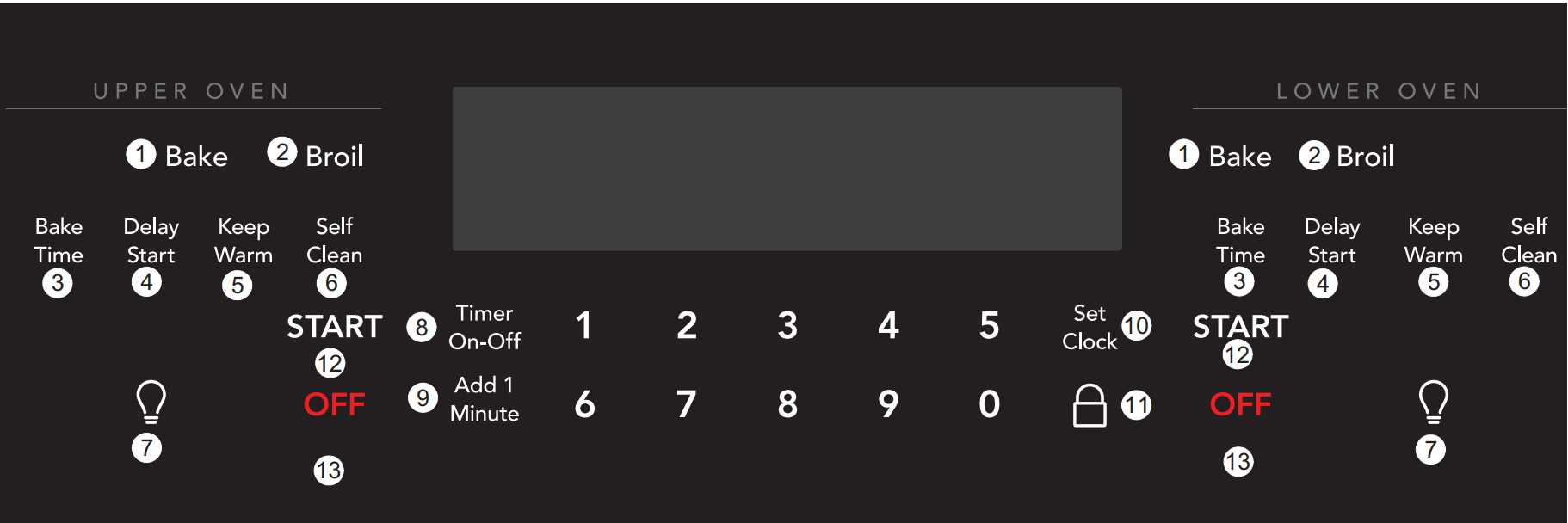
Bake - Use Bake key to select the baking function.
Broil - Use Broil key to star boil function. The broil temperatures may be set between 400°F and (205°C) and 550°F (288°C).
Bake Time - Use to enter the length of baking time.
Delay Start - Use to program a delayed time bake or delayed self-cleaning cycle start time.
Keep Warm - Use to keep food at serving temperature of 170°F (77°C) for up to three hours.
Self Clean - Use to select self-clean function between 2 and 4 hours.
Oven Light - Use to turn oven light on and off. The oven light comes on automatically when the oven door is opened.
Timer On-Off - Use to set or cancel the timer. Timer does not start or stop the cooking process.
Add 1 Minute - The Add 1 Minute key adds one minute to the timer with each key press.
Set Clock - Use with numeric keys and the START key to set oven clock.
Oven Lockout - When activated, this feature automatically locks the oven door, preventing the oven from being turned on.
START - Use START key to start all cooking features and for setting the clock.
OFF - Use to turn off any oven function entered except time of day and minute timer.
Time and Temperature Settings
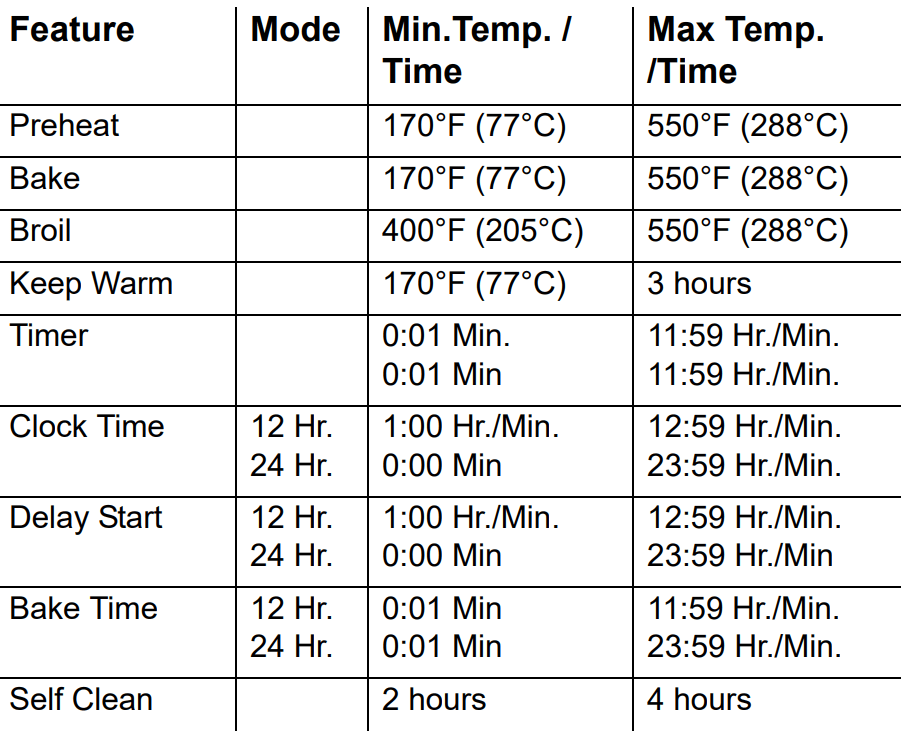
All of the features listed below may be entered into the control. An entry acceptance beep will sound each time a control key is touched (the acceptance beep on the oven lockout key is delayed 3 seconds). An entry error tone (3 short beeps) will sound if the entry of the temperature or time is below the minimum or above the maximum settings for the feature
Table 1: Minimum and maximum control settings
Setting the Clock
The set clock control is used to set the clock. The clock may be set for 12 or 24 hour display operation. The clock is preset at the factory for 12 hour display. When the oven is first plugged in, or when the power supply to the oven has been interrupted, the time in the display will flash.
To set the clock (example: setting time for 1:30):
Press Set Clock. CLO will appear in the display.
Press 1 3 0 on the numeric keypad to set the time of day to 1:30. CLO will stay in the display.
Press START. CLO will disappear and the clock will start.
Temperature Display (Fahrenheit/Celsius)
The oven control can be programmed to display temperatures in °F or °C. The oven is preset at the factory to display in °F.
To change display from °F to °C or °C to °F
Press and hold Broil for about 6 seconds until F or C appears in the display.
Press Self Clean to switch between °F or °C display modes.
Press START to accept the change or press OFF to reject the change.
Add 1 Minute
The Add 1 Minute key adds one minute to the timer with each key press. This allows the timer to be changed to add more time without stopping to reset it.
If the timer is not active and Add 1 Minute is pressed, the timer will turn on and begin counting down.
To turn off the timer at any time press Timer On-Off.
Setting the Timer
The Timer On-Off key controls the minute timer and serves as an extra timer and can be used during any of the other oven control functions.
To set the minute timer:
Press Timer On-Off. -- -- will appear and timer will flash in the display. Press the number keys to set the desired time.
Press START. The time will begin to count down and TIMER will stay in the display. When the time expires, End and TIMER will show in the display. The clock will beep three times every 30 seconds until Timer On-Off is pressed.
To cancel the minute timer before the set time expires, press Timer On-Off.
NOTE If START is not pressed, the timer will return to the time of day after 25 seconds.The timer does not start or stop the cooking process.
Setting 12 or 24 Hour Time of Day Display
Press and hold set clock for 6 seconds. CLO will appear in the display.
Continue holding the key until 12Hr dAY or 24Hr dAY appears in the display and the control beeps once.
Press Self Clean to switch between the 12 and 24 hour time of day display. The display will show either 12Hr dAY or 24Hr dAY.
Press START to accept the change or press OFF to reject the change.
NOTE 12h indicates that the oven is set to 12 hour power saving mode. --h indicates that the oven is set to continuous cooking mode.
Setting Continuous Bake or 12 Hour Energy Saving
The Timer On-Off and Self Clean keys are used to set the continuous bake or 12 Hour Energy saving features. The oven control has a factory preset 12 hour energy saving feature that shuts off the oven if the oven control is left on for more than 12 hours. The oven can be programmed to override this feature for continuous baking.
To set the control for continuous bake or 12 hour energy saving:
Press and hold Timer On-Off for 6 seconds. After 6 seconds 12Hr OFF or StAY On will appear in the display and the control will beep once.
Press Self Clean to switch between the 12 hour energy saving and continuous bake features.
Press START to accept the change (display will return to time of day) or press OFF to reject the change.
12Hr OFF indicates the control is set for the 12 hour energy saving mode. StAY On indicates the control is set for the continuous bake feature.
Setting Control for Silent Operation
Delay Start and Self Clean keys control the silent operation feature. This feature allows the oven control to be operated without sounds or beeps whenever necessary. If desired the control can be programmed for silent operation and later returned to operating with all the normal sounds and beeps.
To change control from normal sound operation to silent control operation:
Press and hold Delay Start. -- -- will appear and DELAY will flash in the display. Continue to hold the key until bEEP On or bEEP OFF appears in the display. Then release the Delay Start key.
Press Self Clean to switch between normal sound operation (bEEP On) and silent operation (bEEP OFF).
Press START to accept the change or press OFF to reject the change.
NOTE The control will still beep when the timer ends and a set temperature is reached, when set for silent operation
Oven Light
The oven light will turn on automatically when the oven door is opened. The oven light may be turned on when the door is closed by using the oven light key on the control panel.
The light will stay off until the door unlocks.
To toggle the oven lights on and off:
Press .
The interior oven light is covered with a glass shield. The glass shield must be in place whenever the oven is in use.
To change the interior oven lights, see “Replacing the oven light” on page 30
Important: When baking delicate items like cakes, breads and pastries leave the oven light off.
Setting Oven Lockout Feature
The key controls the oven lockout. When activated, this feature automatically locks the oven door, preventing the oven from being turned on. It does not affect the clock, timer, or the interior oven lights. Both ovens can be locked individually.
To activate the oven lockout feature:
Select upper or lower oven and press and hold for 3 seconds.
After 3 seconds, door Loc will appear, a tone will sound, and the word DOOR and the icon will flash.
Once locked, DOOR and the lock icon will stop flashing and Loc remains visible in the display.
To reactivate normal oven operation:
Press and hold for 3 seconds.
After 3 seconds, door Loc will appear, a tone will sound, and the word DOOR and the lock icon will flash in the display until the oven door has completely unlocked.
The oven is now fully operational.
Setting Bake
The Bake function cooks the food with the heat that rises from the bottom of the oven. Heat and air circulate naturally in the oven. An audible reminder is issued indicating that the cooking temperature is reached and placing the food in the oven.
The Bake key controls normal baking. The oven can be programmed to bake at any temperature from 170°F (77°C) to 550°F (288°C).
For best bake results:
Fully preheat oven before baking.
Leave oven lights off while baking.
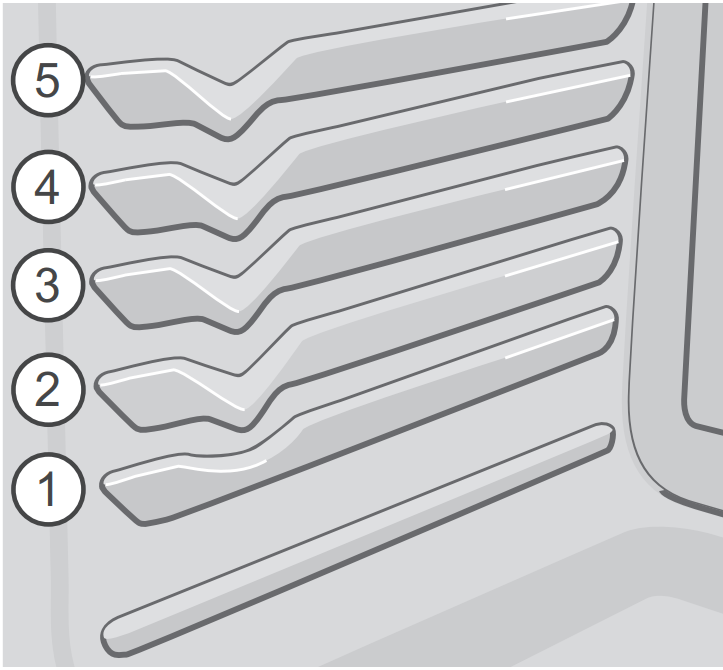
When using a single rack for baking, place in oven rack position 3.
For best results when baking cakes using 2 racks, place cookware on oven rack positions 1 and 4 or 5(flat rack). (Figure 2)
When baking cookies and biscuits use positions 3 (flat) and 5 for best results.
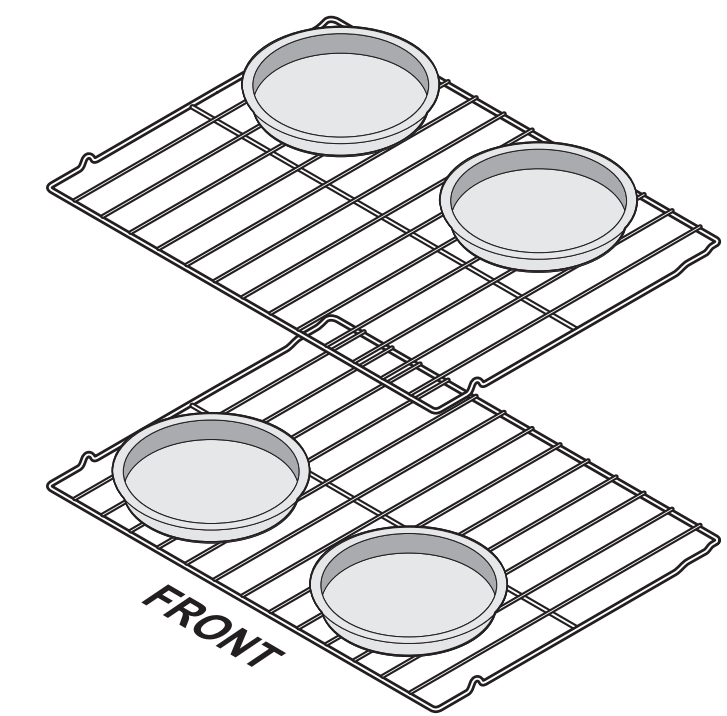
When using 2 oven racks for baking, position cookware as shown in(Figure 3).
To set the bake temperature to 375°F (190°C):
Select upper or lower oven. Press Bake. 350 will appear in the display.
Press 3 7 5 using the numeric keypad.
Press START. A beep will sound once the oven temperature reaches 375°F, and the display will show 375°.
When fully preheated, place food in oven.
Fig. 2 Rack positions
Figure 3: Pan spacing using multiple racks
Setting Bake Time
Use Bake Time when setting the oven to cook for a specific length of time and shut off automatically when the time is complete. When cooking time ends, the oven will shut off and will beep. This feature can be used with bake, convection bake, convection roast, and slow cook modes.
To program the oven to begin baking immediately and to shut off automatically (example: Bake at 350°F (176°C) for 30 minutes):
Be sure the clock is set for the correct time of day.
Arrange interior oven rack(s) and place the food in then oven.
Press Bake. 350 will appear in the display.
Press START. *(see NOTE below)
Press Bake Time. -- -- will appear in the display.
Enter the desired baking time by pressing 3 0.
Press START. Once the timed bake feature starts, the current time of day will appear in the display.
Press OFF when baking has finished or at any time to cancel.
When the timed bake finishes: End and the time of day will show in display. The oven will shut off automatically.
The control will beep three times every 30 seconds until OFF is pressed.
NOTE
The time remaining can be shown in the timer section of the display by pressing Bake Time at any moment of the cooking. A beep will sound when the oven temperature reaches the set temperature.
Baking time can be set for any time between 1 minute to 11hrs and 59 minutes.
Setting Delay Start
The Bake Time and Delay Start keys control the delayed start timed bake feature. The automatic timer of delayed start will turn the oven on and off at the time you select in advance.
CAUTION Food Poisoning Hazard. Do not let food sit for more than one hour before or after cooking. Doing so can result in food poisoning or sickness.
To program the oven for a delayed start time with the bake function. (example: baking at 375°F (190°C) for 30 minutes, starting at 5:30):
Make sure the clock is set to the correct time.
Press Bake Time.
Enter 5 0 using the keypad until item 5 0 appears on the display.
Press START to confirm.
Press Delay Start.
Enter 5 3 0 using the keypad until item 5 3 0 appears on the display.
Press START to confirm.
Press Bake.
Enter 3 7 5 using the numeric keypad.
Press START.
When finished baking END appears in the window and the oven switches off automatically. The oven controller beeps three times every 30 seconds as a reminder until OFF is pressed.
Setting Broil
Broiling is direct heat cooking and will produce some smoke. If smoke is excessive, place food further away from the element. Watch food to prevent burning.
When broiling always remember to arrange the oven racks while oven is still cool. This unit has an electric broil feature.
Broiling tips:
Broil foods with oven door closed.
For optimum browning, preheat broil for 2 minutes. .
WARNING
Always wear oven mitts when broiling. Should an oven fire occur, close the oven door and turn the oven off. If the fire continues, throw baking soda on the fire or use a fire extinguisher. Do not put water or flour on the fire. Flour may be explosive.
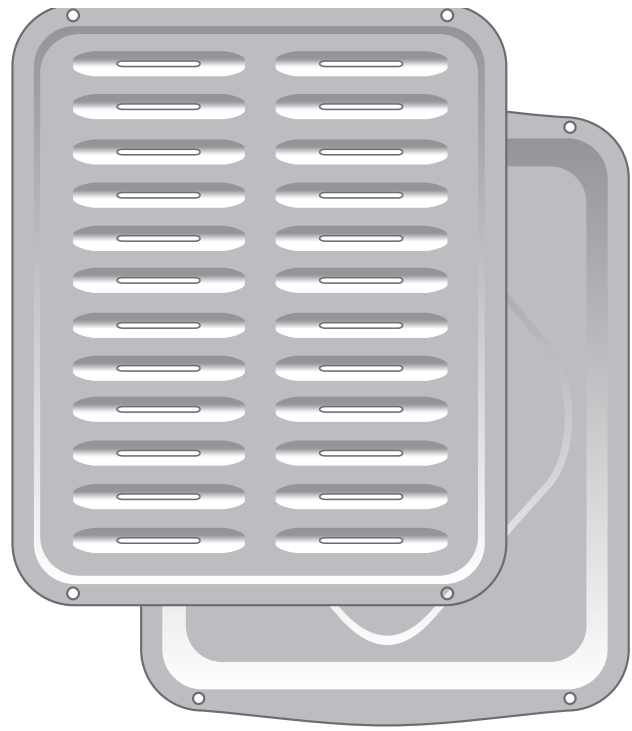
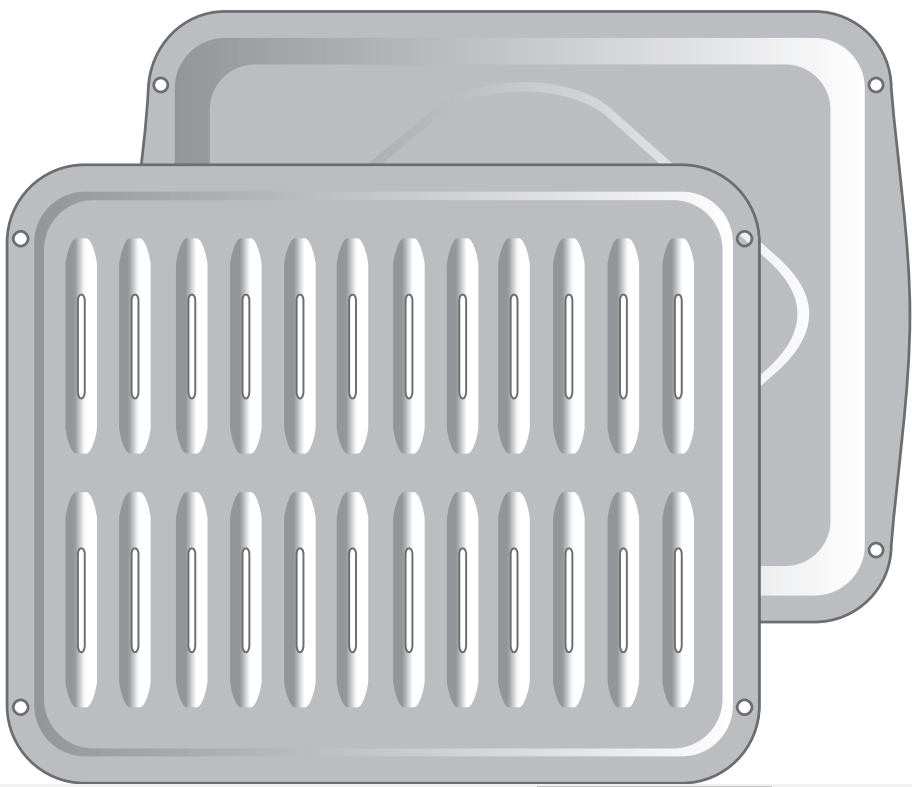
The broiler pan and the insert (some models) allow grease to drain and be kept away from the high heat of the broiler. Do not use the pan without the insert. Do not cover the insert with aluminum foil; the exposed grease could ignite.
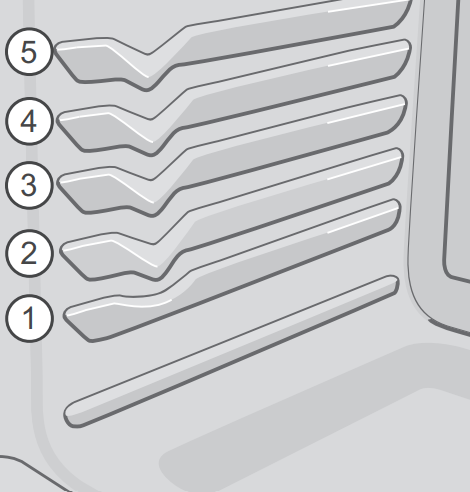
Figure 4: Upper oven rack positions
To set a broil of 500°F:
Place the broiler pan insert on the broiler pan and place the food on the broiler pan insert. Do not use the broiler pan without the insert.The exposed grease could ignite.
Arrange the interior oven rack and place the broiler pan on the rack.
Press Broil. 550 will appear in the display.
Press 5 0 0. If a lower Broil temperature is desired minimum broil temperature setting is 400°F), press the desired temperature before continuing to Step 5.
Press START. The oven will begin to broil. 500° will appear in the display. Preheat for 2 minutes before broiling. Broil with oven door closed.
Center the broiler pan directly under the broiler element. Broil on one side until food is browned; turn and cook on the second side. Season and serve. Always pull the rack out to the stop position before turning or removing food.
To stop broiling, press OFF.
NOTE If a broiler pan and insert are not supplied with this appliance they may be purchased from frigidaire.com.
Figure 5: Broil pan and insert
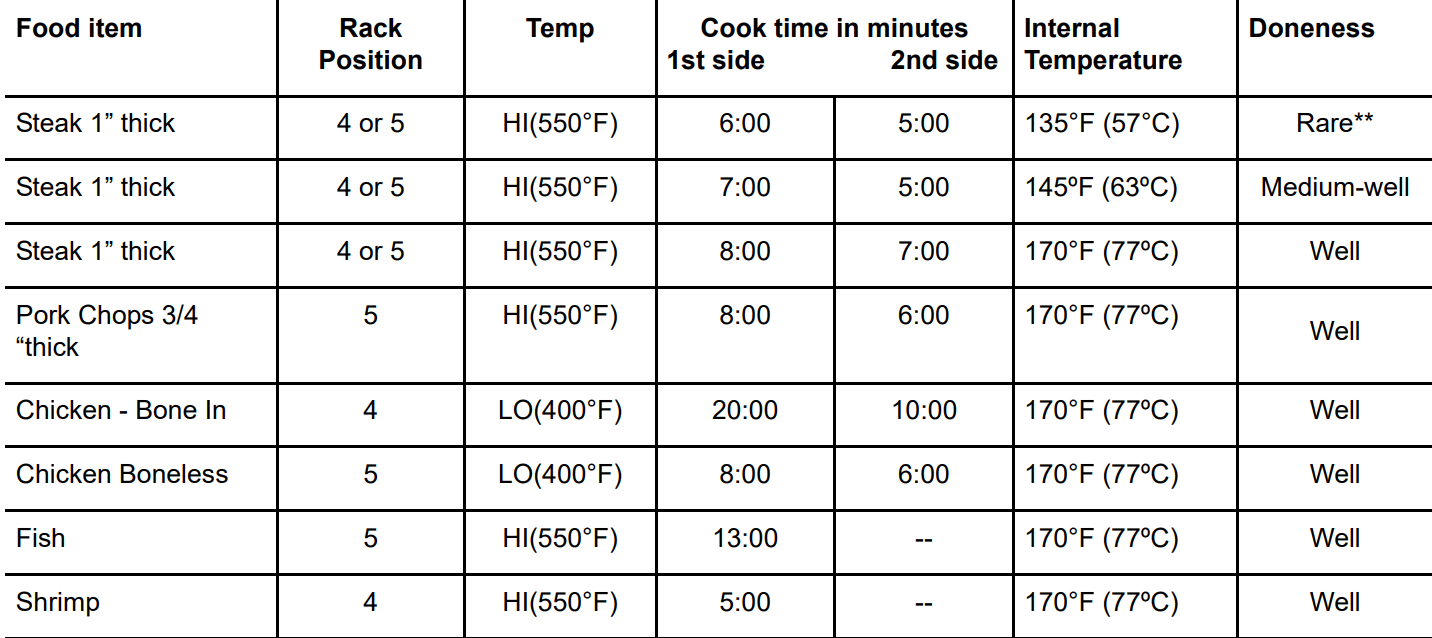
Table 2: Broil recommendations
Setting the Sabbath Feature
The Bake Time and Delay Start keys are used to set the Sabbath feature.
For further assistance, guidelines for proper usage, and a complete list of models with the
Sabbath feature, please visit the web at www.star-k.org.
The Sabbath feature may only be used with the bake function. Once the oven is properly set using bake with the Sabbath feature active, the oven will remain on until cancelled. The Sabbath feature overrides the factory preset hour energy saving feature.
If the oven light is needed during the Sabbath, press oven light before activating the Sabbath feature. Once the oven light is turned on and the Sabbath feature is active, the oven light will remain on until the Sabbath feature is turned off. If the oven light needs to be off, be sure to turn the oven light off before activating the Sabbath feature.
IMPORTANT
It is advised to not activate any cooking function other than bake while the Sabbath feature is active. You may change the oven temperature once baking has started by pressing Bake and the numeric keys for the new temperature. For example, to change from 350°F to 425°F, press 4 2 5. Then, press START twice.
Only the following controls will function after setting the Sabbath feature: numeric keypad, Bake, START, and OFF. All other features will not function once the Sabbath feature is properly activated. The display will not show temperature changes or sound any audible tones when the oven is set with the Sabbath feature
CAUTION Food Poisoning Hazard. Do not let food sit for more than one hour before or after cooking. Doing so can result in food poisoning or sickness.
To program the oven to begin baking immediately and activate the Sabbath feature (example: baking at 350°F (176 °C):
Be sure that the clock is set with the correct time of day.
Place the food in the oven. Press Bake. 350° appears in the display. Press START.
If you desire to set the oven control for a bake time or delayed start bake time, do so at this time. For Delay Start instructions, and Bake Time instructions, see page 16. Remember the oven will turn off after using Bake Time or Delay Start and may only be used once during the Sabbath/Jewish holidays. The maximum bake time is 11 hours and 59 minutes.
The oven will turn on and begin heating.
Press and hold both the Bake Time and Delay Start keys for at least 3 seconds. SAb will appear in the display. Once SAb appears in the display, the oven control will no longer beep or display any further changes, and the oven is properly set for the Sabbath feature.
The oven may be turned off at any time by first pressing OFF (this will turn the oven off only).
To turn off the Sabbath feature:
Press and hold both the Bake Time and Delay Start keys for at least 3 seconds.
SAb will disappear from the display.
Power failure while using Sabbath feature:
Should you experience a power failure or interruption, the oven will shut off. When power is returned, SF (Sabbath Failure) will be displayed, and the oven will not turn back on automatically. If your food was nearly fully cooked, you may allow the trapped heat in the oven to finish the cooking process. Otherwise, you should remove the food when the power failure occurs because you may only start the oven once during the Sabbath/Jewish holidays.
After the Sabbath observance turn off the Sabbath feature. Press and hold both the Bake Time and Delay Start keys for at least 3 seconds. SAb will disappear from the display and the oven may be used with all normal functions.
Setting Warm (Keep Warm)
Warm is best for keeping oven baked foods warm for serving after cooking has finished. The Keep Warm key turns on the Keep Warm feature, will maintain an oven temperature of 170°F (77°C), and will keep oven baked foods warm for serving up to 3 hours after cooking. After 3 hours, the Keep Warm feature will shut the oven off.
Keep Warm tips:
Always start with hot food. Do not use the Keep Warm feature to heat cold food.
Food in heat-safe glass and ceramic containers may need higher temperature settings compared to food in regular cookware.
Aluminum foil may be used to cover food to increase moisture content.
To set Keep Warm:
Arrange interior oven racks and place food in oven.
Press Keep Warm. HLd will appear in the display.
Press START.
To turn off the Keep Warm feature at any time, press OFF.
Trailing Warm (Keep Warm)
When it is necessary to keep cooked foods at serving temperature after a timed bake, the Keep Warm function can be set to turn on automatically and remain on at a steady 170°F (77°C) for up to three hours.
To set Keep Warm to turn on automatically:
Arrange interior oven racks and place food in oven.
Set the oven for Bake Time or Delay Start.
Press Keep Warm.
Press START. HLd will disappear and the temperature will be displayed. The Keep Warm feature will turn on automatically when the timed bake ends.
To turn the Keep Warm feature off at any time, press OFF.
Adjusting Oven Temperature
The temperature in the oven is pre-set at the factory. When first using the oven, be sure to follow recipe times and temperatures. If you think the oven is cooking too hot or too cool for the temperature you select, you can adjust the actual oven temperature to be more or less than what is displayed.
Before adjusting, test a recipe by using a temperature setting higher or lower than the recommended temperature. The baking results should help you to decide how much of an adjustment is needed.
Do not use oven thermometers such as those found in grocery stores. The temperatures can vary as much as 20 to 40 degrees.
To adjust the oven temperature higher:
Press Bake for 6 seconds. UPO 0 will appear in the display.
To increase the temperature, use the number keys to enter the desired change. For 20°F, press 2 0. To set the oven for -20 °, press Self Clean to toggle between + and -.
Press START to accept the temperature change and the display will return to the time of day.
Oven temperature adjustments do not affect Broil, Self Clean or Keep Warm functions.
The oven temperature settings can be made even if your oven displays temperatures in ° C (Celsius). Maximum and minimum settings in Celsius range from plus (+) 19 ° C to minus (-) 19 ° C.
Self-Cleaning Operation
A self-cleaning oven cleans itself with high temperatures well above normal cooking temperatures) which eliminate soils completely or reduces them to a fine powdered ash you can wipe away with a damp cloth. Smoke may appear through the oven vent. If heavy spills are not wiped up before cleaning, they may flame and cause more smoke and odor than usual. This is normal and safe and should not cause alarm. If available, use an exhaust fan during the self-cleaning cycle.
Self Clean is programmable for cleaning cycles ranging from 2 to 4 hour
CAUTION
Do not line the oven walls, racks, bottom, or any other part of the oven with aluminum foil. Doing so will block heat distribution, produce poor baking results, and cause permanent damage to the oven interior aluminum foil will melt to the interior surface of the oven).
The health of some birds is extremely sensitive to the fumes given off during the self-cleaning cycle of any oven. Move birds to another well-ventilated room.
During the self-cleaning cycle, the outside of the oven can become very hot to the touch.
Do not leave small children unattended near the appliance.
Do not force the oven door open. This can damage the automatic door locking system.
Use caution when opening the door after the selfcleaning cycle is completed. The oven may still be very hot.
Stand to the side of the oven door when opening the door to allow hot air or steam to escape.
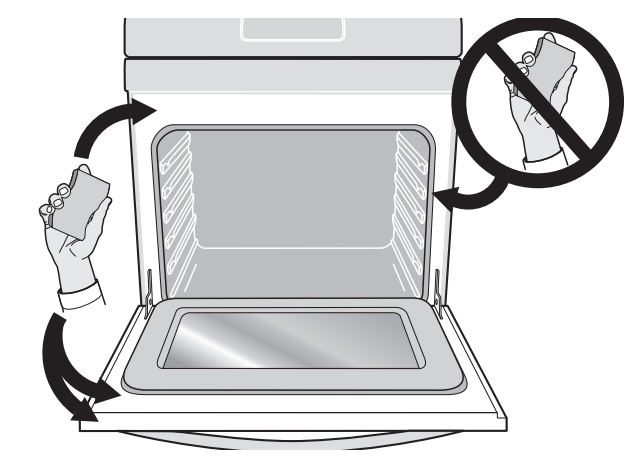
Figure 6: Clean around the oven door gasket
IMPORTANT
Adhere to the following cleaning precautions:
Do not use oven cleaners or protective coatings in or around any part of the oven interior. Do not clean the oven door gasket. Take care not to rub, damage, or remove the gasket or use any cleaning substances on the oven door gasket (See Figure 6). Doing so could cause damage and reduce the efficiency of the oven’s performance.
Clean any soil from the oven frame, door liner outside the oven door gasket, and the small area at the front center of the oven bottom with soap and water (See
Figure 6). These areas heat sufficiently to burn soil on.
Remove any excessive spills from the oven cavity before starting the self-cleaning cycle. To clean, use hot, soapy water and a cloth. Large spills can cause heavy smoke or fire when subjected to high temperatures.
Do not allow food spills with a high sugar or acid content (such as milk, tomatoes, sauerkraut, fruit juices, or pie filling) to remain on the surface as they may leave a dull spot even after cleaning.
Do not use aluminum foil or liners in the oven. These items are not made to withstand the very high temperatures of a self-clean cycle and will melt.
Remove all oven racks and accessories. If oven racks are not removed before a self-clean, they will lose their special coating and will no longer slide in and out of the oven cavity effortlessly.
Oven racks accidentally left in the oven during self clean may be wiped down after cooling with a hightemperature cooking oil to lubricate them.
While in self-clean mode, the oven heats to temperatures much higher than those used in normal cooking. Sounds of metal expansion and contraction are normal. Odors are normal as the food soil is being removed.
Setting Self Clean
The Self Clean key controls the self-cleaning feature. If you are planning to use the oven directly after a self-clean cycle remember to allow time for the oven to cool down and the oven door to unlock. This normally takes about one hour. A hour self-clean cycle will actually take about 4 hours to complete.
It is recommended to use a 2 hour self-clean cycle for light soils, a 3 hour cycle for average soils, and a 4 hour cycle for heavy soils.
To set the controls for a 3 hour self-cleaning cycle to start immediately and shut off automatically:
Be sure the clock is set with the correct time of day and the oven door is closed.
Press Self Clean. CLn and 3:00 HR will show in the display. The control will automatically clean for a 3 hour period (default self-cleaning cycle time). If a 2 or 4 hour clean time is desired, press Self Clean multiple times to toggle between 2, 3, or 4 hours.
Press START. door Loc will appear, a beep will sound, and the word DOOR and the lock icon will flash; CLn will remain on in the display.
As soon as the control is set, the motor driven oven door lock will begin to close automatically. Once the door is locked, the DOOR indicator light and lock icon will stop flashing and remain on, and the oven icon will appear in the display. Allow about 15 seconds for the oven door to lock completely.
When the self-clean cycle is completed:
HOT will appear in the display. The time of day, the word DOOR, and the lock icon will remain in the display.
Once the oven has cooled for approximately 1 hour, door OPn will appear, and the word DOOR and the lock icon will flash until the door unlocks. The door can be opened, and the display will show the time of day.
To stop or Interrupt a self-cleaning cycle:
If it becomes necessary to stop or interrupt a self-cleaning cycle due to excessive smoke or fire in the oven: Press OFF.
NOTE
When self clean is active you may check the time remaining by pressing the Self Clean once. The remaining time will appear in the display momentarily before reverting back to the time of day.
If your clock is set with the (default) 12 hr display mode, the Delay Start for a Self Clean can only be programmed to start up to 11 hours and 59 minutes after the time showing in the display (be sure to set the clock to current time before programming a delay start). To set a Delay Start Self Clean to begin 12 or more hours (maximum is hours and 59 minutes) after the time of setting, be sure to first set the control in the 24 Hr display mode.
If Self Clean was active and then interrupted by a power failure or cancelled before the oven was thoroughly cleaned, it may be necessary to run another Self Clean cycle.
If the oven temperature was high enough when Self Clean was interrupted the oven control may not allow another Self Clean cycle to be set for up to 4 hours.
Setting a Delay Start Self Clean Cycle
The Self Clean and Delay Start keys control the delayed self-clean operation. The automatic timer will turn the oven on and off at the time you select in advance.
To set the control for the self cleaning cycle to start at a delayed time and shut off automatically (example: 3 hour self clean cycle to start at 4:30):
Be sure the clock is set with the correct time of day and the oven door is closed.
Press Self Clean. CLn and 3:00 HR will show in the display. The control will automatically clean for a 3 hour period. If a 2 or 4 hour clean time is desired, press Self Clean multiple times to toggle between 2, 3, or 4 hours.
Press START. door Loc will appear, a beep will sound, and the word DOOR and the lock icon will flash. The letters CLn will remain on in the display.
As soon as the control is set, the motor driven oven door lock will begin to close automatically. Once the door has been locked, the word DOOR and the lock icon indicator light will quit flashing and remain on.
Press Delay Start. Enter the desired start time using the number keys 4 3 0.
Press START. DELAY, DOOR, and the lock icons will remain on.
The control will start the self-cleaning at the set start time for the period of time previously selected. At that time, the icon DELAY will go out; CLn and oven icon will appear in the display.
IMPORTANT
Do not attempt to force the door open while self clean is active or when the motor door latch is unlocking or the door lock indicator is flashing. Once the display is clear, the oven door can then be opened, and the timer will revert back to the time of day.
When the self-clean cycle is completed:
HOT will appear in the display. The time of day, the word DOOR, and the lock icon will remain in the display.
When oven cools approximately 1 HOUR, door OPn will appear, and the word DOOR and the lock icon will flash until the door is unlocked.
NOTE If Self Clean was active and then interrupted by a power failure or cancelled before the oven was thoroughly cleaned, it may be necessary to run another Self Clean cycle. If the oven temperature was high enough when the Self Clean was interrupted, the oven control may not allow another Self Clean to be set for up to 4 hours.
Restoring Factory Control Settings
Your appliance was built with predetermined oven control settings (default). Over time, users may make changes to these settings. The following options have settings that can be modified and may have been changed since the appliance was new:
12 or 24 hour display mode
Continuous Bake or 12 Hour Energy Savings mode
Silent or audible control
Oven temperature display (Fahrenheit or Celsius)
Oven temperature adjustments (offsets)
Note: If you choose to restore factory default settings, all of the above user preferences will be restored to their original settings (factory default).
To restore oven control to factory default settings:
Press and hold 7 until the acceptance tone sounds about 6 seconds)
Press START. The control is now reset to default settings.
CARE AND CLEANING
Remove spills and any heavy soiling as soon as possible.
Regular cleaning will reduce the difficulty of major cleaning later.
CAUTION
Before cleaning any part of the appliance, be sure all controls are turned off and the appliance is cool.
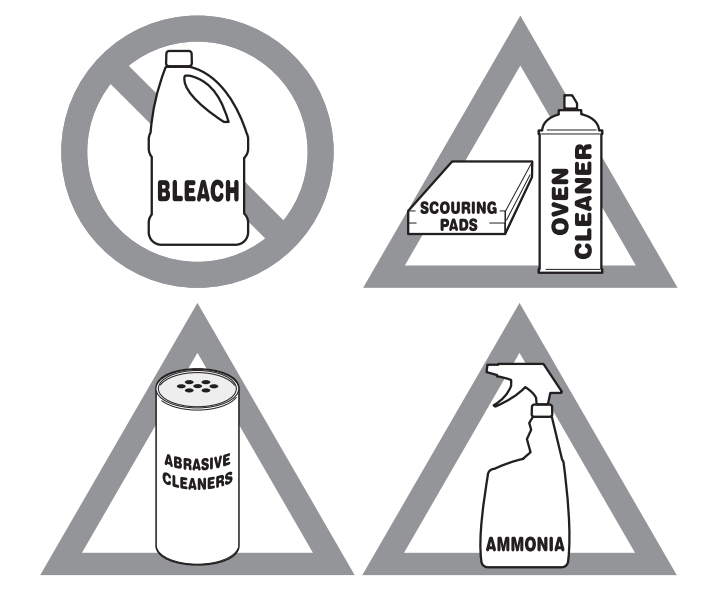
If ammonia or appliance cleaners are used, they must be removed and the appliance must be thoroughly rinsed before operating. Follow manufacturer's instructions and provide adequate ventilation.
Figure 7: Use cleaners with caution
Surface or Areae
Cleaning Recommendation
Aluminum and vinyl
Using a soft cloth, clean with mild dish detergent and water. Rinse with clean water, dry and polish with a soft, clean cloth.
Painted and plastic control knobs
Painted body parts
Painted decorative trims
Using a soft cloth, clean with mild dish detergent and water or a 50/50 solution of vinegar and water. Rinse with clean water, dry and polish with a soft, clean cloth. Glass cleaners may be used, but do not apply directly to surface; spray onto cloth and wipe.
Control panel
Using a soft cloth, clean with mild dish detergent and water or a 50/50 solution of vinegar and water. Do not spray liquids directly on the oven control and display area. Do not use large amounts of water on the control panel - excess water on the control area may cause damage to the appliance. Do not use other liquid cleaners, abrasive cleaners, scouring pads, or paper towels - they will damage the finish.
Control knobs
Using a soft cloth, clean with mild dish detergent and water or a 50/50 solution of vinegar and water. To remove control knobs: turn to the OFF position, grasp firmly, and pull off the shaft. To replace knobs after cleaning, line up the OFF markings and push the knobs into place.
Stainless Steel
Using a soft cloth, clean with mild dish detergent and water or a 50/50 solution of vinegar and water. Rinse with clean water, dry with a soft clean cloth. Do not use cleaners containing abrasives, chlorides, chlorine, or ammonia.
Smudge Proof™
Stainless Steel
Black Stainless Steel
Using a soft cloth, clean with mild dish detergent and water or a 50/50 solution of vinegar and water. Rinse with clean water, dry with a soft clean cloth. Do not use appliance cleaner, stainless steel cleaner, or cleaner containing abrasives, chlorides, chlorine, or ammonia. These cleaners may damage the finish.
Porcelain-enameled broiler pan and insert
Porcelain door liner
Porcelain body parts
Rinse with clean water and a damp cloth. Scrub gently with a soapy, non-abrasive scouring pad to remove most spots. Rinse with a 50/50 solution of clean water and ammonia. If necessary, cover difficult spots with an ammonia-soaked paper towel for 30 to 40 minutes. Rinse and wipe dry with a clean cloth. Remove all cleaners or future heating could damage the porcelain. Do not allow food spills with a high sugar or acid content (milk, tomatoes, sauerkraut, fruit juices or pie filling) to remain on porcelain surfaces. These spills may cause a dull spot even after cleaning.
Manual clean oven interior
The oven interior is porcelain coated and safe to clean using oven cleaners. Always follow manufacturer's instructions for cleaners. After cleaning, remove any oven cleaner or the porcelain may become damaged during future heating. Do not spray oven cleaner on any electrical controls or switches. Do not spray or allow oven cleaner to build up on the oven temperature sensing probe. Do not spray cleaner on oven door trim, door gasket, plastic drawer glides, handles or any exterior surfaces of the appliance.
Ammonia must be rinsed before operating the oven. Provide adequate ventilation
Oven door
Use mild dish detergent and water or a 50/50 solution of vinegar and water to clean the top, sides, and front of the oven door. Rinse well. Glass cleaner may be used on the outside glass of the door. Ceramic smoothtop cleaner or polish may be used on the interior door glass. Do not immerse the door in water. Do not spray or allow water or cleaners to enter the door vents. Do not use oven cleaners, cleaning powders, or any harsh abrasive cleaning materials on the outside of the oven door.
Do not clean the oven door gasket. The oven door gasket is made of a woven material which is essential for a good seal. Do not rub, damage, or remove this gasket
Gas cooktop surface grates
Gas cooktop burner caps
Use a non-abrasive plastic scrubbing pad and mild abrasive cleanser. Do not allow food spills with a high sugar or acid content (milk, tomatoes, sauerkraut, fruit juices or pie filling) to remain on the burner grates or burner caps. These spills may cause a dull spot even after cleaning. Clean these spills as soon as surfaces are cool. Thoroughly dry immediately following cleaning.
General Cleaning
Refer to the table at the beginning of this chapter for more information about cleaning specific parts of the oven.
CAUTION
Before manually cleaning any part of the range, be sure all controls are turned off and the range is cool. The range may be hot and can cause burns.
Remove all racks and accessories from the oven before cleaning.
Ammonia must be rinsed before operating the oven. Provide adequate ventilation.
Follow these cleaning precautions:
Allow the oven to cool before cleaning.
Wear rubber gloves when cleaning the appliance manually.
Remove soils using hot, soapy water. Do not allow food spills with a high sugar or acid content (such as milk, tomatoes, sauerkraut, fruit juices or pie filling) to remain on the surface as they may cause a dull spot even after cleaning. Remove spillovers and heavy soiling as soon as possible. Regular cleaning will reduce the effort required for major cleaning later.
Boiler Pan Cleaning Tips
To prevent grease from baking on, remove the broiler pan from the oven as soon as cooking is completed. Use oven mitts because the broiler pan is extremely hot. Pour off grease. Soak the pan in hot, soapy water.
Clean the broiler pan as soon as possible after each use. If necessary, use soap-filled steel wool pads. Heavy scouring may scratch the grid.
Figure 8: Broiler pan with insert
Aluminum Foil and Utensils
WARNING Never cover any slots, holes, or passages in the oven bottom or cover an entire oven rack with materials such as aluminum foil. Doing so blocks air flow through the oven and may cause carbon monoxide poisoning. Aluminum foil linings may trap heat, causing a fire hazard.
Aluminum foil - Use of aluminum foil on a hot cooktop can damage the cooktop. Do not use thin aluminum cooking utensils or allow aluminum foil to touch the surface burners under any circumstances.
Aluminum utensils - The melting point of aluminum is much lower than that of other metals. Care must be taken when aluminum pots or pans are used on the cooktop. If aluminum pans are allowed to boil dry when using the cooktop, the utensil will be damaged or destroyed.
Oven racks - Do not use aluminum foil to cover the oven racks. Using a liner in the oven restricts the heat and air flow needed to obtain the best possible cooking results for any oven.
Replacing the Oven Light
CAUTION Be sure the oven is unplugged and all parts are cool before replacing the oven light.
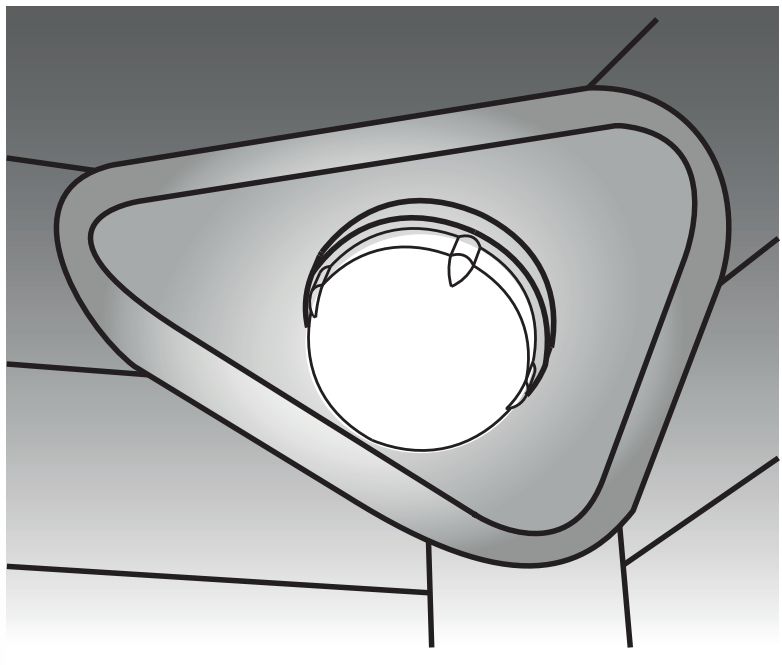
The interior oven light is located at the rear of the oven cavity and is covered by a glass shield. The glass shield must be in place whenever the oven is in use (Figure 9).
To replace the oven interior light bulb:
Turn electrical power off at the main source or unplug the appliance.
Remove interior oven light shield by turning a quarter turn counter-clockwise.
Replace bulb with a new T-4 type Halogen 25 watt appliance bulb.
NOTE: Wear a cotton glove or use a paper towel when installing a new bulb. Do not touch the new bulb with your fingers when replacing. This will shorten the life of the bulb.
Replace glass oven light shield by rotating clockwise.
Turn power back on again at the main source (or plug the appliance back in).
Be sure to reset the time of day on the clock
Figure 9: Wall oven Halogen light
Removing and Replacing the Oven Door
IMPORTANT
Special door care instructions - The door is heavy. For safe, temporary storage, lay the door flat with the inside of the door facing down.
Most oven doors contain glass that can break. Do not close the oven door until all the oven racks are positioned correctly in the cavity. Do not hit the glass with bakeware or any other objects. Scratching, hitting, jarring, or stressing the glass may weaken its structure, causing an increased risk of breakage at a later time.
To remove the oven door:
Open oven door completely, horizontal with floor.
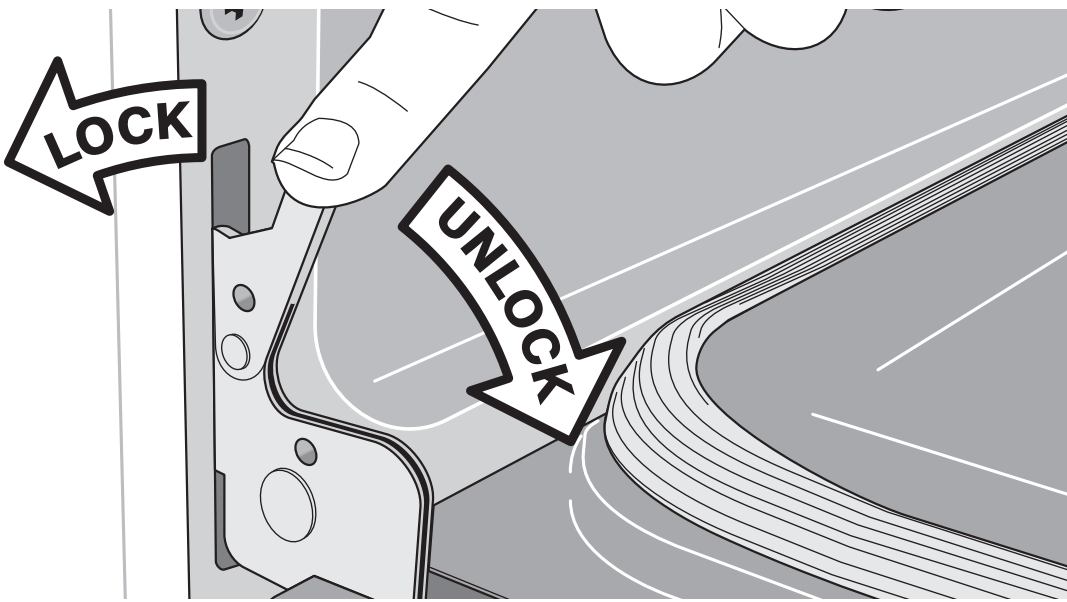
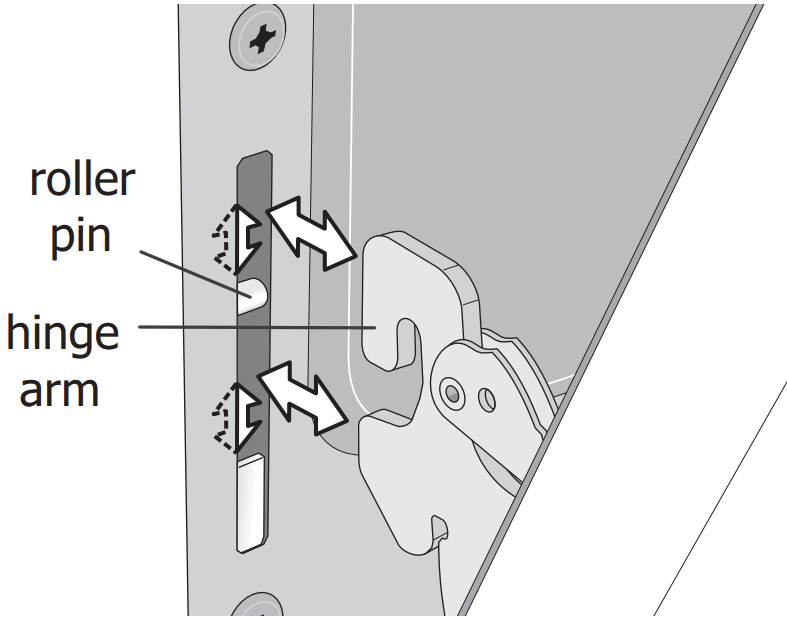
Pull up the lock located on each hinge support toward front of the oven until the lock stops. You may have to apply a little upward pressure on the lock to pull it up (Figure 11 and Figure 12).
Grasp the door by the sides, and close the door until the door frame makes contact with the unlocked hinges.
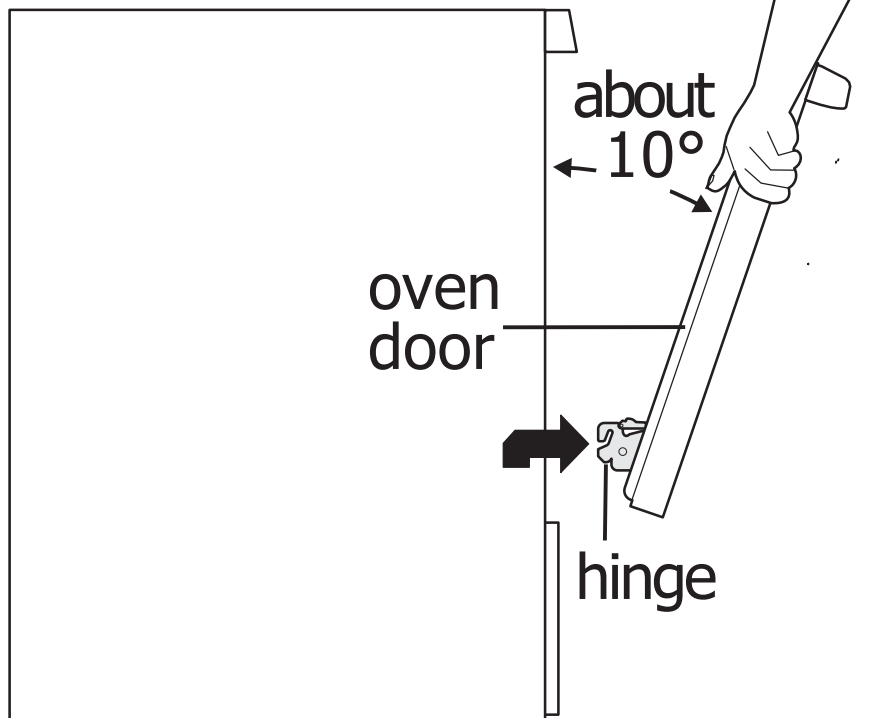
Pull the bottom of the door toward you while rotating the top of the door toward the appliance to completely disengage the hinge levers (Figure 13).
To Replace Oven Door:
Firmly grasp both sides of oven door along the door sides. Do not use the oven door handle (Figure 13).
Hold the oven door at the same angle as the removal position. Carefully insert the hinge levers into the oven frame until you feel the hinge levers are seated into the hinge notches. The hinge arms must be fully seated into the hinge notches before the oven door can be fully opened. (Figure 13).
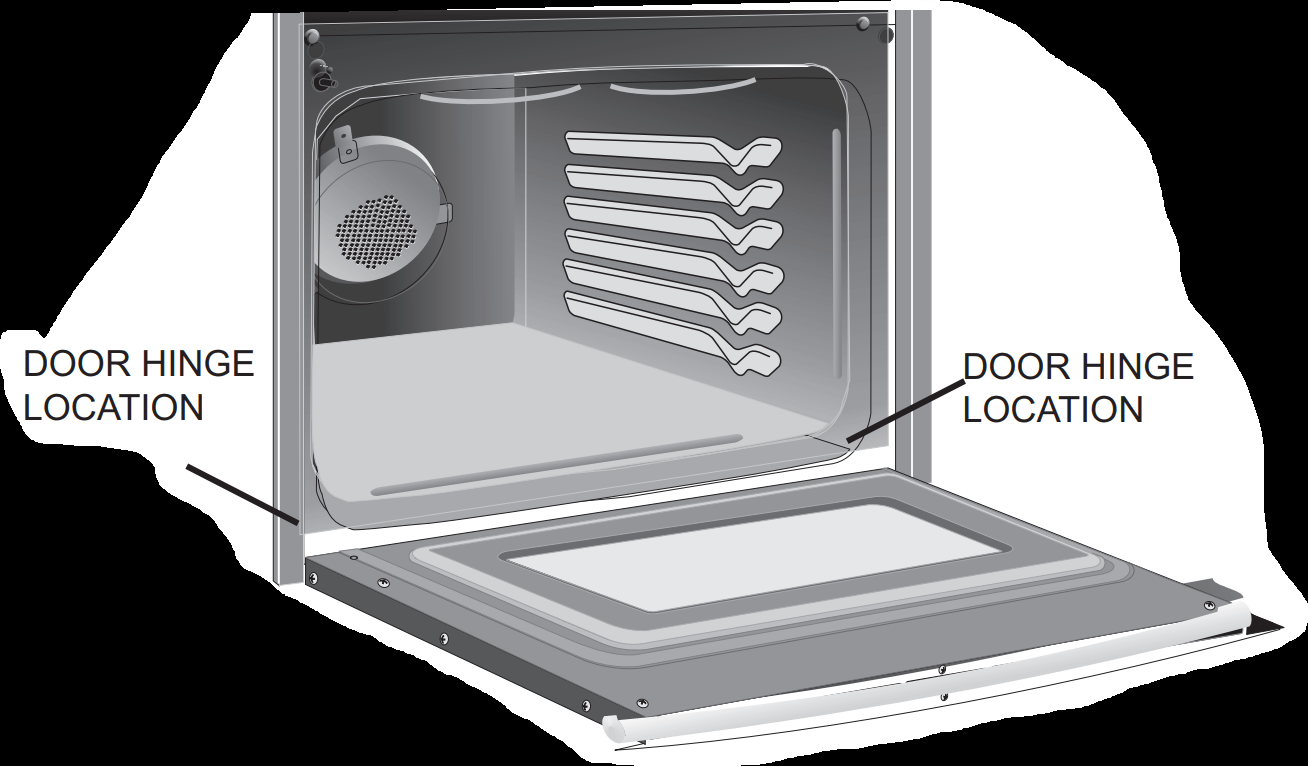
Fully open the oven door, horizontal with floor (Figure 10).
Push the door hinge locks up toward and into the oven frame on both left and right oven door hinges to the locked position (Figure 11)
Close the oven door.
Figure 10: Door hinge location
Figure 11: Door hinge locked
Figure 12: Unlocking door hinge
Figure 13: Remove door position
TROUBLESHOOTING
Oven Baking
Baking Problems
Causes
Corrections
Cookies and biscuits burn on the bottom.
Cookies and biscuits put into oven before oven is preheated.
Oven rack is overcrowded.
Dark pan absorbs heat too fast.
Allow oven to preheat to desired temperature before placing food in oven.
Choose pan sizes that will permit 2” to 4” of air space (5.1 cm to 10.2 cm) on all sides when placed in the oven.
Use a medium weight baking sheet.
Cakes too dark on top or bottom
Cakes put in oven before preheating time is completed.
Rack position too high or too low.
Oven too hot.
Allow oven to preheat to the selected temperature before placing food in the oven.
Use proper rack position for baking needs.
Set oven temperature 25°F (13°C) lower than recommended.
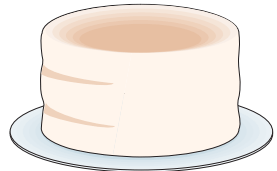
Cakes not done in center
Oven too hot.
Incorrect pan size.
Pan not centered in oven.
Set oven temperature 25°F (13°C) lower than recommended.
Use pan size suggested in recipe.
Use proper rack position and place pan to allow for 2 to 4 inches (5.1 cm to 10.2 cm) space on all sides of pan.
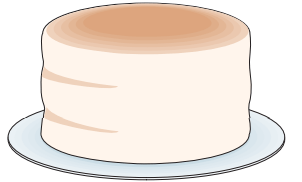
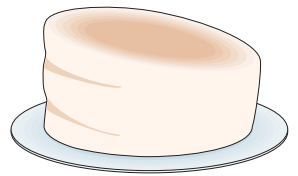
Cakes not level.
Oven not level.
Pan too close to oven wall or rack overcrowded.
Pan warped.
Oven light left on while baking.
Place a marked glass measuring cup filled with water on the center of the oven rack. If the water level is uneven, refer to the installation instructions for leveling the oven.
Be sure to allow 2” to 4” (5.1 cm to 10.2 cm) of clearance on all sides of each pan in the oven.
Do not use pans that are dented or warped.
Leave oven light off while baking
Foods not done when cooking time is over.
Oven too cool.
Oven overcrowded.
Oven door opened too frequently.
Set oven temperature 25°F (13°C) higher than suggested and bake for the recommended time.
Be sure to remove all pans from the oven except the ones to be used for baking.
Open oven door only after shortest recommended baking time.
Before you call for service
Problem
Solution
Oven control panel beeps and displays error codes
Oven control has detected a fault or error condition. When this occurs an E or F will show in the display.
Turn both oven selectors to the OFF position; Activate a Bake or Broil using both the oven mode and temperature selectors.
If the F or E code error repeats, turn off power to appliance, wait 5 minutes and then repower appliance. Set clock with correct time of day.
Try Bake or Broil function again. If a fault code appear again, turn both oven selectors to the OFF position to clear the error code and contact your servicer.
Poor baking results
Many factors effect baking results.
Use proper oven rack position.
Center food in the oven and space pans to allow air to circulate.
Preheat oven to the set temperature before placing food in the oven.
Try adjusting the recipe's recommended temperature or baking time.
Appliance is not level.
Poor installation. Place oven rack in center of oven. Place a level on the oven rack. Adjust leveling legs at base of appliance until the rack is level.
Kitchen cabinet alignment may make range appear not level. Be sure cabinets are square and have sufficient room for appliance clearance.
If cabinets are not square or are built in too tightly, contact builder or installer to make appliance accessible.
Cannot move appliance easily. Appliance must be accessible for service.
Cabinets not square or are built in too tightly.
Contact builder or installer to make appliance accessible.
Appliance does not operate.
Appliance does not operate
Call your local electric company for service outage information.
Service wiring is incomplete. Call 1-800-944-9044 for assistance
Flames inside oven or smoking from oven vent.
Excessive spillovers in oven. Grease or food spilled onto oven bottom or oven cavity. Wipe up excessive spills before starting oven.
If flames or excessive smoke are present when broiling
Oven does not operate
The time of day is not set. The oven clock must first be set in order to operate the oven.
Be sure the oven controls are set properly for the desired function and review instructions for the desired cooking function in this manual..
Oven smokes excessively when broiling.
Incorrect setting.
Meat too close to the broiler. Reposition the broil rack to provide proper clearance between the meat and the broiler. Preheat the broiler for searing.
Grease has built up on oven surfaces. Regular cleaning is necessary when broiling frequently. Old grease or food spatters cause excessive smoking.
Oven racks discolored or do not slide easily.
Clean by using a mild abrasive cleaner following manufacturer's instructions. Rinse with clean water, dry, and replace in oven.
Oven light does not work.
Be sure the oven light is secure in the socket.
Fan noise occurring after the oven is turned off
Some models are equipped with a cooling fan that runs during the cooking process to cool internal electronic components. It is normal for this fan to continue to run for an extended period of time, even when the oven has been turned off.
 .
. key controls the oven lockout. When activated, this feature automatically locks the oven door, preventing the oven from being turned on. It does not affect the clock, timer, or the interior oven lights. Both ovens can be locked individually.
 will flash.