1
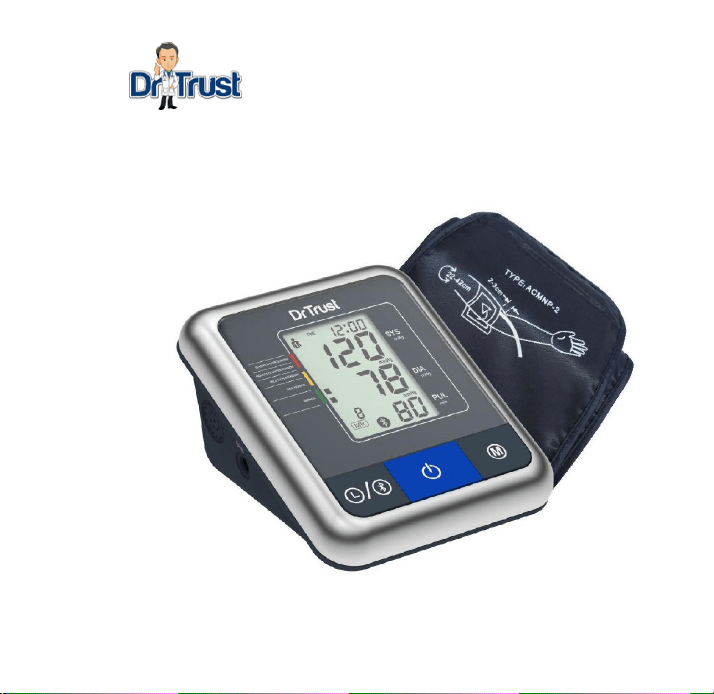
A One Max Connect
Instruction Manual

2
Table of Contents
TABLE OF CONTENTS ........................................................................................... 2
1. INTRODUCTION ................................................................................................. 4
1.1. FEATURES OF THE BP A ONE A ONE MAX CONNECT .............................................. 4
1.2. IMPORTANT INFORMATION ABOUT SELF-MEASUREMENT ............................................. 4
2. IMPORTANT INFORMATION ON THE SUBJECT OF BLOOD-PRESSURE AND
ITS MEASUREMENT........................................................................................................ 5
2.1. HOW DOES HIGH/LOW BLOOD-PRESSURE ARISE? ..................................................... 5
2.2. WHICH VALUES ARE NORMAL?................................................................................ 6
3. VARIOUS COMPONENTS OF THE BLOOD-PRESSURE MONITOR .................... 8
4. PUTTING THE BLOOD-PRESSURE MONITOR INTO OPERATION .. 错误!未定义书
签。
4.1. INSERTING THE BATTERIES ......................................................................................... 9
4.2. READING THE SET DATE .............................................................................................. 9
4.3. LANGUAGE TALKING SELECTION , USER SELECTION AND SETTING THE TIME / DATE ............ 9
5.CARRYING OUT A MEASUREMENT ................................................................. 11
5.1. BEFORE THE MEASUREMENT ..................................................................................... 11
5.2. COMMON SOURCES OF ERROR .................................................................................. 11
5.3. FITTING THE CUFF .................................................................................................... 12
5.4. MEASURING PROCEDURE.......................................................................................... 13
5.5. DISCONTINUING A MEASUREMENT .............................................................................. 14
5.6. MEMORY – STORAGE AND RECALL OF THE MEASUREMENTS .......................................... 14

3
5.7. MEMORY FULL ................................................................................................... 15
5.8. MEMORY– CANCELLATION OF ALL MEASUREMENTS ATTENTION! .................................... 15
5.9.BLUETOOTH
FUNCTION……………………………………………………………………………15
6. APPEARANCE OF IHB(IRREGULAR HEART BEAT)
DETECTION………………………17
7. ERROR MESSAGES /MALFUNCTIONS…… .................................... ……………18
8. CARE AND MAINTENANCE, RECALIBRATION ................................................. 20
9. BATTERY LIFE : ............................................................................................... 20
10.SAFETY,CARE AND DISPOSAL ...................................................................... 20
11.REFERENCE TO STANDARDS ........................................................................ 22
12.REMARK: ......................................................................................................... 22
13. TECHNICAL SPECIFICATIONS ....................................................................... 23
14. MANUFACTURER'S DECLARATION ............................................................... 24

4
1. Introduction
1.1. Features of BP AOne Max Connect
Dr. Trust A ONE MAX Connect (with integrated time/date display) is a fully automatic, digital blood-
pressure measuring device for use on the arm, which enables very fast and reliable measurement of
the systolic and diastolic blood-pressure as well as the pulse frequency by way of the oscillometric
method of measuring.
The device offers very high and clinical tested measurement accuracy and has been designed to
provide a maximum of user-friendliness.
The device is intended for self-use in home.
Before using, please read through this instruction manual carefully and then keep it in a safe place.
For further questions on the subject of blood-pressure and its measurement, please contact your
doctor.
Attention!
1.2. Important information about self-measurement
Substitution of a different component might result in measurement error.
Cuff is replaceable only by an original.
Do not use with neonatal patients.
Do not intend to use with pregnant or pre-eclamptic patients
It will cause harmful injury to the patient or affect the blood pressure due to connection tubing
kinking.
Too frequent measurements can cause injury to the patient due to blood flow interference.

5
The application of the cuff over a wound can cause further injury.
The application of the cuff and its pressurization on any limb where intravascular access or
therapy, or an arteriovenous (A-V) shunt, is present because of temporary interference to
blood flow and could result in injury to the patient.
Do not let the cuff and its pressurization on the arm on the side of a mastectomy
Pressurization of the cuff can temporarily cause loss of function of simultaneously used
monitoring ME equipment on the same limb.
The need to check that operation of the automated sphygmomanometer does not result in
prolonged impairment of patient blood circulation.
Not intended to be used together with HF surgical equipment.
Do not forget: self-measurement means control, not diagnosis or treatment. Unusual values
must always be discussed with your doctor. Under no circumstances should you alter the
dosages of any drugs prescribed by your doctor.
The pulse display is not suitable for checking the frequency of heart pacemakers!
In cases of IHB (Irregular Heart Beat), measurements made with this instrument should only be
evaluated after consultation with the doctor.
Electromagnetic interference
The device contains sensitive electronic components (Microcomputer). Therefore, avoid strong
electrical or electromagnetic fields in the direct vicinity of the device (e.g. mobile telephones,
microwave cookers). These can lead to temporary impairment of the measuring accuracy.
2. Important information on the subject of blood-pressure and its measurement
2.1. How does high/low blood-pressure arise?

6
As your heart beats, it pumps your blood round your body so that your muscles can get all the
energy and oxygen they need. To do this, your heart pushes your blood through a network of blood
vessels called arteries. As the blood travels through the arteries it pushes against the sides of these
blood vessels and the strength of this pushing is called your blood pressure.
As your heart squeezes and pushes your blood through your arteries, your blood pressure goes up.
As your heart relaxes, your blood pressure goes down. So, with each heartbeat, your blood pressure
will rise to a maximum level and then fall to a minimum level.
2.2. Which values are normal?
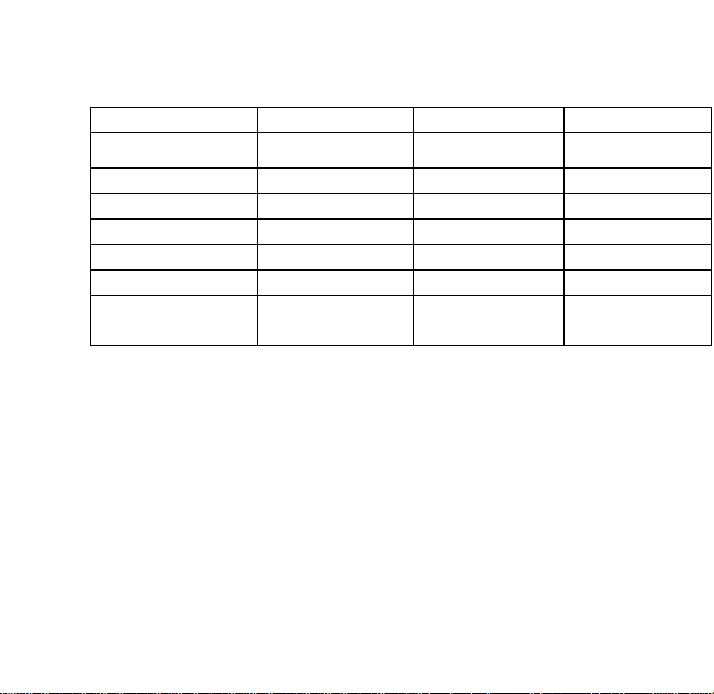
Blood pressure is too high if at rest, the diastolic pressure is above 90 mmHg and/or the systolic blood-
pressure is over 160 mmHg. In this case, please consult your doctor immediately. Long-term values
at this level endanger your health due to the associated advancing damage to the blood vessels in
your body.
Should the systolic blood-pressure values lie between 140 mmHg and 160 mmHg and/or the diastolic
blood-pressure values lie between 90 mmHg and 100 mmHg, likewise, please consult your doctor.
Furthermore, regular self-checks will be necessary.
With blood-pressure values that are too low, i.e. systolic values under 100 mmHg and/or diastolic
values under 60 mmHg, likewise, please consult your doctor. Even with normal blood-pressure values,
a regular self-check with your blood-pressure monitor is recommended. In this way you can detect
possible changes in your values early and react appropriately. If you are undergoing medical treatment
to control your blood pressure, please keep a record of the level of your blood pressure by carrying
out regular self-measurements at specific times of the day. Show these values to your doctor. Never
use the results of your measurements to alter independently the drug doses prescribed by your doctor.
7
Table for classifying blood-pressure values (unit: mmHg) according to World Health Organization:
Range & broadcasting
Systolic Blood-pressure
Diastolic Blood-pressure
Measures
Hypotension
lower than 100
lower than 60
Consult your doctor
optimal
between 100 and 120
between 60 and 80
Self-check
normal
between 120 and 130
between 80 and 85
Self-check
high to normal
between 130 and 140
between 85and 90
Consult your doctor
slight hypertension
between 140 and 160
Between90and 100
Seek medical advice
medium hypertension
between 160 and 180
Between100and 110
Seek medical advice
strong hypertension
Higher than 180
Higher than 110
Urgently seek medical
advice!
8
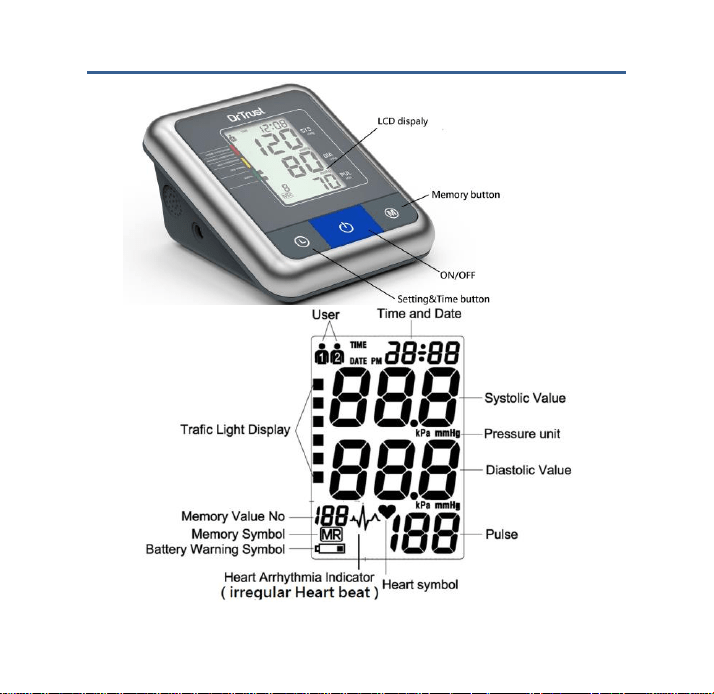
3. Various components of the blood-pressure monitor
9
4. Putting the blood pressure monitor into operation
4.1. Inserting the batteries
a) Insert the batteries (4 x size AA 1.5V), thereby observing the indicated polarity.
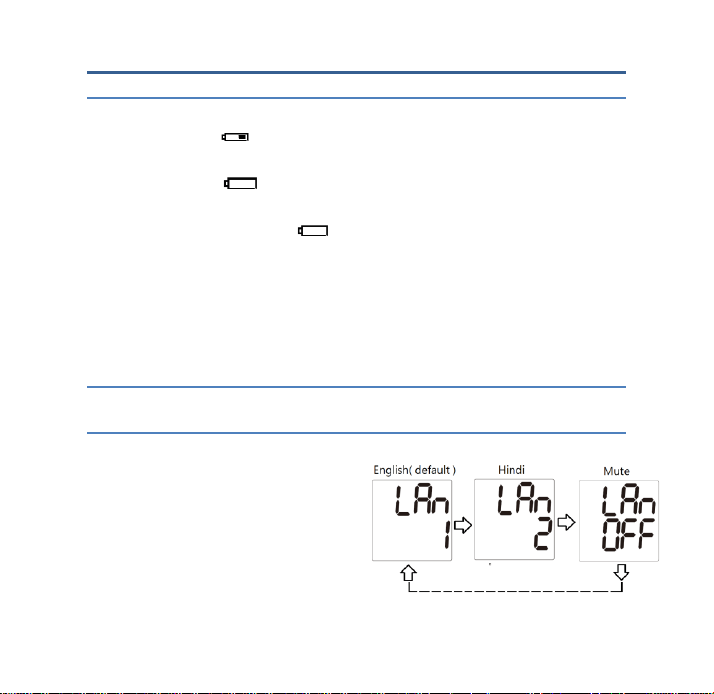
b) If the battery warning icon appears in the display, the batteries remain 20% power to warn
user the batteries will be run out.
c) If the battery warning icon appears in the display, the batteries are empty and must be
replaced by new ones
Attention! • After the battery warning icon appears, the device is blocked until the batteries
have been replaced.
Please use «AA» Long-Life or Alkaline1.5V Batteries. The use of 1.2V
Accumulators is not recommended.
If the blood-pressure monitor is left unused for long periods, please remove the
batteries from the device.
4.2. Reading the set date
Please press the TIME button and the date will be shown in the display.
4.3. Language selection, User selection and setting the time / date
Talking Language selection: Bilingual of English and Hindi
There are two languages:- English and Hindi.
Press and hold “ON/OFF” button for around 5
seconds, to enter language selection mode.
Default language is English. Press memory button
to switch language to Hindi
and to mute (voice off). Again press “ON/OFF”

10
button to save your selection and exit.
User selection: This advanced blood pressure monitor allows you to track blood pressure readings for
2 individuals independently.
a) Before measurement, make sure you set the unit for the intended user. The unit can track results
for 2 individuals. (User 1, User 2)
b) Press the TIME button for at least 3 seconds. The display now indicates the set user, during
which the set user blinks. Press ON/OFF button to confirm.
c) Click the MEMORY button to select User.
Setting the time, date
This blood-pressure monitor incorporates an integrated clock with date display. This has the
advantage, that at each measurement procedure, not only the blood-pressure values are stored, but
also the exact moment of the measurement. After new batteries have been inserted, the clock
begins to run TIME 12:00 and DATE 1-01.You must then re-enter the date and current time. For
this, please proceed as follows.
1. Press TIME button for at least 3 seconds, user icon will blink. Again press TIME button the
display now indicates the set year, during which the four characters blink.
2. Press MEMORY button to enter correct year.
3. Press the TIME button again. The display now switches to the current date, during which the
first character (month) blinks.
4. The corresponding month can now be entered by pressing the MEMORY button.
5. Press the TIME button again. The last two characters (day) are now blinking
6. The corresponding day can now be entered by pressing the MEMORY button.
7. Press the TIME button again. The display now switches to the current time, during which the
first character (Hour) blinks

11
8. The corresponding hour can now be entered by pressing the MEMORY button.
9. Press the TIME button again. The last two characters (Minutes) now blink.
10. The exact time can now be entered by pressing the MEMORY button
11. Press TIME button (or TIME / DATE or TIME): the unit of measurement will flash.
12. Press the "MEMORY to set the unit of measurement (mmHg or kPa)
13. Once you have made your settings, press the TIME button (or TIME / DATE or TIME). The
setting is confirmed and the clock starts running.
14. Now after all settings have been made, press the TIME button once again. The date is briefly
displayed and then the time. The input is now confirmed and the clock begins to run.
Further Information
With each press of the button (TIME, MEMORY) one input is made (e.g. switching over from hours to
minutes mode, or altering the value by +1). However, if you keep the respective button depressed,
you can switch more quickly to find the desired value respectively.
5. Carrying out a measurement
5.1. Before the measurement
Avoid eating, smoking as well as all forms of exertion directly before the measurement. All
these factors influence the measurement result. Try and find time to relax by sitting in an
armchair in a quite atmosphere for about ten minutes before the measurement.
Measure always on the same arm (normally left).
Attempt to carry out the measurements regularly at the same time of day, since the blood-
pressure changes during the course of the day.
5.2. Common sources of error
Note: Comparable blood-pressure measurements always require the same conditions! These are
normally always quiet conditions.
12
All efforts by the patient to support the arm can increase the blood-pressure. Make sure you
are in a comfortable, relaxed position and do not activate any of the muscles in the
measurement arm during the measurement. Use a cushion for support if necessary.
The performance of the automated sphygmomanometer can be affected by extremes of
temperature, humidity and altitude.
Avoid compression or restriction of the connection tubing.
A loose cuff causes false measurement values.
With repeated measurements, blood accumulates in the respective arm, which can lead to
false results. Correctly executed blood-pressure measurements should therefore first be
repeated after a 5 minute pause or after the arm has been held up in order to allow the
accumulated blood to flow away (after at least 3 minutes).
5.3. Fitting the cuff
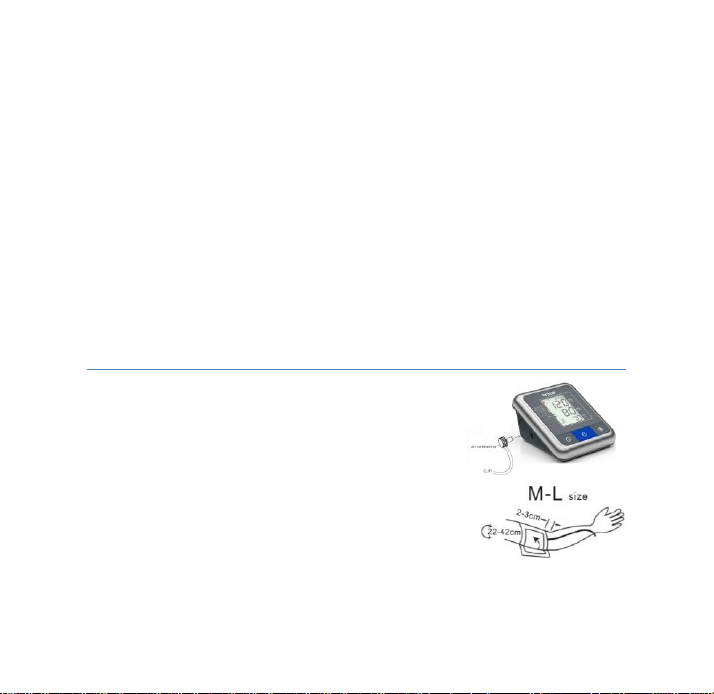
Insert air connector into air outlet as shown in the picture and please
make sure the fitting of the air connector completely and properly to
avoid air leakage.
a) The distance between the edge of cuff and the elbow should
be approx. 2~3cm.
13
b) Secure the cuff with the Velcro fastener, so that it lies comfortably and
not too tight, whereby no space should remain between the cuff and the
arm.
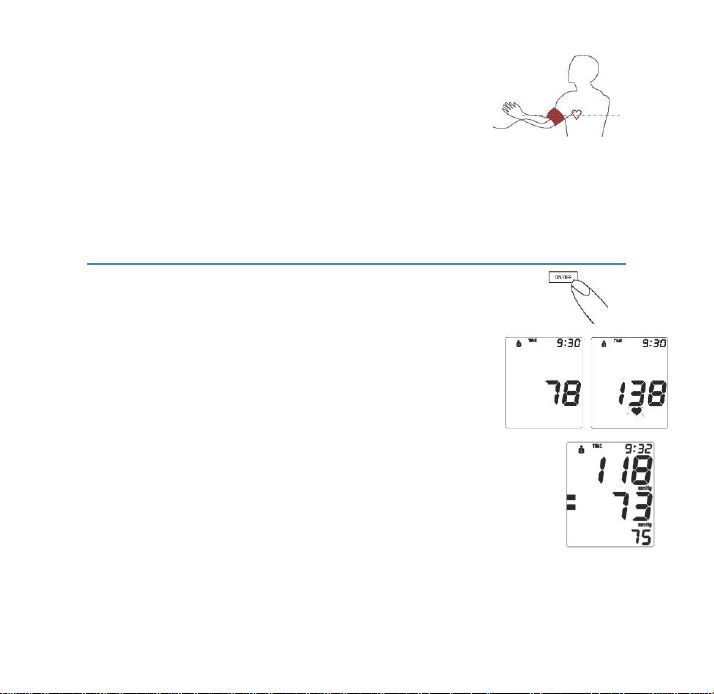
c) Place the arm on a table, with the palm upwards. Support the arm a
little with a rest (cushion), so that the cuff rests at about the same height as the heart. Take care, that
the cuff lies free. Remain so for 2 minutes sitting quietly, before beginning with the measurement.
d) Keep legs uncrossed, feet flat on the floor, back and arm supported.
5.4. Measuring procedure
After the cuff has been appropriately positioned, the measurement can begin:
a) Press the ON/OFF button, the pump begins to inflate the cuff. In the display, the
increasing cuff-pressure is continually displayed.
b) After reaching the inflation pressure, the pump stops and the pressure
slowly falls away. The cuff-pressure (large characters) is displayed during
the measurement. When the device has detected the pulse, the heart
symbol in the display begins to blink for every pulse beat. c) When the measurement
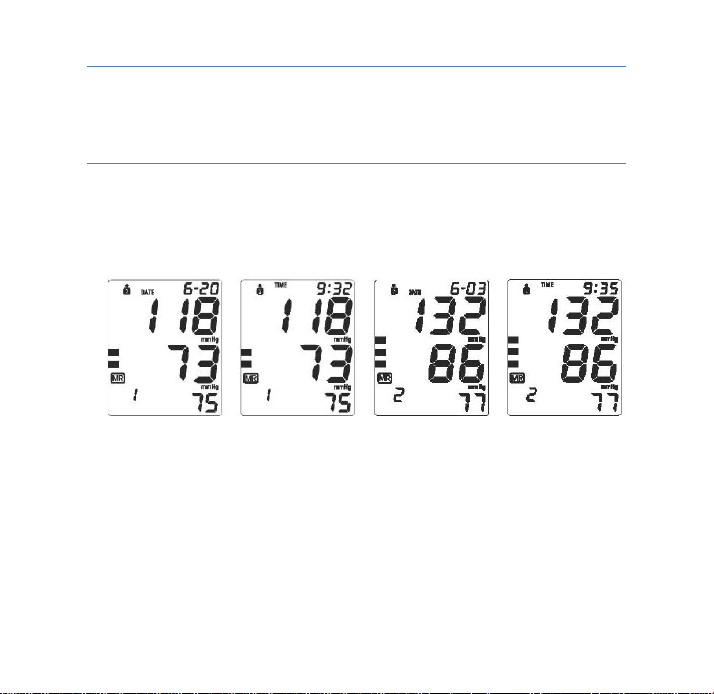
has been concluded. The measured systolic and diastolic blood-pressure values as well
as the pulse frequency are now displayed.
Example (Fig.): Systole 118, Diastole 73, Pulse 75
The measurement results are displayed, until you switch the device off. If no button is
pressed for 3 minutes, the device switches automatically off, to save the batteries.
14
5.5. Discontinuing a measurement
If it is necessary to interrupt a blood pressure measurement for any reason (e.g. the patient feels
unwell), the “ON/OFF” power button can be pressed at any time. The device then immediately
lowers the cuff-pressure automatically.
5.6. Memory – storage and recall of the measurements
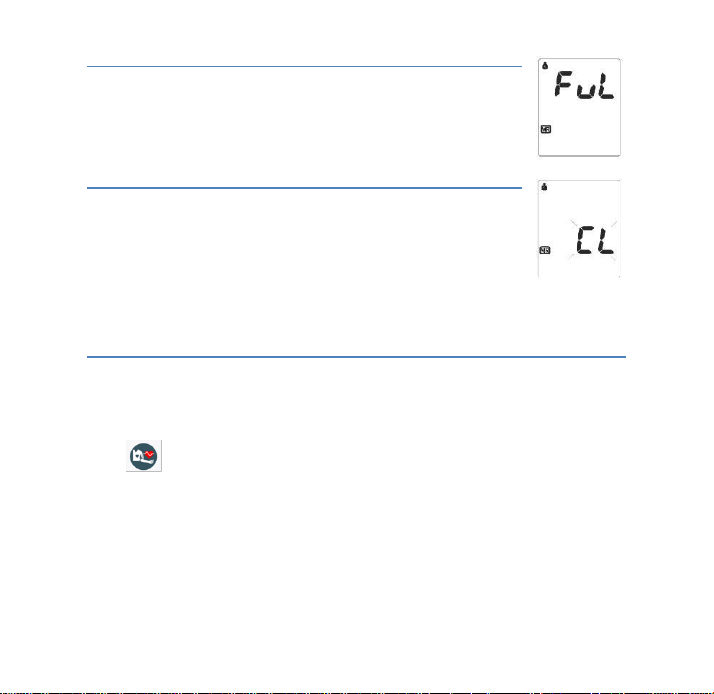
The blood-pressure monitor automatically stores each of the last 120 measurement values. By
pressing the MEMORY button, an average value of the last 3 measurements as well as the last
measurement and the further last 120 measurements (MR119,MR118,…,MR1)can be displayed one
after the other
(MR1: Values of the last measurement) (MR2-MR120: Values of the measurement before MR1)
15
5.7. Memory full
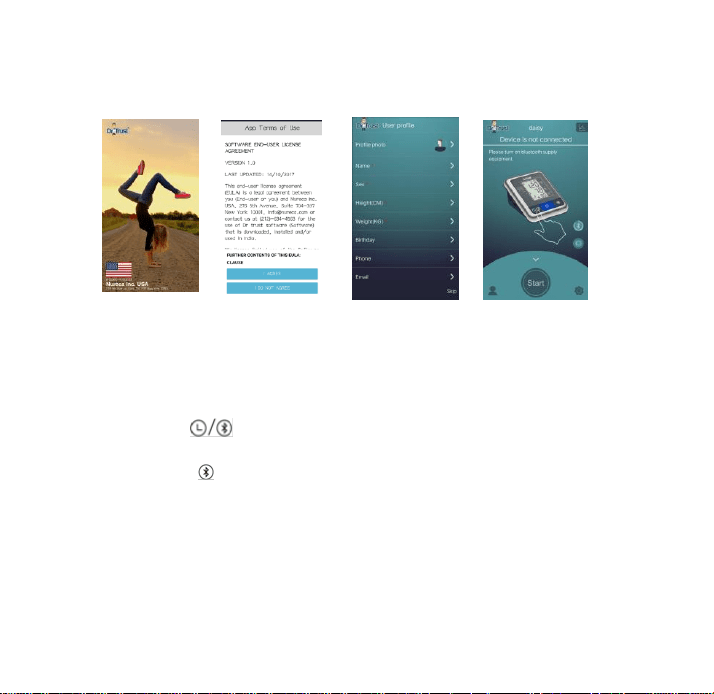
Pay attention that the maximum memory capacity is not exceeded. When the
memory is full, the old values are automatically over written with new ones. When
memory is full , the display shown 1 second as follows to remind you “ memory
full “
5.8. Memory– cancellation of all measurements Attention!
Before you delete all readings stored in the memory, make sure you will not need
to refer to the readings at a later date. Keeping a written record is prudent and
may provide additional information for your doctor’s visit. In order to delete all
stored readings, depress the MEMORY button for at least 5 seconds, the display
will show the symbol «CL» and then release the button. To permanently clear the memory, Press the
MEMORY button while «CL» is flashing. To indicate deletion of stored readings.
5.9. Bluetooth function!
1. The product has Bluetooth function, you can install the offered APP on your phone and to connect
it on BPM device, then hit start to test. The test data will be transmitted to your phone for storage.
The operation method is as follows:
1. For the first time use: install the APP. After completion, the phone shows the app icon:
Software icons:
16
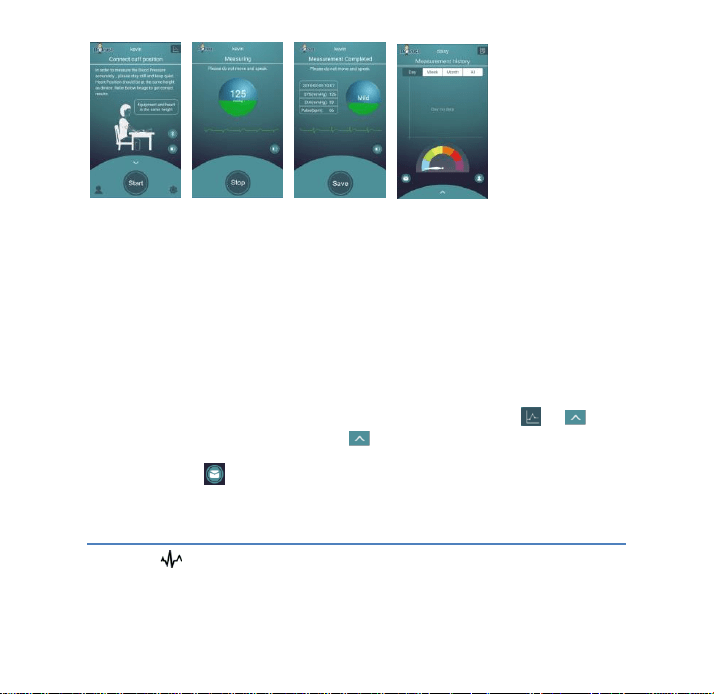
2. When the installation is complete, set the user information. It includes basic information, like
name, gender, height, weight and so on. Enter the Bluetooth connection interface and click
"scanner";
(1) (2) (3) (4)
Image 1: welcome interface
Image 2: APP Terms of Use
Image 3: User information setting
3. Entering the stand-by interface, turn on the Bluetooth on your phone to connect the device. At the
same time press button of the device. (Image 4: Bluetooth connecting)
4. After the device and mobile phone are successfully connected by Bluetooth, the LCD screen of
the device displays " ," and the mobile application switches to the test interface automatically
(image 5).
17
(5) (6) (7) (8)
Image 5: measuring interface
Image 6: measuring process
Image 7: measurement result
Image 8: measurement history
5. In the mobile application measuring interface, click "Start", the device began to measure blood
pressure automatically (image 6), please do not move and speak.
6. Complete the measurement, the application displays the measurement results automatically
(image 7), the user can choose to save the data to the phone; (the measurement results will also be
stored in the device)
7. If the user wants to look up the previous measurement history, then press the " " or " "
button on the measurement interface, press the " " button to return to the measurement interface.
8. User can click the icon to send the last 10 measurement results to the added email address.
6. Appearance of IHB (Irregular Heart Beat) Indicator for early Detection
This symbol indicates that certain pulse irregularities were detected during the measurement.
In this case, the result may deviate from your normal blood pressure – repeat the measurement. In
most cases, this is no cause for concern. However, if the symbol appears on a regular basis (e.g.

18
several times a week with measurements taken daily) we advise you to tell your doctor.
Please show your doctor the following explanation
Information for the doctor on frequent appearance of the IHB (Irregular Heart Beat) indicator
This instrument is an oscillometric blood pressure monitor that also analyses pulse frequency during
measurement. The instrument is clinically tested. The IHB (Irregular Heart Beat) symbol is displayed
after the measurement, if pulse irregularities occur during measurement. If the symbol appears more
frequently (e.g. several times per week on measurements performed daily) we recommend the
patient to seek medical advice.
The instrument does not replace a cardiac examination, but serves to detect pulse irregularities at
an early stage
7. Error messages /malfunctions
If an error occurs during a measurement, the measurement is discontinued and a corresponding
error code is displayed
.
Error No.
Possible cause(s)
ERR 1
No pulse has been detected.
ERR 2
Unnatural pressure impulses influence the measurement result. Reason: The
arm was moved during the Measurement (Artifact).
ERR 3
The inflation of the cuff takes too long. The cuff is not correctly seated.
ERR 5
The measured readings indicated an unacceptable difference between systolic
and diastolic pressures. Take other reading following directions carefully. Contact
you doctor if you continue to get unusual readings.
Err8
The pressure in the cuff is too high (over 290 mmHg)
Further Information - The level of blood-pressure is subject to fluctuations even with healthy people.
Important thereby is, that comparable measurements always require the same conditions (Quiet

19
conditions)! If, in spite of observing all these factors, the fluctuations are larger than 15mmHg, and/or
you hear irregular pulse tones on several occasions, please consult your doctor. For licensing, the
device has been subjected to strict clinical tests, by which the computer program used to measure the
blood-pressure values was tested by experienced specialist doctors in Germany. The same computer
program is used in every individual device, and has thus also been clinically tested. The manufacture
of the devices takes place according to the terms of the European standard for blood-pressure
measuring devices (see technical data) you must consult your specialist dealer or chemist if there are
technical problems with the blood-pressure instrument. Never attempt to repair the instrument yourself!
Any unauthorized opening of the instrument invalidates all guarantee claims!
Other possible malfunctions and their elimination
If problems occur when using the device, the following points should be checked and if necessary,
the corresponding measures are to be taken:
Malfunction
Remedy
The display remains empty when the
instrument is switched on although the
batteries are in place.
1. Check batteries for correct polarity and if necessary insert
correctly.
2. If the display is unusual, re-insert batteries or exchange them.
The device frequently fails to measure
the blood pressure values, or the values
measured are too low (too high).
1. Check the positioning of the cuff.
2. Measure the blood-pressure again in peace and quiet under
observance of the details made under point 5.
Every measurement produces a different
value although the instrument functions
normally and the values displayed are
normal
1. Please read the following information and the points listed under
«Common sources of error». Repeat the measurement.
Please note: Blood pressure fluctuates continually so
successive measurements will show some variability.

20
Blood pressure measured differs from
those values measured by the doctor.
1. Record the daily development of the values and consult your
doctor. Please note: Individuals visiting their doctor frequently
experience anxiety which can result in a higher reading at the doctor
than obtained at home under resting conditions.
8. Care and Maintenance, Recalibration
a) Do not expose the device to extreme temperatures, humidity, dust or direct sunlight.
b) The cuff contains a sensitive air-tight bubble. Handle this carefully and avoid all types of straining
through twisting or buckling.
c) Clean the device with a soft, dry cloth. Do not use petrol, thinners or similar solvent. Spots on the
cuff can be removed carefully with a damp cloth and soapsuds. The cuff must not be washed!
d) Do not drop the instrument or treat it roughly in any way. Avoid strong vibrations.
e) Never open the device! Otherwise the manufacturer calibration becomes invalid!
9. Battery life:
1000 times measurement with 4- size “AA” alkaline Batteries
10. Safety, care and disposal
Safety and protection
1. This instrument may be used only for the purpose described in this booklet. The
manufacturer cannot be held liable for the damage caused by incorrect application.
2. This instrument comprises sensitive components and must be treated with caution.
Observe the storage and operating condition described in the “Technical specifications”
section!
21
3. Protect it from water and moisture, extreme temperatures, impact and dropping,
contamination and dust, direct sunlight, heat and cold.
4. The cuffs are sensitive and must be handled with care
5. Only pump up the cuff once fitted
6. Do not use the instrument close to strong electromagnetic fields such as mobile
telephones or radio installations
7. Do not use the instrument if you think it is damage do notice anything unusual.
8. If the instrument is not going to be used for a prolonged period the batteries should be
removed.
9. Read the additional safety instructions in the individual sections of this booklet.
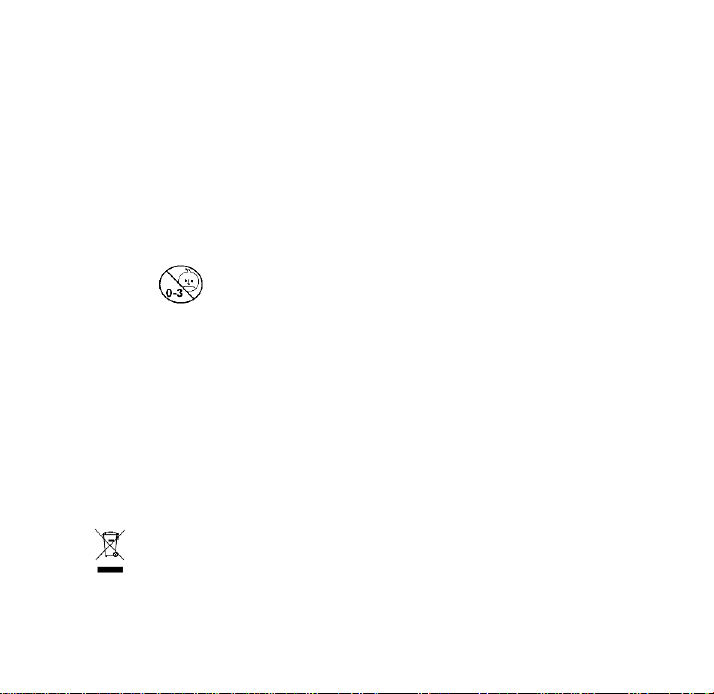
Ensure that children do not use the instrument unsupervised: some parts are small
enough to be swallowed
10. Must use the recognized accessories, detachable parts and materials, if the use of other
parts or materials can degrade minimum safety.
11. A warning to remove primary batteries if the instruments are not likely to be used for
some time.
Instrument care
Clean the instrument only with a soft, dry cloth
Disposal
Batteries and electronic instruments must be disposed of in accordance with the locally
applicable regulations, not with domestics waste.
22
11. Reference to Standards
Device standard: Device corresponds to the requirements of the European standard for non-
invasive blood- pressure monitor
EN1060-1
EN1060-3
EN1060-4 – clinical investigation
IEC/EN 60601-1-11
ANSI / AAMI SP10, NIBP,
IEC80601-2-30:2009 + corrigendum 2010
Electrical compatibility: Device fulfils the stipulations of the
IEC/EN 60601-1 ,
IEC/EN 60601-1-2
The stipulations of the EU-Guidelines 93/42/EEC for Medical Products Class IIa have been fulfilled.
12. Remark:
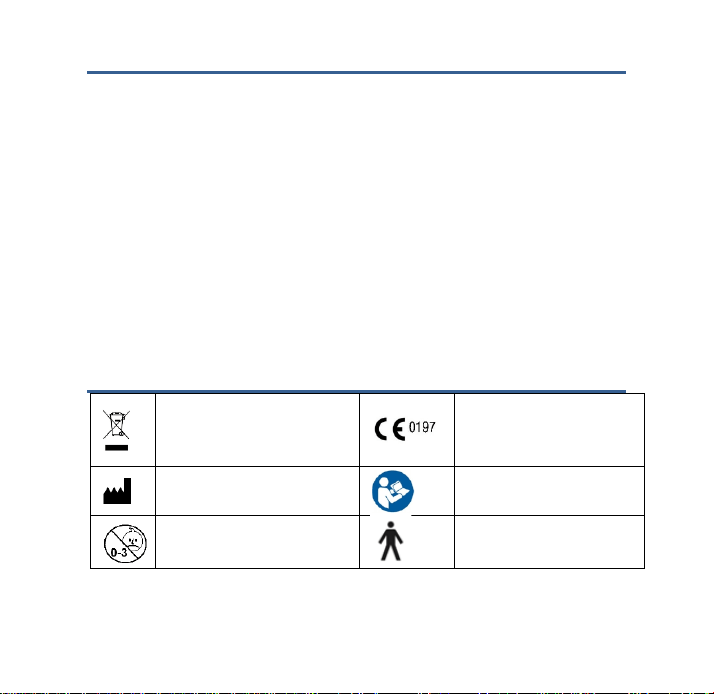
Some electrical and electrical
equipments forbid to abandon and
disposal at will
TUV NO.
Manufacturer’s name and address
Reading Instruction Book before
use
Inapplicable baby
Type B equipment
23
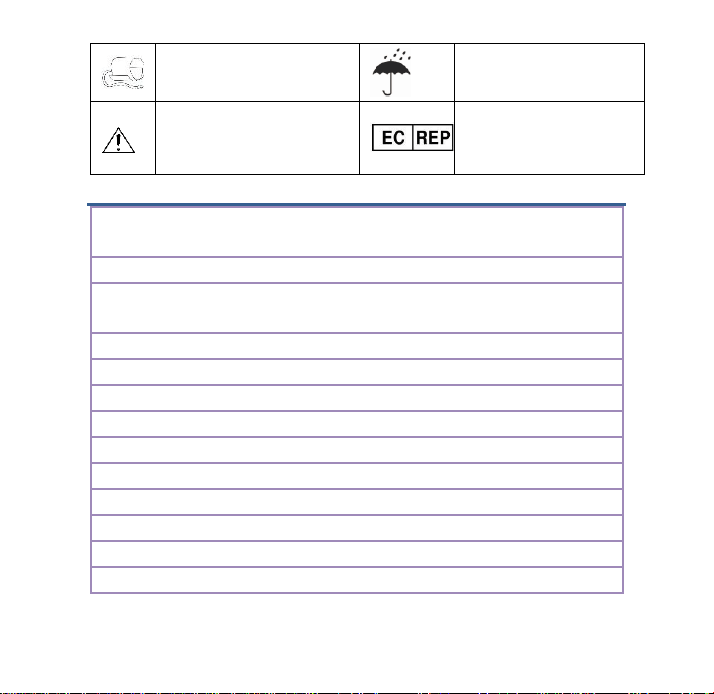
Cuff Connector
Keep Dry
Attention consult accompanying
documents
Wellkang Tech Consulting Suite
B ,29 Harley Street, LONDON
W1G 9QR ,United Kingdom
13. Technical specifications
Measurement Procedure:
Oscillometric , corresponding to Korotkoff method: Phase I : systolic ,
Phase V : diastolic
Display:
Digital display
Measuring range:
Pressure: 30 to 280 mmHg (in 1 mmHg increment)
Pulse: 40 to 199 beat/minute
Static accuracy:
Pressure: ±3mmHg / Pulse: ±5% of reading
Measuring resolution :
1mmHg
Inflation:
Automatic inflation by internal pump
Memory function:
2 x 120 memories for 2 users (SYS, DIA, Pulse)
Decompression:
Constant exhaust valve system
Power source:
4- size “AA” alkaline Batteries
Operation temperature:
5~40°C/41~104°F
Operation humidity:
15%~85%RH maximum
Storage temperature:
-10~55°C/14~131°F
Storage humidity:
10%~95%RH maximum
24
Dimensions :
136×112×71±1.0 mm
Weight :
510 g±5g (including batteries and cuff)
Cuff pressure display range:
0~299mmHg/0~39.9kPa
Electrical shock protection:
Internal power unit
Safety classifications:
Type B equipment
Mode of operation:
Continuous operation
Protection against ingress of
water:
IP22
Accessories:
M-size Cuff , 4 “AA” batteries, instruction manual ,warranty card
Please be noticed the power adapter is not supplied from the origin, users can buy the adapter in the market
which must comply to EN60601-1, EN60601-1-2
14. Manufacturer’s Declaration
BP A one Max Connect is intended for use in the electromagnetic environment specified below. The customer
or the user of the BP A One Max Connect should assure that it is used in such an environment.
Electromagnetic Emissions: (IEC60601-1-2)
Emission Test
Compliance
Electromagnetic Environment
RF emission CISPR 11
Group 1
BP A one Max Connect uses RF energy only for
internal functions. Therefore, this RF emission is
extremely weak and there is little chance of it
creating any kind of interference whatsoever with
nearby electronic equipment.
RF emissions CISPR 11
Class B
BP A one Max Connect is suitable for use in all
establishments, including domestic
establishments and those directly connected to
the public low voltage power supply network that
Harmonic emissions IEC
61000-3-2
Not applicable
Voltage fluctuations/flicker IEC
Not applicable

25
61000-3-3
supplies buildings used for domestic purposes.
Electromagnetic Immunity: (IEC60601-1-2)
Immunity test
IEC60601-1-2 test
level
Compliance level
Electromagnetic environment -
guidance
Electrostatic
discharge (ESD)
IEC 61000-4-2
±6 kV contact
±8 kV air
±6 kV contact
±8 kV air
Floors should be wood, concrete or
ceramic tile. If floors are covered with
synthetic material, the relative
humidity should be at least 30 %.
Electric fast
transient/ burst IEC
61000-4-4
±2 kV for power
supply lines
±1 kV for
input/output lines
Not applicable
Mains power quality should be that of
a typical commercial or hospital
environment.
Surge IEC 61000-4-
5
±1 kV differential
mode
±2 kV common
mode
Not applicable
Mains power quality should be that of
a typical commercial or hospital
environment.
Voltage dips, short
interruptions and
voltage variations
on power supply
input lines IEC
61000-4-11
<5 % U
T
(95% dip
inU
T
.) for 0.5
cycle
40 % U
T
(60% dip
in U
T
)for 5
cycles
70 % U
T
(30% dip
inU
T
) for 25 cycles
<5 % U
T
(95% dip
inU
T
)for 5 sec.
Not applicable
Mains power quality should be that of
a typical commercial or hospital
environment. If the user of the upper
arm stlye requires continued
operation during power mains
interruptions, it is recommended that
the BP A one Max Connect be
powered from an uninterruptible
power supply or a battery.
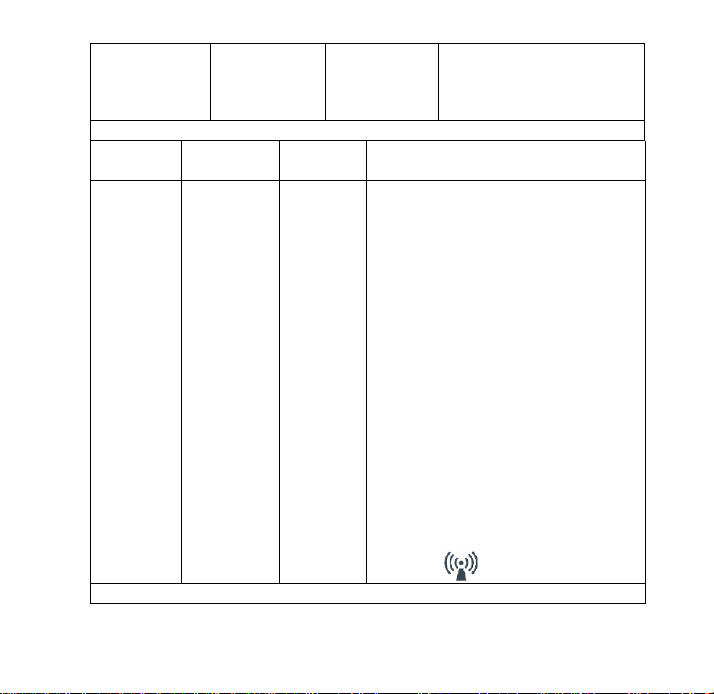
26
Power frequency
(50/ 60 Hz)
magnetic field IEC
61000-4-8
3 A/m
Not applicable
Not applicable
Note: U
T
is the a.c. mains voltage prior to application of the test level.
Immunity test
IEC60601-1-2
test level
IEC60601-1-
2 test level
Electromagnetic environment - guidance
Conducted
RF IEC
61000-4-6
Radiated RF
IEC 61000-4-
3
3 Vrms 150
kHz to 80 MHz
80% AM (2Hz)
3 Vrms 80 MHz
to 2.5 GHz
80% AM (2Hz)
3 Vrms
3 V/m
Portable and mobile RF communications equipment
should be used no closer to any part of BP A one
Max Connect, including cables, than the
recommended separation distance calculated from
the equation applicable to the frequency of the
transmitter.
Recommend separation distance
3V
d = 1.2×p
1/2
80Mhz to 800 MHz
d = 2.3×p
1/2
MHz to 2.5 GHz
Where
P
is the maximum output power rating of the
transmitter in watts (W) according to the transmitter
manufacturer and d is the recommended separation
distance in meters (m).
Field strengths from fixed RF transmitters as
determined by an electromagnetic site survey
a
,
should be less than the compliance level in each
frequency range
b
. Interference may occur in the
vicinity of equipment marked with the following
symbol:
Note1: At 80 MHz and 800 MHz, the higher frequency range applies.
27
Note2: These guidelines may not apply in all situations. Electromagnetic propagation is affected by
absorption and reflection from structures, objects, and people.
a
Field strengths from fixed transmitters, such as base stations for radio (cellular/cordless)telephones and land
mobile radios, amateur radio, AM and FM radio broadcast and TV broad cast cannot be predicted
theoretically with accuracy. To assess the electromagnetic environment due to fixed RF transmitters, an
electromagnetic site survey should be considered. If the measured field strength in the location in which
the BP A one Max Connect is used exceeds the applicable RF compliance level above, it should be
observed to verify normal operation. If abnormal performance is observed, additional measures may be
necessary, such as reorienting or relocating this device.
b
Over the frequency range 150 kHz to 80MHz, field strengths should be less than 3 V/m.
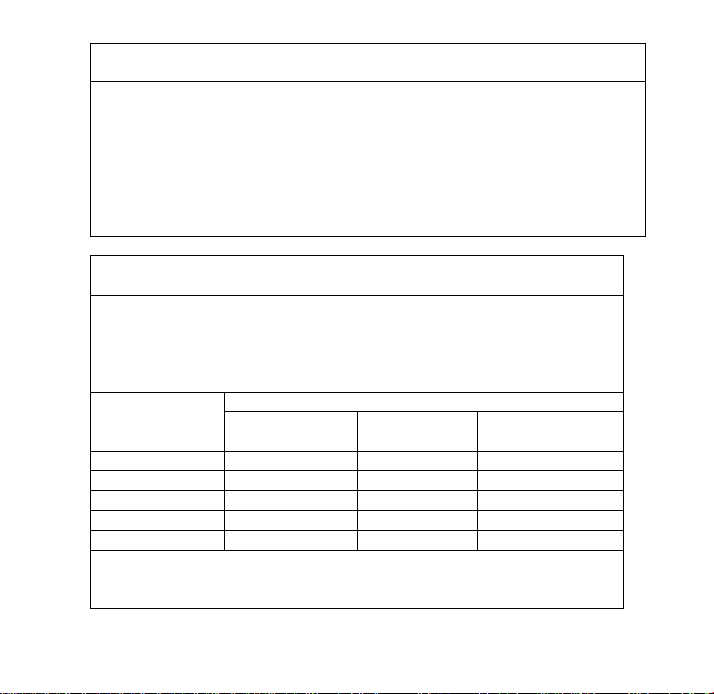
Recommended Separation Distances:
Recommended separation distance between portable and mobile RF communications equipment
and this device.
BP A One Max is intended for use in an electromagnetic environment in which radiated RF
disturbances are controlled. The customer or the user of this device can help prevent electromagnetic
interference by maintaining a minimum distance between portable and mobile RF communications
equipment (transmitters) and BP A one Max Connect as recommended below, according to the
maximum output power of the communications equipment.
Rated maximum
output power of
transmitter (W)
Separation distance according to frequency of transmitter m
150 kHz to 80 MHz
d = 1.2×p
1/2
80 MHz to 800 MHz
d = 1.2×p
1/2
800 MHz to 2.5 GHz
d = 2.3×p
1/2
0.01
0.12
0.12
0.23
0.1
0.38
0.38
0.73
1
1.2
1.2
2.3
10
3.8
3.8
7.3
100
12
12
23
For transmitters rated at a maximum output power not listed above, the recommended separation
distance d in metres (m) can be determined using the equation applicable to the frequency of the
transmitter, where
P
is the maximum output power rating of the transmitter in watts (W) according to the
28
transmitter manufacturer.
Note1:At 80MHz and 800MHz, the separation distance for the higher frequency range applies
Note2: These guidelines may not apply in all situations. Electromagnetic propagation is affected
by absorption and reflection from structures, objects and people.
For any other query contact: - [email protected]m