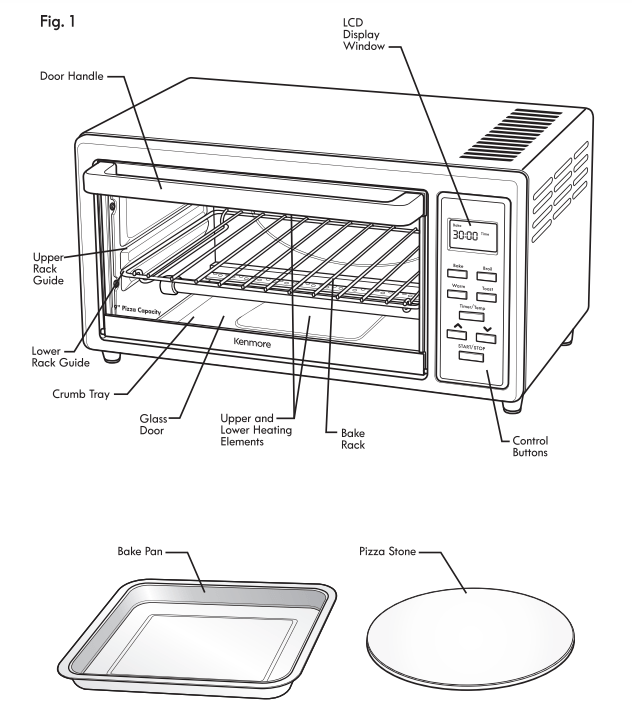
CAUTION: Appliance surfaces are hat during and after use. Always wear protective, insulated oven mitts when touching hot toaster oven or hot dishes and food, or when inserting or removing Bake Rack, Pizza Stone, or other baking dishes.
BEFORE FIRST USE:
Remove all accessories and wash them in hot sudsy water. Dry thoroughly before placing in the oven.
The Pizza Stone should be washed with water only.
BEFORE EACH USE:
Place Toaster Oven on a dry, flat, level surface such as a countertop or table.
Be sure the sides, back and top of the oven are at least four inches away from any walls cabinets or objects on the counter or table.
Remove all items not required for the next cooking procedure.
Plug power cord into a standard 120-V, 60 Hz AC-only 3-prong electrical outlet. The Toaster Oven should be the only appliance operating on the circuit.
Make sure the crumb tray is in place
CAUTION: NEVER leave Toaster Oven unattended while it is in use.
WARNING: DO NOT use roasting bags or plastic containers in the toaster oven.
BAKING
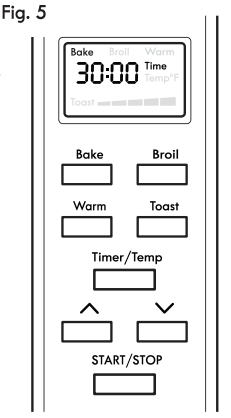
Plug in the Toaster Oven. It is automatically in the Bake mode when plugged in. The word “Bake” is displayed in the LCD window, along with the default time of 30 minutes.
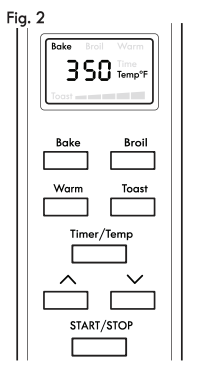
To select the temperature, press the Time/Temp Button and the LCD will display the temperature (see Fig. 2). Use the Plus and Minus buttons to adjust the temperature up or down.
To adjust the time of baking, press the Time/Temp Button again and the time of 30:00 minutes can be changed to more or less time by pressing the Plus and Minus buttons.
Place the food to be baked on the bake pan or other suitable container and close the door.
Press the START /STOP Button to start baking. The word “Bake" will flash in the LCD display and the remaining bake time will show.
After the baking time is up, the Toaster Oven will beep 5 times and shut Off. During the Baking time. the buttons are disabled. If food is done before the baking time is over. press and hold the START/STOP button for about 2 seconds until it beeps once and unit shuts Off.
Unplug the Toaster Oven.
TOASTING
The toasting feature allows for toasting 4 slices of bread, frozen waffles, frozen pancakes or 6 English Muffin halves. When toasting only 1 or 2 items, place the food in the center of the Toaster Oven’s rack.
Plug in the Toaster Oven.
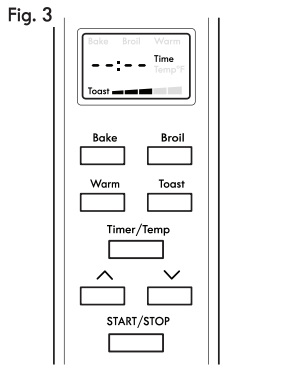
Press the Toast Button for the toasting mode. The LCD display will say “Toast". Graduated bars are also displayed for doneness of toast. see Fig. 3). Press the Plus and Minus Buttons to adjust for desired doneness of toast. For darker toast, use more bars. For lighter toast, use less bars.
Place the food to be toasted on the rack and close the door.
Press the START/STOP Button and the Toaster Oven begins to toast. At this point the word “Toast” will flash in the LCD display and the remaining toasting time will show.
When toasting time is up, the Toaster Oven will beep 5 times and shut Off. During the Toasting time the buttons are disabled. If food is done before the toasting time is over, press and hold the START/STOP button for about 2 seconds until it beeps once and unit shuts off.
Unplug Toaster Oven.
BROILING
Plug in the Toaster Oven.
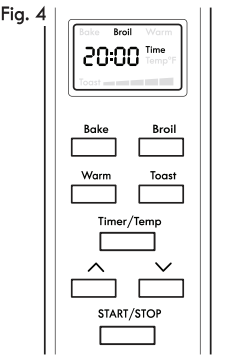
Press the Broil Button for the broiling mode. The LCD display will say “Broil”, along with the default time of 20 minutes.
The temperature for broiling is preset to high.
To adjust the broil time, press the Plus or Minus buttons to reach desired time.
Place the food to be broiled on the supplied bake pan and close the door.
Press the START /STOP Button to start broiling. At this point the word “Broil” in the LCD display will flash and the remaining broil time will show.
When broiling time is up, the Toaster Oven will beep 5 times and shut Off. NOTE: For better performance, you may try placing rack in the upper position. broiling time is over, press and hold the START/STOP button for about 2 seconds until it beeps once and unit shuts off.
Unplug Toaster Oven.
PIZZAS
This Toaster Oven will cook pizzas up to 9 inches in diameter. It is designed to cook frozen or room-temp pizza and is excellent for reheating pizza. For best results, the pizza stone should be preheated before use.
Plug in the Toaster Oven. ‘
Press the Bake Button until the word “Bake" is in the LCD Display. The default time of 30 minutes displays.
Set the temperature for pizza to 400°F or to the temperature specified on the pizza packaging.
To adjust the pizza cooking time, press the Plus or Minus buttons to reach the desired time.
If using pizza stone, change the displayed time to 5 minutes. Lightly oil the surface of the stone, and place it on the Bake Rack for preheating.
Press the START/STOP Button to start the Toaster Oven. When the preheat time is up, The Toaster oven will beep 5 times and shut Off.
Open the oven door, slide the rack out, and carefully place the pizza on the stone. Slide rack back into oven and close the door.
Press the BAKE Button again until the word “Bake” is displayed. The default time of 30 minutes also shows. To adjust the cooking time, press the Plus or Minus Buttons to reach the desired cooking time.
Press the START/STOP Button to start the pizza cooking. At this point the word “Bake” in the LCD display will flash and the remaining cook time will show.
When the pizza cooking time is up, the Toaster Oven will beep 5 times and shut Off. During the Pizza cooking time the buttons are disabled. If pizza is done before the cooking time is over, press and hold the START /STOP button for about 2 seconds until it beeps once and unit shuts off.
Unplug Toaster Oven.
SEASONINGPIZZASTONE
Wash the new pizza stone with hot water. Never use soap. It will seep into the pores and flavor everything you cook on it.
Heat the toaster oven to 450°F. The toaster oven needs to be hot for the oil to soak into the stone and produce a glossy finish that food will not stick to.
Rub a generous amount of oil onto the cooking surface of the stone. Not so much that oil is dripping of the edges. Place the stone in a hot oven and bake it until the oil has been completely absorbed.
Remove the stone from the oven, and allow to cool enough that you can touch it without burning yourself. Re-oil the stone, and bake again. After two seasonings, your stone should be ready to use. However, it is not completely seasoned yet.
Prior to cooking pizzas on your stone, lightly oil the surface with olive oil. Do this every time you use it, and your stone will take on a deep brown and golden tone with an old world look. If you take care of your pizza stone it will last you a lifetime.
Even as your stone becomes well seasoned, it is still important to never use soap. Soap can still seep into the stone, and it can also remove some of that beautiful finish you've achieved. To clean the stone, scrape off any burned-on cheese or sauce with a plastic spatula, and rinse it with very hot water.
WARMING
The Toaster Oven will keep foods warm. Periods longer than 60 minutes are not recommended. Food should be wrapped to keep from drying out.
NOTE: If you are planning to warm food for longer than 30iminutes and the food does not nave set the temperature down to 150°F.
Plug in the Toaster Oven.
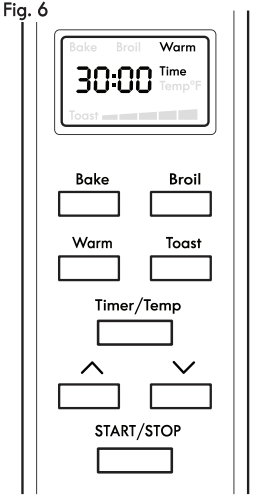
Press the Warm Button until the word “Warm" is in the LCD display, along with the default time of 30 minutes. (See Fig. 6).
The temperature for Warm is preset to 200°F.
To adjust the warming time, press the Plus or Minus buttons to reach the desired time.
Press the START/STOP Button to start warming. At this point the word “Warm” will flash in the LCD display and the remaining warming time will show.
When warming time is up, the Toaster Oven will beep 5 times and shut Off. During the Warming time the buttons are disabled. If food is done before the warming time is over,ut 2 seconds until it beeps once and unit shuts off.
Unplug Toaster Oven.
CAREANDCLEANING
Allow oven and accessories to cool completely before cleaning. NOTE: Sugar and Salt based foods have a tendency to stick to all surfaces and are very hard to clean. When cooking these types of foods with the Bake Pan and Pizza Stone, soak and clean them immediately after each use. The Pizza Stone should only be soaked in water.
The Bake Pan and Bake Rack should be washed by hand in hot sudsy water. Rinse and dry thoroughly. Automatic dish washing is not recommended.
The Pizza Stone should never be washed with soap. Use a scrubber and water only.
The Glass Door can be wiped clean with a damp sponge and wiped dry with a paper or cloth towel. WARNING:
DO NOT immerse Toaster Oven in water or any other liquid.
ALWAYS UNPLUG toaster oven from the electric outlet before cleaning.
To clean the crumb tray, slide it out of the oven and brush off crumbs. Wipe with a damp cloth and dry thoroughly.
Baked on stains can be removed with a paste made from baking soda and water. Rinse and dry thoroughly.
Clean the outside and interior surfaces of the oven with a clean damp sponge or cloth and dry thoroughly. A non-abrasive liquid cleaner may be used for stubborn stains. Rinse and dry thoroughly. NEVER immerse Toaster Oven in water or any liquid. CAUTION: NEVER use steel wool, scouring pads or abrasive cleaners to clean any parts of Toaster Oven interior, exterior, or Accessories.
Allow all parts and surfaces to dry thoroughly before plugging in and using Toaster Oven.
The baking pan and pizza stone may be stored in the oven when the oven is not in use.
Any other servicing should be performed by an authorized service representative.
FAQ - Frequently Asked Questions
Q:What's the inside dimension
A:Thank you for your inquiry. The inside usable internal space in the Kenmore Elite 76771 is 12.5x11.5x5 inches
Q:The door will not stay closed. can it be repaired? was picked up at sears, freehold, nj model # 100-83521510
A:Thank you for your inquiry. Have you cleaned the crumbs that might be obstructing the door area? Are the springs attached (have anchor points – look for hole to re-latch / attach the spring?)
Q:What is the cord length? Thanks
A:Thank you for the inquiry. The length of the cord on he Kenmore 83521 is 3ft.
Q:What is maximum minutes on timer?
A:Thank you for your inquiry. You can set the timer for a maximum of 99 minutes on the Kenmore 83521 Toaster Oven
Q:What is the depth without the handle?
A:I have no idea. What a weird question. I love the oven but it gets hot. so I would be very cautious putting it in a confined space.I can't imagine using it without the handle.
Q:How to turn it off if you set the wrong bake time
A:Thank you for your inquiry. Please hold the "Start/Stop" button for 2 seconds. The over will beep and turn off and can then be reprogrammed.
Q:How hot does the outside get? Does it shut off automatically?
A:The outside can get pretty hot. It run by a timer button not an on & off switch. So it automatically shuts off once the timer winds down.
Q:What are the manufacturer's recommended side, top, and back clearances?
A:Thank you for your inquiry. The recommended clearance is at least 4" away from any walls, cabinets or objects on the counter or table.
Q:Does this toaster make a sound while cooking? As in, is there a timer count down sound? Also is there a ding/ring sound upon completion?
A:Thank you for your inquiry. Yes, this toaster oven has a mechanical timer which ticks when it is cooking. There is a loud ding at cooking completion.
Q:Does the outside get hot or is it insulated well?
A:The outside gets hot, but I love the oven. I just keep it on a heat proof counter and I don't put things on it.
Q:How long is the warranty?
A:Thank you for your inquiry. Model 4606 has a 2 year warranty.
Q:Why does "Bake" function turn the upper element on? How do I bake with only the lower element?
A:I think when you bake or toast upper and lower elements both turn on