G
G
U
U
I
I
D
D
E
E
F
F
O
O
R
R
U
U
S
S
I
I
N
N
G
G
T
T
H
H
E
E
D
D
I
I
S
S
H
H
W
W
A
A
S
S
H
H
E
E
R
R
A
A
N
N
D
D
T
T
H
H
E
E
W
W
A
A
S
S
H
H
I
I
N
N
G
G
P
P
R
R
O
O
G
G
R
R
A
A
M
M
S
S
INSTRUCTION MANUAL

Contents
1
1. Description of the controls _______________________________ 2
2. Operating instructions __________________________________ 13
3. Cleaning and maintenance ______________________________ 25
4. Troubleshooting ______________________________________ 30
Thank you for choosing one of our products.
You are advised to read this manual carefully; it contains all the
information you need use your dishwasher safely, correctly and in the
most satisfactory manner.
Following the cleaning instructions provided here will keep your
dishwasher's performance at peak levels in the long term.
USER INSTRUCTIONS: these consist of recommendations for using
the appliance, a description of its controls and of the correct cleaning
and maintenance procedures.
User instructions
2
1. Description of the controls
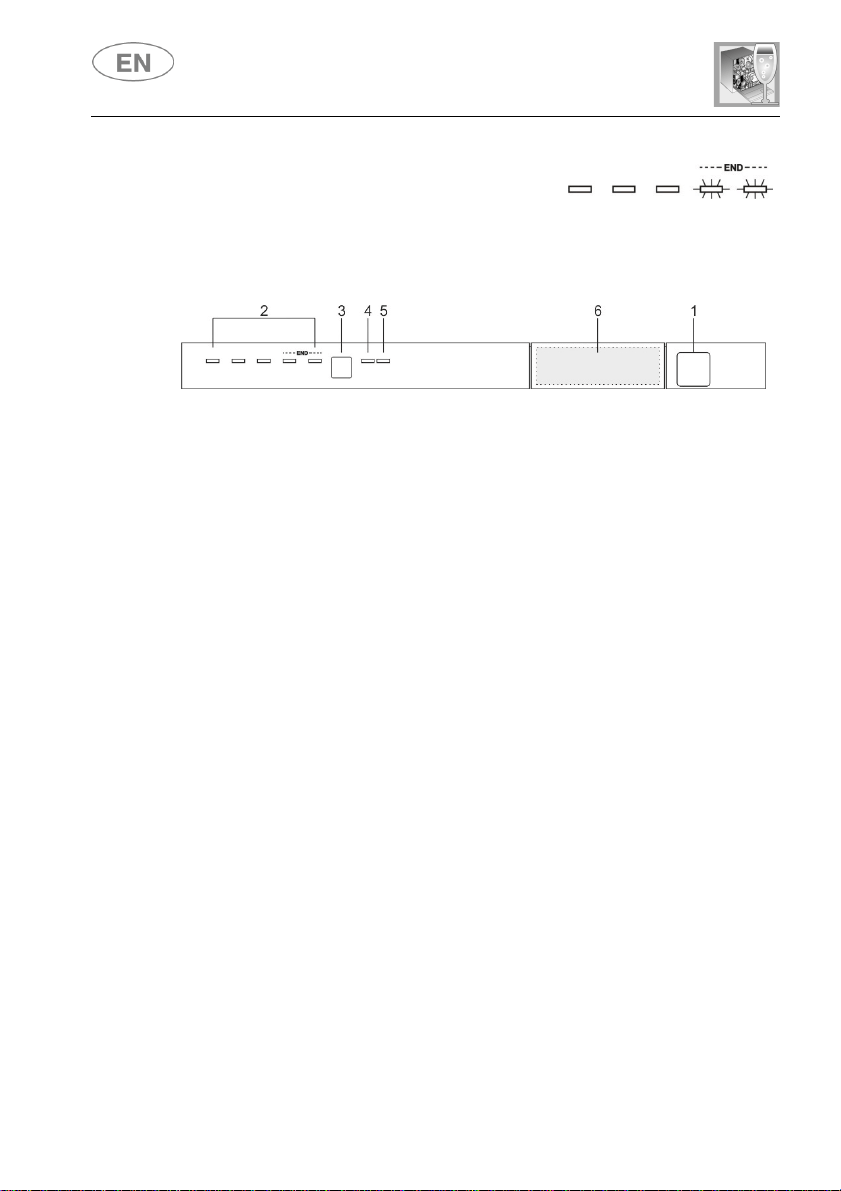
1.1 Upper panel
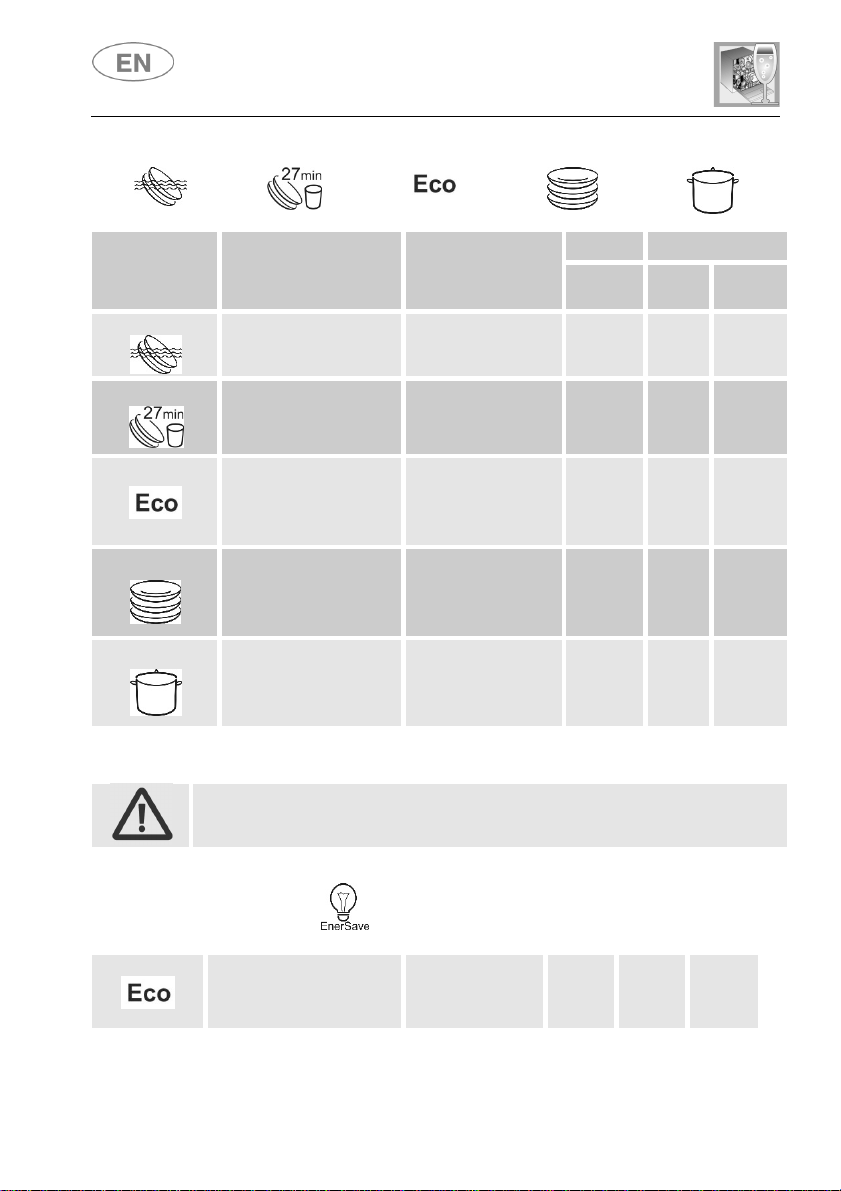
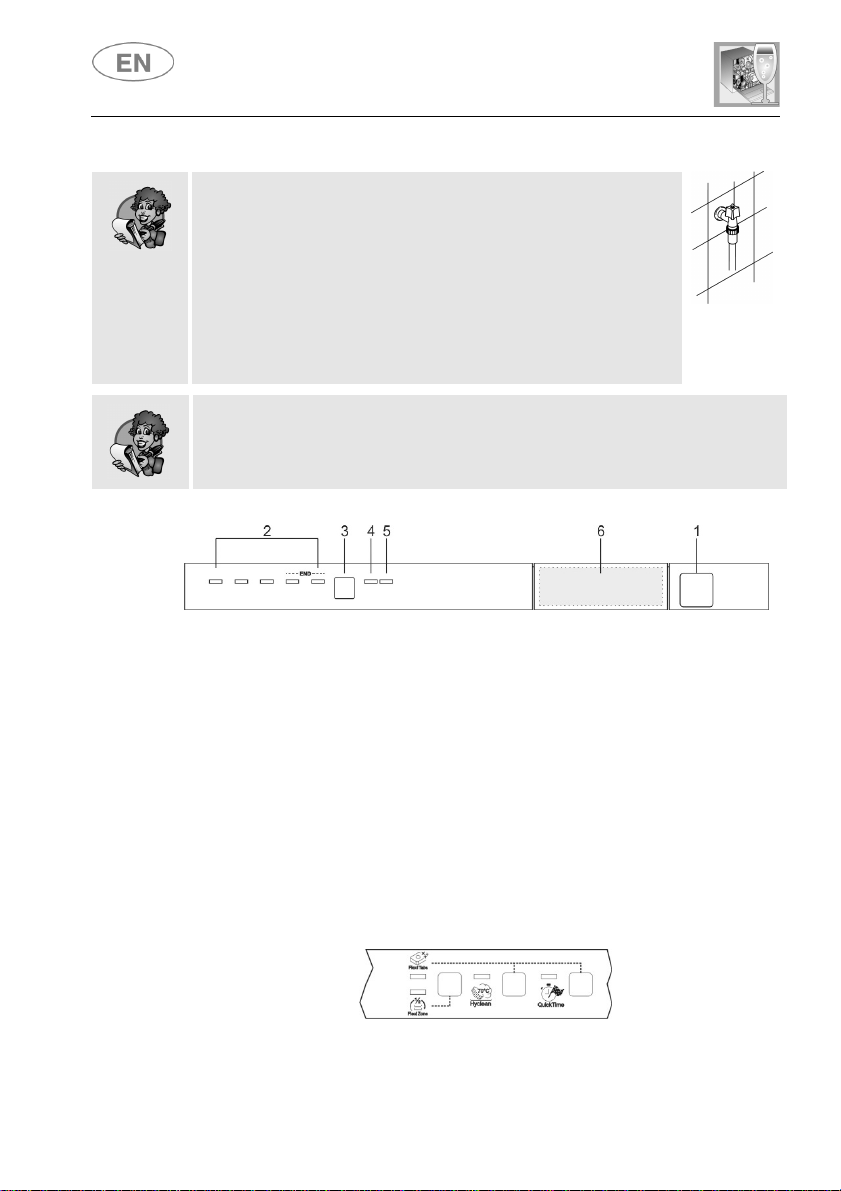
All the dishwasher controls are grouped on the upper panel. Switching on,
programming, switching off, etc. are only possible when the door is open.
The panel shown is given as example: the form of the lights and buttons may
vary depending on the model.
1
ON/OFF BUTTON
Press this button to switch the dishwasher on/off.
2
SELECTED PROGRAM INDICATOR LIGHTS
This light indicates the program selected and the occurrence of a
fault (Troubleshooting).
3
PROGRAM SELECTION BUTTON
+ ADJUSTING THE WATER SOFTENING SYSTEM
Used to select the wash program required and adjust the water
softening system.
4
WATER HARDNESS ADJUSTMENT ON INDICATOR LIGHT
The light flashes to indicate that the appliance is in “water hardness
adjustment” mode.
SALT WARNING LIGHT
This light Indicates the salt is finished.
5
RINSE AID WARNING LIGHT
This light indicates the rinse aid is finished.
6
OPTIONS and DISPLAY (on some models only)
User instructions
3
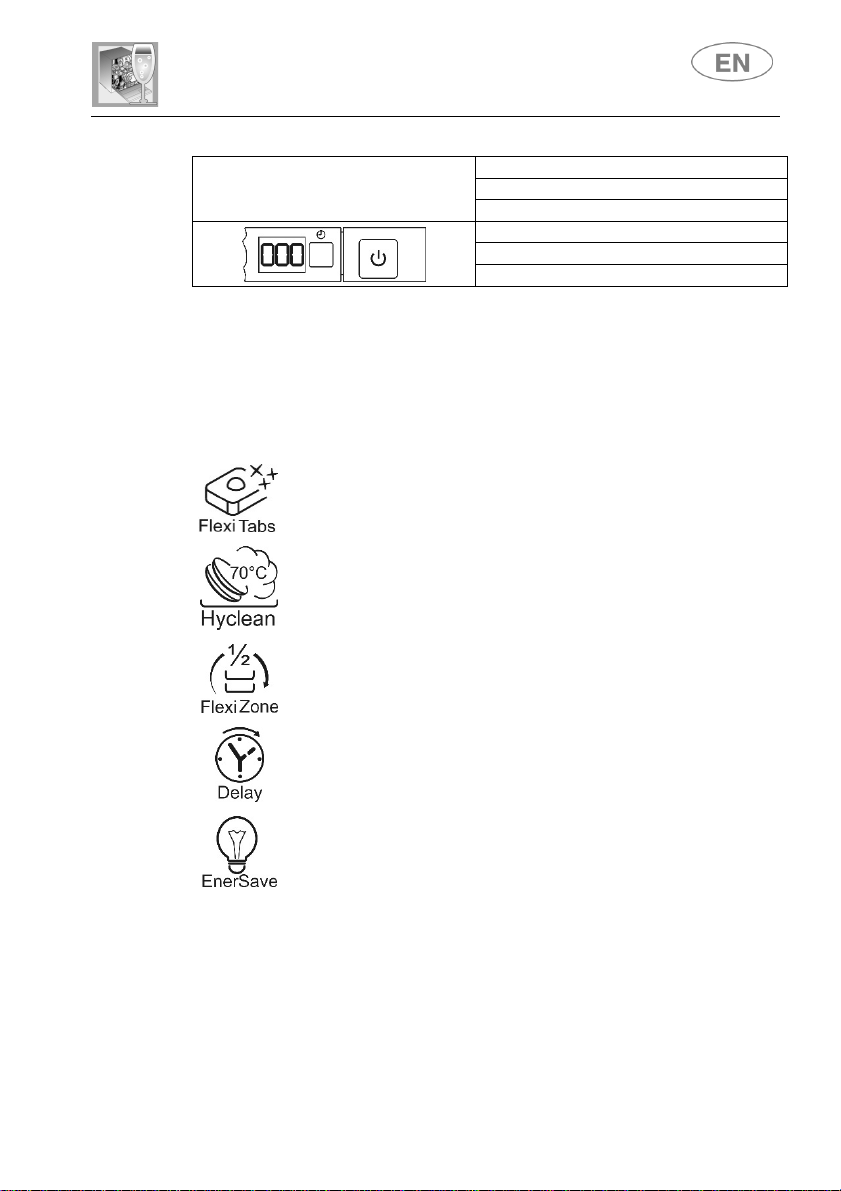
INFORMATION DISPLAY
(on some models only)
Information displayed
Program duration
Remaining program time
Delayed start: 1-24 hours
Error message:
Err
<<OPTIONS (6)>>
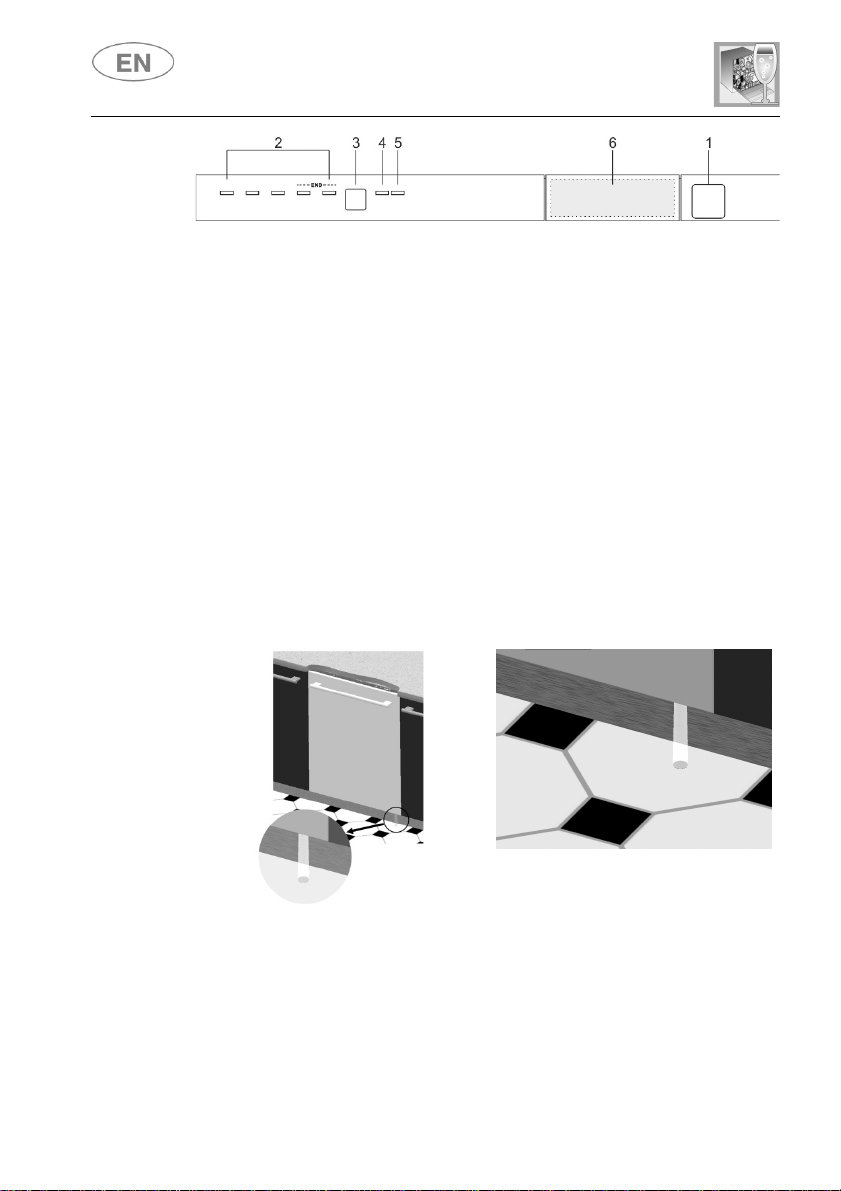
Depending on the model, this zone may contain the information display
and one or more of the following options, identified by symbols and
described in more detail later in the manual.
All options except "Flexi Tabs" are disabled at the end of the wash cycle.
To disable the “Flexi Tabs” option, press the button (the light goes out).
Flexi Tabs
Option recommended for the use of multi-function tablet
detergent.
HYCLEAN
Removes bacteria more effectively by prolonging the last hot
rinse.
Spread HALF LOAD WASH
Recommended for washing small loads spread across both
baskets.
PROGRAM DELAY
Allows the start of the program to be delayed by 9, 12 or 24
hours depending on the model.
ENERSAVE
Energy saving option.
PROGRAMS TABLE
The manual may include the programs table for several models. The set
of symbols at the top of the table indicates the programs available for your
dishwasher.
User instructions
4
S
WITCHING ON, S
ETTING THE WASHING PROGRAM AND
STARTING THE PROGRAM
Press the ON/OFF button (1); the PROGRAM INDICATOR LIGHT
(2) will come on;
Keep pressing the PROGRAM SELECTION button (3) until the
indicator light for the required program lights up;
Select the required option (if any, depending on models);
Close the door and after about 2" the program will start; while it is
running, the corresponding LIGHT will flash (program running
indicator).
PROGRAM IN PROGRESS INDICATOR LIGHT
(on some models only)
When a program is running, a flashing light is projected onto the floor
under the right-hand corner of the door. At the end of the program, the
light goes out to reduce stand-by electricity consumption.

User instructions
5
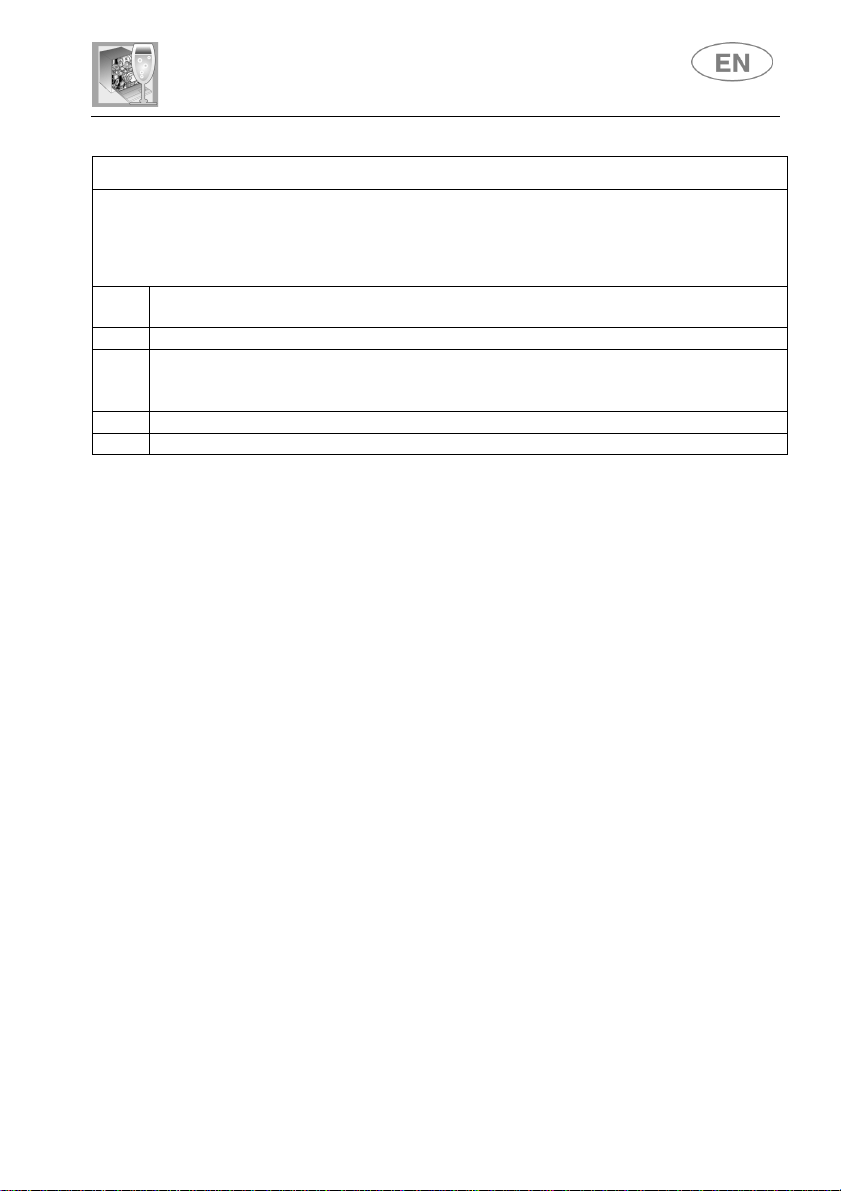
PROGRAMS TABLE
PROGRAMME
NUMBER
& SYMBOL
LOAD CROCKERY AND
CUTLERY
PROGRAM
PROGRESS
DURATION
CONSUMPTION
MINUTES
(1)
WATER
LITRES
POWER
KWh (1)
1 SOAK
Pans and dishes awaiting
completion of the load
Cold prewash
9 5 0,02
2 GLASS
Glass, china and mixed
dishes with light dirt.
Wash at 45°C
Cold rinse
Rinse at 70°C
Dry
59
12 0,90
3 ECO (*)
EN 50242
Dishes with normal dirt,
even with dried-on
residues
Cold prewash (2)
Wash at 45°C
Cold rinse (2)
Rinse at 65°C
Dry
**
** **
4 NORMAL
Dishes with normal dirt,
even with dried-on
residues
Cold prewash
Wash at 65°C
Cold rinse
Rinse at 70°C
Dry
80
17 1,20
5 ULTRA
CLEAN
****
Very dirty pans and
dishes, even with dried-on
residues.
Hot prewash
Wash at 70°C
Cold rinse (3)
Rinse at 70°C
Dry
115
15 1,60
The
ULTRA CLEAN
program terminate with an extra anti-bacteria rinse that ensures
a further reduction in the bacteria level. If the temperature falls during this stage of the
program (e.g. because the door is opened or due to a power blackout), the program
lights flash to warn that the anti-bacteria effect is not guaranteed.
IMPORTANT: see “NOTES AND REFERENCES” table on the following pages.
If the dishwasher door is open or not properly closed, the washing cycle
will not start.
Models with ENERSAVE option
3 ECO (*)
EN 50242
Dishes with normal dirt,
even with dried-on residues.
Cold prewash
Wash at 45°C
Rinse at 55°C
Dry
**
** **
User instructions
6
PROGRAMS TABLE
PROGRAMME
NUMBER
& SYMBOL
LOAD CROCKERY AND
CUTLERY
PROGRAM
PROGRESS
DURATION
CONSUMPTION
MINUTES
(1)
WATER
LITRES
POWER
KWh (1)
1 SOAK
Pans and dishes awaiting
completion of the load
Cold prewash
9 5 0,02
2 RAPID 27’
Dishes with light dirt,
washed immediately after
use
Wash at 38°C
Rinse at 50°C
27
6,5 0,70
3 ECO (*)
EN 50242
Dishes with normal dirt,
even with dried-on
residues
Cold prewash (2)
Wash at 45°C
Cold rinse (2)
Rinse at 65°C
Dry
**
** **
4 NORMAL
Dishes with normal dirt,
even with dried-on
residues
Cold prewash
Wash at 65°C
Cold rinse
Rinse at 70°C
Dry
80
17 1,20
5 SUPER
Very dirty pans and
dishes, even with dried-on
residues.
Prewash at 45°C
Wash at 70°C
Cold rinse (3)
Rinse at 70°C
Dry
105
20 1,50
IMPORTANT: see “NOTES AND REFERENCES” table on the following pages.
If the dishwasher door is open or not properly closed, the washing cycle
will not start.
Models with ENERSAVE option
3 ECO (*)
EN 50242
Dishes with normal dirt,
even with dried-on residues.
Cold prewash
Wash at 45°C
Rinse at 55°C
Dry
**
** **
User instructions
7
NOTES AND REFERENCES
Only
run the soak program with partial loads.
The options cannot be used with the soak program.
The ENERSAVE option (if featured) cannot be used with soak, ultra clean, or any
programs which do not include the final drying stage.
* Standard program under
EN 50242
. The
ENERSAVE
option (if featured) must
be
enabled.
** See information sheet provided
(1) Program consumption and duration figures have been measured in accordance
with the EN 50242 standard. Values may vary depending on water supply and
ambient temperatures and the type and quantity of dishes loaded.
(2) Cold prewash/cold rinse depending on the model.
(3) 1 or 2 cold rinses depending on the model.
REFERENCES for the ENERGY LABEL supplied with the dishwasher:
- Annual energy consumption is based on 280 standard wash cycles with cold
water using low-energy operating modes. Actual figures will depend on the way
in which the appliance is used.
- Water consumption is based on 280 standard wash cycles. Actual figures will
depend on the way in which the appliance is used.
- Information refers to the EN 50242 STANDARD program (identified in the
programs table), which is the most efficient in terms of combined energy and
water consumption. The program is recommended for dishes with a normal
level of dirt.
- Drying efficiency class on a scale from “G” (minimum efficiency) to “A”
(maximum efficiency).
User instructions
8
1.2 Wash programs
Before starting a wash program check that:
The water supply tap is open.
The softener container contains regenerating salt.
The correct amount of detergent has been added to
the dispenser.
The baskets have been correctly loaded.
The spray arms are able to rotate freely and without
obstruction.
The dishwasher door is securely closed.
Warning:
during the initial phase of the washing program, the operation of sprayers
is not perceived because they start rotating about 5 minutes after the start.
This is the normal operation of the washing cycle.
OPTION SELECTION
Press the button to the required option; the corresponding light will come
on to confirm activation.
It is not possible to select any options when the soak program
is being used.
All options except "Flexi Tabs" are disabled at the end of the
wash cycle. To disable the “Flexi Tabs” option, press the
button (the light will turn off).
All options, including "Flexi Tabs" are disabled when a program
is CANCELLED after it has begun.
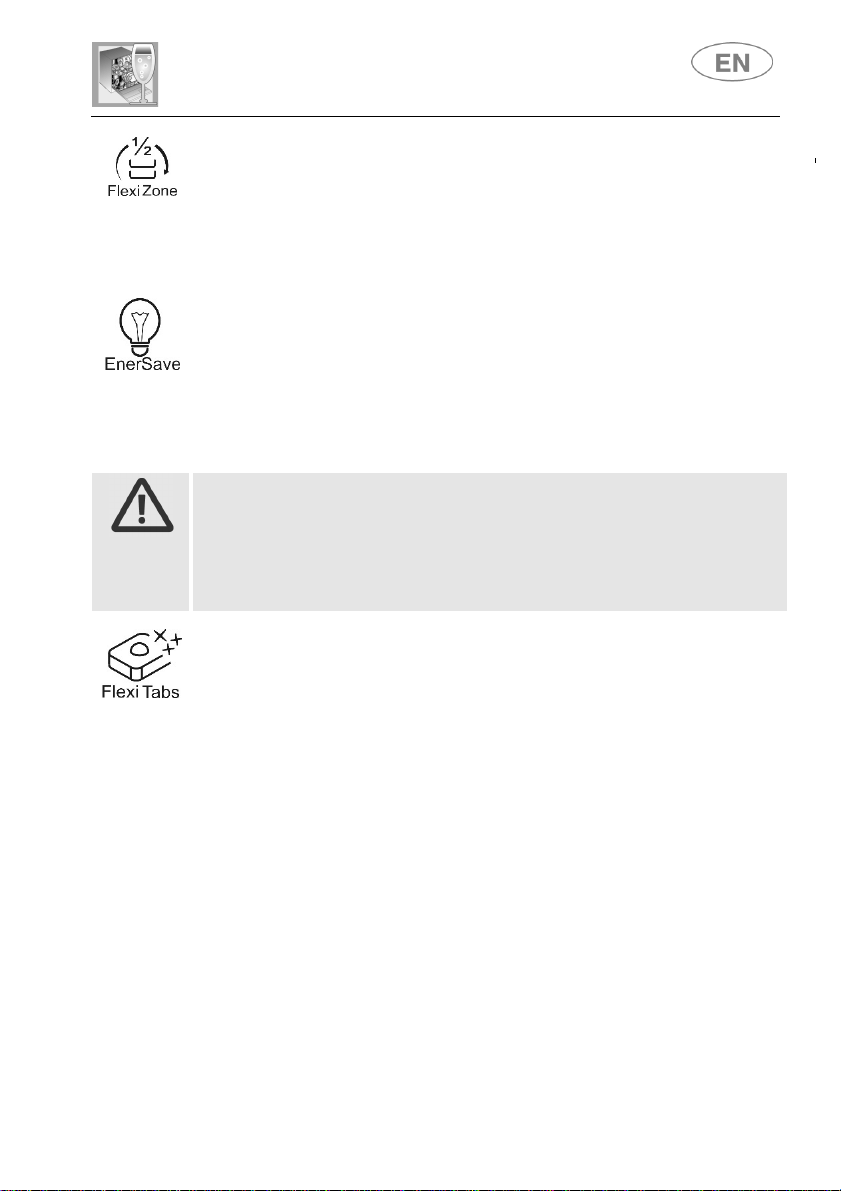
ADDITIONAL OPTIONS (on some models only)
These are activated by pressing two buttons simultaneously as shown
by the graphics on the control panel (e.g. “Flexi Tabs” in this illustration)
User instructions
9
SPREAD HALF LOAD
Suitable when there are not many dishes to be washed, it saves energy
and reduces the program duration. Spread dishes across both baskets;
the detergent dispenser should be loaded with less than the normal
amount for a full load.
ENERSAVE
Allows energy consumption to be further reduced by opening the door
automatically for better drying at the end of the wash cycle, ensuring
optimal drying with lower rinsing temperatures and thus providing
significant energy saving. At the end of the open-door drying phase, the
end of the wash cycle is indicated by a short beep.
Enersave is activated
automatically every time
a compatible wash cycle
is selected (see program table) and can be disabled before the program
is started.
When this function is activated, opening of the door must not be
impeded in any way; do not leave anything in the space in front of the
door necessary to allow it to open.
Do not re-close the door during automatic opening as this would
damage the mechanism. Wait for the pushers to retract before re-closing
the door.
Flexi Tabs
Specifically for washing with combination detergents in tablets, which also
contain salt and rinse aid (3in1) or other agents such as glass protector,
steel rinse aids, etc. (4in1, 5in1…). When this option is selected, salt and
rinse aid will not be dispensed even if the relative compartments contain
them. If the containers are empty, the lights will remain on.
With short programs, because there is less time for them to dissolve,
tablets may fail to wash effectively and undissolved residues may be left.
Powder detergents are more suitable for these programs.
If the option is not provided, we recommend the use of conventional
products (separate detergent, salt and rinse aid), because with
conventional washing cycles, combined products might create problems
such as a white deposit, poor drying results and residues left on dishes.
For further information, refer to the detergent pack.
IMPORTANT:
when no longer required, the option must be deactivated by pressing the
relative button (the light goes out).
User instructions
10
These products
are not suitable
for use with
excessively “hard”
water.
If the hardness level set is higher than H3, when the option is activated
the relative light flashes to indicate that the product is being used
incorrectly; the dishwasher will still work, but washing results may be
poor.
ULTRA CLEAN
Prolongs the final hot rinse to ensure a further reduction in the bacteria
level. If the temperature in the tank falls during this stage of the program
(e.g. because the door is opened or due to a power cut), the option light
an program lights (2) flash to warn that this additional wash phase has not
been completed successfully. This does not mean that the wash program
has been less effective than usual.
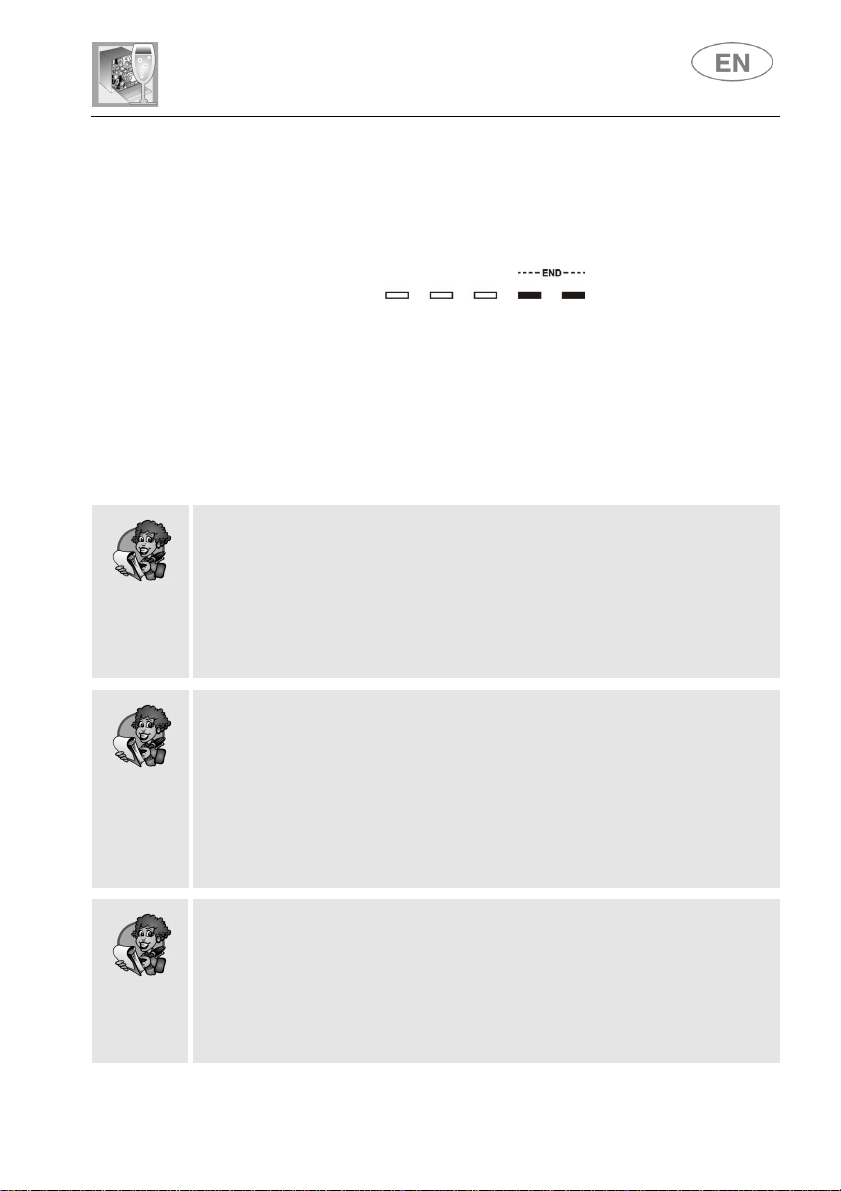
PROGRAM DELAY
The start of the washing program can be delayed by from 1 to 24 hours
depending on the model, to program the dishwasher to operate at the
preferred time of day (e.g. overnight).
● It is not possible to select the option once the cycle has begun.
● When the door is closed, the appliance will prewash the dishes, after
which the count of the "program delay" set will begin.
Models without display
The start of the program can be delayed by 3,
6 or 9 hours. The button can be pressed again
to select the delay required (the relative light
comes on) or disable the option (lights off).
Models
with display
The button can be pressed again to select the
delay required, increasing it in one-hour
steps, with the duration shown on the display.
User instructions
11
CANCELLING A PROGRAM IN PROGRESS
Open the door, taking care to avoid splashes of water, and hold down
the PROGRAM SELECTION (3)
button for a few seconds until the
indicator lights for programs 4 and 5 illuminate simultaneously
(marked "end").
Close the door.
After approximately 1 minute the dishwasher will advance to the end
of cycle.
CHANGING THE PROGRAM
To change the program in progress, simply open the door and select a
new program. When the door is closed the dishwasher will automatically
select the new program.
TO SAVE ON ENERGY!…AND PROTECT THE ENVIRONMENT
Always use the dishwasher with a full load.
Do not wash the dishes in running water.
Use the washing program that is most appropriate for each type of
load.
Do not carry out any preliminary rinsing.
If available, connect the dishwasher to a hot water supply up to 60°C.
TO REDUCE DETERGENT CONSUMPTION AND PROTECT THE
ENVIRONMENT
The phosphates contained in dishwasher detergents are harmful to the
environment. To avoid using excessive amounts of detergent save on
electricity as well, observe the following recommendations:
Sort your dishes, washing delicate items separately from those
more resistant to strong detergents and high temperatures.
Do not pour detergent directly onto dishes.
If the door must be opened while a wash cycle is in progress, the program
will be interrupted. The corresponding light will continue to flash and a
beeper will signal that the cycle has not been completed. You must wait
about 1 minute before closing the door to restart the program. When the
door is closed the program will continue from where it was interrupted.
This operation should only be carried out if strictly necessary, as it could
cause problems in running the program.
User instructions
12
SWITCHING OFF
At the end of the program the beeper
sounds briefly and the lights of programs no.
4 and 5 (marked "end") flash.
To switch off the dishwasher, open the door and press the
ON/OFF
button (1).
ENERGY MANAGEMENT
After 5 minutes of inactivity (wash cycle completed, stopped or set but
not started), the dishwasher switches to standby mode to reduce energy
consumption.
In this mode, the dishwasher indicator panel (lights or display depending
on model) functions more slowly (switch-on once every 5 seconds).
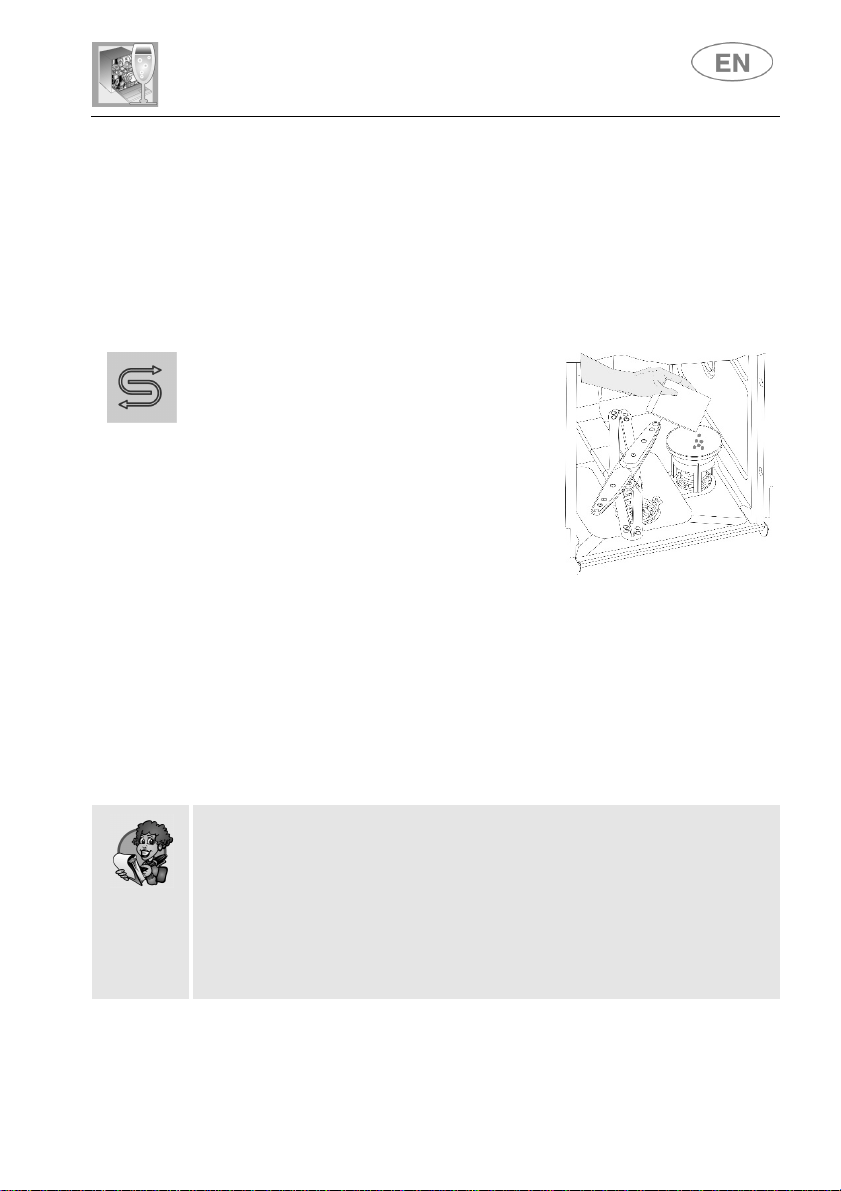
REMOVING THE DISHES
At the end of the wash program, wait at least 20 minutes before removing
the dishes, to allow them to cool. To ensure that any drops of water left in
the top basket do not drip onto the dishes still in the bottom basket, you
are advised always to empty the bottom basket first.
User instructions
13
2. Operating instructions
Once the dishwasher has been correctly installed, prepare it for use as
follows:
Adjust the water softening system
Add salt
Add rinse aid and detergent
2.1 Using the water softening system
The dishwasher is equipped with an
automatic softening system which uses a
special regenerating salt to reduce the
hardness of the water, responsible for
whitish marks on dry dishes The
dishwasher is factory set for water
hardness level 3 (average hardness).
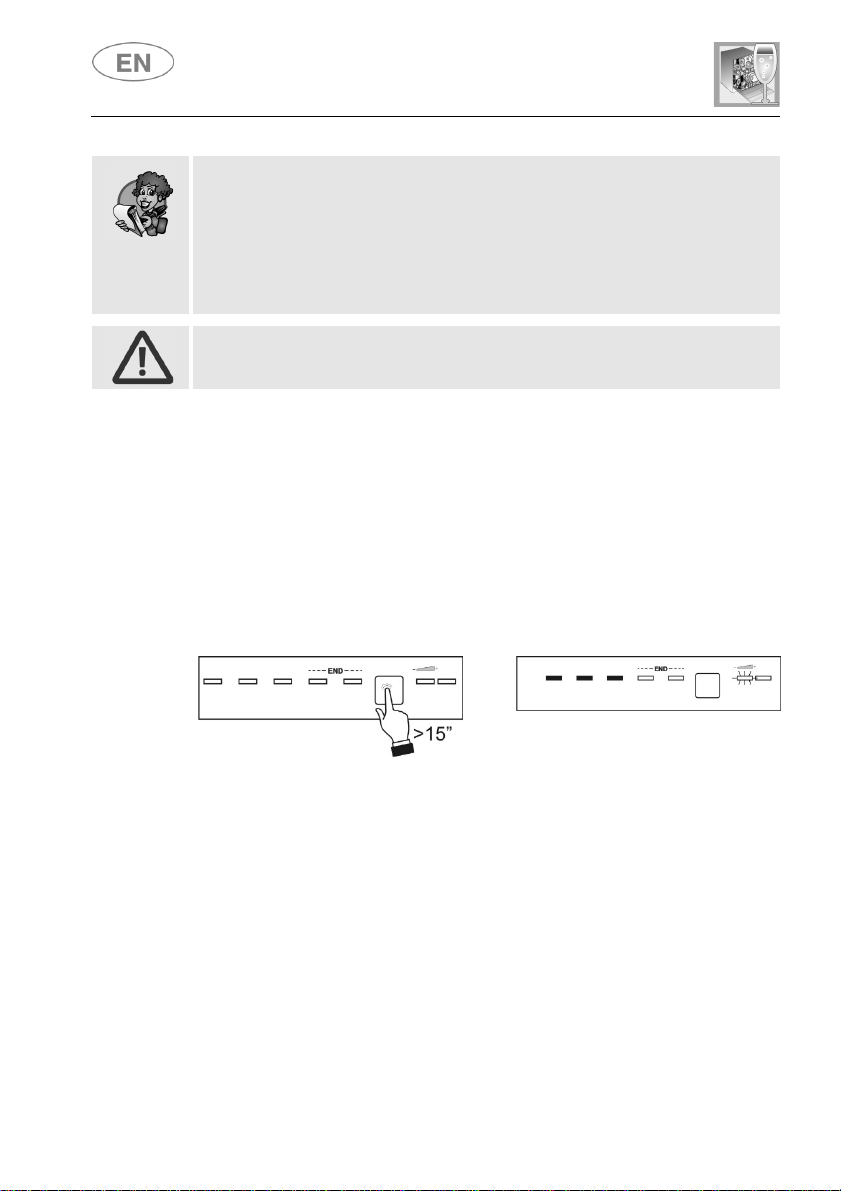
When using water of medium hardness, the salt container should be
refilled after approximately 20 wash cycles. The salt container can hold
approximately 1.7 kg of salt grains. Some models are equipped with a
cap with a no-salt optical indicator containing a green float which
descends as the salt concentration in the water drops. When the green
float can no longer be seen through the transparent cap, salt must be
added. The container is situated at the bottom of the dishwasher. After
removing the lower basket, unscrew the salt container cap by turning it
anticlockwise and pour in the salt using the funnel supplied. Before
replacing the cap, remove any salt residues from around the opening.
When using the dishwasher for the first time, in addition to the salt it
is also necessary to add one litre of water to the container.
Each time the salt container is refilled, make sure that the cap is
securely closed. The mixture of water and detergent must never
enter the salt container, as this would compromise the operation of
the regeneration system. In the event of this occurring, the warranty
will be invalidated.
Only use salt specially formulated for domestic dishwashers. If using
salt tablets, do not fill the container completely.
SALT
User instructions
14
Do not use table salt, as it contains insoluble substances which,
over time, may damage the water softening system.
The salt container should be refilled before starting the wash
program. This way, the excess saline solution will be immediately
removed by the water; prolonged presence of salt water inside the
tank may lead to corrosion.
Be careful not to confuse the salt and detergent packages; adding
detergent to the salt container will damage the water softening system.
ADJUSTING THE WATER SOFTENING SYSTEM
The dishwasher is equipped with a device which allows the softener
setting to be varied to suit the hardness of the mains water. Adjustment is
made using the PROGRAM SELECTION BUTTON (3).
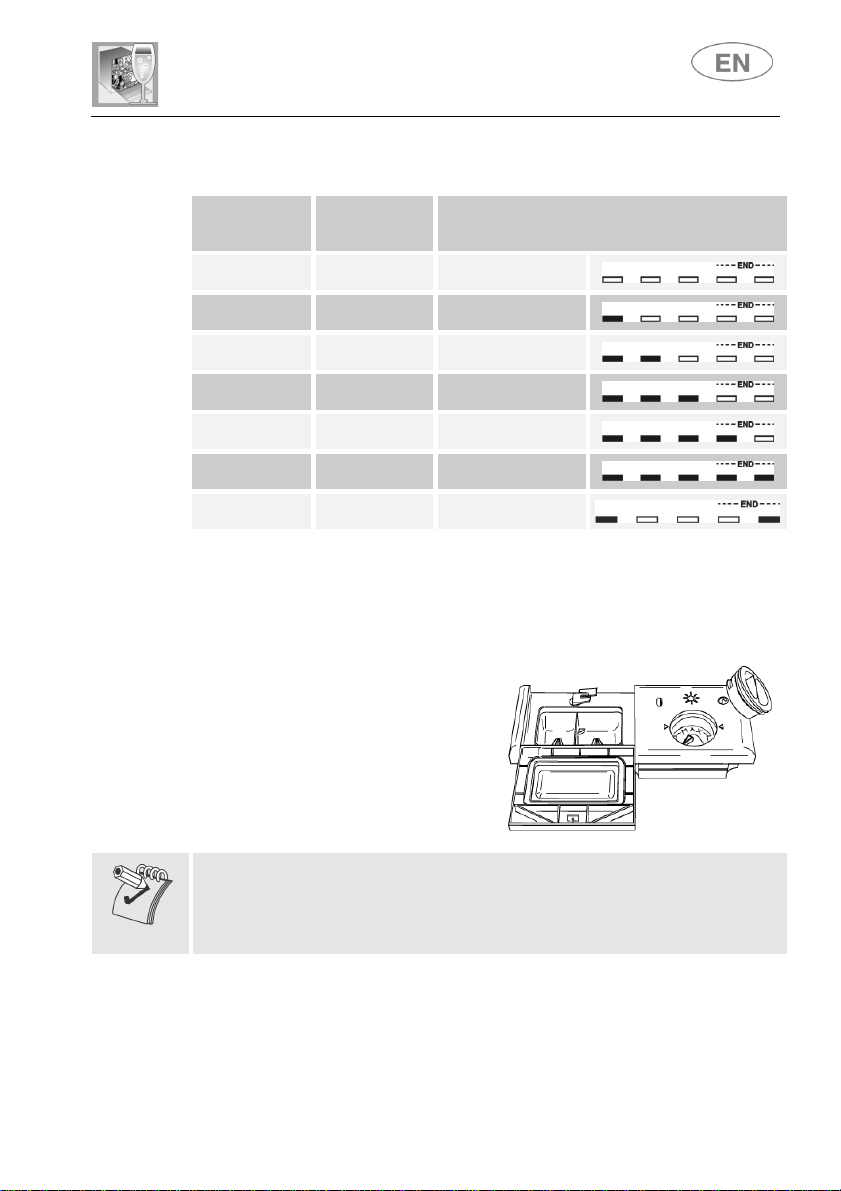
● Hold the button down for more than 15 seconds. The
WATER
HARDNESS ADJUSTMENT INDICATOR LIGHT (4) flashes, while the
SELECTED PROGRAM INDICATOR LIGHTS (2) show the current
setting.
● Each press of the button changes the selection, following the
sequence in the table below.
>
After adjusting or displaying the current setting, simply do not touch the
button for a few seconds; the dishwasher will automatically return to
standard mode, quitting the adjustment mode.
User instructions
15
WATER HARDNESS TABLE
German
degrees (°dH)
French
Degrees (°dF)
SETTING
0 - 6 0 - 11
All lights off
(no salt)
7 - 10 12 - 18
One light on
11 - 15 19 - 27
Two lights on
16 - 21 28 - 37
Three lights on
22 - 28 38 - 50
Four lights on
29 - 35 51 - 62
Five lights on
36 - 50 63 - 90
Two lights on
Contact your local water board for information on the hardness of your
water supply.
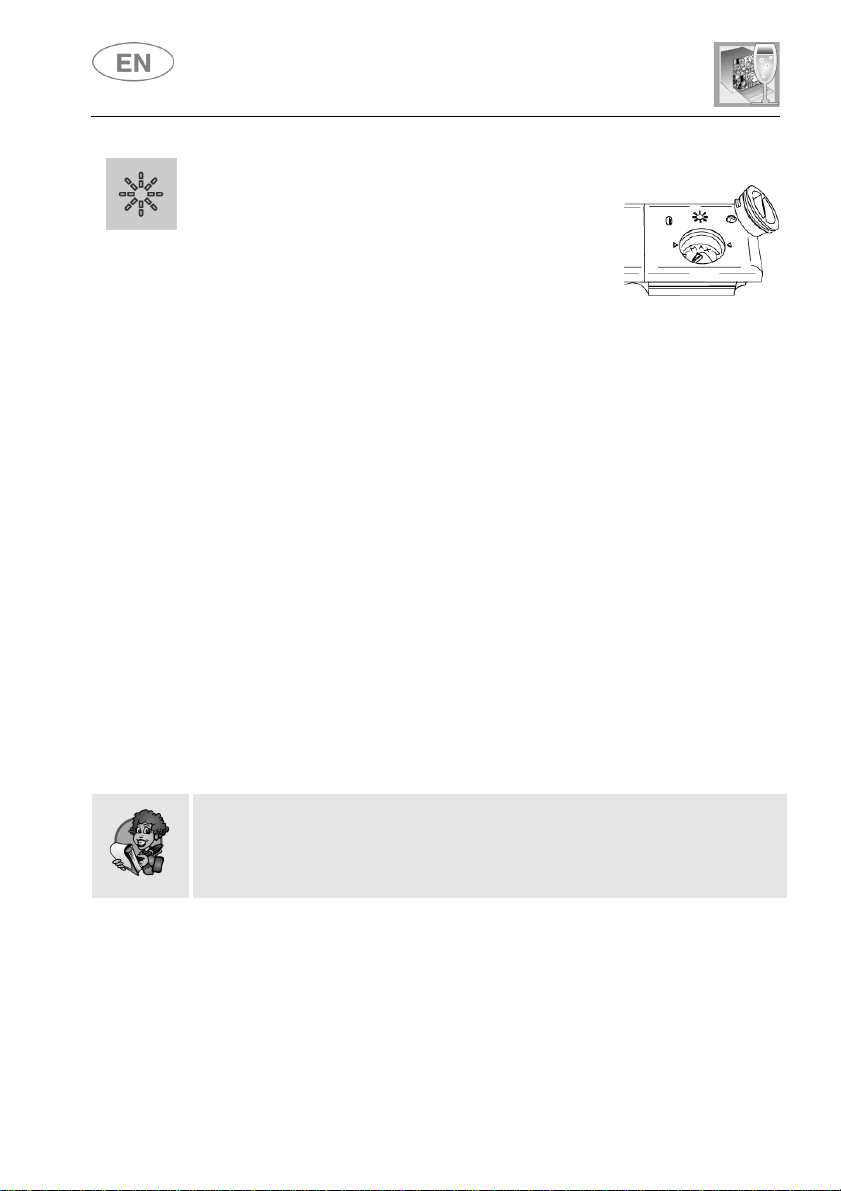
2.2 Using the rinse aid and detergent dispensers
The detergent and rinse aid
dispensers are situated on the inner
part of the door: the detergent
dispenser is on the left, and the
rinse aid dispenser is on the right.
With the exception of the SOAK program, it is necessary to add the
required amount of detergent to the detergent dispenser before every
wash cycle. The rinse aid, on the other hand, should only be added as
required.
User instructions
16
ADDING RINSE AID
Rinse aid helps the dishes dry faster and prevents
the formation of scale deposits and staining; it is
automatically added to the water during the final
rinse cycle.
To add rinse aid:
Open the door.
Rotate the container cap anticlockwise by ¼ of a turn and remove it.
Add the rinse aid until the container is full (approximately 140 ml). The
optical level indicator on the side of the cap should be completely
dark. Refill the rinse aid when the optical level indicator turns clear
again, or when the rinse aid warning light turns on.
Replace the cover and turn it clockwise.
Use a cloth to remove any spillage of rinse aid which might lead to
the formation of excess foam.
ADJUSTING THE RINSE AID DISPENSER SETTING
The dishwasher is factory set for medium water hardness. It is possible to
change this setting by turning the dispenser selector to the required
position: the amount of rinse aid dispensed depends on the selector
position.
To adjust the rinse aid setting, rotate the dispenser cap a quarter of a
turn anticlockwise and remove it.
Then rotate the rinse aid selector to the desired position.
Replace the cap, turning it clockwise.
The amount of rinse aid must be increased if the washed dishes
appear dull or have circular stains.
If, on the other hand, the dishes are sticky or have white streaks, it is
necessary to reduce the rinse aid dosage.
User instructions
17
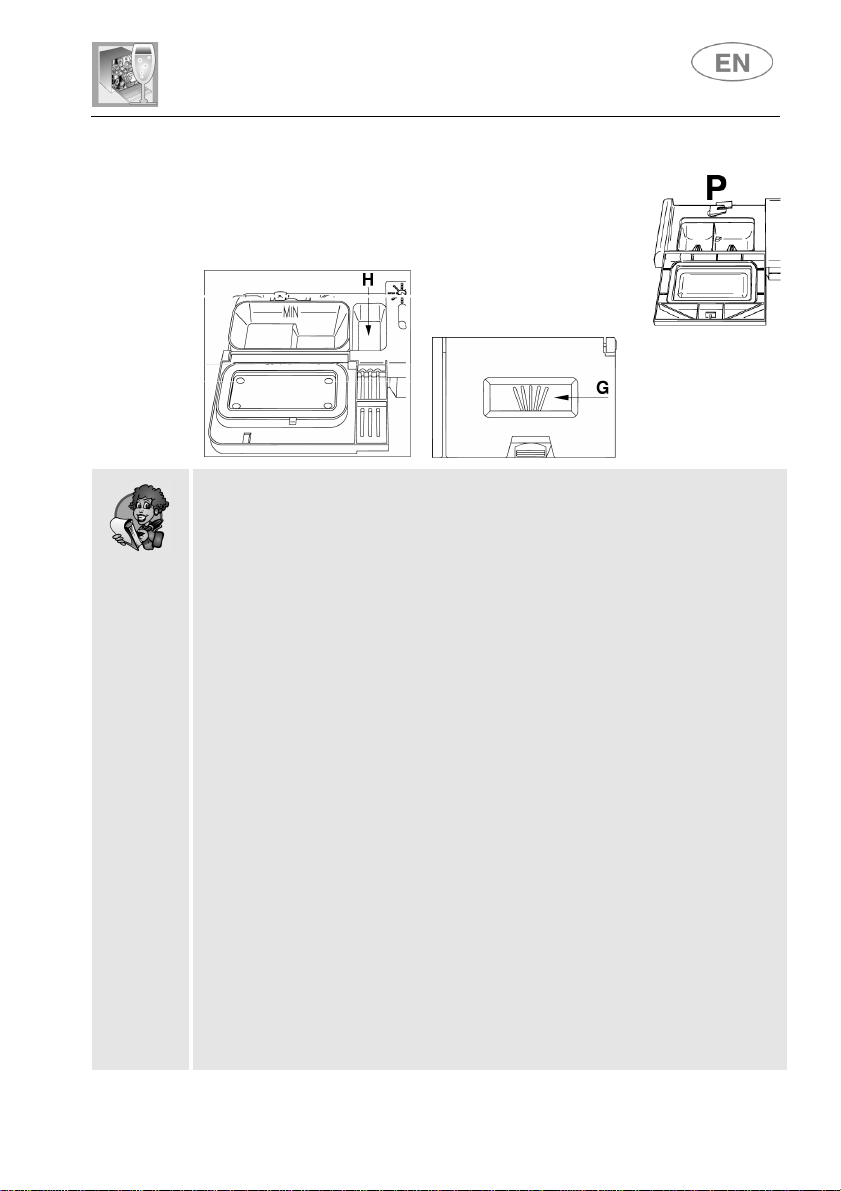
ADDING DETERGENT
To open the detergent dispenser cap, lightly press the
button P. Add the detergent and close the cap
carefully.
During the wash cycle, the dispenser will open
automatically.
When a program with hot prewash is selected (see program table),
extra detergent must be placed in the cavity G/H (depending on
model).
Use only detergents specially formulated for dishwashers. For
optimal washing results it is important to use a good quality detergent.
The detergent packs must be sealed and stored in a dry place to
prevent the formation of lumps which may negatively affect wash
results. Once opened, the detergent packs should not be kept for too
long, otherwise the detergent will lose its effectiveness.
Do not use detergents formulated for washing dishes by hand,
because they produce a great deal of foam and may negatively affect
the operation of the dishwasher.
Add the correct amount of detergent. An insufficient amount of
detergent will result in a partial removal of dirt from the dishes,
whereas an excessive amount is wasteful and does not improve the
wash results.
There are various liquid and powder detergents on the market with
differing chemical compositions, which may contain phosphates, or
be phosphate-free but contain natural enzymes.
- Detergents containing phosphates are more effective against
grease and starch at temperatures above 60°C.
- Enzyme detergents, on the other hand, are also effective at lower
temperatures (from 40 to 55°C) and are more easily biodegradable.
Enzyme detergents provide comparable results at low temperatures
to those which can only be achieved at 65°C using traditional
detergents.
To protect the environment, we recommend the use of phosphate-
and chlorine-free detergents.
User instructions
18
The introduction of detergent into the rinse aid dispenser, even in
liquid form, will damage the dishwasher.
2.3 General warnings and recommendations
Before using the dishwasher for the first time, it is advisable to read the
following recommendations concerning dish types and loading.
There are generally no constraints on washing of domestic dishes, but in
certain cases it is necessary to take their characteristics into account.
Before loading the dishes into the baskets it is necessary to:
Remove large food remains, particularly bones, which may clog the
filter or damage the pump.
Soak any pots or pans with burnt-on food to facilitate its removal,
then load them into the LOWER BASKET.
There is no need to pre-wash the dishes under running water before
loading them into the baskets since this only wastes water.
Correct loading of the dishes helps ensure optimal wash results.

User instructions
19
WARNING!
Make sure that the dishes are securely in place so that they cannot
tip over or obstruct the rotation of the spray arms during the wash
cycle.
Do not place very small objects in the baskets as these could fall and
obstruct the spray arms or the pump.
Containers such as cups, bowls, glasses and pots should always be
loaded with the opening facing downwards and with any cavities at
an angle, to allow the water to drain out.
Do not stack dishes or place them in such a way that they cover each
other.
Do not place glasses too close together because they may knock
against each other and break, or stains may remain at the point
where they touch.
MAKE SURE that the items being washed are dishwasher-safe.
Items which are not dishwasher-safe:
Wooden dishes, pots or pans: these may be damaged by the high
wash temperatures.
Handmade items: these are rarely suitable for washing in a
dishwasher. The relatively high water temperatures and the
detergents used may damage them.
Plastic dishes: heat resistant plastic dishes must be washed in the
upper basket.
Dishes and objects in copper, tin, zinc or brass: these tend to
stain.
Aluminium dishes: items made from anodised aluminium may lose
their colour.
Silverware: silver items may stain.
Glass and crystal: in general, glass and crystal objects can be
washed in the dishwasher. However, certain types of glass and
crystal may become dull and lose their clarity after many washes.
Therefore, for these items we recommend using the most gentle
program available.
Decorated items are generally able to withstand washing in the
dishwasher, although the colours may fade with frequent washing. If
in doubt as to the fastness of the colours, it is advisable to wash just
a few items at a time for approximately one month.
User instructions
20
2.4 Using the baskets
The dishwasher has a capacity of 10 place-settings, including serving
dishes.
LOWER BASKET
Used for items with a heavier degree of soiling.
All types and combinations of loads are permitted, provided that the
dishes, pots and pans are arranged with all the soiled surfaces exposed
to the water jets coming from the bottom. In some models the bottom
basket is fitted with racks which can be lowered to make better use of
the space available.
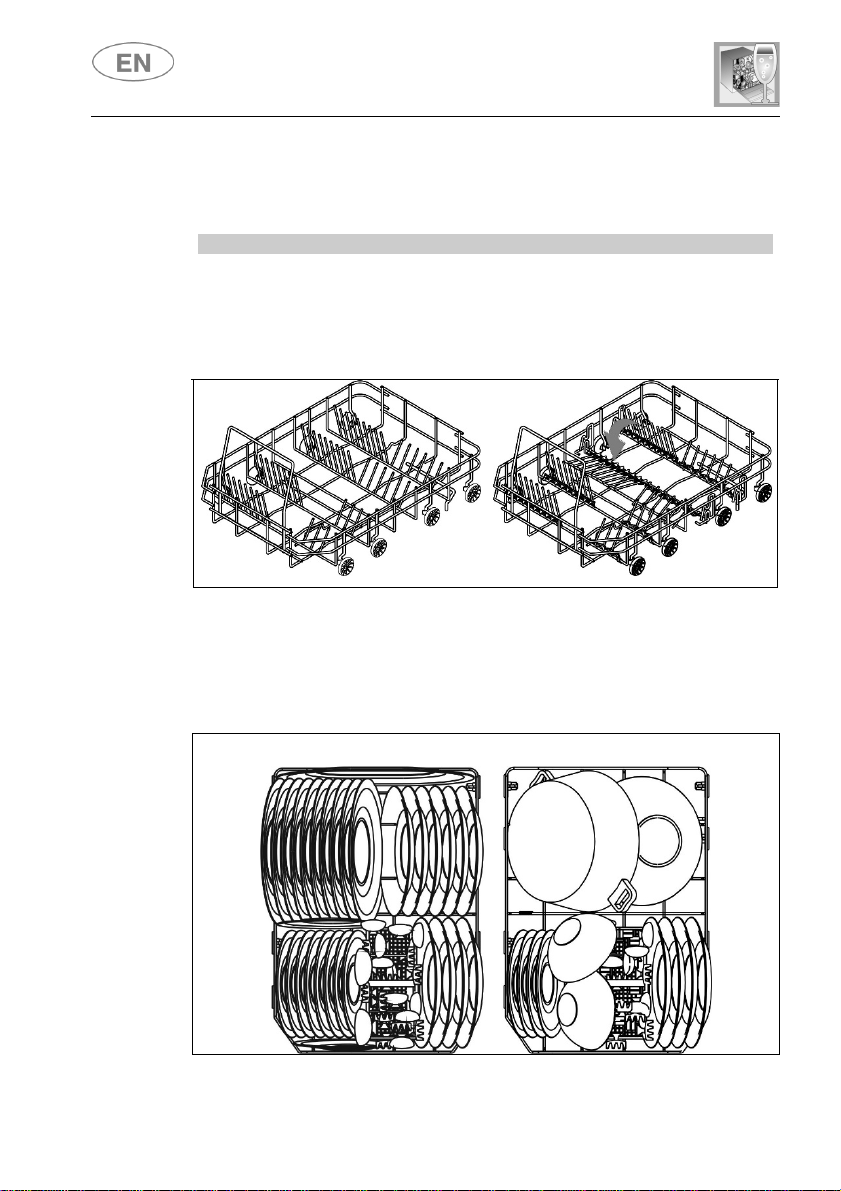
LOADING THE LOWER BASKET
Carefully load flat plates, soup bowls, dessert and serving dishes,
positioning them vertically. Pots, pans and their lids must be loaded
upside down. When loading soup and dessert bowls, be sure to leave a
gap between them.
Loading examples:
User instructions
21
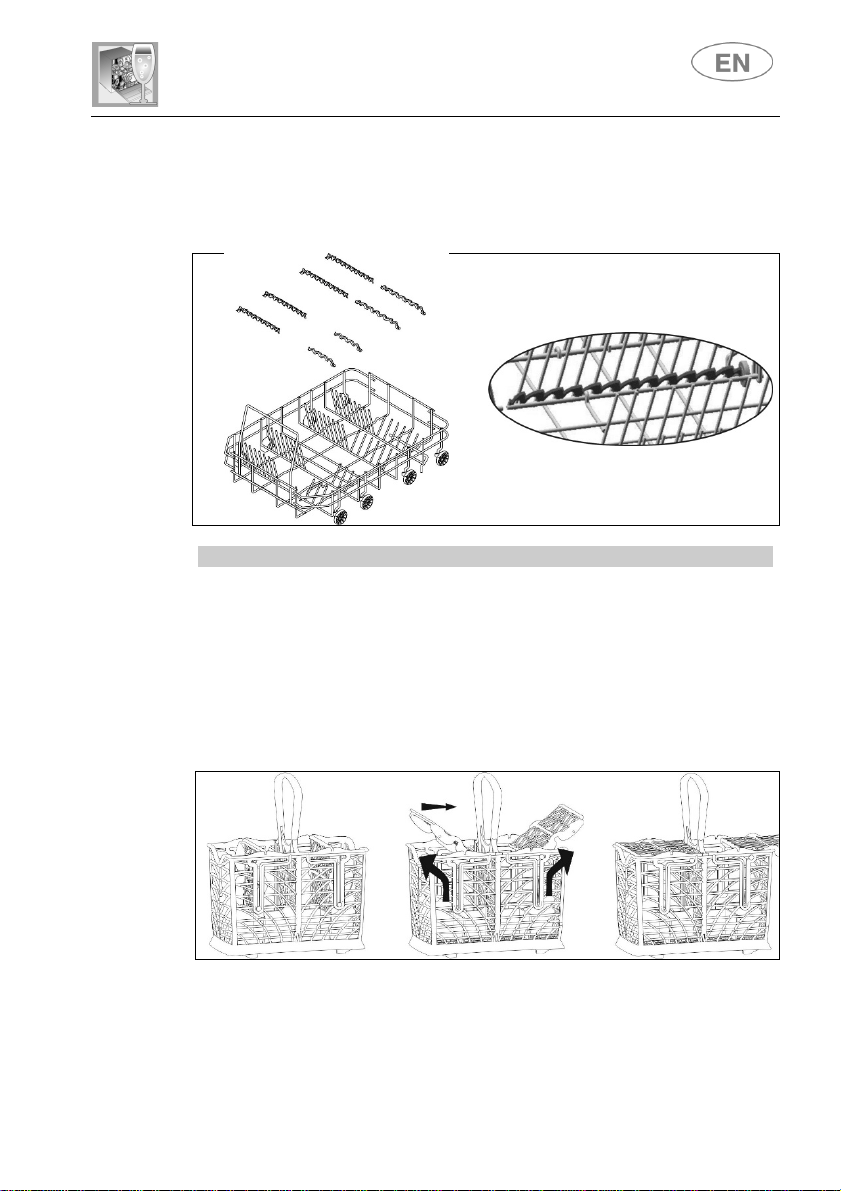
BOTTOM BASKET INSERTS
Some models are equipped with bottom basket inserts which improve the
drying of dishes. The inserts are supplied in the accessories bag; to use
them, simply fit them into place as shown.
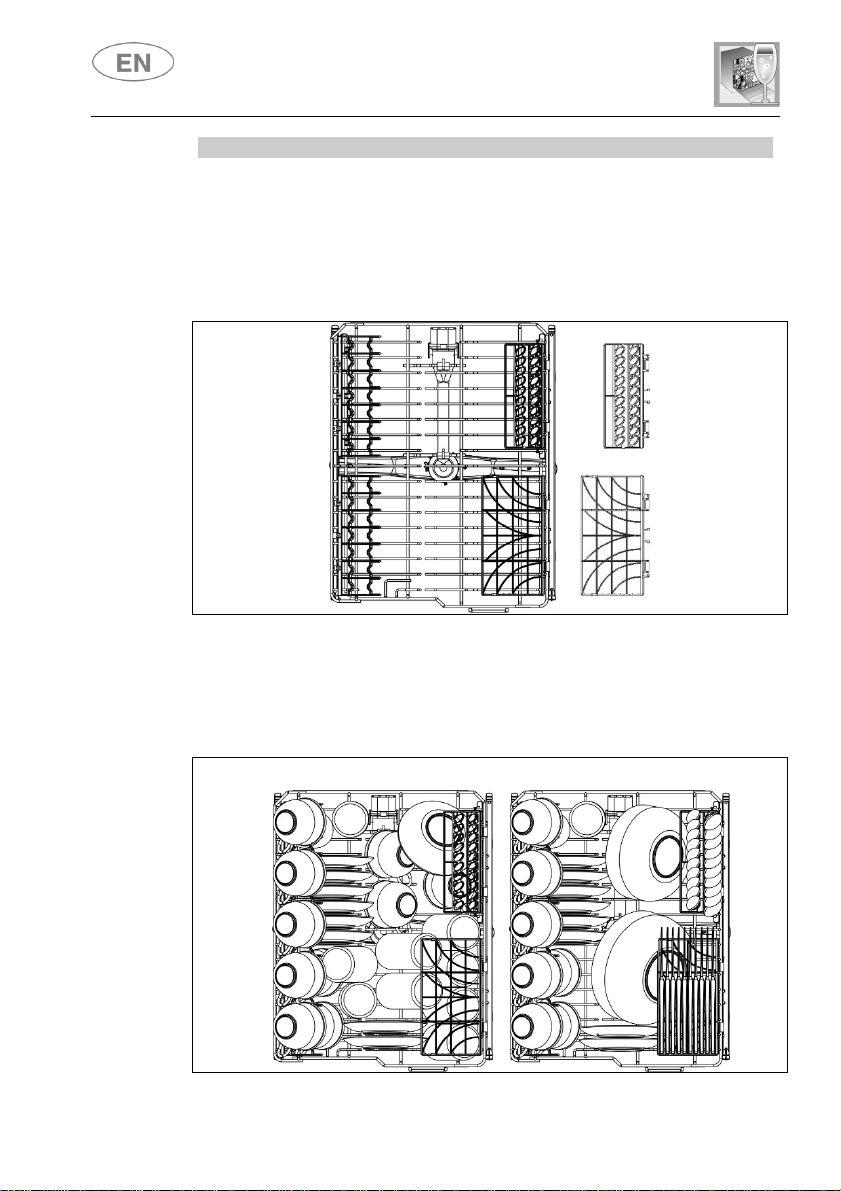
CUTLERY BASKET
The cutlery should be arranged in an orderly manner inside the basket,
with the handles pointing downwards. Take care during loading to avoid
injury from the knife blades. The basket is suitable for all types of cutlery,
except those long enough to interfere with the upper spray arm. Ladles,
wooden spoons and kitchen knives can be placed in the upper basket,
making sure that the knife blades do not protrude from the basket.
The cutlery basket features an exclusive system
of independent
sliding tip-up supports, offering a choice of possible combinations to
allow optimum use of the space available.
User instructions
22
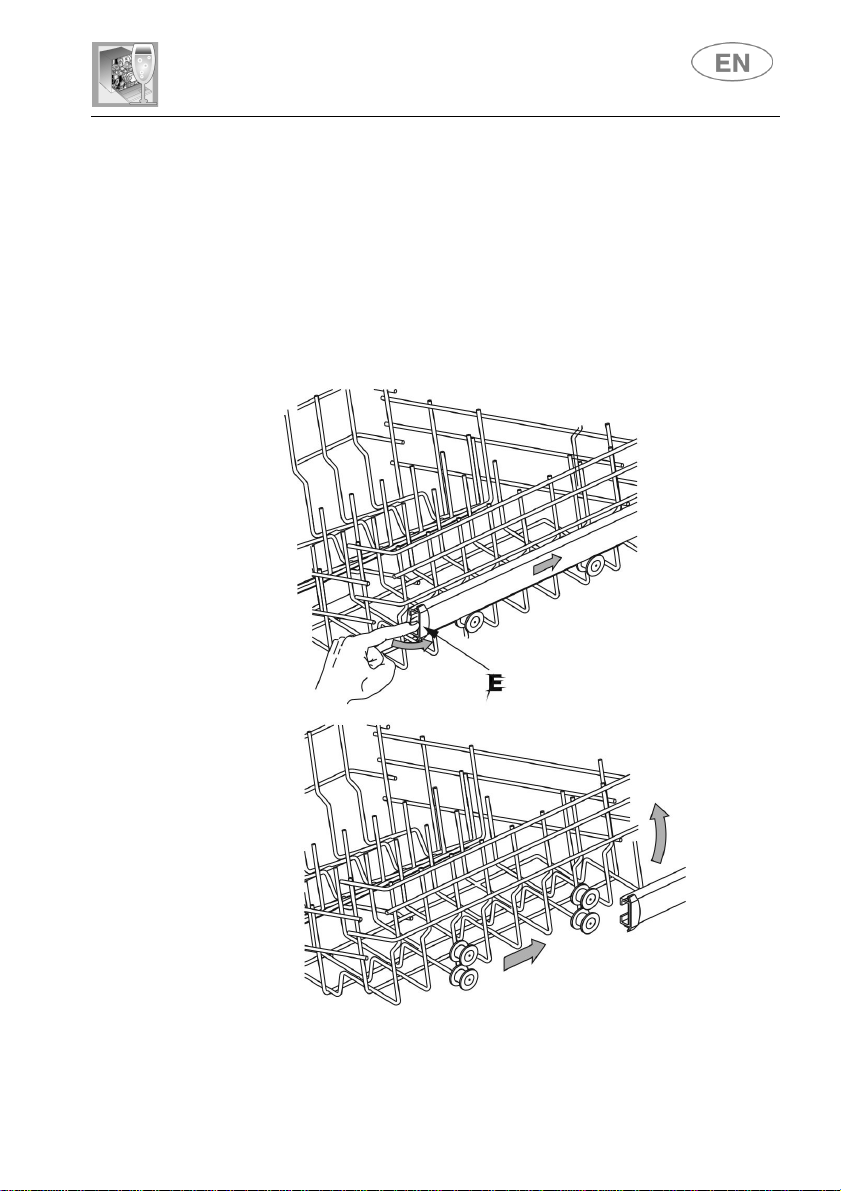
UPPER BASKET
It is recommended to load the upper basket with small or medium-
sized
items such as glasses, small plates and saucers, tea or coffee cups,
shallow bowls and light objects made from heat resistant plastic. If the
upper basket is used in the lowermost position, it can also be loaded with
serving dishes, provided they are only lightly soiled.
The basket is equipped with two tip-up cutlery supports which can be
raised or lowered as required. See illustrations below.
LOADING THE UPPER BASKET
Load plates facing forward; cups, bowls etc. must always be facing
downwards. The left-hand side of the basket can be loaded with two
layers of cups and glasses. On the right, plates and saucers can be
slotted vertically into the racks.
Loading
examples:
User instructions
23
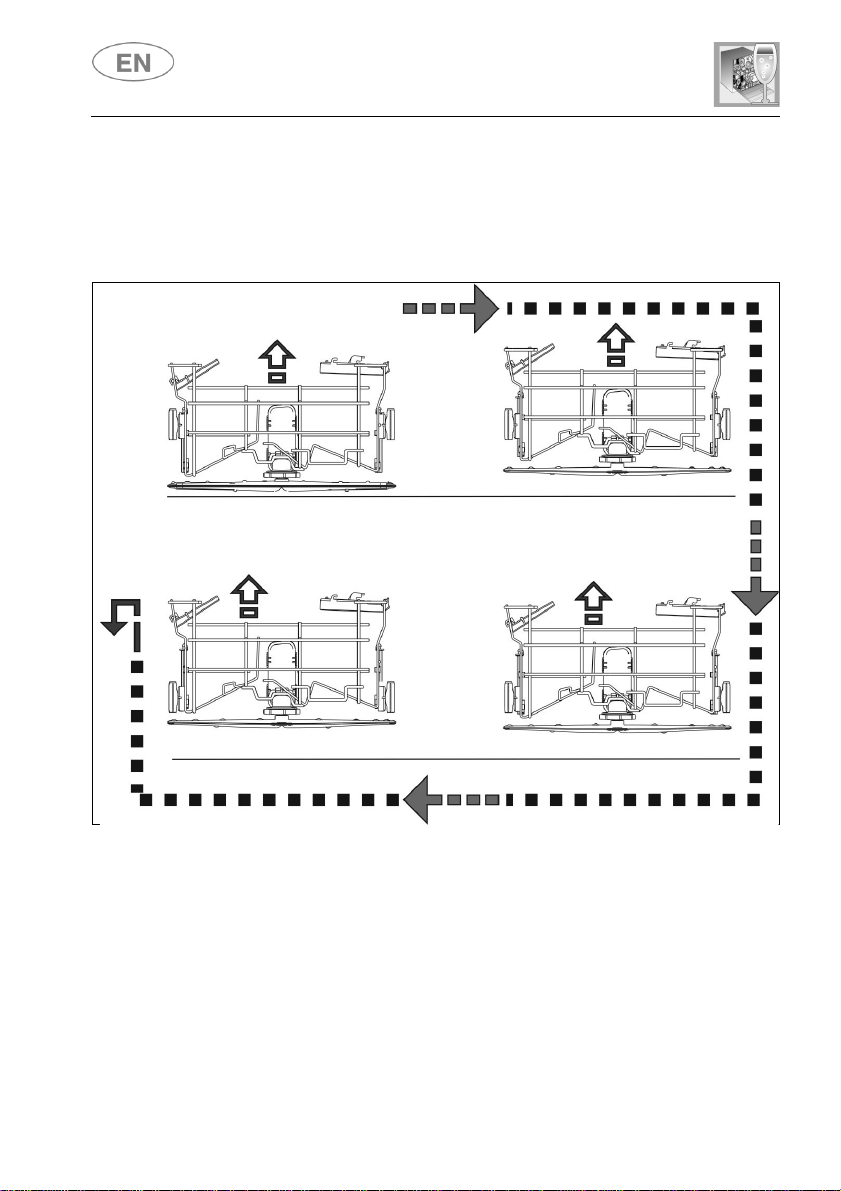
ADJUSTING THE UPPER BASKET
The height of the upper basket can be according to requirements and the
size of the dishes in the lower basket.
Pull-out adjustment system:
Turn the retainer E on both runners, right and left, through 90°
Remove the basket
Lift the basket and fit the smaller pairs of wheels in the runners
Return the retainers E to their original position
User instructions
24
Quicklift
position setting system:
system with 3 position settings (1 lowest, 3 highest). The basket is
snapped into the position required, lifting both sides simultaneously. To
return to the lowest position from any height, lift the basket to the highest
position and then release.
LOWEST
MEDIUM
HIGHEST
RELEASE
User instructions
25
3. Cleaning and maintenance
Before carrying out any work, always unplug the appliance from the
electrical supply or turn off the dual-pole dedicated switch.
3.1 General warnings and recommendations
Avoid the use of acidic or
abrasive detergents.
Clean the outer surfaces and door-lining of the dishwasher regularly
using a soft, damp cloth or with a normal detergent suitable for painted
surfaces.
Clean the door seals with a damp sponge. Periodically (once or twice a
year) it is advisable to clean the tank and seals, using a soft cloth and
water to remove any deposits.
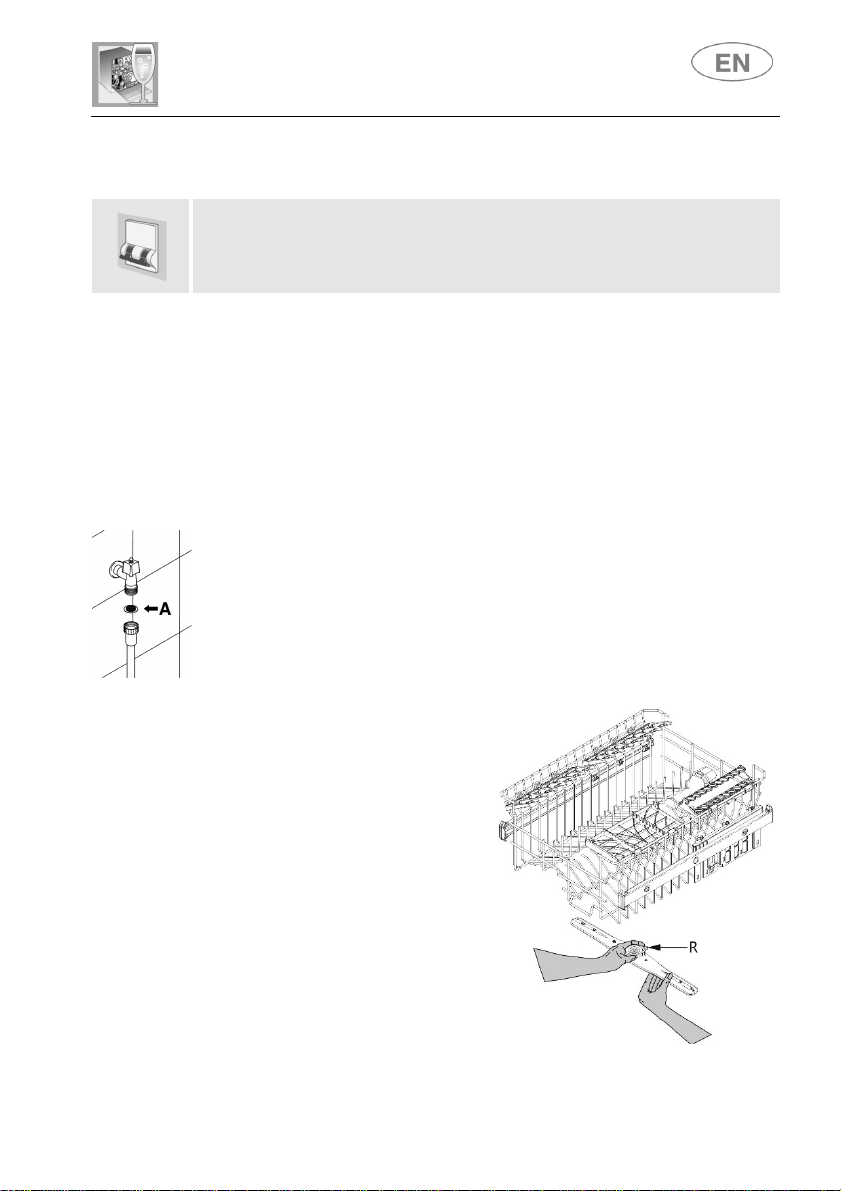
CLEANING THE WATER INTAKE FILTER
The water intake filter A located at the outlet of the water supply tap needs
to be cleaned periodically. After closing the water supply tap, unscrew the
end of the water intake hose, remove the filter A and clean it carefully
under running water. Reassemble filter A and carefully screw the water
intake hose back into position.
CLEANING THE SPRAY ARMS
The spray arms can be easily
removed for periodic cleaning of the
nozzles, to prevent possible clogging.
Wash them under running water and
carefully reinstall them, checking
that their rotation is in no way
impeded.
To remove the upper spray arm,
unscrew locking ring R.
User instructions
26
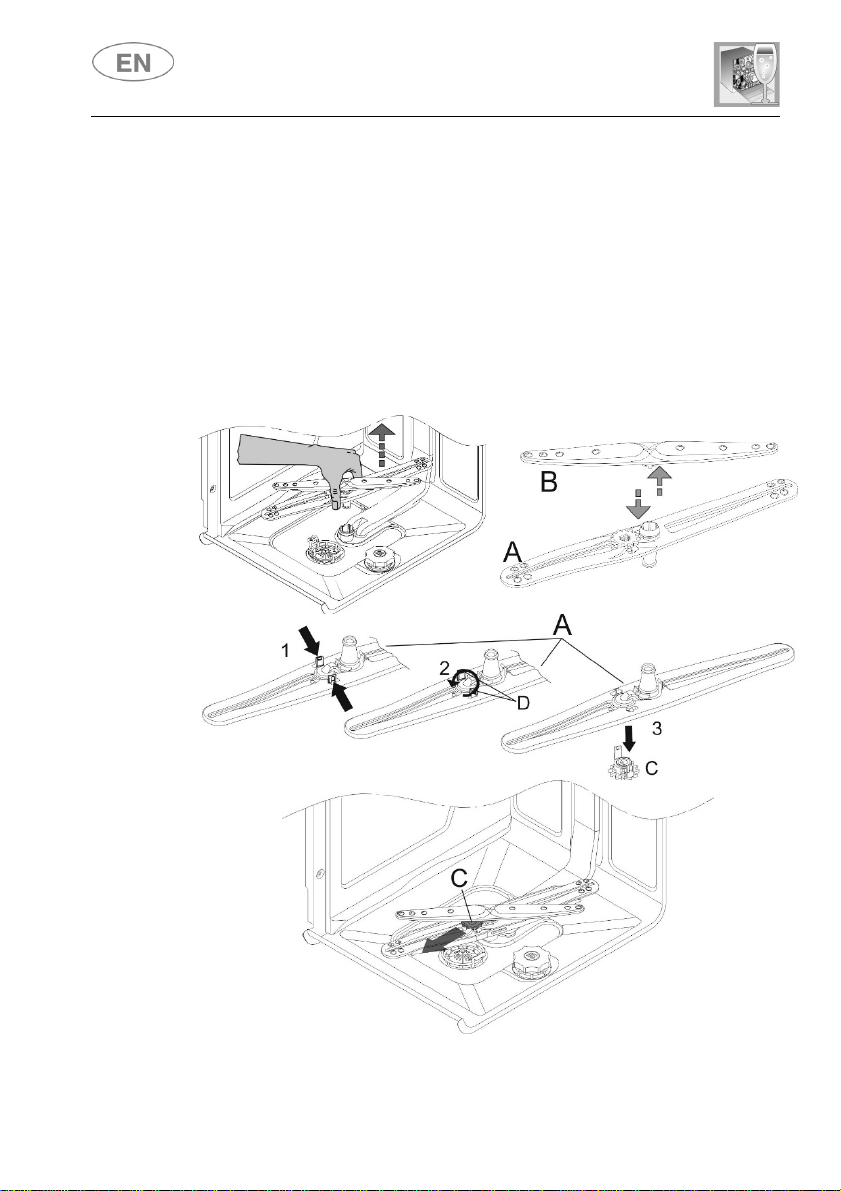
CLEANING THE OSCILLATING BOTTOM SPRAY ARM
● Take hold of the bottom spray arm unit and pull it upward to release.
● Separate the oscillating arm A from the spray arm B.
● Turn the oscillating arm A upside down to release the toothed wheel C
by pressing the teeth D and turning them anticlockwise.
● Extract the wheel C and wash all components under running water.
Assemble the spray arm unit by reversing the sequence described above.
Warning: The wheel C can only be mounted in one position; the teeth D
must engage properly.
Fit the unit so that the wheel C is facing towards the door of the
dishwasher.
User instructions
27
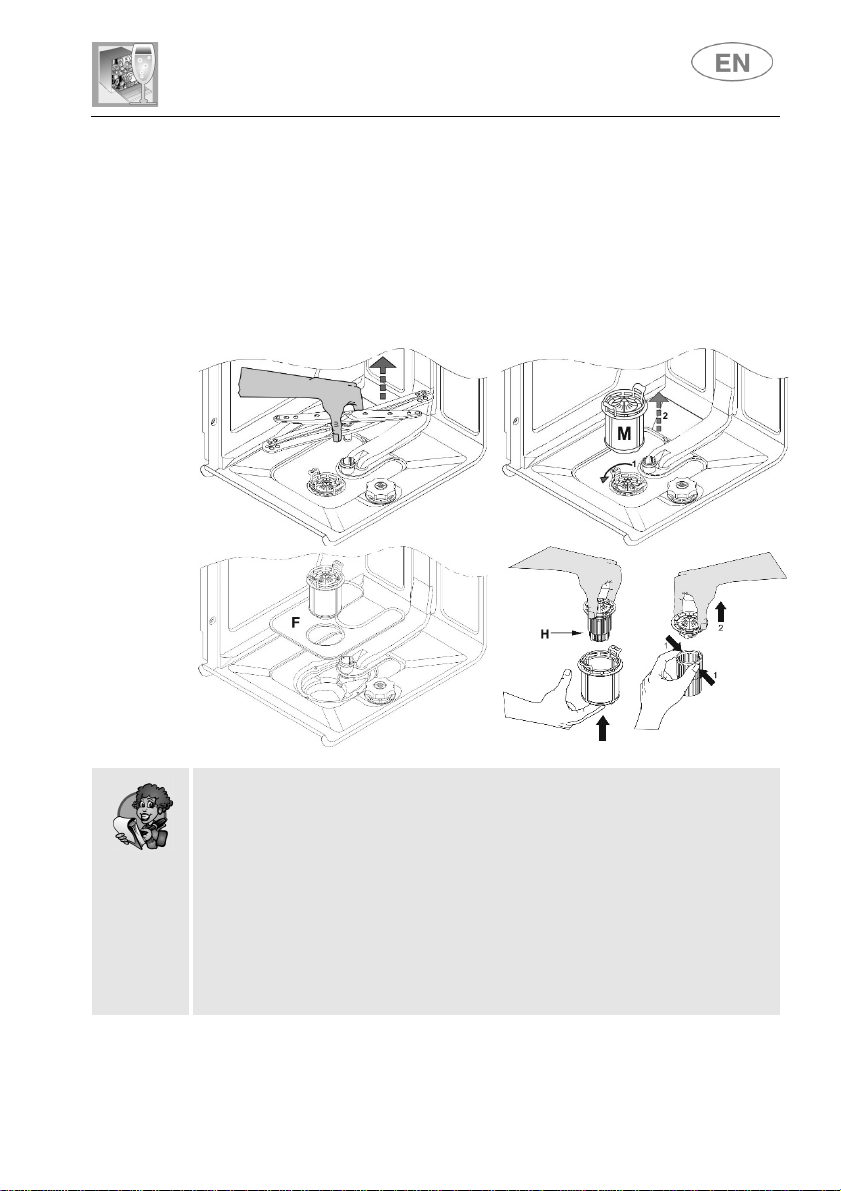
CLEANING THE FILTER UNIT
The central filter should be cleaned regularly. To remove it, pull the
spray arm assembly upwards.
Turn the microfilter M anticlockwise to release and extract it, then lift
the stainless steel filter F.
Push the central filter H from below to extract it from the micro-filter.
Separate the two parts of the plastic filter by pressing the body of the
filter in the zone shown by the arrows.
Remove the central filter by lifting it.
GENERAL WARNINGS AND RECOMMENDATIONS FOR CORRECT
MAINTENANCE:
The filters should be cleaned under running water using a stiff
brush.
When removing the filter, take care that there are no food residues
on it. If any residues fall into the sump they might block hydraulic
components or the spray arm nozzles.
It is essential to thoroughly clean the filters according to the above
instructions: the dishwasher cannot function if the filters are clogged.
Carefully replace the filters to avoid damaging the pump.
User instructions
28
PROLONGED DISUSE:
Run the soak program twice in succession.
Unplug the power cord from the socket.
Leave the door slightly open in order to prevent the formation of
unpleasant odours inside the wash tank.
Fill the rinse aid dispenser.
Shut off the water supply tap.
BEFORE STARTING THE DISHWASHER AFTER PROLONGED
DISUSE:
Check that there are no deposits of sludge or rust inside the water
pipe: if there are, allow the water to run from the water supply tap for
a few minutes.
Plug the power cord back into the socket.
Reconnect the water intake hose and open the tap again.
TROUBLESHOOTING MINOR PROBLEMS
In some cases it is possible to remedy minor problems by referring to the
following instructions:
If the program fails to start, check that:
The dishwasher is connected to the electricity supply
There is no power outage
The water tap is open
The dishwasher door is properly closed
If water remains inside the dishwasher, check that:
The drainage hose is not kinked
The drainage trap is not blocked
The dishwasher filters are not clogged
If the dishes do not come out clean, check that:
The correct amount of detergent has been added
The salt container is not empty
The dishes have been loaded correctly
The selected program is suitable for the dish types and their degree
of soiling
All filters are clean and correctly installed
The spray arm nozzles are not clogged
There is nothing obstructing the rotation of the spray arms
User instructions
29
If the dishes fail to dry or remain dull, check that:
The rinse aid container is not empty
The rinse aid dispenser setting is correct
The detergent used is of good quality and has not lost its
effectiveness (for example, through incorrect storage, with the box left
open)
If the dishes show signs of streaking, staining etc., check that:
The rinse aid dispenser setting is not too high
If there are visible traces of rust inside the tank:
the tank is made of stainless steel, and therefore any rust marks are
due to external elements (fragments of rust from the water pipes,
pots, cutlery etc.). Special products are available to remove such
marks.
Check that the detergent dose being used is correct. Certain
detergents can be more corrosive than others.
Check that the cap of the salt container is securely closed, and that
the water softening setting is correct.
If the problem persists after following the troubleshooting instructions
above, call the nearest Authorised Service Centre.
WARNING: any operations performed on the appliance by
unauthorised technicians are not covered by the warranty and shall
be paid for by the user.
User instructions
30
4. Troubleshooting
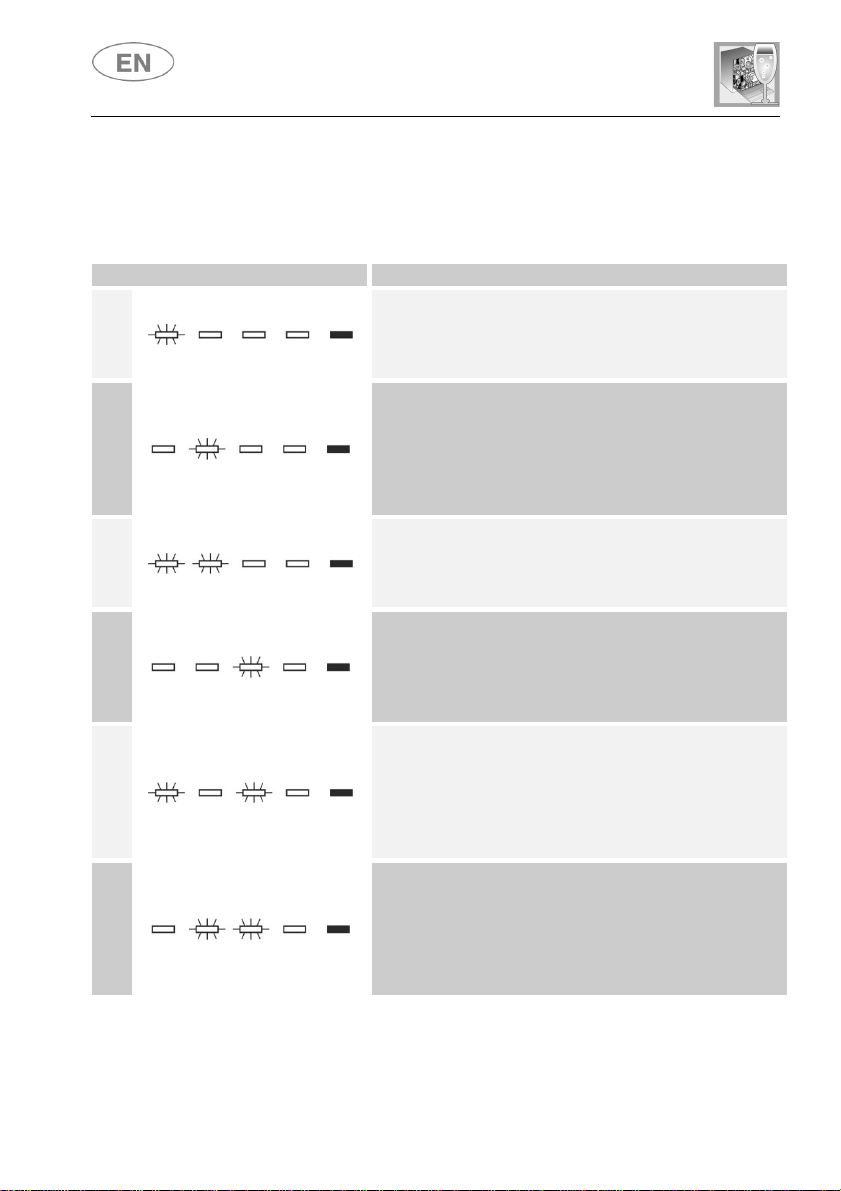
The dishwasher is capable of signalling a number of faults by the simultaneous
illumination of multiple indicator lights; the meanings are given below:
FAULT
DESCRIPTION
E1
Acquastop failure
The anti-flooding system has been activated (for the
relevant models only). The system is tripped in case of
water leaks. Contact the after-sales service.
E2
Safety level
The system which limits the water level inside the
dishwasher has been tripped. Interrupt the program
and switch off the dishwasher. Switch the dishwasher
back on, program it again and start the washing cycle.
If the problem persists, contact the after-sales service.
E3
Water heating malfunction
The water is not heated or the heating parameters are
not correct. Repeat the washing program; if the
problem persists, contact the after-sales service.
E4
Water temperature monitoring malfunction
Interrupt the program and switch off the dishwasher.
Switch the dishwasher back on, program it again and
start the washing cycle. If the problem persists, contact
the after-sales service.
E5
Water intake malfunction
The appliance does not take in water or does not do
so correctly. Check that the water connections are
correct, the water intake tap is turned on and the filter
is not fouled. If the problem persists, contact the after-
sales service.
E6
Water pump-out malfunction
The appliance does not pump out the water or does
not do so correctly. Check that the drain hose is not
kinked or crushed and that the siphon and filter are not
fouled. If the problem persists, contact the after-sales
service.
User instructions
31
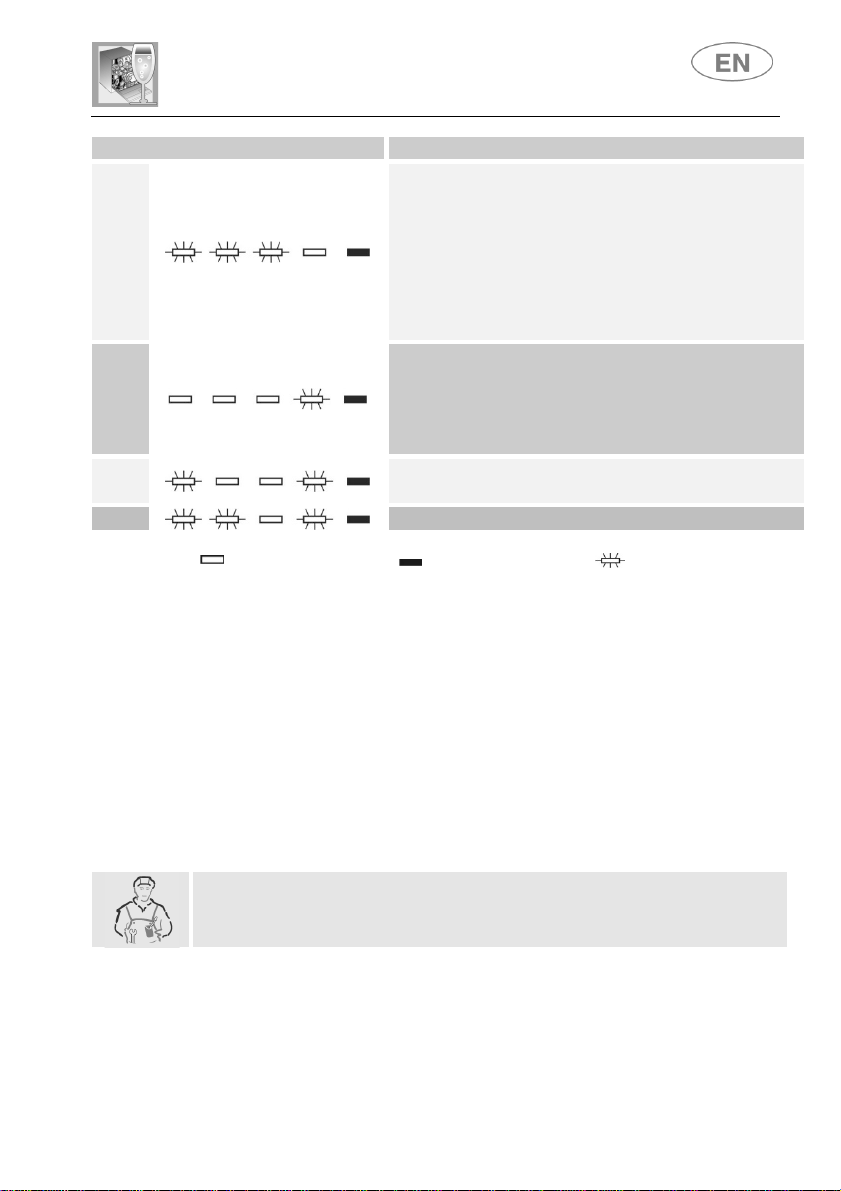
FAULT
DESCRIPTION
E7
Turbine flow-regulator malfunction
(for the relevant models only)
The appliance is not able to "measure" the amount
of water loaded accurately. Interrupt the program
and switch off the dishwasher. Switch the
dishwasher back on, program it again and start the
washing cycle. If the problem persists, contact the
after-sales service.
E8
Alternate washing system malfunction
Interrupt the program and switch off the dishwasher.
Switch the dishwasher back on, program it again and
start the washing cycle. If the problem persists, contact
the after-sales service.
E9
Water intake system malfunction
Contact the after-sales service.
E11
Wash motor pump does not work
Light off
Light on
Light flashing
If an alarm occurs the appliance interrupts the program in progress and signals
a fault.
Alarms E1, E2, E3, E4, E8 and E9 interrupt the current program
immediately.
The E5, E6 alarms interrupts the running program once the cause is
resolved, it will bring bach the execution of the program.
The alarm E7 is visualized at the end of the cycle that comes, however,
brought to the end since the operation of the dishwasher is not harmed.
E11: Contact the after-sales service.
To “reset” an alarm is necessary:
Open and close the door, or turn off and on the machine. At this point is
possible to program the dishwasher again.
If the malfunction persists, contact your authorised Service Centre.