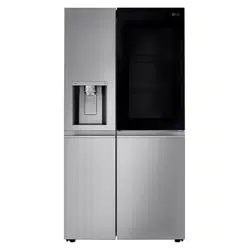
The images in this guide may be different from the actual components and accessories, which are subject to change by the manufacturer without prior notice for product improvement purposes.
Exterior
InstaView Door-in-Door: The InstaView Door-in-Door compartment allows for easy access to commonly used food items.
2. Door-in-Door: Press this button to open the Door-in-Door.
3. Refrigerator: Fresh food compartment
4. Freezer: Frozen food compartment.
5. Handle: Opens and closes the refrigerator door.
Interior
Ice Bin: Stores ice produced by the automatic icemaker.
2. reezer Door Bins: Store small packages of frozen food. Do not store ice cream or food which will be stored for a long period of time within these baskets.
3. LED Interior Lamps: Light up the inside of the refrigerator.
4. Freezer Shelf: Adjust the freezer shelves to fil large or tall items.
5. Freezer Drawer: Store long-term frozen items. The number of drawers may vary by model.
6. Refrigerator Shelf: Shelves are adjustable to suit individual storage needs. Adjust the shelf height by emptying and removing the shelf and inserting it on a different set of shelf supports. The number of refrigerator shelves varies by model. 7. Fresh Zone: Storage for deli, fruit, or vegetables.
8. Door-in-Door Case: Open the outer Door-in-Door for easy access to frequently used items without letting a lot of cold air out of the refrigerator.
9. Refrigerator Door Bins: Standard door bins are adjustable to filt taller items.
10. Control Panel: Sets the refrigerator and freezer temperatures.
OPERATION
Before Use
Checklist
Clean the refrigerator.
Clean the refrigerator thoroughly and wipe off all dust that accumulated during shipping.
CAUTION
Do not scratch the refrigerator with a sharp object or use a detergent that contains alcohol, a flammable liquid or an abrasive when removing any tape or adhesive from the refrigerator. Remove adhesive residue by wiping it off with your thumb or dish detergent.
Do not peel off the model or serial number label or the technical information on the rear surface of the refrigerator.
Open refrigerator door and freezer drawer to ventilate the interior.
The inside of the refrigerator may smell like plastic at first. Remove any adhesive tape from inside the refrigerator and open the refrigerator door and the freezer drawer for ventilation.
Connect the power supply.
Check if the power supply is connected before use.
Turn off the icemaker.
Turn off the icemaker if the refrigerator is not yet connected to the water supply.
NOTE: The icemaker water valve may buzz if the icemaker is turned on while the refrigerator is not connected to the water supply.
Wait for the refrigerator to cool.
Allow the refrigerator to run for at least two to three hours before putting food in it. Check the flow of cold air in the freezer compartment to ensure proper cooling.
CAUTION: Putting food in the refrigerator before it has cooled could cause the food to spoil, or a bad odor to remain inside the refrigerator.
The refrigerator makes a loud noise after initial operation.
This is normal. The volume will decrease as the temperature decreases.
Control Panel
Control Panel Features
Ice Plus
This function increases both ice making and freezing capabilities. Press the Ice Plus button to illuminate the icon and activate the function for 24 hours. The function automatically shuts off after 24 hours. Stop the function manually by pressing the button once more.
2. Freezer
Indicates the set temperature of the freezer compartment in Fahrenheit (°F). The default freezer temperature is 0°F. Press the Freezer button repeatedly to select a new set temperature from -7 °F to 5 °F.
NOTE
To change the temperature mode from °F to °C (or vice versa) press and hold the Refrigerator and Freezer buttons simultaneously for approximately five seconds. The temperature indicator on the display window switches between Celsius and Fahrenheit.
The displayed temperature is the target temperature, and not the actual temperature of the refrigerator. The actual refrigerator temperature depends on the food inside the refrigerator.
3. Refrigerator
Indicates the set temperature of the refrigerator compartment in Fahrenheit (°F). The default refrigerator temperature is 37 °F. Press the Refrigerator button repeatedly to select a new set temperature from 33 °F to 43 °F.
CAUTION: Display Mode (For Store Use Only)
The Display Mode disables all cooling in the refrigerator and freezer sections to conserve energy while on display in a retail store. When activated, OFF is displayed on the control panel and the display remains on for 20 seconds.
To deactivate / activate:
With either refrigerator door opened, press the Ice Plus button 3 times consecutively while pressing the Refrigerator button. The control panel beeps and the temperature settings display to confirm that Display Mode is deactivated. Use the same procedure to activate Display Mode.
NOTE
When the refrigerator is in the Power Saving Mode, the display remains off until a door is opened or a button is pressed. Once on, the display remains on for 20 seconds.
Parts, functions, and options vary by model. Your model may not include all the Options, appears with a different name and / or different position.
Automatic Icemaker
Freezer Icemaker
This feature is only available on some models. The feature may vary depending on model purchased.
NOTE
The icemaker produces ice once approximately 48 hours have passed after the appliance is initially installed.
Throw away the first few batches of ice (about 140 - 160 cubes) after installation.This is also necessary if the refrigerator has not been used for a longtime.
The automatic freezer icemaker produces 12 cubes at a time, 50-110 pieces within a 24 hour period if conditions are favorable. This amount may vary according to the environment (ambient temperature around the appliance, frequency of the door being opened, amount of food stored in the appliance, etc.).
The amount and shape of ice may vary according to the environment (ambient temperature around the appliance, frequency of the door being opened, amount of food stored in the appliance, water pressure, etc.).
The sound of ice dropping into the ice bin is normal.
If the ice bin is completely filled with ice, ice production will stop.
In the event of a power outage, throw away the ice stored in the ice bin.
Ice cubes which are stored in the ice bin for a long time may clump together and be difficult to separate. If this happens, empty the ice bin completely and clean it before reinstalling it.
Turning the Automatic Icemaker On
To turn the automatic icemaker On/Off, press the power switch on the icemaker to the ON ( | ) or OFF (O) position.
Normal Sounds You May Hear
Keeping the power turned on to the icemaker before the water line is connected can damage the icemaker.
The icemaker water valve buzzes as the icemaker fills with water. If the icemaker power button is in the ON mode, it will buzz even if it has not yet been hooked up to water. To stop the buzzing, press the icemaker power button to turn it off.
You will hear the sound of cubes dropping into the bin and water running in the pipes as the icemaker refills.
Preparing for Vacation
Set the icemaker power button to OFF and shut off the water supply to the refrigerator.
NOTE
The ice bin should be emptied any time the icemaker power button is turned to the OFF mode.
Discard the ice inside the storage compartment ice in the freezer if you go on vacation or if a prolonged power outage has occurred. The water product from melted ice could fall to the floor.
If the ambient temperature will drop below freezing, have a qualified technician drain the water supply system to prevent serious property damage due to flooding caused by ruptured water lines or connections
Food Storage Tips
Wrap or store food in the refrigerator in airtight and moisture-proof material unless otherwise noted. This prevents food odor and taste transfer throughout the refrigerator. For dated products, check date code to ensure freshness.
CAUTION
Do not overfill or pack items too tightly into door bins. Doing so may cause damage to the bin or personal injury if items are removed with excessive force.
Do not store glass containers in the freezer. Contents may expand when frozen, break the container and cause injury.
Food
How to Store
Butter or Margarine
Keep opened butter in covered dish or closed compartment. When storing an extra supply, wrap in freezer packaging and freeze.
Cheese
Store in original wrapping until used. Once opened, rewrap tightly in plastic wrap or aluminum foil.
Milk
Wipe milk cartons. For coldest milk, place containers on an interior shelf.
Eggs
Store in original carton on interior shelf, not on door shelf.
Fruit
Do not wash or hull fruit until it is ready to be used. Sort and keep fruit in original container in a crisper, or store in completely closed paper bag on refrigerator shelf.
Leafy
Vegetables
Remove store wrapping, trim or tear off bruised and discolored areas, wash in cold water, and drain. Place in plastic bag or plastic container and store in crisper.
Vegetables with skins (carrots, peppers)
Place in plastic bags or plastic container and store in crisper.
Fish
Freeze fresh fish and shellfish if they are not being eaten the same day purchased. Eating fresh fish and shellfish the same day purchased is recommended.
Leftovers
Cover leftovers with plastic wrap or aluminum foil, or store in plastic containers with tight lids.
Storing Frozen Food
Check a freezer guide or a reliable cookbook for further information about preparing food for freezing or food storage times.
Freezing
Your freezer will not quick-freeze a large quantity of food. Do not put more unfrozen food into the freezer than will freeze within 24 hours (no more than 2 to 3 pounds of food per cubic foot of freezer space). Leave enough space in the freezer for air to circulate around packages. Be careful to leave enough room at the front so the door can close tightly.
Storage times will vary according to the quality and type of food, the type of packaging or wrap used (how airtight and moisture-proof) and the storage temperature. Ice crystals inside a sealed package are normal. This simply means that moisture in the food and air inside the package have condensed, creating ice crystals.
Packaging
Successful freezing depends on correct packaging. When you close and seal the package, it must not allow air or moisture in or out. If it does, you could have food odor and taste transfer throughout the refrigerator and could also dry out frozen food.
Packaging recommendations
Rigid plastic containers with tight-fitting lids
Straight-sided canning/freezing jars
Heavy-duty aluminum foil
Plastic-coated paper
Non-permeable plastic wraps
Specified freezer-grade self-sealing plastic bags
Follow package or container instructions for proper freezing methods.
Do not use
Bread wrappers
Non-polyethylene plastic containers
Containers without tight lids
Wax paper or wax-coated freezer wrap
Thin, semi-permeable wrap
Detaching/Assembling the Storage Bins
Fresh Zone Drawer
The Fresh Zone drawers provide storage for fruit and vegetables.
When removing or installing the lower Fresh Zone drawer, lift the cover to help remove or insert the drawer.
To remove the Fresh Zone drawers, pull out the drawer to full extension 1, lift the front up 2, and pull straight out.
2. To install, slightly tilt up the front, insert the drawer into the frame and push it back into place.
Removing the Fresh Zone Cover
Hold the cover with both hands and pull it out.
Door Bins
The door bins are removable for easy cleaning and adjustment.
Some bins may vary in appearance and will only fit in one location.
To remove the bin, simply lift the bin up and pull straight out.
2. To replace the bin, slide it in above the desired support and push down until it snaps into place.
InstaView Function (Only in some models)
The InstaView function on the Door-in-Door lets you see if you’re running low on frequently used items like beverages and snacks, without opening the refrigerator door.
Knock twice on the glass to turn the LED light inside the Door-in-Door on or off.
The LED light turns off automatically after 10 seconds.
The InstaView Door-in-Door function is disabled when the right refrigerator door and the left freezer.
Knock near the center of the glass. Knocking near the edges of the glass may not activate the InstaView Door-in-Door function properly.
Knock hard enough that the knocking sound is audible.
The InstaView Door-in-Door function may activate if a loud noise occurs near the refrigerator.
Door-in-Door
The Door-in-Door compartment allows for easy access to commonly used food items. To access the Door-in-Door compartment, lightly press the button on the refrigerator door handle until you hear a click and the door opens.
Door-in-Door Case Detaching the Shelf
To open the Door-in-Door case, pull evenly on the ENGLISH marked area. The Door-in-Door Case is removable for easy cleaning and adjustment.
To remove the Door-in-Door case, lift up and pull out.
2. To replace the Door-in-Door case, line up the tabs on the Door-In-Door case with the slots on the door and push down until it snaps into place.
Adjusting the Refrigerator Shelves
The shelves in the refrigerator are adjustable to meet individual storage needs. Your model may have full or split shelves.
Adjusting the shelves to fit items of different heights will make finding the exact item you want easier.
Detaching the Shelf
Remove all items from the shelf. Lift the back of the shelf slightly to disengage the rail stops.
Holding the shelf with both hands, tilt the shelf and pull it out.
Assembling the Shelf
Tilt the front of the shelf up and guide the shelf into the slots at a desired height, keeping shelf holder down. 1
Slide the shelf in, then lower the front of the shelf. 2
SMART FUNCTIONS
LG ThinQ Application
This feature is only available on models with the or logo.
The LG ThinQ application allows you to communicate with the appliance using a smartphone.
LG ThinQ Application Features
Communicate with the appliance from a smartphone using the convenient smart features.
Smart Diagnosis
If you experience a problem while using the appliance, this smart diagnosis feature will help you diagnose the problem.
Installing the LG ThinQ Application
Search for the LG ThinQ application from the Google Play Store or Apple App Store on a smart phone.
Follow instructions to download and install the application.
Run the LG ThinQ application and follow the instructions in the application to register the appliance.
Smart Diagnosis
This feature is only available on models with the or logo.
Use this feature to help you diagnose and solve problems with your appliance.
Using Audible Diagnosis to Diagnose Issues
Follow the instructions below to use the audible diagnosis method.
Launch the LG ThinQ application and select the Smart Diagnosis feature in the menu. Follow the instructions for audible diagnosis provided in the LG ThinQ application.
Open the right door.
2. Press and hold the Freezer button for 3 seconds or longer.
The control panel will be turned off, and then ‘3’ will be displayed on the Freezer temperature display part.
3. Then position the phone’s mic at the Smart Diagnosis logo located on the right hinge of the refrigerator door.
4. After the data transfer is complete, the diagnosis will be displayed in the application.
MAINTENANCE
Cleaning
WARNING
Use non-flammable cleaner. Failure to do so can result in fire, explosion, or death.
Do not damage the refrigerant circuit.
CAUTION
Do not use an abrasive cloth or sponge when cleaning the interior and exterior of the refrigerator.
Do not place your hand on the bottom surface of the refrigerator when opening and closing the doors.
When lifting the hinge free of the latch, be careful that the door does not fall forward.
General Cleaning Tips
Both the refrigerator and freezer sections defrost automatically; however, clean both sections once a month to prevent odors.
Wipe up spills immediately.
Unplug the refrigerator or disconnect power before cleaning.
Remove all removable parts, such as shelves.
Use a clean sponge or soft cloth and a mild detergent in warm water. Do not use abrasive or harsh cleaners.
Hand wash, rinse and dry all surfaces thoroughly
Exterior
For products with black stainless steel exterior, spray glass cleaner on a clean, microfiber cloth and rub in direction of grain. Do not spray glass cleaner directly at the display panel. Do not use harsh or abrasive cleaners.
For products with a standard stainless steel exterior, use a damp microfiber cloth and rub in the direction of the grain. Dry with a paper towel to avoid streaks. For stubborn stains and fingerprints, use a few drops of liquid dish soap in water, and rinse with hot water before drying. Do not use abrasive or harsh cleaners.
Inside Walls
Allow freezer to warm up so the cloth will not stick.
To help remove odors, wash the inside of the refrigerator with a mixture of baking soda and warm water. Mix 2 tablespoons of baking soda to 1 quart of water (26 g soda to 1 liter water.) Be sure the baking soda is completely dissolved so it does not scratch the surfaces of the refrigerator.
Door Liners and Gaskets
Use a clean sponge or soft cloth and a mild detergent in warm water. Do not use cleaning waxes, concentrated etergents, bleaches, or cleaners containing petroleum on plastic refrigerator parts.
Plastic Parts (Covers and Panels)
Use a clean sponge or soft cloth and a mild detergent in warm water. Do not use glass cleaners, abrasive cleansers, or flammable fluids. These can scratch or damage the material.
Condenser Coils
Use a vacuum cleaner with a brush or crevice attachment to clean the condenser cover and vents. Do not remove the panel covering the condenser coil area.
Guidelines for Application / Water Supply Parameters
Service Flow
0.5 gpm (1.9 lpm)
Water Supply
Community or Private Well - Potable Water
Water Pressure
20 – 120 psi (138 – 827 kPa)
Water Temperature
33 °F – 100 °F (0.6 °C – 37.8°C)
Capacity
200 gallons (757 liters)
It is essential that the manufacturer’s recommended installation, maintenance and filter replacement requirements be carried out for the product to perform as advertised.
NOTE: While the testing was performed under standard laboratory conditions, actual performance may vary
TROUBLESHOOTING
FAQs
Frequently Asked Questions
What are the best temperature settings for my refrigerator and freezer?
The default setting for the refrigerator is 37° Fahrenheit (3° Celsius). The default setting for the freezer is 0° Fahrenheit (-18° Celsius). Adjust these settings as necessary to keep food at desired temperatures. Milk should be cold when stored on the inner shelf of the refrigerator. Ice cream should be firm and ice cubes should not melt in the freezer. To switch the display from Fahrenheit to Celsius, press and hold the Freezer and Refrigerator buttons until you hear a beep and the settings in the display change.
2. How do I set the refrigerator and freezer temperatures?
Continually press the Refrigerator or Freezer button on the control panel until the desired temperature appears. The numbers will cycle from highest to lowest and then return to the highest again with continuous pressing.
3. Why do I hear a buzzing noise from my refrigerator periodically?
This may happen if you do not have a water source attached to your refrigerator and the icemaker is turned on. If you do not have a water source attached to the back of the refrigerator you should turn the icemaker off.
4. My refrigerator is powered on and the controls are working, but it’s not cooling and the display shows “OFF” (see below). What is wrong?
The refrigerator is in Display Mode. The Display Mode disables all cooling in the refrigerator and freezer sections to conserve energy while on display in a retail store. When activated, OFF is displayed on the control panel and the display remains on for 20 seconds. With either refrigerator door opened, press the Ice Plus button 3 times consecutively while pressing the Refrigerator button. The control panel beeps and the temperature settings display to confirm the Display Mode is deactivated. Use the same procedure to activate Display Mode.
Before Calling for Service
Cooling
Problem
Possible Cause & Solution
Refrigerator and Freezer section are not cooling.
The refrigerator control is set to OFF (some models).
• Turn the control ON. Refer to the Setting the Controls section for proper temperature settings.
Refrigerator is set to Demo Mode.
• Demo Mode allows the lights and control display to work normally while disabling cooling, to save energy while the refrigerator is on the showroom floor. See the FAQs section of this manual for instructions on how to disable Demo Mode.
Refrigerator is in the defrost cycle.
• During the defrost cycle, the temperature of each compartment may rise slightly. Wait 30 minutes and confirm the proper temperature has been restored once the defrost cycle has completed.
Refrigerator was recently installed.
• It may take up to 24 hours for each compartment to reach the desired temperature.
Refrigerator was recently relocated.
• If the refrigerator was stored for a long period of time or moved on its side, it is necessary for the refrigerator to stand upright for 24 hours before connecting it to power.
Cooling system runs too much.
Refrigerator is replacing an older model.
• Modern refrigerators require more operating time but use less energy due to more efficient technology.
Refrigerator was recently plugged in or power restored.
• The refrigerator will take up to 24 hours to cool completely.
The door is opened often or a large amount of food / hot food was added.
• Adding food and opening the door warms the refrigerator, requiring the compressor to run longer in order to cool the refrigerator back down. In order to conserve energy, try to get everything you need out of the refrigerator at once, keep food organized so it is easy to find, and close the door as soon as the food is removed. (Refer to the Food Storage
Guide.)
Doors are not closed completely.
• Firmly push the doors shut. If they will not shut all the way, the “Doors will not close correctly or pop open” section in Troubleshooting
Refrigerator is installed in a hot location.
• The compressor will run longer under warm conditions. At normal room temperatures (70 °F or 21 °C) expect your compressor to run about 40 % to 80 % of the time. Under warmer conditions, expect it to run even more often. The refrigerator should not be operated above 110 °F (43 °C).
Condenser / back cover is clogged.
• Use a vacuum cleaner with an attachment to clean the condenser cover and vents. Do not remove the panel covering the condenser coil area.
Interior moisture buildup.
Doors are opened often or for long periods of time.
• When the doors are opened often or for long periods of time, warm, humid air enters the compartment. This raises the temperature and moisture level within the compartment. To lessen the effect, reduce the frequency and duration of door openings.
Doors are not closed correctly.
• See the “Doors will not close correctly or pop open” section.
Weather is humid.
• Humid weather allows additional moisture to enter the compartments when the doors are opened leading to condensation or frost. Maintaining a reasonable level of humidity in the home will help to control the amount of moisture that can enter the compartments.
Defrost cycle recently completed.
• During the defrost cycle, the temperature of each compartment may rise slightly and condensation may form on the back wall. Wait 30 minutes and confirm that the proper temperature has been restored once the defrost cycle has completed.
Food is not packaged correctly.
• Food stored uncovered or unwrapped, and damp containers can lead to moisture accumulation within each compartment. Wipe all containers dry and store food in sealed packaging to prevent condensation and frost.
Food is freezing in the refrigerator compartment.
Food with high water content was placed near an air vent.
• Rearrange items with high water content away from air vents.
Refrigerator temperature control is set incorrectly.
• If the temperature is too cold, adjust the control one increment at a time and wait for the temperature to stabilize. Refer to the Control Panel section for more information.
Refrigerator is installed in a cold location.
• When the refrigerator is operated in temperature below 41 °F (5 °C), food can freeze in the refrigerator compartment. The refrigerator should not be operated in temperature below 55 °F (13 °C).
Refrigerator or Freezer section is too cold.
Incorrect temperature control settings.
• If the temperature is too cold, adjust the control one increment at a time and wait for the temperature to stabilize. Refer to the Control Panel for more information.
Frost or ice crystals form on frozen food (inside of sealed package).
Condensation from food with a high water content has frozen inside of the food package.
• This is normal for food items with a high water content.
Food has been left in the freezer for a long period of time.
• Do not store food items with high water content in the freezer for a long period of time.
Frost or ice crystals form on frozen food
(outside of package).
Door is opened frequently or for long periods of time.
• When the doors are opened often or for long periods of time, warm, humid air enters the compartment. This raises the temperature and moisture level within the compartment. Increased moisture will lead to frost and condensation. To lessen the effect, reduce the frequency and duration of door openings.
Door is not closing properly.
• Refer to the “Doors will not close correctly or pop open” section in the Troubleshooting.
Refrigerator or
Freezer section is too warm.
Refrigerator was recently installed.
• It may take up to 24 hours for each compartment to reach the desired temperature.
The air vents are blocked. Cold air circulates from the freezer to the fresh food section and back again through air vents in the wall dividing the two sections.
• Locate air vents by using your hand to sense airflow and move all packages that block vents and restrict airflow. Rearrange items to allow air to flow throughout the compartment.
Doors are opened often or for long periods of time.
• When the doors are opened often or for long periods of time, warm, humid air enters the compartment. This raises the temperature and moisture level within the compartment. To lessen the effect, reduce the frequency and duration of door openings.
Unit is installed in a hot location.
• The refrigerator should not be operated in temperatures above 110 °F (43 °C).
A large amount of food or hot food was added to either compartment.
• Adding food warms the compartment requiring the cooling system to run. Allowing hot food to cool to room temperature before putting it in the refrigerator will reduce this effect.
Doors are not closed correctly.
• See the “Doors will not close correctly or pop open” section in the Troubleshooting.
Temperature control is not set correctly.
• If the temperature is too warm, adjust the control one increment at a time and wait for the temperature to stabilize.
Defrost cycle has recently completed.
• During the defrost cycle, the temperature of each compartment may rise slightly and condensation may form on the back wall. Wait 30 minutes and confirm the proper temperature has been restored once the defrost cycle has completed.
Ice & Water
Problem
Possible Cause & Solution
Icemaker is not making enough ice.
Demand exceeds ice storage capacity.
• The icemaker will produce approximately 70-184 cubes in a 24 hour period.
House water supply is not connected, valve is not turned on fully, or valve is clogged.
• Connect the refrigerator to a cold water supply with adequate pressure and turn the water shutoff valve fully open. If the problem persists, it may be necessary to contact a plumber.
Low house water supply pressure.
• The water pressure must be between 20 and 120 psi on models without a water filter and between 40 and 120 psi on models with a water filter. If the problem persists, it may be necessary to contact a plumber.
Reverse osmosis filtration system is used.
• Reverse osmosis filtration systems can reduce the water pressure below the minimum amount and result in icemaker issues. (Refer to the Connecting the Water Line section.)
Tubing connecting refrigerator to house supply valve is kinked.
• The tubing can kink when the refrigerator is moved during installation or cleaning resulting in reduced water flow. Straighten or repair the water supply line and arrange it to prevent future kinks.
Doors are opened often or for long periods of time.
• If the doors of the unit are opened often, ambient air will warm the refrigerator which will prevent the unit from maintaining the set temperature. Lowering the refrigerator temperature can help, as well as not opening the doors as frequently.
Doors are not closed completely.
• If the doors are not properly closed, ice production will be affected. See the “Doors will not close correctly or pop open” section in Parts & Features Troubleshooting for more information.
The temperature setting for the freezer is too warm.
• The recommended temperature for the freezer compartment for normal ice production is 0°F. If the freezer temperature is warmer, ice production will be affected.
Icemaker is not making ice
Refrigerator was recently installed or icemaker recently connected.
• It may take up to 24 hours for each compartment to reach the desired temperature and for the icemaker to begin making ice.
Icemaker is not turned on.
• Locate the icemaker ON/OFF and confirm that it is turned on.
The ice detecting sensor is obstructed.
• Foreign substances or frost on the ice-detecting sensor can interrupt ice production. Make sure that the sensor area is clean at all times for proper operation.
The refrigerator is not connected to a water supply or the supply shutoff valve is not turned on.
• Connect the refrigerator to the water supply and turn the water shutoff valve fully open.
Icemaker shutoff (arm or sensor) obstructed.
• If your icemaker is equipped with an ice shutoff arm, make sure that the arm moves freely. If your icemaker is equipped with the electronic ice shutoff sensor, make sure that there is a clear path between the two sensors.
Reverse osmosis water filtration system is connected to your cold water supply.
• Reverse osmosis filtration systems can reduce the water pressure below the minimum amount and result in icemaker issues. (Refer to the Connecting the Water Line section).
Ice has bad taste or odor.
Water supply contains minerals such as sulfur.
• A water filter may need to be installed to eliminate taste and odor problems. NOTE: In some cases, a filter may not help. It may not be possible to remove all minerals/odor/taste in all water supplies.
Icemaker was recently installed.
• Ice that has been stored for too long will shrink, become cloudy, and may develop a stale taste. Throw away old ice and make a new supply.
The food has not been stored properly in either compartment.
• Rewrap the food. Odors may migrate to the ice if food is not wrapped properly.
The interior of the refrigerator needs to be cleaned.
• See the Maintenance section for more information.
The ice storage bin needs to be cleaned.
• Empty and wash the bin (discard old cubes). Make sure that the bin is completely dry before reinstalling it.
Icemaker is making too much ice.
Icemaker shutoff (arm/ sensor) is obstructed.
• Empty the ice bin. If your icemaker is equipped with an ice shutoff arm, make sure that the arm moves freely. If your icemaker is equipped with the electronic ice shutoff sensor, make sure that there is a clear path between the two sensors. Reinstall the ice bin and wait 24 hours to confirm proper operation.
Parts & Features
Problem
Possible Cause & Solution
Doors will not close correctly or pop open.
Food packages are blocking the door open.
• Rearrange food containers to clear the door and door shelves.
Ice bin, crisper cover, pans, shelves, door bins, or baskets are out of position.
• Push bins all the way in and put crisper cover, pans, shelves and baskets into their correct positions. See the Operation section for more information.
The doors were removed during product installation and not properly replaced.
• Remove and replace the doors according to the Removing and Replacing Refrigerator Handles and Doors section.
Refrigerator is not leveled properly.
• See Door Alignment in the Refrigeration Installation section to level refrigerator.
Doors are difficult to open.
The gaskets are dirty or sticky.
• Clean the gaskets and the surfaces that they touch. Rub a thin coat of appliance polish or kitchen wax on the gaskets after cleaning.
Door was recently closed.
• When you open the door, warmer air enters the refrigerator. As the warm air cools, it can create a vacuum. If the door is hard to open, wait one minute to allow the air pressure to equalize, then see if it opens more easily.
Refrigerator wobbles or seems unstable
Leveling legs are not adjusted properly.
• Refer to the Leveling and Door Alignment section.
Floor is not level.
• It may be necessary to add shims under the leveling legs or rollers to complete installation.
Lights do not work.
LED interior lighting failure.
• The refrigerator compartment lamp is LED interior lighting, and service should be performed by a qualified technician.
The interior of the refrigerator is covered with dust or soot.
The refrigerator is located near a fire source, such as a fireplace, chimney, or candle.
• Make sure that the refrigerator is not located near a fire source, such as a fireplace, chimney or candle.
Noises
Problem
Possible Cause & Solution
Clicking
The defrost control will click when the automatic defrost cycle begins and ends. The thermostat control (or refrigerator control on some models) will also click when cycling on and off.
• Normal Operationchimney or candle.
Rattling
Rattling noises may come from the flow of refrigerant, the water line on the back of the unit, or items stored on top of or around the refrigerator.
• Normal Operation
Refrigerator is not resting solidly on the floor.
• Floor is weak or uneven or leveling legs need to be adjusted. See the Leveling and Door Alignment section.
Refrigerator with linear compressor was jarred while running.
• Normal Operation
Whooshing
Evaporator fan motor is circulating air through the refrigerator and freezer compartments.
• Normal Operation
Air is being forced over the condenser by the condenser fan.
• Normal Operation
Gurgling
Refrigerant flowing through the cooling system.
• Normal Operation
Popping
Contraction and expansion of the inside walls due to changes in temperature.
• Normal Operation
Sizzling
Water dripping on the defrost heater during a defrost cycle.
• Normal Operation
Vibrating
If the side or back of the refrigerator is touching a cabinet or wall, some of the normal vibrations may make an audible sound.
• To eliminate the noise, make sure that the sides and back cannot vibrate against any wall or cabinet.
Dripping
Water running into the drain pan during the defrost cycle.
• Normal Operation
Pulsating or highpitched sound
Your refrigerator is designed to run more efficiently to keep your food items at the desired temperature. The high efficiency compressor may cause your new refrigerator to run longer than your old one, but it is still more energy efficient than previous models. While the refrigerator is running, it is normal to hear a pulsating or highpitched sound.


 or
or  logo.
logo.