User Manual
OVEN USE
Feature Guide
Control Panel
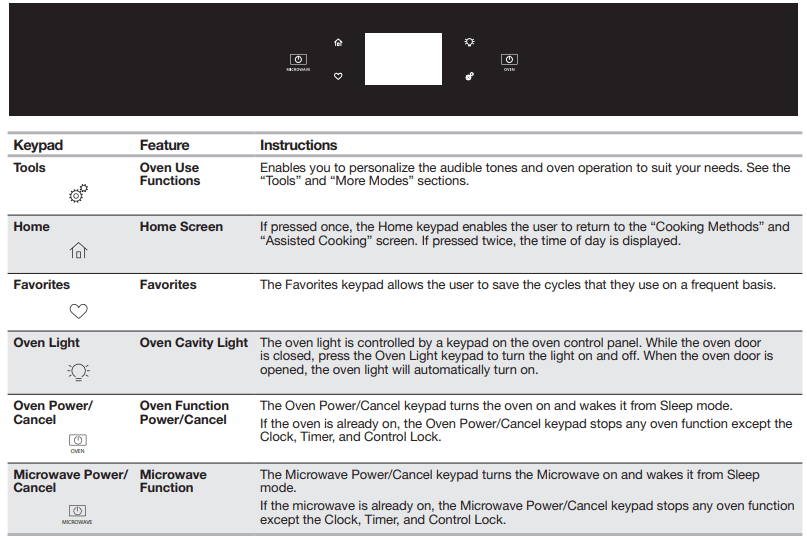
Touch Panel
The touch panel houses the control menu and function controls.The touch keypads are very sensitive and require only a light touch to activate. Scroll up, down, left, or right to explore the different options and features.
For more information about the individual controls, see their respective sections in this manual.
Display
The display is for both the menu, microwave, and oven function controls. The touch panel allows you to scroll through the oven menus. The display is very sensitive and requires only a light touch to activate and control.
When an oven is in use, the display will show the clock, mode, oven temperature, kitchen timer, and oven timer, if set. If the oven timer is not set, you can set it from this screen.
After approximately 2 minutes of inactivity, the display will go into sleep mode and the display will dim. When the oven is in operation, the display will remain bright.
During use, the display will show menus and the appropriate selections for the options being chosen.
Display Navigation
If the oven is off, touch the Oven Power or Microwave Power keypad for the desired oven to activate the menu. From this screen, all automatic cooking programs can be activated, all manual cooking programs can be set, options can be adjusted, and instructions, preparation, and tips can be accessed.
Setup and Demo Mode
1. Select STORE DEMO MODE to enter Demo Mode.
OR
1. Select NEXT to enter into product use.
2. Follow the prompts on the display screen to select a language, set up Wi-Fi/connect to network, accept the terms of service and set the time.
NOTE: The display screen will show the time and date (default screen/standby mode).
3. Select TRY THE PRODUCT to explore various features and options of the product.
OPTIONAL: Select VIEW PRODUCT VIDEOS to view a video about how to navigate and interact with the product and explore Voice Control.
4. Scroll and Select EXPLORE.
5. Select the Tools keypad.
To exit Demo Mode, see the “Tools” section.
OVEN CARE
Self-Cleaning Cycle
IMPORTANT: The health of some birds is extremely sensitive to the fumes given off during the Self-Cleaning cycle. Exposure to the fumes may result in death to certain birds. Always move birds to another closed and well-ventilated room.
Self-clean the oven before it becomes heavily soiled. Heavy soil results in longer cleaning and more smoke.
Keep the kitchen well-ventilated during the Self-Cleaning cycle to help get rid of heat, odors, and smoke.
Do not block the oven vent(s) during the Self-Cleaning cycle.Air must be able to move freely. See the “Oven Vents” section.
Do not clean, rub, damage, or move the oven door gasket.The door gasket is essential for a good seal.
Prepare Oven:
- Remove the broiler pan, grid, cookware and bakeware, and, on some models, the temperature probe from the oven.
- Remove oven racks to keep them shiny and easy to slide. See the “General Cleaning” section for more information.
- Remove any foil from the oven because it may burn or melt, damaging the oven.
- Hand clean inside door edge and the 11 cm) area around the inside oven cavity frame, being certain not to move or bend the gasket. This area does not get hot enough during high-temp self-cleaning to remove soil. Do not let water, cleaner, etc., enter slots on door frame. Use a damp cloth to clean this area.
- Wipe out any loose soil to reduce smoke and avoid damage.
- At high temperatures, foods react with porcelain. Staining, etching, pitting, or faint white spots can result. This is normal and will not affect cooking performance.
How the Cycle Works
IMPORTANT: The heating and cooling of porcelain on steel in the oven may result in discoloring, loss of gloss, hairline cracks, and popping sounds.
The Self-Cleaning cycle uses very high temperatures, burning soil to a powdery ash.
Suggested clean times are 3 hours for light soil, 4 hours for medium soil, and 5 hours for heavy soil.
Once the oven has completely cooled, remove ash with a damp cloth. To avoid breaking the glass, do not apply a cool damp cloth to the inner door glass before it has completely cooled.
The oven lights will not work during the Self-Cleaning cycle.
NOTE: The oven has a two-speed cooling fan motor. During the
Self-Cleaning cycle, the fan(s) will operate at its highest speed to increase airflow to better exhaust the hotter air through the oven vent(s). An increase in noise may be noticeable during and after the Self-Cleaning cycle until the oven cools.
Before Self-Cleaning, make sure the door is closed completely or it will not lock and the cycle will not begin. When the oven is locked, the doors of the oven cannot be opened. To avoid damage to the doors, do not force the doors open when the oven is locked.
1. Touch the Tools keypad.
2. Select SELF CLEAN.
3. Select type of Self-Cleaning:
Steam: 1 hour: Clean up after everyday light spills using lower heat and 11/4 cups (295.74 mL) of water.
High temp: 4 hours: 3 hour cycle and 1 hour cooling.
High temp: 5 hours: 4 hour cycle and 1 hour cooling.
High temp: 6 hours: 5 hour cycle and 1 hour cooling.
4. Follow the prompts on the oven display to prepare the oven.
5. Select START to begin the cleaning process.
OR
Select DELAY to set a delayed Self-Cleaning cycle. See the “To Delay Start Self-Cleaning Cycle” Section.
The oven doors will automatically lock.
NOTE: It may take a couple moments for the oven door to automatically lock after starting the Self-Clean Cycle.
When the self cleaning cycle is complete and the oven cools, the oven doors will unlock.
6. When the oven is completely cooled, remove ash with a damp cloth.
To Delay Start Self-Cleaning Cycle:
Follow steps 1 through 4 of “To Start Self-Cleaning Cycle,” then:
1. Select DELAY.
2. Select the start time of when the Self-Cleaning cycle should begin by scrolling from left to right.
3. Select START DELAY.
The oven doors will automatically lock after the Delay Start countdown.
When the Self-Cleaning cycle is complete and the oven cools, the oven doors will unlock.
4. When the oven is completely cooled, remove ash with a damp cloth.
To Stop Self-Cleaning Anytime:
Touch the Oven Cancel Keypad. If the oven temperature is too high, the door will remain locked. It will not unlock until the oven cools
Steam Clean
The Steam Clean feature is designed for light oven cavity bottom cleaning on models that have hidden bake in the oven.
Do not use oven cleaners.
Allow the oven to cool to room temperature before using the Steam Clean feature. If your oven cavity is above 200°F (93°C), the Steam Clean feature will not activate until it cools down.
Remove all racks and accessories from the oven cavity.
For best results, use 10 oz (295.7 mL) of distilled or filtered water.
The Steam Clean feature will take approximately 1 hour. A tone will sound at the end of the cycle.
IMPORTANT: Because the water in the oven bottom is hot,do not open the oven door during the Steam Clean cycle.
Touch the Oven Cancel Keypad at any time to end the cycle. The display will return to the time of day.
Helpful Hints
- Once the Steam Clean cycle is complete and the oven is completely cooled, remove all remaining water in the bottom of the oven with a sponge or cloth.
- Wipe any remaining moisture from the oven door interior, oven cavity interior sides, and cooktop.
- Use a soft brush or nylon scrubber to wipe the oven interior. This may help with more stubborn stains.
- It is recommended to use distilled or filtered water, as tap water may leave mineral deposits on the oven bottom. Use a cloth soaked with vinegar or lemon juice to remove any mineral deposits that may be left after the Steam Clean cycle.
- If the oven is heavily soiled, use the Self-Cleaning cycle. The Steam Clean cycle may be used first to eliminate most of the debris, resulting in a more effective self-cleaning.
To Steam Clean:
1. Open the oven door of the selected oven and remove all racks and accessories from the oven cavity.
2. Pour 10 oz (295.7 mL) of distilled or filtered water into the oven bottom. Then close the oven door.
3. Touch the Tools keypad.
4. Select STEAM CLEAN.
5. Select START.
6. After approximately 1 hour, a tone will sound to signal the end of the cycle. Touch the Oven Cancel Keypad to clear the display.
7. When the oven is completely cooled, remove any excess water with a sponge or cloth and wipe down oven interior. If needed, use a non-scratch copper scrubbing pad to remove stubborn soils
General Cleaning
IMPORTANT: Before cleaning, make sure all controls are off and the oven is cool. Always follow label instructions on cleaning products. For additional information, you can visit the
Frequently Asked Questions (FAQs) section of our website at www.whirlpool.com. In Canada, refer to the Customer Service section at www.whirlpool.ca.
Soap, water, and a soft cloth or sponge are suggested first unless otherwise noted.
EXTERIOR PORCELAIN ENAMEL SURFACES (on some models)
Food spills containing acids, such as vinegar and tomato, should be cleaned as soon as the entire oven is cool. These spills may affect the finish.
Cleaning Method:
- Glass cleaner, mild liquid cleaner or nonabrasive scrubbing pad:
Gently clean around the model/serial/rating plate because scrubbing may remove numbers.
- Affresh® Kitchen and Appliance Cleaner Part Number W10355010 (not included): See the “Accessories” section for more information.
STAINLESS STEEL (on some models)
NOTE: To avoid damage to stainless steel surfaces, do not use soap-filled scouring pads, abrasive cleaners, steel-wool pads, gritty washcloths or abrasive paper towels. Damage may occur to stainless steel surfaces, even with one-time or limited use.
Cleaning Method:
Rub in direction of grain to avoid damaging.
- Affresh® Stainless Steel Cleaner Part Number W10355016: See the “Accessories” section for more information.
METALLIC PAINT (on some models)
Do not use abrasive cleaners, cleaners with bleach, rust removers, ammonia or sodium hydroxide (lye) because paint surface may stain.
CONTROL PANEL AND OVEN DOOR EXTERIOR
To avoid damage, do not use abrasive cleaners, steel-wool pads, gritty washcloths, or abrasive paper towels.
Cleaning Method:
- Glass cleaner and soft cloth or sponge: Apply glass cleaner to soft cloth or sponge, not directly on panel.
- Affresh® Kitchen and Appliance Cleaner Part Number W10355010 (not included):
See the “Accessories” section for more information
OVEN RACKS
Cleaning Method:
- Steel-wool pad.
- For racks that have discolored and are harder to slide, a light coating of vegetable oil applied to the rack guides will help them slide.
OVEN CAVITY AND OVEN DOOR INTERIOR
Do not use oven cleaners.
Food spills should be cleaned after the oven cools. At high temperatures, foods react with porcelain and staining, etching, pitting, or faint white spots can result.
Cleaning Method:
- Self-Cleaning cycle: See the “Self-Cleaning Cycle” section first.
- For optimal door cleaning results, wipe away any deposits with a damp sponge before running cycle.
Oven Lights
The oven light(s) are standard 25-watt appliance bulbs.
Before replacing, make sure the oven is cool and the controls are turned off.
To Replace:
1. Disconnect power.
2. Open oven door.
3. Turn the glass bulb cover in the back of the oven counterclockwise to remove.
4. Turn bulb counterclockwise to remove from socket.
5. Replace bulb, and then bulb cover, by turning clockwise.
6. Reconnect power.
TROUBLESHOOTING
Nothing will operate
- Household fuse is blown, or a circuit breaker is tripped: Replace the fuse or reset the circuit breaker. If the problem continues, call an electrician.
Oven will not operate
- Control Lock is on: “Control Lock” will display on the screen. Scroll up to unlock.
- Sabbath Mode is set: See the “Sabbath Mode” section.
- On double oven models, one oven is self-cleaning: When one oven is self-cleaning, the other oven cannot be set or turned on.
Oven temperature too high or too low
- Oven temperature needs adjustment: See the “Temperature Calibration” section.
Display shows messages
- Power failure: On some models, reset the clock if needed. See “Preferences” in the “Tools” section.
- Error code (display shows letter followed by number): Press the Cancel keypad to clear the display. If it reapears, call for service. See the “Warranty” section for contact information.
- Demo Mode (product is in Demo Mode): See “To Exit Demo Mode” in the “Tools” section.
Clean cycle did not work on all spills
- Several cooking cycles between Clean cycles or spills on oven walls and doors: Run additional Clean cycles. The affresh® Kitchen and Appliance Cleaner can be used for stubborn soils. See the “Accessories” and “Self-Cleaning Cycle” sections for more information.
Warm air coming from oven vent
- Warm air coming from the oven vent is normal. During a self-clean cycle, the air stream is increased.
- The cooling fan may operate both during an oven’s cycle and after the cycle has ended, causing warm air to exit from the oven vent.
Long preheat times
- Not all cycles require preheating. See cycle instructions for preheat recommendations. Most cycles preheat to 350°F (177°C) in 12 to 17 minutes. Higher temperatures will take more time. Removing unused oven racks prior to preheating can help reduce preheat time.
Self-Cleaning cycle will not operate
- The oven door is open: Close the oven door all the way.
- The function has not been entered: See the “Self-Cleaning Cycle” section.
- A Timed Self-Clean cycle has been set: See the “Self-Cleaning Cycle” section.
- On double oven models, one oven is self-cleaning: When one oven is self-cleaning, the other oven cannot be set to self-clean.
Oven cooking results not what expected
- The set temperature was incorrect: Double-check the recipe in a reliable cookbook.
- Oven temperature needs adjustment: See “Temperature Calibration” in the “More Modes” section.
- Oven was not preheated: See the “Baking and Roasting” section.
- Racks were positioned improperly: See the “Positioning Racks and Bakeware” section.
- Not enough air circulation around bakeware: See the “Positioning Racks and Bakeware” section.
- Batter distributed unevenly in pan: Check that batter is level in the pan.
- Darker browning of food caused by dull or dark bakeware: Lower the oven temperature 25°F (15°C) or move rack to a higher position in the oven.
- Lighter browning of food caused by shiny or light colored bakeware: Move rack to a lower position in the oven.
- Incorrect length of cooking time was used: Adjust cooking time.
- Oven door was not closed: Be sure that the bakeware does not keep the door from closing.
- Oven door was opened during cooking: Oven peeking releases oven heat and can result in longer cooking times.
- Rack is too close to bake burner, making baked items too brown on bottom: Move rack to higher position in the oven.
- Pie crusts browning too quickly: Use aluminum foil to cover the edge of the crust and/or reduce baking temperature.