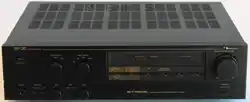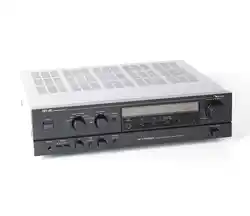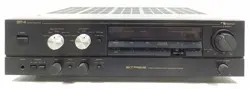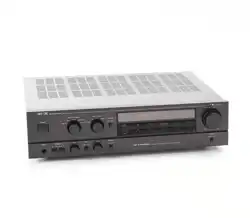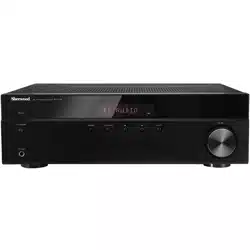

R X-4508
AM/FM STEREO RECEIVER
OPERATING INSTRUCTIONS
2
Safety Information
READ THIS BEFORE OPERATING YOUR UNIT
CAUTION
TO REDUCE THE RISK OF ELECTRIC SHOCK,
DO NOT REMOVE FRONT OR BACK COVER.
NO USER-SERVICEABLE PARTS INSIDE.
REFER SERVICING TO QUALIFIED SERVICE
PERSONNEL.
CAUTION
RISK OF ELECTRIC SHOCK
DO NOT OPEN
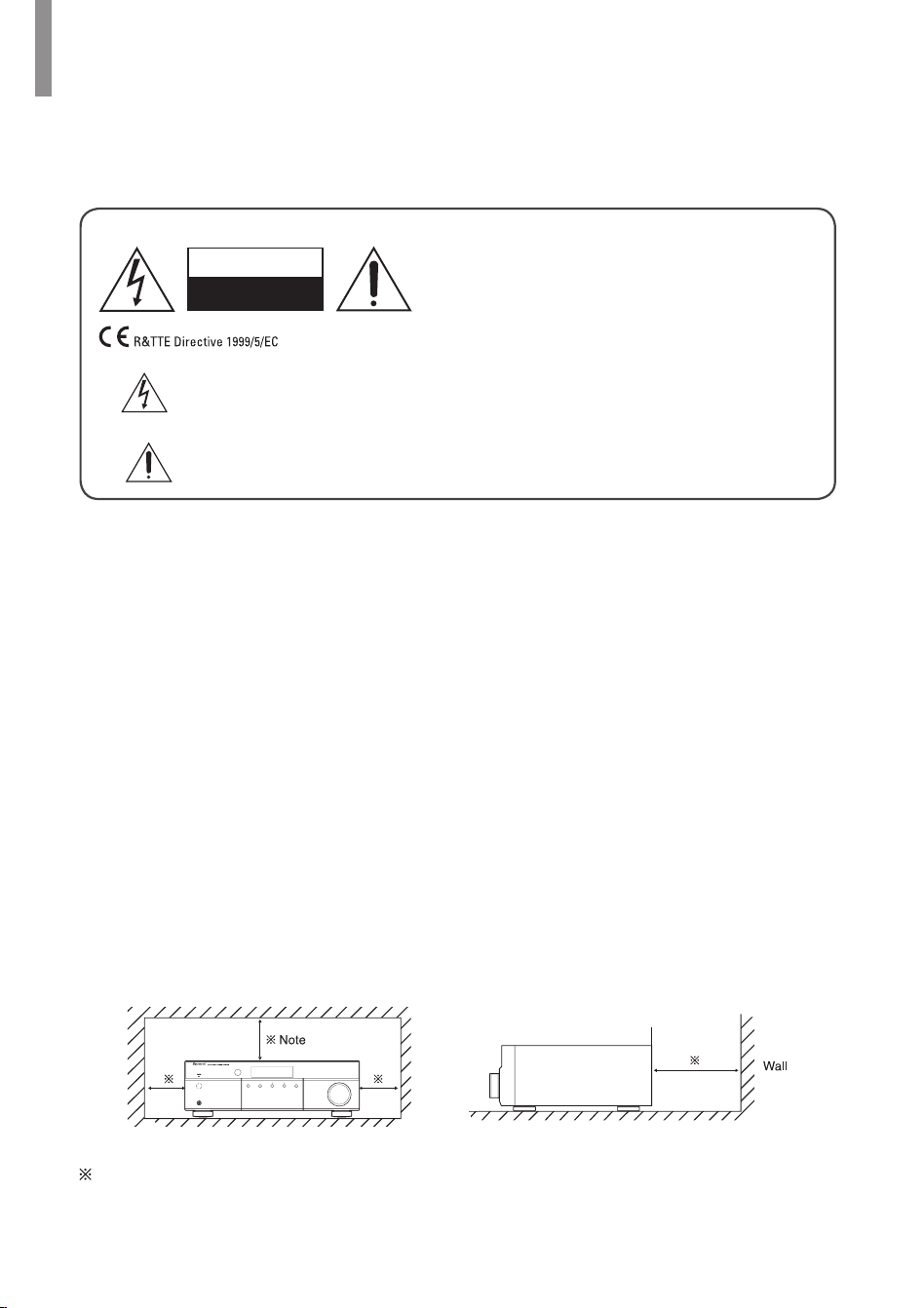
This symbol indicates the presence of uninsulated “dangerous voltage” within
the product’s enclosure that may be of sufcient magnitude to constitute a risk of
electric shock.
This symbol indicates important operating and maintenance (servicing)
instructions in the literature accompanying the appliance.
WARNING
: TO REDUCE THE RISK OF FIRE OR ELECTRIC SHOCK, DO NOT
EXPOSE THIS APPLIANCE TO RAIN OR MOISTURE.
CAUTION
•
Leave space around the unit for sufcient
ventilation.
•
Avoid installation in extremely hot or cold
locations, or in an area that is exposed to
direct sunlight or heating equipment.
•
Keep the unit free from moisture, water, and
dust.
•
Do not let foreign objects in the unit.
•
Keep the ventilation openings clear of items,
such as newspapers, linens, or curtains.
•
Keep open ame from candles or other
sources away from the unit.
•
Observe the local regulations regarding
disposal of packaging materials, exhausted
batteries and old equipment.
•
Do not expose the unit to dripping or
splashing, or place objects lled with liquids
such as vases.
•
Do not let insecticides, benzene, or thinner
come in contact with the unit.
•
Never disassemble or modify the unit in any
way.
Notes on the AC power cord and the wall
outlet
•
The unit remains connected to AC power as
long as it is plugged into the wall outlet, even
if the unit has been turned off.
•
To completely disconnect this product from
AC power, disconnect the plug from the wall
socket outlet.
•
When setting up this product, make sure
that the AC outlet you are using is easily
accessible.
•
Disconnect the plug from the wall outlet when
not using the unit for long periods of time.
Caution regarding installation
PHONES
ON / STANDBY
VOLUME
MEMORY TUNE / PRESET INPUT
Do not block ventilation openings or stack other equipment on the top.
Note:
For heat dispersal, do not install this unit in a conned space such as a bookcase or
similar enclosure.

3
2 SAFETY INFORMATION
3 TABLE OF CONTENTS
4 GETTING STARTED
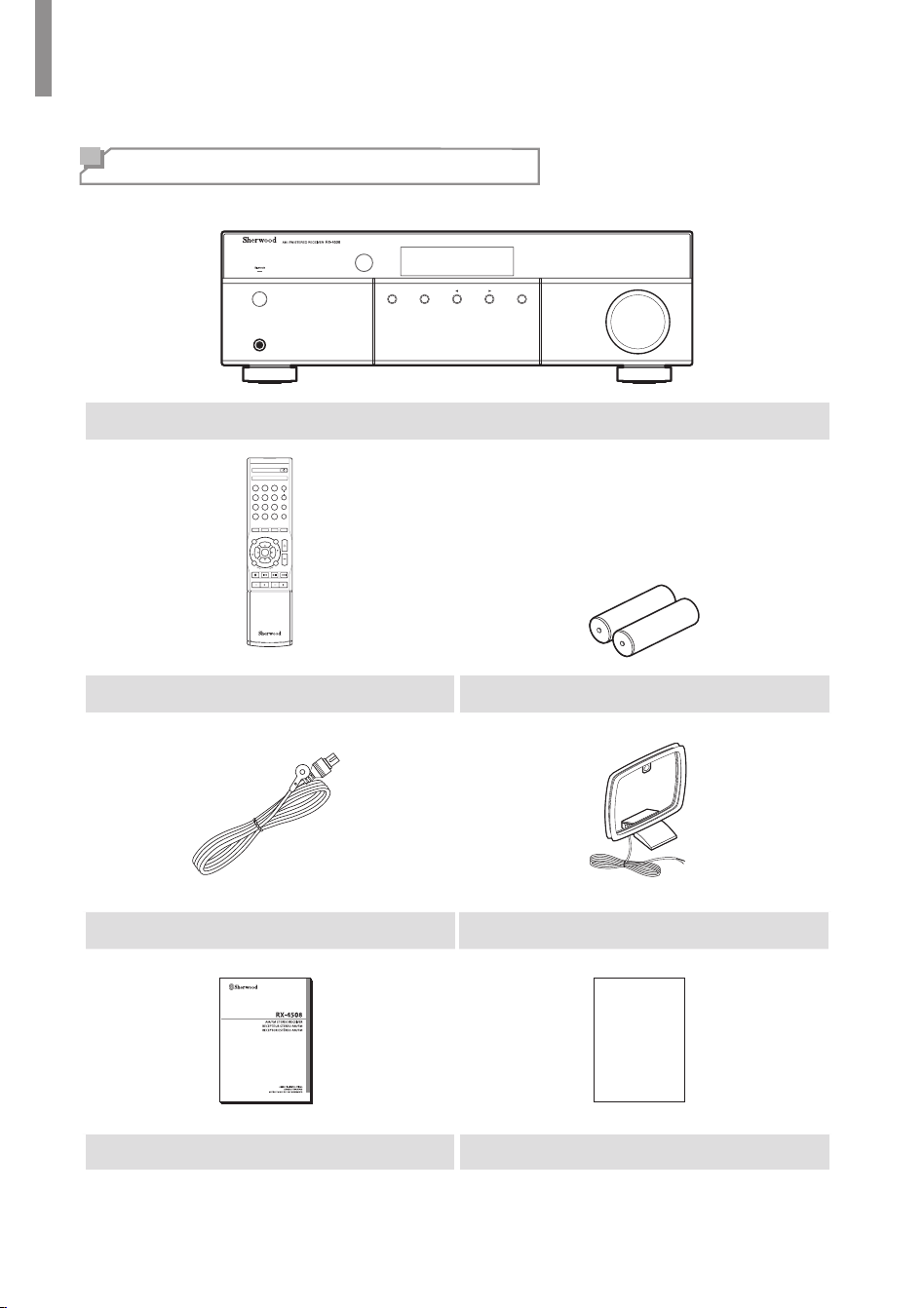
4 What's Included
5 Installing the Remote Control Battery
5 Operating the Range of the Remote
Control
6 PARTS DESCRIPTION
6 Front Panel
7 Front Display
7 Rear Panel
8 R
emote Control
9 MAKING CONNECTIONS
9 Connecting Speakers
9 Placing Speakers
9 Connecting Speakers
11 Connecting Playback Components
11 Connecting Audio Components
12 Connecting Recording Components
13 Connecting an Antenna
13 Connecting FM Antenna
14 Connecting AM Antenna
15 Connecting Power
16 OPERATING YOUR SYSTEM
16 Listening to Your System
16 Basic Operation
17 Muting the Sound
17 Adjusting the Sound Balance
(Left and Right)
17 Adjusting the Tone (Bass and Treble)
18 Listening to Radio
18 Selecting the Band
18 Manual Tuning
18 Auto Tuning
18 Manual Presetting
19 Auto Presetting
20 Tuning in to Preset Stations
20 Scanning Preset Stations in Sequence
20 Switching FM Stereo/Mono Mode
21 Bluetooth
21 Pairing with the Bluetooth Device
21 Listening to Music on Device
22 Recording
23 Using Other Functions
23 Setting the Sleep Timer
23 Setting the Auto Power Control
23 Adjusting the Brightness of the
Fluorescent Display
24 TROUBLESHOOTING
24 GENERAL
24 SOUND
25 ADDITIONAL INFORMATION
25 Specications
26 Trademarks and Licenses
Table of Contents
4
What's Included
PHONES
ON / STANDBY
VOLUME
MEMORY TUNE / PRESET INPUT
Main unit
S
E
L
T
U
N
E
BASS
BLUETOOTH
DISPLAY
SEARCH
MODE
TREBLE
CD AUX
TONE
DIRECT
MUTE
MEMO/
ENTER
VOLUME
PHONO TUNER
123
456
789
0
A
B
PRESET MO/STSLEEP
DIMMER
SPEAKER
P
R
E
S
E
T
P
R
E
S
E
T
T
U
N
E
L
R
B
A
L
A
N
C
E
POWER
RC-157
S
E
L
Remote control (1 ea) Battery
FM Antenna (1 ea) AM Antenna (1 ea)
Warranty
User Manual (1 ea) Warranty (1 ea)
Getting Started
Getting Started
5
Installing the Remote Control Battery
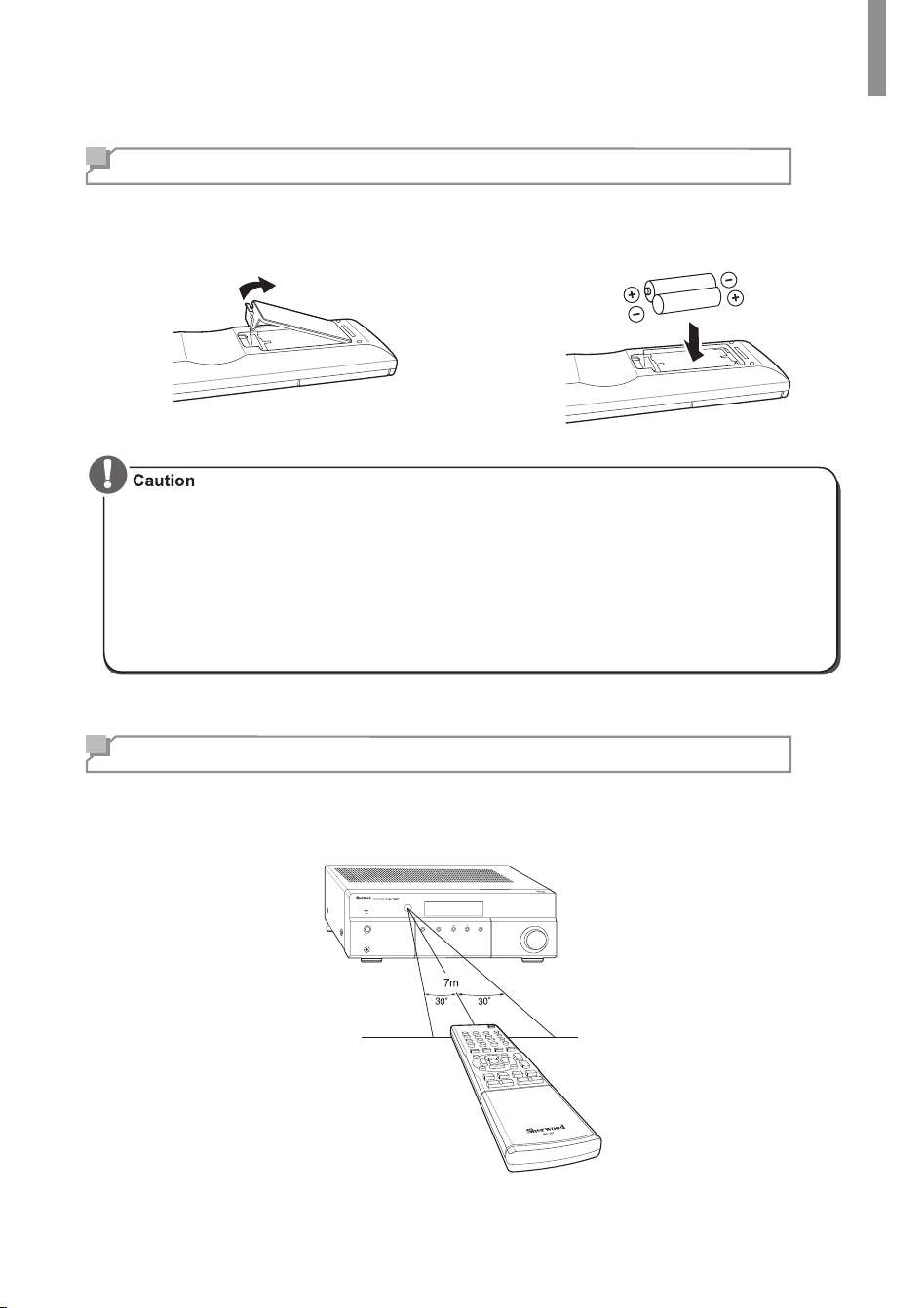
1
Remove the battery cover.
2
Insert two AAA size batteries with the
polarity matched properly.
•
Always use alkaline batteries, and do not use the rechargeable batteries (Ni-Cd type).
•
If the batteries run out, remove the old batteries and replace them with new ones within
several minutes.
•
If the batteries are removed or have been exhausted for a longer period of time, memorized
contents will be cleared. In this case, you should memorize them again.
•
If the battery is placed incorrectly, it can cause explosion.
•
Remove the battery if the remote control is not used for a long period of time.
•
Do not leave the product in a hot or humid place.
•
Do not handle and store the battery with metallic tools.
Operating the Range of the Remote Control
Use the remote control within a range of about 7 meters (23 feet) and angles of up to 30 degrees
aiming at the remote control sensor.
VOLUME
PHONES
MEMORY TUNE / PRESET INPUT
ON / STANDBY
6
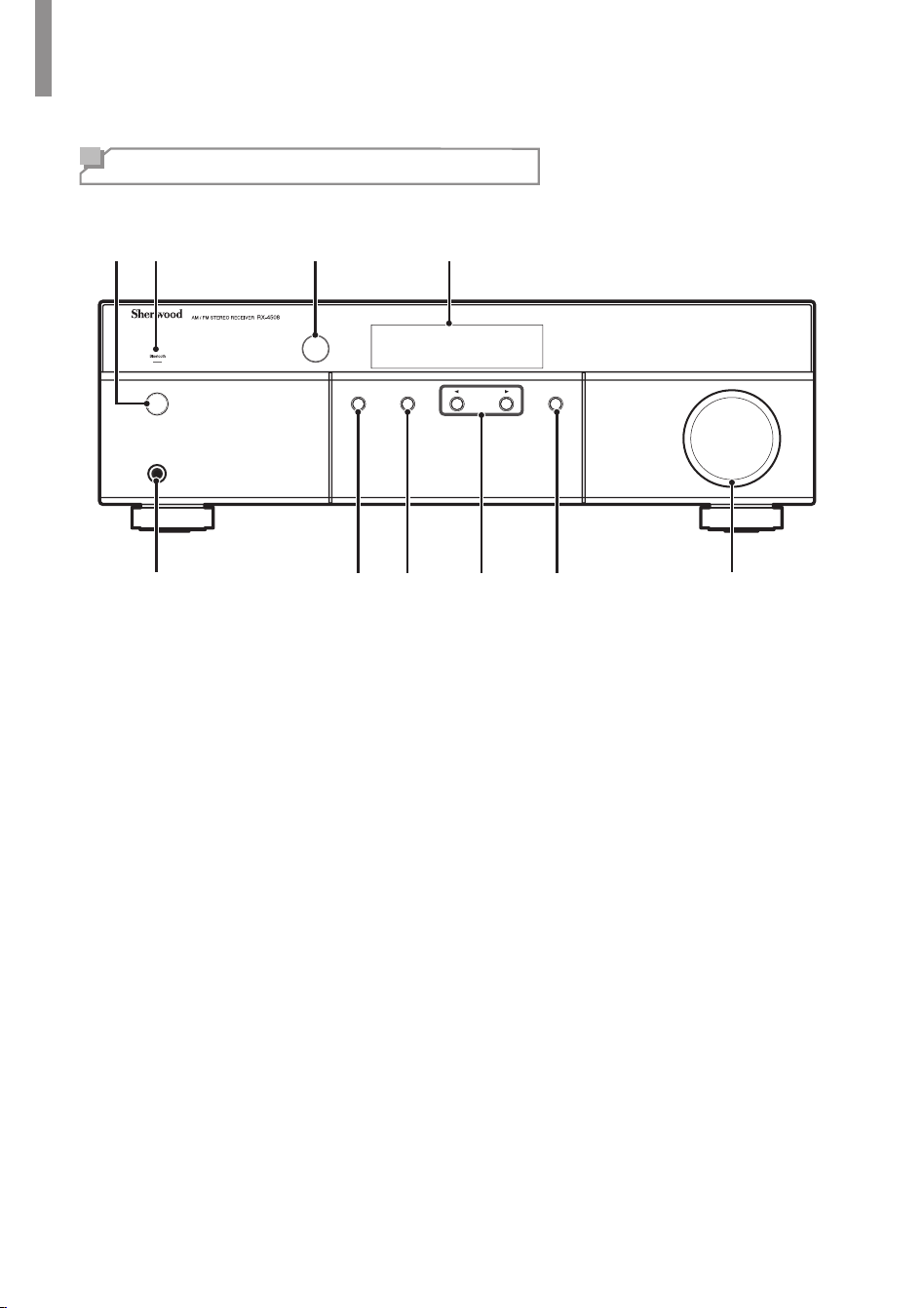
Front Panel
PHONES
ON / STANDBY
VOLUME
MEMORY TUNE / PRESET INPUT
5 6 7 9 10
21 3 4
8
1
ON/STANDBY Button
2
Bluetooth Indicator
3
IR Sensor
4
Display
5
Headphone Connector
6
Memory Button
7
Tune/Preset Select Button
8
Function Buttons
•
Tuning Up/Down - See page 18.
•
Preset Up/Down - See page 18.
•
Auto Tuning - See page 18.
•
Bluetooth Playback Control - See page 21.
9
Input Selector
10
Volume Control
Parts Description
Parts Description
7
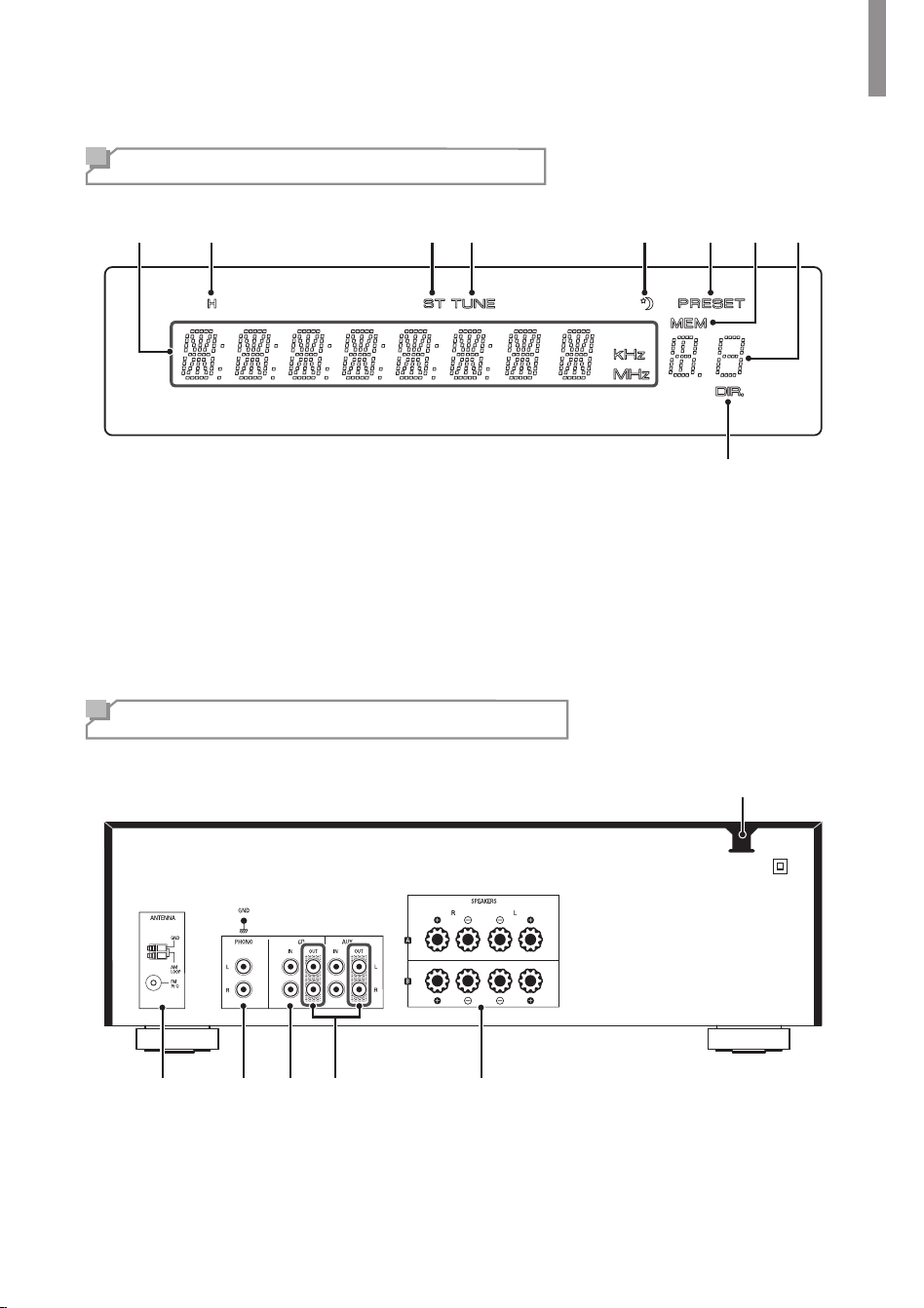
Front Display
3 4 5 6
9
21 87
1
Information Display
2
Headphone Indicator
3
Stereo Indicator
4
Tuned indicator
5
Sleep Timer Indicator
6
Preset Indicator
7
Station Memory Indicator
8
Preset Station Indicator
9
Tone Direct Indicator
Rear Panel
1 2 3 4 5
6
1
Radio Antenna Connectors
2
Phono Connectors
3
Audio Input Connectors
4
Audio Output Connectors
5
Speaker Connectors
6
AC Input Cord
RX-4508 AM/FM STEREO RECEIVER
8
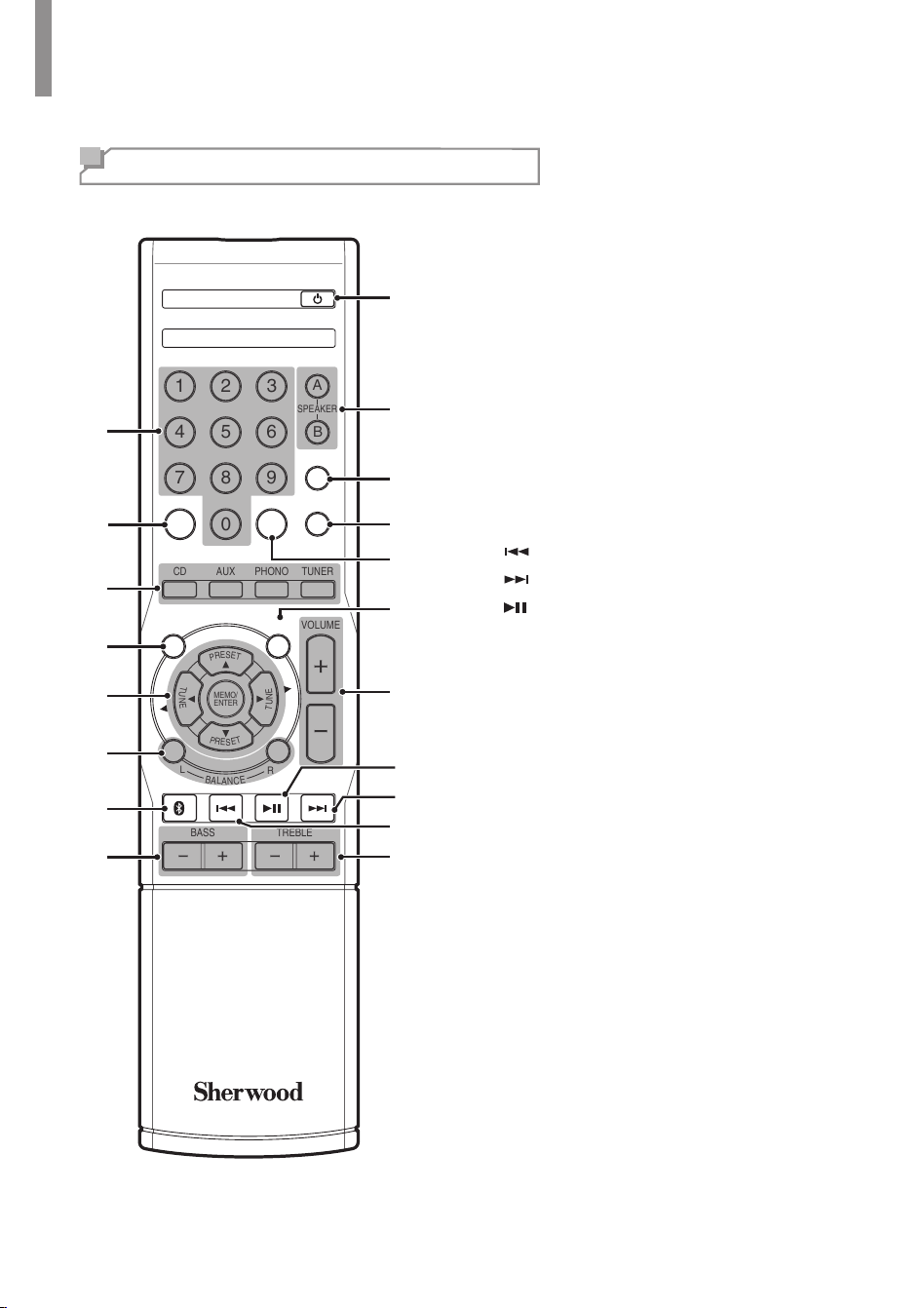
R
emote Control
1
Numeric Buttons
2
Preset Button
3
Source Select Buttons
4
Tone Control Button
5
▲/▼ Preset Up/Down Buttons
◄/► Tuning Up/Down Buttons
MEMO/ENTER
Memory/Enter Button
6
Balance Adjust Buttons
7
Bluetooth Button
8
Bass Up/Down Buttons
9
Treble Up/Down Buttons
10
Bluetooth Previous/Rewind Button
11
Bluetooth Next/Fast Forward Button
12
Bluetooth Play/Pause Button
13
Volume Up/Down Buttons
14
Mute Button
15
Mono/Stereo Select Button
16
Sleep Button
17
Dimmer Button
18
Speaker Select Button
19
Power Button
S
E
L
T
U
N
E
BASS
BLUETOOTH
DISPLAY
SEARCH
MODE
TREBLE
CD AUX
TONE
DIRECT
MUTE
MEMO/
ENTER
VOLUME
PHONO TUNER
123
456
789
0
A
B
PRESET MO/STSLEEP
DIMMER
SPEAKER
P
R
E
S
E
T
P
R
E
S
E
T
T
U
N
E
L
R
B
A
L
A
N
C
E
POWER
RC-157
S
E
L
2
4
5
7
8
1
3
15
14
19
18
17
16
13
9
10
11
12
6
9
Making Connections
Connecting Speakers
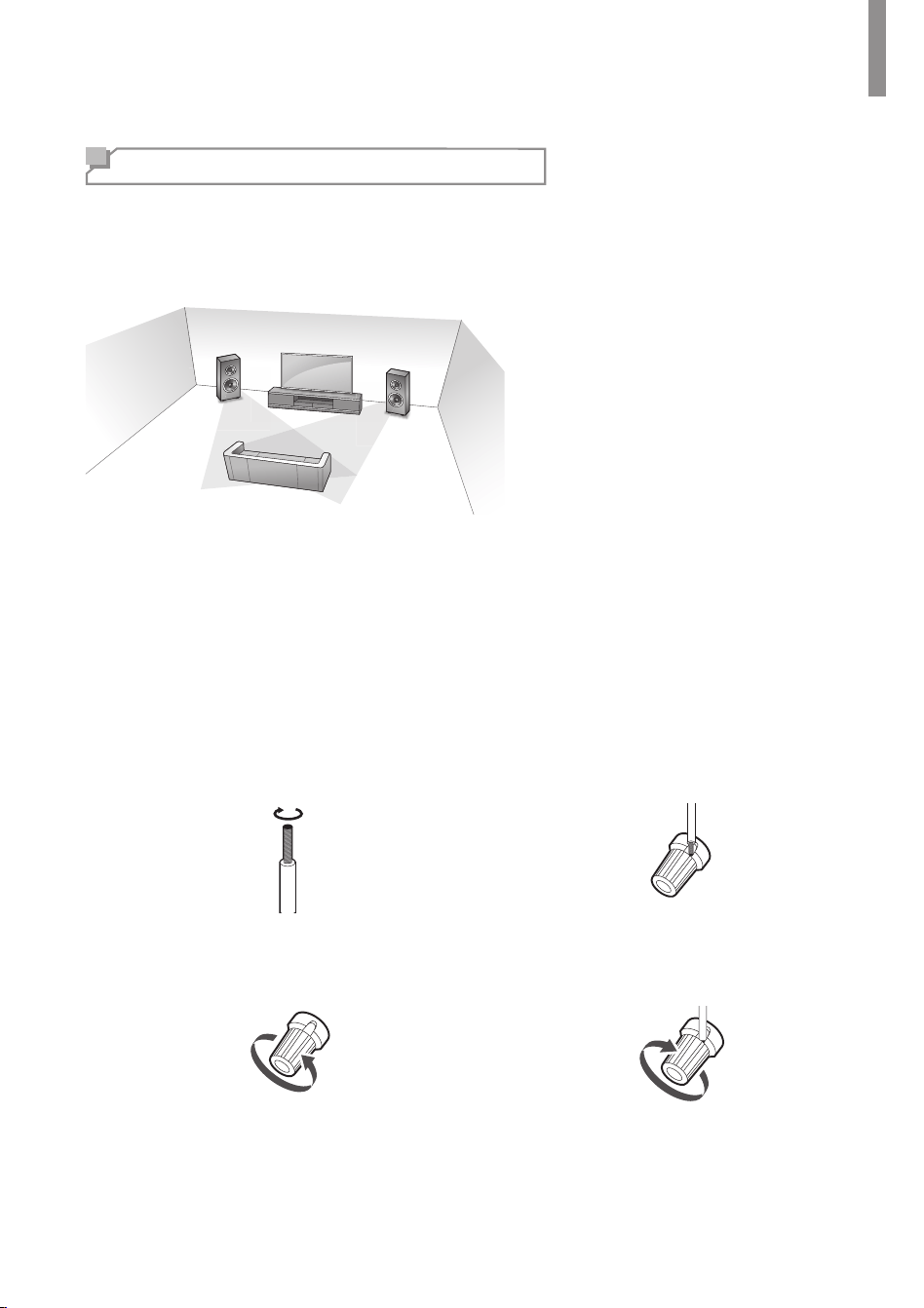
Placing Speakers
Determine the locations for your speaker placement according to their manufacturer’s directions
and the layout of your listening room.
Left and right speakers
•
Place the speakers with their front
surfaces as ush to the TV or monitor
screen as possible.
•
Place each speaker so that sound is
aimed at where listener's ears would
be in the main listening position.
Connecting Speaker Wires
1
Strip away approx. 10 mm (3/8 inch) of
wire insulation, and then tightly twist the
wire ends.
2
Loosen the speaker terminal by turning it
counter-clockwise.
3
Insert the bare part of the wire.
4
Tighten the speaker terminal by turning it
clockwise.
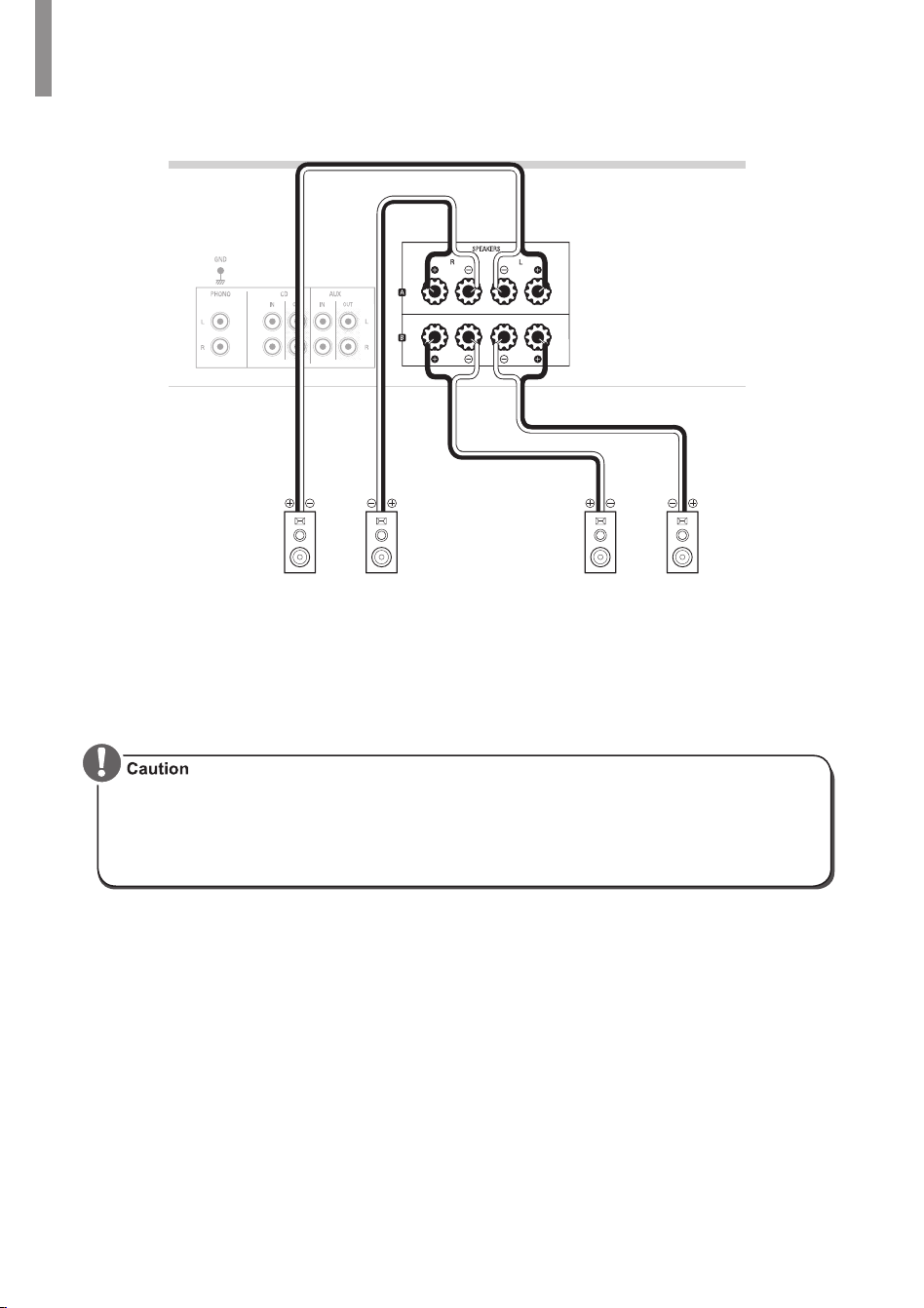
Connecting Speakers
Carefully check the left (L) and right (R) channels and the polarities on the speakers being
connected to this receiver.
RX-4508 AM/FM STEREO RECEIVER
10
Speaker A
Right
Speaker A
Left
Speaker B
Right
Speaker B
Left
Rear Panel
•
Be sure to connect speakers rmly and accurately according to the channel (left and right)
and the polarity (+ and −). If the connections are incorrect, no sound will be produced by the
speakers, and if the polarity of the speaker connection is incorrect, the sound will be unnatural
and tinny.
•
Be sure to use the speakers with the impedance of 8 ohms or above.
•
Do not let bare speaker wires touch each other or any metal part of this receiver. This could
damage the main unit and/or the speakers.
•
Never touch the speaker terminals while the AC input cord is connected to the wall AC outlet.
Doing so could result in electric shock.
Making Connections
11
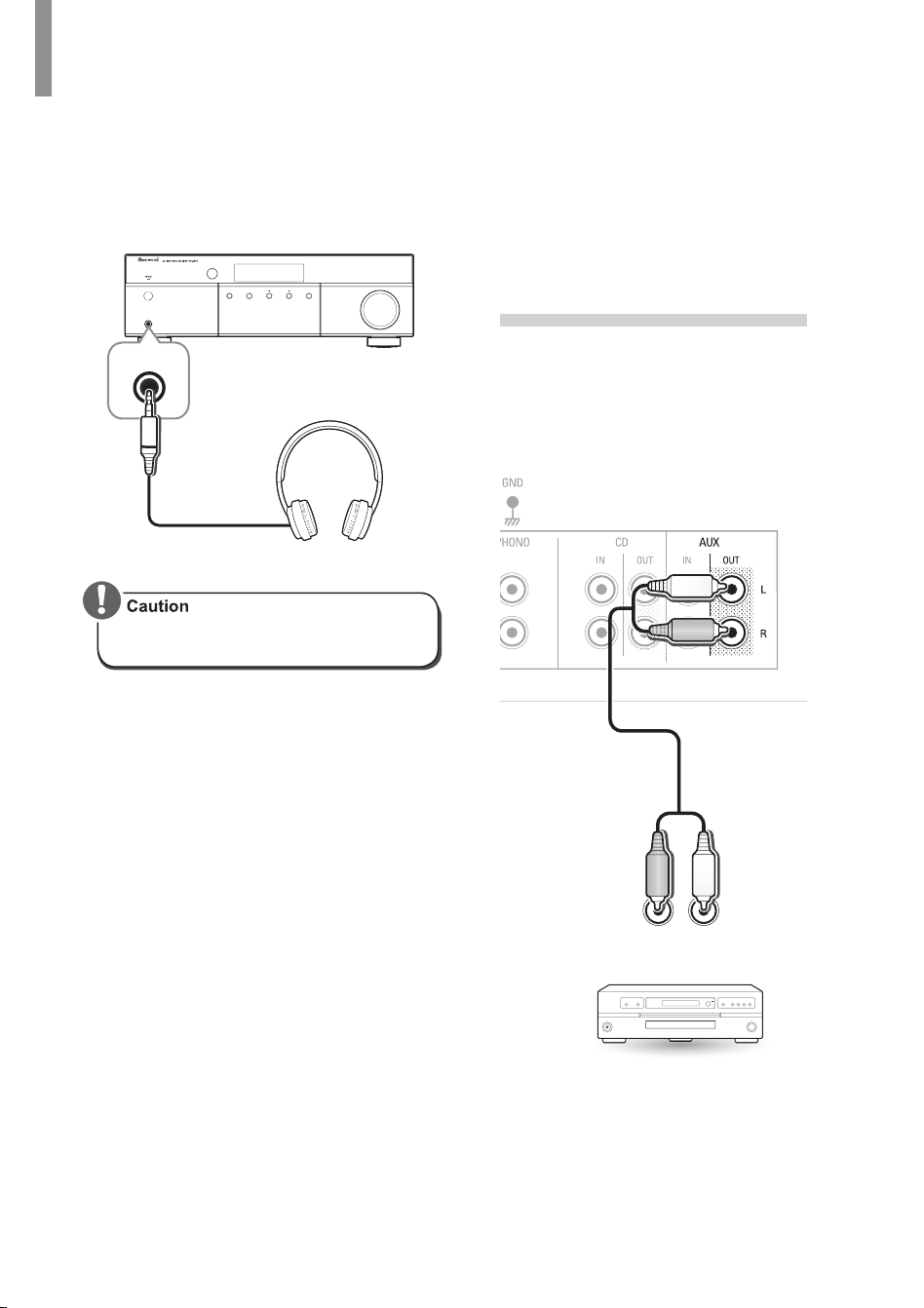
Connecting Playback
Components
Source devices are components from which a
playback signal originates, e.g., a Blu-ray Disc™
or DVD player; a set-top box, or HDTV tuner, etc.
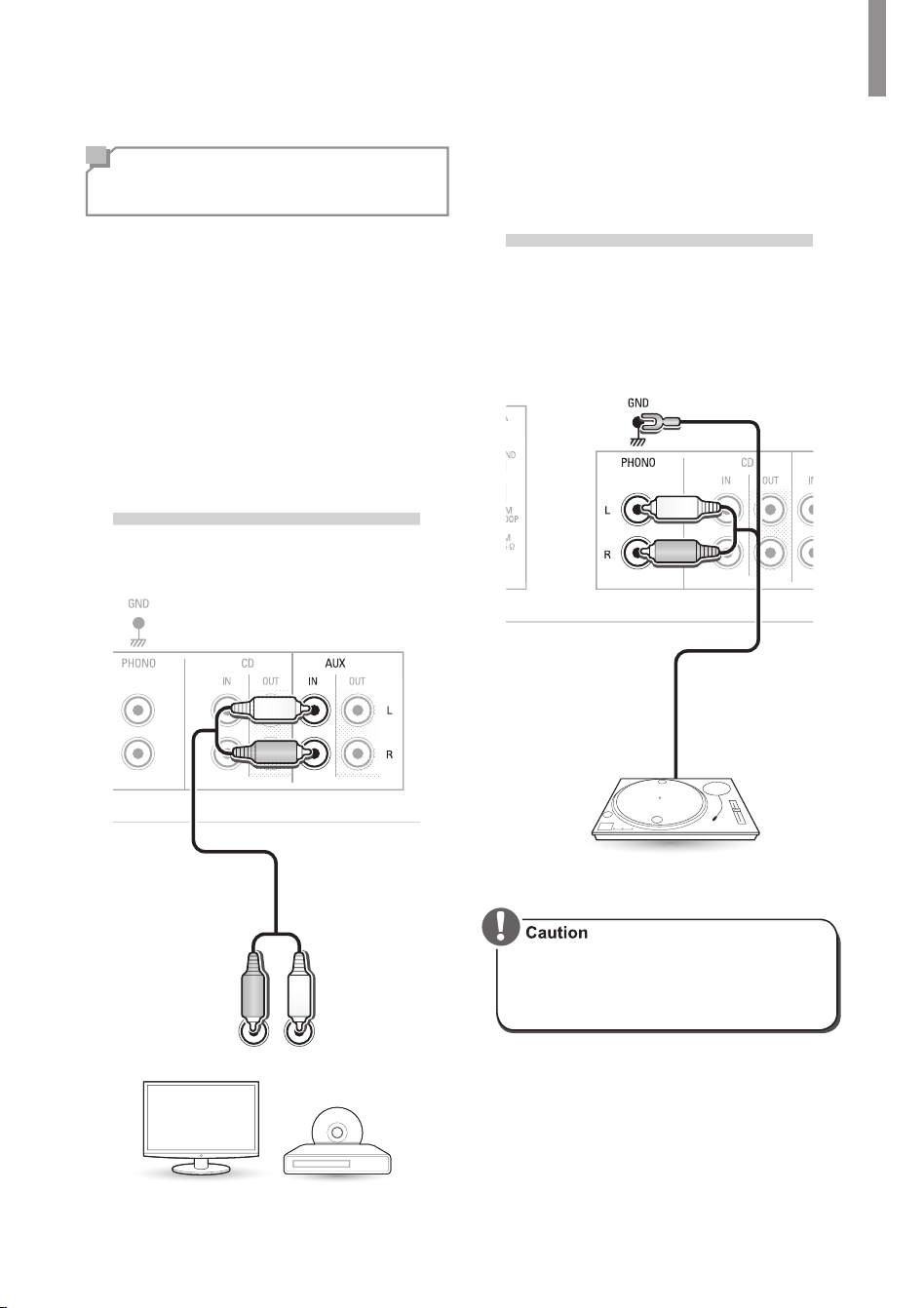
Connecting Audio Components
Audio Connection
Make audio connections from your source devices.
•
Ensure the left (L) and right (R) channels
and the inputs and outputs are correctly
connected.
•
To listen to the sound of a connected audio
device, select AUX as the input source.
R
L
TV, DVD Player, etc.
Rear Panel
Phono Connection
You can use the PHONO input jack to connect
turntable.
Turntable with MM type cartridge
Rear Panel
•
Do not connect the turntable with
MC type cartridge directly. If so, use
a separate head amplier or step-up
transformer.
RX-4508 AM/FM STEREO RECEIVER
12
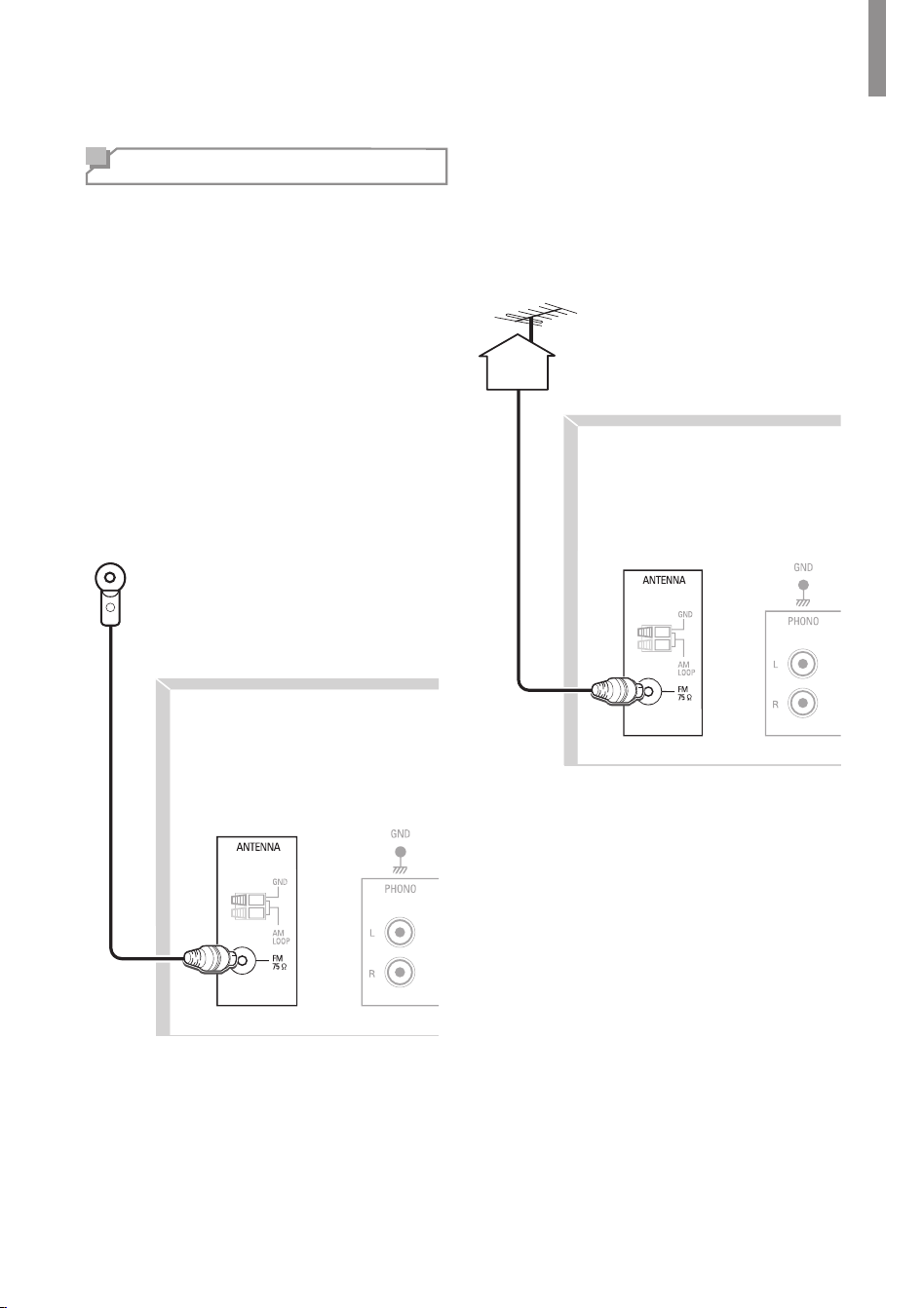
Listening with Headphones
1
Connect the headphones to the PHONES
jack on the front panel.
PHONES
ON / STANDBY
VOLUME
MEMORY TUNE / PRESET INPUT
PHONES
•
Be careful not to set the volume too
high when using headphones.
Connecting Recording
Components
You can connect audio recording devices to
the AUX OUT jacks. You can make an audio
recording from the built-in tuner or from an
audio source connected to the main unit.
R L
AUDIO
IN
Rear Panel
Making Connections
13
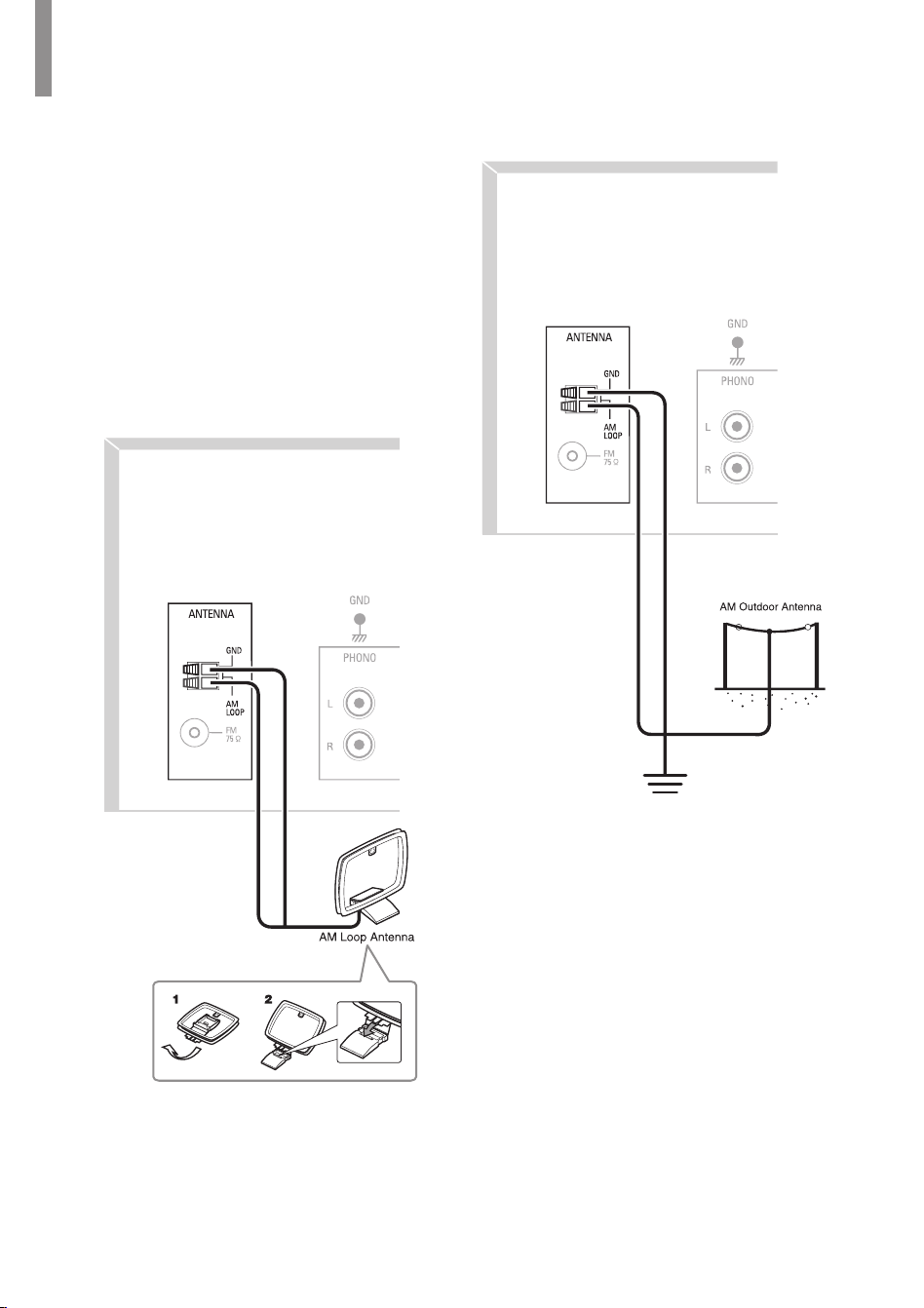
Outdoor Antenna
1
Remove the indoor antenna if it is
connected.
2
Connect the FM outdoor antenna to the
FM antenna terminal.
Rear Panel
Connecting an Antenna
To listen to radio stations, connect the FM wire
antenna and AM loop antenna as illustrated
below.
Connecting FM Antenna
To strengthen the signal reception, extend the
antenna to its full length.
Indoor Antenna
1
Connect the FM indoor antenna to the
FM antenna terminal.
2
Change the position of the antenna until
you get the best reception of your favorite
FM stations.
Rear Panel
RX-4508 AM/FM STEREO RECEIVER
14
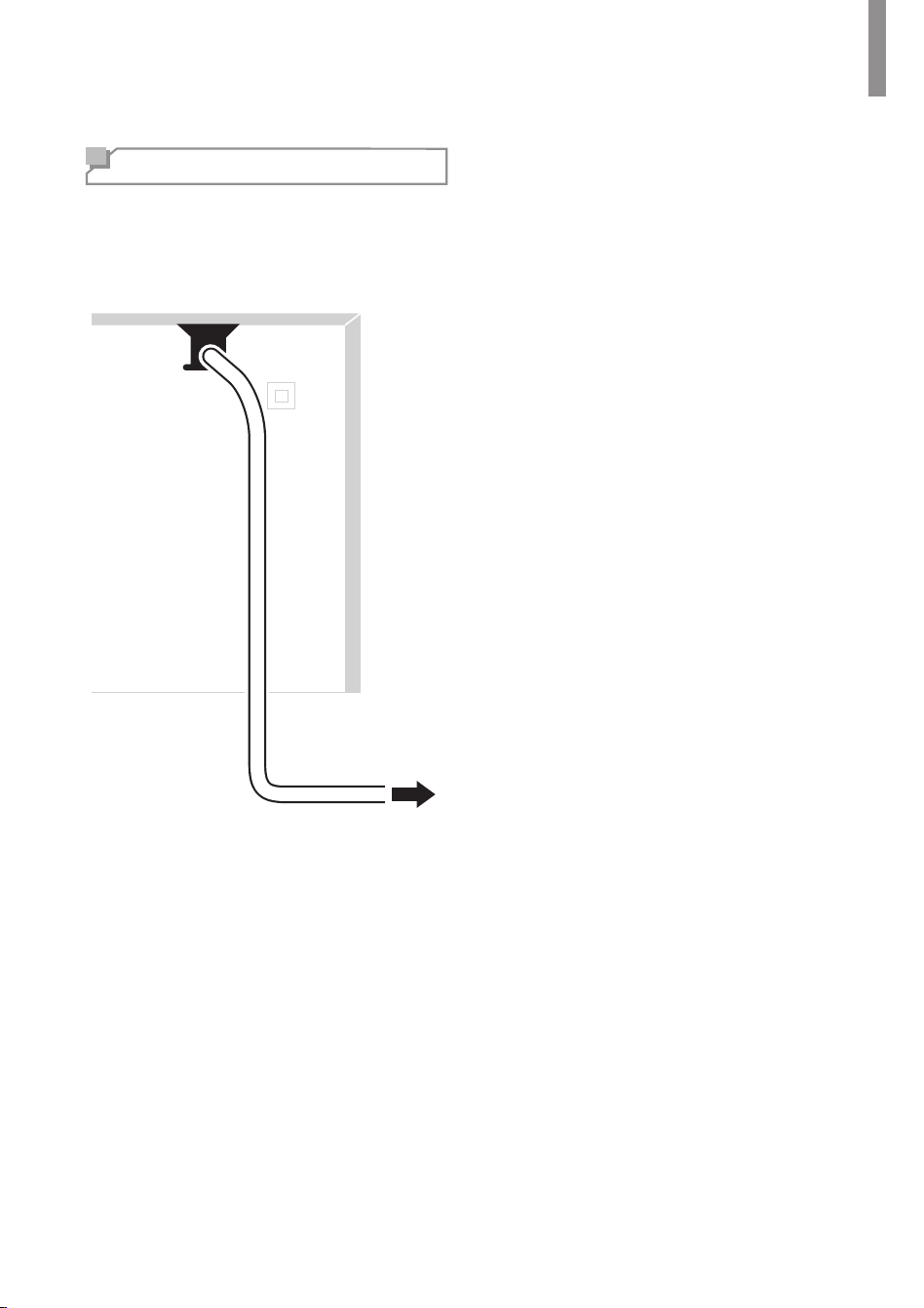
Rear Panel
Connecting AM Antenna
1
Assemble the AM loop antenna as
illustrated below.
2
Place the antenna as far as possible from
the main unit, TV set, speaker cords and
the AC input cord, and set the direction
for the best reception.
3
If the reception is poor with the AM loop
antenna, it is recommended to replace it
with an AM outdoor antenna.
Rear Panel
Making Connections
15
Connecting Power
Make sure to plug in only after you have
connected all your components to the main
unit. Plug the supplied AC power cord into the
wall outlet.
AC power cord
To the wall outlet
Rear Panel
16
Operating Your System
Listening to Your
System
Basic Operation
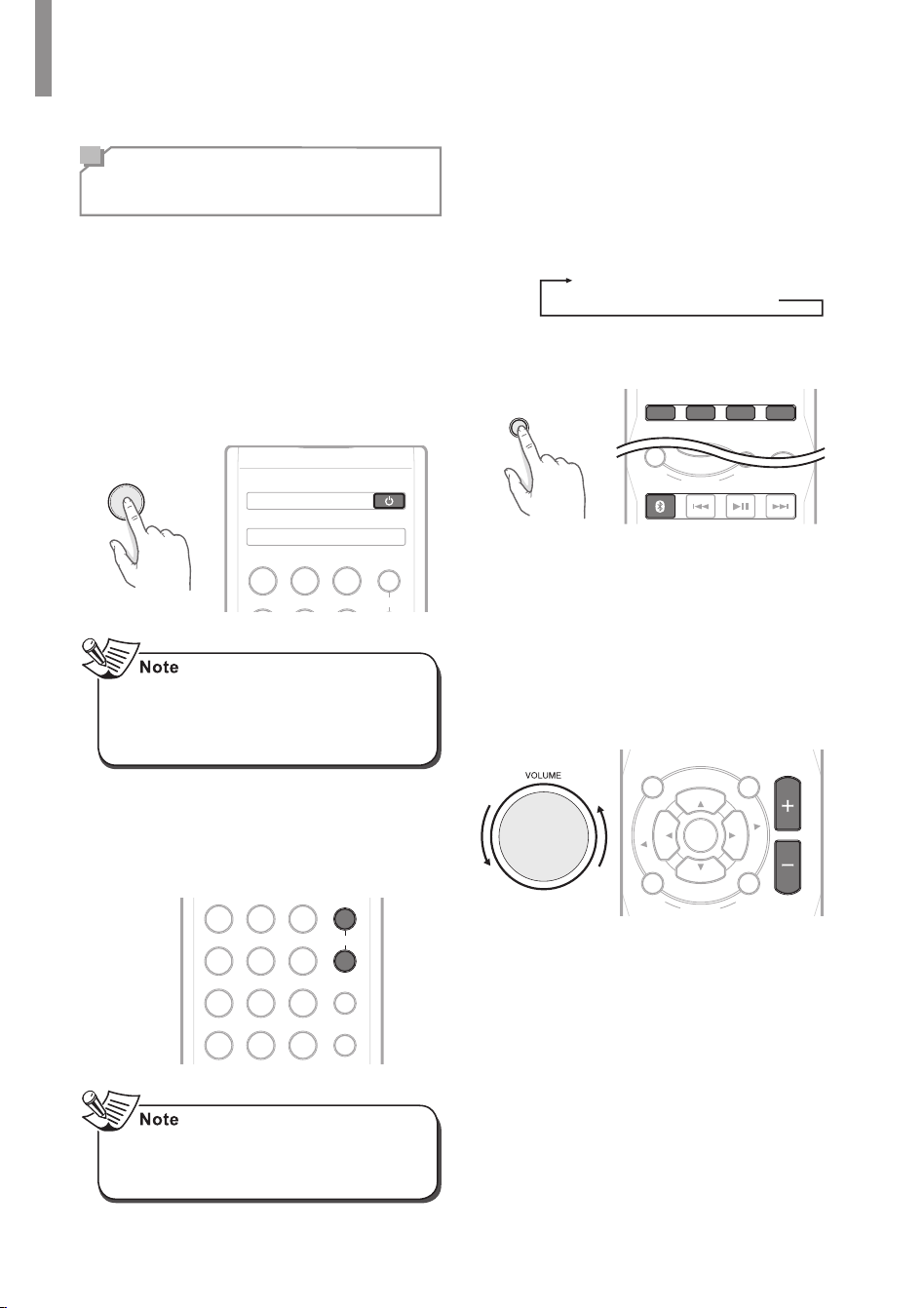
You can listen to audio by following the basic
procedures below.
1
Turn on the connected component.
2
Turn on the main unit.
•
On the main unit, press
ON/STANDBY
.
•
On the remote control, press
POWER
.
ON / STANDBY
123
A
SPEAKER
POWER
•
With the receiver in Standby mode, you
can also turn the power on by pressing
an Input Selector button on the remote
control.
3
Select the speakers you want to play.
•
On the remote control, press
SPEAKER
A
or
SPEAKER B
. "SPK A(or/and)B" is
displayed.
123
456
789
0
A
B
PRESET MO/STSLEEP
DIMMER
SPEAKER
•
When using the headphone, press the
corresponding speaker button to switch
off both A and B speakers.
4
Select the input source you want to play
back.
•
On the main unit, press
INPUT
.
•
Each time the button is pressed, the
display changes in the following order:
FM
AM
CD
AUX
PHONO
Bluetooth AUDIO
•
On the remote control, press a source
select button.
CD AUX
TONE
DIRECT
MUTE
VOLUME
PHONO TUNER
P
R
E
S
E
T
BLUETOOTH
DISPLAY
SEARCH
MODE
P
R
E
S
E
T
L
R
B
A
L
A
N
C
E
INPUT
5
Start playback of the component you
selected in step 1.
6
During playback, you can adjust the volume
level.
•
On the main unit, rotate the volume
controller.
•
On the remote control, press
VOLUME -/+
.
S
E
L
T
U
N
E
BLUETOOTH
DISPLAY
SEARCH
MODE
TONE
DIRECT
MUTE
MEMO/
ENTER
VOLUME
P
R
E
S
E
T
P
R
E
S
E
T
T
U
N
E
L
R
B
A
L
A
N
C
E
S
E
L
Operating Your System
17
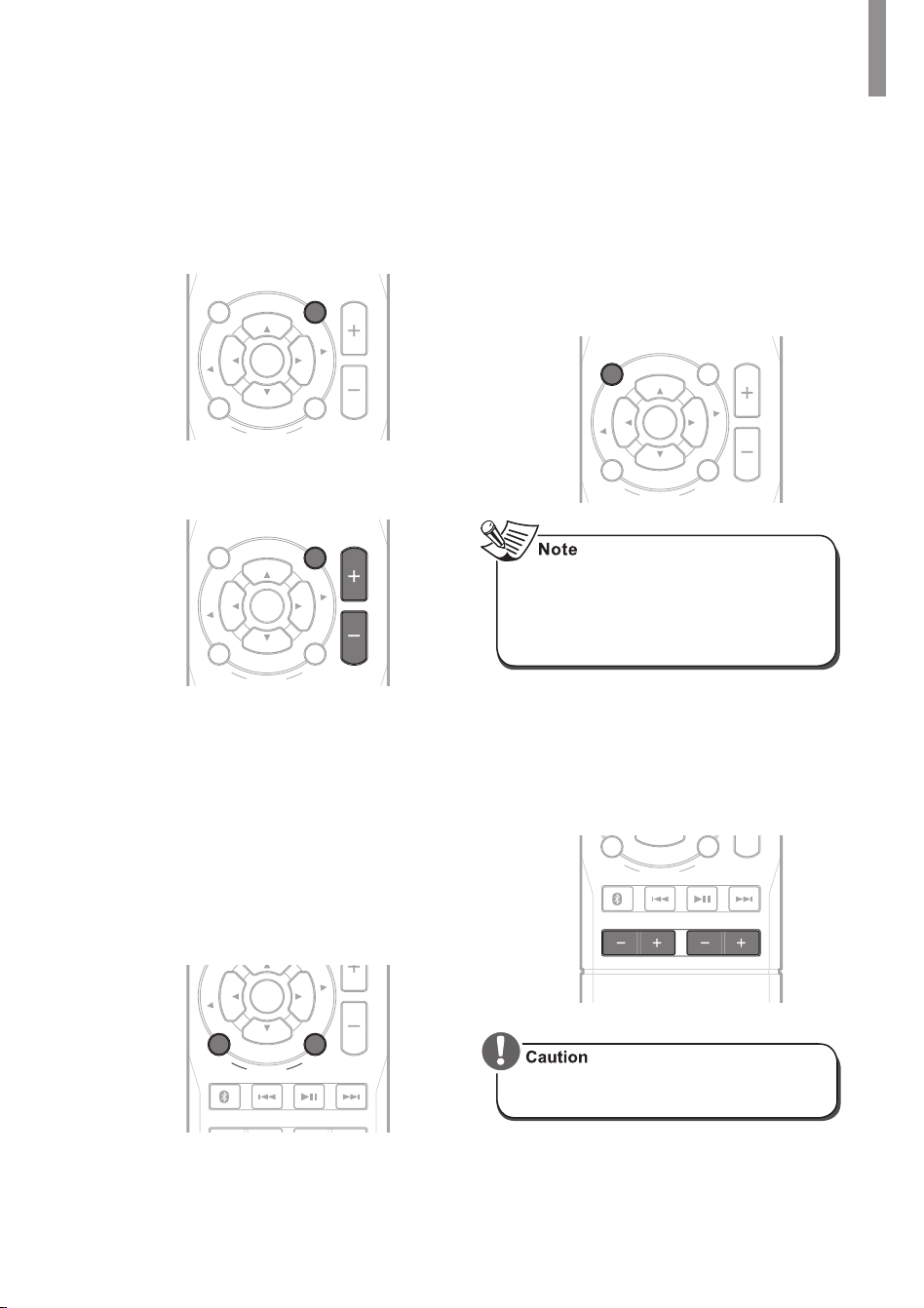
Muting the Sound
You can mute the sound temporarily by
pressing
MUTE
.
1
Press
MUTE
to mute the sound.
S
E
L
T
U
N
E
BLUETOOTH
DISPLAY
SEARCH
MODE
TONE
DIRECT
MUTE
MEMO/
ENTER
VOLUME
P
R
E
S
E
T
P
R
E
S
E
T
T
U
N
E
L
R
B
A
L
A
N
C
E
S
E
L
2
Press
MUTE
or
VOLUME - / +
to turn on
the sound.
S
E
L
T
U
N
E
BLUETOOTH
DISPLAY
SEARCH
MODE
TONE
DIRECT
MUTE
MEMO/
ENTER
VOLUME
P
R
E
S
E
T
P
R
E
S
E
T
T
U
N
E
L
R
B
A
L
A
N
C
E
S
E
L
Adjusting the Sound Balance
(Left and Right)
1
Adjust the sound volume balance
between the left and right speakers by
pressing
L-BALANCE
or
BALANCE-R
.
•
The each sound balance level can be
adjusted up to 10.
•
It is recommended the balance to be
adjusted to 0.
S
E
L
T
U
N
E
BASS
BLUETOOTH
DISPLAY
SEARCH
MODE
TREBLE
MEMO/
ENTER
P
R
E
S
E
T
T
U
N
E
L
R
B
A
L
A
N
C
E
S
E
L
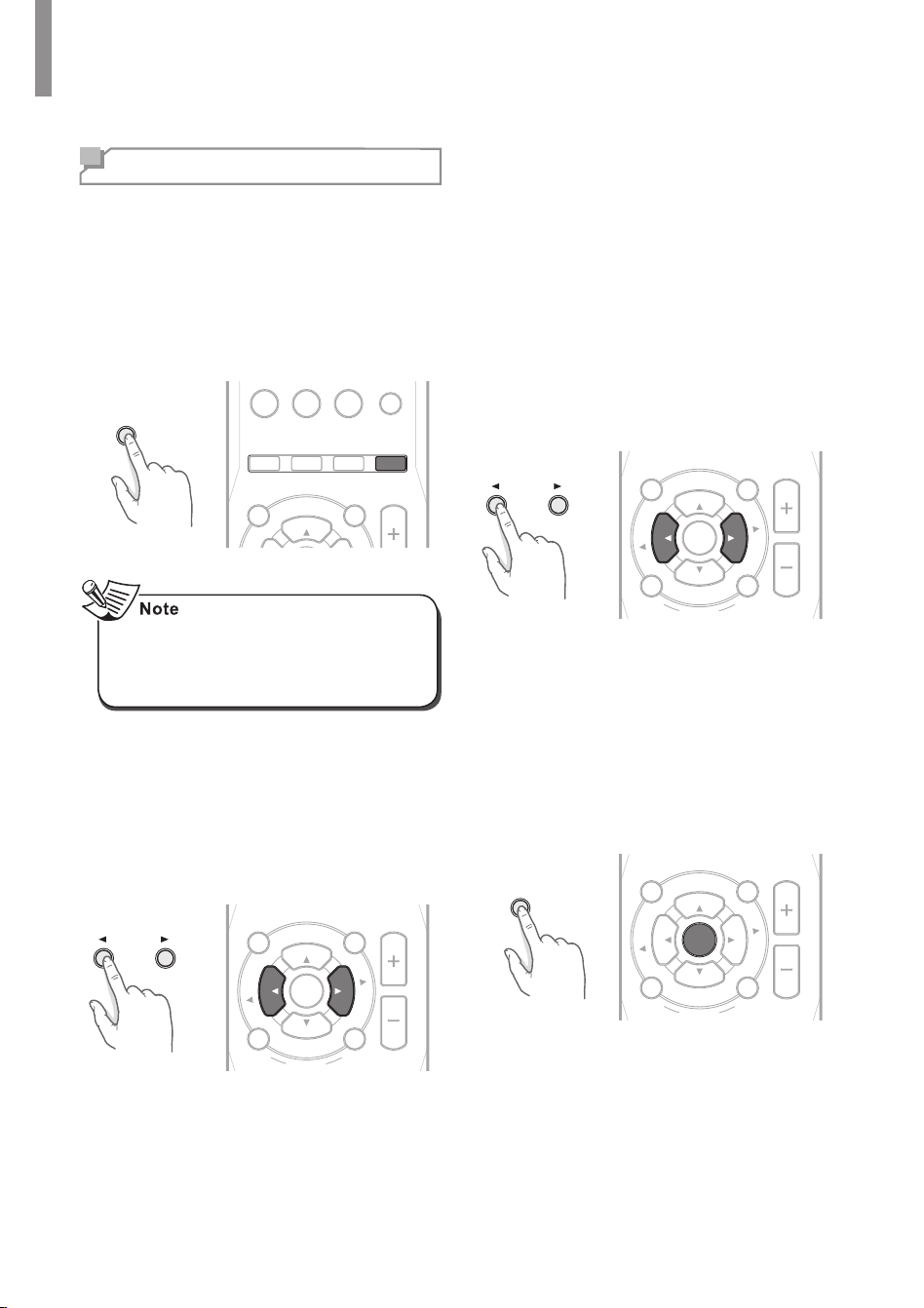
Adjusting the Tone (Bass and Treble)
You can adjust the tone (bass and treble) as
desired.
1
Select the tone control mode by pressing
TONE DIRECT
.
•
"TON CTRL" is displayed on the
display panel.
S
E
L
T
U
N
E
BLUETOOTH
DISPLAY
SEARCH
MODE
TONE
DIRECT
MUTE
MEMO/
ENTER
VOLUME
P
R
E
S
E
T
P
R
E
S
E
T
T
U
N
E
L
R
B
A
L
A
N
C
E
S
E
L
•
If you want to listen to a program source
without the tone effect, select the tone
direct mode by pressing TONE DIRECT.
"TON DIR" and "DIR." are displayed on
the display panel.
2
Adjust the tone as desired by pressing
BASS -/+
or
Treble -/+
.
•
The tone level can be adjusted within
the range of -10 ~ +10 dB.
•
It is recommended the bass and treble
to be adjusted to 0 dB (at level).
BASS
BLUETOOTH
DISPLAY
SEARCH
MODE
TREBLE
P
R
E
S
E
T
L
R
B
A
L
A
N
C
E
•
Extreme settings at high volume may
damage your speakers.
RX-4508 AM/FM STEREO RECEIVER
18
Listening to Radio
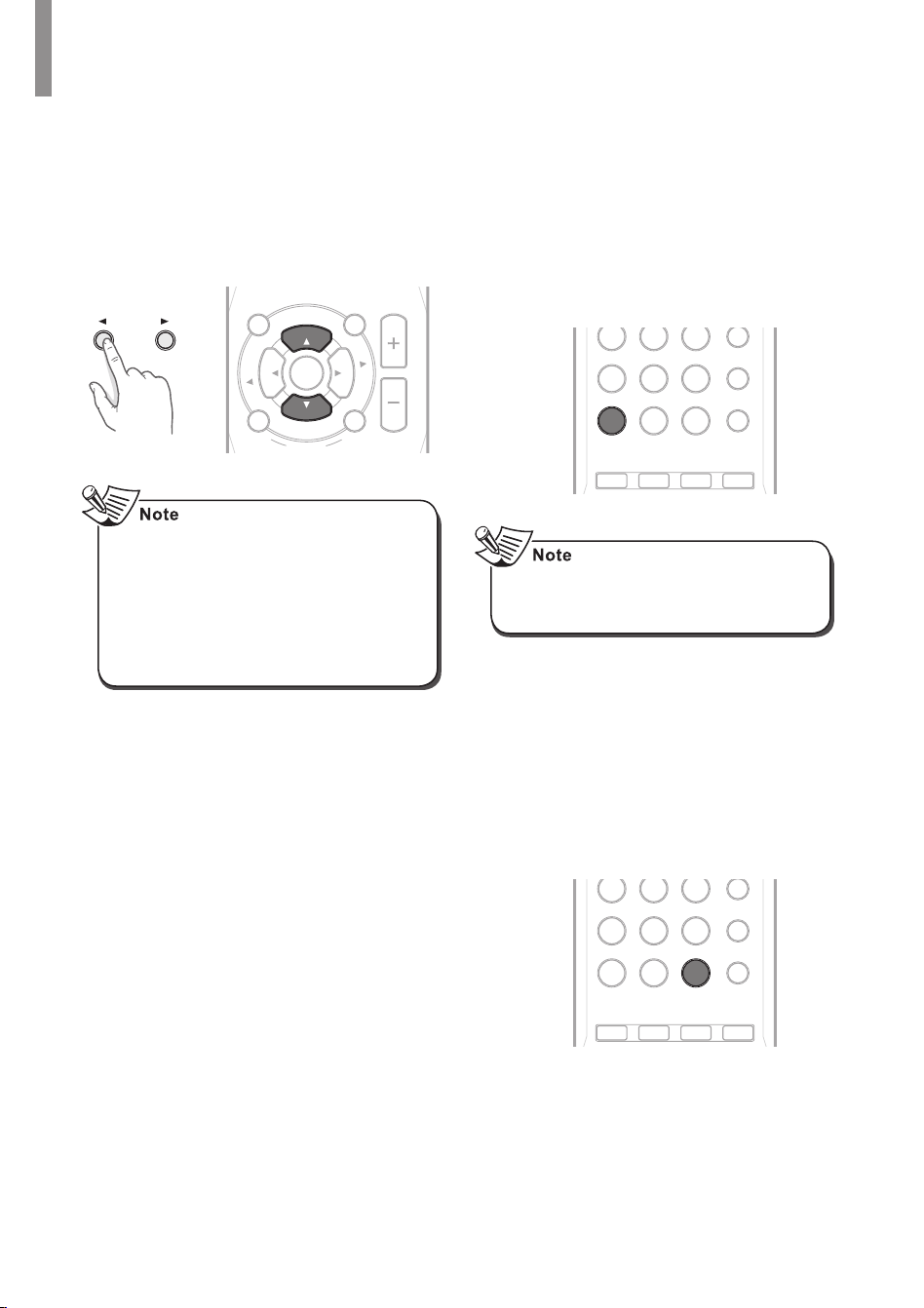
Selecting the Band
1
Select
FM
or
AM
tuner as the input
source.
•
On the main unit, press
INPUT
repeatedly.
•
On the remote control, press
TUNER
repeatedly.
INPUT
CD AUX
TONE
DIRECT
MUTE
VOLUME
PHONO TUNER
0
PRESET MO/STSLEEP
P
R
E
S
E
T
•
When FM stereo broadcasts are poor,
select FM mono mode to reduce the
noise. For details, see "Switching FM
Stereo/Mono Mode" on page 20.
Manual Tuning
1
Select a desired station.
•
On the main unit, press
◄
or
►
repeatedly.
•
On the remote control, press
TUNE
◄
or
TUNE
► repeatedly.
S
E
L
T
U
N
E
BLUETOOTH
DISPLAY
SEARCH
MODE
TONE
DIRECT
MUTE
MEMO/
ENTER
VOLUME
P
R
E
S
E
T
P
R
E
S
E
T
T
U
N
E
L
R
B
A
L
A
N
C
E
S
E
L
Auto Tuning
1
Press and hold
TUNE ◄
or
TUNE►
for
more than 1 second.
•
On the main unit, press and hold
◄
or
►
for more than 1 second.
•
The tuner keeps searching until a
station with strong signal strength is
found. The display shows the tuned
frequency.
•
If the found station is not the desired
one, simply repeat this operation.
•
Stations with weak signal strength are
skipped during auto tuning.
S
E
L
T
U
N
E
BLUETOOTH
DISPLAY
SEARCH
MODE
TONE
DIRECT
MUTE
MEMO/
ENTER
VOLUME
P
R
E
S
E
T
P
R
E
S
E
T
T
U
N
E
L
R
B
A
L
A
N
C
E
S
E
L
Manual Presetting
1
Tune to the desired station with auto or
manual tuning.
2
Press
MEMO/ENTER
.
•
On the main unit, press
MEMORY
.
•
"AUTO MEM" blinks on the display
panel.
MEMORY
S
E
L
T
U
N
E
BLUETOOTH
DISPLAY
SEARCH
MODE
TONE
DIRECT
MUTE
MEMO/
ENTER
VOLUME
P
R
E
S
E
T
P
R
E
S
E
T
T
U
N
E
L
R
B
A
L
A
N
C
E
S
E
L

Operating Your System
19
3
Select a desired preset number (1~30).
•
On the main unit, press
◄
or
►
.
•
On the remote control, press
PRESET
▲ or
PRESET
▼.
•
A stored station is erased from the
memory by storing another station in
its place.
S
E
L
T
U
N
E
BLUETOOTH
DISPLAY
SEARCH
MODE
TONE
DIRECT
MUTE
MEMO/
ENTER
VOLUME
P
R
E
S
E
T
P
R
E
S
E
T
T
U
N
E
L
R
B
A
L
A
N
C
E
S
E
L
•
When you set a preset number by
pressing numeric buttons on the remote
control, you can skip the step 4.
4
Conrm your selection.
•
On the main unit, press
MEMORY
.
•
On the remote control, press
MEMO/
ENTER
.
•
The station has now been stored in
the memory.
•
A stored station is erased from the
memory by storing another station in
its place.
S
E
L
T
U
N
E
BLUETOOTH
DISPLAY
SEARCH
MODE
TONE
DIRECT
MUTE
MEMO/
ENTER
VOLUME
P
R
E
S
E
T
P
R
E
S
E
T
T
U
N
E
L
R
B
A
L
A
N
C
E
S
E
L
5
Repeat the above steps 1 - 4 to store
another station.
Auto Presetting
1
Press and hold
MEMO/ENTER
for more
than 2 seconds.
•
"AUTO MEM" blinks and the main unit
begins to preset stations with strong
signals.
•
Up to 30 FM stations may be stored.
•
To stop auto presetting, press
MEMO/
ENTER
again.
S
E
L
T
U
N
E
BLUETOOTH
DISPLAY
SEARCH
MODE
TONE
DIRECT
MUTE
MEMO/
ENTER
VOLUME
P
R
E
S
E
T
P
R
E
S
E
T
T
U
N
E
L
R
B
A
L
A
N
C
E
S
E
L
•
Auto preset is performed only when you
select FM tuner as a input source.
•
FM stations with weak signal strength
cannot be stored to memory.
RX-4508 AM/FM STEREO RECEIVER
20
Tuning in to Preset Stations
1
Select a desired preset number.
•
On the main unit, press ◄ or ►.
•
On the remote control, press
PRESET
▲ or
PRESET
▼.
S
E
L
T
U
N
E
BLUETOOTH
DISPLAY
SEARCH
MODE
TONE
DIRECT
MUTE
MEMO/
ENTER
VOLUME
P
R
E
S
E
T
P
R
E
S
E
T
T
U
N
E
L
R
B
A
L
A
N
C
E
S
E
L
•
If you select a desired preset number
by pressing ◄ or ► on the main unit,
be sure to select preset mode. When
you select preset mode, "PRESET" is
displayed on the display panel.
•
You can select a desired preset number
by pressing numeric buttons on the
remote control.
Scanning Preset Stations in
Sequence
1
Press
Preset
.
•
The receiver starts scanning the
stations in the preset sequence.
2
Press
Preset
again to stop scanning.
CD AUX PHONO TUNER
456
789
0
B
PRESET MO/STSLEEP
DIMMER
•
Stations with weak signals will not be
scanned, and will therefore not be
sampled.
Switching FM Stereo/Mono Mode
1
Select
FM
tuner as the input source.
•
On the main unit, press
INPUT
repeatedly.
•
On the remote control, press
TUNER
repeatedly.
2
Press the
MO/ST
.
CD AUX PHONO TUNER
456
789
0
B
PRESET MO/ST SLEEP
DIMMER
Operating Your System
21
Bluetooth
Bluetooth technology is a short-range wireless
technology that enables wireless data
communication between digital devices. You
can enjoy music wirelessly with a music player
featuring Bluetooth wireless technology such
as MP3 player, mobile phone, etc..
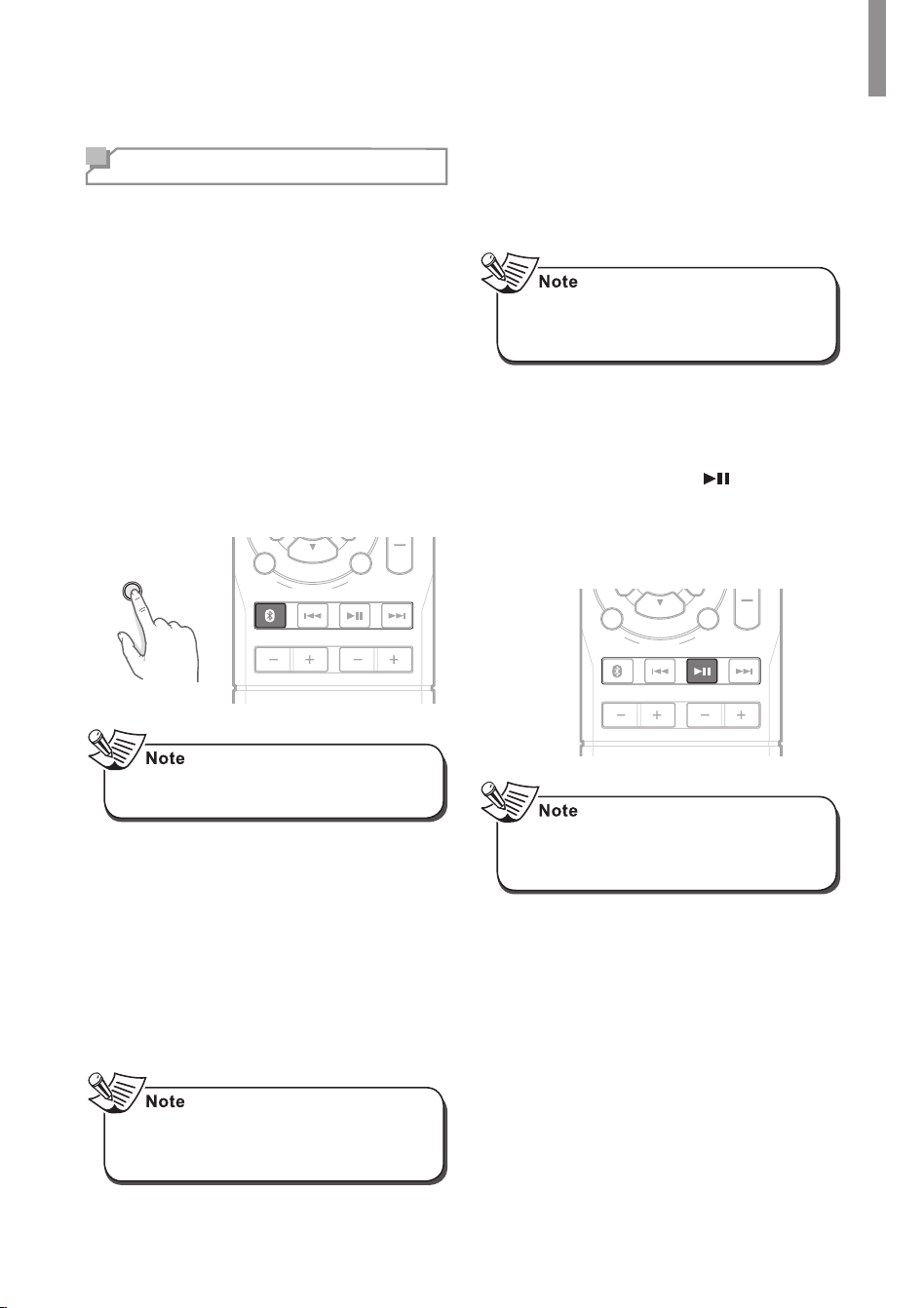
Pairing with the Bluetooth Device
1
Select
Bluetooth AUDIO
as the input
source.
•
On the main unit, press
INPUT
repeatedly.
•
On the remote control, press
BLUETOOTH
.
INPUT
BASS
BLUETOOTH
DISPLAY
SEARCH
MODE
TREBLE
P
R
E
S
E
T
L
R
B
A
L
A
N
C
E
•
Place the device near the main unit within
30 feet (10 meters).
2
Perform pairing on the device to detect
main unit.
•
"PAIRING" is displayed on the display
panel and the Bluetooth indicator blinks.
3
Select "RX-4508" in the device list.
•
If "RX-4508" is not displayed, repeat
from step 1.
4
If PIN code is required, enter "0000" on
the device.
•
Depending on the device, connection
is automatically made without enter the
PIN code.
5
When pairing is completed,
"CONNECTED" is displayed on the
display panel and the Bluetooth indicator
is turned on.
•
If the last paired device in range during
pairing mode, the device will connect
automatically.
Listening to Music on Device
To Pause Playback
1
During playback, press .
•
Playback will stop at the point where
the button is pressed.
•
To resume playback from this point,
press the button again.
BASS
BLUETOOTH
DISPLAY
SEARCH
MODE
TREBLE
P
R
E
S
E
T
L
R
B
A
L
A
N
C
E
•
Depending on the device, "Bluetooth
PAUSE" is delayed on the display
panel.
RX-4508 AM/FM STEREO RECEIVER
22
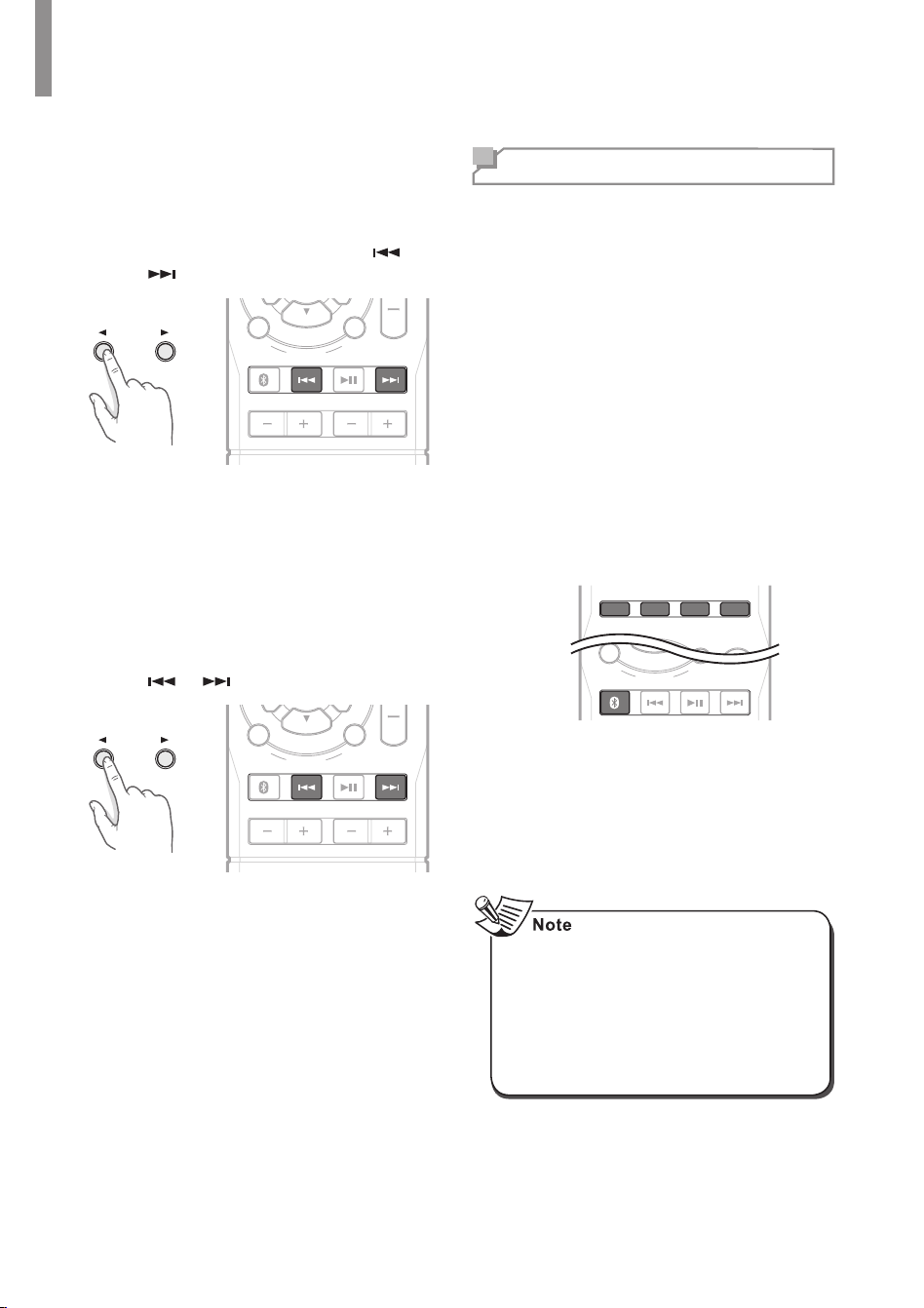
To Skip Forward or Backward
1
Each time the button is pressed, a track
is skipped forward or backward.
•
On the main unit, press
◄
or
►
.
•
On the remote control, press or
.
BASS
BLUETOOTH
DISPLAY
SEARCH
MODE
TREBLE
P
R
E
S
E
T
L
R
B
A
L
A
N
C
E
To Search Forward or Backward
1
Each time the button is pressed and
held, playback point is moved forward or
backward.
•
On the main unit, press and hold
◄
or
►
for more than 1 second.
•
On the remote control, press and hold
or for more than 1 second.
BASS
BLUETOOTH
DISPLAY
SEARCH
MODE
TREBLE
P
R
E
S
E
T
L
R
B
A
L
A
N
C
E
Recording
You can make an audio recording from the built-
in tuner or from an audio source connected to
the receiver (such as a CD player or TV).
Keep in mind you can’t make a digital recording
from an analog source or vice-versa, so make
sure the components you are recording to/from
are hooked up in the same way.
(For details on connection, see “Connecting
Playback Components“ on page 11.)
•
The receiver’s volume, Audio parameters
(the tone controls, for example), and
surround effects have no effect on the
recorded signal.
•
Some digital sources are copy-protected,
and can only be recorded in analog.
1
Select the desired recording source.
CD AUX
TONE
DIRECT
MUTE
VOLUME
PHONO TUNER
P
R
E
S
E
T
BLUETOOTH
DISPLAY
SEARCH
MODE
P
R
E
S
E
T
L
R
B
A
L
A
N
C
E
2
Start recording on the component.
3
Start play on the desired input.
•
The audio signal from the desired input
will be dubbed on the recorder and you
can enjoy them from the speakers.
•
The volume and tone (bass and treble)
settings have no effect on the recording
signals.
•
When recording the audio signals from
AUX, cannot be recorded on the same
AUX jack. (For example, the audio
signal from AUX IN cannot be recorded
on AUX OUT.)
Operating Your System
23
Using Other Functions
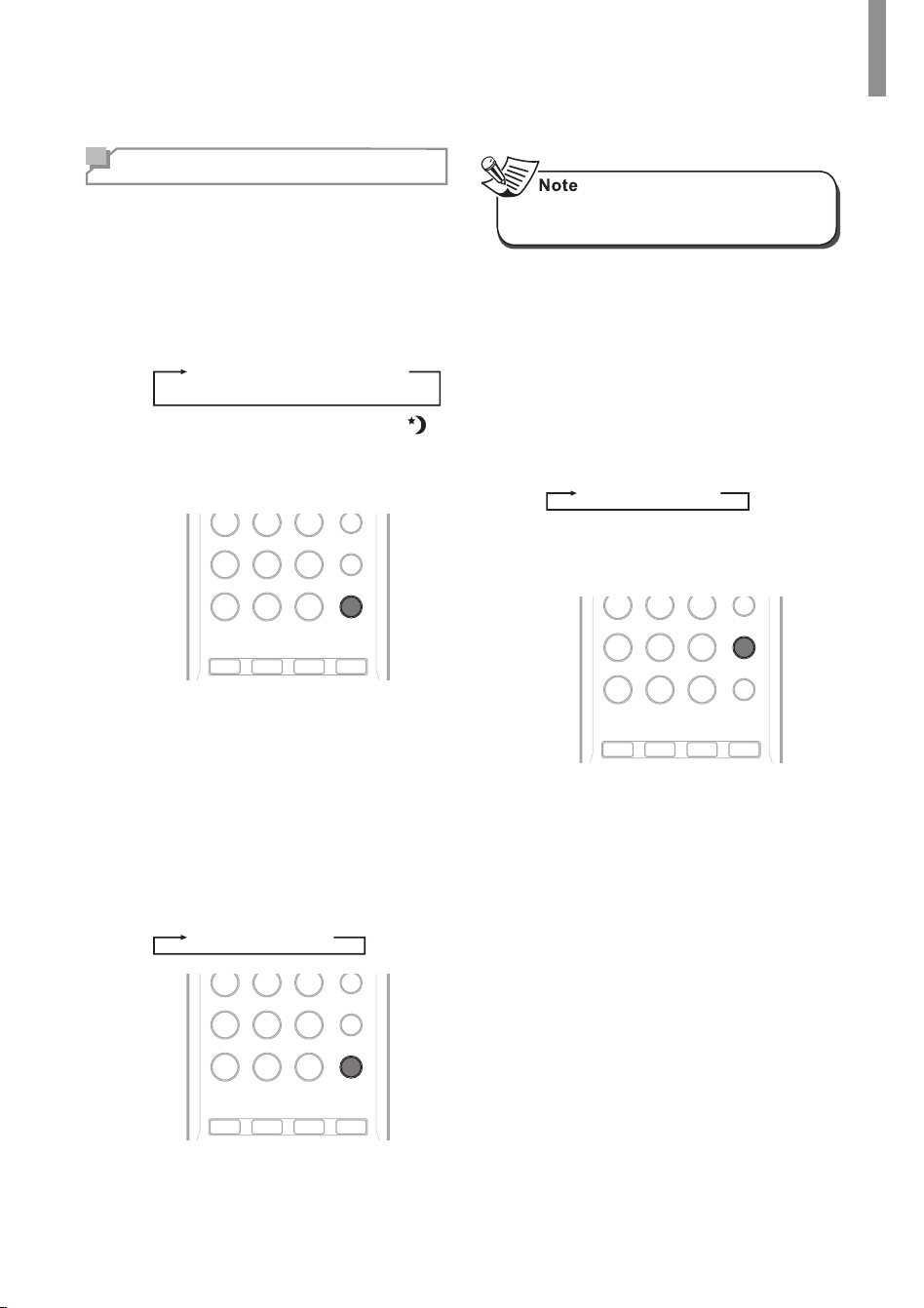
Setting the Sleep Timer
You can set a specied period of time before
the main unit is automatically shut.
1
Press
SLEEP
.
•
Each time the button is pressed, the
sleep time changes as follows:
10
20
30
60
90
Off
Unit: minutes
•
While operating the sleep timer, " "
lights up.
•
When the sleep time is selected, the
uorescent display is dimly lit.
CD AUX PHONO TUNER
456
789
0
B
PRESET MO/ST SLEEP
DIMMER
Setting the Auto Power Control
You can set the standby time for the system to
be turned off. The default setting value is 6H.
1
Press and hold
SLEEP
for more than 3
seconds.
•
Each time this button is pressed, the
auto power control time changes as
follows:
Off
2h
4h
6h
CD AUX PHONO TUNER
456
789
0
B
PRESET MO/ST SLEEP
DIMMER
•
When you play music via Bluetooth, the
auto power control does not works.
Adjusting the Brightness of the
Fluorescent Display
You can select the brightness of the uorescent
display as desired.
1
Press
DIMMER
.
•
Each time the button is pressed, the
display mode changes as follows:
On
Dimmer
Off
•
In the display Off mode, pressing
any button will restore the display On
mode.
CD AUX PHONO TUNER
456
789
0
B
PRESET MO/STSLEEP
DIMMER
24
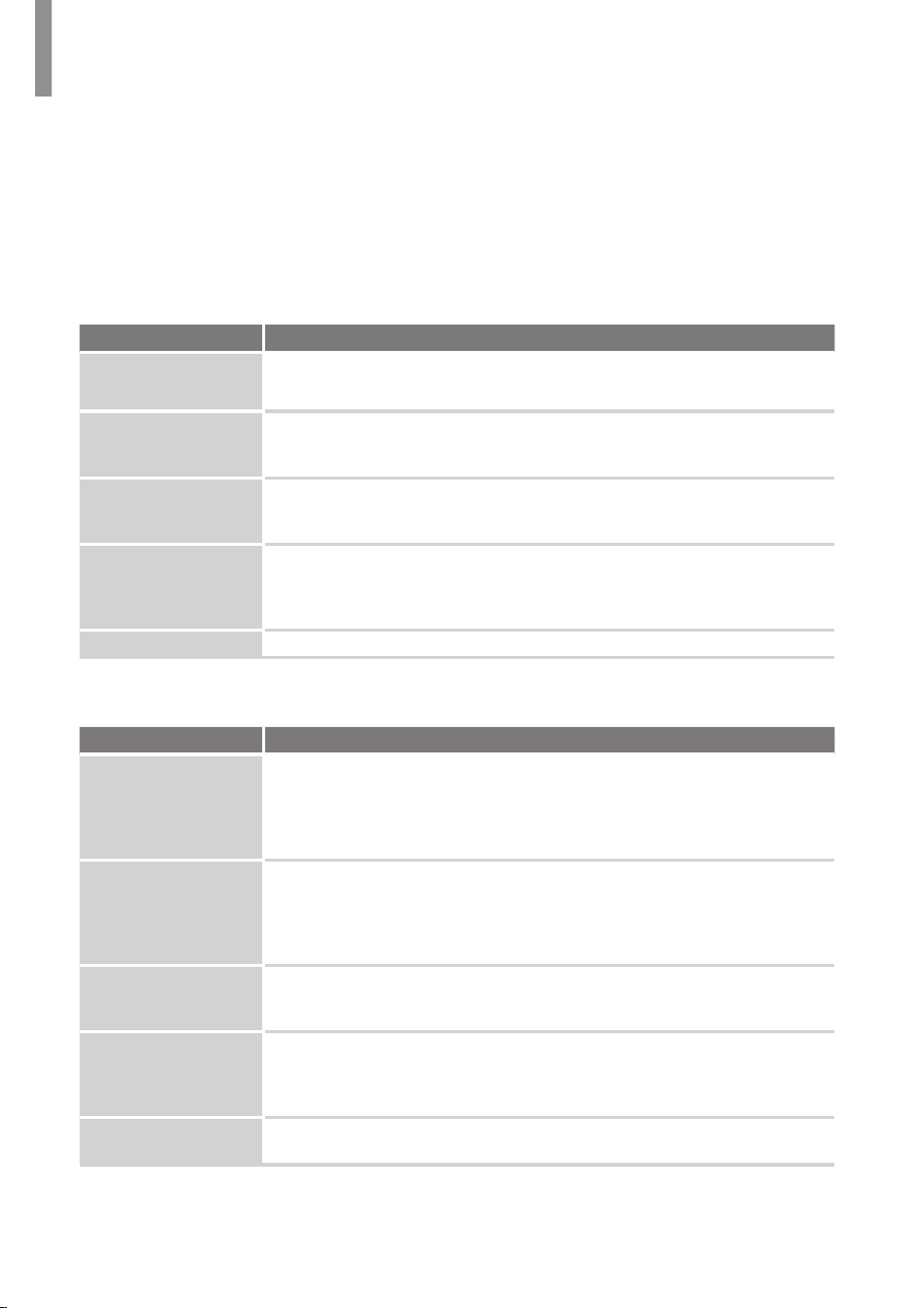
If you experience any of the following difculties while using the system, use this troubleshooting
guide to help remedy the problem before requesting servicing. Should any problem persist, consult
your nearest authorized dealer or authorized independent company.
If the unit does not operate normally due to external inuence such as static electricity, disconnect
the power plug from the outlet and insert again to return to normal operating conditions.
GENERAL
Problem Remedy
The power does not
turn on.
•
Disconnect the power plug from the outlet, and connect again.
The system suddenly
turns off.
•
After about a minute (you won’t be able to turn the main unit on during this
time), turn the system back on. If the problem persists, call an authorized
independent service company.
No sound is heard after
a function is selected.
•
Make sure the component is connected correctly.
(See "Making Connections" on page 9.)
Press
MUTE
to restore the sound.
Can’t operate the
remote control.
•
Replace the batteries. (See page 5.)
•
Operate within 7 m, and 30° of the remote sensor
•
Remove any obstacles, or operate from another position.
•
Avoid exposing the remote sensor on the front panel to direct light.
The display is dark or off.
•
Press
DIMMER
on the control repeatedly to return to the default setting.
SOUND
Problem Remedy
There is no sound
from the selected
component.
•
Check that the component is connected correctly to the audio input jacks of
components.
•
Ensure that the cords are fully inserted into the jacks on both the component
and the main unit.
•
Ensure that the component is selected correctly.
Sound is interrupted or
there is noise.
•
Check the output audio formats support system.
•
Check that the speakers and equipment are connected securely.
•
Move your audio equipment away from the TV.
•
The plugs and jacks are dirty. Wipe them with a cloth slightly moistened with
alcohol.
The left and right
sounds are unbalanced
or reversed.
•
Ensure that the speakers and equipment are connected correctly and securely.
Recording cannot be
carried out.
•
Ensure that the equipment is connected correctly.
•
Select the source equipment using the input buttons (See page 16).
•
Copyright protection to prevent recording is contained in the sources. In this
case, you may not be able to record from the sources.
No sound, or sound
suddenly ceases.
•
Check the audio output settings of the source component.
Troubleshooting
25
Specications
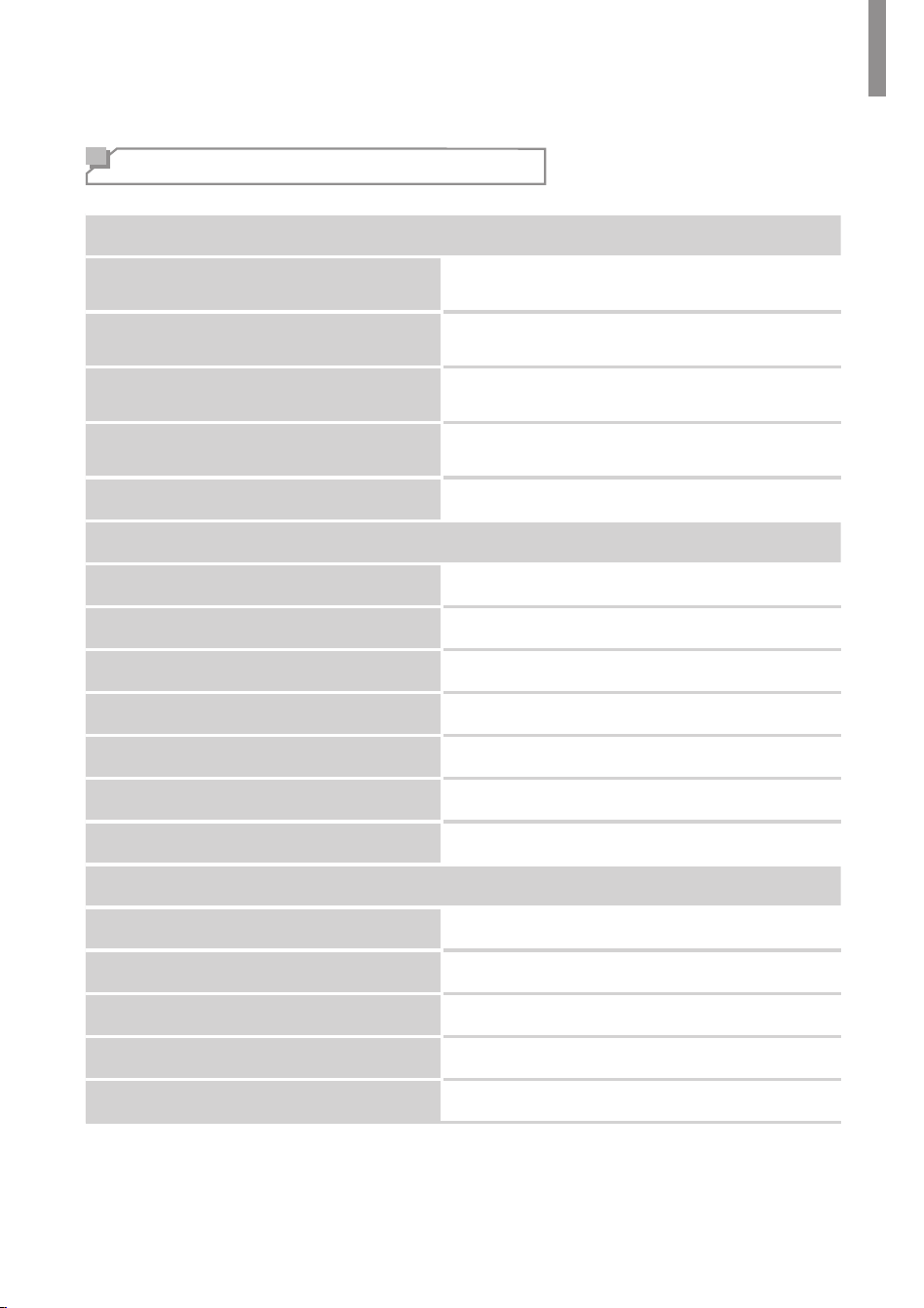
Audio Section
Power Output
100 W x 2 ch
(40 Hz – 20 kHz, 8 Ohms, THD 1 % / Stereo Mode)
Input sensitivity/impedance
Phono(MM): 2.5 mV / 47k ohms
Line(CD, AUX): 200 mV / 47k ohms
Signal-to-noise ratio (IHF-A)
Phono(MM): 65 dB
Line(CD, AUX): 93 dB
Frequency response
Phono(MM), RIAA: 30 Hz – 20 kHz : ±3 dB
Line(CD, AUX): 10 Hz – 95 kHz : ±3 dB
Bass/Treble control
±10 dB
FM Tuner Section
Frequency range
87.5 – 108.0 MHz
Usable sensitivity (S/N = 30 dB)
12 dBu
Signal-to-noise ratio (mono/stereo)
55 dBu / 50 dBu
Distortion (mono/stereo)
0.7 % / 1.0 %
Stereo separation
30 dBu @ 1 kHz
Image rejection
20 dB
IF rejection
65 dB
AM Tuner Section
Frequency range
522 – 1611 kHz
Signal-to-noise ratio
35 dB
Usable sensitivity (S/N = 20 dB)
63 dBu/m
Selectivity (±10 kHz)
23 dB
IF rejection
40 dB
Additional Information
RX-4508 AM/FM STEREO RECEIVER
26
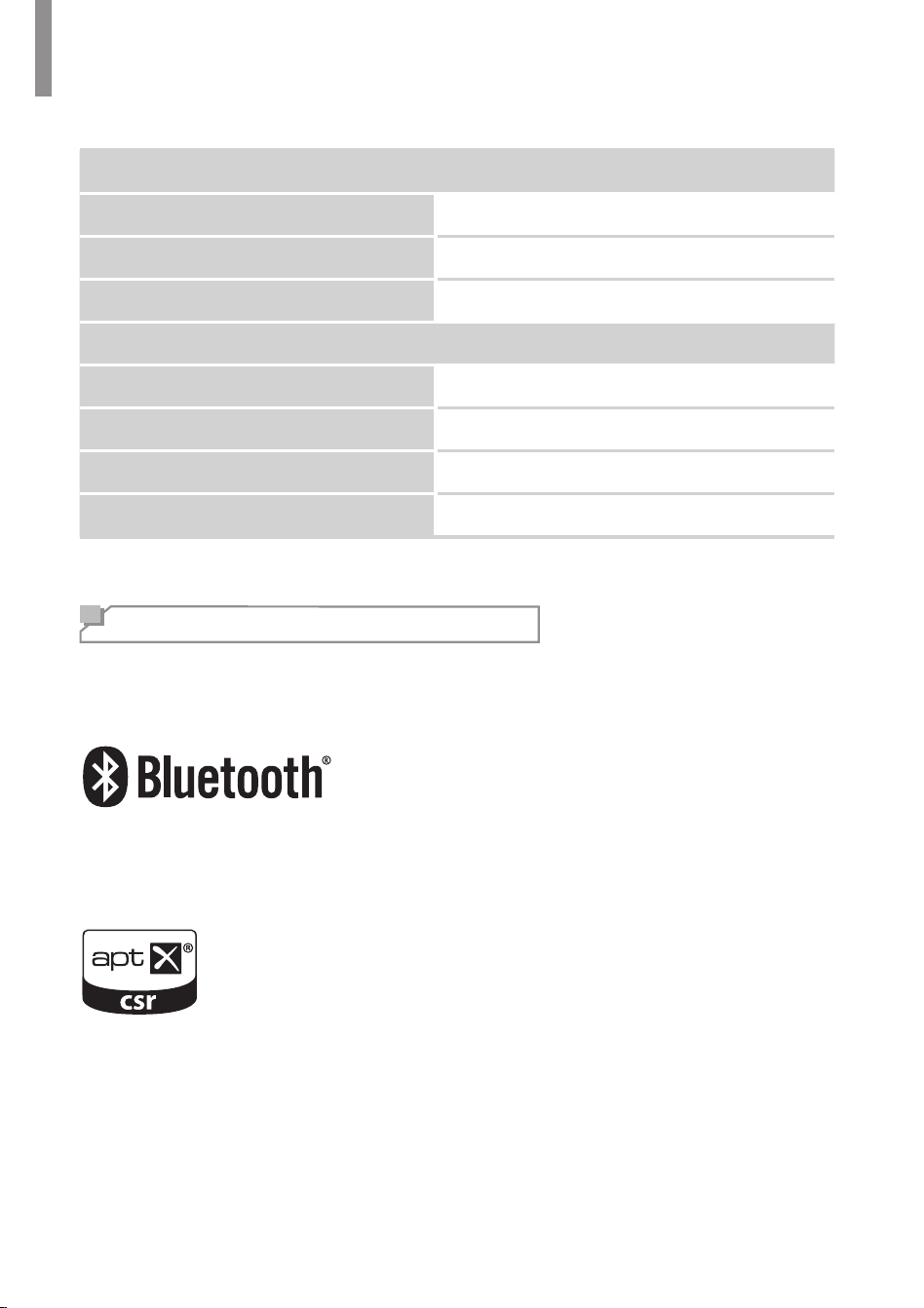
Bluetooth Section
Model name
IK-CSR8645
Out Power
-6 – 4 dBm
Frequency Range
2402 – 2480 MHz
General Specications
Power requirement
AC 230V / 50 Hz
Power consumption
230 W
Dimensions (W×H×D, including protruding
parts)
17.1" x 5.5" x 14.7" (435 mm x 141 mm x 375 mm)
Weight (Net)
16.3 lb (7.4 kg)
Trademarks and Licenses
This system incorporates a sophisticated technology that allows you to create optimum sound
quality and sound atmosphere in your personal Home Theater.
The
Bluetooth
®
word mark and logos are registered trademarks owned by Bluetooth SIG, Inc. and
any use of such marks by inkel is under license. Other trademarks and trade names are those of
their respective owners.
© 2014 CSR plc and its group companies.
The aptX
®
mark and the aptX logo are trade marks of CSR plc or one of its group companies and
may be registered in one or more jurisdictions.


RX-4508
AM/FM STEREO RECEIVER
Printed in Vietnam5707-00000-935-0S