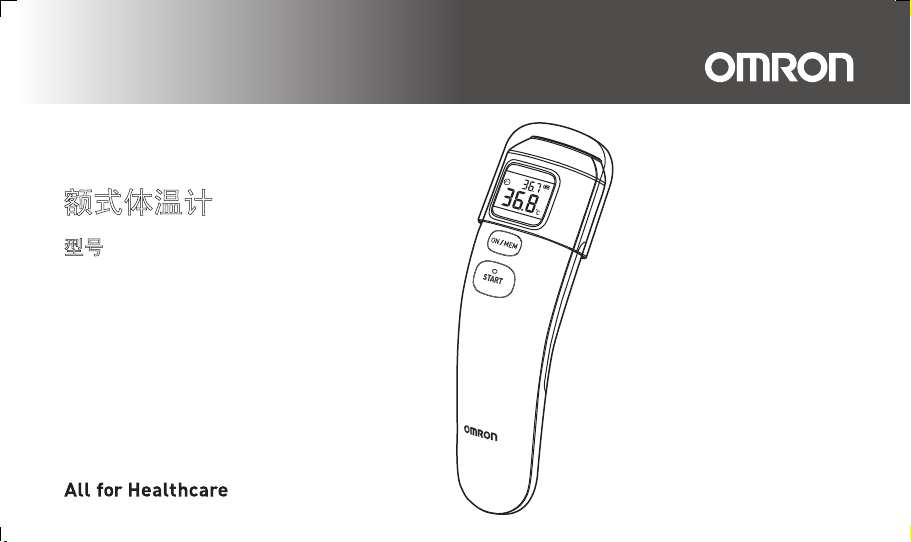
Thank you very much for
purchasing the Forehead
Thermometer.
Be sure to read this Instruction
Manual thoroughly before use.
Keep this Instruction Manual
at hand for future reference.
䴲ᐌᛳ䇶ᙼ䌁фᴀ乱ᓣԧ⏽䅵DŽ
Փ⫼ࠡ䇋䆺㒚䯙䇏ᴀ䇈ᯢкDŽ
䇋ֱᄬᴀ䇈ᯢкҹৢ⫼П䳔DŽ
Forehead Thermometer
INSTRUCTION MANUAL
Model
MC-720
乱ᓣԧ⏽䅵
Փ⫼䇈ᯢк
ൟো
MC-720-AP_A_M.book Page 1 Friday, May 22, 2015 11:01 AM
Contents
Thank you for purchasing the OMRON Forehead Thermometer MC-720.
Intended Use:
The OMRON Forehead Thermometer MC-720 offers safe, comfortable and quick temperature measurement
from the forehead.
It is mainly designed for household use.
Important Safety Information .....................................1
1. Overview .................................................................3
2. Preparation .............................................................4
2.1 Removing the Insulating Tape ......................4
2.2 Switching between °C and °F .......................4
2.3 Setting the Buzzer ........................................5
3. Using the Unit .........................................................6
3.1 Taking a Reading .........................................6
3.2 Using the Memory Function .......................10
4. Troubleshooting and Maintenance ....................11
4.1 The Icons and Error Messages .................. 11
4.2 Questions and Answers ............................. 13
4.3 Maintenance .............................................. 14
4.4 Replacing the Battery ................................. 15
5. Technical Data ......................................................16
6. Some Useful Information .................................... 19
Please read this instruction manual thoroughly before using this unit.
Please keep for future reference. For specific information about your own temperature,
CONSULT YOUR DOCTOR.
MC-720-AP_A_M.book Page 1 Friday, May 22, 2015 11:01 AM

1
EN
Important Safety Information
To assure correct use of the product, basic safety measures should always be followed, including the precautions listed
below.
Warning: The following situations are potentially hazardous and, if not avoided, could result in death or serious
injury.
• Conducting self-diagnosis based on the measurement results and/or treatment can be dangerous. Please follow the
instructions of your doctor. Self-diagnosis may worsen the symptoms.
• A high or prolonged fever requires medical attention, especially for young children. Please contact your doctor.
• Keep the unit out of children's reach.
• If a child swallows the battery, immediately consult with a doctor.
• Do not throw batteries into a fire. The battery may explode.
• Remove the battery when the unit will not be used for three months or more. Failure to do so may lead to fluid leakage,
heat generation or bursting, resulting in damage to the unit.
• Do not use the unit to measure any item with a temperature higher than 80.0°C (176.0°F).
General Precautions
• Do not apply a strong shock to, drop, step on, or vibrate the main unit.
• Do not use a mobile phone near the unit.
• The main unit is not waterproof. Be careful when handling this unit so that no liquid (alcohol, water, or hot water) will get
into the main unit. When the unit is wet with vapor, wait until it dries or wipe it lightly with a soft dry cloth.
• Do not disassemble, repair, or modify the unit.
• When the probe lens becomes dirty, wipe it lightly with a soft dry cloth or a cotton swab. Do not wipe the probe lens with
tissue paper or a paper towel. For details, refer to section 4.3.
• If there is any temperature difference between the places where the unit is stored and where you are going to measure,
leave the unit in the room where you are going to use it for more than 30 minutes to allow it to reach room temperature first,
then measure.
MC-720-AP_A_M.book Page 1 Friday, May 22, 2015 11:01 AM

2
Important Safety Information
• If the forehead is cold, wait until the forehead is warmed up before taking a temperature measurement. The measured result may
indicate low when you use an ice bag or an ice pack, or immediately after coming in from outdoor in winter.
• Do not use the unit when wet after swimming, bathing, or through sweating after physical exercise, as skin temperature
may have fallen. Wipe away moisture and allow 30 minutes for the body to acclimatize to room temperature before
measuring.
• Do not touch the probe lens with a finger or breathe on it.
• Do not attempt measurements when the unit is wet as inaccurate readings may result.
• Check the icon on the display before and after the measurement so that the measurement is taken in the appropriate
mode.
• When taking the temperature of an object with low emissivity such as gold or aluminum, inaccurate readings may result.
• When taking the temperature of something with low emissivity (such as milk) in surface measurement mode, slightly lower
readings may result.
• Do not use the unit in places where strong static electricity or electromagnetic fields are present. Doing so may lead to
inaccurate readings and may contribute to instrument failure.
• When you inform your doctor of your temperature, make sure you state that you measured the temperature from the
forehead.
MC-720-AP_A_M.book Page 2 Friday, May 22, 2015 11:01 AM
3
EN
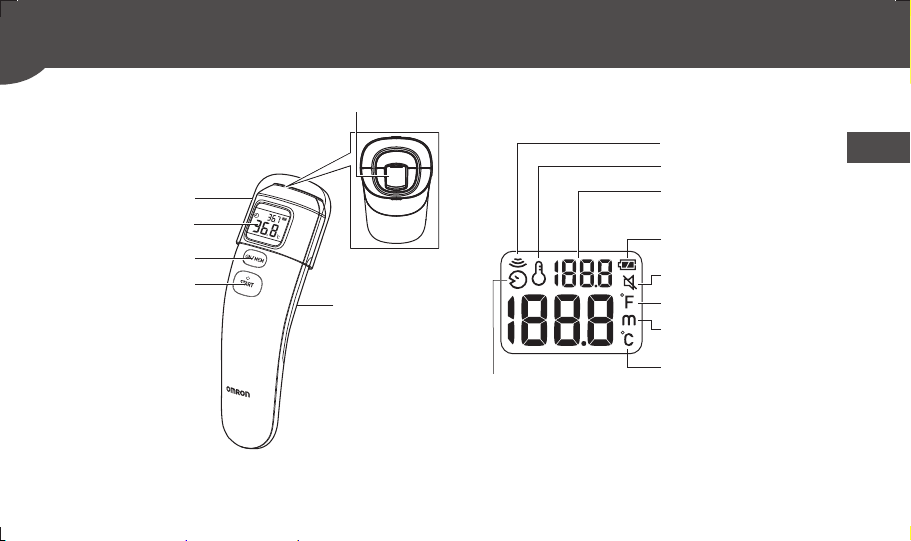
1. Overview
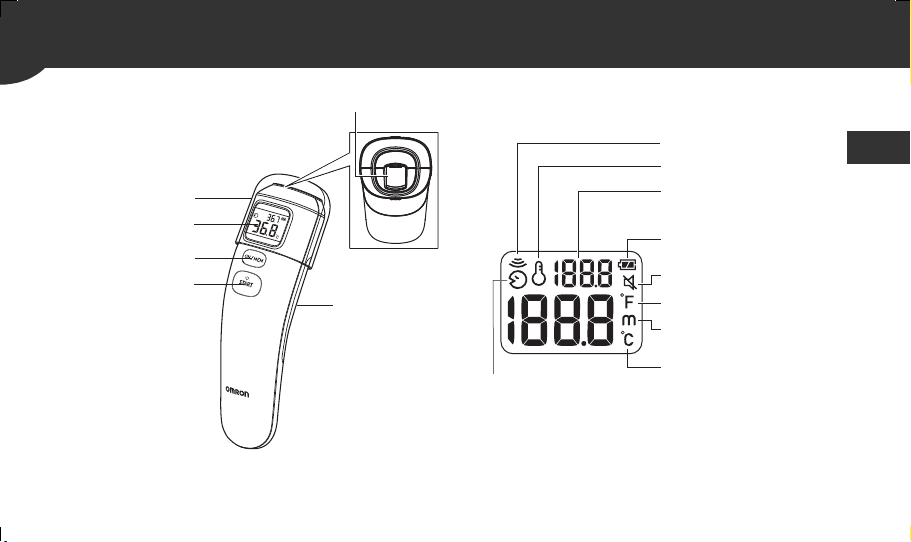
Surface temperature
Room temperature
Last reading
Battery icon
Mute icon
Temperature mode (°F)
Memory icon
Temperature mode (°C)
Forehead
temperature
Main unit: Display:
Probe lens
Battery
compartment
Probe lens cap
Display
ON/MEM button
START button
MC-720-AP_A_M.book Page 3 Friday, May 22, 2015 11:01 AM
4
2. Preparation
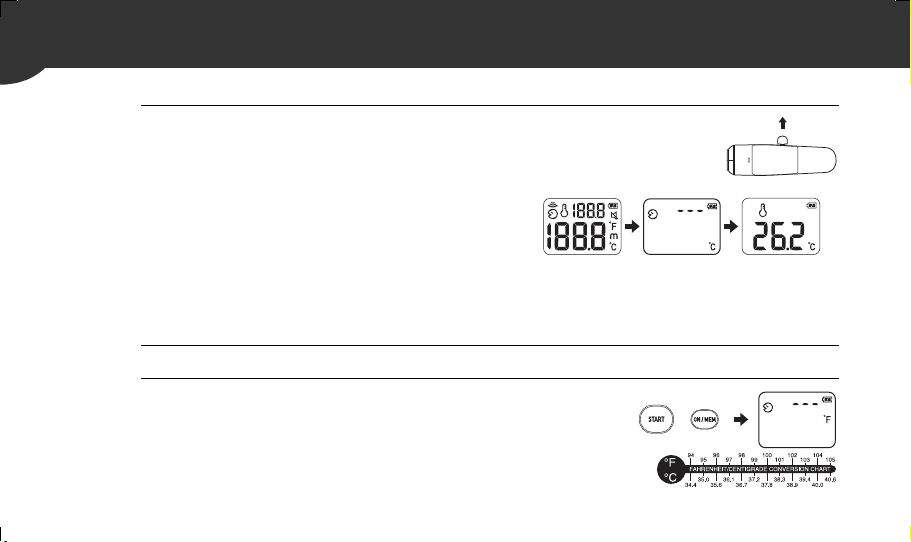
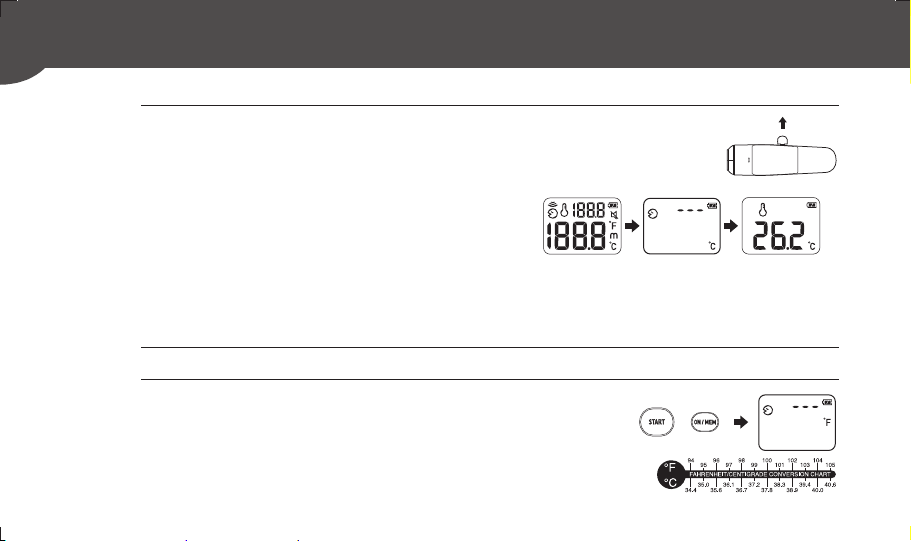
2.1
Removing the Insulating Tape
When using the unit for the first time, pull the insulating tape
out of the battery compartment.
The unit is turned on and after 1 minute the room temperature
appears on the display.
Notes:
• The room temperature remains on the display even after the unit turns off.
• Place the unit on a level surface, in a place that is at room temperature (away from direct sunlight or air conditioning, etc.).
2.2
Switching between °C and °F
This unit is set in °C as default.
1.
While the room temperature is displayed, press and hold the START button.
2.
While holding it down, press and hold the ON/MEM
button until °F appears on the display with two beeps.
Notes:
• To select °C mode again, start from step1.
• When the unit is switched between °C and °F, all the readings stored in the
memory are deleted.
Back of the unit
MC-720-AP_A_M.book Page 4 Friday, May 22, 2015 11:01 AM
2. Preparation
5
EN
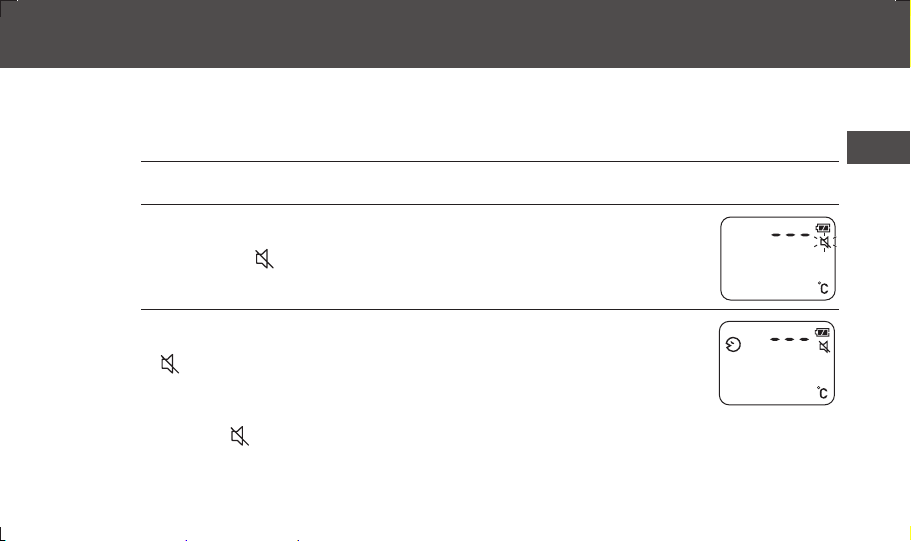
2.3
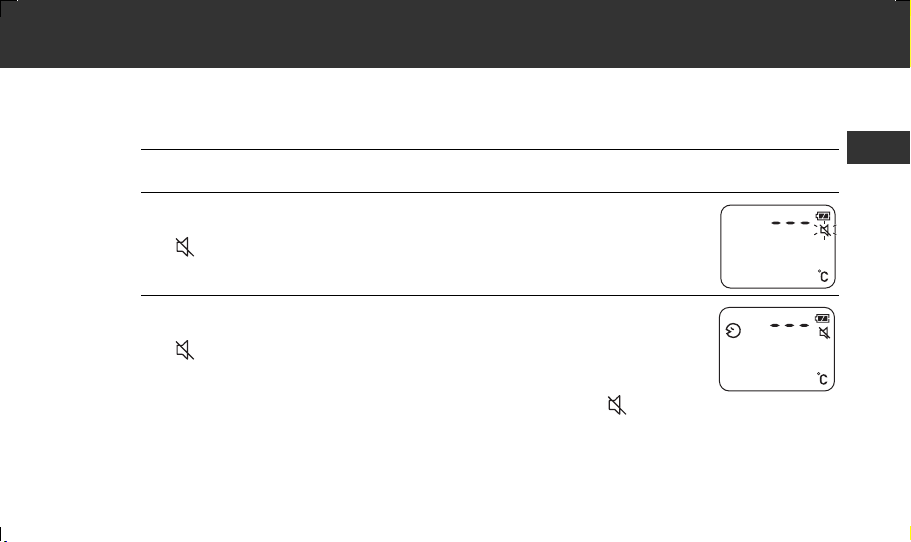
Setting the Buzzer
The buzzer is activated by default, but can be deactivated.
Note: The buzzer is only available in forehead measurement mode.
1. Press the ON/MEM button to turn on the unit.
2. Press and hold the ON/MEM button for 3 seconds.
The " " icon flashes on the display.
3. Release the ON/MEM button.
The " " icon remains lit and the buzzer is deactivated.
Notes:
• If the ON/MEM button is pressed down for more than 5 seconds after the " " icon starts
flashing, the unit turns off without deactivating the buzzer.
• To activate the buzzer again, start from step1.
MC-720-AP_A_M.book Page 5 Friday, May 22, 2015 11:01 AM

6
3. Using the Unit
3.1
Taking a Reading
Forehead Measurement Mode
This mode displays the oral-equivalent value of the measured forehead temperature.
Always make sure the probe lens is clean and undamaged, and the forehead is clean with no sweat, cosmetics,
scars, etc.
Prior to measurement, ensure that the patient has not taken a bath or exercised within the last 30 minutes, and
has remained in a stable environment for at least 5 minutes.
It is recommended to perform measurement three times. If the three measurements are different, select the
highest temperature.
1. Pull off the probe lens cap to remove it.
2. Press the ON/MEM button.
All indicators appear on the display for 1 second.
Then the display shown on the far right appears with two beeps.
MC-720-AP_A_M.book Page 6 Friday, May 22, 2015 11:01 AM

3. Using the Unit
7
EN
3. Hold the unit with the probe lens 1 to 3 cm away from the
center of the forehead.
Notes:
• Holding the unit too long in the hand may cause a higher ambient temperature reading of the
probe. This could make the body temperature measurement lower than usual.
• Keep still during measurement.
4. Press the START button.
The measurement is complete in 1 second with a long beep.
MC-720-AP_A_M.book Page 7 Friday, May 22, 2015 11:01 AM
3. Using the Unit
8
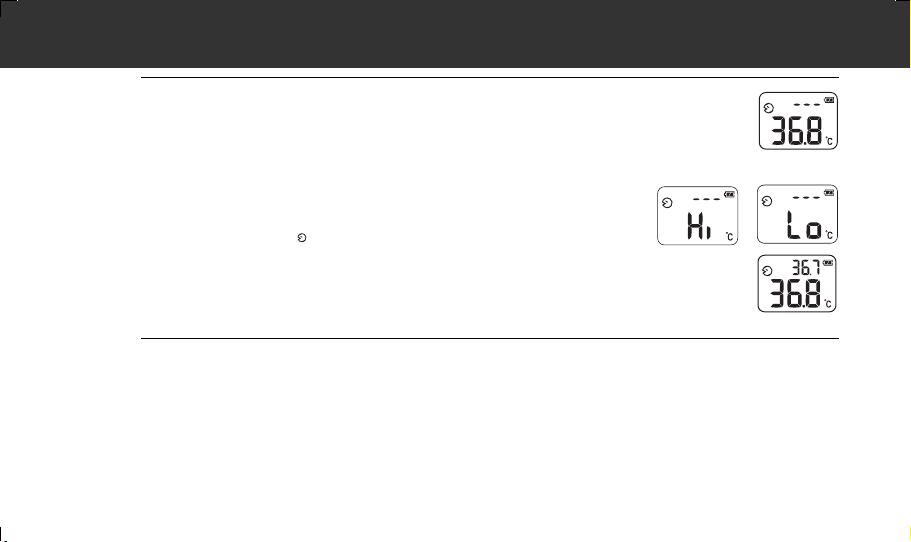
5. Move the unit away from the forehead and check the
measurement result.
The display lights up for 5 seconds.
Notes:
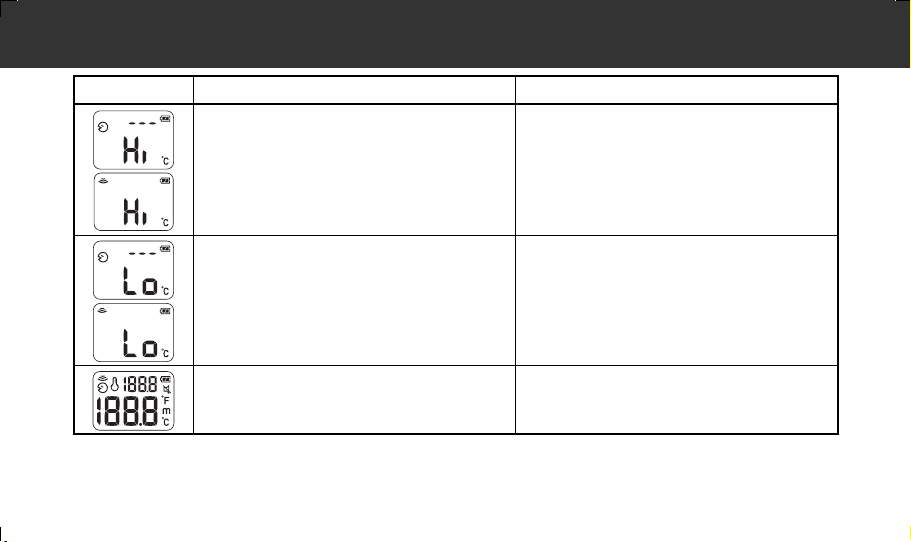
• If the result is higher than 42.2°C (108.0°F), “Hi” appears on the display.
If the result is lower than 34.0°C (93.2°F), “Lo” appears on the display.
• You can take another measurement after the display light turns off with two
beeps. Make sure the " " icon remains lit.
• After the second measurement, the first measurement is displayed in the top
right corner, while the second is displayed in the center.
6. Press and hold the ON/MEM button until "OFF" appears on the display to
turn off the unit.
The unit stores the measurement in memory, then turns off with the room temperature on the display.
The unit also turns off automatically if no operation is performed for 1 minute.
MC-720-AP_A_M.book Page 8 Friday, May 22, 2015 11:01 AM
3. Using the Unit
9
EN
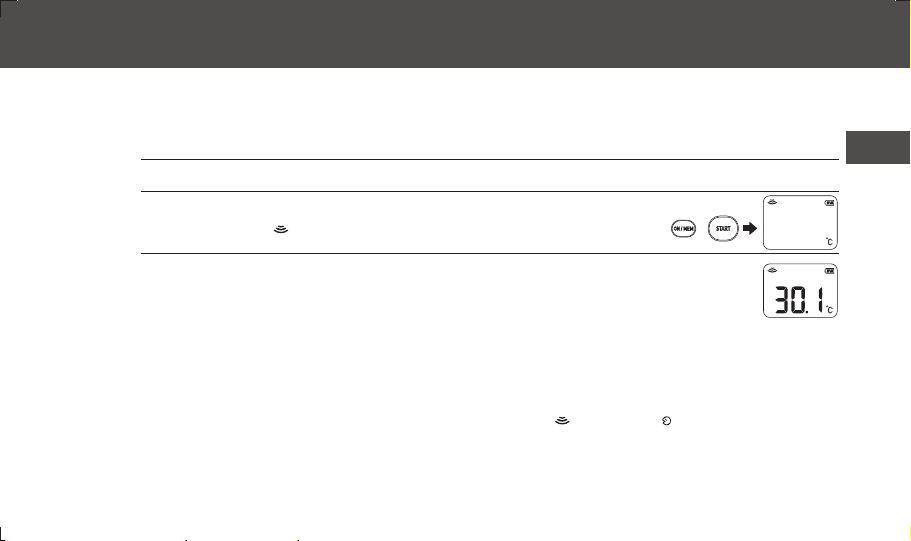
Surface Measurement Mode
Surface measurement mode shows the actual and unadjusted surface temperature of an object, which is different
from the body temperature. This mode can help you determine if the object temperature is suitable for a patient or
baby (such as baby milk).
The unit is set to forehead measurement mode as default. Follow the steps below to switch to surface
measurement mode.
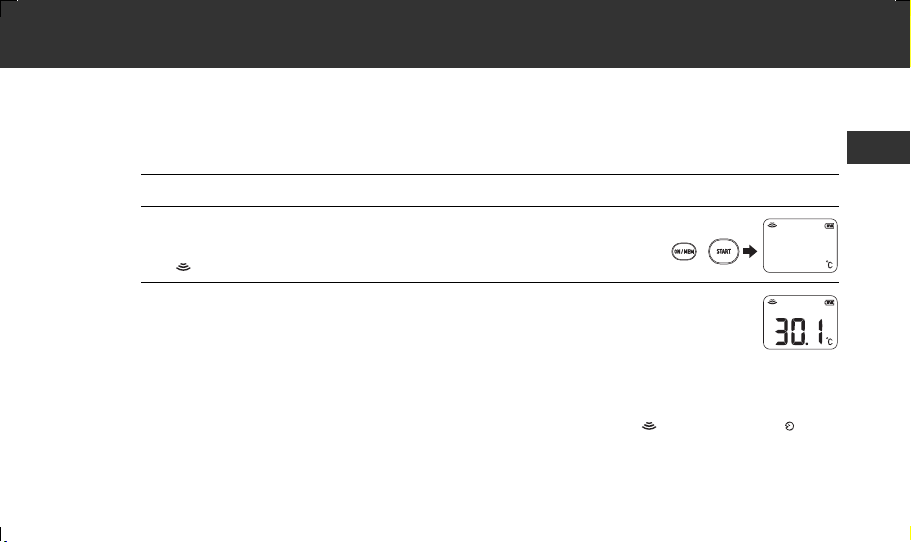
1. Press the ON/MEM button to turn on the unit.
2. Press and hold the ON/MEM button. While holding it
down, press the START button.
The " " icon appears on the display.
3. Move the unit close to the object and press the START button.
It measures continuously until the START button is released.
Notes:
• Move the probe lens as close to the object as possible when using in surface measurement
mode (1 cm apart is recommended). Do not apply the probe lens to the object directly.
• Surface measurement mode shows the surface result. The surface and internal temperature may be different.
Make sure it is safe when measuring an object with extremely high or low temperature.
• The display does not light up and the buzzer is off when using this mode.
• To switch to forehead measurement mode, go back to step 2 and make sure the icon changes to the icon.
• The unit automatically turns off if no operation is performed for 1 minute with the room temperature on the
display. To manually turn off the unit, you can press and hold the ON/MEM button until “OFF” appears on the
display.
• Surface measurement mode is not intended for body temperature measurement or medical use.
MC-720-AP_A_M.book Page 9 Friday, May 22, 2015 11:01 AM
3. Using the Unit
10
3.2
Using the Memory Function
This unit automatically stores the last 25 measurement results (excluding Hi/Lo results).
Notes:
• If the memory is full, the unit will delete the oldest reading.
• When the unit is switched between °C and °F, all the readings stored in the memory are deleted.
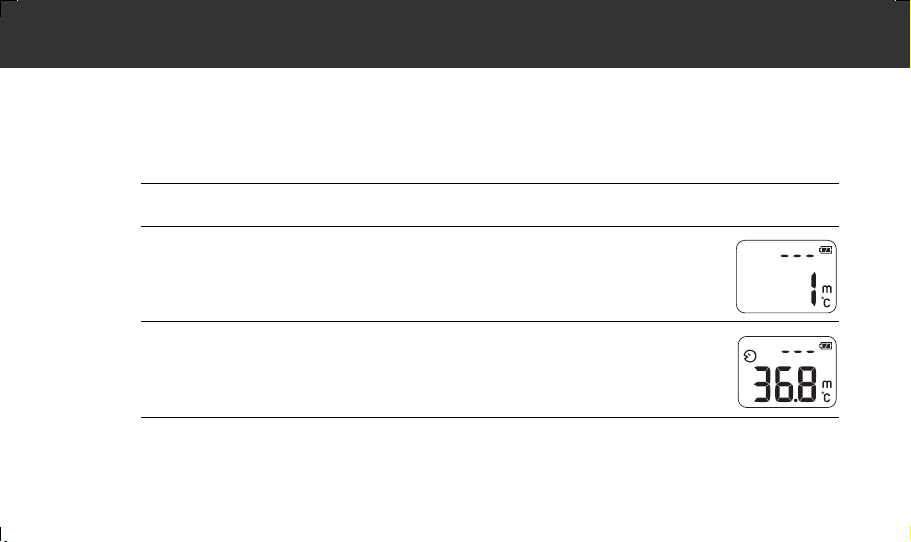
1. Press the ON/MEM button to turn on the unit.
2. Press the ON/MEM button again.
The memory number appears on the display.
3. Release the ON/MEM button.
The most recent result appears on the display.
Press the ON/MEM button repeatedly to view the older results.
4. Press and hold the ON/MEM button until "OFF" appears on the display to
turn off the unit.
The unit turns off with the room temperature on the display.
MC-720-AP_A_M.book Page 10 Friday, May 22, 2015 11:01 AM
11
EN
4. Troubleshooting and Maintenance
4.1
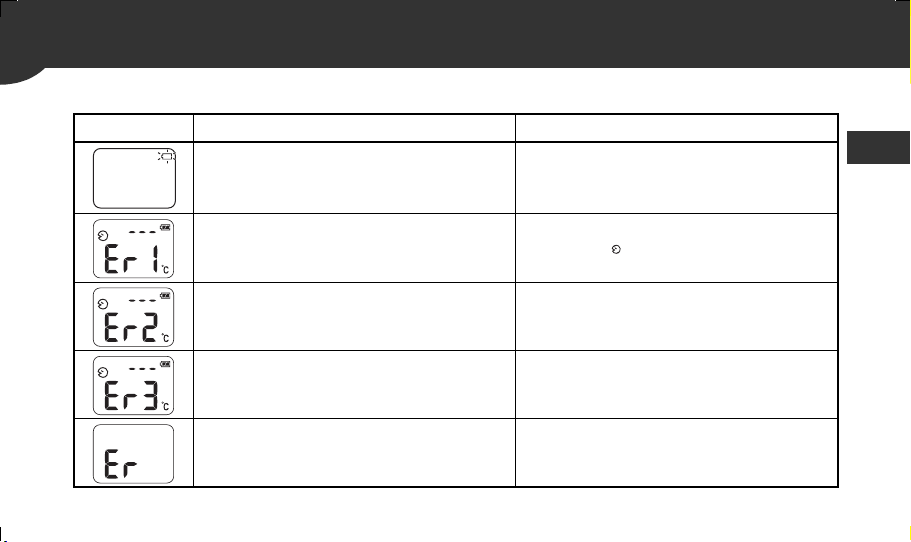
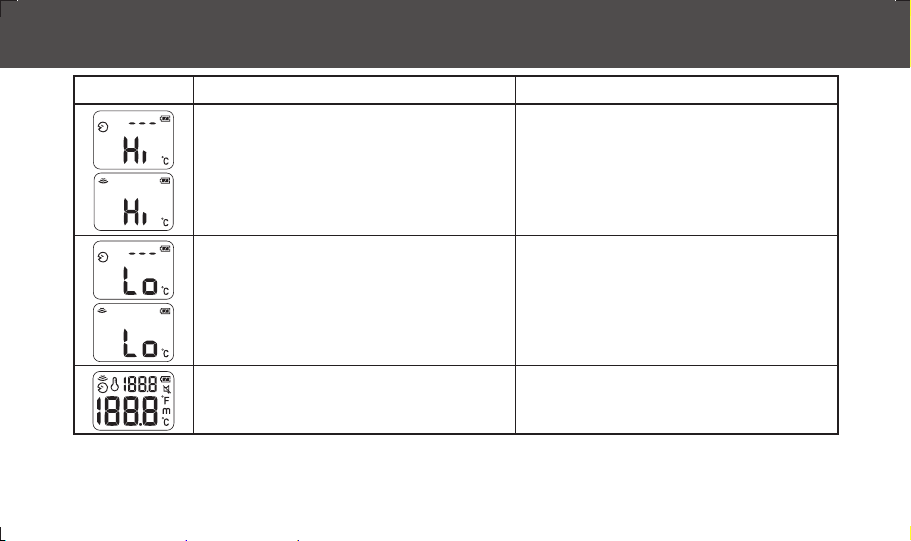
The Icons and Error Messages
Error Display Cause Remedy
Battery is low.
Replace the battery.
(Refer to section 4.4)
Taking measurement before unit stabilizes.
Wait until the “ ” icon stops flashing.
The unit is showing a rapid ambient temperature
change.
Allow the unit to rest in a room for at least
30 minutes at room temperature: 10°C–40°C
(50°F–104°F).
The ambient temperature is not within the range
between 10°C–40°C (50°F–104°F).
Allow the unit to rest in a room for at least
30 minutes at room temperature: 10°C–40°C
(50°F–104°F).
Errors 5–9 indicate a malfunction of the unit.
Remove the battery, wait for 1 minute, reinsert the
battery, and turn on the unit again. If the message
reappears, please contact the OMRON
representative.
MC-720-AP_A_M.book Page 11 Friday, May 22, 2015 11:01 AM
4. Troubleshooting and Maintenance
12
• Forehead measurement mode: The temperature
taken is higher than +42.2°C (108°F).
• Surface measurement mode: The temperature
taken is higher than +80°C (176°F).
Use the unit within its measurable range. If a
malfunction still exists, please contact an OMRON
representative.
• Forehead measurement mode: The temperature
taken is lower than +34°C (93.2°F).
• Surface measurement mode: The temperature
taken is lower than -22°C (-7.6°F).
Use the unit within its measurable range. If a
malfunction still exists, please contact an OMRON
representative.
The unit cannot be powered on to ready stage.
Change to a new battery.
(Refer to section 4.4)
Error Display Cause Remedy
MC-720-AP_A_M.book Page 12 Friday, May 22, 2015 11:01 AM

4. Troubleshooting and Maintenance
13
EN
4.2
Questions and Answers
1. The temperature indicated is rather high.
• The unit has been stored in a cold room.
When the unit has been stored in a cold room, the measured temperature may be rather high if you measure
the temperature shortly after bringing the unit to a room that is at normal temperature. Measure temperature
after leaving the unit for 30 minutes in the room where it will be used. It is advisable to store the unit in the
room where you are going to measure temperature.
• The probe lens has been exposed to direct sunlight.
• Measurement was taken shortly after the subject cried.
Crying can increase facial temperature.
2. The temperature indicated is rather low.
• The body is sweaty.
Do not use the unit when wet after swimming, bathing, or through sweating after physical exercise, as skin
temperature may have fallen. Wipe away moisture and allow 30 minutes for the body to acclimatize to room
temperature before measuring.
• The probe lens is dirty.
• Measurement was taken in surface temperature mode.
Use forehead measurement mode.
• Measurement was taken shortly after the subject was outdoors in cold weather.
Wait until the forehead has warmed up.
• Measurement was taken at a location other than the forehead.
Be sure to measure exactly at the forehead, not surrounding areas such as the hairline.
MC-720-AP_A_M.book Page 13 Friday, May 22, 2015 11:01 AM

4. Troubleshooting and Maintenance
14
3. There are variances in the measurement values.
• Measurements were not taken at the same location.
• The probe lens is dirty.
4. The temperature measured on this unit is not equivalent to oral-temperature.
• Forehead thermometers may not always calculate the exact oral-equivalent value.
It is recommended to take regular measurements on subjects such as family members, etc., who are in
good physical condition, to know their normal temperature.
4.3
Maintenance
• Check the unit if it is dropped. If unsure, please contact your local OMRON representative to have your unit
checked.
• When the probe lens becomes dirty, wipe it lightly with a soft dry cloth or a cotton swab.
Do not wipe the probe lens with tissue paper or a paper towel.
• Clean the probe lens carefully to avoid damaging it.
- Use a 70% alcohol swab or soft cotton moistened with 70% alcohol to clean the probe lens.
- Allow the probe lens to fully dry for at least 1 minute.
• Do not store the unit in the following types of places. Doing so may damage the unit.
- Wet locations.
- Locations with high heat and humidity or those that are exposed to direct sunlight. Areas close to heating
equipment, dusty locations, or environments where there are high salt concentrations in the air.
- Locations where the unit will be subjected to leaning over, falling, shock, or vibration.
- Pharmaceutical storage areas or locations where corrosive gases are present.
MC-720-AP_A_M.book Page 14 Friday, May 22, 2015 11:01 AM
4. Troubleshooting and Maintenance
15
EN
4.4
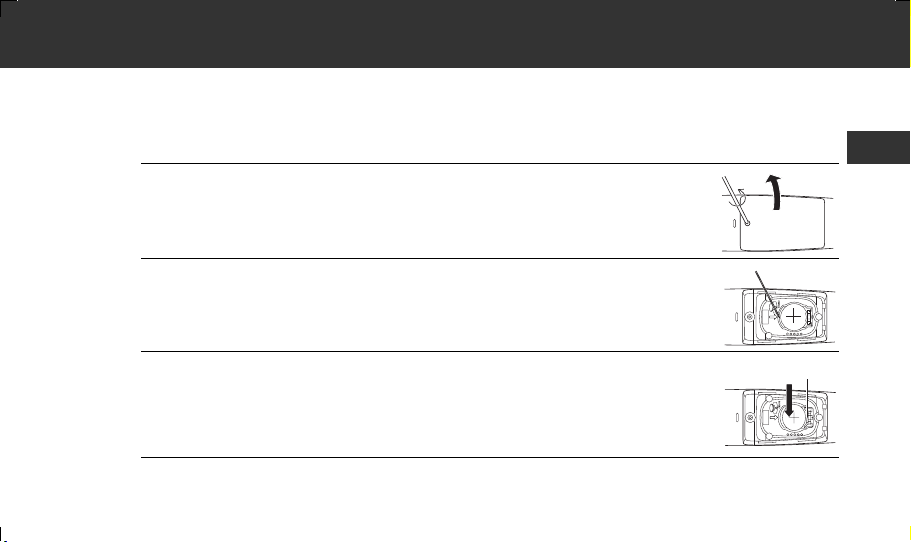
Replacing the Battery
Battery: CR2032 lithium button battery
Note: To protect the environment, discard the used batteries in accordance with the local regulations regarding
waste disposal procedure.
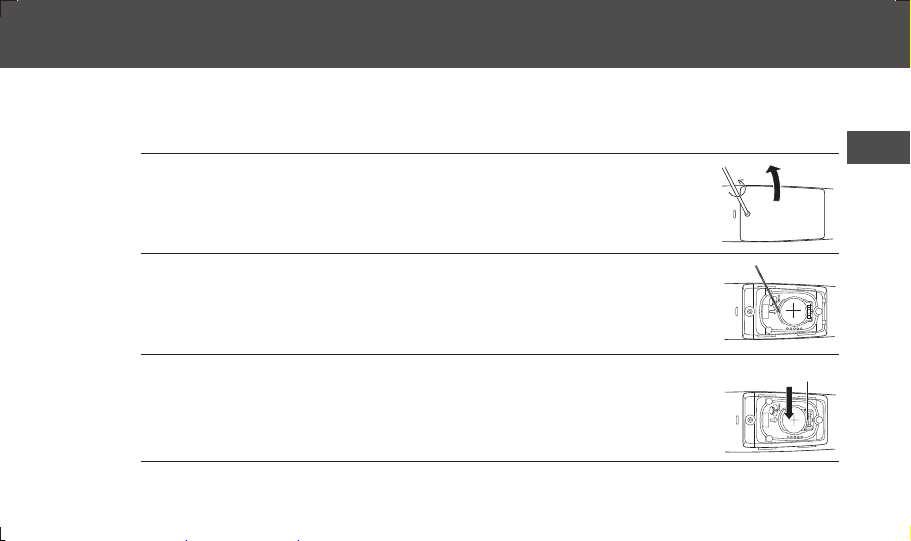
1. Release the screw and remove the battery cover.
2. Remove the battery with a pointed object.
Note: Do not use a metal tool as it may damage the surrounding parts.
3.
Insert the new battery under the metal hook on the right
side and press the left side of the battery down until it
clicks.
Note: Replace the new battery with the plus (+) side on the top.
4. Close the battery cover and tighten the screw.
Metal hook
MC-720-AP_A_M.book Page 15 Friday, May 22, 2015 11:01 AM

16
5. Technical Data
Product Description: Forehead Thermometer
Model: MC-720
Sensor: Thermopile
Temperature Display: 4-digit, °F display in 0.1 degree increments
3-digit, °C display in 0.1 degree increments
Accuracy: Forehead measurement mode ±0.2°C (±0.4°F) within 35.0°C to 42.0°C (95.0°F
to 107.6°F), ±0.3°C (±0.5°F) for other range
Surface measurement mode ±0.3°C (±0.5°F) within 22.0°C to 42.2°C (71.6°F to
108.0°F). Outside this range, it is ±2°C (±3.6°F) or
±4% (percentage of actual temperature),
whichever is greater.
Room temperature mode ±2°C (±3.6°F) within 10°C to 40°C (50°F to 104°F).
Out of this range, the measurement result cannot
meet the aforementioned accuracy.
Measurement Range: Forehead measurement mode 34.0°C (93.2°F) to 42.2°C (108.0°F)
Surface measurement mode -22.0°C (-7.6°F) to 80.0°C (176.0°F)
Room temperature mode 10°C (50°F) to 40°C (104°F)
Power Supply: 3.0V DC, 1 CR2032 lithium button battery
Power Consumption: 0.018 W
Battery Life: With a new battery, approx. 2,500 measurements
Operating Temperature
and Humidity:
10°C (50°F) to 40°C (104°F), 15 to 85%RH
MC-720-AP_A_M.book Page 16 Friday, May 22, 2015 11:01 AM

5. Technical Data
17
EN
Notes:
• The specification may be changed without prior notice.
• This OMRON product is produced under the strict quality system of OMRON HEALTHCARE Co. Ltd., Japan.
• This unit fulfills the provisions of the EC directive 93/42/EEC (Medical Device Directive) and the European Standard
EN ISO 80601-2-56:2012: Particular requirements for basic safety and essential performance of clinical thermometers for
body temperature measurement.
Storage Temperature/
Humidity/Air Pressure:
-20°C (-4°F) to 60°C (140°F), 10 to 95%RH, 200 to 1060 hPa
Protection against
electric shock:
Internally powered ME equipment
Applied Part:
Weight: Approx. 90 g (with battery installed)
Outer Dimensions: 45(w) × 155(h) × 39(d) mm
Package Contents: Main unit, test battery (CR2032 installed), probe lens cap, instruction manual.
= type BF
MC-720-AP_A_M.book Page 17 Friday, May 22, 2015 11:01 AM

5. Technical Data
18
Important information regarding Electro Magnetic Compatibility (EMC)
With the increased number of electronic devices such as PC's and mobile (cellular) telephones, medical devices in use may be susceptible to electromagnetic interference
from other devices. Electromagnetic interference may result in incorrect operation of the medical device and create a potentially unsafe situation.
Medical devices should also not interfere with other devices.
In order to regulate the requirements for EMC (Electro Magnetic Compatibility) with the aim to prevent unsafe product situations, the EN60601-1-2 standard has been
implemented. This standard defines the levels of immunity to electromagnetic interferences as well as maximum levels of electromagnetic emissions for medical devices.
This medical device manufactured by OMRON HEALTHCARE conforms to this EN60601-1-2:2007 standard for both immunity and emissions.
Nevertheless, special precautions need to be observed:
• Do not use mobile (cellular) telephones and other devices, which generate strong electrical or electromagnetic fields, near the medical device. This may result in incorrect
operation of the unit and create a potentially unsafe situation. Recommendation is to keep a minimum distance of 7 m. Verify correct operation of the device in case the
distance is shorter.
Further documentation in accordance with EN60601-1-2:2007 is available at OMRON HEALTHCARE EUROPE at the address mentioned in this instruction manual.
Documentation is also available at www.omron-healthcare.com
.
Correct Disposal of This Product (Waste Electrical & Electronic Equipment)
This marking shown on the product or its literature, indicates that it should not be disposed with other household wastes at the end of its working life. To
prevent possible harm to the environment or human health from uncontrolled waste disposal, please separate this from other types of wastes and recycle it
responsibly to promote the sustainable reuse of material resources.
Household users should contact either the retailer where they purchased this product, or their local government office, for details of where and how they
can take this item for environmentally safe recycling.
Business users should contact their supplier and check the terms and conditions of the purchase contract. This product should not be mixed with other
commercial wastes for disposal.
Disposal of used batteries should be carried out in accordance with the national regulations for the disposal of batteries.
MC-720-AP_A_M.book Page 18 Friday, May 22, 2015 11:01 AM

19
EN
6. Some Useful Information
How the Forehead Thermometer MC-720 Works
This unit measures the temperature at the surface of the forehead by sensing infrared emission of the skin at the measured
point, and then calculates the oral-equivalent value using a unique algorithm based on actual body temperature survey data.
About Body Temperature
Body temperature refers to the stable temperature of the inner body (also known as core body temperature). While
temperature measurements at the armpit or mouth provides surface temperature values, holding the thermometer steadily at
the measurement point for approx. 10 minutes provides a temperature measurement more closely representing that of core
body temperature.
Since forehead temperature measurement involves no bodily support of the thermometer, the resulting measured
temperature is typically lower than that of the armpit or mouth.
However, since the forehead has blood vessels that are much less prone to vascular constriction (a natural function of body
temperature adjustment), it is supposedly a better measurement area for determining core body temperature, even in a lower
temperature environment. By contrast, temperature measured at the arm or leg, for example, is not a suitable gauge of core
body temperature, since such body areas are more subject to vascular constriction.
(Note that temperature measured at the forehead may still be influenced by other conditions, such as sweating, or wind from
an air conditioner, etc. It is therefore advised to perform measurement in as stable an environment as possible.)
When measuring the temperature of an infant, note that infant body temperature is generally higher than adult body
temperature and easily affected by external factors. For example, body temperature tends to increase after nursing or crying.
Therefore, it is recommended to take measurements with the infant in calm and normal condition.
MC-720-AP_A_M.book Page 19 Friday, May 22, 2015 11:01 AM

6. Some Useful Information
20
This unit measures the temperature at the surface of the forehead by sensing infrared emission of the skin at the measured
point, and then calculates the oral-equivalent value using a unique algorithm (forehead measurement mode) based on actual
body temperature survey data.
32
33
34
35
36
37
38
39
40
36 36.5 37 37.5 38 38.5 39 39.5 40
Forehead measurement mode
Calculates the oral-equivalent value of
the temperature at the surface of the
forehead using a unique algorithm.
Temperature differences between body temperature and forehead temperature
Forehead temperature (°C)
(Survey conducted by OMRON)
(room temperature at 23°C)
Body temperature (oral-equivalent) (°C)
Surface measurement mode
MC-720-AP_A_M.book Page 20 Friday, May 22, 2015 11:01 AM
6. Some Useful Information
21
EN
Knowing One’s Normal Temperature
In order to make a correct judgment of suspected fever conditions, it is important to know one’s normal temperature.
Normal temperature varies with the individual and also changes depending on the time through a day. In addition, measured
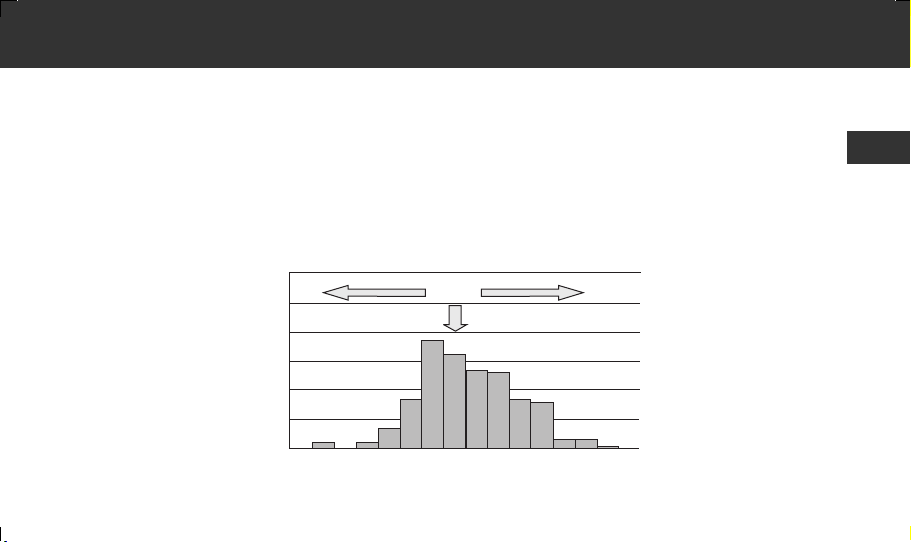
body temperatures may vary depending on the thermometer or the body part where you measure (see the graph “Variances
in core body temperatures obtained at the forehead and mouth”). To find out one’s normal temperature, therefore, we
recommend performing regular measurements under the following conditions:
- Measure with the same thermometer.
- Measure at the same area.
- Measure at the same time of day.
60
50
40
30
20
10
0
1.4 1.2 1 0.8 0.6 0.4 0.2 0 0.2 0.4 0.6 0.8 1 1.2 1.4 1.6
Variances in core body temperatures obtained at the forehead and mouth
(Cases surveyed: 190, ages: 0–68, environment temperature: 23±2°C)
Equivalent
Oral higherForehead higher
Number
of
cases
Temperature difference (°C)
(Survey conducted
by OMRON)
MC-720-AP_A_M.book Page 21 Friday, May 22, 2015 11:01 AM

Asia Pacific HQ
OMRON HEALTHCARE SINGAPORE PTE LTD.
438A Alexandra Road, #05-05/08, Alexandra Technopark
Singapore 119967
www.omronhealthcare-ap.com
Manufacturer
EU-representative
OMRON HEALTHCARE Co., Ltd.
53, Kunotsubo, Terado-cho, Muko, Kyoto,617-0002 JAPAN
OMRON HEALTHCARE EUROPE B.V.
Scorpius 33, 2132 LR Hoofddorp, THE NETHERLANDS
MC-720-AP_A_M.book Page 22 Wednesday, March 26, 2014 1:34 PM


ⴤᖋ
ᝏ䉒ᛘ䍝Ҡ 20521 仍ᔿփ䇑 0&DŽ
䇴䇗⭞䙊φ
20521 仍ᔿփ䇑 0& ᨀᆹޘ㡂䘲фᘛ䙏Ⲵᓖ⍻䟿DŽ
ᵜփ䇑Ѫᇦ⭘ӗ૱DŽ
ᆿޞ⌞ᝅӁ亯
Ᾰ䘦
༽ᐛ֒
л㔍㕈ෛ⡷
࠷ᦒ °& ઼ °)
䇮ᇊ㴲呓༠
ֵ⭞ᵢ㻻㖤
⍻䟿ᓖ
֯⭘䇠ᗶ࣏㜭
᭻䳒ᧈ䲚ૂؓޱ
⭫䶒ᱮ⽪ࠪ䭉ᰦ
䰞ㆄ
؍ޫ઼؍㇑
ᴤᦒ⭥⊐
ᢶᵥᮦᦤ
䈭൞ֵ⭞㻻㖤ࢃ䙐䈱ᵢֵ⭞䈪᱄ҜȾ
ᒬؓ㇗ԛ༽ሼᶛ৸㘹ȾᴿީᛞѠӰ։Ⲻޭ։ؗᚥθ䈭䈘⭕Ⱦ
0&6+B$B0ERRN3DJH7XHVGD\-DQXDU\$0

CS
ᆿޞ⌞ᝅӁ亯
0&(BFVIP3DJH7XHVGD\-DQXDU\$0
䈤᰾Җѝᡰ㺘⽪Ⲵ䆖䇠઼മֻˈⴞⲴᱟѪҶ֯ᛘ㜭ཏᆹޘ৺↓⺞ൠ֯⭘ᵜӗ૱ˈᒦ䱢→ሩᛘ઼ԆӪ䙐ᡀՔᇣDŽ
䆜䇦Ƚഴׁެѿ㺞⽰䭏䈥ֵ⭞ᰬᴿ⭕Ӱ↱ӗᡌ䠃՚㜳ᙝⲺᇯȾ
ሩ⍻䟿㔃䘋㹼㠚ᡁࡔᯝ઼⋫⯇ᖸড䲙DŽ䈧䚥➗⭏ⲴᤷሬDŽ㠚ᡁࡔᯝ㜭ሬ㠤⯵ᛵᚦDŽ
儈✗ᡆ䮯ᵏ✗䴰㾱ቡˈቔަᱟሩҾᒬݯDŽ䈧䈒⭏DŽ
䈧ሶ⭥⊐᭮൘ݯㄕ᧕䀖нࡠⲴൠᯩDŽ
ྲнሶ⭥⊐伏ˈ䈧・ণо⭏㚄㌫DŽ
䈧ሶ⭥⊐Ѫ⟳⢙䘋㹼༴㖞ˈࡉᴹ㜭Պ䙐ᡀ⭥⊐⠶⛨DŽ
䮯ᰦ䰤˄ њᴸԕк˅н֯⭘ᰦˈ䈧ࠪ⭥⊐DŽࡉ㜭Պ䙐ᡀ⭥⊐┿⏢ǃ✝ǃ㻲ㅹˈᦏᇣᵜ㻵㖞DŽ
䈧⭘ᵜ㻵㖞⍻䟿ԫօᓖ䎵䗷Û&˄Û)˅Ⲵ⢙փDŽ
ж㡢⌞ᝅӁ亯
䈧ᕪ⛸⻠ǃ᪄㩭ǃ䑙䐿ᡆᥟࣘѫ㻵㖞DŽ
䈧൘ᵜ㻵㖞䱴䘁֯⭘ᨀ⭥䈍DŽ
ᵜ㻵㖞н䱢≤DŽ֯⭘ᰦ䈧ሿᗳˈԕݽ⏢փ˄䞂㋮ǃ≤ᡆ✝≤˅䘋ޕDŽᖃᵜ㻵㖞ഐ᧕䀖㫨≄㘼㻛ᔴ⒯ᰦˈ
䈧ㅹࡠަᒢᡆ⭘Ḅ䖟Ⲵᒢᐳ䖫䖫ᬖᤝDŽ
䈧নǃ؞⨶઼᭩㻵ᵜ㻵㖞DŽ
ᖃ᧒⍻䮌ཤ㜿ᰦˈ䈧⭘Ḅ䖟ᒢᐳᡆỹㆮ䖫䖫ᬖᤝDŽ䈧⭘㓨ᐮᡆ∋ᐮᬖᤝ᧒⍻䮌ཤDŽ䈖ᛵ䈧৲䰵 㢲DŽ
ྲᵜ㻵㖞ᆈ᭮༴оᛘ㾱䘋㹼⍻䟿Ⲵᡰ൘༴ᴹᐞˈ䈧ሶᵜ㻵㖞⮉൘ᛘ㾱䘋㹼֯⭘Ⲵᇔ䎵䗷࠶䫏ˈ
ԕׯ䇙ަݸ䗮ࡠᇔˈ❦䘋㹼⍻䟿DŽ
11

ᆹޘ⌘һ亩
0&(BFVIP3DJH7XHVGD\-DQXDU\$0
ྲࡽ仍ߠ߹ˈ䈧ㅹࡠࡽ仍᳆䘋㹼փ⍻䟿DŽྲᛘ֯⭘ߠ㺻ᡆߠˈᡆߜཙӾᇔཆ䘋ޕᇔ
・ণ֯⭘ˈ㜭Պሬ㠤⍻䟿㔃ٿվDŽ
䈧൘⑨⌣ǃ⍇◑䓛փ䘈⒯Ⲵᰦىˈᡆ൘փ㛢䭫⛬ࠪ⊇֯⭘ᵜ㻵㖞ˈഐѪⳞ㛔ᓖՊл䱽DŽᬖ৫≤࠶ˈ
ᒦㅹᖵ ࠶䫏䇙䓛փ䘲ᓄᇔ䘋㹼⍻䟿DŽ
䈧⭘ᤷ䀖᪨᧒⍻䮌ཤᡆሩ䮌ཤબ≄DŽ
䈧ቍ䈅൘ᵜ㻵㖞▞⒯ᰦ䘋㹼⍻䟿DŽ㜭Պሬ㠤䈫ᮠн↓⺞DŽ
䈧൘⍻䟿ࡽḕⴻᱮ⽪ቿкⲴമḷˈԕׯ൘䘲ᖃⲴ⁑ᔿл䘋㹼⍻䟿DŽ
ᖃ⍻䟿䠁ᡆ䬍ㅹᴹվ᭮ሴᙗⲴ⢙փᓖᰦˈ㜭Պሬ㠤䈫ᮠн↓⺞DŽ
ᖃ൘㺘䶒⍻䟿⁑ᔿл⍻䟿ḀӋᴹվ᭮ሴᙗⲴ⢙փ˄ྲ⢋ྦ˅ᓖᰦˈ㜭Պሬ㠤䈫ᮠٿվDŽ
䈧н㾱൘ᴹᕪ⛸䶉⭥ᡆ⭥⻱⌒Ⲵൠᯩ֯⭘ᵜփDŽ㜭ሬ㠤⍻䟿ࠪ⧠䈟ᐞᡆᕅ䎧ᵪಘ᭵䳌DŽ
ᖃᛘሶᛘⲴփ⸕⭏ᰦˈ䈧࣑ᗵ䈤᰾ᱟӾࡽ仍⍻䟿ⲴփDŽ
22
1. Ᾰ䘦
㺘䶒ᓖ
ᇔ
ᴰа⅑䈫ᮠ
⭥⊐മḷ
䶉丣മḷ
ᓖ⁑ᔿ ˄°)˅
䇠ᗶമḷ
ᓖ⁑ᔿ ˄°&˅
ࡽ仍ᓖ
ᱴ⽰ኅφѱ㻻㖤φ
0&6+B$B0ERRN3DJH7XHVGD\-DQXDU\$0
᧒⍻䮌ཤ
⭥⊐ⴆ
᧒⍻䮌ཤⴆ
ᱮ⽪ቿ
210(0 ᤹䫞
67$57᤹䫞
CS
3
2. ༽ᐛ֒
2.1
с㔓㕎⡽
俌⅗ֵ⭞։䇗ᰬθ䈭Ԅ⭫⊖ⴌ࠰㔓㕎⡽Ⱦ
ᵜ㻵㖞ᔰˈ⋑ᴹ䘋㹼ԫօ᤹䫞Ⲵ⣦ᘱлˈ
࠶䫏ᱮ⽪ቿкࠪ⧠ᇔDŽ
⌞φ
Ь ণ֯ᵜ㻵㖞ޣ䰝ˈᱮ⽪ቿѝӽ❦؍⮉ᇔᱮ⽪DŽ
Ь ሶᵜ㻵㖞᭮൘༴Ҿᇔ ˄䘌ⴤሴ䱣ݹᡆオ䈳ㅹ˅Ⲵ≤ᒣ㺘䶒кDŽ
2.2
࠽ᦘ °& ૂ °)
ᵜ㻵㖞唈䇔䇮ᇊѪ °&DŽ
1.
ᖉᱴ⽰ᇚᰬθօ 67$57 䫤Ⱦ
2.
ؓᤷօу᭴θ❬߃օ 210(0 䫤ࡦᱴ⽰ኅр࠰⧦
°
) ᒬ࠰њ༦ᨆ⽰丩Ⱦ
⌞φ
Ь 㤕㾱䟽ᯠ䘹ᤙ °&ˈ䈧Ӿ↕僔 ᔰDŽ
Ь ᖃᵜ㻵㖞࠷ᦒ °& ઼ °) ᰦˈᡰᴹᆈѝ؍ᆈⲴ䈫ᮠሶ㻛ࡐ䲔DŽ
㻵㖞㛼䶒
0&6+B$B0ERRN3DJH7XHVGD\-DQXDU\$0
4
2. ༽ᐛ֒
2.3
䇴ᇐ㴸呙༦
唈䇔䇮ᇊѪ⭘㴲呓༠ˈնᱟԕሶަ⾱⭘DŽ
⌞φ㴲呓༠ӵ൘ࡽ仍⍻䟿⁑ᔿлᴹ᭸DŽ
1. 210(0 䫤ᢉᔶᵢ㻻㖤Ⱦ
2. օ 210(0 䫤 〈䫕Ⱦ
ᱮ⽪ቿкⲴ Āāമḷ䰚⛱DŽ
3. ᶴᔶ 210(0 䫤Ⱦ
Āāമḷ؍ᤱӞ䎧ˈ㴲呓༠ণ㻛⾱⭘DŽ
⌞φ
Ь ྲ൘ Āāമḷᔰ䰚⛱ӽ᤹տ 210(0 ᤹䫞䎵䗷 。䫏ˈᵜ㻵㖞ሶޣ䰝㘼н⾱
⭘㴲呓༠DŽ
Ь 㤕㾱䟽ᯠ⭘㴲呓ಘˈ䈧Ӿ↕僔 ᔰDŽ
0&6+B$B0ERRN3DJH7XHVGD\-DQXDU\$0
CS
5

3. ֵ⭞ᵢ㻻㖤
3.1
⎁䠅ᓜ
ࢃ仓⎁䠅⁗ᕅ
↔⁑ᔿᱮ⽪ᡰ⍻䟿Ⲵࡽ仍ᓖᖃҾ㞄⍻䟿٬DŽ
䈧࣑ᗵ⺞؍᧒⍻䮌ཤ⌱ᰐᦏˈࡽ仍ᒢ߰⋑ᴹ⊇≤ǃྶ૱ǃ⯔ⰅㅹDŽ
⍻䟿ࡽˈ䈧⺞䇔⯵Ӫ൘ ࠶䫏⋑ᴹ⍇◑ᡆ䭫⛬ˈᒦᐢ؍ᤱ൘っᇊ⧟ຳл㠣ቁ ࠶䫏DŽ
ᔪ䇞䘋㹼й⅑⍻䟿DŽྲй⅑⍻䟿٬нˈ䈧䘹ᤙᴰ儈Ⲵᓖ٬DŽ
1. с᧘⎁䮒ཪⴌȾ
2. 210(0 䫤Ⱦ
ᱮ⽪ቿкⲴᡰᴹᤷ⽪ࠪ⧠ 。䫏DŽ
❦ࠪ⧠ᴰחᱮ⽪Ⲵᱮ⽪⭫䶒ᒦࠪє༠ᨀ⽪丣DŽ
0&6+B$B0ERRN3DJH7XHVGD\-DQXDU\$0
6

3. ֵ⭞ᵢ㻻㖤
3. ሼ᧘⎁䮒ཪሯ䐓⿱ࢃ仓ѣᗹ 㠩 FP ༺Ⱦ
⌞φ
Ь 䮯ᰦ䰤ᨑտᵜ㻵㖞㜭Պ䙐ᡀ᧒ཤ䈫䖳儈Ⲵ⧟ຳᓖDŽഐ↔㜭Պ֯
⍻䟿㔃∄ᇎ䱵仍վDŽ
Ь 䈧൘⍻䟿ᵏ䰤؍ᤱ䶉→DŽ
4. 67$57 䫤Ⱦ
⍻䟿൘ 。䫏ᆼᡀˈᒦࠪа༠䮯ᨀ⽪丣DŽ
0&6+B$B0ERRN3DJH7XHVGD\-DQXDU\$0
CS
7

3. ֵ⭞ᵢ㻻㖤
5. ሼᵢ㻻㖤Ԅࢃ仓༺ᤵᔶᒬḛⵁ⎁䠅㔉Ⱦ
ᱮ⽪ቿӞ䎧 。䫏DŽ
⌞φ
Ь ྲ⍻䟿㔃儈Ҿ °& ˄°)˅ˈᱮ⽪ቿкՊࠪ⧠
Ā+LāDŽ
ྲ⍻䟿㔃վҾ °& ˄°)˅ˈᱮ⽪ቿкՊࠪ⧠
Ā/RāDŽ
Ь ᛘԕ൘ᱮ⽪ቿ⚟➴⚝ᒦࠪє༠ᨀ⽪丣䘋㹼а⅑⍻䟿DŽ
⺞؍ Āāമḷ؍ᤱӞ䎧DŽ
Ь ㅜҼ⅑⍻䟿ˈㅜа⅑⍻䟿٬ᱮ⽪൘к䀂ˈ㘼ㅜҼ⅑⍻䟿٬
ᱮ⽪൘ѝཞDŽ
6. օ 210(0 䫤ࡦᱴ⽰ኅр࠰⧦ ć2))Ĉ ԛީ䰣ᵢ㻻㖤Ⱦ
ᵜ㻵㖞ሶ⍻䟿㔃؍ᆈ൘ᆈѝˈ❦ޣ䰝ᒦ൘ᱮ⽪ቿкᱮ⽪ᇔDŽ
ྲ ࠶䫏⋑ᴹᢗ㹼ԫօˈᵜ㻵㖞ҏՊ㠚ࣘޣ䰝DŽ
0&6+B$B0ERRN3DJH7XHVGD\-DQXDU\$0
8
3. ֵ⭞ᵢ㻻㖤
㺞䶘⎁䠅⁗ᕅ
㺘䶒⍻䟿⁑ᔿᱮ⽪⢙փᵚ䈳㢲Ⲵᇎ䱵㺘䶒ᓖˈ䈕ᓖоփнDŽ↔⁑ᔿᑞࣙᛘࡔ
ᯝ⢙փᓖᱟ䘲Ҿ⯵ӪᡆႤݯ ˄ྲႤݯྦ㊹˅DŽ
ᵜ㻵㖞唈䇔䇮ᇊѪࡽ仍⍻䟿⁑ᔿDŽ䈧᤹➗ԕл↕僔࠷ᦒࡠ㺘䶒⍻䟿⁑ᔿDŽ
1. 210(0 䫤ᢉᔶᵢ㻻㖤Ⱦ
2. օ 210(0 䫤Ⱦؓᤷօу᭴θ❬ 67$57 䫤Ⱦ
ᱮ⽪ቿкࠪ⧠ ĀāമḷDŽ
3. ሼᵢ㻻㖤䶖䘇⢟։ᒬ 67$57 䫤Ⱦ
ሶՊᤱ㔝⍻䟿ⴤࡠᶮᔰ 67$57 ᤹䫞Ѫ→DŽ
⌞φ
Ь ᖃ൘㺘䶒⍻䟿⁑ᔿл֯⭘ᰦˈ䈧ሶ᧒⍻䮌ཤቭ䟿䶐䘁⢙փ ˄ᔪ䇞䐍 FP˅DŽ䈧ሶ
᧒⍻䮌ཤⴤ᧕᭮൘⢙փкDŽ
Ь 㺘䶒⍻䟿⁑ᔿᱮ⽪㺘䶒ᓖ㔃DŽ㺘䶒ᓖ઼䜘ᓖ㜭нDŽᖃ⍻䟿ᶱ儈ᡆᶱվ
ᓖⲴ⢙փᰦˈ䈧⺞؍ᆹޘDŽ
Ь ᖃ֯⭘↔⁑ᔿᰦˈᱮ⽪ቿнӞф㴲呓༠ޣ䰝DŽ
Ь 㤕㾱࠷ᦒࡠࡽ仍⍻䟿⁑ᔿˈ䈧䘄എ↕僔 ˈᒦ⺞䇔മḷѪമḷDŽ
Ьྲ ࠶䫏⋑ᴹᢗ㹼ԫօˈᵜ㻵㖞ሶ㠚ࣘޣ䰝ᒦ൘ᱮ⽪ቿкᱮ⽪ᇔDŽ㤕㾱ࣘޣ
Ь 㺘䶒⍻䟿⁑ᔿн䘲⭘Ҿփ⍻䟿ᡆ⯇⭘䙄DŽ
0&6+B$B0ERRN3DJH7XHVGD\-DQXDU\$0
CS
䰝ᵜ㻵㖞ˈ䈧᤹տ⭥Ⓚ䇠ᗶ᤹䫞ⴤࡠᱮ⽪ቿкࠪ⧠Ā2))āDŽ
9

3. ֵ⭞ᵢ㻻㖤
3.2
ֵ⭞䇦ᗼࣕ㜳
ᵜ㻵㖞㠚ࣘ؍ᆈᴰ ⅑⍻䟿㔃 ˄нᤜ +L/R 㔃˅DŽ
⌞φ
Ь ྲᆈᐢ┑ˈᵜ㻵㖞ሶࡐ䲔ᴰᰙа⅑Ⲵ䈫ᮠDŽ
Ь ᖃᵜ㻵㖞࠷ᦒ °& ઼ °) ᰦˈᡰᴹᆈѝ؍ᆈⲴ䈫ᮠሶ㻛ࡐ䲔DŽ
1. 210(0 䫤ᢉᔶᵢ㻻㖤Ⱦ
2. ߃⅗ 210(0 䫤Ⱦ
ᱮ⽪ቿкࠪ⧠䇠ᗶ㕆DŽ
3. ᶴᔶ 210(0 䫤Ⱦ
ᱮ⽪ቿкࠪ⧠ᴰ䘁а⅑Ⲵ⍻䟿㔃DŽ
৽༽᤹ 210(0 ᤹䫞ḕⴻ䖳ᰙⲴ⍻䟿㔃DŽ
4. օ 210(0 䫤ࡦᱴ⽰ኅр࠰⧦ ć2))Ĉ ԛީ䰣ᵢ㻻㖤Ⱦ
ᵜ㻵㖞ޣ䰝ᒦ൘ᱮ⽪ቿкᱮ⽪ᇔDŽ
0&6+B$B0ERRN3DJH7XHVGD\-DQXDU\$0
10

4. ᭻䳒ᧈ䲚ૂؓޱ
4.1
⭱䶘ᱴ⽰࠰䭏ᰬ
䭏䈥ᱴ⽰ ഖ 䀙ߩᯯ⌋
⭥⊐⭥䟿վDŽ
ᴤᦒ⭥⊐DŽ
˄䈧৲䰵 㢲˅
൘ᵜփっᇊࡽ䘋㹼⍻䟿DŽ 䈧ㅹࡠമḷĀāڌ→䰚⛱DŽ
ᵜ㻵㖞↓൘ᱮ⽪ᘛ䙏⧟ຳᓖDŽ
ሶᵜ㻵㖞㖞Ҿᇔ⧟ຳл㠣ቁ
࠶䫏˖°&°& ˄°)°)˅DŽ
⧟ຳᓖн൘ °&°& ˄°)°)˅Ⲵ㤳ത
DŽ
ሶᵜ㻵㖞㖞Ҿᇔ⧟ຳл㠣ቁ
࠶䫏˖°&°& ˄°)°)˅DŽ
䭉䈟 㺘⽪ᵜ㻵㖞᭵䳌DŽ
ࠪ⭥⊐ˈㅹᖵ ࠶䫏ˈ䟽ᯠᨂޕ⭥⊐ˈ❦⅑
ᢃᔰᵜ㻵㖞DŽྲࠪ⧠䭉䈟ᱮ⽪ˈ䈧㚄㌫ 20521
ԓ⨶୶DŽ
0&6+B$B0ERRN3DJH7XHVGD\-DQXDU\$0
CS
11
4. ᭻䳒ᧈ䲚ૂؓޱ
Ь ࡽ仍⍻䟿⁑ᔿ˖⍻䟿Ⲵᓖ儈Ҿ °&
˄°)˅DŽ
Ь 㺘䶒⍻䟿⁑ᔿ˖⍻䟿Ⲵᓖ儈Ҿ °&
˄°)˅DŽ
䈧൘⍻ᓖ㤳ത֯⭘ᵜ㻵㖞DŽྲӽ❦ࠪ⧠᭵
䳌ˈ䈧㚄㌫ 20521 ԓ⨶୶DŽ
Ь ࡽ仍⍻䟿⁑ᔿ˖⍻䟿ⲴᓖվҾ °&
˄°)˅DŽ
Ь 㺘䶒⍻䟿⁑ᔿ˖⍻䟿ⲴᓖվҾ °&
˄°)˅DŽ
䈧൘⍻ᓖ㤳ത֯⭘ᵜ㻵㖞DŽྲӽ❦ࠪ⧠᭵
䳌ˈ䈧㚄㌫ 20521 ԓ⨶୶DŽ
ᔰᵪᰐ⌅䘋ޕ⍻䟿⁑ᔿDŽ
ᴤᦒᯠ⭥⊐DŽ
˄䈧৲䰵 㢲˅
䭏䈥ᱴ⽰ ഖ 䀙ߩᯯ⌋
0&6+B$B0ERRN3DJH7XHVGD\-DQXDU\$0
12

4. ᭻䳒ᧈ䲚ૂؓޱ
4.2
䰤ㆊ
⽰Ⲻᓜᖉ儎Ⱦ
Ьᵜ㻵㖞㻛ᆈ᭮൘ሂߧⲴᇔDŽ
ᖃᵜ㻵㖞㻛ᆈ᭮൘ሂߧⲴᇔᰦˈྲሶ㻵㖞ࡠ༴ҾᑨⲴᡯ䰤・⍻䟿ᓖˈ
ࡉ⍻ᗇⲴᓖ㜭Պᖃ儈DŽሶᵜ㻵㖞⮉൘ᛘ㾱䘋㹼֯⭘Ⲵᇔ ࠶䫏⍻䟿
ᓖDŽᴰྭሶᵜ㻵㖞ᆈ᭮൘ᛘᢃ㇇⍻䟿ᓖⲴᇔDŽ
Ь᧒⍻䮌ཤаⴤ᳤䵢൘ⴤሴ䱣ݹлDŽ
Ь⍻䟿ሩ䊑ଝ⌓нᓄ・ণ⍻䟿DŽ
ଝ⌓ሬ㠤䶒䜘ᓖ儈DŽ
⽰ⲺᓜᖉքȾ
Ь䓛փࠪ⊇DŽ
䈧൘⑨⌣ǃ⍇◑䓛փ䘈⒯Ⲵᰦىˈᡆ൘փ㛢䭫⛬ࠪ⊇֯⭘ᵜ㻵㖞ˈഐѪⳞ㛔
ᓖՊл䱽DŽᬖ৫≤࠶ˈᒦㅹᖵ ࠶䫏䇙䓛փ䘲ᓄᇔ䘋㹼⍻䟿DŽ
Ь᧒⍻䮌ཤ㜿ҶDŽ
Ьԕ㺘䶒ᓖ⁑ᔿ䘋㹼Ҷ⍻䟿DŽ
֯⭘ࡽ仍⍻䟿⁑ᔿDŽ
Ь⍻䟿ሩ䊑൘ሂߧཙ≄ࡠᡧཆ・ণ䘋㹼Ҷ⍻䟿DŽ
䈧ㅹࡠࡽ仍᳆DŽ
Ьሩࡽ仍ԕཆⲴަԆ䜘ս䘋㹼Ҷ⍻䟿DŽ
࣑ᗵ߶⺞⍻䟿ࡽ仍ˈ㘼нᱟ䱵㓯ㅹઘത䜘սDŽ
0&6+B$B0ERRN3DJH7XHVGD\-DQXDU\$0
CS
13

4. ᭻䳒ᧈ䲚ૂؓޱ
⎁䠅ٲҁ䰪ᴿᐤᔸȾ
Ьᵚ൘ս㖞䘋㹼⍻䟿DŽ
Ь᧒⍻䮌ཤ㜿ҶDŽ
൞ᵢ㻻㖤р⎁ᗍⲺᓜуӄ㞊ᓜȾ
Ь仍ᔿփ䇑ᦒ㇇ࠪⲴ㞄ᓖоᇎ䱵㞄ᓖ㜭ᆈ൘ᐞᔲDŽ
ᔪ䇞ሩ䓛փ⣦ߥ㢟ྭⲴᇦᓝᡀઈㅹ⍻䟿ሩ䊑䘋㹼ᇊᵏ⍻䟿ˈԕҶ䀓ԆԜⲴ↓ᑨփDŽ
4.3
ؓޱૂؓ㇗
Ьྲᵜ㻵㖞ᦹ㩭䈧ỰḕDŽྲн⺞ᇊˈ䈧㚄㌫ 20521 ԓ⨶୶䘋㹼㻵㖞ỰḕDŽ
Ь䈧ሿᗳ⌱᧒⍻䮌ཤԕݽᦏൿDŽ
⭘ 䞂㋮ỹㆮᡆ䖟ỹᐳ㱨 Ⲵ䞂㋮⌱᧒⍻䮌ཤDŽ
䇙᧒⍻䮌ཤᆼޘᲮᒢ㠣ቁ ࠶䫏DŽ
Ь䈧ሶᵜ㻵㖞ᆈ᭮൘ԕл൪ᡰDŽࡉ㜭Պᦏൿᵜ㻵㖞DŽ
▞⒯ⲴൠᯩDŽ
ᓖ઼⒯ᓖ䖳儈ᡆ᱃䱣ݹⴤሴⲴൠᯩDŽ䶐䘁࣐✝㻵㖞Ⲵս㖞ǃ⚠ቈཊⲴൠᯩˈᡆオ
≄ѝᴹ儈⎃ᓖⴀ࠶Ⲵ⧟ຳDŽ
㻵㖞㜭Պٮᯌǃᦹ㩭ǃࡠࠫᡆᥟࣘⲴൠᯩDŽ
㦟૱ᆈ᭮ᡆᆈ൘㞀㲰ᙗ≄փⲴൠᯩDŽ
0&6+B$B0ERRN3DJH7XHVGD\-DQXDU\$0
Ьᖃ᧒⍻䮌ཤ㜿ᰦˈ䈧⭘Ḅ䖟ᒢᐳᡆỹㆮ䖫䖫ᬖᤝDŽ
䈧⭘㓨ᐮᡆ∋ᐮᬖᤝ᧒⍻䮌ཤDŽ
14
4. ᭻䳒ᧈ䲚ૂؓޱ
4.4
ᴪᦘ⭫⊖
⭥⊐˖&5 䫞ᢓ䬲⭥⊐
⌞φ ѪҶ؍ᣔ⧟ຳˈ䈧ṩᦞᖃൠᴹޣᓏ⢙༴⨶〻ᒿⲴޣ㿴ᇊђᔳᓏᰗ⭥⊐DŽ
1. ᤝᶴ㷰ѓθс⭫⊖ⴌȾ
2. ⭞ቌཪ⢟։࠰⭫⊖Ⱦ
⌞φ䈧֯⭘䠁ᐕާˈࡉ㜭Պᦏൿઘത䜘ԦDŽ
0&6+B$B0ERRN3DJH7XHVGD\-DQXDU\$0
3.
ሼ᯦⭫⊖ᨈޛםⲺ䠇ኔ䫟сθ❬с⭫⊖Ⲻᐜםࡦ
࠰ఈ༦Ⱦ
⌞φᴤᦒᯠ⭥⊐ᰦˈ䈧֯↓ ˄˅䶒ᵍкDŽ
4. ީ䰣⭫⊖ⴌθᤝ㍝㷰ѓȾ
䠁䫙
CS
15

5. ᢶᵥᮦᦤ
ӝᨅ䘦φ 仍ᔿփ䇑
ශφ 0&
Ֆಞφ ✝⭥ึᔿ
ᓜᱴ⽰ኅφ սᮠ °) ᱮ⽪ˈԕ °& Ѫ໎䟿
սᮠ °& ᱮ⽪ˈԕ °& Ѫ໎䟿
⎁䠅㋴ᓜφ ࡽ仍⍻䟿⁑ᔿ f°&˄f°)˅ˈ ൘ °& ° ˄°) °)&
㺘䶒⍻䟿⁑ᔿ f°& ˄f°)˅ˈ ൘ °& °&
˄°) °)˅㤳തDŽ䎵ࠪ↔㤳തᰦѪ
f°& ˄f°)˅ᡆ f ˄ᇎ䱵ᓖⲴⲮ࠶∄˅ˈ
ԕ䖳བྷ㘵Ѫ߶DŽ
ᇔ⁑ᔿ f°& ˄f°)˅ˈ ൘ °& °
& ˄°)
㤳തDŽ
°)˅
⎁䠅㤹പφ ࡽ仍⍻䟿⁑ᔿ
°& ˄°)˅ °&˄°)˅
㺘䶒⍻䟿⁑ᔿ
°& ˄°)˅ °&˄°)˅
ᇔ⁑ᔿ
°& ˄°)˅ °&˄°)˅
⭫Ⓠ⭫ুφ '&9ˈ њ &5 䫞ᢓ䬲⭥⊐
ࣕ㙍φ :
⭫⊖ስળφ ֯⭘ᯠ⭥⊐㓖нቁҾ ⅑⍻䟿
ֵ⭞⒵ᓜφ
°& ˄°)˅°& ˄°)˅ˈ 5+
ᆎ᭴ᓜ⒵ᓜ≊ুφ
°& ˄°)˅ °& ˄°)˅ˈ 5+ˈ K3D
0&6+B$B0ERRN3DJH7XHVGD\-DQXDU\$0
f°&˄f°)˅ަԆ㤳തDŽ
䎵ࠪ䘉њ㤳തˈн㜭┑䏣к䘠⍻䟿㋮ᓖDŽ
16

5. ᢶᵥᮦᦤ
CS
⌞φ
Ь 㿴Ṭ㤕ᴹᴤˈᚅн㹼䙊⸕DŽ
Ьᵜ 20521 ӗ૱ṩᦞᰕᵜ 20521 ڕᓧ⯇һъṚᔿՊ⽮ѕṬⲴ䍘䟿փ㌫⭏ӗDŽ
Ь ᵜ䇮༷ㅖ (& ᤷԔ ((& ˄⯇䇮༷ᤷԔ˅઼⅗⍢ḷ߶ (1,62Ⲵ㿴ᇊ˖
ሩ⭘Ҿփ⍻䟿Ⲵփ䇑Ⲵสᵜᆹޘ઼ᗵ㾱࣏㜭Ⲵ⢩ᇊ㾱≲DŽ
⭫࠱ؓᣚφ 䜘⭥ 0( 㻵㖞
ᓊ⭞䜞࠼φ
䠃䠅φ
㓖 J ˄⭥⊐˅
ཌᖘተሮφ
ᇭ h 儈 h PP
㻻ᇯφ
ѫ㻵㖞ǃ䈅⭘⭥⊐ ˄ᐢ㻵ޕ &5˅ǃ᧒⍻䮌ཤⴆǃ֯⭘䈤᰾Җ
%) ර
0&6+B$B0ERRN3DJH7XHVGD\-DQXDU\$0
17

0&6+B$B0ERRN3DJH7XHVGD\-DQXDU\$0
0186343-0B
Asia Pacific HQ
OMRON HEALTHCARE SINGAPORE PTE LTD.
438A Alexandra Road, #05-05/08, Alexandra Technopark
Singapore 119967
www.omronhealthcare-ap.com
Manufacturer
EU-representative
OMRON HEALTHCARE Co., Ltd.
53, Kunotsubo, Terado-cho, Muko, Kyoto,617-0002 JAPAN
OMRON HEALTHCARE EUROPE B.V.
Scorpius 33, 2132 LR Hoofddorp, THE NETHERLANDS