USER
MANUAL
EN User Manual
Steam oven
BSE874320M
BSK874320M

CONTENTS
1. SAFETY INFORMATION.............................................................................................2
2. SAFETY INSTRUCTIONS.............................................................................................4
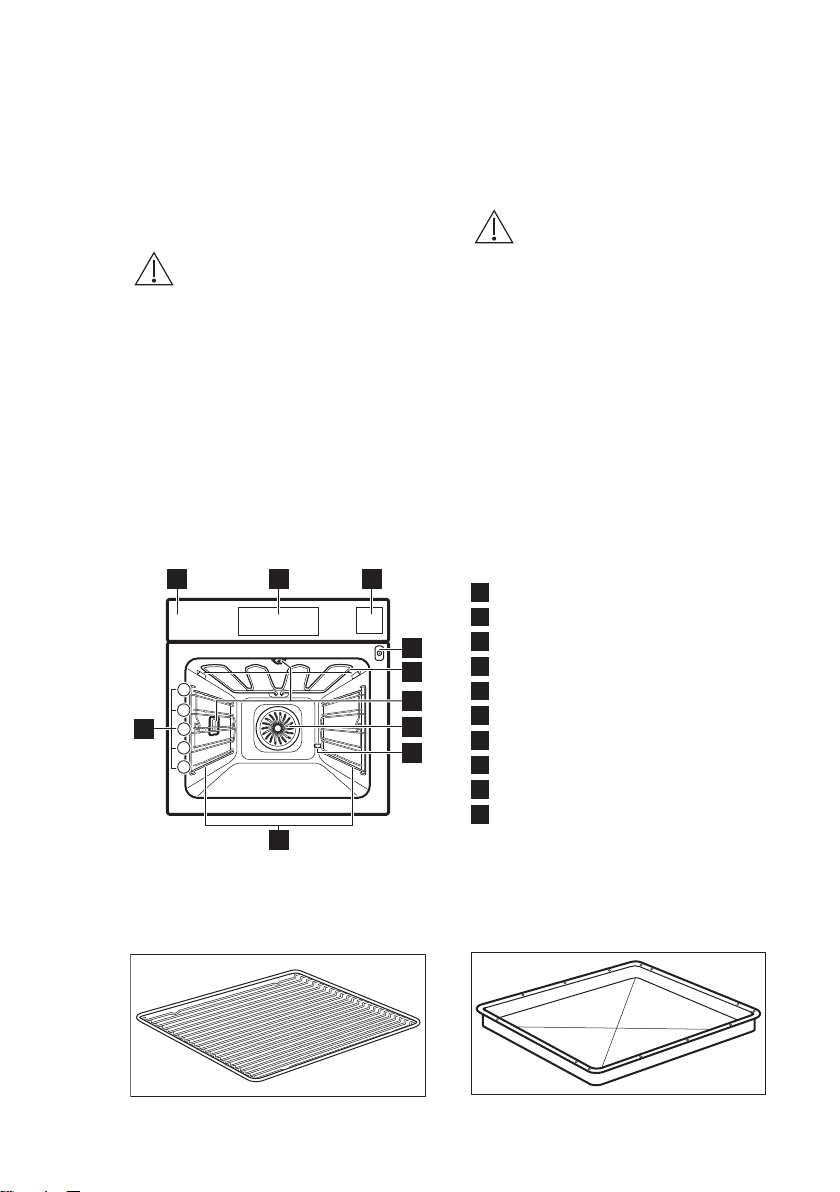
3. PRODUCT DESCRIPTION...........................................................................................7
4. OPERATING THE APPLIANCE...................................................................................8
5. BEFORE FIRST USE..................................................................................................... 9
6. DAILY USE..................................................................................................................10
7. CLOCK FUNCTIONS.................................................................................................18
8. USING THE ACCESSORIES...................................................................................... 18
9. ADDITIONAL FUNCTIONS...................................................................................... 21
10. HINTS AND TIPS..................................................................................................... 22
11. CARE AND CLEANING.......................................................................................... 38
12. TROUBLESHOOTING.............................................................................................43
13. ENERGY EFFICIENCY.............................................................................................45
FOR PERFECT RESULTS
Thank you for choosing this AEG product. We have created it to give you
impeccable performance for many years, with innovative technologies that help
make life simpler features you might not find on ordinary appliances. Please
spend a few minutes reading to get the very best from it.
Visit our website for:
Get usage advice, brochures, trouble shooter, service information:
www.aeg.com/webselfservice
Register your product for better service:
www.registeraeg.com
Buy Accessories, Consumables and Original spare parts for your appliance:
www.aeg.com/shop
CUSTOMER CARE AND SERVICE
Always use original spare parts.
When contacting our Authorised Service Centre, ensure that you have the
following data available: Model, PNC, Serial Number.
The information can be found on the rating plate.
Warning / Caution-Safety information
General information and tips
Environmental information
Subject to change without notice.
1.
SAFETY INFORMATION
Before the installation and use of the appliance,
carefully read the supplied instructions. The
www.aeg.com
2

manufacturer is not responsible for any injuries or
damages that are the result of incorrect installation or
usage. Always keep the instructions in a safe and
accessible location for future reference.
1.1 Children and vulnerable people safety
• This appliance can be used by children aged from 8
years and above and persons with reduced physical,
sensory or mental capabilities or lack of experience
and knowledge if they have been given supervision or
instruction concerning the use of the appliance in a
safe way and understand the hazards involved.
• Children between 3 and 8 years of age and persons
with very extensive and complex disabilities shall be
kept away unless continuously supervised.
• Children of less than 3 years of age should be kept
away unless continuously supervised.
• Do not let children play with the appliance.
• Keep all packaging away from children and dispose of
it appropriately.
• Keep children and pets away from the appliance when
it operates or when it cools down. Accessible parts are
hot.
• If the appliance has a child safety device, it should be
activated.
• Children shall not carry out cleaning and user
maintenance of the appliance without supervision.
1.2
General Safety
• Only a qualified person must install this appliance and
replace the cable.
• WARNING: The appliance and its accessible parts
become hot during use. Care should be taken to
avoid touching heating elements.
• Always use oven gloves to remove or put in
accessories or ovenware.
• Before carrying out any maintenance, disconnect the
appliance from the power supply.
ENGLISH
3

• Ensure that the appliance is switched off before
replacing the lamp to avoid the possibility of electric
shock.
• Do not use a steam cleaner to clean the appliance.
• Do not use harsh abrasive cleaners or sharp metal
scrapers to clean the glass door since they can scratch
the surface, which may result in shattering of the glass.
• If the mains power supply cable is damaged, it must
be replaced by the manufacturer, its Authorised
Service Centre or similarly qualified persons to avoid
an electrical hazard.
• Excessive spillage must be removed before the
pyrolytic cleaning. Remove all parts from the oven.
• To remove the shelf supports first pull the front of the
shelf support and then the rear end away from the
side walls. Install the shelf supports in the opposite
sequence.
• The means for disconnection must be incorporated in
the fixed wiring in accordance with the wiring rules.
• Use only the food sensor (core temperature sensor)
recommended for this appliance.
2.
SAFETY INSTRUCTIONS
2.1 Installation
WARNING!
Only a qualified person must
install this appliance.
• Remove all the packaging.
• Do not install or use a damaged
appliance.
• Follow the installation instructions
supplied with the appliance.
• Always take care when moving the
appliance as it is heavy. Always use
safety gloves and enclosed footwear.
• Do not pull the appliance by the
handle.
• Keep the minimum distance from
other appliances and units.
• Make sure that the appliance is
installed below and adjacent safe
structures.
• The sides of the appliance must stay
adjacent to appliances or units with
the same height.
• The appliance is equipped with an
electric cooling system. It must be
operated with the electric power
supply.
2.2 Electrical connection
WARNING!
Risk of fire and electric
shock.
• All electrical connections should be
made by a qualified electrician.
• The appliance must be earthed.
• Make sure that the parameters on the
rating plate are compatible with the
electrical ratings of the mains power
supply.
www.aeg.com
4

• Always use a correctly installed
shockproof socket.
• Do not use multi-plug adapters and
extension cables.
• Make sure not to cause damage to
the mains plug and to the mains
cable. Should the mains cable need
to be replaced, this must be carried
out by our Authorised Service Centre.
• Do not let mains cables touch or
come near the appliance door,
especially when the door is hot.
• The shock protection of live and
insulated parts must be fastened in
such a way that it cannot be removed
without tools.
• Connect the mains plug to the mains
socket only at the end of the
installation. Make sure that there is
access to the mains plug after the
installation.
• If the mains socket is loose, do not
connect the mains plug.
• Do not pull the mains cable to
disconnect the appliance. Always pull
the mains plug.
• Use only correct isolation devices: line
protecting cut-outs, fuses (screw type
fuses removed from the holder), earth
leakage trips and contactors.
• The electrical installation must have
an isolation device which lets you
disconnect the appliance from the
mains at all poles. The isolation
device must have a contact opening
width of minimum 3 mm.
• This appliance complies with the
E.E.C. Directives.
2.3 Use
WARNING!
Risk of injury, burns and
electric shock or explosion.
• This appliance is for household use
only.
• Do not change the specification of
this appliance.
• Make sure that the ventilation
openings are not blocked.
• Do not let the appliance stay
unattended during operation.
• Deactivate the appliance after each
use.
• Be careful when you open the
appliance door while the appliance is
in operation. Hot air can release.
• Do not operate the appliance with
wet hands or when it has contact with
water.
• Do not apply pressure on the open
door.
• Do not use the appliance as a work
surface or as a storage surface.
• Open the appliance door carefully.
The use of ingredients with alcohol
can cause a mixture of alcohol and air.
• Do not let sparks or open flames to
come in contact with the appliance
when you open the door.
• Do not put flammable products or
items that are wet with flammable
products in, near or on the appliance.
WARNING!
Risk of damage to the
appliance.
• To prevent damage or discoloration
to the enamel:
– do not put ovenware or other
objects in the appliance directly
on the bottom.
– do not put aluminium foil directly
on the bottom of cavity of the
appliance.
– do not put water directly into the
hot appliance.
– do not keep moist dishes and
food in the appliance after you
finish the cooking.
– be careful when you remove or
install the accessories.
• Discoloration of the enamel or
stainless steel has no effect on the
performance of the appliance.
• Use a deep pan for moist cakes. Fruit
juices cause stains that can be
permanent.
• This appliance is for cooking
purposes only. It must not be used for
other purposes, for example room
heating.
• Always cook with the oven door
closed.
• If the appliance is installed behind a
furniture panel (e.g. a door) make sure
the door is never closed when the
appliance is in operation. Heat and
moisture can build up behind a
closed furniture panel and cause
ENGLISH
5

subsequent damage to the appliance,
the housing unit or the floor. Do not
close the furniture panel until the
appliance has cooled down
completely after use.
2.4 Steam Cooking
WARNING!
Risk of burns and damage to
the appliance.
• Released Steam can cause burns:
– Be careful when you open the
appliance door when the function
is activated. Steam can release.
– Open the appliance door with
care after the steam cooking
operation.
2.5 Care and cleaning
WARNING!
Risk of injury, fire, or damage
to the appliance.
• Before maintenance, deactivate the
appliance and disconnect the mains
plug from the mains socket.
• Make sure the appliance is cold.
There is the risk that the glass panels
can break.
• Replace immediately the door glass
panels when they are damaged.
Contact the Authorised Service
Centre.
• Be careful when you remove the door
from the appliance. The door is
heavy!
• Clean regularly the appliance to
prevent the deterioration of the
surface material.
• Clean the appliance with a moist soft
cloth. Only use neutral detergents. Do
not use any abrasive products,
abrasive cleaning pads, solvents or
metal objects.
• If you use an oven spray, follow the
safety instruction on it's packaging.
• Do not clean the catalytic enamel (if
applicable) with any kind of
detergent.
2.6 Pyrolytic cleaning
WARNING!
Risk of Injury / Fires /
Chemical Emissions (Fumes)
in Pyrolytic Mode.
• Before carrying out a Pyrolitic self-
cleaning function or the First Use
please remove from the oven cavity:
– any excess food residues, oil or
grease spills / deposits.
– any removable objects (including
shelves, side rails etc., provided
with the product) particularly any
non-stick pots, pans, trays,
utensils etc.
• Read carefully all the instructions for
Pyrolytic cleaning.
• Keep children away from the
appliance while the Pyrolytic cleaning
is in operation.
The appliance becomes very hot and
hot air is released from the front
cooling vents.
• Pyrolytic cleaning is a high
temperature operation that can
release fumes from cooking residues
and construction materials, as such
consumers are strongly advised to:
– provide good ventilation during
and after each Pyrolytic cleaning.
– provide good ventilation during
and after the first use at maximum
temperature operation.
• Unlike all humans, some birds and
reptiles can be extremely sensitive to
potential fumes emitted during the
cleaning process of all Pyrolytic
Ovens.
– Remove any pets (especially birds)
from the vicinity of the appliance
location during and after the
Pyrolytic cleaning and first use
maximum temperature operation
to a well ventilated area.
• Small pets can also be highly sensitive
to the localized temperature changes
in the vicinity of all Pyrolytic Ovens
when the Pyrolytic self cleaning
program is in operation.
• Non-stick surfaces on pots, pans,
trays, utensils etc., can be damaged
by the high temperature Pyrolytic
cleaning operation of all Pyrolytic
www.aeg.com
6
Ovens and can be also a source for
low level harmful fumes.
• Fumes released from all Pyrolytic
Ovens / Cooking Residues as
described are not harmful to humans,
including infants or persons with
medical conditions.
2.7 Internal lighting
WARNING!
Risk of electric shock.
• The type of light bulb or halogen
lamp used for this appliance is for
household appliances only. Do not
use it for house lighting.
• Before replacing the lamp, disconnect
the appliance from the power supply.
• Only use lamps with the same
specifications.
2.8 Service
• To repair the appliance contact an
Authorised Service Centre.
• Use original spare parts only.
2.9 Disposal
WARNING!
Risk of injury or suffocation.
• Disconnect the appliance from the
mains supply.
• Cut off the mains electrical cable
close to the appliance and dispose of
it.
• Remove the door catch to prevent
children or pets from becoming
trapped in the appliance.
3. PRODUCT DESCRIPTION
3.1 General overview
21
10
9
3
5
4
3
2
1
5
4
6
7
8
1
Control panel
2
Display
3
Water drawer
4
Socket for the food sensor
5
Heating element
6
Lamp
7
Fan
8
Descaling pipe outlet
9
Shelf support, removable
10
Shelf positions
3.2 Accessories
Wire shelf
For cookware, cake tins, roasts.
Baking tray
For cakes and biscuits.
ENGLISH 7
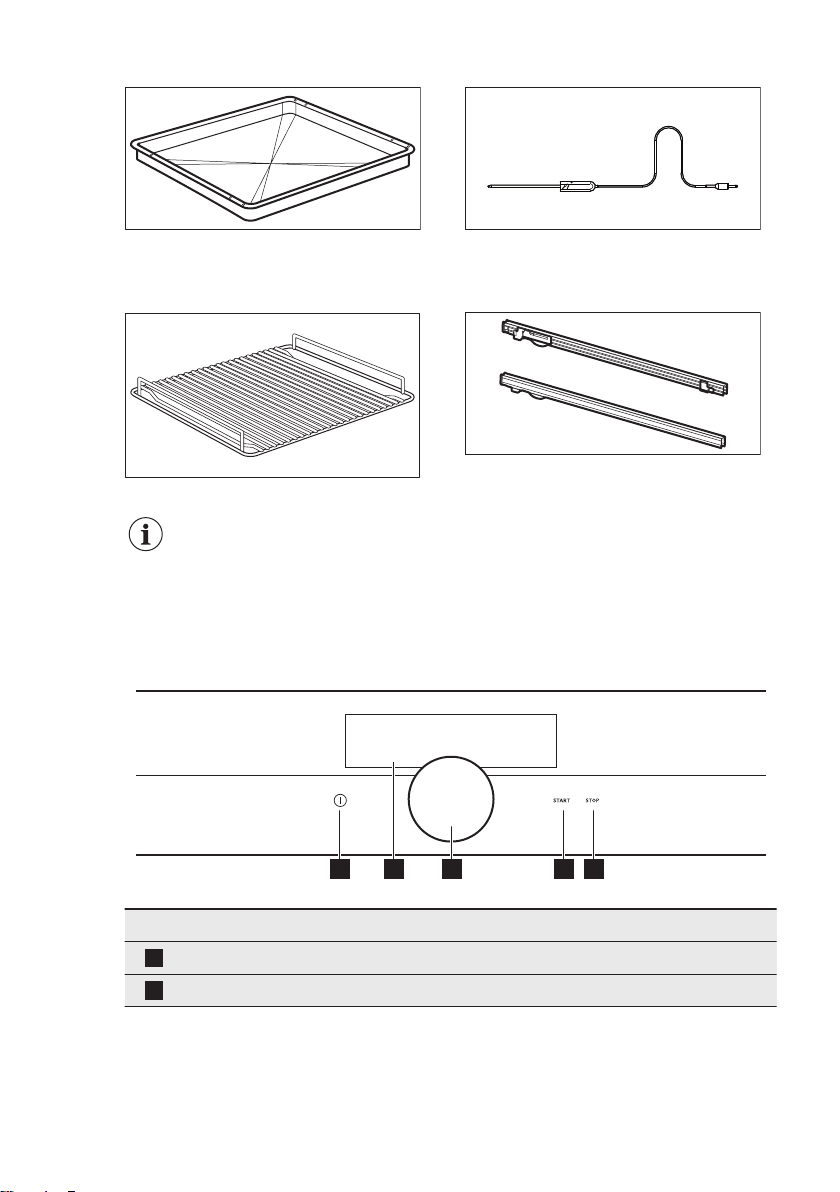
Grill- / Roasting pan
To bake and roast or as a pan to collect
fat.
Trivet
For roasting and grilling.
Use the trivet only with the
Grill- / Roasting pan.
Food Sensor
To measure the temperature inside the
food.
Telescopic runners
For shelves and trays.
4. OPERATING THE APPLIANCE
4.1 Control panel
1 2 3 4 5
Function Comment
1
On / Off To turn the appliance on and off.
2
Display Shows the current settings of the appliance.
www.aeg.com8
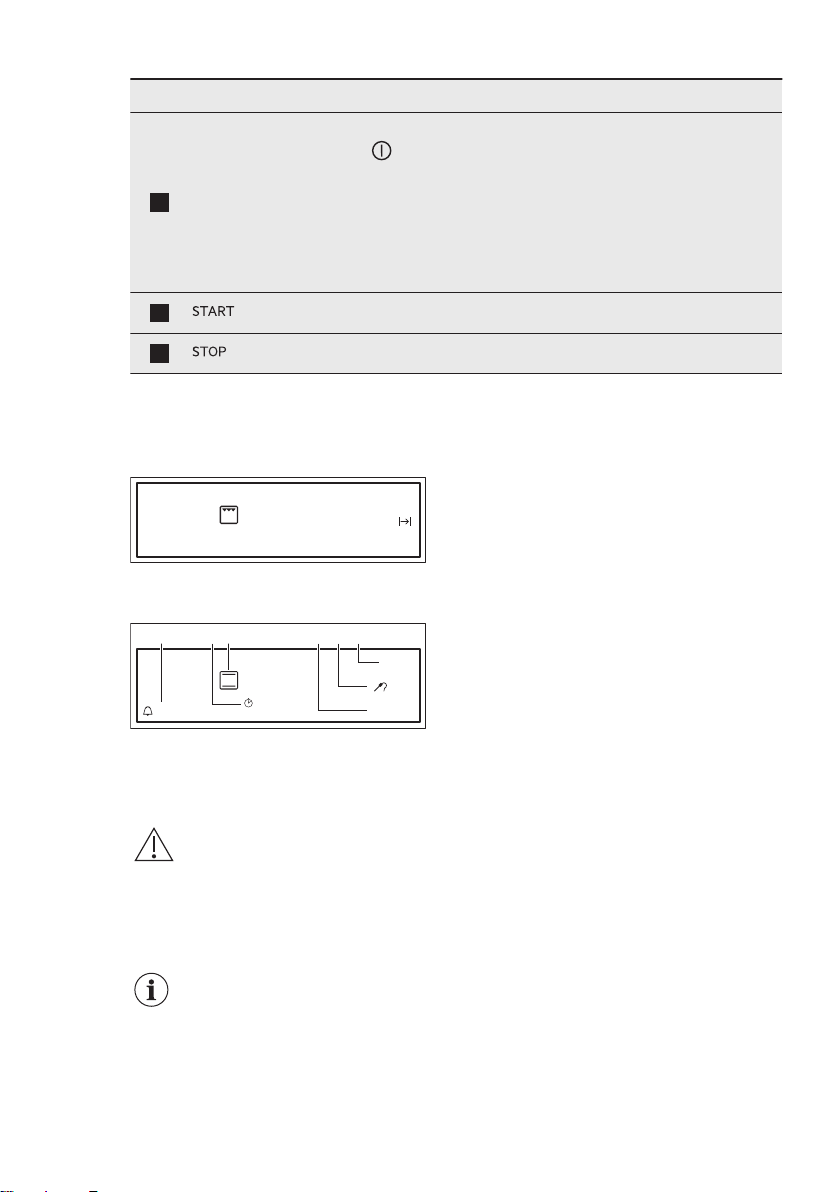
Function Comment
3
Rotary knob
To adjust the settings and navigate through the menu.
Press to turn the appliance on.
Hold the rotary knob to turn on the setting screen.
Hold and turn the rotary knob to navigate through the menu.
Hold and press the rotary knob to confirm a setting or enter
the selected submenu.
To return to the previous menu find the option Back in the
menu list or confirm a selected setting.
4
To turn on selected function.
5
To turn off selected function.
4.2 Display
After turning on, the display shows the
last selected heating function mode.
150°C
14:05
The display with maximum number of
functions set.
Options
Menu
25min
85°C
170°C
1h 15m
A B C D E F
A. Reminder
B. Up Timer
C. Heating function and temperature
D. Options or Time of Day
E. Duration time and End time of a
function or Food Sensor
F. Menu
5. BEFORE FIRST USE
WARNING!
Refer to Safety chapters.
5.1 Initial Cleaning
Remove all accessories and removable
shelf supports from the oven.
Refer to "Care and
cleaning" chapter.
Clean the oven and the accessories
before first use.
Put the accessories and the removable
shelf supports back to their initial
position.
5.2 First Connection
After the first connection the software
version will appear for 7 seconds.
You have to set the language, the
Display Brightness, Water hardness and
the Time of Day.
5.3 Setting the hardness level
for the water
When you connect the appliance to the
mains, you have to set the water
hardness level.
ENGLISH 9
The table below explains the water
hardness range with the corresponding
Calcium deposit (mmol/l) and the quality
of the water.
Water hardness Calcium deposit
(mmol/l)
Calcium deposit
(mg/l)
Water classi-
fication
Class dH
1 0 - 7 0 - 1.3 0 - 50 Soft
2 7 - 14 1.3 - 2.5 50 - 100 Moderately
hard
3 14 - 21 2.5 - 3.8 100 - 150 Hard
4 over 21 over 3.8 over 150 Very hard
When the water hardness exceeds the
values in the table, fill the water drawer
with bottled water. To check the
hardness level of the water you can use
water strips or contact your water
supplier.
You can change the hardness level of the
water in the menu: Basic Settings / Water
hardness.
6. DAILY USE
WARNING!
Refer to Safety chapters.
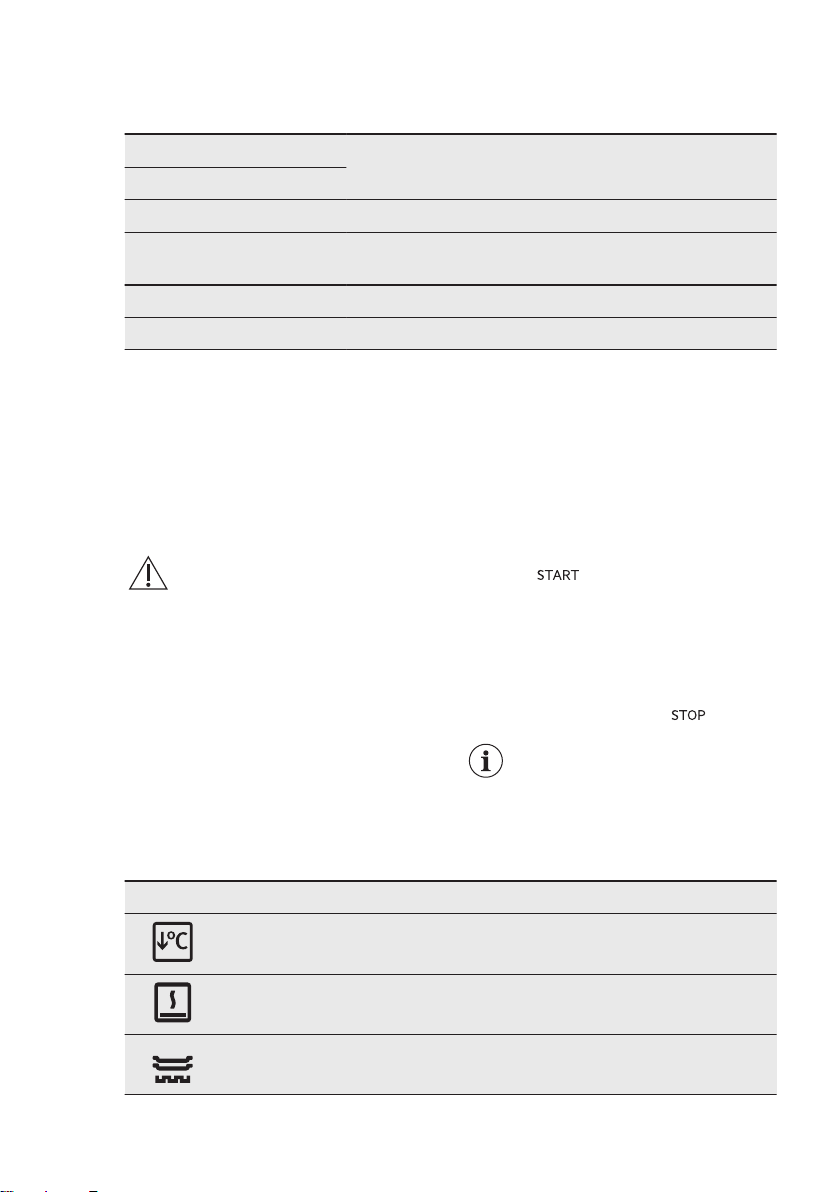
6.1 Heating Functions
Turning the heating functions on and off.
1. Turn on the oven.
2. Hold the rotary knob.
The last used function is underlined.
3. Press the rotary knob to enter the
submenu and turn it to select a
heating function.
4. Press the rotary knob to confirm.
5. Set the temperature and confirm.
6. Press . Food Sensor can be
plugged at any time before or during
cooking process. Some functions
contain a sequence of pop-ups. Press
the rotary knob to go to the next
pop-up. After the last confirmation
the function starts.
To turn off a function press .
The lamp may turn off
automatically at a
temperature below 60 °C
during some oven functions.
Heating Functions: Specials
Heating function Application
Slow Cooking To prepare tender, succulent roasts.
Keep Warm To keep food warm.
Plate Warming To preheat plates for serving.
www.aeg.com10
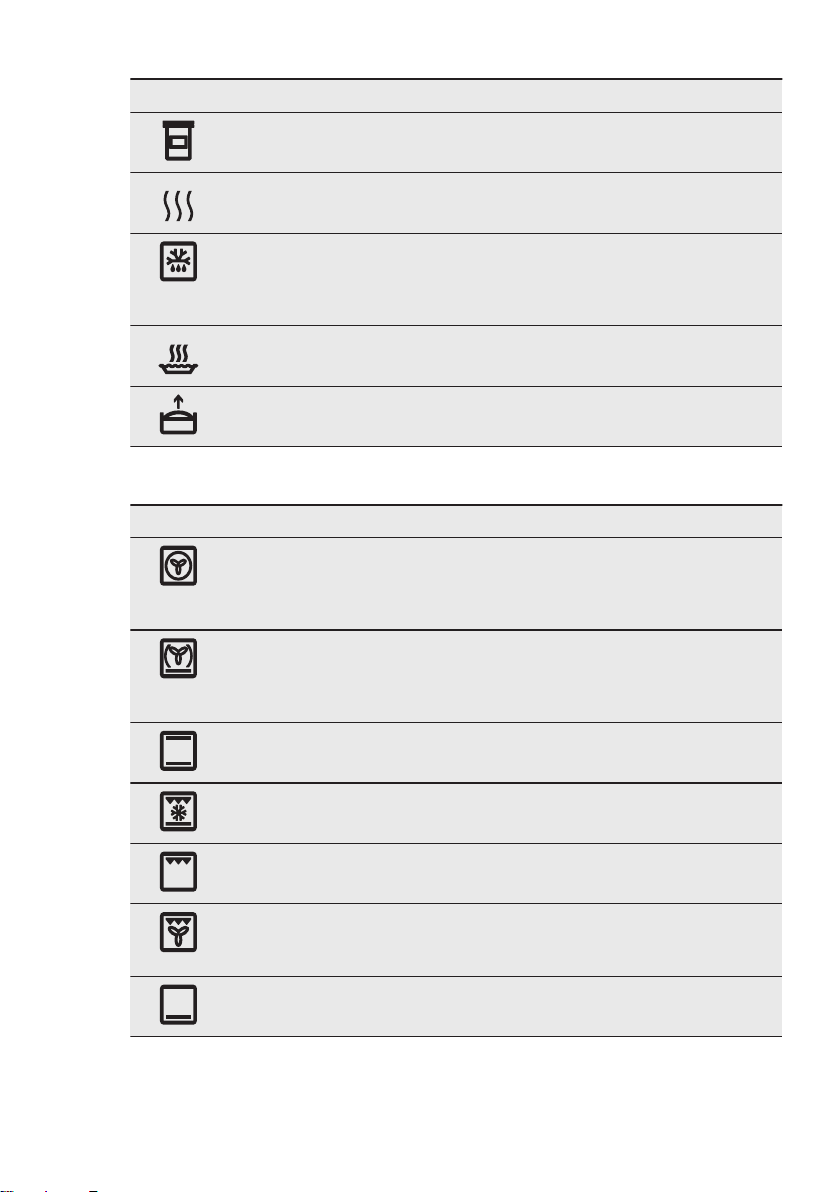
Heating function Application
Preserving To make vegetable preserves such as pickles.
Drying To dry sliced fruit, vegetables and mushrooms.
Defrost This function can be used for defrosting frozen
foods, such as vegetables and fruits. The defrost-
ing time depends on the amount and size of the
frozen food.
Au Gratin For dishes such as lasagna or potato gratin. Also
to gratinate and brown.
Dough Proving For controlled rising of yeast dough before bak-
ing.
Heating functions: Standard
Heating function Application
True Fan Cooking To bake on up to three shelf positions at the same
time and to dry food. Set the temperature 20 - 40
°C lower than for the function: Conventional
Cooking.
True Fan + Bottom To bake food on one shelf position for a more in-
tensive browning and a crispy bottom. Set the
temperature 20 - 40 °C lower than for the func-
tion: Conventional Cooking.
Conventional Cooking
(Top / Bottom Heat)
To bake and roast food on one shelf position.
Bottom + Grill + Fan To make convenience food like e.g. french fries,
potato wedges or spring rolls crispy.
Grill To grill flat food and to toast bread.
Grill + Fan To roast larger meat joints or poultry with bones
on one shelf position. Also to make gratins and to
brown.
Bottom Heat To bake cakes with crispy bottom and to preserve
food.
ENGLISH 11
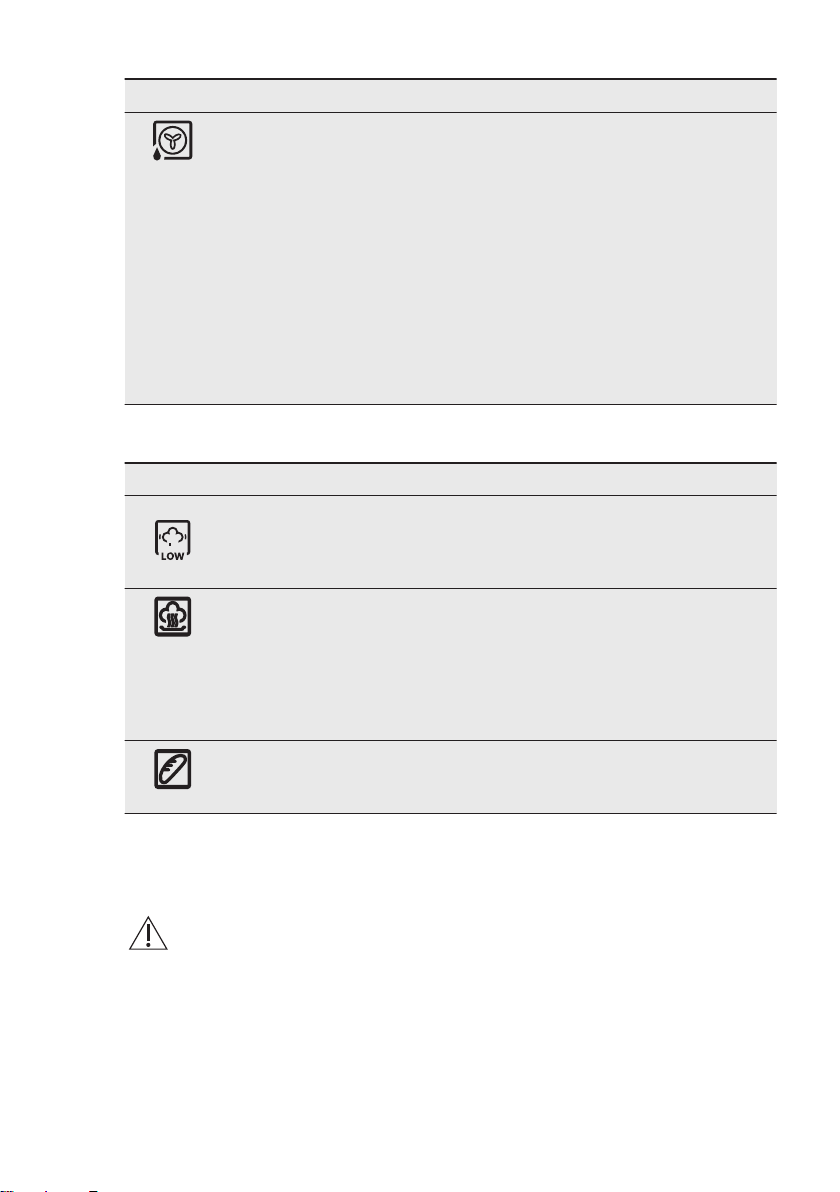
Heating function Application
Moist Fan Baking This function is designed to save energy during
cooking. For more information refer to "Hints and
tips" chapter, Moist Fan Baking. The oven door
should be closed during cooking so that the func-
tion is not interrupted and to ensure that the oven
operates with the highest energy efficiency possi-
ble. When you use this function, the temperature
in the cavity may differ from the set temperature.
Due to the use of the residual heat - the heating
power may be reduced. For general energy sav-
ing recommendations refer to: "Energy Efficien-
cy" chapter, Energy Saving.This function was used
to comply with the energy efficiency class accord-
ing to EN 60350-1.
Heating functions: Steam
Heating function Application
Humidity Low The function is suitable for meat, poultry, oven
dishes and casseroles. Thanks to the combination
of steam and heat, meat gets a tender and juicy
texture along with a crusty surface.
Steam Regenerating Food reheating with steam prevents surface dry-
ing. Heat is distributed in a gentle and even way,
which allows to recover taste and aroma of food
as just prepared. This function can be used to re-
heat food directly on a plate. You can reheat
more than one plate at the same time, using dif-
ferent shelf positions.
Bread Baking Use this function to prepare bread and bread rolls
with a very good professional-like result in terms
of crispiness, colour and crust gloss.
Steam cooking
The water drawer cover is in the control
panel.
WARNING!
Use only cold tap water. Do
not use filtered
(demineralised) or distilled
water. Do not use other
liquids. Do not put
flammable or alcoholic
liquids into the water
drawer.
1. Press the cover of the water drawer
to open it.
2. Fill the water drawer with cold water
to the maximum level (around 950
ml) until the signal sounds or the
display shows the message. Do not
fill the water drawer over its
maximum capacity. There is a risk of
water leakage, overflow and furniture
damages.
3. Push the water drawer to its initial
position.
4. Turn on the appliance.
www.aeg.com12
5. Set a steam heating function and the
temperature.
6. If necessary, set the function:
Duration or: End Time .
The steam appears after
approximately 2 minutes. When the
appliance reaches the set
temperature, the signal sounds.
When the water drawer is running
out of water, the signal sounds and
the water drawer needs to be refilled
to continue the steam cooking as
described above.
The signal sounds at the end of the
cooking time.
7. Turn off the appliance.
8. Empty the water drawer after the
steam cooking is completed.
Refer to the cleaning function: Tank
emptying.
CAUTION!
The appliance is hot.
There is a risk of burns.
9. After Steam Cooking steam can
condensate on the bottom of the
cavity. Always dry the bottom of the
cavity when the appliance is cool.
Let the appliance dry fully with the door
open. To speed up the drying you can
close the door and heat up the appliance
with function: True Fan Cooking at
temperature 150°C for approximately 15
minutes.
6.2 Menu - overview
Options
Menu
170°C
Menu
Menu item Application
Assisted Cooking Contains a list of automatic programmes.
Cleaning Contains a list of cleaning programmes.
Basic Settings Used to set the appliance configuration.
Submenu for: Cleaning
Submenu Description
Quick Pyrolytic cleaning.
1 h for a low degree of dirt.
Normal Pyrolytic cleaning.
1 h 30 min for a usual degree of dirt.
Intense Pyrolytic cleaning.
3 h for a high degree of dirt.
Descaling Procedure for cleaning the steam generation circuit
from residual limestone.
Rinsing Procedure for rinsing and cleaning the steam genera-
tion circuit after frequent use of the steam functions.
Tank emptying Procedure for removing the residual water from the wa-
ter drawer after use of the steam functions.
ENGLISH 13

Submenu for: Basic Settings
Submenu Description
Child Lock When the Child Lock is on, the oven cannot be activa-
ted accidentally. You can activate and deactivate this
function via Basic Setting Menu. Once activated, Child
Lock appears on the display when you turn on the ap-
pliance. To enable the oven use, choose the code let-
ters with the rotary knob in the following order: A B C.
When the Child Lock is on and the oven is turned off
the oven door are locked.
Fast Heat Up Decreases heat up time as a default. Note that it is
available only for some of the heating functions.
Heat + Hold Keeps the prepared food warm for 30 minutes after a
cooking is finished. To turn it off earlier press the rotary
knob. When this function is active the message "Keep
warm started" appears on the display. Note that it is
available only for some of the heating functions and if
Duration is set.
Time Extension To extend predefined cooking time. Note that it is
available only for some of the heating functions.
Setup To set the oven configuration.
Service Shows the software version and configuration.
Submenu for: Setup
Submenu Description
Language Sets the language for the display.
Time of Day Sets the current time and date.
Key Tones Activates and deactivates the tone of the touch fields. It
is not possible to deactivate the tone of the ON / OFF
and STOP.
Alarm/Error Tones Activates and deactivates the alarm tones.
Buzzer Volume Adjusts the volume of press-tones and signals by de-
grees.
Display Brightness Adjusts the display brightness by degrees.
Water hardness Sets the water hardness.
Submenu for: Service
Submenu Description
DEMO Activation / deactivation code: 2468
www.aeg.com14

Submenu Description
Show Licenses Information about licenses.
Show Software Version Information about software version.
Factory Settings Reset to factory settings.
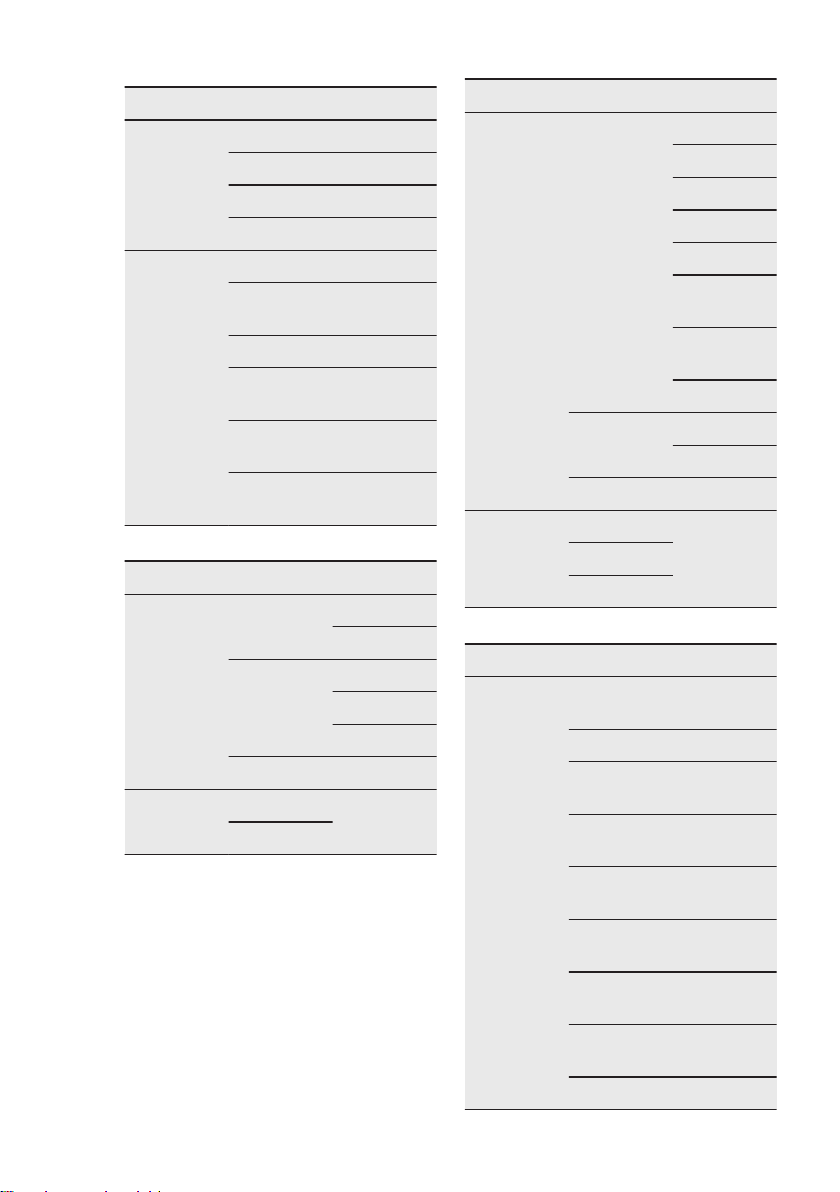
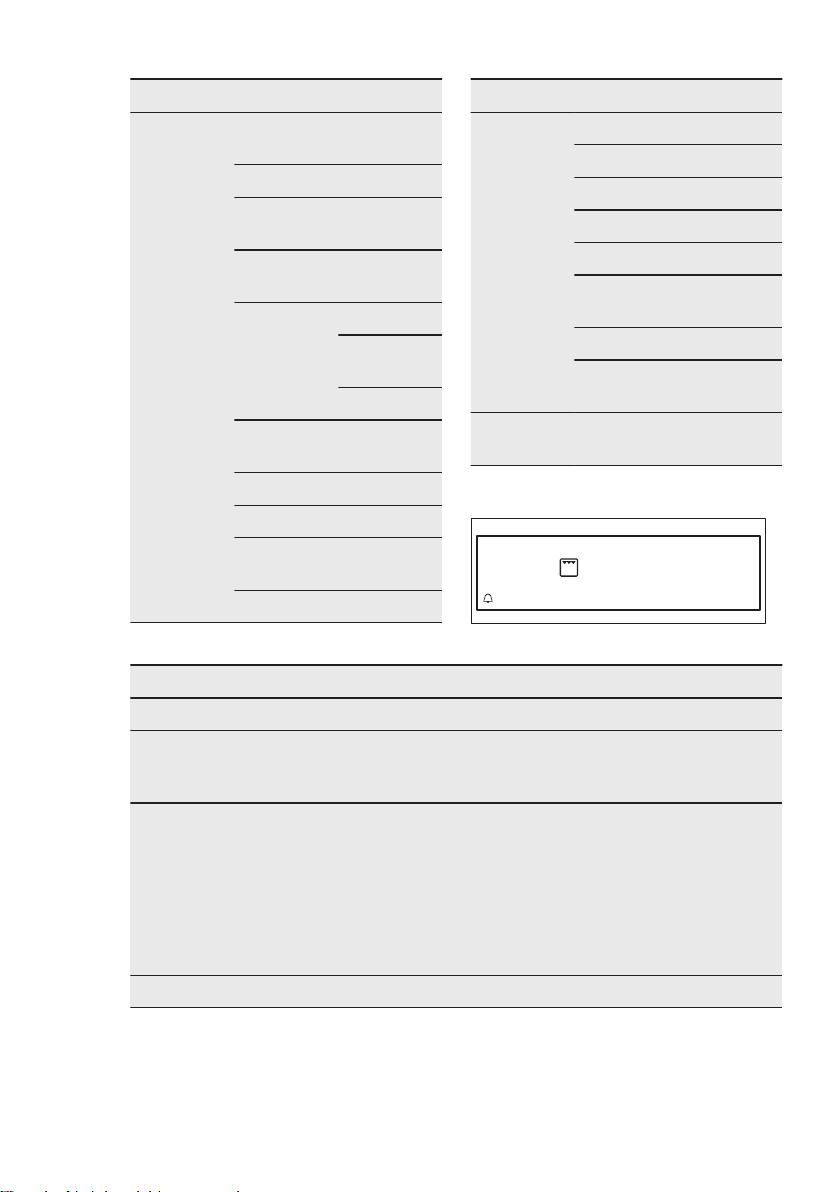
Submenu for: Assisted
Cooking
Every dish in this submenu has a
proposed function and temperature.
Those parameters can be adjusted
manually according to the user's
preference.
For some of the dishes You can also
choose way of cooking:
• Weight Automatic
• Food Sensor
The level to which a dish is cooked:
• Rare or Less
• Medium
• Well Done or More
Food Category: Meat and Fish
Meat
Beef Sirloin
Roast
Meat Loaf
Scandinavi-
an Beef
Pork Tenderloin Fresh
Smoked
Roast
Ham Roasted
Steamed
Knuckle,
precooked
Ribs
Veal Tenderloin
Roast
Knuckle
Meat
Lamb Roast
Saddle
Leg
Game Venison Saddle
Haunch
Hare Saddle
Leg
Poultry
Chicken Whole
Half
Legs
Wings
Duck
Goose
Turkey Whole
Breast
Fish
Whole Fish Small
Medium
Large
Fish Bakes
Fish Fingers
ENGLISH 15
Food Category: Side / Oven Dishes
Dishes
Side Dishes French Fries
Croquettes
Wedges
Hash Browns
Oven Dishes Lasagne
Potato Gra-
tin
Pasta Bake
Vegetables
au Gratin
Casserole,
savoury
Casserole,
vegetable
Food Category: Savoury Baking
Dish
Pizza
Fresh Thin
Thick
Frozen Thin
Thick
Snacks
Chilled
Quiche
Thin
Thick
Dish
Bread
Fresh Baguette
Ciabatta
White Bread
Dark Bread
Rye Bread
All Grain
Bread
Unleavened
Bread
Yeast Plait
Frozen Baguette
Bread
Pre-baked
Rolls
Fresh
Frozen
Pre-baked
Food Category: Desserts / Baking
Dish
Cake in Tin Almond
Cake
Apple Pie
Cheese
Cake
Apple Cake,
covered
Short Pastry
Base
Sponge Flan
Base
Madeira
Cake
Sponge
Cake
Tarts
www.aeg.com16
Dish
Cake on
Tray
Froz. Apple
Strudel
Brownies
Cheese
Cake
Christmas
Stollen
Fruit Flan Short Pastry
Sponge
Dough
Yeast Dough
Sponge
Cake
Sugar Cake
Swiss Roll
Swiss Tarte,
sweet
Yeast Cake
Dish
Small Pastry Cakes, small
Cream Puffs
Eclairs
Macaroons
Muffins
Pastry
Stripes
Puff Pastry
Short Pastry
Biscuits
Casserole,
sweet
6.3 Options
Options
Menu
170°C
Options Description
Timer Settings Contains a list of clock functions.
Fast Heat Up To decrease heat up time in the currently
running heating function.
On / Off
Set + Go To set a function and turn it on later. Once
set, the message "Set&Go active" appears
on the display. Press Start to turn it on.
When this function is active the message
disappears from the display and the oven
starts to work. Note that it is available only
for some of the heating functions and if Du-
ration / End Time is set.
Light On / Off
6.4 Residual heat
When you turn off the oven, the display
shows the residual heat. You can use the
heat to keep the food warm.
ENGLISH 17
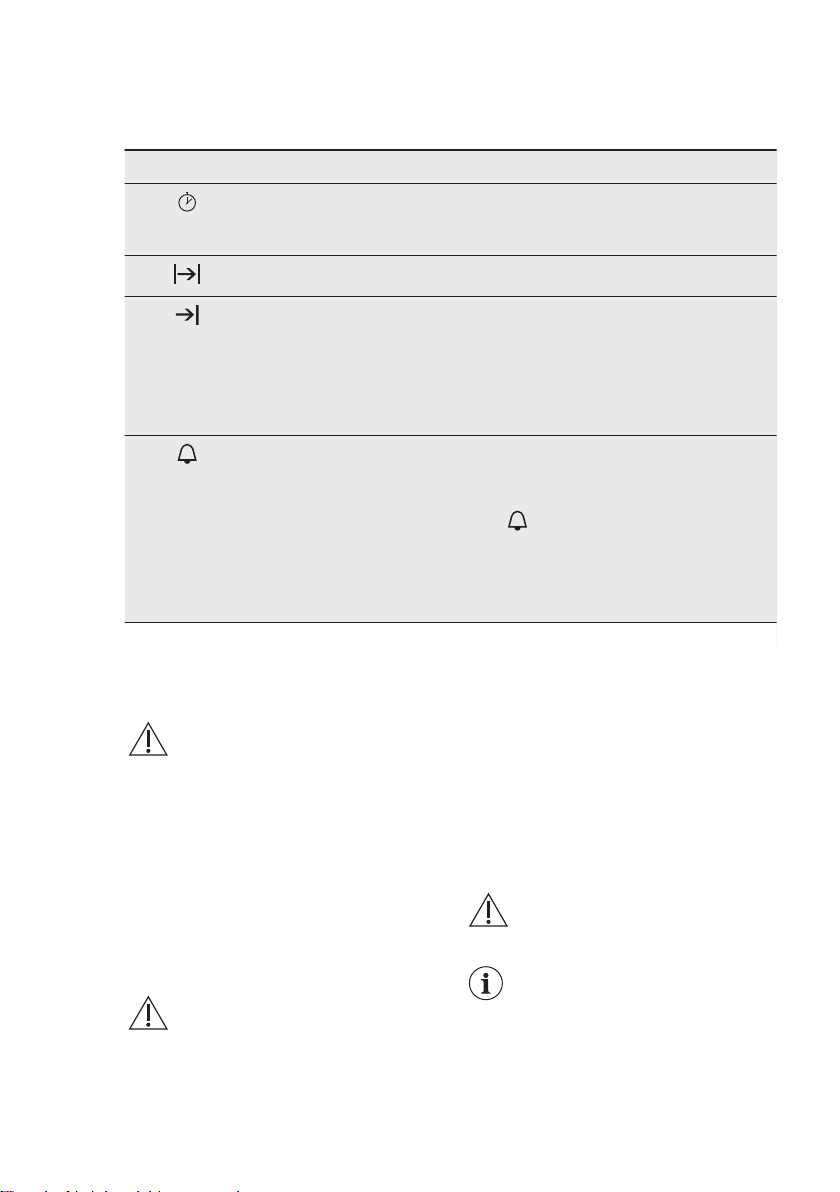
7. CLOCK FUNCTIONS
7.1 Timer Settings
Clock function Application
Up Timer Automatically monitors how long the func-
tion operates. The visibility of the Up Timer
can be turned on and off.
Duration
To set the length of an operation.
1)
End Time To set the switch-off time for a heating func-
tion. This option is available only when the
Duration is set. Use the functions Duration
and End Time at the same time to automati-
cally turns on and off the oven on a given
time later.
1)
Reminder
To set a countdown.
1)
This function has no effect on the operation
of the oven.
Choose and set the time. When the time
ends the signal sounds. Press the rotary knob
to stop the signal.
When the oven is turned off press the rotary
knob to turn on this function.
1)
Maximum 23 h 59 min
8. USING THE ACCESSORIES
WARNING!
Refer to Safety chapters.
8.1 Food Sensor
Food Sensor measures temperature
inside the food. When the food is at the
set temperature, the appliance
deactivates.
There are two temperatures to be set:
• the oven temperature (minimum 120
°C),
• the food core temperature.
CAUTION!
Use only the accessory
supplied and the original
replacement parts.
Directions for the best results:
• Ingredients should be at room
temperature.
• The Food Sensor cannot be used for
liquid dishes.
• During cooking the Food Sensor must
remain in the dish and the plug in the
socket.
• Use recommended food core
temperature settings.
WARNING!
Refer to “Hints and tips”
chapter.
The appliance calculates an
approximate end of cooking
time. It depends on the
quantity of food, the set
oven function and
temperature.
www.aeg.com18
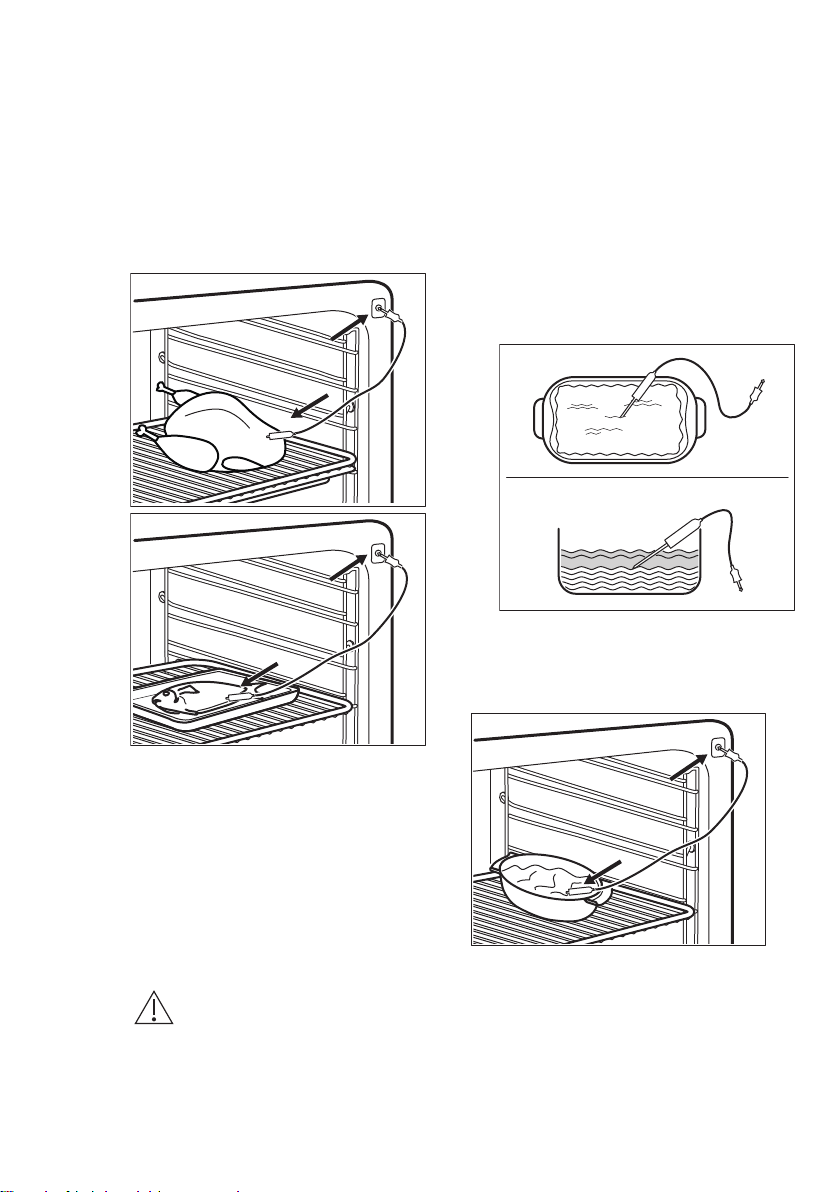
Food categories: meat, poultry
and fish
1. Activate the oven.
2. Insert the tip of the Food Sensor into
the centre of meat or fish, in the
thickest part if possible. Make sure
that at least 3/4 of the Food Sensor is
inside of the dish.
3. Put the plug of the Food Sensor into
the socket at the front of the oven.
The display shows: Food Sensor.
4. Set the core temperature.
5. Set a heating function and, if
necessary, the oven temperature.
When the dish reaches the set
temperature the signal sounds. The oven
turns off automatically.
6. Press the rotary knob to stop the
signal.
7. Remove the Food Sensor plug from
the socket and remove the dish from
the oven.
WARNING!
There is a risk of burns as the
Food Sensor becomes hot.
Be careful when you unplug
it and remove it from the
food.
Food category: casserole
1. Activate the oven.
2. Place half of the ingredients in a
baking dish.
3. Insert the tip of the Food Sensor
exactly in the centre of the casserole.
The Food Sensor should be
stabilized in one place during baking.
Use a solid ingredient to achieve
that. Use the rim of the baking dish
to support the silicone handle of the
Food Sensor. The tip of the Food
Sensor should not touch the bottom
of a baking dish.
4. Cover the Food Sensor with the
remaining ingredients.
5. Put the plug of the Food Sensor into
the socket at the front of the oven.
The display shows: Food Sensor.
6. Set the core temperature.
7. Set a heating function and, if
necessary, the oven temperature.
When the dish reaches the set
temperature, an acoustic signal sounds.
The oven turns off automatically.
8. Press the rotary knob to stop the
signal.
ENGLISH
19
9. Remove the Food Sensor plug from
the socket and remove the dish from
the oven.
WARNING!
There is a risk of burns as the
Food Sensor becomes hot.
Be careful when you unplug
it and remove it from the
food.
Changing the core
temperature
You can change the core temperature
and the oven temperature at any time
during cooking.
1. Select on the display.
2. Turn the rotary knob to change the
temperature.
3. Press to confirm.
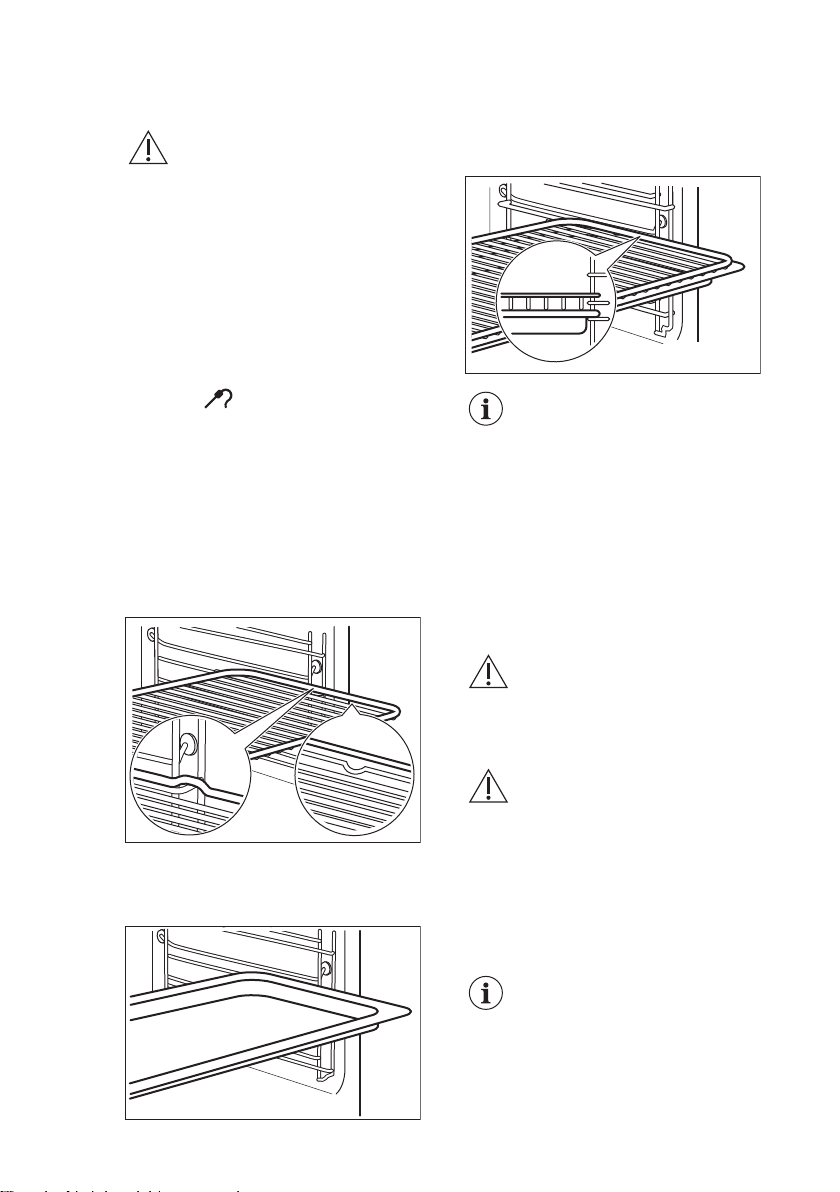
8.2 Inserting the accessories
Wire shelf:
Push the shelf between the guide bars of
the shelf support and make sure that the
feet point down.
Baking tray/ Deep pan:
Push the baking tray / deep pan between
the guide bars of the shelf support.
Wire shelf and baking tray / deep pan
together:
Push the baking tray / deep pan between
the guide bars of the shelf support and
the wire shelf on the guide bars above.
Small indentation at the top
increase safety. The
indentations are also anti-tip
devices. The high rim
around the shelf prevents
cookware from slipping of
the shelf.
8.3 Telescopic runners -
inserting the accessories
With the telescopic runners you can put
in and remove the shelves more easily.
CAUTION!
Do not clean the telescopic
runners in the dishwasher.
Do not lubricate the
telescopic runners.
CAUTION!
Make sure you push back
the telescopic runners fully
in the oven before you close
the oven door.
Wire shelf:
Put the wire shelf on the telescopic
runners so that the feet point
downwards.
The high rim around the wire
shelf is a special device to
prevent the cookware from
slipping.
www.aeg.com20
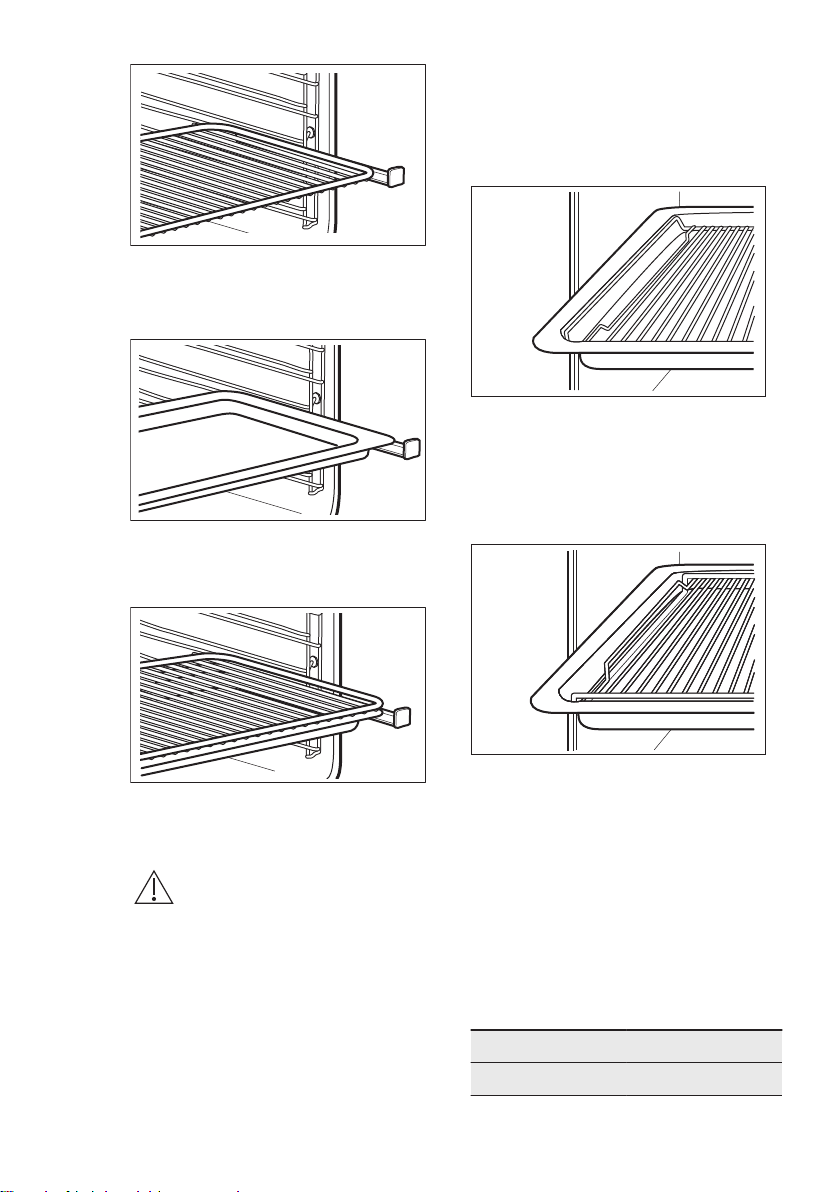
Deep pan:
Put the deep pan on the telescopic
runners.
Wire shelf and deep pan together:
Place the wire shelf and the deep pan
together on the telescopic runner.
8.4 Trivet and Grill- / Roasting
pan
WARNING!
Be careful when you remove
the accessories from a hot
oven. There is a risk of burns.
You can use the trivet to roast larger
pieces of meat or poultry on one shelf
position.
1. Put the trivet into the deep pan so
that the supports of the wire shelf
point up.
2. Put the deep pan into the oven on
the necessary shelf position.
You can use the trivet to grill flat dishes
in large quantities and to toast.
1. Put the trivet into the deep pan so
that the supports of the wire shelf
point down.
2. Put the deep pan into the oven on
the necessary shelf position.
9.
ADDITIONAL FUNCTIONS
9.1 Automatic Switch-off
For safety reasons the oven turns off
automatically after some time if a heating
function works and you do not change
any settings.
Temperature (°C) Switch-off time (h)
30 - 115 12.5
ENGLISH 21
Temperature (°C) Switch-off time (h)
120 - 195 8.5
200 - 245 5.5
250 - maximum 1.5
The Automatic switch-off
does not work with the
functions: Light, Food
Sensor, Duration, End Time.
9.2 Cooling fan
When the oven operates, the cooling fan
turns on automatically to keep the
surfaces of the oven cool. If you turn off
the oven, the cooling fan can continue to
operate until the oven cools down.
10. HINTS AND TIPS
WARNING!
Refer to Safety chapters.
The temperature and baking
times in the tables are
guidelines only. They
depend on the recipes and
the quality and quantity of
the ingredients used.
10.1 Inner side of the door
On the inner side of the door you can
find:
• the numbers of the shelf positions.
• information about the heating
functions, recommended shelf
positions and temperatures for
dishes.
10.2 Humidity Low
Food Temperature (°C) Time (min) Shelf position
Roast pork 1000 g 160 - 180 90 - 100 2
Roast beef 1000 g 180 - 200 60 - 90 2
Roast veal 1000 g 180 80 - 90 2
Meat loaf, uncooked,
500 g
180 30 - 40 2
Smoked loin of pork
600 - 1000 g (soak for
2 hours)
160 - 180 60 - 70 2
Chicken 1000 g 180 - 210 50 - 60 2
Duck 1500 - 2000 g 180 70 - 90 2
Goose 3000 g 170 130 - 170 1
Potato gratin 160 - 170 50 - 60 2
Pasta bake 170 - 190 40 - 50 2
Lasagne 170 - 180 45 - 55 2
www.aeg.com22

Food Temperature (°C) Time (min) Shelf position
Misc. types of bread
500 - 1000 g
180 - 190 45 - 60 2
Bread rolls 180 - 210 25 - 35 2
Ready-to-bake rolls 200 15 - 20 2
Ready-to-bake bagu-
ettes 40 - 50 g
200 15 - 20 2
Ready-to-bake bagu-
ettes 40 - 50 g, fro-
zen
200 25 - 35 2
10.3 Steam Regenerating
Food Temperature (°C) Time (min)
1)
Shelf position
One-plate dishes 120 - 130 15 - 20 2
Pasta 120 - 130 15 - 20 2
Rice 120 - 130 15 - 20 2
Dumplings 120 - 130 15 - 20 2
1)
The times are for guidance only.
10.4 Baking
• Use the lower temperature the first
time.
• You can extend baking times by 10 –
15 minutes if you bake cakes on more
than one shelf position.
• Cakes and pastries at different
heights do not always brown equally.
There is no need to change the
temperature setting if an unequal
browning occurs. The differences
equalize during baking.
• Trays in the oven can twist during
baking. When the trays become cold
again, the distortions disappear.
10.5 Tips on baking
Baking results Possible cause Remedy
The bottom of the cake
is not browned suffi-
ciently.
The shelf position is incor-
rect.
Put the cake on a lower shelf.
ENGLISH 23

Baking results Possible cause Remedy
The cake sinks and be-
comes soggy, lumpy or
streaky.
The oven temperature is
too high.
The next time you bake, set a
slightly lower oven temperature.
The baking time is too
short.
Set a longer baking time. You
cannot decrease baking times by
setting higher temperatures.
There is too much liquid in
the mixture.
Use less liquid. Be careful with
mixing times, especially if you use
a mixing machine.
The cake is too dry. The oven temperature is
too low.
The next time you bake, set a
higher oven temperature.
The baking time is too long. The next time you bake, set a
shorter baking time.
The cake browns un-
evenly.
The oven temperature is
too high and the baking
time is too short.
Set a lower oven temperature and
a longer baking time.
The mixture is unevenly dis-
tributed.
Spread the mixture evenly on the
baking tray.
The cake is not ready in
the baking time given.
The oven temperature is
too low.
The next time you bake, set a
slightly higher oven temperature.
10.6 Baking on one level
Baking in tins
Food Function Temperature
(°C)
Time (min) Shelf position
Ring cake / Brio-
che
True Fan Cook-
ing
150 - 160 50 - 70 1
Madeira cake /
Fruit cakes
True Fan Cook-
ing
140 - 160 70 - 90 1
Flan base - short
pastry
True Fan Cook-
ing
150 - 160
1)
20 - 30 2
Flan base -
sponge mixture
True Fan Cook-
ing
150 - 170 20 - 25 2
Cheesecake Conventional
Cooking
170 - 190 60 - 90 1
1)
Preheat the oven.
www.aeg.com24

Cakes / pastries / breads on baking trays
Food Function Temperature
(°C)
Time (min) Shelf position
Plaited bread /
Bread crown
Conventional
Cooking
170 - 190 30 - 40 3
Christmas stol-
len
Conventional
Cooking
160 - 180
1)
50 - 70 2
Bread (rye
bread):
1. First 20 mi-
nutes:
2. After that
reduce to:
Conventional
Cooking
1. 230
1)
2. 160 - 180
1. 20
2. 30 - 60
1
Cream puffs /
Eclairs
Conventional
Cooking
190 - 210
1)
20 - 35 3
Swiss roll Conventional
Cooking
180 - 200
1)
10 - 20 3
Cake with crum-
ble topping (dry)
True Fan Cook-
ing
150 - 160 20 - 40 3
Buttered al-
mond cake /
Sugar cakes
Conventional
Cooking
190 - 210
1)
20 - 30 3
Fruit flans Conventional
Cooking
180 35 - 55 3
Yeast cakes with
toppings (e.g.
quark, cream,
custard)
Conventional
Cooking
160 - 180
1)
40 - 60 3
1)
Preheat the oven.
Biscuits
Food Function Temperature
(°C)
Time (min) Shelf position
Short pastry /
sponge mixture
True Fan Cook-
ing
150 - 160 15 - 25 3
Meringues True Fan Cook-
ing
80 - 100 120 - 150 3
Macaroons True Fan Cook-
ing
100 - 120 30 - 50 3
Yeast dough
biscuits
True Fan Cook-
ing
150 - 160 20 - 40 3
ENGLISH 25

Food Function Temperature
(°C)
Time (min) Shelf position
Puff pastries True Fan Cook-
ing
170 - 180
1)
20 - 30 3
Rolls Conventional
Cooking
190 - 210
1)
10 - 25 3
1)
Preheat the oven.
10.7 Bakes and gratins
Food Function Temperature
(°C)
Time (min) Shelf position
Pasta bake Conventional
Cooking
180 - 200 45 - 60 1
Lasagne Conventional
Cooking
180 - 200 25 - 40 1
Vegetables au
gratin
1)
Grill + Fan 170 - 190 15 - 35 1
Baguettes with
melted cheese
True Fan Cook-
ing
160 - 170 15 - 30 1
Milk rice Conventional
Cooking
180 - 200 40 - 60 1
Fish bakes Conventional
Cooking
180 - 200 30 - 60 1
Stuffed vegeta-
bles
True Fan Cook-
ing
160 - 170 30 - 60 1
1)
Preheat the oven.
10.8 Moist Fan Baking
Food Temperature
(°C)
Time (min) Shelf position
Pasta gratin 200 - 220 45 - 55 3
Potato gratin 180 - 200 70 - 85 3
Moussaka 170 - 190 70 - 95 3
Lasagne 180 - 200 75 - 90 3
Cannelloni 180 - 200 70 - 85 3
Bread pudding 190 - 200 55 - 70 3
Rice pudding 170 - 190 45 - 60 3
www.aeg.com26

Food Temperature
(°C)
Time (min) Shelf position
Apple cake, made with
sponge mixture (round cake
tin)
160 - 170 70 - 80 3
White bread 190 - 200 55 - 70 3
10.9 Multilevel Baking
Use the function: True Fan Cooking.
Cakes / pastries / breads on baking trays
Food Temperature
(°C)
Time (min) Shelf position
2 positions 3 positions
Cream puffs /
Eclairs
160 - 180
1)
25 - 45 1 / 4 -
Dry streusel
cake
150 - 160 30 - 45 1 / 4 -
1)
Preheat the oven.
Biscuits
Food Temperature
(°C)
Time (min) Shelf position
2 positions 3 positions
Short pastry /
sponge mixture
biscuits
150 - 160 20 - 40 1 / 4 1 / 3 / 5
Meringues 80 - 100 130 - 170 1 / 4 -
Macaroons 100 - 120 40 - 80 1 / 4 -
Yeast dough
biscuits
160 - 170 30 - 60 1 / 4 -
Puff pastries
170 - 180
1)
30 - 50 1 / 4 -
Rolls 180 20 - 30 1 / 4 -
1)
Preheat the oven.
10.10 Crispy baking with True Fan + Bottom
Food Temperature (°C) Time (min) Shelf position
Pizza (thin)
210 - 230
1)2)
15 - 25 2
Pizza (thick) 180 - 200 20 - 30 2
ENGLISH 27

Food Temperature (°C) Time (min) Shelf position
Tarts 180 - 200 40 - 55 1
Spinach flan 160 - 180 45 - 60 1
Quiche Lorraine /
Swiss Flan
170 - 190 45 - 55 1
Apple cake, covered 150 - 170 50 - 60 1
Vegetable pie 160 - 180 50 - 60 1
Unleavened bread
210 - 230
1)
10 - 20 2
Puff pastry flan
160 - 180
1)
45 - 55 2
Flammekuchen
210 - 230
1)
15 - 25 2
Pierogi
180 - 200
1)
15 - 25 2
1)
Preheat the oven.
2)
Use a deep pan.
10.11 Roasting
Use heat-resistant ovenware.
Roast large roasting joints directly in the
tray or on the wire shelf placed above
the tray.
Put some water in the tray to prevent the
meat juices or fat from burning.
Meat with crackling can be roasted in the
roasting tin without the lid.
Turn the roast after 1/2 - 2/3 of the
cooking time.
To keep meat more succulent:
• roast lean meat in the roasting tin with
the lid or use roasting bag.
• roast meat and fish in large pieces (1
kg or more).
• baste large roasts and poultry with
their juices several times during
roasting.
10.12 Roasting
Beef
Food Quantity (kg) Function Temperature
(°C)
Time (min)
Braised meet 1 - 1.5 Conventional
Cooking
230 120 - 150
Roast beef or fillet:
rare
1 cm thick Grill + Fan
190 - 200
1)
5 - 6
Roast beef or fillet:
medium
1 cm thick Grill + Fan
180 - 190
1)
6 - 8
www.aeg.com28

Food Quantity (kg) Function Temperature
(°C)
Time (min)
Roast beef or fillet:
well done
1 cm thick Grill + Fan
170 - 180
1)
8 - 10
1)
Preheat the oven.
Pork
Food Quantity (kg) Function Temperature
(°C)
Time (min)
Shoulder / Neck /
Ham joint
1 - 1.5 Grill + Fan 150 - 170 90 - 120
Chop / Spare rib 1 - 1.5 Grill + Fan 170 - 190 30 - 60
Meatloaf 0.75 - 1 Grill + Fan 160 - 170 50 - 60
Pork knuckle (pre-
cooked)
0.75 - 1 Grill + Fan 150 - 170 90 - 120
Veal
Food Quantity (kg) Function Temperature
(°C)
Time (min)
Roast veal 1 Grill + Fan 160 - 180 90 - 120
Knuckle of veal 1.5 - 2 Grill + Fan 160 - 180 120 - 150
Lamb
Food Quantity (kg) Function Temperature
(°C)
Time (min)
Leg of lamb /
Roast lamb
1 - 1.5 Grill + Fan 150 - 170 100 - 120
Saddle of lamb 1 - 1.5 Grill + Fan 160 - 180 40 - 60
Game
Food Quantity (kg) Function Temperature
(°C)
Time (min)
Saddle / Leg of
hare
1 Grill + Fan
180 - 200
1)
35 - 55
Saddle of veni-
son
1.5 - 2 Conventional
Cooking
180 - 200 60 - 90
Haunch of veni-
son
1.5 - 2 Conventional
Cooking
180 - 200 60 - 90
1)
Preheat the oven.
ENGLISH 29

Poultry
Food Quantity (kg) Function Temperature
(°C)
Time (min)
Poultry portions 0.2 - 0.25 Grill + Fan 200 - 220 30 - 50
Half chicken 0.4 - 0.5 Grill + Fan 190 - 210 40 - 50
Chicken, pou-
lard
1 - 1.5 Grill + Fan 190 - 210 50 - 70
Duck 1.5 - 2 Grill + Fan 180 - 200 80 - 100
Goose 3.5 - 5 Grill + Fan 160 - 180 120 - 180
Turkey 2.5 - 3.5 Grill + Fan 160 - 180 120 - 150
Turkey 4 - 6 Grill + Fan 140 - 160 150 - 240
Fish
Food Quantity (kg) Function Temperature
(°C)
Time (min)
Whole fish 1 - 1.5 Grill + Fan 180 - 200 30 - 50
10.13 Grill
Put the pan to collect the fat into the first
shelf position.
Preheat the empty oven for 5 minutes.
Grill
Food Temperature
(°C)
Time (min) Shelf position
1st side 2nd side
Roast beef 210 - 230 30 - 40 30 - 40 2
Filet of beef 230 20 - 30 20 - 30 3
Back of pork 210 - 230 30 - 40 30 - 40 2
Back of veal 210 - 230 30 - 40 30 - 40 2
Back of lamb 210 - 230 25 - 35 20 - 25 3
Whole Fish, 0.5 -
1 kg
210 - 230 15 - 30 15 - 30 3 / 4
Fast Grilling
Preheat the empty oven for 3 minutes.
Grill with the maximum temperature setting.
Food Time (min) Shelf position
1st side 2nd side
Pork fillet 10 - 12 6 - 10 4
www.aeg.com30

Food Time (min) Shelf position
1st side 2nd side
Sausages 10 - 12 6 - 8 4
Fillet / Veal steaks 7 - 10 6 - 8 4
Toast with topping 6 - 8 - 4
10.14 Bottom + Grill + Fan
Food Temperature (°C) Time (min) Shelf position
Pizza, frozen 200 - 220 15 - 25 2
Pizza American, fro-
zen
190 - 210 20 - 25 2
Pizza, chilled 210 - 230 13 - 25 2
Pizza Snacks, frozen 180 - 200 15 - 30 2
French Fries, thin 190 - 210 15 - 25 3
French Fries, thick 190 - 210 20 - 30 3
Wedges / Cro-
quettes
190 - 210 20 - 40 3
Hash Browns 210 - 230 20 - 30 3
Lasagne / Cannello-
ni, fresh
170 - 190 35 - 45 2
Lasagne / Cannello-
ni, frozen
160 - 180 40 - 60 2
Oven baked cheese 170 - 190 20 - 30 3
Chicken Wings 180 - 200 40 - 50 2
Frozen ready meals
Food Function Temperature
(°C)
Time (min) Shelf position
Frozen pizza Conventional
Cooking
as per manufac-
turer’s instruc-
tions
as per manufac-
turer’s instruc-
tions
3
French fries
1)
(300 - 600 g)
Conventional
Cooking or Grill
+ Fan
200 - 220 as per manufac-
turer’s instruc-
tions
3
Baguettes Conventional
Cooking
as per manufac-
turer’s instruc-
tions
as per manufac-
turer’s instruc-
tions
3
ENGLISH 31
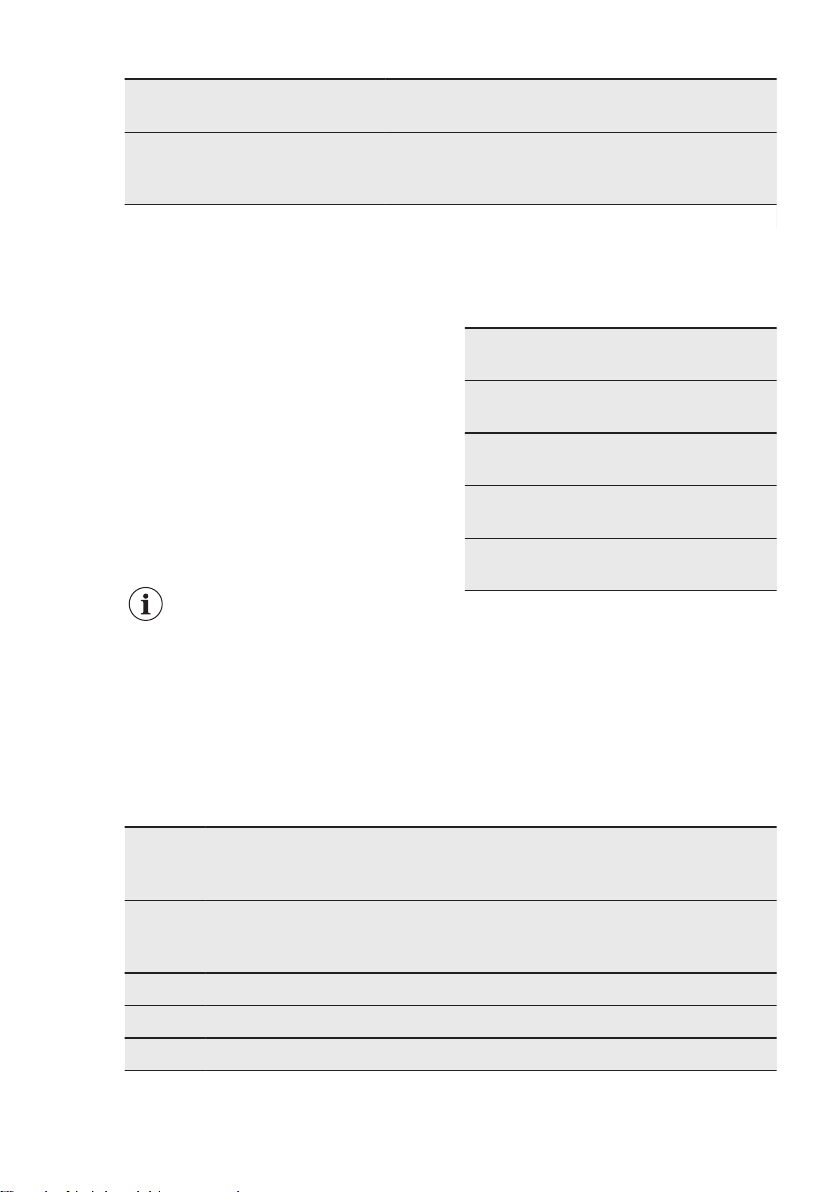
Food Function Temperature
(°C)
Time (min) Shelf position
Fruit flans Conventional
Cooking
as per manufac-
turer’s instruc-
tions
as per manufac-
turer’s instruc-
tions
3
1)
Turn the French fries 2 or 3 times during cooking.
10.15 Slow Cooking
Use this function to prepare lean, tender
pieces of meat and fish with core
temperatures no more than 65 °C. This
function is not applicable to such recipes
as pot roast or fatty roast pork. You can
use the core temperature sensor to
guarantee that the meat has the correct
core temperature (see the table for the
core temperature sensor).
In the first 10 minutes you can set an
oven temperature between 80 °C and
150 °C. The default is 90 °C. After the
temperature is set, the oven continues to
cook at 80 °C. Do not use this function
for poultry.
Always cook without a lid
when you use this function.
1. Sear the meat in a pan on the hob on
a very high setting for 1 - 2 minutes
on each side.
2. Put the meat together with the hot
roasting pan in the oven and on the
wire shelf.
3. Put the core temperature sensor into
the meat.
4. Select the function: Slow Cooking
and set the correct end core
temperature.
Set the temperature to 120 °C.
Food Time
(min)
Shelf posi-
tion
Roast beef, 1 -
1.5 kg
120 - 150 1
Fillet of beef, 1 -
1.5 kg
90 - 150 3
Roast veal, 1 -
1.5 kg
120 - 150 1
Steaks, 0.2 - 0.3
kg
20 - 40 3
10.16 Defrost
• Remove the food packaging and put
the food on a plate.
• Use the first shelf position from the
bottom.
• Do not cover the food with a bowl or
a plate, as this can extend the defrost
time.
Food Quantity Defrosting
time (min)
Further de-
frosting time
(min)
Comments
Chicken 1 kg 100 - 140 20 - 30 Put the chicken on an upturned
saucer in a big plate. Turn halfway
through.
Meat 1 kg 100 - 140 20 - 30 Turn halfway through.
Meat 500 g 90 - 120 20 - 30 Turn halfway through.
Trout 150 g 25 - 35 10 - 15 -
www.aeg.com32

Food Quantity Defrosting
time (min)
Further de-
frosting time
(min)
Comments
Strawber-
ries
300 g 30 - 40 10 - 20 -
Butter 250 g 30 - 40 10 - 15 -
Cream 2 x 200 g 80 - 100 10 - 15 Whip the cream when still slightly
frozen in places.
Gateau 1.4 kg 60 60 -
10.17 Preserving
Use only preserve jars of the same
dimensions available on the market.
Do not use jars with twist-off and
bayonet type lids or metal tins.
Use the first shelf from the bottom for
this function.
Put no more than six one-litre preserve
jars on the baking tray.
Fill the jars equally and close with a
clamp.
The jars cannot touch each other.
Put approximately 1/2 litre of water into
the baking tray to give sufficient moisture
in the oven.
When the liquid in the jars starts to
simmer (after approximately 35 - 60
minutes with one-litre jars), stop the oven
or decrease the temperature to 100 °C
(see the table).
Soft fruit
Food Temperature (°C) Cooking time until
simmering (min)
Continue to cook at
100 °C (min)
Strawberries / Blue-
berries / Raspber-
ries / Ripe gooseber-
ries
160 - 170 35 - 45 -
Stone fruit
Food Temperature (°C) Cooking time until
simmering (min)
Continue to cook at
100 °C (min)
Pears / Quinces /
Plums
160 - 170 35 - 45 10 - 15
Vegetables
Food Temperature (°C) Cooking time until
simmering (min)
Continue to cook at
100 °C (min)
Carrots
1)
160 - 170 50 - 60 5 - 10
Cucumbers 160 - 170 50 - 60 -
ENGLISH 33

Food Temperature (°C) Cooking time until
simmering (min)
Continue to cook at
100 °C (min)
Mixed pickles 160 - 170 50 - 60 5 - 10
Kohlrabi / Peas / As-
paragus
160 - 170 50 - 60 15 - 20
1)
Leave standing in the oven after it is deactivated.
10.18 Drying
• Cover trays with grease proof paper
or baking parchment.
• For a better result, stop the oven
halfway through the drying time, open
the door and let it cool down for one
night to complete the drying.
Vegetables
Food Temperature
(°C)
Time (h) Shelf position
1 position 2 positions
Beans 60 - 70 6 - 8 3 1 / 4
Peppers 60 - 70 5 - 6 3 1 / 4
Vegetables for
sour
60 - 70 5 - 6 3 1 / 4
Mushrooms 50 - 60 6 - 8 3 1 / 4
Herbs 40 - 50 2 - 3 3 1 / 4
Fruit
Food Temperature
(°C)
Time (h) Shelf position
1 position 2 positions
Plums 60 - 70 8 - 10 3 1 / 4
Apricots 60 - 70 8 - 10 3 1 / 4
Apple slices 60 - 70 6 - 8 3 1 / 4
Pears 60 - 70 6 - 9 3 1 / 4
10.19 Bread Baking
Preheating is not recommended.
Food Temperature (°C) Time (min) Shelf position
White Bread 170 - 190 40 - 60 2
Baguette 200 - 220 35 - 45 2
www.aeg.com34

Food Temperature (°C) Time (min) Shelf position
Brioche 180 - 200 40 - 60 2
Ciabatta 200 - 220 35 - 45 2
Rye Bread 170 - 190 50 - 70 2
Dark Bread 170 - 190 50 - 70 2
All Grain bread 170 - 190 40 - 60 2
Bread rolls 190 - 210 20 - 35 2
10.20 Food Sensor table
Beef Food core temperature (°C)
Rare Medium Well done
Roast beef 45 60 70
Sirloin 45 60 70
Beef Food core temperature (°C)
Less Medium More
Meat loaf 80 83 86
Pork Food core temperature (°C)
Less Medium More
Ham,
Roast
80 84 88
Chop (saddle),
Smoked pork loin,
Smoked loin poached
75 78 82
Veal Food core temperature (°C)
Less Medium More
Roast veal 75 80 85
Knuckle of veal 85 88 90
Mutton / lamb Food core temperature (°C)
Less Medium More
Leg of mutton 80 85 88
Saddle of mutton 75 80 85
ENGLISH 35

Mutton / lamb Food core temperature (°C)
Less Medium More
Leg of lamb,
Roast lamb
65 70 75
Game Food core temperature (°C)
Less Medium More
Saddle of hare,
Saddle of venison
65 70 75
Leg of hare,
Whole hare,
Leg of venison
70 75 80
Poultry Food core temperature (°C)
Less Medium More
Chicken (whole / half / breast) 80 83 86
Duck (whole / half),
Turkey (whole / breast)
75 80 85
Duck (breast) 60 65 70
Fish (salmon, trout, zander) Food core temperature (°C)
Less Medium More
Fish (whole / large / steamed),
Fish (whole / large / roasted)
60 64 68
Casseroles - Precooked vegeta-
bles
Food core temperature (°C)
Less Medium More
Zucchini Casserole,
Broccoli Casserole,
Fennel Casserole
85 88 91
Casseroles - Savoury Food core temperature (°C)
Less Medium More
Cannelloni,
Lasagne,
Pasta bake
85 88 91
www.aeg.com36

Casseroles - Sweet Food core temperature (°C)
Less Medium More
White bread casserole with / with-
out fruits,
Rice porridge casserole with /
without fruits,
Sweet noodle casserole
80 85 90
10.21 Information for test
institutes
Tests according to EN 60350-1:2013 and
IEC 60350-1:2011.
Baking on one level. Baking in tins
Food Function Temperature
(°C)
Time
(min)
Shelf posi-
tion
Fatless sponge cake True Fan Cooking 140 - 150 35 - 50 2
Fatless sponge cake Top / Bottom Heat 160 35 - 50 2
Apple pie (2 tins Ø20
cm, diagonally off set)
True Fan Cooking 160 60 - 90 2
Apple pie (2 tins Ø20
cm, diagonally off set)
Top / Bottom Heat 180 70 - 90 1
Baking on one level. Biscuits
Food Function Temperature
(°C)
Time
(min)
Shelf posi-
tion
Short bread / Pastry
stripes
True Fan Cooking 140 25 - 40 3
Short bread / Pastry
stripes
Top / Bottom Heat
160
1)
20 - 30 3
Small cakes (20 per
tray)
True Fan Cooking
150
1)
20 - 35 3
Small cakes (20 per
tray)
Top / Bottom Heat
170
1)
20 - 30 3
1)
Preheat the oven.
ENGLISH 37
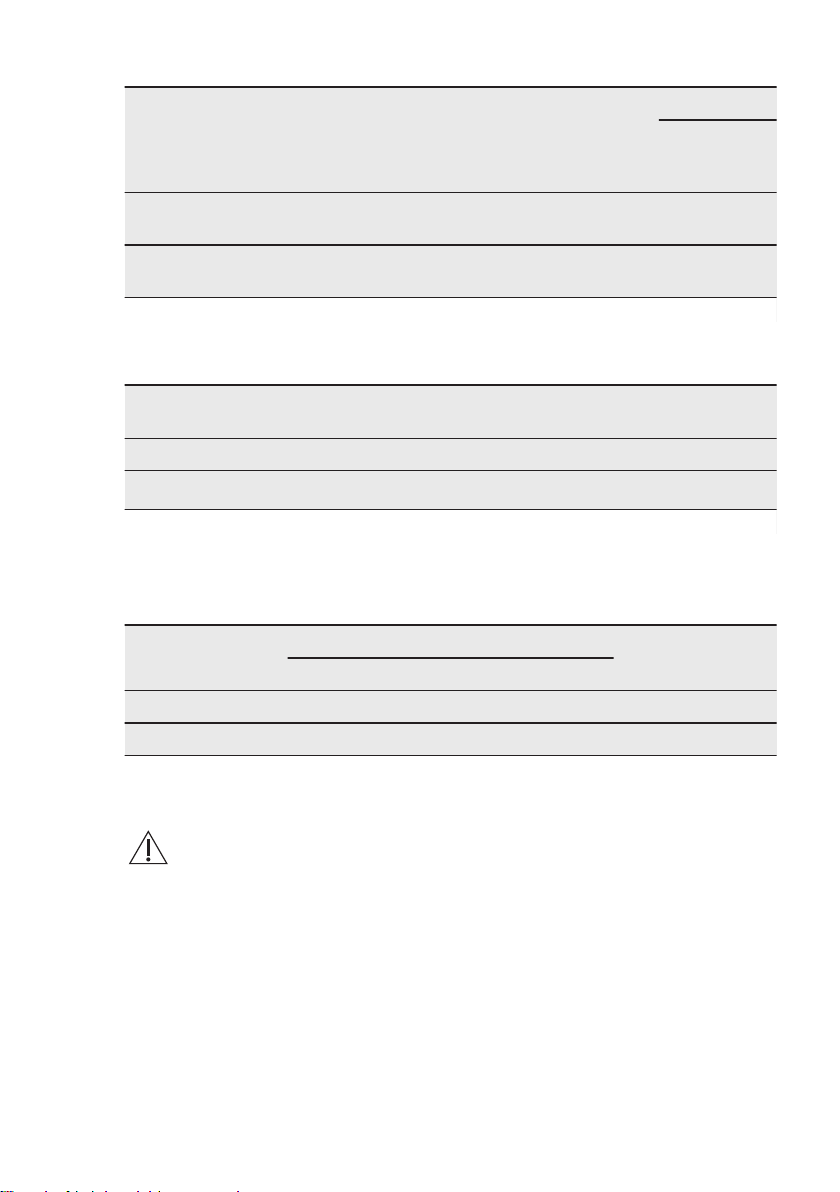
Multilevel Baking. Biscuits
Food Function Temperature
(°C)
Time
(min)
Shelf position
2 po-
sitions
3 po-
si-
tions
Short bread / Pastry
Stripes
True Fan Cooking 140 25 - 45 1 / 4 1 / 3 /
5
Small cakes (20 per
tray)
True Fan Cooking
150
1)
23 - 40 1 / 4 -
1)
Preheat the oven.
Grill
Preheat the empty oven for 5 minutes.
Food Function Temperature
(°C)
Time (min) Shelf position
Toast Grill max 1 - 3 5
Beef Steak Grill max
24 - 30
1)
4
1)
Turn halfway through.
Fast Grilling
Preheat the empty oven for 3 minutes.
Grill with the maximum temperature setting.
Food Time (min) Shelf position
1st side 2nd side
Burgers 8 - 10 6 - 8 4
Toast 1 - 3 1 - 3 4
11. CARE AND CLEANING
WARNING!
Refer to Safety chapters.
11.1 Notes on cleaning
Clean the front of the oven with a soft
cloth with warm water and a mild
cleaning agent.
To clean metal surfaces, use a dedicated
cleaning agent.
Clean the oven interior after each use.
Fat accumulation or other food remains
may result in a fire. The risk is higher for
the grill pan.
Clean all accessories after each use and
let them dry. Use a soft cloth with warm
water and a cleaning agent.
Clean stubborn dirt with a special oven
cleaner.
If you have nonstick accessories, do not
clean them using aggressive agents,
sharp-edged objects or a dishwasher. It
can cause damage to the nonstick
coating.
Clean the moisture from the cavity after
each use.
www.aeg.com38
11.2 Recommended cleaning
products
Do not use abrasive sponges or
aggressive detergents. It can cause
damage to the enamel and the stainless
steel parts.
You can buy our products at
www.aeg.com/shop and at the best
retailer shops.
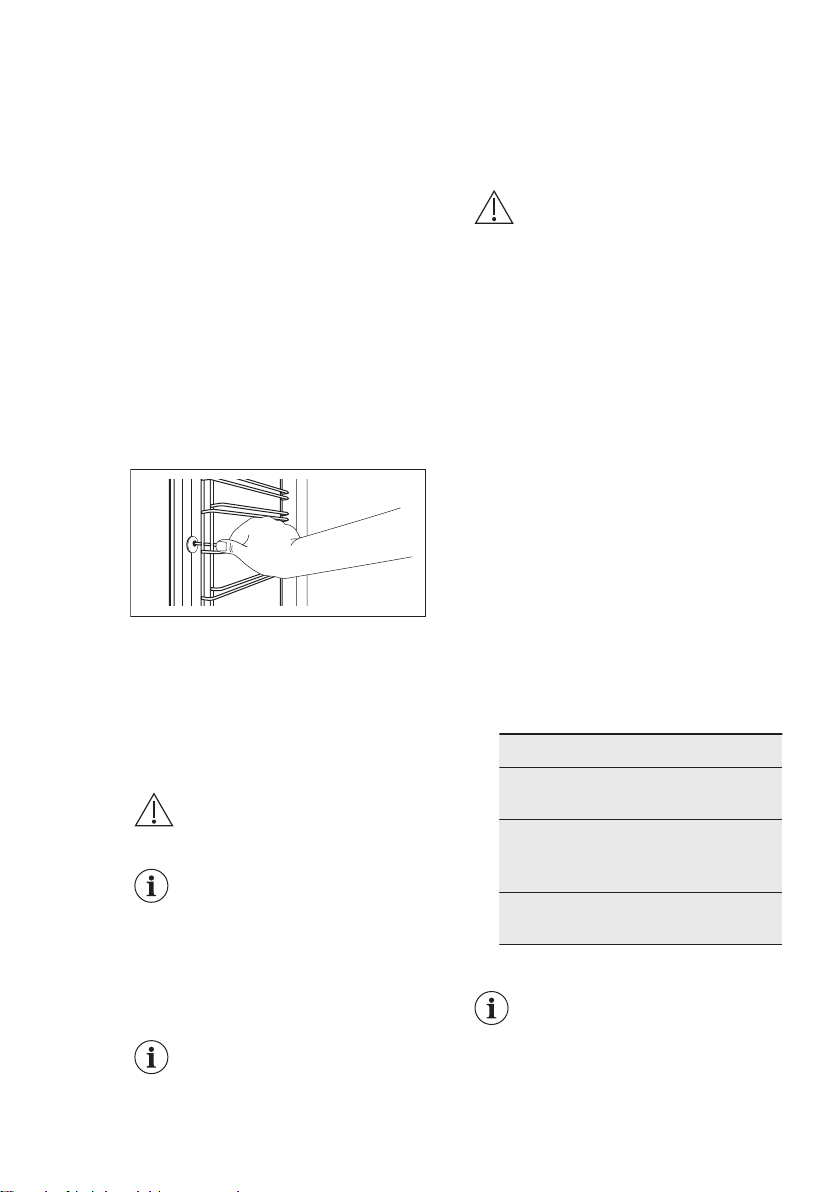
11.3 Removing the shelf
supports
Before maintenance, make sure that the
oven is cool. There is a risk of burns.
To clean the oven, remove the shelf
supports.
1. Pull carefully the supports up and out
of the front catch.
2. Pull the front end of the shelf support
away from the side wall.
3. Pull the supports out of the rear
catch.
Install the shelf supports in the opposite
sequence.
11.4 Pyrolytic cleaning
CAUTION!
Remove all accessories and
removable shelf supports.
Do not insert water in the
water tank during the
pyrolytic cleaning. Filling the
water tank during pyro cycle
will stop the pyrolytic
cleaning. After this
operation pyro cycle will
start from the beginning.
The pyrolytic cleaning
procedure cannot start:
• if you did not remove the core
temperature sensor plug from the
socket.
• if you did not fully close the oven
door.
Remove the worst dirt manually.
CAUTION!
If there are other appliances
installed in the same
cabinet, do not use them at
the same time as the
function: Cleaning. It can
cause damage to the
appliance.
1. Turn on the oven.
2. Select the Menu and press the rotary
knob to confirm.
3. Select Cleaning and press the rotary
knob to confirm.
4. Put the baking tray on the first shelf
position to collect water from the
water tank. Press the rotary knob to
start water tank emptying procedure.
5. When the procedure ends remove all
accessories and the side grids.
Remove the remaining food
manually. Clean the inner side of the
door with hot water, so that the
residues do not burn from the hot air.
Press the rotary knob to start the
cleaning procedure.
6. Select the duration of the cleaning
procedure:
Option Description
Quick 1 h for a low
degree of dirt
Normal 1 h 30 min for
a usual de-
gree of dirt
Intense 3 h for a high
degree of dirt
7. Press the rotary knob to confirm.
When the pyrolytic cleaning
starts, the oven door is
locked and the lamp does
not work. The cooling fan
works at a higher speed.
ENGLISH 39
To stop the pyrolytic
cleaning before it is
completed, turn off the
oven.
WARNING!
After the function is
completed, the oven is very
hot. Let it cool down. There
is a risk of burns.
When the function ends, the
door stays locked for the
cool down phase. Some of
the oven functions are not
available.
11.5 Cleaning Reminder
When reminder is displayed cleaning is
necessary. Perform the function Pyrolytic
Cleaning.
11.6 Steam generation system
- Descaling
When the steam generator operates,
limestone accumulates inside it (because
of calcium contents in the water). This
can have a negative effect on the steam
quality, on the performance of the steam
generator and on the food quality. To
prevent limestone accumulation, clean
the steam generation circuit.
Remove all accessories.
Select the function from the menu:
Cleaning. The user interface will guide
you through the procedure.
The duration of the complete procedure
is about 2 hours.
The light in this function is off.
1. Make sure that the water drawer is
empty.
2. Press
.
3. Put the grill- / roasting pan on the
first shelf position.
4. Press the rotary knob.
5. Put 250 ml of the descaling agent in
the water drawer.
6. Fill the remaining part of the water
drawer with water to the maximum
level until the signal sounds or the
display shows the message.
7. Press the rotary knob.
This activates the first part of the
procedure: Descaling.
The duration of this part is
around 1 hour 40 minutes.
8. After the end of the first part, empty
the grill- / roasting pan and put it on
the first shelf position again.
9. Press the rotary knob.
10. Fill the water drawer with fresh water
to the maximum level until the signal
sounds or the display shows the
message.
11. Press .
This activates the second part of the
procedure: Descaling. It will rinse the
steam generation circuit.
The duration of this part is
around 35 minutes.
Remove the grill- / roasting pan after the
end of the procedure.
If the function: Descaling is
not performed in the correct
way, the display will show a
message to repeat it.
If the oven is humid or wet, wipe it out
with a dry cloth. Let the oven dry fully
with the door open.
11.7 Descaling reminder
There are two descaling reminders which
remind you to perform the function:
Descaling.
The soft reminder reminds and
recommends you to perform the
descaling cycle.
The hard reminder obligates you to
perform the descaling.
If you do not descale the
appliance when the hard
reminder is on, you cannot
use the steam functions.
You cannot disable the
descaling reminder.
www.aeg.com40
11.8 Steam generation system
- Rinsing
Remove all accessories.
Select the function from the menu:
Cleaning. The user interface will guide
you through the procedure.
The duration of the function is around 30
minutes.
The light in this function is off.
1. Put the baking tray on the first shelf
position.
2. Fill the water drawer with fresh water
to the maximum level until the
acoustic signal sounds or the display
shows the message.
3. Press
.
Remove the baking tray after the end of
the procedure.
11.9 Tank emptying
Remove all accessories.
The cleaning function removes the
residual water from the water drawer.
Use the function after the steam cooking
function.
Select the function from the menu:
Cleaning. The user interface will guide
you through the procedure.
The duration of the function is around 6
minutes.
The light in this function is off.
Put the baking tray on the first shelf
position.
Remove the baking tray after the end of
the procedure.
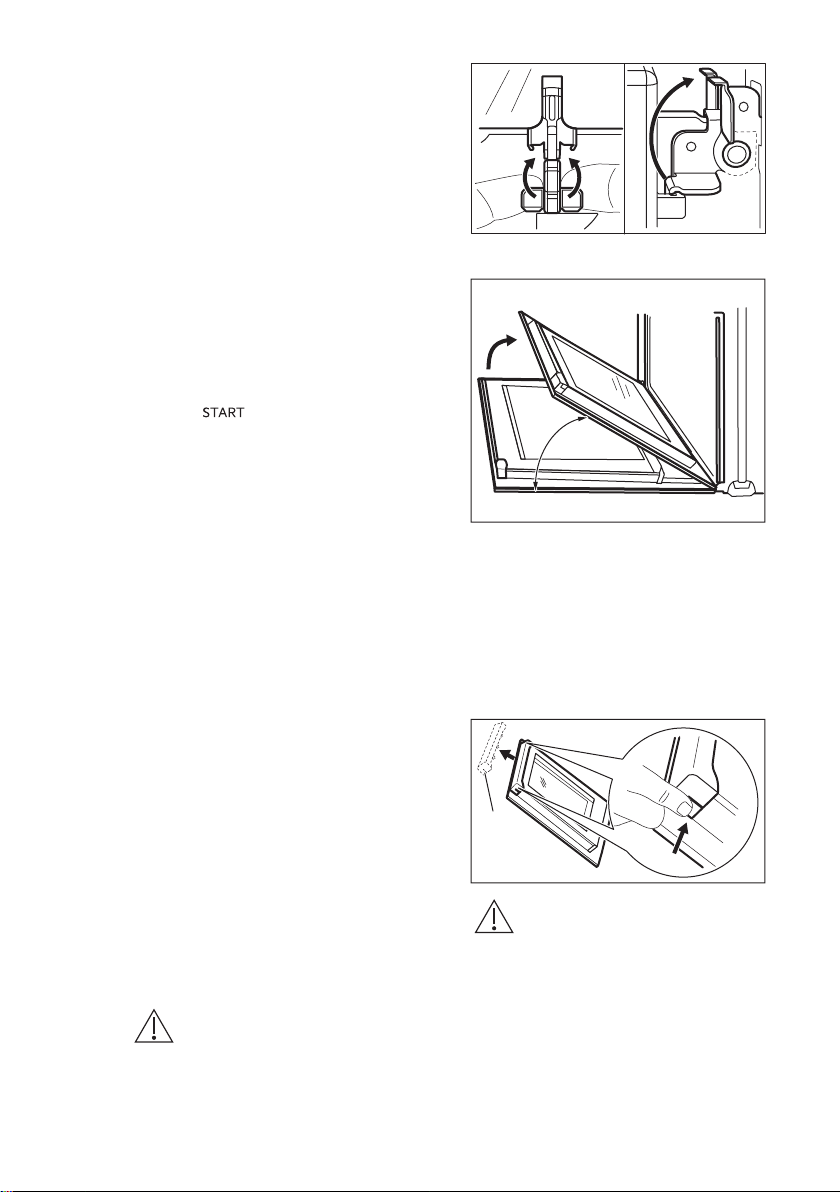
11.10 Removing and installing
the door
You can remove the door and the
internal glass panels to clean it. The
number of glass panels is different for
different models.
WARNING!
The door is heavy.
1. Open the door fully.
2. Fully lift up the clamping levers (A) on
the two door hinges.
A
A
3. Close the door until it is at an angle
of approximately 45°.
45°
4. Hold the door with one hand on each
side and pull it away from the oven at
an upwards angle.
5. Put the door with the outer side
down on a soft cloth on a stable
surface.
6. Hold the door trim (B) on the top
edge of the door at the two sides
and push inwards to release the clip
seal.
1
2
B
CAUTION!
Rough handling of the glass,
especially around the edges
of the front panel, can cause
the glass to break.
7. Pull the door trim to the front to
remove it.
8. Hold the door glass panels on their
top edge one by one and pull them
up out of the guide.
ENGLISH
41
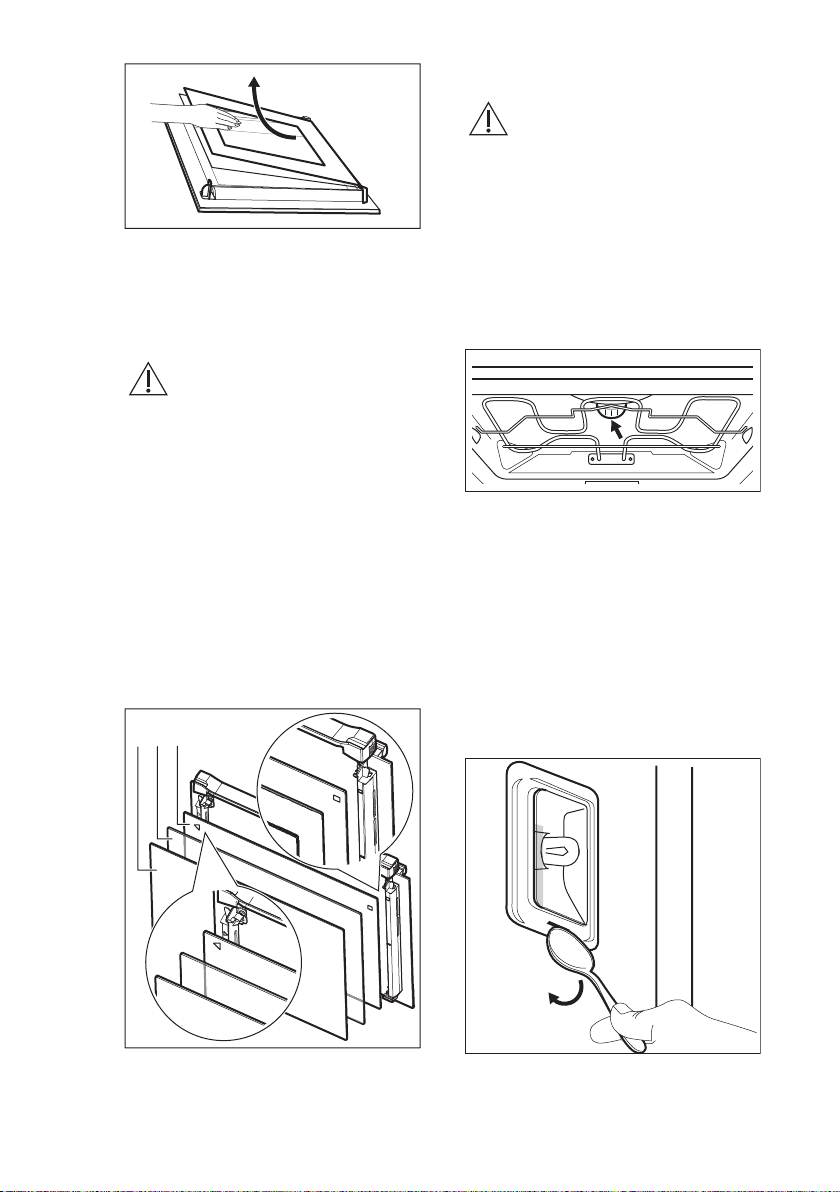
9. Clean the glass panel with water and
soap. Dry the glass panel carefully.
When the cleaning is completed, do the
above steps in the opposite sequence.
Install the smaller panel first, then the
larger and the door.
WARNING!
Make sure that the glasses
are inserted in the correct
position otherwise the
surface of the door may
overheat.
Make sure that you put the glass panels
(C, B and A) back in the correct
sequence. First, insert panel C, which has
a square printed on the left side and a
triangle on the right side. You will also
find those symbols embossed on the
door frame. The triangle symbol on the
glass must match the triangle on the
door frame, and the square symbol must
match the square. After that insert the
other two glass panels.
A B C
11.11 Replacing the lamp
WARNING!
Risk of electric shock.
The lamp can be hot.
1. Turn off the oven.
Wait until the oven is cooled down.
2. Disconnect the oven from the mains.
3. Put a cloth on the bottom of the
cavity.
The top lamp
1. Turn the lamp glass cover to remove
it.
2. Remove the metal ring and clean the
glass cover.
3. Replace the lamp with a suitable 300
°C heat-resistant lamp.
4. Attach the metal ring to the glass
cover.
5. Install the glass cover.
The side lamp
1. Remove the left shelf support to get
access to the lamp.
2. Use a narrow, blunt object (e.g. a
teaspoon) to remove the glass cover.
3. Clean the glass cover.
www.aeg.com
42

4. Replace the lamp with a suitable 300
°C heat-resistant lamp.
5. Install the glass cover.
6. Install the left shelf support.
12. TROUBLESHOOTING
WARNING!
Refer to Safety chapters.
12.1 What to do if...
Problem Possible cause Remedy
You cannot activate or oper-
ate the oven.
The oven is not connected
to an electrical supply or it is
connected incorrectly.
Check if the oven is correctly
connected to the electrical
supply (refer to the connec-
tion diagram if available).
The oven does not heat up. The oven is deactivated. Activate the oven.
The oven does not heat up. The clock is not set. Set the clock.
The oven does not heat up. The necessary settings are
not set.
Make sure that the settings
are correct.
The oven does not heat up. The automatic switch-off is
activated.
Refer to "Automatic switch-
off".
The oven does not heat up. The door is not closed cor-
rectly.
Fully close the door.
The oven does not heat up. The fuse is blown. Make sure that the fuse is
the cause of the malfunction.
If the fuse is blown again
and again, contact a quali-
fied electrician.
The lamp does not operate. The lamp is defective. Replace the lamp.
The display prompts to set
the Language.
There was a power cut lon-
ger than 3 days.
Refer to "Before first use"
chapter.
The display prompts to set
the Language.
The demo mode is activa-
ted.
Turn off demo mode in:
Menu / Basic Settings /
DEMO. Activation / deacti-
vation code: 2468.
The display shows F111. The plug of the core tem-
perature sensor is not cor-
rectly installed into the sock-
et.
Put the plug of the core tem-
perature sensor as far as
possible into the socket.
ENGLISH 43

Problem Possible cause Remedy
The display shows an error
code that is not in this table.
There is an electrical fault. • Deactivate the oven with
the house fuse or the
safety switch in the fuse
box and activate it again.
• If the display shows the
error code again, contact
the Customer Care De-
partment.
Steam and condensation
settle on the food and in the
cavity of the oven.
You left the dish in the oven
for too long.
Do not leave the dishes in
the oven for longer than 15 -
20 minutes after the cooking
process ends.
The descaling procedure is
interrupted before it finishes.
There was a power cut. Repeat the procedure.
The descaling procedure is
interrupted before it finishes.
The function was stopped by
the user.
Repeat the procedure.
There is no water inside the
grill- / roasting pan after the
descaling procedure.
You did not fill the water
drawer to the maximum lev-
el.
Check if the a descaling
agent / water is present in
the water drawer body.
Repeat the procedure.
There is dirty water on the
bottom of the cavity after
the descaling cycle.
The grill- / roasting pan is on
a wrong shelf position.
Remove the residual water
and the descaling agent
from the bottom of the
oven. Put the grill- / roasting
pan on the first shelf posi-
tion.
The cleaning function is in-
terrupted before it finishes.
There was a power cut. Repeat the procedure.
The cleaning function is in-
terrupted before it finishes.
The function was stopped by
the user.
Repeat the procedure.
There is no good perform-
ance of the cleaning proce-
dure.
You did not remove the side
grids before the start of the
cleaning procedure. They
can transfer heat to the walls
and decrease the perform-
ance.
Remove the side grids from
the appliance and repeat the
function.
12.2 Service data
If you cannot find a solution to the
problem yourself, contact your dealer or
an Authorised Service Centre.
The necessary data for the service centre
is on the rating plate. The rating plate is
on the front frame of the oven cavity. Do
not remove the rating plate from the
oven cavity.
www.aeg.com44

We recommend that you write the data here:
Model (MOD.) .........................................
Product number (PNC) .........................................
Serial number (S.N.) .........................................
13. ENERGY EFFICIENCY
13.1 Product Fiche and information according to EU 65-66/2014
Supplier's name AEG
Model identification
BSE874320M
BSK874320M
Energy Efficiency Index 81.2
Energy efficiency class A+
Energy consumption with a standard load, conven-
tional mode
0.99 kWh/cycle
Energy consumption with a standard load, fan-forced
mode
0.69 kWh/cycle
Number of cavities 1
Heat source Electricity
Volume 71 l
Type of oven Built-In Oven
Mass
BSE874320M 39.5 kg
BSK874320M 39.5 kg
EN 60350-1 - Household electric cooking
appliances - Part 1: Ranges, ovens, steam
ovens and grills - Methods for measuring
performance.
13.2 Energy saving
The oven contains features
which help you save energy
during everyday cooking.
General hints
Make sure that the oven door is closed
properly when the oven operates. Do not
open the door too often during cooking.
Keep the door gasket clean and make
sure it is well fixed in its position.
Use metal dishes to improve energy
saving.
When possible, do not preheat the oven
before you put the food inside.
When the cooking duration is longer
than 30 minutes, reduce the oven
temperature to minimum 3 - 10 minutes
before the end of the cooking time,
depending on the duration of the
cooking. The residual heat inside the
oven will continue to cook.
Use the residual heat to warm up other
dishes.
Keep breaks between baking as short as
possible when you prepare few dishes at
one time.
ENGLISH
45

Cooking with fan
When possible, use the cooking
functions with fan to save energy.
Residual heat
If a programme with the Duration or End
Time selection is activated and the
cooking time is longer than 30 minutes,
the heating elements automatically
deactivate earlier in some oven
functions.
The fan and lamp continue to operate.
Keep food warm
Choose the lowest possible temperature
setting to use residual heat and keep a
meal warm. The residual heat indicator
or temperature appears on the display.
Cooking with the lamp off
Turn off the lamp during cooking. Turn it
on only when you need it.
Moist Fan Baking
Function designed to save energy during
cooking.
When you use Moist Fan Baking, the
lamp automatically turns off after 30
seconds. You may turn on the lamp again
but this action will reduce the expected
energy savings.
14. ENVIRONMENTAL CONCERNS
Recycle materials with the symbol .
Put the packaging in relevant containers
to recycle it. Help protect the
environment and human health by
recycling waste of electrical and
electronic appliances. Do not dispose of
appliances marked with the symbol
with the household waste. Return the
product to your local recycling facility or
contact your municipal office.
*
www.aeg.com
46

ENGLISH 47
www.aeg.com/shop
867336721-C-482017