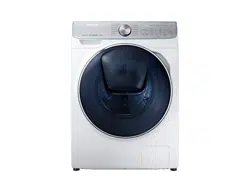
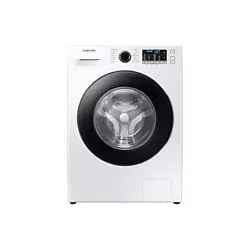
Follow these instructions carefully to ensure proper installation of the washing machine and to prevent accidents when doing laundry.
What’s included
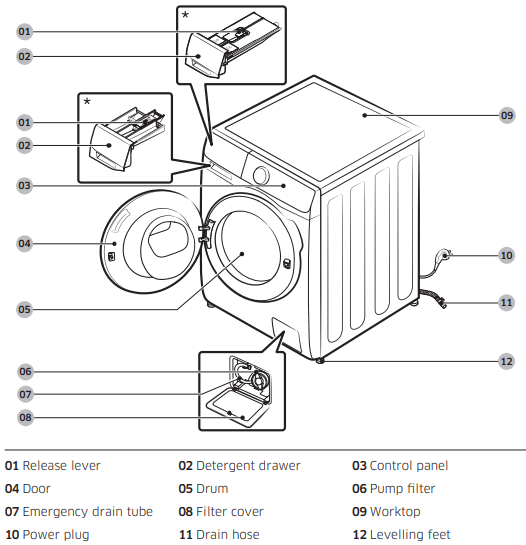
Make sure all the parts are included in the product package. If you have a problem with the washing machine or the parts, contact a local Samsung customer centre or the retailer.
* The design of the drawer and/or the lever differs with the model.
4. When the cycle is complete, “0” appears on the display and the washing machine will turn off automatically. The washing machine is now ready for use.
Operations
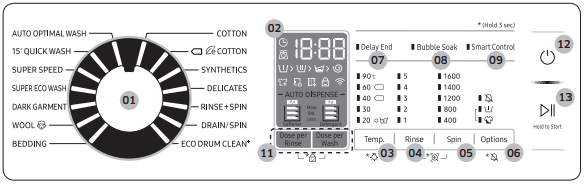
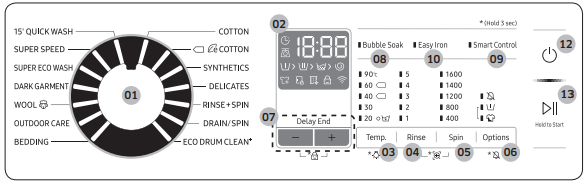
The actual design of the control panel may differ with the model.
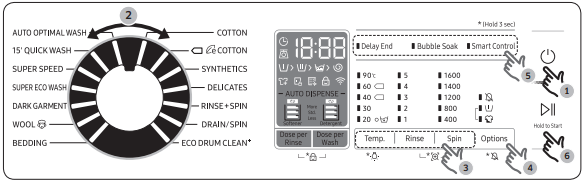
WW**M8*B*** / WW**M8*D*** / WW**M8*E***
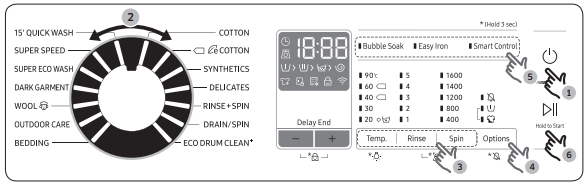
WW**M8*2*** / WW**M8*4*** / WW**M8*5***
01. Cycle Selector
Turn the dial to select a cycle.
02. Display
The display shows current cycle information and estimated time remaining, or an information code when a problem occurs.
For buttons and icons, refer to the corresponding page.
03. Temp.
Press to change the water temperature for the current cycle.
Press and hold for 3 seconds to turn on/off the Drum Light.
The drum light turns off automatically after 2 minutes.
04. Rinse
Press to change the rinse count for the current cycle. You can set the rinse count to a max of 5, depending on the cycle.
05. Spin
Press to change the spinning speed for the current cycle. The revolutions per minute (RPM) differs with the model.
• Rinse Hold: The final rinse process is suspended so that the laundry remains in the water. To unload the laundry, run a drain or spin process.
- To use the Rinse Hold option, press Spin repeatedly until all rpm numeric indicators turn off. Not available for the DRAIN/SPIN cycle.
• No Spin: The drum does not rotate after the final drain process.
- To use the No Spin option, press Spin repeatedly until all rpm numeric indicators turn off. Only available for the DRAIN/SPIN cycle.
• Spin Only: To run the Spin Only cycle, press Spin for 3 seconds. When the cycle time and spinning speed appear, press Spin repeatedly until a desired spinning speed is selected. Then, press and hold Start/Pause (Hold to Start) to start the cycle. The spinning time depends on the selected cycle.
06. Options
Press to select the options. Availability of the options depends on the cycle.
07. Delay End
Delay End lets you set the end time of the current cycle. Based on your settings, the start time of the cycle will be determined by the machine’s internal logic. For example, this setting is useful for programming your machine to finish a wash at the time you normally return home from work.
• Press to choose a preset unit of hours.
08. Bubble Soak
Press to activate/deactivate the Bubble Soak function. This function helps remove a wide variety of stubborn stains.
• Bubble Soak helps remove a variety of stubborn stains.
• With Bubble Soak selected, laundry is thoroughly soaked in water bubbles for effective washing.
• Bubble Soak is available with and adds up to 30 minutes to these cycles: COTTON, SYNTHETICS, BEDDING, and SUPER SPEED.
09. Smart Control
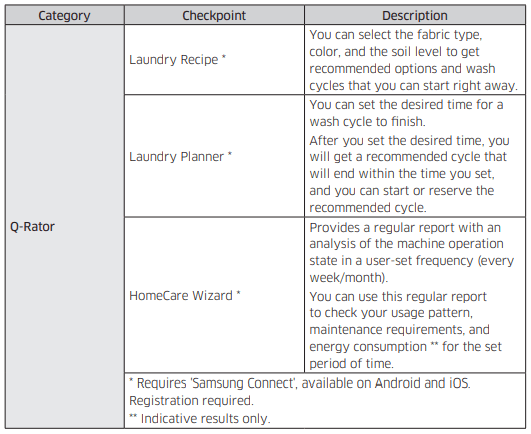
Press to activate/deactivate the Smart Control function. When the Smart Control function is activated, you can control your washing machine using your mobile device. For more information, see the Samsung Connect section on page 49.
10. Easy Iron (applicable models only)
The spinning speed decreases to reduce wrinkles of the laundry.
• Set the spinning speed up to 800 rpm.
11. AUTO DISPENSE (applicable models only)
• Dose per Wash : The washing machine adjusts the amount of detergent to dispense.
• Dose per Rinse : The washing machine adjusts the amount of fabric softener to dispense.
12. Power
Press to turn on/off the washing machine.
13. Start/Pause (Hold to Start)
Press and hold to start an operation, or press to stop an operation temporarily.
For more information on the options, see the Special features section.
Simple steps to start
WW**M8*B*** / WW**M8*D*** / WW**M8*E***
WW**M8*2*** / WW**M8*4*** / WW**M8*5***
Press Power to turn on the washing machine.
Select a cycle in the cycle panel.
Change the cycle settings (Temp., Rinse, and Spin) as necessary.
To add an option, press Options. Use the button again to choose a preferred item.
The machine supports the options of Bubble Soak, Easy Iron, and Delay End for easy access. To use an option item, press the corresponding button.
Press and hold Start/Pause (Hold to Start).
To change the cycle during operation
Press Start/Pause (Hold to Start) to stop operation.
Select a different cycle.
Press and hold Start/Pause (Hold to Start) again to start the new cycle.
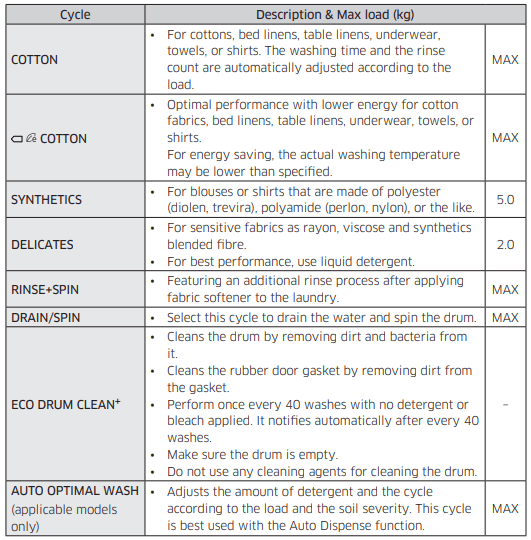
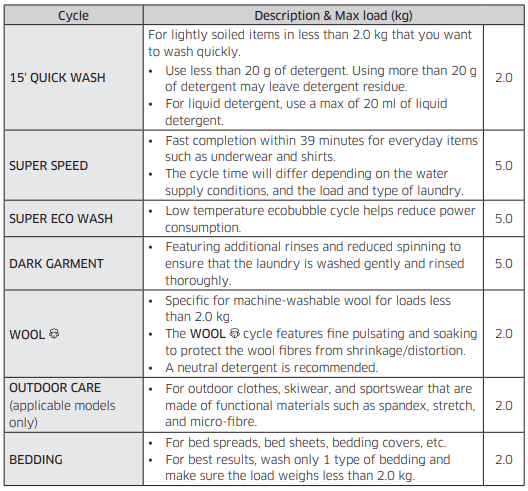
Cycle overview
Standard cycles
Options
Delay End
You can set the washing machine to finish your wash automatically at a later time, choosing a delay of between 1 to 24 hours (in 1 hour increments). The hour displayed indicates the time the wash will finish.
Select a cycle with necessary settings.
Press Delay End (or the +/- button) repeatedly until a desired end time is set.
Press and hold Start/Pause (Hold to Start). The Delay End indicator blinks and the washing machine tumbles the drum to sense the weight of the load if load sensing is preset for the selected cycle. When complete, it displays your set time with the timer running.
To cancel the Delay End, restart the washing machine by pressing Power.
Real-life case
You want to finish a two-hour cycle 3 hours later from now. For this, you add the Delay End option to the current cycle with the 3-hour setting, and Press and hold Start/Pause (Hold to Start) at 2:00 p.m. Then, what happens? The washing machine starts operating at 3:00 p.m., and ends at 5:00 p.m. Provided below is the time line for this example.
Load sensor
The load sensor icon lights up when you select a cycle that supports load sensing. Some cycles may not support loading sensing. Once you start the cycle, the icon blinks or stays solid during the load sensing process, and turns off when the process is complete.
Special features
AddWash
When the AddWash indicator is on, you can stop operation of the machine and put additional laundry or softener into the drum. The Add Door opens by more than 130° for easy access.
1. Press Start/Pause (Hold to Start) to stop operation.
2. Press the upper area of the Add Door until you hear a clicking sound to unlock. Pull the handle of the Add Door to open.
3. Open the Add Door and put additional laundry or softener into the drum.
4. Push the Add Door until you hear a clicking sound to close.
5. Press and hold Start/Pause (Hold to Start) to resume operation.
CAUTION Do not put excessive force on the Add Door. It may break.
NOTE The water inside the drum will not leak if the Add Door is closed properly. Water drops may form around the door, but they will not leak from inside the drum.
CAUTION
Do not open the Add Door if suds have formed inside the drum that rise above the level of the Add Door.
Do not attempt to open the Add Door while the machine is operating without first pressing Start/Pause (Hold to Start). Please note that the Add Door can be opened unintentionally (without pressing Start/Pause (Hold to Start)) when the wash is complete.
Do not add an excessive load through the Add Door. Performance may be degraded.
Do not use the lower area of the Add Door as a handle. Your fingers may be caught.
Make sure that no laundry is caught in the Add Door.
Keep your pets out of the washing machine, especially the Add Door.
When using hot water for the wash, the Add Door may appear to leak water after opening and closing the Add Door. This is normal, simply because steam emerging from the open Add Door has cooled and formed water drops on the surface.
When the Add Door closes, the door seals up and no water can leak. However, you may encounter what appears to be water leak around the door - some residual water remaining around the Add Door may form water drops. This is normal.
Neither the main door or the Add Door can be opened when the water temperature is over 50 °C. If the water level inside the drum is over a certain point, the main door cannot be opened.
If an information code of ‘DDC’ appears on the display, see the Information codes section for further actions.
Keep the Add door and its surroundings clean at all times. Debris or detergent on or around the seals of the Add door may cause a leak.
Settings
Child Lock
To prevent children or infants from accidentally starting or setting the washing machine, Child Lock locks all buttons except for the Power button.
To activate Child Lock
• On the auto dispenser models, press and hold Dose per Wash and Dose per Rinse simultaneously for 3 seconds. Then, press and hold Start/Pause (Hold to Start) to activate. The door locks and the Child Lock indicator turns on.
• On the manual dispenser models, press and hold - and + (of the Delay End option) simultaneously for 3 seconds. Then, press and hold Start/Pause (Hold to Start) to activate. The door locks and the Child Lock indicator turns on.
To deactivate Child Lock temporarily
You can deactivate Child Lock temporarily for 1 minute. The door is unlocked for 1 minute and the Child Lock indicator blinks.
• On the auto dispenser models, press and hold Dose per Wash and Dose per Rinse simultaneously for 3 seconds.
• On the manual dispenser models, press and hold - and + (of the Delay End option) simultaneously for 3 seconds.
NOTE
If you open the door 1 minute or more after deactivating Child Lock, an alarm sounds for up to 2 minutes.
If you close the door within 2 minutes, the door locks and Child Lock is reactivated. If you do not close the door or the door is not properly closed, the alarm keeps sounding for 2 minutes.
To add laundry after activating Child Lock, first deactivate Child Lock or restart the washing machine.
To cancel Child Lock
On the auto dispenser models, press and hold Dose per Wash and Dose per Rinse simultaneously for 3 seconds to deactivate, and then press and hold the buttons again for 3 seconds to cancel Child Lock. The door unlocks and the Child Lock indicator turns off.
On the manual dispenser models, press and hold - and + (of the Delay End option) simultaneously for 3 seconds to deactivate, and then press and hold the buttons again for 3 seconds to cancel Child Lock. The door unlocks and the Child Lock indicator turns off.
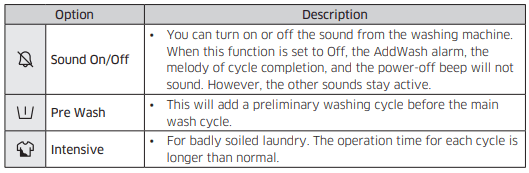
Sound On/Off
You can turn on or off the sound from the washing machine. When this function is set to Off, the AddWash alarm, the melody of cycle completion, and the power-off beep will not sound. However, the other sounds stay active.
To mute the sound, press and hold Options for 3 seconds.
To unmute the sound, press and hold again for 3 seconds.
Your setting will be kept even after restarting the machine.
Auto dispense (applicable models only)
Detergent
1. To select an input level, press Dose per Wash to cycle through the settings: Less > Standard > More.
- If you choose More, the rinse process will be added once more.
2. To select a water hardness level, press and hold Dose per Wash to cycle through the settings: 1 (soft water) > 2 (medium water) > 3 (hard water).
3. When complete, press and hold Dose per Wash for 3 seconds to confirm your changes.
Fabric softener
To select an input level, press Dose per Rinse to cycle through the settings: Less > Standard > More.
To select a concentration level, press and hold Dose per Rinse to cycle through the settings: 1 (Normal) > 2 (x2) > 3 (x3).
When complete, press and hold Dose per Rinse for 3 seconds to confirm your changes.
NOTE
If the indicator of the Detergent or Softener stays on, refill the corresponding compartment.
If you select WOOL the Dose per Wash/Dose per Rinse will be disabled automatically. However, you can enable the function(s) manually after selecting a cycle.
Samsung Connect
Wi-Fi connection
On your smartphone, go to the Settings and turn on the wireless connection and select an AP (Access Point).
NOTE
• This device is designed for household use only (Class B), and can be used in all residential areas.
• This device may cause wireless interference, and neither the manufacturer or the installer of this device can provide a safety measure of any kind.
• Recommended encryption methods are WPA/TKIP and WPA2/AES. Newly developed Wi-Fi protocols or unapproved Wi-Fi protocols are not supported.
• The reception sensitivity of a wireless network may be affected by surrounding wireless environments.
• If your Internet provider has registered the MAC address of your PC or the modem module for permanent use, your Samsung washing machine fails to connect to the Internet. If this is the case, contact your Internet provider.
• The Internet firewall may interrupt your Internet connection. If this happens, contact your Internet provider.
• If Internet failure continues after following the measurement of your Internet provider, contact a local Samsung retailer or service centre.
• For installing wired and wireless routers, refer to the user manual of the router you use.
• Samsung washing machine supports the Wi-Fi 2.4 GHz protocols.
• Samsung washing machine supports the IEEE802.11 b/g/n (2.4 GHz), Soft-AP protocols. (IEEE802.11n is recommended)
• An unapproved wired/wireless router may fail to connect to Samsung washing machine.
Download
On an app market (Google Play Store, Apple App Store, Samsung Galaxy Apps), find the Samsung Connect app with a search term of “Samsung Connect”. Download and install the app on your device.
NOTE
• The Samsung Connect app is available on third-party devices with Android OS 6.0 (Marshmallow) or higher, Samsung devices with Android OS 5.0 (Lollipop) or higher, and iOS devices with iOS 10.0 or higher (For iPhones, it must be iPhone 6 or higher). The app is optimised for Samsung smartphones (Galaxy S and Note series).
• Some functions of the app may operate differently on third-party devices.
• The app is subject to change without notice for improved performance.
Log in
You must first log into Samsung Connect with your Samsung account. To create a new Samsung account, follow the instructions on the app. You don’t need a separate app to create your account.
NOTE If you have a Samsung account, use the account to log in. A registered Samsung smartphone user automatically logs in.
To register your device to Samsung Connect
1. Make sure your smartphone is connected to a wireless network. If not, go to the Settings and turn on the wireless connection and select an AP (Access Point).
2. Select to run Samsung Connect on your smartphone.
3. When a message of “A new device is found.”, select Add.
4. If no message appears, select + and select your washing machine in a list of devices available. If your washing machine is not listed, select Device Type > Specific Device Model, and then add your washing machine manually.
5. Register your washing machine to the Samsung Connect app as follows.
a. Log into Samsung Connect with your Samsung account.
b. Turn a Wi-Fi connection on.
c. Add your washing machine to Samsung Connect. Make sure your washing machine is connected to Samsung Connect.
d. When registration is complete, your washing machine appears on your smartphone.
Washing Machine app
Integrated control: You can monitor and control your washing machine both at home and on the go.
• Select the Washing Machine icon on Samsung Connect. The Washing Machine page appears.
• Check the operation status or notifications related to your washing machine, and change options or settings if necessary
Samsung Connect
Maintenance
Keep the washing machine clean to prevent deteriorated performance and to preserve its life cycle.
Eco drum clean+
Perform this cycle regularly to clean the drum by removing bacteria from it. This cycle heats the water between 60 °C and 70 °C, and it also removes accumulated dirt from the rubber door gasket.
1. Press Power to turn on the washing machine.
2. Turn the Cycle Selector to select ECO DRUM CLEAN+.
3. Press and hold Start/Pause (Hold to Start).
CAUTION Do not use any cleaning agents for cleaning the drum. Chemical residue in the drum may cause damage to the laundry or the drum of the washing machine.
ECO DRUM CLEAN+ reminder
• The ECO DRUM CLEAN reminder appears on the main screen once every 40 washes. It is advisable to perform the ECO DRUM CLEAN regularly.
• When you first see this reminder, you can ignore the reminder for 6 consecutive washes. From the 7th wash, the reminder no longer appears. However, it appears again on the second 40th wash.
Smart Check
To enable this function, you must first download the Samsung Smart Washer app at the Play Store or the App Store, and install it on a mobile device featuring a camera function.
The Smart Check function has been optimised for Galaxy & iPhone series (applicable models only).
1. When the washing machine detects an issue to check, an information code appears on the display. To enter Smart Check mode, press and hold Rinse and Spin simultaneously for 3 seconds.
2. The washing machine starts the self-diagnosis procedure and displays an information code if a problem is detected.
3. Run the Samsung Smart Washer app on your mobile device, and tap Smart Check.
4. Put the mobile device close to the washing machine’s display so that the smartphone camera and the washing machine face each other. Then, the information code will be recognised automatically by the app.
5. When the information code is recognised correctly, the app provides detailed information about the problem with applicable solutions.
NOTE
• The function name, Smart Check, may differ depending on the language.
• If the washing machine reflects light on the display, the app may fail to recognise the information code.
• If the app fails to recognise the Smart Check code consecutively, enter the information code manually onto the app screen.
Emergency drain
In case of a power failure, drain the water inside the drum before taking out the laundry.
1. Power off and unplug the washing machine from the electrical outlet.
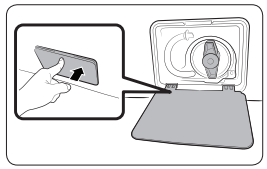
2. Gently press the top area of the filter cover to open.
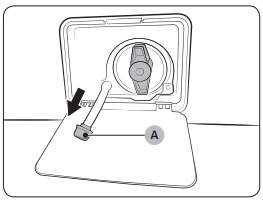
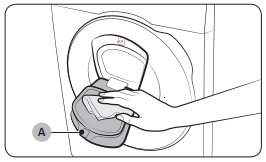
3. Put an empty, spacious container around the cover, and stretch the emergency drain tube to the container while holding the tube cap (A).
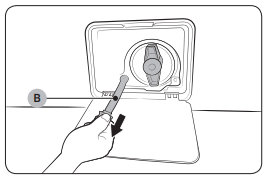
4. Open the tube cap and let water in the emergency drain tube (B) flow into the container.
5. When done, close the tube cap, and reinsert the tube. Then, close the filter cover.
NOTE Use a spacious container because the water in the drum may be more than expected.
Cleaning
Surface of the washing machine
Use a soft cloth with a nonabrasive household detergent. Do not spray water onto the washing machine.
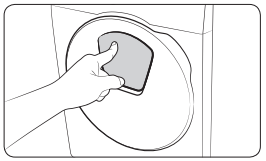
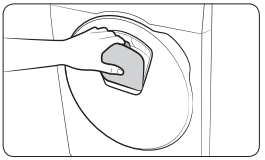
Add Door
1. Open the Add Door.
2. Use a wet cloth to clean the Add Door.
- Do not use cleaning agents. Discolouration may occur.
- Use caution when cleaning the rubber packing and the locking mechanism (A).
- Dust off the door area regularly.
3. Wipe up and close the Add Door until you hear a clicking sound.
CAUTION
Do not apply force on the Add Door. It may break.
Do not leave the Add Door open while the machine is operating.
Do not put heavy objects on the Add Door at any time.
To prevent physical injury, do not touch the Add Door while the drum is rotating.
Do not open the Add Door while the machine is operating. This may cause physical injury.
Do not manipulate the feature panel while the Add Door is open. This may cause physical injury or system failure.
Do not input objects other than laundry.
Do not input bulky items to the drum through the Add Door.
Do not pull out the rubber packing of the Add Door when cleaning. This may cause damage.
Troubleshooting
Checkpoints
If you encounter a problem with the washing machine, first check the table below and try the suggestions.
Problem
Action
Does not start.
• Make sure the washing machine is plugged in.
• Make sure the door is properly closed.
• Make sure the water taps are open.
• Press and hold Start/Pause (Hold to Start) to start the washing machine.
• Make sure Child Lock is not activated.
• Before the washing machine starts to fill, it will make a series of clicking noises to check the door lock and does a quick drain.
• Check the fuse or reset the circuit breaker.
Water supply is insufficient, or no water is supplied.
• Fully open the water tap.
• Make sure the door is properly closed.
• Make sure the water supply hose is not frozen.
• Make sure the water supply hose is not kinked or clogged.
• Make sure there is sufficient water pressure.
After a cycle, detergent remains in the detergent drawer.
• Make sure the washing machine is running with sufficient water pressure.
• Make sure the detergent is added to the centre of the detergent drawer.
• Make sure the rinse cap is inserted properly.
• If using granular detergent, make sure the detergent selector is in the upper position.
• Remove the rinse cap and clean the detergent drawer.
Excessive vibrations or makes noise.
• Make sure the washing machine is installed on a level, solid floor that is not slippery. If the floor is not level, use the levelling feet to adjust the height of the washing machine.
• Make sure the shipping bolts are removed.
• Make sure the washing machine is not contacting any other object.
• Make sure the laundry load is balanced.
• The motor can cause noise during normal operation.
• Overalls or metal-decorated clothes can cause noise while being washed. This is normal.
• Metal objects such as coins can cause noise. After washing, remove these objects from the drum or filter case.
Does not drain and/ or spin.
• Make sure the drain hose is straightened all the way to the drain system. If you encounter a drain restriction, call for service.
• Make sure the debris filter is not clogged.
• Close the door and press and hold Start/Pause (Hold to Start). For your safety, the washing machine will not tumble or spin unless the door is closed.
• Make sure the drain hose is not frozen or clogged.
• Make sure the drain hose is connected to a drain system that is not clogged.
• If the washing machine is not supplied with sufficient power, the washing machine temporarily will not drain or spin. As soon as the washing machine regains sufficient power, it will operate normally.
The door does not open.
• Press Start/Pause (Hold to Start) to stop the washing machine.
• It may take a few moments for the door lock mechanism to disengage.
• The door will not open until 3 minutes after the washing machine has stopped or the power turned off.
• Make sure all the water in the drum is drained.
• The door may not open if water remains in the drum. Drain the drum and open the door manually.
• Make sure the door lock light is off. The door lock light turns off after the washing machine has drained.
Excessive suds.
• Make sure you use the recommended types of detergent as appropriate.
• Use high efficiency (HE) detergent to prevent oversudsing.
• Reduce the detergent amount for soft water, small loads, or lightly soiled loads.
• Non-HE detergent is not recommended.
Cannot apply additional detergent.
• Make sure the remaining amount of detergent and fabric softener is not over the limit.
Stops.
• Plug the power cord into a live electrical outlet.
• Check the fuse or reset the circuit breaker.
• Close the door and press and hold Start/Pause (Hold to Start) to start the washing machine. For your safety, the washing machine will not tumble or spin unless the door is closed.
• Before the washing machine starts to fill, it will make a series of clicking noises to check the door lock and does a quick drain.
• There may be a pause or soak period in the cycle. Wait briefly and the washing machine may start.
• Make sure the mesh filter of the water supply hose at the water taps is not clogged. Periodically clean the mesh filter.
• If the washing machine is not supplied with sufficient power, the washing machine temporarily will not drain or spin. As soon as the washing machine regains sufficient power, it will operate normally.
Fills with the wrong water temperature.
• Fully open both taps.
• Make sure the temperature selection is correct.
• Make sure the hoses are connected to the correct taps. Flush water lines.
• Make sure the water heater is set to supply a minimum 120 °F (49 °C) hot water at the tap. Also, check the water heater capacity and recovery rate.
• Disconnect the hoses and clean the mesh filter. The mesh filter may be clogged.
• While the washing machine fills, the water temperature may change as the automatic temperature control feature checks incoming water temperature. This is normal.
• While the washing machine fills, you may notice just hot and/ or just cold water going through the dispenser when cold or warm temperatures are selected. This is a normal function of the automatic temperature control feature as the washing machine determines the water temperature.
Load is wet at the end of a cycle.
• Use the High or Extra High spin speed.
• Use high efficiency (HE) detergent to reduce oversudsing.
• Load is too small. Small loads (one or two items) may become unbalanced and not spin completely.
• Make sure the drain hose is not kinked or clogged.
Leaks water.
• Make sure the door is properly closed.
• Make sure all hose connections are tight.
• Make sure the end of the drain hose is correctly inserted and secured to the drain system.
• Avoid overloading.
• Use high efficiency (HE) detergent to prevent oversudsing.
Has odours.
• Excessive suds collect in recesses and can cause foul odours.
• Run cleansing cycles to sanitise periodically.
• Clean the door seal (diaphragm).
• Dry the washing machine interior after a cycle has finished.
No bubbles are seen (Bubbleshot models only).
• Overloading may screen bubbles.
• Severely contaminated laundry may not generate bubbles.
Can I open the Add Door at any time?
• The Add Door can be opened only when the indicator appears. However, it does not open in the following cases:
- When the boiling or drying process is running and the internal temperature becomes high
- If you set the Child Lock for safety reasons
- When the drum wash or drum drying cycle is running that does not involve additional laundry
The auto dispenser indicators blink. (applicable models only)
• Check if the detergent drawer is closed properly.
- Open the detergent drawer and close it again. Make sure it’s closed properly.
• This may happen if liquid detergent has hardened inside the detergent compartment.
- Clean and unclog the detergent compartment.
If a problem persists, contact a local Samsung service centre.
Information codes
If the washing machine fails to operate, you may see an information code on the screen. Check the table below and try the suggestions.
Code
Action
4C
Water is not supplied.
• Make sure the water taps are open.
• Make sure the water hoses are not clogged.
• Make sure the water taps are not frozen.
• Make sure the washing machine is operating with sufficient water pressure.
• Make sure that the cold water tap and the hot water tap are properly connected.
• Clean the mesh filter as it may be clogged.
• All buttons will be disabled for 3 minutes after the information code appears.
4C2
• Make sure the cold water supply hose is firmly connected to the cold water tap. If it is connected to the hot water tap, the laundry may be deformed with some cycles.
5C
Water is not draining.
• Make sure the drain hose is not frozen or clogged.
• Make sure the drain hose is positioned correctly, depending on the connection type.
• Clean the debris filter as it may be clogged.
• Make sure the drain hose is straightened all the way to the drain system.
• If the information code remains, contact a customer service centre.
dC
Operating the washing machine with the door open.
• Make sure the door is properly closed.
• Make sure laundry is not caught in the door.
OC
Water has overflowed.
• Restart after spinning.
• If the information code remains on the display, contact a local Samsung service centre.
LC, LC1
Check the drain hose.
• Make sure the end of the drain hose is not placed on the floor.
• Make sure the drain hose is not clogged.
• If the information code remains, contact a customer service centre.
Ub
Spinning does not work.
• Make sure laundry is spread out evenly.
• Make sure the washing machine is on a flat, stable surface.
• Redistribute the load. If only one item of clothing needs washing, such as a bathrobe or pair of jeans, the final spin result might be unsatisfactory, and an “Ub” check message will be shown in the display.
3C
Check the drum motor for operation.
• Try restarting the cycle.
• If the information code remains, contact a customer service centre.
3CP
Check the pulsator motor for operation.
• Try restarting the cycle.
• If the information code remains, contact a customer service centre.
UC
The electronic control needs to be checked.
• Check if power is supplied properly.
• If the information code remains, contact a customer service centre.
Low voltage detected.
• Check if the power cord is plugged in.
• If the information code remains, contact a customer service centre.
HC
High temperature heating check.
• If the information code remains, contact a customer service centre.
1C
The Water Level sensor is not working properly.
• Turn the machine off, and restart the cycle.
• If the information code remains, contact a customer service centre.
AC
Check communications between main and sub PBAs.
• Turn the machine off, and restart the cycle.
• If the information code remains, contact a customer service centre.
DDC, ddC
This message appears when you open the Add Door without pressing Start/Pause (Hold to Start). If this happens, do one of the following:
• Press the Add Door to close properly. Then, press and hold Start/Pause (Hold to Start) and try again.
• To add laundry, open the Add Door and input laundry. Close the Add Door properly. Then, press and hold Start/Pause (Hold to Start) to resume operation.
8C
The MEMS sensor is not working properly.
• Turn the machine off, and restart the cycle.
• If the information code remains, contact a local Samsung service centre.
AC6
Check communications between the main and the inverter PBAs.
• Depending on the state, the machine may automatically returns to normal operation.
• Turn the machine off, and restart the cycle.
• If the information code remains, contact a local Samsung service centre.
DC1
The Main Door lock/unlock is not working properly.
• Turn the machine off, and restart the cycle.
• If the information code remains, contact a local Samsung service centre.
DC3
The Add Door lock/unlock is not working properly.
• Turn the machine off, and restart the cycle.
• If the information code remains, contact a local Samsung service centre.
If any information code keeps appearing on the screen, contact a local Samsung service centre.






 indicator of the Detergent or Softener stays on, refill the corresponding compartment.
 the Dose per Wash/Dose per Rinse will be disabled automatically. However, you can enable the function(s) manually after selecting a cycle.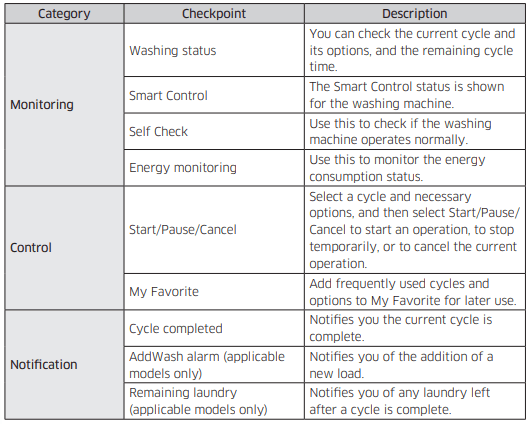


 is not activated.