Overview
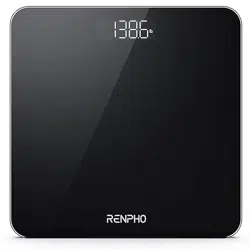
The RENPHO Core 1S is a digital bathroom scale designed for measuring body weight. It features a high-precision sensor system, a clear LED display, and a step-on activation function. This manual provides instructions for setup, operation, and troubleshooting.

Features
High-Precision Weighing
- Four Sensors: Utilizes four high-precision sensors for accurate measurements.
- Capacity: Maximum weight capacity of 400 lbs / 180 kg.
- Graduation: Measures in increments of 0.1 lb / 50 g.
Display and Operation
- LED Display: Bright white screen for easy reading in various lighting conditions.
- Step-On Technology: Automatically powers on and calibrates when you step onto the platform.
- Unit Conversion: Switch between pounds (lb) and kilograms (kg) using a button on the underside.
- Auto Power Off: The scale turns off automatically after use to conserve battery life.
Design and Build
- Platform: Constructed from 5mm tempered glass.
- Safety: Features rounded corners to prevent injury.
- Anti-Slip Pads: Four pads on the bottom provide stability and protect flooring.
- Compact Size: Dimensions are 10.2" x 10.2" x 0.8" (26 x 26 x 2.1 cm).
Indicators
- Low Battery: A symbol will appear on the display when batteries need replacement.
- Overload: The display will show "ERR" or similar if the weight exceeds the maximum capacity.
Use Guide
Initial Setup
- Remove the scale from its packaging.
- Open the battery compartment on the underside of the scale.
- Insert the included 3 AAA batteries, ensuring correct polarity (+/-).
- Close the battery compartment.
Placing the Scale
- Place the scale on a hard, flat, and level surface (e.g., tile, hardwood). Avoid carpets, rugs, or uneven floors.
- Ensure the four anti-slip pads are clean and making full contact with the floor.
Note: For consistent and accurate results, try to use the scale in the same location each time and avoid moving it frequently.
Taking a Measurement
- Gently step onto the scale with bare feet or thin socks. Place one foot on each side of the platform.
- Stand still, with your weight evenly distributed. The display will illuminate and show "0.0" before displaying your weight.
- Wait for the measurement to stabilize. The reading will lock on the screen.
- Step off the scale. It will automatically turn off after a few seconds.
Changing the Unit of Measurement
Locate the unit button (marked as "kg/lb") on the underside of the scale. Press it with your finger or a pen to toggle between kilograms (kg) and pounds (lb). The current unit will be shown on the display.
Maintenance and Care
- Cleaning: Wipe the glass platform with a soft, slightly damp cloth. Do not use abrasive cleaners or submerge the scale in water.
- Battery Replacement: Replace all 3 AAA batteries when the low battery indicator appears. Use new batteries of the same type.
- Storage: Store the scale in a dry place. Avoid extreme temperatures or humidity.
Troubleshooting
Scale Shows Inconsistent or Incorrect Weight
- Ensure the scale is on a hard, flat, and stable surface.
- Check that the feet/pads are clean and free of debris.
- Reset the scale:
- Remove one battery for 5 seconds, then reinsert it.
- Step on the scale with one foot until the display lights up, then step off and wait for the screen to show "CAL".
- Recalibrate by stepping on and off the scale as described above.
Scale Does Not Turn On
- Replace the batteries with a new set of 3 AAA batteries.
- Ensure the batteries are inserted with the correct polarity (+/-).
- Check the battery compartment for any corrosion or rust and clean it if necessary.
Display Shows "ERR" or "LO"
- ERR/Overload: The weight exceeds the 400 lb / 180 kg capacity. Remove weight from the scale.
- LO/Low Battery: Replace all batteries immediately.
Specifications
| Attribute | Specification |
|---|---|
| Model | Core 1S (BG260R) |
| Max Capacity | 400 lbs / 180 kg |
| Min Capacity | 13 lbs / 6 kg |
| Graduation | 0.1 lb / 50 g |
| Display | White LED |
| Units | kg / lb |
| Platform Material | 5mm Tempered Glass |
| Power Source | 3 x AAA Batteries (included) |
| Dimensions (L x W x H) | 10.2" x 10.2" x 0.8" (26 x 26 x 2.1 cm) |
| Item Weight | 1 kg |
Compliance and Disposal
This device complies with relevant safety standards. At the end of its life, do not dispose of this product with household waste. Please recycle or dispose of it according to your local regulations for electronic waste and batteries.