1. Overview
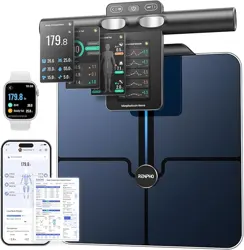
The RENPHO MorphoScan Base is an 8-electrode smart scale designed to measure body weight and analyze body composition. It uses Bioelectrical Impedance Analysis (BIA) technology to provide data on over 50 metrics, including body fat percentage, muscle mass, and BMI. The scale connects via Bluetooth to the RENPHO Health App for detailed tracking and analysis.

Key components include a large weighing platform, a handle with an integrated display, and eight metal electrodes (four on the platform, four on the handle).
2. Features
2.1 Measurement Technology
- 8-Electrode Dual-Frequency BIA: Uses eight contact points (hands and feet) for segmental body composition analysis.
- High Precision: Provides results within 2% accuracy compared to physician scales.
- 50+ Body Metrics: Analyzes weight, body fat percentage, muscle mass, BMI, visceral fat, bone mass, protein, and more.

2.2 Display and Indicators
The handle features an LED display that shows key metrics:
- Body Weight
- BMI (Body Mass Index)
- Body Fat Percentage
- Skeletal Muscle Percentage
- Visceral Fat Index
- 7-Day Weight Trend
The display can store and show data for up to eight different user profiles.
2.3 Connectivity and App
- Bluetooth Connectivity: Pairs with the RENPHO Health App (available for iOS and Android).
- Unlimited User Profiles: The app can create profiles for multiple users.
- Data Syncing: Syncs data with Apple Health, Google Fit, MyFitnessPal, and Samsung Health.
- Detailed Reports: Generates comprehensive body composition reports within the app, which can be printed.

2.4 Physical Specifications
- Weighing Platform: Large, non-slip surface.
- Handle: Durable handle with a 60-inch (152 cm) elastic cable connecting it to the base.
- Weight Capacity: 180 kg / 400 lbs.
- Battery: Powered by 4 AAA batteries (included). Provides up to 130 days of battery life.
- Dimensions: 11.8" x 12.9" (300 mm x 328 mm).
3. Use Guide
3.1 Initial Setup
- Install Batteries: Open the battery compartment on the back of the scale base and insert 4 AAA batteries.
- Place the Scale: Position the scale on a hard, flat surface (avoid carpets).
- Download the App: Search for "RENPHO Health" in the Apple App Store or Google Play Store and install it on your smartphone.
- Create an Account & Profile: Open the app, create an account, and set up your user profile (enter height, age, gender).
- Pair the Scale: Enable Bluetooth on your phone. Open the RENPHO app and follow the in-app instructions to pair with the scale. The scale's Bluetooth signal activates when you step on it.
3.2 Taking a Measurement
- Ensure the scale is on a flat, hard surface.
- Step onto the scale platform barefoot, ensuring your feet make contact with the four metal electrodes.
- Grasp the handle firmly with both hands, ensuring your thumbs and fingers contact the four electrodes on the handle. Stand upright with arms slightly extended.
- Remain still while the scale takes measurements. The display on the handle will show readings.
- Once the measurement is complete, the data will be transmitted via Bluetooth to the paired smartphone and saved in the RENPHO Health App.
- View detailed results and trends within the app.
Video: Product Setup and Use
The video guides you through product setup and demonstrates the correct posture for taking a measurement.
3.3 Understanding the Display
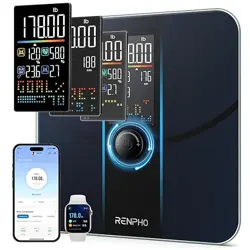
The LED display on the handle cycles through key metrics after a measurement. The icons or abbreviations next to the numbers indicate the specific metric being shown (e.g., FAT for body fat percentage). Consult the app for the complete set of over 50 metrics and historical trends.
3.4 Using the RENPHO Health App
- Open the app to view your latest measurement and historical data graphs.
- Navigate to different sections to view detailed analyses like segmental body fat (arms, legs, trunk).
- Use the data to inform exercise or diet plans. Reports can be generated and printed from the app.
- Add profiles for other family members. They can use the same scale; the app will recognize different users based on weight differences and store data separately.
4. Care and Maintenance
- Cleaning: Wipe the scale platform and handle with a slightly damp cloth. Do not use abrasive cleaners or submerge any part of the scale in water.
- Storage: Store in a dry place. Avoid extreme temperatures.
- Battery Replacement: Replace the 4 AAA batteries when the low battery indicator appears on the display or if the scale fails to turn on.
- Accuracy: For consistent results, try to weigh yourself at the same time of day under similar conditions (e.g., in the morning before eating).
5. Troubleshooting
- Scale won't turn on: Check battery orientation and replace batteries if necessary.
- Inconsistent or inaccurate readings: Ensure the scale is on a hard, flat surface. Ensure feet and hands are clean and making full contact with the electrodes.
- Bluetooth connection failed: Ensure Bluetooth is enabled on your phone. Ensure the scale is in pairing mode (step on it to activate). Restart the app and your phone's Bluetooth.
- Data not syncing to app: Check that the correct user profile is selected in the app. Ensure your phone is within Bluetooth range (typically within 3-5 meters).
- Display shows "Err" or "LO": "Err" indicates a measurement error; step off and retry. "LO" indicates low batteries; replace them.
6. Specifications
- Model: R-MSC02 (MorphoScan Base)
- Technology: 8-Electrode Dual-Frequency Segmental BIA
- Metrics: 50+ body composition measurements
- Weight Capacity: 180 kg / 400 lbs
- Display: LED on handle
- Power: 4 x AAA batteries (included)
- Connectivity: Bluetooth 4.0
- Compatible Apps: RENPHO Health, Apple Health, Google Fit, Samsung Health, MyFitnessPal
- Platform Dimensions: Approx. 30 x 32.8 cm (11.8" x 12.9")