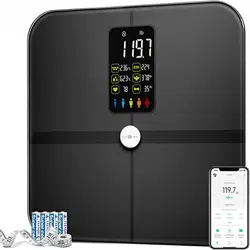
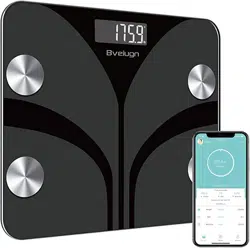
1. Product Overview

The Posture Smart Body Fat Scale is a digital bathroom scale designed to measure body composition. It uses 8-electrode technology to provide multiple health metrics beyond simple weight.
The scale features a large tempered glass platform, a bright LED display, and a built-in voice prompt function. It connects to a mobile app via Bluetooth to sync and track data.
2. Specifications
- Brand: Posture
- Color: Black
- Model Number: FI2211LB
- Display Type: LED
- Platform Material: Tempered Glass
- Weight Capacity: 400 Pounds (181 kg)
- Product Dimensions: 13.1 x 12 x 1.3 inches
- Item Weight: 5.59 pounds
- Power Source: 4 AA batteries (included)
- Recommended Use: Adults
3. Features & Functions

3.1 Measurement Capabilities
The scale provides 28 body composition measurements using Bioelectrical Impedance Analysis (BIA) through 8 electrodes (four on the platform, four on the handle). Reported metrics include:
- Weight
- Body Fat Percentage
- Body Mass Index (BMI)
- Muscle Mass
- Bone Mass
- Body Water Percentage
- Visceral Fat
- Basal Metabolic Rate (BMR)
- Metabolic Age
- Protein Mass
- Subcutaneous Fat
- Skeletal Muscle
3.2 Physical Design

- Larger Platform: Provides stable footing.
- Bright LED Display: Shows measurement results clearly.
- Integrated Handle with Electrodes: Contains four additional electrodes for upper body measurement.
3.3 Smart Functions

- Voice Prompt: Automatically announces key measurement results (e.g., weight) after each reading.
- Bluetooth Connectivity: Syncs data wirelessly to the companion mobile app.
- Multi-User Support: The app can store data for up to 24 separate user profiles.
- Data Tracking & Sharing: View historical trends in the app and share data with family or healthcare providers.
- App Integration: Data can sync with popular fitness applications.
4. Initial Setup
4.1 Installing Batteries
- Turn the scale over and locate the battery compartment on the bottom.
- Open the battery compartment cover.
- Insert 4 new AA batteries, observing the correct polarity (+/-) as indicated inside the compartment.
- Close the cover securely.
The scale will typically activate or display a welcome message upon first battery installation.
4.2 Placing the Scale
- Place the scale on a hard, flat, and level surface (e.g., bathroom tile, hardwood floor).
- Avoid placing on soft, uneven, or carpeted surfaces, as this will affect accuracy.
- Ensure the scale is not touching a wall or other object.
4.3 Connecting to the Mobile App
- Download the official "Posture" or associated app from the Apple App Store or Google Play Store.
- Enable Bluetooth on your smartphone.
- Open the app and follow the in-app instructions to create an account and add a new device.
- The app will search for the scale. Step onto the scale to wake it up if necessary for pairing.
- Select the scale from the device list in the app to complete the pairing process.

5. Usage Guide

5.1 Preparing for a Measurement
Important: For accurate body composition readings, conditions must be consistent.
- Measure at the same time of day, ideally in the morning after using the bathroom and before eating or drinking.
- Stand on the scale barefoot. Ensure your feet are clean, dry, and making full contact with the four metal electrodes on the platform.
- For Body Composition Analysis: Grip the handle electrodes firmly with bare, dry hands. Your thumbs should rest on the top electrodes and your fingers underneath.
- Note on Skin Condition: Very dry skin can impede the BIA signal. Applying lotion to hands and feet regularly (especially in winter) is recommended for consistent readings. Do not apply lotion immediately before measuring.
- Wear light clothing or undergarments only. Heavy clothing will affect weight readings.
5.2 Taking a Measurement
- Step onto the scale platform. The display will light up and show "0.0" or dashes.
- Stand still, with your feet apart and aligned with the electrode markings.
- For a full body composition reading, lift the handle and hold it with arms slightly extended, not touching your body. Grip the electrodes firmly.
- Remain still until the weight is locked (the display stops flashing) and the voice prompt announces your weight. For full analysis, continue holding the handle until all measurements are complete, which takes a few more seconds.
- The results will be shown on the LED display. The voice prompt will announce the primary result (weight).
- Step off the scale. The data will automatically sync to the app if your phone is nearby and Bluetooth is enabled.
5.3 Using the Mobile App

- Open the app to view your latest measurements and historical trends.
- Switch between different user profiles if multiple people are using the scale.
- Review detailed breakdowns of all 28 body composition metrics.
- Share data reports via the app's sharing functions.
- Connect the app to other health platforms (like Apple Health or Google Fit) to centralize your data.
6. Care & Maintenance
- Cleaning: Wipe the glass platform and handle with a soft, slightly damp cloth. Do not use abrasive cleaners or submerge the scale in water.
- Battery Replacement: Replace all 4 AA batteries when the low battery icon appears on the display or the scale becomes unresponsive.
- Storage: Store in a dry place. Avoid extreme temperatures or humidity.
- Accuracy Check: If you suspect inaccuracy, try repositioning the scale on a perfectly flat, hard surface and recalibrating by stepping on and off until it reads zero.
7. Troubleshooting
| Issue | Possible Cause & Solution |
|---|---|
| Scale does not turn on. | Batteries may be depleted or incorrectly installed. Replace all batteries, ensuring correct polarity. |
| Display shows "Err" or unstable numbers. | Scale is on an uneven or soft surface. Move to a hard, flat floor. Ensure feet are dry and centered on the electrodes. |
| Body composition readings seem inconsistent. | Measure at a consistent time of day. Ensure hands and feet are clean, dry, and making full contact with all electrodes. Hydration levels significantly affect BIA readings. |
| Bluetooth does not connect. | Ensure Bluetooth is enabled on your phone. Check that the scale is awake (step on it briefly). Restart the app and your phone's Bluetooth. Ensure you are within range (typically within 10 feet/3 meters). |
| Voice prompt is not working. | Check that the voice function is not muted in the app settings (if applicable). Ensure volume on your device is up if voice comes via app. The scale's built-in speaker may have volume limitations. |
8. Compliance & Disposal
- FSA/HSA Eligible: This product may be eligible for purchase with Flexible Spending Account (FSA) or Health Savings Account (HSA) funds. Consult your plan administrator for details.
- Battery Disposal: Dispose of used batteries according to your local regulations. Do not dispose of with household trash.
- Product Disposal: Dispose of the electronic device at an approved e-waste recycling facility.
9. What's in the Box
- Posture 8-Electrode Smart Body Fat Scale (Model FI2211LB)
- 4 x AA Batteries
- User Manual (this document)