1. Overview

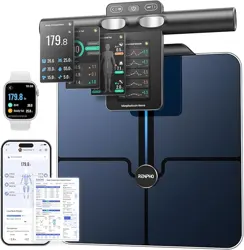
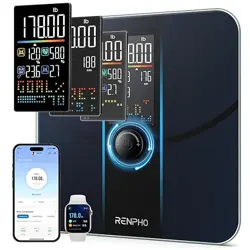
The RENPHO Elis 1 is a smart digital bathroom scale designed to measure body weight and body composition metrics. It connects via Bluetooth to the Renpho Health app on your smartphone to track and analyze data over time.
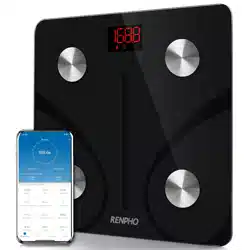
Key components visible on the device include:
- A large, ultra-wide platform (12 x 12 inches).
- A central LED display for showing weight.
- Four integrated metal electrodes on the platform's surface for body composition analysis.
- A battery compartment on the underside.
2. Features and Specifications
Physical Specifications
- Model: RENPHO Elis 1 (Model R-A019)
- Weight Capacity: Up to 500 lbs (approx. 227 kg).
- Measurement Increments: 0.2 lb / 0.05 kg.
- Platform Dimensions: 12 x 12 inches (30 x 30 cm).
- Product Dimensions: 30.0 x 30.0 x 2.5 cm.
- Product Weight: 1.7 kg.
- Display: Large LED digital display.
- Power: 3 x AAA batteries (included).
- Connectivity: Bluetooth 4.0 and above.
Measurement Features
The scale provides 13 essential body composition metrics when used with the Renpho Health app. Weight is displayed on the scale's LED screen, while other metrics are stored and tracked within the app.
- Primary Metric (on scale): Body Weight.
- App Metrics (examples): BMI, Body Fat Percentage, Muscle Mass, and other body composition data.
Smart Features
- Unlimited Users: One scale can create profiles for an unlimited number of users.
- Baby/Pet Weighing Mode: A dedicated mode for weighing infants or pets.
- App Integration: Syncs data with Apple Health, Google Fit, Samsung Health, and Fitbit.
- Data Tracking: The app stores historical data to track progress daily, weekly, and monthly.
3. What's in the Box
- RENPHO Elis 1 Smart Scale
- 3 x AAA batteries
- Quick Start Guide
4. Use Guide
Initial Setup
- Install Batteries: Open the battery compartment on the underside of the scale. Insert the 3 included AAA batteries, ensuring correct polarity (+/-).
- Place the Scale: Place the scale on a hard, flat surface. Avoid soft or uneven surfaces like carpet.
- Activate the Scale: Step onto the scale to turn it on. The display will light up. Step off, and the scale should turn off automatically.
Connecting to the Renpho Health App
- Download the App: Search for "Renpho Health" in the Apple App Store (iOS) or Google Play Store (Android) and install it.
- Create an Account: Open the app and follow the prompts to create a user account.
- Enable Bluetooth: Ensure Bluetooth is enabled on your smartphone.
- Pair the Scale: Open the Renpho Health app. Step onto the scale. The app should automatically detect and pair with the scale. Follow any in-app instructions to complete the setup for your user profile (entering height, age, gender, etc.).
Taking a Measurement
- Ensure the scale is on a flat, hard surface.
- Open the Renpho Health app on your phone.
- Step onto the scale barefoot, ensuring your feet are clean, dry, and in contact with the four metal electrodes.
- Stand still until your weight stabilizes and is shown on the LED display. The measurement will then sync to the app.
- Step off the scale. View your full body composition analysis within the Renpho Health app.
Using Baby/Pet Weighing Mode
- Open the Renpho Health app and select the corresponding user profile or the baby/pet mode option.
- Step onto the scale alone and wait for your weight to register.
- Hold your baby or pet and step back onto the scale.
- The app will calculate the weight of the baby or pet by subtracting your weight from the total weight.
LED Display Indicators
The central LED display shows numerical weight. Icons or codes may appear to indicate status:
- "Lo" or a low battery icon: Indicates the batteries need to be replaced.
- "Err" or flashing numbers: May indicate an overload (weight over 500 lbs), unstable surface, or movement during measurement.
5. Care and Maintenance
- Cleaning: Wipe the scale with a soft, slightly damp cloth. Do not use abrasive cleaners or submerge the scale in water.
- Storage: Store in a dry place. Avoid extreme temperatures.
- Battery Replacement: Replace all 3 AAA batteries when the "Lo" indicator appears. Use new, high-quality batteries.
- Accuracy: For consistent results, always use the scale on the same hard, flat surface. Recalibrate by stepping on and off the scale once after moving it to a new location.
6. Troubleshooting
- Scale won't turn on: Check battery polarity and replace batteries if necessary.
- Inconsistent or fluctuating readings: Ensure the scale is on a hard, flat surface and that you are standing still. Check for debris on the feet or sensors.
- App won't connect to scale:
- Ensure Bluetooth is enabled on your phone.
- Ensure the scale is awake (step on it to activate).
- Restart the app and your phone's Bluetooth.
- Check that the Renpho Health app has the necessary permissions (Location/Bluetooth).
- Data not syncing: Ensure your phone is within Bluetooth range (typically within 10 meters/30 feet).
7. Safety Information
WARNING: This product contains a button/coin battery and is hazardous.
- Keep the scale and batteries out of reach of children.
- If a battery is swallowed or placed inside any part of the body, it can cause severe or fatal injuries in 2 hours or less.
- Seek medical attention immediately if you suspect a battery has been swallowed or placed inside the body.
Do not use the scale if it is damaged. Do not use on a wet floor. This scale is for personal, domestic use only.
8. Compliance and Disposal
This device complies with relevant radio equipment and safety standards. At the end of its life, do not dispose of this product with household waste. Please recycle or dispose of batteries and electronic components according to your local regulations.