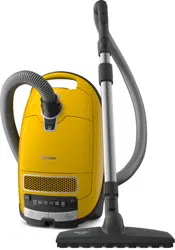
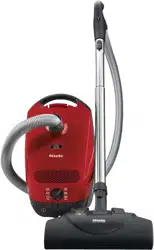
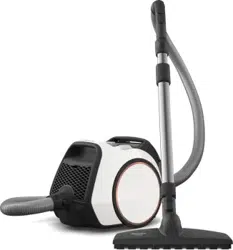
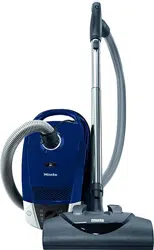
Operating Instructions Vacuum Cleaner
Description
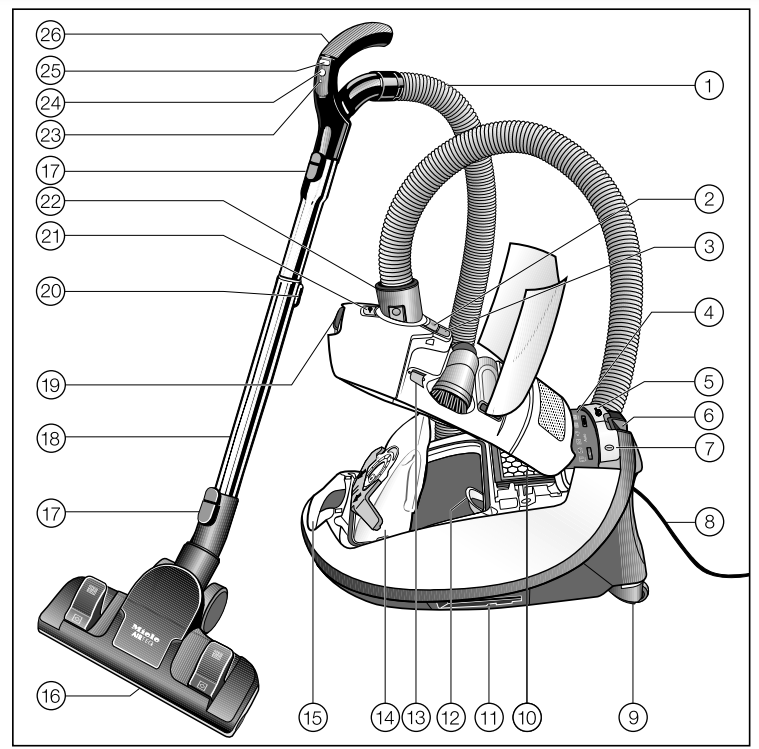
- Suction hose *
- Release button for accessories compartment
- FilterBag change indicator
- Display *
- Foot switch for automatic cord rewind
- Park system for pauses during vacuuming
- On/Off foot switch

- Power cord
- Castor wheels *
- Exhaust filter *
- Park system for storage (on both sides of the vacuum cleaner) *
- Motor protection filter
- Electrobrush socket cover holder *
- Original Miele FilterBag
- Carrying handle
- Floorhead *
- Release buttons
- Telescopic suction wand *
- Dust compartment lid release button
- Telescopic suction wand release button *
- Socket for Electrobrush *
- Connection socket *
- LED *
- Standby button for short pauses in vacuuming *
- Suction power selector buttons + / -*
- Handle (some models have an air inlet valve in the handle)
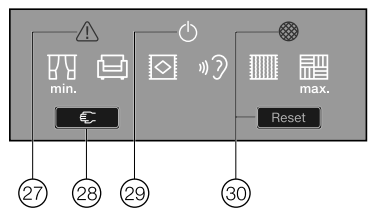
- Overheating warning light
 *
*
- Restart button *
- Standby indicator light *
- Maintenance indicator with reset button *
Preparing for use
Attaching the suction hose (Fig. 01)
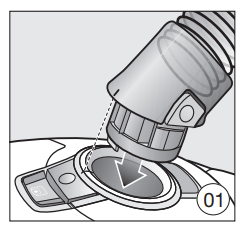
- Insert the hose connector into the suction socket on the vacuum cleaner until it clicks into position. To do this, line up the guides on the two pieces.
Disconnecting the suction hose (Fig. 02)
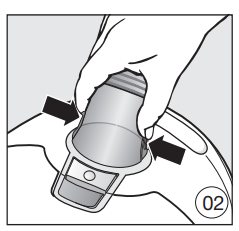
- Press the release buttons at the side of the hose connector, and lift the hose from the socket.
Connecting the suction hose to the handle (Fig. 03)
(required depending on model)
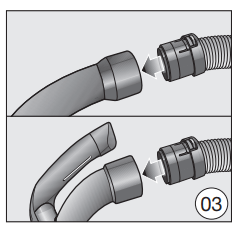
- Insert the suction hose into the handle until it clicks into position.
Connecting the handle to the wand (Fig. 04)
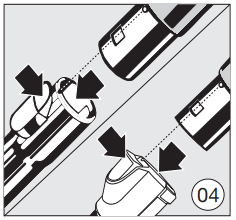
- Insert the handle into the wand until it clicks into position. To do this, line up the guides on the two pieces.
- To release the handle from the wand, press the release button and pull the handle out of the wand, twisting it slightly as you do so.
Adjusting the telescopic suction wand
Depending on the model, your vacuum cleaner will be fitted with one of the following suction wands:
- Telescopic suction wand
- Comfort telescopic suction wand
One part of the telescopic suction wand is packed inside the other and it can be adjusted to suit your height for comfortable vacuuming.
Telescopic suction wand (Fig. 05)
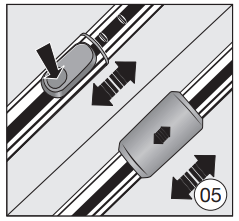
- Press the release button and adjust the telescopic suction wand to the required length. Comfort telescopic suction wand (Fig. 05)
- Grasp the release mechanism and adjust the telescopic suction wand to the required length.
Connecting the telescopic wand to the floorhead/floorbrush (Fig. 06)
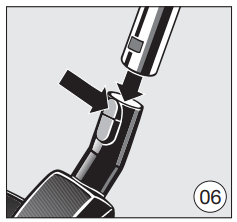
- Push the telescopic wand into the suction nozzle and turn it clockwise or counter-clockwise until it clicks into position.
- To detach these parts from each other, press the release button and pull the telescopic wand out of the suction nozzle, twisting it slightly as you do so.
Adjusting the floor head (Figs. 07 + 08)
(only for models with a reversible floor head included in the standard version)
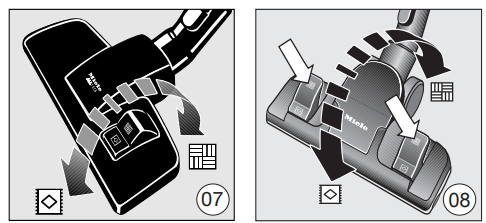
This vacuum cleaner can be used for the everyday cleaning of carpets, rugs and hard flooring.
Miele offers a range of other floor heads, brushes and accessories for other types of flooring and special applications (see "Optional accessories")
Vacuum carpets and rugs with the brush retracted:
- Press the foot switch
 .
.
Clean hard flooring which is not susceptible to scratching, and flooring with gaps or deep crevices in it with the brush protruding:
- Press the foot switch

Activating the exhaust filter change indicator on the exhaust filter
Depending on the model, your vacuum cleaner will be fitted as standard with one of the following exhaust filters (Fig. 09).
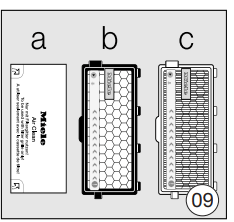
- AirClean
- Active AirClean 50 (black)
- HEPA AirClean 50 (white
If your vacuum cleaner is equipped with filter type b or c, you will need to activate the exhaust filter change indicator.
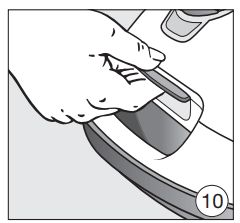
- Press the release button on the recessed handle and raise the dust compartment lid as far as it will go (Fig. 10).
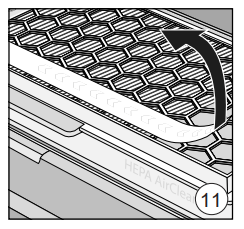
- Remove the indicator strip (Fig. 11).
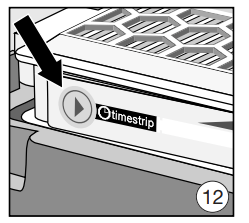
- Press the exhaust filter change indicator (Fig. 12).
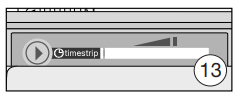
After approx. 10-15 seconds a thin red line will appear in the left-hand side of the display (Fig. 13).
- Close the dust compartment lid securely, making sure it clicks into position. Take care not to trap the FilterBag when doing so.
How the TimeStrip exhaust filter change indicator works
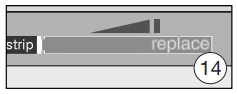
The TimeStrip exhaust filter change indicator shows the remaining functional life of the exhaust filter. After approx. 50 operating hours, or approx. one year of average use, the display will be completely filled with red (Fig. 14).
Inserting batteries into the LED handle (Figs. 15 + 16)
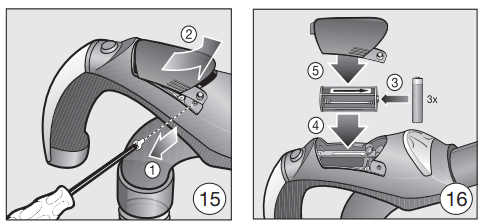
- Loosen the screws on the cover.
- Press down on both sides of the cover to remove it.
- Take out the battery holder and insert the three batteries supplied making sure the polarity is correct.
- Replace the battery holder. Make sure the arrows on the holder and in the battery compartment line up in the same direction.
- Replace the cover and tighten the screw.
Using the accessories supplied (Fig. 17)
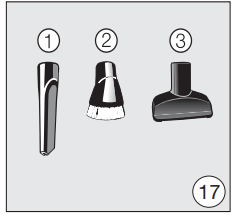
- Crevice nozzle For cleaning in folds, crevices or corners.
- Dusting brush with natural bristles For cleaning base boards, ornate and carved objects. The head can be swiveled to adjust the angle.
- Upholstery nozzle For cleaning upholstery, mattresses, cushions, curtains, covers, etc.
Some models are supplied as standard with one of the following accessories, which are not illustrated.
These accessory parts are supplied with their own operating instructions.
Opening the accessories compartment (Fig. 18)
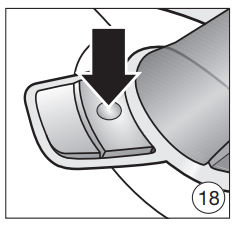
- Press the release button on the accessories compartment lid.
The accessories compartment will then open.
- Take out the accessory you require.
- Press down firmly on the lid to close it.
Floor brush (Fig. 19) (included as standard depending on model)
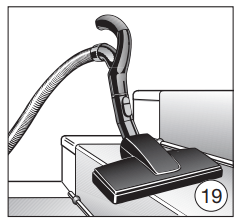
For general use and also for vacuuming the stairs.
For safety reasons when vacuuming stairs, it is best to start at the bottom of the stairs and move upwards.
Use
Power cord
Unwind the cord completely to aid the vacuum in dissipating heat. Do not pull or carry by the cord, use the cord as a handle, close a door on the cord, or pull the cord around sharp edges or corners. Do not run the appliance over the cord. Keep the cord away from heated surfaces. Do not unplug by pulling the cord. To unplug grasp the plug, not the cord. This appliance is equipped with a power cord reel. Hold the plug when rewinding onto cord reel. Do not allow plug to whip when rewinding.
Unwinding the cord (Fig. 20)
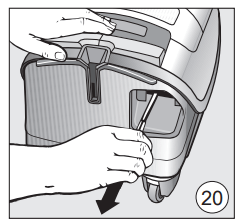
- Pull the cord out to the required length (max. length approx. 24'7" (7.5 m)).
- Insert the plug into the socket.
If your vacuum cleaner is equipped with a lit park system for storage, it switches on in this manner.
When the vacuum cleaner is used for the first time the lighting will switch itself on after approximately two minutes.
Caution! If vacuuming for longer than 30 minutes, the cord must be pulled out all the way. Danger of overheating and damage.
Rewinding the cord (Fig. 21)
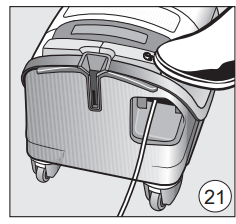
- Remove the plug from the outlet.
If your vacuum cleaner is equipped with a lit park system for storage, it switches off in this manner.
- Step briefly on the automatic cord rewind foot switch.
The cord will then retract itself fully into the vacuum cleaner.
If you do not want the cord to retract completely into the vacuum cleaner you can deactivate this function. To do this, take hold of the end of the cord whilst retracting it and give it a short pull when you want the rewinding to end.
Turning the vacuum cleaner on and off (Fig. 22)
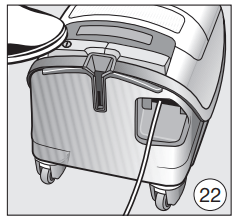
- Press the On/Off foot control
Regulating the suction power
The suction power can be regulated to suit the type of flooring being cleaned. Reducing the suction power reduces the amount of effort required to maneuver the floor brush. The vacuum cleaner has symbols on the controls which indicate the type of use the settings are suitable for. The selected power setting will light up yellow.
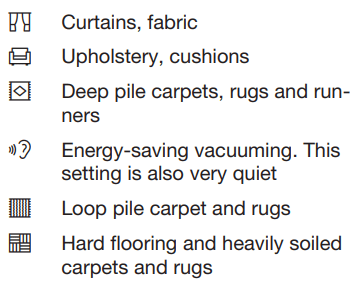
When using the AirTeQ floor brush, reduce the suction power until the floor brush is easier to maneuver if the suction seems too high.
Depending on the model, your vacuum cleaner will also be equipped with one of the following power settings.
Auto: Automatic adjustment of suction power to flooring
Warning! Do not use the Auto setting to vacuum lightweight materials or curtains. These could be sucked into the vacuum cleaner and possibly damaged.
SoftCarpet: Particularly soft flooring
Depending on the model, your vacuum cleaner will be fitted with one of the following suction power selectors:
- Footswitches
- Footswitches with Auto function
- Footswitches with SoftCarpet function
Footswitches (Fig. 23)
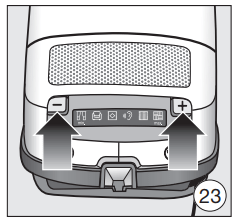
The first time the vacuum cleaner is switched on, the highest power setting will be selected automatically. After that, the vacuum cleaner will switch on at the power setting that was last used.
- Press the + footswitch to select a higher suction power.
- Press the - footswitch to select a lower suction power
Footswitches with Auto (Figs. 24 + 25) function
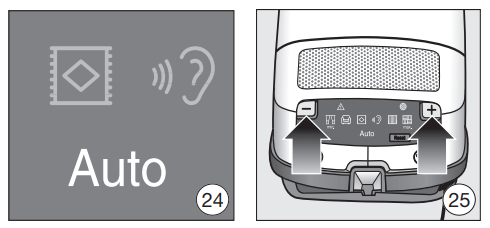
The first time the vacuum cleaner is switched on, it is in the Auto power setting.
- Press the + footswitch to select a higher suction power.
- Press the - footswitch to select a lower suction power.
After that, the vacuum cleaner will switch on at the power setting that was last used.
Footswitches with SoftCarpet (Fig. 26 + 27) function
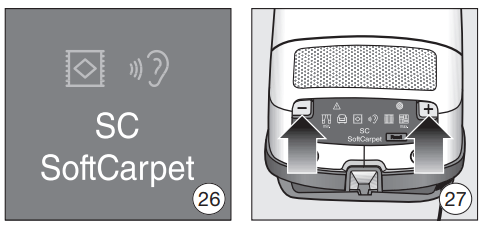
The first time the vacuum cleaner is switched on, it is in the SoftCarpet power setting.
- Press the - footswitch to select another power setting.
Activating the SoftCarpet power setting:
- Press the + footswitch until the maximum power setting has been reached.
- Then press the + footswitch again.
After that, the vacuum cleaner will switch on at the power setting that was last used.
Opening the air inlet valve (Figs. 28 + 29) (depending on model)
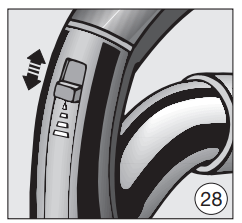
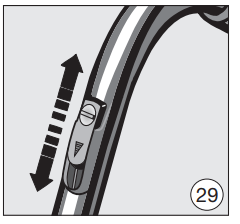
It is easy to reduce the suction power for a short time, e.g., to prevent rugs or other objects being sucked into the vacuum cleaner.
- Open the air inlet valve on the handle far enough to reduce the suction power.
This reduces the suction on the respective nozzle used.
During vacuuming
- When vacuuming, pull the vacuum cleaner behind you on its wheels. You can stand it upright for vacuuming stairs and curtains, etc.
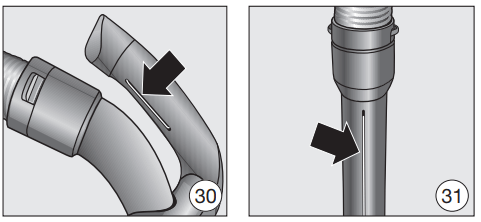
Warning! When vacuuming, in particular fine dust, e.g. drilling dust, sand, plaster, flour, etc., electrostatic charges build up naturally. Under certain conditions these charges will be released. To avoid the unpleasant effects of these discharges, a metal inlay has been incorporated into the underside of the handle. Please make sure that you keep your hand in constant contact with this metal strip during vacuuming (Figs. 30 + 31).
Illuminating the work area (Fig. 32) (for models with the LED handle)
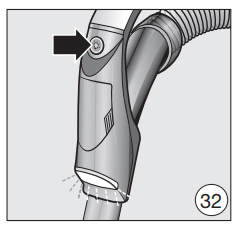
Your vacuum cleaner is equipped with an LED on the handle to illuminate the work area.
- Press the
 button on the LED handle.
The lighting will switch itself off automatically after approx. 30 seconds.
Maintenance
When to change the FilterBag (Fig. 35)
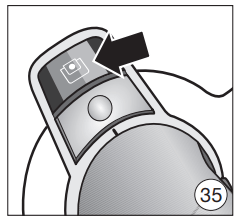
Change the FilterBag when the color marker in the FilterBag change indicator turns red, or sooner if it is no longer effective (see possible reasons for this below).
Miele FilterBags are disposable and designed for single use only. Dispose of the FilterBag when full. Do not attempt to reuse. Blocked pores in used FilterBags will reduce the suction power of the vacuum cleaner.
Checking the FilterBag change indicator
- Attach the floor brush to the vacuum cleaner (depending on the model).
- Switch the vacuum cleaner on and select the highest power setting.
- Lift the floor brush off the floor a little.
How the FilterBag change indicator works
The FilterBag change indicator is set for normal household dust. This generally contains a mixture of dust, hair, threads, carpet lint, grit, etc.
However, if the cleaner has been used to vacuum up fine dust, such as plaster, brick dust, cement or flour, the pores of the FilterBag will become blocked very quickly. This affects the air permeability of the bag, and the marker will indicate that the bag is "full" even when it is not. If this happens you must still change the FilterBag because suction power will be greatly reduced by blocked pores in the FilterBag.
If, on the other hand, a large amount of hair and carpet lint which typically contains a lot of air is vacuumed up, the indicator may fail to react even though the bag is full. You should still change it. Both these extremes can occur.
Replacing the FilterBag (Figs. 36 + 37)
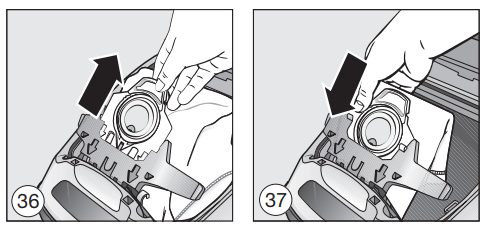
- Press the release buttons at the side of the hose connector, and remove the hose from the suction opening (Fig. 02).
- Lift the release button for the dust compartment lid and raise the lid until it engages (Fig. 10).
The FilterBag has a closing flap which closes automatically when the dust compartment lid is raised to prevent any dust escaping.
- Pull the FilterBag out by the grip on the collar.
- Insert the new FilterBag into the blue holder as far as it will go. Leave it folded up when you take it out of the box.
- It should be unfolded as far as possible in the dust compartment.
- Close the dust compartment lid securely, making sure it clicks into position. Take care not to trap the FilterBag when doing so.
- Insert the hose connector into the suction socket on the vacuum cleaner until it clicks into position. To do this, line up the guides on the two pieces (Fig. 01).
When to change the dust compartment filter
Replace this filter every time you start a new packet of FilterBags. A dust compartment filter is supplied with every packet of Miele FilterBags.
Changing the dust compartment filter (Fig. 38)
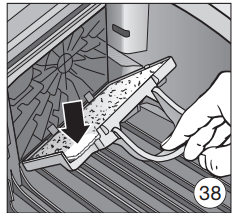
- Open the dust compartment lid.
- Pull the FilterBag out by the grip on the collar.
- Open the blue filter frame fully and remove the old filter. Hold by the clean, unsoiled section to remove it.
- Replace with a new dust compartment filter (for motor protection).
- Close the filter frame.
- Insert the FilterBag into the blue holder as far as it will go.
- Close the dust compartment lid securely, making sure it clicks into position. Take care not to trap the FilterBag when doing so.
When to replace the exhaust filter
Depending on the model, your vacuum cleaner will come with one of the following exhaust filters (Fig. 09) as standard:
- AirClean Replace this filter every time you start a new packet of Miele FilterBags. An AirClean exhaust filter is supplied with every packet of Miele FilterBags.
- Active AirClean 50 (black)
- HEPA AirClean 50 (white) Replace if the display for the exhaust filter change indicator is completely filled with red (Fig. 14). This occurs after approx. 50 hours of operation which is equivalent to about a year of average use. The vacuum cleaner can still be used.
However, the suction power will be reduced as will the effectiveness of the filter if it is not replaced in good time.
How to replace the AirClean filter (Figs. 39 + 40)
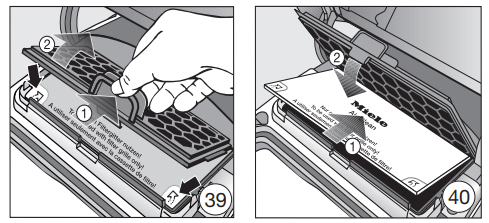
Do not use more than one exhaust filter at a time.
- Open the dust compartment lid.
- Press the release catch on the filter grille and open the grille until it clicks.
- Grasp the used AirClean exhaust filter by one of the clean, unsoiled sections and take it out.
- Replace it with a new AirClean exhaust filter.
If you wish to fit an Active AirClean 50 or HEPA AirClean 50 exhaust filter, see "Replacing one type of exhaust filter with another."
- Close the filter frame.
- Close the dust compartment lid.
Replacing the Active AirClean 50 and HEPA AirClean 50 exhaust filters (Figs. 41 + 42)
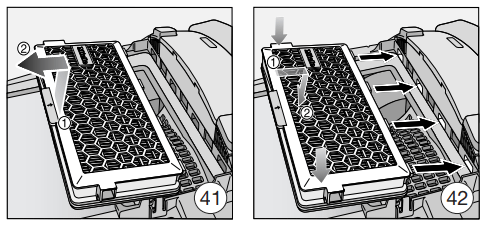
Do not use more than one exhaust filter at a time.
- Open the dust compartment lid.
- Lift the exhaust filter and remove it.
- Insert a new exhaust filter, making sure it goes in properly, then push it down into position.
- Press the TimeStrip exhaust filter change indicator (Fig. 12).
After approx. 10-15 seconds a thin red line will appear in the left-hand side of the display (Fig. 13).
- Close the dust compartment lid.
Replacing one type of exhaust filter with another (Fig. 09)
Depending on the model, your vacuum cleaner will be fitted as standard with one of the following exhaust filters :
- AirClean
- Active AirClean 50 (black)
- HEPA AirClean 50 (white)
When changing the filter please note
- If you wish to replace exhaust filter a with filter b or c, you must completely remove the filter grille before you install the new exhaust filter. You must also activate the TimeStrip exhaust filter change indicator (Fig. 12).
- If you wish to replace exhaust filter b or c with filter a, you must insert the new filter into a filter grille * before installing (Fig. 40). * Filter grille – see "Optional accessories"
Maintenance indicator with reset button (Fig. 43)
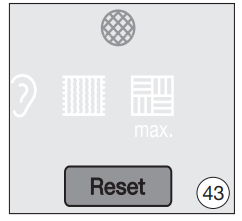
Some models are fitted with a maintenance indicator.
The indicator lights up after approximately 50 hours of operation, which is equivalent to about a year of average use. The level of soiling of the motor protection filter and the exhaust filter must be checked at this point. The indicator must be reset each time the filters are replaced.
The vacuum cleaner must be switched on to do this.
The maintenance indicator will go out and reset to zero.
The indicator can only be reset by pressing the reset button after the light has come on. Pressing the button at any other time will have no effect.
Inserting batteries into the LED handle (Figs. 15 + 16) (depending on model)
You will need three 1.5 V (AAA) batteries.
- Loosen the screws on the cover.
- Press down on both sides of the cover to remove it.
- Take out the battery holder and insert the three batteries supplied making sure the polarity is correct.
- Replace the battery holder. Make sure the arrows on the holder and in the battery compartment line up in the same direction.
- Replace the cover and tighten the screw.
When to change the thread catchers?
(only possible for models with a reversible floorhead included as standard)
The thread catchers on the suction inlet of the reversible floorhead can be replaced. Check them from time to time and replace them if the pile has worn down.
How to replace the thread lifters (Figs. 44 + 45)
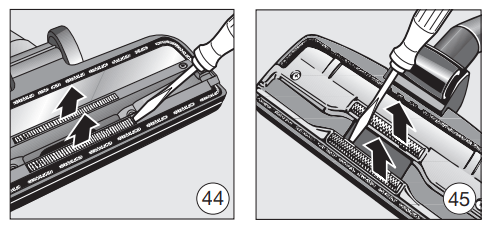
- Use a suitable screwdriver to remove the thread lifters from the slots.
- Fit new thread lifters.
Cleaning the roller on the AllTeQ floorhead (Fig. 46) (depending on model)
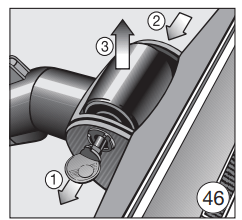
Clean the roller on the floorhead if required.
- Release the bearing (with bayonet fitting) using a coin.
- Press the bearing out, and remove.
- Remove the roller.
- Remove any threads and hair, replace the roller and refit the bearing, locking it back into position.
Cleaning and care
Warning! Always disconnect the vacuum cleaner from the electrical supply before cleaning it. Turn off and unplug it.
Vacuum cleaner and accessories
The vacuum cleaner and all plastic accessories can be cleaned with a proprietary cleaner suitable for plastic.
Warning! Do not use abrasive cleaning agents, glass cleaning agents, allpurpose cleaners or oil-based conditioning agents!
Dust compartment
The dust compartment can, if necessary, be cleaned using a dry duster, brush or, if available, a second vacuum cleaner to vacuum the dust out.
Monitor the filter bag change indicator and inspect all filters regularly. Clean or replace them when necessary according to these Operating Instructions.
Warning! Do not let the vacuum cleaner get wet. If moisture gets into the appliance, there is a risk of electric shock
Frequently asked questions
| Problem |
Possible cause and solution |
|
The vacuum cleaner switches off automatically.
On certain models, the overheating warning light also comes on
|
A temperature limiter turns the vacuum cleaner off automatically if it gets too hot. This can occur if, for instance, large articles block the wand or when the FilterBag is full or contains particles of fine dust. A heavily soiled exhaust or dust compartment filter can also be the cause of overheating.
- Turn the vacuum cleaner off immediately using the On/Off foot switch , and unplug it.
After removing the cause, wait for approximately 20 - 30 minutes to allow the vacuum cleaner to cool down. It can then be turned on again.
|