

CONTENTS
Product Features
2.4G USB Connection
Bluetooth Connection
Charging Guide
How to Switch Connection Mode
Data Parameters
Packing List
2
3
4
5
6
7
7
- 1 -
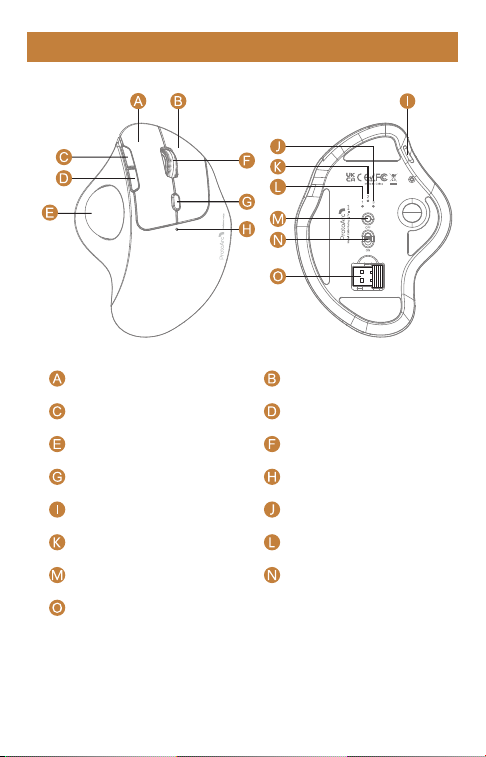
Product Features
Channel Switch Button
Scroll Wheel
Charging / DPI Indicator
Bluetooth 1 Indicator
DPI Button
Bluetooth 2 Indicator
2.4G Wireless Indicator
USB Receiver
Forward Button
Left Button Right Button
Trackball
Power Switch
Backward Button
TYPE-C Charging Port
- 2 -
DPI Button
Press the DPI button to adjust the cursor sensitivity. A single flash of
indicator light corresponds to DPI level 200, two to 400, three to
800, four to 1200, and five to 1600.
1
2
3
4
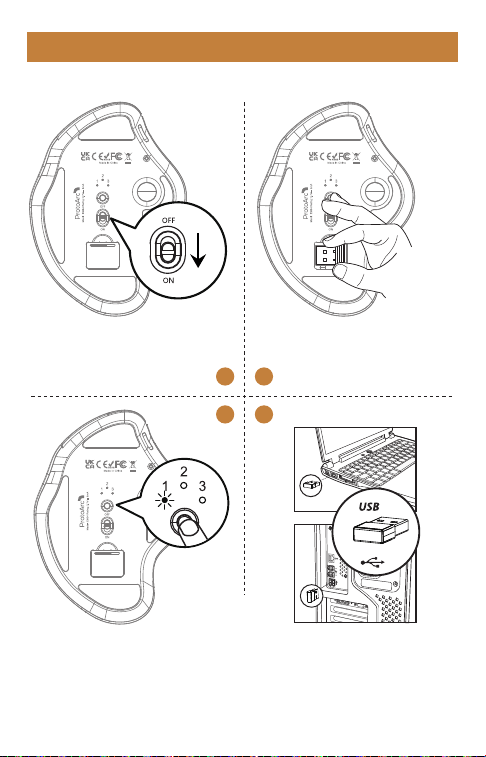
2.4G USB Connection
1. Turn the power switch to
“ON”.
2. Take out the receiver.
3. Press the channel switch button
until the channel 1 flashes a white
light, and the mouse enters 2.4G
wireless mode.
4. Insert the usb receiver
into your computer’s usb
port.
- 3 -
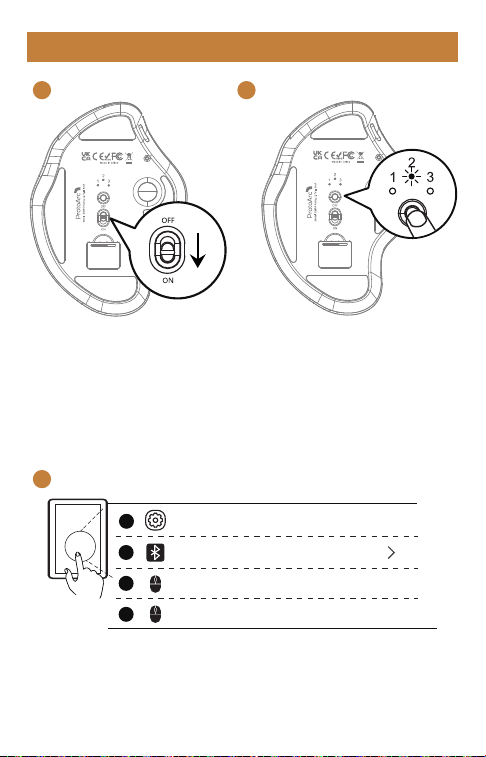
Bluetooth Connection
1
2
3
1. Turn the power switch
to “ON”.
- 4 -
2. Press the channel switch button
until the channel 2 or channel 3
indicator flash slowly.
Long Press the channel switch button
for 3~5 seconds until the white light
flashes quickly, and the mouse enters
the Bluetooth pairing mode.
3. Turn on the Bluetooth settings on your device, search or select
"ProtoArc EM04" and start Bluetooth pairing until the connection
is completed.
Bluetooth
Settings
ProtoArc EM04
ProtoArc EM04
Connected
On
1
2
3
4
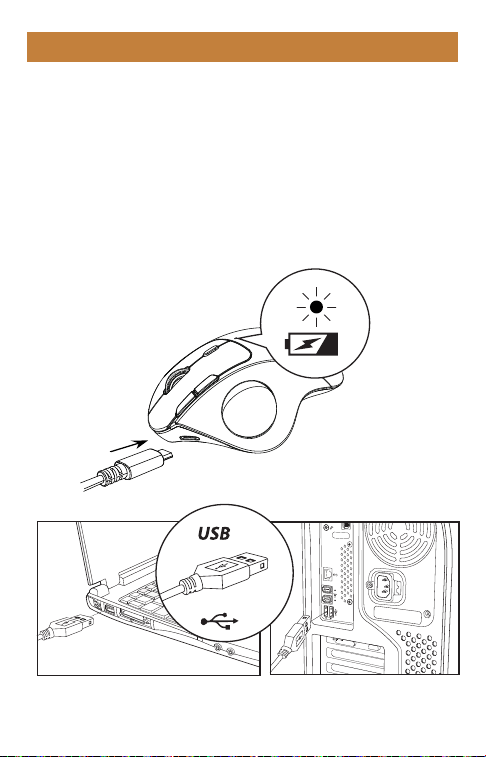
Charging Guide
1. When the battery is low, the charging indicator flashes red
until it is turned off.
2. Insert the Type-C charging cable into the computer to charge,
the red light stays on during charging.
3. The charging time is about 1~3.5 hours and the indicator light
turns off when fully charged.
- 5 -
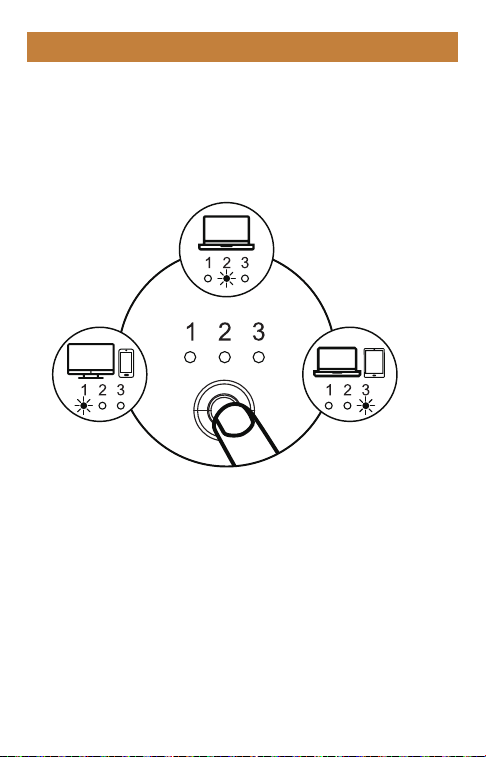
How to switch connection mode
After BT1, BT2 and 2.4G wireless mode is connected, press the
channel switch button on the bottom of the mouse to switch
between multiple devices.
2.4G Wireless
Connection
Bluetooth 1 Device Connection
Bluetooth 2
Device Connection
- 6 -

Packing List
1 x Wireless Mouse
1 x USB Receiver
1 x Type C Charging Cable
1 x User Manual
Data parameters
Basic parameter:
Movement Detection Technology: Optical
Lithium Battery Capacity: 450mAh
DPI: 200-400-800-1200-1600
Click Life: 3 million+
Dimension: 136.8*100.5*52.3mm
Weight: 119g
Bluetooth transmission parameters:
Transmission distance: 10m
Working Voltage: 3.7V
Working current: 8mA
Reaction rate: 125Hz
System requirement:
Bluetooth-enable device
Windows 8, Windows 10 or higher version
Mac OS x 10.10 or higher version
Android 4.3 or higher version
2.4G transmission parameters:
Transmission distance: 20m
Working Voltage: 3.7V
Working current: 10mA
Reaction rate: 250Hz
System requirement:
An available USB port
Windows XP, Windows 7, Windows 8, Windows 10 or higher version
Mac OS x 10.10 or higher version
- 7 -