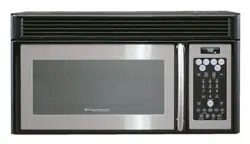
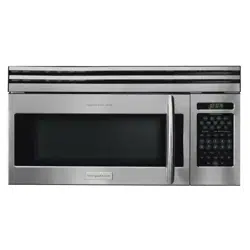
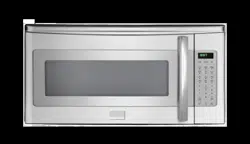
Microwave oven light. It will light when microwave oven is operating or door is open.
Metal rack holders
Safety door latches. The microwave oven will not operate unless the door is securely closed.
Handle
Light hi lo pad . Press light once for high, twice for low, three times for light off.
Vent turbo/hi/med/lo/off pad . Press fan for fan speed turbo, twice for fan speed high, three times for fan speed medium,four times for fan speed low,five times for fan speed off.
Auto-Touch control panel
Time display: Digital display, 99 minutes, 99 seconds
Ventilation openings
Removable turntable glass. Position glass tray on turntable motor shaft coupling.
Removable turntable support. Install the turntable support on the microwave oven bottom, centering the turntable support around the turntable coupling. Then place the turntable glass tray unto the turntable motor coupling.
Wire metal tray for cooking multiple levels of food.
Rating label (model and serial number)
CONTROL PANEL
Number next to the control panel illustration indicates pages on which there are feature descriptions and usage information.
Words in the lower portion of the display will light to indicate what function is in progress.
NOTE The left and right arrow keys will light when it is valid to adjust or select items using the arrow keys.
MANUAL COOKING
USING ONE TOUCH START USING ADD 30 SEC.
This is a time saving pad that will automatically start cooking 2 seconds after selected. Numeric key 1 to 9 can be touched for a 1 minute to minutes automatic start cooking feature.
Suppose you want to cook 3 minutes at 100% power.
NOTE
Arrow keys will display when they are valid to use
“Food” will be displayed if a quick start cooking cycle or +30 sec key is not selected within 5 minutes of placing food in the microwave. You must open then close the door again to clear ''Food" from the display.
USING ADD 30 SEC.
This is a time saving pad that will automatically start cooking 2 seconds after selected. Numeric key 1 to 9 can be touched for a 1 minute to minutes automatic start cooking feature. This is a time-saving pad. It is a simplified feature that lets you quickly set and start microwave cooking at 100% power
Suppose you want to set and start microwave cooking at 100% for 30 SEC.
NOTE
The cooking time can be extended for 30 seconds by pressing add 30 sec key (only in manual cooking). The cooking time is extended to a maximum of 99 minuts 99 seconds.
Arrow keys will display when they are valid to use
3.“Food” will be displayed if a quick start cooking cycle or +30 sec key is not selected within 5 minutes of placing food in the microwave. You must open then close the door again to clear ''Food" from the display.
SETTING TIMED COOKING WITH POWER LEVEL
This feature lets you program a specific cook time and power. For best results, there are 10 power level settings in addition to HIGH (100%) power.
Refer to the "Microwave Power Levels" table.
Suppose you want to cook for five minutes at 70% power.
NOTE If you do not select a power level, the oven will automatically cook at HIGH (100%) power. Arrow keys will display when they are valid to use.
Keep Warm
Suppose you want to keep warm for 30 minutes.
SETTING TWO-STAGE COOKING
For best results, some recipes call for different power levels during a cook cycle. You can program your oven for two power level stages during the cooking cycle.
To set a 2-stage cook cycle. The first stage is a 2 minutes cook time at 30% cook power then a 4 minutes cook time at 70% cook power.
NOTE Arrow keys will display when they are valid to use.
MICROWAVE POWER LEVELS
For best results, some recipes call for different cook powers. The lower the cook power, the slower the cooking. Each number from 1 to 9 stands for a different percentage of full cook power.
The following table gives the percentage of cook power each number pad stands for, and the cook power name usually used.
The table also tells you when to use each cook power.
Follow recipe or food package instructions if available.
NOTE Refer to a reliable cookbook for cooking times based on the 1050 Watt cook power of your microwave oven.
COOK POWER
LEVEL
WHEN TO USE IT
100% of full power
High
Quickly heating convenience foods and foods with high water content, such as soup and beverages.
Cooking tender cuts of meat, ground meat or chicken.
9 = 90% of full power
Heating cream soups.
8 = 80% of full power
Heating rice, pasta, or casseroles.
7 = 70% of full power
Medium-High
Cooking and heating foods that need a
Cook Power lower than High (for example, whole fish and meat loaf) or when food is cooking too fast. Reheating a single serving of food.
6 = 60% of full power
Cooking that requires special care, such as cheese and egg dishes, pudding, and custards. Finishing cooking casseroles.
5 = 50% of full power
Medium
Cooking ham, whole poultry, and pot roasts. immering stews.
4 = 40% of full power
Melting chocolate. Heating pastries.
3 = 30% of full power
Medium-Low, Defrost
Manually defrosting pre-cooked and other foods, such as bread, fish, meats and poultry.
2 = 20% of full power
oftening butter, cheese, and ice cream.
1 = 10% of full power
Low
Keeping food warm. Taking chill out of fruit.
0 = 0% of full power
None
Standing time in oven.
AUTO COOKING
USING AUTO DEFROST
Four defrost sequences are preset in the oven.
The auto defrost feature provides you with the best defrosting method for frozen foods.
The cooking guide will show you which defrost sequence is recommended for the food you are defrosting.
For added convenience, the Auto Defrost includes a built-in beep mechanism that reminds you to check, turn over, separate, or rearrange the food in order to get the best defrost results. Four different defrosting levels are provided:
MEAT
POULTRY
FISH
BREAD
Available weight is 0.1-6.0 lbs
Suppose you want to defrost 0.6 Ibs of meat.
NOTE The oven will beep during the DEFROST cycle. At this time, open the door and turn, separate, or rearrange the food. Remove any portions that have thawed. Return frozen portions to the oven and touch START to resume the defrost cycle.
OPERATING TIPS
For best results, remove fish, shellfish,meat, and poultry from its original closed paper or plastic package (wrapper). Otherwise, the wrap will hold steam and juice close to the foods, which can cause the outer surface of the foods to cook.
For best results, roll your ground meat into a ball before freezing. During the DEFROST cycle, the microwave will signal when it is time to turn the meat over. Scrape off any excess frost from the meat and continue defrosting.
Place foods in a shallow containers or on a microwave roasting rack to catch drippings.
This table shows food type selections and the weights you can set for each type. For best results, loosen or remove covering on food.
Weight conversion table
You are probably used to measuring food in pounds and ounces that are fractions of a pound (for example, 4 ounces equals 1/4 pound). However, in order to enter food weight in Auto Defrost, you must specify pounds and tenths of a pound. If the weight on the food package is in fractions of a pound, you can use the following table to convert the weight to decimals.
NOTE If between two decimal weights, choose the lower weight for the best defrosting results.
DEFROSTING TIPS
When using Auto Defrost, the weight to be entered is the net weight (the weight of the food minus the container).
Before starting, make sure to remove any and all metal twist-ties that often come with frozen food bags, and replace them with strings or elastic bands.
Open containers, such as cartons, before placing in the oven.
Always slit or pierce plastic pouches or packaging.
If food is foil wrapped, remove foil and place food in a suitable container.
Slit the skin of skinned food, such as sausage.
Bend plastic pouches of food to ensure even defrosting.
Always under estimate defrosting time. If defrosted food is still icy in the center, return it to the microwave oven for more defrosting.
The length of defrosting time varies according to how solidly the food is frozen.
The shape of the package affects how quickly food will defrost. Shallow packages will defrost more quickly than a deep block.
As food begins to defrost, separate the pieces.Separated pieces defrost more easily.
Use small pieces of aluminum foil to shield parts of food such as chicken wings, leg tips, fish tails, or areas that start to get warm. Make sure the foil does not touch the sides, top, or bottom of the oven. The foil can damage the oven lining.
For better results, let food stand after defrosting.
Turn over food during defrosting or standing time.Break apart and remove food as required.
SETTING POPCORN
The Popcorn quick touch pad lets you pop 3.3, 3.0, 1.75 ounce bags of commercially packaged microwave popcorn. Pop only one package at a time. If you are using a microwave popcorn popper, follow manufacturer's instructions.
SETTING BEVERAGE
SETTING VEGGIES
The Veggies quick touch pad lets you cook fres\h and frozen vegetables.
SETTING MELT/SOFTEN
The oven uses low power to melt and soften items. See the following table.
MELT/SOFTEN TABLE
SENSOR COOKING
SENSOR OPERATING INSTRUCTIONS
Sensor Cook allows you to cook most of your favorite foods without selecting cooking times and power levels.
The display will indicate Sensing during the initial sensing period.
The oven automatically determines required cooking time for each food item. When the internal sensor detects a certain amount of humidity coming from the food, it will tell the oven how much longer to heat. The display will show the remaining heating time. For best results for cooking by Sensor, follow these recommendations.
Food cooked with the sensor system should be at normal storage temperature
Always use microwavable containers.
Match the amount to the size of the container. Fill containers at least half full for best results.
Be sure the outside of the cooking container and the inside of the microwave oven are dry before placing food in the oven. Beads of moisture turning into steam can mislead the sensor
Foods should always be covered with micowavable plastic wrap, waxed paper, or a lid. Never use tight-sealing plastic covers. They can prevent steam from escaping and cause food to overcook.
Do not open the door or touch the STOP key during the sensing time. When sensing time is over, the oven beeps and the remaining cooking time will appear in the display window At this time you can open the door to stir, turn,or rearrange the food.
USING SENSOR COOK
Using SENSOR COOK lets you cook common microwave-prepared foods without needing to program times and cook powers.
USING REHEAT
Using SENSOR REHEAT lets you common microwave-prepared foods without selecting cooking times and power levels.
SENSOR COOK TABLE
SENSOR TABLE
CLEANING AND CARE
Disconnect the power cord or leave the door open to deactivate the oven during cleaning. Disconnect the power cord before replacing filters and lights.
EXTERIOR
The outside surface is precoated steel and plastic.
Clean the outside with mild soap and water; rinse and dry with a soft cloth. Do not use any type of household or abrasive cleaner.
DOOR
Disconnect the power cord or deactivate the oven with setting Child Lock before cleaning to prevent unexpected manipulation.
Wipe the window on both sides with a soft cloth to remove any spills or spatters. Metal parts will be easier to maintain if wiped frequently with a soft cloth.
Avoid the use of spray and other harsh cleaners as they may stain, streak or dull the door surface.
EASY CARE™ STAINLESS STEEL (SOME MODELS)
Your microwave oven finish may be made with Easy Care™ Stainless Steel (some models). Clean the stainless with warm soapy water using a clean sponge or cloth. Rinse with clean water and dry with a soft clean cloth. DO NOT use ANY store bought cleaners like Stainless Steel cleaners or any other types of cleaners containing any abrasive, chlorides, chlorines or ammonia. It is recommended to use mild dish soap and water or a 50/50 solution of water and vinegar.
INTERIOR
Cleaning is easy because little heat is generated to the interior surfaces; therefore, there is no baking and setting of spills or spattering. To clean the interior surfaces, wipe with a soft cloth and warm water. DO NOT USE ABRASIVE OR HARSH CLEANERS OR SCOURING PADS. For heavier soil, use baking soda or a mild soap; rinse thoroughly with hot water. The rack can be cleaned with hot soapy water, rinsed and dried.
WAVEGUIDE COVER
The waveguide cover is located on the ceiling in the microwave oven cavity. It is made from mica so requires special care. Keep the waveguide cover clean to assure good microwave oven performance.
Carefully wipe with a damp cloth any food spatters from the surface of the cover immediately after they occur. Built-up splashes may overheat and cause smoke or possibly catch fire. DO NOT REMOVE THE WAVEGUIDE COVER.
ODOR REMOVAL
Occasionally, a cooking odor may remain in the microwave oven. To remove, combine 1 cup water, grated peel and juice of 1 lemon and several whole cloves in a 2-cup glass measuring cup. Boil for several minutes using 100% power. Allow to set in microwave oven until cool. Wipe interior with a soft cloth.
TURNTABLE/TURNTABLE SUPPORT
The turntable and turntable support can be removed for easy cleaning. Wash them in mild, sudsy water; for stubborn stains use a mild cleanser and non-abrasive scouring sponge. They are also dishwasher-proof. Use upper rack of dishwasher. The turntable motor shaft is not sealed, so excess water or spills should be wiped up immediately.
GREASE FILTER
Filter should be cleaned at least once a month. Never operate the fan or microwave oven without the filter in place.
Pull down slightly on the tab toward the front of the microwave oven and remove the filter.
Soak the filter in a sink or dish pan filled with hot water and detergent. DO NOT use ammonia or other alkali; they will react with the filter material and darken it.
Agitate and scrub with a brush to remove embedded dirt.
Rinse thoroughly and shake dry.
Replace by fitting the filter back into the opening
Cleaning the exhaust filters
The oven ventilation exhaust filters should be removed and cleaned often; generally at least once every month
Vent exhaust filter part number 5304478913
To avoid risk of personal injury or property damage, do not operate oven hood without filters properly in place
1. To remove the exhaust ventilation filters, slide the filter to the rear. Then pull filter downward and push to the other side. The filter will drop out.
2. Soak the ventilation filters in hot water using a mild detergent. Rinse well and shake to dry or wash in a dishwasher. Do not use ammonia. The aluminum on the filter will corrode and darken.
3. To reinstall the exhaust ventilation filter, slide it into the side slot, then push up and toward oven to lock. Reinstall the 2nd filter using the same procedure
Surface light replacement
To avoid risk of personal injury or property damage, wear gloves when replacing the light bulbs.
1. Unplug the microwave oven or turn off power at the main circuit breaker.
2. Remove the cover mounting screws at both light positions under the microwave.
3. Remove the LED light mounting screw
4. Unplug the LED light from the harness, replace with LED light of part#5304499540.
5. Re-install LED light and mounting screw. When re-installing mounting screw be careful not to damage the LED light.
6. Re-install LED light cover and mounting screw.
7. Plug the microwave back into the power supply or turn the power back on at the main circuit breaker.
CHARCOAL FILTER REPLACEMENT
Chacoal Filter installed in the oven is used for non vented, recirculated installation, should be changed every 6 to 12 months depending on use.
Disconnect power to the oven at the circuit breaker panel or by unplugging.
Remove the vent grill mounting screws.
Pull the vent grill away from the unit.
4. Remove the charcoal filter and replace with part
5.Put the vent grill back on unit. number 5304488379.
OVEN LIGHT REPLACEMENT
Remove the vent grill per charcoal filter replacement instructions.
1. Remove the light cover mounting screw, open light light cover by carefully pulling up on the front edge.
2. Remove the LED bracket and light assembly. Remove the LED light from the bracket by removing the mounting screw and replace only with part 5304499540. To order parts call 800-599-7569.
3. Re-install LED light to the bracket with mounting screw. When re-installing mounting screw be careful not to damage the LED light.
4. Reconnect LED light to the harness and place the LED light assembly back into the light cover.
5 Replace the microwave oven light cover by carefully pushing into place and mounting the screw.
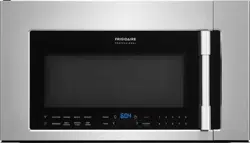


 . Press light once for high, twice for low, three times for light off.
 . Press fan for fan speed turbo, twice for fan speed high, three times for fan speed medium,four times for fan speed low,five times for fan speed off.